How to accept online payments with Stripe and earn 1.5–2x more per client
A $1,200 program turns into $50/month for the client. You get the full amount upfront. Full walkthrough: signup, payment page setup, the 2026 fee table, terms of service, and FAQ. Built for US-based courses, coaching, and services.
A nutrition coach sells a two-month program for $1,200. Not every client can put $1,200 on a card in one shot, and 60% of would-be sales drift off into "let me think about it." A do-it-yourself payment plan doesn't save you either – you become the collections department, chasing payments while the client drops off halfway through.
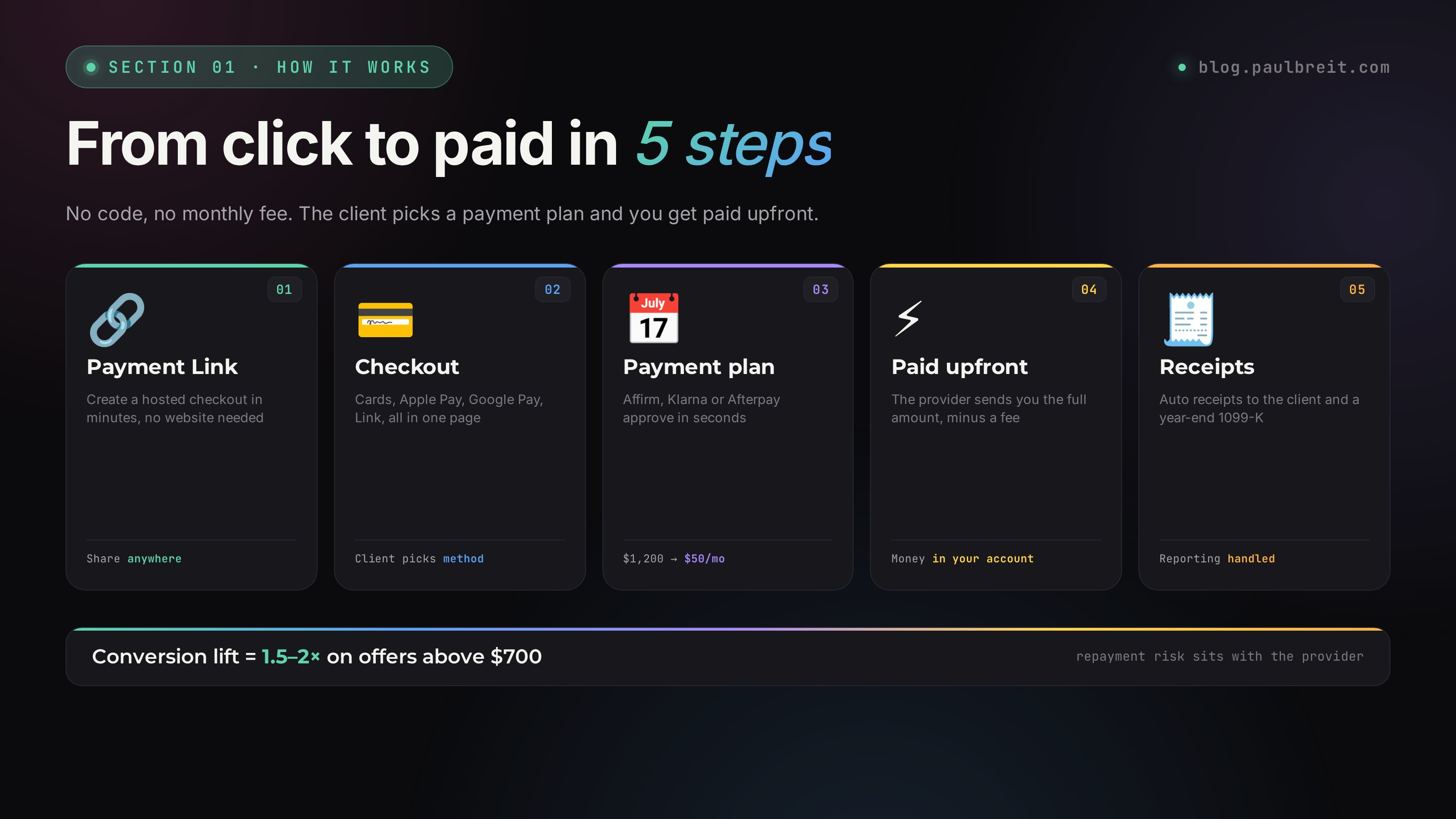
Buy-now-pay-later through Stripe solves this in about 3 minutes at checkout. The client picks Affirm or Klarna, the provider pays you the full amount upfront minus a fee, and the client repays in installments. A $1,200 charge in one payment turns into $50/month over 24 months – less than a couple of streaming subscriptions.
* This article is a full 2026 guide to setting up Stripe to accept payments. With everything that matters: the current fee table, what changed for the 1099-K threshold, how receipts work automatically, and a clear breakdown of Affirm and Klarna as buy-now-pay-later options at checkout.
What's inside
- Why you need to accept online payments and what you lose without it
- Alternatives: PayPal, Lemon Squeezy, Square – what to choose
- Setup cost and how to keep it near zero for the first few months
- What you need before signing up: sole prop or LLC
- Step 1. The signup form – field by field
- Step 2. Setting up your payment page
- Fee table and payment-plan terms for 2026
- Terms of service: where to get one and how to set it up
- Automatic tax reporting and the 1099-K
- Affirm and Klarna BNPL – short and important
- FAQ and gotchas
- What's next: using payment plans to close more
Section 01Why you need to accept online payments and what you lose without it
Stripe is the default way to accept card payments and offer installments for online courses and experts in the US. Put simply: without a real checkout you can't offer buy-now-pay-later, and without that option you lose 20–40% of sales on mid and high-ticket offers.
Take a concrete example. A nutrition coach sells a two-month program for $1,200. The mechanics of actually closing a sale like this on a call are covered separately – the sales call script that converts up to 30%. Not every client can put $1,200 on a card in one go. And that leaves you two scenarios.
The DIY payment plan – why it always loses
Scenario one. You split the amount into 3–4 payments and wait on the client. In practice: the first payment shows up on time. The second comes late, after a reminder. The third turns into "can we push it, things are tight right now." The fourth never arrives.
Here's what you end up with: you become the collections department. You chase the client with "did you send the payment?" reminders. The client drops off halfway through the program, and you lose the money, the result, and your sanity. Half the payments never make it to the end. That's the stat for anyone who's tried it.
Buy-now-pay-later through Stripe – how it should work
Scenario two. The client picks a payment plan right on the checkout page – the application takes 3 minutes. The provider (Affirm, Klarna, Afterpay) pays you the full $1,200 upfront minus a fee. The client repays the provider in installments. The money is in your account, and the repayment risk sits with the provider, not you.
Now compare what the client sees:
- $1,200 in one payment – "can't right now, that's a lot, let me think" (a deferred decision = a lost sale 70% of the time)
- 12 months: $1,200 / 12 = $100/month. Manageable for an average client
- 24 months: $1,200 / 24 = $50/month. Less than a couple of streaming subscriptions
The client's perception shifts. Handing over $1,200 in one shot feels scary. Investing $50/month in yourself isn't a decision at all – it's easy.
Experts who add buy-now-pay-later at checkout, on average, lift their conversion from lead to paid by 1.5–2x on offers above $700. Above $1,500 the effect is even bigger – without installments those sales simply don't happen.
Section 02Alternatives: PayPal, Lemon Squeezy, Square – what to choose
Before you commit to Stripe, let's look at the alternatives, so you understand why it and not something else.
| Service | Cards + wallets | Payment plans 12-24 mo | Best for |
|---|---|---|---|
| Stripe | Yes | Yes (Affirm, Klarna, Afterpay) | Online courses and experts |
| PayPal | Yes | Weak (Pay in 4 only) | Stores with carts under $150 |
| Lemon Squeezy | Yes | No (merchant of record, handles tax) | Digital products, no tax hassle |
| Square | Yes | Afterpay only | Small shops, in-person + online |
The breakdown is simple. If you sell low-priced digital products and want someone else to handle sales tax, Lemon Squeezy is a clean choice – it acts as merchant of record, so the tax headache isn't yours.
If you sell at $300 and up, Stripe is the strongest option on the US market. Where to put the checkout in your overall sales system – at the offer stage of the expert sales funnel built with AI. The main reason is one thing: real buy-now-pay-later over 12–24 months. Without it, on a high-ticket offer you leave half the revenue on the table.
Yes, people sometimes mix: Stripe for installments on long programs + PayPal as a familiar one-click option for short purchases. But that complicates your bookkeeping. For most experts, Stripe alone is enough.
Section 03Setup cost and how to keep it near zero for the first few months
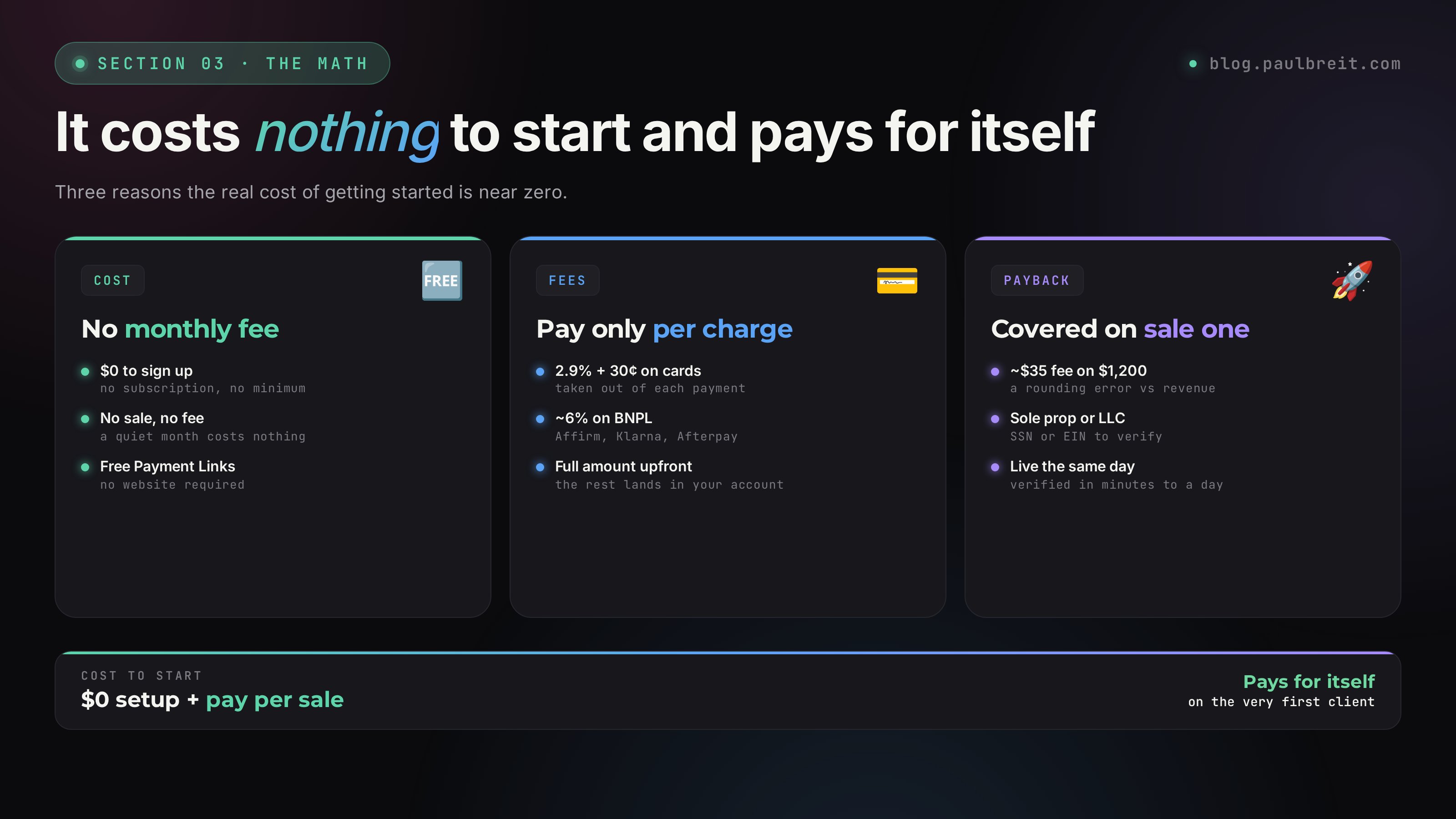
Stripe costs $0 to set up – no signup fee, no monthly fee. That's its biggest advantage over older processors. You pay only per transaction. There are three things that keep your real cost of getting started low – low enough that the first sale more than covers it.
No monthly fee at all
You create a Stripe account for free at stripe.com. There's no monthly subscription and no minimum. If you take no payments in a month, you pay nothing. Older "merchant accounts" used to charge a flat monthly fee whether you sold or not – Stripe doesn't.
Pay only when you get paid – 2.9% + 30 cents
Stripe takes a flat 2.9% + 30 cents per successful card charge. That comes out of each payment, and the rest lands in your account. No payment, no fee. For buy-now-pay-later, the provider adds its own cut, which we cover in the fee table below.
It pays for itself on the first sale
On a $1,200 sale, Stripe's card fee is about $35. Your first client who pays by card or installment covers that and then some. After that it's just the cost of doing business – a small percentage of money you wouldn't have collected otherwise.
A realistic scenario: you set up for free, take a $700 payment in your first week (one package or two consultations), the fee is roughly $20, the rest is yours. By the time you've done a few thousand in sales, the processing fees are a rounding error next to the revenue you've unlocked.
Section 04What you need before signing up: sole prop or LLC
One thing to know before you start: Stripe needs to verify a real business or individual. You can sign up as a sole proprietor (just you, using your SSN and legal name) or as an LLC (using your EIN). If you already have one of these, skip this section and go straight to the signup form.
If you don't, you can start as a sole proprietor with nothing but your name and SSN – no paperwork required to begin. Many experts launch this way and form an LLC later.
Sole proprietor (fastest)
This is the default for a solo expert. You don't have to register anything – you operate under your own legal name and report income on your personal taxes (Schedule C). Stripe verifies you with your name, address, date of birth, and SSN. You can be live in under an hour.
LLC for liability protection
An LLC separates your personal assets from the business. You can form one through your state's site or a service like LegalZoom or Stripe Atlas, then get a free EIN from the IRS at irs.gov. Filing takes about a week depending on the state. Worth doing once you're past your first few thousand in revenue.
Get an EIN even as a sole prop
If you'd rather not hand out your SSN, you can request a free EIN from the IRS in a few minutes and use that for Stripe instead. It costs nothing and keeps your SSN off forms. Slightly more setup, but cleaner.
Once your card processing crosses the IRS reporting threshold for the year, Stripe issues a 1099-K and reports it to the IRS. The threshold has been changing year to year, so check the current number before tax season. Either way, report all your income – the 1099-K just documents what Stripe already sees.
Section 05Step 1. The signup form – field by field
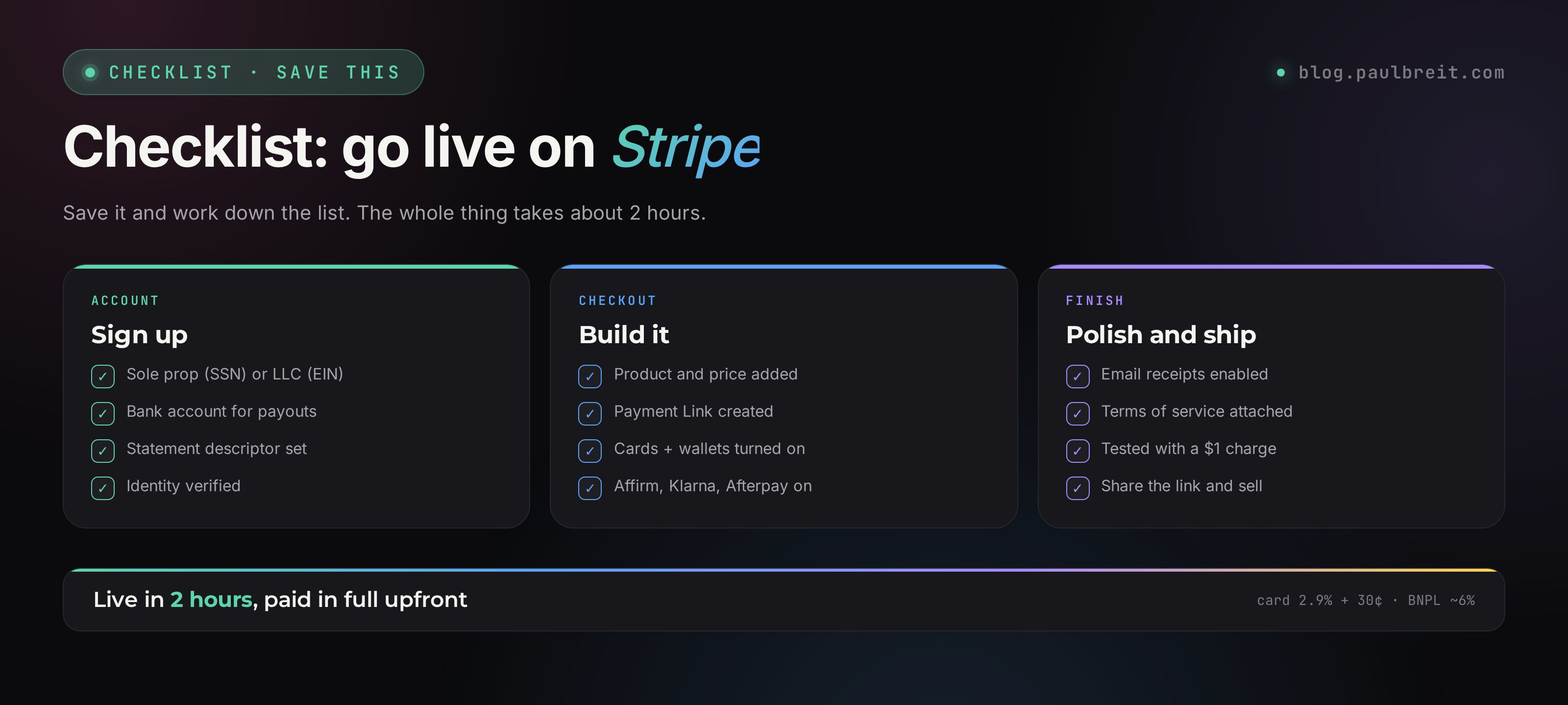
Head to stripe.com and click "Start now." Then you fill out the onboarding form. Below are the important points on each field that rarely get explained.
Business type
Pick "Individual / sole proprietor" or "Company / LLC" – whichever you have. If you have neither, go back to Section 04 and start as a sole prop.
Tax ID and bank details
Enter your SSN (sole prop) or EIN (LLC), then your bank account and routing number for payouts. You'll find those in your bank app under "Account details" or on a check. Stripe deposits your money straight to this account.
Statement descriptor
This is the name your clients see on their card statement. Keep it recognizable – your name or brand, like PAULBREIT or BREIT COACHING. A confusing descriptor causes chargebacks because people don't recognize the charge.
Business website or profile link
If you have a site, list it. No site yet? Point to your main social profile or a one-page Notion site describing your program. If Stripe asks for "a site describing the product," a Google Doc or Notion page with the program description works in 95% of cases.
What you're selling
Choose "Education" or "Professional services." Even if you do consulting, one-on-one work, or mentorship, it all falls under those categories. Don't hunt for the "perfect" code – education and services cover 90% of cases.
Product description (internal)
Something plain like "marketing coaching," "nutrition coaching," "psychology sessions." No labored clever phrasing – this is an internal field that only Stripe's review sees.
Your Payment Link or checkout URL
Stripe lets you create a hosted Payment Link with no code. You can customize the URL slug – usually your name or brand: buy.stripe.com/yourname. This is the link a client clicks to reach the checkout page, so a short, memorable version is best.
Integrations
Choose "No integration needed" for now. If you later want to connect a course platform like Kajabi or Teachable, or a site builder, that's done separately with API keys, not in onboarding.
Payment methods – turn them all on
This one is critical. Enable every payment method available: cards, Apple Pay, Google Pay, Link, and the buy-now-pay-later options – Affirm, Klarna, Afterpay.
Why all of them. Affirm approves roughly 30–40% of applicants on long-term plans. Klarna and Afterpay add short installment options with much higher approval. If one provider declines a client, another option is right there at checkout. The more financing sources you offer, the fewer declines you eat.
Business / public name
Enter your legal name as "Paul Breit" or "Breit Coaching LLC." This is what clients see at checkout. Ideally it matches how people know you on social, so nothing feels off.
Payout schedule
Stripe lets you choose daily, weekly, or monthly payouts. For a new account the default is a rolling daily payout after a short initial hold. Leave it on automatic – you don't need to touch this.
Where you'll sell
"A Payment Link shared directly" is the most universal answer for an expert – it works whether you sell on calls, in DMs, or from a landing page.
Public-facing description
In your own words, what you sell. You can edit this later in the dashboard, so don't get stuck on wording – write what's true right now.
Logo and branding
Stripe lets you upload a logo and brand color for your checkout. No logo? Upload a clean square headshot. Clients see it on the checkout page, so keep it neutral – not a "gym mirror selfie."
After you submit, Stripe usually verifies your account within minutes to a day or two. You may be asked to confirm your identity by uploading an ID. Once verified, you can create your first Payment Link and start taking money the same day.
Section 06Step 2. Setting up your payment page
After verification, you set up your checkout from the Stripe Dashboard. To create a no-code payment page:
Open the Dashboard
Go to dashboard.stripe.com and sign in. This is your control center for products, payments, and payouts.
Create a product and a Payment Link
Under Products, add your program with a name and price. Then create a Payment Link for it. Stripe generates a hosted checkout page you can share anywhere – no website required.
Open Settings
The gear icon opens Settings, where you'll find branding, payout schedule, payment methods, and tax options. This is the edit mode with all the sections.
Your business category
Pick the category you actually work in. It affects which buy-now-pay-later providers will underwrite your customers – they treat industries differently. Nutrition, psychology, marketing, fitness, and coding pass fine. Anything in the gray zone (some health, financial, or "guru" claims) can trigger extra review, and there's not much you can do about that.
Payment methods and fees
Here you see the fee for each payment method. Just review it – the card rate is fixed at 2.9% + 30 cents, and the BNPL providers each list their own cut. These rates are standard and not negotiable on a starter account.
Payouts
The bank account Stripe sends your money to. Payouts are automatic on the schedule you chose. If you later open an account at a different bank, you can update the payout account in Settings yourself – no support ticket needed.
API keys, integrations, and webhooks
This section is for developers connecting Kajabi, Teachable, a custom site, or a CRM. You don't need it right now. If you do later, you'll come back and set it up.
Success and cancel pages
These are the pages a client lands on after a successful payment or a canceled one. If you don't have a site, Stripe's default confirmation page is fine. If you do have a site, set up two pages:
- Success – "Thanks, see you on the call" with a clear next step (for example, "you'll get an email with instructions within 5 minutes")
- Cancel – "Something went wrong, message me" with a direct link to your DMs or contact
Notifications
There are three pieces here:
- Webhooks – needed when you connect a course platform or CRM. Don't touch them now
- Email receipts – ALWAYS turn this on with your main email. You'll get an email on every payment. It's the simplest way to know "I just got paid"
- Mobile alerts – the Stripe Dashboard app pushes a notification on each sale. Worth installing if you want a ping on your phone
The other way to see every payment is the Payments tab in the Dashboard at dashboard.stripe.com/payments. There's your full history with filters by date, status, and amount.
Business details
Here Stripe shows what you entered in onboarding. If something needs to change, you can edit most fields in Settings; some verified details require re-verification. That's a safeguard against errors, since these details affect approval rates on installments.
Contact info
Complete, real contact details push BNPL approval up by 10–15%. Providers check that the seller has real, reachable contacts – and if there aren't any, they decline with "could not verify."
- Business name – your name or LLC. Should match onboarding
- Phone – your mobile. Only people ready to pay see the checkout page, so there's nothing to worry about
- Website – list it if you have one. If not, link your social or main profile
- Email – your main email
Section 07Fee table and payment-plan terms for 2026
This is the heart of accepting payments. Let's break down what's available to your client and how it affects your money.
What's available to the client in 2026
| Plan length | Your cost | Best when the price is |
|---|---|---|
| Card, one payment | 2.9% + 30¢ | Up to $400 |
| Pay in 4 (Klarna/Afterpay) | ~6% | $200–700 |
| 6 months (Affirm) | ~6% | $700–1,000 |
| 12 months (Affirm) | ~6% | $1,000–3,000 |
| 24 months (Affirm) | ~6% | $2,000–6,000 |
| 36 months (Affirm) | ~6% | $4,000+, VIP formats |
Unlike older models, BNPL providers typically charge the merchant a flat fee (around 6%) regardless of plan length, and the interest is the client's deal with the provider. Your cost stays roughly the same whether the client picks 6 months or 24.
How to decide what to offer at checkout
Simple rule – long plans only matter on high-ticket offers. Under $400, clients usually just pay by card in one shot. Above $400, you start seeing people who want to split it.
The optimal mapping by price:
- Under $700 – card or Pay in 4
- $700–1,500 – 6 to 12-month Affirm
- Above $1,500 – 12 to 24-month Affirm
The biggest mistake experts make
Some people get spooked by the ~6% BNPL fee and turn it off. The result: clients who would have bought on a payment plan don't buy at all. The right framing: better to sell with a 6% fee than not sell at all. The lost 6% is just math. A lost sale is empty revenue.
Section 08Terms of service: where to get one and how to set it up
Your terms of service is the agreement between you and the client. Legally, it's best to have one. In practice few people get complaints without it, but a terms page is your protection in disputes and refunds.
Where to get your terms
Have a lawyer who knows online businesses draft it
Cost is usually $300–800 and it takes a few days. This is the ideal route: the terms account for your specific product and protect you from the typical risks (refunds, payment disputes, conflicts). For a US business, this is money well spent before you scale.
Adapt a template with Claude
If you're not ready to pay a lawyer yet, start from a solid terms-of-service template. Paste it into Claude with a prompt like: "Adapt these terms for my niche [X], my business [name, address], and my product [description], for a US sole proprietor." In 5 minutes you'll have a working draft. Not perfect, but enough to start.
How to set it up at checkout
In your Payment Link settings, turn on "Require customers to accept terms of service" and paste a link to your terms page. Save. At checkout, clients will see a checkbox confirming they agree to your terms before they pay.
Section 09Automatic tax reporting and the 1099-K
Stripe handles a chunk of the tax busywork for you: automatic receipts and a year-end 1099-K. Every payment becomes an emailed receipt to the client and a recorded transaction in your Dashboard. You don't have to generate receipts by hand after each sale.
Turn on email receipts
In Settings, under Customer emails, enable "Successful payments." Stripe then emails a receipt automatically on every charge.
Confirm your tax details
Stripe needs your legal name or business name and tax ID (SSN or EIN) on file so it can issue your 1099-K correctly. Fill this in under Settings and verify it matches what you'll file.
Test with a small charge
Pay your own Payment Link a small amount (say, $1). Within a few minutes the receipt should hit your inbox and the payment should appear in the Dashboard. If it shows up, everything's wired correctly – forget about it.
Stripe's official, screenshot-by-screenshot guide is at stripe.com/docs/tax.
As a US business, you're responsible for income tax and self-employment tax on your earnings. A simple habit: set aside roughly 25–30% of each payment for taxes, and pay quarterly estimated taxes to the IRS. Stripe's exports make this easy – it tracks every dollar so your accountant doesn't have to reconstruct it.
Section 10Affirm and Klarna BNPL – short and important
These are the buy-now-pay-later options people most often underrate. Turn them on – all of them.
Affirm is the workhorse for longer plans: 6, 12, or 24 months. The client sees a clear monthly number, applies in seconds at checkout, and Affirm pays you upfront. Approval depends on the client's credit, and there's a soft check that doesn't hurt their score to see options.
Klarna and Afterpay handle the short stuff – "Pay in 4," four interest-free payments over six weeks. No hard credit check, approved in one click for most clients, works with any major card.
When this works
For prices in the $200–700 range, Pay in 4 is the main option. Many clients don't want to fill out a full financing application, but they happily split a charge into 4 payments. Klarna and Afterpay do that in one click.
Your cost is around 6%. That's in line with longer Affirm plans, and you get the full amount upfront either way.
Pay in 4 replaces the DIY payment plan. Where you used to split a charge into 4 parts and chase the client, now Klarna or Afterpay does it for you, pays you the full amount upfront, and collects from the client. No reminders, all clean and automatic.
Section 11FAQ and gotchas
Stripe asked for a website and all I have is a social profile
Send a Google Doc or Notion page describing your program – the one you built in the "Product and offer" module. In 95% of cases that's enough. If review still pushes back and won't accept even a document, message me or post in the program chat and I'll help you sort it out.
A client tried a payment plan and Affirm declined – what now?
It happens, roughly 30–40% of the time on longer Affirm plans. At checkout the client can immediately try another option – Klarna or Afterpay Pay in 4 – which approve far more often. If everything declines, offer to split the charge manually: 50% now, 50% in two weeks.
How long until the money lands after payment?
For your first payouts, Stripe holds funds for a short rolling period (often a few business days) to verify the account, then deposits on your schedule. After the account is established, card payments typically pay out the next business day. Within a few business days is normal.
Can I refund a client through Stripe?
Yes. In the Dashboard, open the payment and click "Refund" – enter the amount and reason, and the money goes back to the client in a few business days. Note that the original processing fee is generally not returned to you on a refund, so factor that into your refund policy.
How do I handle taxes as my income grows?
Stripe tracks every transaction and issues a 1099-K when you cross the IRS threshold. Set aside 25–30% of each payment for taxes and pay quarterly estimated taxes. When you outgrow sole-prop simplicity, form an LLC and possibly elect S-corp status – a quick conversation with an accountant pays for itself here.
What changes if I'm an LLC taxed as an S-corp?
Nothing changes in Stripe itself, but your tax picture does. An S-corp lets you split income between salary and distributions, which can lower self-employment tax once you're profitable enough. Below roughly $40–60K in profit it's usually not worth the added bookkeeping. Talk to an accountant before electing.
For most people starting out, a plain sole proprietorship is simplest – you can always upgrade later without touching your Stripe setup.
Can I add a second expert to the same payment page?
Not on one account in a clean way. A Stripe account belongs to one business or individual. If you have two separate ventures, the cleanest path is two accounts, or Stripe Connect if you're building a platform that pays out to multiple people.
My account is stuck in review and support isn't responding
It's rare, but it happens. Use Stripe's support chat in the Dashboard (bottom right) and write "account stuck in verification for 5+ days, please escalate." Most reviews clear within a day or two once escalated. Make sure your business details and ID are clean and consistent – that's usually what holds things up.
Section 12What's next: using payment plans to close more
Once Stripe is connected, a separate story begins: actually selling through payment plans. That's not technique anymore, it's tactics in the conversation with the client.
The main mindset shift
Most experts, after setting up checkout, don't actually use payment plans – especially those who just finished their first 5-day launch to their own audience and got scared of "scaring people off with the price." The plans are there at checkout, but the expert never mentions them. The client sees the number $1,200, panics, and leaves. The expert thinks "my product is too expensive, not my audience." When the real issue is – they never brought up the payment plan.
The right line in a sales conversation: "The program is $1,200. You can pay it in one payment by card. Or you can split it with a payment plan – around $50 a month over 24 months. Which works better for you?"
That line flips the conversation. Before it, the client was comparing "$1,200 in one shot vs nothing." After it: "$50 a month vs nothing." The numbers are objectively the same, but the perception is radically different.
What to do with clients everyone declined
It happens 5–10% of the time. If a client genuinely wants to buy but no provider approves them, there are three options:
- Split into 2 manual payments – 50% now, 50% in two weeks
- Push the payment a month – the client pays down a card, their score improves, and the plan gets approved
- Offer a co-applicant – a partner or family member applies for the plan, and you split responsibility between you
Pushing approval up toward 90%
Beyond turning on "all payment methods" from Field 9, a few more things move the needle on approval:
- Real, complete contact details at checkout (name, phone, email, site)
- A clear product name on the charge – "Nutrition Coaching Program," not "Services"
- A steady sales history – the more successful payments through your account, the more the providers trust you
- Price matched to your audience – providers see who's buying and decide based on the stats for your niche
Stripe isn't just "payment processing." It's the tool that turns an expensive product into an affordable one without losing a dollar of your revenue. Without it you're boxed in: either a high price and few clients, or a low price and fast burnout. With it – high value for the client (a payment plan they can manage) and the full amount for you, upfront. It's the infrastructure no online expert should be working without in 2026.
FAQFrequently asked questions
Is Stripe a good fit for a solo expert or coach?
Yes. Stripe works for sole proprietors, LLCs, and registered businesses. There are no monthly fees and you only pay per transaction. Receipts go out to clients automatically.
What are the fees on payment plans?
Stripe's standard card rate is 2.9% + 30 cents. Buy-now-pay-later providers like Affirm and Klarna add their own fee, usually 3% to 6% of the sale. Full breakdown is in the article.
How fast does a client get approved for a payment plan?
With BNPL like Affirm or Klarna, the decision arrives in seconds right on the checkout page. If one provider declines, the client can try another at checkout.
Why Stripe over PayPal or Lemon Squeezy?
Stripe is built for recurring billing, payment plans, and high-ticket checkout, with deep integrations. PayPal is simpler but weaker on installments. Lemon Squeezy is great if you want a merchant of record that handles sales tax for you.