A Sales Webinar Script and Slide Deck Built with Claude – Turnkey in 30 Minutes
A ready-made playbook: two sales webinar models (for high- and low-ticket offers), setting up a Claude account, generating the script from a template, an HTML deck in your brand, and refining it with plain-text edits. Inside – the prompts, a checklist, and the principles I used on the launches for my own online school and in client projects.
You've decided to run a launch. The warm-up is ready, the audience is gathered, the product is packaged. One thing is missing – the webinar. Writing the script yourself is a week of "evenings after client work." Building the deck in Tilda or Figma is another week. Hiring a copywriter and a designer means $800–1,300 out of the budget and extra calls to sign off on every revision.
So the launch gets pushed back. Again. And again.
This article is about a different path. 30 minutes, and you've got a working draft of a sales webinar script plus a deck in your brand colors. One tool: Claude. I ran the launches for my own online school with 10,000+ graduates and three client projects through this exact playbook.
Here's the step-by-step. What a sales webinar is, what it's made of, how to set up a Claude account, how to feed it the right context and get a script, how to generate the deck, and how to polish it to "ready to go live."
What's inside
Section 01Types of webinars and why a sales webinar
A webinar is your key conversion event, the pivotal stage of the funnel. The point where cold and warm audiences meet you face to face and make a decision: buy or don't.
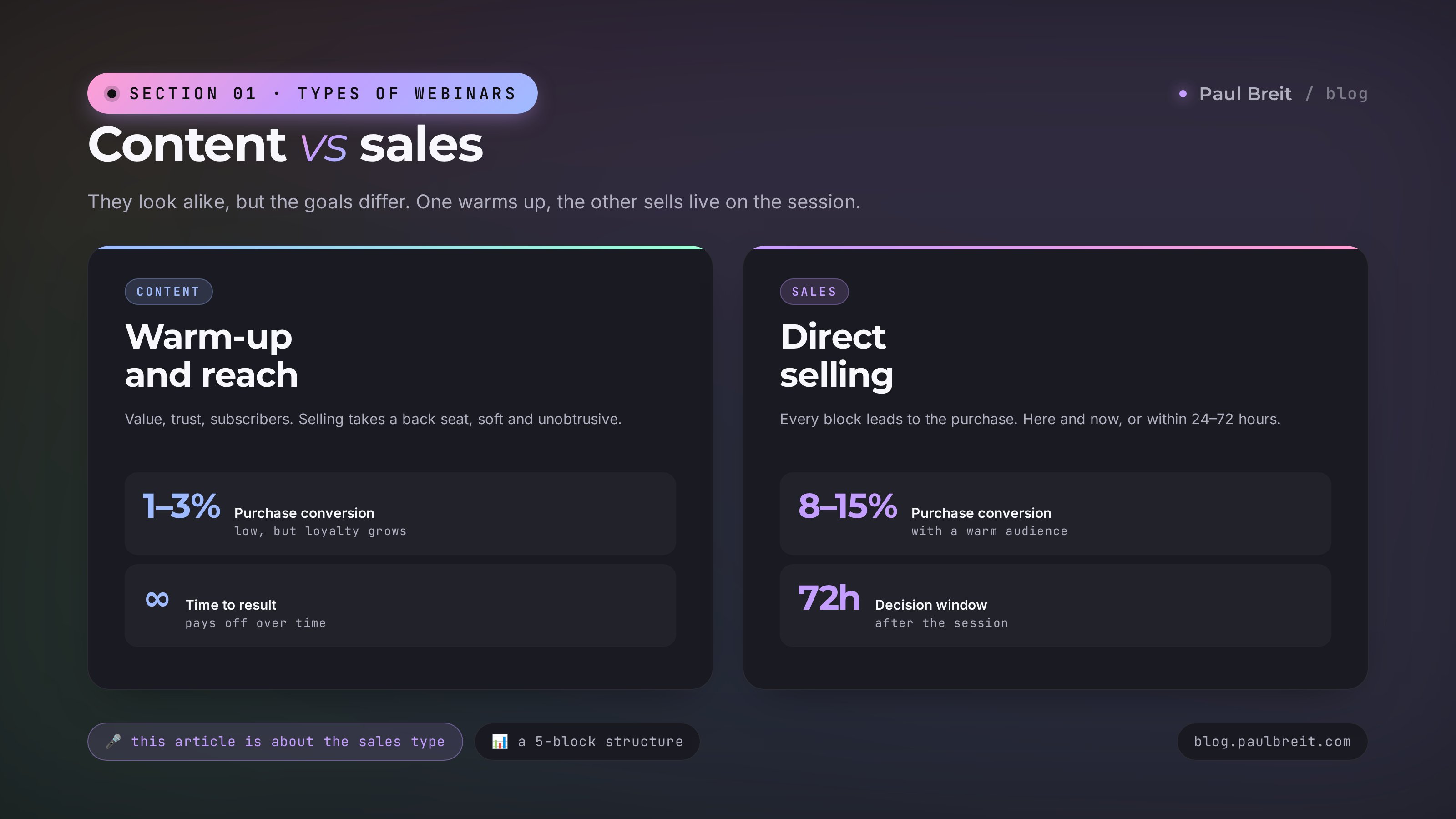
People often confuse two types of webinars. They look alike, but their goals are different.
The content webinar
The goal is to give value, warm up the audience, and boost reach. Selling takes a back seat – it's soft, in the spirit of "if you want to go deeper, there's a program."
It's a fit for a cold audience, for creators with low trust levels, for first sessions in a new niche. Purchase conversion is low (1-3%), but people subscribe, remember you, and come back.
The sales webinar
The goal is to sell. Right here, right now. Or within 24-72 hours after the session. The webinar is the key conversion event in an expert's overall 5-stage automated funnel: before it comes the warm-up, after it the offer and onboarding.
There's value in it too – without it the audience leaves. But the structure is built so that every block leads to the purchase. Conversion runs 8-15% with a well-built script and a warm audience. On 1,000 registrations, that's 80-150 sales.
If a listener says "that was interesting, thanks" after the webinar, it was a content webinar. If they ask "where do I pay?", it was a sales webinar.
This article is about the second type. From here on, "webinar" means a sales webinar.
Section 02The structure of a sales webinar
This is the exact framework I teach for launches in my online school. There's a model for each price point. If you have a high-ticket offer and you move people from the session to a consultation – that's one structure. If your ticket is low and you name the price right on the webinar – that's another. We'll break down both.
Model 1 – high-ticket, lead to a consultation
If your product is mentorship, one-on-one work, or a premium course priced above ~$1,500, don't name the price on the session itself. The webinar does the warm-up, and at the end people DM you a code word and move to a sales consultation. That's where you work out the details.
The webinar steps in order:
- The webinar title
- What's happening today
- Who should listen and what they'll walk away with
- A bonus for everyone who stays to the end
- Who you are (briefly, a couple of minutes)
- Your cases, client results (framed as value for the viewers)
- Why your approach / method is the best solution
- Why and how it works, what drives the result
- A call for anyone interested to DM the code word
- The step-by-step plan – what to do to get the result
- Everything illustrated with client cases
- The payoff – how life changes if you implement the plan
- A call for anyone interested to DM the code word
- But it's a little harder than it looks – there are pitfalls
- So you need to move with someone who knows how to avoid them
- And who has those cases
- Cases
- Who would want a result like this?
- Product announcement
- Who it's for
- What you get out of it
- How it all works
- Client cases
- Start date
- A bonus for those who decide now
- All the benefits of the bonus
- But there's a catch – you can't just walk in
- A call for anyone interested to DM the code word
- Q&A until there's no one left in the chat
The logic of this model: first you sell a specific method for solving the problem. You back its effectiveness up with cases. You explain how it works. Once people already want to implement the method you've laid out – you sell your product as the place where they can implement all of it under your guidance.
Model 2 – low-ticket, price on the session
If the product is a mini-course, a training, or a recorded consultation priced under ~$1,500, you name the price right on the webinar. With three tiers at once: the regular price, 30% off if paid within 72 hours, and another 30% off if paid or reserved right on the session. This drives a decision in the moment, with no drawn-out DM negotiations.
The webinar steps in order:
- The webinar title
- What's happening today
- Who should listen and what they'll walk away with
- A bonus for everyone who stays to the end
- Who you are (briefly, a couple of minutes)
- Your cases, client results (framed as value for the viewers)
- Why your approach / method is the best solution
- Why and how it works, what drives the result
- The step-by-step plan – what to do to get the result
- Everything illustrated with client cases
- The payoff – how life changes if you implement the plan
- But it's a little harder than it looks – there are pitfalls
- So you need to move with someone who knows how to avoid them
- And who has those cases
- Cases
- Who would want a result like this?
- Product announcement
- Who it's for
- What you get out of it
- How it all works
- Client cases
- Start date
- Why it can't be cheap
- The price
- The price for those who pay within 72 hours (30% lower)
- The price for those who pay or place a deposit on the webinar (another 30% lower)
- A bonus for those who decide now
- All the benefits of the bonus
- The payment link
- The reservation link
- Q&A until there's no one left in the chat
The logic is the same as in Model 1: first you sell the method, back it up with cases, explain how it works, catch the moment of readiness, and sell your product. The only difference is the finish – instead of leading to a consultation, you give the price and the payment link live on the session.
Section 03Setting up a Claude account
Claude is made by Anthropic. Depending on where you are, claude.ai may not be available – Anthropic doesn't serve every region. But there's a working path, and it takes about 30 minutes. You need three things: access to a supported region, a phone number for SMS, and an account on claude.ai.
Make sure you're connecting from a supported region
If you're outside the US/EU and Claude isn't available where you are, connect through a server in a supported country: any EU country, the US, the UK, Canada, Australia, Japan.
Turkey, the UAE, India, and Brazil are not supported – Anthropic doesn't let them in.
The main rule: the country you connect from should match the country of your payment card. If the card is from Germany, connect from Germany or another EU country. If the card is from the US, connect from the US. Anthropic flags a mismatch and marks the account as suspicious.
Get a phone number for SMS verification
If your own number works in a supported region, use it. If not, a virtual-number service does the job: you sign up, top up the balance, and search for "Claude AI" or "Anthropic" in the service list. A US or UK number works best (Anthropic is most lenient with those). The cost is a few cents per number.
Plenty of providers offer this – the principle is the same across them.
Sign up on claude.ai
Open claude.ai from a supported region and hit Sign up. Registering with a Google account is faster than with email. If Google asks for an SMS code, use the same number.
Anthropic will also request a number for confirmation. Enter your number, catch the code, and type it in on claude.ai. Done.
Pay for the Pro plan ($20/mo)
Free Claude is enough to play around. For serious work you need Pro: long chats that don't cut off halfway, uploads of PDFs and large files, access to Projects.
Pay through the "Upgrade to Pro" section on claude.ai with a card from a supported country. Visa and Mastercard both work. It's a one-time effort to set up a card if you don't have one – after that every subscription goes through without surprises.
Tip · Use one card across your AI stack
Once you have a working card on file, the same one covers Cursor, Gamma, ChatGPT, Midjourney, and the rest. Set it up once, subscribe to anything afterward.
Never open Claude from an unsupported region, not even for a quick minute to check a chat. Don't switch between countries: pick one and stick with it. Don't use one number across several accounts.
As of April 2026, Anthropic additionally requests ID verification from suspicious accounts – a passport plus a selfie. Register from a clean device, on a stable connection, without rushing.
A detailed guide to signing up, paying, and installing Claude Code on a server is in a separate article: "Build a Site in an Evening with Voice Messages in Telegram".
Section 04Feed Claude the right context
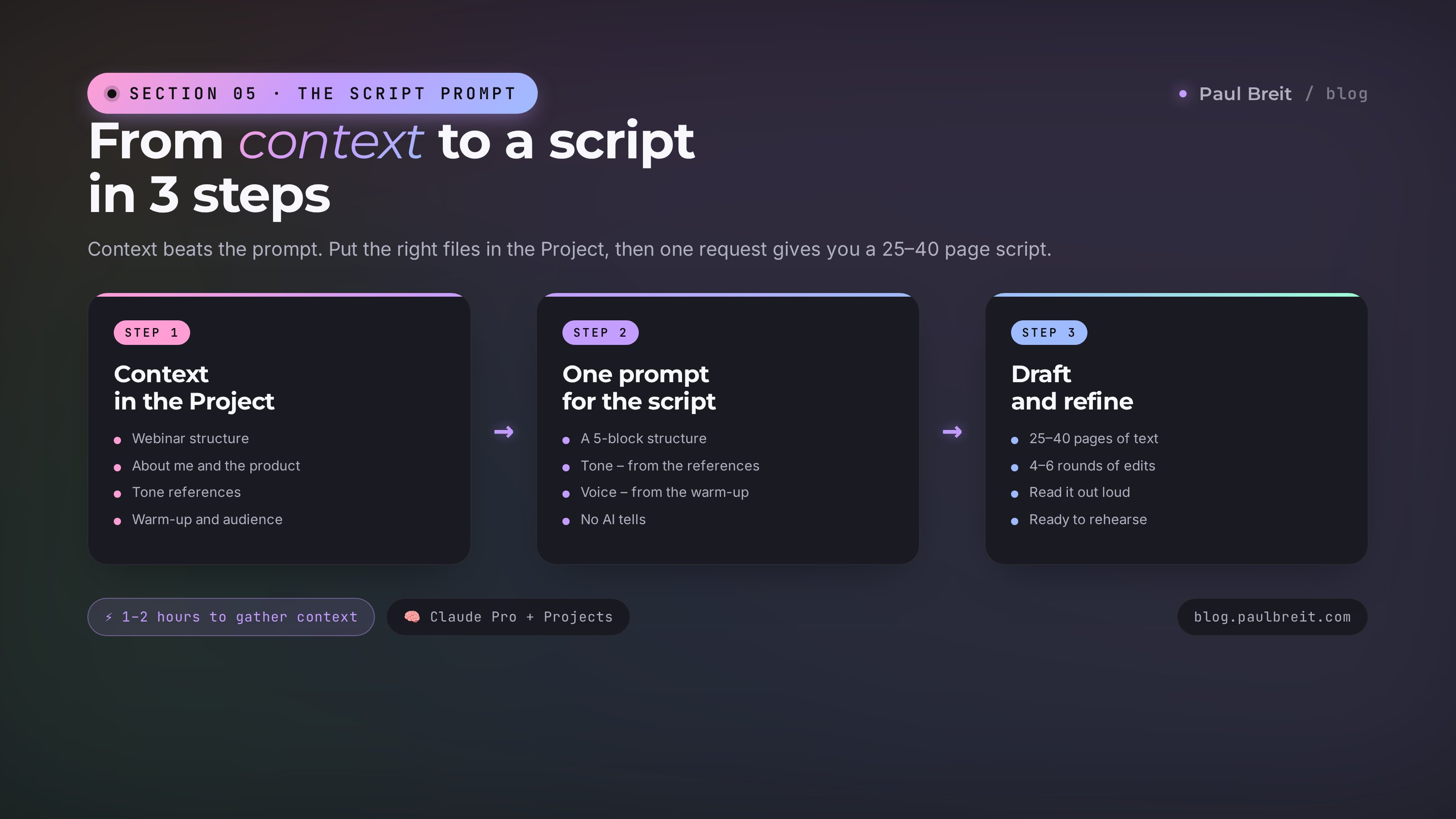
Claude is smart. But without context it writes average AI text – polite, abstract, not yours. To get your script, you have to put four things in front of it.
What to gather ahead of time
- The webinar structure template. Just copy Section 02 of this article. Use the model that fits your ticket – high or low.
- Info about you and the product. Who you are, your niche, your audience (who they are, their pains, their experience), your USP (in one sentence), your product (what's included, price, format). If you have a landing page, link it.
- 2-3 examples of webinars you like. Not to copy – for tone and style. A transcript works, a link to a recording works, or describe it in your own words.
- Warm-up and audience profile. What you said in your posts in the month before the webinar, the objections you collected in subscriber polls, what your audience cares about. This gives Claude the exact note of your voice and the real pains to write to.
Where to store it
Claude has a feature called Projects – memory tied to a container of files. You open a new chat inside a Project, and Claude already sees all your materials, no need to explain again.
An important caveat: Projects are available only on paid plans – Pro, Team, Enterprise. The free Claude doesn't have this feature. If you're on the Free plan, upload the files into each new chat by hand, or paste the text into your first message.
On Pro, set up a Project named "Launch [product]" and drop in each of the four things as a separate file:
- File "Webinar structure" (the text from Section 02)
- File "About me and the product" (everything you gathered in point 2)
- File "References" (examples of the tone you like)
- File "Warm-up and audience" (posts, polls, typical objections)
Put it in once, and in every future chat inside the project Claude sees these materials. You save a month of work from day one.
A good prompt with no context gives you average text. An average prompt with good context gives you text in your voice. Context beats wording – budget an hour or two for gathering materials before you start.
Section 05The prompt to generate the script
Open a new chat inside the Project. Drop in one prompt, get a script. From there you iterate with edits.
Before you start the chat, you've already picked your model from Section 02 (high- or low-ticket) and put it in the Project as a separate file, "Webinar structure." The prompt references it – Claude pulls the steps in order from there.
Write a sales webinar script for the product described in the Project.

Structure – from the file "Webinar structure." Go through the steps top
to bottom, skipping nothing and reordering nothing.

Tone – from the file "References," voice – from my posts in the file
"Warm-up." No formal style, no AI tells: "however," "thus,"
"let me note," "first and foremost," "firstly, secondly,"
"it should be emphasized" – don't use any of these.

Webinar length – 90 minutes.
Audience – from the file "About me and the product."

Format:
- The step heading from the structure
- Full text of what I say – the way I'd say it out loud on the
  session, with pauses, specifics, personal examples

Under each step – a note "slide: [topic]" describing
which slide I show at that moment.

In the steps with cases – use the specific names and numbers from the
file "About me and the product." No generalities like "one of my clients."
You'll get a draft 25-40 pages long. From there it's edits: "make block 3 shorter," "rewrite this story – it sounds too smooth, add specifics," "the 'I need to think about it' objection – redo it, the answer is too abstract."
Usually after 4-6 iterations the script reaches "ready to rehearse out loud."
The main test: read the script out loud on a timer. Stumbled on a phrase – it sounds like AI, rewrite it. Noticed you're bored saying a block – the listener will be bored too. Send that fragment to Claude with a note: "this sounds like a robot – rewrite it livelier, like a conversation with a friend."
Section 06The deck – why HTML
The main hack of this article: Claude builds the deck. Not PowerPoint, not Tilda, not Figma, not a designer. Claude. Straight to HTML.
Why HTML instead of the usual formats
- Free. No subscriptions to Canva Pro or Figma Team.
- Flexible. Any change is one line of text: "make slide 7 darker," "bump up the font on slide 3." A designer takes two revisions a week – Claude does it in a minute.
- Modern. HTML+CSS gives you gradients, animations, and Apple Keynote-level typography – with no designer.
- Responsive. It looks the same on a laptop for the session and on a phone for a run-through on the go.
- Presents directly. Open it in a browser, hit F11 for full screen. Share the window in Zoom/OBS, and the audience sees clean slides.
- Converts to PDF in a second. File → Print → Save as PDF. You get a shareable file for everyone who didn't make the session.
But isn't HTML hard?
That's the beauty of it: you don't need to know HTML. Claude generates a finished file, and you open it in a browser with a double click. Want to edit it – you tell Claude "change this and that" in plain words and get an updated version. You never write a line of code by hand.
Section 07Design: colors, fonts, references
Once the script is ready, you go to Claude with a new prompt – about the deck this time. And here it matters that you give it taste, rather than leaving it to "do whatever you think is best."
What to bake into the design prompt
Palette
The simplest option is to describe it in words: "dark background, white text, yellow accent on the CTA, pink accent on quotes." Claude will get it.
If you have brand colors, give the HEX codes. The same "one prompt, finished on-brand HTML" approach works great not only for decks but for carousel slides built with HTML+CSS+Playwright too: "primary #0F0F12, text #F8F8FC, accent #C49EFF, second accent #FF9ED4."
Not sure which colors to use – describe the mood: "premium, calm, not aggressive" or "bright, energetic, like Robinhood."
Typography
The standard pairing for a modern look: Montserrat for headings, Inter for body. These are free Google Fonts, available everywhere.
For a premium aesthetic – Playfair Display + Inter. For a sporty feel – Manrope + IBM Plex Sans. For a tech feel – Space Grotesk + JetBrains Mono.
If you're unsure, keep Montserrat + Inter. A can't-lose choice for any niche.
The mood in one word
The most powerful move is to give the style in one word: "minimalist," "premium," "pop art," "sporty," "glossy," "techno." Claude knows how to translate these words into visual choices.
Examples you like
The most honest way to explain is to show. Send Claude:
- A screenshot of a site or deck you like
- A link to a competitor's landing page or a foreign expert's
- A few slides from someone else's decks with a note "this is the look I want"
Claude can read images – it analyzes the composition, color palette, and typography, and carries the logic over into your file.
If you don't have references on hand, there's a ready style library: styles.refero.design. Open it, scroll through dozens of ready design systems (Apple minimalism, Linear, premium editorial, neon, retro, and dozens more), pick the one that matches your brand, copy the style URL, and send it to Claude: "Build it in the style of this page." Claude pulls the palette, typography, and composition from there and applies them to your deck.
A ready prompt for the deck
Build an HTML deck for the webinar. The script is attached (or in the Project).

Format: one HTML file, ready to open in a browser. Each slide is
full screen (100vw × 100vh). Switch slides with arrow keys or
the spacebar – a simple JS handler.

Structure: one slide = one idea. Don't overload it. A 2-5 word heading
+ one visual accent (a number, a quote, an icon, an image).

Design:
- Palette: [dark background #0F0F12, text #F8F8FC, accent #C49EFF,
  second accent #FF9ED4]
- Fonts: Montserrat (display) + Inter (body), load via Google Fonts
- Style: premium, minimalist, like the attached references
- Whitespace over density. Big margins, large type

Slides by script:
- Title (webinar name + speaker)
- A slide for each block of the script per the "slide: [topic]" notes
- An offer slide with the tiers
- A bonus slide
- A final CTA slide with the code word "REVIEW" to DM

Keep it clean and tidy, no extra decorative elements.
In 1-3 minutes you get a 30-60 slide file. You open it with a double click in Chrome – a working deck already.
A live example – my deck under this article
Here's a deck I got from roughly this prompt – "AI isn't a toy anymore, it's the shortest path to money." Built in one pass in Claude, then refined with edits. Every slide is HTML, opens in a browser, works on any device.
Section 08Refining with plain-text edits
The first draft is a draft. From there you go through the deck slide by slide and fix things in words. Claude makes the updated version in a minute.
Typical edits
- "Slide 5 – the heading is long, cut it to 3 words."
- "On slide 7 drop the list – leave one number in the center, big."
- "The offer slide is too dense – split it into two slides: tiers and bonuses separately."
- "Final slide – add a pulse animation on the code word."
- "There's too much pink in the palette – remove it from all the headings, keep it only on quotes."
What to watch for
One slide – one idea
If there are two ideas on a slide, the audience won't remember either. Two slides in a row beat one overloaded one.
Headings of 2-5 words
"Three sales windows" – good. "How I realized that three sales windows work better than one" – not good. The long version goes into a subheading or just into what you say out loud.
Numbers big, text small
On a slide that says "350 clients in one launch," the number 350 should be one and a half times bigger than any other element. It's the punch.
Whitespace over density
If a slide feels empty, you did it right. Professional decks (Apple, Stripe, Linear) are built on whitespace. Amateur ones are built on "let's cram in as much value as we can."
The CTA slide is simple
At the end, only three things: where to write, what to write (the code word), and what they get for it. No fine print, no footnotes. One big block – so the audience has time to snap a photo on their phone.
A full 40-slide deck takes 3-5 iterations. Each iteration is 5-15 edits. The full cycle from first draft to "ready to ship" – 2-4 hours.
For comparison: a designer builds a deck in 5-7 working days with two rounds of revisions. Doing it yourself in Tilda – at least 3 evenings.
Section 09Go-live readiness checklist
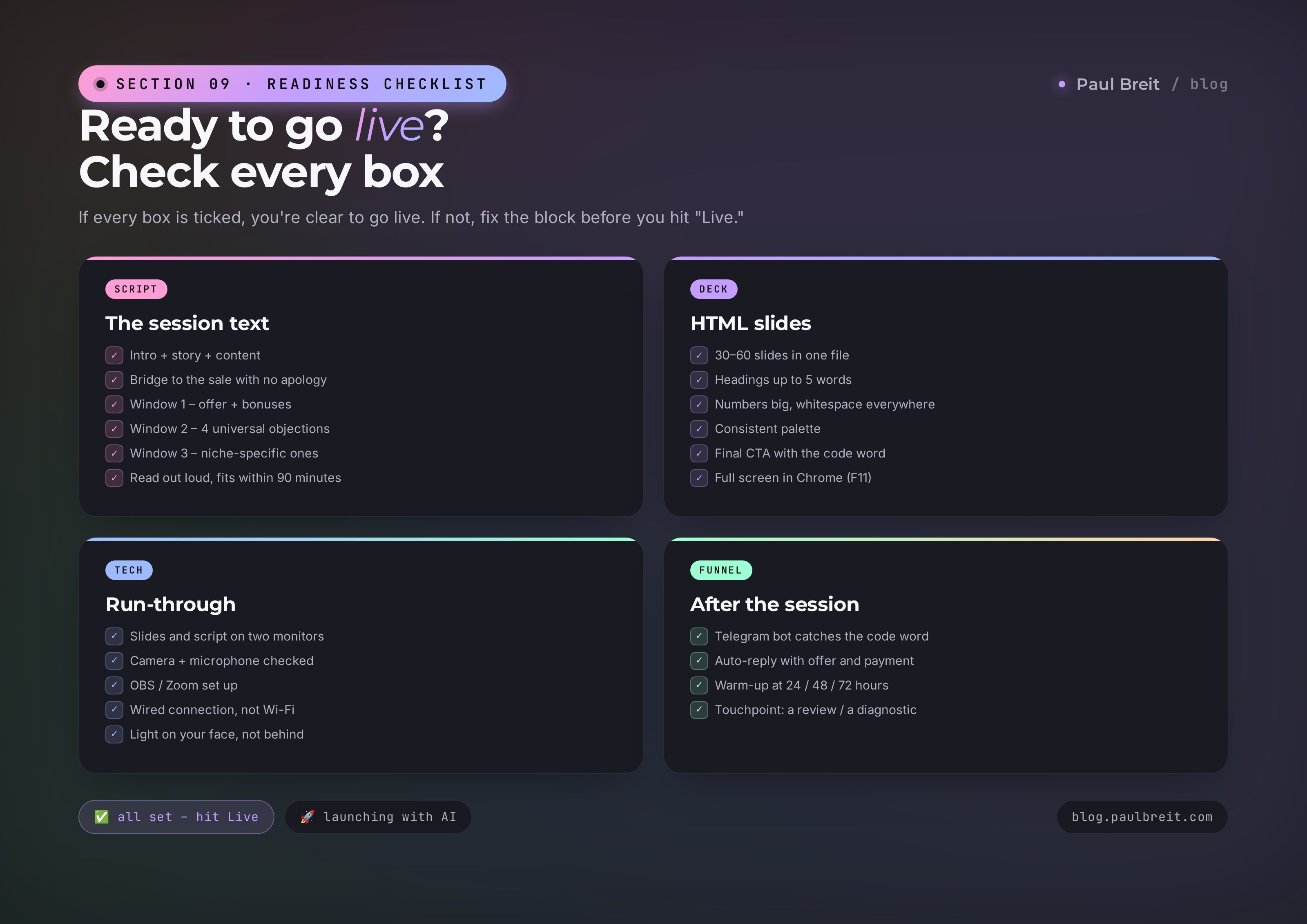
You've gone through all the steps – now check yourself against this list. If every box is ticked, you're clear to go live.
Script
- The right model is chosen – high-ticket (to a consultation) or low-ticket (price on the session)
- The webinar title hooks, with a result and numbers
- What's happening today + who should listen + a stay-to-the-end bonus – in the first 5 minutes
- Who you are + cases / client results
- Why your method is the best solution and what makes it work
- The step-by-step plan illustrated with specific client cases
- Pitfalls flagged + why it matters to move with an expert
- Product announcement: who it's for, what you get, how it runs, start date
- Bonuses for those deciding now + payment / reservation links (Model 2) or calls to DM the code word (Model 1)
- Calls to DM the code word – at least 3 times during the session
- Read out loud on a timer – you fit within 90 minutes
Deck
- 30-60 slides in HTML, opens in a browser
- Each slide is one idea, headings up to 5 words
- Numbers big, whitespace everywhere
- The palette is consistent across all slides
- A final CTA slide with the code word
- A run-through in full-screen mode (F11) – nothing falls out
- A presentation test in OBS / Zoom – the audience sees it clean
Technical run-through
- The deck is open in a single Chrome window
- The script is printed or open on a second monitor
- Camera + microphone checked an hour before the session
- OBS / Zoom set up, sharing only the deck window
- Connection is wired, not Wi-Fi
- Light on your face – not from the window, not from behind
The post-session funnel
- A Telegram bot ready to catch the code word
- An auto-reply with the offer and a payment button
- A 24/48/72-hour warm-up after the session reminding people of the bonuses
- The next touchpoint: a review / a diagnostic / an onboarding call
The script and the deck aren't what separates a good launch from a bad one. Claude makes them now. What separates them is the depth of the warm-up, the precision of the offer, your readiness to handle objections in the moment, your personal presence on the session.
The machine takes the routine. Your job is the meaning, the experience, the eye-to-eye conversation.
Section 10What's next
This article covers one part of the system. The script and the deck. In a real launch there are five to seven: the warm-up, seeding, the lead magnet, the webinar, the offer, the follow-up close, and the technical payment pipeline. That one-on-one close is broken down in the sales call script – without it, even a strong webinar leaves money on the table.
The whole system as one piece – ten AI agents that take the routine off your plate (content, funnels, scripts, copy, testing hypotheses), plus ready Project templates for different niches – we build together with you. Book a free consultation and we'll lay out a step-by-step plan for your niche.
FAQFrequently asked questions
Does this work if I've never run a webinar before?
It does. The script from Claude handles the structure – all you have to do is read it out loud 2–3 times and add your own stories.
Why an HTML deck instead of PowerPoint or Figma?
HTML opens in any browser, needs no install, and is easy to rebrand. And Claude can generate it from a single prompt.
How long does it really take to prepare a webinar?
A draft script and deck – 30 minutes. Full polish with your cases and a rehearsal – another 4–6 hours.
What kind of purchase conversion can you expect from a webinar like this?
For a warm audience – 5–15% on offers up to ~$1,500. For cold traffic – 1–3%. It depends on the pre-webinar warm-up and the strength of the offer.