Instagram carousels on autopilot. A Claude agent does it all – from topic to published post
A step-by-step guide: how to set up an agent that sends you 3 carousel ideas in Telegram every morning, writes the slide copy once you pick one, designs the cards after you approve them, and publishes the finished post to Instagram. With scripts, Meta API keys and design templates.
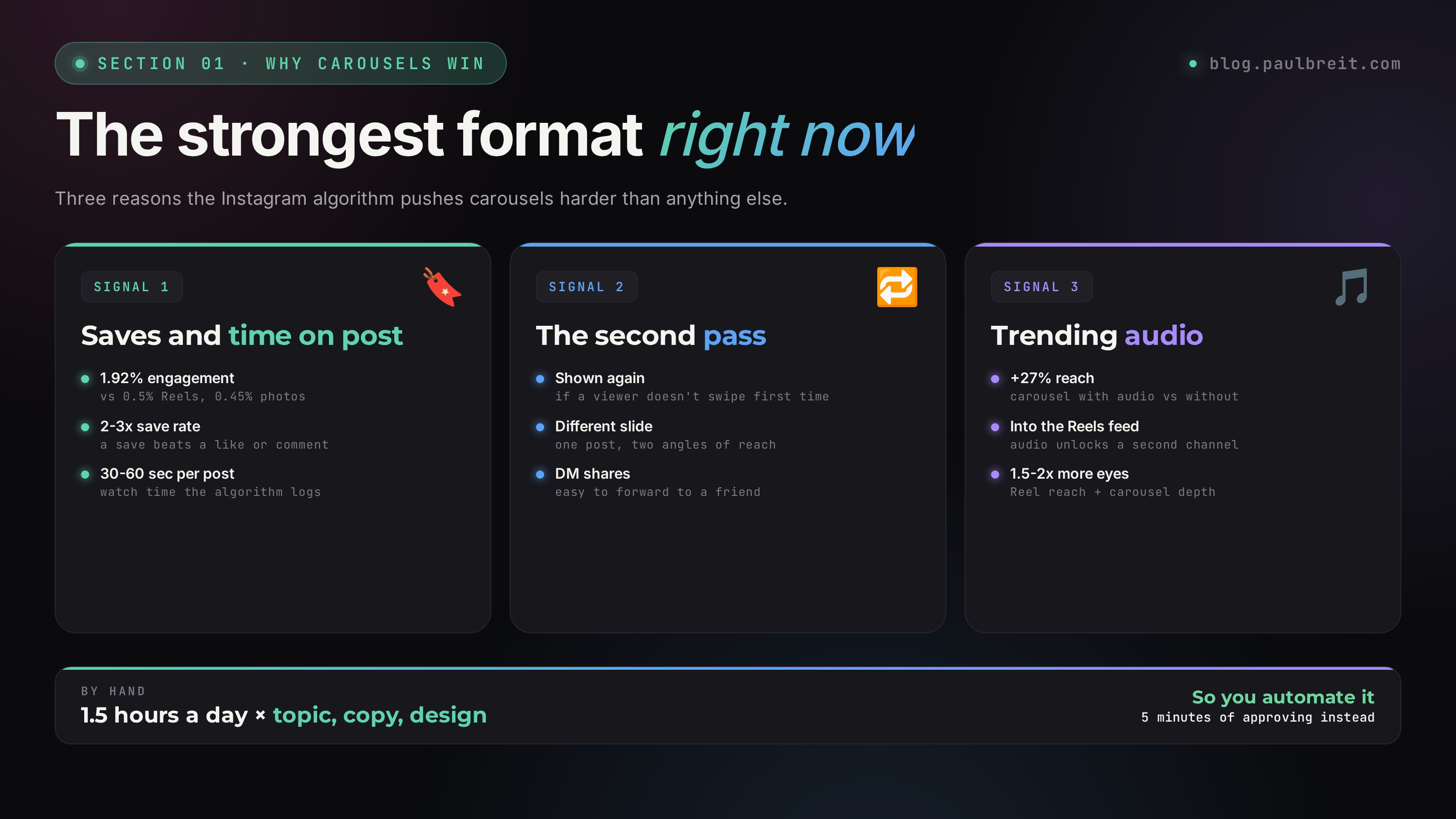
Carousels are the strongest format on Instagram right now. A 1.92% engagement rate versus 0.5% for Reels and 0.45% for single photos. Add trending audio and the post lands in the Reels feed too – reach multiplies another 1.5–2x. The algorithm gives carousels a second pass: if someone doesn't swipe, the post shows up again starting from a different slide.
But making one carousel a day by hand is 1–1.5 hours: pick a topic, write the slide copy, design it, approve it, publish it. An expert doesn't have that kind of time. So I built an agent in Claude that sends me 3 ideas in Telegram every morning, writes the slide copy after I reply, and once I say "ok" designs the cards with HTML+CSS+Playwright and publishes the post to Instagram through the Meta Graph API. Caption, hashtags and trending audio included.
* Everything in this guide uses official APIs: Anthropic for Claude, the Telegram Bot API through an MCP plugin, and the Meta Graph API for publishing to Instagram. No surfing bots, mouse emulators or gray-market tricks – the automation stays inside each service's terms of use.
What's inside
- Why carousels win and why you have to automate them
- Agent architecture: what the pieces are
- Installing Claude Code on a VPS
- A Telegram bot for approvals via MCP plugin
- Connecting Instagram through the Meta Graph API
- The prompt for morning idea generation
- The prompt for slide copy
- Designing the cards with HTML+CSS+Playwright
- Automatic publishing to Instagram
- Extending to Threads, Facebook, LinkedIn, Pinterest
- Cron, monitoring and what to do when it breaks
- Upgrades: trending audio, A/B tests, analytics
Section 01Why carousels are the strongest format right now
The short answer: Instagram currently gives carousels two privileged reach channels at once. Every carousel post lands in your followers' main feed and in their Explore. And since last year's algorithm update, it also lands in the Reels feed if you attach trending audio. That means the reach of a Reel plus the depth of a carousel.
The 2026 numbers look roughly like this. Carousel engagement rate averages 1.92%. Single image: 0.45%. Reels: 0.5%. Carousel save rate runs 2–3x higher than any other format. And for the algorithm, a save is the strongest signal of value. Stronger than a like, stronger even than a comment.
Why the algorithm loves carousels
- Time on post – a person swipes, reads, looks. A carousel takes 30–60 seconds versus 3 seconds for a single photo. The algorithm logs that watch time and boosts reach
- The second pass – if someone doesn't swipe on the first impression, Instagram gives the carousel another shot. It shows up again starting from a different slide. One post = two impressions from different angles
- Save rate – checklists, frameworks and breakdowns get saved as bookmarks. A save beats a like, so every save pushes the post up in the feed
- DM shares – a carousel is easy to forward to a friend with a "check this out." A share to DMs is the strongest signal for the algorithm after a save
A carousel with trending audio gets +27% reach versus one without. I tested this on my own blog – a check across 60 posts over 2 months showed an even bigger gap, around +35% in reach.
Why you can't do one a day by hand
Let's add up the minimum time a carefully made carousel takes:
- Picking a topic and checking you haven't done it yet – 10 minutes
- Structure: cover hook, 5–7 slides, CTA, caption – 25 minutes
- Designing the cards in Figma or Canva – 30–40 minutes
- Approving it yourself (reread, fix) – 10 minutes
- Publishing: upload, pick audio, hashtags – 10 minutes
That's 1.5 hours a day, 45 hours a month. An expert doesn't have that kind of free time. So either you skip carousels and lose the strongest format, or you hire a designer and a copywriter for $700–1,100/mo and try to keep them in sync. Or you build an agent – which is what's next. On top of carousels it's worth building a full content pipeline from 10 AI prompts for experts, where one voice note in the morning turns into a week of posts across five platforms.
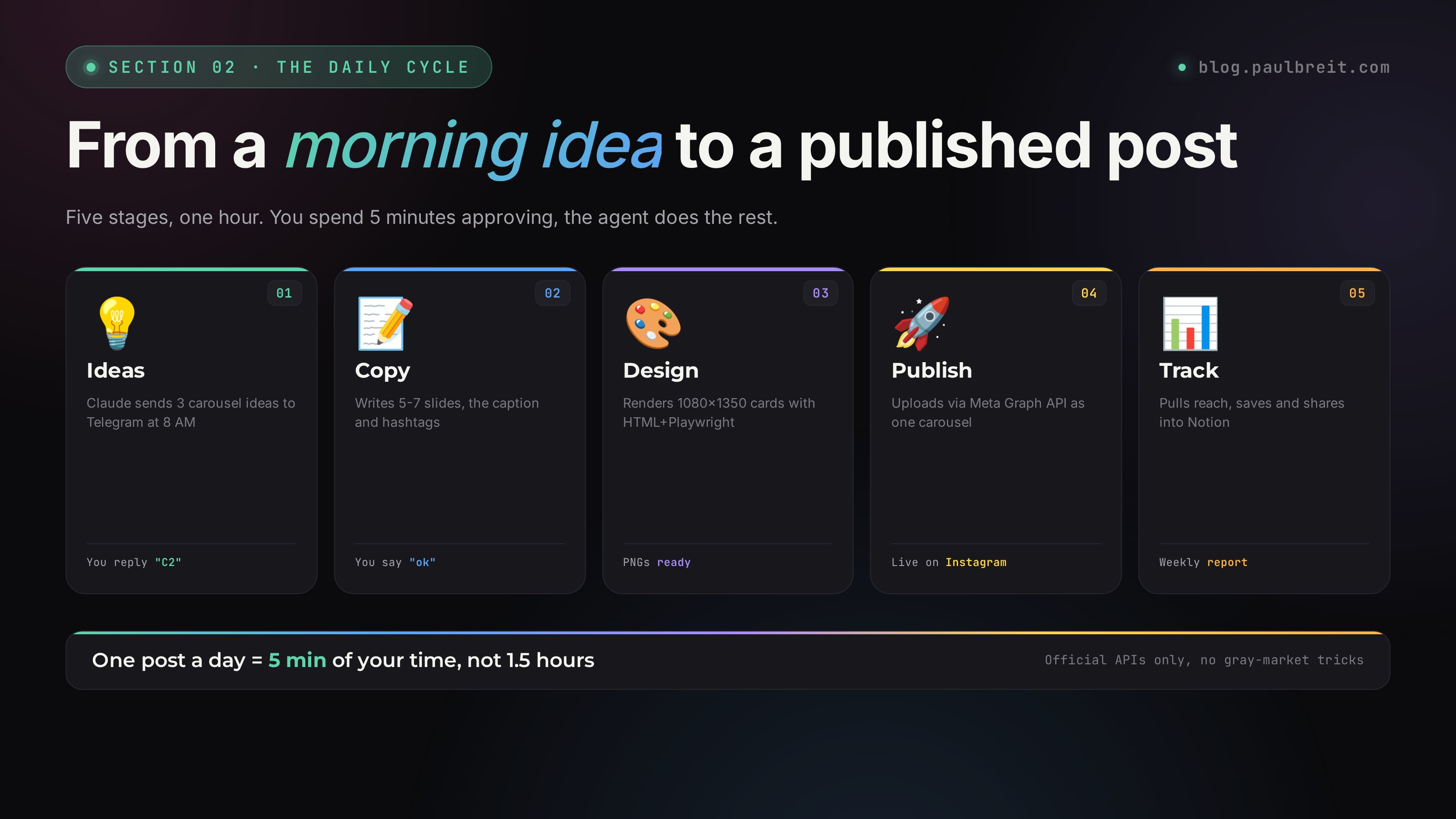
Section 02Agent architecture: what the pieces are
Before we dive into the steps – the big picture. A carousel agent is six components working together on one VPS.
| Component | Role | Cost |
|---|---|---|
| Claude Code on a VPS | The agent's brain: thinks, writes, designs, publishes | $20/mo (Pro) |
| VPS (Linux) | So the agent runs 24/7 – a laptop won't do, it sleeps when you sleep | $5–7/mo |
| Telegram bot | The approval interface: ideas, copy, sign-off | Free |
| Meta Graph API | The official channel for publishing to Instagram | Free |
| Playwright + HTML | Renders the card designs: PNGs from templates | Free |
| Cron + systemd | Kicks off the agent at the right time every morning | Free |
That's ~$25/mo for the stack itself. A single post that pulls 3 leads into your channel pays for a quarter's subscription in advance.
The full cycle in one day
The morning cron job kicks off the agent
Claude gathers fresh news hooks (AI news, trending topics), checks them against the history of past ideas, and generates 3 Reel options and 3 carousel options. It sends them to the Telegram chat.
You pick an idea
You see the message, read the ideas in a minute, reply "R1 C2" (Reel #1, carousel #2). That's it – nothing else to do.
The agent writes the slide copy
Given your pick, the agent takes the idea and writes 5–7 slides: cover hook, content slides, CTA. Plus the post caption and hashtags. It sends it to the chat for approval.
You approve or ask for a fix
You read the copy, say "ok" or "swap slide 3 for X." The agent either accepts it or rewrites.
The agent designs the cards
It fills in the HTML template, renders 1080×1350 PNGs through Playwright, and drops them in the finished-cards folder.
The agent publishes the post to Instagram
Through the Meta Graph API: it uploads the images, creates a carousel container, and publishes with the caption and hashtags. It sends you the link to the post.
That's it, your day has started. Your Instagram content is live, and you spent 5 minutes approving it instead of 1.5 hours doing it by hand.
Section 03Installing Claude Code on a VPS
If you already have a working VPS with Claude Code – skip this section and jump to the fourth. If not, here's the full path from nothing to a working agent on the server.
Buy a VPS
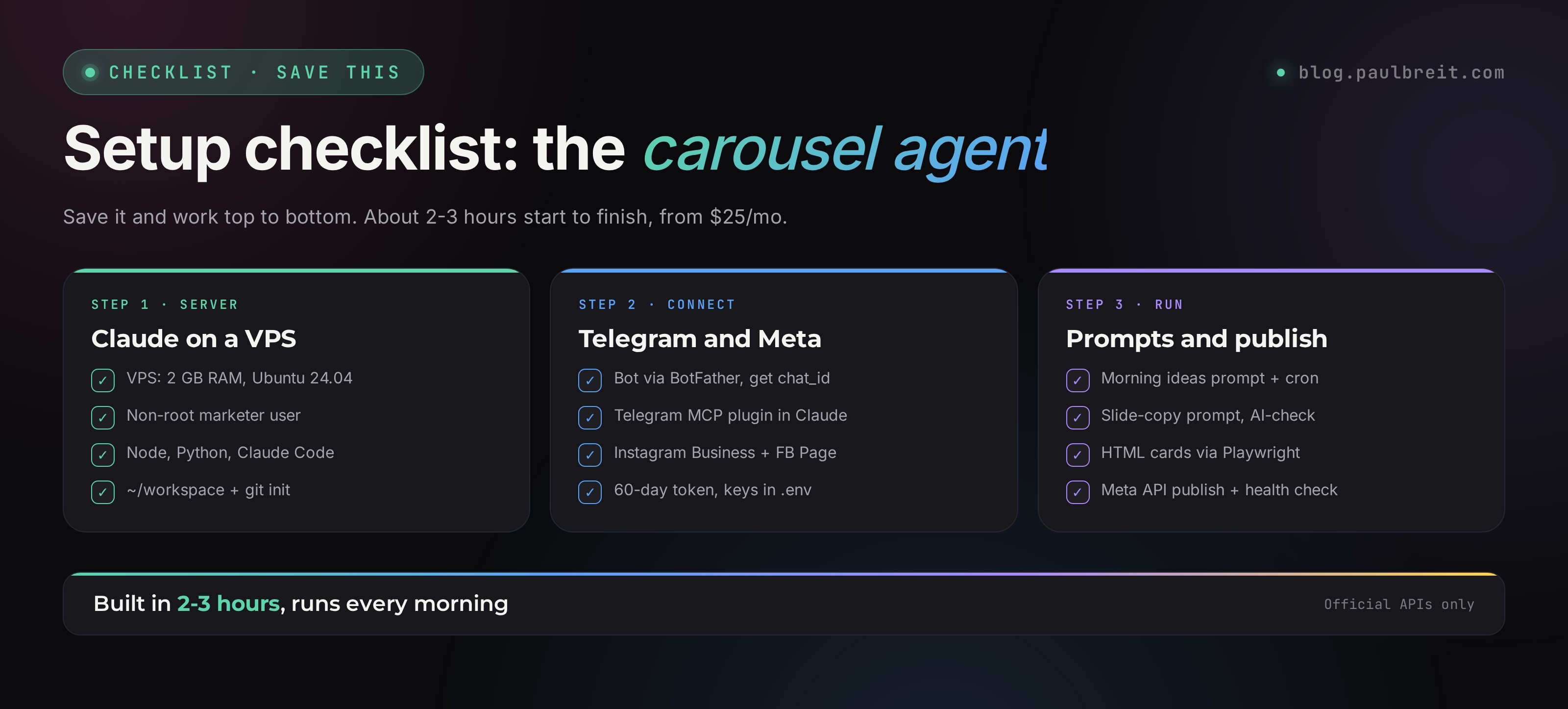
Minimum config: 2 GB RAM, 1 vCPU, 20 GB SSD, Ubuntu 24.04. That's plenty with room to spare. Where to get one: DigitalOcean ($6/mo), Linode, Hetzner Cloud ($5/mo), or AWS Lightsail. Any of them takes a regular card and spins up in a couple of minutes.
Pick a region close to you for lower latency. If you're outside the US/EU, note that Claude's API region is set by Anthropic – check that your account's region supports the API before you commit to a far-flung data center.
Create a marketer user
Don't work as root. After your first SSH login, create a separate user:
adduser marketer
usermod -aG sudo marketer
mkdir -p /home/marketer/.ssh
cp ~/.ssh/authorized_keys /home/marketer/.ssh/
chown -R marketer:marketer /home/marketer/.ssh
chmod 700 /home/marketer/.ssh
chmod 600 /home/marketer/.ssh/authorized_keys
From here on we work through ssh marketer@your-server-ip.
Install Node.js, Python and dependencies
sudo apt update && sudo apt upgrade -y
curl -fsSL https://deb.nodesource.com/setup_20.x | sudo -E bash -
sudo apt install -y nodejs python3 python3-pip python3-venv git tmux
sudo npm install -g bun
Bun works as a fast replacement for npm with Claude Code. Not required, but noticeably faster.
Install Claude Code
npm install -g @anthropic-ai/claude-codeAfter installing, run claude – it'll ask you to log in. If a browser opens, sign in to your Anthropic account. If your VPS has no browser, the agent gives you a link – open it on your laptop, confirm, and copy the access code back into the server terminal.
Create a working directory
mkdir -p ~/workspace
cd ~/workspace
git init
This is where all the agent's scripts and files will live: prompts, card templates, the publishing queue, logs.
Run claude -p "Say 'hello' and nothing else". If you get a reply, Claude Code is installed correctly. If you get a token or subscription error, go back to step 4 and re-authenticate.
Section 04A Telegram bot for approvals via MCP plugin
For Claude to send you ideas and take your reply, you need a Telegram bot connected to Claude through MCP (Model Context Protocol). It's free and takes 15 minutes to set up.
Create a bot through BotFather
Open Telegram and find the bot @BotFather. Commands in order:
/newbot
Bot name: Marketing Agent
Username: @your_marketing_agent_bot
<BotFather sends a token like: 7891234567:AAxxxxxx>
Save the token – you'll need it in the next step.
Create a chat to talk to the agent
Message the bot /start in a DM – it won't reply, that's fine, the bot isn't running yet. Create a new group in Telegram and add your bot as an admin (Settings → Administrators → Add). You can stay the only human in the group – that's more convenient.
Find your group's chat_id. The fastest way is @getmyid_bot: add it to the group, it sends you the chat_id (it'll start with -100), then kick it out of the group.
Install the Telegram MCP plugin for Claude
Claude Code has a built-in plugin mechanism. The Telegram plugin turns your bot into a full two-way channel. Install it with one command:
claude /plugin install telegramWhen the plugin asks for a token, paste the one from BotFather. When it asks for a chat_id, paste your group's id. From there the plugin handles polling on its own, and Claude can receive your messages and send replies.
Test it
In the terminal, run:
claude -p "Send the message 'test' to the Telegram chat"If a message from the bot shows up in the group, the connection works. If not, check that the bot is in the group and the plugin is active (claude /plugin list).
Never show anyone your bot token. It gives full control of the bot account: anyone can send messages as the bot and read everything it receives. If a token leaks (say, in a GitHub commit), open BotFather, select the bot, hit "Revoke current token" and get a new one.
Section 05Connecting Instagram through the Meta Graph API
For the agent to publish to Instagram automatically, you need an official connection through the Meta Graph API. This is the longest step in the whole setup (45–60 minutes), because Meta built a complicated approval system. But you only do it once, and after that it runs itself.
Switch your Instagram account to Business or Creator
Open Instagram → Settings → Account → Switch to professional account → Business. If you're already on Creator, that works too. The API doesn't work with a regular personal account.
Create or use a Facebook Page
The Meta API requires Instagram to be linked to a Facebook Page. If you don't have one, go to facebook.com/pages/create and create one. A "Brand" page with your business name works fine.
To link them: Instagram → Settings → Account → Linked accounts → Facebook → pick your Page.
Register as a developer with Meta
Go to developers.facebook.com and sign in with your regular Facebook account. Accept the standard developer terms (there's no review, it's a formality).
Create a Meta App
In Meta for Developers: My Apps → Create App → Other → Business. Fill in:
- App name: for example, "Carousel Publisher"
- Contact email: your email
- Business account: leave blank or use your personal one
Once created, you land on the app dashboard.
Add the "Instagram Graph API" product
In the app dashboard, on the left: Add Product → Instagram → Set Up. Go to Instagram Graph API → Generate Access Tokens. Connect your Instagram Business account with the "Add or remove pages" button – pick the page your Instagram is linked to.
Get a long-lived token (60 days)
The basic token lasts 1 hour – useless for automation. You need a long-lived token good for 60 days. You get it through a dedicated endpoint:
curl "https://graph.facebook.com/v19.0/oauth/access_token?\
grant_type=fb_exchange_token&\
client_id=<APP_ID>&\
client_secret=<APP_SECRET>&\
fb_exchange_token=<SHORT_LIVED_TOKEN>"
You get APP_ID and APP_SECRET from the app dashboard (Settings → Basic), and SHORT_LIVED_TOKEN is the one you got in step 5. The response comes back as JSON with a new token – it lasts 60 days.
Find your Instagram Business Account ID
This is your Instagram account's identifier in the API:
curl "https://graph.facebook.com/v19.0/me/accounts?access_token=<LONG_TOKEN>"The response shows an array of pages – each has an id. Then:
curl "https://graph.facebook.com/v19.0/<PAGE_ID>?\
fields=instagram_business_account&access_token=<LONG_TOKEN>"
You'll get your Instagram Business Account id – save that too.
Put the keys in the agent's .env
On the server, in the agent's working folder:
cd ~/workspace
nano .env
# Contents:
META_LONG_TOKEN=<long-lived token>
META_APP_ID=<App ID>
META_APP_SECRET=<App Secret>
IG_BUSINESS_ID=<Instagram Business ID>
The .env file never goes into git (add it to .gitignore). All the agent's scripts read the keys from here.
Meta's long-lived token expires after 60 days. So the agent doesn't break, add a cron job that hits the token-refresh endpoint every 50 days and rewrites .env. The refresh_meta_token.py script itself is simple – ask Claude and it'll build it in a couple of minutes.
Section 06The prompt for morning idea generation
The most important part is the quality of the ideas that arrive in the morning. If the agent serves up "generic marketing topics," you'll reject them forever. If the ideas hit your audience's nerve and use a fresh news hook, you tap "pick" on the first try.
The prompt itself is an instruction file the agent reads every morning. Mine lives at ~/workspace/cron-tasks/prompts/ideas-daily.md. Here are the key blocks.
Block 1: Loading context
Before generating, the agent reads a few files:
- Blog concept – one page: what you write about, who the audience is, what the tone is. For example: "Online experts, $10K–100K/mo revenue, tone is direct, no fluff"
- Content pillars – the 6 categories you publish in: AI, funnels, personal brand, school case studies, personal, tools
- Idea history – a log of everything used in the last 30 days. So it doesn't pitch the same thing twice
- Style – tone rules from your posts: which phrasings you like, which you avoid, how long the hook should be
Block 2: Gathering news hooks
The agent gathers fresh news through WebSearch:
- AI news from the last 24–48 hours: model releases, controversies, viral demos
- Google Trends for today: viral cultural moments – celebrities, memes, sports events
- What's being discussed on Reddit r/popular and in the niche's leading channels
Why the cultural trends matter: one of the 3 ideas should be "AI × cultural moment" – the format with the highest viral potential. For example: "Bieber performed at Coachella with a deepfake of his dad" – which turns into an idea like "3 AI tools any creator could use for the same effect."
Block 3: Strict fact-checking
Before generating ideas, the agent verifies every number and name through at least 2 independent sources. If a fact doesn't hold up, it drops the idea. This is the key defense against hallucinations.
One time I got lazy and didn't write an explicit check into the prompt – Claude confidently pitched a carousel about a "new Gemini 4.0 release" that didn't exist yet. If I'd accepted it blindly, I'd have published a post with a fake and then had to walk it back in the comments.
Block 4: Output format
The agent returns 3 Reel ideas and 3 carousel ideas in one message. The structure of each idea:
🎴 Cover hook in one line
Category: [one of the 6 pillars]
What the slides cover: [3-5 key points]
Why it'll land: [save / share / debate in the comments]
At the end of the message – a prompt to reply "R1 C2" or "R2 C3," and a note that "sources verified."
Running it every morning
A cron job on the server calls a wrapper script run-task.sh, which runs Claude in non-interactive mode with this prompt:
# crontab -e
0 13 * * * /home/marketer/workspace/cron-tasks/run-task.sh ideas-daily \
  /home/marketer/workspace/cron-tasks/prompts/ideas-daily.md
0 13 * * * is 1:00 PM UTC, which is 8:00 AM US Eastern. Change it to fit your time zone.
Section 07The prompt for slide copy
When you reply "C2," the agent takes idea #2 from the morning batch and runs the second prompt. This prompt writes the final copy for all the slides plus the caption and hashtags.
What the agent does, step by step
Identify the chosen idea
Read your last Telegram message, pull out the number (C1, C2 or C3), and grab the matching idea from the morning-ideas log. Mark it "Chosen" in the log.
Load context and style
Read the same style and voice files used for idea generation. Plus a separate rules file for slides: optimal text length per slide, which phrasings to avoid, what CTA goes on the final slide.
Write the slide copy
5–8 slides: cover, content slides, CTA. Each one is a single idea. Short lines (3–5 seconds to read). Specifics, numbers, verbs. No fluff, no rule-of-three constructions ("no X. no Y. no Z.").
The post caption
The caption doesn't repeat the carousel. The caption is a different angle: a personal story, an emotion, context on the topic. 3–6 short paragraphs. It ends with the same CTA as the final slide (or follows on from it naturally).
Hashtags
5–8 targeted hashtags on the topic. No filler. A mix of high-volume (#ai, #marketing) and niche (#onlineschool, #salesfunnels).
Run an AI-pattern check
Before sending, the agent checks itself against 10 AI markers: "moreover," "however," "thus," "let's dive in," "it's worth noting," pretty empty phrases, symmetrical structures. If it finds any, it rewrites.
Send for approval
The final copy, formatted as "Slide 1: ..., Slide 2: ..., Caption: ..., Hashtags: ...," goes to Telegram. It ends with: "Approve? After 'ok' I'll do the design."
Transparency for the expert: the agent doesn't try to hide that it's AI and doesn't try to "seem more human than it needs to." If an idea came from a specific source, the agent says so. If a fact doesn't hold up, it drops it. If the style isn't working, it writes "this isn't landing, give me another angle" instead of sending a weak draft.
Section 08Designing the cards with HTML+CSS+Playwright
This is the prettiest part of the whole system. The agent designs the cards not in Figma and not in some AI image generator, but by hand – with HTML+CSS, rendered to PNG through Playwright.
Why this approach: typography renders perfectly (AI image models still mangle text), typos in tool names and prices are impossible, it's free, you can edit in real time, and the brand standard is guaranteed.
The stack
- HTML5 + CSS3 by hand, no frameworks
- Google Fonts: Inter (400-900) for headings, Fraunces (italic) for accents, JetBrains Mono for labels and numbers
- Playwright (Python sync_api) to render to PNG
- Slide templates live in
~/workspace/carousel-templates/
The cover slide template
One HTML file = one slide. The structure is minimal:
<!doctype html>
<html lang="en">
<head>
  <link href="https://fonts.googleapis.com/css2?family=Inter:[email protected]&family=Fraunces:ital@1&display=swap" rel="stylesheet">
  <style>
    body{
      width:1080px;height:1350px;margin:0;padding:80px;
      background:#06070E;color:#fff;
      font-family:'Inter',sans-serif;
      display:flex;flex-direction:column;justify-content:space-between;
    }
    h1{font-weight:900;font-size:104px;line-height:0.96;
       letter-spacing:-0.045em;text-wrap:balance;}
    h1 em{font-family:'Fraunces';font-style:italic;color:#FFCD1F;}
    .number{font-weight:900;font-size:340px;color:#FFCD1F;
            letter-spacing:-0.06em;line-height:0.85;}
  </style>
</head>
<body>
  <h1>5 prompts for Claude.</h1>
  <div class="number">−10</div>
  <div>hours a week for every expert</div>
</body>
</html>
Rendering to PNG with Playwright
from playwright.sync_api import sync_playwright
from pathlib import Path
import time

DIR = Path("/home/marketer/workspace/carousel-output/2026-05-02")
slides = [f"slide-{i}" for i in range(1, 8)]

with sync_playwright() as p:
    browser = p.chromium.launch(headless=True)
    ctx = browser.new_context(
        viewport={"width": 1080, "height": 1350},
        device_scale_factor=2,
    )
    for name in slides:
        page = ctx.new_page()
        page.goto(f"file://{DIR}/{name}.html", wait_until="networkidle")
        page.evaluate("document.fonts.ready")
        time.sleep(1.5)
        page.screenshot(
            path=str(DIR / f"{name}.png"),
            clip={"x": 0, "y": 0, "width": 1080, "height": 1350},
        )
        page.close()
    browser.close()
device_scale_factor=2 is the retina render – the file is 2160×2700 but reads as crisp 1080×1350. Without it, text looks blurry on phones.
Brand rules (important)
No handles or dates on the cards themselves. @username, publish date, technical metadata – all of it cheapens the look. The caption/CTA should live in the post under the photo, not on the image itself.
Body text no smaller than 36px. On a card, 40–44px is ideal – that means it's readable on an iPhone when the carousel takes up 85% of the screen width.
Headlines 80–110px with negative letter-spacing (-0.03 to -0.05em).
One accent color for everything. No more than two colors in the palette. Black/dark-blue background + white typography + one accent (yellow, lime, fuchsia).
text-wrap: balance on all headlines – the browser distributes words across lines evenly on its own. No orphan lines.
The prompt for generating the card HTML
The agent gets the slide copy from you and assembles the HTML from the template itself. The prompt is roughly:
Take the slide copy from the last approved message.
For each slide:
1. Copy the closest template from ~/workspace/carousel-templates/
   (cover for the cover, prompt for text blocks, cta for the finale)
2. Replace the placeholder text with the real text
3. Save to ~/workspace/carousel-output/{date}/slide-{N}.html
After all slides, run render.py.
Check that all 7 PNGs were created and each is exactly 1080x1350.
Section 09Automatic publishing to Instagram
The finished PNGs live in ~/workspace/carousel-output/2026-05-02/. Next comes a script that uploads them to Instagram as a single carousel post through the Meta Graph API.
The publishing logic
The Meta API doesn't accept files directly – it only accepts URLs. So the process has multiple steps:
- Put the files in a public folder on your site (or in S3/Cloudflare R2)
- For each slide, create an IG Media Container with type IMAGE and the parameter is_carousel_item=true
- From all the containers, create one CAROUSEL container
- Publish the CAROUSEL container
The ready-made publishing script
import os
import requests
import time
from pathlib import Path

LONG_TOKEN = os.environ["META_LONG_TOKEN"]
IG_ID = os.environ["IG_BUSINESS_ID"]
PUBLIC_BASE = "https://blog.paulbreit.com/carousel-output/2026-05-02"

def create_image_container(image_url):
    r = requests.post(
        f"https://graph.facebook.com/v19.0/{IG_ID}/media",
        data={
            "image_url": image_url,
            "is_carousel_item": True,
            "access_token": LONG_TOKEN,
        },
        timeout=30,
    )
    r.raise_for_status()
    return r.json()["id"]

def create_carousel(container_ids, caption):
    r = requests.post(
        f"https://graph.facebook.com/v19.0/{IG_ID}/media",
        data={
            "media_type": "CAROUSEL",
            "children": ",".join(container_ids),
            "caption": caption,
            "access_token": LONG_TOKEN,
        },
        timeout=30,
    )
    r.raise_for_status()
    return r.json()["id"]

def publish(creation_id):
    r = requests.post(
        f"https://graph.facebook.com/v19.0/{IG_ID}/media_publish",
        data={"creation_id": creation_id, "access_token": LONG_TOKEN},
        timeout=30,
    )
    r.raise_for_status()
    return r.json()["id"]

slides = sorted(Path("/var/www/blog.paulbreit.com/carousel-output/2026-05-02").glob("slide-*.png"))
caption = open("/home/marketer/workspace/carousel-output/2026-05-02/caption.txt").read()

container_ids = [create_image_container(f"{PUBLIC_BASE}/{s.name}") for s in slides]
time.sleep(8)  # give Meta time to process each container
carousel_id = create_carousel(container_ids, caption)
time.sleep(5)
post_id = publish(carousel_id)
print(f"Published: https://www.instagram.com/p/{post_id}")1. The images must be public. Meta downloads them by URL. The folder /var/www/blog.paulbreit.com/carousel-output/ is reachable over https – Meta can see it.
2. You need a sleep between creating containers and publishing. Meta processes each container for a few seconds. Publish immediately and you'll get a "media not yet processed" error. 5–10 seconds is enough.
3. The limit is 25 posts per day. A Meta technical limit. For a single expert, that's plenty – you won't hit it.
4. Hashtags go in the caption. They have to be in the caption itself, not a separate field. Just add them at the end of the caption text.
Wiring up the whole cycle
Every stage – idea generation, copy, design, publishing – is run by a single master script that the Claude agent kicks off on cron. The pseudocode:
1. In the morning: generate 3 Reel ideas + 3 carousel ideas → Telegram
2. Wait 30 minutes for the expert's reply
3. If they replied "C2": run the slide-copy prompt for idea 2 → Telegram
4. Wait 30 minutes for "ok"
5. If "ok" received: assemble HTML, render PNGs to the carousel folder
6. Copy the carousel folder to /var/www for public access
7. Through the Meta API: upload containers, create CAROUSEL, publish
8. Send the link to the published post to Telegram
9. Log everything
If the expert doesn't reply at any step, the agent pauses and writes "waiting for a reply." If the expert says "fix X," the agent rewrites and asks for approval again.
Section 10Extending to Threads, Facebook, LinkedIn, Pinterest
Once you've built the agent for Instagram, extending to other platforms takes about an hour each. Same logic: swap the publish function for each platform's. Which platforms are even worth an expert's energy in 2026 is covered in the guide on your first thousand followers across 4 platforms.
Threads
Since late 2025 Threads has an official API. The setup is similar to Instagram: Meta App + Threads product + access token. The publishing method: POST /me/threads with media_type=CAROUSEL and an array of children. Docs: developers.facebook.com/docs/threads.
Limit: a Threads carousel maxes out at 10 items and a caption up to 500 characters.
Facebook publishing runs through the same Meta Graph API you already set up for Instagram. Post to your Page with POST /{page-id}/photos for each image (set published=false), then attach them to a single feed post via attached_media. Same token, same app – almost no extra work.
LinkedIn has the Marketing Developer Platform API. To post a multi-image update: register an app, get a token via OAuth, then use the /ugcPosts (or newer /posts) endpoint with multiple image assets. Docs: learn.microsoft.com/linkedin/marketing.
Limit: LinkedIn doesn't show a swipeable "carousel" the way Instagram does unless you upload a PDF document post – a multi-image post shows as a grid. For document carousels, use the document-share endpoint with your slides exported as a single PDF.
Through the Pinterest API (you need a Business account). The method is POST /pins, one pin per image. Pinterest has no native carousel, but you can create a board and publish a series of pins to it as a set.
YouTube Shorts
YouTube doesn't support carousels as a format. If you want to export there, build a short slideshow from the 7 PNGs (5 seconds per slide) with ffmpeg and post it as a Short. You get a 35-second video carousel.
ffmpeg -framerate 0.2 -pattern_type glob -i 'slide-*.png' \
  -c:v libx264 -pix_fmt yuv420p -vf "scale=1080:1920:force_original_aspect_ratio=decrease,pad=1080:1920:(ow-iw)/2:(oh-ih)/2" \
  output.mp4
Through scheduling services
If you'd rather not write API integrations for every platform, use Buffer, Hootsuite or Later. They take an RSS feed or a manual upload and publish to the right networks on a schedule for you.
Downsides: paid (~$15–30/mo), and some features (trending audio, true carousels on certain networks) may be unavailable or work poorly.
Don't post the same thing everywhere at once – social algorithms dislike duplicates. Better: Instagram at 9:00, Facebook at 12:00, Threads at 15:00, LinkedIn at 18:00. One post, four platforms, 8 hours of "warm-up" on each – no signs of spam.
Section 11Cron, monitoring and what to do when it breaks
Automation without monitoring is a time bomb. Within a month something breaks: Meta updates the API, Anthropic changes auth, an image fails moderation. You need to know about it before your followers notice a missed post.
Where the schedule lives
On the VPS – the system crontab. It runs through a wrapper, run-task.sh, which:
- Runs Claude Code in non-interactive mode
- Passes the prompt from a specific file
- Logs stdout/stderr to
~/workspace/cron-logs/{task}_{date}.log - Deletes logs older than 7 days (so they don't fill the disk)
# crontab -e
# Morning ideas – 8:00 AM US Eastern (UTC-5 = 13:00 UTC)
0 13 * * * /home/marketer/workspace/cron-tasks/run-task.sh ideas-daily \
  /home/marketer/workspace/cron-tasks/prompts/ideas-daily.md

# Refresh the Meta token every 50 days
0 3 1,15 * * /home/marketer/workspace/cron-tasks/run-task.sh refresh-token \
  /home/marketer/workspace/cron-tasks/prompts/refresh-meta-token.md

# Daily health check – verifies tokens are alive and quotas are ok
30 12 * * * /home/marketer/workspace/cron-tasks/run-task.sh health-check \
  /home/marketer/workspace/cron-tasks/prompts/health-check.md
Health check
Once a day the agent checks:
- Whether the Meta token is alive (a request to
/me– if 401, the token expired) - Whether there's enough Anthropic quota (via
/usage) - Whether there's enough disk space (df -h)
- Whether any Claude processes are stuck (ps aux | grep claude)
If something's off, the agent writes to Telegram: "⚠ Problem: Meta token expired, 2 days left." You get to react ahead of time.
Logs and debugging
Every agent run writes logs. The folder structure:
~/workspace/cron-logs/
├── ideas-daily_2026-05-02_13-00.log
├── carousel-publish_2026-05-02_14-00.log
├── health-check_2026-05-02_12-30.log
└── refresh-token_2026-05-01_03-00.log
If something breaks, you immediately know which task and where to look. A single tail -100 on the right log usually shows the cause.
A silent failure is worse than a loud one. If the agent stopped publishing a week ago and you only noticed today, you lost 7 posts and don't know when it broke. So health check + Telegram alerts on any anomaly aren't "nice to have," they're mandatory.
Section 12Upgrades: trending audio, A/B tests, analytics
Once the base system has run for 2–3 weeks, the extensions suggest themselves. Here's what the people who've used the agent longest add.
Trending audio
Carousels with trending audio get +27% reach. The Meta API lets you attach audio to a post through the audio_name parameter. Before publishing, the agent loads the Reels feed page (via playwright + cookies from a real browser session), pulls the top 10 tracks marked "Trending," picks one that fits the mood with Claude, and attaches it to the post.
A subtlety: Meta's Trending API is still in beta and tracking doesn't work on every account. The alternative is a manual pick once a week: you open Reels on your phone, make a list of 5 tracks, drop them in a trending-music.json file, and the agent grabs a random one.
A/B testing covers
The most delicate part of a carousel is the cover (the first slide). It drives the swipe rate – the share of people who move to the second slide. Below 50% means the hook is weak.
The agent can make 2 versions of the cover with different hooks, publish the same carousel on different days with different first slides, then compare reach. After 2–3 months you build your own library of "hook formulas" that work for your specific audience.
Post-publish analytics
24 hours after publishing, the agent hits the Insights API and collects: reach, impressions, saves, shares, swipe-through rate. It logs them to a Notion table. Once a week the agent makes itself a report: what worked, what didn't, which topics drive the most saves.
After 3 months of this, you have the most accurate data on your audience that no SMM agency could give you.
Wiring Notion in for the content plan
Instead of the agent pitching topics itself, you can wire in Notion as the source of ideas. You keep a "Carousel topics" table in Notion with columns: topic, category, status (draft / ready to publish / published). Each morning the agent grabs the first topic with status "ready," publishes it, and updates the status.
This is handy when you already have a strategic content plan for the quarter and you want the agent to execute it rather than pitch its own ideas.
Going further
- DM auto-replies – the agent monitors DMs and automatically answers common questions about your product
- Competitor scraping – once a week the agent goes through 5 competitors in your niche, pulls their top 3 posts of the week, and analyzes what worked for them. A ready-made build of this kind of agent, with a morning roundup and buttons in Telegram, is in the guide on the AI client hunter
- Cross-posting with adaptation – the same topic, but a different format and tone for each network: more polished for LinkedIn, sharper for Threads, more visual for Instagram
Carousels on autopilot are the first brick. Once it works, it's clear how to stack the rest on top: content plan, analytics, cross-posting, Reels, DM replies, sales through an automated funnel. Within six months you don't have one agent – you have a whole team of agents running your marketing faster than any in-house department. And it costs less than a single junior marketer.
FAQFrequently asked questions
Can I run this without a VPS, straight from my computer?
Technically yes, but your computer has to stay on 24/7. It's easier to rent a VPS for $5/mo and forget about it.
Will Instagram ban me for publishing through the API?
No. The Meta Graph API is the official channel for business accounts. Bans only happen for gray-market services and emulators.
How many slides should one carousel have?
7–10 slides is the sweet spot. The algorithm gives carousels a repeat impression – a person sees the post again starting from a different slide.
Can I use the same setup for Threads or LinkedIn?
Yes. Only the final publishing module changes – the rest of the architecture (Claude + Telegram bot + HTML slides) works everywhere.