Grow a Huge Audience on Threads on Full Autopilot with Claude
A step-by-step guide for anyone who wants AI to run their Threads instead of doing it themselves. No code, no developers, no endless tweaking. All it takes is 30 minutes and ten dollars a month.
The whole idea here is to set things up once and then never touch them again. You'll talk to Claude in plain English, Claude sets up a server, and the server keeps posting 24/7 – without you. You spend 30 minutes on the front end, and after that it runs on its own.
One note on regions: Claude (from Anthropic) is available in the US, EU, UK, Canada, Australia, Japan and most of the world, but a handful of countries are blocked. If you're posting from outside the supported regions, you'll need a connection that routes through a supported country for the initial setup. The server we rent in section 6 lives in a US/EU data center, so it works directly – no workarounds needed.
What's inside
- Why Threads, and not something else
- Why Claude specifically, not ChatGPT
- Signing up for Claude
- Paying for Claude
- Installing Claude Code on your computer
- Getting a VPS (a server for 24/7 work)
- Installing Claude on the VPS
- Connecting to Threads
- Setting up the prompts
- Content on Threads: what works
- How to teach the AI to write in your voice
- Power move: watch your competitors
Section 01Why Threads
Threads is a social network from Meta (the same people behind Instagram). It launched in 2023 and is tied directly to Instagram, so your posts reach people worldwide. Automated posting works from any country.
Why Threads is an opportunity right now
The algorithm is young and hungry for new authors. When a platform is still growing, it boosts everyone – that's the classic pattern. Instagram did it in 2012, TikTok in 2020. The same moment is happening on Threads now: a new author's post to 300 followers can pull 50,000 views overnight. That doesn't happen anymore on Instagram or X.
The format is pure text. No editing, no stories, no reels. You write a thought, you hit send. That's perfect for coaches, therapists, experts: your main asset is your thinking and your experience. Not pretty pictures.
The audience has money. Threads right now is full of people who are tired of TikTok noise and want substantial writing. It's a reading crowd, 25–45 years old. The same people who buy consultations, courses, and workshops.
Global reach. Threads is integrated with Instagram, so your posts get seen by followers all over the world. That's especially great if you work in English or want to go international.
Threads in 2026 is like Instagram in 2014. Early authors get free reach that won't be there a year from now. The window is open right now.
What Threads actually does for a business
- A stream of followers into your main channel (newsletter, Instagram, your website)
- Warming up your audience with your thoughts, with no effort spent on design
- Proof of expertise – a public trail that prospects see before they buy
- Testing ideas – a Threads post takes 10 minutes and gives you feedback you'd wait a month for from a landing page
Section 02Why Claude, not ChatGPT
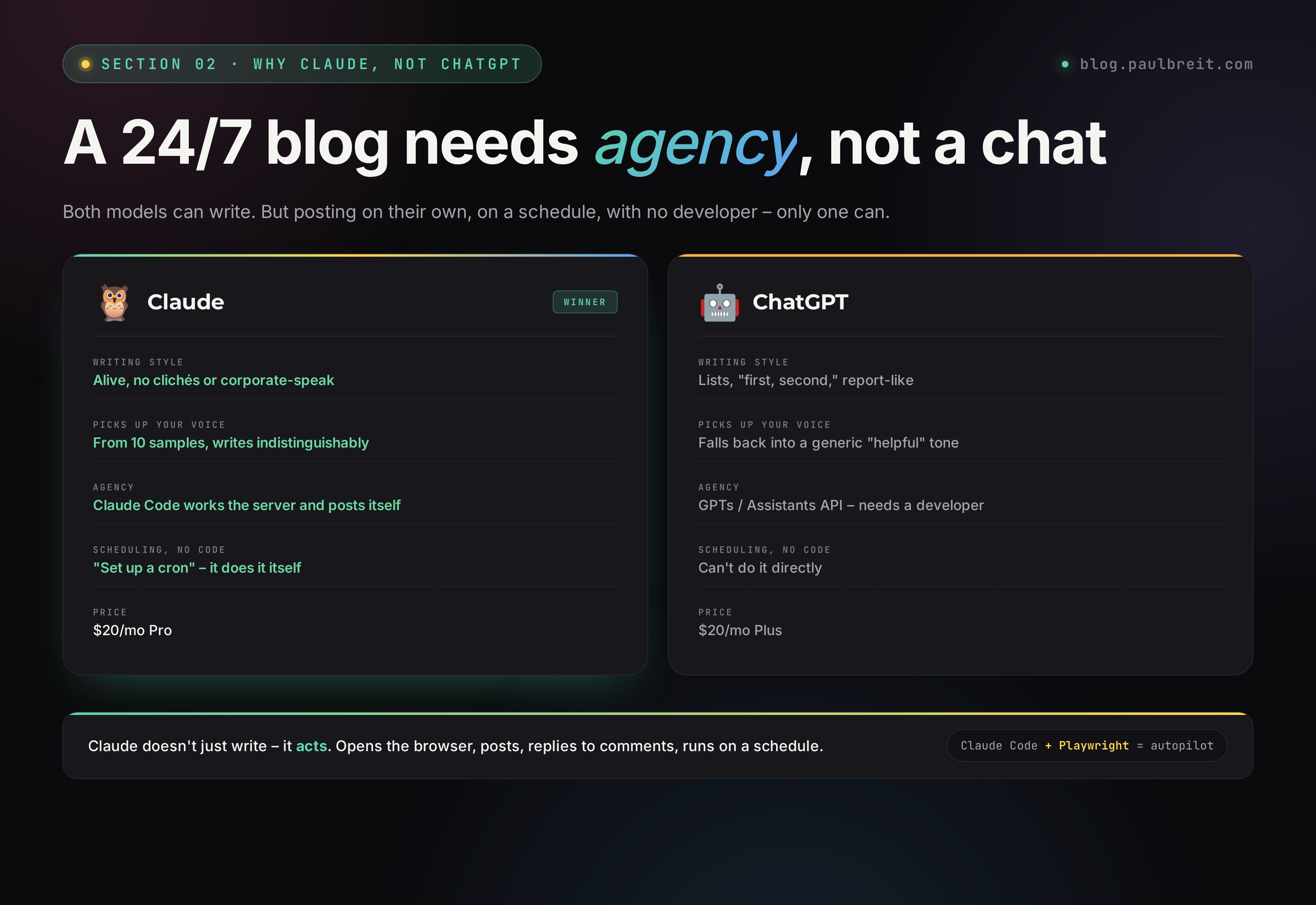
Both Claude and ChatGPT are powerful models. But for the job of "run my blog 24/7 so it's indistinguishable from me," Claude is objectively better. Here's why.
Claude writes more naturally
ChatGPT loves structure: lists, headings, "first, second." In a social post that reads like a report. Claude writes more smoothly – like a person telling a story. Fewer clichés, less corporate-speak, more rhythm.
This matters. A ChatGPT post gets spotted in a second. A Claude post – you have to read closely to realize a human didn't write it. For a blog, that's critical.
Claude understands style
Give Claude 10 of your posts and ask it to "write like this," and it really will. It picks up your sentence length, your favorite turns of phrase, even your punctuation habits. ChatGPT does this worse – it keeps falling back into its universal "helpful" tone.
Claude Code is not a chat, it's an agent
This is the most important difference. Claude has a separate tool – Claude Code. It's not just a chat in the browser. It's a program that runs in the terminal (or on a server) and can do things, not just talk.
Claude Code can:
- Open a browser and post to Threads itself (by emulating user actions)
- Read files on your computer: ideas, notes, drafts
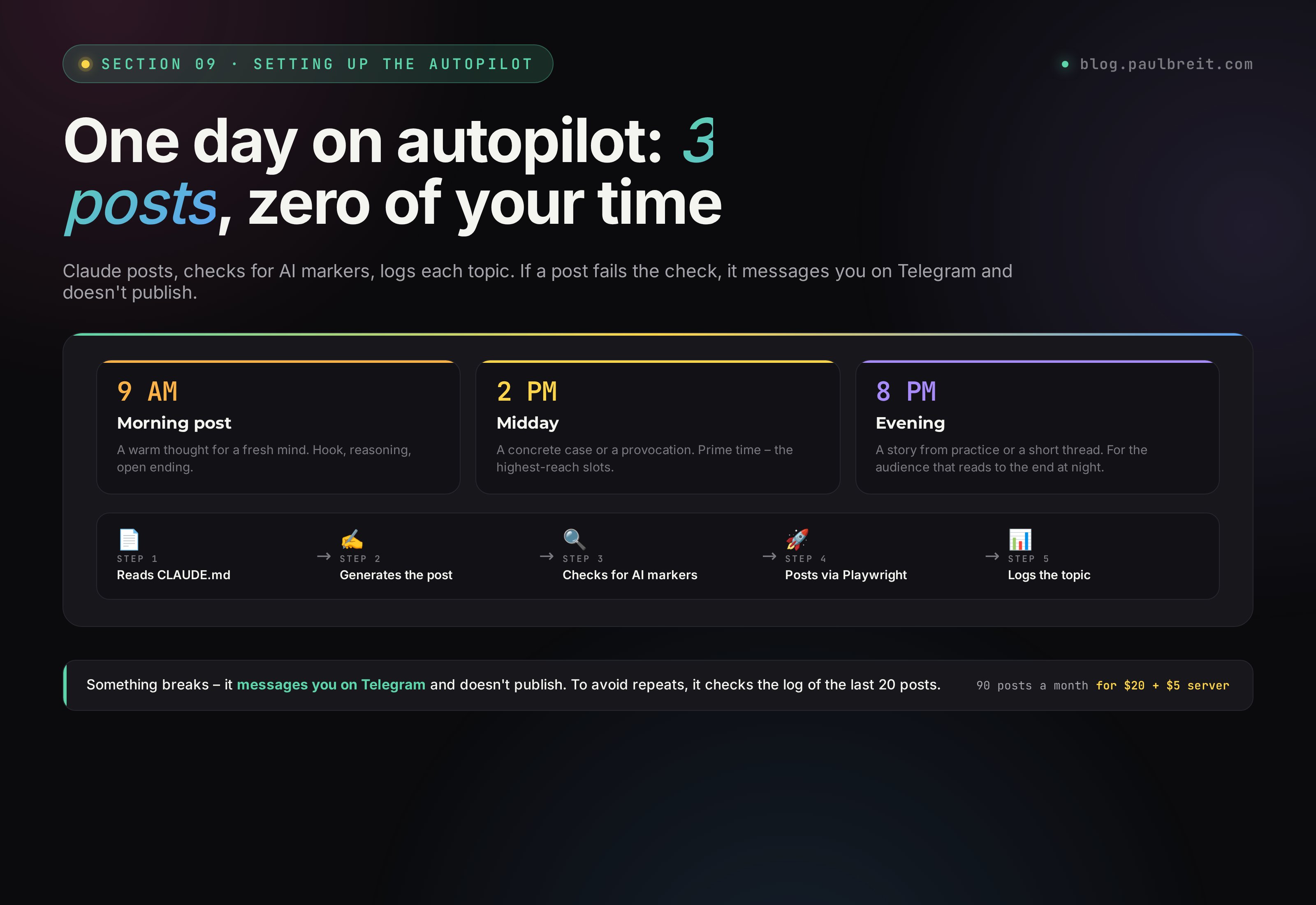
- Run on a schedule – for example, generate and publish a post every day at 9 AM
- Remember past posts, so it doesn't repeat itself
- Watch comments and reply
ChatGPT has no equivalent tool. There are GPTs and the Assistants API, but they need a developer. Claude Code is one install command and you're done.
Claude for content = better style + natural language + agency (it can publish on its own, not just write). For automating social media, that's the whole game.
Section 03Signing up for Claude
Claude is made by the American company Anthropic. In most of the world you just go to claude.ai and sign up – it takes two minutes. A small number of countries are blocked at Anthropic's end; if you're in one of them, you'll need to route your connection through a supported country for sign-up. After that, it's a regular account.
Open claude.ai and click Sign up
Sign up with a Google account – it's faster than email. You'll get straight into the web chat.
Confirm your phone number
Anthropic asks for a phone number at sign-up. A regular mobile number works fine. This is a standard verification step to cut down on bots.
You're in
Once you're signed up you have access to claude.ai – this is the web chat, and you can check right away that everything works. The free plan gives you a few dozen messages per window (Anthropic doesn't publish exact limits, they're dynamic) – enough to test.
Don't run several Anthropic accounts off one number – it leads to bans. If you pay with a corporate card, register the work account separately from your personal one.
Since April 2026 Anthropic has introduced mandatory ID verification for suspicious accounts – an ID plus a selfie. If you sign up normally, from your own device and your own connection, you'll almost never hit this. Just don't rush between steps and don't use throwaway numbers.
Section 04Paying for Claude
Now the important question – which plan to get and how to pay.
What plans exist
| Plan | Price | For what |
|---|---|---|
| Free | $0 | To try it out. A few dozen messages per window (Anthropic doesn't publish exact limits, they're dynamic). Claude Code doesn't work. |
| Pro | $20/mo monthly, or $17/mo billed annually | The minimum for Claude Code. About 50 requests per 5 hours. Fine to start with. |
| Max 5x | $100/mo | For people running automation seriously. 5x the limits. |
| Max 20x | $200/mo | For agencies and teams. Practically no limits. |
For running Threads, the Pro plan is plenty – $20/mo monthly, or $17/mo billed annually. One Threads post is 1–2 requests to Claude. Over a month, even 3 posts a day = 90–180 requests, which fits comfortably inside Pro.
How to pay
Anthropic takes any standard credit or debit card. Pay right on the billing page – it takes a minute.
Your regular card
Visa, Mastercard, Amex – whatever you already use. Add it on the billing page, pick monthly or annual, and you're set. Annual saves you about 15%.
A company card
If this is for a business, put it on the company card and keep the receipts – it's a deductible software subscription. Register the work account separately from your personal one.
Pay per use through the API
If your volume is unpredictable, you can use the Anthropic API and pay only for what you consume. For a steady 3-posts-a-day routine, though, a flat Pro plan is simpler and cheaper.
Yes, you do. Claude Code only works on the paid Pro and Max plans, or through the API (also paid, by request). Free Claude on claude.ai is just the web chat, with no agent capabilities.
Section 05Installing Claude Code on your computer
Claude Code is first and foremost a CLI tool: a program that runs in the terminal and can take real actions on files, servers, and the browser. Beyond the terminal, Anthropic has extensions for VS Code and JetBrains, a web version and an iOS app, and lately a desktop app for Mac and Windows. They all use the same account and the same logic.
For day-to-day work the desktop or IDE extension is more convenient – there's a visual chat, history, files at hand. But for the automation in section 7 we need the CLI specifically: the same Claude Code, just installed right on the VPS and run in the server's terminal. That's the workhorse – one install command and the server can do everything the desktop on your computer can. The logic of the guide: you install the desktop for yourself, to talk to Claude in plain words, and it deploys the CLI on the server itself, so the posts go out 24/7.
Download the app from the official site
Go to claude.com/claude-code, click "Download for Mac" or "Download for Windows" – depending on your computer. Save the file, run it, drag the icon into Applications (Mac) or walk through the setup wizard (Windows). Just like any other app.
Log in to your account
On first launch the app asks you to sign in with your Anthropic account (the one you made in sections 3–4). You click "Log in," the browser opens, you confirm, and you're back in the app. That's it, you can start writing.
No terminals, no commands, no writing code by hand. You just open the app and say in words what you need – "set up my server," "publish a post," "add a schedule." Claude does it all itself, and your job is to answer "yes" to its clarifying questions.
Section 06Getting a VPS
A VPS is a rented computer on the internet that runs 24/7. You pay $5 a month – and you have a server where Claude keeps working while you sleep, eat, and live your life.
Why a VPS at all, if you have a laptop
Close the laptop – everything stops. Step out without internet – everything stops. Power goes out – same thing. A VPS runs always. Claude can publish a post at 6 AM while you sleep, reply to comments at lunch while you're on a call.
A VPS also lives in a data center with rock-solid uptime and a fast connection straight to Claude and to Threads – no hiccups.
Where to get a VPS
Any major cloud provider works. Good balance of price and quality for this task: DigitalOcean, Hetzner, Vultr, or Linode. Pick a data center in the US or EU, near your audience.
Timeweb Cloud is a solid pick
Good speed, fair pricing, and decent support. A server at $4–5/mo is more than enough for our task.
Go to Timeweb Cloud →Signing up through this link gives you account credit + a small affiliate commission for me. The price doesn't change for you.
What server to order
After signing up, create a cloud server with the following specs:
| Setting | Value |
|---|---|
| Location | A US or EU data center near your audience |
| OS | Ubuntu 24.04 LTS |
| CPU | 1–2 cores |
| RAM | 2 GB (minimum) |
| Disk | 20–30 GB SSD |
| Budget | $4–6/mo |
When you create the server, save the IP address and root password – you'll need them to connect. Your provider will email them, but it's best to copy them right away.
Section 07Installing Claude on the VPS (no commands)
This is the part where it all turns into magic. Instead of typing 5 commands by hand, you just tell the Claude that's already running on your computer: "connect to the server and set everything up for Threads." It does it itself.
What it looks like in practice
Open the Claude Code app (you installed it in the previous step). In the chat, write something like this:
I have a VPS on Timeweb Cloud.

IP: 185.12.45.67
User: root
Password: MyPassword_123

Connect to the server over SSH and set up
everything needed to automatically publish posts
to Threads through you and Playwright.

Plan:
1) Update the system, install Node.js 22 LTS.
2) Install Claude Code on the server and authorize it
   under my account (I'll log in via the link
   you show me).
3) Install Playwright + Chromium.
4) Create a working folder /root/threads and prepare
   a CLAUDE.md there for my style (generate
   a draft – I'll edit it later).
5) Set up cron for three posts a day:
   9 AM, 2 PM, 8 PM Eastern.

If anything needs a decision from me –
ask, I'm right here.
Claude reads it, confirms the plan, opens an SSH session to your server, and gets to work. Along the way it'll ask clarifying questions ("continue?"), but you won't have to type any commands. All you need to do is answer "yes" and log in to your Anthropic account once via the link.
Sometimes there are surprises on the server: a different Ubuntu version, a busy port, a network error. Claude sees them itself and fixes them. If it's stuck for a while – write "keep going" or "try another way." In 90% of cases it gets out of the corner on the first nudge.
You have a server in a data center with Claude + Playwright + cron installed, all set up under your account. The time it took – 15–20 minutes. And you personally didn't type a single command.
Section 08Connecting to Threads
Now you need to show Claude your Threads once – so it can log in on its own from then on. It's literally one message and one minute.
"Log me in to Threads"
A browser window opens on your computer – the same one you'd see when you open threads.net yourself. Enter your Threads login and password, the way you usually do. If Threads asks for an SMS code – enter it.
Once you're in – go back to Claude and write "done." That's it. Claude remembers your session and will log in on its own from then on, without you.
You enter your number and code once – and after that Telegram opens right away. Same thing here. You log in once – Claude remembers. You'll never have to log in again.
Downloaded the Claude app (3 minutes). Got a server and handed Claude the login and password (5 minutes). Told Claude "log me in to Threads" – logged in once (2 minutes). Done. You have an autopilot that writes for you.
Section 09Setting up the prompts
Now the main part. Claude has a "memory" mechanism – a CLAUDE.md file where you describe yourself, your business, your style, your rules. Claude reads it every time before generating a post and behaves accordingly.
The structure of CLAUDE.md for Threads
Create a CLAUDE.md file in the project folder. Inside, write something like this (adapt it to yourself):
# Who I am
My name is Maria, I'm a therapist, 10 years in private practice.
Specialties: relationships, anxiety, self-esteem.
I run a Threads blog to attract clients to consultations.

# My audience
Women 28–45, mostly in big cities.
Working, with kids. Tired. Want to understand themselves and others.

# Tone of voice
– Direct, no fluff
– Second person, warm
– Plain language, no jargon
– I mix short sentences with long ones
– I love concrete examples from practice (no names)

# Post structure
– First line hooks: a paradox, a number, a provocation
– Middle – one idea, taken all the way through
– Ending – either a question or a call to action

# What NOT to do
– Don't write in corporate-speak
– Don't open posts with "let's talk about"
– Don't use emoji in every sentence
– Don't make lists of 10 points
– Don't promise to "change your life in 7 days"

# Topics I write about
– Relationships with a partner
– Parents and childhood
– Boundaries
– Self-esteem and anxiety

# Posting frequency
3 posts a day: 9 AM, 2 PM, 8 PM Eastern

# Examples of my posts (so Claude catches the style)
[paste 5–10 of your real posts here]
How to publish manually (when you want one right now)
Open the Claude Code app and write something like:
Write a Threads post in my style on the topic "how to tell
you're emotionally burned out and what to do about it."
Lean on CLAUDE.md. After I approve it –
publish it through Playwright on the server.
Claude generates the post, shows it to you, waits for an "ok" (or edits), and publishes. The whole publishing flow is one message in the chat.
Autopilot on a schedule
The best part: to have Claude post on its own, without you, on a schedule – you just ask it to. No cron, no commands, no code by hand. Claude does it all itself – writes the scripts it needs, sets up the scheduler on the server, checks that everything works.
In the Claude Code app, write something like:
Set up scheduled autoposting to Threads for me:

– 9 AM Eastern – morning post
– 2 PM – midday
– 8 PM – evening

Run it on the VPS. For each post:
1) Read CLAUDE.md (my style and rules are there).
2) Come up with a topic that hasn't shown up
   in the last 20 posts.
3) Write the post in my voice.
4) Check it against the AI-marker list.
5) Publish it through Playwright.
6) Log on the server what the post was about –
   so it doesn't repeat.

If a post doesn't pass the check – rewrite it
up to 3 times. If it still doesn't pass – message me
on Telegram and don't publish it.
Claude reads the task, confirms the plan, sets everything up on the server (cron, scripts, logs, Telegram notifications) and says "done." From that moment it publishes 3 posts a day on its own, without you.
In this system you don't write any code at all. You don't set up cron by hand. You don't open SSH. All you need to do is describe in words what should happen. The rest is Claude's job.
Section 10Content on Threads: what works
Automation only works if the content itself works. You can publish 10 posts a day – if they're bad, you'll get no follows and no leads.
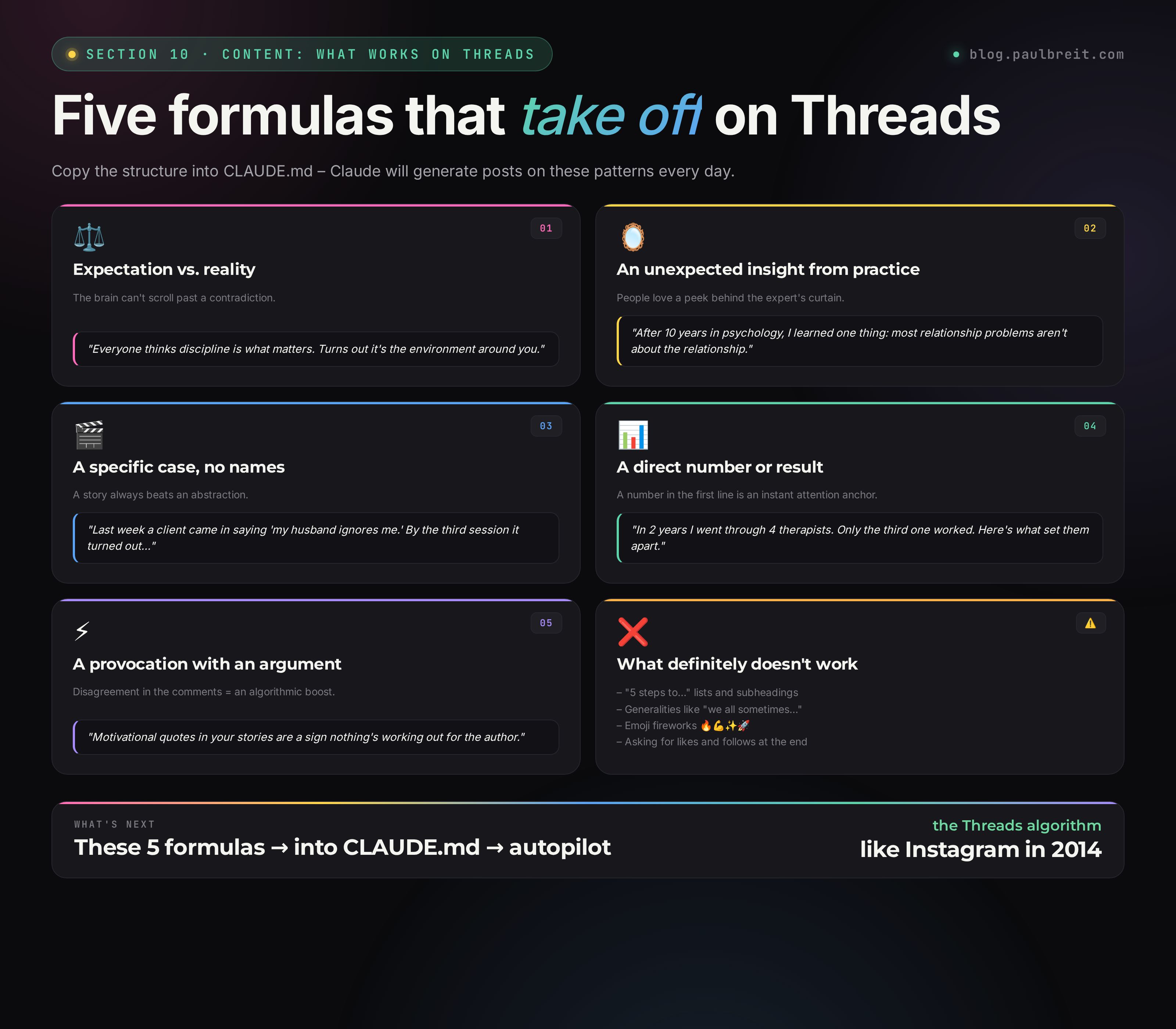
Post formulas that take off
1. Expectation vs. reality
"Everyone thinks X. But actually it's Y." This works because the brain reacts to a contradiction – you can't scroll past it.
2. An unexpected insight from your profession
"After 10 years in psychology I learned one thing: most relationship problems aren't about the relationship." People love a peek behind the expert's curtain.
3. A specific case, no names
"Last week a client came in saying 'my husband ignores me.' By the third session it turned out..." A story always beats an abstraction.
4. A direct number or result
"In 2 years I went through 4 therapists. Only the third one worked. Here's what set them apart."
5. A provocation with an argument
"Motivational quotes in your stories are a sign nothing's working out for the author." Don't fear disagreement in the comments – that's the algorithmic boost.
What definitely doesn't work
- Lecture posts with subheadings and "5 steps to..." lists
- Generalities with no specifics: "we all sometimes feel..."
- Asking for likes and follows at the end of a post
- Emoji fireworks: 🔥💪✨🚀 reads like a scam
- "Selling" posts more than once a week – the audience leaves
Threaded posts (chains)
Threads is named for a reason – here you can write in chains. A long thought breaks into several short posts linked into a thread. It's a powerful tool:
- The first post is short and hooky, it's what people see in the feed
- The second and beyond unpack the thought, read by those who clicked
- The algorithm values thread reads more than likes
Claude generates threads beautifully – just ask it to "make a 4-post thread on topic X, first one a hook, last one a conclusion."
How to make Claude learn from what takes off for you
This is the part that turns autoposting from "check the box – published" into a growing blog. You have stats: which posts pulled the most views, likes, replies. Claude can read them and draw conclusions – which topics, which hooks, what length, what timing works. And then build on those conclusions.
In the Claude Code app, write:
Go into my Threads through Playwright (the session
is saved on the server). Pull my last
100 posts with metrics: views, likes,
replies, reposts.

Find the top 15 by total engagement.
Spot the patterns:
– Which topics pull the most
– Which first-line hooks work
– What post length is best (short / medium / long)
– What time of day posts take off most
– Which type of content (story / opinion /
  breakdown / provocation) resonates most

Save this analysis in CLAUDE.md under
"What works for me" and factor it in
when generating new posts. Update the analysis
in 30 days on fresh data.
A minute later, your CLAUDE.md has a "What works for me" block with concrete patterns – not the vague "write something interesting," but "short posts under 200 characters with a question in the first line, posted at 2 PM, do well for you." From there, Claude generates posts in that direction on its own, and the metrics climb.
Most blogs stall because the authors are guessing. Claude doesn't guess – it looks at the stats, sees the patterns you miss, and adapts. After 2–3 such iterations your blog becomes a self-learning system. Every month it gets a little better – automatically.
Section 11How to teach the AI to write in your voice
This is the main secret. A post you can't tell apart from your own isn't Claude magic. It's the right material, given the right way.
The 10-post method
Take 10 of your best posts – the ones that pulled the most response. Not random ones, your top 10 by your own judgment. To skip choosing by hand – hand Claude your whole archive and ask it to pick the top through a 5-prompt channel breakdown. Paste them into CLAUDE.md under "Examples of my posts." This gives Claude an understanding of:
- The sentence length you use
- The phrases you favor
- How you structure a thought
- Your tone – sharp, warm, ironic
- How you open a post and how you close it
Claude copies style beautifully from 10 examples. From 3 – noticeably worse. From 1 – almost not at all.
A list of banned words
Every author has their own "can't stand it." For some it's "allow me," for others "let's figure it out," for others "it's worth noting." A full breakdown of living and dead phrasing is in the guide on 10 prompts for experts. Make your own and add it to CLAUDE.md:
# Words and phrases I never use
– Allow me, permit me, let's
– First, second, third
– At this point in time, by means of
– It's worth noting, it should be emphasized
– Thus, however, that said
– The em dash ( — ) – I use only the en dash ( – )
Claude will stop slipping them in. That removes 80% of the "AI markers" from your posts.
Feedback through editing
Every time you edit a Claude post before publishing, remember exactly what you edited. At the end of the week, add it to CLAUDE.md:
# Edits I make most often
– Claude likes to add "in a world where..." – always cut it
– Claude ends on a motivational note – ask it to end on action
– Claude puts too many commas in simple sentences
After 2–3 weeks of these iterations, Claude learns to write so well you stop editing at all.
The "rewrite it like me" method
One more trick. When you want to publish a thought but can't be bothered to write it – dictate it by voice into the Notes app. You get a rough draft. You hand it to Claude and ask: "Rewrite this in my style per CLAUDE.md, keep the meaning." You get a finished post in 30 seconds.
This is the best option for live authors. Claude doesn't invent the thought for you – it just tidies it up.
Section 12Power move: let Claude watch your competitors
This is my favorite. A feature almost no one does, because by hand it's slow. For Claude – it's routine.
The idea is simple. I broke down the full build of this setup – with a ready bot and a morning roundup of your competitors' top 5 viral posts – separately in the guide on the AI client hunter. You give Claude a list of 10–20 blogs in your niche (competitors, adjacent people, those you respect). Once a week Claude goes through each one, finds their most viral posts of the week, breaks them down – why it took off, what the hook was, what the format was. And it files those breakdowns into a separate idea-bank file. All you have to do is open the bank and pick what to adapt for yourself.
We don't steal text. We take the ideas, angles, and formats that worked. Then Claude rewrites them in your voice, with your experience, with your examples. The output is fully your post, just on a topic the audience has already shown demand for.
How to set this up (with one prompt)
In the Claude Code app, write something like:
Set up competitor tracking on the server
for Threads. Here's the list of accounts:

@competitor_1
@competitor_2
@competitor_3
@adjacent_1
@adjacent_2
(15 total)

Every Sunday at 6 PM Eastern:
1) Go into each profile through Playwright.
2) Collect all posts from the last 7 days
   with metrics (views, likes, replies).
3) Mark the top 3 by engagement for each.
4) For each top post, write to the file
   /root/threads/competitors-week.md:
   – author and date
   – what the post is about (1 sentence)
   – what hook was used
   – what format (story / opinion / list / question)
   – a hypothesis on why it took off
   – an idea for how to adapt it to my niche
5) Send me a summary on Telegram: the top 10
   ideas of the week with a short phrasing,
   the ones you'd suggest I develop.

Then I'll pick 2–3 from the list and tell
you which ones to develop into full posts.
Claude sets this up once. Every Sunday, 10 ready ideas land in your Telegram, validated by other people's reach. You pick 2–3 – Claude unpacks them into posts in your voice and schedules them for the week.
Why this changes the game
The average author sits there thinking "what should I write about." Spends an hour on an idea that might flop. You – open the file of breakdowns, see "three experts had posts on burnout take off this week in a new way," and write your own version. It's a shift from "I'm guessing" to "I'm working with market data."
After a month of this system you start to understand your niche better than the competitors understand it themselves. Because they only have their own experience, and you have breakdowns of 15 blogs in parallel.
Wire in the "what works for you" piece from section 10 here too. Claude compares: "this idea from someone else's blog is closest to what took off for you last month – take that one first." You get a double filter: it worked for the market + it matches your pattern of success. The odds of a hit go up several times over.
FAQFrequently asked questions
Does the server need to stay on all the time?
Yes, but you don't manage it. The VPS runs 24/7 in a data center and posts on its own. You don't keep your own computer on, you don't babysit anything.
Why Claude, not ChatGPT for Threads?
Claude holds long context better, writes more naturally, and is more stable in agent mode. ChatGPT slips into templates more often.
What does the whole setup really cost per month?
Claude Pro $20 plus a VPS from $5. That's about $25–30/mo total. An SMM hire for the same reach runs $700 or more.
Is automated posting against the rules?
Posting your own content on a schedule is fine. Just keep it within Threads' rules: real account, your own content, no spam or aggressive mass-following. The approach here is one author publishing their own posts, which is exactly what the platform wants.