Stop hunting for post ideas for good: get dozens of ready-to-go options every morning
Every morning an expert opens Telegram and stares at a blank field – what to write about today. An hour later, either a weak post is born, or nothing is. This guide is how to build an AI agent that reads your competitors' channels overnight, picks the posts with the highest engagement, brings you a morning digest with adaptation ideas, and turns someone else's viral thought into a finished post in your voice with one tap.
Your competitors on Telegram publish a dozen posts a day. Most of them fly right past. One or two pull in several times more reactions, comments and shares – they hit a nerve with the audience, and readers didn't scroll past, they responded. If you catch a post like that the next morning, you've got a ready-made idea in your hands, and all that's left is to rewrite it in your voice.
The AI client hunter is a setup of a second Telegram account for reading, the Telethon library, Claude, and an interactive bot with buttons. Set it up once – and every morning at 8:00 your DMs hold a digest of the 5 strongest competitor posts plus three ideas for each. Tap a button – and a minute later there's a finished post in your style waiting in the chat.
* A quick word on Telegram reach so there's no confusion. Telegram has no recommendation feed – your subscribers see every one of your posts in the order it goes out. The view count itself tells you very little. The real "did it land or not" signal is engagement relative to reach: of the people who read it, how many responded with a reaction, a comment or a share.
What's inside
- Why engagement on other people's channels is the cheapest source of ideas
- What the AI client hunter is built from
- Sign up and pay for Claude
- A second Telegram account for reading
- Telegram api_id and api_hash keys
- A bot to wake you up with ideas
- Get a VPS
- Install Claude Code on the VPS
- Where to find competitor channels
- How Claude captures your channel's voice
- Building the hunter with Claude's hands
- How to work with the morning digest
- Account safety and risks
- What's next: extensions
Section 01Why engagement on other people's channels is the cheapest source of ideas
Experts struggle with one question for years: what to write about today. They sit and dream up topics out of thin air, guessing at what will land. Some posts go into the void. Some happen to hit, and there's no way to tell why that particular topic worked.
Meanwhile, right next door, in ten of your competitors' channels, the audience has already voted. With reactions, comments, shares. And every day you can see which topic people responded to more strongly than usual. It's a free focus test on exactly the audience you care about – it sits with your niche neighbors too.
How to properly measure "did it land" in Telegram
Telegram has no recommendation feed. A subscriber sees every post from a channel they follow, regardless of how strong the post is. So the view count itself tells you very little. The quality of a post only affects views indirectly: through shares, and through someone showing the post to a friend.
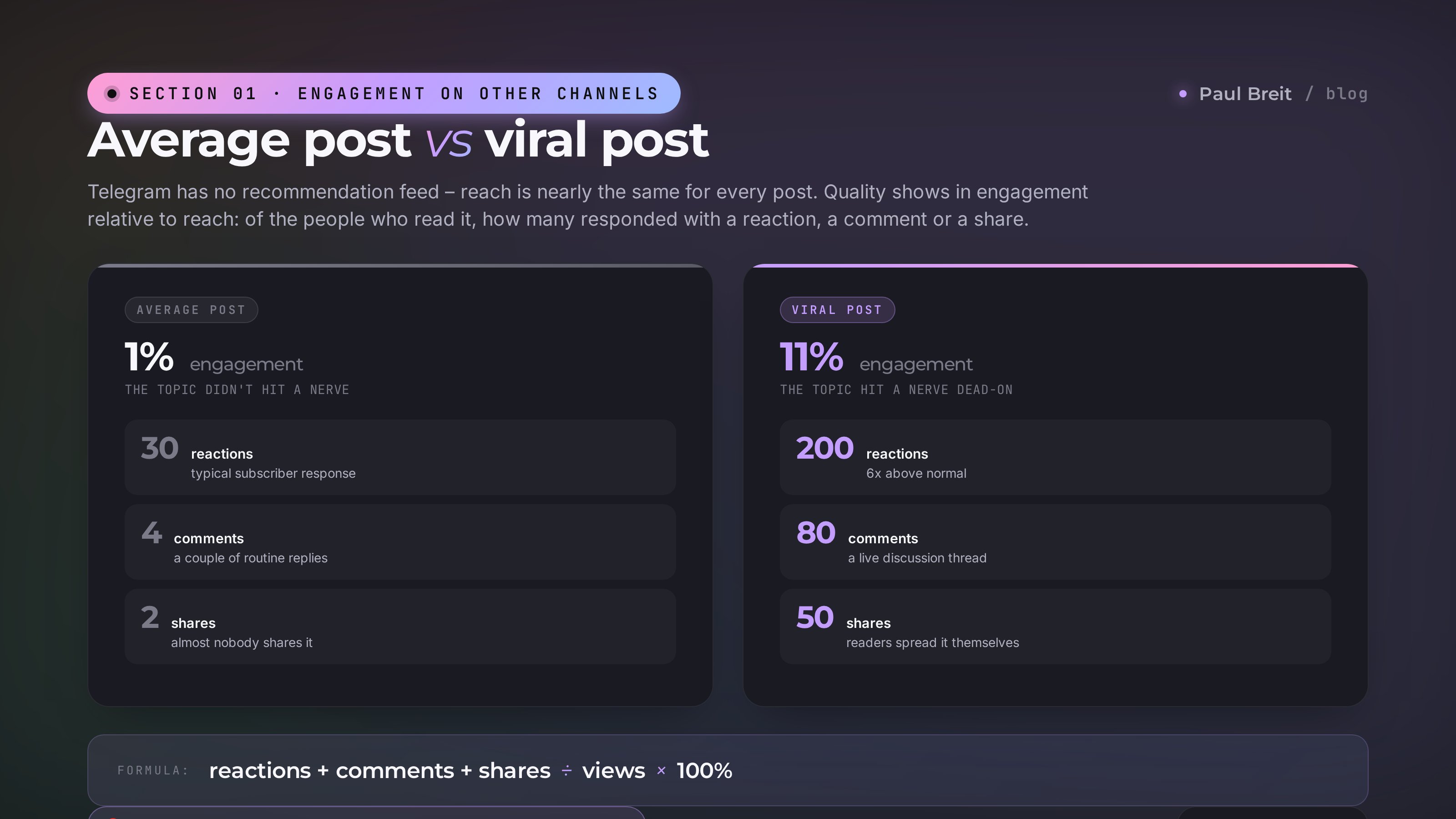
The key metric in Telegram is engagement relative to reach. In plain terms: reactions plus comments plus shares, divided by views. On a channel with 10,000 subscribers, an average post typically pulls 30 reactions and 4 comments on 3,000 views – that's about 1%. If some post pulls 200 reactions, 80 comments and 50 shares on those same 3,000 views, that's 11%, ten times the average. That's the signal: the topic landed.
What monitoring other people's engagement gives you
- Ready-made viral topics. You're not guessing what will land. You see what already landed with your niche neighbors
- A benchmark against similar channels. If a competitor your size got three times more reactions on a post, your delivery is lagging. You see it instantly
- Fresh trends. If one topic surfaced with three different authors in a week, a new demand has entered the niche. You catch it before anyone else
- The audience's voice in the comments. Under a viral post there's always a long thread of real questions and objections. That's material for your next post and for your ads
- Publishing rhythm. You can see what hours your competitors' posts take off. You can tune your own rhythm to match
Content marketing on guesses loses to content built on other people's results. Competitors have already spent the time and money to test topics for you. From there, all that's left is to take the proven winners and adapt them to yourself – that's a normal working growth strategy, not "creating from scratch."
Section 02What the AI client hunter is built from
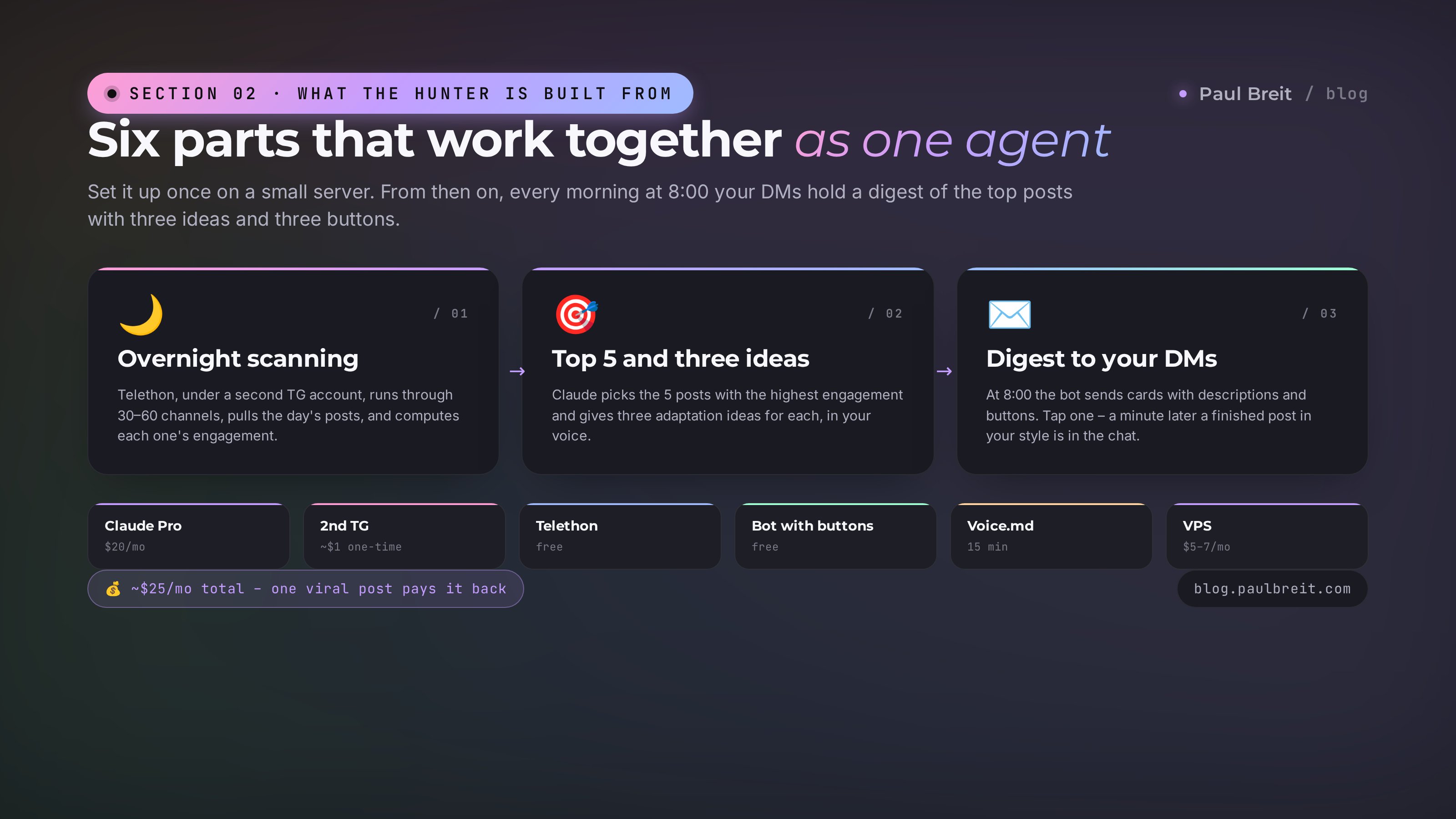
Before we dive into the steps – the big picture. The AI client hunter is made of six parts that work together on one small server.
| Component | Role | Cost |
|---|---|---|
| Claude (Pro or Max) | The hunter's brain. Calculates engagement, picks the top posts, suggests ideas, writes the final texts | $20/mo |
| Second Telegram account | Subscribed to competitor channels. The hunter reads posts on its behalf | ~$1 per number, one time |
| Telethon library | Pulls posts, views, reactions and shares from Telegram's open API | Free |
| Telegram bot with buttons | Sends the digest in the morning. Tap a button – it generates a post and sends it to your DMs | Free |
| Claude's analysis of your channel | Claude reads your channel itself and builds a voice sample – so it writes like you, not "like the average" | 15 minutes |
| VPS server | So all of this runs while you sleep | $5–7/mo |
That's ~$25–27 a month total. One post from the digest that lands harder than usual will pay for the subscription six months in advance. And there are 30 digests a month.
If you read the guide on the AI spy – these agents have different jobs. The spy sits in private chats and catches insights from conversations between experts. The hunter reads public competitor channels and looks for already-published content that the audience has measured. The spy works with raw conversations, the hunter with finished posts and their metrics. They complement each other nicely and live happily on the same server.
How it works in one paragraph
Every morning at 7:30 the hunter wakes up on the server. Through Telethon, under your second account, it goes down the list of competitor channels, pulls every post from the last 24 hours, calculates each one's engagement and compares it to that channel's average. From all the channels it picks the top 5 by engagement. For each it gathers three ideas for adapting it to your blog. The bot sends the digest to your DMs at 8:00, with buttons. Tap a button – Claude writes a post in your style, and the bot sends it to the chat.
Section 03Sign up and pay for Claude
If you already have a working Claude Pro or Max and you've used Claude Code – skip to the next section.
If not – here's a short rundown. The full guide to signing up and paying is in the Threads article – I won't repeat it here.
If you're outside Anthropic's supported regions, use a VPN
Anthropic supports the US, EU and many other countries. If you happen to be somewhere it isn't available, route your connection through a supported location. Options that work well: Proton VPN, Mullvad, or any reputable provider.
Sign up at claude.ai
Use a Google account. Confirm your phone number – any regular mobile number works.
Pay for Claude Pro – $20/mo
Any standard card works. It takes about 15 minutes from sign-up to a working subscription. Pick the monthly plan to start – you can always upgrade later if you need more headroom.
Claude Pro at $20/mo is plenty for the hunter. A morning digest is 8–12 requests to Claude, plus one request per generated post. It fits comfortably inside Pro for the month. If you want to run an AI spy, a Threads automation and other tasks in parallel, get Max at $100 – its limits are 5x higher.
Section 04A second Telegram account for reading
The hunter needs a separate account. Not the one you message people from, and not the one your channel runs on. It's the same move as a separate card for subscriptions – not critical, but it saves you from sudden losses. A full breakdown of what an expert should generally protect from automated AI scanners is in the guide on protecting yourself from AI hacking.
What to know before signing up
One number, one account. Telegram ties an account firmly to a phone number. Want a second one – you need a second number.
A virtual number works too. Telegram accepts numbers from any normal carrier. Virtual ones from services like 5sim, SMS-activate or OnlineSim are fine. The price is about $0.50–1 for a one-time number, $3–7 for a month's rental.
Don't use disposable numbers. Telegram periodically asks you to revalidate the account. If the number is no longer yours, you lose the account. Rent for 30 days or use a second SIM card.
Get a second number
On a service like 5sim.net, choose a country, the "30-day rental" plan, and grab a number with Telegram support. The price is around $4–7. Or use a second SIM card from another carrier that you only use for this.
Set up a second account in Telegram
Telegram lets you keep up to three accounts at once. Tap the three lines at the top left → the little arrow next to your name → "Add Account." Register a new one with the second number.
Set the account up "neutrally"
Use a real or neutral name. No empty accounts with a single avatar. Add a normal photo, a short bio. This lowers the chance of landing in an anti-spam filter.
Don't message anyone from this account, and don't join 30 channels on day one. 3–5 channels a day is fine. For the first week, behave like an ordinary new user.
Don't link the second account to your main email, don't use it for payments, and don't keep important conversations on it. This account is a disposable tool. If it gets banned, you'll spin up a new one in 10 minutes and lose nothing important.
Section 05Telegram api_id and api_hash keys
For Claude to log into Telegram through Telethon under your second account, you need two keys: api_id and api_hash. Free, on Telegram's official site, 5 minutes.
Go to my.telegram.org
Open my.telegram.org – it's Telegram's official portal for developers. Log in with the second number. Telegram will send a code to the app – enter it.
Open the API development tools section
On the main page, click "API development tools." If it's your first time, you'll be asked to fill out a form: app name, a short description, platform. Fill it in freely: "Personal Reader," "Internal monitoring tool," platform Desktop. Nobody checks this form – it only exists to confirm you agree to the rules.
Copy api_id and api_hash
After you save the form, you'll land on a page with the keys. api_id is a 7–8 digit number. api_hash is a long string of letters and digits. Copy both values and save them somewhere safe – a password manager or a private note. You'll need them at the build step.
The api_hash is essentially your app's password. If it falls into the wrong hands, someone can write in Telegram on your behalf. Don't publish it on GitHub, don't send it in open chats. If you leak it by accident, you can generate a new one at my.telegram.org.
Section 06A bot to wake you up with ideas
The bot does two things: in the morning it sends the digest with buttons, and on a button tap it generates a post in your style. You make it for free through @BotFather in Telegram, in about a minute.
Open @BotFather in Telegram
Search Telegram for @BotFather, pick the account with the checkmark (the official bot). Tap Start.
Create a new bot
Send the /newbot command. BotFather will ask for the bot's name (anything, e.g. "My Hunter") and a username (it must end in bot, e.g. idea_hunter_my_bot). The username has to be available – if it's taken, come up with another.
Save the bot token
BotFather will send a message with the token – a string like 1234567890:AAEhBOweik9ai2vSgMy_qkW9qpL7wsApg9I. This is your bot's password. Copy it and save it next to api_id and api_hash.
Find out your chat_id
So the bot knows who to send the digest to, find the bot @userinfobot in Telegram and tap Start. It'll send your ID – a number like 265489854. Save it.
Send your bot a first message
Find your bot, tap Start, send "hi." This is needed so Telegram opens a channel for the bot to message you in your DMs.
Summary: the second TG account, its api_id and api_hash, the bot token, your chat_id. These four things plus Claude are enough to build the hunter. Next up – the server and the build itself.
Section 07Get a VPS
A VPS is a rented computer that runs in a data center 24/7 without you. The heart of the system: while you sleep it reads channels, while you eat breakfast it assembles the digest.
Why a VPS and not a laptop
On a laptop the script only runs while the laptop is open and connected. Close the lid and the hunter stops. If you're doing this for serious work, you need a server.
Plus a VPS sits in a stable data center. Telethon runs cleanly on a proper server, and the connection stays solid – no flaky home Wi-Fi to worry about.
Where to get a server
Any inexpensive VPS works. The easiest to work with is Hetzner Cloud – cheap, reliable, with data centers in the US and EU.
I recommend Hetzner Cloud
Stable, cheap, and you can pay with any regular card. A server at $5–6/mo is plenty for the hunter, with room to spare.
Go to Hetzner Cloud →Any reputable cloud host will do the job – pick whichever you're comfortable with.
Which server to order
| Parameter | Value |
|---|---|
| Location | US or EU |
| OS | Ubuntu 24.04 LTS |
| CPU | 1–2 cores |
| RAM | 2 GB |
| Disk | 20 GB SSD |
| Budget | $5–6/mo |
After it's created, save the server's IP address and the root password. You'll need them on the next step, when we move Claude in.
Section 08Install Claude Code on the VPS
This is the best part. Instead of typing commands in a terminal, you'll open Claude Code on your laptop and just tell it in words what needs to be done. It'll connect to the server and install everything itself.
If you don't have Claude Code yet, download it from claude.com/claude-code, install it, and sign in with your Anthropic account.
Anthropic blocks some regions by IP. If you're in one of them, neither Claude Code's authorization on the server nor requests to Claude will go through without a VPN. Turn on a VPN with an EU or US location before every Claude Code session. Proton VPN, Mullvad, or any reputable provider will do.
Tell Claude to prep the server
In the Claude Code chat, write something like this (substitute your own values):
I have a VPS on Hetzner Cloud:

IP: 185.12.45.67
User: root
Password: MyPassword123

Connect over SSH and prep the server for the AI client hunter.

What to do:
1) Update the system, install python3, pip, screen.
2) Install Claude Code on the server and authorize
   it under my account (I'll enter the code at the link).
3) Install the libraries telethon, python-telegram-bot,
   anthropic.
4) Create a folder /root/hunter and prepare an empty
   config.env file there – I'll put the keys in it.
5) Verify everything works: run a short
   Telethon ping with my api_id and api_hash.
Claude will ask a couple of clarifying questions (e.g. "start the install?"). You answer "yes." After that it mostly happens on its own: you watch commands scroll by, occasionally Claude asks permission to install something – you agree.
Authorize Claude on the server
Once Claude installs its code on the VPS, it'll ask you to authorize: it gives you a link to follow and a code to enter. After that, Claude is on the server – with the same account and subscription you have on your laptop.
Put the keys in the config
In the Claude chat, write:
Write these variables into /root/hunter/config.env
(in KEY=VALUE format, one per line, no spaces):

TG_API_ID=12345678
TG_API_HASH=string-from-my.telegram-keys
TG_PHONE=+1XXXXXXXXXX  (the second account's number)
BOT_TOKEN=bot-token-from-BotFather
MY_CHAT_ID=my-id-from-userinfobot
Claude will create the file, set permissions to 600 (only root can read), and make sure the data inside is correct.
From a chat with Claude on your laptop, you configured a whole server with authorization, libraries and a config. Without a single command typed by hand. That's "agency" – Claude doesn't advise, it does. It'll keep going in this same style.
Section 09Where to find competitor channels
The hunter is only as good as the list of channels it watches. Weak channels, weak digest. So build the list with care: a one-time, 30–40 minute effort determines the value of every future morning digest.
Who's a "good competitor"
It's not the one who sells the same thing. It's the one whose audience overlaps with yours but whose product doesn't. That way the digest doesn't turn into spying on an enemy – it becomes a source of complementary ideas.
If you're an expert in systematic client acquisition, your "competitors" in this sense are marketers, content creators, producers, copywriters, sales experts, personal-brand authors. They have your audience too, but they talk to it from different angles – and that's exactly what you need.
Six working ways to build the list
1. Similar channels in a competitor's card
Open any large channel in your niche, tap the name at the top – the description opens. Below the description, Telegram itself shows a "Similar channels" block, a list the algorithm assembles based on audience overlap. It's the highest-quality source: people who read channel A probably read B, C and D from that block. Run through 3–4 large channels in the niche and you've got 15–20 channels to start.
2. TGstat and Telemetr directories
Filter by topic and size. A good range is 10,000 to 100,000 subscribers with an ERR (views per post / subscribers) above 15%. Channels like that have a live audience. Don't grab everyone indiscriminately – check that the channel is authored, not a news aggregator.
3. Folders and curated lists from thought leaders
Many well-known experts publish folders of their favorite channels or post recommendations. It's a ready-made base someone already put taste into. Find 2–3 respected authors in the niche and see who they recommend.
4. Ad marketplaces like Telega.in and similar
Ad exchanges show channels in a niche that have an audience willing to pay for advertising. If a channel is on the platform, it's alive and it converts. Just open the catalog and run through your topic.
5. Mentions in the comments
Under viral posts in large channels, other experts often get mentioned – "so-and-so covers this better," "read such-and-such channel." A natural recommendation network that surfaces strong authors the directories don't show.
6. Your own subscribers
Ask 5–10 people from your audience what other channels in an adjacent topic they read. In half an hour you'll collect 20–30 fresh links no directory will ever show you.
How many channels is optimal
30–60 live channels is the sweet spot. Fewer, and the digest gets thin – there won't be viral posts every day. More, and the hunter's overnight run gets pricier and longer, while the top 5 still boils down to the same leaders.
It's better to have 40 concentrated channels with active authors than 100 full of memes and reposts. Once a month, review the list: which channels give signal and which have died – cut the dead ones, add new ones.
You don't create any files by hand. Once the list is ready, just send it to Claude in the chat: "here's my list of competitor channels: @channel_a, https://telegram.me/channel_b, @channel_c – add them to the hunter so it scans them every morning." Claude will put the list on the server itself, check that all the links are valid, and report back that it's done.
Section 10How Claude captures your channel's voice
This is the key step that separates the hunter from generic AI text generation. Without an understanding of your voice, Claude writes an "average good post" – without you in it. With an understanding of your voice, it writes a post a reader can't tell apart from one you wrote yourself.
The good news: Claude does all the work. No hours spent hand-building style rules – you just hand it a link to your channel.
Give Claude a link to your channel
In Claude Code (still connected to the server), write something like this:
Here's my Telegram channel: https://telegram.me/my_channel

Read the last 100 posts through Telethon
(use the second account and the api_id and api_hash
from config.env). Build a sample of my voice from them:

– Do I write with "you" formal or casual, what's the tone,
  is there humor or not
– Which techniques I like: contrasts, personal stories,
  quotes, short punchy sentences
– What my post structure looks like – the hook, paragraph
  length, how I usually end
– Which words and turns of phrase I repeat often
– Which words and turns of phrase never appear with me
  (the slots where other people usually have AI markers)
– Which topics I write about most often

Save the result on the server as voice.md in the
hunter's folder – posts will be generated from it later.
And send the file here in the chat, I'll read it
and tell you where to fix.
Claude will pull your last 100 posts through Telethon, run them, and build a document. In 2–3 minutes it'll send back a finished breakdown – short, a page or two. You'll read it and say "fix this here – I never use the word X," and Claude will fix it. That's it, your voice is locked in.
If your channel just started
If your channel has fewer than 30 posts, or they don't reflect your real voice, tell Claude: "the channel is young, there's little material. Take some transcripts of my live streams or interviews too" and attach a link to a couple of recordings or text transcripts. Claude will build the voice from those. The main thing is that Claude learns from your live voice, not from posts polished by a copywriter.
Rebuild it once a quarter
Your style evolves. Three months after the first setup, ask Claude to rebuild the voice from new posts – especially if there were posts in that time that took off hard. Those are exactly what the hunter will take as the "target style."
In 15 minutes you got what usually takes hours by hand. Claude read your channel itself, picked out the techniques, locked in the vocabulary. From now on, every time you ask the hunter to write a post, it'll load that breakdown into the prompt and write in your voice.
Section 11Building the hunter with Claude's hands
At this stage Claude already has: the keys in config.env, the list of competitor channels, and a sample of your voice. All that's left is to ask Claude to build the script itself. It does everything itself – writes the code, installs the dependencies, sets up the schedule. From you, just one thing: give it a detailed brief.
Tell Claude what the hunter should do
In Claude Code, write something like this:
In the /root/hunter folder, build the AI client hunter.

What it should do:

1) Every night at 7:30 ET:
   – through Telethon, under our second TG account,
     visit the channels from my list (you saved it)
   – for each channel, pull the last 30 posts,
     compute average engagement (reactions +
     comments + shares ÷ views)
   – from posts in the last 24 hours, pick the ones
     whose engagement is at least 1.7x higher than
     that channel's average – meaning they took off
   – collect the top 5 across all channels

2) At 8:00 hand the top 5 to you and ask for:
   – for each: 1–2 sentences on what the post is about
   – the engagement numbers and why it took off
   – 3 ideas for adapting it to my blog,
     using voice.md (why this topic is for me,
     what angle to take, how my post differs)

3) The morning bot sends to my DMs:
   – a header "Morning digest for [date]"
   – a card for each post with a description and ideas
   – under each card, 3 inline buttons
     [Idea 1] [Idea 2] [Idea 3]

4) When I tap a button:
   – the bot takes the source post and the chosen idea
   – passes it to you along with voice.md
   – you write a finished post in my voice
   – the bot sends it as clean text

Install everything needed (telethon, python-telegram-bot,
anthropic). Authorize Telethon under the second TG account.
If it asks for an SMS code for the first login, message
me in the chat and I'll forward the code that comes
to the second Telegram. After that Telethon runs on its own.

Set up cron and a background service for the bot so it
runs around the clock. Logs go to /root/hunter/log/.

When it's ready, run a full cycle right now on one
test channel and show me the result.
From there Claude writes everything, installs it, and brings the service up. If it has architecture questions, it'll ask. If it needs an SMS code for Telethon's first login under the second TG, it'll ask you to forward it right in the chat. That's the only thing a human does: look at the 5-digit number that came to the second Telegram and forward it to Claude. After that Telethon saves the session and never asks for a code again.
Run a test right now
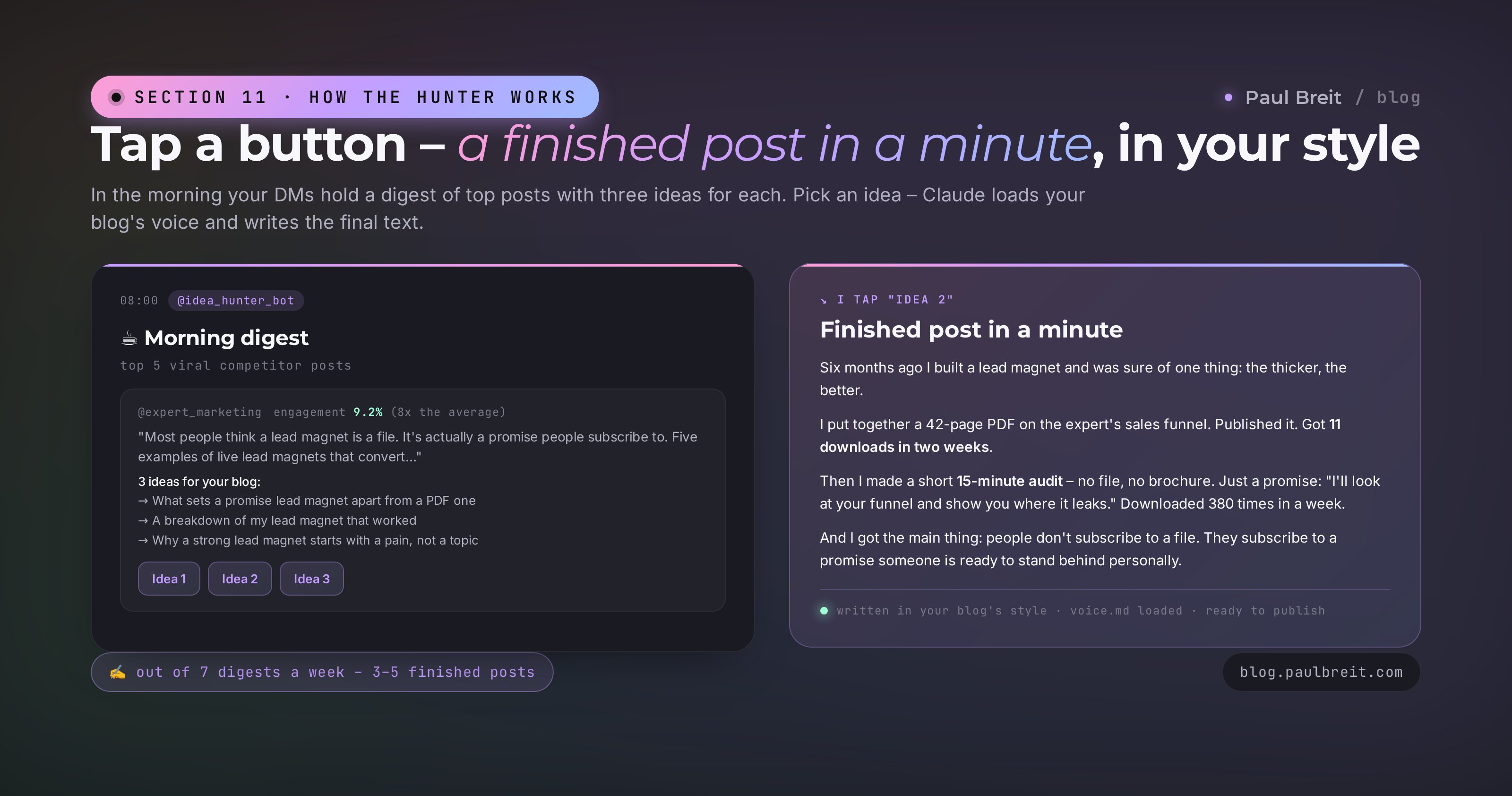
When Claude reports "everything's built," tell it: "run a full cycle right now, don't wait for night." In 3–5 minutes the first digest with buttons lands in your DMs. Tap any of them – a minute later a finished post in your style arrives. Read it out loud, check that the text sounds like you, that there are no AI markers, that the formatting didn't break. If something's off, tell Claude "fix this here," and it'll correct the code or the voice sample.
A fully working hunter: it scans channels overnight, sends a digest with buttons in the morning, and writes a post in your style on request. You didn't write a single line of code. The only physical action required was forwarding one SMS code one time.
Section 12How to work with the morning digest
Getting the digest is a third of the job. The second third is filtering it right. The third is not turning the hunter into a copy machine.
15 minutes in the morning
Open the digest over coffee, before the workday starts. Run through the 5 posts with one filter: where's a topic I can say something of my own on, not just repeat someone else's?
- If I have personal experience with the topic – take it. Someone else's post gave the angle, your experience gives the uniqueness. Tap the button, get a draft, polish it to fit you
- If the topic's hot but I have no experience – skip it. Someone else's posts under your name are a fast track to losing the audience's trust
- If the same topic took off with two different authors in one day – that's a trend signal. Worth going in even with basic experience, the demand is real
- If a post is written in a manner opposite to yours – a rare gift. You can write your counter-take: "this topic has another side too," and build a whole separate post on it
Out of 7 morning digests a week, you get 3–5 real posts, written and published. Over a month, 12–20 finished publications, none of which you had to drag out of thin air. If, on top of the idea, you want a full set right away – "post + reel + caption + adaptations for Meta and Threads" – plug in the 10-prompt pipeline for experts.
The main rule – you're the editor, not the observer
The hunter wrote a draft – that's not the final, it's a half-finished part. Read it out loud. Find the spot where you stumble – rewrite it. Add one real example from your own practice. Cut the paragraph that feels unnecessary. After ten cycles like that, the hunter starts writing in your style more and more precisely – you're effectively fine-tuning it with your edits.
You stop figuring out what to write about every morning. The topic comes on its own, already with proof that it landed with the same audience. Your head is freed for the thing that matters – depth and personal experience in the post. Content marketing turns from a guessing game into a deliberate choice.
Section 13Account safety and risks
Telegram doesn't forbid monitoring public channels – you read exactly what any subscriber sees on their phone. But Telegram does have an anti-spam system that can flag an account that's "too automated." To avoid trouble – three simple rules.
Rule 1: don't scan too fast
If you set it to "pull the entire history of every channel for all time in one pass," Telegram will temporarily limit the account. Telethon paces its own requests. Don't remove those pauses to speed things up – you save nothing and lose the account.
Rule 2: one account, one server
Once you log Telethon in on the VPS, Telegram remembers that session. If you open the same account on three other devices in parallel, Telegram gets suspicious. Logged in on the server – don't use that account from other devices.
Rule 3: for private channels, subscribe from this same account
Telethon reads public channels by link without any subscriptions – that's part of Telegram's open API. Private channels are different: to get in, the second account has to be among the subscribers. So if your list has private invite-only channels, join them ahead of time from the second account specifically.
Don't panic: you only lost the tool. Get a new number, a new account, ask Claude to move the channel list into the new session – and carry on. Your main business and contacts weren't affected, because we used a separate account from the start. That's the whole point of two accounts: so a risk like this never touches what matters.
Section 14What's next: extensions
Once the basic hunter is running and you're used to the morning digests, the extensions suggest themselves. A few directions the people who've used the system for 2–3 months move toward.
Comparison with your own channel
You can bolt on a second module to the hunter that gathers your own posts' engagement in parallel and compares it to the competitors' top posts on the same day. In the morning you see not just "the neighbors had a hit," but "your engagement over the same period was X times lower." It's immediately clear which topics work for you, which don't, and which deliveries you should borrow.
Real-time reaction
The basic hunter makes one digest a day. You can set up a second cycle – an instant one: as soon as a post in any channel hits abnormally high engagement in its first hour, Claude sends a notification right away. The viral idea reaches you not in a day, but in an hour – while the topic's still hot.
A content series from one idea
On top of a finished post, you can plug in a second agent that unfolds a series from one idea: a channel post, a Threads thread, a reel script, an article thesis. In parallel, it's worth periodically running your own archive through a channel breakdown and blind-spot search, so the hunter works not "in general," but against your topic gaps. One morning top – five content units across different platforms.
Several directions in one hunter
If you have several projects, keep several channel lists and several digests. One for the main business, a second for a new niche, a third for experiments. Claude builds each digest toward its own goal and its own voice sample.
The hunter is the first brick. Once it works, it's clear how to stack the rest on top: auto-publishing, comparison with yourself, content series, trend forecasting. In six months you don't have one agent – you have a whole team of agents running your content faster than any in-house department. And it costs less than a single social media intern.
FAQFrequently asked questions
Why do I need a second Telegram account?
Reading channels through Telethon from your main account is risky – you can hit a limit. A second account isolates the risk and the subscriptions.
How does the agent know which post is strong and which is weak?
By the ratio of reactions, comments and shares to reach. A bare view count in Telegram tells you very little – engagement is what matters.
Can it read private channels?
Only the ones you've already been accepted into. Telethon works on your behalf – it has no access to other people's private channels.
How many competitor channels is it optimal to monitor?
10–20 of your direct competitors and adjacent niches. More is noise, less is too little signal.