How to protect your blog and client base from AI hacking: everyone is at risk
Anthropic recently tested an internal model that swept through real software and found thousands of holes in a few hours. Most of the vulnerabilities it found are still unpatched as of publication – Anthropic hasn't released the exact share. If you have a site, a list of subscribers, client chats – you're standing there with no lock. This article is a step-by-step plan for putting that lock in place in one evening.
Hacking an expert's site used to be exotic – not worth a hacker's time, the juice wasn't worth the squeeze. Now the rules are different. AI doesn't get tired, doesn't ask for a salary, and scans thousands of sites an hour, hunting for common holes. Your blog on a website builder, a mini-CRM in Notion, a Telegram channel, a Google Sheet full of leads – these are all targets not because you're famous, but because you exist.
The news about Mythos is a dress rehearsal. In six months to a year a tool like this will be in any group's hands. Protection that looked like paranoia in 2024 is basic hygiene in 2026.
What's inside
Section 01What can be taken from you
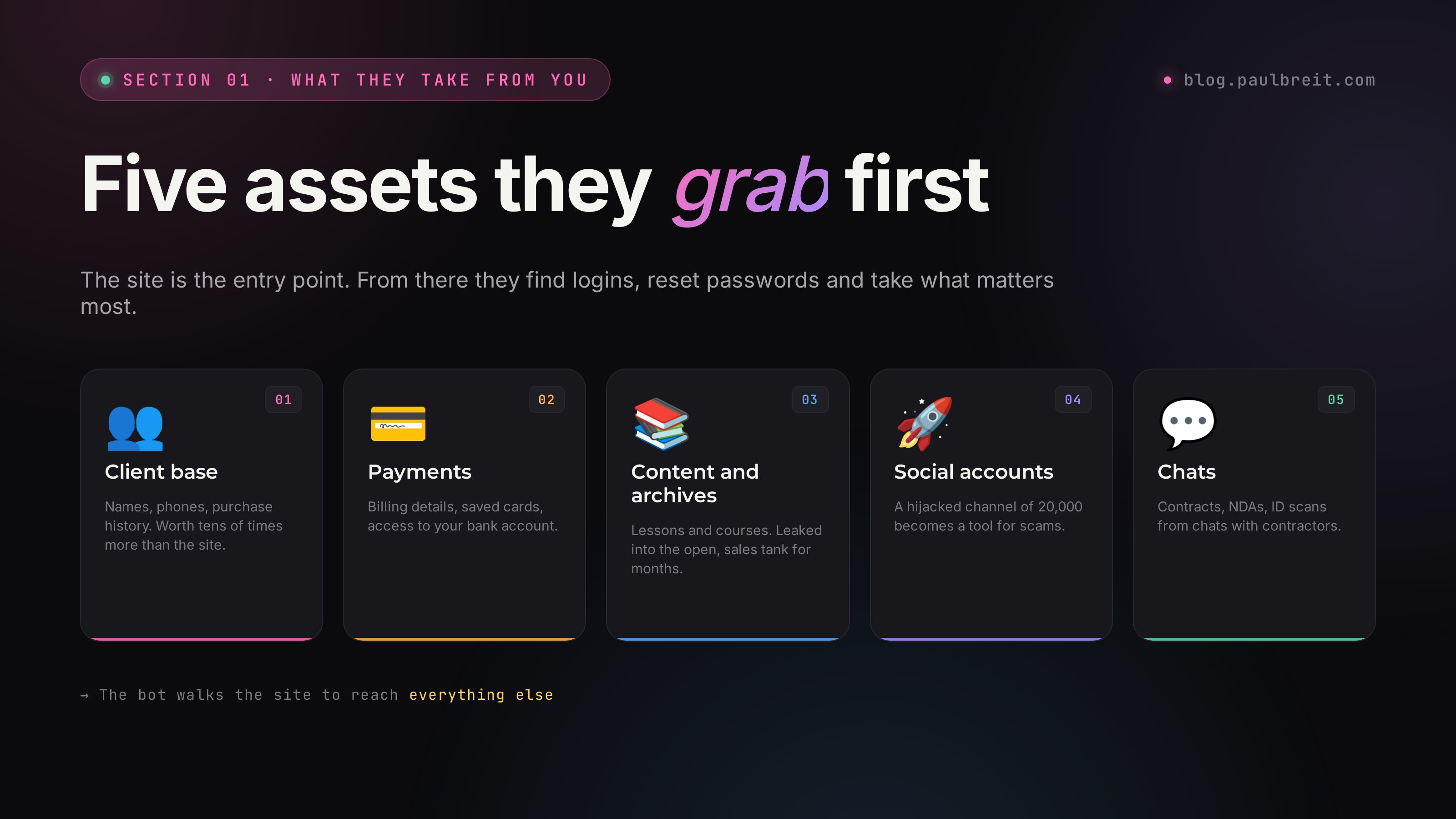
Before you lock the doors, figure out what's worth protecting inside the house. An expert, a blogger, the owner of an online school usually has this:
- The client and subscriber base. Names, phones, emails, purchase history, chats. The most valuable asset – worth tens of times more than the site.
- Payment data. Billing details, saved cards in your payment processor, in a Telegram bot, access to your online banking.
- Content and archives. Lessons, courses, presentations, videos. If they get leaked into the open, sales tank for months.
- Social reputation. Access to your Telegram channel, Instagram, Threads, YouTube. A hijacked channel with 20,000 subscribers becomes a tool for running scams in your name. And remember what it cost to earn your first 1,000 real followers – 30 to 90 days of discipline that a hijack wipes out in an hour.
- Business correspondence. Contracts, NDAs, photos of ID documents, screenshots with bank details – everything you forwarded to clients and contractors over messaging apps and Telegram.
When a site gets broken into through an automated AI scanner, the target is rarely the site itself. The site is the entry point. From there they look for logins to your email, your hosting, your Notion, your Telegram. And from your email they reset the passwords for everything else.
Protection isn't built against a "strong hacker", it's built against automated brute-forcing. If you don't use common passwords, didn't leave an admin panel open, and turned on two-factor – you're already out of the sample. The bot moves on to an easier victim.
Section 02The new threat model
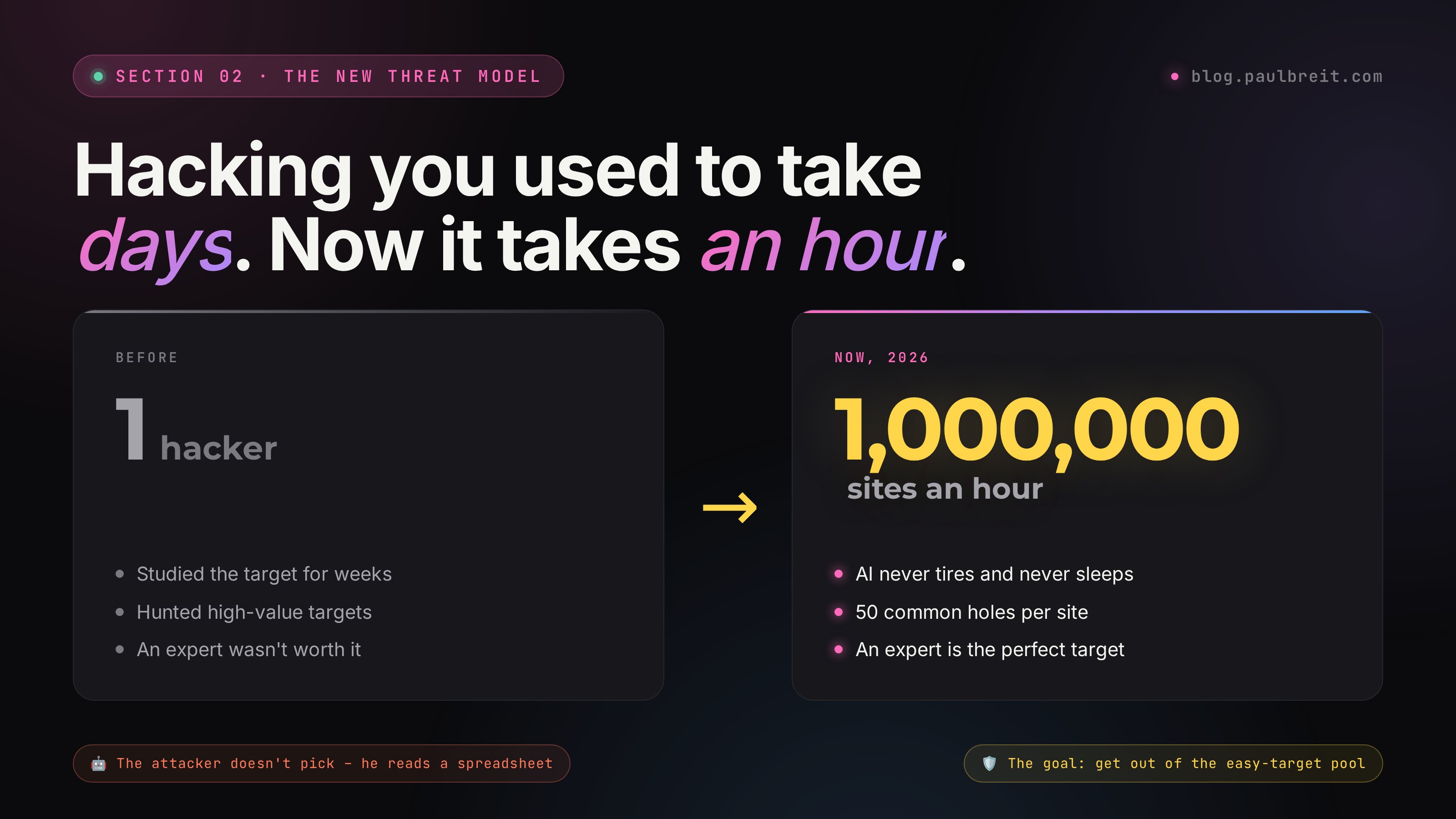
It used to work like this: a smart person picked a victim, studied them for days, found a hole, broke in. That's expensive, so mostly large companies got attacked.
In 2026 it's all different. An AI takes a list of a million sites, runs each one through fifty common vulnerabilities in an hour, and dumps the report straight into a shared database. The attacker doesn't need to "pick" a victim – he looks at the spreadsheet and chooses the juiciest ones. The easier targets that happen to hold a more valuable asset.
An expert with a base of 10,000 subscribers and a blog on an old version of WordPress is a perfect victim. Lots of assets, zero protection, nobody watching the logs.
The takeaway is simple. You don't need to build a "fortress". You need to get out of the easy-target sample. Close the basic holes everyone gets hacked through, and set up monitoring so you notice if something goes wrong. Then four areas do the work: the site, access, data, perimeter.
Section 03Protecting your site and blog
It doesn't matter what your site is built on – a website builder, WordPress, a landing page from a contractor, custom code. The basic steps are the same.
A shield in front of the site
A WAF (web application firewall) sits between your visitors and your site and filters out attacks before they reach you. The default choice for most people is Cloudflare – it has a free tier that covers basic DDoS and bot protection, and the paid plans add a managed WAF from $20 per month. It's a five-minute setup: point your domain's DNS at Cloudflare and turn the proxy on.
If you want managed cleanup and malware removal too, look at Sucuri or Wordfence (for WordPress specifically). For a custom site on your own server, Cloudflare's free tier plus a few firewall rules already pushes you well out of the easy-target sample.
Whatever you pick, check from a clean network that your site still loads fast for the people who actually need it. A WAF that breaks your page is worse than no WAF.
Nobody should reach the admin panel over the open internet
If you're on WordPress – rename the login URL from /wp-admin to something non-standard (the WPS Hide Login plugin does it in one click). Better still – restrict access by IP through your web server or WAF settings. Then you can only log in from your home and office internet.
On a hosted website builder, turn on two-factor in your account – it's in the profile settings. Without it, your site can be hijacked with a single guessed password.
An old plugin is the hole they walk in through
Log into the admin panel, update the engine, the themes, the plugins. Delete everything you don't use – don't disable it, delete it. Every unused plugin is code nobody checks, but that someone can climb in through.
Turn on auto-updates for critical components. On WordPress it's a built-in feature; on a hosted website builder this isn't even an issue.
A captcha on every form
Any lead-capture form is a potential leak point. Bots can flood your base with junk through it or, worse, feed malicious data into your CRM.
On a hosted website builder, the captcha turns on in the form settings in two clicks. On your own site, add Cloudflare Turnstile (free, privacy-friendly, no annoying puzzles) or Google reCAPTCHA v3. Both are easy to drop in and keep automated submissions out without hurting conversion for real people.
No .env, .git, /backup left in the open
Open these in your browser: your-site.com/.env, your-site.com/.git/config, your-site.com/wp-config.php.bak. If even one page opens – you have a problem. This is the basic check an AI scanner uses to find keys and passwords in a second.
If something opened up – delete the file from the server right away and change every password it contained. Then configure the web server so it never serves files like that.
Section 04Authentication and passwords
The most common hole isn't in the site, it's in people. The password Paul2020! on five services – and one leak is enough to lose everything.
Bitwarden – non-negotiable
Bitwarden is free and fully covers an expert's needs: unlimited passwords, sync across devices, a generator. The apps work everywhere. You don't need the premium subscription – the free tier is enough.
1Password is more polished but it's a paid subscription. Either one is fine – the point is to use a real password manager instead of a notes app or a spreadsheet.
The rule: every service gets its own unique password, at least 16 characters, generated by the manager itself. Don't memorize it, don't write it in notes, don't message it to yourself on Telegram.
2FA on every important service
What should have 2FA on it already today:
- Email (Gmail, Outlook, any) – the most important one, your email resets everything else
- Telegram – turn on the "Two-Step Verification" cloud password in settings
- Hosting (whatever you use)
- Your domain registrar
- Your site's CMS (the WordPress or website-builder admin panel)
- Notion, Google Drive, Dropbox
- Online banking, your payment processor, acquiring services
- GitHub, if you have it
Use an authenticator app: Aegis (Android), 2FAS (Android+iOS+desktop, open source), the built-in "Passwords" app (iPhone), or Google Authenticator. Authy is in a strange spot right now – Twilio shut down the Authy desktop app in March 2024. The iOS/Android apps are alive and supported – it works fine as a 2FA service, just without a Mac/Windows client. SMS as a second factor is a poor option: a SIM card can be reissued at a carrier store without your knowledge, and it has happened before.
Print them and put them in a safe
When you turn on 2FA – the service shows you 8 to 10 one-time codes in case you lose your phone. You need to save them. Not to the cloud, not to notes on that same phone. Print them on a printer and put them where you keep your passport.
Without them, if you lose your phone you lose access to everything at once. That's the worst day of the year for an expert who didn't plan ahead.
Section 05Client base and payments
The core principle here: store only what you actually need, and keep access narrow. Every extra name in the base is a potential lawsuit a year from now if the base leaks.
Don't collect extra
In your lead form, keep only what you need for the next touch: name, contact handle. Email and phone – only if the process stalls without them. The fewer fields, the less damage in a leak, and the higher the conversion (a bonus).
Old databases you haven't used in ages – delete or anonymize them. Two-year-old leads don't convert anymore, but in a breach they expose you to fines under privacy law.
Give a contractor only what they need for the job
If an assistant works with the base through your course platform, give them a separate account with "manager" rights, not admin. If your social media manager needs access to the Telegram channel, add them as an admin with limits (no right to remove other admins).
Once a month, run down the "who has access" list and remove everyone who hasn't worked with you in a while. Former contractors are the most common leak point in a small business.
Documents, ID photos, contracts – encrypted only
If you store scans of clients' ID documents or contracts, pack them into a password-protected ZIP (with 7-Zip) before uploading to the cloud. Keep the password in your manager, not in the same folder.
Clouds like Google Drive and Dropbox are a fine choice, as long as they themselves are protected with 2FA. A local hard drive with no encryption is a bad one: a stolen laptop takes the data with it.
Don't link your main card directly
Get a separate card you only use for online services, and keep a minimal balance on it. If it gets compromised – you lose fifty dollars, not a month's pay.
To accept payments, work through a payment processor or your bank's acquiring, not "just send a transfer to my card." Any direct exchange of payment details is material for social engineering.
Section 06Backups
Protection might not work. A backup isn't a "just in case" – it's a mandatory second layer. Without one, any incident means months of recovery.
Three copies, two media types, one off-site
Three copies of the data. On two different media types (for example, a local drive + the cloud). One copy physically somewhere else (for example, on an external drive at a relative's place or in a safe-deposit box).
It sounds like overkill for an expert, but the client base and your course archive should be stored this way. One fire or one ransomware virus – and without a second copy you're left with nothing.
An automatic backup once a week
For a site on hosting – most hosts run automatic backups, just check that they're turned on and kept for at least 30 days. On WordPress you can install the UpdraftPlus plugin – it'll drop backups into Dropbox or Google Drive.
For the subscriber base – export it to CSV once a week and put it in an encrypted folder in the cloud. The base is the main asset that feeds the 5-stage expert sales funnel: losing it hurts more than losing the site. Lessons and content – regular sync too.
A backup you haven't tested isn't a backup
Once every three months, take your backup and try to deploy it on a test environment. If, in the moment of disaster, it turns out the archives are corrupt or you no longer remember the passwords for them – they're worth nothing.
Set a calendar reminder. January, April, July, October – the fifteenth: "backup check." 15 minutes once a quarter.
Section 07Monitoring and alerts
The most dangerous attack is the one you didn't notice. An AI hack often leaves the site running: it adds invisible redirects, leaks the base through a hidden plugin, intercepts payments. Without monitoring you find out about it a month later from a client.
A free watchdog that pings Telegram
Sign up at uptimerobot.com, add your site, hook up a Telegram chat for notifications. If the site goes down, the server response changes, or the SSL drops – an alert lands in your DMs within a minute.
Check these separately: the homepage, the checkout page, the capture form. If an attacker swaps out the payment page, UptimeRobot catches it via a checkword on the page.
Turn on notifications for logins from a new device
In Gmail, Telegram, online banking, hosting – check that "login from a new device" pushes and emails are on. If someone logs in at night from an unfamiliar IP – you'll know in the first minute, not a week later.
Once a month, go into the Gmail and Telegram settings under "Active sessions" and kick out anything you don't recognize.
Have I Been Pwned
Go to haveibeenpwned.com, enter your main email. The service shows all known breaches your address has turned up in. If something comes up – the password you used on that service needs to be changed everywhere you reused it.
Subscribe to notifications there too. When your email shows up in a new breach – you'll get an email.
Section 08Email, domain, DNS
If an attacker hijacks your domain – they can redirect all your traffic to themselves and "become you" in the eyes of search engines and clients. Domain settings often get forgotten, and that's a mistake.
Block domain transfer
In your registrar's account (GoDaddy, Namecheap, Cloudflare, any) find the "Transfer Prohibited" or "Domain Lock" option. Turn it on. Without it, even if your account is compromised, the domain can be moved to another registrar in 5 days.
Don't run corporate email through your hosting
If you have an email like [email protected] tied to your hosting – when the hosting is compromised, you lose the email too. Set it up through Google Workspace (from $7/mo per user on the Business Starter plan) or Microsoft 365. Both support 2FA and keep your email separate from your site.
If your budget is tight, a free Gmail or Outlook account with a strong password and 2FA is still far better than email tied to your hosting.
The main thing – the email that receives password resets from every service should not live in the same place as the service itself.
Signing DNS records
If your registrar supports it (GoDaddy, Namecheap, Cloudflare, many others do) – turn on DNSSEC. It protects against DNS responses being spoofed on the way to your site.
The option is usually in the "DNS" or "Domain management" section. It turns on with a single toggle.
Section 09Server and access
If you run your own VPS (for example, following the guide in a neighboring article), that's a separate world with separate rules. That guide is "build a site in an evening by voice in Telegram".
Generate a key and disable password login
On your computer: ssh-keygen -t ed25519. Copy the public key to the server: ssh-copy-id root@your-ip. After that, log into the server and in the file /etc/ssh/sshd_config set PasswordAuthentication no. Restart SSH: systemctl restart sshd.
From then on, only someone with your private key can log into the server. Guessing a password becomes impossible by design.
Close every port except the ones you need
On Ubuntu: ufw default deny incoming, ufw allow ssh, ufw allow http, ufw allow https, ufw enable. Anything not explicitly allowed is closed.
If you have extra services running (a database, some admin panel) – don't open their ports to the outside. Access to them only through an SSH tunnel.
Automatically ban IPs that brute-force passwords
Install it: apt install fail2ban. From there it watches failed login attempts on its own and bans the brazen IPs. This cuts the background noise of scanners from thousands of attempts an hour down to zero.
So critical patches get installed without you
On Ubuntu: apt install unattended-upgrades, then dpkg-reconfigure unattended-upgrades, choose "Yes". The server will install security updates on its own and nothing else that could accidentally break your site.
Section 10Telegram channel and bots
Telegram is a separate risk. A hijacked channel is almost impossible to recover, and a bot with its token out in the open is a gift to an attacker.
- A cloud password on the account. Settings → Privacy → Two-Step Verification. Without it the account can be hijacked by swapping the SIM card.
- Active sessions – check them once a week. Settings → Devices. Anything you don't recognize – remove.
- The channel – at least two admins, each with two-factor. If your account is hijacked, the second admin restores control.
- The bot token – environment variables only. Never in the code, never in the repository, never in screenshots. If you accidentally exposed it – reissue it immediately via @BotFather.
- Suspicious links in your DMs – don't open them. An AI can generate convincing messages from "colleagues" with phishing links. If a message comes from the "Telegram security team" – it's always a scam, Telegram has no such team.
Section 11Your plan in case of a breach
Protection might not work. When you notice that something is wrong – it matters that you act in the right order, not in a panic. Keep this plan in Notion or printed out.
Stop the bleeding
- Change your email password (the main one) – from a computer you're sure has no viruses
- End all active Telegram sessions except the current one
- Change the passwords for your hosting, domain registrar, WAF provider
- Freeze the cards linked to the compromised services
- Notify the channel's second admin and your contractors so they don't act on "new instructions from you"
Understand the scope
- Check the logs: what was changed and when, which IPs logged in
- Download a backup of the base and the site to a clean computer
- Contact your hosting and registrar support, ask them to freeze any changes from anyone but you personally
- If client data leaked – prepare an honest email to clients. Under data-protection law a breach of personal data usually has to be reported to the relevant authority and to affected clients within a tight window (in the US, that varies by state; in the EU it's 72 hours), so check your obligations and act fast
Recover and close the original hole
- Deploy the site from a clean backup (one you're sure was made before the breach)
- Find and close the entry point: which password leaked, which plugin was vulnerable, which account was compromised
- Change all the other passwords in your manager – not just the ones that definitely leaked
- Turn back on everything that was off: 2FA, the firewall, monitoring
- Write a postmortem: record in Notion what happened and why. Next time that note will save you days
In that file: support phone numbers for your hosting, registrar, bank, Telegram. Logins for your main services. Where the recovery codes are. The contact for the channel's second admin. The URL for blocking your cards. This file – printed out, in a safe place, not in a cloud you might not be able to reach.
Section 12One-page checklist
Save it and run through it in one evening. Each item takes 5 to 30 minutes.
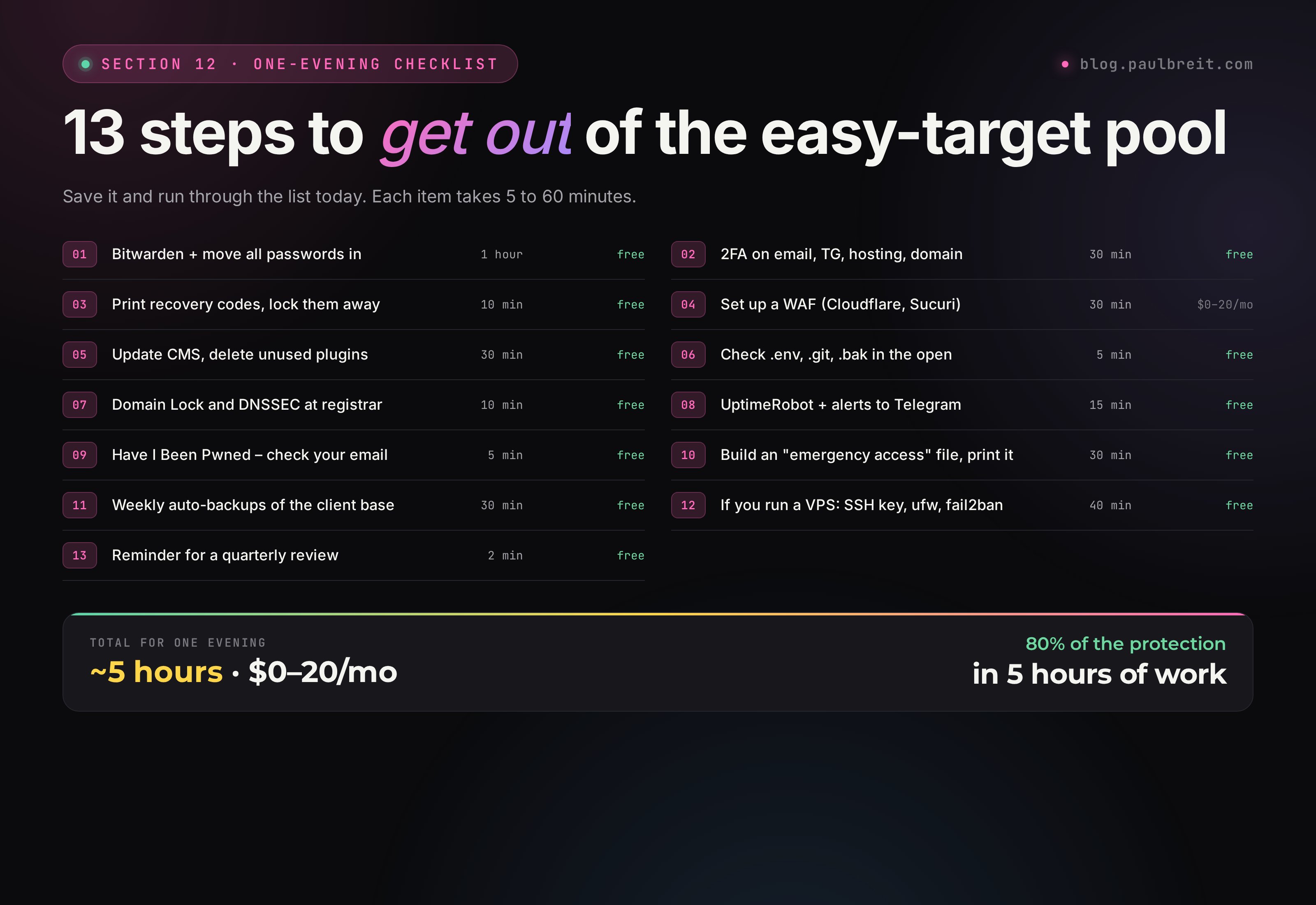
| What to do | Time | Budget |
|---|---|---|
| Install Bitwarden and move all passwords in | 1 hour | $0 |
| Turn on 2FA for email, Telegram, hosting, domain | 30 min | $0 |
| Print recovery codes and put them in a safe | 10 min | $0 |
| Set up a WAF (Cloudflare, Sucuri) | 30 min | $0–20/mo |
| Update the CMS, delete unused plugins and themes | 30 min | $0 |
| Check for .env, .git, .bak in the open | 5 min | $0 |
| Turn on Domain Lock and DNSSEC at the registrar | 10 min | $0 |
| Set up UptimeRobot with Telegram alerts | 15 min | $0 |
| Check your email in Have I Been Pwned | 5 min | $0 |
| Build an "emergency access" file, print it | 30 min | $0 |
| Set up auto-backups of the client base | 30 min | $0 |
| If you have a VPS: SSH by key, ufw, fail2ban | 40 min | $0 |
| Set a reminder for the quarterly check | 2 min | $0 |
You don't need to do all of it at once and perfectly. Do 80 percent of this checklist in one evening – and you drop out of the "easy victim" category. After that only targeted attacks work, and AI scanners don't run those. They hunt at scale, not one by one.
FAQFrequently asked questions
I'm not a celebrity, who would target me?
The AI isn't scanning you, it's scanning common holes on thousands of sites an hour. The target isn't you personally, it's your lack of protection. Right now everyone is equally interesting.
Which item is the most critical if I'm short on time?
The client base and passwords. A leaked list of phones and emails is the costliest damage. Start there.
Is two-factor authentication enough?
Not everywhere. SMS codes can be cracked through SIM swapping. Use authenticator apps (Google Authenticator, Authy) or hardware keys.
How much does decent protection cost per month?
$0–25. Most of the measures are free and done by hand in one evening. The only paid item is cloud backups, if you don't have them yet.