AI Chat Moderator: your community watched 24/7
Chat moderation by a bot that understands what a message means instead of matching stop-words. It wipes spam and hidden ads, cools down toxicity, greets newcomers, and answers common questions while you sleep. You build it in one evening through an ordinary chat with an AI, without a single line of code. Below: the full walkthrough, ready-to-paste wording, and a breakdown for different communities.
AI-powered chat moderation works like this: an AI moderator connects to your Telegram chat through a bot token, reads every new message, and understands its meaning. It removes spam and hidden ads, cools flooding and toxicity, greets newcomers, answers common questions, and escalates anything borderline to you. You set the rules in plain words in a chat with Claude, and the agent lives on your own server and stays on duty 24/7 without you.
You open the chat in the morning and overnight it has gummed up: three ad bots pushing sketchy schemes, one polite "investment expert" now in the DMs of half your members, a twenty-message flame war, and a newcomer who asked a question and left because nobody answered. You spend half an hour clearing it out instead of drinking your coffee. And it happens every single day.
I run several communities and a personal channel with 20,000 followers. I stopped doing this by hand long ago – AI agents stand guard in my chats. This article is how to build yourself the same moderator and stop living with your phone in your hand.
You'll read it in 20 minutes. You'll build it in one evening. After that the chat runs itself: spam never reaches people, newcomers get an answer in the first minute, and you only look in when the agent calls you about something that matters.
📋 What's inside
- What an AI moderator is and why it's smarter than a regular bot
- Why manual moderation breaks down
- What exactly it does in your chat
- How it works, in plain words
- What you'll need to launch it
- Building the moderator in one evening, step by step
- Your chat's constitution: how to explain the rules in words
- A ladder of reactions: delete, warn, mute, call the owner
- If something goes wrong
- A breakdown by niche
- What it costs and whether it pays off
- The whole path in a minute
In a handful of regions Claude won't open directly – you'll need a VPN set to a US or EU location. Anthropic keeps a short blocklist of countries, so pick a mainstream location and sign up with a non-blocked email. Everything below works the same once you're in.
Section 01What an AI moderator is and why it's smarter than a regular bot
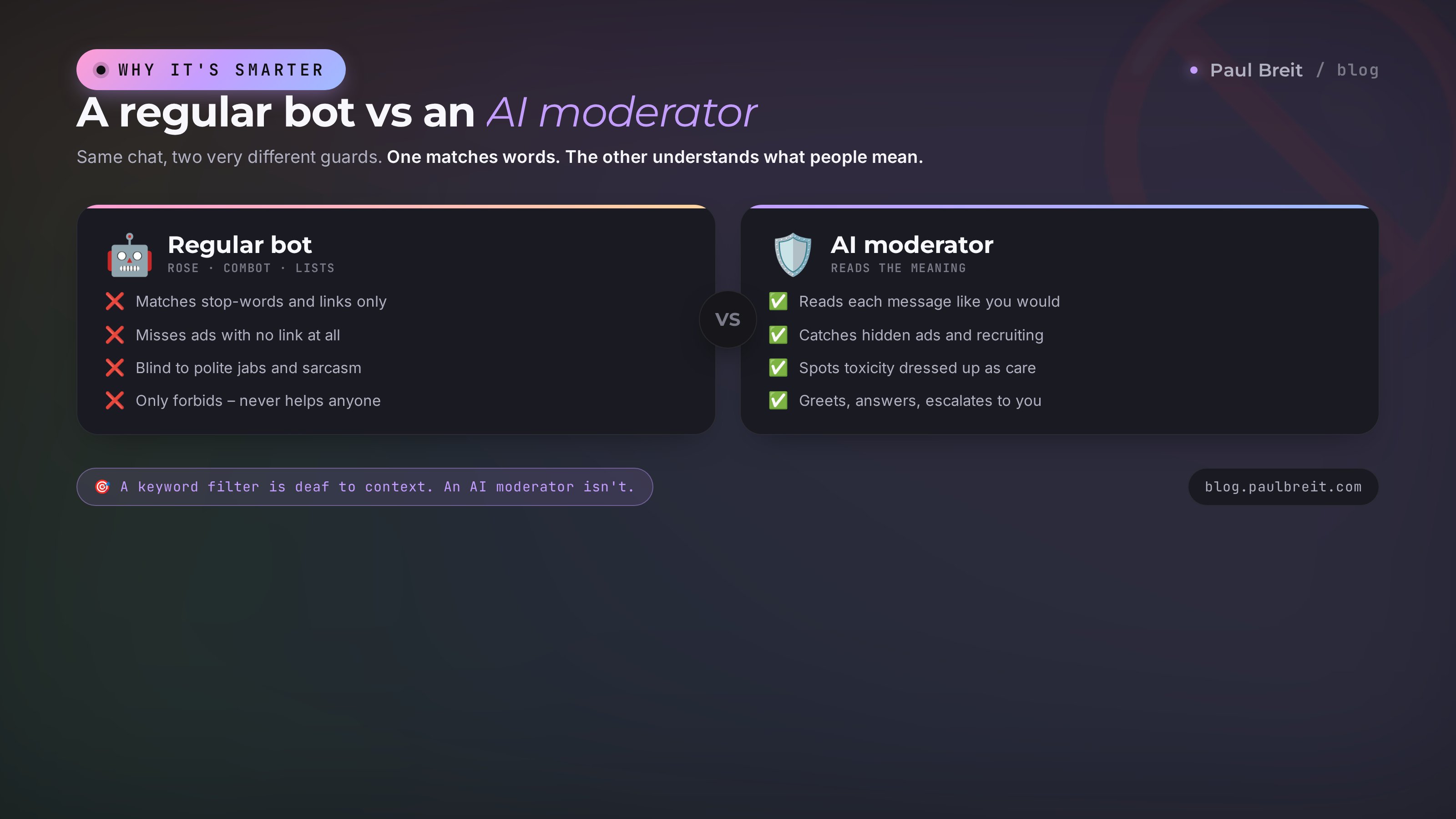
An AI chat moderator is an AI that's been set to stand guard in your chat. It reads every new message the way you would, understands what the person meant, and decides: keep it, delete it, warn, or call the owner. All of it happens in a second, without you.
To make the difference clear, remember how regular moderator bots work. Rose, Combot, Shieldy, and the rest run on lists of stop-words and rigid rules. You feed them a list of banned words, links, and domains, and the bot deletes a message when it finds a match. The mechanic is simple and fast. It's also full of holes.
Here's the catch. A spammer doesn't write "buy crypto at this link." They write "hey, anyone into making money, hit me up in DMs, I've got something 🔥." Zero stop-words, zero links, the bot sees a clean message and lets it through. A toxic member doesn't swear – they carefully, politely belittle a newcomer until that person quietly leaves. A word filter is blind here. And a competitor's ad served up as "just sharing my experience" is something no stop-word list will ever catch.
An AI agent catches the meaning. It understands sarcasm, recognizes a soft jab wearing the mask of concern, sees an ad disguised as friendly advice, and tells a real newcomer's question apart from a spam bot's script. It's the same leap as the one from keyword search to a live assistant who actually understood what you meant. If you want to dig into the concept itself, I have a separate piece on what an AI agent is and how it differs from a plain script.
And one more important difference. A regular bot only forbids. An AI agent can be useful: greet a newcomer by name, answer a question the chat asks ten times a day, briefly recap what was discussed overnight. It behaves like a living community manager, not a turnstile at the door.
Section 02Why manual moderation breaks down
If you run a membership chat, a course chat, a coaching community, a support chat, or live comments under a channel, you've already felt this. Manual moderation breaks down for several reasons, and each one hits your wallet and your nerves.
Spam runs around the clock. Bots don't sleep. The peak of DM spam to your members hits at night, when you and your helpers are offline. Someone joins the community in the morning and there's already a scammer with "investments" in their DMs. First impression ruined, and often for good.
Night and time zones. Your audience lives across the country and abroad. While you sleep in your time zone, half the chat is in the middle of their day. Keeping a moderator on the night shift is expensive, and without one the chat turns into an open door.
Burnout. Moderation is a slow drip on your mind. Constantly glancing at your phone, breaking up fights, explaining the rules to newcomers for the hundredth time. After a month or two a real person in that role wears out and starts letting things slide, snapping, or quietly checking out. I've been through it, both myself and with helpers.
The atmosphere fades. People come to a community for value and for their people. Let a couple of toxic clashes slide, or let spam sit there, and the tone shifts. Active members go quiet, newcomers never post their first message, the chat goes dead. And a dead chat inside a paid product means refunds and churn.
Here's how it usually goes. An expert launches a membership or a course with a chat, spends the first couple of weeks living in it, loving the live conversation. Then the real work piles up, the chat gets neglected, quality drops, and people feel abandoned. The complaint ultimately lands on the creator: "I paid, and it's a mess in here." The spammers have nothing to do with it. An AI agent removes exactly this pain – it doesn't burn out, doesn't sleep, and doesn't check out.
Section 03What exactly it does in your chat
Let's get specific. Here's the list of what the moderator takes off your plate. Concrete jobs it closes every day, no vague talk about "keeping order."
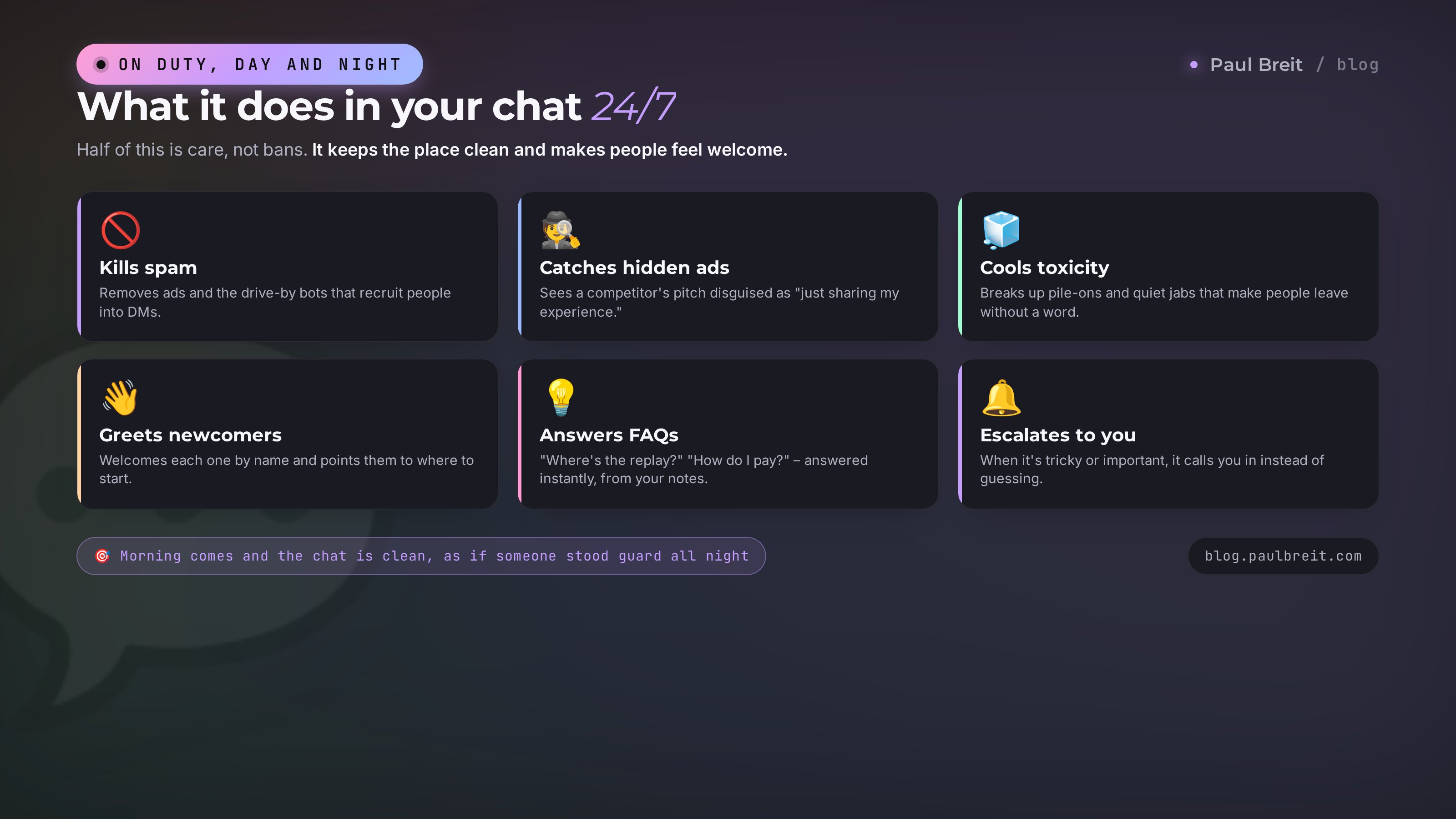
- Spam and mass DMs. Removes obvious ads and catches the ad bots that drop in, post one message, and leave to recruit people into DMs.
- Hidden ads. Spots a competitor's ad or a shady scheme served up as "just sharing my experience" or "this really helped me." By meaning, not by link.
- Flooding and caps. Cools a wall of emoji, one-letter messages, and SHOUTING IN CAPS across the whole screen.
- Toxicity and personal attacks. Breaks up fights and removes insults and soft jabs that make people leave without a word.
- Off-topic. Gently steers back on track when a marketing course chat drifts into politics or sports.
- Welcoming newcomers. Greets each one by name, briefly reminds them of the rules, and points them to where to start. The person feels expected.
- Answering common questions. "Where's the lesson replay?", "when's the next live?", "how do I pay?" – it answers on its own, instantly, from your set of replies.
- Escalation to the owner. When a situation is borderline or important, it calls you in personally instead of swinging the axe. On the role of an assistant like this in direct messages I have a separate breakdown: a Telegram bot without a programmer.
- The night shift. All of the above, but while you sleep. In the morning the chat is clean, as if someone stood guard all night. Someone did.
- A morning digest. A short recap of "what happened in the chat": how many newcomers, what they argued about, what it deleted, and what deserves your personal attention.
Notice: half of this list is about care, not bans. A good moderator doesn't just clear out the trash – it makes the chat feel warm and clear to people. That's what keeps a community alive.
Section 04How it works, in plain words
No tech jargon. The moderator has three parts, and you already know each one on its own.
The brain. This is the AI, Claude. It can read text and understand meaning. The brain on its own knows nothing about your chat – it's simply smart and able to reason.
The rules. This is your instruction, written in plain words: what's allowed in your chat, what isn't, how to greet newcomers, what to warn for, what to delete on sight, and whom to call in. You dictate these rules once, in a chat with the AI, in plain language. The brain turns them into its working memory and keeps them in view for every message.
The hands. This is the bot in Telegram. Through it the brain sees what's posted in the chat, and through it the brain deletes, writes warnings, and greets newcomers. The bot is just a pair of eyes and hands inside the messenger; Claude does the thinking for it.
The chain works like this. Someone posts a message. The bot passes it to the brain. The brain looks at the message through the lens of your rules and decides what to do: let it pass, delete, warn, greet, answer, or call you in. And the bot carries out that decision. All in a second, around the clock, without you.
The most important part for you: you never write code and you never edit any files. All of your work is a conversation with the AI in a chat. You explain in words what you need, and Claude builds the agent, connects it to the bot, and configures it. What used to require a programmer now just takes being able to clearly explain what you want. On this no-code approach I have a separate article – a Telegram bot without a programmer.
Section 05What you'll need to launch it
Three things. None of them requires technical skills; let's go through each.
1. A Claude account
This is the moderator's brain. Sign up at claude.ai. For steady work you'll want a paid plan, about twenty dollars a month. Setup takes a couple of minutes.
- Sign up with your regular email and confirm it – nothing special required.
- Pick a paid plan so the moderator has enough capacity to read every message without hitting limits.
- If Claude isn't available where you live, turn on a VPN set to a US or EU location before you open the site.
2. A Telegram bot
This is the moderator's hands. A bot is created in a minute through Telegram's official service, @BotFather. It hands you a long token key – that's the password to your bot. You'll later just give the token to Claude, and the AI will use it to connect the moderator to your chat. No manual setup, just copy and paste.
3. Your own server
This is where the moderator lives and stands guard. For the agent to run 24/7, it needs a computer that's always on and always online. Your home laptop won't do the job – close the lid and the moderator falls asleep with it. You need a small server on the internet, also called a VPS. It's your own always-on computer for rent, a few dollars a month.
For an agent like this you don't need anything powerful. Any mainstream cloud host with a clean control panel works – the cheapest tier is enough for a chat moderator. Pick a provider you're comfortable paying, spin up the smallest instance, and you're set in a couple of minutes.
And here's an important principle I follow myself and recommend to you. Get your own server for the moderator. Don't borrow someone else's, don't park the agent on a friend's server "just for now." It's your operation: you pay for it, you control it, and nobody will switch it off at the worst moment. Keep your community on your own land.
Section 06Building the moderator in one evening, step by step
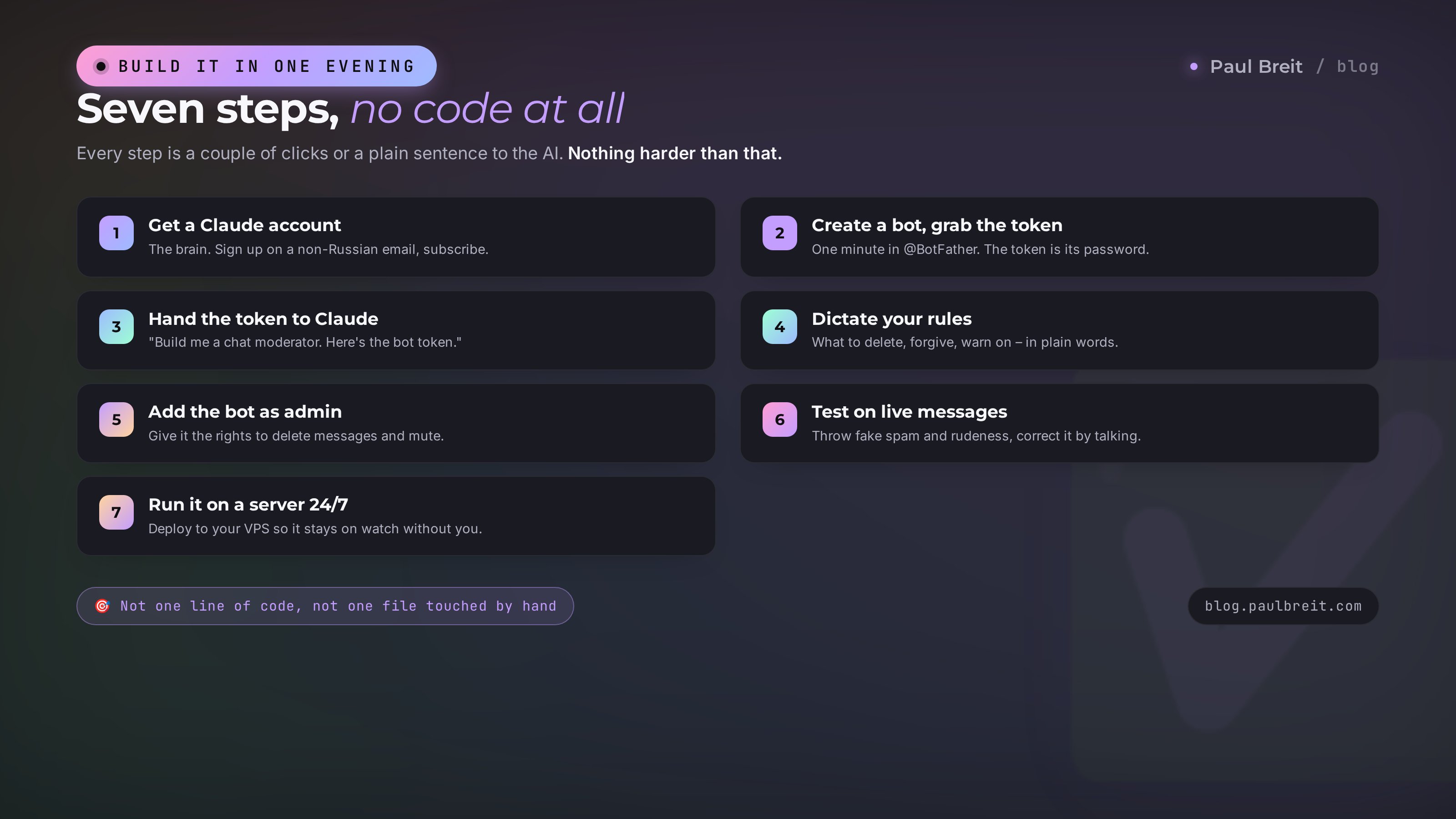
Now the fun part. Let's walk through the whole build step by step, detailed enough that even someone hearing about this for the first time can do it. Each step is either a couple of clicks or a sentence you say to the AI. Nothing harder.
Create a Claude account
Go to claude.ai, sign up with your email, and get a paid plan. (If Claude isn't available where you live, turn on a VPN set to a US or EU location first.) That's the brain set up – from here on you just talk to it in a chat.
Create a bot and grab the token
Open @BotFather in Telegram, send it the command for a new bot, and choose a name and a handle. It replies with a long token string. Copy it and don't forward it to anyone. That's the password to your moderator, so keep it handy.
Hand over the token and explain the task
Open a chat with Claude and say it in plain words: "Build me a moderator bot for my Telegram chat. Here's the bot token: [paste the token]. I want it to read messages in the chat and moderate them by my rules." That's it. Claude figures out what to do and starts building the agent.
Dictate your chat rules
Next you describe, in words, how the moderator should behave. What to delete on sight, what to forgive, what tone to warn in, how to greet newcomers, whom to call in personally. This is the most important part, and there's a whole section below with ready wording for it. Claude remembers all of it and stores it in the agent's memory.
Add the bot as an admin
Go to your chat, open the member list, add your bot, and make it an admin with the rights to delete messages and ban. Without admin rights the moderator can only watch, not restore order. Claude will tell you exactly which boxes to check.
Test it on live messages
Right in the chat, post test messages: throw in fake spam, rudeness, a newcomer's question, flooding in caps. Watch how the moderator reacts. If it got something wrong, tell Claude in words: "it was wrong to stay silent on that message" or "it overreacted, that was a joke." The AI corrects the behavior right away. A couple of rounds of this is enough to get the agent into your tone.
Run it on a server 24/7
While you're working, the moderator lives inside your current conversation with the AI and falls asleep the moment you close it. To keep it on duty all the time, tell Claude: "Deploy the moderator on my server so it runs around the clock," and give it access to your VPS. Claude installs and starts everything itself. From that moment the chat is watched without you.
And that's the whole build. You didn't write a single line of code or touch a single file by hand. Just a few clicks and a conversation with the AI in plain words. If you want the general playbook for any agent, not just a moderator, take a look at what an AI agent is – it's the same approach in general form.
Section 07Your chat's constitution: how to explain the rules in words
The moderator is only as good as how clearly you explained the rules. It's like with a new human assistant: say "keep things in order" and they'll keep order the way they understood it. Spell it out and they'll do it right. The rules are written in plain language, as if you were briefing a person on their first day.
Here's a ready-made frame you can copy into a chat with Claude and fill in with your own. It's broken into blocks by purpose.
Who we are and what tone to use
"You are the moderator of my community chat about [topic]. The tone is friendly and calm, polite, no stiffness and no rudeness. You help people, you don't scare them. When in doubt, a gentle warning beats an instant punishment."
What to delete on sight
"Delete without warning: ads for other people's products and services, links to outside channels and bots, money-making and investment offers, requests to DM about money, and open insults or slurs aimed at people. If a message reads like a hidden ad or recruiting even without a direct link, delete it too."
What we forgive
"Leave alone: genuine on-topic questions, friendly jokes and emoji in moderation, a light on-topic debate, and links to my own resources. If someone slipped up out of inexperience and with no bad intent, explain the rule kindly and don't punish them."
How to greet newcomers
"Greet every new member by name, briefly remind them of the main chat rule, and point them to where to start: where the pinned materials are, where to ask a question. Once, without being pushy."
When to call me in personally
"DM me when: a member complains about another, a big conflict is brewing, someone mentions a refund or is unhappy with the product, or you're not sure what to do. Better to ask me than to get something important wrong."
Notice the key thing. You explain in words, the same language you'd use to brief a living assistant. The more concrete your examples of "delete things like this, forgive things like that," the better the moderator matches your style. You can even paste it a couple of real messages from your chat and say: "delete this one, keep that one."
Section 08A ladder of reactions: delete, warn, mute, call the owner
A common beginner mistake is to set the moderator to a single "ban" button. Then it either axes everyone and scares off real people, or forgives everything and is useless. A good moderator reacts differently, in proportion to the offense. Give it a ladder of reactions.
- Let it pass. The message is fine. The moderator stays quiet and doesn't get in the way of real conversation. This is its default state; it's important that it doesn't twitch over trifles.
- Gently correct. A little off-topic or a newcomer breaking a rule. The moderator politely nudges, no punishment. "Let's get back on topic" instead of deleting.
- Delete the message. Clear spam, ads, rudeness. The message is removed, the person stays. Usually that's enough.
- Warn. A repeat offense. The moderator sends the person a personal warning and remembers it. Three warnings and it gets stricter.
- Mute. The person won't stop. They temporarily lose the right to post, for an hour or a day. Cooled off, they're back.
- Call the owner. A borderline or important situation. The moderator doesn't decide alone. It calls you in and waits. In a conflict with a real person, better safe than sorry.
You set this ladder in words too: "for a first offense, warn gently; for a repeat, delete and warn personally; for a third, mute for a day; and if the person is aggressive or it's about money, call me in right away." The moderator keeps this logic per member and won't punish the innocent for other people's sins.
Section 09If something goes wrong
The first few days the moderator settles into your chat, and that's normal. The good news: you fix everything with the same words in a chat with Claude, no tech at all. Let's go through the typical situations and exactly what to say.
It deletes too much
Sometimes the moderator overdoes it: nukes a friendly joke, mistaking it for an attack, or removes a link to your own material. You go to Claude and say: "You were wrong to delete this message, it's fine, it was a friendly joke. Keep things like it from now on." Give it the example. The AI dials back the sensitivity and the moderator gets gentler in similar cases.
It misses spam
The opposite trouble: an ad or a recruiting pitch slipped through. You say: "This message is a disguised ad, you let it through. Things like this should be deleted." The more live examples you show, the sharper the moderator's eye gets for hidden spam. You're training it right on your own chat, all through ordinary conversation, no code.
The tone is off
The moderator warns too dryly and it rubs people the wrong way, or the opposite – too softly, and nobody takes it seriously. Just say: "Write warnings warmer and with some humor" or "be stricter, they're not listening to you." The tone changes with a single sentence.
It stays completely silent
If the moderator doesn't react at all, it's almost always about permissions. Check that the bot is added to the chat and made an admin with the right to delete and ban. Without those rights it sees messages but can't do anything. Tell Claude "the moderator isn't reacting," and the AI will walk you through what to check.
Notice the logic here. You're not fixing a broken program – you're coaching an employee. It made a mistake, you explained, it remembered. After a week of a live chat the moderator hits your tone with almost no misses.
Section 10A breakdown by niche
The moderator tunes to any community; only the rules differ. I put together a table for you: what to moderate in different types of chats and where to put the emphasis. Find your case and take the ready-made accents.
| Community type | The main pain | What to tune the moderator for |
|---|---|---|
| Expert membership | DM spam to members, a silent chat | Hit recruiting and scams hard, actively greet newcomers, raise questions for discussion, protect the warm atmosphere |
| Course chat | The same questions, off-topic, conflicts | Answer common questions about access and replays, gently steer back to the lesson topic, call in a mentor for tough program questions |
| Coaching community | Toxicity, belittling, outside ads | Catch belittling and personal attacks with a fine eye, protect a safe space, remove rival coaches who recruit |
| Comments under a channel | A wave of spam bots, trolling under posts | Instantly clear drive-by bots, cool trolling, leave the live discussion on the post's topic |
| Support chat | Repeat questions, lost requests | Answer from a set of standard replies, escalate the unusual to a human, make sure no question is left unanswered |
The logic is the same everywhere; the accents differ. In a membership the priority is warmth and protection from recruiters. In a course chat it's taking the repeat-question grind off your mentors. For a coach it's protecting people's safety. In comments it's holding up against the flood of bots. In support it's making sure no request gets lost. You just describe your pain in words, and the moderator adapts.
Section 11What it costs and whether it pays off
Let's count without fake precision, in honest ranges. There are exactly two expenses, both small.
- A Claude plan – around twenty dollars a month. That's the brain; there's no going without it.
- A server – from a few dollars a month for a simple VPS. That's plenty for a chat; you don't need anything powerful.
All told it comes out to about the price of a couple of lunches. Now the other side. A part-time human moderator runs several hundred dollars a month, and they still sleep at night, burn out, and go on vacation. Your own hours, if you moderate yourself, are worth something too: half an hour to an hour a day of clearing the chat adds up to a full day of your life every month.
The payoff isn't only money. A clean, lively chat means fewer refunds in a paid product, more renewals, more trust. People stay where they feel good. And you also stop living with your phone in your hand and get your quiet evenings back. For me that outweighed any numbers long ago.
The moderator is just one role you can hand off to AI agents. The same way, you can build helpers for replies in your DMs, for content, for taking in leads. For the big-picture view of what you can hand to AI in general, I put it together in the piece on what you can do with AI.
Section 12The whole path in a minute
If you skimmed, here's the gist in short.
- An AI moderator understands what a message means instead of matching stop-words. So it sees hidden ads, sarcasm, and soft jabs that a regular bot lets through.
- It stands guard around the clock: clears spam, cools toxicity, greets newcomers, answers common questions, and calls you in on anything borderline.
- Three parts: the brain (Claude), the rules (you dictate them in words), and the hands (the bot in Telegram). The agent lives on your own server.
- Built in one evening and seven steps: a Claude account, a bot from @BotFather, hand over the token, dictate the rules, add the bot as admin, test it, deploy to a server.
- The rules are written in plain language, like briefing an assistant. Reactions run on a ladder from "let it pass" to "call the owner."
- When it errs, you fix it with words in a chat with Claude, no code. Within a week it hits your tone.
- It costs about a couple of lunches a month and saves you hundreds of dollars and your evenings.
So, shall we build you a guard like this? One evening of work, and the chat is watched 24/7.
FAQFrequently asked questions
How is an AI moderator different from a regular bot like Rose or Combot?
A regular moderator bot runs on lists of stop-words and links: it finds a match, it deletes. It is blind to meaning and lets through hidden ads, sarcasm, and polite jabs. An AI moderator reads the message and understands what the person meant, so it catches spam with no link, toxicity with no swearing, and ads dressed up as personal experience.
Do I need to know how to code to build a moderator?
No. All of your work is a conversation with the AI in plain words. You describe your chat rules, hand over the bot token, and Claude builds the agent and connects it for you. Not one line of code, not one file touched by hand.
What do I need to launch a moderation bot in Telegram?
Three things: a Claude account, a Telegram bot with a token from @BotFather, and your own server so the moderator stays on duty around the clock. None of them requires technical skills.
Why does the moderator need its own server and not my laptop?
To stay on duty 24/7, the agent needs a computer that is always on and online. A laptop goes to sleep the moment you close the lid, and the moderator sleeps with it. A small rented server costs a few dollars a month and runs without you.
How do I set the rules for my specific chat?
You write the rules in plain language in a chat with Claude, as if you were briefing a new assistant: what to delete on sight, what to forgive, what tone to warn in, how to greet newcomers, and when to call you personally. The more concrete your examples, the better the moderator matches your style.
What do I do if the moderator deletes too much or misses spam?
You fix it with words in a chat with Claude, no tech involved. Show the AI the exact message and say: you were wrong to delete this, keep things like it, or this is disguised advertising, it should be removed. The moderator corrects its behavior. You are training it on live examples straight from your own chat.
What kinds of communities is an AI moderator good for?
Any chat you run: an expert's membership, a course chat, a coaching community, a support chat, or the comments under a Telegram channel. The logic is the same; you tune the emphasis to your niche with words.
How much does it cost to run a moderator?
Two small expenses: a Claude plan at about twenty dollars a month and a server from a few dollars. Together it comes out to about the price of a couple of lunches, and it replaces a part-time human moderator and gives you your evenings back.