What You Can Do With AI: 10 Tasks Without a Single Line of Code
An honest showcase for beginners: copy in your voice, client replies, meeting notes, analytics, slide decks, even a working web page – all through a plain chat window. Every task comes with a ready prompt, a live example, and a real number for how much time it gives back. No startup-deck fantasy.
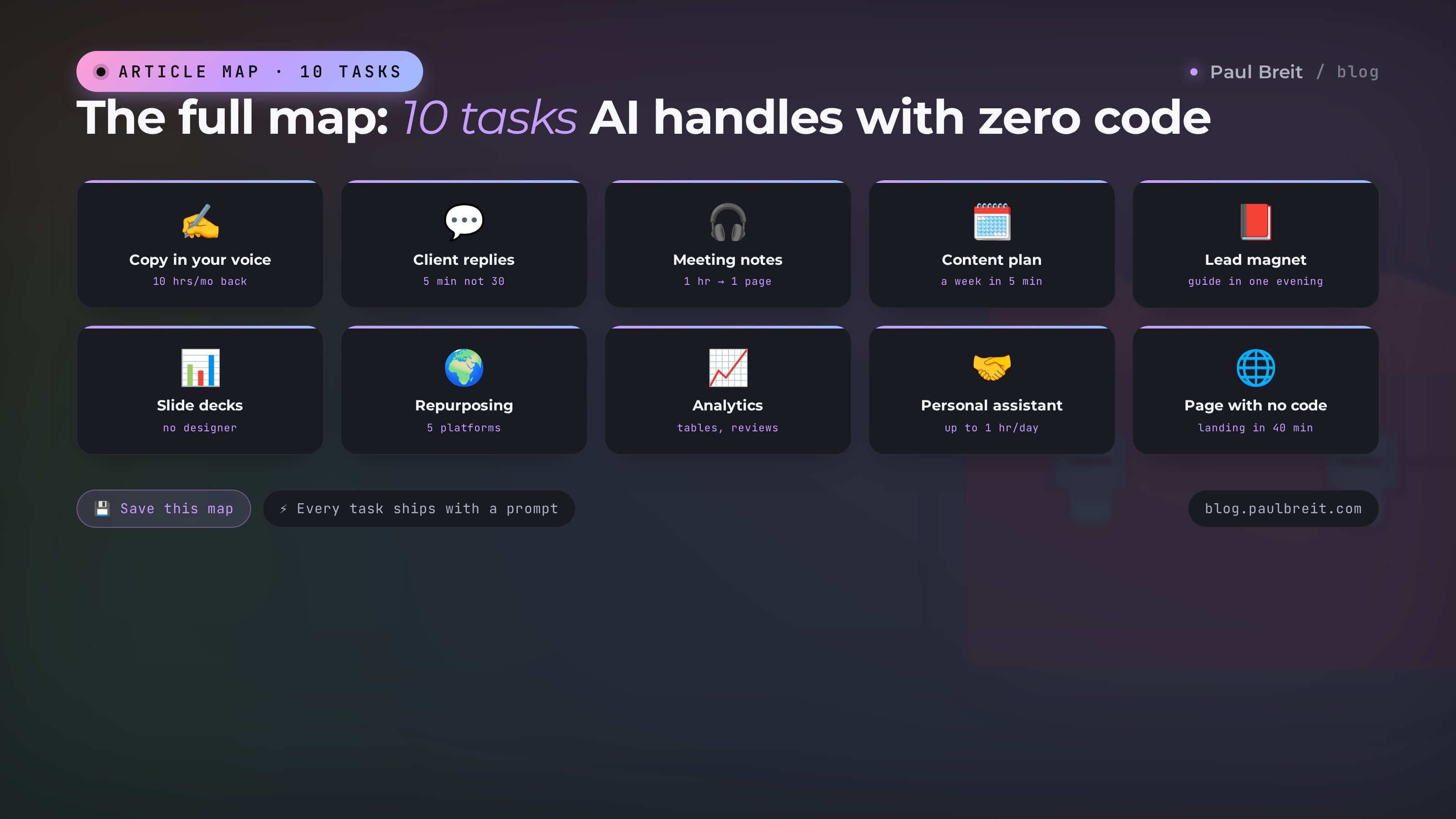
Without a single line of code, AI handles: copy and posts in your voice, client replies, summaries of recordings and books, content plans, lead magnets and guides, slide decks, translation and repurposing, spreadsheet and review analysis, weekly planning, and even building a working web page. First result on any task – 30 minutes in a plain chat with Claude or ChatGPT. All 10 tasks with example prompts below.
The most frequent question sounds the same every time: "Okay, AI. What can it actually do? Honestly, no sci-fi." It comes from therapists, tutors, coaches, nutritionists, accountants – people who are excellent with their hands and heads, but close the tab at the word "programming" and decide this can wait.
This article is the honest answer. Ten tasks AI solves right now – no code, no installs, no technical background. Every number comes from my practice and my clients' practice.
If after reading you want the systematic ramp-up – accounts, first prompts, Projects – start with the expert content pipeline. This piece is the showcase of what's possible; that one is the step-by-step engine.
What's inside
- Why "no code" is no longer a compromise
- Copy and posts in your voice
- Client replies and objections
- Notes: an hour into one page
- A content plan that never runs out
- A lead magnet in one evening
- Slide decks without a designer
- Repurposing across platforms
- Analytics: spreadsheets and reviews
- A personal assistant
- A working page with no developer
- What not to hand over yet
- Where to start: week one
Section 01Why "no code" is no longer a compromise
Three years ago, "using AI without programming" meant clicking buttons in someone else's stripped-down app. The real power belonged to people who knew Python and APIs.
In 2026 that's flipped. Conversational AI – Claude, ChatGPT – takes a task described in plain human language and returns specialist-level output. The chat window became a universal remote: the same text you'd send a colleague is now how you brief a "staff member" who works for pennies and never burns out.
The code didn't disappear – it moved to the AI's side of the table. When you ask for "a one-page site about my practice," the model writes the code itself and hands you the finished result. You don't need to understand it, the same way you don't need to understand a gearbox to drive.
Free tiers of Claude and ChatGPT cover every task below while you're learning. The $20/month Pro subscription becomes worth it when you hit message limits and want Projects – persistent knowledge bases that remember your context. Nothing else to buy.
Task 01Copy and posts in your voice
The most common task and the most underrated one. Underrated because everyone has tried "write a post about nutrition" and got faceless mush. After that, 8 out of 10 experts decide AI writes badly.
AI writes badly without context. With context, it writes like you – on your good days.
The mechanics are simple. Collect 20-30 of your best posts into one document and load it into the chat with this instruction:
Here are 25 of my posts. Study the style: sentence
length, how I address the reader, favorite words
and transitions, how I open and how I close.

From now on, write everything in this style only.

First task: a post about [topic] for my channel.
600-800 characters, end with a question to readers.
The difference shows on the very first text. Without samples, "a post about burnout" returns: "In today's fast-paced world, each of us faces emotional exhaustion. Let's explore the early warning signs..." – a text you would never publish. With samples, the same request returns: "It's 7 p.m. Your last client is done, and you're sitting there unable to even close the laptop. Sound familiar?" – a draft that becomes your post after ten minutes of editing.
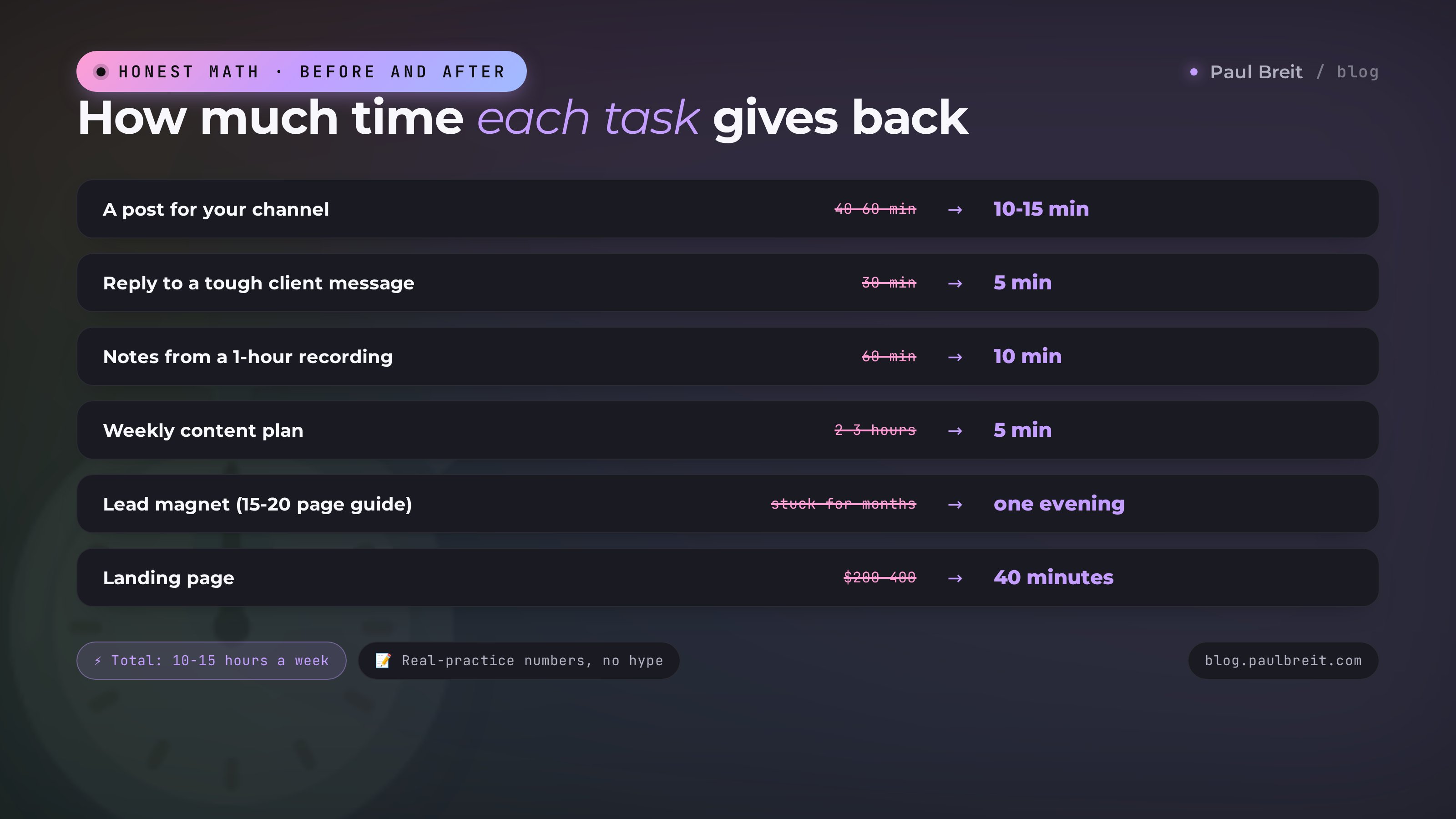
The first draft arrives 70-80% done. Your 10-15 minutes of editing versus 40-60 minutes of writing from scratch. Over a month of 12-15 posts, that's 8-10 hours saved – a full working day and change.
The same pipeline covers newsletter emails, video descriptions, landing page copy, comment replies. Any text you write regularly moves onto this scheme.
The full system with 10 prompts for different content types is in the expert content pipeline. And if you want the style to load automatically in every chat, that's what skills are for – see 7 Claude skills for writing.
Time to learn: 30-40 minutes. Payoff: 8-10 hours a month.
Task 02Client replies and objection handling
The second most common pain. A client sends a long message: doubts, price questions, "will this really work for me," "why is your colleague cheaper." You read it and spend half an hour composing yourself, because the reply needs to be warm, expert, and free of irritation – which, by evening, has been building up.
The scheme: load your product descriptions and 10-15 of your best replies from past conversations into the chat. Then every difficult dialog just gets forwarded to the AI:
A client wrote: [paste the full message].

Draft a warm, expert reply in my style.
Keep in mind: [any important nuance].
No pressure; end with a soft question.
You get a draft in 20 seconds. Fix the live details, send. Five minutes instead of thirty – and the reply stays even-keeled even when you're already boiling inside. AI never gets tired of being polite.
Objections are a separate pleasure. Ask: "give me 4 ways to answer 'too expensive' from different angles – value, price breakdown, case study, honest letting-go." Pick the one that fits this particular person. A ready library of answers to common objections lives in the sales call script.
Once the question flow becomes steady, you can take this task off your plate entirely – put a consultant on your site that answers routine questions itself, in your voice, around the clock. Mine closes 30-50% of inquiries; the build is covered in the AI consultant article.
Time to learn: 20 minutes. Payoff: 3-5 hours a week with a live client flow.
Task 03Notes: an hour of recording into one page
The invisible task: nobody plans for it, then it turns out to be the one they use most.
Every expert accumulates hours of recordings: webinars, client calls, 8-minute voice memos from colleagues, that course bought in 2024 and never rewatched. All of it is buried value, untouched because "listening to an hour-long recording" costs an hour of life.
AI eats a recording in minutes. Two steps. First – transcription: TurboScribe (free up to three files a day) or any Whisper bot in Telegram turns audio into text. Second – the squeeze:
Here's a transcript of a 1-hour session. Produce:
1. A one-page summary – substance only, no filler
2. The 10 key takeaways as a list
3. Every number, example, and case – as a block
4. 5 quotes worth turning into posts
An hour of content becomes two pages of concentrate in 10 minutes. Those notes then work three jobs: you refresh the material fast, the takeaways feed your posts, and the quotes feed your stories.
The same trick works on books (upload a PDF, ask for a summary against your specific question), long articles, 40-page documents. You no longer need to read everything – you need to ask well.
Time to learn: 15 minutes. Payoff: for active experts – 4-6 hours a month.
Task 04A content plan and ideas that never run out
"I don't know what to write about" is the number one reason channels get abandoned. There are plenty of topics around – they just evaporate the moment you sit down to write.
The quick way: describe your niche and audience, ask for 30 ideas grouped by theme. Decent. But there's a much stronger way – give the AI facts instead of descriptions: export your channel archive and ask it to break down what worked, what flopped, and what you haven't covered yet.
That analysis surfaces "blind spots" – topics your audience is waiting for while you keep walking past them. One such session gave me a quarter's worth of content; the full method with five prompts is in the channel analysis guide.
For weekly routine – this prompt:
My content plan for the week. Niche: [niche].
Audience: [who]. Currently promoting: [product].

Give me 5 posts: topic, format (story, breakdown,
list, case study), and an opening hook line
for each. One post – softly selling.
Five minutes and the week is mapped. Hooks ready, formats alternating, the selling post built in without the "shopping channel" feel.
Time to learn: 15 minutes. Payoff: 2-3 hours a week, plus the Monday blank-page dread disappears.
Task 05A lead magnet: a guide or mini-book in one evening
Funnel classic: for someone to leave a contact and subscribe, they need tangible value upfront – a guide, a checklist, a mini-book. Reality classic: "make a lead magnet" sits in an expert's task list for months, because writing 20 pages is a heroic feat.
With AI the feat shrinks to one evening. The scheme: voice-record everything you know about one narrow topic (15-20 minutes of stream of consciousness, structure optional), transcribe it with Whisper, and hand it over:
Here's my stream of thoughts on [topic].
Build a 15-20 page guide out of it:
5-6 chapter structure, keep the live examples
from the transcript, add a checklist at the end.
Write in my language – you can see it in the text.
An hour or so of edits later, you have a document you're not ashamed to trade for a subscription. The cover is AI work too; PDF layout is 10 minutes in Google Docs.
The same path, stretched over two days instead of an evening, produces a full 40-80 page book – the strongest magnet for an expert funnel. The step-by-step route with all prompts is in the book-in-a-weekend guide.
Time to learn: one evening for the first guide. Payoff: the lead magnet that "hung there for months" ships this week.
Task 06Slide decks without a designer
Presentations are a tax on expertise. Webinar – slides. Talk – slides. Client review – slides again. A designer costs money and revision cycles; homemade PowerPoint looks like homemade PowerPoint.
AI covers both halves: the content and the look. For content – hand over your talking points or a transcript and ask it to lay them out as slides: one idea per slide, headlines under five words, numbers big. For the look – ask for the deck as a single HTML page in your brand colors: opens in any browser, arrows to navigate, looks like studio work.
The starter prompt:
Here are my talking points: [paste].
Build a 15-20 slide deck as an HTML page:
one idea per slide, headlines under 5 words,
numbers large. Colors: [your two colors].
Big type, lots of air, no clip art.
Sounds like magic, works like craft: revisions happen in plain phrases – "make slide three higher-contrast," "swap the blue for my purple," "add a pricing slide after eight." No designer between you and the result.
The full process – from a selling webinar's structure to a polished deck – is in the sales webinar guide: script and slides come together in about 30 minutes there.
Time to learn: 30 minutes. Payoff: $800-1,300 a year on design if you present regularly.
Task 07Repurposing across platforms
Translation in 2026 is long past word-for-word. AI translates with tone intact: your warm post stays warm in Spanish instead of turning into a refrigerator manual. If you've been eyeing an audience in another language, the barrier is effectively gone.
But the real value for an expert is adaptation within one language. The same material sounds different in a Telegram channel, on LinkedIn, in a newsletter, and on a landing page: different length, rhythm, hooks. "Repackage this post for LinkedIn" used to mean rewriting it. Now:
Here's my channel post. Adapt it for LinkedIn:
expand to 1,500+ characters, add subheadings,
open with a story, drop the messenger slang.
Keep the voice and the facts.
One click and a piece of content lives on five platforms instead of one. Each platform is an audience that would never have seen you otherwise.
Same bucket: simplifying complex texts ("explain this without jargon, for a client"), squeezing a legal contract into human language, turning a dry service description into living copy. AI translates between registers of speech, not just languages.
Quality check for translations is simple: translate the text, then ask a different AI to translate it back. If the meaning and tone come home intact, the translation works.
Time to learn: 10 minutes. Payoff: every distribution platform stops costing separate time.
Task 08Analytics: spreadsheets, reviews, competitors
The task beginners refuse to believe until they try it: AI reads spreadsheets and finds meaning in them.
Six months of sales data, an ad-spend table, 200 survey responses, a year of client reviews – all of it uploads into the chat as a file, and then you talk to your data like a person:
Here's my lead table for 6 months.
Find: which channel brings the best-paying
clients, which days leads spike, where I'm
losing money. Explain in plain words and
tell me what to fix first.
No formulas, no pivot tables, no "how do I VLOOKUP." Question – answer. From my own practice: a 20-minute pass over a year of client reviews produced three landing-page lines people had been saying in their own words – the application form converted visibly better once the copy started speaking client language.
Competitors get the same treatment, no agents or spying required: copy 20-30 of a competitor's posts and ask what pains they press, what they promise, where they're weak, and how you objectively differ. One evening gets you a positioning map an agency would bill as a project.
Before uploading client tables, strip names, phones, and emails: pattern analysis gains nothing from those columns, and your peace of mind is worth more. Replacing the name column with "Client 1, Client 2" takes a minute and removes the only real risk in this whole task.
Time to learn: 20 minutes. Payoff: an analyst on demand instead of "I'll crunch it someday."
Task 09A personal assistant: plans, inbox, meetings
The small stuff that eats the day in bites: clearing the inbox, planning the week, prepping for a call, recalling what you agreed with a client a month ago, writing a polite refusal, phrasing an awkward message.
Each item is 10-15 minutes. Together – two hours a day. AI takes them as a package:
- Weekly plan. Dump every task as a stream, ask it to spread them across days by priority and your energy ("calls before lunch, writing in the morning, don't touch Tuesday").
- Meeting prep. Paste the correspondence and ask for a digest: what was agreed, what you promised, their pains, what to ask.
- Awkward messages. "Write a polite reschedule that won't offend" – three options in 15 seconds, one will fit.
- Inbox triage. Forward a batch of messages, ask for a sort: urgent, delegate, ignore.
Here's what it looks like live. Monday morning, 40 minutes before my first call. I dump everything in my head into the chat: two content tasks, three client promises, an invoice to send, a post idea, someone's birthday. I ask: "spread this across the week, Tuesday is call-free – put deep work there, batch the small stuff into one Friday block." A minute later I'm looking at a plan where nothing is lost. That layout used to cost half a Sunday evening and still leaked.
Individually each item looks trivial. A month into the habit, it turns out the "AI secretary" frees more time than any other task on this list – the time was just smeared across the day and never got counted.
Time to learn: the habit forms in a week. Payoff: up to an hour a day.
Task 10A working page with no developer
The finale – the one that makes beginners' eyes go wide. AI builds working web pages from a plain-language description.
A consultation booking page. A client intake form. A landing page for your lead magnet. A personal habit tracker. A link-in-bio mini-site. All of it described in ordinary text:
Build a one-page site: I'm a [role], I help [who]
with [what]. Sections: short intro, 3 services
with prices, testimonials, a "Message me" button.
Style: calm, light, large type.
The AI hands you the page right in the chat – in Claude it's called an artifact: a panel opens where the page is visible and clickable. Revisions in the same plain words: "bigger button," "warmer background," "move testimonials up."
Publishing needs no developer either: Claude publishes an artifact to a shareable link in one click – the page is live on the internet. A worked example of this exact path is the habit tracker built in one evening: readers assemble it from the article without knowing a tag from a token.
Forms and quizzes deserve a special mention. "Build an intake form for my strategy call: 5 questions about niche, revenue, main bottleneck; send the answers to my email." A form like that filters applications before the call: you meet people you already know everything about. There used to be a freelancer and a week of back-and-forth between "I want a form" and "the form works"; now it's a twenty-minute conversation.
And when you want your own domain and more serious builds – there's a setup where you send voice notes in Telegram and your site updates itself: the walkthrough is in building a site by voice.
Time to learn: 40 minutes to the first live page. Payoff: $200-400 for every landing page you don't commission.
Section 12What not to hand over yet
For an honest picture – the boundaries. Three things it's too early to delegate in 2026.
Final decisions
AI is brilliant at preparing options and laying out pros and cons, but choosing is yours. It doesn't know your intuition, your market from the inside, or your appetite for risk. Strategy stays human.
Unverified facts
AI confidently invents: statistics, study names, quotes. Anything headed for publication gets checked by hand. Treat every number from an AI as a draft by default.
Live contact where money and relationships are decided
Closing a high-ticket sale, a hard conversation with a client, working with someone in crisis – AI preps you for the conversation but doesn't replace you in it. Clients feel the difference between live attention and its imitation.
Everything else on this list – hand it over without guilt. The rule is simple: AI does the draft and the routine, you do the meaning and the final word. Experts who hold that line get the best of both worlds: machine speed and the trust only a live human earns. Those who blur it hear about it from their audience fast – people sense the substitution before you've saved your first hour.
Section 13Where to start: week one
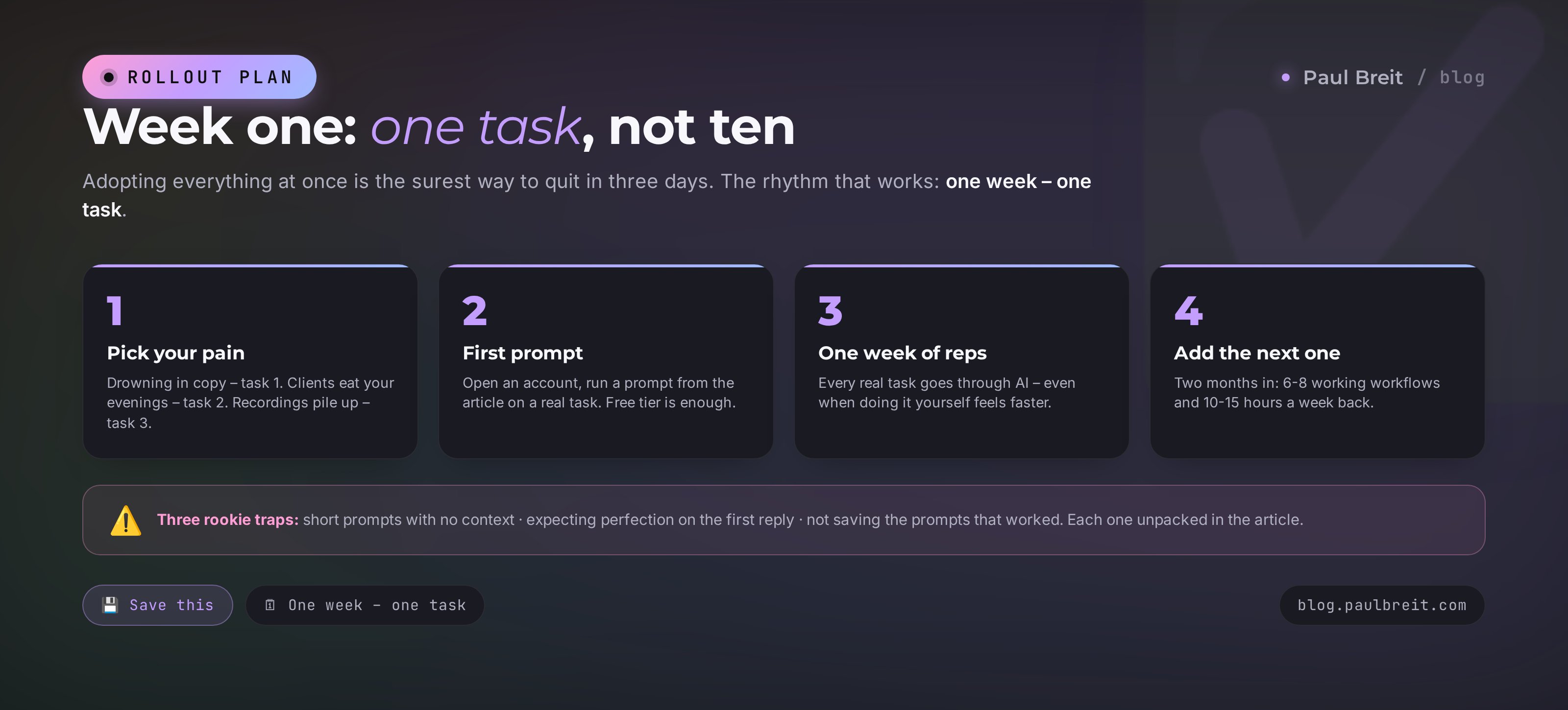
Don't try to adopt all ten tasks at once – that's the guaranteed way to quit in three days. The working scheme:
- Pick the one task with the sharpest pain. Drowning in copy – task 1. Clients eating your evenings – task 2. Recordings piling up – task 3.
- Open an account and run your first prompt from this article on a real task. claude.ai or chat.openai.com – free tier is fine.
- Run only that task for a week. Every real occurrence goes through the AI, even when "doing it myself is faster." By week's end the prompt is tuned, and it genuinely is faster.
- Add the next task. One week – one task. Two months in, you have 6-8 working workflows and 10-15 hours a week back.
Cost at the start: zero. Free tiers cover the entire first week on any task. Buy the subscription when the limits start to pinch – that's your sign the tool has taken root.
Three rookie traps in week one
So the first week doesn't become the last, walk around what trips up almost everyone.
Short prompts
"Write a post about nutrition" – and the disappointment of faceless text. The cure is context: who you are, who you write for, what format you need, and what's off-limits. Compare the prompts in this article with what you'd write on your own – the difference is in the details, and the details decide everything.
Expecting perfection on the first reply
AI is a dialog. The first answer is almost never final: say what's off ("drier," "shorter," "cut the pathos from paragraph two") and the second pass lands much closer. People who quit after one weak reply lose the tool over nothing.
Keeping everything in your head
Good prompts are forgotten within a day. Start one note called "My prompts" and drop in every wording that worked. A month later it's your personal library, and every task starts in seconds. Mine outgrew the note long ago and became a system of its own – and it's exactly what separates playing with AI from working with it.
One last thing. A month or two into regular practice, a quiet shift happens: you stop thinking "how could I use AI here" and start thinking in tasks – "this goes to the AI, this I do myself." From that point the tool is an extension of your hands, and this list of ten becomes just the starting set: every expert grows their own within a couple of months, shaped by their own routine. Contract reviews for one person, story scripts for another, marketplace review replies for a third. The logic is the same everywhere: anything repetitive that follows a pattern is a candidate for handover.
RecapAll 10 tasks in a minute
- Copy in your voice – 30 of your posts as samples, a draft in a minute
- Client replies – a warm expert answer in 5 minutes instead of 30
- Notes – an hour of recording into one page
- Content plan – a week of posts with hooks in 5 minutes
- Lead magnet – a guide in one evening from a voice memo
- Slide decks – no designer, revisions in plain words
- Repurposing – one post lives on five platforms
- Analytics – talking to your spreadsheets like a person
- Assistant – plans, inbox, meeting prep
- Pages – a working landing page with no developer
FAQFrequently asked questions
Which AI is best for a beginner with no technical background?
Claude or ChatGPT – both run on plain text. Claude holds your voice better in longer writing; ChatGPT has a more familiar interface and generates images. For the tasks in this article either works; for writing, Claude is the recommendation.
How much does it cost to start?
Zero. Free tiers of Claude and ChatGPT cover all ten tasks while you learn. The paid plan ($20/month) becomes worth it once you hit message limits and want Projects – knowledge bases that keep your context.
Is it really possible with no programming at all?
Really. All ten tasks are set in plain text in a chat window. Where code is needed under the hood – pages, decks – the AI writes it itself and hands you the finished result. The only technical skill required is copy and paste.
Which task should I start with if I've never used AI?
Notes or copy. Notes give an instant wow with no prep: drop in a recording, get a summary. Copy gives the biggest time savings but needs 20-30 of your posts collected as style samples first.
Will AI write better than me?
Differently. It drafts faster than you; its final text is worse than yours. The right pairing: AI delivers a draft at 70-80%, you add live details and intonation. The result is at your level, 3-4 times faster.
Won't I get lazy handing everything to AI?
Hand over the routine, keep the thinking: decisions, fact-checking, live conversations. Practice shows the opposite of the fear – once the routine is gone, deep work finally gets room on the calendar.
Is client data safe to upload into a chat?
On paid tiers, Anthropic and OpenAI don't use your data to train models. Keep one hygiene rule anyway: anonymize names, phones, and payment details before uploading – pattern analysis doesn't need those columns.