Write an ebook with AI in a weekend: a step-by-step guide for experts
Plenty of experts put off their book for years. They think it takes months, an editor, and a literary gift. In reality, you sit down Saturday morning with an AI tool, and by Sunday night you have a finished 40–80 page book with structure, text, and a cover. This guide is written for the expert who isn't technical. Every step is laid out so you simply open an AI tool in your browser and repeat the action.
An ebook for an expert isn't a second degree or a literary feat. It's your own method, packaged in an evening – the same method you share every day on calls. With AI you stop being a writer and become an editor who sets the direction and picks out the best parts.
This article lays out the 6 steps that take you from a blank screen to a finished PDF in a weekend. First you pick a precise topic. Then you build the structure in half an hour. Then you write the text chapter by chapter. You strip out the fluff. You design a cover. And you put it all into a PDF without a layout person. All of it – through an AI window in your browser.
* Inside: a step-by-step guide, ready prompts for every step, a breakdown of common mistakes, and an hour-by-hour checklist for both days.
What's inside
- Why an expert needs an ebook in 2026
- What to prepare before you start: AI tool, access, time
- Step 1: pick a precise topic in 20 minutes
- Step 2: build a structure of 6–8 chapters in half an hour
- Step 3: write each chapter with one prompt
- Step 4: strip the AI fingerprints out of the text
- Step 5: make a cover without a designer
- Step 6: assemble the PDF without a layout person
- What to do when the AI writes fluff
- How to use the book for sales
- Hour-by-hour weekend checklist
- Where to start right now
Section 01Why an expert needs an ebook in 2026
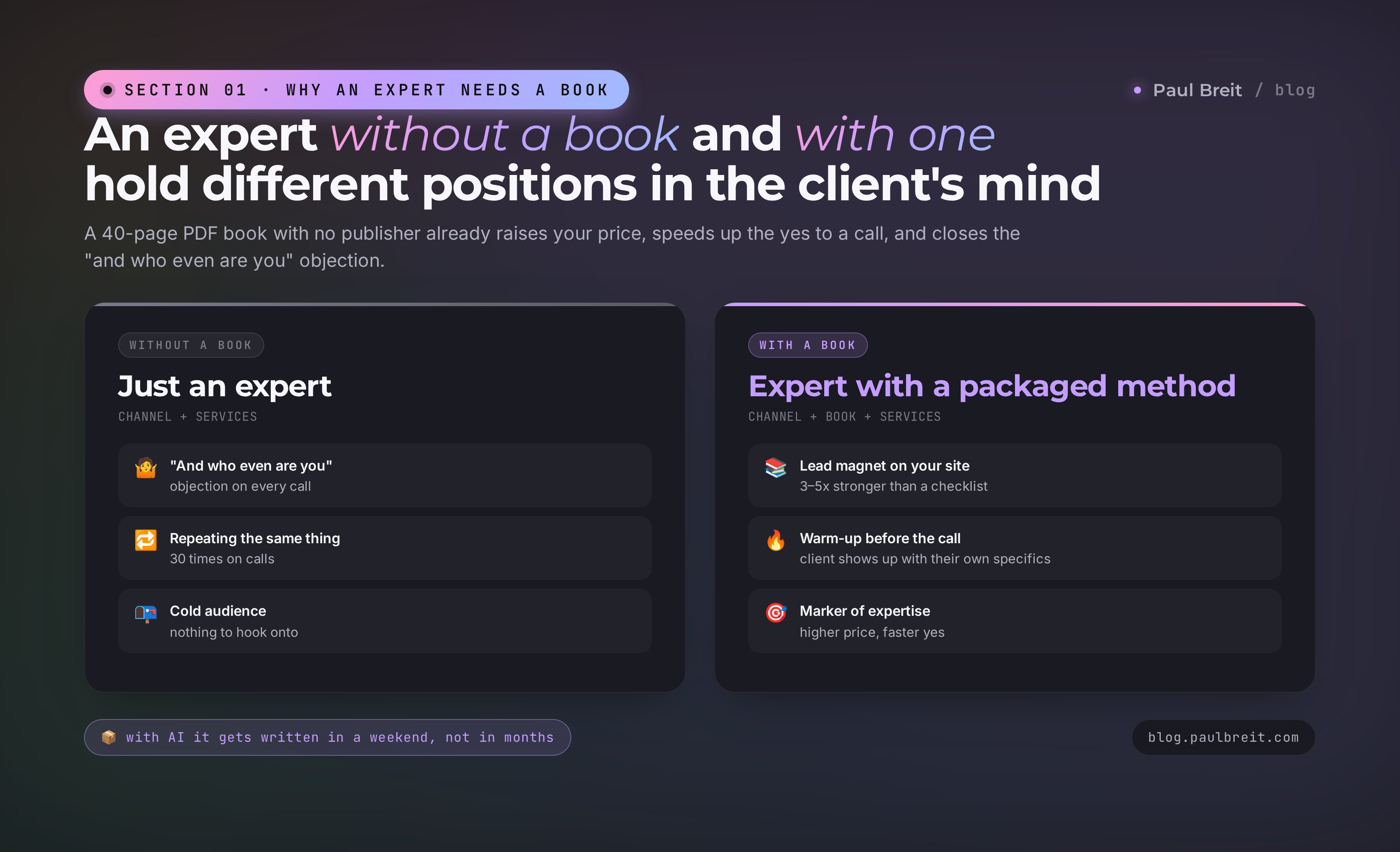
An expert without a book and an expert with a book hold different positions in the client's mind. The one with a book is automatically seen as someone who has gone deep on the topic and has something real to say. This works even if the book is 40 pages, a PDF, with no publisher behind it. The simple fact of a packaged method raises your price, speeds up the yes to a call, and closes the "and who even are you" objection.
What a book actually does for an expert:
- A strong lead magnet. A book in exchange for an email or a channel subscription works far better than a one-page checklist.
- A warm-up before the call. The client read the book and shows up to the call not with a cold "tell me what you do," but with a specific "here's my situation, what do I do."
- A packaged method. Everything you repeat on every call now lives in one file. You stop saying the same thing 30 times over.
- A marker of expertise. A book is an anchor for your status. You can link it on your site, in your channel bio, in your email signature, in a landing-page banner.
It used to be expensive, time-wise, to write a book. Months on structure, weeks on chapters, paying an editor and a proofreader. With AI the expert's role changes: you stop being a writer and become an author who sets the direction, picks the living parts, and cuts the fluff. The text itself takes hours, not weeks.
Sitting down and asking the AI to "write a book about marketing" is a road to nowhere. You'll get 60 pages of a watered-down Wikipedia rehash that nobody finishes. A book comes alive only if you give the AI two things: your narrow topic and your examples from practice. Everything else is fluff, and the AI will pour it on generously by default.
Section 02What to prepare before you start: AI tool, access, time
Before the first word of the book, spend an hour on prep. It'll save you half of Saturday. Prep is three things: pick an AI tool, get access to it, and clear two days of time ahead.
Which AI to use for a book
For long-form text in 2026, a few options work well. I'll list them in descending order of how steadily they hold quality over long stretches of text.
| AI tool | Strong at | Where to open it | Plan |
|---|---|---|---|
| Claude (by Anthropic) | Best prose, long even text, little fluff | claude.ai in the browser | Free tier works; Pro is $20/mo |
| ChatGPT (by OpenAI) | Structures well, fast responses | chatgpt.com in the browser | Free tier works; Plus is $20/mo |
| Gemini (by Google) | Handles huge documents, good at research | gemini.google.com or the app | Free tier works; Advanced is $20/mo |
| Copilot (by Microsoft) | Good for short tasks, built into Windows | copilot.microsoft.com or the app | Free; Pro is $20/mo |
If you have a choice, go with Claude. In my experiments it writes the most natural prose, slips into stiff corporate language least, and holds the author's voice best. ChatGPT is a strong second if you already use it daily – it's a perfectly workable tool, and people write whole books on it.
Anthropic (Claude) and OpenAI (ChatGPT) are available in most countries, but a few regions are blocked. If claude.ai or chatgpt.com won't open where you are, connect through a VPN with a US or European location. Working options as of 2026 include Proton VPN and Mullvad. Note that some regions are on Anthropic's blocklist and a VPN there won't help. If you'd rather not deal with a VPN, Gemini is widely available and is plenty for a book.
Access: free or paid
You can write a book on the free version of any AI, but it will cut the length of answers short. On a paid plan (around $20 a month for Claude, ChatGPT, and Gemini) the answers are 2–3 times longer and the AI writes in more even chunks. For a single weekend, the paid plan is easy to justify: $20 against your packaged method isn't a number worth debating.
Time
A realistic plan: 6–8 hours on Saturday, 4–6 hours on Sunday. If you work fast, you'll fit it into one day. If it's your first book and you want to take it slow, spread it across two days, about 5 hours each with breaks.
What matters: carve those hours out in solid blocks of 2–3 hours. A book doesn't get written 15 minutes at a time on the run – the AI loses the thread, you wear out from switching, and the text comes out choppy.
What you need in hand before you start
A list of 6 items that takes about an hour. Without these, Saturday turns into setup time instead of writing time.
- One AI tool picked from the 4 above.
- An account registered and login verified in the browser (for ChatGPT and Claude – through a VPN if your region is blocked).
- A paid monthly plan bought, if you plan to write in Claude or ChatGPT.
- An empty document open in Google Docs or Microsoft Word, where the book's text will accumulate.
- A notepad ready: 5–10 typical client questions and 3–5 cases from your practice with real detail (you don't need names, you need numbers and details).
- Your household warned that you're busy in 2–3 hour blocks over the weekend. Coffee and quiet secured.
Section 03Step 1: pick a precise topic in 20 minutes
The most common mistake at the start is choosing a topic like "about marketing," "about health," "about coaching." That's not a topic, that's a niche. A book on a topic like that comes out blurry, and the AI will hand you common-knowledge platitudes, because a framing that broad has no one to speak to.
A good book topic catches three things:
- A specific person with a specific pain.
- One problem you know how to solve.
- A promise of a visible result.
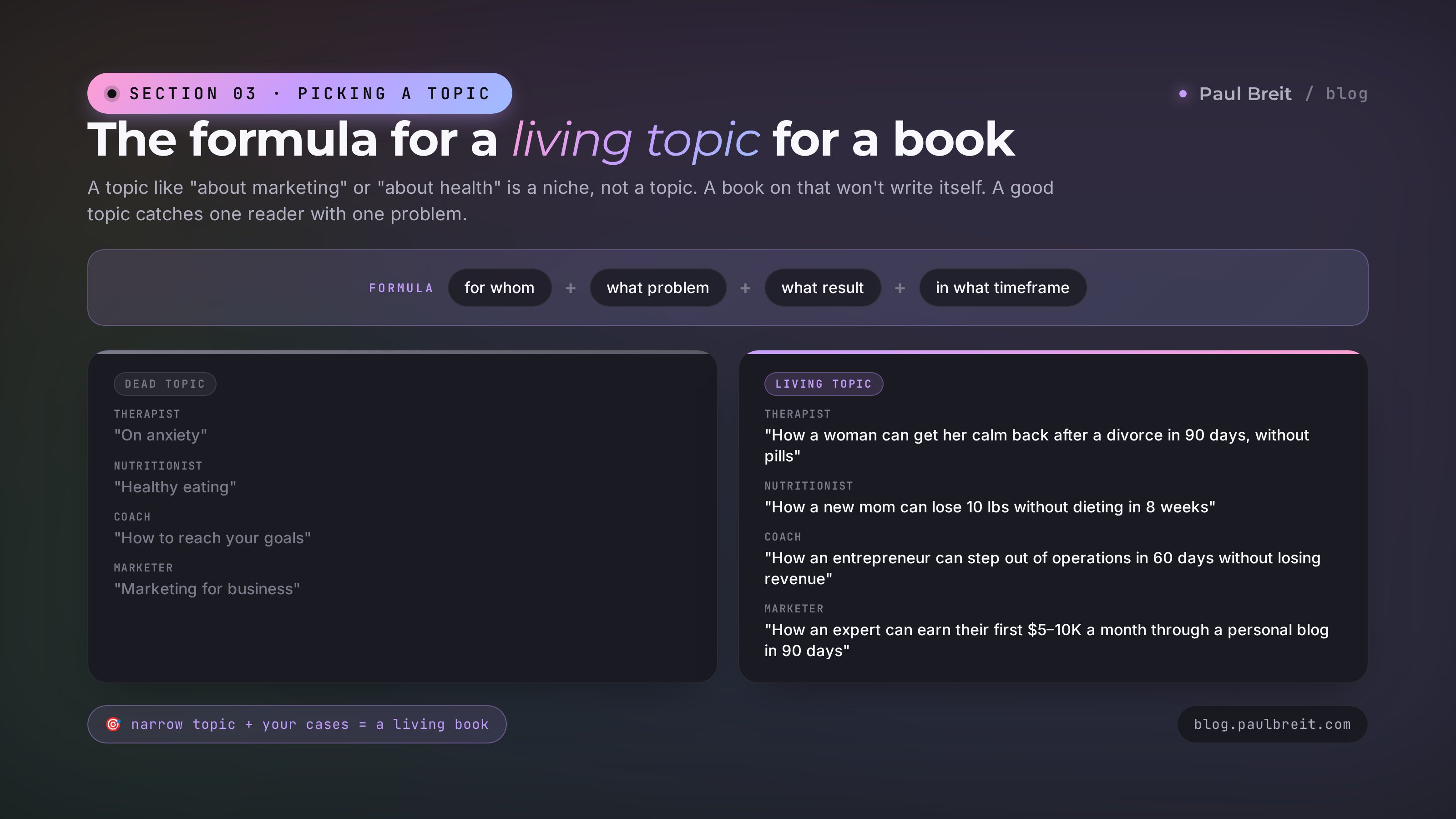
The formula for a living topic: for whom + what problem + what result + in what timeframe. Compare how dead topics turn into living ones:
| Niche | Dead topic | Living topic |
|---|---|---|
| Therapist | "On anxiety" | "How a woman can get her calm back after a divorce in 90 days, without pills" |
| Nutritionist | "Healthy eating" | "How a new mom can lose 10 lbs without dieting or binges in 8 weeks" |
| Coach | "How to reach your goals" | "How an entrepreneur can step out of day-to-day operations in 60 days without losing revenue" |
| Tutor | "SAT prep" | "How to raise your kid's SAT math score from 600 to 750 in one school year" |
| Marketer | "Marketing for business" | "How an expert can earn their first $5–10K a month through a personal blog in 90 days" |
A prompt that helps you pick a topic
If you can't formulate a living topic off the top of your head, ask the AI. Open a chat window and paste the text below. The data in square brackets is yours.
I'm a [your profession], working with [who your clients are]. I want to write an ebook that I'll give away for free as a lead magnet. The goal of the book is for the reader to book a consultation with me.
Suggest 10 precise book topics using the formula: for whom + what pain + what result + timeframe. The topics must be narrow and speak to a visible change in the reader's life. Don't give me generic phrasings like "about health" or "about marketing."
After the list, pick the one topic that in your judgment will produce the most consultation bookings, and explain in two sentences why.
The AI will roll out 10 options. Of those, 2–3 will fit you. From those 2–3, pick the one you have the most personal cases and stories for – that way the book comes out with your real material, not a rewritten textbook.
Before you move on, say the topic out loud in one sentence to someone in your household. If a person outside your niche can repeat the topic back in their own words within 10 seconds – the topic is alive. If their eyes glaze over and all you get back is "uh-huh" – the topic is still abstract, rewrite it.
Section 04Step 2: build a structure of 6–8 chapters in half an hour
The structure is the book's skeleton. If it's crooked, no amount of text will save it. Luckily, the skeleton for an expert's book almost always looks the same: problem → cause → solution → step breakdown → examples → wrap-up. The AI knows this and builds it in a single prompt.
A prompt for the book structure
Open a chat with the AI and send a message like this. Swap your topic in for the square brackets.
I'm writing an ebook for an expert on the topic: [paste your precise topic here, using the "for whom + problem + result + timeframe" formula].
The book will be 40–80 pages as a PDF. The goal of the book is to lead the reader to book a consultation with me.
Build a table of contents of 6–8 chapters. For each chapter give me: 1) a title, 2) one sentence on what the chapter is about, 3) three key points inside it. The structure should lead the reader from the problem to a clear path of action.
Number the chapters. After the table of contents, add what should go in the introduction and what in the conclusion.
In 15 seconds you'll get a table of contents. This isn't the final version, it's a draft. Read it through and make 3 edits:
- If a chapter duplicates another – merge them.
- If there are 8 chapters and you feel 6 is enough – cut the two weakest.
- If a chapter sounds "textbooky" – rewrite the title from the reader's point of view: not "The Theory of Stress," but "Why You're Exhausted by Wednesday."
How to tailor the table of contents to yourself
After the AI hands you the first table of contents, adjust it to your real material. Add this to the same chat:
In my practice, the most common client cases are: [list 3–5 typical stories: what they come in with, what's getting in their way, how it was solved].
Rewrite the table of contents so at least 2 chapters are built around these cases from my practice. The chapter titles should sound alive, not like textbook sections.
You'll get a second, noticeably more alive version. That's the structure you'll go write chapters from.
Don't fall into perfectionism with the table of contents. If you sit on it for 3 hours, you won't reach the text today. Remember a simple rule: the first version of the table of contents is never perfect, and it almost always changes as you write the chapters. That's normal. Your job right now is to lock in a working frame, not to polish it to a shine.
Section 05Step 3: write each chapter with one prompt
Write the chapters one at a time, each in its own conversation with the AI. Don't try to dictate the whole book in one message – the AI will lose the thread and the text will come out vague. One conversation, one chapter, full attention here.
Each chapter should come out to 4–8 pages. That's roughly 1,500–2,500 words. If the free version won't give you that much at once, split the chapter into 2–3 chunks: "write the first part of the chapter," "now continue, I'll start with the words …," "now the final part."
A prompt template for a chapter
I'm writing a book on the topic: [topic].
The book's audience: [for whom].
The book's goal: [lead to a consultation / sell a course / package a method].
Right now we're writing chapter [number]: [chapter title].
Inside the chapter we need to cover three points: [point 1], [point 2], [point 3].
I have an example from practice that illustrates this chapter: [describe the case in 3–5 sentences: what the client came in with, what you did, what came of it]. Weave this example into the text as a living story.
Style: conversational, addressing the reader directly, no corporate jargon, no fluff, no throat-clearing intros like "in today's world" or "let's dive in." Every sentence should carry meaning. Chapter length: about 2,000 words. At the end of the chapter, give a short takeaway in one or two sentences.
You'll get a chapter. Read it through from start to finish. If it's full of generalities and thin on specifics – don't fix it yourself, send this to the AI in the same chat:
Rewrite the chapter from scratch. Remove all intro phrases and generic lines. Add more specifics: numbers, timeframes, actions. The client story should be more detailed: what exactly they felt, which 2–3 concrete actions we took, how many days until the result showed up. At the end of the chapter – one concrete task the reader can do in 15 minutes.
The second version is almost always stronger than the first. Sometimes you need a third pass with the edit "make the chapter 30% shorter, keep only the densest parts." Don't be afraid to send the AI back to work – that's its main advantage over an editor, it doesn't get tired.
Where to get examples from practice
The main material for a living book is your client stories. Before each chapter, jot down 1–2 cases that illustrate it in your notepad. You don't need names and details, you need: what the person came in with, what was holding them back, what you did, in what timeframe, and what result you got.
If you don't have many cases yet – write about yourself. "When I was just starting out, I did X. A year later I realized I needed Y. And ever since I do Z." That's just as alive as someone else's case, and even stronger, because it's first person.
How to make the AI write in your voice
The most common failure of an AI-written book is that it sounds like AI, not like you. Stock phrases, long sentences, a detached tone. There's one fix: show the AI a sample of how you write in real life. Then it stops writing "by default" and picks up your rhythm, your vocabulary, and your signature turns of phrase.
Where to get that sample, best to worst:
- Your Telegram channel – the most common and convenient source. Copy 5–10 of your posts in a row where you sound exactly the way you want to sound in the book. To skip picking by hand, hand Claude your whole channel archive and ask it to surface the top ones via the 5-prompt channel analysis. If you have breakdown posts, story posts, reflection posts – grab 2–3 of each type.
- Your blog or site – articles you're proud of. 2–3 long pieces of 1,500–3,000 words is enough.
- Transcripts of your livestreams or podcasts – the most alive source, because it's spoken language with no editing. Take a transcript of 30–60 minutes of conversation, it'll give the AI your spoken voice.
- Your notes in personal client messages – if you have long replies where you explained something to a client in your own words.
If you have few of your own texts, or none – no problem. First, talk for 15–20 minutes into a recorder, answering a typical client question, transcribe it with AI, and use that transcript as your sample.
Below are samples of my writing. These are samples of my voice: vocabulary, rhythm, tone, typical phrasings, sentence length. Study them and write the book chapter in exactly that style.
[paste here 5–10 of your channel posts / 2–3 of your articles / a 30-minute transcript of your livestream]
Before you write the chapter, briefly describe in three points what's characteristic about my style: sentence length, favorite words, how I build transitions, what I never do. Then write the chapter taking those observations into account.
Send this prompt once at the start of each new chapter (in each new chat). The AI will read the samples, describe your style in three points – check that the description is accurate. After that, send the main chapter prompt. The difference is visible from the first paragraph: the book stops sounding like a collection of lectures and starts sounding like you.
Don't hand the AI facts you haven't verified. It can convincingly make up a method's effectiveness percentage, the date of a study, the author of a quote. Every number and fact that goes into the book should either come from your practice (so you know it for sure) or be verified through a search before publishing. Otherwise the book ends up with hallucinations, and some reader will absolutely catch it.
Section 06Step 4: strip the AI fingerprints out of the text
The biggest tell that a book was written by AI with no edits is the "AI" language. Smooth, evasive phrases, lines like "in today's world," "let's dive in," "it's important to note that." A reader spots that within half a paragraph and closes the PDF.
So there's a separate step after writing the chapters – stripping out those fingerprints. It's done in three passes, each taking 20–30 minutes per chapter.
Pass 1: banned phrases
Open each chapter and search (Ctrl+F or Cmd+F) for these phrases. Delete or rewrite each one you find to be shorter.
| Banned phrase | What to replace it with |
|---|---|
| In today's world / nowadays / in the era of | Delete entirely, get to the point |
| Let's break it down / let's take a look | Delete, start straight into the breakdown |
| It's important to note that / it's worth emphasizing | Delete, just write the thought itself |
| Essentially / basically / in fact | Delete, the thought is stronger without the wrapper |
| In conclusion, I'd like to say | Go straight to the final thought, no announcement |
| It's no secret that | Delete, replace with a concrete fact |
| Many people wonder | Go straight to the question itself, from the reader's view |
| Huge / colossal / significant | A concrete number instead of the adjective |
Pass 2: long dashes and dense paragraphs
AI loves writing with long em dashes and packing sentences into one monolithic half-page paragraph. A living book has short paragraphs and short dashes.
- Replace all long em dashes with shorter en dashes or hyphens using find-and-replace.
- Break any paragraph longer than 5 lines into 2–3. The reader's eye tires on a solid wall of text.
- If several sentences in a row start the same way ("This," "This," "This"), reword them so the openings alternate.
Pass 3: reading aloud
Open the chapter and read it out loud. This isn't for beauty – it's the strongest filter for AI text. By ear you immediately hear:
- Where a sentence is wooden and no one would say it out loud – rewrite it shorter.
- Where there's a comma-separated list longer than three items – turn it into a list.
- Where the author starts praising themselves or saying "unique method" – cut it.
- Where a word shows up that you'd never use in your life – swap it for your own.
Reread this chapter and rewrite it the way a living expert would, someone telling you about the topic over a cup of coffee. Remove all "AI" tells: intro phrases at the start of paragraphs, generic lines, long complex sentences. Keep the meaning and the examples from practice, but cut the length by 20–30%. The final text should sound like it wasn't edited, just spoken.
Don't hand the cleanup to a different AI without giving it context. It'll rewrite your chapter until nothing of your voice is left. Clean up only in the same chat where you wrote the chapter, and be sure to give the AI a sample of your speech – for example, copy a couple of paragraphs from one of your own posts or articles. Then the result will sound in your voice, not in the AI's default voice.
Section 07Step 5: make a cover without a designer
The cover is the first thing a person sees. If it's "AI-ish" with extra hands and crooked letters – the book won't get opened, even if the text inside is brilliant. Luckily, for a PDF book the cover takes 30 minutes with no designer.
Two workable paths
You have two paths depending on how much you want to sweat it.
| Path | What to do | How long |
|---|---|---|
| Simple: a Canva template | Go to canva.com, search "book cover," pick a template, swap the image and text | 20–30 minutes |
| With AI: generate an image + text in Canva | Generate a visual in Midjourney, DALL·E, or Ideogram, download it, add the title in Canva | 40–60 minutes |
What has to be on the cover
The minimum, without which you don't release the cover into the book:
- The book title – large, readable at thumbnail size.
- A subtitle – one sentence on the benefit to the reader.
- Your name – at the bottom, no bigger than the title.
- One visual element: a photo, an illustration, or a color block. One, not three.
A prompt for the cover visual
If you go the path of generating an image, paste a prompt like this into Midjourney or another image generator. You'll get 3–4 options, pick one.
A minimalist book cover in [dark pastel / light pastel / monochrome] tones. Main element: [an abstract geometric shape / a schematic object related to the book's topic]. No people, no text, no complex details. Vertical composition, 2:3 format. Style: modern, clean, like a Penguin or Princeton University Press cover.
Then in Canva open the "Book Cover" format, at 1600 by 2400 pixels. Upload the image, place the title in a large font on top or in the center. The subtitle – smaller, under the title. Your name – at the bottom. Save as a PDF and a JPG (the JPG comes in handy for social media and your site).
Don't use photos of AI-generated people. They usually have crooked hands, extra fingers, dead eyes. On a book cover this gets caught in 2 seconds and kills trust. If you need a face – use your own, a photo from a consultation or a shoot. If there's no photo, go with an abstract visual without people. Also, don't use more than two fonts – the cover ends up overloaded. One font for the title, one for your name, that's it.
Section 08Step 6: assemble the PDF without a layout person
The final step is to put the book into a PDF you're not embarrassed to hand a reader. No layout person and no InDesign. Google Docs or Microsoft Word is enough. Time: 1–1.5 hours.
The simple path through Google Docs
Google Docs is free, opens in the browser, and is handy for assembling a long text. The steps in order:
- Go to docs.google.com, sign in with any Google account. If you don't have one – set it up in 3 minutes, you only need an email and a password.
- Create a new document. At the top, type the book title, below it your name.
- On the second page, insert the table of contents. First write the chapters out as a list by hand. Then go to "Insert" → "Table of contents" – Google Docs will build the links itself.
- From the third page, start loading in the chapters. Each chapter – on a new page (Ctrl+Enter or Cmd+Enter).
- Format the chapter titles with the "Heading 1" style – that way they land in the table of contents automatically.
- Go to "File" → "Page Setup" and set 1-inch margins and Letter (or A4) format.
- Body font: Inter, Open Sans, or PT Sans, size 12. Headings – the same font, size 18–24, bold.
- Page numbers at the bottom. "Insert" → "Page numbers" → bottom center.
- On the last page – your contacts and an invitation to book a consultation. One or two sentences and a clickable link.
- "File" → "Download" → "PDF document." The file saves to your computer.
A prompt for the final check
Before you save to PDF, ask the AI to check the whole book in one message. Open a new chat and attach the final text there.
Read this book through the eyes of an expert in [your niche] and a reader from the target audience. Find:
1) Repetitions of the same ideas across different chapters.
2) Contradictions between chapters.
3) Factual errors and dubious claims.
4) Places where the text sounds dry or too generic.
5) Places where one short phrase could strengthen the meaning.
In response, give a numbered list of notes with quotes from the text and a suggested edit.
You'll get a list of notes. Go through it in 30–40 minutes, make the edits in Google Docs, and re-export the PDF.
A finished 40–80 page PDF with a cover, a table of contents, page numbers, and an interactive link to a consultation. The file weighs 2–5 megabytes, opens on any device, and gets sent by email or messenger in one click. That's your first ebook.
Section 09What to do when the AI writes fluff
At every step there will be moments when the AI hands you vague text with no specifics. That's normal – by default it writes cautiously, so as not to step on anyone. Specifics show up only when you ask for them explicitly. Five typical problems and five antidote prompts.
| Problem | Antidote prompt |
|---|---|
| "It's all correct, but kind of generic" | "Add 3 concrete numbers, 2 names or tool names, and one date to each paragraph. No generic lines" |
| The AI praises the reader and the topic | "Remove all praise of the reader and adjectives like 'important,' 'valuable,' 'useful.' Keep only facts and instructions" |
| The text reads like a textbook, not a conversation | "Rewrite it as if you were telling a friend over coffee. Short sentences, conversational tone, no jargon" |
| The chapters repeat each other | "Read chapters [X] and [Y]. Find three places where they say the same thing. Rewrite chapter [Y] so there are no repetitions" |
| Every chapter ends the same way | "You use similar constructions to end chapters. Rewrite the endings of 4 different chapters in 4 different styles: takeaway-number, question to the reader, short story, direct instruction" |
When the AI gets stuck and won't give you what you need
Sometimes you ask 3 times to rewrite a chapter and it returns the same thing. That means the AI has locked onto its first version. Do this:
- Open a new chat with the same AI. Close the old one.
- In the first message, give it the book's context, audience, and style (repeat the chapter prompt from the start).
- Paste in only the piece of the chapter you don't like. One paragraph or one page, not the whole chapter.
- Ask it to rewrite with the new input.
In 9 cases out of 10, a new chat produces a different line of thinking, and the text moves forward.
Section 10How to use the book for sales
A book sitting on your computer doesn't work. The book starts bringing in clients when you wire it into three places.
Place 1: a lead magnet in your blog
Put a download link for the book in the bio of your main channel, in the pinned post, and in your chatbot's first auto-message. If you don't have a channel yet, or it's small – first go through the guide on your first 1,000 real followers with no budget. The phrasing is simple: "Free book '[title]' – for anyone who wants [result]. To download – hit the button below." Some new subscribers will follow just for the book, and those are already warm contacts.
Place 2: a warm-up before the call
When a person books a consultation with you, attach a link to the book in the confirmation message. What to say on the call itself so a read book turns into a payment – that's in the 7-block sales call script: "Before our call, please read chapters 2 and 5 – that way we'll get to your specifics faster." Whoever reads it shows up with a clear picture and buys at a higher price. Whoever doesn't read it – no big deal, but the simple fact that "the expert has a book" raises trust.
Place 3: warming up a cold audience
Give the book away on other people's platforms. Record a podcast, speak at a webinar, give an interview on someone else's channel – and at the end drop the link: "I put the full method in a book, download it free." With a cold audience, the conversion to a subscription through a book is 3–5 times higher than through a direct "subscribe to my channel."
| Where to put the link | Anchor text |
|---|---|
| Telegram channel bio | "Free book for anyone who wants [result] →" |
| Pinned post in Telegram | Short book blurb + download link + "grab it" |
| Site landing page | A "Download the book free" button in the first screen |
| Email signature | "P.S. I put the method in a PDF – [link]" |
| After a webinar / livestream | "I put the full version of the method in a book – here's the link" |
Don't sell your first book for money. A paid 40-page book from a not-yet-public author barely sells, and you'll get 5 purchases a month instead of a thousand downloads. The goal of a first book isn't sales revenue – it's warm contacts and clients for your expensive products. Once you have 5,000+ subscribers and a reputation – then you repackage the first book as a paid one and make a second as the lead magnet.
Section 11Hour-by-hour weekend checklist
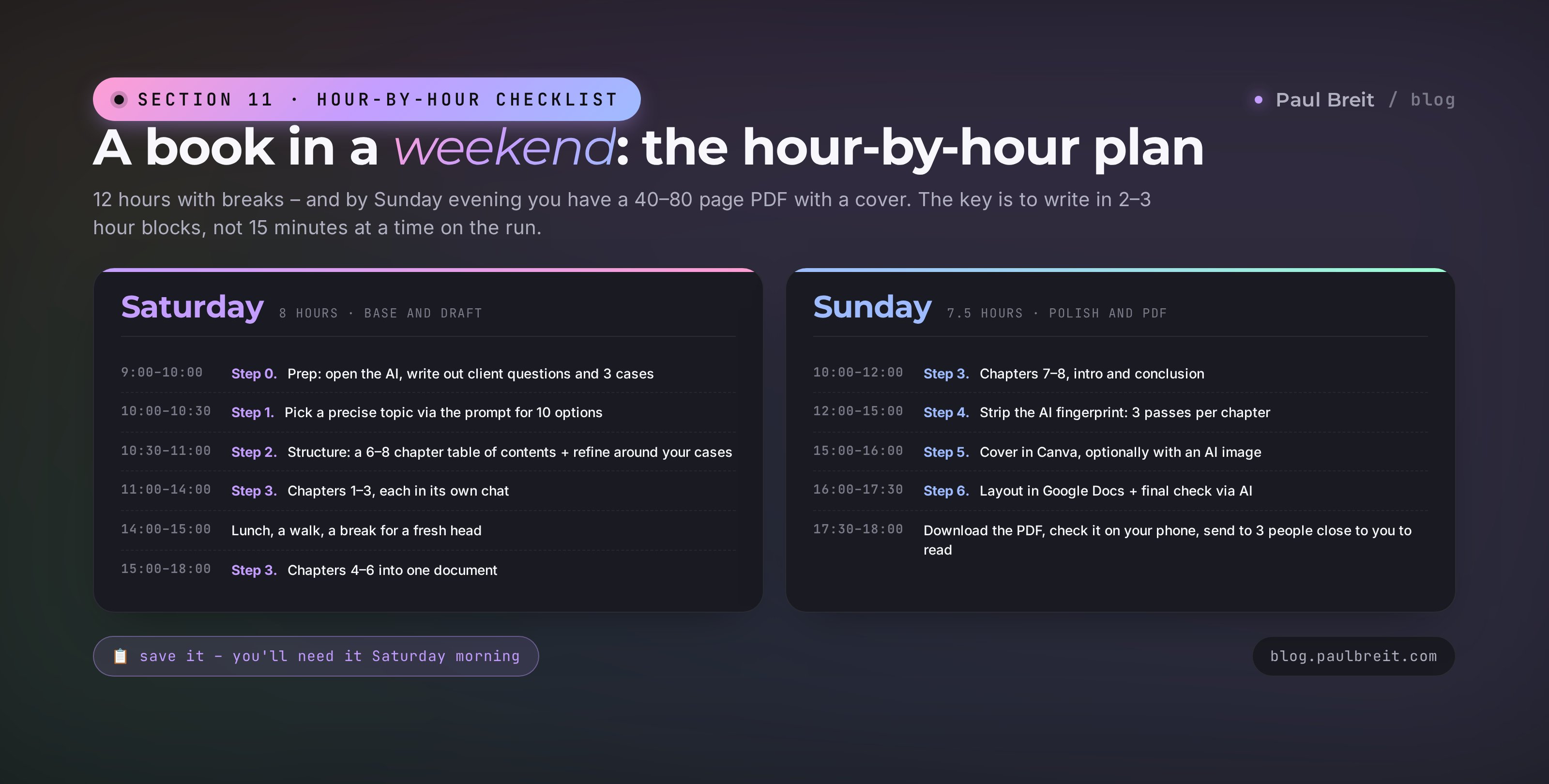
A two-day plan so that by Sunday evening you have a finished PDF. If you fall off schedule – no big deal, finish it the next weekend. The main thing is not to break the process into little 20-minute pieces on the run; in that mode the book doesn't come together.
| When | What we do | What you'll have in hand |
|---|---|---|
| Saturday, 9:00–10:00 | Prep: open the AI, set up a document, write out 5–10 client questions and 3 cases from practice | An open AI chat + a notepad with real material |
| Saturday, 10:00–10:30 | Step 1: pick a precise topic via the prompt for 10 options | One book topic |
| Saturday, 10:30–11:00 | Step 2: build the structure via the table-of-contents prompt and refine it around your cases | A table of contents of 6–8 chapters |
| Saturday, 11:00–14:00 | Step 3: write chapters 1–3, each in its own chat | 3 finished chapters in Google Docs |
| Saturday, 14:00–15:00 | Lunch, a walk, a break for a fresh head | Rest |
| Saturday, 15:00–18:00 | Write chapters 4–6 | All chapters in one document |
| Sunday, 10:00–12:00 | Finish chapters 7–8 (if any), write the intro and conclusion | A full draft of the book |
| Sunday, 12:00–15:00 | Step 4: strip the AI fingerprint, three passes per chapter | Text with no boilerplate phrasing |
| Sunday, 15:00–16:00 | Step 5: make the cover in Canva, optionally with an AI image | A cover in PDF and JPG |
| Sunday, 16:00–17:30 | Step 6: lay it out in Google Docs, add the table of contents and page numbers, do the final check via AI | A final 40–80 page PDF |
| Sunday, 17:30–18:00 | Download the PDF, check it on your phone, send it to 3 people close to you to read | The file is ready to publish |
When Sunday evening comes and your PDF with your name on the cover opens on your phone – it feels like the first time you stepped on a stage. All 12 hours pay off in a minute. And this is just the beginning: from here the book works for you for years as a lead magnet, a warm-up, and a marker of expertise.
Section 12Where to start right now
The most dangerous thing is to close this article saying "great, I'll sit down with it sometime." Putting it off kills the book more reliably than any technical snag.
Do three things right now, an hour of time, so your Saturday start is from a warmed-up head:
- Pick one AI from the table in section 02. Register, verify your login in the browser. If your region is blocked and you're going with Claude or ChatGPT – set up a VPN while you're at it.
- Open a notepad and write out 5–10 questions your clients ask you most often on calls.
- Write out 3 stories from practice: what the client came in with, what you did, what result you got. No names and no details, just the gist.
These 3 steps will take you an hour. That's the foundation on which, come Saturday, the structure assembles in half an hour, and over two days a book grows.
A book with AI doesn't get written by those with more time or talent. It gets written by those who sat down at the table Saturday morning and didn't get up until they'd gone through the 6 steps. The discipline of one weekend – and your method sits in a PDF that works for you for years.
If you'd rather not build it all from scratch – book a free consultation. We'll look at your niche and suggest a specific topic for your audience that will produce the most consultation bookings.
FAQFrequently asked questions
How long does it really take to write a book with AI?
10–15 hours of focused time over a weekend. With breaks – 8 hours Saturday, 7.5 hours Sunday.
Which AI is best for writing a book?
Claude – it writes the most natural prose. ChatGPT is a strong second if you already use it daily.
Can I write a book on the free version of an AI?
Yes, but you'll have to split chapters into 2–3 chunks. A paid plan gives you long answers in one go.
How do I make the book sound like me, not like AI?
Give the AI 5–10 of your own posts from your Telegram channel as a sample. It picks up your vocabulary and rhythm.