An AI Consultant on Your Site: Train AI on Your Own Content to Answer Clients 24/7
A step-by-step playbook to ship an AI consultant on your site in a weekend. It's grounded in your own knowledge base and speaks in your voice – not a plain chatbot. Live case study inside: my platform learn.pavelshiriaev.ru with 94 lessons, 1,200 chats in month one, 47 consultation requests, 11 sales. With a system-prompt template, a weekend checklist, and the four ways it breaks – so you can fix them fast.
Every expert with a blog eventually catches the same set of questions from clients. "How much is it?" – the fifth time today. "Can I pay from outside the US?" – the twentieth time this week. "What's the difference between the course and the mentorship?" – you've already written five posts and an article, and clients still land in your DMs asking.
It's not on the clients. They aren't going to hunt down your post from last August. They ask where they saw your offer – in DMs, in comments, in chat.
In 2026 there's a third way: an AI consultant trained on your material. It replies as if you wrote it, knows your products, links to your articles, walks the client toward the purchase. Runs 24/7. Read this in 22 minutes. Ship it in a weekend.
What's inside
- A scripted bot vs an AI consultant
- What you need: the minimum kit
- Step 1. Collect the knowledge base
- Step 2. Pick the AI – Claude, ChatGPT, or a turnkey service
- Step 3. Training is a myth: how RAG actually works
- Step 4. System prompt – voice, guardrails, sales
- Step 5. Ship it on your site – three tiers
- Step 6. Beta-test on real questions and fix the misses
- Case study: 94 lessons as an AI consultant
- Weekend checklist
Section 01A scripted bot vs an AI consultant
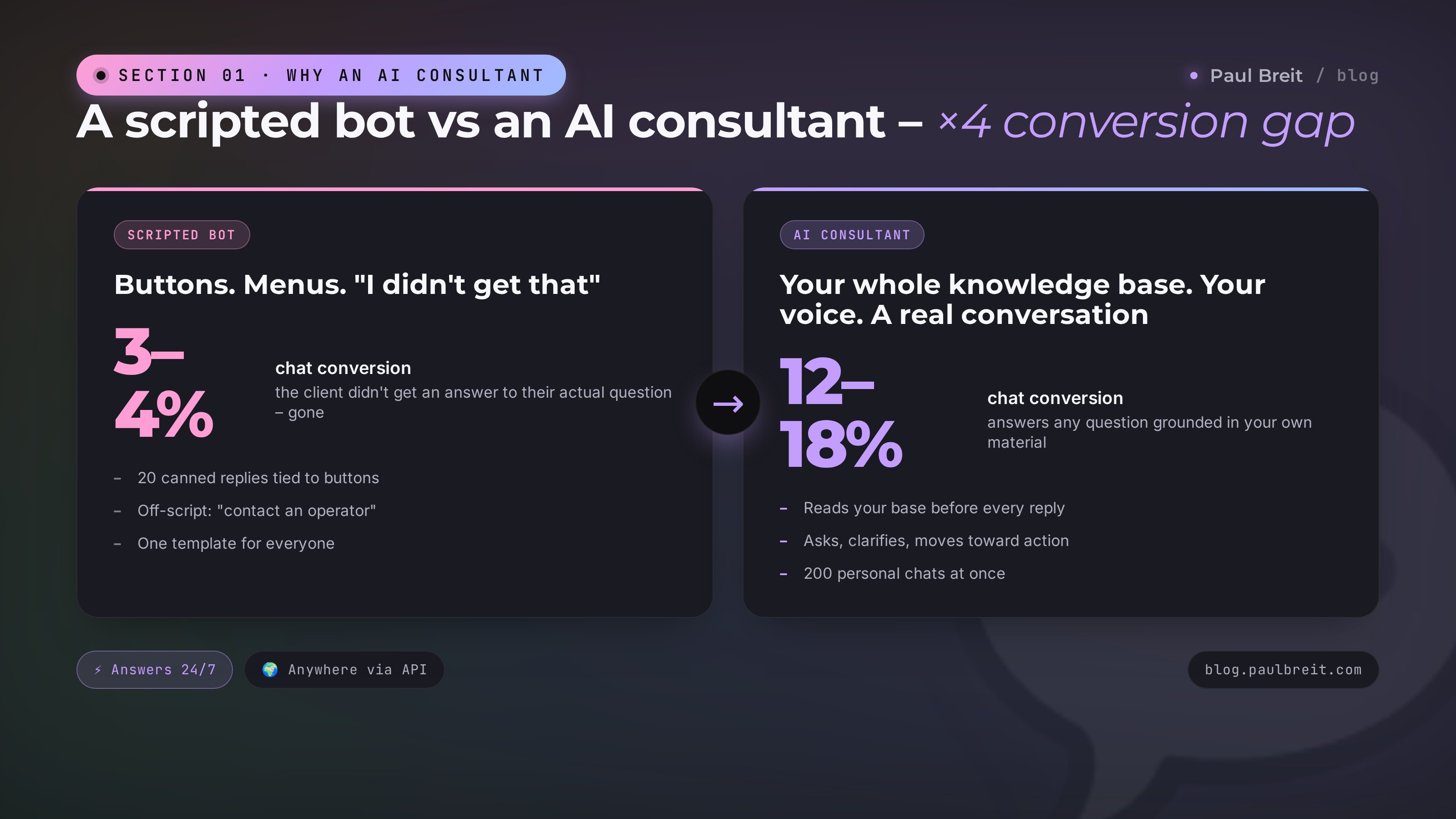
A scripted chatbot is a set of buttons. The client taps "price" – the bot spits out the price. Taps "shipping" – the bot spits out shipping info. Anything off-script gets "I didn't understand your question, please contact an operator." A live example: your bank's bot that can't answer whether your paycheck cleared, because "that function isn't supported."
Clients feel it and hate it. On my numbers, chat conversion with a scripted bot runs about 3–4%. Chat conversion with a real human runs 12–18%. People bounce because they didn't get an answer to the actual question they asked.
An AI consultant works differently. It reads the client's question, finds what it needs in your knowledge base (lessons, articles, posts), and writes a reply. And the reply sounds like something you'd write. Because it learned from your text.
Three key differences
- It answers on any topic. A scripted bot has 20 canned replies. An AI consultant has everything in your material.
- It runs a real conversation. A client asks: "would the mentorship work for me?" A regular bot spits out a program description. An AI consultant asks first: "quick question – what's your niche, and how many clients a month right now?" The client answers – the consultant recommends the right product, or says "hold off on buying, this free lesson matters more for you first."
- It scales. Say 1,000 visitors an hour, one in five hits the chat – that's 200 chats at the same time. A live rep can't handle it. A scripted bot serves the same buttons to everyone. An AI consultant runs 200 personal conversations in parallel.
The AI consultant is a paid model that charges by tokens. An average chat in my projects costs 3–8 cents. If the chat converts 5% of visitors into a lead – the math is deep in the black. If conversion is worse, the fix is in the prompt or the base (Section 8 shows how).
Section 02What you need: the minimum kit
The list is short so it doesn't look scary.
A knowledge base
Your accumulated content. Most experts already have three or four sources:
- posts on your channel or feed over the past year or two
- blog articles or breakdowns you've written for LinkedIn, Medium, Substack
- materials from your course, mentorship, cohort – anything already documented
- transcripts of lives, webinars, interviews
- sales scripts and stock replies to objections
Ten-module course? Feed in the module text. Just a newsletter or a channel? Export the last year of posts. Nothing prewritten? Start with 30–40 of your most-asked client questions and your best answers.
An AI
In 2026 there are three working options: Claude from Anthropic, ChatGPT from OpenAI, and specialized services like Voiceflow, Chatbase, Botsonic. I break them down in Section 4. The point here: an AI costs money. Base subscription starts around $20/month, tokens on top.
A way to ship it on the site
Three tracks:
- A turnkey chat widget in the bottom-right of your site – Chatbase, Botsonic, RagBot, TixAE. 30 minutes to set up, polished UI out of the box.
- Your own minimal chat widget in HTML+JavaScript that calls the Anthropic API. A couple of hours of dev work. Full control over the design.
- A production build with a backend, chat logs, CRM integration. That needs a real developer.
Time
A first working consultant takes 6–10 hours of focused work. Plus a few days of beta-testing and prompt tuning.
Step 01Collect the knowledge base – what to include, what to leave out
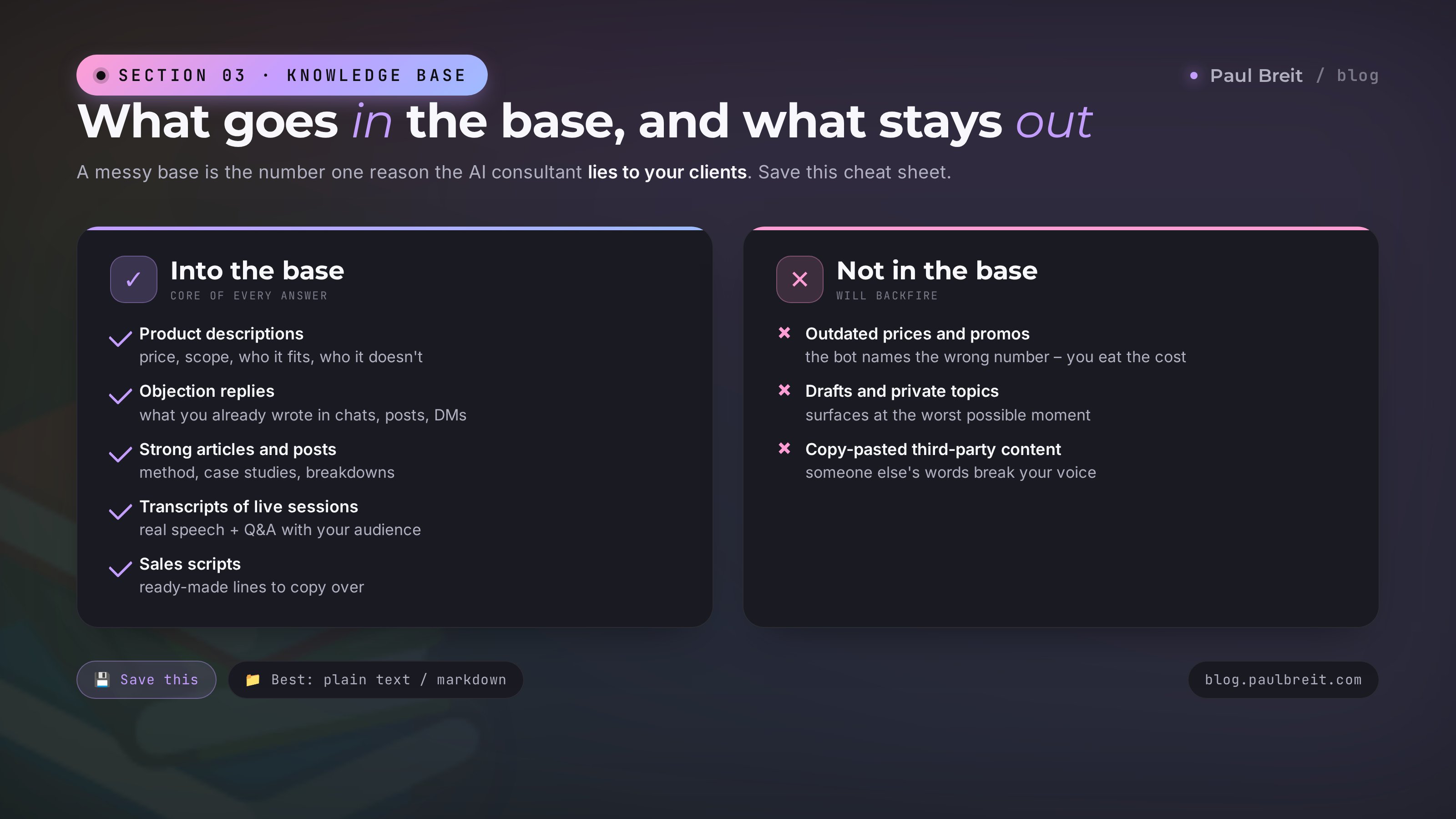
It's tempting to dump everything you've ever written into the bot. Don't. A messy base is the number one reason the AI consultant later lies to your clients.
What to put in
The product core
Full descriptions of every product you sell – course, mentorship, consultations, breakdowns. Price, scope, length, who it fits, who it doesn't. If you have an FAQ on the landing page – in it goes.
Objection replies
Everything you've already written in chats, posts, and DMs answering "too expensive", "why would I need this", "I do fine on my own", "I bought X's course and it didn't help." Pull those replies into a single file, sort them by objection.
Your strong articles and posts
Not everything – only the strong ones. The ones where you laid out a method, walked through a case, explained how something works. Weak posts (short announcements, holidays, reshares) don't go in.
Transcripts of lives and webinars
Whisper transcripts, or transcripts you paid for – gold. Real speech, real objection handling, Q&A with your audience.
Sales scripts, briefs, checklists
Ready-made workflows you already hand to clients.
What to keep out
If the course was $50 last year and it's $150 now, and the old number is buried in one file – the bot will quote the wrong price to a client once, and you'll eat the cost.
Anything you don't want said publicly: personal stories, money, partner disputes. The AI will surface it at the worst possible moment.
Don't dump quotes and articles you reshared but never wrote. The bot will start answering in someone else's voice and break yours.
File formats
Everything works: txt, md, docx, pdf. Optimal is markdown or txt – small file, no styling, the model chews through it fastest. One topic per file. Don't cram 500 posts into a single PDF; the model gets lost.
A live example. When I built the base for the AI consultant on learn.pavelshiriaev.ru, I ended up with 12 modules × 8 lessons (94 text files) plus about 200 posts from the channel and 50 breakdowns from private chats. Total volume: 1.2 million characters. That's the lower bound of a "serious" base. Less than that and the bot answers in generalities. More than that and it starts getting lost if the base isn't sliced by topic.
How I put together material at that pace without spending months – I wrote it up in the piece on 10 prompts for experts.
Step 02Pick the AI – Claude, ChatGPT, or a turnkey service
Three questions, and I'll answer them upfront.
Why can't I just use the free model
Free tiers and legacy open models don't handle big knowledge bases. They're built for short conversations, not "find the answer about Module 7, Lesson 4 in these 1.2 million characters." Every serious option is paid.
Which model handles English best
My experience: Claude Sonnet and Claude Opus feel a step ahead – more natural, less stiff, and they hold your voice through long replies. Current ChatGPT versions are fine too, but they drift to a stock GPT tone on longer answers.
Which option should you actually pick
Claude Projects by Anthropic
What I use. You upload up to 200 files into a project – the model treats the whole set as context. You write one system prompt with the character on it – and you have a working chat. Pros: no code required, works out of the box, updating the base takes two clicks. Cons: to put Claude Projects on your public site, you still need API access plus a minimal chat widget. You can't share a project link directly – the client would have to register with Anthropic. Price: $20/month base. API extra, pennies per chat.
ChatGPT Custom GPT
Same idea as Claude Projects. Pros: friendlier UI for newcomers, built-in image generation and web search. Cons: in my testing it holds your client's voice less well (drifts to a stock GPT tone faster), and putting one on your site still needs the API – you can't just share a Custom GPT link without ChatGPT Plus. Price: $20 subscription plus API.
Turnkey services
Chatbase, Botsonic, Voiceflow, RagBot, TixAE. Hosted platforms where you upload the base and get a chat widget in the corner of your site. Pros: 30-minute setup, ready design, chat analytics, leads pushed straight to your CRM. Cons: $40 to $300 a month depending on chat volume, and the reply quality depends on whatever model they run under the hood.
Claude Projects + Anthropic API + a minimal in-house chat widget. Why: precise control over voice, top-tier reply quality, cheaper long term (for 10,000 chats a month it comes out 2–3× cheaper than the turnkey services), and full control over chat logs. If you don't want to sink hours into a widget, grab something like Chatbase to start. In a month, once you see the idea works, you can migrate to your own stack.
On building AI agents with Claude in general – I broke that down in the piece on the AI client hunter. Same piece has the case study of one agent surfacing 6 out of 50 target channels in a week.
Step 03"Training" – what that actually means in 2026
The word "train" sounds like a long, hard project. It has nothing to do with a 2026 AI consultant.
Real training (fine-tuning) is when you take a base model, teach it on millions of examples, and end up with a new model that knows your subject. Expensive (thousands of dollars), long (weeks), and – for most use cases – unnecessary.
What you actually need is called RAG, retrieval-augmented generation. Plain English: "a model plus a knowledge base it pulls the right chunks from before each reply."
Under the hood
The client asks: "how much is the mentorship?" The system searches your base, finds text chunks around "mentorship", "price", "cost", and sends those chunks to the model together with the client's question. The model writes the reply grounded in those chunks. Put simply: it reads the right page of your manual and reads it back to the client.
What that means for you as an expert
- No coding. Claude Projects, Custom GPT, every turnkey service has RAG built in. You upload files – the platform does the rest.
- No "wait for the model to finish training." There is no training. The moment you upload a file, the consultant can answer from it. Within a minute.
- Updates are trivial. New article? Replace the file in the project. Done, the bot already knows.
- The model itself doesn't change. Claude stays Claude. ChatGPT stays ChatGPT. What changes is what the model reads before answering.
The model answers using your base plus its own general knowledge. If the client asks "how long do dogs live" and there's nothing about dogs in your base, the model answers from its own knowledge. Sometimes that's fine (client asked a general question, they got an answer), often it's bad (the model wanders into unrelated territory). The fix is in Section 6 on the system prompt.
On base size: Claude Projects' limit in 2026 is roughly 5 million characters per project. ChatGPT Custom GPT sits around 2 million. Services like Chatbase depend on the tier. For most experts, that's plenty.
The short version: "training the AI on your material" in 2026 = upload the files + write the prompt. No Python scripts, no servers, no ML engineers.
Step 04System prompt – voice, guardrails, sales
This is where one consultant feels like the real Paul and another feels like a generic GPT with a US accent.
The system prompt is the text the model reads before every single reply. It sets the role, the voice, the guardrails, the style. A weak prompt and the bot goes off the rails on reply one, drifting into corporate speak like "in today's world, artificial intelligence opens up new opportunities."
My working prompt, split by layers:
Layer 1. Role and goal
You're the consultant on Paul Breit's site.
Your job is to answer visitors' questions
about Paul's products, mentorship, and blog
material. Help them figure out which product
fits, handle objections, walk them to a free
consultation.
Layer 2. Voice and style
You speak in Paul's voice. Plain words.
No corporate speak. You mix short punches
with longer sentences. You address the
reader as "you", not "one".
No stock filler like "in today's world" or
"it's worth noting". No "AI opens up new
opportunities." Direct, on-point, with a
human read.
Layer 3. Guardrails
You only answer on: Paul's products,
methodology, real client questions.
If asked something outside that (general
business, psychology, other experts),
you give a short answer and pull it back
to Paul's material.

If the answer isn't in the base, you say
honestly: "I don't have a solid answer on
that – I'll pass this to Paul, he'll get
back to you." You do not invent prices,
dates, or product contents. Only what's
in the base.
Layer 4. Sales
You do not push. You do not sell hard.
If the person isn't ready, you ask what
matters more to them right now: figuring
it out on their own (share a free resource)
or getting a review from Paul (share
https://paulbreit.com/).

The last line of your reply is always soft:
"does that help?" or "anything I missed?"
Layer 5. Rules of the road
Replies are 2-5 short paragraphs.
Every reply ends with a soft follow-up
question or the next step.
If the client is outside the US and asks
about payment, note that our payment stack
supports international cards.Each layer is 3–8 lines. The full prompt runs 400–600 words. Test it, watch where it slips, tighten those layers. Don't try to write the perfect prompt on the first pass – ship the basic one, run 10 real client questions through it, watch the ugly answers, edit the specific layer that broke. One more tip: paste 3–5 Q&A pairs where the answer sounds exactly the way you want. That beats any abstract style rule – the model catches your voice from examples faster.
Step 05Ship it on your site – three tiers
Three ways to put the chat on your site – from simple to complex.
A turnkey widget from Chatbase / Botsonic / RagBot
Sign up, upload the base, paste in the prompt, get an HTML snippet like <script src="...chatbase.co..."></script>. Paste that snippet before </body> on every page – the chat appears in the bottom-right corner.
Pros: 30-minute setup, polished UI, built-in chat analytics, CRM export for leads.
Cons: $40–300 a month, widget customization is limited, some services aren't available in every region.
Fits: testing the idea in one evening, no developer needed.
Your own minimal widget + Anthropic API
You (or someone you hire) writes a single HTML file with the chat – input, message window, send button. On send, it hits your server script (PHP, Node, Python) – the script attaches the system prompt, calls the Anthropic API, returns the reply. A couple of hours for a mid-level developer.
Pros: total control over the design, only the API cost ($10–50/month on light traffic), no middleman subscription.
Cons: you need a developer and a server.
Fits: you tested it in a turnkey service, it works, and you want off the third-party platform.
Full chat with sessions, logs, CRM
Everything from Tier B, plus: chats saved to your database, leads pushed into your CRM (HubSpot, Salesforce, Pipedrive), an admin panel where you read every conversation and refine the prompt from real data. That's a week of developer time.
Pros: conversations are yours, wired into sales, escalation to a human is scripted.
Cons: $400–1,300 one-off build, plus support after.
Fits: the consultant is bringing in real lead volume and you want full CRM integration.
Where to host the backend
Any decent cloud provider works – AWS, DigitalOcean, Vultr, Hetzner. Pick by price and by where the majority of your traffic lives to keep latency low. Anthropic and OpenAI APIs are reachable from all mainstream US and EU regions with no extra configuration.
An average 5–10 message chat on Claude Sonnet runs 3–8 cents. A thousand chats a month is around $50. If the bot converts even 3% of those into a paid click on a $100 product, it pays for itself in the first week.
Step 06Beta-test on real questions and fix the misses
First thing to accept: your AI consultant will be bad right after launch. Normal. Below are the four common misses and what to do about each.
The bot invents prices and product contents
The client asks: "how much is the mentorship?" Instead of the real price, the bot answers: "similar programs typically run around $200." Red flag.
Fix. Add a hard rule to the system prompt: "prices, contents, dates – only from the base, if you don't know it say 'I'll double-check with Paul'". Put a single file prices.md in the base with every current price for every product. Grep the rest of the base to make sure no old prices are still floating around.
The bot answers in corporate speak
The client asks about the mentorship, the bot replies: "The mentorship program is a structured learning format providing access to educational content, mentor support, and hands-on practice." That's a fail.
Fix. Reread the prompt. If the voice-and-style layer is three lines, expand it to fifteen or twenty with examples. Paste 3–5 Q&A pairs written in the voice you want. Strip words like "professionally", "confidently", "expertly" – the model latches onto them and slips into corporate mode.
The bot answers off-topic
The client asks "what did you say about Threads ads?" – the bot starts talking about Threads algorithms in general, not what you actually wrote about Threads.
Fix. Check whether your base actually has material on Threads. If not, the prompt should say: "if the topic isn't in the base, be honest: 'I don't have a solid answer on that specific topic.'" The bot hallucinates most where the base is thin – shut that door in the prompt.
The bot doesn't move the client to the next step
The client asks about a product, gets an answer, leaves. Bad. The consultant's job is to close the lead.
Fix. Add to the prompt: "every reply ends with a soft follow-up question or the next step. If the client shows interest, propose a concrete action: read a specific article, watch a free lesson, book a consultation." Write 3–5 scenarios that map "if the client says X, propose Y."
The first week after launch – read every chat. Every bad reply goes into a file called to-fix.md. Every evening, open the file, tune the prompt for the specific problem. By the end of month one you'll be down from 20 bad answers to 2 or 3, and after that it's fine-tuning.
Section 09Case study: 94 lessons as an AI consultant
Concrete version of how I built the AI consultant on my own platform. It's the template you can copy.
Inputs
My platform learn.pavelshiriaev.ru – 12 modules, 94 lessons on the "Clients through AI" methodology. Plus 200+ breakdowns from a private chat, two years of channel posts, mentorship sales scripts. Total: about 1.2 million characters.
The problem to solve
Clients land on the site and ask the same set of questions: "what's included", "how is it different from the course", "how much", "how long", "is there a payment plan", "how do I pay from abroad", "does it work in my niche?" All of it used to live in DMs and channel comments – 30 to 40 messages a day, an hour and a half of my time.
How I built it
5 files, 1.2 million characters
Took the lesson text (it's already in markdown, that's how the platform stores it), rolled it into one file. Separately: products.md (descriptions, prices, terms), faq.md (50 frequent questions), scripts.md (sales scripts), posts.md (40 strong posts out of 200). Five files total. Into Claude Projects.
500 words, 5 layers, 4 examples
Wrote a 500-word system prompt on the template from Section 6. Five layers: role, voice, guardrails, sales, rules of the road. Plus four Q&A pairs where the answer was written in my voice. First version of the prompt took about three hours, with two cups of coffee.
Own widget + API, one evening
Middle tier – custom widget + Anthropic API. Widget: a 200-line HTML+CSS+JS file with a corner chat window. Backend: a Flask endpoint /api/consult on the same server. Development took one evening: 4 hours.
Three days reading every chat
Out of 40–50 chats a day: 30 solid answers, client got what they came for; 8–10 mediocre – prompt tune; 2–3 way off – add missing material to the base. By the end of week two, 90% of chats are solid. By month one, I only read chats where the client actually left a request, to see how the bot walked them there.
1,200 chats, 47 consultation requests, 11 sales. API spend: ~$80. The math is deeply in the black.
An unexpected side effect
Reading the chat logs, I pulled out 30 new post topics – the questions clients ask most often but I didn't have a solid post on. The consultant turned into a content-plan generator too. And a precise one: those are the exact topics real clients want, not my guesses.
How to turn client questions into a full funnel – I broke that down in the expert sales funnel with AI.
Section 10Weekend checklist – ship your consultant
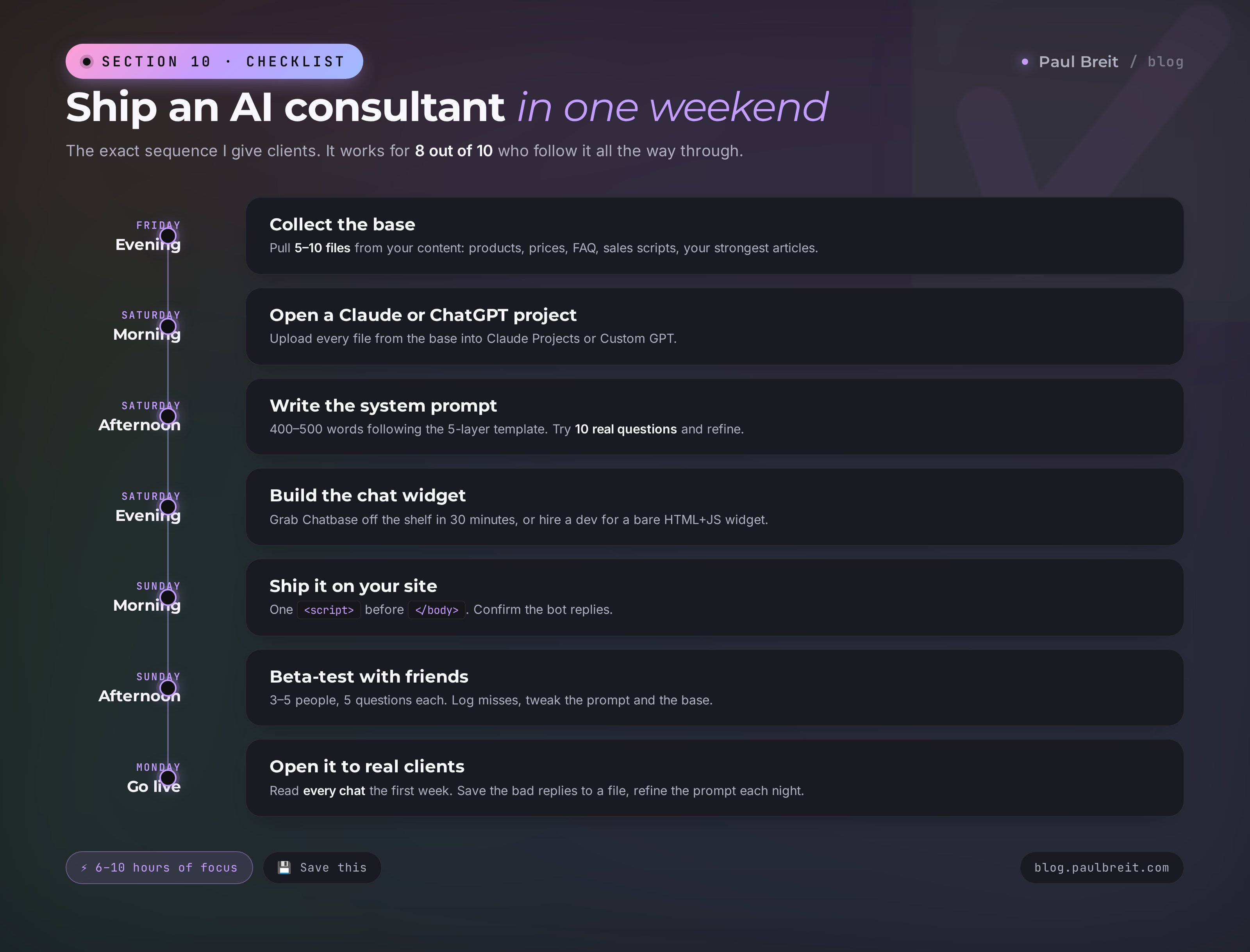
The exact sequence I give clients. It works for 8 out of 10 who run it end to end.
Collect the base
Walk through your content, pull 5–10 files by topic: products, prices, FAQ, sales scripts, your strongest articles. Drop them in a folder called knowledge-base.
Sign up for Claude or ChatGPT Plus
Create a project (Claude Projects / Custom GPT), upload the base.
Write the first system prompt
400–500 words on the 5-layer template from Section 6. Run 10 of your own questions through the project chat, look at the replies, tune the prompt.
Build a simple chat widget
Take a turnkey option like Chatbase to start (30 minutes) or commission a bare widget from a freelancer.
Ship it on your site
Confirm the bot replies live.
Beta-test with friends
Ask 3–5 people you know to send 5 questions each. Collect the misses. Tune the prompt and the base.
Open it to real clients
Read every chat the first week. Log the misses. Every 2–3 days, tune the prompt.
Four to six weeks of that rhythm and the consultant takes 30–50% of your routine client replies off your plate. What's left is either genuinely complex cases or high-ticket sales where the human conversation still matters.
FAQFrequently asked questions
How much does it cost to run an AI consultant in month one?
Between $40 and $160. Breakdown: Claude Pro ($20/mo) + API ($25–50 for 500–1,000 chats) + widget ($0 on Chatbase's free tier, up to $80 for a bespoke widget from a freelancer). It scales with your site traffic.
Can I do this if I only have a Telegram or Instagram channel, no website?
Yes, you drop the site widget and put the bot inside Telegram or an Instagram DM auto-reply instead. The mechanic is the same: base + prompt + model. Telegram bots run on python-telegram-bot or a hosted tool; Instagram DMs use ManyChat or a similar platform.
Will my knowledge base be used to train Anthropic or OpenAI models?
No, not on paid business tiers. Anthropic and OpenAI explicitly state that API and business-tier data are not used for model training. On free tiers, they are. If your base is sensitive, work through the API rather than the web interface. Claude Projects and Custom GPT on paid plans fall under the safer terms. Also strip out anything that should never leave: real phone numbers, emails, contracts.
Can the AI consultant handle an angry or emotional customer?
Up to a point. You can prompt it for empathy: "if the client is upset, acknowledge the emotion, apologize when we're at fault, offer a solution." But once the customer escalates or asks for a manager, the bot should route the conversation to a human. Add a trigger to the prompt: "in those cases reply: I'll pass this to Paul directly, expect a reply within the day" plus a Slack or email ping to you.