Claude writing dry copy? Here's the playbook to fix it
You ask the AI to write a post, and out comes something smooth, correct and stone dead. Impossible to read, embarrassing to publish. And the worst part: your audience has learned to sniff out AI from the first line, and their trust in you slips.
The good news is that the problem isn't the AI itself. It's that you're using it like a regular chat. You can turn Claude into a personal editor that knows your voice, hooks from the first second, and scrubs out every machine fingerprint. You do it through skills – small instructions you set up once and then call with a single command.
In this article I'll show you step by step what skills are, how to install them even if you've never written a line of code, and I'll hand you 7 ready-made skills to copy. Each one solves a specific pain for a writer. At the end they snap together into a single pipeline that writes almost all your content for you.
What's inside
- What skills are and why they change everything
- What you'll need before you start (and a note on access)
- How to install a skill in two minutes without touching a file
- How to use a skill
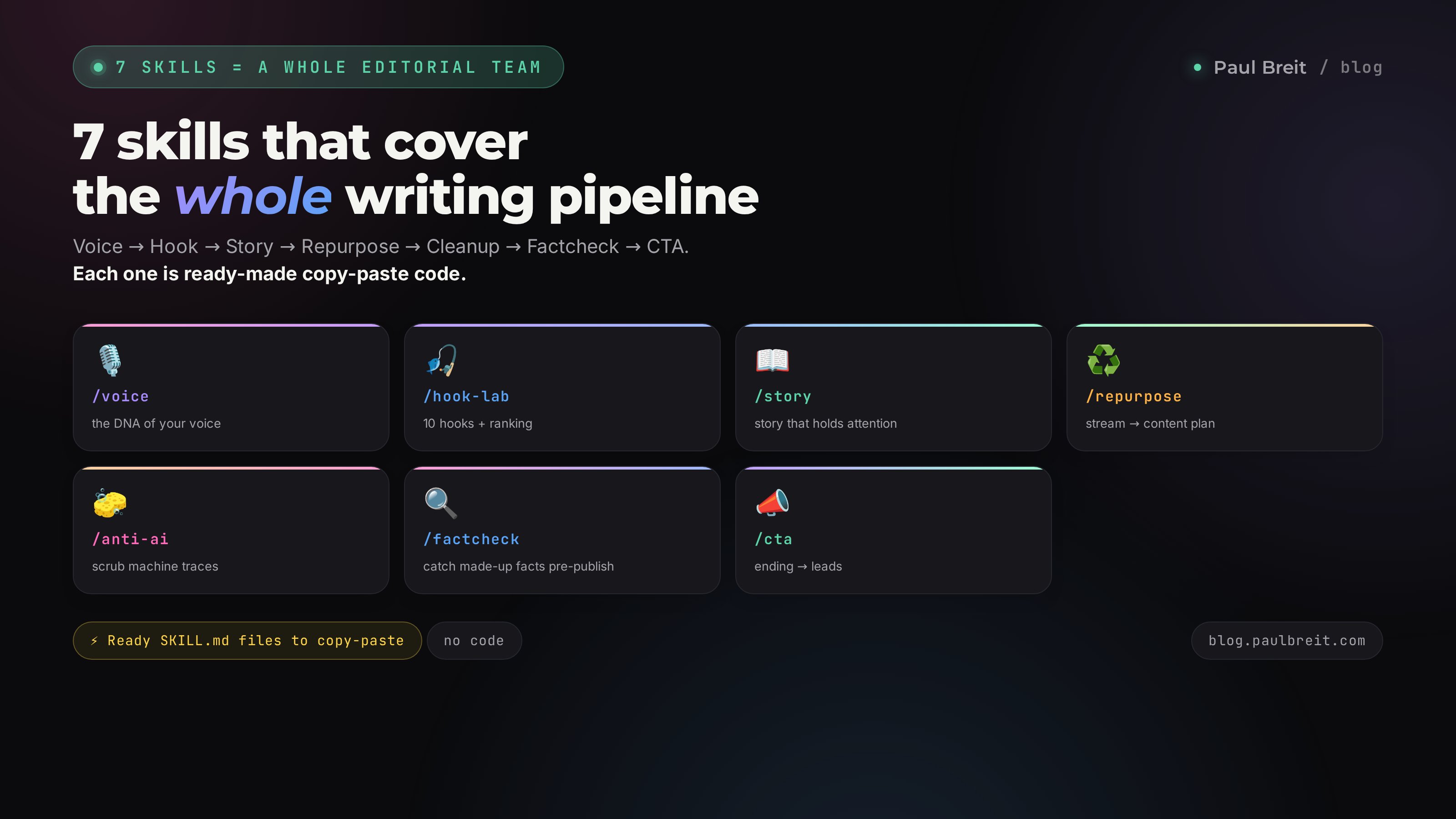
- Seven skills in order – with ready code and examples
- How to chain them into one content pipeline
- What these skills do for different niches
- When something goes wrong
- The whole path in a minute, plus common questions
Section 01What skills are and why they change everything
Imagine you've just hired an editor. On day one you explain: here's my voice, here's how I hook my audience, here's what I never write. After that you don't have to repeat it every time. You say "write a post," and they already know all your rules.
A skill is exactly that kind of job description for Claude. A small text file that says: when you're called, do this, by these rules. You set it up once. Then you just type a command like /voice or /hook-lab, and the AI switches into the right mode.
Unlike a regular chat request, a skill has three big upsides. First: the rules are stored permanently, so you're not explaining the same thing twenty times. Second: the quality is consistent, because the AI always works off the same proven instruction instead of however it happens to feel. Third: skills can be chained, and then one stream turns into a stack of finished content with almost no work from you.
One thing to grasp right away. The skill itself is the same SKILL.md text file, and it works the same in every version of Claude: the web version at claude.ai, the desktop app, Claude Code, even programmatic access. You write the seven skills from this article once, and they work everywhere. Only one thing differs – how exactly you install the skill into your version of Claude. Below we'll cover both main methods, and you pick the one you like. If you'd rather work from ready-made command templates, take a look at the collection in the article on prompts for experts – it's a handy place to grab starting points for your skills.
What it looks like in real life: before and after
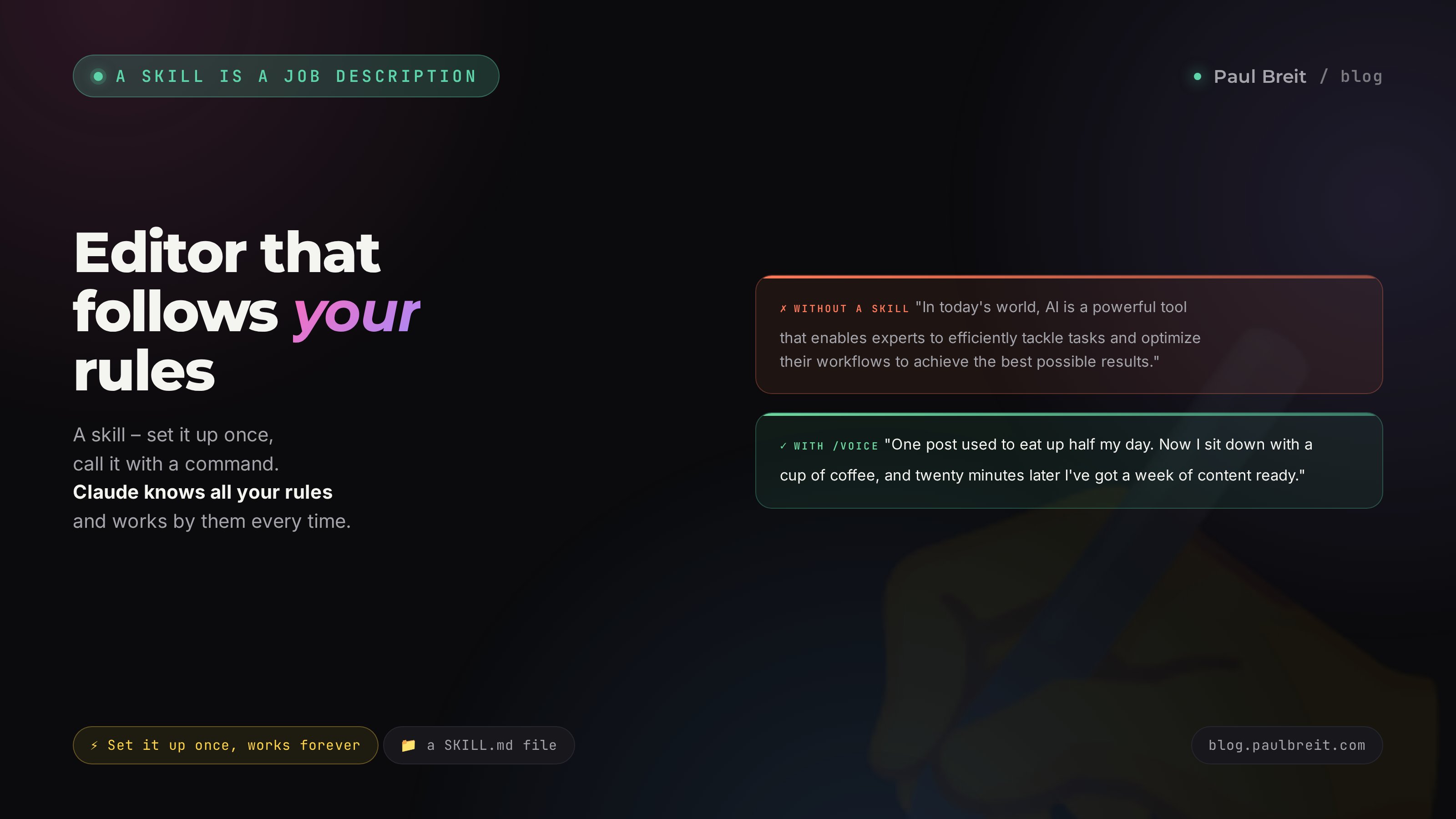
To make it clear why any of this matters, here's the same idea in two forms. First, the way the AI writes straight out of the box, with no skills:
"In today's world, AI is an important tool that allows experts to efficiently solve content creation tasks and optimize their workflows to achieve the best results."
Read it and forgot it. Smooth, correct, dead. Now the same idea after the voice skill:
"A single post used to eat half my day. Now I sit down with a cup of coffee, and twenty minutes later I've got a week of content ready. The difference? I finally stopped fighting the blank page."
You want to finish reading the second one. There's a real person in it, a number and a picture. That's exactly what skills do: they switch the AI from report-speak to your language. And you'll have seven of those switches, one for each part of working on a text.
Section 02What you'll need before you start
To use skills you need very little.
- Any version of Claude. Skills are in the web version at claude.ai, in the desktop app for Mac and Windows, and in Claude Code (a free app that can create files for you). The easiest entry point for a non-technical expert is the web version. The most convenient for working with skills is Claude Code, because there Claude creates the files for you.
- A Claude account. Skills work even on the free plan. But for daily content work, get Pro: the limits are high enough to run texts through without stopping.
- Ten to twenty of your own texts. Old posts, stream transcripts, long messages. The voice skill needs them to learn to write like you.
Important if you're outside the US/EU. Anthropic restricts access from some countries, so Claude may not open on your local connection. If that's the case, turn on a VPN with an EU or US location before each session and confirm the connection is active. Use a region Anthropic actually supports – a handful of countries are on its block list and won't get you in. When you register, set the same country as your VPN location, and pay for Pro with an international card. If you're in the US or EU, none of this applies – just sign up and go.
If you don't have Claude Code installed yet, ask anyone who works with AI to set it up for you, or write to me for a call and I'll point you to the right setup for your system. From here I'll assume Claude already opens and answers for you.
Section 03How to install a skill
How you install it depends on which version of Claude you use. Let's cover both main ones. The skill text itself comes from this article and is the same for either method.
Method 1. Claude Code or the desktop app (the easiest)
This is the simplest path, because here Claude can create files itself and you don't have to do anything by hand. Open Claude Code (or the desktop app) and write in plain language:
Create a skill named voice.
Put it in the file ~/.claude/skills/voice/SKILL.md
Here's its content:

[paste the skill text from this article here]
Claude creates the folder, creates the file, and writes the text into it. A couple of seconds later the skill is ready. The folder name (in this example, voice) becomes the command you call the skill with: /voice. To check that it installed, say "show me my list of skills." The desktop app for Mac and Windows works exactly the same way and stores skills in the same folder as Claude Code.
Then you copy the next skill, say "create a skill with this content" again, and paste. Repeat seven times – and inside one AI you've assembled a whole newsroom.
Method 2. The web version at claude.ai
The web version has no file system, so the skill is uploaded as a ready-made archive. A few more steps, but it's a one-time thing.
- On your computer, create a folder named after the skill, for example voice.
- Inside it, create a text file named SKILL.md and paste the skill content from the article into it. On the top line, set name to the skill name in lowercase, hyphens allowed: voice, hook-lab, anti-ai.
- Zip the folder into a single file.
- On claude.ai, open Settings, the Skills section, click the plus, then "Create skill" and upload your zip.
Once uploaded, the skill is available in chat right away. If you'd rather not create files at all, install the free Claude Code and follow the first method – there Claude makes the file for you, and you get a more convenient tool for working with skills.
A skill is plain text inside a frame of two dashed lines at the top. At the very top are the service lines: name – a short name, and description – a description Claude uses to figure out on its own when the skill is needed. The instruction follows below. The format is the same across all versions of Claude; only the installation method changes. You can change anything to fit you, it's just text.
Section 04How to use a skill
There are two ways to call a skill.
The first, direct way. You type a slash command – for example /voice – followed by the task. Claude switches on that skill and works strictly by its rules.
The second, automatic way. You just describe the task in plain words: "make this post sound alive, like me." From the description, Claude figures out on its own that this needs voice and picks it up. Handy when you don't remember the exact name.
Next we'll go through each skill: what it does, why it matters to you as an expert, the ready code to copy, and a live example of how to use it.
Section 05Seven skills in order
Skill 1. /voice – your voice
This is the foundation of the whole system. Without it, any AI text sounds like a stranger, and the reader feels it in a second. The voice skill takes your old texts apart, pulls out your recognizable style, and writes so you can't tell it apart from your own posts.
Why it matters: your voice is what people read you for and what they trust. Anyone can buy smooth faceless copy; your voice they can't. That's why voice goes first, and the other skills lean on it.
---
name: voice
description: Extracts the DNA of the author's voice from their texts and writes new texts in that voice. Use when a text needs to sound like the author themselves. Triggers: write in my voice, capture my style, make it sound like me.
---
You are an analyst of an author's voice. Your job is to pull out a person's recognizable style and write so it can't be told apart from them.

STEP 1. If there's no voice profile yet, ask for 10-20 of the author's texts: posts, stream transcripts, voice memos. The more, the more precise.

STEP 2. Take the texts apart layer by layer and write down:
- Tone: warm, blunt, ironic, casual or formal
- Rhythm: sentence length, beat-pauses, the breathing of the text
- Vocabulary: favorite words and quirks, what the author avoids
- Hooks: how they open, what grabs you in the first lines
- Structure: how they carry a thought, how they end
- Bans: jargon, cliches, turns of phrase the author never uses

STEP 3. Assemble a short "voice profile" from these rules and save it so you don't rebuild it every time.

STEP 4. When you write a new text, run it through the profile. After the draft, read it aloud: if even one line doesn't sound like the author, rewrite it.

Main rule: better simple and alive than smooth and machine-made.
How to use it. The first time, write: "/voice build my voice profile, here are my texts" – and attach a dozen posts. Claude builds the profile. After that, for any text: "/voice write a post about the launch in my voice." Out comes a text you won't be ashamed to publish under your own name.
The first exchange looks roughly like this:
You: /voice here are twenty of my posts, build a voice profile.
Claude: Got it. You write warm, casual, short beats mixed with longer sentences, you like concrete numbers and self-deprecation, you avoid jargon. Saved the profile, I'll write by it from here.
You: /voice write a post about how I built a sales funnel over a weekend.
Claude: (returns a finished post in your voice)
If some line still isn't yours, just say so: "I wouldn't put it that way here." Claude fixes the profile and gets more precise from there.
Skill 2. /hook-lab – the hook lab
The first two seconds decide whether your post gets read or scrolled past. The hook-lab skill generates 10 versions of the first line for a single topic, scores each one for strength, and hands you the top picks. You choose from the best instead of fighting a blank page.
Why it matters: you can write a brilliant post, but if the hook is weak, nobody reads far enough to reach the strong part. The hook is the entry ticket. A dedicated hook skill lifts your reach more than rewriting the body of the post.
---
name: hook-lab
description: Generates 10 hook options for a post and scores each for strength, returning the top 3. Use when you need to grab attention in the first second. Triggers: come up with a hook, a grabbing opener, first-line options.
---
You are an editor who knows: the first two seconds decide whether a post gets read or scrolled past.

STEP 1. Ask or infer from context: the post topic, the main point, who it's for, which platform.

STEP 2. Generate exactly 10 different hooks. Vary the techniques:
- contrast: they laughed at X, but when...
- a question with pain: why no clients with 20K followers
- a hard truth or a provocation
- a concrete number, point-blank
- intrigue with something left unsaid
- a promise of fast payoff
Each hook is one or two lines, no filler.

STEP 3. Score each one on four criteria from 1 to 5:
- Stop-scroll: does it stop the thumb
- Curiosity: do you want to read on
- Specifics: is there a number or detail, or is it filler
- Emotion: does it hit a nerve with the audience
Add up the total.

STEP 4. Give a table of all 10 with scores, top 3 on top. Briefly explain why the top ones are stronger.

Don't dress up weak hooks. An honest score beats a polite one.
How to use it. "/hook-lab come up with hooks for a post about how I built an AI sales funnel over a weekend." You get a table of 10 lines with scores and the top three. Take the top one or mix two. If you're curious how channel analysis turns into dozens of topics for hooks like these, check the article on 20 post ideas from a channel audit.
Skill 3. /story – story and retention
You have a useful point, but as a dry list it gets abandoned by the second paragraph. The story skill rebuilds the material into a story with drama, so people read and watch to the end.
Why it matters: retention is the currency of every platform. Read to the end – they saw the CTA. Watched the reel through – the algorithm showed it to others. A boring text loses both people and reach halfway through.
---
name: story
description: Rebuilds dry text or a set of facts into a story people read to the end. Use when the text is logical but boring and gets abandoned by the second paragraph. Triggers: turn it into a story, add retention, rewrite so people finish it.
---
You are a retention screenwriter. A boring text loses the reader by the second paragraph; a story holds them to the end.

STEP 1. Find the drama in the material: a conflict, a before-and-after contrast, a mistake, a turn, the stakes. If there's no story, take the reader's pain and make it the opening.

STEP 2. Rebuild it along an arc:
- Hook: the first line, breaks the scroll
- Setup: a recognizable situation, the reader sees themselves
- Tension: the problem grows, the stakes rise
- Turn: an insight, an unexpected move, the solution
- Resolution: what changed, a concrete result
- Close: one action, no moral

STEP 3. Write "inner cinema": concrete details, what the person sees, hears, feels. Verbs over nouns.

STEP 4. Keep all facts, numbers and names without distortion. A story is no excuse to lie.

Emotion beats smooth logic. Where you choose between "pretty" and "alive," pick alive.
How to use it. "/story rewrite this breakdown so people finish it" – and paste the dry text. Out comes the same meaning, but with a hook, tension and a close that leads onward.
Skill 4. /repurpose – one stream into a stack of content
You ran an hour-long stream or webinar. Inside are dozens of strong ideas, but usually it all lives once and is forgotten. The repurpose skill turns one big piece into reel scripts, posts and carousels. It solves the busy expert's biggest pain: the constant lack of time for content.
Why it matters: creating content from scratch eats hours every week. Repurposing hands you a stack of ready drafts from what you've already said once. You save time and stay inside your own meaning everywhere.
---
name: repurpose
description: Turns one long piece (a stream, a webinar, a longread) into a stack of finished content: reel scripts, posts, carousels. Use when it's a shame your big piece only ran once. Triggers: cut it into content, make posts from the stream, repurpose.
---
You are a content factory. One big piece yields dozens of content units; your job is to squeeze it dry.

STEP 1. Get the source: a stream or webinar transcript, a long post, an article. If it's video or audio, ask for a transcript.

STEP 2. Pull out the "idea cores": 7-15 standalone thoughts, each strong enough for its own content unit. Each has a main claim plus a number or example.

STEP 3. For each core, suggest the format where it's strongest:
- Reel: a short script, a 3-second hook plus body plus close, for a dynamic idea
- Post: when it needs to be unpacked and warmed up
- Carousel: when it's a list, steps, a breakdown
- A short post or Threads: when it's a hot take

STEP 4. Assemble a content plan as a table: core, format, finished draft. Minimum from one source: 3-5 reel scripts, 3-5 posts, 1-2 carousels.

Don't repeat one idea across three formats word for word; give each its own angle.
How to use it. "/repurpose here's my webinar transcript, cut it into a content plan for the week." You get a table of ready drafts for reels, posts and carousels. Then you polish each with the voice and story skills.
Skill 5. /anti-ai – scrubbing the AI fingerprints
Audiences now sniff out AI text instantly: jargon, cliches, fake phrasing, perfectly symmetrical sentences. And the moment a reader senses the machine, their trust in you drops. The anti-ai skill goes through the text and files off those fingerprints.
Why it matters: trust is what an expert's sales rest on. One AI paragraph and a follower thinks "he doesn't even write his own posts." Cleanup gives the text its human sound back.
---
name: anti-ai
description: Scrubs AI fingerprints from a text: jargon, cliches, fake phrasing, antithesis, long em dashes. Use before publishing any text written with AI. Triggers: remove the AI sound, clean up the text, it reads like AI.
---
You are an AI-fingerprint cleaner. Audiences sense machine text in a second, and it kills trust. Your job is to make the text human.

Go through the text and remove:
- Jargon: utilize, facilitate, in order to, leverage, that allow you to
- Cliches and filler: in today's world, it's no secret that, plays an important role
- The antithesis-reframe pattern, "not one thing but another" and "it's not about X, it's about Y." This is the most common machine marker; cut it every time
- Triads of "without one, without another, without a third" and paired constructions back to back. Break the rhythm
- Long em dashes. Swap them for shorter ones or rebuild the sentence
- Lists of three for the sake of looking pretty, and perfectly symmetrical sentences
- Sycophancy: great question, wonderful, opening praise

Replace with: verbs over nouns, the concrete over the abstract, active voice, living words, short sentences mixed with long ones.

After cleanup, read it aloud. Sounds like a real person? Done. Sounds smooth and faceless? Keep cleaning.
How to use it. The last step before publishing: "/anti-ai clean up this post." Claude returns a version with no machine fingerprints and briefly tells you what it cut.
Skill 6. /factcheck – fact-checking
The AI can confidently make things up: invent a number, a feature of a service, a study that doesn't exist. One such slip in an expert post hits your reputation harder than ten weak posts. The factcheck skill catches the invention before it goes live.
Why it matters: people read you as an expert, and every number builds trust. Slip them one made-up fact and the audience starts double-checking everything behind you. Factchecking protects the very thing you run a blog for.
---
name: factcheck
description: Checks facts, numbers, names and dates in a text so the AI doesn't slip in something made up. Use before publishing any expert content. Triggers: check the facts, factcheck, did you make this up.
---
You are a meticulous fact-checker. One made-up fact dents the author's expertise. Your job is to catch the invention before it's published.

STEP 1. Pull out every checkable claim from the text: numbers, percentages, dates, names of tools and companies, quotes, references to studies, product specs.

STEP 2. For each one, decide:
- This is a fact from the author's life, their case, their numbers. Mark it "per the author," don't invent on their behalf
- This is a general fact: a service price, a feature, a statistic. Verify it with a web search
- This looks made up: a suspiciously round number, a feature that doesn't exist, a study with no source. Raise a flag

STEP 3. Give a report as a list: the claim, the status (confirmed, not found, contradicted, needs author's data), the source or a comment.

STEP 4. Say plainly that publishing without checking is risky. Don't soften it.

Better to hold the post for a check than to ship a blunder.
How to use it. "/factcheck check the numbers and facts in this post." You get a list of every claim with its status. Fix the red flags before publishing.
Skill 7. /cta – a strong close and call to action
Someone read your post, nodded, and left. Sound familiar? That's what happens when a text has no close and no call to action. The cta skill picks a strong ending tuned to the post's goal: a lead, a click, a save or a sale.
Why it matters: content with no CTA warms the audience but brings no clients. A call to action is the bridge from "interesting" to "signed up." The same post with a strong close and without one bring very different lead numbers.
---
name: cta
description: Picks a strong close and call to action for the post's goal. Use when the text is good but ends on nothing and leads to no result. Triggers: add a CTA, make a close, what CTA.
---
You are an editor of endings. Content with no CTA brings no clients: the person read it, nodded, and left.

STEP 1. Clarify the post's goal: leads for a call, a link click, a save, a comment, a sale, a follow. One post, one goal.

STEP 2. Match a close type to the goal:
- Leads and sales: a concrete action with a link, "book a call at the link," no vague "learn more"
- Saves: "save this for your next launch," tied to the moment it'll come in handy
- Comments: a question that's easy to answer
- Warm-up: a bridge to the next post

STEP 3. Cut weak closes: "so there you have it," "draw your own conclusions," "good luck everyone," ending on the pain. A close invites a step.

STEP 4. Give three close options for the goal, recommended one on top. The CTA is concrete: what to do, where to click, what the person gets.

If the post has a case or a number, put it right before the CTA; they reinforce it.
How to use it. "/cta pick a close for this post, the goal is leads for a call." You get three endings with a concrete call to action. Use the strongest.
Section 06How to chain the skills into one pipeline
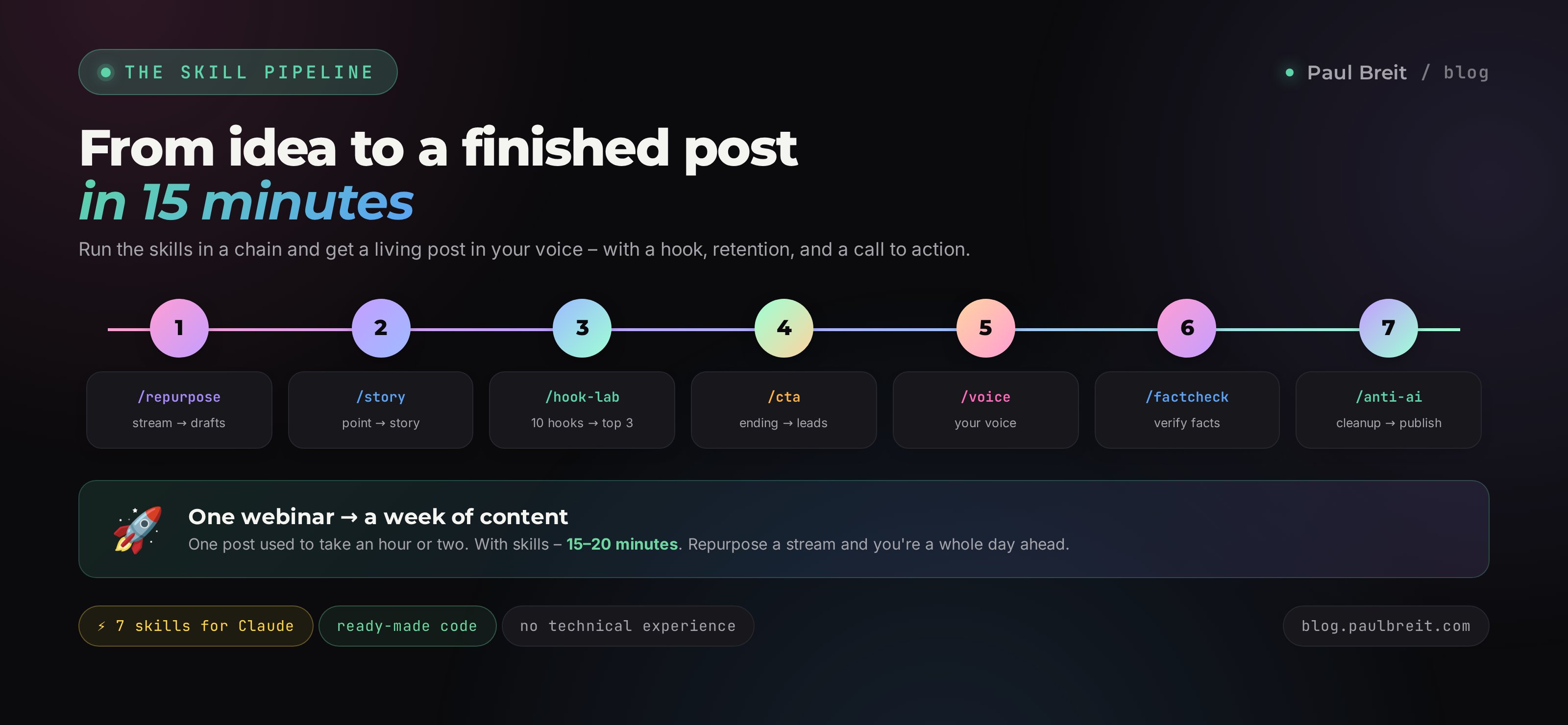
On their own each skill is useful. Together they become a newsroom that carries a text from idea to finished post. Here's the working order.
Step 1. You took a stream or a big idea and ran it through /repurpose. Now you have a stack of drafts for reels, posts and carousels.
Step 2. You take one draft and call /story, so a dry claim becomes a story with retention.
Step 3. You ask /hook-lab to come up with a strong opener and put the best hook in the first line.
Step 4. You call /cta, so the post ends with a concrete call to action for your goal.
Step 5. You run the whole text through /voice – now it sounds like you, not like an AI.
Step 6. You launch /factcheck and verify every number and fact.
Step 7. The final touch – /anti-ai, a last scrub of machine fingerprints. You publish.
This whole path takes minutes instead of hours, and out comes a living post in your voice, with a hook, retention, a CTA and no inventions. You can go even simpler: give Claude one big request like "run this draft through all my skills in order," and it builds the chain itself.
Section 07What these skills do for different niches
The pain is the same for every expert: you need a lot of content, you have no time, and AI text doesn't sound alive. But it gets solved differently depending on your niche. Here's how it plays out in practice.
Therapist and coach. Voice preserves your soft, careful manner, the thing your clients' trust rests on. Stories from practice through /story land harder than any advice. Factcheck guards you against big promises you could get challenged on.
Nutritionist and doctor. Here /factcheck is the star: not a single number on dosages or studies should be made up. /anti-ai strips out the dry medical jargon that scares ordinary people off.
Tutor and teacher. /repurpose turns one topic breakdown into a week of short useful posts and reels. /hook-lab helps you stand out in a niche where everyone writes the same boring way.
Sales expert, marketer, mentor. /cta brings money directly here: every post ends with a concrete step toward a lead. /story and /hook-lab lift your reach, and voice keeps you recognizable.
Course creator and online school. The whole pipeline at once: one webinar becomes a content plan for weeks ahead, in a single voice, ready for warm-up and sales. By the same logic, one big piece assembles into a full lead magnet – like in the article on writing a book with AI in a weekend.
Section 08When something goes wrong
The skill won't trigger from the command
Check the name. The command has to match the name line in the skill. Ask Claude: "show me my list of skills" and check the spelling. If the skill isn't in the list, the file didn't get created – ask it to create it again.
Claude won't let you in
That's almost always the VPN. Turn on a VPN with an EU or US location before launching Claude and confirm the connection is active. Use a region Anthropic supports – some countries are on its block list.
The wrong skill gets picked up
That means two skills' descriptions are too similar. Ask Claude to refine the description of the one you want, or call it with the direct slash command, so there's no choice to make.
The voice doesn't sound like you yet
Feed it more texts. Ten posts is the minimum; twenty to thirty are noticeably more precise. And give feedback: "this line isn't mine, I don't talk like that" – the skill refines your voice profile.
Section 09The whole path in a minute, plus common questions
📌 The whole path in a minute
- A skill is an instruction for Claude that you set up once and call with a command.
- You install it without touching a single file by hand: you tell Claude "create a skill with this content" and paste the text.
- Seven skills cover the whole life of a text: voice, hook, story, repurpose, cleanup, factcheck, CTA.
- If access is restricted in your country, always go through a VPN with an EU or US location.
- Chained together, the skills turn one stream into a week of finished content in your voice.
FAQCommon questions
Do I need to know how to code?
No. You talk to the skills in plain English. Claude creates the files itself; all you do is copy the text from this article and paste it in.
Do the skills cost money?
The skills themselves are free, they're just text. You only pay for a Claude subscription, and the Pro plan pays for itself the first day it saves you on content.
Will it work in any niche?
Yes. Voice, hooks, stories and CTAs matter for a coach, a therapist, a nutritionist, a tutor and a course creator alike. The voice skill adapts to your niche and your style.
Can I customize the skills?
You should. It's plain text, so add your own rules, favorite words, things you ban. The more it's tuned to you, the better the result.
Will Claude really not lie with the factcheck?
The factcheck skill forces the AI to re-verify numbers through search and honestly flag what it couldn't confirm. The final word is still yours: fix the red flags yourself.
How many texts does the voice skill need?
Ten minimum, twenty to thirty is better. Posts, stream transcripts and even long voice memos turned into text all work.
Can I just hand it all to the AI and step out?
You can run a draft through every skill with one command. But the final read with your own eyes is still yours: you know your voice and your facts better than anyone.
What if I have no old texts at all?
Then start with voice memos. Talk into a recorder for ten minutes on any topic of yours, the way you'd tell a client in person, transcribe it and give it to the voice skill. Live speech shows your manner even better than polished old posts.
Isn't this against the platforms' rules?
No. You write your own content, on your own ideas and in your own voice; the AI just helps it go faster and cleaner. Platforms fight empty machine spam, not an author who sped up their work. The cleanup skill makes the text human, which is only a plus for the platforms.
How much time does the whole pipeline really save?
A single post from idea to finished text used to take an hour or two. With the chain of skills it's fifteen to twenty minutes, and it already has a hook, retention and a CTA. Repurposing one webinar saves you a whole day you'd have spent inventing content from scratch.
Your first paid AI job in about a week
Free guide: the seven directions people pay for right now, the real 2026 rates, and the six steps from tonight to your first client.
Read the free guide