AI Christmas Card Generator: Free Prompts and Tools 2026
An AI Christmas card takes about five minutes once you know two things: which free tool writes the greeting on the picture without typos, and how to describe the card so you don't redo it ten times. Below are the prompt formula, 12 ready prompts to copy, a card with your own photo, and a message the AI writes for you.
The easiest free AI Christmas card generator is Gemini or ChatGPT. Describe the scene, the style, the colors, the exact greeting in quotes, and the format, for example 4:5. Both tools render short holiday lettering cleanly and let you fix details in plain words. One card takes 5-10 minutes, and the message text can come from any chatbot.
What's inside
Section 01Which free tool to pick
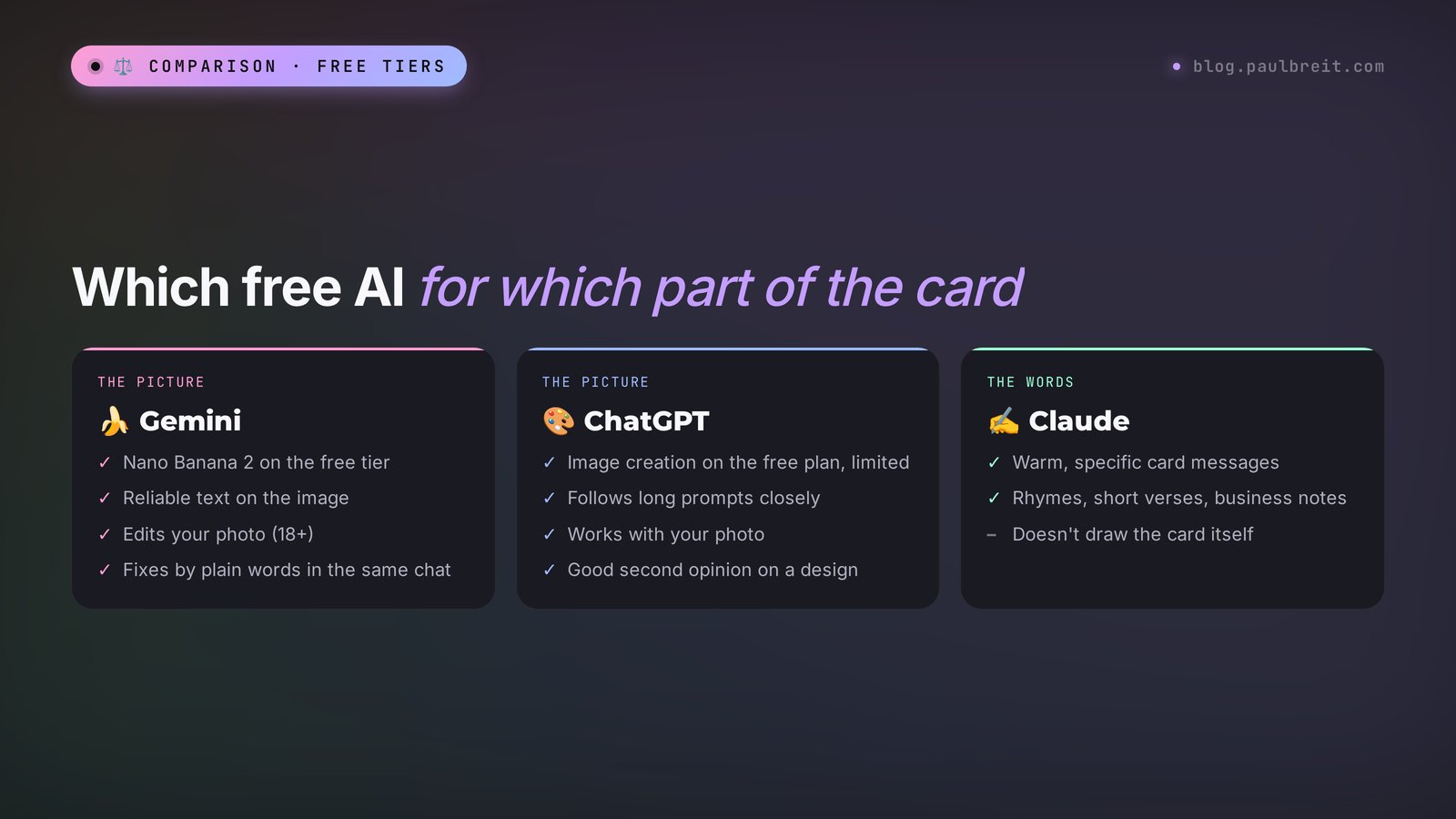
One detail separates a card from any other picture: the lettering. Almost every AI image tool can paint a pretty winter forest. Far fewer can write "Merry Christmas!" without a stray letter or a melted "s". So the choice starts with one question: do you need text right on the image?
Here is what the free options actually do, based on the official pages, checked November 21, 2026.
| Tool | Free tier | Text on the card | Best for |
|---|---|---|---|
| Gemini (Nano Banana 2) | Yes, with a daily limit | Reliable, per Google's help page | Cards with lettering, edits to your own photo |
| ChatGPT | Yes, "Limited" image creation | Clean on short phrases | Long, detailed prompts, a second design option |
| Claude | Yes | Doesn't create images | The greeting inside the card: warm, specific, in your voice |
| Your phone's photo editor | Yes | Exactly what you type | Adding a name or a longer line on top of any picture |
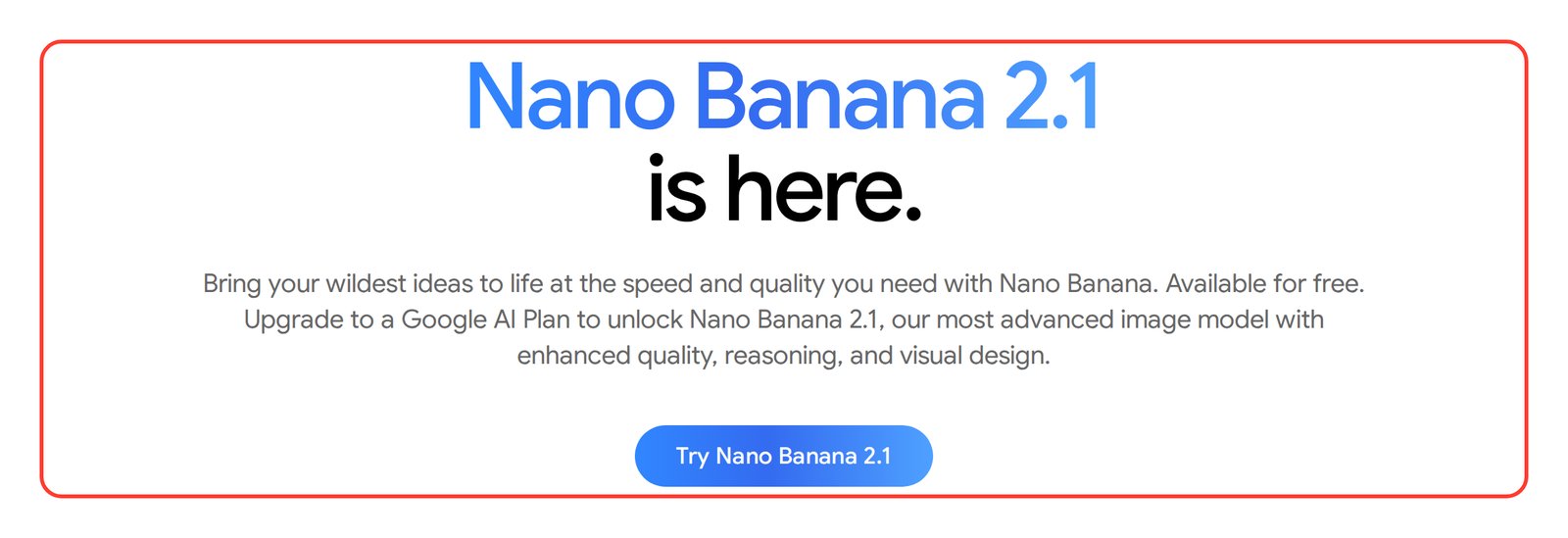
You don't need a subscription for a few cards. A paid Google AI plan unlocks Google's most advanced image model (Nano Banana 2.1 on the product page at the time of writing) and the "Redo with Pro" button for extra detail in text-heavy images. Paid ChatGPT plans give you more image creation. For a dozen holiday cards, the free tiers are enough to make and tweak several versions.
If you want to compare more tools beyond these two, I tested the main ones in AI image generators in 2026.
Section 02The Christmas card prompt formula
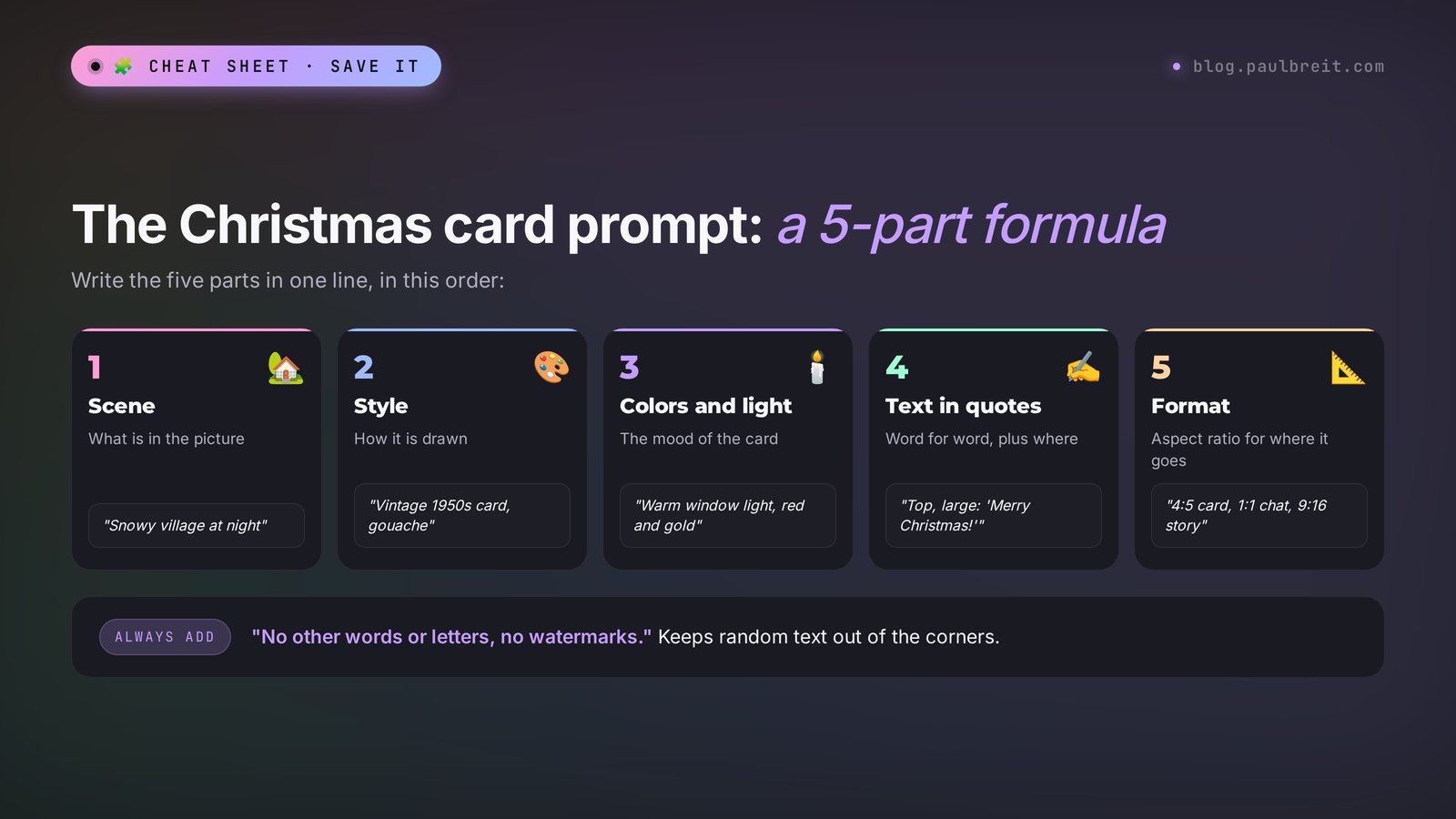
A prompt is a description of the picture in words. The more precise it is, the fewer tries you need. For cards I use a five-part formula and write all five parts in one line.
- Scene. What's in the picture: a snowy village, a tree by the window, Santa on his sleigh, a cat in a knit hat.
- Style. How it's drawn: a vintage 1950s card, watercolor, layered paper cut, 3D like an animated movie.
- Colors and light. Warm light from the windows, red and gold, a deep blue night sky, soft pastels.
- The text in quotes. Word for word, plus where it goes: "large, at the top", "small, at the bottom".
- Format. Square 1:1 for a chat, vertical 4:5 for a card, 9:16 for stories.
I end every prompt with "no other words or letters, no watermarks." Without that line, small filler text often shows up in a corner of the image.
Keep the lettering short: 2-4 words. "Merry Christmas!" and a signature like "Love, the Millers" come out clean. A whole poem on the image almost always gets typos. Send the long greeting as a separate message next to the card.
Section 03A card in Gemini in 5 minutes
Gemini is Google's free assistant, and its images come from the Nano Banana models. I covered the app itself in how to use Gemini; here is only the path to a finished card.
Step 1. Open gemini.google.com or the Gemini app and sign in with your Google account.
Step 2. Start the prompt with "draw", "generate" or "create an image". Google's own tips recommend exactly these words, and Gemini then knows you want a picture.
Step 3. Paste a prompt built on the formula above, or any of the 12 below. Send it.
Step 4. Check the lettering letter by letter. Don't like a detail? Type the fix in plain words in the same chat: "make the snow heavier", "remove the text at the bottom", "change red to burgundy". Gemini redraws and keeps the rest.
Step 5. Hover over the image and click "Download full size". On a phone, tap the image and save it.
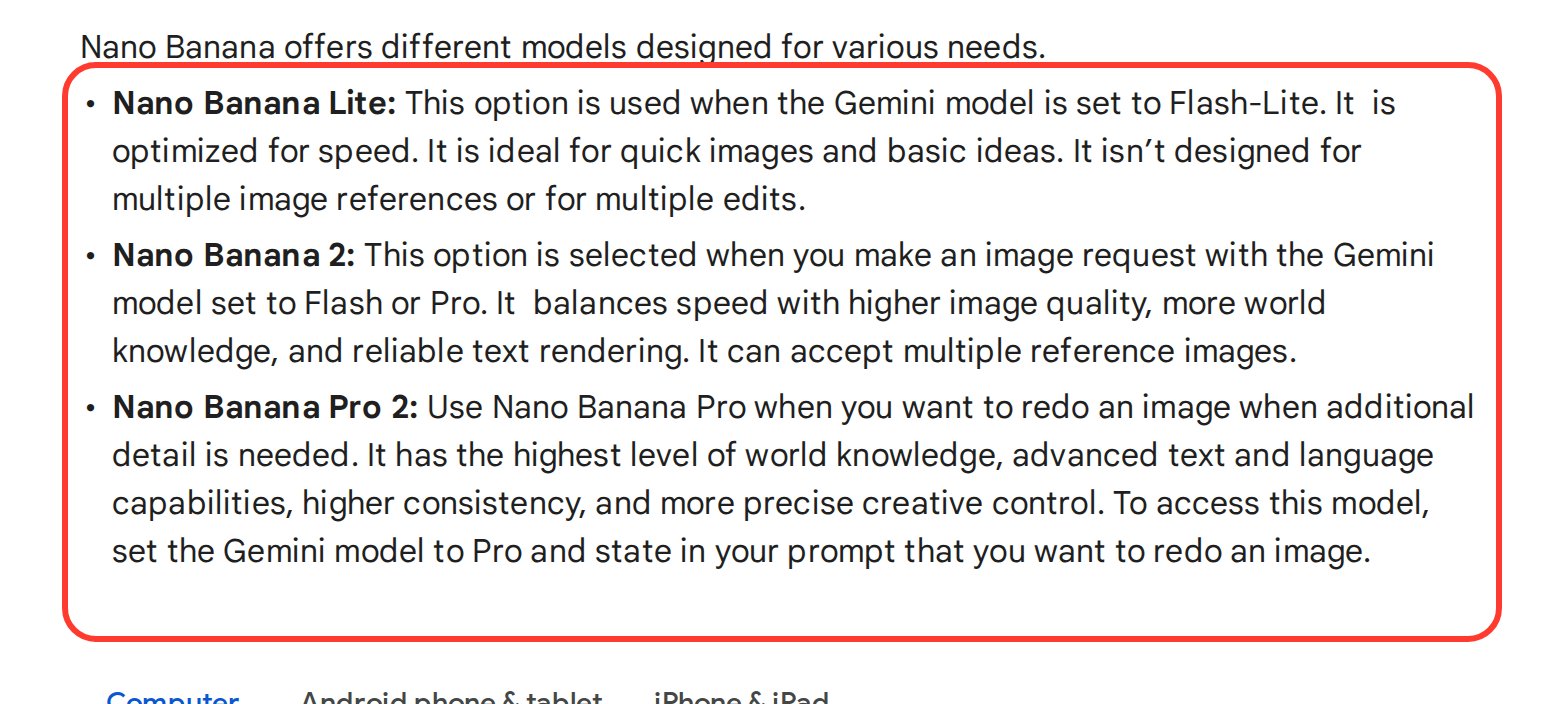
One detail from Google's help page that few people notice: editing images, including photos you upload, isn't available to users under 18. If a teenager makes the card from their own account, the photo route won't work. Generate it from a text prompt instead.
For deeper photo edits, like swapping the background, outfit or light on your own shot, see my step-by-step guide to Nano Banana 2.
Section 04The same card in ChatGPT
In ChatGPT the order is the same: sign in at chatgpt.com or in the app, paste the prompt, wait for the image, and download it. The free plan includes image creation, but OpenAI marks it as "Limited" on its pricing page, so plan for a handful of cards per day, not fifty.
Here is the main prompt I use as a starting point. Copy it as is, then swap the signature for your own:
A Christmas card in the style of a vintage 1950s American greeting card. A snowy village at night, warm light in the windows, a decorated tree with string lights in the foreground, a red cardinal on a branch. Gouache, soft paper texture, muted red, blue and gold. Large text at the top, spelled exactly: "Merry Christmas!". Small text at the bottom: "Love, Mom and Dad". No other words or letters, no watermarks. Format 4:5.
Whatever you leave out, the model fills in on its own. You may get a church on the hill, extra stars or rowan berries you never asked for. If you don't want something, add "no church" to the prompt or ask for it to be removed in the next message. That habit alone saves most redos.
Section 0512 ready AI Christmas card prompts
Each prompt follows the formula: scene, style, colors, text, format. Change the text to yours and add names. If you plan to add the text yourself in a photo editor, cut the part about the lettering and write "no text or letters on the image".
Retro and classic
1. A vintage 1950s Christmas card: Santa Claus in a red sleigh pulled by reindeer flies over a snowy small town at night, a sack of presents behind him. Gouache, paper texture, red, white and gold. Text at the top: "Merry Christmas!". No other text. Format 4:5.
2. A Christmas card in the style of an antique glass ornament: a glass ball with a tiny snowy cabin inside hangs on a pine branch, soft warm string-light glow, blurred background. Realistic, shallow depth of field. Neat text at the bottom: "Happy Holidays!". Format 1:1.
3. A layered paper-cut Christmas card: a winter landscape with pine trees, a moon and a small house, soft shadows between the layers. Colors: navy, white, gold. Text in the center: "Season's Greetings". Format 4:5.
Cozy and funny
4. A ginger cat in a red knit hat sits on a windowsill, snow falling outside, a mug of hot cocoa with marshmallows and a plate of cookies next to it. Watercolor, soft warm tones. Handwritten text at the top: "Warm Christmas Wishes". Format 4:5.
5. A 3D cartoon-style illustration: a snowman in a scarf clumsily decorates a Christmas tree, ornaments falling, two cardinals laughing on a branch. Bright colors, soft light. Text at the bottom: "Merry Everything!". Format 1:1.
6. A child's crayon drawing: a family building a snowman in the yard, a dog next to them, a house with string lights in the background. Naive style, white background. Text at the top in a child's handwriting: "Merry Christmas, Grandma!". Format 4:5.
New Year and elegant
7. A New Year card: two champagne glasses clinking in front of a window, city fireworks outside, gold confetti in the air. Soft digital illustration, black and gold. Text at the top: "Happy New Year 2027!". No other text. Format 4:5.
8. A minimalist card: one thin gold fir branch with a small red ornament on a light cream background, lots of empty space. Premium letterpress look. Elegant thin lettering at the bottom: "Merry Christmas". Format 4:5.
9. A Christmas card in the style of an oil painting: a winter evening in a small town, street lamps, an outdoor skating rink, people in scarves skating, warm yellow light from shop windows. Visible brushstrokes. Text at the top: "Happy Holidays!". Format 16:9.
For clients and colleagues
10. A business holiday card: a desk by a window, a closed laptop, a cup of tea, a pine sprig and a gift wrapped in kraft paper, snow outside. Realistic photo, soft light, calm tones. Text at the top: "Thank you for a wonderful year!". Format 1:1.
11. A holiday card from a yoga studio: a woman in a warm sweater sits cross-legged by a window, a winter forest outside, a candle and a pine branch next to her. Pastel illustration. Text at the bottom: "Peace and light this season". Format 4:5.
12. A vertical story card: close-up of a sparkler in a hand against a night sky with fireworks, bokeh. Photo, high contrast, warm sparks. Large text at the top: "Happy Holidays!". Empty space at the bottom for a logo. Format 9:16.
Prompts 10-12 suit everyone who sells services, courses, and consulting: a therapist, a trainer, a tutor, a nail artist. A card from you to your clients is a reason to stay in touch without a sales pitch. For more festive scenes with people in them, see 40 holiday photo prompts.
Section 06A card with your own photo
The most touching card is the one with you, your kids or your dog in it. Gemini and ChatGPT can take your photo and place it into a Christmas scene. This is the "AI Christmas card generator with photo" people search for, and it needs no separate app.
- Upload the photo with the "+" button or the paperclip in the input box. A daylight portrait works best: the whole face visible, no filters.
- Write the prompt on the formula and add one line: "keep the person's face and features exactly as in the photo".
- Check the face carefully. Doesn't look like you? Ask "restore the facial features from the original photo" or upload a different shot.
Use the person from the photo. Keep the face and features exactly as they are. Make a Christmas card: they wear a red reindeer sweater and stand by a decorated tree, holding a mug of cocoa, warm string-light glow around them. Realistic, like a professional photo shoot. Text at the top: "Merry Christmas!". Format 4:5.
Remember the age rule from Google's help page: photo editing in Gemini is for users 18 and over. If you also want a New Year version of the same portrait, there are 24 scenes with real results in New Year photo prompts, plus advice on which photos keep your face recognizable.
Section 07The card message, written by AI
A card without a few warm lines looks like a picture from the internet. Any chatbot writes a Christmas card message in a minute if you give it details: who it's for, your relationship, and what happened this year.
Write a short Christmas message for my mom, 4-5 sentences, warm and natural, no clichés like "wishing you joy and happiness". Details: this year she took her first trip to the ocean and learned to make video calls, and I moved to another city. Talk to her directly, like a son writing to his mom.
I gave the prompt above to Claude (model Claude Opus 5.5). The reply, word for word: "Merry Christmas, Mom! This was your brave year: you finally saw the ocean, and you figured out video calls faster than I ever expected. Now that I live so far away, those calls are how we stay close, and seeing your face on my screen still makes my day. Here's to more trips next year and plenty of calls for no reason at all. I love you, and I can't wait to hug you in person."
See the difference from stock greetings? All the power is in details only you know. Want a rhyme? Add "as a rhyming verse, 8 lines". Writing to clients? Swap the details for what you did together this year, and ask for 2-3 sentences with no sales offer.
Section 08How to send and print it
Most AI cards travel by text message or email. To keep them looking sharp, remember three things.
- Format for the place. Square 1:1 and vertical 4:5 look good in a chat, 9:16 in stories. Set the format in the prompt from the start: cropping later can cut off the lettering.
- Compression. Messaging apps compress photos. If the card has small text, send it as a file or document to keep the quality.
- Printing. Print shops ask for about 300 pixels per inch. A 4x6 card needs about 1200x1800 pixels, a 5x7 card about 1500x2100. Check the size of your download before you order. If it's smaller, use the highest-quality version your tool gives you or run it through an AI upscaler.
Want a different look than Gemini and ChatGPT give you? Another free tool with more style controls is covered in my Leonardo AI free image generator guide.
Section 09If something goes wrong
| Problem | Why it happens | What to do |
|---|---|---|
| A typo or an extra letter in the text | The text is too long | Cut it to 2-4 words, put it in quotes, add "spelled exactly". Still wrong? Make the image without text and add the words in a photo editor |
| Random extra words appear | The model filled empty space with stock text | Add "no other text" to the prompt or ask in the next message to remove it |
| The tool refuses to draw | The request looks like a real celebrity or a copyrighted character | Describe the hero in your own words, without a name: "a kind old man with a white beard in a red coat" |
| The face doesn't look like you | A weak source photo or too much stylization | Upload a front-facing daylight portrait and add "keep facial features unchanged" |
| Photo editing is unavailable | The account belongs to someone under 18 | Generate the card from a text prompt only |
| Free tries ran out | The daily limit of the free tier | Continue tomorrow or switch to the other tool from the table above |
RecapEverything in a minute
The easiest free AI Christmas card generator for a card with text is Gemini or ChatGPT. Build the prompt from five parts: scene, style, colors, the text in quotes, format. Keep the lettering short and send the long greeting as a message. Any chatbot writes it in a minute if you give it real details. Check pixel size before printing.
The cheat sheet, the whole guide in one list. Copy it for later:
Cheat sheet: an AI Christmas card
1. Need text on the image: Gemini or ChatGPT, free tiers.
2. Prompt: scene + style + colors + text in quotes + format.
3. End the prompt with: "no other words or letters, no watermarks".
4. Lettering: 2-4 words, check every letter.
5. Fixes: type them in the same chat in plain words.
6. Your photo: "keep the face exactly as in the photo" (Gemini: 18+).
7. Format: 1:1 or 4:5 for chats, 9:16 for stories.
8. Small text: send as a file so the app doesn't compress it.
9. Print: about 300 pixels per inch, 5x7 = 1500x2100.
10. Message: give the chatbot details about the person and the year.
SourcesSources
- Generate & edit images with Gemini Apps (Google Help: Nano Banana models, editing age limit, download), checked November 21, 2026
- Gemini image generation (official Google page: Nano Banana available for free, advanced model on Google AI plans), checked November 21, 2026
- Google AI plans (official Google page), checked November 21, 2026
- ChatGPT Pricing (official OpenAI page: image creation on free and paid plans), checked November 21, 2026
FAQFrequently asked questions
Is there a free AI Christmas card generator?
Yes. Gemini and ChatGPT both create Christmas cards on their free tiers. Gemini uses the Nano Banana 2 model, and ChatGPT's free plan includes limited image creation. For text on the card, keep it to 2-4 words in quotes.
How do I make an AI Christmas card with my photo?
Upload a daylight portrait to Gemini or ChatGPT, describe the Christmas scene, and add "keep the face exactly as in the photo". In Gemini, photo editing is available only to users 18 and over.
What is a good AI Christmas card prompt?
Build it from five parts: scene, style, colors and light, the text in quotes, and the format. For example: a vintage 1950s card, a snowy village at night, warm window light, the text "Merry Christmas!", format 4:5. End with "no other words or letters".
Can AI write a Christmas card message?
Yes, any chatbot writes one in a minute. Give it details: who the card is for, your relationship, and what happened this year. Ask for 4-5 sentences without clichés, or a short rhyming verse.
Can I print a card made with AI?
Yes, but check the size first. Print shops ask for about 300 pixels per inch, so a 4x6 card needs about 1200x1800 pixels and a 5x7 card about 1500x2100. If your image is smaller, use an AI upscaler.