AI for Reels: 30 Scripts a Month in One Evening
A month of content in a single evening. This is the full workflow for turning AI into your reels scriptwriter: a hook library, a copy-paste prompt-constructor, a shot list, subtitles, and a 30-day calendar. You film and edit; AI reels scripts carry the ideas and the structure.
To get 30 reels scripts in one evening, load 20-30 of your own texts into AI so it catches your voice, brainstorm 30 topics, pick a hook from four types for each one, and run everything through a single prompt-constructor on the formula hook → problem → turn → call. AI returns the voiceover and a shot list for every clip. The setup takes an evening; after that the monthly batch comes together in an hour or ninety minutes. Claude writes the most natural copy; a free tier of ChatGPT or Gemini is enough for drafts.
Morning. You have to film a reel. You open the camera and realize you don't know what to say. No topic comes to mind, and everything that does you've already filmed. An hour passes, you've shot nothing, you're annoyed with yourself, and you close the phone. Three days later it repeats. Instead of ten clips a week you end up with two, and those through gritted teeth.
I run a personal channel with 20,000 subscribers and four client projects. Filming every day from scratch would be physically impossible. Something else works: once a month I sit down for an evening, build thirty scripts with AI, and for the whole next month I never ask what to film. There's only shooting and editing. This article is my entire process from a blank page to thirty finished scripts, with prompts you can copy straight into your own chat.
You'll read it in 22 minutes. You'll build your first batch in an evening. And after that reels stop being a daily ordeal and become an ordinary routine you show up to with the text already written.
What's inside
- Why the script decides everything, not the shoot
- The anatomy of a reel: hook, problem, turn, call
- Tuning AI to your voice and niche
- 30 topics in 15 minutes: brainstorming with AI
- A hook library: 4 types that hold attention
- The prompt-constructor: 30 scripts in an hour
- The shot list: what to say and what to show
- Subtitles, voiceover, and editing with AI
- The calendar: how to spread 30 reels across a month
- 6 mistakes that keep reels from taking off
- Checklist: from prompt to publish
Claude writes the most natural scripts, so it's my main recommendation. You can sign up at claude.ai and start on the free tier – it's enough for scripts. If you want to compare it against ChatGPT before you commit, I broke both down side by side in Claude vs ChatGPT. Either one runs on plain text, so no technical setup is involved.
Section 01Why the script decides everything, not the shoot
Most people who sell services, courses, and consulting assume reels don't grow because the shooting is bad. Wrong lighting, a cheap camera, clumsy editing. So they buy a ring light, a lav mic, an editing course, and wait for lift-off. It doesn't come.
Check it yourself: open any reel that blew up to a million views. Half of them are shot on a front camera in a car or a kitchen, no lighting, no editing. Just a person talking to the lens. What's strong there is the first line, the train of thought, and the ending. In other words, the script. The shoot is secondary; it just stays out of the way of the meaning.
A script is WHAT you say and in what order. The camera is HOW it looks. A viewer forgives a poor picture if the content is interesting. But they won't forgive boredom even under perfect lighting. So the whole lever sits in the text, and the text is exactly what's easiest to hand to AI.
A reel doesn't grow because you film badly. It doesn't grow because in the first seconds it's unclear why anyone should keep watching, and in the middle there's no idea worth watching through and sharing for. That's fixed with a script, not with gear.
There's another reason to write scripts in a batch instead of one at a time. When you invent a topic every morning, your brain is tired and picks the most obvious thing. You get the same clip about the same thing over and over. When you sit down fresh and generate thirty topics at once, your range kicks in: one idea sparks another, and stories surface that you'd have forgotten in a rush. A batch always comes out more varied than thirty separate attempts.
Section 02The anatomy of a reel: hook, problem, turn, call
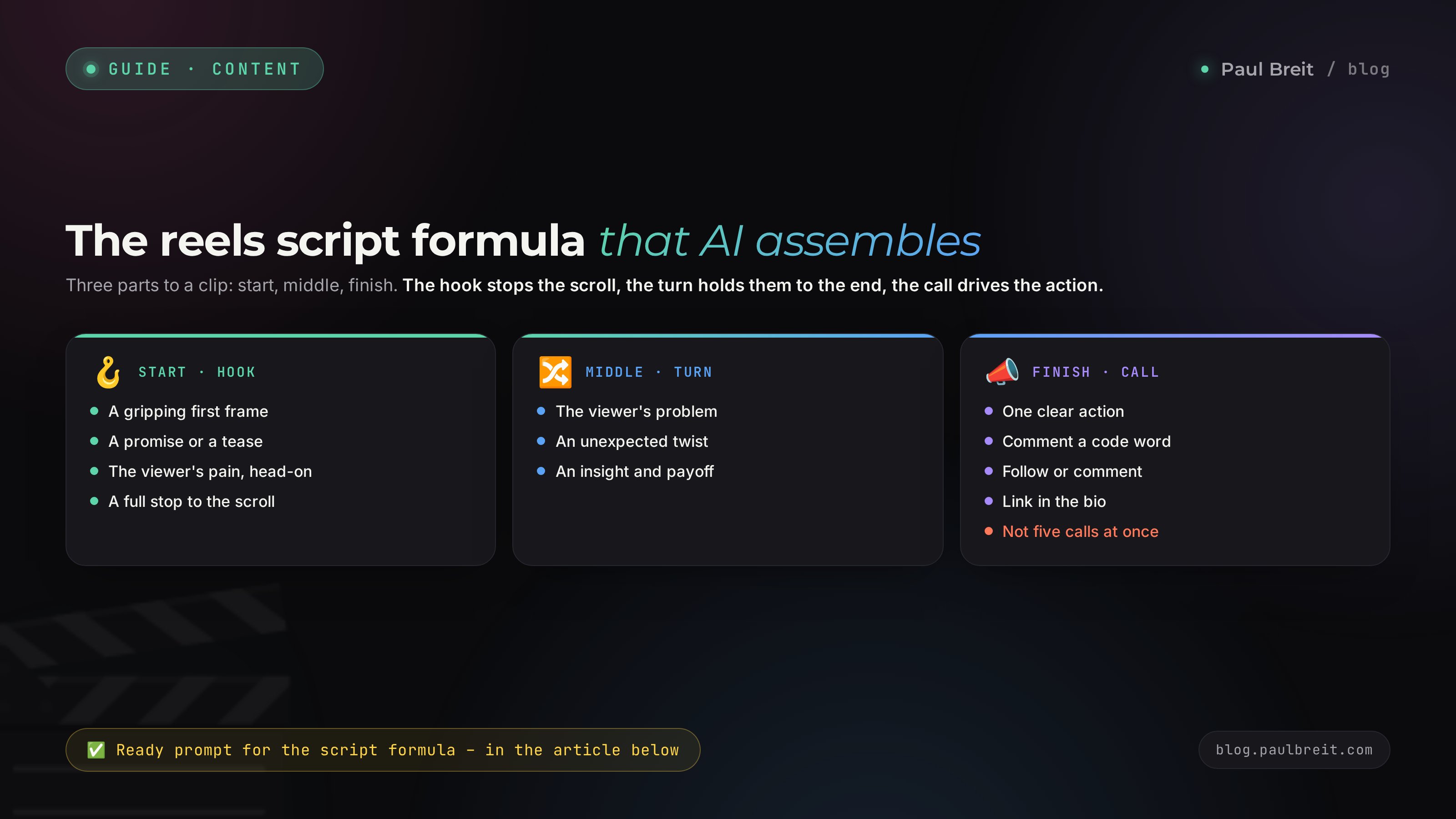
For AI to write working scripts, you have to give it a structure. Left free, it writes smooth and empty. Structure forces it to hold the drama. I use a four-block formula that works in educational, personal, and sales reels alike.
Hook – stops the scroll
The first line that makes a person stop the thumb. It's not a greeting and not the name of the topic. It's a promise, a pain-point question, or a contradiction. Bad: "Hi, today we'll talk about content." Good: "You post reels every day and still get zero clients – here's why."
Problem – recognition
The viewer should think: this is about me. Here you name the pain specifically and honestly. Not an abstract "few sales," but exactly what the person feels: "you film, you post, and nobody messages you, and you're ready to give up."
Turn – insight or method
The longest part. You deliver new knowledge, a breakdown, a story, or a step-by-step method. Here the person either gets a payoff worth saving the clip for, or an emotion worth sending it to a friend for. One reel, one idea. A second idea is a second reel.
Call – one concrete action
Not "follow and like" all at once. One action: "comment the word BREAKDOWN," "save this so you don't lose it," "answer yes or no in the comments." The more specific the call, the higher the response.
Let's be honest about timing. You've surely heard the three-second rule: if you don't hook them in three seconds, it's over. Three seconds do matter, but they aren't the main metric. The algorithm looks at total watch time and at how many people shared and saved the clip. A strong hook keeps a person from swiping away immediately. After that, meaning and pace hold them. A hook that promises gold while the clip is water actually drops your watch-through rate: the person feels tricked and leaves.
Watch-through beats likes. Shares and saves are the strongest signal for the algorithm, stronger than a like. Comments with questions push a clip too, because you can reply and keep the activity going. So in the call, ask people to save, share, or ask a question more often than you ask for a plain like.
This formula is exactly what we'll sew into the prompt. AI will write every script across the four blocks, and instead of abstract text you'll get finished drama that only needs a voiceover.
Section 03Tuning AI to your voice and niche
This is the step almost everyone skips, and then complains that AI writes like a robot from an ad. If you just ask "write me a reels script about my topic," you'll get smooth text full of phrases like "in today's world" and "it's important to understand." That's visible from a mile away, and a viewer reads the artificiality instantly.
The fix is simple: first teach AI to speak in your words. You feed it your real texts and ask it to derive the rules of your voice. After that it writes in that style.
Step 1. Collect your own texts
Take 20-30 of your own texts where you can hear yourself: channel posts, transcripts of past reels, messages to clients, even voice memos turned into text. The livelier and more varied, the better. Copy them into a single document.
Step 2. Ask AI to derive your style
Give it this prompt along with the texts:
Here are 25 of my texts. Analyze my speaking style and build
a voice passport, point by point:
1. Sentence length and rhythm (clipped or long).
2. Favorite words and phrases I repeat.
3. How I address my audience (formal or casual, warm or strict).
4. Humor and self-irony: present or not, what kind.
5. Words and phrases I NEVER use.
6. How I open a thought and how I close it.

From now on, use this passport whenever you write as me.
Texts: [paste everything here]
AI returns a description of your voice. Read it, fix anything that's off, and save it. In Claude it's handy to drop into a Project, so the style is picked up in every new chat without re-uploading. How Projects work is broken down in the article on teaching AI to write in your voice.
The voice-tuning method deserves its own breakdown. If you want AI to write indistinguishably from you, read how to teach AI to write in your voice – it walks through the 30-posts method step by step. You'll come back here with your voice already set, and all 30 scripts will sound like you.
Step 3. Set the niche context
Besides your voice, AI needs to know who you film for and what you sell. Add a short brief: who your client is, what their pain is, what your product is, what result you deliver. Then the scripts won't be about reels in general but about your niche, aimed at your sales.
Section 0430 topics in 15 minutes: brainstorming with AI
The voice is tuned. Now you need topics. Coming up with thirty on your own is hard, but AI produces them by the hundred if you ask right. The trick is not to say "come up with reels topics," but to give it a frame of content pillars.
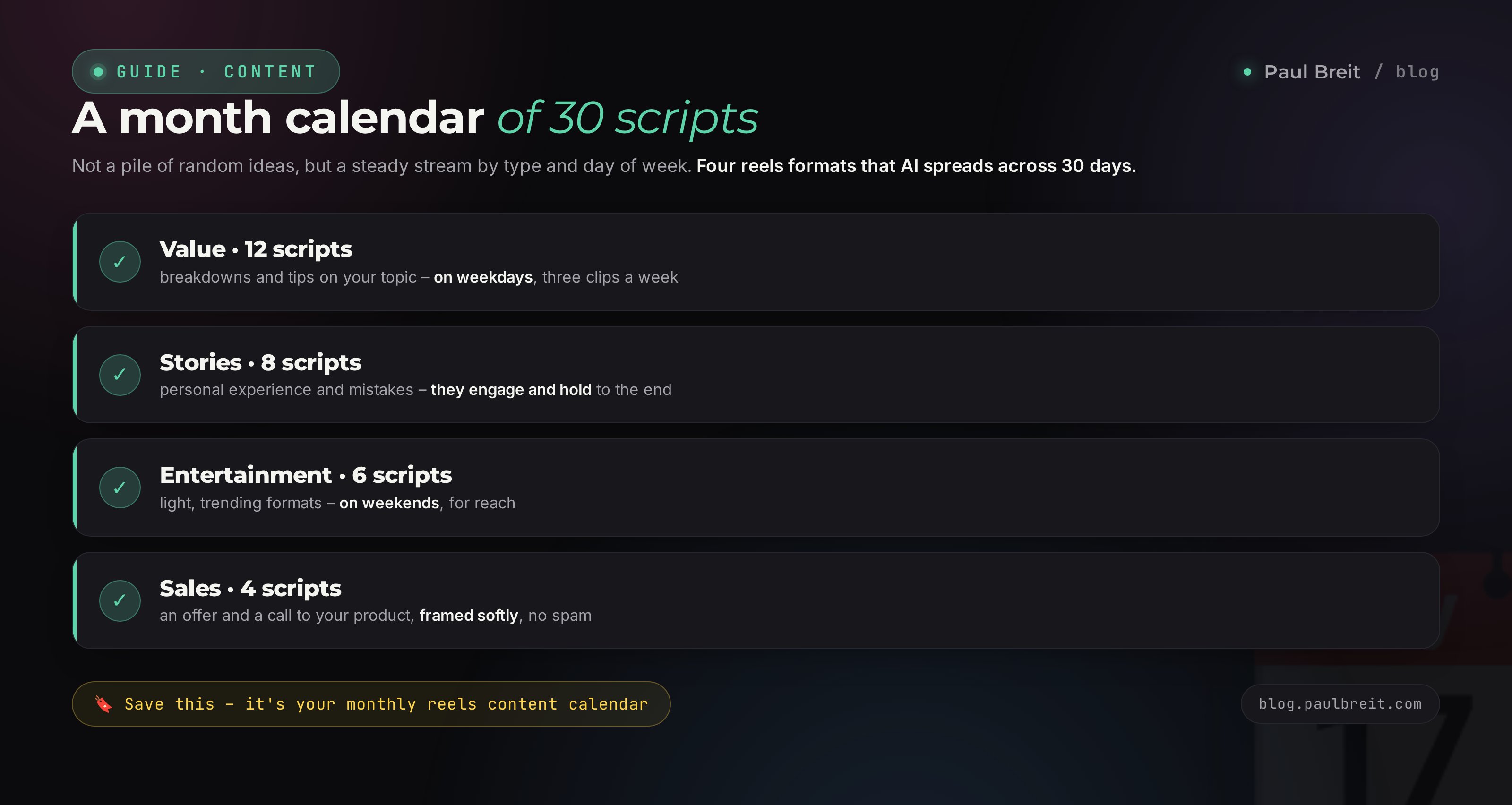
For anyone who sells services, courses, and consulting, topics fall into a few groups. I ask AI to keep a balance: roughly 40 percent educational content, 30 percent entertaining and personal, 20 percent inspiring, and 10 percent selling. That way the feed doesn't turn into a nonstop pitch and doesn't drift into pointless entertainment.
You know my voice and my niche. Build 30 reels topics for a month.
Split them by type:
- 12 educational (how-to, mistake breakdown, step-by-step method)
- 9 personal and entertaining (story from practice, everyday, a flop)
- 6 inspiring (a client's journey, before and after, a mindset shift)
- 3 selling (handling an objection, a case, an invitation)

For each topic give:
- a working title in one line
- one sentence on the client pain it addresses
- the type (educational / personal / inspiring / selling)

Don't repeat topics by meaning. Write in my words, no corporate phrasing.
You get a table of thirty rows. Skim it and cut whatever doesn't land, asking for replacements: "topics 7 and 14 are weak, give me two others about [subtopic]." Five minutes of edits and you have a list you're not embarrassed to work from for a month.
You: topics 3, 11, and 19 are too generic, swap them for concrete stories from client work
Claude: Swapped. Topic 3: how a nutritionist client got her first inquiries in a month even though she was scared of the camera. Topic 11: why I blew up my first launch and what I learned. Topic 19: a client came in with two thousand followers and grew into steady sales – what we changed.
See the difference: generic topics turned into concrete stories with people and numbers. Reels like that get watched, because there's a real person behind them, not a paragraph from a textbook. If you want a full content plan with a week-by-week layout, not just reels, build it with the method in the expert content pipeline.
Section 05A hook library: 4 types that hold attention
You have topics, but a topic isn't a hook yet. A hook is a specific first line. Left free, AI will write thirty similar hooks and the feed will go flat. So I give it four types and ask it to rotate.
Type 1. Contradiction
You break a common belief. "Everyone says you should film every day. That's bad advice, and here's why." It works because the brain can't scroll past a claim that argues with what it thought was true.
Type 2. Pain-point question
You hit the viewer's problem straight on. "Why do you have 20,000 followers and not a single inquiry this week?" The person recognizes their own situation and stays for the answer.
Type 3. Shock or contrast
An unexpected fact, number, or confession. "I filmed 200 reels before one took off." Or: "One reel brought me 40 clients, and I shot it in five minutes in my kitchen." The gap between effort and result grabs attention.
Type 4. A specific promise
You promise a payoff and set a timer. "In 30 seconds I'll show you how to build a reels script even if you hate writing." It works if you actually keep the promise inside the clip.
For each of the 30 topics, write 3 hook options - the first line
of the clip, up to 12 words. Rotate the 4 types: contradiction,
pain-point question, shock or contrast, specific promise.
The hook should sound like live spoken language, not an article headline.
Mark the type on each hook.
Three options per topic let you pick the strongest or run an A/B test. Out of ninety hooks you'll mark the best ones in ten minutes, and every reel gets a gripping opener instead of a dull greeting.
Build your own swipe file. Every time you stop on someone else's reel, write down the first line. In a month you'll have fifty working templates. Feed them to AI and ask it to write hooks in that manner for your topics. That raises the quality sharply.
Section 06The prompt-constructor: 30 scripts in an hour
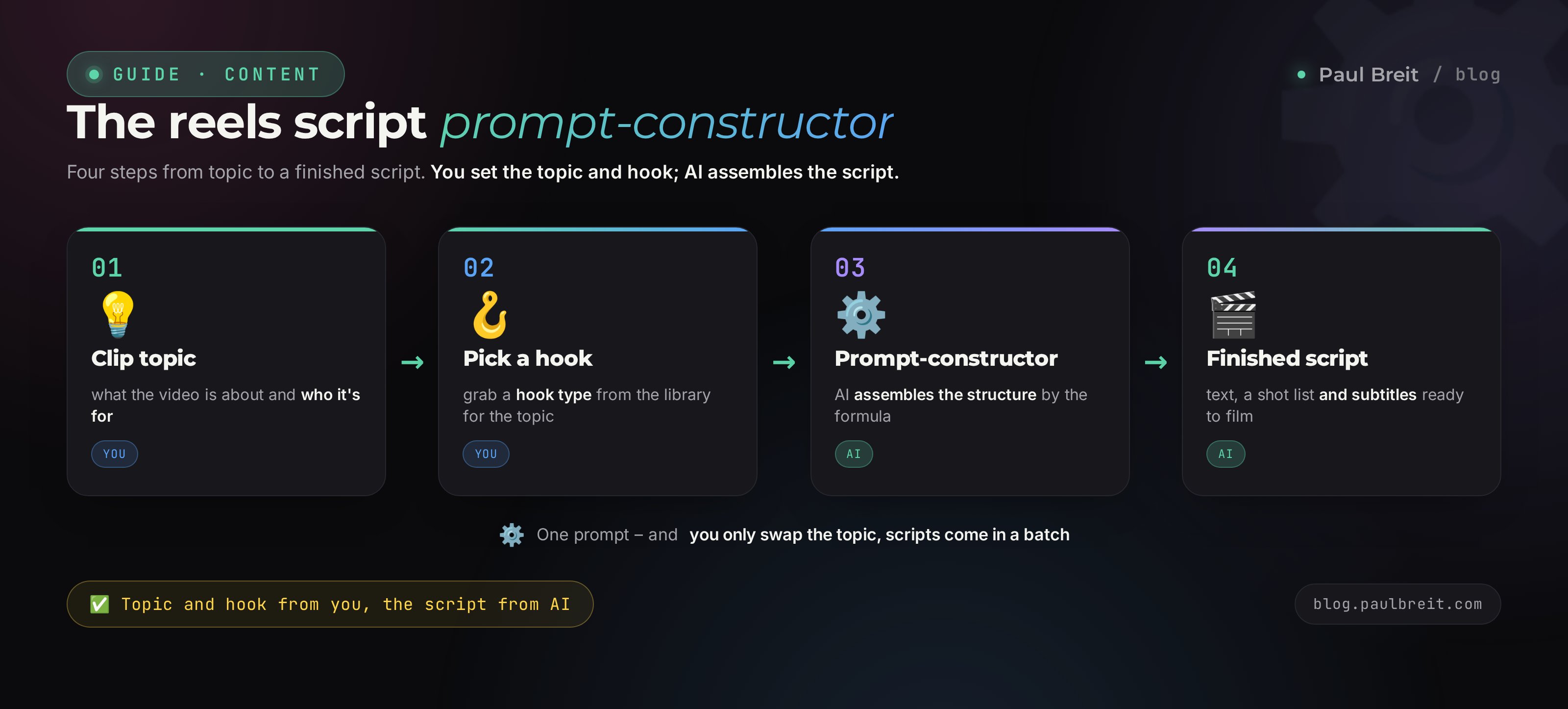
This is the heart of the whole process. You have a tuned voice, 30 topics, and hooks. Now one prompt turns that into thirty finished scripts. I'm giving it in full – copy it and drop in your own.
You write reels scripts in my voice and know my niche.
Take the topic and hook I give you and write a script on the formula:

HOOK (0-3 sec): first line, stops the scroll.
PROBLEM (3-10 sec): name the pain so the viewer recognizes themselves.
TURN (10-40 sec): one insight, method, or story. One idea.
CALL (5 sec): one concrete action.

Requirements:
- voiceover length 45-60 seconds, roughly 110-140 words;
- live spoken language, the way I talk out loud, short sentences;
- no corporate phrasing or ad cliches;
- at the end, state which action is in the call and why it fits.

Topic: [topic title]
Hook: [chosen hook]
Run this prompt across each topic. In Claude it's handy to drop in a list of five topics at once and ask for five scripts in a row, then the next five. In an hour or ninety minutes you'll have all thirty. Save them in one document and number them.
It's tempting to give one prompt for all 30 topics at once and get everything in one shot. Don't. When AI writes thirty scripts in a single pass, it gets tired on context toward the end and starts repeating phrasing and structure. In batches of five the quality stays even. The difference is visible to the naked eye.
How to bring a script to life
The first draft is almost always a B-minus. It needs a couple of commands to sharpen:
- Read it out loud. Anything you stumble over, hand back: "this line is hard to say, rewrite it simpler."
- Strip the smoothness. If you spot phrases like "in today's world," "it's worth noting," "thus" – ask for a rewrite in living language. How to tell AI text apart and clean it is covered in Claude vs ChatGPT.
- Strengthen the ending. The call often comes out limp. "Make the call more specific: one action, a verb up front."
The prompts that get the best result on the first try are all built the same way: role, task, format, constraints, example. If you want to build prompts like that yourself instead of copying other people's, see the breakdown in how to write prompts.
Section 07The shot list: what to say and what to show
The script is written, but in front of the camera a new question shows up: what do I show while I'm saying this? Staring into the lens for a whole minute is dull. You need a visual track, the b-roll. And AI can plan that too.
Ask it to break each script into two columns: on the left, what you say; on the right, what's on screen.
Break this script into a shot list, two columns:
VOICE - what I say (line by line)
FRAME - what to show at that moment: me on camera, phone screen,
        a close-up object, on-screen text, stock b-roll.
Mark where to put a full-screen text subtitle for emphasis.
Keep in mind I shoot on a phone at home, no studio.
You get a ready shooting instruction. It's clear where to talk to the camera, where to show a phone screen with an example, where to drop a big on-screen caption. Filming from a shot list like this is far faster, because you don't have to invent the picture on the fly.
If you're shy on camera, the voiceover-plus-b-roll format is your lifesaver. AI writes the text, you read it into a recorder, and the b-roll runs on screen: a city, hands on a laptop, a screen with examples. Reels like that perform no worse than a talking head, and you can shoot them without showing yourself at all.
Section 08Subtitles, voiceover, and editing with AI
Eight in ten people watch reels with the sound off. That means subtitles are mandatory, or half your audience won't understand a word. This used to be a half-hour of manual work; now it's automatic.
Subtitles
CapCut recognizes speech and lays down subtitles by itself in a couple of minutes. Open the clip, hit auto-captions, pick a style – done. Just check the names and terms; the recognizer sometimes garbles them. Keep the caption big, centered or low, high-contrast, readable on the move.
Voiceover without filming
If you'd rather not read it yourself, the script can be voiced with speech synthesis. Tools like ElevenLabs produce lifelike speech, and some can clone your voice from a short recording. Then the reel speaks in your voice even if you never read it aloud. For the b-roll format it's an ideal pairing.
Editing
For daily reels, CapCut is enough: subtitles, cuts, music, simple transitions. Don't chase fancy effects. The best transition is a hard cut with no animation. Clever transitions only belong when they add meaning, not just polish. Every frame should add something, or it gets cut.
Format 9:16, resolution 1080 by 1920. The first frame is the cover, so it has to grip on its own. Length 15-60 seconds, up to 90 for something educational. Subtitles across the whole clip. Nothing else is needed to start; the rest is decoration.
Section 09The calendar: how to spread 30 reels across a month
Thirty scripts in hand. Now you lay them out by day, so you don't post three educational clips in a row and don't forget about selling. Ask AI to build the calendar.
Lay out my 30 scripts across a month on a calendar.
Rules:
- rotate types so two of the same don't run back to back;
- space the selling reels (there are 3) evenly: about once every 10 days;
- put the strongest hooks on Monday and Friday;
- for each day give: date, script number, type, hook.
Output as a table.
You get a month grid. From there you can pick one shooting day and film 8-10 clips in a batch, then simply post one a day. That's called batching, and it saves a mountain of time: you set the lighting once, put on the right outfit, get into the zone – and shoot a week ahead.
| Day | Reel type | Job |
|---|---|---|
| Monday | Educational | Strong hook, payoff, a save |
| Tuesday | Personal | A story from practice, live emotion |
| Wednesday | Educational | A client's mistake, broken down |
| Thursday | Inspiring | A client's journey, before and after |
| Friday | Educational or selling | Strong hook, invitation to a call |
| Weekend | Entertaining | Everyday life, humor, no pressure |
This is a guide, not a law. The point is rhythm and rotation. When scripts and the calendar are ready in advance, you stop depending on inspiration. Bad mood, a busy stretch, a vacation – the content still ships, because it's already built.
Section 106 mistakes that keep reels from taking off
Even with finished scripts it's easy to step on a rake. Here are the six I see most often.
One prompt for all 30 topics
AI gets tired on context and stamps out identical scripts. Generate in batches of five so every clip stays alive.
Skipping the voice setup
Without your texts loaded, AI writes in ad-speak. The viewer reads the artificiality and leaves. Voice first, scripts second.
Two ideas in one reel
You want to pack in more payoff and the clip swells. Watch-through drops. One idea, one reel. The second idea is just another clip for tomorrow.
The hook promises what the clip doesn't deliver
A loud hook for views, water inside. The person feels tricked, leaves, and the algorithm sees it in the retention. The hook has to honestly reflect the content.
No call to action
The clip ends and the viewer just scrolls on. Every reel should push toward one concrete step: save, comment a word, answer in the comments.
Judging by a single clip
You shot one reel, it didn't fly, you gave up. Don't. Film 8-10 clips before drawing conclusions. One reel shows nothing; the stats build up across a series.
Look at retention. If people leave en masse in the first seconds, the hook is weak – rewrite the opening. If they watch through but don't share or save, the clip has no payoff or emotion worth sharing for. Change one element at a time, or you won't know what worked.
Section 11Checklist: from prompt to publish
Let's gather the whole path into one list. Walk it the first time, and after that it settles into habit.
- Collected 20-30 of your own texts and had AI derive a voice passport.
- Put the voice and niche brief into a Project so you don't reload it each time.
- Generated 30 topics with a balance of education, personal, inspiring, selling.
- Cut the weak topics and swapped them for concrete stories with people.
- Got 3 hooks of four different types per topic and picked the strongest.
- Ran the prompt-constructor in batches of five and built 30 scripts.
- Read each one out loud, stripped smooth phrasing, strengthened the calls.
- Got a shot list: voice on the left, frame on the right, subtitle marks.
- Laid the 30 scripts on a calendar with rotating types.
- Filmed 8-10 clips in a batch in one shooting day.
- Edited in CapCut with auto-captions, checked names and terms.
- Post one a day, and after a week look at retention and adjust.
You tune the voice once. You build 30 topics and hooks. You run the prompt-constructor and get 30 scripts with a shot list. You lay them on a calendar, film in a batch, edit with auto-captions. One evening of thinking work – a month of calm content with no morning panic about what to film.
FAQFrequently asked questions
Which AI writes reels scripts best?
Claude writes the most natural, human copy and holds your voice well once you load examples. ChatGPT works too, but it leans toward a smooth, ad-like tone you have to clean up. For a free start, ChatGPT's free tier or Google's Gemini is enough for drafts, though the quality is lower.
How long does it really take to write 30 scripts?
The first time, while you set up your voice and the prompt, it takes an evening, about three to four hours. Once the template is ready, the next 30 scripts for the month come together in an hour or ninety minutes. Filming and editing are counted separately.
Won't all 30 reels look the same if AI wrote them?
They will if you give one generic prompt for every topic. To avoid that, spread the hooks across four types, rotate formats (story, breakdown, mistake, answer to a question), and ask AI to keep a different rhythm. Then the feed looks alive.
Is it true that the first three seconds decide a reel?
Three seconds matter, but they aren't the main metric. The algorithm looks at total watch time and at shares and saves. A strong hook keeps a person from swiping away immediately; after that, meaning and pace hold them. A hook that promises one thing and delivers another actually drops your watch-through rate.
Do I have to show my face in reels, or can I stay off camera?
You can stay off camera: a voiceover plus b-roll, your phone screen, text on a background. Those reels perform just as well and are easier to shoot. AI will write the voiceover and the shot list for the b-roll without you appearing on camera at all.
How do I strip the AI feel out of a script so it sounds alive?
Load 20-30 of your own texts into the model, ban corporate phrasing and smooth cliches, and read the script out loud before filming. Anything you stumble over, rewrite. A full breakdown of the tells lives in Claude vs ChatGPT.
What if reels from these scripts still don't get views?
Look at retention in your stats. If people leave in the first seconds, the hook is weak. If they watch through but don't share, there's no payoff or emotion worth sharing for. Change one element at a time and film 8-10 clips before drawing conclusions, because a single reel shows nothing.