How to Write Prompts So AI Gets It Right the First Time: A 5-Part Formula
Some people get a finished text out of an AI on the first try. Others fight the "fluff" and give up. The difference is almost never the AI. It's how the question was asked. Let's break down, in plain English, what a prompt is, walk through a five-part formula, and show on real examples how a weak request turns into a strong one that gives you the result you need right away.
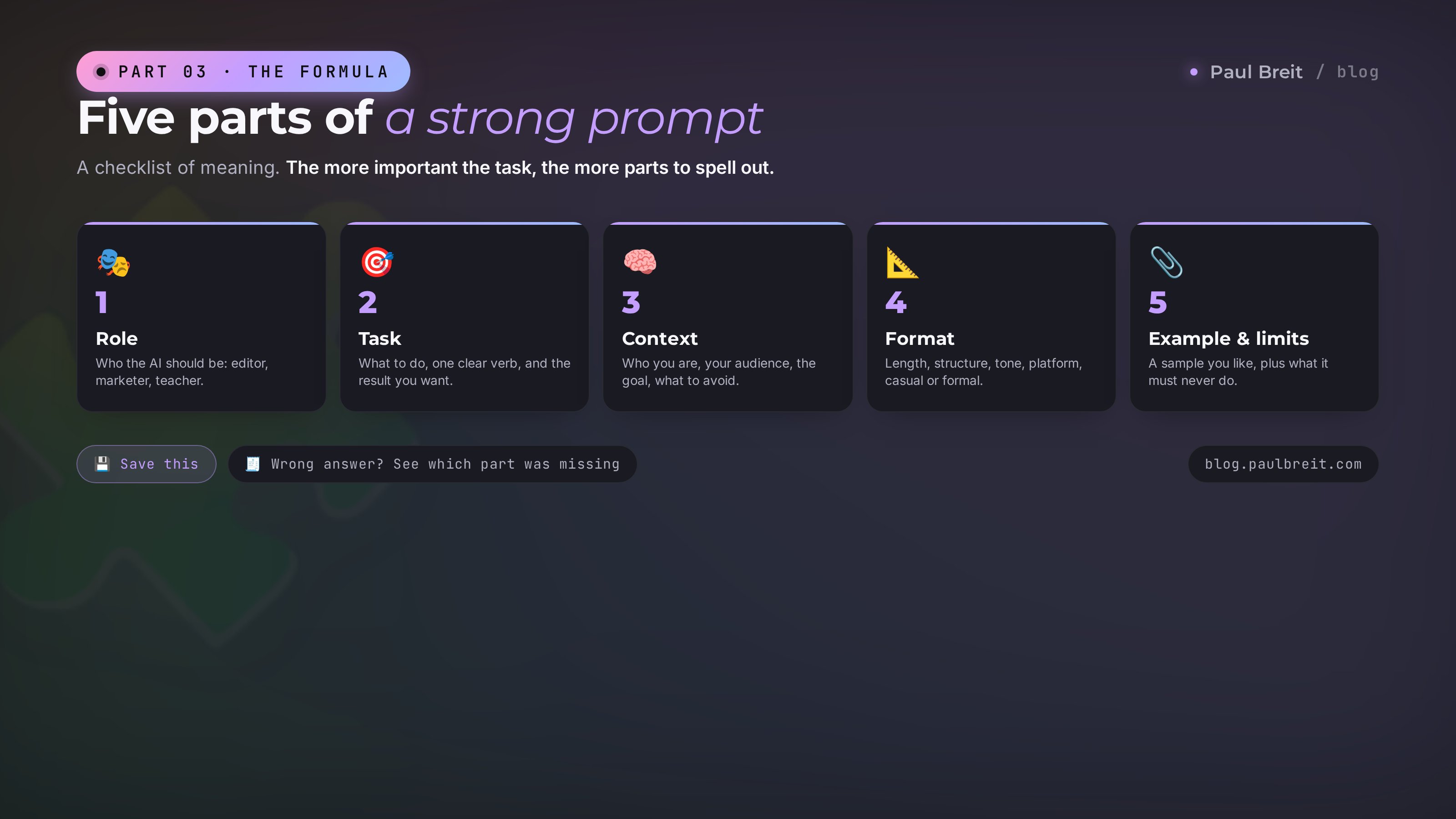
To write good prompts, break the request into five parts. Role – who the AI should become to solve the task ("you're an experienced editor"). Task – what exactly to do, in one clear verb, and what result you need. Context – who you are, who the audience is, what the goal is, what to avoid. Format – the form to deliver it in: length, structure, tone, casual or formal. Examples and constraints – a sample of what you like and the limits, what not to do. You don't have to use all five every time, but the more important the task, the more parts are worth spelling out. You can write the prompt in plain, everyday language: Claude and ChatGPT understand it perfectly.
An AI today can do almost anything: write a post, assemble an article, mine your reviews, come up with an offer. But it does exactly what you asked and never guesses at what you left unsaid. The same ChatGPT hands one person a lively sales text and another a faceless wall of fluff. The tool is the same. The difference is in the prompt.
Here's the good news: writing prompts is a learnable skill, and talent has nothing to do with it. It comes down to a simple formula you can learn in an evening and then apply every day. Once you have it, you stop being annoyed at the AI and start getting the kind of value out of it that other people pay contractors for.
By the end of this article you'll have a clear scheme for how to frame a request for any task, a set of ready-to-copy prompts, and an understanding of why your answers used to come out empty. No technical background needed – I explain it so any expert who can type a message in a chat app will follow.
What's inside
- It's almost always your question
- What a prompt is and why one line isn't enough
- The five-part formula
- Before and after: three real examples
- Ready prompts for an expert's tasks
- How to refine an answer in the chat
- Where to write prompts: Claude or ChatGPT
- Five mistakes that break a prompt
- Where to start today
Section 01It's almost always your question
The most common beginner complaint sounds like this: "I tried your AI, it spits out some kind of fluff, nothing useful." Almost every time I ask to see what the person actually wrote, the picture is the same. In the window there's one short line: "write a post about my course" or "make me a content plan." That's it. The AI got a generic question and honestly gave a generic answer.
Imagine you hired a sharp assistant, sat them down in front of you, and said: "make it good for me." What would they do? At best, ask you to clarify; at worst, invent what you even meant and miss the mark. An AI rarely asks back and more often fills in the blanks itself. And it fills them in with the average, the most common and safe option. That's where the bland fluff comes from: you handed it the right to decide for you, and it decided the gray way.
The point is that an AI doesn't read minds and doesn't know your context. It doesn't know your niche, your audience, or your platform: that you're a psychologist writing for moms on maternity leave, that the post needs to be short and for Telegram, not a longread for a website. All of that lives in your head. Until you say it out loud, for the AI it doesn't exist. It answers literally what's written, and everything still in your head simply isn't there for it.
From that comes a simple rule that flips the whole way you work with an AI. A bad answer is almost always a signal that the prompt was too generic. And that's great news: the prompt is entirely in your hands. You can't rebuild the AI itself, but you can rewrite your question to it in a minute. There's even a fast test for vagueness: if you can hand your request, word for word, to ten different specialists and they'd each read it a different way, it's too fuzzy, and the result will be just as fuzzy.
The rest of this article is about one thing: how to stop asking the AI generic questions and start asking specific ones. For that there's a simple formula, and that's where we head next. But first, let's agree on the words.
Section 02What a prompt is and why one line isn't enough
A prompt is your request to an AI. Any text you send it to get a result. The word comes from "prompt" as in a cue, but really it's just the assignment you set. You typed "translate this email into Spanish" – that's a prompt. You dictated three paragraphs of detail by voice – also a prompt, just a fuller one.
The key idea to accept from the start: an AI answers to the exact amount you put into the request. Put in one line, get an average answer to one line. Put in a paragraph of detail, get an answer fitted to your details. Between those two answers there's a chasm, and it costs you only a couple of extra sentences in the request.
Why that happens is clear from an everyday example. You message a handyman you know: "make me a table." He'll make some table, to his own taste, out of whatever's around. Now: "make me a writing desk for a laptop, light wood, four feet wide, with one drawer on the left, Scandinavian style." The second order the handyman builds the way you need it, because you made all the decisions for him. With an AI it's exactly the same. Every detail in the prompt is one decision you made yourself instead of leaving it to the machine to guess.
An AI is a very capable doer that works exactly to the brief. It doesn't guess at your wishes and doesn't read minds. The fuller the brief, the closer the result to what's in your head. Writing prompts is the art of setting a full, clear brief. And it's easy to learn, because a good brief has a fixed structure.
Notice something important: a long prompt doesn't mean a good one, and a good one doesn't mean a clever-sounding one. You don't need to write the AI an essay or sprinkle in fancy words. You need to spell out a few specific things it can't know on its own. Which ones, the five-part formula shows. Treat it as a checklist of meanings rather than a rigid form to fill in line by line: run your eyes down it and add to the request whatever's missing.
Section 03The five-part formula
Here are the five bricks a strong prompt is built from. Run through them like a checklist: role, task, context, format, examples and constraints. Let's break down each one with examples so it's clear what to actually write.
Who the AI should become
Start with who the AI should picture itself as to solve your task. "You're an experienced editor who scrubs texts clean of clichés." "You're a marketer who knows how to write hooky headlines." "You're an instructional designer who explains the complex in simple words." The role isn't decoration. It sets the vocabulary, tone, and depth of the answer: the editor nitpicks words, the marketer thinks about hooks, the designer breaks things down. One sentence about the role already cuts out half the noise and turns the AI in the right direction.
What exactly to do
Say in one clear verb what you need at the end, and what kind of result it is. Not "help me with a post," but "write a post that leads the reader to book a free consultation." Not "something about reviews," but "pull three strong quotes for a landing page out of these reviews." A verb – "write," "pull," "come up with," "break down" – plus a clear result is the heart of the prompt. If your request leaves it unclear what should come out at the end, the AI will invent the goal for you, and almost certainly the wrong one.
The inputs about you and the situation
This is the most underrated part and the one that changes the answer the most. Give the AI the inputs it can't know on its own: who you are and what your topic is, who your audience is, what the goal is, what you've already tried, what matters, and what to avoid. "I'm a nutritionist, I write for women 30-45 who are tired of harsh diets. The goal is to gently show that you can fix your eating without bans." One paragraph like that turns an average text into a text that reads like it's about your life. Context is what's worth the extra minute: it's what makes the answer yours and not generic.
The form to deliver the result in
Describe how the answer should look. Length: "three short paragraphs" or "a post of about 150 words." Structure: "hook first, then a story, a call to action at the end." Tone: "warm and human, no hype." Address: casual "you" for a reel, a more formal voice for an article. Platform: "this is a Telegram post, no markdown and no headings." Format saves you rounds of edits: without it the AI gives an answer in its own default format – usually dry, full of lists and subheads, which you then have to redo into living text.
A sample plus limits
The last brick is to show what you like and mark what's off-limits. An example works better than any description: paste one of your own good posts and say "write in this style." The AI picks up the rhythm, the sentence length, the manner. Constraints kill the typical misfires: "no corporate speak," "no long dashes, short ones only," "don't use the word 'unique'," "don't invent numbers I didn't give." The example shows where to go, the constraints show where not to. Together they sharply raise your hit rate on the first try.
You don't have to fit all five parts into every request. For a small thing like "reword this sentence more simply," just the task is enough. But the more important and complex the result, the more bricks are worth laying. General rule: if the answer came out wrong, look at which part was missing. Bland and generic – add context. Wrong tone – add format. Missed the meaning – sharpen the task. The formula works both as a way to write a prompt and as a way to fix a broken one.
Section 04Before and after: three real examples
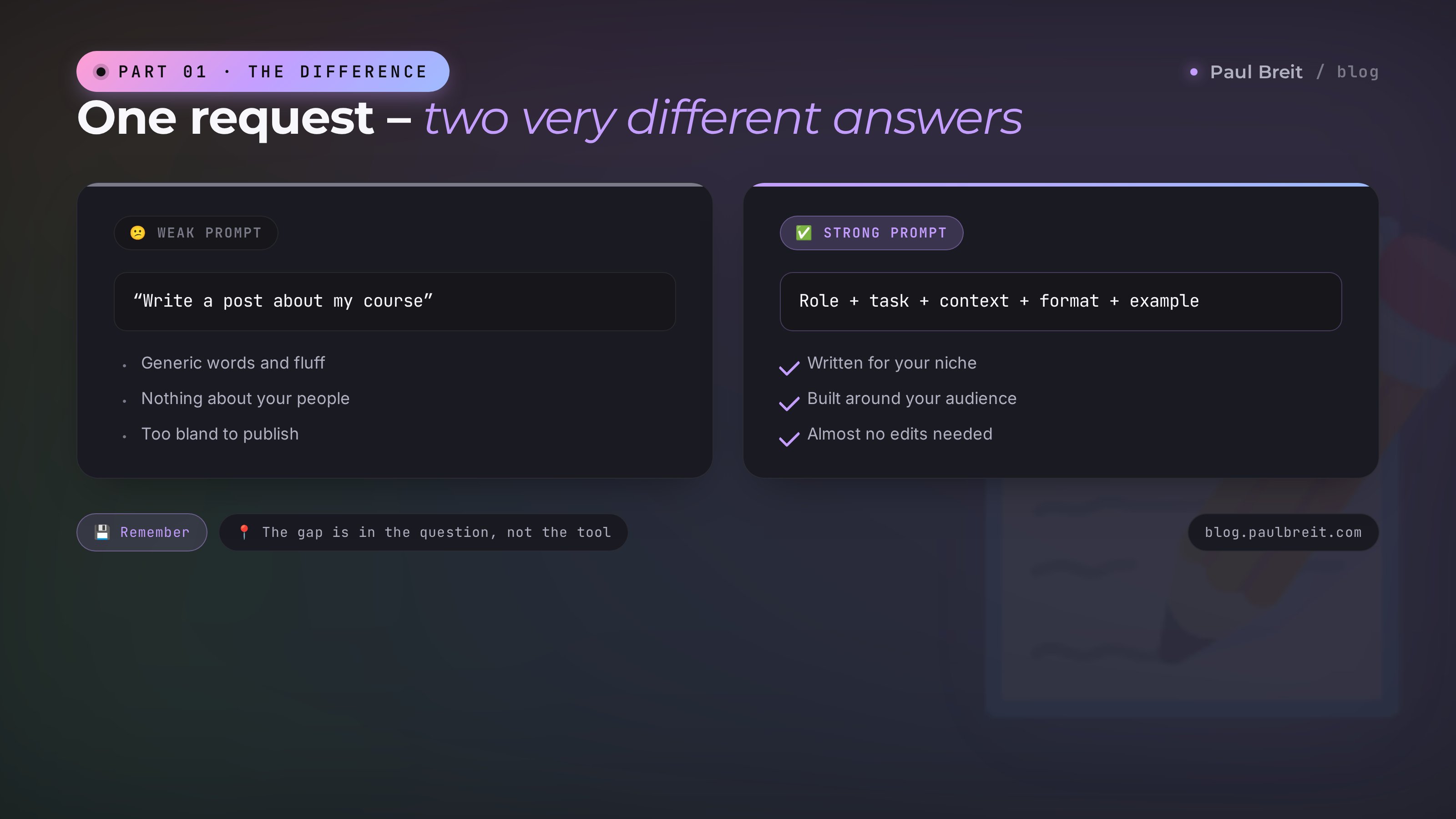
Theory comes alive in specifics. Let's take three typical expert tasks and see how the same request changes once you apply the formula. On the left – how a beginner usually writes it. On the right – the same intent, broken into the five parts.
Example 1. A post for a Telegram channel
What you get from a request like that: a faceless text with generic lines like "AI is changing the world" and "don't miss out," without a single detail about your course or your people. Impossible to read, embarrassing to publish. Now let's break it into the formula.
The difference is obvious. The second prompt has a role (a copywriter with no clichés), a task (a post with a call to a consultation), context (who the author is, who the audience is, what they fear), format (length, tone, structure, platform), and constraints (no markdown, no invented numbers). The AI now writes your exact post for your exact people. Generic text about nothing stops coming out of it. Edits after a request like that are minimal.
Example 2. Mining client reviews
To a request like that the AI hands you a vague "the reviews are mostly positive, clients are happy." Thanks, you already knew that. Let's add the formula and a concrete goal.
Now the AI mines real material out of the reviews: your audience's language, the recurring results, ready quotes. What comes out are finished pieces for the landing page that you just drop in. Context (who you are, what the landing page is for) and format (three clear blocks, verbatim quotes) did the work.
Example 3. Ideas for reels
You'll get a dozen generic themes along the lines of "show your behind the scenes" and "do a myth breakdown," which suit anyone and hook no one. Let's sharpen it.
The difference is that now the ideas grow out of a specific audience's life, not out of thin air. Hook, gist, call to action – a ready draft for each video. The constraint "no generic words about health and motivation" pulled its own weight: it cuts exactly the bland layer the AI fills the void with when it's short on context. By the way, if you want to assemble a whole month of scripts in one pass, I laid that out in a separate article on prompts for experts.
Section 05Ready prompts for an expert's tasks
So you don't have to assemble the formula from scratch every time, keep a few templates for common tasks on hand. Below is a short map: which task, and what you must spell out in the prompt so the answer is usable. After that – three ready templates to copy, where you just drop in your own details.
| Task | What you must give in the prompt |
|---|---|
| Telegram post | role, audience and its pain, the post's goal, length and tone, "no markdown" |
| Blog article | topic and key query, who the reader is, section structure, length, examples |
| Sales email | who you're writing to and where they are in the journey, one goal for the email, tone, length |
| Mining reviews | the reviews themselves, what to pull, what it's for, the output format |
| Ideas and headlines | niche and audience, how many variants, the criterion for a strong one |
| Simplify a text | the source text, who we're simplifying for, what to avoid in the edits |
And here are three universal templates. Copy them, drop your own details into the square brackets, and send it to the AI.
Template for a post.
You're a copywriter who writes living texts with no cliches.
Write a post for [platform], the goal is [what the reader should do].
About me: [who you are, your topic].
Audience: [who they are, what they care about, what they fear].
Format: [length], tone [which], address [casual/formal],
structure: [for example: hook, story, idea, call to action].
Constraints: no corporate speak, no long dashes, [your no-go list].
Template for breaking down material (reviews, chats, a call transcript).
You're an analyst. Here's my material: [paste the text].
Break it down and pull these for me: [what exactly you need, point by point].
Context: why I need this - [goal], I'm [who you are].
Output format: [how many blocks, with subheads, quotes verbatim].
Don't make anything up, work only with what's in the text.
Template for ideas and variants.
You're a [role for the task: scriptwriter / marketer / editor].
Come up with [how many] variants of [what: headlines / reel ideas / post topics].
About me and the audience: [niche, who the reader is, their situation].
The criterion for a strong variant: [what "strong" means to you].
For each variant give: [what to show for each one].
No generic words or cliches, only specifics for my audience.
Once you build a library like this for your own tasks, you stop writing prompts from scratch and just pull the right template. That saves hours a month. If you want to figure out which tasks are worth handing an AI first, check out the overview of what you can do with AI without a single line of code.
Section 06How to refine an answer in the chat
Even a strong prompt doesn't always land the ideal on the first try. That's normal. The beginner's mistake is, on seeing the wrong thing, to wipe it all and write the prompt again. That way you lose the ground you already gained. The right move is to refine it in the same chat, because the AI remembers the earlier messages and holds the context of the conversation.
It works like a conversation with a live assistant. The answer came out long – you write "make it about a third shorter." Too dry – "add a living example from my audience's life." Wrong angle – "the first paragraph is weak, start with a question that hits the pain." The AI doesn't take offense at edits and redoes exactly the piece you asked about, keeping the rest. Two or three tweaks like that usually get the text where you need it.
A few phrasings worth keeping in mind as working editing tools:
- "Give me three options for the first paragraph to choose from" – when you don't like the opening but can't be bothered to explain what you want.
- "Cut the corporate speak and cliches, keep the meaning" – when the text sounds stiff and official.
- "Better, but you lost the warmth from the last version, bring it back" – the AI remembers the previous version and merges the best of both.
- "Explain why you picked that headline" – when you want to understand the logic and refine it deliberately.
- "Ask me 5 questions that would help you write this better" – a powerful move: the AI pulls the missing context out of you itself.
That last move deserves its own word. If the task is hard and you don't fully know what you want yourself, don't agonize over the prompt – flip the order. Describe the task as it is and ask: "before you write, ask me questions whose answers will help you do this precisely." The AI asks about the audience, the goal, the tone – and you gather the context in a dialogue instead of in one long message. It's also a way to learn to write prompts: the AI's questions show you which bricks you usually leave out.
You can just ask the AI to write the prompt for you. Describe the task in plain words and add: "build me a detailed prompt for this task using the formula role, task, context, format, example." It hands back a neatly assembled request that you polish for yourself and reuse later. That way you get a ready prompt and learn from its wording at the same time.
Section 07Where to write prompts: Claude or ChatGPT
The five-part formula works the same in any AI – it's a universal skill that carries over to any service. Still, people often ask where exactly to write. Short version: both main models, Claude and ChatGPT, handle detailed prompts well, so you can start with whichever is already at hand.
For working with text I find Claude more convenient. It holds a long context carefully, doesn't lose details from the start of the conversation, follows a format well, and writes in a livelier voice with less corporate stiffness. For an expert who writes posts, articles, and emails every day, that's a noticeable difference. ChatGPT is stronger on some other tasks and is simply more familiar to many. There's no right answer here: try both on your real tasks and stay with the one you enjoy more.
One practical note on access. In some countries Claude and ChatGPT don't open directly: you'll need a VPN set to the US or EU, otherwise the login won't go through. If you haven't set up Claude yet, registration starts at claude.ai – turn on the VPN if you need it, sign up with your email, and from there you talk to it like a normal conversation partner.
The important thing is not to get stuck choosing a tool. People will spend weeks deciding which AI is "better" and never actually start. The gap between the services is smaller than the gap between a weak and a strong prompt inside the same service. Pick any one, master the formula, and you're already ahead of most.
Section 08Five mistakes that break a prompt
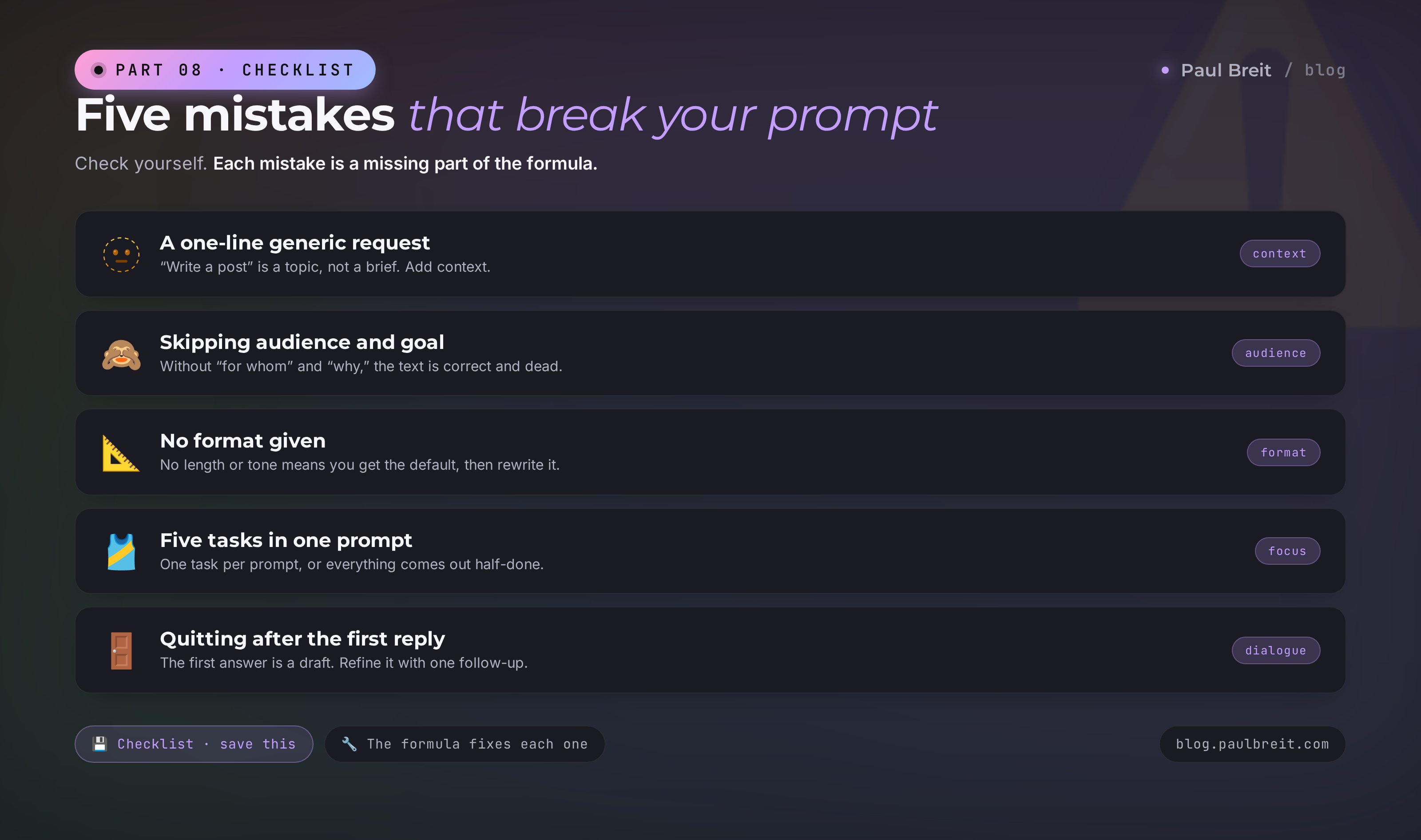
To avoid the usual rakes, run through this list. Each mistake is a missing part of the formula or an attempt to skimp on clarity.
A generic one-line request
"Write a post," "make a content plan," "come up with an offer." That's not a prompt yet. That's a topic, nothing more. The AI will fill the void with the average option and you'll get fluff. The fix is adding context and task: who you are, for whom, with what goal.
Staying silent about the audience and the goal
The most expensive omission. Without a "for whom" and a "why," the text comes out correct and dead. One sentence about your audience and its pain changes the answer more than any pretty words in the request. Don't skimp on that line.
Not setting the format
Didn't say anything about length, tone, and platform – you get an answer in the AI's default format: with lists, subheads, a bit dry. Then you redo it by hand. It's easier to just write "a Telegram post, about 130 words, a warm tone, no headings" up front.
Cramming five tasks into one prompt
"Write a post, and a reel script too, and an email, and ten headlines." The AI spreads itself thin and does each part at half strength. One task – one prompt. Need several results – go one at a time, and each will come out stronger.
Bailing after the first answer
You saw the wrong thing and decided "the AI can't do it." When one clarifying tweak would have done it. The first answer is a draft and an invitation to a dialogue. It's too early to call it final. The most valuable stuff often shows up on the second or third edit.
The common root of all five mistakes is one: trying to get a lot while putting in a little. The AI honestly reflects what you put into it. Put in clarity and context – you get value. Put in one lazy line – you get a lazy answer. So the best strategy is simple: treat the prompt like a brief for a good doer you respect, and it'll answer you in kind.
Section 09Where to start today
So the formula doesn't stay theory, here are three steps you can genuinely do in the next hour with no prep at all.
First – rewrite one of your old requests. Think of a task where the AI recently handed you fluff. Open it again and ask the same question, but by the formula: role, task, context, format, constraints. Compare the two answers side by side. That difference is more convincing than any article and shows on the spot that the problem was the prompt.
Second – build your three templates. Take the three tasks you do most often: say, a post, a review breakdown, ideas. Assemble a prompt for each by the formula and save it to your notes. From that moment you're not writing from scratch anymore – you just drop details into the ready thing. In a week you'll have a personal library of working requests.
Third – practice refining. On any AI answer, make at least one deliberate edit in the chat: "shorter," "add an example," "cut the corporate speak." Get used to the idea that the answer is a draft you can and should talk to. This skill pays off every single day.
And keep the main thought of the whole article in mind. The AI doesn't decide for you whether the result comes out good. You do – by how you set the task. A bad answer almost always means the prompt was too generic, and that gets fixed in a minute. Once you've mastered the simple five-part formula, you stop depending on luck and start reliably getting what you need out of the AI. From there it turns into a habit: you barely think about the bricks anymore and just set clear tasks, getting strong answers. That's where real work with AI begins – with the ability to explain precisely what you want. No magic button needed for that.
If you're just walking into the topic and want a general route for where an expert should even begin, take a look at the article on getting found in AI search. And once prompts become second nature, the logical next step is to fold them into ready Claude skills for your texts, so you don't have to type a long request every time.
RecapThe whole thing in a minute
- Bad answer = bad prompt. To a generic question the AI gives a generic answer. The question is entirely in your hands, and it gets fixed in a minute
- A prompt is a brief. The AI answers to the exact amount you put in. More detail – closer to what's in your head
- The five-part formula: role → task → context → format → examples and constraints. A checklist of meanings, not a rigid form
- Context matters most: who you are, who the audience is, what the goal is. One paragraph about your people makes the answer yours, not generic
- Refine in the chat: don't rewrite from scratch – edit piece by piece – "shorter," "add an example," "cut the corporate speak"
- You can ask the AI to write the prompt for you or to ask you questions before it starts
- The formula works in both Claude and ChatGPT. If they don't open in your country, use a VPN set to the US or EU
FAQFrequently asked questions
What is a prompt in plain terms?
A prompt is your request to an AI, the text in which you tell it what to do. The clearer and fuller you explain the task, the more accurate the answer. A weak prompt is one vague line like "write a post". A strong prompt spells out the role, task, context, and format, and shows an example. AI doesn't read minds: it answers exactly what you wrote.
What parts make up a good prompt?
Five of them: role (who the AI should become), task (what exactly to do, in one clear verb), context (who you are, who the audience is, what the goal is), format (the form to deliver it in – length, structure, tone), and examples with constraints (a sample of what you like and what to avoid). You don't have to use all five every time, but the more important the task, the more parts are worth spelling out.
Why does the AI give a generic, useless answer?
Almost always the reason is the prompt itself. To a generic question it gives a generic answer, because it doesn't know your context: who you are, who you're writing for, what the goal is, what form you need. Give it those inputs and the answer gets specific. Quick test: if you could hand the same prompt to ten different experts and they'd all read it the same way, it's too generic.
Do I need to write the prompt in a special way?
No, and you don't need fancy or technical wording. Modern AI tools, especially Claude and ChatGPT, understand plain, everyday language perfectly. Write the way you'd explain a task to a smart assistant, in full sentences with the details spelled out. A clear everyday prompt beats a clever-sounding one. Precision in what you want matters far more than style.
What do I do if the answer is almost good but not quite?
Don't rewrite the prompt from scratch – refine it right in the chat. The AI remembers the previous messages, so just say what to fix: "make it shorter", "cut the corporate speak", "add a concrete example", "the first paragraph is weak, rewrite it". Two or three tweaks usually get the answer where you need it. That's a normal workflow, not a sign of a bad prompt.
How long does it take to write a good prompt?
The first few times, a couple of minutes to spell out the five parts. After that it's faster: you save your good prompts and reuse them, changing a detail or two. A minute on a prompt saves half an hour of fixing a bad answer, so it pays off right away. Over time the formula settles in your head and you write strong prompts almost on autopilot.
Can I ask the AI to write the prompt for me?
Yes, and it's one of the most underrated moves. Describe the task in words and ask: "build me a detailed prompt for this task using the role-task-context-format-example formula". The AI hands back a ready prompt that you polish for yourself. That way you learn from its wording and get up to speed faster.
Where's it better to write prompts – Claude or ChatGPT?
Both models handle detailed prompts well. For long texts, working with big documents, and following a format carefully, many experts pick Claude. The five-part formula works the same in any AI, so start with whichever is at hand. If Claude or ChatGPT don't open in your country, use a VPN set to the US or EU before you log in.