Claude vs ChatGPT in 2026: An Honest Comparison for Your Work
Two of the strongest AI tools, one question – which one to pick for your own work. I break it down honestly: writing, documents, images, voice, price, access, and ten real tasks you actually do. No hype, no "they're both great." By the end you'll know exactly which one to open first.
Claude is stronger where you earn money with words: long-form writing, articles, posts in your voice, digging through documents and a knowledge base, building AI agents. ChatGPT is stronger on versatility: image generation, voice conversations, web search, quick everyday tasks. Both cost about $20 a month and, from restricted regions, open only through a VPN. If your work is writing and content, start with Claude. If you need one all-purpose helper for everything, start with ChatGPT. Many practitioners keep both and switch by task.
You finally decided to get a handle on AI. You opened a couple of articles and got even more confused. Some shout that ChatGPT is all you'll ever need. Others swear that once you try Claude, you never go back. A third camp tells you to run five services at once. And so you end up paying for a subscription you barely touch, or you put off starting altogether.
I work with both every single day. I run four client projects and a personal channel with 20,000 followers, and AI handles the lion's share of my content routine. Over that time I've built a clear picture of where each tool wins and where it's just trendy noise. That's the picture I'm sharing here – no taste-based verdicts, just task by task.
It's a 22-minute read. By the end you'll know which subscription to get first and why. And at the very end there's a five-minute checklist to pick the right one for your exact work.
What's inside
- The 30-second verdict: who needs what
- Who's who: Claude and ChatGPT in plain words
- Writing and a living voice: who sounds more human
- Documents and knowledge base: who holds more in mind
- Images, voice, web: ChatGPT's strong side
- Agents and automation: why Claude wins here
- Price, limits, and payment in 2026
- Access from restricted regions: what actually works
- A breakdown across 10 real tasks (table)
- How I use both together
- 5 mistakes when choosing
- Checklist: choose in 5 minutes
Neither Claude nor ChatGPT opens directly from some regions – you need a VPN with an EU or US location. Reliable ones in 2026: Proton VPN, Mullvad, and similar. A few countries are on Anthropic's blocklist, so stick to European or American locations. A full walkthrough with prompts and setup is in the article on how to write prompts and in what you can do with AI.
Section 01The 30-second verdict: who needs what
I'll start with the conclusion so you don't have to scroll to the end. There's a detailed breakdown of every point with examples below, but if you're short on time, here's the gist.
Take Claude if your work is words. You write articles, posts, emails, scripts, sales copy. You want the AI to pick up your style and sound human, not like a pension-fund press release. You work with long documents: handbooks, transcripts, contracts, a knowledge base. You want to build an AI agent that reads chats on its own or keeps a spreadsheet updated. All of that is Claude's turf.
Take ChatGPT if you need one all-purpose helper for everything. You want to generate images for posts right inside the chat. You'd rather talk out loud than type. You often need fresh web search with links. You handle a messy mix of everyday tasks: translate, calculate, brainstorm an idea, read a photo. ChatGPT is the Swiss Army knife here – not the best at every single task, but always within reach.
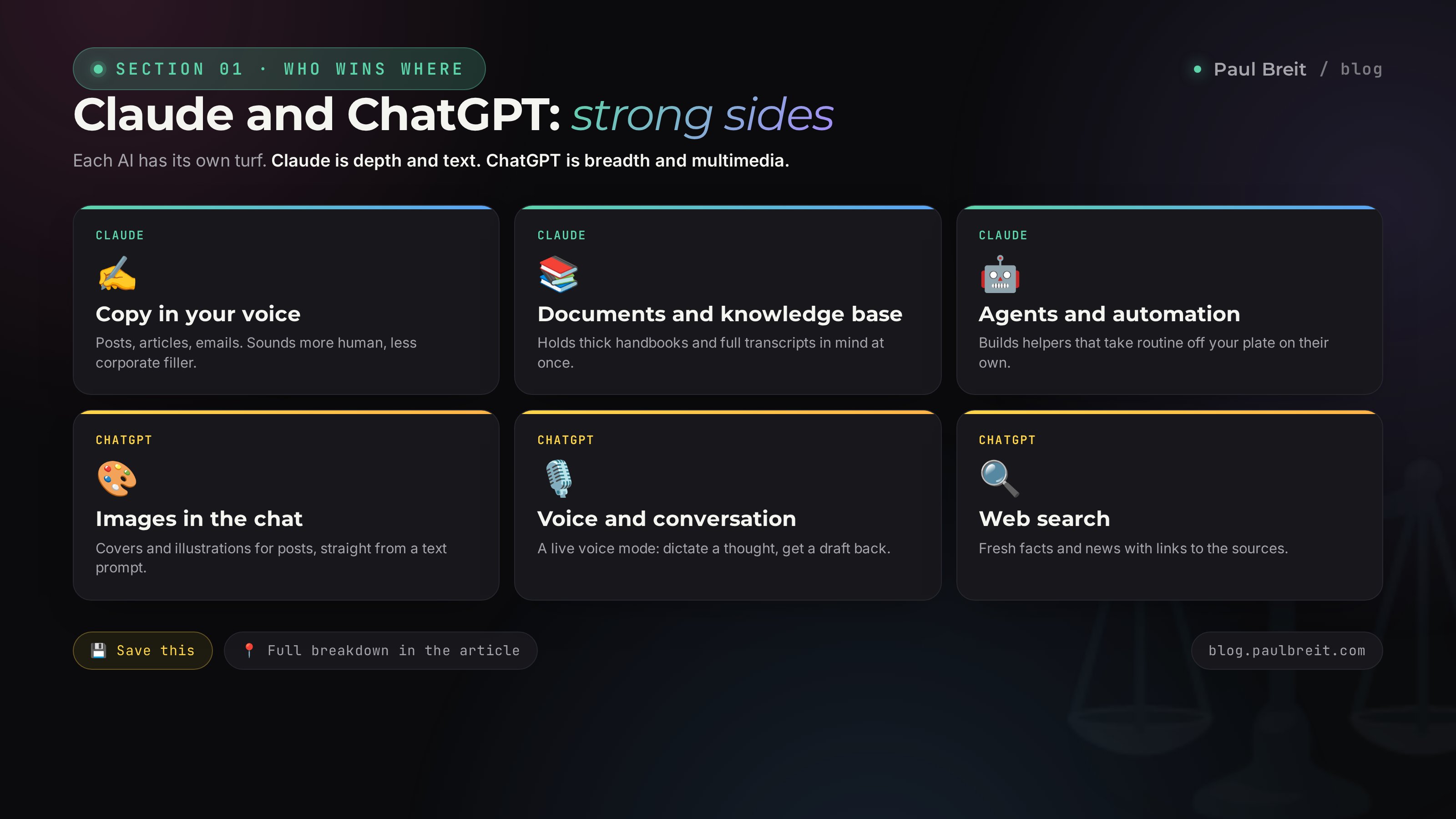
Claude is about depth and text. ChatGPT is about breadth and multimedia. Ask yourself what you actually earn money on. If it's words and content, put Claude first. If you need a generalist helper for whatever the day throws at you, start with ChatGPT.
Now let's really dig into where this difference comes from. No technical jargon, I promise – just the things you'll feel in your own work.
Section 02Who's who: Claude and ChatGPT in plain words
Both are AI tools that understand human language and answer in text. You type a request, they respond. That's where the resemblance ends, because different teams with different philosophies built them.
ChatGPT was made by OpenAI. It's the tool that once blew up the internet and taught the whole world the word "prompt." ChatGPT grew as a product for everyone at once: students, programmers, marketers, grandmothers asking for a borscht recipe. That's where its character comes from – it can do almost everything a little bit. Inside it live an image generator, a voice mode, web search, analysis of uploaded photos and spreadsheets, and a store of ready-made mini-bots. It's a big ecosystem with a button for every task.
Claude was made by Anthropic. Its founders came out of that same OpenAI and built an AI with a different focus: accuracy, following instructions, and working with large volumes of text. Claude spreads itself thinner. It doesn't draw images and doesn't search the whole internet in its base mode. But what it does, it does thoughtfully: it writes long text without losing the thread, holds an entire huge document in mind at once, and executes complex multi-step tasks precisely. For someone who lives on content, that's often more important than every other feature.
There's one more important thing that rarely gets explained to newcomers. Both tools have several models inside: lighter and faster ones for simple questions, heavier and smarter ones for hard ones. In the interface it looks like a model dropdown. The rule is simple: use the fast model for routine, and the most powerful one for important text or complex analysis. Don't run the heavy model on "translate this one phrase" – that's a waste of your limits. And the reverse: don't ask the light model to write you a sales article, the result will be flat.
Section 03Writing and a living voice: who sounds more human
This is the most common question I get, and I have a firm position on it. On text quality, Claude sounds more human in most cases. The gap is especially clear when you need a living post or email, not a dry summary.
ChatGPT writes with energy and confidence, but it has a recognizable accent. It loves lists, sprinkles in stock transition phrases and corporate turns, and often builds an answer to a template: first this, then that, then a third thing. A reader feels that kind of text and subconsciously stamps it "written by a machine." Cleaning off those traces takes separate work – I walked through it in the article on how to teach AI to write in your voice.
Claude is closer to living speech out of the box. It sprinkles in less filler, holds a single tone across a long text better, and is more willing to write in short sentences when you ask. It's easier to instruct: write like a real person talks, no transition words and no pomp – and it will hold that.
Take the same request and give it to both. For example: "Write a first-person Telegram post about how I was scared to run live streams, but did the first one and landed three clients. Living language, no corporate filler, short paragraphs." Read the two results aloud. The one that reads easier and looks less like an article from a corporate blog is your pick for content. For most people, Claude wins this test.
But honesty beats a flattering picture, so I'll say the opposite too. ChatGPT is stronger when you need text fast and its quality is secondary: a rough product description, ten headline options to try, a short photo caption. It cranks out volume faster and brainstorms ideas better in a rapid-fire mode. If you need to sketch twenty topics for a content plan in a minute, ChatGPT handles it with more pep.
One more point about prompts. Both tools answer exactly as well as you framed the task. Even the best model will hand you blandness if the request sounds like "write a post about marketing." How to phrase requests so you get a strong result, I laid out in detail in the piece on how to write prompts. That matters more to the outcome than the choice between Claude and ChatGPT.
Section 04Documents and knowledge base: who holds more in mind
Here Claude has a historical edge, and for you it's very practical. Claude has a large "context window" – the amount of text the AI holds in mind during one conversation. In plain words: you can load a thick handbook, a transcript of a three-hour webinar, a dozen articles into Claude, and it will answer across all of it as a whole, without losing the thread.
Why do you need this on the ground, not in theory? Here are real scenarios.
- Digesting your own material. You drop in a transcript of your talk and ask: build five posts out of this, keep my phrasing. Claude holds the whole text and doesn't invent things you never said.
- A knowledge base at hand. Claude has a "Projects" mode – you load your handbooks, sample posts, and product description once, and from then on the AI answers with all of it in mind in every new chat. You get a helper that knows your business.
- Long documents. A contract, a proposal, a twenty-page report – Claude reads it whole, pulls out the essence, compares versions, and finds contradictions.
ChatGPT can also read uploaded files and hold context, and in recent versions it does this noticeably better than a year ago. But on very large volumes it starts to "forget" the beginning of the conversation earlier and lose details from the middle of a document. If your work hinges on long texts and a big knowledge base, you feel it.
Lots of long material, your own knowledge base, digesting transcripts and handbooks – Claude. A short file to skim once a week – ChatGPT is plenty. How to turn this into a working tool, I show in the article on analyzing a Telegram channel with Claude.
Section 05Images, voice, web: ChatGPT's strong side
Now honestly, about where ChatGPT is ahead. Here it's not just better – in these tasks Claude basically doesn't compete at all in base mode, and you need to know that upfront so you're not disappointed.
Image generation
ChatGPT draws images right in the chat. A cover for a post, an illustration for an article, a simple infographic, an avatar – you describe what you want in words and get an image. Quality crossed the threshold long ago where you're not embarrassed to put the picture in your feed. Claude doesn't generate images. It can help you come up with an idea and a description for an image, but the picture itself you'll make somewhere else.
Voice conversations
ChatGPT has a voice mode: you speak out loud, it answers with a voice, and it turns into a live conversation. Handy on a walk, behind the wheel, when you're too lazy to type or want to talk a thought through. For many people it's a way to dictate a post idea and get a ready draft on the spot. Claude has no full voice dialogue in this form.
Web search
ChatGPT can search the internet for fresh information and give an answer with links to sources. Ask about a news item, a current price, fresh statistics – it goes online and brings it back. Claude in base mode answers from what it knows and honestly warns you if the data might be short. For tasks that need fresh facts from the web, ChatGPT is more convenient.
Is it worth picking ChatGPT for the images and voice? It depends on how much you use them. If you make ten pictures a day – yes, ChatGPT is closer to your work. If you need an image once a week, it's easier to generate it with a separate service or order it, and run your main text work in Claude. Don't buy a tool for a feature you'll open twice a month.
Section 06Agents and automation: why Claude wins here
This section is for those who want to hand the AI a routine whole. For example, so the AI gathers competitors' fresh posts once a day, pulls out ideas, and drops them into a spreadsheet. Or answers common DMs and books people onto a call. These things are called AI agents, and I wrote about them in detail in the article on prompts and pipelines that work.
For building agents, Claude has two serious aces.
- Claude Code. This is a mode where the AI writes and runs small programs for your task on its own. You explain in words what you need, and Claude assembles a working tool. Don't be scared by the word "code" – you won't have to program, you set the task in human language.
- Connecting external services. Claude can plug directly into your spreadsheets, Telegram, site, and other services. So the AI actually does the work with its hands: writes into the spreadsheet, sends a message, publishes a post.
ChatGPT has automation too: you can build your own GPT bot with instructions and loaded knowledge, and that's handy for standard scenarios like a "consultant bot for my product." But these bots live inside the ChatGPT ecosystem and are less suited to a flexible link with your own services. When you need automation for a specific business process, practitioners more often choose Claude.
An AI agent is not a magic "make it pretty" button. It's a tool you have to set up and check. For the first couple of days you'll watch what it does and correct it. But after that it works on its own while you sleep. It makes sense to start building agents once you're already comfortable in a regular chat and understand exactly which routine you want off your plate.
Section 07Price, limits, and payment in 2026
Good news: both tools cost roughly the same, and for one person it's affordable. Let's break it down.
| Plan | Claude | ChatGPT |
|---|---|---|
| Free | yes, with limits | yes, with limits |
| Main paid | Pro ≈ $20/mo | Plus ≈ $20/mo |
| Heavy plan | Max, from $100/mo | Pro, ≈ $200/mo |
| What paid gives | more limits, best models, Projects | more limits, images, voice, search |
What matters to know about the free versions. They exist and you really can use them, but they run into limits: sit for half an hour of dense work and the AI asks you to wait or suggests a subscription. For "try it and see if it's for me," the free version is enough. For a daily workload, you need the $20 paid plan, otherwise the limits will keep cutting you off mid-task.
The heavy plans at $100 to $200 are for a few: those who run the AI for hours every day or assemble complex agent setups. Most people don't need them, so don't overpay at the start.
Both subscriptions are paid with an international card. From a restricted region it comes down to three routes: a virtual international card, payment through an intermediary, or a card of a relative or friend abroad. Plus, at the moment of payment you need a VPN turned on with a location in the same country as the card, otherwise the payment may not go through. Step by step with services and pitfalls is in the article on how to write prompts and getting set up – for ChatGPT the scheme is the same.
Section 08Access from restricted regions: what actually works
I'll say it straight, no dressing it up, because this is where most people stumble. Both Claude and ChatGPT restrict access from certain regions' IP addresses. That means you can't just open the site from there – you need a VPN that shows you're coming in from another country.
What works in 2026:
- A VPN with an EU or US location. Proven ones: Proton VPN, Mullvad, and similar. Turn it on, pick a country like Germany, the Netherlands, or the US, and only then open the AI.
- Not every country works. A few countries are on Anthropic's blocklist – Claude won't let you in through them. Use European or American locations.
- You need the VPN on the whole time. Keep it on for the entire work session, from login to the last message. If the VPN drops mid-session, the AI may stop answering.
Keep the same VPN and one country for your account. If today you log in from Germany, tomorrow from the US, the day after from Asia – the system sees the jumps and can suspect something is off, up to a block. Pick a location and stick with it. This rule is the same for Claude and ChatGPT.
From my own experience: technically both tools come up the same way from a restricted region – through a VPN and international payment. So access is not a reason to pick one over the other. It's more of a shared entry barrier you pass once and then just work. If you're only starting, calmly walk through this step following the guide in what you can do with AI and don't turn it into a tragedy.
Section 09A breakdown across 10 real tasks
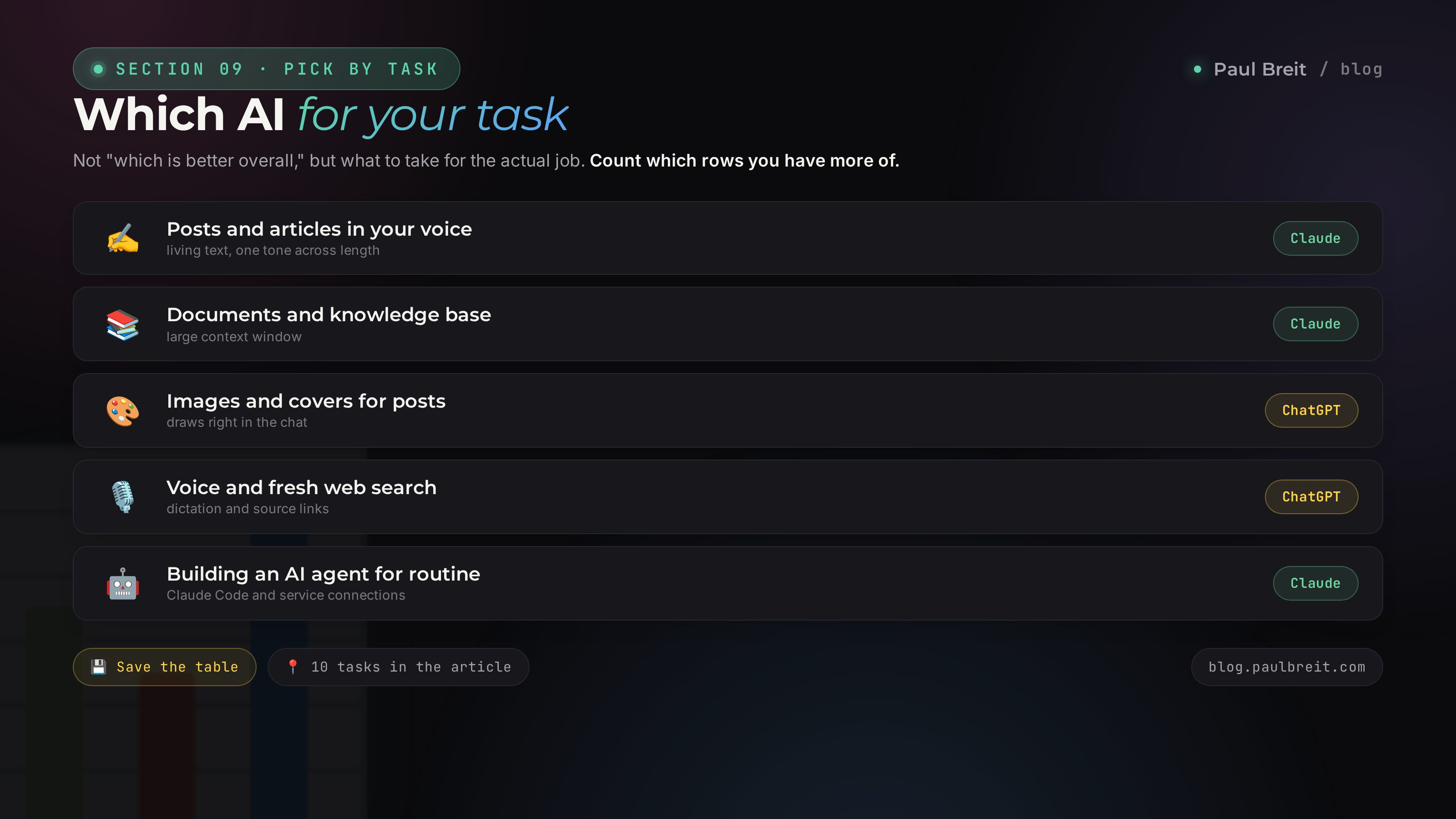
The most useful part. Below are typical tasks and my recommendation for each. The recommendation goes per specific job, because an abstract ranking of "which is better overall" is useless in practice. Use it as a cheat sheet.
| Task | What to take | Why |
|---|---|---|
| Telegram posts in your voice | Claude | sounds more alive, less filler |
| A blog article or landing page | Claude | holds long text and a single tone |
| Covers and images for posts | ChatGPT | draws right in the chat |
| Digesting a webinar transcript | Claude | large context window |
| 20 ideas for a content plan | ChatGPT | fountains options fast |
| Dictating a thought by voice | ChatGPT | voice mode |
| Fresh facts and news with links | ChatGPT | web search |
| A knowledge base on your product | Claude | Projects mode, remembers context |
| Building an AI agent for routine | Claude | Claude Code and service connections |
| Quick translation, photo read, math | ChatGPT | all-purpose helper for everything |
Count which tasks you have more of. If more rows landed on Claude – start with it. If ChatGPT tips the scale – start there. This is more honest than any "which is better overall" argument, because you won't be working "overall." You'll be doing the concrete things from this table.
And notice something important: for the main task – regular content that brings in clients – Claude comes up more often in the table. That's exactly why, when people ask me "what should one person start with," I recommend Claude by default and add ChatGPT second for images and general tasks. How to turn content into a flow of clients, I break down in the article on how to make money with AI.
Section 10How I use both together
I'll be straight: I have both subscriptions, and it's a clean division of labor. Each covers what it's strong at, and together they save me hours every day. Here's my actual routine – take it apart and grab whatever fits you.
The day's content – in Claude
I sit down to write posts and articles in Claude. I have samples of my own text and project descriptions loaded there, so it writes in my tone right away. One stream transcript turns into a series of posts in half an hour. That's the core of the work, and it's on Claude.
Images and quick tasks – in ChatGPT
Need a cover for a post or an illustration for an article – I go to ChatGPT, describe it in words, get the image. Right there I quickly translate something, read a photo someone sent, check a fresh number through search. The small, messy routine is on ChatGPT.
Automation – back to Claude
Setting up and tweaking the AI agents that gather ideas and read chats runs through Claude. Build it once, and it works on its own after that. That's what takes routine off my plate without me in the loop.
If your budget only allows one subscription right now – that's fine, and even right at the start. Take the one that covers your main task, master it until it's automatic, and only then add the second for its strong side. Two subscriptions you don't know how to use are worse than one you've figured out.
Section 115 mistakes when choosing
I see these rakes constantly with people just walking into AI. Check yourself against the list.
Hunting for one AI that's "best at everything"
There isn't one. There's the one that's stronger for your specific work. The question isn't "which is better," it's "which is better for what I do every day." The table in Section 09 answers that, not the rankings online.
Judging by one weak request
You typed "write a post about marketing," got blandness, and concluded "the AI is dumb." The cause isn't the AI. The cause is the request. Give it a proper prompt with details and tone – the result changes beyond recognition. Learn to set the task first, then judge.
Grabbing the most expensive plan right away
A $200 plan isn't for most people. Start with the free version, figure out if it's for you, then move to $20. You'll come to the heavy plans on your own if you really hit the limits, and it'll be a deliberate decision, not overpaying at the start.
Forgetting about a stable VPN
Hopping between countries in a VPN is a direct road to account trouble. Pick an EU or US location and stick with it for both login and payment. That saves you from blocks more than any other precaution.
Waiting for the perfect moment
While you're reading a tenth review and picking the "perfect" AI, a competitor has already been shipping content with one for a month. Both tools are good. Take either one for your main task and start today. You can always switch or add the second.
Section 12Checklist: choose in 5 minutes
The final cheat sheet. Go through the points and get an answer for yourself.
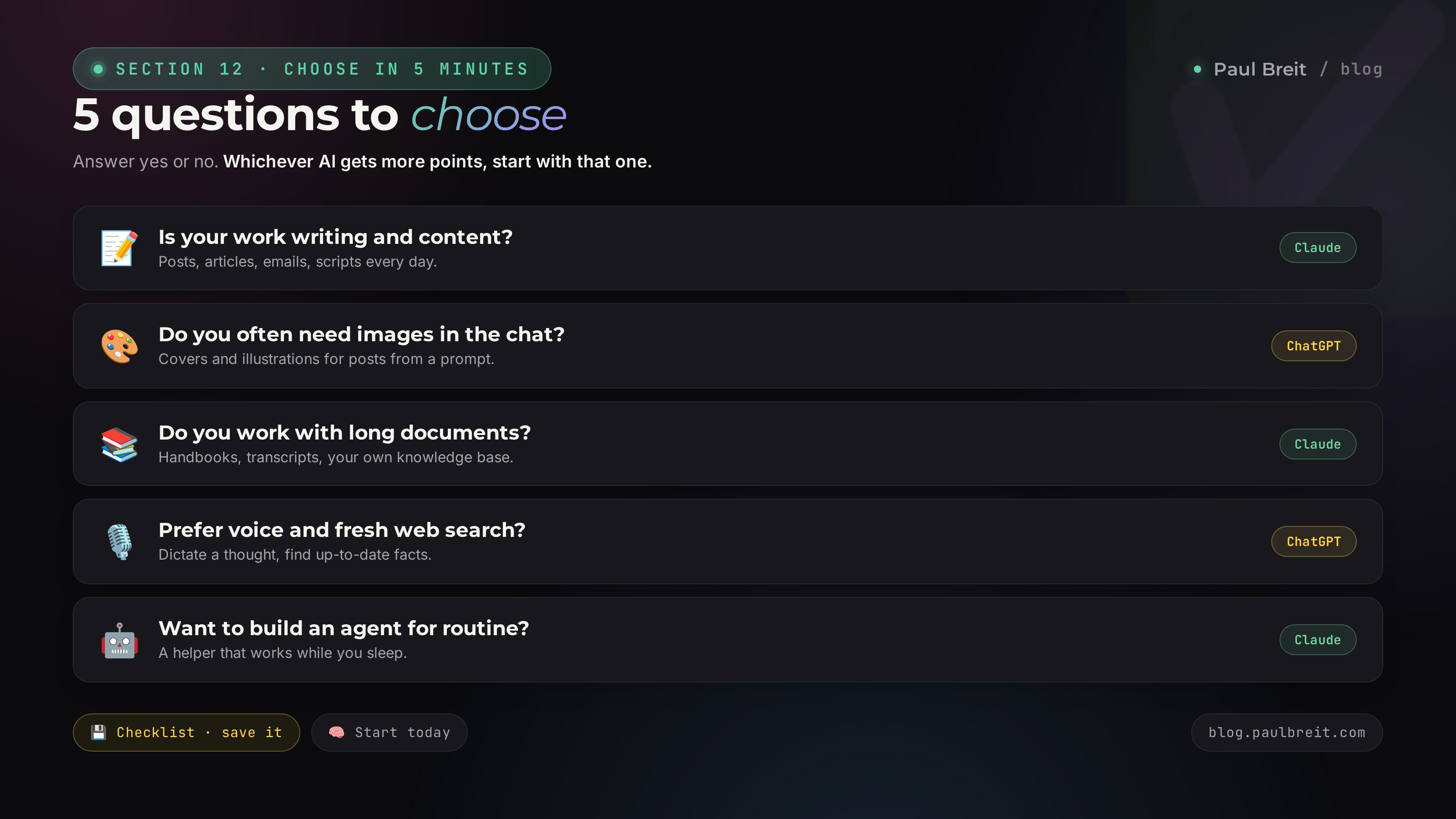
1. Is your main work writing and content? If yes, a point for Claude.
2. Do you often need images right in the chat? If yes, a point for ChatGPT.
3. Do you work with long documents and your own knowledge base? If yes, a point for Claude.
4. Do you prefer talking by voice and need fresh web search? If yes, a point for ChatGPT.
5. Do you want to build an agent that takes routine off your plate? If yes, a point for Claude.
Wherever more points landed – start with that AI. Then three simple steps so you don't stall.
- Step 1. Set up a stable VPN with an EU or US location. Once, and forget it.
- Step 2. Register on the free version of your chosen AI and work a couple of days on real tasks. You can register for Claude through this link.
- Step 3. If it clicks – get the $20 plan and move your routine onto the AI. In a month, decide whether you need the second.
That's the whole choice. Five questions and three steps for your work instead of an endless argument in the comments. The rest is practice, which sorts everything out quickly.
Claude is depth and text: posts in your voice, articles, documents, knowledge base, agents. ChatGPT is breadth and multimedia: images, voice, search, everyday versatility. Both are ≈ $20 a month and, from restricted regions, only through an EU or US VPN. If your work hinges on content, start with Claude. If you need one generalist for everything, start with ChatGPT. Don't choose forever: take one for your main task and add the second when you hit the wall of its strong side.
FAQFrequently asked questions
Claude vs ChatGPT: which should you pick in 2026?
For long-form writing, articles, working with documents, and digesting a large knowledge base, pick Claude. For images, voice conversations, web search, and everyday all-purpose tasks, pick ChatGPT. Many people keep both subscriptions: they write in Claude and grab images and voice from ChatGPT.
Which AI writes better?
Claude usually sounds more human and produces less corporate filler. ChatGPT writes with energy but slips into template phrasing more often and loves bullet lists. If writing is your main job, start with Claude.
How much do Claude and ChatGPT cost in 2026?
Both have a paid plan around $20 a month: Claude Pro and ChatGPT Plus. There are free tiers with limits and heavy plans for serious workloads at $100 to $200. For one person, the $20 plan is plenty.
Can I use Claude and ChatGPT if I'm outside the US or EU?
Yes, but through a VPN with an EU or US location. Both companies restrict access from some regions. Reliable VPNs in 2026: Proton VPN, Mullvad, and similar. Payment goes through an international or virtual card, or through an intermediary.
ChatGPT has images and voice and Claude doesn't. Does that matter in practice?
It depends on your work. For covers, post images, and voice conversations, ChatGPT is more convenient. If you mostly write, review documents, and assemble content, you rarely need image generation, and Claude covers most of the job.
Which is better for building AI agents and automation?
Claude. It has Claude Code and connects to external services, which is how people build agents that read chats, write posts, and manage spreadsheets on their own. ChatGPT is stronger with ready-made bots inside its own ecosystem, but for flexible automation people choose Claude.
Do I need to buy both subscriptions at once?
No. Start with one for your main task: writing and documents means Claude, images and general tasks mean ChatGPT. Add the second a month later, once you hit the wall of its strong side. That way you don't pay for what you don't use.