Best AI for Writing: Top 5 Tools for Natural, Human Text
Five AI writing tools, ranked by one thing: how human the English reads. Which to pick for posts, articles, emails, and sales copy, how to prompt it so the result sounds like a person instead of a robot, and how to strip the AI tells in a ten-minute edit. With prompts you can copy and use today.
The most natural, human English comes from Claude: it holds tone, varies sentence length, and rarely slips into filler. ChatGPT (GPT-5) and Gemini are strong all-rounders but drift into a corporate, robotic register unless you steer them with a firm prompt. DeepSeek is the value pick, and Llama is the free, private, open-source option. To make any of them write like a person instead of a machine, feed it samples of your own writing in the prompt, then run the draft through a ten-minute edit.
You ask an AI to write a post. It hands back something smooth and on-topic that's somehow impossible to read. The sentences run long, the words are stiff, and every other paragraph opens with "in today's world" or "it's important to note." You sense something is off but can't name it. That's the robotic AI tone: the model reaches for the safe, average phrasing, so the text comes out correct and dead.
I run four client projects and a personal channel with 20,000 followers. Almost every rough draft passes through AI first. Over the past couple of years I've tested everything that writes in English and I know exactly which tools deliver and which ones need a babysitter. This article is my whole shortlist, with before-and-after examples and prompts you can copy.
Give it 22 minutes. After that you just open the right tool, paste the prompt for your task, and get text you'd be fine publishing without a full rewrite.
What's inside
Section 01Why AI writes in a robotic tone
To choose well, you first need to understand where the woodenness comes from. A large language model is trained to sound safe and average across a huge pile of text. When you ask it to write, it reaches for the phrasing that shows up most often, not the phrasing a specific human would use. The grammar is perfect and there are no mistakes. But a real person doesn't talk like that. That gap produces three problems in almost every AI draft.
Problem one: sentences that never end
The model loves to stack clauses. It threads subordinate phrases together with commas until a single sentence carries three separate ideas. You read to the middle and lose the thread. The model can't feel that, because to it a long, tightly connected construction looks like a sign of quality.
"In today's competitive market, characterized by ever-increasing audience expectations, it is important for any expert to devote particular attention to the quality of the content being produced, as it is precisely this factor that ultimately determines the level of trust on the part of potential clients."
"The market is crowded. Your audience is picky. Weak content costs you – it hits trust harder than you'd think."
Problem two: filler phrases and nominalizations
English AI text is full of empty connectors: "in today's world," "it's important to note," "moreover," "delve into," "when it comes to." A person almost never opens a thought that way. The model does it constantly because those phrases are everywhere in its training data, so they read as normal to it. Alongside the filler come nominalizations – "utilize" instead of "use," "facilitate" instead of "help," "make a determination" instead of "decide." Turning verbs into nouns makes the text feel official and lifeless at the same time.
Problem three: manufactured rhythm
The model reaches for neat patterns. Rule-of-three triads: "fast, clean, and reliable." The "not X but Y" antithesis: "it's not a tool, it's a partner." Em dashes dropped into every other line. Each one looks tidy in isolation, and together they add up to a rhythm no human writes in. Once a reader hits three of them in a row, they smell the machine even if they can't say why.
Why some tools do this less
Not every model leans on the safe average equally hard. Claude, in particular, was tuned to follow a demonstrated style closely and to vary its cadence, so its default English reads noticeably more human. ChatGPT and Gemini are just as capable but ship with a more corporate default voice, so you have to steer them with a firm prompt. Cheaper and open models like DeepSeek and Llama write clean drafts but stay a bit flatter, which means more editing on your end. The takeaway is simple. If you want a natural voice out of the box, start with Claude. If you're using something else, the prompt does the heavy lifting.
The good news: all of this is fixable. The right prompt gets you most of the way, and ten minutes of editing closes the rest. We'll cover both. First, the tools.
Section 02Top 5 AI tools for writing
I judged these on one thing: does the English read like it was written by a person, or translated by a machine? Then I factored in price, context length, and how much cleanup each one needs. Here's the five that beat the rest.
1. Claude – the most human voice
Claude, from Anthropic, writes the most natural English of anything I've tested. It holds a given style over a long piece, feels the rhythm, and alternates long and short sentences the way a person does. Show it a few samples of your writing and it picks up your intonation closely enough that readers won't spot the seam. It also lies less: it invents fewer facts and is more willing to say when it doesn't know something. You can try it at claude.ai.
- Strong zone: articles, posts, emails, sales copy, and editing someone else's draft into a living voice.
- Context: huge. Your whole library of samples plus the brief fits in a single request.
- Downsides: free tier has limits; Pro runs about $20 a month.
- Best for: anyone who writes a lot and wants one tool for all of it. My main workhorse. If you want to load your voice automatically into every chat, see Claude skills for writing.
2. ChatGPT (GPT-5) – the powerful all-rounder
ChatGPT, from OpenAI, is the best-known model, and the latest GPT-5 is genuinely strong at English. The catch is that by default it leans into filler harder than Claude: long sentences, "moreover," "it's worth noting." Give it a firm prompt with examples and a demand to write short and plain, though, and it falls in line and produces solid work. The huge ecosystem, image generation, and voice mode are real bonuses.
- Strong zone: a true generalist. Drafts, outlines, ideas, and any format once you've edited it.
- Context: large on paid plans.
- Downsides: without a firm prompt it drifts into the robotic register fast.
- Best for: people already comfortable in ChatGPT who don't mind steering it. A ready prompt framework is in AI prompts for experts.
3. Gemini – long documents and research
Google's Gemini is excellent when the job is big: long reports, research-heavy pieces, documents that pull from a lot of source material. Its context window is enormous and it stays coherent across thousands of words. The English is clean, if a touch corporate by default, so it responds well to a style prompt. If you already live in Google Docs and Gmail, it's right there.
- Strong zone: long-form, research summaries, anything grounded in a big pile of documents.
- Context: very large.
- Downsides: default tone is the most "brand-safe" of the group; needs a nudge to loosen up.
- Best for: long documents and Google-ecosystem users. Taken to full size, this is how you write a book with AI in a weekend.
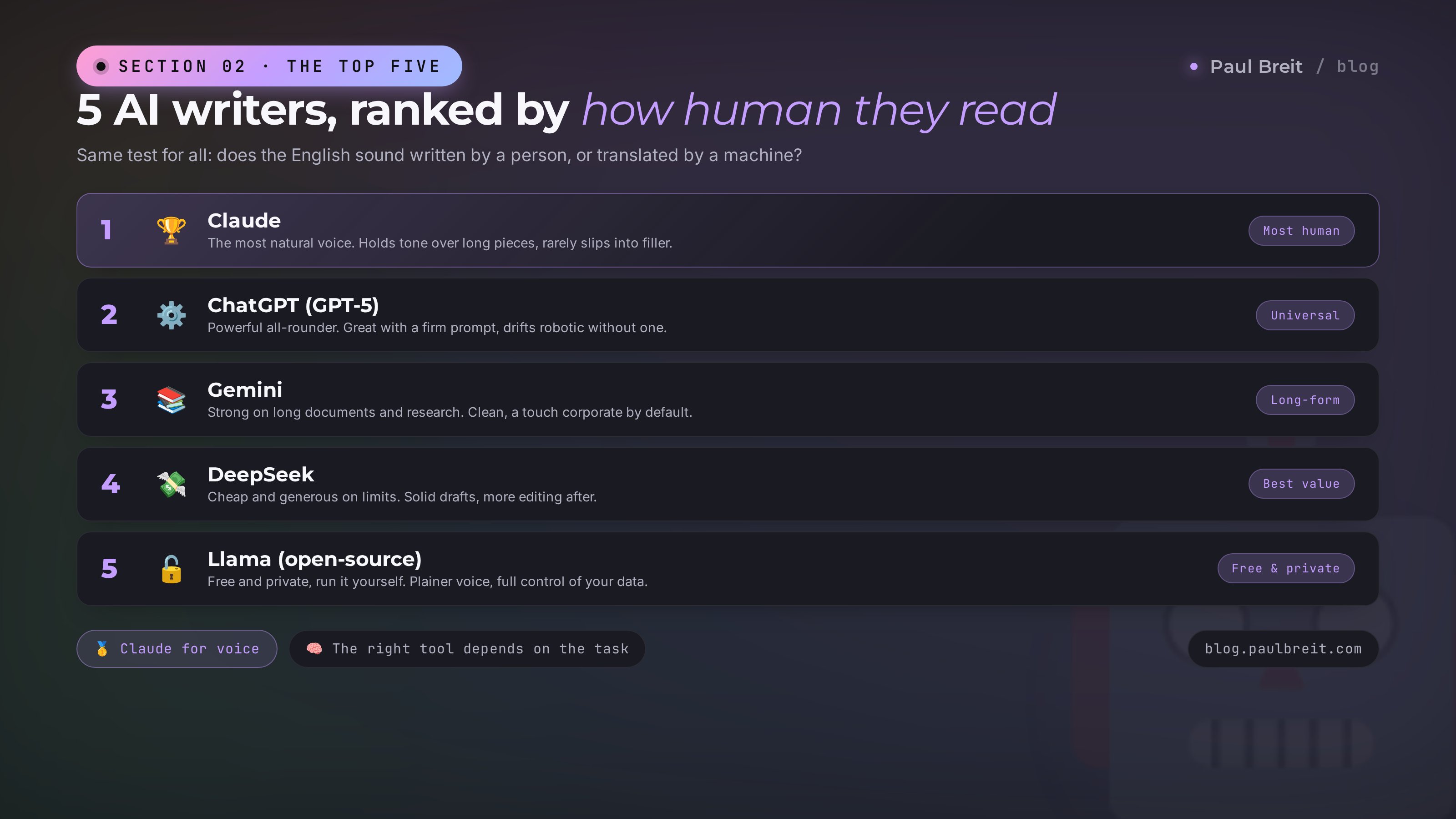
4. DeepSeek – cheap and generous on limits
DeepSeek is the Chinese model that surprised the market on price and quality. Its English is decent, though there's more filler in it than in the top three. The real draw is cost: it's very cheap with generous limits, runs in the browser, and doesn't gate you behind tight message caps. When you're producing a lot of drafts on a small budget, DeepSeek carries the load.
- Strong zone: high-volume drafting, where quantity and price matter more than a flawless voice.
- Context: large.
- Downsides: drier English than the leaders, more editing after. Be careful with confidential data.
- Best for: anyone pushing volume and watching cost.
5. Llama – free, private, run it yourself
Meta's Llama is the open-source option. You can run it on your own machine or server, which means your text never leaves your control – a real advantage for sensitive work. The voice is plainer than Claude's and it takes more prompting to loosen up, but it's completely free and there are no usage limits when you host it yourself. For privacy-first writers and anyone who wants to own the whole stack, it's the pick.
- Strong zone: private drafting, on-device work, anything where data can't go to a third party.
- Context: good, and improving with each release.
- Downsides: flatter default voice; setup takes some effort if you self-host.
- Best for: privacy-conscious users and tinkerers who want full control.
Want the most human text with no fuss – Claude. Already in ChatGPT – steer it with a firm prompt. Long documents or research – Gemini. Volume on a budget – DeepSeek. Privacy and full control – Llama. In practice it's handy to keep two around: one for everyday drafts and Claude for the writing that matters.
Section 03How to pick for your task
There's no single winner. The right choice depends on what you're writing. The same model can shine on a short headline and fall apart on a long article, so tie the choice to the task, not to habit. Here's a cheat sheet for the writing jobs that come up most.
By type of text
- Social posts and newsletters. Claude for a personal, living tone. ChatGPT works too with a firm style prompt.
- Long blog articles. Claude is out front: it holds structure and voice across 4,000-5,000 words. Gemini is strong when the piece leans on research.
- Sales emails and sequences. Claude reads emotion and eases toward a call to action without getting pushy.
- Headlines and product cards. ChatGPT or Gemini: fast, punchy, plenty of options in one go.
- Website and service copy. Claude for clean, human business English; Gemini if it needs to fold in a lot of source material.
- High-volume drafts. DeepSeek: cheap and plentiful, then edit. Or Llama if the material is sensitive.
By situation
- Voice matters most. Claude, with samples of your writing in the prompt.
- Budget is zero. Free tiers of Claude, ChatGPT, and Gemini, plus Llama if you can self-host.
- Privacy is non-negotiable. Llama on your own machine, or anonymize before uploading anywhere.
- You need speed and volume. DeepSeek for drafts, Claude for the final polish.
I keep two tools in rotation. Claude is the main one – everything where voice matters goes through it: posts, articles, emails. ChatGPT comes in for quick outlines, brainstorms, and formats where I want a lot of options fast. Two tools, and not a single writing job I can't cover.
By price and access
Money and access matter as much as raw quality. Here's the lay of the land for late 2026, so you can see what you're paying for.
- Claude. Free tier with limits. Pro is about $20 a month and unlocks Projects – knowledge bases that hold your context. Higher barrier than free tools, but it pays for itself in text quality.
- ChatGPT. A usable free version; Plus is about $20 a month. Same price bracket as Claude, with images and voice thrown in.
- Gemini. Free tier, with a paid plan around $20 a month that raises limits and plugs into Google Workspace.
- DeepSeek. The cheapest of the paid options, with generous limits. Runs in the browser.
- Llama. Free and open-source. Your only cost is the hardware or hosting you run it on.
If you count the dollars, a sensible starting stack is one free tool for everyday drafts plus Claude Pro for the writing that actually moves the needle. The outlay is small, and the strong tool plugs in exactly where it changes the result. As your volume grows, you upgrade whichever model you sit in most.
Section 04The prompt that makes text sound human
Even the stiffest model writes noticeably better with the task set up right. A weak prompt like "write a post about the benefits of AI for my business" is guaranteed to return robotic filler. A strong prompt assigns a role, a style, hard limits, and examples. Here's the formula, with a before and after.
The 5-part prompt formula
- Role. Who's writing. "You're an editor who writes in plain, conversational English, in the spirit of William Zinsser and George Orwell's rules for writing."
- Task. What you need. "Write a 200-word post about how a busy expert can save time on their writing."
- Style. How to write it. "Short sentences. Talk directly to the reader as 'you.' No filler. Vary long and short lines."
- Bans. What to avoid. "Don't use 'in today's world,' 'it's important to note,' 'moreover,' or 'delve into.' No sentence over 15 words unless it earns it. No em dashes."
- Examples. Your voice. "Here are three of my posts – write in this tone: [paste your text]."
Part five does more than the other four combined. Once the model sees your real writing, it stops averaging and starts imitating one specific person. How to build a full voice profile from 30 of your texts is covered step by step in teach AI to write in your voice.
Before and after, on a real example
Prompt: "Write a post about the benefits of AI for experts."
Output: "In today's world, artificial intelligence plays a pivotal role in the professional activities of any expert. It is important to note that leveraging these technologies allows one to significantly optimize workflows and enhance the efficiency of content creation, which in turn positively impacts the level of audience engagement."
Prompt with a role, a style, bans, and three sample posts of mine.
Output: "A post used to eat an hour. Sit down, stare at the screen, rewrite the opener three times. Now the draft's done in five minutes – AI writes it, I shape it into mine. That freed-up hour goes to clients instead of wrestling with a sentence. That's the whole difference."
Same idea, both times. The only variable is the prompt. You could publish the second one nearly as-is; the first one you'd close on the second line.
You're an editor who writes in plain, conversational English. Your models are Zinsser and Orwell. Write a [type of text] on [topic]. Rules: short sentences, address the reader directly, no filler and no nominalizations. Alternate long and short lines so the text breathes. Banned phrases: in today's world, it's important to note, moreover, delve into, when it comes to, and "not X but Y" constructions. Don't write sentences longer than 15 words without a real reason. No em dashes. Here are samples of my style – write in this tone: [3-5 of your texts]. For more on prompt structure, see AI prompts for experts.
Section 057 tells of AI text and how to fix them
Even after a good prompt, traces remain. Here are the seven tells a reader clocks in a second. Run every draft past them before you publish.
Filler phrases
"In today's world," "it's important to note," "moreover," "delve into," "when it comes to." No real person opens a thought that way. Delete them outright – the sentence only gets stronger.
Nominalizations
"Utilize," "leverage," "facilitate," "make a determination." Swap them for plain verbs: "use," "help," "decide." If a verb will do the job, don't hire a noun to do it.
Sentences that run too long
More than 20 words and three commas? Cut it into two or three short ones. The reader needs room to breathe. A rhythm of long and short lines is the main tell of living text.
The "not X but Y" antithesis
"It's not a tool, it's a partner." "Not work, but a joy." AI adores this shape, and in real speech it reads like an ad slogan. Rewrite it as a plain statement: "It's a partner that takes the busywork off your plate."
Rule-of-three triads
"Fast, clean, reliable." "No stress. No burnout. No overtime." Three matched beats in a row is machine rhythm. Break it: keep two, and turn the third into a real, specific line.
Em-dash overuse
Models drop a long em dash where a person would use a comma, a period, or nothing at all. It's the single most common giveaway in AI English. Trade most of them for commas and short sentences – small change, big difference.
Sterile smoothness
The sneakiest one. The text is polished to nothing – no aside, no casual word, no texture. Add a "look," a "here's the thing," an "honestly." A little roughness reads as human; flawless smoothness reads as machine.
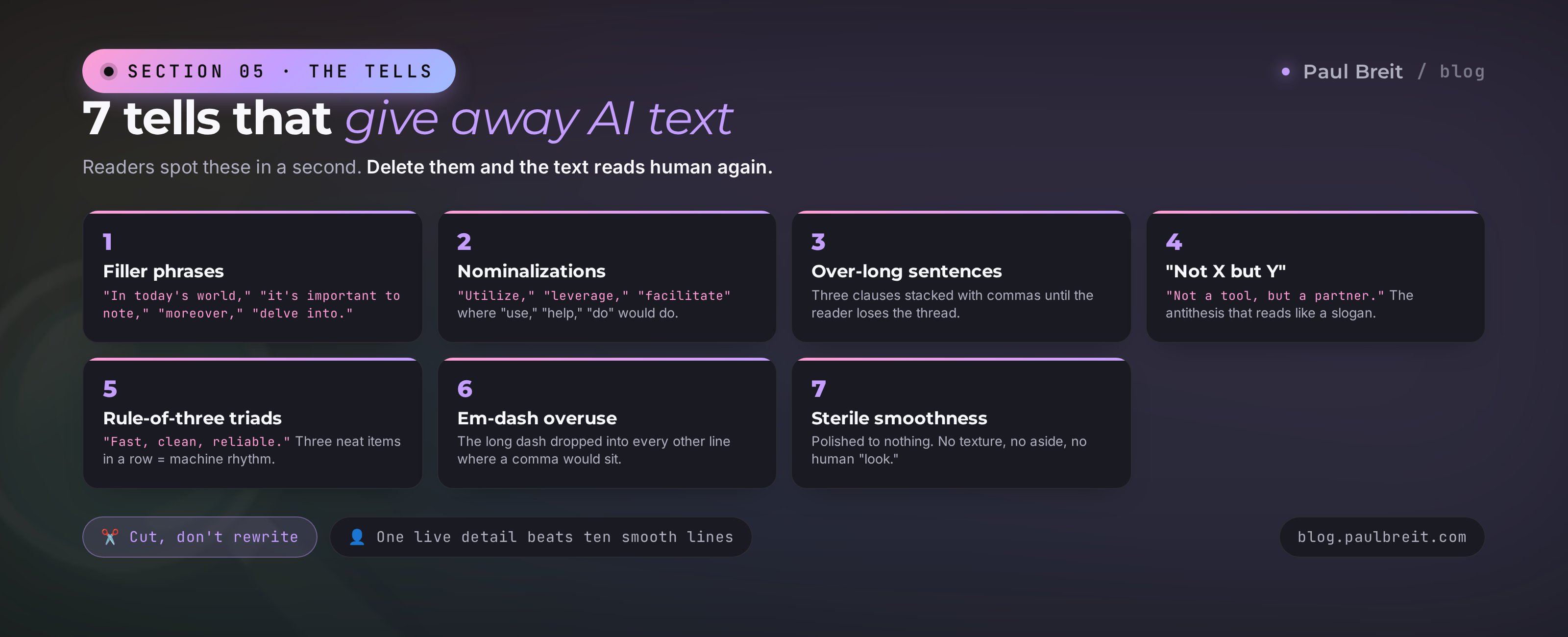
The habit to build is simple: cut, don't rewrite. Most AI tells disappear by deleting a phrase, not by reworking a whole paragraph. Once you can spot the seven at a glance, a draft cleans up in minutes. To load your voice automatically so fewer tells show up in the first place, see Claude skills for writing.
Section 06The 10-minute edit: make it human
You can't publish a raw AI draft, not even the best one. But you don't have to rewrite it from scratch either. A short, fixed routine does the job. Mine takes 10 to 15 minutes an article and turns a decent draft into text I'm glad to put my name on.
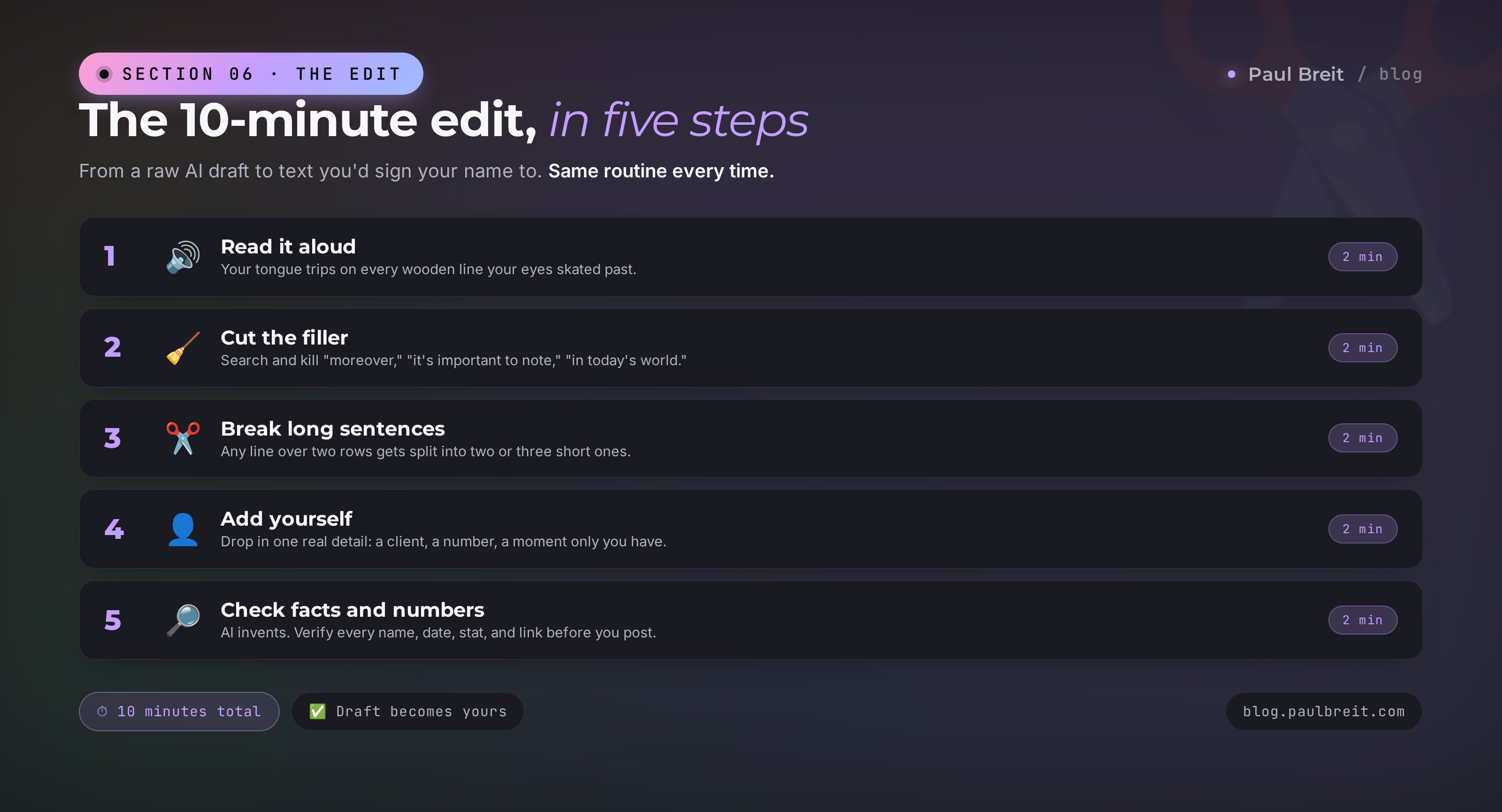
Step 1. Read it aloud
This is the big one. Your eyes glide over a wooden sentence; your tongue trips on it. Anything you stumble over reading aloud gets rewritten. It works more reliably than any checklist.
Step 2. Cut the filler
Search the text for "in today's world," "it's important to note," "moreover," "delve into," "when it comes to," "utilize," "leverage." Every hit is either deleted or swapped for a plain word. After this pass alone the text breathes noticeably easier.
Step 3. Break the long sentences
Find any sentence longer than two lines. Split it into two or three short ones. Between them, a very short punch line helps: "That's the difference." "Seriously." The rhythm comes alive instantly.
Step 4. Add yourself
The model doesn't know your story. Drop in one concrete detail from your own practice: a number, a client, a moment. "A client in Austin rewrote one email and closed a $2,400 job." Specifics make the text yours and human at the same time. The model always writes in generalities because it's averaging thousands of other people's words. Your job is to put back the details only you have: the client's name, how many days it took, what they said at the end. One live detail outweighs ten smooth paragraphs.
Step 5. Check the facts and numbers
AI invents. Numbers, dates, names, links, titles – verify each one separately. A model will confidently cite a study that doesn't exist or misquote a statistic. One fabricated fact wrecks trust in the whole piece.
Aloud → cut filler → break long sentences → add your detail → check the numbers. Five steps, ten minutes, and an AI draft becomes your text. Don't skip this stage: it's the line between people whose AI is a helper and people whose AI embarrasses them.
The edit speeds up with practice. Your first pieces will take 20 minutes, tripping on every line and rewriting whole paragraphs. Within a month your eye sharpens: you'll spot the clichés on sight and clear them on autopilot. Better still, build a second "editor" prompt that runs the draft through all seven tells before it ever reaches you. Then the output arrives nearly clean, and all that's left is a live detail and a fact-check. That's my pipeline: AI writes, a second prompt cleans, I bring it to voice. Three passes, and a finished piece comes out in minutes instead of an hour.
Section 075 mistakes when writing with AI
You've picked a tool, written a prompt, learned the edit. All that's left is to avoid the rakes almost everyone steps on. These five cost people time, money, and reader trust. Check yourself against them – odds are at least one looks familiar.
Asking in one line with no context
"Write a post about AI" – then wondering why it came back robotic. The model knows nothing about you or your audience, so it averages. Give it a role, a style, bans, and examples. The prompt gets longer; the text needs less fixing.
Publishing without an edit
The temptation is real: it looks done, why bother. But raw AI text is exactly what kills trust fastest. Readers feel the fakeness even when they can't name it. Ten minutes of editing always pays off.
Taking facts and numbers on faith
AI sounds just as confident when it's wrong as when it's right. It'll cite an invented study or name a law that doesn't exist. Verify anything checkable, especially before you publish to a wide audience.
One tool for every job
People get attached to a single model and force it everywhere. DeepSeek on a delicate sales email, or a lightweight model on a long article, is wasted time. Keep two or three for different jobs – the difference in output is worth it.
Uploading confidential data anywhere
Client details, private numbers, passwords – all of it lands on the provider's servers. Be careful with any third-party service. For sensitive material, use a self-hosted model like Llama or anonymize the data before you send it.
Section 08Checklist: ready to publish
Save this and run every draft through it before you post. As long as all eight boxes are checked, the text reads human and doesn't give away the machine.
- Tool matched to the task – Claude for voice, Gemini for long-form, DeepSeek for volume
- Prompt set a role, style, and bans and included 3-5 samples of your writing
- Read aloud – every place you stumbled has been rewritten
- Filler phrases cut – not one stock connector from the tells list left
- Long sentences broken – a rhythm of short and long lines
- No triads or "not X but Y" antithesis – rewritten as plain statements
- Em dashes trimmed down to commas and short sentences
- Facts and numbers verified – nothing invented left behind
AI doesn't write for you – it writes a draft you bring up to your own voice. English comes out human when three things line up: the right tool for the task, a prompt with your samples, and a ten-minute edit. Drop any one of the three and the robotic tone comes back. Keep all three and nobody can tell the AI draft from your own writing.
How this connects to the rest of the blog
Picking a tool is the "what" you write with. The prompt-with-samples from teach AI to write in your voice is "how" you make the text yours. Loading that voice automatically with Claude skills for writing is how you keep it consistent. And AI prompts for experts answers "what to write about" day after day. Four pieces, one working writing pipeline.
FAQFrequently asked questions
Which AI writes the most natural, human English in 2026?
Claude. It holds tone over long pieces, varies sentence length, and rarely slips into filler. ChatGPT (GPT-5) and Gemini are strong too but drift into a corporate, robotic register without a firm prompt. DeepSeek and Llama write acceptable drafts that need more editing.
Why does AI-written text sound robotic?
Models are trained to sound safe and average, so they reach for filler phrases like "in today's world" and "it's important to note," heavy nominalizations, over-long sentences, and neat rule-of-three triads. It reads smooth but lifeless. A prompt with your own writing samples plus a short edit fixes it.
Can I use the best AI writing tools for free?
Yes. Claude, ChatGPT, and Gemini all have free tiers with limits; the paid plans run about $20 a month. DeepSeek is very cheap with generous limits, and Llama is fully free and open-source if you run it yourself.
How do I remove the AI tone from my text?
Run the text past seven tells: filler phrases, nominalizations, over-long sentences, the "not X but Y" antithesis, rule-of-three triads, em-dash overuse, and sterile smoothness. Cut the filler, break long sentences, and add one real detail only you have.
Is Claude or ChatGPT better for writing?
For natural voice, Claude. It follows a style you show it more closely and needs less cleanup. ChatGPT is the stronger all-rounder for ideas, structure, and drafts, but by default it leans harder into AI filler, so you have to steer it with a firm prompt.
How do I make AI write in my style?
Give the model 20-30 of your real posts or emails and ask it to extract the rules of your voice: sentence length, favorite words, tone. Save that as a document and attach it to every request. The output then sounds like you instead of an average copywriter.
Should I publish AI text without editing it?
No. Even the best model leaves templated phrasing and sometimes invents facts. Read the draft aloud, fix anything that sounds inhuman, and verify every number and name. The edit usually takes 10 to 15 minutes and sharply raises reader trust.