Claude Projects: A Knowledge Base That Remembers Everything for You
Every new chat in Claude starts as a blank page: you explain again what you do, who you sell to, and how you talk to clients. Claude Projects stores that information once and connects it to every conversation inside the project.
Claude Projects is a separate space inside Claude.ai where you upload instructions for how Claude should behave once, plus files with information about your business: pricing, tone of voice, case studies, scripts. Every new chat you open inside that project automatically sees those files and instructions, so you never re-explain the context. It's the difference between talking to someone who's meeting you for the first time and talking to an assistant who's already up to speed.
Picture the scene. You open your fifth Claude chat of the day and the first thing you do is paste the same paragraph: who you are, what you do, what your program looks like, who your clients are. Then you type your actual question. Then you get an answer generic enough to fit any consultant on the planet, because the model knows nothing about you except what you typed in the last two minutes.
A week of chats like that piles up into a dozen re-explanations: that you're a productivity coach, not a relationship coach, that your program costs a specific amount and runs eight weeks, that you address clients formally but warmly, without corporate stiffness. The time spent explaining eats up the time the model was supposed to save.
There's a way to tell Claude all of this once and never revisit the question. It's called Claude Projects, and it's exactly the feature that turns the model from an amnesiac conversation partner into an assistant that holds the context of your business.
What's inside
- What Claude Projects is and why it matters
- Who a Claude knowledge base is for
- How to create a project, step by step
- Custom project instructions
- Uploading the knowledge base
- Examples for different niches
- Before and after: a live contrast
- How to keep the knowledge base current
- What Projects actually remembers
- Paying and access in a restricted region
- 7 common mistakes
- Checklist before you start
Claude isn't reachable directly from every country - Anthropic blocks access by IP in some regions. To sign up and work with Projects you need a VPN set to an EU or US location. The full working setup, with tested services and the pitfalls to avoid, is in How to Pay for Claude: 3 Working Methods in 2026. From here on, we'll assume you already have access.
Section 01What Claude Projects is and why it matters
Claude Projects is a folder inside Claude.ai, but not a simple one. Three things live inside it at once, and together they create the effect of "an AI that's up to speed on your business."
First: custom project instructions. Text you write once, and Claude keeps it in mind in every conversation inside the project: who you are, what tone you use, what to avoid, how to format an answer. It works like a standing instruction you never have to paste at the top of a new chat.
Second: the knowledge base. Here you upload files: a price list, a course program, sample client correspondence, sales scripts, posts you've written as style examples. Claude reads them and draws on them when answering any question inside the project, even if you never mention the file directly in your message.
Third: the chat history inside the project. Every chat you open within one project sits next to the others, all logically tied to the same subject. You discussed the structure of a webinar yesterday inside the "Nutrition Course" project; today you open a new chat in the same project and ask about an ad headline. Claude is still in context: it knows about the webinar, the program, your tone.
The difference from a regular chat is simple. A regular Claude.ai chat starts from a blank page: the model doesn't see your files, your instructions, or what you discussed yesterday. Every time, you either copy the context by hand or get a generic answer. A project removes that routine: you set it up once, then you work.
A practical analogy: imagine an assistant who's worked for you for a month, read all your documents, and learned how you like to talk to clients. In a regular chat, you hire a brand-new person every morning and spend half an hour bringing them up to speed before they can do anything.
On the interface level it's simple: a list of your projects on the left, and inside each one its own chat stream, its own files tab, its own instructions window. Switching between projects takes one click, and Claude never mixes the context of one line of work with another if you run, say, both consulting and a separate course. Open the "Consulting" project and Claude is in that niche. Open "Photography Course" next to it and it's in a completely different one, with the first project's files never leaking through.
Section 02Who a Claude knowledge base is for
It used to seem like this kind of setup was for developers and agencies with a team of prompt engineers. In reality, a Claude knowledge base is useful for anyone who sells time and expertise through conversation and consultations, rather than a ready-made product with one fixed price on a shelf.
Check your own situation against these.
A productivity coach. You have an eight-week program, three pricing tiers, ready answers to "I don't have time" and "I already tried and it didn't work." Upload the program, the pricing, and the standard objections into the project. Then ask Claude to write a post about procrastination, and you get copy that mentions your actual program, not the generic advice to "just start."
A therapist with a private practice. You have website copy, phrasing for how you work - short-term therapy, anxiety work, no diagnosing over chat - and sample questions clients ask at a first session. Put all of that in the project, and when you ask for a draft reply to a comment about "how do I know it's time to see a therapist," Claude writes it in your voice, with your caveats intact.
A nutritionist doing online consultations. Upload your client intake template, common questions about calories and macros, your own list of things you don't recommend - detox teas, extreme diets. Ask Claude for a post about weight-loss myths, and the copy already reflects your stance against harsh restriction, because it's written into the project's instructions.
The list goes on: a tutor with a curriculum and a pricing schedule, a freelance designer with a portfolio and a client brief, an independent marketing consultant with case studies and prices. The common trait is a recurring set of facts about your business that you'd otherwise re-explain to the model in every single conversation.
A lawyer or bookkeeper working on retainer fits this list too: you have a fixed-price service list, standard client questions about deadlines and paperwork, template phrasing for emails. Upload it once, and Claude helps draft client replies in your style, not in the style of a faceless legal FAQ pulled off the internet.
This fits poorly for anyone without settled information about their offer: if your niche is still shifting and your positioning changes every week, the knowledge base goes stale fast, and you'll be updating it more often than you save time explaining. For an established line of work with steady products and clients, it's a straight-up time saver, month after month.
Do the rough math for yourself. If you spend even five minutes at the start of every Claude conversation explaining context, and you open three or four chats a day, that adds up to several hours a month spent re-explaining the same thing. Fifteen minutes of one-time setup pays for itself in the first week.
Section 03How to create a project, step by step
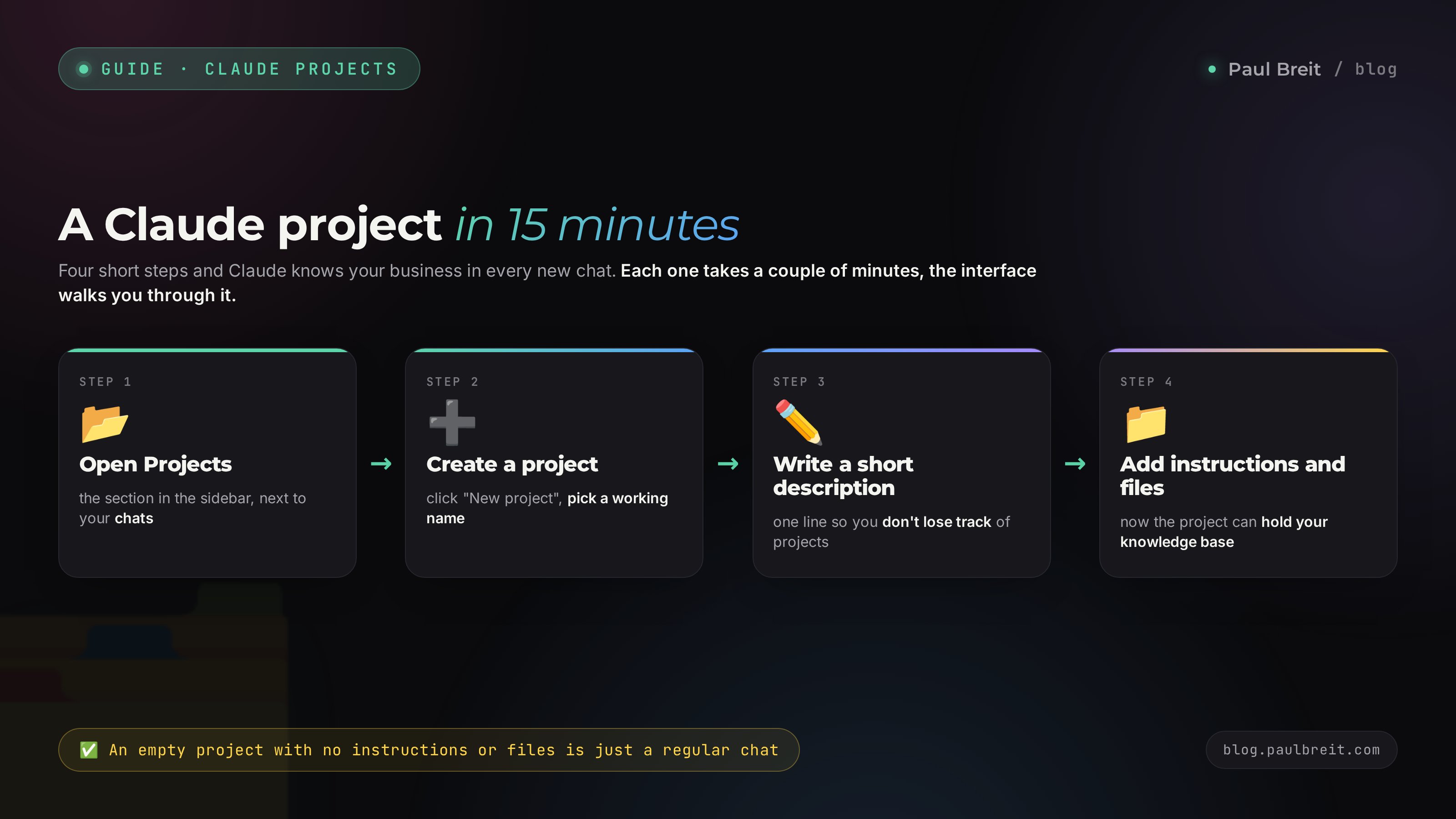
Here's the process, no steps skipped. Open Claude.ai (see the section below on access in restricted regions) and set aside 15 minutes with your laptop or phone. The whole thing fits into four short actions, each taking a couple of minutes - no need to rush or memorize anything, the interface prompts the next step on its own.
Open the Projects section
Log into Claude.ai with your account. In the left sidebar, next to your chat list, there's a separate "Projects" section. On mobile, the same section hides in the top menu. Click it, and you'll see a list of your projects, likely empty if this is your first time.
Click "New project"
The button is usually labeled "New project" and sits near the top of the screen. After clicking it, Claude will ask you to name it. Don't agonize over a fancy name - a working label like "Nutrition Consulting" or "Productivity Course" is fine.
Add a short description
Next to the name there's a description field for a sentence or two. You don't need the full instructions here, that comes in the next step. One line describing the project is enough: "Everything for my therapy practice's consultations and posts." The description mostly keeps you organized once you have several projects.
Open the project - it's ready for files and instructions
After saving, you land inside an empty project. Two things are waiting: a button to add instructions (sometimes labeled "Set project instructions") and an area for uploading files, usually next to the chat window. Next, we set them up in order - that's where the entire value of a project lives; an empty project with no instructions and no files is no different from a regular chat.
Section 04Custom project instructions
Custom instructions are the single most important part of the setup, and they're exactly where people cut corners - which is a mistake. A good instruction runs half a page, not one line that says "write like an expert."
What to include, at minimum:
- Who you are and what you do. Be specific: "I'm a nutritionist running online consultations on eating habits for women 30-45, focused on food habits rather than clinical dietetics."
- Tone of voice. How you talk to clients: formal or casual, warm or strict, with humor or reserved. Give one real example sentence you'd actually send a client.
- Who your client is. Age, pain points, level of familiarity with the topic. Claude adjusts how it explains things to match that audience.
- What to avoid. A list of things not to do works as well as a list of requirements: no medical diagnoses, no promising "lose weight in a week," no corporate stiffness, no long numbered lists.
- Default format. If you mostly ask for social posts, specify length, no markdown, a conversational style. If you mostly write client emails, that's a different format.
A template you can copy and adapt to yourself:
Notice the last line of the example - a direct ban on inventing facts. Without it, the model sometimes fabricates plausible-sounding details when it lacks information. One sentence in the instruction fixes that.
Update the instruction whenever something important changes: price, program format, target audience. The instruction is a living document that grows with your business, not a one-time setting.
One more practical trick: ask Claude to first paraphrase how it understood your instruction, in its own words. If the paraphrase sounds off or misses an important detail, that's your cue to tighten the wording right away, not a month later when a poorly written post has already gone out to a client.
Section 05Uploading the knowledge base
The instruction sets the character, the files supply the facts. Without files, Claude will still answer in your tone, just without the details: no exact prices, no phrasing from your real case studies, no specifics about your product.
What to upload first if you're starting from zero:
- Your price list or a description of your pricing tiers - exact numbers, not "affordable."
- Your course program or consultation structure - what's included, how long it runs, what the stages are.
- 5-10 real posts or pieces of copy you wrote yourself - Claude picks up your voice from these better than from any style description.
- Common client questions and your answers to them - a ready base for future copy and comment replies.
- A list of what you don't do and don't promise - the negative side of your positioning matters as much as the positive one.
The technical limits are simple. A single file can be up to 30 megabytes, which comfortably covers any text document, PDF, or spreadsheet. There's no formal cap on the number of files, but there's a practical ceiling: Claude reads file contents within its context window, and if you dump fifty documents of hundreds of pages each in there, some of that information physically won't fit into the conversation at once. Upload what you'll actually use, not an archive of every document you've accumulated over three years.
Formats accepted are wide-ranging: PDF, Word, plain text, spreadsheets, even screenshots of conversations. You don't need to format a document any special way before uploading; Claude parses the structure itself.
A practical rule of thumb on volume: 5-10 well-chosen files work better than forty random ones. If you have a mountain of material, start small - pricing, program, a dozen sample texts - and add more as you notice Claude is missing a specific piece of information in its answers.
One thing deserves a separate note: client personal data. What belongs in the knowledge base is information about your business - product, tone, pricing, anonymized case studies. Real correspondence with names, phone numbers, and diagnoses of specific people shouldn't go in - that's personal data, and it belongs in a secured CRM or your own archive, not a cloud AI service. An anonymized case like "a 34-year-old client, anxiety about public speaking" works just as well for the knowledge base as a real name, without the added risk.
Section 06Examples for different niches
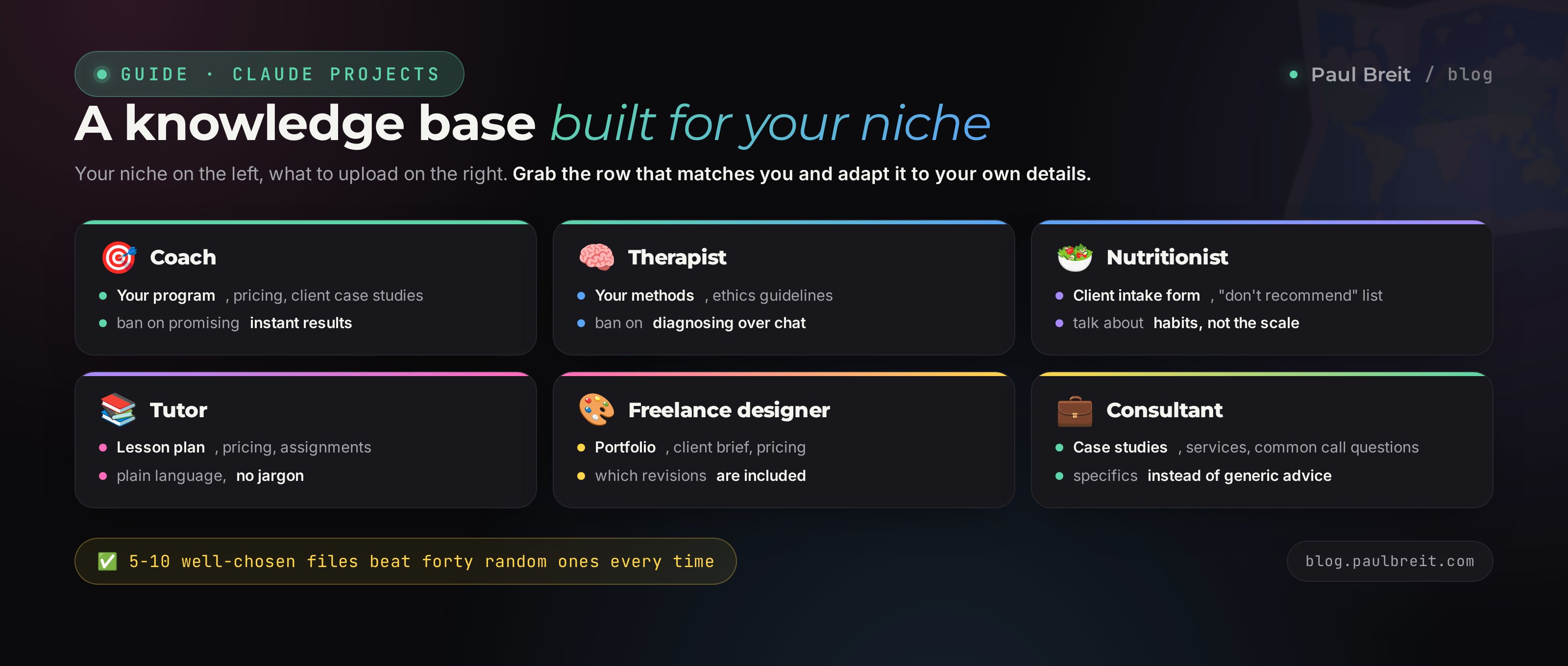
So you don't have to build this from scratch in your head, here's a table of ready starting points for the most common niches. Take the row that matches you and adapt it to your specifics.
| Niche | What to upload to the knowledge base | What to write in the instructions |
|---|---|---|
| Coach | Program, pricing, sample client case studies, common objections | Tone of voice, who the program fits, a ban on promising instant results |
| Therapist | Description of your methods, ethics rules, website copy, first-session questions | A ban on diagnosing over chat, a gentle tone, no pressure |
| Nutritionist | Client intake form, common nutrition questions, a "don't recommend" list | A stance against harsh diets and detoxes, talk about habits, not numbers on a scale |
| Tutor | Lesson program, schedule and pricing, sample assignments | Student age and level, tone of explanations, plain language with no jargon |
| Freelance designer | Portfolio description, client brief, service pricing | How you talk to clients, which revisions are included in the price, scope boundaries |
| Business consultant | Case studies, services and formats, common first-meeting questions | Client level - small business or enterprise, specifics over generic advice |
Section 07Before and after: a live contrast
The difference between a regular chat and a properly set up project shows up best on the exact same question.
The copy reads fine, but it's completely generic. You could find that same advice in any time-management article; it's not tied to you, your audience, or your program.
The second answer names a specific program, a specific module, and points to a next step - comments, a consultation, whatever you specified in the instruction. The difference comes down to one thing: Claude has context that, in the first case, you'd have had to explain by hand in every single message.
One more example - answering a client's question.
The second answer names your actual price, because it lives in the pricing file inside the project, and it immediately offers the next step.
Section 08How to keep the knowledge base current
A knowledge base works as long as it reflects reality. An outdated price in the project is worse than having none at all - Claude will confidently quote a client a price that stopped being accurate a week ago.
The practice is simple: once a month, open the project and go through the files. Check three things. Did the price or product format change - update the pricing and program. Did a new product or consultation appear - add a separate file, don't mix it into an old one. Is any wording in the instruction outdated - fix it directly in the text, it takes a couple of minutes.
A separate reason for an off-schedule check is launching something new: a program, a pricing tier, a positioning shift. At that moment the knowledge base goes stale fast, and it's not worth waiting until the end of the month to update it.
The "don't upload everything" rule works in reverse too: if a file is no longer current, remove it from the project. Old pricing versions and discontinued programs sitting next to current ones confuse not just you but the model itself - it can't always tell which of two contradicting files is the one that matters.
A good way to think about it: treat the knowledge base like a desk, not an archive. A desk holds what you need right now. A useful habit: set a recurring calendar reminder on the first of the month to "check the Claude knowledge base." Five minutes a month spares you the awkward moment when the model confidently quotes a client last quarter's price.
If you work in a project daily, build the habit of a weekly check too: ask Claude to briefly summarize what it knows about your current pricing and program. If the summary matches reality, you're fine. If something's drifted, it's time to open the files and fix the exact spot where the numbers or wording diverged.
Section 09What Projects actually remembers
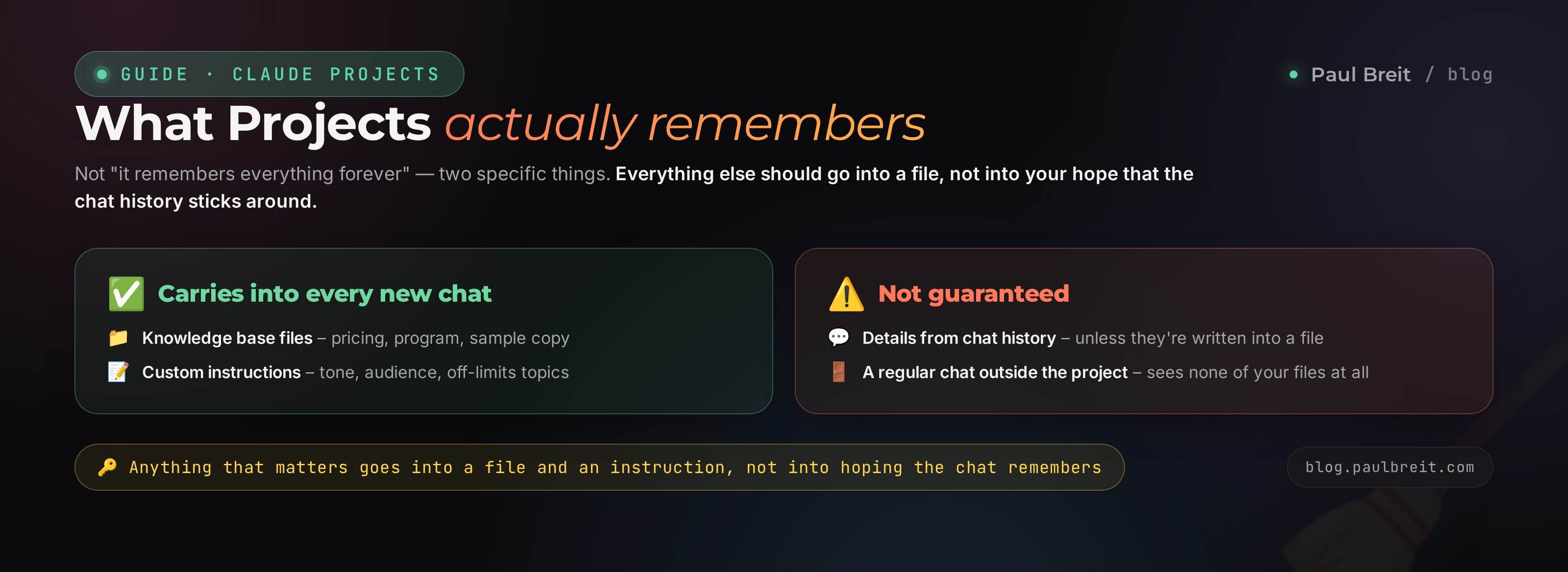
This deserves its own stop - it's the most common misunderstanding about Projects, and getting it wrong can undo the whole benefit of the setup.
Claude Projects doesn't work like a being with permanent memory that remembers absolutely everything you've ever told it. What actually gets saved and carried into every new chat inside the project are two specific things: the uploaded knowledge base files and the project's custom instructions. Those are what Claude has access to from the very first message in any new conversation inside that project.
The chat history inside the project also exists and is physically visible - you can open an old chat and read it in full. But that history doesn't act as unconditional permanent memory. An important detail that only surfaced in conversation and was never written down elsewhere isn't guaranteed to carry into the next chat - it's better to write it out and add it to the knowledge base.
Even more important: regular Claude.ai chats outside a project have no connection to the knowledge base at all. Open a new chat from the main screen instead of the project tab, and Claude is meeting you for the first time again, with no files and no instructions, even if you have a perfectly set-up project sitting right next to it. Project memory only works inside the project itself.
You can verify this yourself easily. Set up a project, upload your pricing, ask a pricing question inside the project - you'll get an exact answer. Then open a regular chat from the main screen and ask the same question - Claude will honestly say it doesn't have that information, because it physically can't see the project's files. That's a direct consequence of how isolation between projects and regular chats is built, not the model being forgetful.
What this means in practice: keep the key information in the files and instructions themselves. If you discussed something important with Claude - a new offer phrasing, a detail about a client - and you want it to carry into future conversations, write it out as a separate item in a file or the instruction. A conversation "forgets" in the sense that the next chat won't give it the same weight as content in an uploaded document.
This is how the tool is built, not a flaw in it. Claude re-reads context on every response, and that context genuinely includes files, instructions, and, with lower priority, the chat history. Understanding the mechanics saves you the frustration of thinking, a month later, that "Claude forgot what I told it" - more likely, that information never made it to where it's actually retained.
Section 10Paying and access in a restricted region
Projects is available on both the free and paid Claude plans, but the free plan's limits - daily message count, upload volume - hit a ceiling fast if you work in a project every day. For regular use, it makes sense to go straight to the Pro plan.
If you're in a restricted region, there's an extra complication: Anthropic blocks access by IP address, and Claude.ai doesn't open directly. The fix is a VPN set to an EU or US location before you open the site and register. The full working setup - including which VPN services actually work in 2026 and how to pay for a subscription without a locally issued card - is covered step by step in How to Pay for Claude: 3 Working Methods in 2026. Open it before your first step if you haven't set up access yet.
The signup itself is short: turn on the VPN, go to sign up for Claude, enter your email, confirm the code, upgrade to Pro with a card the service accepts. Once you're in, you'll see the Projects section in the sidebar right away, and you can move on to the steps in the section above.
If you already have a Claude account but don't see Projects in the interface, upgrade to Pro - the feature opens up along with it. Projects is sometimes visible on the free plan too, but the limits on file uploads and daily messages make it practically unusable for regular work.
Paying for the subscription from a restricted region has its own quirks - a locally issued card won't work, and you'll need one of the workarounds I cover in detail in the payment article. Don't put this step off: without a paid Pro plan, file and message limits will keep getting in the way of using a project seriously.
Section 117 common mistakes
Here are the typical ways to wipe out all the benefit of Projects. Most of them come down to habits, not complicated technique - easy to catch yourself doing if you know what to look for.
- Assuming Claude will remember everything on its own, without files or instructions. The most common and the most costly mistake. You discuss an important detail in conversation, never write it into a file - a month later, that detail is gone for new chats. The fix is a habit: important things go into a file or instruction, not into the hope that the model will remember.
- Dumping an unstructured pile of files. Forty mixed documents - old pricing, drafts, random notes - are worse than five tidy files. Claude spends its attention sorting through clutter instead of relying precisely on current data.
- Not updating the knowledge base for months. The price changed in March, and in June Claude is still confidently quoting a client the March figure, because nobody touched the file.
- Writing instructions in overly generic phrases. "Write professionally" gives Claude nothing to work with - it could mean anything. What works are concrete examples: who the client is, a phrase that's characteristic of you, exactly what to avoid.
- Running one project for every niche and product at once. If you're both a coach and running a separate photography course on the side, one project for both will mix up files and instructions - Claude will blend the tone and facts of one line of work with the other. Different lines of work deserve different projects.
- Not checking that Claude actually read the file. Sometimes an upload doesn't fully go through, especially with large PDFs or unusual encoding. Check with the very first question in a new chat: "what's my consultation price according to the price list" - if the answer is correct, the file was picked up.
- Confusing Projects with a regular chat. You open a new conversation from the main screen instead of the project tab, and all your setup vanishes, because you're not physically inside the project. Always enter chats through the project itself.
Section 12Checklist before you start
Print this and check off items as you go.
- Picked one niche or product for this project, no mixing lines of work
- Created the project in Claude and gave it a clear name
- Wrote custom instructions: who you are, tone of voice, who the client is, what to avoid
- Uploaded 5-10 files: pricing, program, sample copy, common questions
- Checked with a first question that Claude actually sees the numbers from the files
- Set a monthly calendar reminder to check the knowledge base is current
- Removed outdated files from the project if migrating from somewhere else
- Agreed with yourself that important details go into a file, not just into conversation
Claude Projects is a space inside Claude where instructions and files you upload once connect to every new conversation. You create a project, write an instruction about tone and audience, upload pricing and sample copy - and Claude answers in the context of your business from the first message, with no retelling the story every time. Keep the main thing in mind: files and instructions are what's saved, while chat history doesn't act as permanent memory, so keep the important stuff in the files themselves. Update the knowledge base once a month, and fifteen minutes of setup will save you hours of explaining for years to come.
How this connects to other articles
If you're just getting started with Claude, Claude from Scratch: A Complete Guide for Non-Techies covers the whole interface from the basics. Deciding between this model and ChatGPT - the comparison is in Claude vs ChatGPT in 2026: An Honest Comparison for Your Work. And once your knowledge base is set up, the quality of the answers still depends on how you phrase the request inside the project - the formula for a good prompt is covered in How to Write Prompts So AI Gets It Right the First Time: A 5-Part Formula.
FAQFrequently asked questions
What is Claude Projects in simple terms?
It's a separate space inside Claude.ai where you upload files about your business once (pricing, program, sample copy) and write instructions for how Claude should behave. Every new chat inside that project automatically sees those files and instructions, so you don't have to re-explain context each time.
Does Claude Projects remember the entire chat history forever?
No. What actually carries over into every new chat are the uploaded knowledge base files and the project's custom instructions. Chat history inside the project is visible and accessible, but it doesn't act as an unconditional permanent memory of everything you've ever discussed. Important details are better captured in a file or instruction.
How many files can you upload to one project?
There's no formal limit on the number of files, and a single file can be up to 30 megabytes. The practical limit is different: Claude reads file contents within its context window, so it's smarter to upload 5-10 current documents rather than dozens of random ones.
What Claude plan do you need for Projects?
The feature is available on the free plan too, but daily message limits and upload volume get tight fast with regular use. For daily work you need the Pro plan.
How is Projects different from a regular chat with Claude?
A regular Claude.ai chat starts from a blank slate: no files, no instructions, and you need to re-explain context every time. A chat inside a project sees the uploaded files and instructions from the very first message.
How often should you update the knowledge base in a project?
A reasonable minimum is once a month, plus off-schedule whenever you launch a new product, change a price, or shift positioning. An outdated file in the knowledge base is worse than having none: Claude will confidently quote a client a number that's no longer accurate.
Will Claude Projects work for me if I'm not tech-savvy?
Yes. The entire setup is a click on a "Create project" button, a text field for instructions, and an upload button for files, no code and no settings. The whole process takes fifteen minutes, then you just write messages in the chat like usual.