How to Pay for Claude: 3 Working Methods in 2026
If you're in a region where Anthropic doesn't accept local cards and blocks logins by IP, paying for Claude Pro looks impossible. It isn't. There are three working methods: a virtual foreign card, a real card from a bank in an eligible neighboring country, and buying access through a reseller. This guide walks each one step by step - with prices, fees, and how to keep your account from getting banned.
To pay for Claude from a restricted region in 2026 you need two things: a VPN with an EU or US location (AmneziaVPN, Proton VPN, Hiddify) and a foreign payment method. Three working options for that method: 1) a virtual card through an intermediary service - fast, about 20 minutes; 2) a real card from a bank in Kazakhstan, Armenia, or a similar eligible country - the most stable; 3) ready access from a trusted seller - if you'd rather not deal with a card. A Pro subscription is $20 a month, or about $17 a month billed annually.
You open claude.ai to sign up, and instead of a payment form you get a refusal. Or the form opens, you enter your card - and the payment is declined with no explanation. Recognize it? That's the two-lock combo at work: Anthropic has closed access from restricted-region IPs and, at the same time, doesn't accept cards issued in those regions. A VPN gets past the first; a foreign payment method gets past the second.
I've been paying for Claude and other foreign services from a restricted region for three years now, and I've helped dozens of my school's students set up payment. There are exactly three ways, and in this article I break each one down step by step - with real numbers, fees, and a list of the spots where people trip up most.
You'll read it in 22 minutes. You'll pay in 20. And you'll stop depending on other people's accounts and resellers whose access falls apart at the worst possible moment.
What's inside
- Why you can't pay for Claude directly from a restricted region
- What you need for any method
- Method 1. A virtual foreign card
- Method 2. A real foreign bank card
- Method 3. Ready access through a reseller
- Step by step: pay for Claude Pro in 20 minutes
- If the payment won't go through - 7 fixes
- How not to lose your account: protection from a ban
- What it really costs
- If you'd rather not pay yourself
- Checklist and the whole path in a minute
Claude won't open directly from a restricted region - you need a VPN set to an EU or US location. Working ones in 2026: AmneziaVPN, Proton VPN, Hiddify. Turkey and the UAE won't do - they're on Anthropic's blocklist. If you don't have an account yet, start with the walkthrough on getting into Claude from scratch - the full login flow in 20 minutes - while this article handles the payment side.
Section 01Why you can't pay for Claude directly from a restricted region
Before you pay, it helps to understand exactly what you're fighting. Then every next step is deliberate, not "click here because someone said so."
Anthropic is a US company. It follows US export rules and its own access policy. For a user in a restricted region that turns into two barriers, and they work independently of each other.
Barrier one - the IP block
Anthropic figures out your country from your IP address. Come in from a restricted-region address and the site either won't open, or it opens but registration and payment hit a "service not available in your region" wall. The fix is a VPN: it swaps your IP for an address in another country. One important nuance: not just any country works. Turkey and the UAE are on Anthropic's blocklist alongside restricted regions, so a VPN set to those locations is useless. Use Germany, the Netherlands, the US, or the UK.
Barrier two - the payment barrier
Even if you get past the IP block and reach the payment form, a Visa or Mastercard issued by a bank in a restricted region won't work. International processing for those cards has been shut off, and Anthropic can see the card's issuing country. The issuer's BIN (the first six digits of the card number) is rejected on the payment system's side. So you need a card issued elsewhere - or ready access someone has already paid for with such a card.
Claude has a free tier. It's enough for getting acquainted and light tasks, but the limits fill up fast: a few dozen messages, then a pause for several hours, older models, no access to Projects or large file uploads. If you work with Claude every day - writing copy, digging through documents, building content - Pro at $20 pays for itself the very first day. I broke down the tier differences in detail in the piece on free AI tools and in the full guide to Claude.
What we'll be paying for
To keep things concrete, here are Claude's plans as of mid-2026:
| Plan | Price | Who it's for |
|---|---|---|
| Free | $0 | Getting acquainted, occasional tasks. Hard limits, older models. |
| Pro | $20/mo, or ~$17/mo billed annually | Daily work: copy, documents, Projects, files. The right pick for 9 out of 10. |
| Max | from $100/mo | Heavy load: long sessions, Claude Code, big limits. Only a few need it. |
From here on, when I say "subscription" I mean Pro - it's what the vast majority choose. The payment methods are the same for any plan; only the amount changes.
Section 02What you need for any method
There's a base kit without which none of the three methods will work. Put it together once, and choosing a method comes down to choosing a payment instrument.
A VPN with the right location
The foundation of everything. Without a VPN you won't open the payment form. And through someone else's access, the first login from a restricted-region IP can get you banned. Install AmneziaVPN, Proton VPN, or Hiddify, and pick a server in Germany, the Netherlands, or the US. Check your location before you start: open any IP-checker site and confirm it shows the country you want, not your real region.
A Claude account
If you don't have an account yet, set it up ahead of time, before paying. Register through claude.ai with the VPN on, by email or through a Google account. I covered the full step-by-step signup in the piece on getting into Claude. Register with an email you actually control - that's where the receipt goes and where you'll recover your login.
A foreign payment method
This is the fork into three methods. A virtual card, a real foreign bank card, or ready paid access. Pick one option and jump to it below. Spoiler: for a quick start, get a virtual card; for years of use, open a real card at a bank in Kazakhstan or Armenia.
After you pay, never log into your Claude account without the VPN. Not once. Anthropic tracks your login region, and a login from a restricted-region IP to a paid account is a direct invitation for a ban. Keep the VPN on every single time you open Claude. More on protecting the account in the safety section below.
Method 01A virtual foreign card
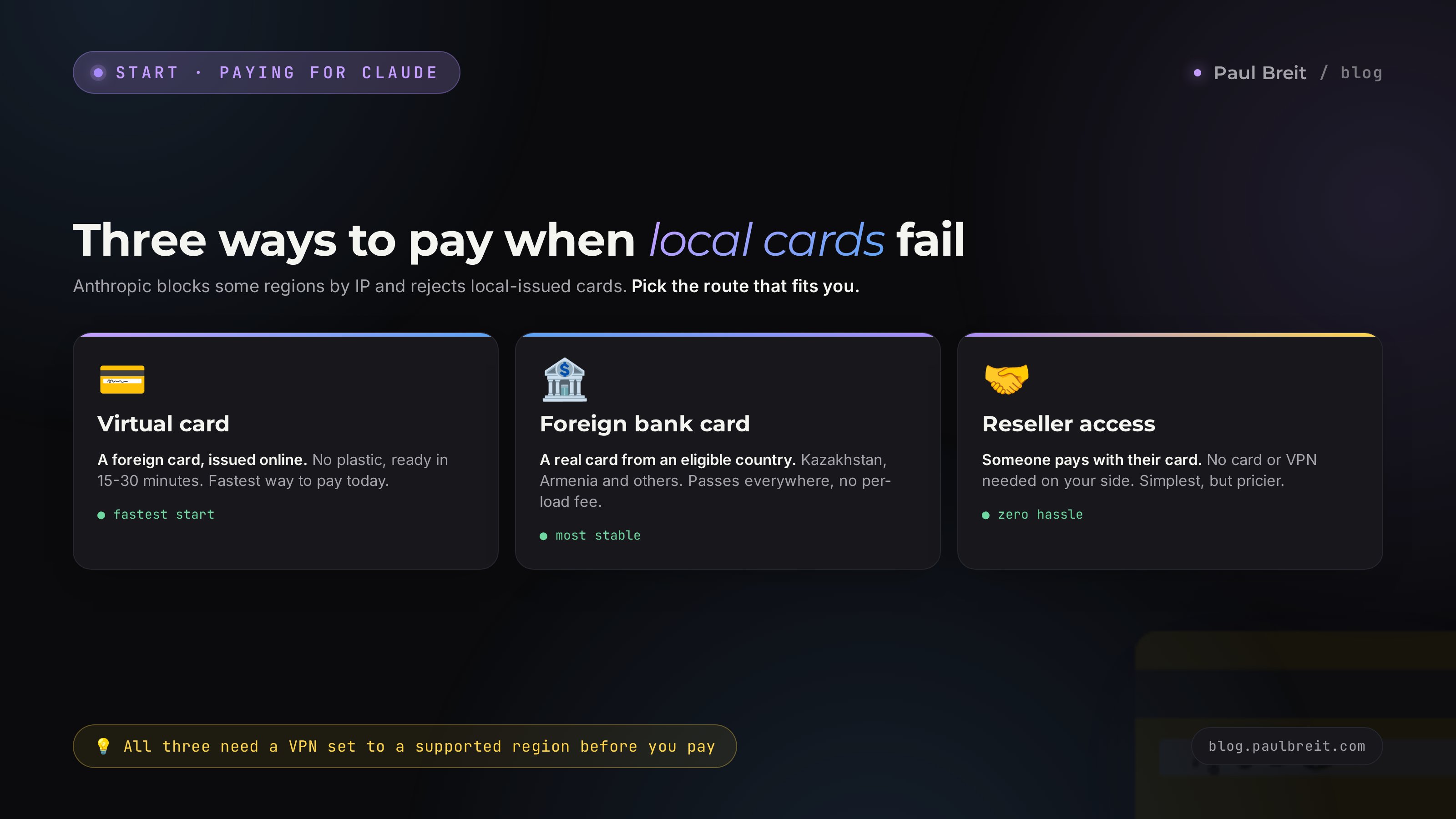
The fastest route. A virtual card is a card with no plastic - just a number, an expiry date, and a code. An intermediary service registered abroad issues it, and the card counts as foreign. Exactly what Anthropic wants.
How it works
You sign up with a service that issues virtual cards, pass a short check, issue a card (usually a few dollars), load it from a local card or another available method, and attach it to Claude. The whole thing takes 15-30 minutes.
How to pick a service and not get burned
There are lots of these services; they appear and shut down, so I won't name one "correct" pick - by the time you read this, the landscape may have shifted. Instead, here are the criteria that separate a working service from a dumpster:
- The cards are genuinely foreign. Look at the issuing country: cards issued in the EU, the UK, the US, or eligible neighboring countries work. A restricted-region BIN won't do, even if the service calls the card "virtual."
- Transparent fees. An honest service shows it all up front: the issuing price, the top-up fee (usually 3-8%), the maintenance charge. If the terms are murky, walk away.
- Fresh reviews from the last month. Look for recent reviews specifically about paying for foreign subscriptions. A service that worked a year ago may not go through at Anthropic today.
- Support that answers. Message support with a question before you pay. A clear, fast reply is a good sign. Silence means your money will end up there too.
Don't load a big sum right away. Issue the card, top it up with the minimum, attach it to Claude, and wait for the $1 test charge to clear (Anthropic runs it to verify the card, then refunds it). It cleared - the card works, so top up for the subscription. It didn't - you're out a dollar, not a month's payment.
Pros and cons
| Pros | Cons |
|---|---|
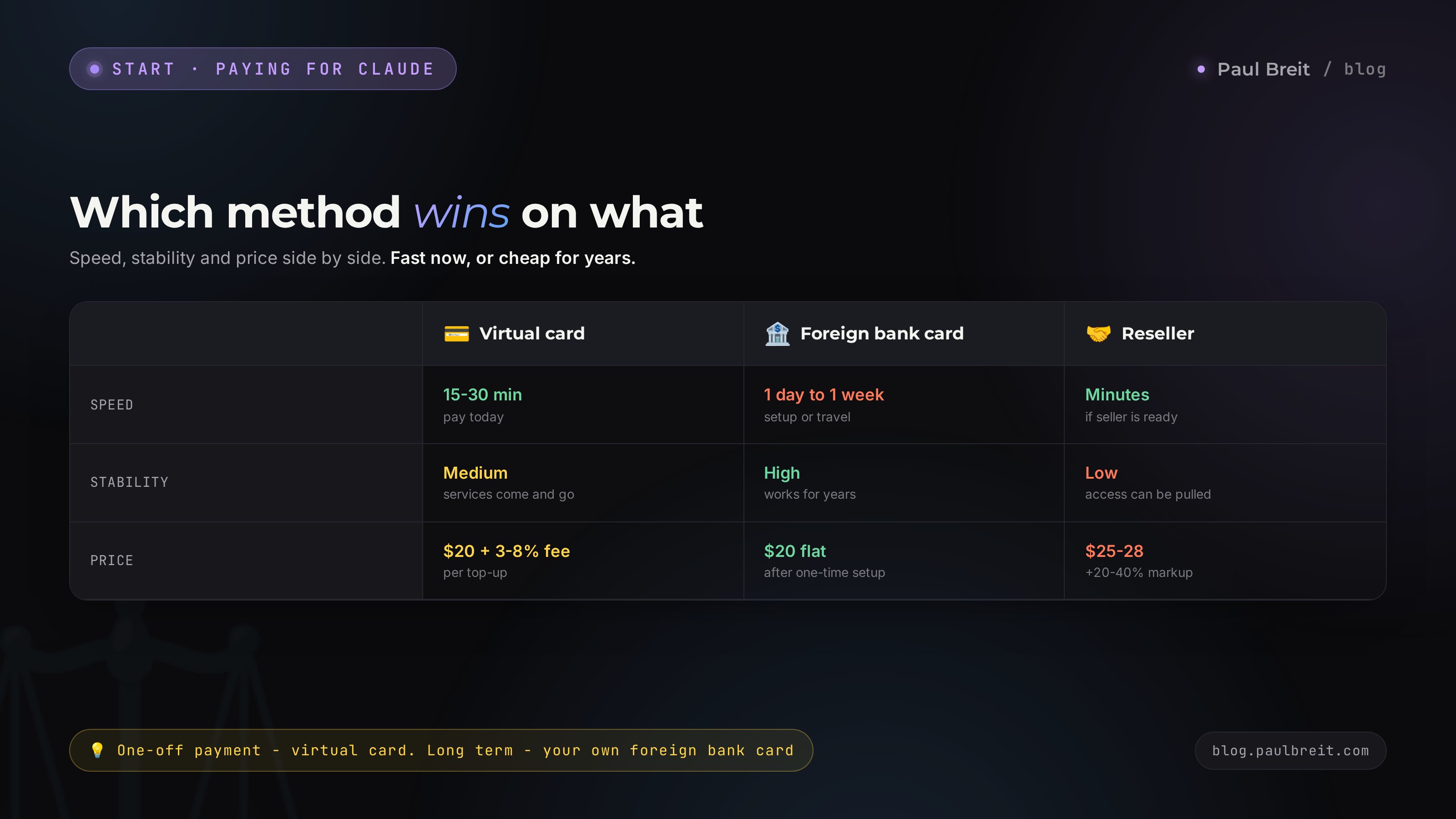
| Fast - a card in 15-30 minutes | A 3-8% top-up fee |
| No need to travel to another country | Services are unstable and can shut down |
| Top up from a local card | Sometimes the card isn't accepted on the second or third try |
| Great for a one-off "pay now" task | Exchange rate and fees eat part of the amount |
A virtual card is your pick if you need to pay today and don't have time to open a bank account in another country. For one or two services and a monthly subscription, that's reasonable. If you plan to use foreign services all the time, look at method two - it comes out cheaper and more reliable.
Method 02A real foreign bank card
The most stable option for years. Your own real card from a foreign bank that goes through in Claude, ChatGPT, the App Store, anywhere. Set it up once and forget about intermediaries and top-up fees.
Which countries work
People most often open cards in three countries where it's simplest and doesn't require citizenship:
- Kazakhstan. The most popular route. Cards from Freedom Bank, Kaspi, Bereke, and others. You need a Kazakh IIN (their equivalent of a tax ID) - issued against a passport in a day at a service center. Many banks issue a card to a non-resident within an hour.
- Armenia. Opening an account is a well-worn path, and banks are welcoming. Visa and Mastercard cards that go through foreign services consistently.
- Kyrgyzstan, Uzbekistan. Also working routes - cards are issued to non-residents, and requirements are softer than at EU banks.
Two ways to get such a card
Travel and open it yourself
You go to Kazakhstan or Armenia for a couple of days, get a local ID number, open a bank account, and walk out with a card. Then you top it up by transfer and pay from anywhere. This is the most honest and reliable option: the card is yours, the account is yours, and no one can freeze a "middleman." The downside is the trip.
Open it remotely through an agent
Some companies open a foreign bank card remotely: you send documents, they get the number and the card, and they send you the details. It saves the trip but costs money (usually $100-200 for the setup) and requires trusting the agent. Check reviews and the contract; don't pay blind.
A virtual card takes a fee on every top-up. A real foreign bank card is a one-time setup cost, after which you pay at the normal exchange rate with no intermediary markup. If you have Claude, ChatGPT, service and app subscriptions - your own foreign card pays for itself in a couple of months and removes the headache for years.
Pros and cons
| Pros | Cons |
|---|---|
| Goes through everywhere, stable for years | Requires a trip or paying an agent |
| No fee on each top-up | Slower to start - a day to a week |
| One card for all foreign services | The account needs the occasional transaction to stay active |
| You fully control the money | An exchange-rate spread when you top up |
Method 03Ready access through a reseller
The option for those who don't want to deal with cards, VPNs, or payment forms at all. You find a seller who has already paid for a subscription with their own foreign card, and you buy access from them. It works, but with caveats you need to understand up front.
Two forms of that access
- Payment of your subscription. The seller takes your money and pays for Pro on your personal account with their card. This is the best of the reseller options: the account stays yours, you're just paying for someone to attach their card. The markup is usually 20-40% on top.
- A ready shared account. The seller gives you a login and password for an account several people use. It's cheaper, but it's someone else's account: your chats are visible in it, access can be revoked at any moment, and when everyone hits the limits, you're simply out of quota.
Resellers are where people lose money most often. The pattern is simple: you pay for "lifetime access," two weeks later the account gets banned for sharing, and the seller vanishes. The rules against this: only pay for payment of your own personal account, not a shared one; check the seller's recent reviews; and never prepay for "lifetime" plans - they don't exist, a Claude subscription is monthly or annual.
When it makes sense
Ready reseller access makes sense in exactly one case: you need Claude right now, for a short stretch, and you have no time for a card at all. For ongoing work it's pricier and riskier than paying yourself. As soon as you have time, get a virtual or real card and move your account onto self-payment.
Section 04Step by step: pay for Claude Pro in 20 minutes
Let me walk through the most common scenario end to end - paying for Pro with a virtual card. For a real foreign bank card the steps are the same; only the source of the card differs. Go in order and don't skip anything.
Turn on the VPN and check your location
Launch the VPN and pick a server in Germany, the Netherlands, or the US. Open any IP-checker site in your browser and confirm it shows the country you want, not your real region. As long as your IP still reads as restricted, there's no point going further - the payment won't clear.
Issue and top up the card
If you're going the virtual-card route - sign up with your chosen service, issue the card, and top it up a bit above the subscription price (allow for the fee and the $1 test charge). For monthly Pro, budget the equivalent of $22-24. Write down the card number, expiry, and CVC.
Log into your Claude account
With the VPN on, open claude.ai and sign in. If you don't have an account, register by email right now. Make sure you're logged in before heading to payment.
Open the subscription page
Click your name in the bottom-left corner and choose the subscription or Upgrade option. A plan comparison opens. Pick Pro. Here you can also switch to annual billing if you want to save - annual comes out roughly 15% cheaper than monthly.
Enter the card details
A payment form opens (it's handled by Stripe). Enter the number, expiry, and CVC of your foreign card. In the country field, put the card's country, not your real region. For the address, use a real foreign one or the one tied to the card at the issuing service. The postal code has to match the country.
Confirm the payment
Hit pay. First a $1 verification charge may go through - that's normal, it'll be refunded. Then the subscription amount is charged. A receipt arrives by email, and a Pro status appears in the Claude interface. Done - you're on the paid plan.
Go into subscription settings and confirm you see the next billing date and an active Pro status. Check your email - there should be a receipt from Anthropic. If the status doesn't update within a couple of minutes, reload the page with the VPN on. Everything in place - you're good to work.
Section 05If the payment won't go through - 7 fixes
A declined payment is the most common problem, and it's almost always solved in a minute. Work down the list top to bottom, no skipping.
- Check your IP. First and foremost. The VPN may have dropped or switched to a restricted-region server. Open an IP checker, confirm the right country, and reconnect the VPN if needed.
- Switch the VPN location. Sometimes a specific server lands on Stripe's blocklists. Switch from Germany to the Netherlands or the US and try again.
- Check the card's balance and limits. The card needs to cover not just the subscription but the $1 test charge plus the service fee. Virtual cards often have a per-transaction limit - check it.
- Verify country and postal code. In the payment form the country must match the card's issuing country, and the postal code must be valid for that country. A restricted-region address with a foreign card gets declined.
- Clear the cache or open incognito. Old cookies can leak your previous region. Open claude.ai in incognito with the VPN on and retry the payment.
- Wait and retry. After two or three failures in a row, the payment system may temporarily hold the card. Take a 30-60 minute break and try again.
- Switch cards. If nothing helps, the card itself is the problem. Issue a card with a different service or use a card from a different bank. That's more reliable than banging on the same wall.
Don't enter the card details ten times in a row without pauses - you'll only speed up the payment system freezing the card. Don't turn off the VPN "just for a second to check" - one login from a restricted-region IP can cost you the account. Calm, one step at a time.
Section 06How not to lose your account: protection from a ban
Paying is half the job. The other half is not losing the paid access a week later. Anthropic bans accounts for violating its regional policy, and getting a refund on a banned subscription is nearly impossible. A few rules I follow myself and recommend to my students.
- Always with the VPN. Every Claude login - only with the VPN on and the right location. No "quick peek from my phone without the VPN." This is rule number one.
- One region. Don't hop between countries. If you registered and paid from Germany - log in from Germany. Constant jumps between Germany, the US, and the Netherlands look suspicious to the system.
- Don't share the account. One paid account, one person. Mass logins from different devices and countries are a direct road to a ban for sharing. If a team needs access, that's separate accounts or a team plan.
- A dedicated email. Set up a separate mailbox for Claude that you have solid access to. Receipts land there, and that's where you'll recover your login if something goes wrong.
- Check the phone. A local phone number at signup is sometimes accepted, sometimes not. If the system asks for verification and won't take the number, that's a separate topic - I touched on it in the piece on getting into Claude.
Make it a habit: VPN first, then Claude. Keep the VPN shortcut next to your browser and check the location before you work. Thirty seconds of discipline saves you the subscription and the stress. People lose accounts over one small thing - a stray login without the VPN.
Section 07What it really costs
The subscription price isn't just $20. On top of it come the exchange rate, fees, and the one-time cost of your payment method. Let me lay it out honestly so you see the full picture.
Monthly through a virtual card
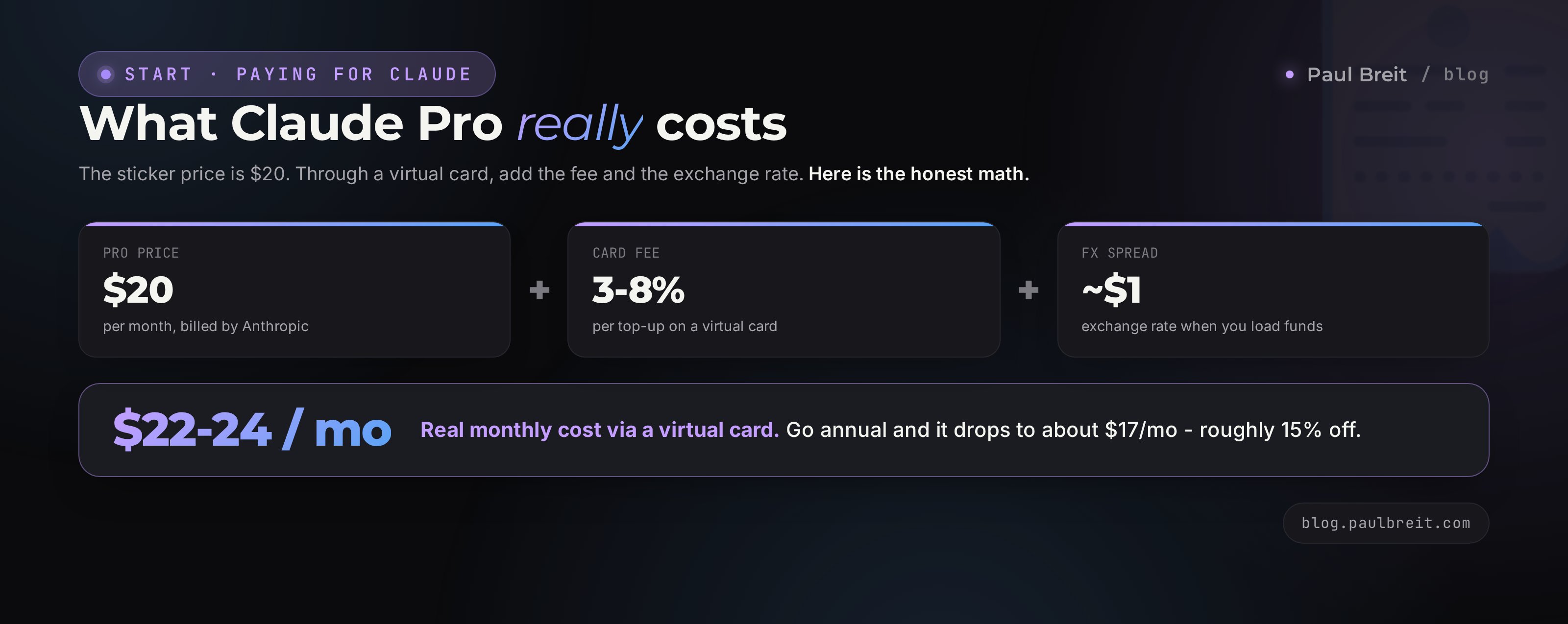
Pro subscription - $20. Plus the service's top-up fee - 3-8% on average, so another $1-2. Plus the exchange-rate spread when you load funds. All told, a single payment runs about the equivalent of $22-24. A one-time card issue is a few dollars more, but only in the first month.
Through a real foreign bank card
Pro subscription - $20 at the normal exchange rate, no intermediary markup. There's no top-up fee, or it's minimal. Up front, though, you invest in opening the card: a trip, or $100-200 to an agent. Those costs are one-time and pay off if you're paying for several services or using Claude for the long haul.
Through a reseller
A 20-40% markup on top of the subscription price. For Pro you'll hand over the equivalent of $25-28 a month and won't control the payment. The priciest over time, but no hassle.
Switch to annual billing - it's about 15% cheaper than monthly, and it removes twelve trips to the payment form in one move. One payment a year instead of twelve means fewer top-up fees and fewer chances that some future charge fails at the wrong moment. If you already know you need Claude for the long haul, the annual plan is the calmest option.
Is it worth the money
Claude Pro at $20 a month replaces a copywriter on high-volume text, an assistant on documents and email, and a helper on content prep. One saved workday covers the subscription with room to spare. What exactly you can hand to AI without writing a single line of code, I collected in the piece on tasks for AI. And if you're torn between Claude and ChatGPT - there's a separate honest comparison for your tasks.
Section 08If you'd rather not pay yourself
Sometimes you don't want to mess with cards and VPNs at all, but you need Claude for a specific task. Then there are workarounds. I'll be honest about each one - the upsides and the pitfalls.
- Aggregator services. Some platforms give you access to Claude and other foreign models through their own interface, paid with a local card. Convenient - you pay in your currency, no VPN needed. The downside: you're working through an intermediary, with a slightly higher price, its own limits, and no direct access to Projects or some of the original's features.
- API access. If you need Claude inside an app or a bot rather than the web chat, you can connect to the model through a token reseller's API. That's for people building automation, not working by hand in the chat.
- Pairing with the free tier. For occasional tasks, free Claude plus the free limits of other AI tools is enough. How to combine them without a single subscription, I covered in the piece on free AI tools.
If you need Claude for work every day, I always recommend paying for Pro yourself directly - through a virtual or real card. You get the original with nothing cut, full limits, Projects, and control over the account. Aggregators are fine for trying it without the hassle, but for steady work a direct subscription is more convenient and, in the end, cheaper.
Section 09Checklist and the whole path in a minute
Print it or save it. Tick the boxes as you go - when they're all checked, you've got a paid and protected Claude.
- VPN installed, location set to EU or US, verified with an IP checker
- Claude account set up on an email you securely control
- Payment method chosen: virtual card / foreign bank card / reseller
- Card topped up with a margin for the subscription, the fee, and the $1 test charge
- Payment went through: Pro status active, receipt in your inbox
- Login rule: open Claude only with the VPN on, one region
- Annual billing considered, if you need Claude for the long haul
A restricted-region card won't go through in Claude, and logins from there are blocked by IP - so you need a VPN and a foreign payment method. Fastest is a virtual card in 20 minutes; most reliable for years is your own card from a bank in Kazakhstan or Armenia; simplest with no hassle is ready access through a trusted reseller. Make the payment with the VPN on, set the country in the form to match the card, and after paying log in only through the VPN and never share the account. Pro at $20 pays for itself on the first workday.
What to read next
Paying is the entry into the tool. The work starts after. Where to begin once you've paid - in the full guide to Claude. What exactly to hand to AI - in the piece on 10 tasks without code. And if you're still choosing a tool - the Claude vs ChatGPT comparison for your tasks.
FAQFrequently asked questions
Can I pay for Claude with a local card in a restricted region at all?
No. Anthropic reads the card's issuing country, and a card from a restricted region is rejected by the payment system. You need a card issued in an eligible country - a virtual card through an intermediary service or a real card from a bank in an eligible neighboring country. The no-card option is paying through a reseller, who attaches their own foreign card to your account.
Do I still need a VPN if I already have a foreign card?
Yes, absolutely. The card solves the payment barrier; the VPN solves the IP block. Anthropic will not open the payment form from a restricted region's address even if the card is foreign. And after you pay, you should only log into the account with the VPN on, or you risk a ban for a region violation.
Which method is cheapest?
Over time - a real foreign bank card: after a one-time setup you pay at the normal exchange rate with no intermediary fees. A virtual card takes 3-8% on every top-up. A reseller adds 20-40% on top. For a single payment, a virtual card is faster and simpler; for ongoing work, your own card from a bank in Kazakhstan or Armenia is cheaper.
How much does Claude Pro cost, and is there an annual discount?
Pro is $20 a month. Paid annually it works out to about $17 a month, roughly 15% off. An annual plan is also handy because you go through the payment form once a year instead of twelve times, and you depend less on whether the next charge goes through.
What should I do if the payment is declined?
Work through it in order: check that the VPN is active and shows the right country; switch the VPN location; check the card's balance and limit; make sure the country and postal code in the form match the card's country; open claude.ai in incognito; take a 30-60 minute break after several failures; as a last resort, switch cards. Most of the time it's a dropped VPN or a country mismatch in the form.
Is it safe to buy ready access from a seller?
With caveats. The safest option is when the seller pays for your personal account with their card - the account stays yours. A shared account for several people is risky: access gets revoked, limits are split, and your chats are visible to others. Don't pay for "lifetime" access - no such plan exists; the subscription is monthly or annual. Check the seller's recent reviews.
What can get a Claude account banned?
Logging in from a restricted region's IP without a VPN, sharing one account across many people and devices, and sudden jumps in login country. Protection is simple: always turn on the VPN before logging in, stay in one region, and don't share the account. A subscription banned for a region violation is almost impossible to recover, so login discipline matters most.
Can I use Claude without paying at all?
Yes, there's a free tier with hard limits and older models - enough for getting acquainted and occasional tasks. For daily work you hit the ceiling fast. How to squeeze the most out of free AI without a subscription, I cover in a separate article on free AI tools.