LinkedIn lead generation: 300 warm connection requests a month for about $8
An automation tool engages with posts from your network and from your competitors' audience on your behalf. On my own profile this took visits from 20-50 to 110-170 a day, and connection requests from 1-2 to 10-17. Here is the full playbook: setup, settings, prospecting your competitors, DM templates, and safe limits for 2026.
The play here is simple: an automation tool engages, on your behalf, with new posts from people in your network and views the activity of your competitors' audience. Those touches remind people you exist – people who connected with you once and forgot. Some of them open your profile, read your posts, engage back, and a few drop a message asking about working with you.
The algorithm sees an active profile with real engagement from real people, and pushes your posts higher in the feed. Engaging with a competitor's audience works differently: a person sees that a stranger reacted to their post, checks who it was, lands on your profile, reads, reacts back, and sends a connection request. You accept automatically and fire off a welcome message with an invite to a consultation or a link to a lead magnet.
* The tool costs about $8/month. Minimum 300 new connection requests a month. That works out to roughly 3 cents per lead. And these are real people who saw your profile and chose to connect. Below I break it all down: setup, settings, prospecting competitors, message templates, safe limits, and what to change in 2026.
What's inside
- The math: 300 requests ÷ $8 = about 3 cents per lead
- How it actually works – two engagement scenarios
- Step 1. Register and connect your account to the tool
- Step 2. Account settings inside the tool
- Step 3. The auto-message to new connections – two templates that work
- Step 4. Birthday and milestone touches
- Step 5. Activity limits – what is safe in 2026
- Step 6. Prospecting your competitors' audience
- Where to send the leads – Telegram channel and funnel
- Account safety and risks
- Alternatives and the wider tool landscape
- What I learned over 2 years of running this
Section 01The math: 300 requests ÷ $8 = about 3 cents per lead
Before we dive into settings, let's count what we're actually doing this for.
After I turned the engine on, my profile started pulling 110-170 unique visitors a day instead of 20-50 before. You can see it right in the native analytics. Here's a screenshot from my dashboard:
At the same time, connection requests started coming in: 10-17 a day instead of 1-2 before. These aren't just visitors – these are people who saw my content, liked what they saw, and chose to connect.
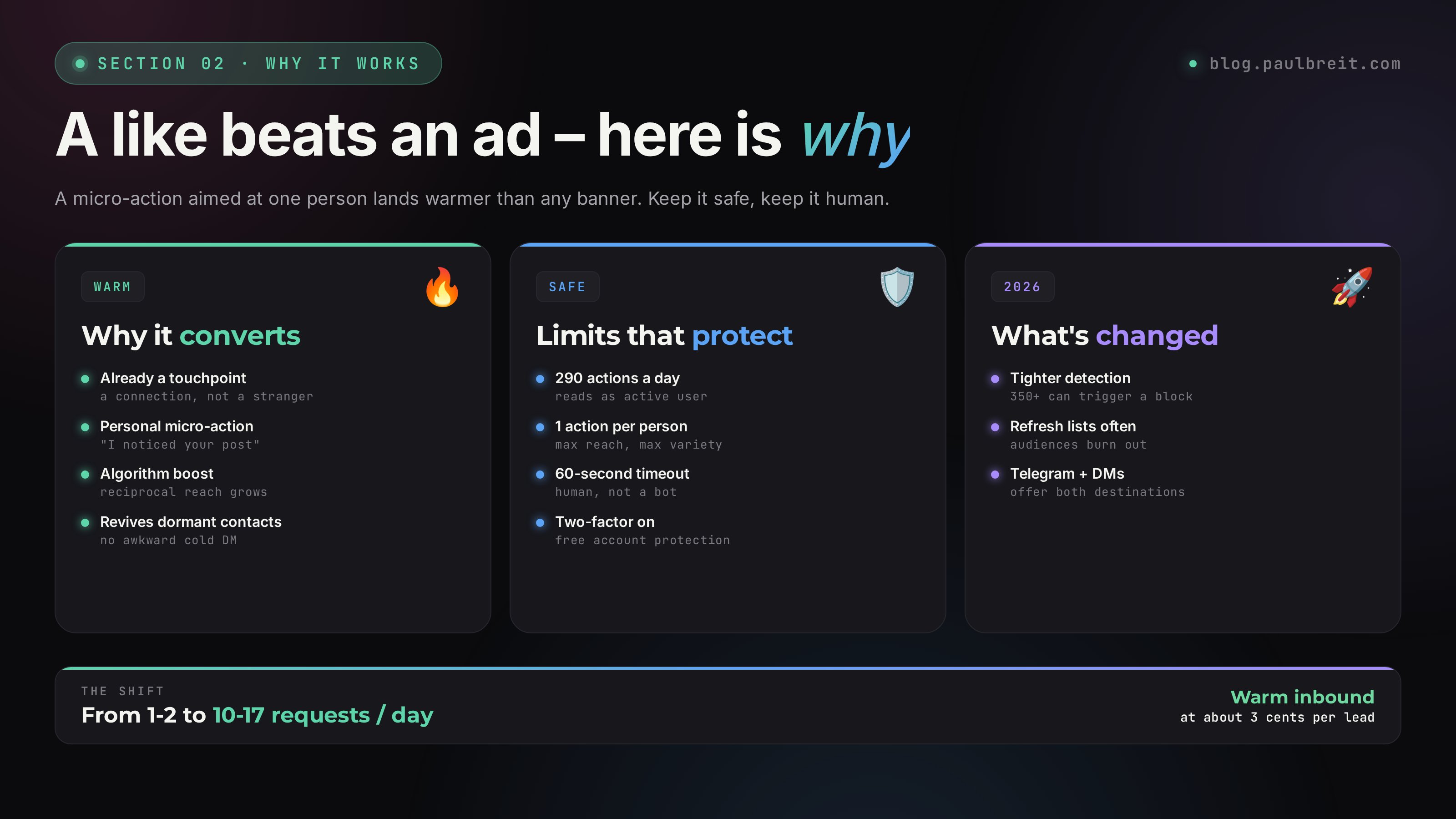
Let's count on the low end. Take 10 requests a day – that's 300 a month. The tool costs about $8. So each connection request costs roughly 3 cents. Cheaper than any paid ad on any platform, and with a contact that's already half-warm (a connection, not just a follower).
Unlike an ad that shows your offer to total strangers, engagement works differently. You're reminding people you already have a touchpoint with (a connection, someone who liked a post next to yours, someone in a competitor's audience). It's warm traffic that came to look at who you are on its own.
Section 02How it actually works – two engagement scenarios
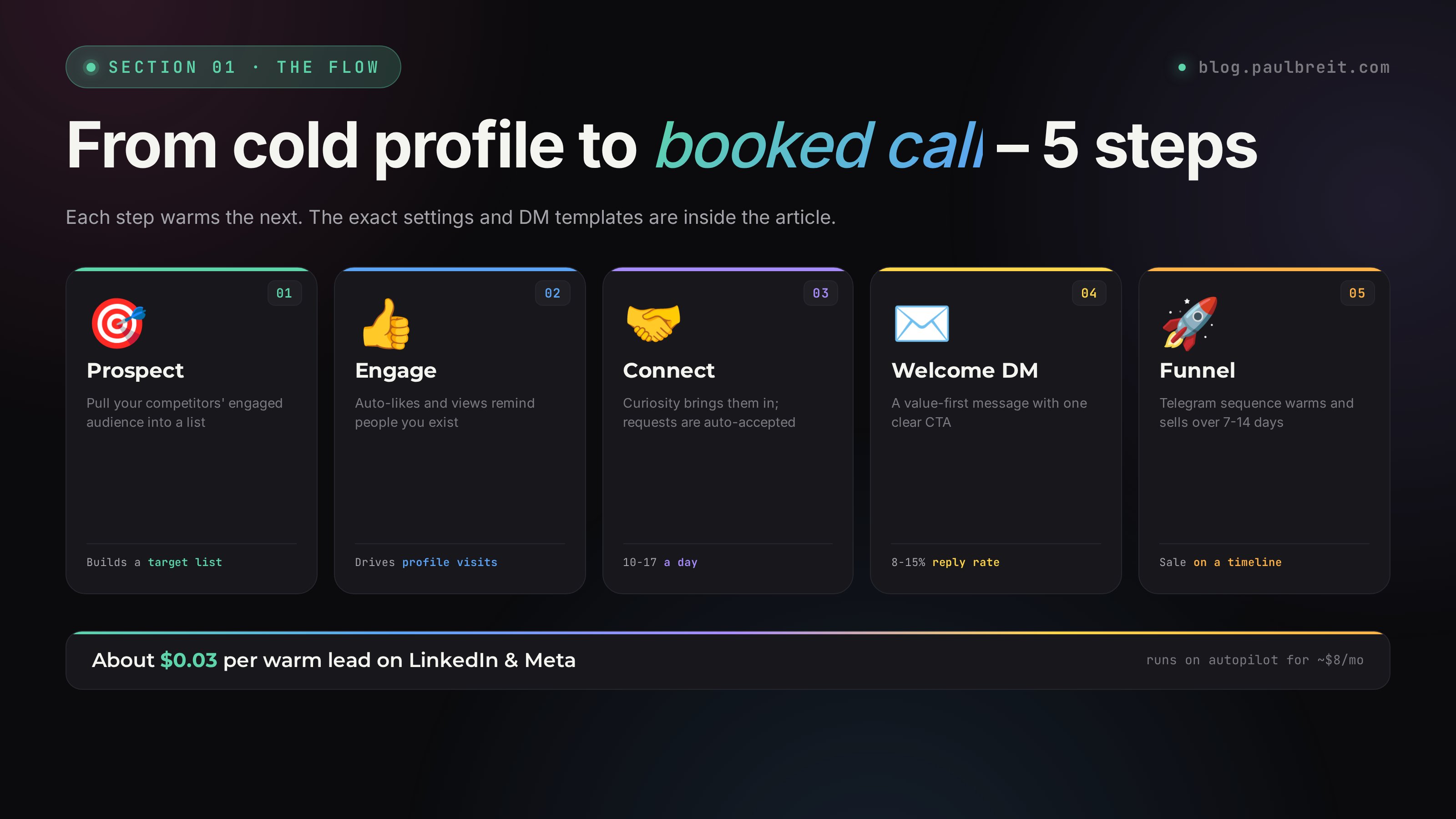
The tool runs two scenarios in parallel, and both matter.
Scenario 1. Engaging with your network's posts
The tool reacts to new posts from your connections and followers. The logic is simple: someone gets a notification that "Paul Breit reacted to your post" → subconsciously remembers you → some of them click your profile → read your latest posts → react back.
What this gives me as an expert:
- Algorithmic boost – the platform sees activity around my posts (reciprocal engagement) and lifts them in the feed of my followers. Reach grows organically. The same "work with people, not the algorithm" idea is the foundation of my guide on your first 1,000 followers with no budget
- Reviving dormant connections – everyone has 100-500 connections who linked up once and forgot. A like is a gentle reminder, with none of the "hey, long time no talk" cold-DM awkwardness
- Consultation requests – some of the people who land on your profile read your pinned invite and book
Scenario 2. Engaging with your competitors' audience
This is an acquisition play for brand-new people, not just working your existing base. We build a list of live, engaged people from competitors' audiences (the ones who actually react to their posts, not silent followers), and the tool engages with those people.
Then curiosity kicks in: "some stranger reacted to my post, let me see who that is." The person heads to your profile, sees your content, sees the topic is close to theirs (since you reacted to a post in the same niche their network cares about) – and sends a connection request.
An ad shows a banner. A like is a micro-action aimed at a specific person. Personally. That's why it lands one or two orders of magnitude warmer. It's not "I know nothing about you, but buy my course" – it's "I noticed your post." After that, if your profile is interesting, the person comes to get to know you on their own.
Section 03Step 1. Register and connect your account to the tool
Sign up for an outreach-automation tool in this class (there are several – I cover the landscape below). After signing up, connect your social account to the system.
Two ways to connect an account
OAuth-only login (no password stored)
In this case the tool can only like posts and view activity. It cannot: auto-accept connection requests, message new connections, or send birthday touches. You get about half the capability.
Full login (the way I did it)
Full feature set: likes, views, auto-accepting requests, welcome messages to new connections, birthday touches. There's a small risk of account compromise (the tool stores your credentials on its servers), but over 2 years of heavy use I've never had a problem. The class of tools is mature and has been around for years.
Turn on two-factor authentication. Then even if credentials leak, logging in needs a code from your phone – which the tool never receives. The tool keeps working through its saved session, and an attacker without the second factor can't log in. It's free protection; I turned it on the day I connected.
Section 04Step 2. Account settings inside the tool
In the tool's dashboard, open the settings for the account you connected. Here's what to turn on:
The "Filters" block
- New posts in the feed – ON. This is the core of the whole thing
- New photos – ON. Liking photos works as a reminder too
- New photos on profiles – ON
- Targeting filters – OFF. This is for fine-tuning (for example, only engaging with posts of a certain length); skip it at the start
The "Sources" block
- Connections – ON. Engage with your connections' posts
- People you follow – ON. Engage with the people you follow yourself (useful if you follow well-known experts – it's "social warming")
- Hidden sources – ON
- Recommendations – OFF. This is a paid add-on, not needed at the start
- Search – OFF
The "Advanced" block
- Like reshares – OFF. Someone else's content, no point
- Like attachments – OFF. Same reason
- View stories – ON. Viewing a story is the same kind of free reminder
- Auto-accept requests – ON (if you chose Option 2 with full login). Without it, new requests just sit there and you miss the intro moment
- Send a message – ON. This is where we'll wire in the welcome to a new connection
- Birthday touches – ON. Send a happy-birthday note
Section 05Step 3. The auto-message to new connections – two templates that work
When someone is accepted as a connection, the tool immediately sends them a message on your behalf. This is the critical field – this is where the first contact happens and the future sale is set up.
The principle of a good welcome message:
- Not "hi, thanks for connecting" – empty, zero value
- Lead with value – a lead magnet, a free audit, a guide
- Use the
%first_name%variable – the tool fills in the recipient's name, so it feels like personal outreach - One CTA – one link, one action
Template 1. Lead magnet – sending people to a Telegram channel
Hey %first_name%! Great to connect.
I'm Paul. I help experts build sales funnels for cold traffic with ROI up to 7x. My personal record is a funnel that drove over $1.3M in sales on cold traffic.
As a new connection, I want to send you a detailed breakdown of a simple funnel for selling mentorship and consulting – the one that earns for me and for dozens of my clients right now. It comes together in 5 days and starts pulling in leads immediately, with no exhausting launch sequences, no sales webinars, and no technical headaches.
Grab the plan: telegram.me/paulbreit
Template 2. Free audit – inviting people to a consultation
Hey %first_name%! Great to connect.
On my profile I do free audits and find the key growth points in subscriber funnels. I show experts and specialists how to build a stable, predictable, reliable sales funnel.
As a new connection, I'll give you a shot at a free check-up from me personally. If you sell courses, consulting, or mentorship, I have a really strong offer for you. I launched a challenge where I take on 100 experts, audit their funnels, and help them lift sales. On a 1-on-1 call I break down your funnel, offer, and traffic, and show you 2-3 simple moves that can multiply sales.
Book here: paulbreit.com. Spots are limited – 100 total, 13 left.
Templates like "Hi! I have a $700 course, buy it!" kill conversion. The goal of the first message is to give value for free and hook them, not to sell. The sale happens 2-4 weeks later, after the person has gone through your content. The job of the welcome message is to hook them with a lead magnet and pull them into your Telegram channel, where there's a proper warm-up sequence.
What changes in 2026 – destination channels
For years I led social audiences into Telegram (that's where the funnel lives). For the makeup of the funnel you pour this traffic into – step by step – see my guide to the expert sales funnel. In 2026, I also run parts of the audience through Instagram DMs alongside Telegram. You can offer a choice in the welcome message: "get the plan in Telegram" / "get it via DM" – that way you catch both audiences.
Section 06Step 4. Birthday and milestone touches
This feature turns on with one toggle in the settings, but it does a lot for loyalty. Anyone with a birthday today gets a note from you, sent on your behalf.
The template that works
Happy birthday! Wishing you health, happiness, and good luck.
Simple, short, no flowery phrasing. Long boilerplate greetings like "on this wonderful day I wish you incredible achievements and boundless opportunities" instantly read as a mass blast. Simple, sincere words don't.
The effect: the recipient sees your name in their inbox, clicks over to your profile, and refreshes the memory – "right, Paul, the funnel guy." A few days later some of them drop a request or react to a fresh post.
Section 07Step 5. Activity limits – what is safe in 2026
The tool has three key limits that affect both your reach and your account's safety.
Max actions per day – 290
This is the safe number that doesn't put your account at risk. Platforms catch suspicious activity by the number of actions per unit of time, and up to about 300 actions a day is well within the range of an "active user."
What it used to be: at 500 actions you'd sometimes get a temporary block. At 700-1000 – often. In 2026 the detection got tighter – even 350+ can trigger a 24-hour "action limit." So 290 is the sweet spot.
Max actions per person – 1
This one is critical. If you set 5, the tool fires 5 actions in a row at one person and reaches not 290 people a day, but only 58 (290 / 5).
The goal isn't to shower one person with likes – it's to reach the maximum number of different people. So 1 action per person is maximum variety.
Timeout between actions – 60 seconds
This protects against activity that's too fast. A 60-second pause between actions reads as "human" to the platform. Without a timeout, the tool could fire off 200 actions in 5 minutes, which is trivially flagged as a bot. With a 60-second timeout, the daily reach spreads over about 5 hours – normal user activity.
Safe operating window
The "active from / active until" setting defaults to "around the clock." That's fine, but you can narrow the window to your time zone – say, only act between 8:00 and 23:00. That makes the activity look even more "alive" (nobody is liking posts at 4 a.m.).
Section 08Step 6. Prospecting your competitors' audience
This is the most valuable step in the whole system. Here we build a list of live users who actively engage with content in your competitors' communities. We hand that list to the tool, it starts engaging with those people, and they start landing on your profile.
Step 1. Sign up for a prospecting tool
A prospecting tool pulls an audience based on engagement signals. Sign-up is usually free; you only pay for a plan if you scrape a lot (from about $20/month). For one or two pulls, a free or trial account is enough.
Step 2. Open the "Activity in a community" tool
In the menu, find the "Activity → In a community" tool. It collects everyone who showed activity (likes, comments, reshares) in the communities you specify. Paste in the links to your competitors' communities in the "Communities" field.
Which communities to add? Your top 5-7 competitors in the niche. If you work with marketing experts, find communities of popular marketers. If you're in nutrition, other nutritionists. The one rule: communities with an active, live audience, not "dead" pages with bot-inflated follower counts.
Which boxes to check: leave the defaults (authors, likes, comments). Reshares are optional (they only work if you're a community admin). Polls and comment-likes – leave them on.
Step 3. Set the period and the activity threshold
Period: set "past month" – this cuts off people who liked something once by accident and forgot. Active users engage regularly.
Minimum activity: set "5 or more." That means "the person must have made at least 5 actions in the past month inside the specified communities." Five is a safe filter against random people.
Step 4. Run the pull and download the result
Hit the Play button. The pull starts – it can take anywhere from 30 minutes to a few hours depending on the size of the communities.
When the task finishes, it shows up in the list on the right. Click the task and download the CSV with the list of IDs. That's your target audience.
Step 5. Load the list into the tool
Go back to the tool → the "Target IDs to engage" section. Open the CSV from the prospecting tool, copy all the IDs, paste them into the tool. Save.
The tool accepts a maximum of 5,000 IDs to engage. What to do depending on the size of your export:
Fewer than 500 IDs – too few competitors, or they're weak. Add another 5-7 communities, or use the prospecting tool's "Activity → On profiles" tool (it scrapes activity on competitors' personal profiles).
More than 5,000 IDs – the audience is too broad. Narrow it: set the period to "past 2 weeks" instead of "past month," or raise the activity threshold from 5 to 8-10. The idea is to keep the most active people, not everyone.
Section 09Where to send the leads – Telegram channel and funnel
Connection requests are only half the job. Next you need to move them to subscribing to your Telegram channel, where you have a full sales funnel.
The social → Telegram architecture
The logic goes like this. A person connects → gets the welcome message with a lead magnet → clicks the link to your Telegram bot / channel → inside Telegram gets a warm-up sequence → after 7-14 days reaches an offer for a consultation or a course.
In my case, the link from the welcome message points to telegram.me/paulbreit – a Telegram bot that delivers the lead magnet "The funnel plan behind $1.3M+." After delivery, the bot kicks off a 14-day sequence (through Telegram, not email) with case studies, common mistakes, and a sales offer at the end.
The alternative path – straight to a consultation
If you have a short sales cycle (say, a coach or consultant selling one-off sessions), you can send people straight to booking a consultation through your booking page. A landing page describing the format, a "Book now" button, a schedule. Conversion from this channel is lower (warm traffic still needs warming up), but the sales cycle is shorter.
UTM tags – non-negotiable
I put ?utm_source=linkedin&utm_medium=newconnection in every link from social. This gives you two things:
- In analytics you can see exactly how many subscribers came from welcome messages (not from other channels)
- You can separately track conversion from these leads into paying clients and compare it with other traffic channels
Section 10Account safety and risks
The main fear with this kind of tool is losing your account. Let's go through which risks are real and how to protect against them.
Risk 1. The platform spots "non-human" activity and blocks you
In principle possible, if you crank the limits to the max (700+ actions a day). At a limit of 290 with a 60-second timeout, the activity is statistically indistinguishable from an active user's behavior. Over 2 years, neither I nor dozens of my clients have had a single ban.
What to do if you do hit a temporary "action limit": wait 24 hours, lower the daily limit to 200, restart. It usually clears the next day.
Risk 2. Leaked login and password
The tool stores your credentials on its servers. If they get hacked, accounts are exposed. To bring the risk to zero:
- Turn on two-factor authentication. You can't log in without the second factor, even knowing the password
- Use a unique password for this account (not the same one as your email or banking)
- Every six months, change the password – just in case. You just go into the tool, enter the new password, and everything keeps working
Risk 3. A competitor reports you
An unlikely scenario, but it happens: a competitor notices you actively engaging with their audience and files a complaint with support. Support will check – if the automation is moderate (290 actions a day), they return the account with no penalty. If it's aggressive – block.
The protection here is not to engage with the same communities for months on end. Every 1-2 months, swap out your competitor list in the prospecting tool and refresh the ID list in the tool. As a bonus, that brings in fresh audience.
Section 11Alternatives and the wider tool landscape
This tool isn't the only one in its class. Here's a quick map of the landscape so you understand the ecosystem.
Heavier outreach platforms
The big-brother class – also auto-engagement plus prospecting plus messaging. A bit pricier (around $25/month), but more capability: message sequences, segmentation by gender / age / interests, more precise filter tuning. Worth it if you already have the basics working and want fine control.
Broadcast tools
Not a like/prospect tool – these send broadcasts through a page's messaging. They don't engage and don't scrape, but they pair perfectly: people connect → move into your page → subscribe → land in the broadcast sequence. I recommend using them together.
Chatbot platforms
A chatbot for messaging across platforms. Not a scraper. Useful at the next funnel step – when you already have a subscriber and need the bot to deliver a lead magnet, a sequence, and a sales offer. The common stack: the engagement tool (acquisition) → broadcast / chatbot (warm-up) → consultation (sale).
What to pick at the start
Start with one engagement tool – it gives the fastest result (connection requests within a week). After 1-2 months, once you understand your flow, add a broadcast or chatbot tool for sequences and an automated funnel. A heavier outreach platform is optional, if you want a parallel engagement channel targeting other audience segments.
Section 12What I learned over 2 years of running this
A few non-obvious observations that'll save you months of trial and error.
Don't engage with the same audience for 6 months straight
A competitor's audience burns out. After the tool has been liking the same people for 2-3 months, they've either already connected or they ignore your like. The effect drops. The fix – every 2 months, refresh your list of donor communities and re-run the pull.
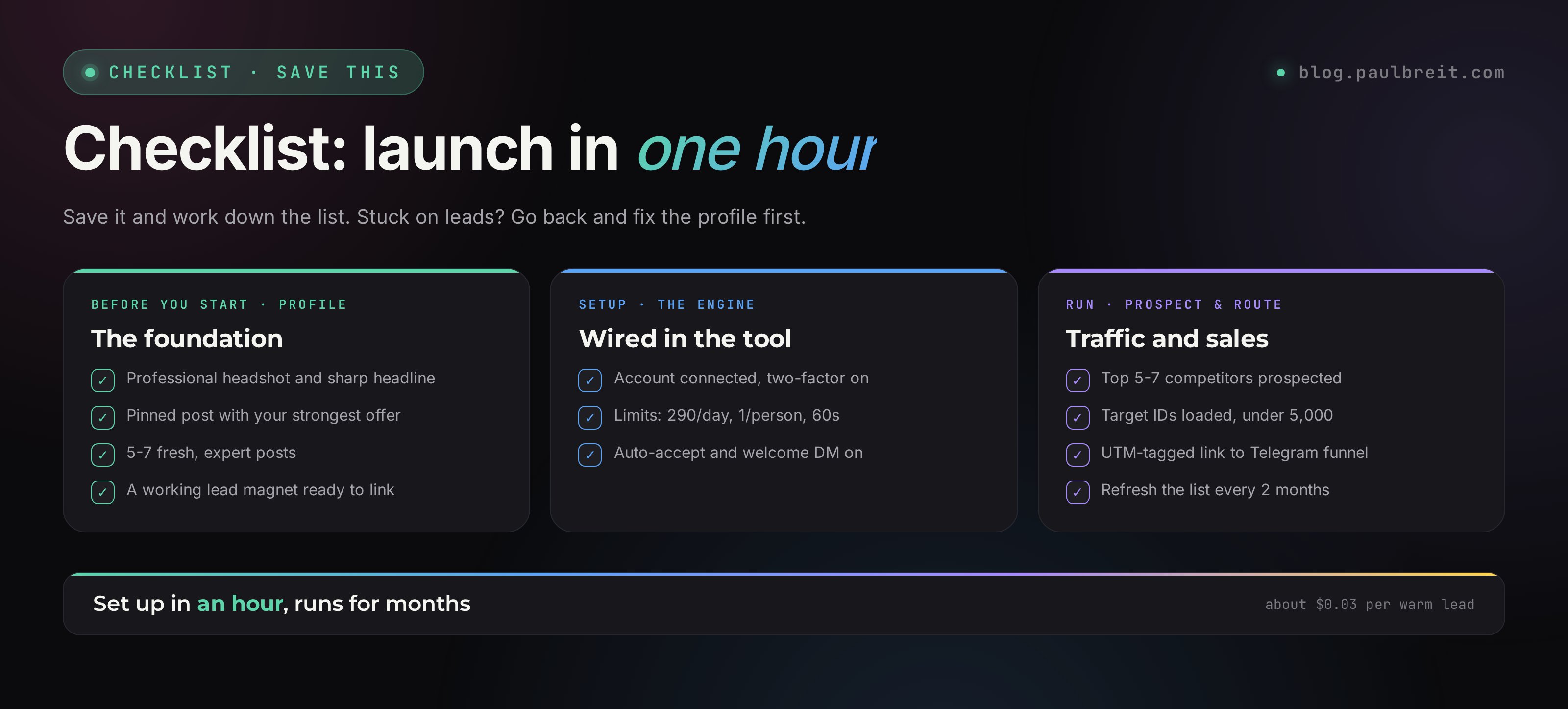
A pinned post is mandatory
When someone clicks your profile out of curiosity, the first thing they see is your pinned post. It's your "storefront." Make the pinned post your strongest offer: "I help experts land their first $3K through social + Telegram in 30 days. Free audit – DM me the word AUDIT." Without a good pin, conversion into a request drops several times over.
Your profile should be "selling," not "personal"
Profile photo – a professional headshot. Headline – sharp positioning ("I help experts hit $15K/mo through systematic sales"). Recent posts – expert, not personal. If your last 5 posts are memes and beach photos, there will be no requests.
Engagement is only a tool, not magic
The tool creates a flow of visitors. What a person sees on your profile is your job. If the content is weak, the product is fuzzy, the offer is unclear – even 1,000 requests won't bring sales. So 2 weeks before turning the engine on, I always advise: clean up your profile, set a pinned post with a lead magnet, publish 5-7 fresh expert posts. Then likes turn into follows, and follows turn into sales.
The Telegram pairing is mandatory
Social audiences right now are mostly "browsers" – they buy little, read a lot. I make all my sales in Telegram, on consultations using my 7-block sales call script. So social is the top of the funnel (acquisition, getting acquainted, first contact), and Telegram is the middle and bottom (warm-up, sale). Without a Telegram channel, social brings in zero revenue. With one, it becomes a powerful cold-traffic channel at 3 cents per lead.
This isn't a "magic button for getting clients" – it's a tool that amplifies an already-working system. If you have a polished profile, a working lead magnet, a warm-up funnel in Telegram, and a clear offer, this doubles your inbound flow for about $8/month. If the base isn't there – build the base first, then plug in the tool. The other way around doesn't work.
FAQFrequently asked questions
Will the platform ban me for automated engagement?
Not at the limits in this article. If you blast actions with no delays, you get flagged in the first day. Keep safe intervals and stay under the daily cap.
Where do I get my competitors' audience?
Through a prospecting tool that pulls people who actively engage with your competitors' content. The article walks through how to set it up and which segments to collect.
What do I put in the welcome message to a new connection?
The article gives 2 templates that work: one with a lead magnet link and one with an invite to a consultation. Reply rate runs 8-15%.
Will this work for an expert with weak content?
No. This brings people to your profile, but if the content is empty they leave. Post 10-15 real, useful pieces first, then turn the engine on.