AI for Lawyers: Documents, Client Work, and Content
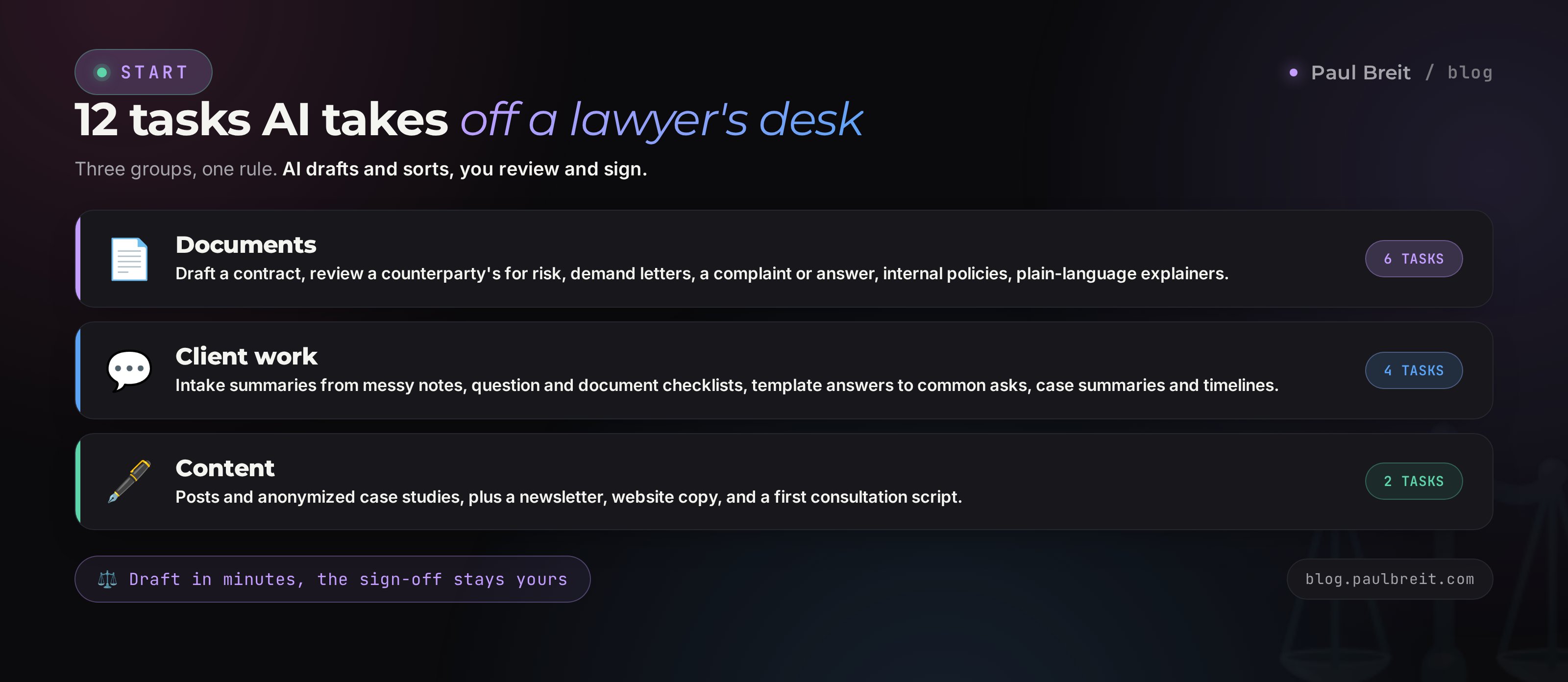
AI clears the routine that eats a lawyer's evenings: a contract draft, a risk read of the other side's paper, a demand letter, a tangled client situation, posts and a newsletter. Inside: 12 real tasks with ready prompts, a five-part prompt formula, the rules for attorney-client privilege, and how to keep AI from citing cases that never existed. The final word and the responsibility stay with the lawyer; AI just delivers the first version in minutes.
AI for a lawyer is an assistant for the rough work. It writes the first version of a contract, a demand letter, a complaint, and a client answer; it finds the weak spots in someone else's document; it translates legalese into plain English; and it produces content for your practice. It works from your template and your facts, in minutes instead of hours. Two limits: never upload a client's personal data without anonymizing it, and never trust a citation to a statute or case without checking it in an official source. The lawyer stays the one who decides and signs.
Half of a solo lawyer's day is repeatable routine. The fifth standard services contract this month. An answer to a client who is asking exactly what three people asked before. A read-through of a 40-page document to find the three dangerous clauses. A blog post that has been sliding for weeks because there is never a free hour. All of it eats the time that could go to hard matters and new clients.
I help specialists across fields take that routine off their plate with AI. With lawyers the story is special: the cost of a mistake is high, so here AI works as a fast assistant that a human always checks behind. No autopilot. Below is how to set up that pairing so it saves time and never burns you.
You will read it in 24 minutes. You will close your first task today. In a week AI becomes part of your desk, and you will be surprised how many evenings it hands back.
What's inside
- What AI can do for a lawyer, and where its ceiling is
- Documents: contracts, demand letters, complaints
- Client work and consultations
- Content and growing your practice
- The prompt formula for lawyers, before and after
- Attorney-client privilege and client data
- Why AI invents laws
- Which AI to choose
- Your first working day with AI
- 5 mistakes that make AI let you down
- The whole path in a minute
Section 01What AI can do for a lawyer, and where its ceiling is
Start with an honest frame, so nothing disappoints you later. AI is not a legal database and not a second lawyer with a bar card. It carries no current code of statutes and no docket of cases inside it. What it does have is a strong command of language and structure: it knows what a lease or a demand letter usually looks like, and it assembles text to fit your task. Its real strengths grow out of that.
What AI does well:
- writes the first version of a document from your template and inputs;
- reads a long document from the other side and pulls out the risky clauses and contradictions;
- translates heavy legalese into plain English so a client actually understands it;
- structures the chaos: turns a tangled thread of messages into a timeline and a list of facts;
- generates alternative wordings when you are stuck on one phrase;
- takes on the content: posts, case studies, answers to common questions, a newsletter.
Now the ceiling, which matters more than the strengths. AI is not responsible for the outcome. It can cite, with full confidence, a statute that was repealed years ago, or invent a case number out of thin air. It does not know recent amendments if they came after its training. It cannot see your client or the full circumstances. So the role is simple: AI prepares the draft and clears the routine; the lawyer reviews, refines, and takes the responsibility. The whole article rests on that rule.
Treat AI like a sharp assistant fresh out of law school: fast, diligent, well-read, but you are the one who walks into court behind the text. Everything it writes passes through your review. On those terms the pairing works and saves hours instead of creating problems.
Section 02Documents: contracts, demand letters, complaints
Documents are half of a lawyer's work and the biggest time sink. This is where AI pays off fastest. Here are the tasks in order, with prompts you can copy and adjust to your own practice.
Task 1. A contract draft from your inputs
You dictate the substance of the deal, and AI builds the structure and the first version. What it saves is less the typing and more the "remembering": which sections you need, what you cannot forget, and where the risks usually hide for your side.
You help a lawyer in the US draft a contract.
Governing law: general US contract law, no
citations to specific statutes.

Draft a services agreement between a company
(client) and a sole proprietor (contractor).
Scope: website development. Term: 45 days.
Fixed fee, paid 50% upfront and 50% on
acceptance. IP transfers to the client on
full payment.

Structure: parties, scope, rights and duties,
fee and payment, timeline, liability, IP,
force majeure, dispute resolution, termination,
miscellaneous.

At the end, as a separate list, flag the points
I as the lawyer must review and confirm with the
client. Do not invent statute numbers; if you
reference a rule, mark it [verify].
Notice the last two lines of the prompt. Asking it to flag the open points and not invent statute numbers is your insurance. AI will highlight where to look first, on its own.
Task 2. Reviewing the other side's contract for risk
The counterparty sends their template, and it needs a read-through with your side's eyes. In a minute AI finds the one-sided terms, the vague language, and the clauses that hurt your client. Then you check its findings and add what it missed.
Read the contract below through the contractor's
eyes. Find the clauses that are unfavorable or
dangerous for the contractor: unilateral
termination by the client, uncapped penalties,
vague acceptance criteria, hidden deadlines,
IP transfer before payment.

For each clause: the clause number, the risk,
and how to rewrite it in the contractor's favor.
Separately: what the contract is missing.

Contract text:
[paste the anonymized text]
I have watched this kind of review in practice: what used to take an hour of focused reading, AI highlights in a couple of minutes. The lawyer spends the time on the decision, the searching is already done. Double-check the findings; the final word is yours.
Task 3. A demand letter and a reply to one
A demand letter follows a clear shape: the facts, the breach, the demand, the deadline, the consequences. AI holds that shape in mind and writes clean, businesslike text with no filler. You supply the facts, it supplies the frame.
Draft a pre-suit demand letter.
From: a sole proprietor (buyer of services).
To: a company (service provider).
Substance: the provider missed the delivery
deadline by 30 days, the work was not accepted,
a $1,500 retainer was paid.
Demand: refund the retainer and pay the late
fee set in the contract.
Give a response deadline of 10 calendar days.

Tone: businesslike, no threats. Structure: facts,
breach, demand referencing the contract, deadline,
consequences of refusal. Mark any amounts or rules
that need checking as [verify].
Task 4. A draft complaint and answer
When the demand letter does not land, AI assembles the shell of a complaint: caption, statement of facts, legal grounds, requested relief, exhibits. It will not build your legal theory, but it will put the facts in the right order and propose a structure. In the same way it drafts an answer to someone else's complaint when you are on the defense side.
Task 5. Internal documents and policies
A privacy policy, a data-processing consent, a job description, a confidentiality policy, an internal procedure. These are standard documents that AI assembles from your inputs quickly and cleanly. The risk of error here is lower than in court papers, and the time savings are large.
Task 6. Translating legalese into plain English
A client reads the contract and understands half of it. AI rewrites the heavy clause in plain words, and the client sees what they are paying for and where the risk sits. That removes half the distrust before anyone signs.
Explain this contract clause in plain English,
as if you were telling a client with no legal
background. What it means in practice, what the
client risks, what to watch out for. No jargon.

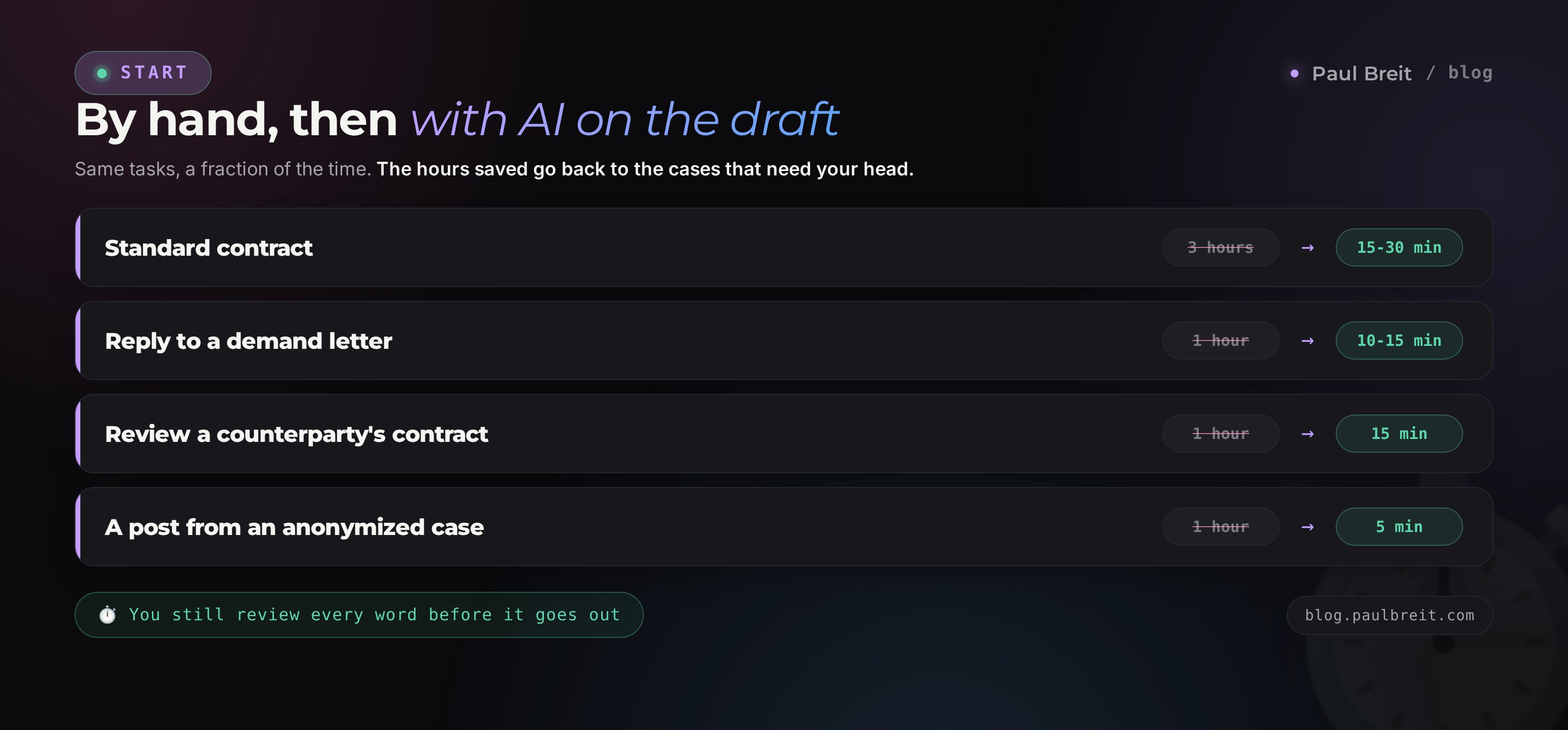
Clause: [paste the clause text]From watching lawyers who put AI into their workflow: a standard contract drops from about 3 hours to 20-30 minutes with review, a reply to a demand letter from an hour to 10-15 minutes, a review of someone else's document from an hour to about 15 minutes. The numbers move with complexity, but the order of magnitude holds. The freed-up time goes to the hard matters, where a lawyer's head is worth more.
| Document | AI's role | What the lawyer does |
|---|---|---|
| Standard contract | Frame and first version from inputs | Edits the wording, checks the rules, adapts it to the deal |
| Reviewing the other side's contract | Finds the risky clauses | Judges the findings, adds what was missed, decides strategy |
| Demand letter | Structure and businesslike text | Verifies amounts, rules, deadlines, then sends |
| Complaint / answer | Shell and order of facts | Builds the legal theory, checks the authorities |
| Internal policies | Ready template from inputs | Adapts it to the company, checks it is current |
| Explainer for the client | Plain-English translation | Checks the meaning is accurate |
Section 03Client work and consultations
The second layer of the work is talking to people. Here AI is not about replacing your judgment. It lightens the prep and the routine correspondence. You walk into a consultation prepared, instead of burning time untangling a client's messy messages.
Task 7. Working up a client's situation before the consult
A client sends ten voice memos and three screenshots of a thread. AI builds structure out of that chaos: what happened, who the parties are, the dates and amounts, where the tight spots are. You sit down for the consult already seeing the picture.
The client described the situation in a jumble.
Build a structure for a legal consultation:
1. Parties and their roles
2. Timeline with dates
3. Key facts and amounts
4. The core of the dispute
5. Which documents are mentioned
6. A list of questions I should ask the client
   to close the gaps

Do not give a legal assessment - I will do that.
Client's text: [paste the anonymized text]
That last line matters. Keep the legal characterization for yourself; give AI the collecting and the structuring. That way you do not risk it steering you sideways with an invented rule.
Task 8. Question lists and document checklists
For common matters, AI prepares a checklist: which documents to ask the client for, which questions to ask so nothing slips. Build one such checklist per category of matter once, and prep for a meeting speeds up several times over.
Task 9. Template answers to common client questions
Half of the inbound messages are the same questions. How to terminate a contract, what to do about a missed deadline, which documents a deal needs. AI writes draft answers in your tone, you review them once, and after that you use them as templates in your direct messages.
Task 10. A case summary and timeline
On a long matter, by the third hearing your head is a mess. From your notes and documents, AI assembles a short summary: where we are now, what is done, what comes next. Handy before a hearing, and handy when a matter is handed to a colleague.
AI will happily give a legal assessment if you ask. Do not ask. It can get the rule wrong and do it with full confidence. Give it the fact-gathering, the structure, and the drafts; keep the characterization and the strategy for yourself. That is a line worth not crossing with client matters.
Section 04Content and growing your practice
Clients reach a lawyer through two doors: referrals and content. Referrals are self-explanatory; content is what most lawyers skip, because "there is no time to write." AI closes that objection: a draft post is born in five minutes, and all you add is your experience and a living detail.
Task 11. Posts and case studies for your blog
A lawyer's strongest content is a walk-through of a real situation with no names. A client got into trouble, you solved it, the reader recognizes themselves and writes to you. AI helps turn the matter into a post: the setup, the problem, what you did, how it ended, the takeaway for the reader.
Write a post for a lawyer's Telegram channel from
a case. Audience: business owners and individuals
with no legal background. Tone: calm, confident,
no scare tactics and no jargon.

Case: a client bought a home; six months later the
prior owner surfaced and challenged the sale. We
sorted it out and held the sale. What helped:
checking the property's history before the purchase.

Structure: a hook, the situation, what was at stake,
what we did, how it ended, a short takeaway, and a
soft call to reach out. No invented details - where
you need a fact from me, leave a blank [___].
From there it is worth running the draft through a cleanup to strip the machine phrasing, so the text reads in a living voice. I have a separate walk-through on that: how to remove AI traces from text. The voice of your practice should be yours, not an average.
Task 12. Newsletter, website, and consultation scripts
AI assembles emails for your client list, website copy for your firm aimed at search queries, and a script for the first paid consultation. On emails that get read to the end, I go deep in the piece on writing a newsletter with AI - the mechanics for a lawyer are the same. For the website, the "common client question, then a full answer" pairing works: it is useful to the reader and it brings search traffic.
Never put real names, addresses, or recognizable details of a matter into a post. Anonymize so the client cannot be identified. Disclosure is a hit to both your reputation and your privilege obligations. Ask AI in the prompt, directly, to replace everything personal with generic labels.
Section 05The prompt formula for lawyers, before and after
The quality of AI's answer rests 80% on how you set the task. For a lawyer, a prompt stands on five parts. Put them together and you get a document, not a pile of generalities.
Role and jurisdiction
Say who AI is acting as and under which legal system. "You help a lawyer in the US; governing law is general US contract law." Without it, the model can blend rules from several jurisdictions into one text.
Facts and context
Give the inputs: parties, amounts, deadlines, substance. The more concrete the facts, the less AI improvises. This is also where you attach an anonymized template or sample, if you have one.
The task
One clear action: draft this, find the risks, rewrite in plain English, build the timeline. One task per prompt. Mix three together and you get a blurry answer.
Format
Describe how the result should look: sections, a risk table, a list of questions. AI will match the shape you set.
Limits and insurance
The closing block that separates a lawyer from a beginner. "Do not invent statute numbers, mark open points as [verify], do not fabricate personal data." These lines cut the risk and highlight what to check.
Here is how it looks in practice. Compare two prompts for the same task.
| Weak prompt | Strong prompt |
|---|---|
| "Write a lease" | "You help a lawyer in the US. Draft a commercial lease for a cafe space. Landlord: a sole proprietor; tenant: a company. Term: 12 months, rent $2,000/mo, deposit one month, annual increase. Standard sections. At the end, a list of points for my review. Do not invent statute numbers, mark them [verify]." |
| Result: a generic text, half of it to rewrite, some terms invented | Result: a working frame for your deal, review points flagged, an hour saved |
The formula is simple, but worth drilling until it is automatic. A breakdown with before-and-after examples for any task is in my piece on how to write prompts - it is useful well beyond legal text.
Section 06Attorney-client privilege and client data
This is the most important section, and you cannot skip it. When you paste text into a cloud AI, it travels to a third party's server. For a lawyer that is a high-risk zone: attorney-client privilege and client confidentiality both demand that a client's information does not leak.
What not to upload into a cloud AI in the clear:
- names of clients and counterparties;
- Social Security numbers, tax IDs, addresses, phone numbers;
- company account and bank details;
- case numbers, court identifiers, and other unique markers;
- trade secrets and internal documents where a contract forbids disclosure.
Anonymizing is your baseline habit
The fix is simple and becomes a habit fast. Before uploading, replace everything personal with generic labels: "Client A," "Company B," "City N," "amount X." To draft a contract, AI does not care whether it is Smith or Jones, it cares about the structure of the deal. You put the real data back into the finished draft yourself, offline.
Anonymizing before upload:

Before: John A. Smith, SSN 123-45-6789,
        Acme LLC, EIN 82-1234567, lease at
        10 Main St, amount $3,000/mo
After:  Tenant (individual), Landlord (LLC),
        space downtown, amount $3,000/mo
Extra measures
- In your account settings, turn off using your conversations for training where you can. Paid and business tiers usually offer it.
- For sensitive data, prefer tools that run on your own machine without sending anything to the cloud, or a business tier with a no-training agreement in place.
- Do not keep a matter's correspondence in the AI chat like an archive. Save what you need on your side, clear the rest from the thread.
If you are unsure whether you can upload a fragment, that means you cannot. Anonymize it or do not upload it at all. One client-data leak costs more than a whole year of saved time. Build that habit from day one.
Section 07Why AI invents laws
A story that went around the profession: in Mata v. Avianca (2023), lawyers filed a brief citing cases that did not exist, cases ChatGPT had "found" for them. The text looked convincing, the citations were in place, and the cases were pure fiction. The result was sanctions and a public black eye. A lesson for everyone who uses AI in law.
The reason is in the nature of the technology. AI does not look a rule up in a database of laws. It predicts what text plausibly comes next, based on what it saw in training. So it confidently produces the plausible: it looks like a statute, it looks like a case number, and inside it is invention. That is a property, not a bug.
Verify every citation to a statute, a case, and a deadline in an official source: the reporters, current codes, Westlaw, LexisNexis, PACER. Never file a document where the citations come from AI's word without checking. In the prompt, ask it directly to mark rules as [verify] - so you see at a glance where the check is needed.
A word on freshness. The model knows the law as of its training. Amendments passed later do not exist for it. If you are working with recent changes, AI is unreliable there, and you cannot lean on its memory of dates. Check the current version yourself.
Section 08Which AI to choose
Different models behave differently on a lawyer's tasks. Here is the short version of where each is stronger.
- Claude - careful with long documents and reasoning, drifts into invention less often, holds the structure of a contract and a risk review well. My main tool for complex text.
- ChatGPT - a versatile all-rounder, strong on content and quick drafts, with a familiar interface and image generation.
A practical setup: run drafting and review on anonymized data in Claude, and lean on ChatGPT for content and fast first passes. For long legal text and careful review, Claude is the pick; you can register at claude.ai. Both have free tiers that cover the first tasks, so you can test the pairing before you pay for anything. If you want a fuller comparison, I lay it out in Claude vs ChatGPT.
Section 09Your first working day with AI
Do not try to adopt everything at once. Take one task and carry it to a result. From there it rolls on its own.
Pick one task
The best start is a draft of a standard document you produce often. A contract, a demand letter, an answer to a frequent client question. Something where you can judge the result cold.
Gather the inputs and anonymize
Write out the facts of the deal and replace everything personal with labels: "Client A," "Company B"; keep the amounts, drop the names. It takes a minute and becomes a habit.
Write the prompt by the formula
Role and jurisdiction, facts, task, format, limits with the insurance "[verify] and do not invent statutes." Send it.
Review it as a lawyer
Read the draft, check the rules in an official source, cut the excess, add what AI does not know about your deal. Put the real data back.
Save the prompt that worked
Drop the working prompt into a separate file or note. Over time you build a personal library of prompts for your categories of matters, and every next task gets faster still.
Keep a set of templates and prompts for each category of matter. Contracts in one, demand letters in another, consultations in a third. Then AI works with your style and your forms, instead of assembling everything from scratch each time. That is the move from one-off experiments to a system.
Section 105 mistakes that make AI let you down
- Trusting citations blindly. The most expensive mistake. AI confidently cites a case that does not exist. Verify every authority in an official source before you file.
- Uploading client data as-is. Names, SSNs, account details in the cloud is a direct risk to privilege. Anonymize before uploading, every time.
- Expecting a finished document with no edits. AI gives a draft, not a final. Whoever sends its text unread will, sooner or later, send an invention. Editing is mandatory.
- Asking for "a legal opinion." A generic ask gets a generic, often wrong answer. Set a concrete task with facts and a format, and you get something usable.
- Keeping every matter in one chat. The context tangles, and AI mixes the circumstances of different matters. One matter, one thread or one project.
RecapThe whole path in a minute
AI for a lawyer covers three layers of work. Documents: drafts of contracts, demand letters, and complaints, a risk review of the other side's text, a plain-English translation. Client work: working up a client's situation, question checklists, template answers to common asks, case summaries. Content: posts, case studies, a newsletter, website copy.
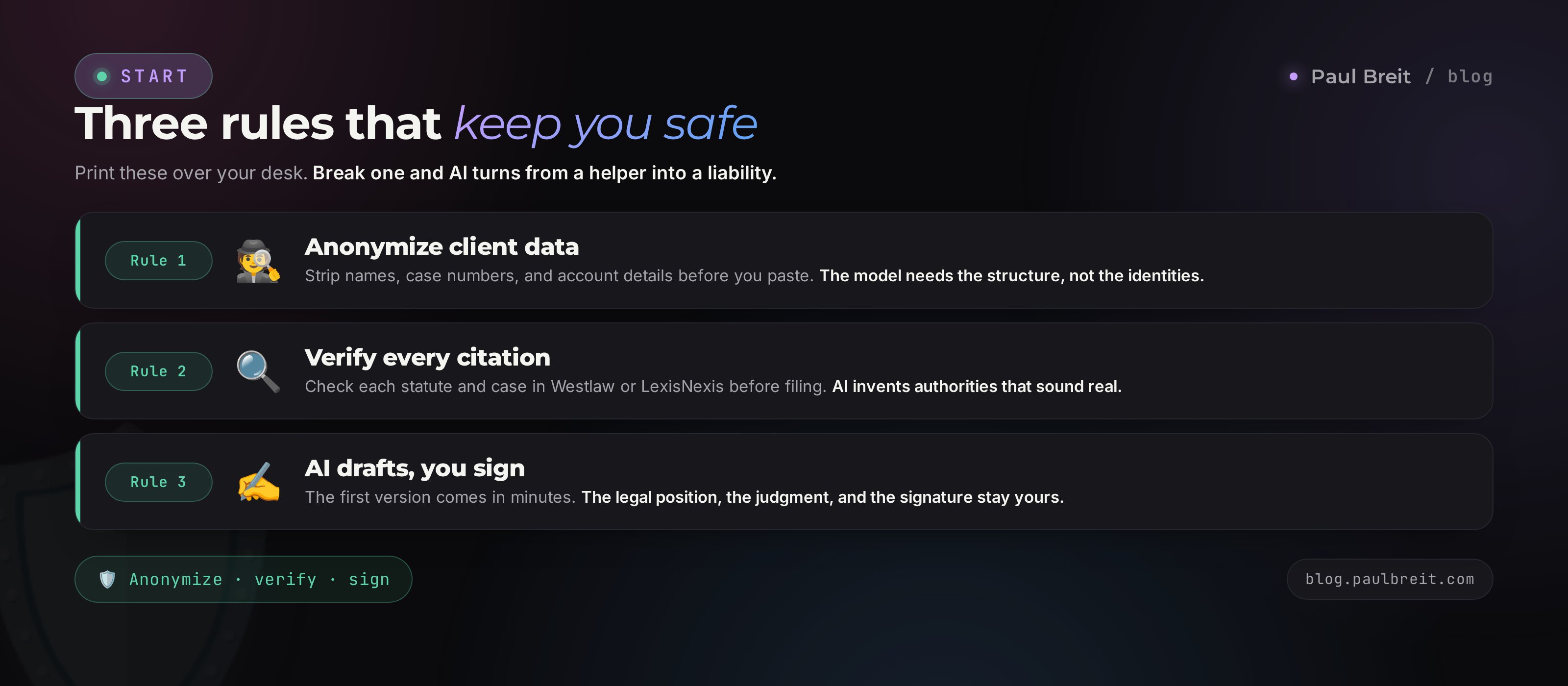
It runs on one rule: AI prepares the first version in minutes, the lawyer reviews and takes responsibility. Hold two insurances always - anonymize client data, and verify every citation in an official source. Build the prompt on five parts: role, facts, task, format, limits. Start with one task today, collect a library of prompts that work, and within a week AI hands back the evenings that used to go to routine.
FAQFrequently asked questions
Can AI replace a lawyer?
No. AI takes on drafts and routine: the first version of a document, a risk read, structure, and content. The legal position, strategy, and responsibility stay with the lawyer, who reviews every text and signs it. The pairing saves hours; it does not replace the person.
Is it OK for a lawyer to use AI?
Yes, it is an ordinary working tool. The limits are about data, not the tool: you cannot break attorney-client privilege or expose confidential client information. That is why you anonymize client details before uploading and never paste anything you would not want on a third-party server.
Can I upload client documents into AI?
Only anonymized ones. Replace names, case numbers, account and identity details with generic labels like "Client A" and "Company B." To draft a contract, AI needs the structure, not the real identities. You put the real data back into the document yourself, offline.
Which AI is best for a lawyer?
For long documents and careful review, Claude is the stronger pick, it is more disciplined with reasoning and holds the structure of a contract. ChatGPT is a versatile all-rounder and strong on content and quick drafts. A practical setup is to use both: Claude for documents, ChatGPT for content.
Does AI really invent statutes and cases?
Yes. It predicts plausible text, it does not look a rule up in a database, so it confidently produces statutes and case numbers that do not exist. In Mata v. Avianca (2023), lawyers were sanctioned for filing fake citations found by ChatGPT. Verify every authority in Westlaw or LexisNexis before you file.
How much time does AI actually save?
From watching lawyers use it in practice: a standard contract goes from about 3 hours to 20-30 minutes with review, a reply to a demand letter from an hour to 10-15 minutes, and reviewing someone else's document from an hour to about 15 minutes. Exact numbers depend on complexity, but a real slice of the day comes back.
Is client data safe inside a chat?
On paid and business tiers, Anthropic and OpenAI do not use your conversations to train models, and you can turn training off in settings. Keep the hygiene rule anyway: anonymize names, case numbers, and account details before uploading. Privilege is your obligation, not the vendor's.
How should a lawyer with no AI experience start?
Take one common task, a draft of a standard contract or an answer to a frequent client question. Anonymize the data, write a prompt using the five-part formula, and review the result as a lawyer. Save the prompt that worked. From there, build a personal library organized by your categories of matters.