AI for tutors: cut 10 hours of busywork every week
Grading in the evenings, lesson plans on the weekend, the same test built for the fifth time, parent messages until midnight. A tutor spends 10 to 15 hours a week on this on top of the actual sessions. AI takes most of it off your plate: it grades work, preps materials to each student's level, writes tests and reports. Inside: 12 tasks with ready-to-use prompts and a note on what to double-check by hand.
AI for tutors is an assistant that takes the mechanical part of the job: it grades written work and essays, builds lesson plans to a student's level, generates tests and exercises, breaks down errors, writes parent reports, and preps students for the SAT, ACT, and AP by the scoring rubric. You set it up in one evening in a plain chat window, no code. With 15 to 20 students, it frees up 8 to 12 hours a week. Teaching, explanation, and the work on motivation stay with the tutor.
Sessions ended at eight, and the workday is only starting. A stack of essays to grade. A plan for tomorrow's lesson with a new eighth grader you can't figure out how to reach. Three messages from parents: how's my kid doing, what was assigned, will there be results by the test. A quiz on irregular verbs you're building for the fifth time this month, because your students have already seen the old one. By midnight you're wrung out, and almost none of it was live work with kids.
I run an online school that has trained more than ten thousand people, and among them are hundreds of tutors and teachers. Nearly all of them arrive with the same pain: it takes a mountain of energy, and half of that energy goes to paper busywork nobody pays for. This article is a breakdown of how to hand the busywork to AI and get your evenings back.
You'll read it in 22 minutes. You'll set it up in one evening. By next week, grading and prepping materials will take a fraction of the time, and you'll spend that time on what tutors are called for in the first place: to explain and to carry a student to a result.
What's inside
- What AI actually does for a tutor
- Getting started with Claude
- 12 tutoring tasks AI handles
- How to write prompts so the answer is ready to use
- A student knowledge base: memory that remembers everything
- One tutor's evening with AI, step by step
- Your week before and after
- 5 mistakes and how to avoid them
- A one-evening setup checklist
Section 01What AI actually does for a tutor
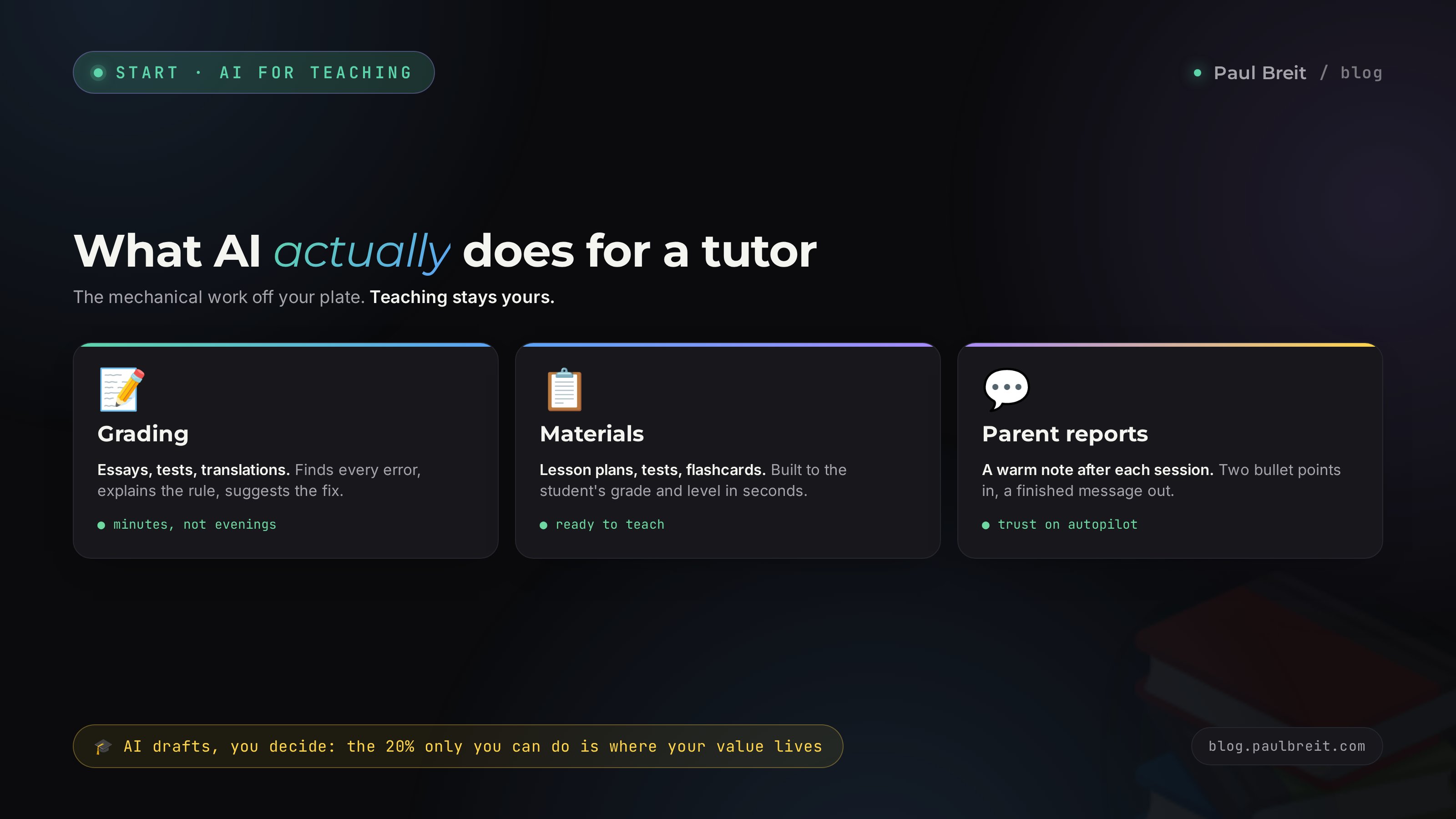
Let me separate the value from the noise right away. AI is a text assistant that reads what you send it and returns a coherent, thoughtful answer: an analysis, a plan, a list, a check, a draft. It works with words, numbers, problems, and texts. For a tutor that means any task you can describe in words, you can hand off.
Where AI is strong:
- Checking and analyzing text. An essay, a paper, a translation, a spoken retelling in transcript. It finds errors, explains them, and suggests how to fix them.
- Generating learning material. Tests, flashcards, exercises, dictations, and problems on a given topic and difficulty in seconds.
- Planning. A lesson plan, a month-long program, an exam prep route from the student's current point.
- Explaining one topic in different ways. Through an analogy, through an example, in simple words for a struggling student and with more depth for a strong one.
- Copy about you and for parents. A report after a session, a message to a parent, a post to attract new students.
Where AI is weak and needs your control:
- Exact calculations. Double-check the arithmetic and the final answer in math and physics problems. The model confidently produces numbers that are sometimes wrong.
- Fresh facts and exact dates. It can miss on a specific date or a recent event. Verify anything in doubt.
- Live connection. A child who has shut down or lost motivation opens up to a person, not a chat. That's your territory.
AI prepares a draft, you make the decision. It takes 80% of the mechanical work off your plate; the remaining 20% is your professional judgment and your edit for a specific child. That 20% is exactly where a tutor's value lives, and it's what parents pay for.
Three myths that keep tutors from starting
Before we get to the tasks, let me clear away three fears that make tutors put off getting to know AI.
- "It's complicated, I'm not technical." Working with AI is a chat in plain English. If you send messages in a messaging app, you already know everything you need. No settings, no software, no code.
- "Kids will start cheating and stop thinking." The tool is neutral. In your hands it saves time; to the student you hand out assignments, not finished solutions. If anything, going over errors with AI helps you explain deeper and catch gaps faster.
- "Parents will think I'm cutting corners." Parents see the result: prepared materials, regular reports, attention to their child. How you freed up the time for that attention doesn't concern them. That it exists does.
Which AI to pick
For working with text and analysis, I lean toward Claude from Anthropic: it phrases things more carefully, holds long context (you can load a whole curriculum or a month of a student's work), and slips into template phrasing less often. Right next to it stands ChatGPT – for tutoring tasks the two are close, so take whichever you get used to. The free tier is fine for your first steps. If you carry 15+ students and reach for the assistant every day, Claude Pro at $20 a month pays for itself with the very first evening of grading you skip. I broke down how to choose between the two in the article Claude vs ChatGPT.
Section 02Getting started with Claude
The good news for a US tutor: Claude works directly, no workarounds. Signing up takes about five minutes and you're in. Here's the whole path, so it works even if you've never touched a tool like this.
Create an account
Open claude.ai and sign up with your email or a Google account. That's it – no card required to start. You land straight in the chat window, which is where all twelve tasks below happen.
Try it on the free tier
The free tier lets you run real work: grade an essay, build a lesson plan, generate a test. You'll hit a daily message cap if you push hard, but for a first evening it's plenty. Run one prompt from Section 3 on a real task and see the output before you decide on anything paid.
Upgrade to Pro when you go daily
When you're leaning on the assistant every day across several students, get Claude Pro at $20 a month. It raises the message limits and unlocks Projects – persistent knowledge bases that keep a card for each student between sessions. That's the feature that turns a chat toy into a working tool, and I cover it in Section 5.
Set it up once and from then on you just open the chat and work. Hundreds of thousands of teachers already use AI in their week. If something doesn't click on the first try, it's almost always the prompt: add context and run it again. The tool itself needs nothing from you but plain English.
Section 0312 tutoring tasks AI handles
Next up: twelve concrete tasks. Each comes with a ready prompt you can copy, drop your own details into, and get a result. A prompt is simply the text of an assignment for the AI. The clearer you explain what you want, the sharper the answer.
1. Grading essays and written work
The heaviest routine for language and writing tutors. AI reads a paper and returns an analysis faster than you'd finish the first paragraph. It finds spelling, punctuation, grammar, style, and logic errors, explains each one, and suggests a fix.
You're an experienced English teacher. Grade this 8th grader's essay. Find the errors and sort them by type: spelling, punctuation, grammar, style, logic. For each error, give a short explanation of the rule and a corrected version. At the end, score the work on a 100-point scale with a rationale and name three strengths worth praising the student for. Essay text: [paste text].
The praise line isn't an accident. A kid needs to hear what worked, not just a list of failures. You skim the AI's analysis in a minute and bring it to the session already prepared.
2. A lesson plan for a specific student
New student, and you don't yet see how to shape the session. Describe the situation, and AI builds a lesson structure with timing, a warm-up, a main block, and homework.
Build a plan for a 60-minute one-on-one English session. Student: 6th grade, a bit below average, struggles with the present simple, shy about speaking out loud. Goal for the session: lock in the present simple and get them talking. Break the lesson down by minutes: warm-up, explanation, practice, a speaking game, homework. Add two backup exercises in case the main ones move faster.
3. Generating tests, flashcards, and exercises
The repetitive assignments you build by hand over and over, AI produces in batches. A test on a topic, flashcards for memorization, a set of problems with rising difficulty.
Make a 10-question test on the topic "Fractions" for a 5th grader. Five multiple-choice questions and five open-response, difficulty rising. For each question, give the correct answer and a short solution in a separate block, so I can hand the student the questions only and keep the answers for myself.
4. Explain one topic three ways
The kid doesn't get the textbook explanation. You need a different angle. AI gives you several versions of one explanation at once, and you pick the one that will land for this student.
Explain what photosynthesis is to a 6th grader in three different ways: through a simple everyday analogy, through a short story with a character, and with a precise definition plus an example. After each version, add one check question to see whether the kid caught the idea.
5. Error analysis and a catch-up plan
Collect a student's typical errors from recent work, and AI finds the pattern: which topics are sagging and in what order to close them.
Here's a list of a 9th grader's errors from their last five math assignments: [list the errors]. Find which topics are consistently weak. Build a one-month catch-up route: what to tackle first, what second, which topics connect to each other. For each topic, suggest one practice assignment.
6. Homework with keys for fast checking
AI preps the homework and the answer key with worked solutions in one go. At the next session you check the student's work against the key in a minute.
Build a homework set on the topic "commas with participial phrases" for 7th grade: five sentences on placing commas, three on forming the phrases, one creative. In a separate block, give a full key with correct answers and a note explaining each item.
7. Exam prep by the rubric
Standardized exams are scored against strict rubrics. AI knows the structure of the tasks and grades a piece the way a scorer would on test day, with a breakdown by each criterion. For a student that's priceless: they see not just a score but the exact reason for a lost point, and they know precisely what to work on. After a few weeks of this kind of checking, kids stop losing points in the same spots, because they can see the pattern of their errors in numbers.
You're an SAT essay scorer. Grade this argument essay against the reading, analysis, and writing dimensions of the rubric. For each dimension, give a score and explain what kept it from a top mark. At the end, give an overall score and the three most important things to improve for the next attempt. Text: [paste essay].
8. Parent reports after a session
Parents want to understand what they're paying for. A short report after each session keeps them at ease and builds trust. AI writes it for you from a couple of your bullet points.
Write a warm, clear message to a parent after a chemistry session. My notes: we covered atomic structure, the boy worked hard, there's a gap on valence, I assigned homework, we'll shore up valence next time. Tone friendly and professional, no stiff jargon, 4 to 5 sentences.
9. Adapting texts for language lessons
For language tutors, AI picks and adapts texts to a student's level: it simplifies the vocabulary, adds a glossary, and preps comprehension questions.
Take this Spanish news article and adapt it to an A2 level: simplify the vocabulary and grammar, keep the meaning. Under the text, give a glossary of 10 new words with translation and pronunciation, and five reading comprehension questions. Text: [paste text].
10. Game mechanics and motivation
Dry material lands through play. AI dreams up quests, stories, and contests that turn drilling into fun. It's a lifesaver with younger kids and with anyone who loses interest after fifteen minutes. Ask it to reframe the topic around the child's favorite thing: soccer, dinosaurs, a video game. The material stays the same, and the engagement shifts in front of your eyes, and the session runs without the endless fight for attention.
Invent a game mechanic for drilling the multiplication table with a 3rd grader who loses interest fast. Format: an adventure with a storyline where solving problems moves the hero forward. Describe the rules, three difficulty levels, and a small reward system.
11. Keeping a student knowledge base
Holding the progress of twenty kids in your head is impossible. AI keeps a card for each student: what you've covered, what's sagging, what was assigned. How to set that memory up, I'll cover in the next section.
Keep a card for this student. Note: Aaron, 7th grade, physics, goal – get ready by the end of the term. Today we covered friction, understood it well. Weak on working with formulas, mixes up the symbols. Homework – problems 3 to 7 from the section. At the start of the next session, remind me where to pick up.
12. Content to attract new students
A tutor without a steady flow of students is always hunting for more. AI helps you run a blog, write posts, and put together a simple lead funnel. For how to teach it to write in your own voice, there's a separate breakdown of the 30-posts method.
Write a post for a parents' group and my channel. I'm a math tutor, I prep for standardized tests, and I'm taking on three students for the fall. The post should show the value through a concrete student result, feel alive and short, and end with an invitation to message me directly. No fluff, no clichés.
Section 04How to write prompts so the answer is ready to use
The quality of an answer depends on how you frame the task. A weak prompt like "grade the essay" gives a generic answer. A strong prompt gives you a result you carry straight to the session. A simple five-part formula does the work.
- Role. "You're an experienced English teacher with 15 years of practice." AI tunes its tone and depth to the role you set.
- Task. What exactly to do: check, build, explain, break down.
- Context. Grade, level, goal, quirks of the child. The more detail, the sharper the answer.
- Format. How to lay out the result: a list, a table, by rubric, a separate block with the key.
- Constraints. Length, tone, what to avoid: "no stiff jargon," "5 sentences," "in simple words."
Fold these five parts into one message, and the answer comes back ready on the first try. If something's off, don't rewrite the prompt from scratch – just add a follow-up line: "make it simpler," "add three more examples," "this version is too hard for sixth grade." AI remembers the previous answer and edits it. A detailed breakdown of the formula with before-and-after examples is in the article how to write prompts.
Build your own prompt library
Prompts that worked are worth saving. Start a separate document or note with the wordings that hit for your frequent tasks: essay grading, lesson plan, topic test, parent report. Get a prompt to a perfect result once, and after that you just copy it and swap the topic and grade. In a couple of weeks you'll have a personal set of ten to fifteen templates that covers almost your whole weekly routine. It turns working with AI from "I invent it every time" into "I grab the ready one and drop in the details."
Another trick is to ask AI to improve your prompt itself. Write: "Here's my task – ask me clarifying questions so the answer comes out sharper." The model will ask about grade, goal, format, and after your answers it hands back noticeably better material. This especially helps at the start, before the formula becomes a habit.
Compare. The prompt "give me fraction problems" returns ten random examples. The prompt "you're a math teacher, make 8 problems on adding fractions with different denominators for a 5th grader who gets tangled up finding a common denominator, rising in difficulty, with each solution in a separate block" returns ready material for a specific child. The difference in the text is a minute. The difference in the result is between "still needs work" and "I'm taking it to the lesson."
Section 05A student knowledge base: memory that remembers everything
An ordinary chat forgets the conversation the moment you close it. For a tutor that's awkward: you want an assistant that remembers each student between sessions. Claude's Projects feature gives you that memory (in ChatGPT the equivalent runs through settings and memory). A Project is a separate space with uploaded materials that the AI keeps in view in every conversation.
How it works for a tutor:
- You spin up a separate Project for each student, or per subject.
- You upload the curriculum, the textbook, the topic list, past work, and your own notes on progress.
- From then on, in any conversation inside that Project, the AI already knows the context. You don't have to explain every time that Aaron is in 7th grade and mixes up the symbols in formulas.
Over a month the Project builds a living card of the student: what you've covered, where they stumble, what worked in sessions. Before a lesson you open the Project and ask: "Remind me where Aaron and I left off, and suggest a plan for today." You get a ready starting point in ten seconds. How Projects work and where to begin is covered in the guide Claude from scratch.
Don't load last names, phone numbers, addresses, or other personal data into a student's card. A first name and the learning context are enough. Sending a piece of work or a problem solution is fine; a child's personal details are not. It's a simple hygiene rule that keeps you safe and respects a family's privacy.
Section 06One tutor's evening with AI, step by step
The theory clicks into a picture once you see the whole process at once. Let's walk one working evening of a math tutor with a roster of about fifteen students. Sessions are done, tomorrow's prep is ahead. This used to be two or three hours past midnight; now it's forty minutes over a cup of tea.
Grade today's work
Three students turned in tests. You photograph or type out the solutions, anonymize them, and hand them to the AI one by one with a prompt to grade step by step. In five minutes you have a breakdown of each paper: where the error is in the calculation, where in the logic, where in the layout. You skim it, check any questionable calculations yourself, and mark what to go over at the next session. What used to take an hour fits into fifteen minutes.
A plan for tomorrow's new student
Tomorrow is a first session with a 9th grader prepping for a standardized test. You open the chat, describe the level and the goal, and ask for a diagnostic lesson plan with a set of problems to surface the gaps. AI builds the structure in a minute. You tune it: cut the extras, add a problem you like to give on a first session. Plan ready.
Materials and homework
Two students need fresh tests on a topic they've already seen in the last version. You ask AI to generate new assignments of the same difficulty plus keys. For one more, you put together homework with a self-check answer key. Five minutes instead of half an hour laying out assignments by hand.
Parent reports
Four parents are waiting to hear from you. You give the AI a couple of bullet points about each session, get four warm, finished messages, skim them, and send. Parents are at ease, trust grows, and you didn't compose each message from scratch for the tenth time that day.
Update the cards in Projects
You drop into the students' Projects and note in a phrase or two what you covered and what's sagging. Tomorrow, before each session, you'll open the card and get a ready starting point. Evening closed, head clear.
Same load, same roster, same quality for the kids. But instead of a grueling second workday after sessions, it's forty minutes of calm work. The freed-up time goes where you decide: new students, rest, or better prep for the hard cases where a human is exactly what's needed.
Section 07Your week before and after
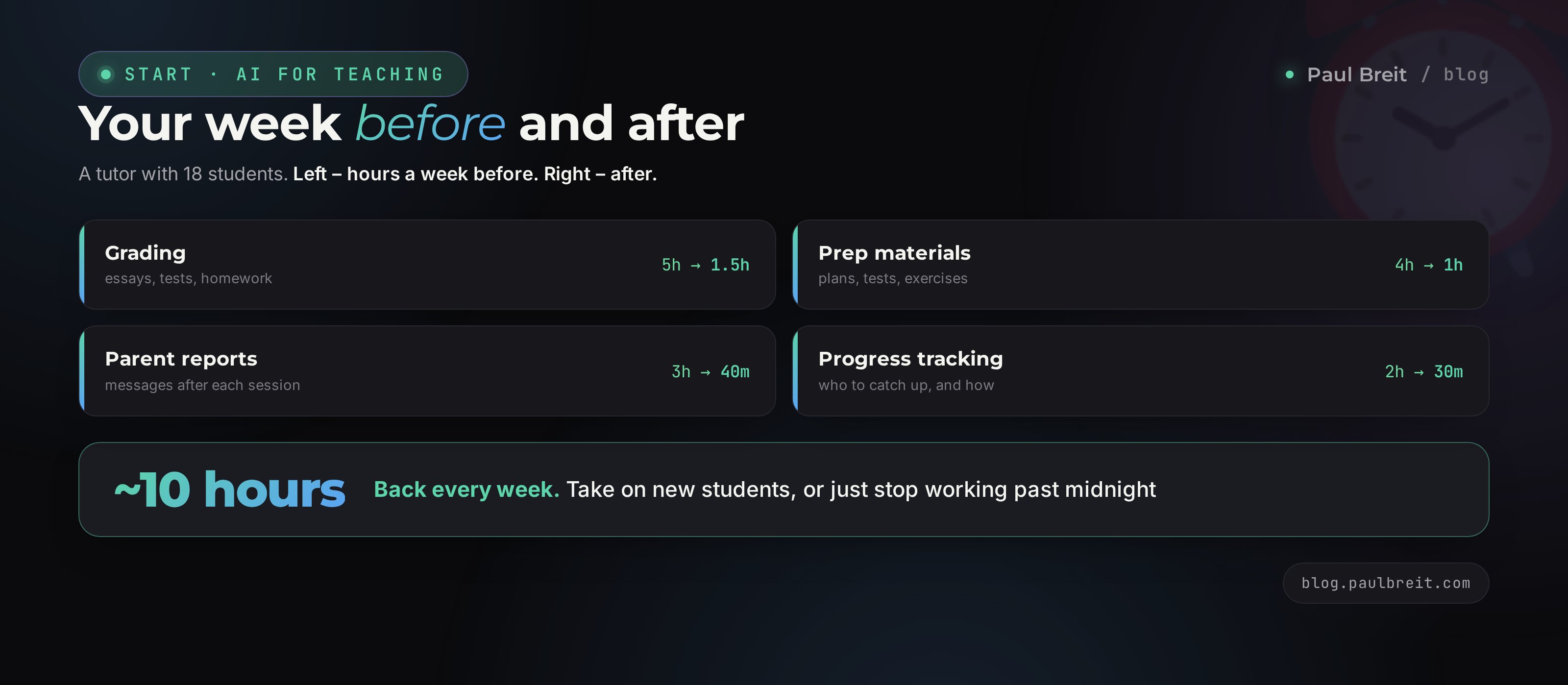
Take a tutor with 18 students. Let's look at where the time goes on top of the sessions and what shifts when AI takes the busywork.
Before
- Grading work – about 5 hours a week. Essays, tests, homework by hand.
- Prepping materials – 4 hours. Plans, tests, exercises from scratch.
- Reports and parent messages – 3 hours. Messages in the evenings after sessions.
- Working out who to catch up and how – 2 hours. Held in your head and on scraps of paper.
That's about 14 hours of busywork on top of the lessons. Nearly two full workdays that nobody pays for.
After
- Grading work – about 1.5 hours. AI breaks it down, you skim and edit for the child.
- Prepping materials – 1 hour. Plans and tests come together in minutes from prompts.
- Parent reports – 40 minutes. A couple of bullet points, a finished message.
- Progress tracking – 30 minutes. The Project remembers each kid, you make the calls.
That's about 3.5 hours. Roughly 10 hours a week freed up. You can keep them for yourself, take on two or three new students without losing quality, or finally stop working evenings until midnight.
Ten freed-up hours at an average $50 per session is another 6 to 8 students a week, if you decide to grow. Or the same money for less time, if you decide to save your energy. One tool, and you can spend those free hours however works for you.
There's a second effect too, and it shows up a month or two in. When the busywork stops wringing you out, you have energy for quality: to dig deeper into a hard case, to come up with an unusual approach for a kid who's stuck, to prep calmly for a difficult parent. A worn-out tutor runs on autopilot. A rested one notices what used to slip past, and that's exactly what separates the specialist with a waiting list from the one who's just clocking hours.
Section 085 mistakes and how to avoid them
Trusting the answer blindly
AI sounds confident even when it's wrong, especially on calculations and exact facts. Always look the result over with a professional eye. Your 20% of control is a required part, not a formality.
Framing the task in two words
"Check this" or "give me problems" gives a blurry result. Spend the extra minute on context: grade, level, goal, format. That minute saves ten on rework.
Loading kids' personal data
Don't send last names, phone numbers, or addresses into a chat. Anonymize work before grading. The content is fine; the personal details are not.
Expecting AI to replace the teaching
It takes the busywork, but it doesn't lead a child by the hand and doesn't sense when they're tired or upset. Motivation, explanation, and connection are your job. That's what parents pay for.
Handing the raw output to the student
Material from AI is a draft for your edit, not a finished product for the child. Look it over, cut the extras, adapt it to the specific student. Then the session is yours, not the machine's.
Section 09A one-evening setup checklist
Run through these tonight. By morning you'll have a working assistant that takes most of the busywork off your plate from the very first student.
- Account created. You've signed up at claude.ai and you're in the chat.
- First prompt tried. You took any task from Section 3, dropped in your own details, and got an answer.
- Prompt formula on hand. Role, task, context, format, constraints – keep the cheat sheet close for the first week.
- A Project set up for a student. At least one, with the curriculum and notes on progress uploaded.
- Privacy rule adopted. You anonymize work; kids' personal data doesn't go into a chat.
- Control built in. You review and edit every answer for the child before the session.
AI doesn't make you worse as a teacher. It takes the paper work nobody pays for and gives you back the hours for what you're called for: to explain, to inspire, to carry a child to a result. One evening of setup, and your evenings are yours again.
How this connects to other articles
This article is about what AI does for a tutor. The formula from the article on prompts shows how to frame a task so the answer comes back ready. The guide Claude from scratch walks you through the first steps and Projects. And if you want the wider view of what's possible, look at what you can do with AI – ten tasks with no code at all. Together they add up to one system.
RecapAll 12 tasks in a minute
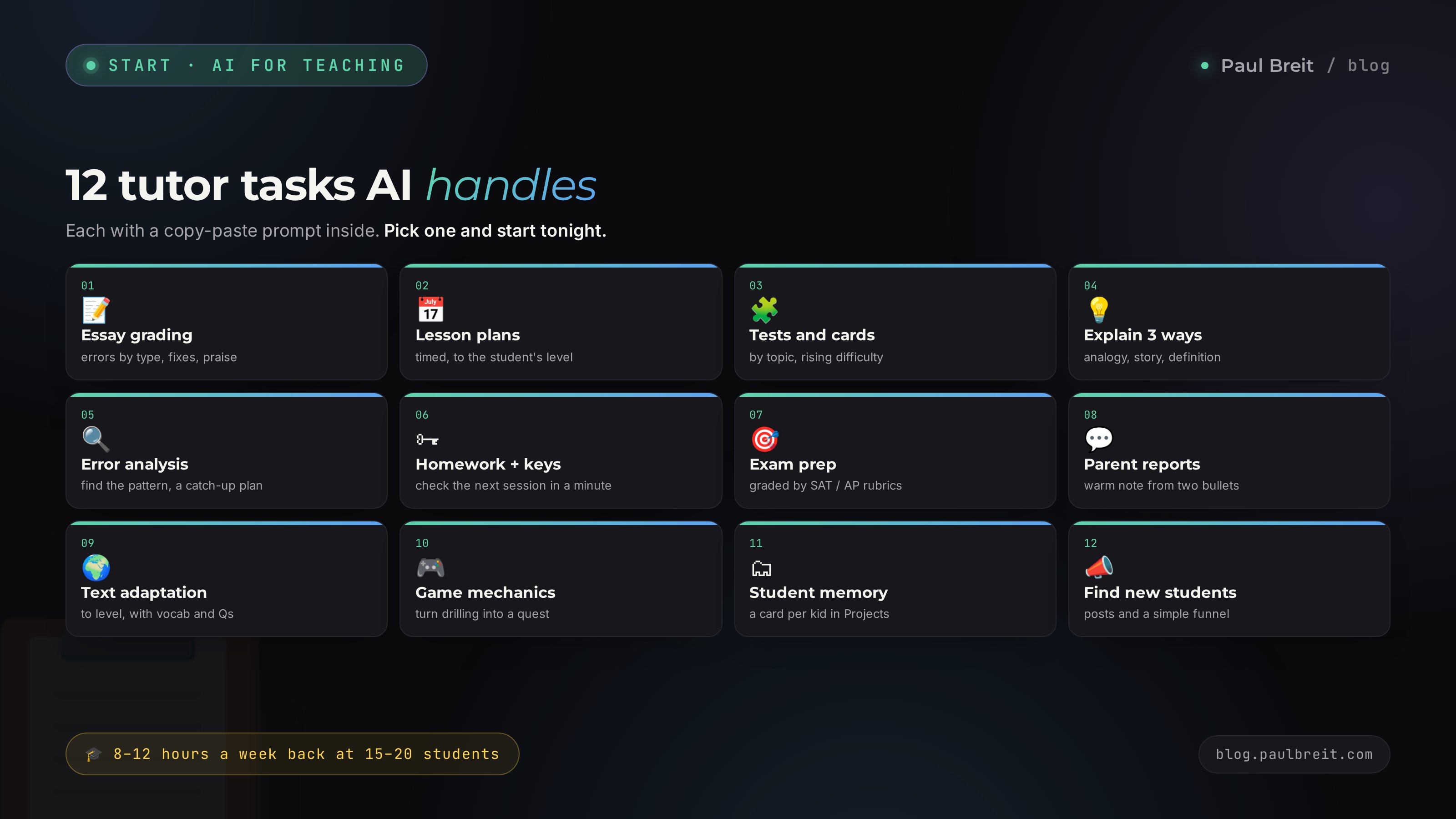
- Essay grading – errors by type, fixes, and praise in minutes
- Lesson plans – timed, built to the student's level
- Tests and flashcards – by topic, rising difficulty, with keys
- Explain three ways – analogy, story, precise definition
- Error analysis – find the pattern, a month-long catch-up route
- Homework with keys – check the next session in a minute
- Exam prep – graded against SAT, ACT, and AP rubrics
- Parent reports – a warm note from two bullet points
- Text adaptation – to level, with a glossary and questions
- Game mechanics – turn drilling into a quest
- Student memory – a card per kid in Projects
- Find new students – posts and a simple funnel
FAQFrequently asked questions
Which AI should a tutor start with?
Claude or ChatGPT is the easiest place to start. For grading text, lesson plans, and tests the free tier is plenty. If you work daily across several subjects, get Claude Pro at $20 a month: it holds long context and is cleaner with wording.
Will AI replace tutors?
No. AI takes the busywork: grading, prepping materials, tests, parent reports. Live explanation, the connection with the child, and motivation stay with you. Parents pay for a person who carries a kid to a result, not for someone who grades papers.
Can I give AI real student work?
Anonymize it. Strip names, phone numbers, addresses, and other personal data before you paste the text into a chat. The content of the work itself, the solution, or the essay is fine to send; the child's personal data is not.
How accurately does AI check math and physics problems?
At the school level it does well, but double-check the arithmetic and the final answer by hand. The model sometimes slips on calculations. Ask it to show the work step by step, so an error is easy to spot and catch.
How much time does AI save a tutor per week?
With 15 to 20 students, 8 to 12 hours. The biggest savings come from grading written work, prepping materials to a student's level, and writing parent reports after sessions.
Do I need to know how to program?
No. The whole job is ordinary messages in a chat in plain English. You write what you need, the AI answers. Not a line of code, no settings, no software to install.
How much does it cost to get started with Claude?
Nothing to try. The free tier of Claude covers grading, plans, and tests while you learn. When you run daily across several students, Claude Pro at $20 a month pays for itself with the first evening of grading you skip.