Claude 5, GPT-5 and Gemini 3: what changed and which one fits you
In 2026 the three big AI models took a leap the industry used to spread over years: they can now hold a whole book in memory, run chains of tasks on their own, and understand not just text but images, documents, and in places video and sound. Here's the no-hype version – what actually changed in Claude, ChatGPT, and Gemini, how they differ, what they cost, and which one to pick for your work if you sell services, courses, or consulting and want AI working for you instead of eating your evenings.
In 2026 all three models gained a context window near a million tokens, learned to run chains of tasks on their own, and can read images and documents. Claude 5 is strongest at code and long tasks, GPT-5 is the most versatile with a huge ecosystem, and Gemini 3 is best at multimedia and price. For writing and code go with Claude, for everything in one place go with GPT, for video, PDFs, and volume go with Gemini.
You open the news and every week there's a new AI that "changes everything." Claude 5, GPT-5, Gemini 3, and a dozen more names with numbers. You feel like you should figure it out, but there's no time, and a quiet worry sits underneath: pick the wrong one and you'll waste money and nerves for nothing. So a lot of people just put it off and keep doing by hand what AI would do in a minute.
I run four client projects and a channel with 20,000 subscribers, and all three models are in my workflow every day. This article is the honest version with no ad copy: what changed in 2026, how Claude, ChatGPT, and Gemini differ, and which one to pick for your specific work.
It's a 22-minute read. At the end there's a checklist that tells you in five minutes which AI is yours. And a section on access from blocked regions – because all three officially keep some countries out, and that's worth knowing how to get around.
What's inside
- What actually happened in 2026 (quick primer)
- Claude 5 by Anthropic: code, long tasks, clean text
- GPT-5 by OpenAI: the all-rounder with the biggest ecosystem
- Gemini 3 by Google: multimedia, volume, and price
- The whole thing in one table
- Which one fits you: a task-by-task breakdown
- How to get access from a blocked region
- 5 mistakes when picking an AI
- Checklist: choose in 5 minutes
- Frequently asked questions
Section 01What actually happened in 2026
Let's keep it plain. Back in 2024 an AI was a smart conversation partner: ask a question, get an answer. Sometimes sharp, sometimes made up. It remembered little, understood images poorly, and a complex task had to be split into ten small ones with you leading it by the hand. By 2026 all of that changed, and it changed across all three leaders at once. Here are the four shifts worth understanding before you compare models by name.
Memory grew to a whole book
An AI used to hold a few pages of the conversation and start forgetting the beginning. Now Claude 5, GPT-5, and Gemini 3 have a context window near a million tokens. In plain terms that's about 700 pages of text in one pass. You can drop in your entire course, a year of client correspondence, a hundred-page contract, or the transcript of an hour-long stream and ask it to work through the whole thing at once instead of in chunks. For anyone who works with text and documents, that changes the game.
AI learned to do, not just advise
A new word showed up: "agentic." It sounds heavy; the idea is simple. The model now runs a chain of steps on its own. Not "here's an instruction, take it from here," but "done, checked, fixed, here's the result." Ask it to build a landing page and it writes the copy, lays out the page, and checks that nothing broke. Ask it to tidy a spreadsheet and it opens it, does the math, formats it. You set the goal, the AI walks toward it. More on this shift in what you can do with AI.
It sees images, documents, and in places video
This is called multimodality. All three models now understand more than text: show a screenshot and they'll explain what's wrong; drop in a photo of a handwritten note and they'll transcribe it; upload a PDF contract and they'll flag the traps. Gemini went furthest and understands video and audio natively: hand it a clip or a call recording and ask for a summary. How to put this to work in content is in using AI on your phone.
Price fell, quality rose
A year ago a smart model cost real money at volume. Now the same tasks run for a fraction of that, and the junior models in each family got good enough that for most everyday work you don't need to pay at all. All three have a free tier and a paid plan around $20 a month that removes limits and unlocks the top models. In other words, the barrier to entry today is close to zero – the only question is which one to pick.
Next, each of the three on its own: where it's strong, where it's weak, and who it's built for. We'll start with the one closest to our kind of work – text, content, and automation.
Section 02Claude 5 by Anthropic: code, long tasks, clean text
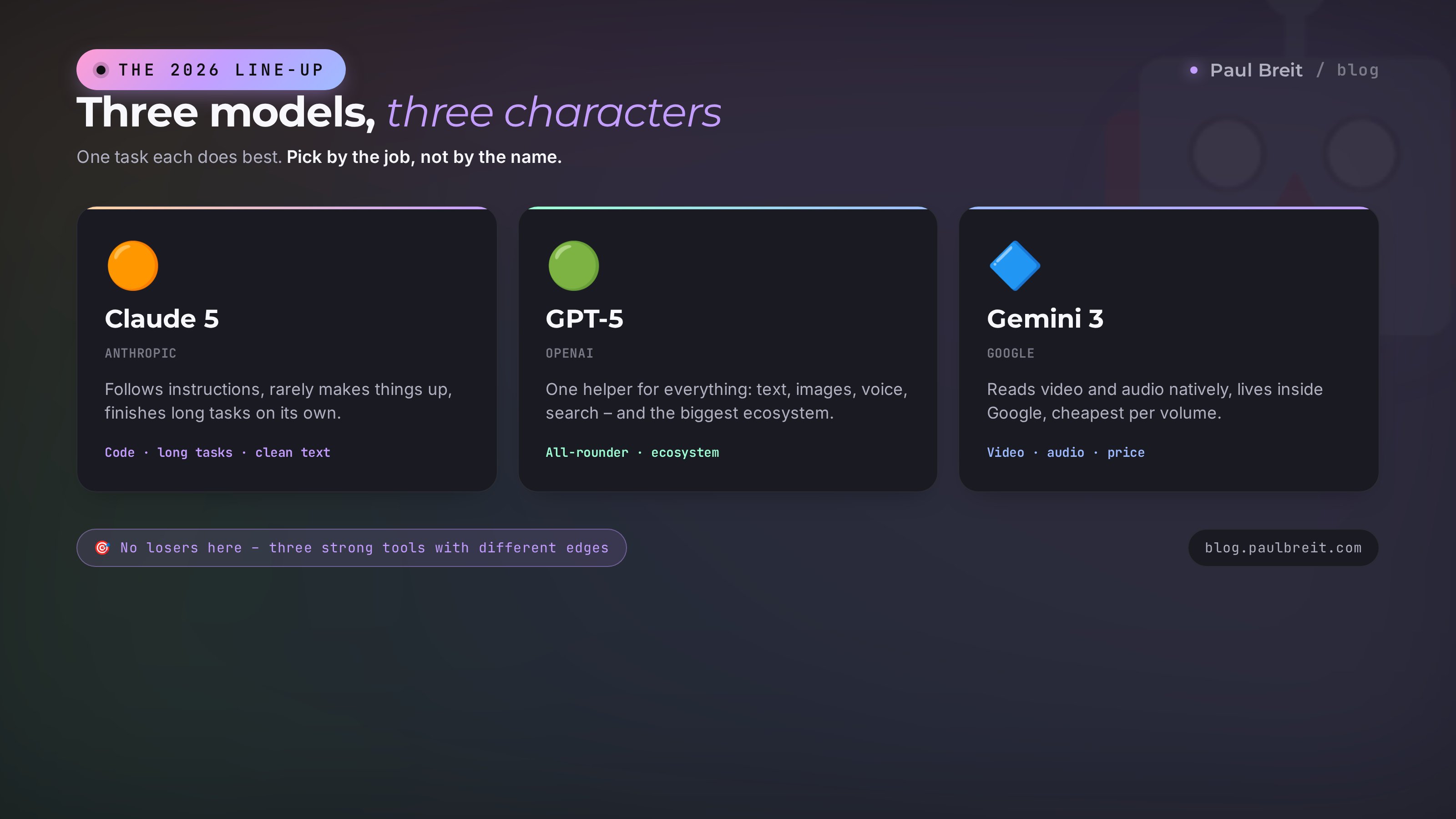
Claude is made by Anthropic. In one line: it's the most careful, most grown-up AI of the three. It makes things up less often, follows instructions more precisely, and holds a long task all the way to the end without your constant babysitting.
A family, not a single model
Claude 5 isn't one button but a lineup for different tasks and budgets:
- Opus – the flagship. For the hard stuff: building an app, working through a big project, running a long analysis. Smart and thorough.
- Sonnet – the sweet spot. Faster and cheaper than Opus, and on everyday work barely behind on quality. This is where most people live.
- Haiku – the fastest and cheapest. For simple, high-volume jobs: sorting, classifying, short replies.
The point of the lineup is simple: don't pay for the flagship where the middle will do. Inside the Claude chat you just pick the model for the task.
Where Claude beats everyone
First, code. If you need to build a site, an app, a Telegram bot, or make sense of someone else's project, Claude more often than its rivals gets to a working result without manual fixes. It's no accident that developer tools are built on it. And you don't have to code yourself: you describe in words what you need, and Claude writes it. More on that approach in building a site by voice with Claude.
Second, long autonomous tasks. Claude works on one big goal for a long stretch without drifting off halfway. Give it the transcript of an hour-long webinar and ask it to build an article, key points, and posts – it delivers something coherent, not a pile of fragments.
Third, text and instruction-following. Claude writes cleaner, pads less, and holds your requirements more precisely: formal or casual, no corporate mush, in a specific tone. For people who earn a living on content, that's decisive. How to brief it so you get what you want on the first try is in how to write prompts.
Here's what it looks like in practice. I hand Claude the transcript of my hour-long live stream – thousands of words of raw text with slips and repetition. I ask it to build a blog article, five channel posts, and reel talking points out of it, keeping my voice and inventing no numbers. A few minutes later I have coherent text I only need to proofread, not rewrite from scratch. That used to eat a full working day; now it's half an hour. That's why people who live on content keep Claude in the rotation.
Weak spots
Claude isn't an all-in-one machine. It doesn't generate images inside the chat, it has a leaner set of built-in extras, and fewer third-party integrations than ChatGPT. Voice mode and image generation aren't its thing. It's a tool for people who value quality of text, code, and reliability over the long haul, not "everything in one."
You, if you write a lot, automate your work, build sites and bots, or run long tasks where it matters that the AI carries everything to the end without making things up. As a price reference, the top model runs around $5 per million input tokens and $25 for output – but on a $20-a-month plan you never think about tokens at all.
Section 03GPT-5 by OpenAI: the all-rounder with the biggest ecosystem
GPT-5 is the model inside ChatGPT, the most famous and most widely used service. If Claude is the careful specialist, GPT-5 is the all-purpose helper for everything at once. It isn't always first in a narrow task, but it does more different things in one window than anyone else, and an ecosystem has grown around it that the others don't have.
What it does out of the box
In a single chat GPT-5 writes text, searches the web, generates images, works by voice, reads documents, and analyzes photos. No hopping between services: draft a post, generate a cover for it right there, ask it to voice it – all in one place. For someone who wants one helper for every small work and life task, that's a huge plus.
A real example. You're prepping a channel post: you ask GPT-5 for three text variants on your topic, pick the best, then in the same window ask it to draw a cover in the right style, and follow that with a short voiceover to narrate the post. Three tasks, one service, ten minutes. Neither Claude nor Gemini pulls off "all in one" this smoothly – you'd be assembling it from pieces across different places.
Ecosystem and habit
ChatGPT is built into thousands of third-party services, has slick apps on every device, and is used by more people than any other. That means an ocean of tutorials, ready-made solutions, and people to ask. If you're just stepping into AI, ChatGPT is the softest entry: whenever something's unclear, the answer is a minute of searching away. Where to start as a beginner is covered in what you can do with AI.
Weak spots
Versatility is also a downside. On genuinely hard code and very long tasks, GPT-5 more often than Claude needs manual fixes and supervision. It can be wordy, and it sometimes presents what it isn't sure of with more confidence than it should – you have to fact-check behind it. And the top model costs a touch more than rivals on output tokens. But as a daily helper across a wide range of tasks, it's still one of the best.
You, if you want one helper for everything – text, images, search, voice, document analysis – and you care about an easy start and a huge community. The ideal first pick for a beginner and a dependable Swiss-army knife for everyday tasks. As a price reference, the top model is around $5 per million input tokens and $30 for output; there's a free tier and a plan around $20 a month.
Section 04Gemini 3 by Google: multimedia, volume, and price
Gemini is made by Google, and its main advantage follows directly from that: it works with multimedia better than anyone and is more deeply built into the services you already use every day.
King of video, sound, and documents
The other models understand images and text. Gemini 3 also understands video and audio natively. In practice: upload an hour-long recording of a stream, webinar, or call and ask for a summary with timestamps; hand it a competitor's clip and ask it to break down the structure; drop in a 900-page PDF and find what you need. For anyone working with large volumes and mixed formats, it's the most powerful of the three. How to use this in content is in what you can do with AI.
An example. You've stacked up ten webinar recordings over a quarter and need to turn them into a knowledge base. You upload the clips to Gemini and ask for a summary with timestamps, a topic list, and client quotes for each one. That used to be a week of manual work with scrubbing; now it's one evening. No other model in the trio works with video and sound this directly, with no transcription step first.
It lives inside Google
Gemini is built into Search, Gmail, Google Docs and Sheets, and Android. It sees your emails and files (with your permission) and helps right where you work – nothing to copy into a separate chat. If your life is already in the Google ecosystem, Gemini plugs in with almost no effort.
The best price per volume
At the same million-token context window, Gemini 3 costs noticeably less than its rivals – roughly $2 per million input tokens and $12 for output. For jobs that push a lot of data through the model, that's the deciding factor: the same work runs for a fraction of the cost.
Weak spots
On text polish and reliability on hard code, Gemini trails Claude in places – it can be less predictable in fine phrasing. And the deep tie to Google cuts both ways: handy if you're in the ecosystem, extra baggage if you're not. But on the combo of multimedia plus volume plus price, nothing today beats it.
You, if you work with video, audio, and large documents, push a lot of data through AI, and already live in Google's services. The best value for the money when you're working at volume. The free tier is generous, and the paid plan is in the same $20-a-month range.
Section 05The whole thing in one table
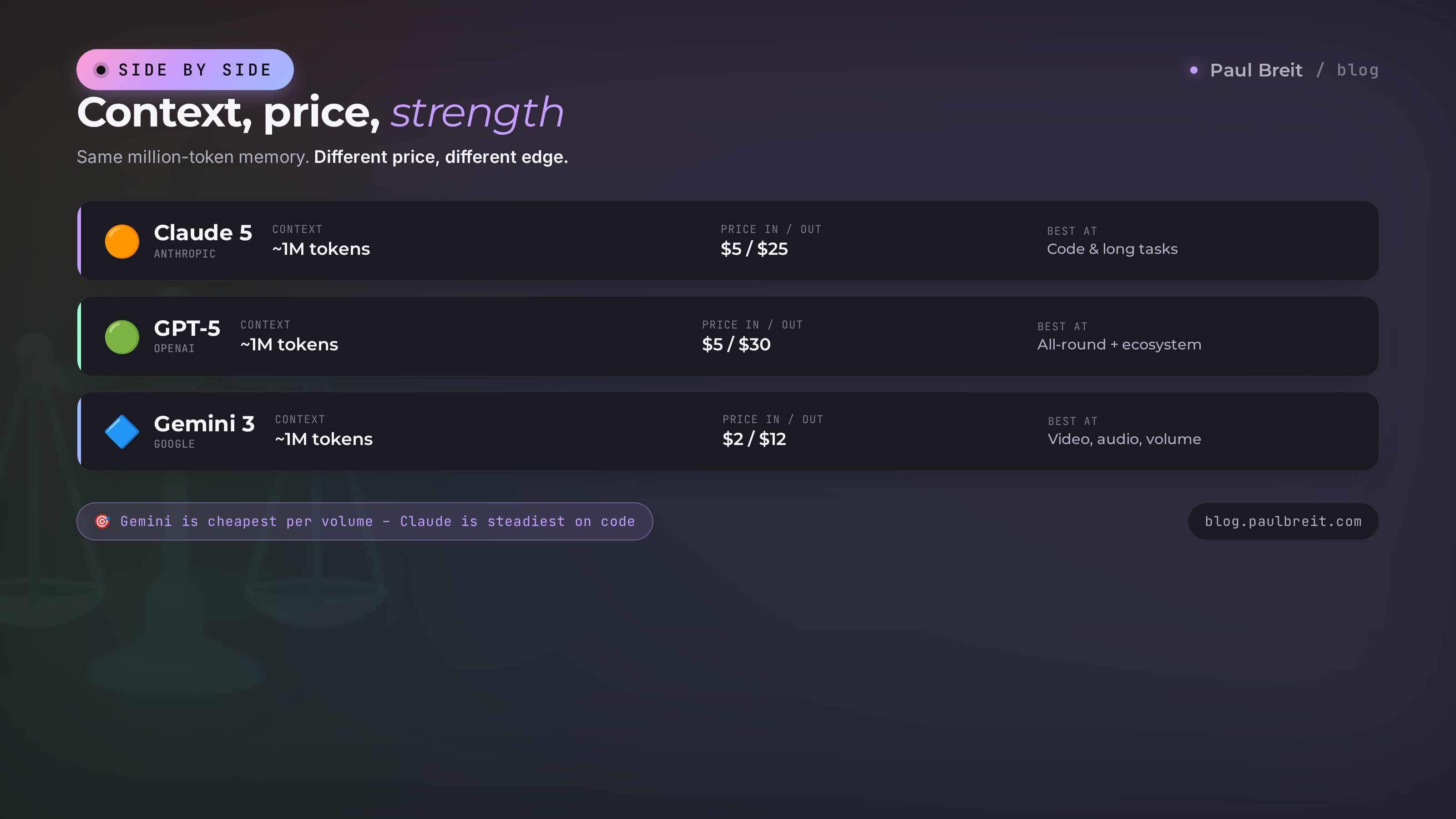
I put the essentials in a table so you can see it at a glance. Prices are approximate, per million tokens, for the top models; versions inside each family update often, but the balance of power holds.
| Parameter | Claude 5 | GPT-5 | Gemini 3 |
|---|---|---|---|
| Made by | Anthropic | OpenAI | |
| Context window | ~1M tokens | ~1M tokens | ~1M tokens |
| Price (in / out) | ~$5 / $25 | ~$5 / $30 | ~$2 / $12 |
| Strength | Code, long tasks, clean text | Versatility, ecosystem, images and voice | Video, audio, volume, price |
| Weakness | No image generation, fewer extras | Wordiness, supervision on hard code | Less predictable on fine text |
| Multimodality | Text, images, PDF | Text, images, PDF, voice, image generation | Text, images, PDF, video, audio |
| Ecosystem | Developer tools | Thousands of integrations, biggest community | Search, Gmail, Docs, Android |
| Availability | Worldwide, VPN where blocked | Worldwide, VPN where blocked | Worldwide, VPN where blocked |
| Best for | Text, code, automation | First pick and all-rounder | Multimedia and large volumes of data |
The main takeaway from the table: there are no losers. There are three strong tools with different characters. Next – how to choose for a specific task.
Section 06Which one fits you: a task-by-task breakdown
The most honest way to choose isn't reading benchmarks – it's looking at what you actually do most often. Let's go through the real tasks of someone who sells services, courses, and consulting.
I write text: articles, posts, emails
First pick – Claude. It writes cleaner, livelier, and pads less, and it holds tone and requirements more precisely. A good pairing is two models: Claude drafts and proofreads, ChatGPT quickly spits out headline variants and draws a cover for the post on the spot. If it's one budget – take Claude. More on which model writes best is in the best AI for writing.
I make social content with images
Here GPT-5 is handier: text and image in one window, no hopping between services. Sketch a carousel idea and get the visual right away. Gemini shines when the content is built around video: breaking down someone else's clip, drafting a script, summarizing a stream.
I'm building a site, a bot, or an app
Claude, no contest. On code and technical tasks it gets to a working result more reliably than the rest, and you can explain in ordinary words. GPT-5 is a solid second, especially if you're already in its ecosystem.
I work with video, audio, and big documents
Gemini 3. Summarizing an hour-long stream, breaking down a clip, searching a hundreds-of-pages contract – that's its element. Neither Claude nor GPT understands video and sound as natively.
I analyze data: spreadsheets, reports, correspondence
If there's a lot of data and price matters, Gemini is cheaper at volume. If accuracy of conclusions matters and you're worried the AI will "invent" things that aren't there, Claude is more reliable. For one-off jobs any of them will do.
I'm just starting, I can't do anything yet
GPT-5. The softest entry, the biggest community, everything is a minute of searching away, all in one window. Once you're comfortable, add Claude for text and code. To start from the basics, see what you can do with AI.
Experienced users almost always keep two AIs. Not because it's trendy, but because each has its own character: one writes text, another draws and searches, a third breaks down video. Two subscriptions at $40 a month pay for themselves with a single saved working day. Start with one for your main task; add the second when you hit its ceiling.
Section 07How to get access from a blocked region
The uncomfortable truth: all three services officially don't operate in some countries and block sign-in by IP address. But getting connected is doable, and it works the same way for all three. Here it is step by step, for anyone who's outside the US or EU where access is restricted.
Step 1. A VPN with the right location
You need a VPN with a Europe or US location. Reliable options include Proton VPN, Mullvad, and similar. One important nuance: Turkey and UAE locations are on Anthropic's blacklist (that's Claude) – sign-in won't go through them. Use Europe or the States. Keep the VPN on both during sign-up and every time you log in.
Step 2. An email not on a blocked domain
Register with a Gmail or iCloud address. Emails on blocked local domains often fail registration. If you don't have a suitable one, make a fresh account with the VPN already on, so the account isn't tied to a blocked footprint from the first second. This matters especially for Claude.
Step 3. Paying for a subscription
The paid plan removes limits, and that's a noticeable convenience. You can pay with a foreign card (yours or a relative's abroad) or through proxy services that pay for foreign subscriptions on your behalf for a small fee. You can use the free tier without paying at all – it's enough to start.
To register: Claude at claude.ai, ChatGPT on OpenAI's site, Gemini through a Google account. The scheme is the same everywhere: VPN, an email on an allowed domain, and payment if you want it.
There are regional and open models – for example DeepSeek and other open models – that run without a VPN and handle simple tasks fine. But on hard code, long tasks, and multimedia they still trail the top three. For light, everyday work they can be enough on their own.
Section 085 mistakes when picking an AI
Watched it play out with clients and in my own channel. Here are the five rakes people step on most often.
Mistake 1. Choosing by the loudest name
"A new one dropped, so it must be the best." No. The best is the one that solves your task. For writing, the benchmark winner on code can turn out worse than a calm middle-of-the-road model. Task first, model second.
Mistake 2. Taking only the free version and deciding AI is weak
The free tier often runs on junior models with tight limits. Someone tries it, gets a weak answer, and concludes "AI is overrated." They just never saw the top model. Even a month of the paid plan up front pays for itself in understanding what the hardware can really do.
Mistake 3. Demanding everything from one model
One AI won't be simultaneously best at code, images, video, and price. Those are different strengths from different makers. Expecting all of it from one means being slightly unhappy all the time. Two models for different tasks make the problem go away.
Mistake 4. Not checking facts
Any AI can confidently produce something that doesn't exist. Especially with numbers, dates, names, and legal details. Claude invents less often, but it's no guarantee. Anything that goes to a client or into publication, check yourself. AI is a strong helper, not a source of truth.
Mistake 5. Setting bad tasks and blaming the model
"I asked and it answered nonsense" usually means "I asked badly." The more specific the task, context, and desired format, the better the result from any of the three. Half an hour spent learning to set tasks pays off on every request. The breakdown is in how to write prompts.
Section 09Checklist: choose in 5 minutes
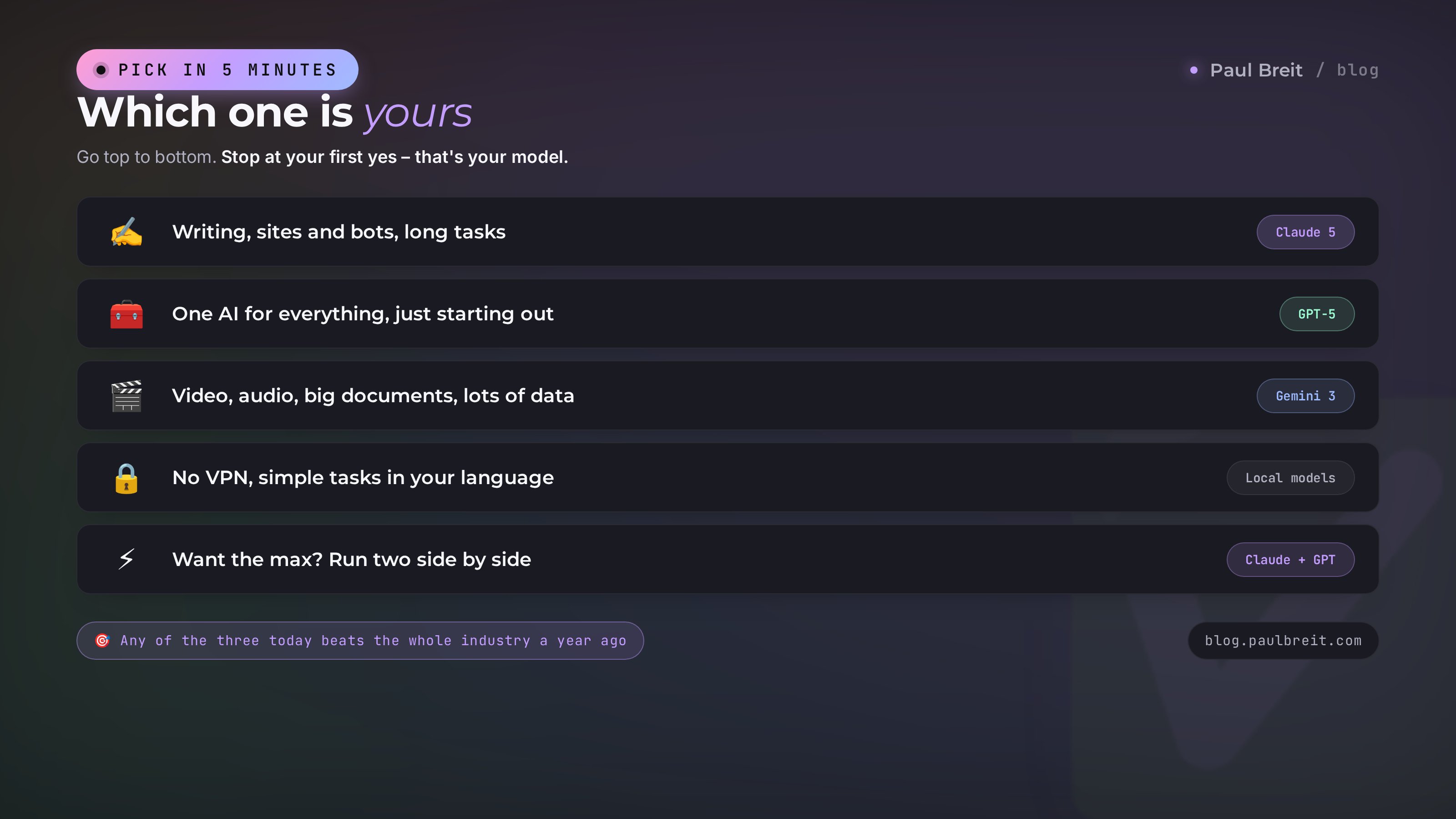
Go top to bottom and stop at the first "yes" – that's your pick.
- Write a lot and want living text, or build sites and bots, or run long tasks? → Claude 5.
- Need one helper for everything and you're just starting? → GPT-5.
- Work with video, audio, big documents, or push a lot of data for the savings? → Gemini 3.
- Not ready to bother with a VPN and payment, and your tasks are simple? → regional or open models like DeepSeek.
- Want to squeeze out the max and ready to keep two? → Claude for text and code plus GPT for images, search, and all-purpose tasks.
And the main thing – don't get stuck on the choice. Any of the three today is stronger than the whole industry was a year ago. Take one, work with it for a week, get a feel for its character. Picked wrong? You'll switch – all your data and habits carry over easily. It costs far more to pick none and keep doing by hand what AI would do in a minute.
In 2026 the three big AI models – Claude 5, GPT-5, Gemini 3 – gained memory for a whole book, learned to run chains of tasks on their own, and can understand images and documents. Claude is stronger at code, long tasks, and clean text. GPT is the most versatile, with image generation, voice, and the biggest ecosystem, the best entry for a beginner. Gemini is the king of video, audio, and volume and the best value on price. Where access is blocked, all three need a VPN and an email on an allowed domain. Choose by the task, keep two when you can – and don't drag your feet on adopting them.
FAQFrequently asked questions
Which AI is the best in 2026?
There's no single winner. Claude 5 is strongest at code and long tasks, GPT-5 is the most versatile with the biggest ecosystem, and Gemini 3 is best for video, audio, and PDFs and on price. Pick by the task, not by the loudest name.
How is Claude 5 different from GPT-5?
Claude follows instructions more carefully, makes things up less often, and holds long autonomous tasks better – building an app or working through a big document end to end. GPT-5 is more versatile: it generates images, works by voice, plugs into thousands of services, and makes a handy everyday helper for everything.
What can Gemini 3 do that the others can't?
Gemini 3 understands video and audio natively: drop in an hour-long recording or a clip and ask for a summary. It's also built into Google – Search, Gmail, Docs, Android – and costs less than its rivals at the same million-token context window.
How much does it cost and are there free versions?
All three have a limited free tier and a paid plan around $20 a month that unlocks the top models and removes limits. For everyday tasks the free version is often enough; for real work and volume, people go paid.
Which AI should I pick for writing and content?
For living text, articles, and posts most people reach for Claude – it writes cleaner and pads less. For quick ideas, headlines, and an image to go with a post, GPT-5 is handy. A good habit is to keep two: one to draft, the other to polish.
Which one for code and apps?
Claude 5 is usually the first pick for code and long technical tasks: building a site, app, or bot from a description, or making sense of someone else's project. GPT-5 and Gemini 3 can do it too, but Claude more often finishes without manual fixes.
How do I use these outside the US or EU?
If your region is blocked, you'll need a VPN with a Europe or US location and an email that isn't on a blocked local domain – Gmail or iCloud. Pay with a foreign card or through a proxy service. More detail is in the access section above.
What about regional or open models like DeepSeek?
They run without a VPN and handle simple tasks fine. But on heavy code, long tasks, and multimedia they still trail the top three. For light, everyday work in your own language they can be enough.