How to Choose an AI Tool: A 5-Minute Picking Scheme
Hundreds of AI tools, each good at its own thing. This article gives you a simple scheme: five questions to ask yourself and a 2026 map of tools for text, images, video, voice and code. Five minutes from now you'll know exactly what to open for your task, without wasting money on a plan that doesn't fit.
To choose an AI tool, answer five questions: what output you need (text, image, video, voice, code), what budget you have (free or up to $20 a month), whether you're fine starting on a free tier before paying, how much your language and niche context matter, and how sensitive the data is that you upload. For text and documents, use Claude or ChatGPT; for images, Midjourney or FLUX; for video, Runway or Kling. Run the final check with the same prompt on two or three tools and keep the one that needs the fewest edits.
You open a roundup called "50 best AI tools" and five minutes later your head is mush. Every creator hypes their own pick, every tool has a hundred uses, and it's not clear where you should start. That leaves two outcomes. Either you grab the first one, get let down, and decide "AI just isn't for me." Or you grab none and keep spending hours on work an AI would finish in a minute.
I work with AI every day: writing copy, building funnels, editing video, running client projects and a personal channel with 20,000 followers. Over two years I've tried almost everything that shipped, and I've made my share of bad picks. Let me lay the choice out step by step so you don't drown in reviews.
You'll read this in 20 minutes. You'll remember the scheme in five. And after that, for any task, you'll open the right tool without second-guessing and without money wasted on a plan that never fit.
What's inside
- Why "which AI is best" breaks your decision
- The 5-minute scheme: five questions to yourself
- The 2026 AI map: who's good at what
- Task by task: a "job to tool" table
- Free or paid: when it's time to reach for your card
- Free vs paid and privacy: how to decide
- The one-prompt test: compare in 10 minutes
- 5 mistakes when choosing an AI tool
- Ready-made AI stacks by niche
- The whole path in a minute
- The picking checklist
Section 01Why "which AI is best" breaks your decision
An AI is a tool. A hammer isn't better than a screwdriver; they do different jobs. It's the same with AI. When you ask "which AI is the best," you're asking "which tool is best overall." There's no answer to that, and any roundup online only muddies the water: it dumps tools for text, images, video and code into one pile, as if you could rank them against each other.
Every AI is tuned for its own thing. Some write and reason well. Others draw beautifully but won't build you a spreadsheet. Some are steady with numbers and analysis but weaker at long-form prose. There are universal chat assistants that handle almost everything at a solid level, and there are narrow tools that do one thing a head above the rest.
A simple example. Claude is strong at long text, holds style carefully and reads big documents. Midjourney draws images at studio-photo quality but won't write your post. Perplexity gives you an answer with links to the sources, while a pure chat model just makes claims. Ranking them "who's better" is pointless. They're about different things.
So the right question sounds different: what do I want to get as the output? A finished post? A cover image? A video from a photo? A call transcript? Once you answer that, the list narrows from a hundred options to two or three. After that, the choice takes five minutes. If you're just starting and don't yet know what AI can even do, take a look at the piece on 10 tasks without a single line of code – it lays out the whole range with examples.
Forget "top AI tools." Keep only your task in mind. The tool is picked to fit it, and comparing a chat assistant to an image generator is like arguing whether a fridge or a kettle is more useful.
Section 02The 5-minute scheme: five questions to yourself
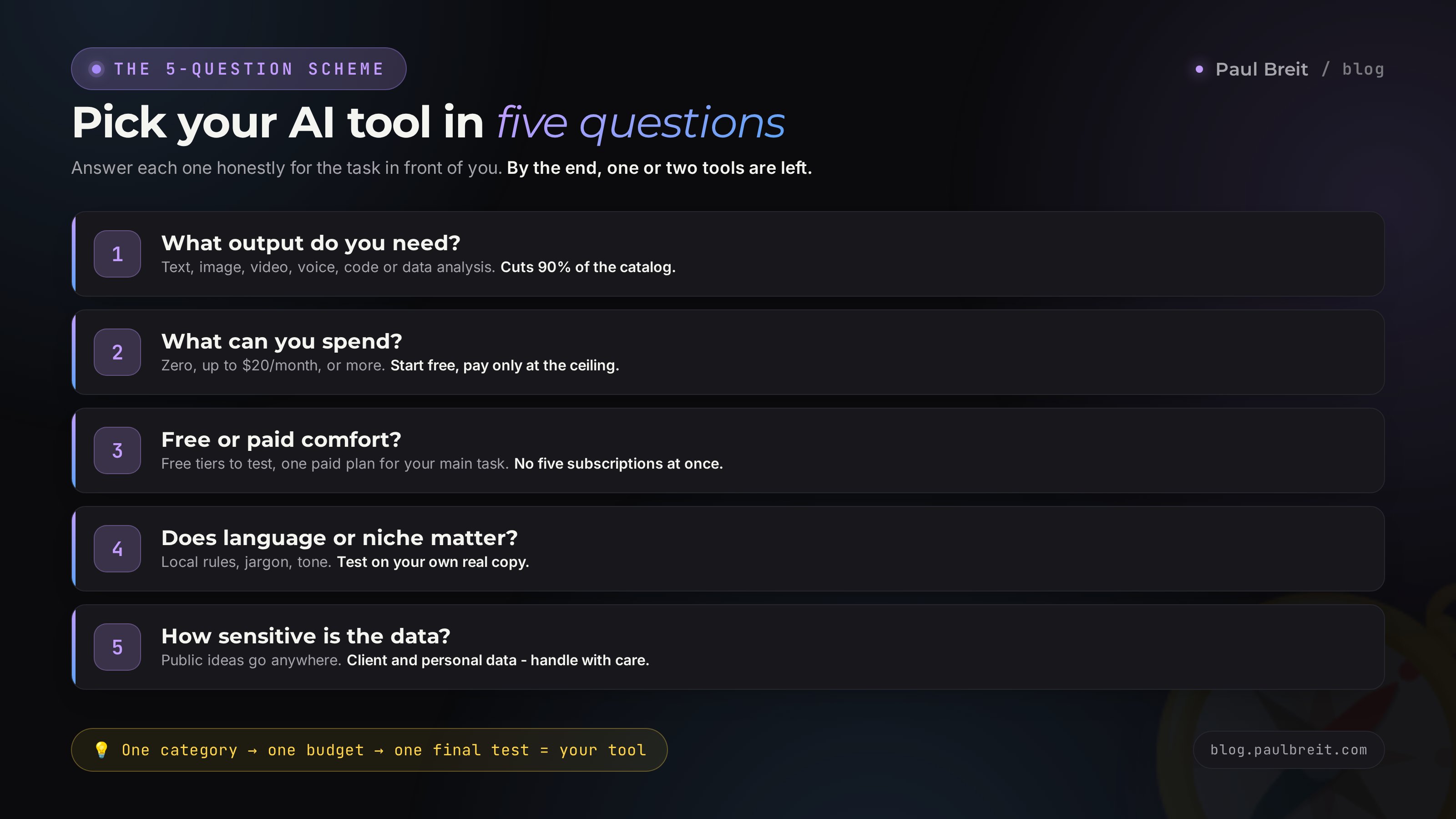
Here's the algorithm the whole article is built around. Five questions, each one cutting away the noise. Go through them in order, and at the end you'll have one or two tools left. Ask them honestly, for a real task, not "for the future in general."
What output do you need?
This is the main question, and it splits all AI tools into groups right away. Pick one: text (posts, articles, emails, client replies), image (covers, illustrations, avatars), video (clips, bringing photos to life), sound (voiceover, music), code (sites, scripts, automation) or data analysis (tables, calculations, document review). If you have several tasks, start with the one eating the most time by hand.
What can you spend?
Three answers: zero, up to about $20 a month, or more. At zero you use free tiers. Up to $20 opens one top-tier tool for your main task. More is for people already earning with AI who want every limit lifted. My advice: start at zero, ride the free tier to its ceiling, and only then pay.
Free tier or paid plan?
Decide how you want to start. Free tiers are enough to test everything and find your fit. A paid plan makes sense once you keep hitting a wall on your main task. Be honest: are you comfortable running a free version for a couple of weeks, or do you need the full model and priority access from day one? Most people should start free and upgrade only where it pays off.
How much do language and niche matter?
If your topic leans on specialized context – legal terms, medical detail, a specific trade or your audience's habits – test the tools on that exact material, not on a generic prompt. Top models handle natural English beautifully, but on narrow facts they sometimes make things up. For general writing, any top assistant will do.
What data are you uploading?
Public texts and ideas can go anywhere. Sensitive client data, personal records, trade secrets – handle with care. Major tools offer modes where your chats aren't used for training, but medical records and government IDs are better kept out entirely. When you work with clients' personal data, turn on the no-training setting and strip identifying details before you paste.
How it works on a real example
Watch how the scheme trims the noise. A therapist wants to run a newsletter and post a weekly breakdown. We walk the questions. Output – text (question 1, chat assistants remain). Budget – zero to start (question 2). Fine starting on a free tier (question 3, a free assistant it is). Topic is people and emotions, general language (question 4, any top tool works). Data is public, no specific clients named (question 5, no limits). Result: open ChatGPT or Claude free, write the first post today. No month of reading reviews.
Second example. A marketer makes article covers and edits short videos. Output – images and video (question 1, two different tools). Budget is there, the product already earns (question 2). Happy to pay for what works (question 3, full market open). No language dependency on images, text added by hand (question 4). Data public (question 5). Result: Midjourney or FLUX for images, Runway or Kling for video. Two subscriptions for two tasks, each doing its own thing at full strength.
Third example, so the scheme fully clicks. A tutor wants to prep assignments and explanations faster. Output – text (question 1). Budget zero, income still small (question 2). Comfortable on a free tier for now (question 3). Explanations are subject-specific, so test on real lesson material (question 4). The data is kids' names and progress, better kept out of a chat you don't control (question 5, privacy matters). Result: ChatGPT or Claude free for assignments and lesson plans, with no real student names in the prompts. As the workload grows, add HeyGen and record short video explainers without filming.
Section 03The 2026 AI map: who's good at what
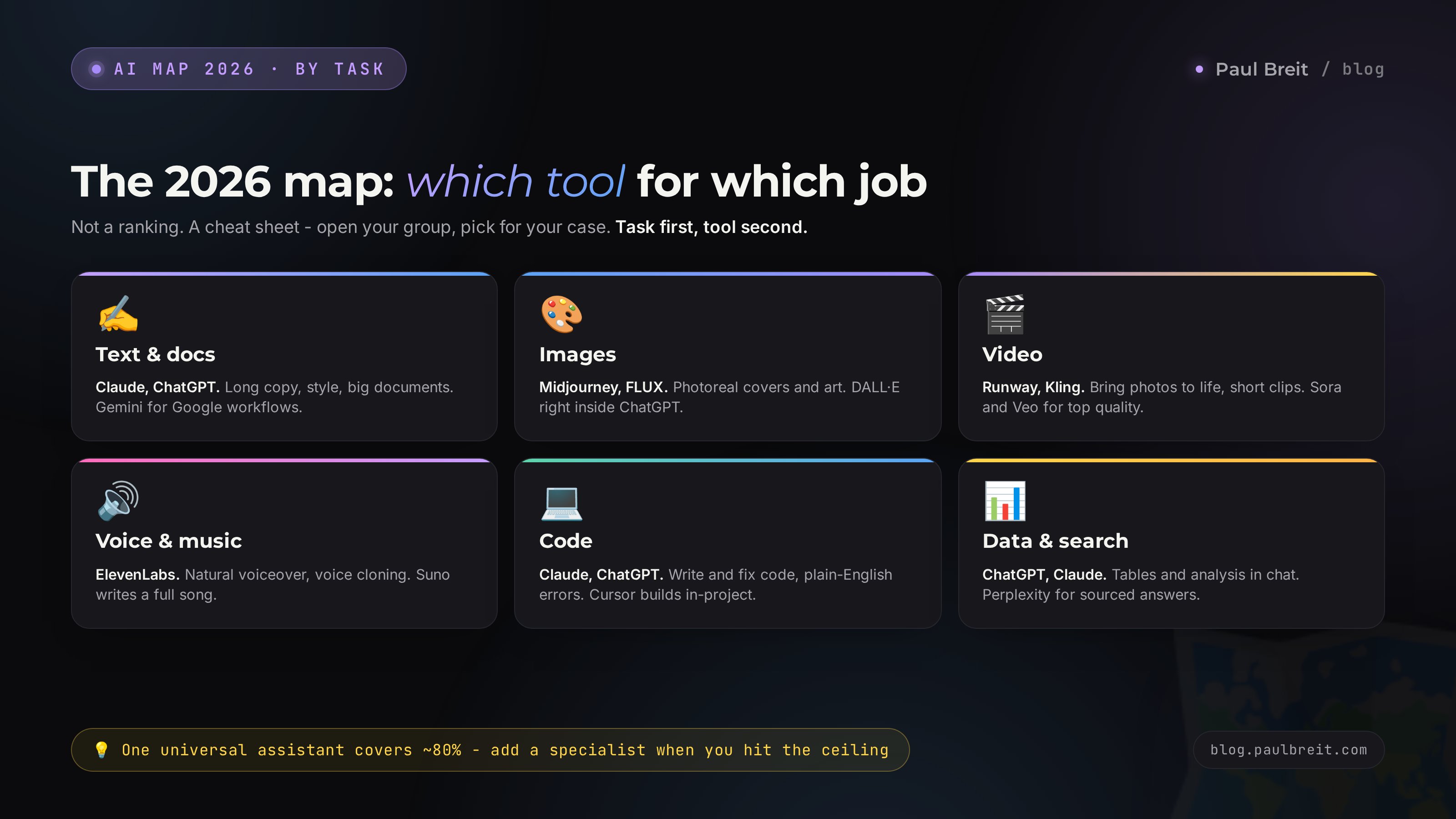
Now the map. I've grouped the tools and, for each, jotted its strong side and one caveat. This isn't a "best on top" ranking. It's a cheat sheet: open the group you need, pick for your case.
Universal or specialized: where to start
One principle before the map, and it saves months. All AI tools fall into two camps. Universal chat assistants like ChatGPT, Claude and Gemini handle a wide range of tasks at a good level: text, ideas, data review, simple code, translation. Specialized tools do one thing a head above: Midjourney draws, ElevenLabs voices, Runway edits.
For a beginner it makes sense to start with one universal assistant. It'll cover 80% of everyday tasks and show you exactly where you need something stronger. Once you hit the ceiling on a specific job – say, "good enough for me" images stop cutting it – that's when you add a specialized tool for that task. This way you don't pay for five subscriptions in month one and you're not torn between tabs before you've learned even one.
Text and documents
- Claude (Anthropic). Careful long text, natural style, a large context window – upload a whole document and work through it in one go. Caveat: the free tier has tighter usage limits.
- ChatGPT (OpenAI). The most versatile. Writes, searches the web, draws inside the chat, reads spreadsheets, talks by voice. Caveat: the style can read "glossy" and needs an edit pass.
- Gemini (Google). Strong with large volumes and tight integration with Google's apps. Caveat: best if you already live in Google Workspace.
- DeepSeek. Free and strong at logic and code. Caveat: with sensitive data be careful, the servers are in China.
- Perplexity. Answers with linked sources, great for research. Caveat: it's a search-first tool, not your go-to for long creative writing.
If you're choosing between the two heavyweights for text, I have a detailed breakdown: Claude vs ChatGPT – a comparison by concrete tasks, not marketing promises.
Images
- Midjourney. The benchmark for beauty and photorealism. Covers, art, concepts. Caveat: paid from the start, runs through Discord and the web.
- FLUX. A strong Midjourney rival, good at text-on-image and realistic faces. Caveat: usually accessed through third-party apps and the API.
- DALL·E (inside ChatGPT). Handy when you need an image right in the chat, mid-conversation. Caveat: quality trails Midjourney.
- Ideogram. Excellent at legible text inside the image – logos, posters, thumbnails. Caveat: a bit weaker on pure photorealism than Midjourney.
Video
- Runway and Kling. Bring photos to life, make short clips from text and images. The workhorses for reels. Caveat: generation costs credits, and long scenes are still hard.
- Sora (OpenAI) and Veo (Google). The highest-quality text-to-video today. Caveat: access is limited and credits run out fast.
- HeyGen. A digital avatar that speaks your script. Great for training clips without filming. Caveat: paid, and it takes tuning to look natural.
Voice and music
- ElevenLabs. Turns text into a lifelike voiceover, including a clone of your own voice. Sounds natural. Caveat: the free quota is small.
- Suno. Generates a full song from a description: music, vocals, lyrics. Caveat: for commercial use, check the license terms.
Code and automation
- Claude and ChatGPT. Write and fix code, explain errors in plain words. Work even for people who can't program. Caveat: for a big project you'll still want to check the output.
- Cursor. An editor where the AI writes code right inside your project. For people building sites and apps. Caveat: the learning curve is steeper than a chat.
Section 04Task by task: a "job to tool" table
The fastest way to choose is to find your task in the table. On the left is what you want to get, on the right where to start and why exactly there. The "why" column matters more than the name: it explains the logic, so you can find a substitute if a tool doesn't fit.
| Task | Where to start | Why |
|---|---|---|
| Write a post or article | Claude, ChatGPT | hold length, style and structure, edit to your notes |
| Research a topic with sources | Perplexity, ChatGPT search | give an answer and show where it came from |
| Read a long document or contract | Claude | large context window, careful takeaways without made-up facts |
| Cover or illustration for a post | Midjourney, FLUX | photorealism and controllable style |
| Image with readable text on it | Ideogram, FLUX | handle logos, posters and thumbnails cleanly |
| Short video from text or a photo | Runway, Kling | bring photos to life and generate clips for reels |
| Training clip without filming | HeyGen | a digital avatar speaks your script |
| Voice a text out loud | ElevenLabs | natural voice and cloning your own |
| Generate music or a jingle | Suno | a full song from a text description |
| Write or fix code | Claude, ChatGPT, Cursor | explain errors in plain words, good for non-programmers |
| Tables, calculations, analytics | ChatGPT, Claude | read the file and compute right in the chat |
| Translate while keeping meaning | Claude, ChatGPT, DeepL | translate by meaning, not word for word |
| Search with links to sources | Perplexity, ChatGPT search | give an answer and show its origin |
| Ideas and brainstorming | any chat assistant | for brainstorming the difference between tools is minimal |
If your task is writing content regularly in different formats, start with one universal assistant and teach it to write in your voice. I show how, step by step, in the piece on prompts: the right request pulls a stronger result out of an average AI than a hyped model does on a weak prompt.
Section 05Free or paid: when it's time to reach for your card
A common beginner mistake is paying for a subscription on day one, before you even know if the tool fits. Do the opposite. First squeeze the free tier dry, then pay for the place where you actually hit a wall.
What free tiers give you
There's more available for free in 2026 than it seems. ChatGPT and Gemini have solid free modes. Claude's free tier is enough to feel out its style. DeepSeek is fully open. Image tools like Ideogram and the free credits on others let you draw at no cost. That's enough to spend a month testing everything and figuring out what you actually need. I've gathered the full list of working free tools in a separate piece on free AI tools.
Free tiers come with a trap worth knowing up front. Often it's a trimmed-down model: it answers faster and simpler, while the smartest version hides behind the paid plan. So a first impression can mislead you both ways. A weak answer on the free tier doesn't always mean the tool is bad, sometimes it's just the junior model. And the flip side: excitement over a free demo can fade the moment you hit the daily cap on your third message. Test on your real workload, not on one showcase example.
Signals it's time to pay
- You hit the daily message cap right in the middle of your work.
- You need file uploads and large documents, and the free version doesn't have them.
- At peak hours the free access slows or drops, and you're on a deadline.
- You need a specific feature: high-quality image generation, a long context window, the priority model.
- The AI has started earning money, and the subscription pays for itself in one order.
What it costs
Ballpark for 2026. Claude Pro and ChatGPT Plus run about $20 a month each. Midjourney starts around $10. Many tools have a free tier that covers the basics. The sensible logic: one paid subscription for your main task covers most needs. You take a second subscription when you have two different recurring tasks, say text and images. Paying for five tools at once makes no sense, you won't earn back a single one.
Section 06Free vs paid and privacy: how to decide
A separate conversation, because two things trip people up more than the tool itself: whether to pay, and what's safe to upload. Let me break it into three questions: what the free tiers really cover, when the paid plan earns its keep, and how to keep your data safe.
What free actually covers
The free tiers of ChatGPT, Gemini and Claude go further than people expect. You can write posts, draft emails, brainstorm, read a document, sketch a plan – all at no cost. Image tools like Ideogram and free credits on others let you draw for nothing. If you want a quick result and don't feel like fiddling with billing, start here and see how far it takes you.
When paid earns its keep
The $20-a-month plans (Claude Pro, ChatGPT Plus) buy you three things: the smartest model, higher limits, and priority when the servers are busy. They pay off once the AI is part of your daily work and a single order covers the cost. Until then, a free tier is plenty. Start free, hit the ceiling on purpose, and only then upgrade the one tool your main task depends on. To register for Claude, use this link – claude.ai – and I've walked through the plans and billing in the piece on paying for Claude.
Before you paste anything sensitive, turn off training on your chats. Every major tool has the setting: in ChatGPT and Claude it's a toggle in privacy or data controls. For client work, strip names, emails and account numbers, and keep medical records and government IDs out entirely. Public ideas can go anywhere; private data needs a second of care first.
Keeping your data safe
The rule is simple. Public texts and ideas – anywhere, no worry. Sensitive material – client records, personal details, trade secrets – only with the no-training setting on and identifiers removed. Business plans on the paid tiers usually come with stronger data terms and won't use your inputs for training at all, so if you handle client data daily, that alone can justify the subscription. If you'd rather not upload something at all, don't; a quick manual pass is cheaper than a leak.
My practical takeaway. For quick everyday writing and general tasks, a free assistant is enough – ChatGPT or Claude. For serious work with long documents and code, pay for one of them and enable the privacy controls. For top-tier images, Midjourney or FLUX. Keep it to two tools you actually use: one for speed, one for the heavy lifting.
Section 07The one-prompt test: compare in 10 minutes
When you're still unsure between two tools, don't read ten more reviews. Test them yourself. The method is simple and honest: one task, one prompt, two or three tools, compare the results. Ten minutes gives you more clarity than a week of other people's opinions.
How to run the test
- Take a real task that's on your plate right now. The one that's due today, no made-up examples.
- Write one prompt with context and format requirements. Example: "You're the editor of a newsletter for therapists. Write a 200-word post on handling anxiety before an important conversation. Warm tone, no corporate speak, speak directly to the reader, end with a question."
- Run that same prompt word for word on two or three tools.
- Compare the answers on four criteria: accuracy, language, format, and how many edits it takes to get to a finished result.
- Keep the one that needs the fewest edits. That's your tool for this task.
The same prompt is the key condition. If you give each tool a different request, you're comparing your own wording, not the models. Identical input reveals the model itself. And yes, a weak prompt makes every tool look equally average, so learn to state the task clearly first.
One thing many people miss: run a series of three or four similar tasks, don't stop at a single answer. One answer is a lottery – the AI can land it or miss by luck. Run a few in a row and consistency shows: one tool holds the bar evenly, another swings from great to useless. In real work you need predictability, because rewriting every other answer costs more than doing it yourself. Keep a short list of three typical tasks and run any new tool you want to try through it.
Accuracy – no made-up facts or errors. Language – natural writing or wooden phrasing. Format – did it hit the length and structure you set. Edits – how many rewrites before it's ready to ship. The winner is the tool that holds the bar steadily across a series. One pretty answer is deceptive.
Section 085 mistakes when choosing an AI tool
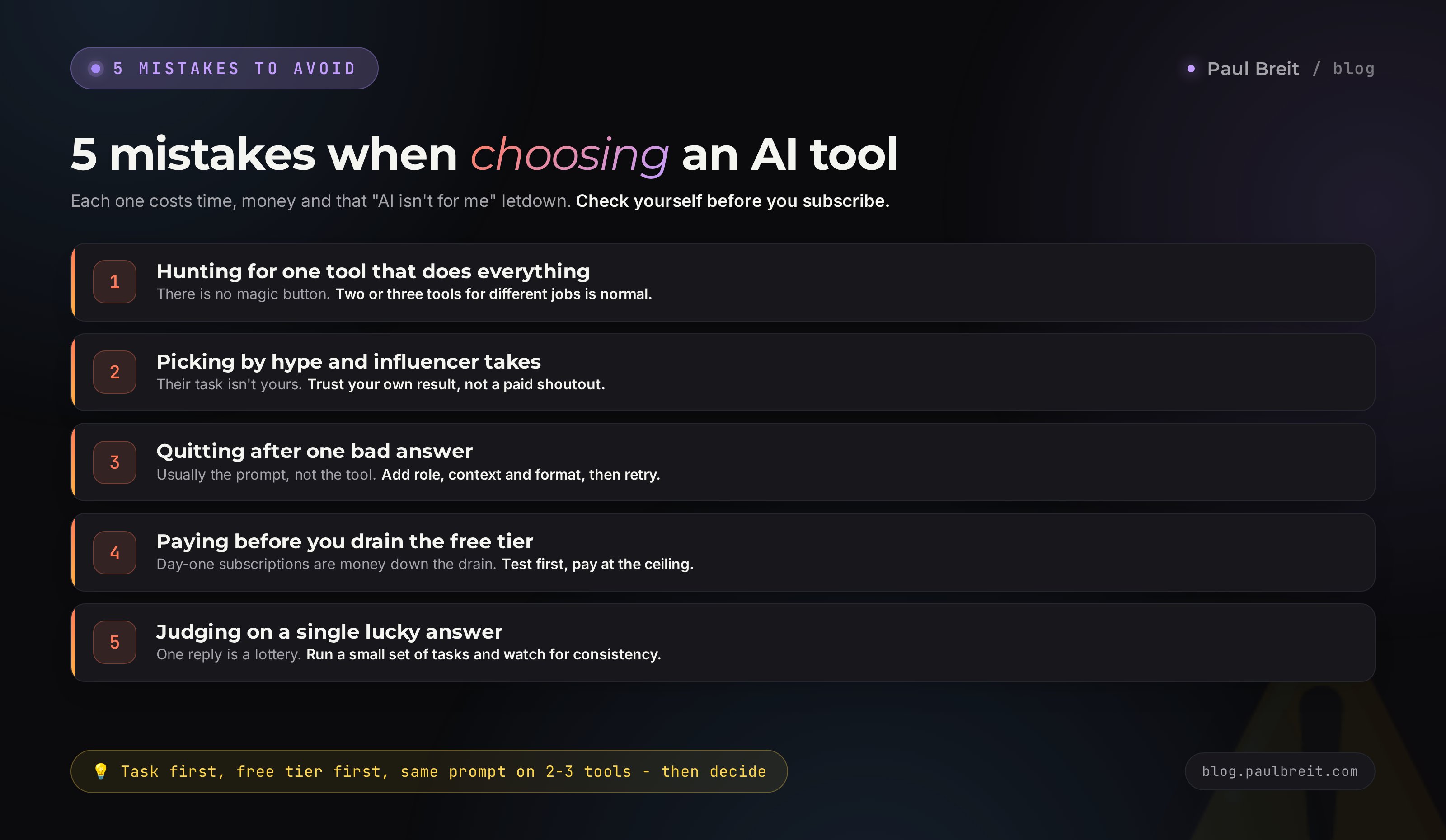
I've collected these five traps both on myself and on clients I helped bring AI into their work. Each mistake costs time, money and that exact letdown after which someone says "AI just isn't for me." Check yourself against the list before you sign up for your first subscription or write a tool off.
Hunting for one AI that does everything
The dream of a magic button makes sense, but it doesn't exist. A universal assistant handles text and data review, while images and video come from specialized tools. It's fine to keep two or three tools for different jobs. Everyday stuff, like owning both a phone and a laptop.
Picking by hype and influencer takes
A creator praises a tool because it fit their task, or because they were paid to. Your task is different. Your one reference point is your own output. Test the advice from a video with your own experiment from the last section, don't take it on faith.
Quitting after one bad answer
The AI spat out nonsense and you decided the tool is bad. More often the prompt is to blame. A vague request gives a vague answer from any model. Before switching tools, try rewriting the task more specifically: add a role, context, format and an example.
Paying before you drain the free tier
A subscription on day one is money down the drain until you know the tool fits. Free version first, a test on your own tasks, a sense of the ceiling. Pay once you know exactly which feature you're paying for.
Judging on a single lucky answer
One reply is a lottery: the AI can nail it or miss by chance. People try a tool once, love or hate the result, and decide forever. Run a small set of your real tasks instead and watch for consistency, because in daily work predictability beats a one-off wow.
Section 09Ready-made AI stacks by niche
So you don't build the choice from scratch, here are working stacks for different professions. The audience for AI is long past programmers and marketers: services, courses and consulting are sold by therapists, tutors, coaches, nutritionists, lawyers, trainers. Each has its own stack. Take them as a starting point and adjust to fit.
Therapist and coach
The base is Claude or ChatGPT for posts, framing client questions and structuring sessions. ElevenLabs for audio practices and voice-guided meditations. Ideogram or Midjourney for channel covers. Privacy comes first here, so don't paste specific client stories into prompts, work with anonymized examples.
Tutor and teacher
ChatGPT or Claude for explaining topics and generating assignments and quizzes. HeyGen for training clips with a digital avatar when there's no time to film. For schedules and handouts, a free assistant is plenty.
Nutritionist and trainer
Claude for reviewing food journals and building programs and meal plans around restrictions. Midjourney or Ideogram for appetizing food images for content. Keep clients' medical data separate and out of your prompts.
Marketer and social media manager
The widest stack. Claude or ChatGPT for copy and strategy, Midjourney or FLUX for banners and covers, Runway or Kling for reels. That's three subscriptions, but for someone who earns on content they pay off from the first orders.
Lawyer and accountant
Claude or ChatGPT for drafting documents and explaining rules, but always verify citations against the primary source, because models can invent case numbers. Privacy is critical, so turn on the no-training setting and redact client identifiers before you paste anything.
Freelancer and entrepreneur without a fixed niche
If your tasks change every day, start with one universal tool – ChatGPT or Claude. It'll cover copy, ideas, emails, simple analytics. Add specialized tools for images and video later, once you see what actually repeats most often.
Section 10The whole path in a minute
Short version, to lock it in. If you remember only this, you'll still choose right.
- There's no single best AI for everything. Task first, tool second.
- The scheme's five questions: output → budget → free vs paid → language and niche → data privacy.
- Text – Claude and ChatGPT. Research with sources – Perplexity.
- Images – Midjourney and FLUX; text-on-image – Ideogram.
- Video – Runway and Kling, voice – ElevenLabs, music – Suno, code – Claude and ChatGPT.
- Free tiers cover the basics; upgrade the one tool your main task depends on.
- A tie between two is broken by one prompt on two or three tools. Fewer edits – your pick.
- Before sensitive data, turn off training on your chats and strip identifiers.
Section 11The picking checklist
Run through the points before you open a tool or sign up for a plan.
- Stated one specific task and the output I want.
- Walked the five questions and narrowed the list to one or two tools.
- Decided whether a free tier is enough or the paid plan earns its keep.
- Checked the tool's data terms and turned off training for sensitive work.
- Started with the free version, not a subscription on day one.
- Ran one prompt on two or three tools and compared by edits.
- Ran a small series of tasks, not a single answer, to check consistency.
- Made sure clients' sensitive data doesn't fly off just anywhere.
Picked a tool? Get to work. Teach it to write in your voice, draft the first posts, read a document, make a cover. AI reveals itself in practice, and reviews can't replace that. And if you want to build a whole client-acquisition system for your niche instead of guessing blind, book a call below and we'll lay it out step by step.
FAQFrequently asked questions
What is the best AI tool in 2026?
There's no single best tool for everything. There's a best tool for a specific task. For text and documents, Claude and ChatGPT are strong; for images, Midjourney and FLUX; for video, Runway and Kling. Define the task first, then pick the tool.
Which AI tool should a beginner choose?
Start with one universal chat assistant: ChatGPT, Claude or Gemini. Learn it on your own tasks for a couple of weeks, then add specialized tools for images and video later, once you hit the ceiling.
Can I get by with a single free AI tool?
For starting out and simple tasks, yes. The free tiers of ChatGPT, Gemini, Claude and DeepSeek are enough to try everything. Pay when you hit daily limits, need file uploads and large documents, or want priority access at peak hours.
Which is better for text, Claude or ChatGPT?
Claude holds long text, style and large documents more carefully. ChatGPT is stronger at web search, images inside the chat and reading spreadsheets. Run both on one of your own prompts and keep the one that needs fewer edits.
How much does a decent AI subscription cost per month?
Top-tier subscriptions run about $20 a month: Claude Pro, ChatGPT Plus. Midjourney starts around $10. One paid tool for your main task usually covers most of your needs.
Is it safe to upload client data to an AI tool?
Public texts and ideas are fine anywhere. For sensitive client data, personal records or trade secrets, be careful. Major tools offer modes where your chats are not used for training, but medical records and IDs are better kept out entirely.
Do I need a paid plan or is free enough to test?
Free is enough to test. The trap is that free tiers often run a smaller model, so a weak answer does not always mean a weak tool. Test on your real workload, not a single showcase example, then pay only where you truly hit a wall.
How fast can I tell if an AI tool fits me?
Take one real task, write one prompt and run it on two or three tools. Compare accuracy, language, format and the number of edits. Ten minutes of that test tells you more than a dozen reviews.