Suno AI: How to Make a Song With AI in 5 Minutes
Suno is the AI that builds a whole song in about a minute: music, vocals, and lyrics. Here's how to get started, what changed with the v6 models in September 2026, what the plans cost, how to write lyrics with Claude, how to get clean pronunciation, and where a song actually helps your business. For everyone who sells services, courses, and consulting and wants their own music for live streams, Reels, and client gifts.
To make a song with Suno AI, go to suno.com, sign in with Google, and click Create. In simple mode, describe the occasion, the hero, three real details, the genre, and the voice in one box, for example "a warm acoustic song for my mom Linda's birthday, female vocal." A minute later Suno gives you two versions of the song. For your own words, switch to Custom mode: paste lyrics tagged with [Verse] and [Chorus] into the Lyrics field and describe the sound in the Styles field. The free plan covers about 10 songs a day; for ads and downloads you need a Pro subscription.
Suno is for anyone who needs their own music without hiring a musician: an intro for your live streams, an anthem for a challenge, a background track for Reels, a song as a gift for a client or someone close to you. If you're just getting to know AI tools, start with the roundup of free AI tools for 2026, and for video to go with your songs, see AI video from text.
You know the feeling. Someone close to you has a big birthday coming up, you want to give them something warm and unusual, and all you can think of is a card and flowers. Or you run a challenge and need a short intro so people recognize your live sessions from the first seconds. Not long ago that meant finding a musician, negotiating, waiting a week, and paying $130 or more. Today Suno builds that song, and the first version plays a couple of minutes after you click the button.
I've watched the same scene play out many times. Someone hears a song they just made for the first time, and their face shows a mix of delight and a little shock: there's a real voice, a chorus, a guitar, and it's all about their client Jessica or their English tutoring school. So in this guide I'll take Suno from zero: how to sign up, what it costs after the big September 2026 update, how to write lyrics with Claude, how to make the AI pronounce your words the way you mean them, and where a Suno song actually earns its keep in your business.
Inside: sign-up step by step, your first song in simple mode, your own lyrics with meta tags, 15 ready-made style prompts, a breakdown of commercial rights, and a section on fixing the most common problems. Read it in order or jump around using the table of contents.
What's inside
- What Suno is in 2026
- How much Suno costs: free and paid
- Access, sign-in, and payment
- Signing up for Suno, step by step
- Your first song in 5 minutes
- Your own lyrics and meta tags
- Writing lyrics with Claude
- Lyrics and pronunciation tips
- The style formula and 15 prompts
- Extend, cover, edit a section, stems
- 9 ways a song helps your business
- Rights: what you can do with Suno music
- When something goes wrong
- Suno and other music AI tools
- Checklist before you ship a song
- The whole path in a minute
Section 01What Suno is in 2026
Suno is an AI that writes complete songs: music, vocals, and lyrics. You describe in words what you want to hear, for example "an upbeat pop song about morning coffee, female vocal," and a minute later you get two finished tracks with verses and a chorus. The voice sings in English, Spanish, and dozens of other languages. You can also give it your own lyrics, and Suno will sing exactly those words.
The service lives at suno.com, with apps for iPhone and Android. It's an American company; its first models came out in 2023, and since then Suno has become the best-known music generator in the world. That's why it's usually the first tool people open when they decide to make music on their own.
Here's what matters as of early October 2026:
- On September 9, 2026, Suno released its v6 generation of models. It replaced all previous models. These are the first Suno models trained in part on music licensed from the labels Warner Music Group, BMG, and Believe.
- There are three models. Suno v6 follows instructions carefully and sounds closer to radio-ready. v6-wild is deliberately "wild," with unexpected ideas, and it slips up a little more often. v6-mini is faster and free for everyone.
- Targeted editing has arrived. You can now rewrite a single line or one section of a song with a plain-language instruction, without regenerating the whole track. You can also blend elements of two of your songs and build a track from an image, audio, or video.
- There's Suno Studio. It's a built-in mixing tool: tracks, instruments, effects. It's part of the top Premier plan, and a beginner doesn't need it to get started.
- Downloads became a paid feature. After the deal with Warner Music in November 2025, Suno changed the rules: free songs can be played and shared as a link, while files are downloaded by paid subscribers, who have a monthly limit.
That last point disappointed a lot of people, so money and rights get their own detailed sections below. The short version: the free plan is enough for first experiments, gifts, and play, and for ads and Reels for your business you'll want a subscription.
Section 02How much Suno costs: free and paid
Everything in Suno runs on credits. One generation gives you two versions of a song and costs 10 credits, so roughly 5 credits per song. The higher-quality mode costs twice as much. Credits don't roll over: daily credits reset the next day, monthly credits reset the next month.
| Plan | Price | Credits | Models | Downloads | Commercial use |
|---|---|---|---|---|---|
| Free | $0 | 50 a day, about 10 songs | v6-mini | play and share a link; files are nearly impossible to download | no |
| Pro | $8–10 a month | 2,500 a month, about 500 songs | v6, v6-wild | 20 songs a month | yes |
| Premier | $24–30 a month | 10,000 a month, about 2,000 songs | v6, v6-wild, Studio | 60 songs a month | yes |
The price moves around: in September 2026 Pro cost $10, and in October the pricing page shows $8; paying annually brings it down further. Check the current number at suno.com/pricing on the day you buy. On paid plans, extra downloads beyond the limit can be bought one at a time.
Here's something that isn't obvious. On Pro you get 2,500 credits, enough for about 500 songs, yet you can only download 20. So generate as much as you like, listen right inside Suno, and download only the final versions that are actually going to work. Let the drafts stay in your library.
If you want to try it out, make a birthday song, and send it as a link, Free is enough. If you need music for your own Reels, ads, podcast, or challenge, take Pro for a month: commercial rights to songs made during the subscription stay with you even after you cancel. Premier is for people who take music seriously and mix tracks in Studio.
Section 03Access, sign-in, and payment
The good news for anyone in the US: there's nothing to work around. Suno is an American service, and it works directly in your browser and in the official apps.
The site. suno.com opens in any modern browser on a laptop or phone. Generation runs in the cloud, so an older computer is fine; what matters is a stable connection while the track loads.
Sign-in. You log in with a Google, Apple, Microsoft, or Discord account. Suno doesn't ask you to create a separate password. Google is the most convenient option: one account, and you can use the same login for other AI tools later.
The apps. Suno has official apps in the App Store and Google Play. They're handy for listening to drafts on the go and generating ideas from your phone. For long lyrics and careful style work, the desktop browser is more comfortable, simply because the fields are bigger.
Payment. Suno takes payments through Stripe, and a regular US credit or debit card works. Pick the plan, enter your card, and the credits show up right away. You can cancel anytime from your account settings; the plan keeps working until the end of the paid period.
Sign up with the email you actually plan to use for work. Your library, your Personas, and the record of which songs were made during a paid subscription all live in that account. If you later need to prove commercial rights for a song, that history is your evidence.
Section 04Signing up for Suno, step by step
Sign-up takes a couple of minutes. I'll show it on a computer; on a phone the steps are the same.
Open the official site
Type suno.com into the address bar. Check the address with your own eyes: search results are full of look-alike sites that resell access. The official address is exactly suno, dot, com.
Click Sign Up
The sign-up button sits in the left sidebar or the top right corner. Choose Google and confirm your account. If the site asks for a phone number, enter yours to verify, or go back and choose another sign-in method.
Pick a username
Suno asks for a handle. It's visible when you share a song by link, so choose something neutral or the name of your project or business.
Check your credit balance
At the bottom of the left sidebar you'll see how many credits you have left today. On the free plan it's 50, enough for five generations, which means ten song versions.
Look around the interface
Before your first song, click through the sidebar: Create is where songs are made, Library holds everything you've generated, and the account menu shows your plan. Five minutes of looking around now saves you from hunting for buttons later.
Section 05Your first song in 5 minutes: simple mode
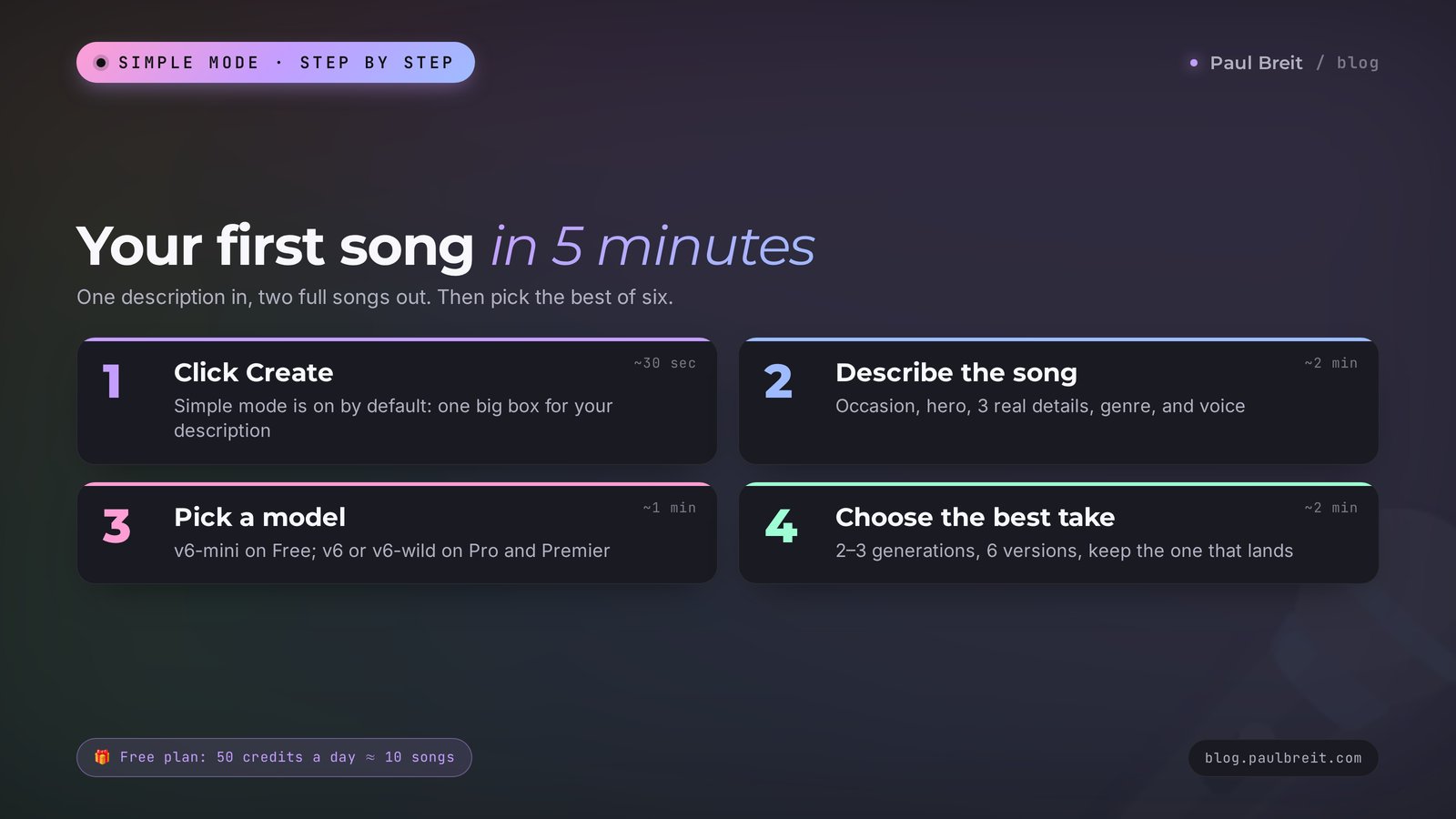
Let's start with the easiest path. In simple mode you write one description, and the AI composes both the lyrics and the music. This is how you make your first song, and it's a handy way to search for a mood.
Click Create
Open the Create section in the left sidebar. At the top there's a mode switch. Simple mode is usually on by default, with one big box for your description.
Describe the song in a sentence or two
Say what the song is about, who it's for, the genre, and the voice. Be specific: names, a city, details from real life. The more vivid the details, the fewer generic words about "dreams and stars" end up in the lyrics.
Pick a model and click Create
On the free plan there's one model, v6-mini. On a paid plan, choose v6 for a polished result and v6-wild when you want surprises. A minute later two versions appear in the list.
Listen to both and make a couple more attempts
Every generation is different, even with the same description. Run two or three generations and compare. Usually the best song is somewhere in the first six versions.
Here's a real description that tends to work on the first try:
You type into Suno: A warm acoustic pop song for my mom Linda's birthday. She's turning 60, she loves her garden and her peonies, and she bakes the best apple pie in the family. Female vocal, guitar and light drums, bright mood, a chorus that's easy to sing along to.
What you get: two songs of about two to three minutes each. The verses talk about the garden and the pies, the chorus repeats "Mama Linda," the voice sounds soft, and the guitar carries the melody. One version usually comes out calmer, the other more upbeat.
Look at what's doing the work here. The name, the age, and three details give the AI material for the lyrics, so the song feels personal. The genre and instruments set the sound. The line about the chorus tells it to go for a simple, repeating melody. Strip out the details and write "a song for mom," and you'll get a set of generic lines that fit every mom on the planet.
One more habit worth building from day one: name every song the moment you like it. Suno fills your library fast, and after a week of experiments "Untitled 14" and "Untitled 15" are impossible to tell apart. A short title like "Linda 60 – calm guitar" saves you a lot of scrolling later.
Section 06Your own lyrics and meta tags: Custom mode
Simple mode is great for finding a mood. When the words matter, switch to Custom mode (in some versions of the interface it's called Advanced). There are three fields: the song text (Lyrics), the music style (Styles), and the title (Title). The AI sings exactly your lyrics and picks the music based on the style description.
To get the song structured correctly, you mark up the lyrics with meta tags in square brackets. A tag sits on its own line before a block of text and tells Suno which part of the song this is.
| Meta tag | What it means | Tip |
|---|---|---|
| [Intro] | An opening with no words or one short line | Leave it empty for an instrumental start |
| [Verse] | A verse that tells the story | 4–8 lines, each with roughly the same number of syllables |
| [Pre-Chorus] | The lead-in to the chorus | 2 lines that build tension |
| [Chorus] | The chorus, the main idea | Short lines, repeat the key phrase |
| [Bridge] | A transition, a change of mood | Put it near the end, before the last chorus |
| [Instrumental] | A break with no vocals | You can be specific: [Guitar Solo], [Piano Break] |
| [Outro] | The ending of the song | Repeat a chorus line or let the music play out |
| [End] | A hard stop for the track | Helps when a song cuts off mid-word |
Here's what tagged lyrics look like in the Lyrics field:
[Intro]
[Verse]
Morning in the studio, coffee on the sill,
Mat rolled out, and everything is still.
The city hums somewhere beyond the wall,
And I breathe in slow and come back to it all.
[Chorus]
Breathe in, breathe out, let it go,
The body knows, the body's slow.
Breathe in, breathe out, no need to rush,
Freedom lives here in the hush.
[Outro]
Breathe in, breathe out…
For lyrics like these, the Styles field gets: "calm acoustic pop, soft female vocal, piano and ambient pads, 80 bpm, warm and intimate." Always describe the style in English: that's how the AI understands genres and instruments most precisely. If you write the lyrics in Spanish, French, or any other language, Suno will sing them in that language while still reading the style in English.
A few fine points about markup. A tag isn't sung; it's an instruction for the AI. Keep the lines in a verse roughly the same length, or the voice will start rushing and swallowing words. And don't put notes like "sad here" into the Lyrics field, because Suno may sing them out loud. Every wish about the sound goes into the Styles field or into square brackets.
Section 07How to write lyrics with Claude
Suno can write lyrics on its own, but they often come out smooth and empty. I write lyrics in Claude: it holds rhythm and rhyme and, just as important, it doesn't drop the details you gave it. Then the finished, tagged lyrics simply get pasted into Suno.
You can open Claude at claude.ai and sign up with your email or Google account in under a minute. The free version of Claude is more than enough for song lyrics.
Here's what a working conversation looks like. Say you're a nutritionist and you want a short intro song for your "Lose 7 Pounds by Summer" challenge.
You: I'm a nutritionist running an online challenge called "Lose 7 Pounds by Summer" for women aged 30–45. I need a fun one-minute intro song to open every live session. Include: water first thing in the morning, a plate full of vegetables, an evening walk, no starving. Write the lyrics in English with Suno markup: [Intro], [Verse], [Chorus], [Outro]. Short lines, an even rhythm, a four-line chorus that's easy to remember. On a separate line, suggest a description for the Styles field.
Claude: Here are the lyrics. [Verse] A glass of water, the day begins, / A plate of green where the color wins… [Chorus] Seven by summer, step by step… Style: upbeat pop, bright female vocal, ukulele and claps, 110 bpm, summer mood.
You: Good. In the chorus, "summer" lands on a weak beat and will sound off. Rebuild the chorus so the key word falls at the start of the line. And replace "where the color wins," it sounds stiff.
Claude: Fixed. [Chorus] Summer's coming, step by step, / Seven pounds and no regrets…
See the principle? First you give context: who you are, who the song is for, how long it runs, which details are a must. Then you ask for tagged lyrics and a style right away. Then you edit in plain words, the way you'd give notes to a human songwriter. Three or four messages later, the lyrics are done.
Here's a prompt you can copy and fill in with your own details:
Write song lyrics in English for the AI music tool Suno. Occasion: [birthday, intro, course anthem]. Who it's for: [name, who they are, what they do]. Must-have details: [3–5 specific facts]. Mood: [fun, touching, celebratory]. Length: [1 minute or 3 minutes]. Mark the sections with the tags [Intro], [Verse], [Pre-Chorus], [Chorus], [Bridge], [Outro]. Keep verse lines roughly the same length, and make the chorus 4 short lines that repeat the main phrase. Don't use the words "dreams," "stars," or "forever." At the end, on a separate line, give a style description in English for the Styles field.
The list of banned words at the end of the prompt is a small trick that freshens the lyrics a lot. AI loves "dreams," "stars," and "wings," and the moment you ban them, your real details show up in the text. More prompting techniques are collected in Claude prompts: a 6-block formula and 25 examples.
Section 08Lyrics and pronunciation tips
Suno sings English very well, but it has a few typical stumbles. Almost all of them are fixed by editing the lyrics, with no need to switch models.
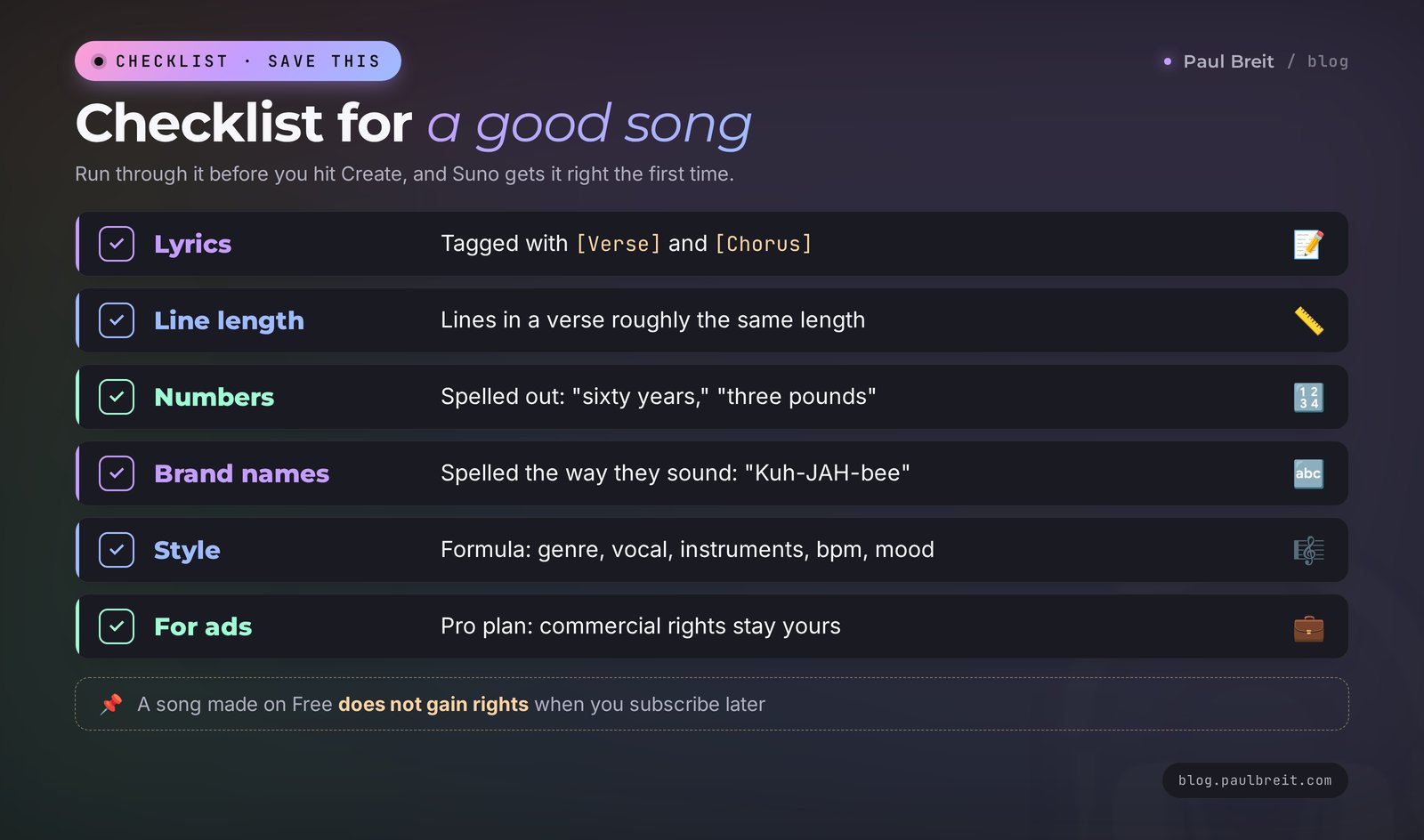
Numbers. Suno reads digits unpredictably: "2026" might come out as "two zero two six," and "$49" might be skipped entirely. Write numbers out as words: "twenty twenty-six," "sixty years," "forty-nine dollars." The same goes for symbols: "&" becomes "and," "%" becomes "percent."
Abbreviations. "CEO," "ASAP," or "DIY" can be read as a word or as letters, and you don't get to choose which. Spell it the way you want it sung: "C-E-O" for letters, or rephrase the line around it.
Brand names. A product or company name may get mispronounced, especially if it's invented or borrowed from another language. Write it phonetically, the way it sounds: "Kajabi" becomes "Kuh-JAH-bee," "Notion" stays as is. If you need the exact brand spelling for the title or the post, keep it there; the Lyrics field is only about sound.
Words with two pronunciations. "Read," "live," "lead," "record," "present" change meaning with stress. Suno guesses from context and sometimes guesses wrong. An accent hint helps: capitalize the stressed syllable, "re-CORD" or "REC-ord." If that doesn't work, swap in a synonym or rearrange the line so the stress lands on a strong beat.
Line length. If the voice swallows the ends of words, the line is too long for the musical phrase. Cut it by two or three syllables or split it into two lines. A useful rule of thumb: count syllables in the first line of a verse and keep the rest within one or two of that number.
Accent. Sometimes the vocal comes out with an accent you didn't ask for. Add "American English vocal, clear pronunciation" to the Styles field. It's not a guarantee, but it noticeably raises the odds of clean diction. If you want a particular regional sound, say so: "Southern American vocal" or "British male vocal."
Names of people. Unusual names suffer the most. Before generating, read the line out loud yourself and write the name the way you'd say it. "Siobhan" becomes "Shi-VAWN," "Nguyen" becomes "Win." The person will hear their name sung correctly, and that's half of the gift.
Section 09How to describe a music style: the formula and 15 prompts
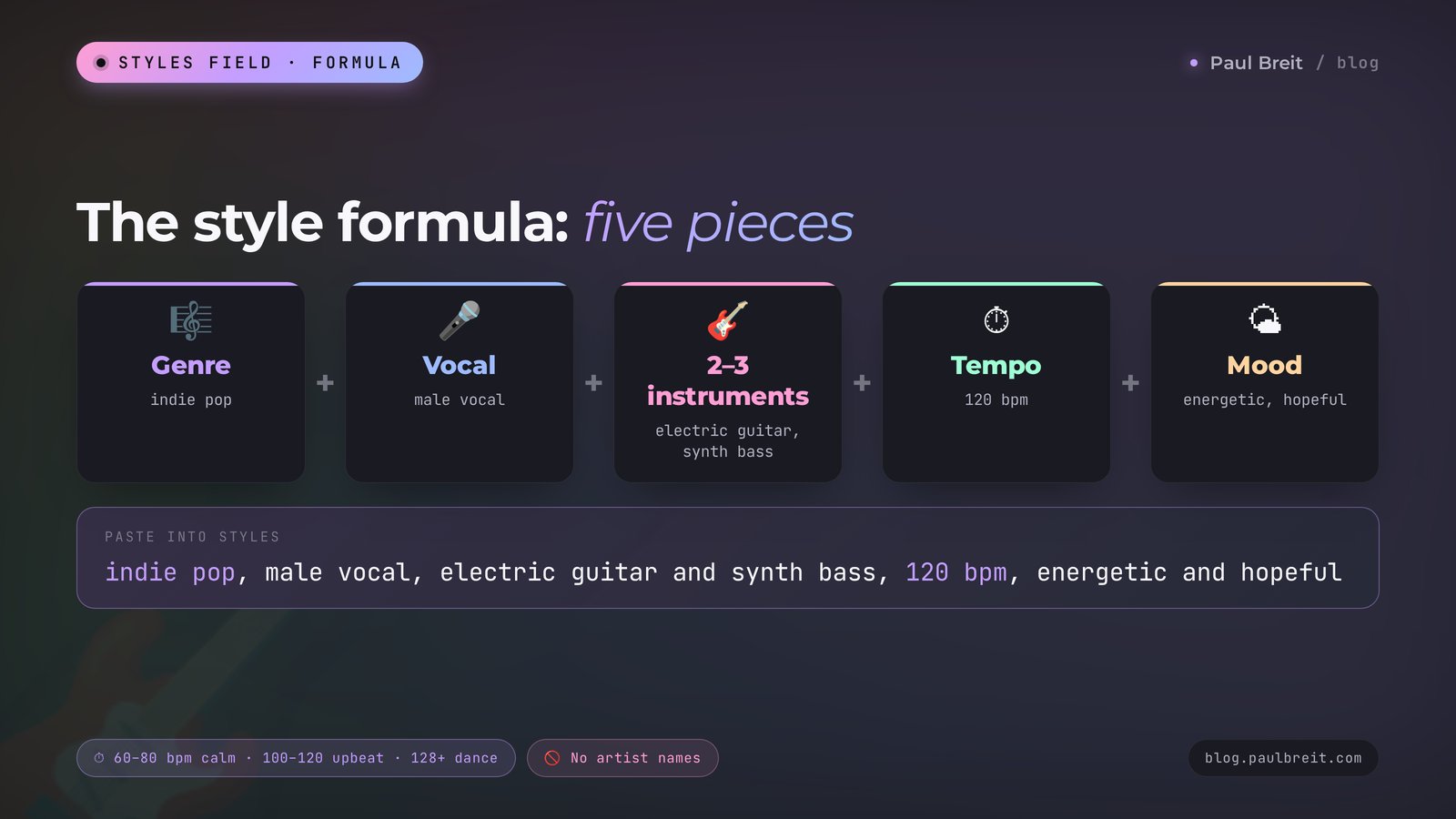
The Styles field decides how the song will sound. A good description is assembled from five pieces, and I recommend always writing them in the same order so you never forget one.
The style formula: genre + vocal + 2–3 instruments + tempo + mood.
Example: "indie pop, male vocal, electric guitar and synth bass, 120 bpm, energetic and hopeful." The genre sets the overall frame, the vocal is self-explanatory, the instruments give it character, the bpm number sets the speed (60–80 is calm, 100–120 is upbeat, 128 and above is dance), and the mood adds color.
Artist names don't work in the style: Suno filters them so it doesn't copy real performers. Instead of "like a certain singer," describe what you like about her songs: "breathy female vocal, minimal piano, melancholic."
| Use case | Description for the Styles field |
|---|---|
| Live stream intro | upbeat pop, bright female vocal, claps and synth, 118 bpm, confident |
| Birthday song | warm acoustic pop, soft female vocal, guitar and light drums, 95 bpm, joyful |
| Reels background, no vocals | lo-fi hip hop, instrumental, mellow piano, vinyl crackle, 80 bpm, relaxed |
| Podcast intro | cinematic electronic, instrumental, deep bass and pulsing synth, 100 bpm, curious |
| Course or community anthem | anthemic pop rock, male and female choir, drums and electric guitar, 128 bpm, uplifting |
| Yoga and meditation | ambient, instrumental, soft pads and singing bowls, 60 bpm, calm and spacious |
| Fitness and challenges | dance pop, energetic female vocal, punchy drums, 128 bpm, motivating |
| Kids' song | children's song, cheerful vocal, ukulele and xylophone, 110 bpm, playful |
| Romantic gift | soft R&B, smooth male vocal, Rhodes piano, 75 bpm, tender |
| Humor and parody | retro 80s synth pop, dramatic vocal, big drums, 115 bpm, funny and over the top |
| Company party | funk pop, groovy bass, brass section, male vocal, 112 bpm, festive |
| A moving story | piano ballad, emotional female vocal, strings, 70 bpm, heartfelt |
| Tongue-in-cheek country | country, twangy male vocal, banjo and fiddle, 90 bpm, ironic |
| Rock for energy | alternative rock, raw male vocal, distorted guitars, 140 bpm, driving |
| Training video background | corporate acoustic, instrumental, light guitar and glockenspiel, 105 bpm, optimistic |
You can take the descriptions from the table as they are and change one or two details. For example, swap "female vocal" for "male vocal" or raise the tempo. Change one parameter at a time: that way you'll quickly see what actually makes the song better.
Keep a short note with the styles that worked for you. After a dozen songs you'll have your own sound, and every new track for your brand will start from a proven line instead of a blank field. That consistency matters more than any single great song: people start recognizing your intro the same way they recognize a TV show theme.
Section 10How to polish a song: extend, cover, edit a section, stems
The first version is rarely perfect from start to finish. Usually you love the verse but want a different chorus, or the song ends too early. That's what Suno's editing tools are for. They live in the three-dot menu next to each song; button names sometimes change after updates, but the set of features stays the same.
Extend. Pick the moment the song should continue from and add new lyrics. Suno carries on with the same sound. That's how a one-minute track becomes a three-minute one, and how a cut-off ending becomes a proper finale.
Edit a section. New in v6. You select a fragment and say in plain words what to change: "make the second chorus bigger, add backing vocals" or "replace the line about coffee with a line about tea." The rest of the song stays as it was. Before v6 you had to regenerate the whole track for this.
Cover. Takes the melody and lyrics of your song and replays them in another genre. A pop birthday song turns into jazz, rock, or a lullaby. Handy when you like the lyrics and melody but not the sound.
Persona. Saves the voice and delivery of a song you like so your next tracks sound the same. Useful if you're making a series of songs for one project: an intro, a closing song for the challenge, and an ad jingle, all in one voice.
Stems. On paid plans, Suno splits a song into vocals and music separately, and on Premier also into individual instruments. You need this when you want only the backing track under a Reel or want to hand the vocal to your video editor.
Upload your own audio. You can hum a melody into your phone or upload your own recording, and Suno will build an arrangement around it. On the free plan uploads go up to 8 minutes, on Premier up to 30. Only upload what you have the rights to: your voice, your melody.
Section 11Where a Suno song helps your business: 9 use cases
For yourself, a song is pure joy. For everyone who sells services, courses, and consulting, it's also a tool that sets you apart from a hundred similar accounts. Here's where it really works.
| Use case | Who it fits | What it gives you |
|---|---|---|
| Intro for live streams and webinars | Coaches, therapists, online schools | Recognition from the first seconds; your stream sounds like a show |
| Anthem for a challenge or course | Nutritionists, fitness trainers, mentors | Participants sing along, share it, post Stories |
| A song as a gift to a client | Anyone with repeat clients | The client remembers you for a long time and forwards the song to friends |
| Background for Reels | Anyone who makes short videos | Your own music with no copyright claims |
| Podcast intro and outro | Podcast hosts, teachers | Your podcast sounds professional without a studio |
| A testimonial song | Trainers, tutors, therapists | A client's story in a song gets more reactions than a written review |
| A learning song | Tutors, speech therapists, kids' centers | Rules and words stick through the melody |
| An ad jingle | Local pros, studios, small businesses | A short tune with your name that people remember |
| A song giveaway | Anyone who runs a blog | Followers send stories, and the best ones become songs |
Let me dig into the most underrated use case in the table: the song as a gift. Picture a therapist whose client, Emily, has just finished a course of therapy. The therapist asks Emily for permission and a couple of sentences about what has changed, Claude writes lyrics from them, and Suno builds a warm ballad. Emily gets a song about her own journey. People keep things like that for years and tell their friends about them, and those friends later come in as referrals. It all takes one evening, and it costs you a month of Pro.
The second working technique is the giveaway. Announce on your blog or channel: "Tell me a funny story from your work in the comments, and I'll turn the three best into songs." You'll get more comments than under a regular post, and the songs then become separate posts and Reels. If you want more mechanics like this that turn attention into followers, see how AI brings you followers: 5 mechanics that work.
If you shoot Reels, Suno music pairs nicely with AI tools for scripts and video. How to put together a month of clips in one evening is covered in AI for Reels: 30 scripts a month in one evening, and for the video itself there's a breakdown of AI video from text.
A practical note on the gift song and the testimonial song: always ask first. A person's name, story, and private details in a song are still their name, story, and details. A one-line message, "Can I turn what you told me into a song for you?", is enough, and the yes you get back is already part of the gift.
Section 12Song rights: what you can do with Suno music
This is the section people usually skip, and then they're surprised when a video gets taken down. Let's go point by point.
The free plan. Songs made on Free are for personal use only: listen, give them as gifts, share them as links. You can't use them in ads or in Reels on a business account, sell them, or upload them to streaming services. Suno keeps the rights to those songs.
Paid plans. Songs made during a Pro or Premier subscription can be used commercially: in ads, videos, podcasts, and on streaming services. That right stays with you even after you cancel. One important detail: if a song was made for free and you bought a subscription later, that doesn't give you rights to the old song. Make your working tracks on a paid plan from the start.
Streaming. With v6, Suno works with the distributors Believe and TuneCore, and through them you can release songs on Spotify, Apple Music, Amazon Music, and YouTube. Each distributor has its own requirements for AI-generated music, so read their terms before you upload.
Watermarks. Every v6 song carries invisible watermarks that tell platforms the track was made with AI. You can't hide that. An honest note under the post, "music made with AI," doesn't put anyone off.
Other people's songs and voices. Don't upload other artists' tracks into Suno and don't try to copy a specific singer's voice. That breaks the service's rules and other people's rights, and those songs are the first to get pulled from platforms.
Lyrics. Words you wrote yourself or together with Claude belong to you. That's convenient: even if you have to regenerate a song, the lyrics stay yours and move over to the new version.
Suno's rules change after every major deal with the labels. Before a serious commercial project, open the Terms section on the site and check the latest version.
Section 13When something goes wrong
Here are the most common problems and how I fix them.
The site won't open or hangs while loading. Refresh the page and try another browser. Turn off ad blockers and extensions for suno.com, since they sometimes break the player. On a phone, switch from cellular data to Wi-Fi or the other way around.
The Create button is grayed out. You're out of credits. On the free plan they refresh once a day, and the balance is shown at the bottom of the left sidebar. While you wait, polish your lyrics in Claude.
The vocal sounds off or has an accent you didn't want. Check that the Lyrics field contains only the lyrics, with no notes or instructions. Add "American English vocal, clear pronunciation" to Styles and run two more generations.
The AI sings the tags or your notes. That means a note is sitting in the lyrics without square brackets. Delete the extra words from the lyrics and move instructions into the Styles field.
The chorus doesn't stand out, and the song blurs into one mass. Make the chorus shorter than the verse, repeat the main phrase twice, and put a [Chorus] tag before every repeat. A two-line [Pre-Chorus] before the chorus also helps.
The song cuts off mid-word. Use Extend from the point where it breaks, add the final lines, and put [Outro] and [End] at the end.
The style doesn't match the description. The description is too long or contradictory. Keep the five pieces from the formula in Section 09 and drop extra adjectives. If you asked for "calm" and "energetic" at the same time, the AI will land somewhere in the middle.
The payment won't go through. Try another card, or call your bank: banks sometimes block the first online charge from a new merchant. Make sure the billing ZIP code matches the card.
The file won't download. On the free plan downloads are closed, but you can share the song as a link. On a paid plan, check whether you've used up the monthly download limit.
Section 14Suno and other music AI tools
There are several music generators, and for songs with vocals Suno is the most convenient one right now. A quick look at the neighbors.
Udio. The main competitor; its sound is at times finer and more detailed. After its deal with Universal Music in 2025, Udio also rewrote its rules and limited downloads. Worth trying if sound quality matters most to you and you're ready to spend longer on settings.
ElevenLabs Music. A music generator from the company known for speech synthesis. It's trained on licensed music and built for commercial use from the start. Good for background music for videos and ads.
If you're just starting, go with Suno. It has the most tutorials and the biggest community, and the free plan is enough to find out whether this is your thing. For a wider view of services that work without a subscription, see free AI tools 2026, and the best tools for different jobs are collected in best AI tools 2026: 12 tools for 12 real tasks.
Section 15Checklist before you ship a song
Before you send a song to a client or put it in a Reel, run through this list. It takes two minutes and saves you awkward moments.
- You listened to the whole song, down to the last second, and the ending doesn't cut off.
- Every word is pronounced correctly, especially names and brands.
- Numbers and abbreviations sound the way you intended.
- The lyrics contain no names or facts about anyone who hasn't agreed to it.
- The song was made on a paid plan if it's going into ads or a business account.
- You downloaded the final version and saved the lyrics separately in your notes.
- The post with the song carries a note that the music was made with AI.
Section 16The whole path in a minute
- Open suno.com and sign in with Google.
- For your first song, click Create and describe the occasion, the hero, three details, the genre, and the voice in one box.
- Run two or three generations and pick the best of six versions.
- For your own words, switch to Custom mode, write the lyrics in Claude with [Verse], [Chorus], and [Outro] tags, and paste them into the Lyrics field.
- Describe the style with the formula: genre, vocal, 2–3 instruments, tempo, mood. In English.
- Spell numbers out as words, write tricky names the way they sound, and add accent hints where a word can be read two ways.
- Polish the song with Extend, edit a section, or Cover.
- For ads and business, make songs on Pro: commercial rights stay with you even after you cancel.
Open Suno tonight and make a song for one person you're grateful to. It's the best way to understand the tool, and you'll see the reaction that makes those five minutes worth it.
FAQFrequently asked questions
Is Suno AI free?
Yes, Suno has a free plan: 50 credits a day, enough for about 10 songs. It runs on the v6-mini model. You can listen to songs and share them as links, but file downloads and commercial use are only available on the paid Pro and Premier plans.
How do I make a song with AI in Suno?
Go to suno.com, sign in with Google, and click Create. In simple mode, describe the occasion, the hero, three real details, the genre, and the voice in one box. A minute later you get two versions. For your own lyrics, switch to Custom mode and paste tagged lyrics into the Lyrics field.
How much does a Suno subscription cost?
Pro costs $8–10 a month depending on the current offer and gives you 2,500 credits, about 500 songs, and 20 downloads. Premier costs $24–30 a month and gives you 10,000 credits, 60 downloads, and Suno Studio. Paying annually is cheaper.
Can I use Suno songs in ads and Reels?
Yes, if the song was made during a paid Pro or Premier subscription. Commercial rights to those songs stay with you even after you cancel. Songs from the free plan are for personal use only and can't be used in ads or on business accounts.
What is Suno v6?
It's the generation of Suno models released on September 9, 2026. It replaced the previous models and is the first trained in part on music licensed from Warner Music Group, BMG, and Believe. There are three models: v6 and the experimental v6-wild on the paid plans, and the fast v6-mini for everyone.
How do I write good lyrics for Suno?
The easiest way is to write them in Claude: give it the occasion, the hero, 3–5 specific details, the mood, and the length, and ask for markup with [Verse], [Chorus], and [Outro] tags plus a style description in English. Paste the finished lyrics into the Lyrics field in Custom mode.
Why does Suno mispronounce some words?
Usually it's numbers, abbreviations, brand names, or words with two pronunciations. Spell numbers out as words, write names the way they sound, capitalize the stressed syllable as an accent hint, and shorten lines that are too long for the melody.
Can I put Suno songs on Spotify?
Yes, songs made on a paid plan can be released through the distributors Believe and TuneCore, which deliver to Spotify, Apple Music, Amazon Music, and YouTube. Every v6 song carries invisible AI watermarks, so check each distributor's rules for AI music before uploading.