Claude Prompts: The Formula and 25 Ready-to-Use Examples
The Claude prompt formula has six blocks: role, context, task, examples, format, and check. I show you how to build a prompt with it in five minutes, why Claude likes tags in angle brackets, where long documents go, and how to get writing that sounds like you. Inside are 25 ready-to-use prompts for content, sales, documents, and planning. For everyone who sells services, courses, and consulting and wants a usable result from AI on the first try.
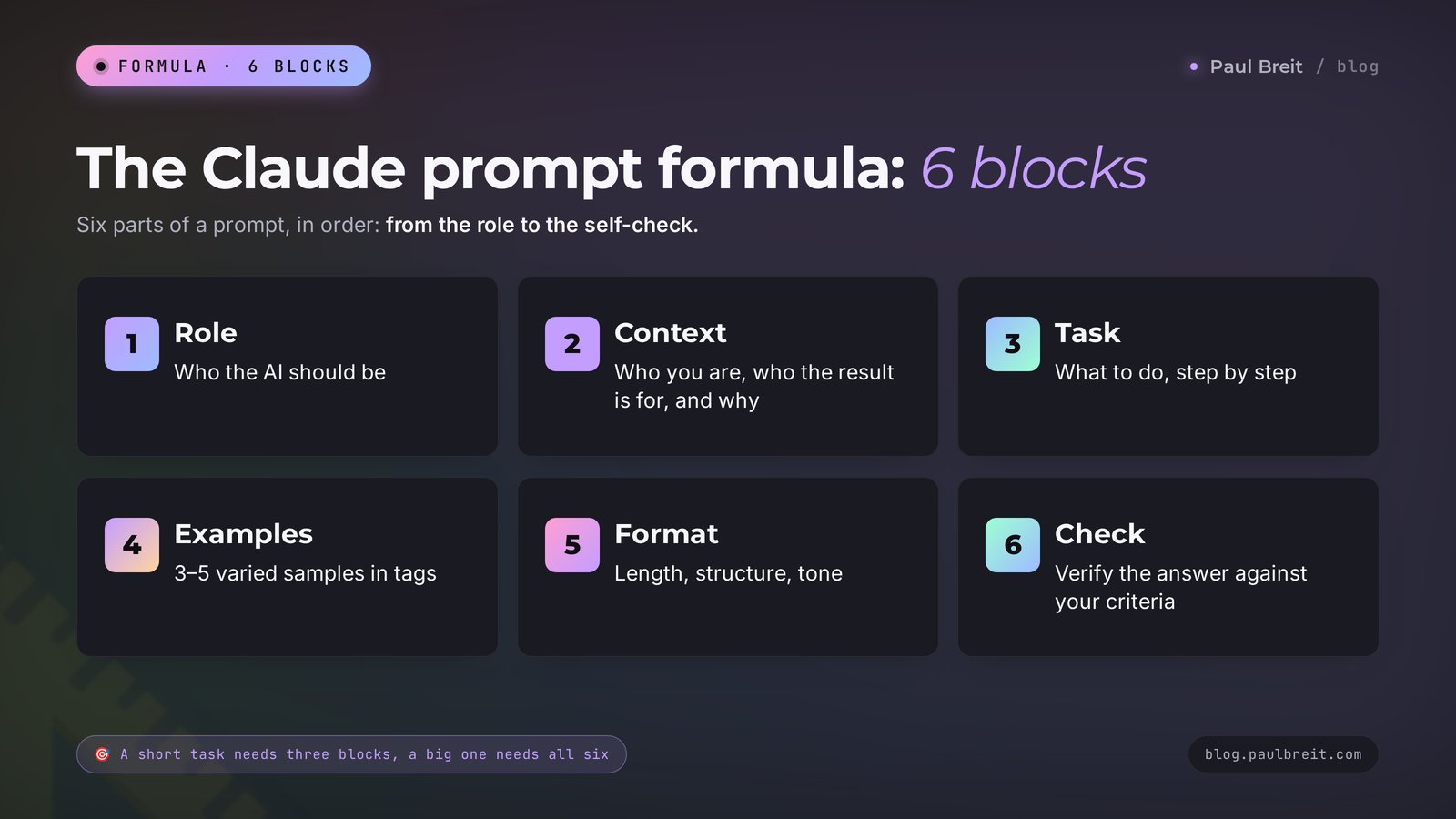
The Claude prompt formula in 2026 has 6 blocks: role (who the AI should be), context (who you are, who the result is for, and why you need it), task (what to do, step by step), examples (3–5 samples inside tags), format (length, structure, tone), and check (ask Claude to verify the answer against your criteria). Separate the blocks with tags such as <context> and <examples>. Put long documents at the start of the message and your question at the end. Claude replies in the language you write in.
For people who already tried Claude and got smooth writing that sounded like somebody else. For people who type one line into the chat and then ask for a redo ten times. And for people still choosing an AI for work: the formula fits other chat assistants too, and I'll point out where Claude has its own habits. I covered the general theory of prompting in how to write prompts: a 5-part formula. Everything here is tuned for Claude.
What's inside
- Why Claude needs its own kind of prompt
- The Claude prompt formula: 6 blocks
- Build a prompt with the formula in 5 minutes
- Tags in angle brackets: 8 that cover everything
- Examples in a prompt: teaching Claude your voice
- Long documents: what goes where
- How to control format and length
- Prompts for content: 6 examples
- Prompts for sales: 6 examples
- Prompts for documents and analysis: 6 examples
- Prompts for planning and learning: 4 examples
- Prompts that improve other prompts: 3 examples
- What to plug into the formula for your niche
- Where to keep prompts so you never rewrite them
- Where to open Claude
- 7 mistakes in Claude prompts
- If something goes wrong
- Prompt checklist before you hit Send
- The whole path in one minute
Here's how it usually goes. Someone opens Claude and types: "Write a post about my service." Ten seconds later there's a smooth, grammatical, completely anonymous piece of text on the screen. That post could sit in the feed of any of a thousand people in the same field. The person sighs, asks Claude to "make it livelier," gets the same smoothness with three exclamation points, and closes the tab convinced that AI writes empty copy.
Now the same person spends five minutes and writes the request with the formula. They say who they are and who they write for, paste in three of their old posts as samples, name the length, and ask Claude to check the draft against two conditions before sending it back. Claude returns a post that carries their tone and speaks to their client. Same AI. The request is the one thing that changed.
Why does that happen? Because Claude answers exactly what you gave it. One line gets you an average answer for an average person. Six blocks get you an answer about you.
In this article you'll find the formula itself, a step-by-step build of one prompt, a table of tags, and 25 ready-to-use Claude prompts. I drew on my daily work with Claude and on Anthropic's official prompting guide, updated for the 2026 models. Read straight through, or use the table of contents to jump to the set you need.
Section 01Why Claude needs its own kind of prompt
The basic rules of prompting are the same for every chat assistant: give context, state the task, name the format. Claude adds four traits of its own, and the whole formula rests on them.
Claude reads your request very closely
In its guide, Anthropic suggests thinking of Claude as a brilliant new employee who doesn't yet know anything about your rules and habits. It's smart, it's diligent, and it does what the request says. If you ask it to "suggest edits," it will suggest edits and leave the text alone. If you ask it to "rewrite," it rewrites.
The same guide gives a golden rule for testing a prompt. Show your prompt to a colleague who knows nothing about the task and ask them to follow it. If the colleague gets confused and starts asking questions, Claude will get confused in the same places. The difference is that Claude won't ask. It will quietly fill in the gaps for you.
Claude works better when it knows the reason
Claude will follow a bare rule like "don't use ellipses." An explanation works harder: "a text-to-speech engine will read this answer, and it can't pronounce ellipses." Once Claude knows the reason, it figures out on its own that other symbols the engine would trip over should go too. That example comes from Anthropic's guide, and the takeaway there is that the model can generalize from an explanation.
For you this means one thing. Next to every requirement that matters, write why it matters. "Keep the email under 150 words, because my readers open it on the train and scroll past anything long." One extra clause changes the result.
Claude understands tags
Tags are words in angle brackets that label the parts of your message: here's the context, here are the samples, here's the document. When one message holds an instruction, three of your posts, and a client review, the AI can mistake a piece of a post for a command if nothing is labeled. With tags the confusion goes away. This kind of markup works in other AI tools too, but for Claude the developer recommends it directly.
Claude keeps large documents in mind
A forty-page contract, the transcript of a two-hour webinar, or ten files at once all fit into a single chat. Where the document sits in your message and where the question sits affects the quality of the answer. There's a separate section on this below, with a number from the tests.
Write to Claude the way you'd write to a sharp new assistant on their first day: who you are, what you need, why you need it, and what a good result looks like. Everything else in this article is a way to do that quickly.
Section 02The Claude prompt formula: 6 blocks
Here's the whole Claude prompt formula in one table. Save it. After the table I go through each block with examples.
| Block | The question it answers | One-line example | When it's required |
|---|---|---|---|
| 1. Role | Who the AI should be | You're an editor of email newsletters for solo professionals | Writing, reviews, advice |
| 2. Context | Who you are, who the result is for, and why | I'm a nutrition coach, I write for women 35–50, and the email should bring people to a consultation | Always |
| 3. Task | What to do and in what order | Write an email about evening overeating: a scene, the cause, three steps | Always |
| 4. Examples | What a good result looks like | Three of my emails that got the most replies | When voice or format matters |
| 5. Format | What shape the answer should take | Under 200 words, paragraphs of 2–3 sentences, warm and direct | Always |
| 6. Check | What to verify before answering | Reread it and make sure there are no generic phrases and there is a call to action | Big and high-stakes tasks |
The order is easy to remember as one sentence: who to be, what to know, what to do, what to match, how to deliver, how to check.
Block 1. Role
The role sets the tone and the angle. Anthropic's guide says that even a single sentence of role changes how the model behaves. Compare two openings: "You're a copywriter" and "You're an editor who has run therapists' newsletters for ten years and cuts everything that sounds like a brochure." The second role already contains both the niche and the quality bar.
A good role answers three questions: what this person does for a living, who they work with, and what they especially value or can't stand. One or two sentences is enough.
Block 2. Context
This is the most underrated block. It holds everything a human assistant would know about the task and Claude doesn't: what you do, who your clients are, what you sell and for how much, where the result will be published, and what should happen after someone reads it. And always the reason: why you need this piece of writing or this review.
The rule is simple. If you're unsure whether a detail is needed, add it. An extra paragraph of context almost never hurts the answer. A missing one always does.
Block 3. Task
One message carries one task. Start with a verb: write, shorten, compare, find, draft. If the order of actions matters, give it as a numbered list. Claude follows the steps in sequence and skips nothing.
If you want a result that's above average, say so directly. Claude does what it was asked. "Give me ideas for Reels" brings back five tidy ideas. "Give me 15 ideas, and at least five of them should be unexpected ones my competitors don't have" brings back what you came for.
Block 4. Examples
Examples are the most reliable way to pass along tone, structure, and format. Explaining "write warmly, but don't baby the reader" in words is hard. Showing three of your own posts is easy. A whole section below is devoted to this block.
Block 5. Format
Length in words, structure, how you address the reader, whether there are lists, headings, and emoji. The tighter the frame, the fewer the edits. This is also the place to say what happens with the result: "give it to me as one message so I can paste it into an email."
Block 6. Check
The last line of the prompt, and the one that saves the most time. Ask Claude to reread its answer and verify it against your conditions: the length, no made-up facts, a call to action. This is the same technique used in large systems built on Claude: draft, review against criteria, revise. In a chat you start the whole cycle with one sentence.
Section 03Build a prompt with the formula in 5 minutes
Let's take the task this article opened with: a post about a service. The person in this example is a therapist who works with anxiety and runs an Instagram account.
Write the task in one sentence
"Write a post about why anxiety gets worse in the evening." That's the core. Right now it looks the same as the request from the opening scene, and the answer would be just as average.
Add the context and the reason
Who you are, who reads you, what you sell, why you need the post. Four sentences. Write it the way you'd tell a friend: "I'm a therapist, and I work with anxiety in women aged 30–45. My Instagram has 1,800 followers, and most of them read in the evening. I sell an 8-session program. The post should lead to the idea that anxiety is something you can work with, and it should bring people into my DMs."
Set the role
"You're an editor who runs social media for therapists and makes sure the writing sounds human, with no jargon and no scare tactics."
Paste in two or three of your own posts
Open your account, copy the posts that got the most replies, and put each one in its own tag. Don't edit anything in them.
Name the format
Length, tone, structure. "Under 180 words, speak to the reader as 'you,' paragraphs of two or three sentences, one scene at the start, one question at the end."
Add the check
"Before you answer, reread the text. Make sure it contains no diagnoses and no promises of a cure, and that it sounds like my examples."
The finished prompt looks like this:
<role>
You're an editor who runs social media for therapists and makes sure the writing sounds human, with no jargon and no scare tactics.
</role>

<context>
I'm a therapist, and I work with anxiety in women aged 30–45. My Instagram has 1,800 followers, and most of them read in the evening. I sell an 8-session program. The post should lead to the idea that anxiety is something you can work with, and it should bring people into my DMs.
</context>

<examples>
<example>[your post 1]</example>
<example>[your post 2]</example>
<example>[your post 3]</example>
</examples>

<task>
Write a post about why anxiety gets worse in the evening. Order: a scene the reader recognizes, a simple explanation of the cause, three things to do tonight, an invitation to message me.
</task>

<format>
Under 180 words. Speak to the reader as "you." Paragraphs of 2–3 sentences. One question at the end. Send it as one message so I can paste it into Instagram.
</format>

<check>
Before you answer, reread the text. Make sure it contains no diagnoses and no promises of a cure, and that it sounds like my examples.
</check>
And here's how the conversation continues:
Claude: Nine p.m. The kids are in bed, the dishes are done, and you can finally sit down. That's the exact minute the familiar wave rises: what if tomorrow at work, what about Mom, will the money last until the end of the month... The wave wasn't there during the day. Where was it hiding?
You: Keep the opening. In the second paragraph, take out the word "cortisol" and explain it in everyday language. And cut the steps down to two.
Claude: Done. The explanation now reads: during the day your head is busy with tasks and anxiety has no room to spread out. In the evening the tasks run out and the room opens up...
Notice that the edits happen in the same chat. Claude remembers the prompt and the draft, and it edits that exact text. Open a new chat for a new topic.
Translating a phrase, finding a synonym, working out a percentage: one line is plenty. The formula is for the places where your voice, your client, or the cost of a mistake matters: copy you'll publish, replies to clients, document reviews. A good rule of thumb: if anyone besides you will see the result, build the full prompt.
Section 04Tags in angle brackets: 8 that cover everything
A tag has two parts: an opening <context> and a closing </context> with a slash. Claude treats everything between them as one piece with a clear purpose. They're ordinary labels, and you need no programming to use them.
Tags have no special "magic" names. Anthropic's guide asks for only two things: give your tags clear names, and use the same names from prompt to prompt. The name can be any word that describes what's inside. Here's the set I use.
| Tag | What goes inside | When you need it |
|---|---|---|
| <role> | Who the AI should be | Writing, advice, reviews |
| <context> | Who you are, your audience, your product, your goal | Almost always |
| <task> | What to do and in what order | Whenever the prompt is longer than three lines |
| <examples> and <example> | Samples of the result | When voice or format matters |
| <document> | The text to work through | Contracts, transcripts, articles |
| <format> | Length, structure, tone | Almost always |
| <rules> | Constraints, each with its reason | When you have hard requirements |
| <check> | Conditions for the self-check | High-stakes tasks |
You can nest tags inside each other. Several examples sit inside a shared <examples>, several documents sit inside <documents>, and each document can carry a label with its name. That lets Claude cite the source in its answer: "the September price list says..."
One more technique: tags work for the output too. Ask Claude to "put the headline options in a <headlines> tag and the notes in a <notes> tag," and the answer arrives sorted into bins. That's handy when you only need one part to copy.
When are tags unnecessary? In a short request of two or three sentences. There's nothing to separate, and the markup only slows you down.
Section 05Examples in a prompt: teaching Claude your voice
Anthropic's guide calls examples one of the most reliable ways to steer the format, tone, and structure of an answer. It also gives three requirements for them, and I've tested each one on my own tasks.
- Close to the task. If you need an Instagram post, give Instagram posts and leave your website article out of it. If you need a reply to a client, give your real replies to clients.
- Different from each other. Three posts on one topic with the same opening will teach Claude that one opening. Take a story, a breakdown of a mistake, and a short note. Then it picks up what they share: the rhythm, the sentence length, your pet phrases.
- Labeled. Each example goes in its own <example> tag, and all of them together go inside <examples>. Otherwise a piece of your post can be read as an instruction.
How many examples should you give? Anthropic recommends three to five. With one sample, Claude nearly retells it. With ten long ones, you spend space in the chat with no visible gain.
What if you don't have any writing of your own yet? Two paths help here. First: record your thought out loud, transcribe it, and give Claude the transcript as a sample of how you really talk. Second: ask Claude to write three versions in different tones, pick the closest one, fix it by hand, and put it into the examples as your own. After two or three rounds you'll have your own reference sample.
I described the full method for building a "voice" out of thirty of your own posts and locking it in, in the article on how to teach AI to write in your voice. And if the finished text still smells like a machine, the guide on how to remove AI traces from your writing will help.
You can ask Claude to evaluate your examples: are they varied enough, and do they fit the task? You can also ask it to write a couple more samples in the same spirit. That's how three posts turn into five in a minute.
Section 06Long documents: what goes where
A contract, a webinar transcript, an export of client reviews, a book chapter. Claude handles material like this with confidence if you follow three rules. All three come from the long-context section of the guide.
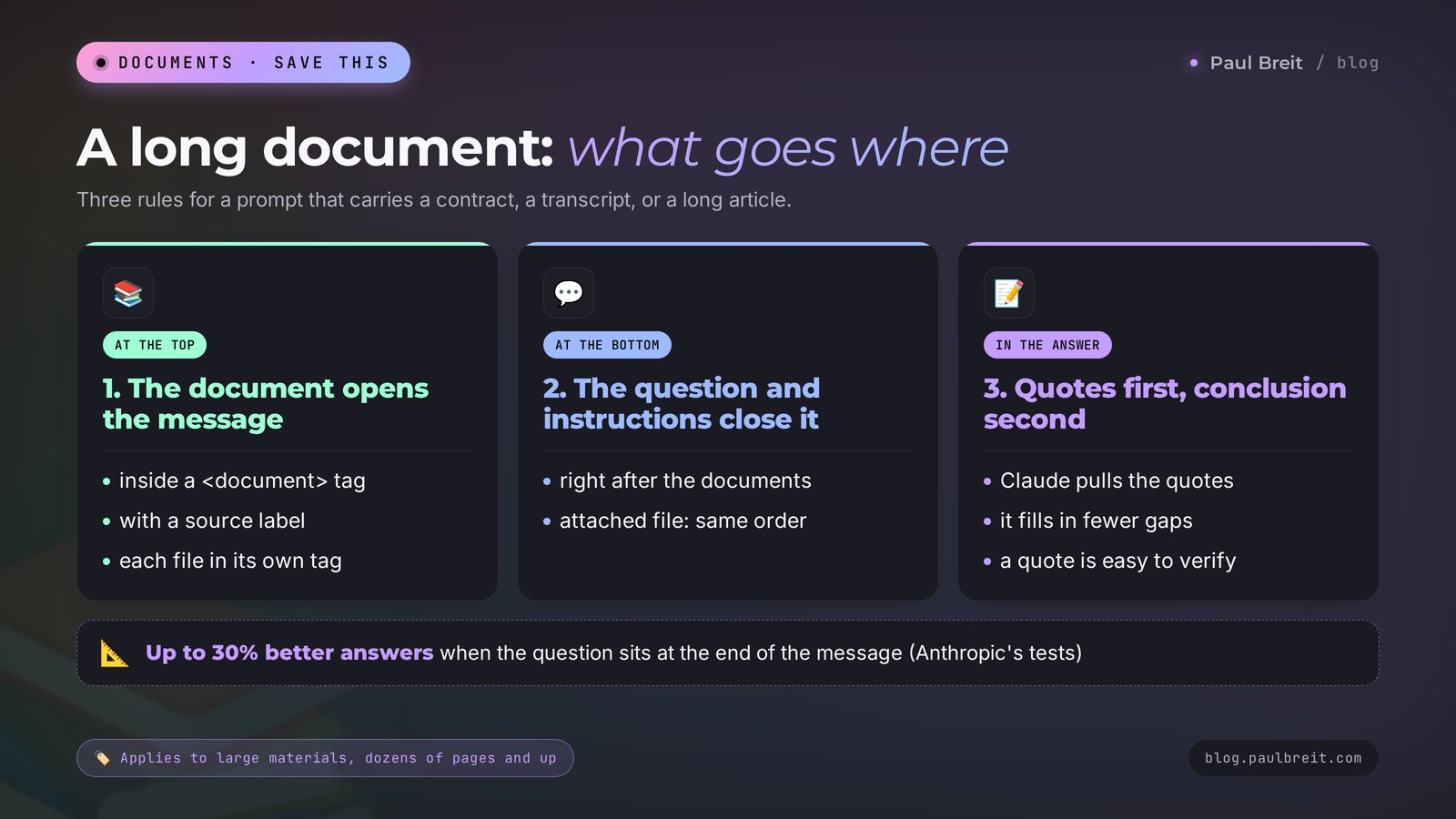
Rule 1. Document at the top, question at the bottom
Most people write it the other way around: the question first, then "here's the text." Anthropic recommends putting long material at the very start of the message, and the instructions and the question after it. The guide gives a number: a question at the end improves answer quality in tests by up to 30 percent, especially on complex tasks with several documents. This applies to truly large volumes, from dozens of pages up.
Rule 2. Each document in its own tag, with a label
When you have several files, wrap each one and label the source. Claude stops mixing up last year's price list with the current one.
<documents>
<document>
<source>Contract with the contractor, version dated September 12</source>
[text of the contract]
</document>
<document>
<source>Email thread with the contractor</source>
[text of the emails]
</document>
</documents>

Compare the contract and the email thread. Find the promises made in the emails that are missing from the contract. Give me a table: what was promised, where in the emails, whether it's in the contract.
Rule 3. Quotes first, conclusion second
Ask Claude to pull out the phrases from the document that relate to your question before it answers, and to draw the conclusion only after that. This keeps it anchored to the text and cuts down on guessing. For you it's also a fast check: a quote is easy to find in the original with a search.
You can upload PDFs, documents, and spreadsheets to the chat with the paperclip. There's no need to copy the text by hand. The order stays the same: the file is attached, and the question comes after it.
Section 07How to control format and length
Complaints about format are the same for everyone: too long, too many lists, bold type on every other word, asterisks showing up when you paste into Instagram or an email. Four techniques fix all of it.
Say what to do
The ban "don't use lists" works worse than a description of the result you want: "write in connected paragraphs of two or three sentences, like a letter to a friend." This is direct advice from Anthropic's guide. It's easier for the AI to hit a described target than to steer around a named obstacle.
Write the prompt in the shape you expect back
If your request is typed out in lists and headings, the answer comes back in lists and headings. Want even prose with no markup? Write the request as even prose. The style of the prompt influences the style of the answer. That's also an observation from the guide.
Give the length as a number
"Short" means three sentences to you and three paragraphs to Claude. Write "under 100 words," "5 bullet points of one line each," "a table with 4 columns." Claude counts words approximately, so check the length after you get the answer and, if needed, ask it to cut a specific number of lines.
Explain where the text will live
"This goes on Instagram, where asterisk markup shows up as clutter, so give me clean text." A reason plus a place of publication settles several questions at once: length, markup, tone.
On complex tasks, add a request to think before answering: "first work through the options step by step, then give your conclusion." Current Claude models decide for themselves how long to think about a request, and a sentence like that tells them the task is worth the time.
Section 08Prompts for content: 6 examples
Every prompt below is built with the formula. The square brackets hold my sample details. Replace them with your own. Where the first prompt has already set the context, you can write the rest in the same chat in a shorter form.
1. An introduction for the whole chat
<context>
Remember this for the whole chat. I'm [a math tutor] and I work with [parents of high school students in grades 9–12]. I sell [SAT prep: 2 sessions a week, $200 a month]. I run [an email newsletter with 900 subscribers]. I write in a calm tone, with examples from my sessions and no exclamation points.
</context>

When I ask for a piece of writing, first ask me up to three questions if you're missing information. For now, reply with one word: "got it."
Why it works: the context is written once, and after that short tasks are enough in this chat. The line about questions protects you from answers made up on a guess.
2. A post in your voice
<examples>
<example>[your post 1]</example>
<example>[your post 2]</example>
<example>[your post 3]</example>
</examples>

<task>
Write a post on [why a kid knows the rule and still gets the problem wrong]. Start with a scene a parent will recognize. Give one explanation and two things to do this week. End with a question for the reader.
</task>

<format>
Under 200 words. Sentence length, tone, and the way I address the reader should match the examples. Clean text with no markup, because I'll paste it into my newsletter.
</format>

<check>
Reread it. If you find a phrase that would fit any topic, replace it with a specific detail.
</check>
3. Fifteen openings for one post
Post topic: [why clients disappear after the first consultation]. Audience: [new coaches].

Give me 15 options for the first line. Use different mechanics: a number, a scene, a confession, a question, an argument with a common belief. Each line under 15 words. Note in parentheses which mechanic you used. At the end, name the three strongest options and explain each choice in one sentence.
Why it works: the number and the variety of mechanics push Claude past the first obvious idea. Asking it to pick the best ones saves you reading time.
4. A two-week content plan
<context>
I'm [an online fitness trainer for women over 40]. In two weeks I open enrollment for [a 6-week group]. My followers are people who have tried to lose weight before and fell off.
</context>

<task>
Build a plan of 10 posts for 14 days. The first six are useful and show my approach, the next three show client results, and the last one opens enrollment.
</task>

<format>
A table: day, topic, main idea in one sentence, which reader pain it touches, what action the reader can take after the post.
</format>
A detailed walkthrough with a live example of a plan is in the article a content plan for a month in one evening.
5. A short video script
<role>
You write scripts for short vertical videos. You write the way people talk out loud.
</role>

<task>
Write the words for a 40-second video on [one résumé mistake that keeps you from getting interviews]. The first sentence has to stop the scroll. One idea for the whole video. A question for the comments at the end.
</task>

<format>
Only the words I'll say. 90–110 words. Short sentences that are easy to say out loud. Casual tone, talking to one person.
</format>
6. An edit of your own writing
<document>
[your draft]
</document>

You're an editor. Leave the text itself alone for now. Find and list:
1. Phrases that say nothing.
2. Places where the reader could lose the thread.
3. Words I wouldn't use in everyday speech.
For each item, suggest a replacement. After the list, give me the full corrected version.
Why it works: Claude does what's written. Asking to see the edits as a list first leaves the decision with you, and the finished version at the end saves you a second request.
Section 09Prompts for sales: 6 examples
7. An offer out of scattered thoughts
<context>
Service: [résumé review and interview prep]. Client: [a professional who hasn't landed a job offer in six months]. What they get: [a new résumé, a 2-minute "tell me about yourself," a mock interview]. Price: [$150]. Timeline: [10 days].
</context>

<task>
Write the offer as one sentence using this structure: who it's for, what result, in what time, by what means. Give me 5 versions, each with a different main emphasis: speed, result, peace of mind, money, status.
</task>

<rules>
Promise only what's listed in the context. I'm the one who has to answer to the client for these words.
</rules>
You'll find the formula and a breakdown of strong and weak versions in the article how to write an offer people pay for.
8. A reply to "it's too expensive"
A client wrote in my DMs: "[I like everything, but $200 a month is too much for me right now]."

Write two versions of a reply. Calm tone, no discount, no pressure. Show what the person gets for the money and suggest an easy next step. Each version under 60 words. Write the way a real person would reply in a messaging app: no formal greetings and no lists.
9. A service description for your website
<context>
Service: [8-week nutrition coaching]. Who it's for: [women 35–50 who are tired of diets]. Format: [a weekly call, a review of the food journal, answers in chat on weekdays]. Client results: [steady weight with no forbidden foods, a clear meal plan for the whole family].
</context>

<task>
Write a description of 120–150 words. Order: what the person comes in with, what changes in 8 weeks, how the work goes, what to do to get started.
</task>

<format>
Connected paragraphs with no lists. Speak to the reader as "you." Leave out the words "unique," "comprehensive," and "personalized approach."
</format>
10. A message to people who went quiet
This person [signed up for a consultation 5 days ago, I replied, they read it and went silent].

Write three short messages that I'll send a few days apart. The first one is a nudge that takes away the awkwardness. The second gives a small piece of value on their request: [fear of public speaking]. The third closes the conversation politely and leaves the door open. Each under 50 words, with no reproach and without the phrase "just following up."
11. Discovery questions before a call
<context>
I'm [a marketer who sets up ads for small online schools]. Tomorrow I have a call with [the owner of an English school who complains that leads are expensive].
</context>

Write 12 questions for the first conversation. Group them: current situation, numbers, what they've already tried, what they want in 3 months. Next to each question, add what I'll learn from the answer. Phrase the questions in plain words, the way you'd ask them in a live conversation.
What to do with the client's answers afterward is shown in the article on client research before a sales call.
12. A client case study
<document>
[your notes on the client: what they came with, what you did, the numbers before and after, a quote from the client]
</document>

Turn these notes into a case study of 170–220 words. Order: who the client is and what they came with, what was in the way, what we did step by step, the result in numbers, the client's own words.

Use only the facts from the notes. If a number is missing, put the marker [CONFIRM] in its place and list all the markers after the text.
Why it works: the [CONFIRM] marker gives the AI an approved way out instead of inventing something. Without it, the blanks get filled with plausible-looking numbers.
Section 10Prompts for documents and analysis: 6 examples
13. Notes on a long piece of material
<document>
[a webinar transcript, an article, or a chapter]
</document>

Write a summary for someone who hasn't seen the original. First pull out 5–7 quotes that carry the main ideas. Then give the summary: 7–10 points, one or two sentences each. At the end, in a separate block, list what I can put to use this week.
14. A breakdown of client reviews
<document>
[30–50 reviews or survey answers, each on a new line]
</document>

Go through the reviews. Give me a table: what clients praise, in what words (exact quotes), how many times it came up. A second table for what they complain about, in the same format. After the tables, write out three client phrases that deserve to go on my website word for word.
Why it works: exact quotes are your client's language. Later they fit into headlines and ad copy better than anything you'd phrase yourself.
15. A contract check
<document>
[text of the contract]
</document>

I'm [a contractor providing services under this contract]. I have no legal training. Find the clauses that carry risk for me: penalties, one-sided termination, payment terms, transfer of rights, liability. For each one, quote the clause, explain in plain words why it's risky, and suggest a question I should ask the other party.

At the end, remind me which clauses I should show to a lawyer.
This is a first pass that helps you walk into a lawyer's office with specific questions. Details are in the article on how to review contracts and documents with AI.
16. A review of a client call
<document>
[transcript of the conversation]
</document>

Review this sales call. Find and quote: the moment the client named their main problem; the client's objections; the places where I talked for more than a minute straight. Then give me three pieces of advice on what to say differently next time, with ready-to-use wording.
17. Numbers from a spreadsheet
<document>
[table: month, ad spend, leads, sales, revenue]
</document>

For each month, calculate the cost per lead, the share of leads that turned into a purchase, and the revenue per ad dollar. Show the calculation step by step so I can check it. Then write three observations in plain words: what's growing, what's falling, what to watch next month.
Why it works: asking for the step-by-step calculation lets you catch an arithmetic error with your own eyes. Final figures with no calculation behind them aren't worth trusting.
18. A breakdown of a competitor's page
<documents>
<document><source>My page</source>[text]</document>
<document><source>A competitor's page in my niche</source>[text]</document>
</documents>

Compare the two pages through the eyes of a client choosing between us. A table: what each one promises, how they back it up, what it costs, what the first step is. After the table, name three places where my page loses and suggest an edit for each.
Section 11Prompts for planning and learning: 4 examples
19. An explanation of a hard topic
Explain to me [how quarterly estimated taxes work for a freelancer]. I'm [a designer and I don't understand taxes]. Use everyday examples and no jargon. After the explanation, ask me three questions to check my understanding, one at a time. Wait for my answer to each one and correct me if I get it wrong.20. A weekly plan out of the mess in your head
<document>
[all your to-dos and thoughts in one stream, exactly as they are]
</document>

Lay this out across a week. I have [4 working hours a day, and Wednesday is fully booked]. First sort the to-dos into three groups: brings in money, keeps the work running, can wait. Then build a schedule by day, with no more than three tasks per day. At the end, list what you suggest I drop completely and explain why.
21. A rehearsal for a difficult conversation
Play the role of [a client who wants a refund for a course halfway through]. You're irritated but willing to listen. Reply briefly, the way people do in a chat. I'll answer as myself. After five of my replies, step out of the role and go over what I said well and where I lost the connection.Why it works: the role comes with a mood and with a boundary for the game. Without the five-reply condition, the conversation can drag on forever.
22. A decision you're stuck on
<context>
I'm choosing between [raising my consultation price from $70 to $110] and [keeping the price and launching a group]. Right now I have [12 clients a month and almost no free hours].
</context>

First work through each option step by step: what happens to my income, my workload, and my clients in 3 months. Name the assumptions your calculation rests on. Then give your conclusion and tell me what information you were missing for a confident answer.
Section 12Prompts that improve other prompts: 3 examples
I use these three requests more often than any others. They turn Claude into a helper for the prompts themselves.
23. Let Claude ask first
I need to [write a welcome email for new newsletter subscribers]. Before you write, ask me the questions without which the result would come out generic. Ask them one at a time, no more than seven. When you have enough, tell me and get started.Why it works: you get an interview in place of a blank page. Answering questions is easier than remembering what you forgot to mention.
24. Let Claude rewrite your prompt
<document>
[your current prompt]
</document>

This is a request I give to an AI. The answers come out [too generic and too long]. Find the places in the request that could be read more than one way, and find what's missing: role, context, examples, format, check. Rewrite the request with tags. After it, briefly list what you changed.
25. A self-check against your criteria
Check your previous answer against this list:
1. Are all the facts taken from my materials?
2. Are there phrases that would fit any topic?
3. Does the text fit the length I named?
4. Is it clear to the reader what to do after reading?
For each item, write "yes" or "no" with a quote. Then give me the corrected version.
More templates for other tasks are in the library of 100 prompts. You can strengthen any of them with blocks from the formula.
Section 13What to plug into the formula for your niche
The role and the check depend most on what you do. The table below collects ready-made pieces you can drop into any prompt from the sets above.
| Niche | Role for Claude | What the context must include | What to add to the check |
|---|---|---|---|
| Therapist | An editor who writes about mental health with care and no jargon | Which requests you work with and which you don't | No diagnoses and no promises of a cure |
| Coach | An editor who strips slogans out of the copy | Specific client results, the format of your work | None of the words "breakthrough," "alignment," "transformation" |
| Tutor | A curriculum specialist who explains things to parents in plain language | Grade, exam, session format, price | No score guarantees |
| Nutrition coach | An editor who writes about food with no bans and no guilt | Audience, the format of your coaching | No medical prescriptions and no numbers without a source |
| Fitness trainer | A trainer who talks to beginners as equals | Client level, health limitations | No promises like "lose 20 pounds in a month" |
| Lawyer | A lawyer who translates legalese into plain English | Area of law, type of clients | Every conclusion is backed by a quote from the document |
| Designer | A senior designer who explains decisions to a client with no jargon | Type of projects, typical budget, timelines | The client can understand the text without a glossary |
| Marketer | A marketer who counts the money and talks in numbers | The client's niche, budget, current metrics | All figures come from the data, and the calculation is shown |
| Online school | A producer who writes on behalf of the school, warm and to the point | Product, length, price, start date | No invented deadlines or bonuses |
Section 14Where to keep prompts so you never rewrite them
Nobody is going to assemble six blocks from scratch every time, and that's fine. The permanent part of the prompt belongs somewhere Claude can find it on its own.
Projects in Claude
A project is a folder with shared memory. It has a field for instructions and a place for files. The instructions hold your role, context, and format. The files hold your posts, your service descriptions, your price list. Every new chat inside the project already knows all of it, and all you have to write is the task. So four of the six blocks live in the project permanently, and you add two each time.
I showed how to set up a project for your content, your clients, and your documents in the article Claude Projects: a knowledge base that remembers everything for you.
A file of templates
An ordinary note on your phone or a document where you collect the prompts that worked. Label each one: what it's for and when you last edited it. In a month you'll have a personal library of ten to fifteen requests that covers most of your routine.
Skills
The next step up is to package a prompt into a permanent skill that Claude turns on by itself when it sees a matching task. That's a topic for its own guide: how to fix Claude's dry writing with Skills.
Section 15Where to open Claude
Claude runs in the browser and in apps. You sign up and log in at claude.ai. There's a free plan with a cap on the number of messages. The Pro plan costs $20 a month and gives you more messages per session and priority during busy hours. Every prompt in this article works on the free plan too. Long documents simply reach the limit sooner.
If you work in a different AI tool, you can apply the formula there as well. Role, context, task, examples, format, and check work everywhere, and nearly all current models understand tags. If you're still deciding what to use, see my roundup of the best AI tools of 2026 and the list of free AI tools.
Section 167 mistakes in Claude prompts
1. One line for a big task. "Write sales copy" leaves Claude guessing about the product, the client, the price, and the platform. It will guess the average. Add at least the context and the format.
2. Bans with no reasons. Claude will follow a list of ten "don'ts" literally and stiffly. Replace half of the bans with a description of what you want, and add a reason to the ones that remain.
3. A single example. With only one sample, the answer comes out as its twin. You need three different ones.
4. The question before a long document. The habit of writing "analyze this" and then pasting forty pages costs you quality. Switch the order: document first, question after.
5. Several tasks in one message. A post, headlines, a website description, and a monthly plan in one request each get a sliver of attention. Give the tasks one after another in the same chat.
6. Vague words in place of numbers. "Shorter," "livelier," "more salesy" mean something different to everyone. Write "cut it to 100 words," "add one scene from a client's life," "put the price and the next step in the last paragraph."
7. Blind trust in the answer. Claude writes with confidence even when it's wrong. Check numbers, dates, names, legal references, and quotes against the source. Asking it to rely only on your materials and to use the [CONFIRM] marker cuts the number of inventions sharply, but the checking is still on you.
The list of typical beginner slips goes beyond prompts. I collected it in the article 10 beginner mistakes with AI.
Section 17If something goes wrong
| What happens | Why | What to do |
|---|---|---|
| The answer is smooth and faceless | No context and no examples | Add a <context> block and three of your own texts in <examples> |
| Too long | The length wasn't given as a number | State the word count or the number of points and ask Claude to verify the length before answering |
| Lists and bold type where you wanted even prose | The prompt itself is written in lists, or the format isn't described | Describe the shape you want: "connected paragraphs, clean text for Instagram" |
| Claude made up a number or a fact | Your materials have a gap, and the task calls for a number | Ask it to use only your data and to put [CONFIRM] where something is missing |
| It copies your example almost word for word | There's one example, or the examples are alike | Give three different samples and add: "take the tone and the rhythm, come up with a new topic and story" |
| It did half the task | The message holds several tasks, or the steps run together as one block of text | Keep one task and format the steps as a numbered list |
| It suggested edits and left the text unchanged | You asked it to "take a look" or "suggest" | Use an action verb: "rewrite it and give me the finished version" |
| It forgot what you agreed on at the start of the chat | The chat got very long | Ask it to gather the agreements into a short summary and start a new chat with that summary |
| It answers in the wrong language | The prompt mixes languages, or the pasted documents are in another one | Add "reply in English" (or the language you need) to the format block |
| It refuses to help | The request looks risky | Explain the work purpose and the context of the task |
| It says you've hit the limit | You've used up the messages for the current session | Wait for the limit to reset, shorten the documents, or move to a paid plan |
Section 18Prompt checklist before you hit Send
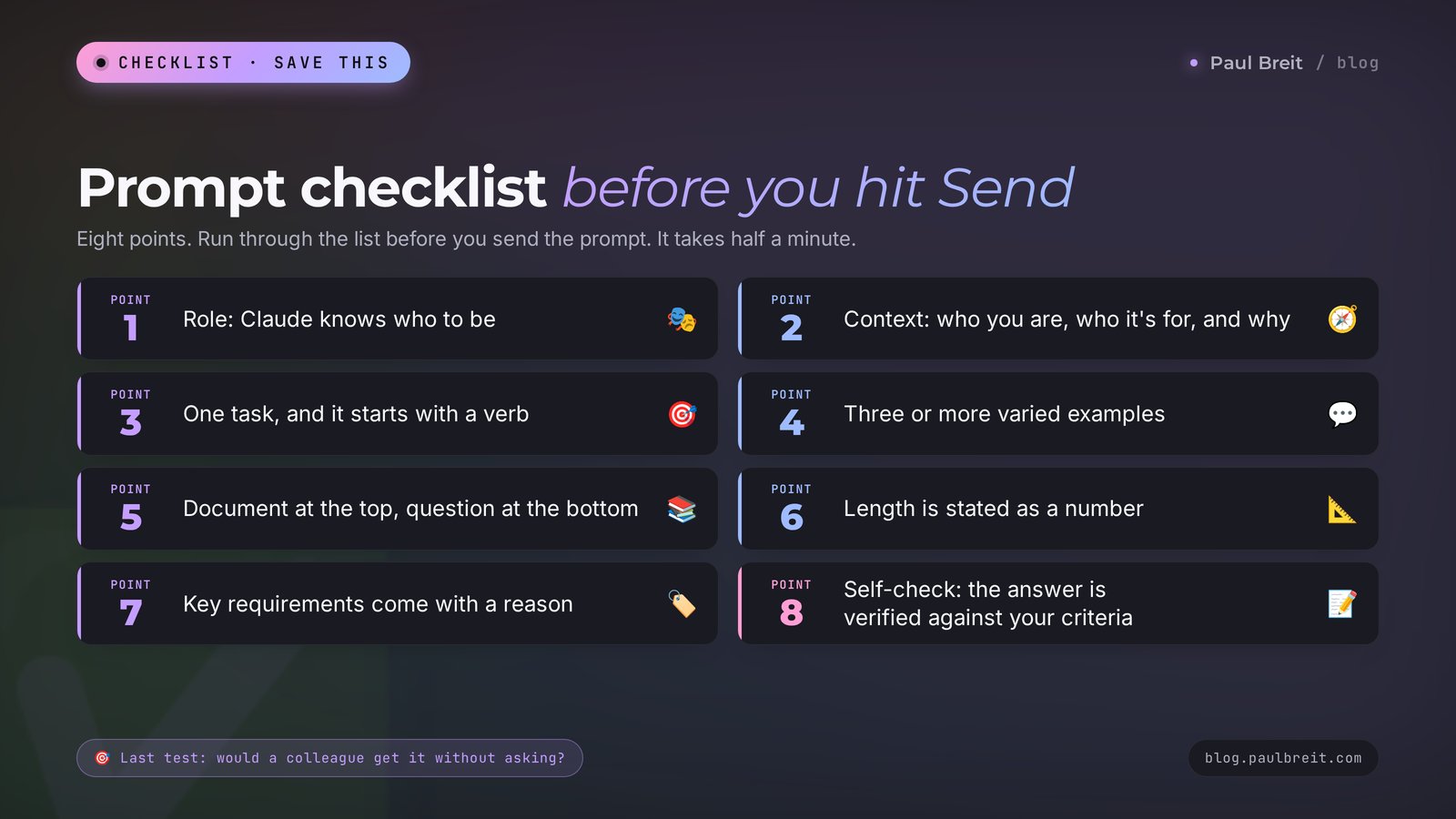
Run through the list before you press Send. It takes half a minute.
- Role. Claude knows who to be and what that specialist values.
- Context. You've said who you are, who the result is for, and why you need it.
- Task. There's one, it starts with a verb, and the steps are in a list.
- Examples. There are three or more, they differ from each other, and each sits in its own tag.
- Documents. Long material is at the start, and the question comes after it.
- Format. The length is a number, you've described what to do, and you've named where the text will be published.
- Reasons. The requirements that matter come with an explanation.
- Check. Claude knows which conditions to verify the answer against.
And one last test, the one with the colleague. Reread the prompt through the eyes of someone who knows nothing about your work. If it's all clear to them, send it.
Section 19The whole path in one minute
- The Claude prompt formula: role, context, task, examples, format, check.
- Claude does what's written. Ask directly, and give the reason behind the requirements that matter.
- Separate the parts of your message with clearly named tags, and keep the same names in every prompt.
- Give three to five different examples when voice or format matters.
- Put long documents at the start and the question at the end, and ask for quotes before the conclusion.
- Describe what to do with the format, and give the length as a number.
- On big tasks, ask for a self-check against your conditions.
- Keep the permanent part of your prompt in a Claude project and the requests that worked in your own notes.
- Check facts, numbers, and quotes against the source.
Today, take one task you usually hand Claude in a single line and build a prompt for it with the formula. Put the two answers side by side. Save that prompt as the first entry in your library.
FAQFrequently asked questions
What is the prompt formula for Claude?
The formula has six blocks: role, context, task, examples, format, and check. The role says who the AI should be. The context explains who you are, who the result is for, and why you need it. The task names the action and the steps. The examples show a sample, the format sets the length and structure, and the check asks Claude to verify the answer against your conditions. A short task needs only context, task, and format.
What language should I write Claude prompts in?
Write in the language you want the answer in. Claude replies in the language of the request. Tag names can stay as short English words, since that doesn't affect the language of the answer. If your prompt mixes languages or you paste in documents written in another one, add a line to the format block naming the language you want back.
Do I have to use tags in Claude prompts?
Short requests don't need tags. They help when one message mixes an instruction, examples, and documents: tags show what is where, and Claude doesn't mistake a piece of your text for a command. Anthropic recommends giving tags clear names and using the same names across your prompts.
How are Claude prompts different from ChatGPT prompts?
The foundation is the same: context, task, format. Claude has its own traits. It follows the wording of the request closely, reads tags in angle brackets well, and answers better when a long document sits at the start of the message and the question at the end. A prompt built with the six-block formula will work in ChatGPT and in other chat assistants too.
How many examples should I give Claude?
Three to five. That's the advice in Anthropic's guide. The examples should be close to the task and different from each other, each in its own example tag. With one example Claude copies it too closely, and a large number of long samples spends space in the chat with no visible benefit.
How long should a Claude prompt be?
Long enough that a person unfamiliar with the task could complete it with no questions. For translating a phrase, that's one line. For a post in your voice, it's 150–300 words plus examples. A long prompt with context and samples almost always gives a better result than a short one, as long as it doesn't contradict itself.
Where do I put a long document in a prompt?
At the start of the message, with the instructions and the question after it. In Anthropic's tests, a question at the end improves answer quality by up to 30 percent, especially on complex tasks with several documents. It helps to wrap each document in its own tag and label the source.
Do these prompts work on the free version of Claude?
Yes, every prompt in the article works on the free plan. The only difference is the message limit: long documents and long chats use it up faster. The Pro plan at $20 a month gives you more messages per session and priority during hours of heavy demand.
Where should I keep my Claude prompts?
The permanent part, meaning the role, context, and format, is best kept in the instructions of a project in Claude: every new chat inside the project already knows it. Save whole requests that worked in a note or a document, each labeled with the task it's for.
Why does Claude make up facts, and how do I reduce it?
The AI fills in plausible data where your materials have a gap and the task calls for a number or a name. Ask it to use only facts from the attached documents, to pull quotes before drawing a conclusion, and to put a [CONFIRM] marker where data is missing. Even then, check the numbers and quotes against the source.