Best AI tools 2026: 12 tools for 12 real work tasks
A plain map of which AI to reach for in 2026, task by task. Writing, images, video, voiceover, decks, spreadsheets, chatbots and agents. With real prices, free picks, and where each tool actually earns its keep.
The best AI tool in 2026 depends on the task. For writing, Claude and ChatGPT. For images, Midjourney and FLUX. For video, Runway, Kling and Sora; for a talking avatar, HeyGen; for voiceover, ElevenLabs. For search, Perplexity; for code with no developer, Claude Code and Cursor. Build a stack around your 3-4 most common tasks instead of forcing one model to do everything.
You google "best AI tools 2026" and land on an article listing 87 services. You scroll, understand nothing, close the tab. A week later you google it again. Round and round. The trouble with those roundups is they answer "what AI tools exist," while your real question is different: "I need to make this specific thing, what do I use for it?"
I run four client projects and a personal channel with 20,000 followers, and almost all of my routine is handled by AI. So I built this roundup by task. Open the row you need, see the tool, an example, and a price. That's it.
Eighteen minutes to read. At the end there's a table you can choose from in 30 seconds, and a plan for building your own stack in a single evening. Let's go, task by task.
What's inside
Section 01How to read this roundup
Let's clear up the main confusion first. People ask "which AI is the best," and that's a bit like asking "which tool is the best." Is a hammer the best? For a nail, yes. For driving a screw, not even close. AI works the same way. One model writes beautifully but won't paint you a cover. Another paints masterpieces but won't build a spreadsheet. A third searches the web and cites sources but loses the thread in a long conversation.
So the whole roundup is built around the task. I took the 12 jobs that land most often on the plate of someone who sells their own services, courses, or consulting. Write a post. Design a banner. Cut a reel. Transcribe a call. Build a deck. Answer clients while you sleep. Under each job there's a short breakdown: what the task is, my pick, and the backup option.
One more thing worth getting straight right away. In 2026 the models have caught up to each other on the basics. The gap between the leaders isn't huge anymore, and any of the top models will handle around 80 percent of your tasks. So don't agonize over finding the perfect one. Grab any first-line model, get used to it, then round out your stack with whatever's missing. I walk through the step-by-step version of that in a separate piece on how to choose an AI tool in 5 minutes.
And last: I deliberately don't chase the newest, loudest names. The market shifts every month, new models drop in batches, and half of them vanish within six months. This roundup is the stuff that actually sits in my workflow and my clients' workflows and doesn't let us down. Proven gear, not news-cycle hype.
Section 0212 tasks and the best AI for each
Below are twelve sections, one per task. You can read straight through or jump to the one that hurts right now. I'll call each tool honestly: where it's strong, where it's weak, and when you can skip it entirely.
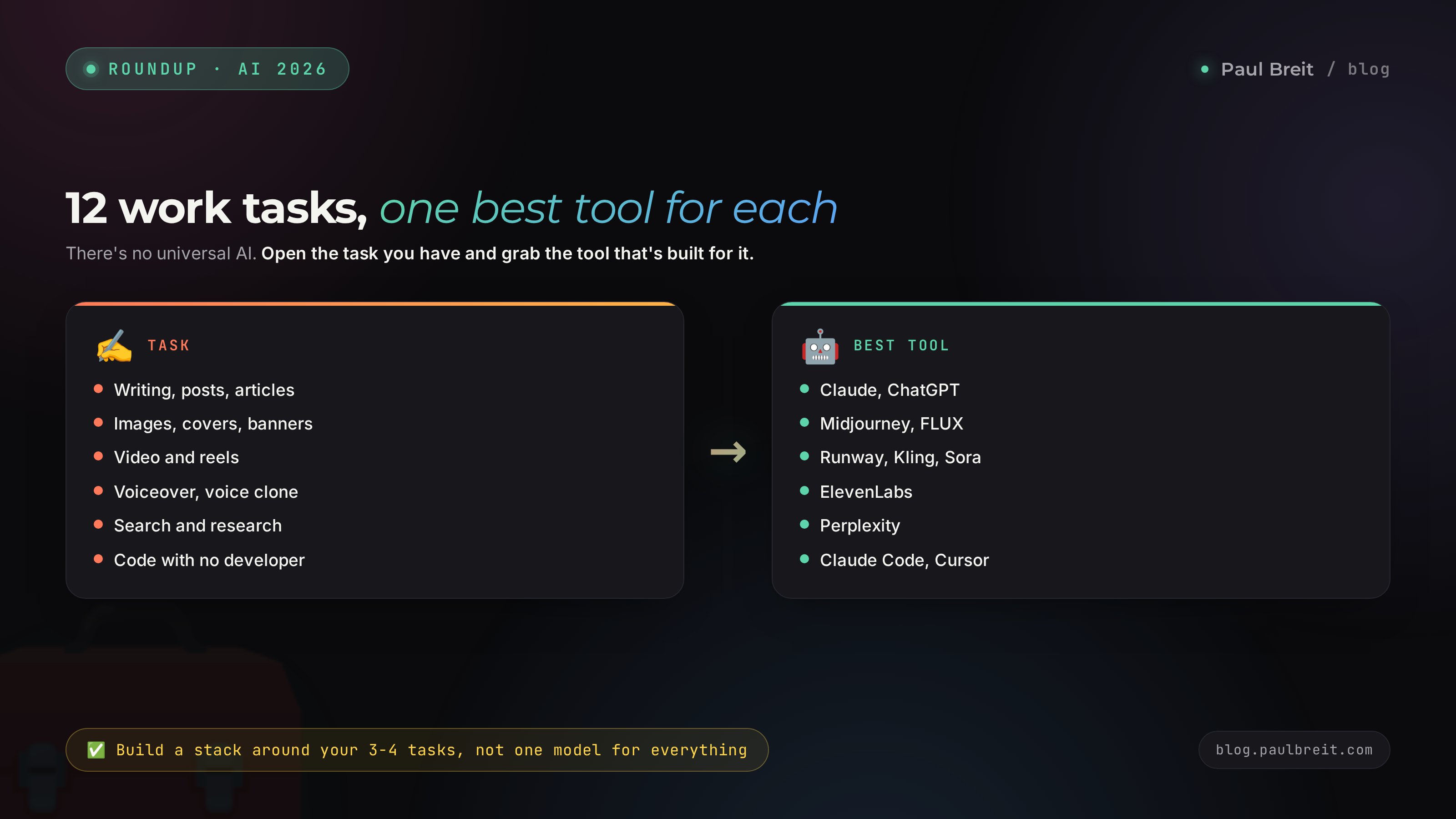
Task 1. Writing, posts and articles
The most common job of all. Write a channel post, an email to a client, a product description, a landing page, a reply to an objection. What matters here is that the text reads alive and in your voice, not in some sterile robot tone.
My pick: Claude. It holds a long text more cleanly than the rest, keeps a set tone better, and slips into cliches less often. Feed it 20-30 of your own posts and ask it to write the same way, and it genuinely hits your voice. I break down how to set that up in the piece on teaching AI to write in your voice.
Backup: ChatGPT. Stronger on short formats, fast rewrites, and when you want to bolt an image on right away. Plenty of people keep both and switch between them. I dug into which is better for you in the piece on Claude vs ChatGPT.
A small trick that changes everything. Don't ask "write a post about my product." Give the AI context: who your reader is, what pain they have, the tone you usually use, and drop in a couple of your old posts as examples. Then the text comes out yours, not some averaged version. The difference between a lazy prompt and a detailed one is the difference between a text you're embarrassed to publish and one you actually want to.
Task 2. Images, covers and banners
A cover for an article, an image for a post, a background for a banner, an illustration for a deck. This used to mean a designer or a stock site; now you get an image in a minute from a description.
My pick: Midjourney and FLUX. Midjourney gives the prettiest, most alive image, especially people, textures, and mood. FLUX is faster and follows a prompt more precisely, handy when you need a specific object on a specific background. For banners with text on them, use AI for the background and objects only and lay the type over it in a design tool, so the letters don't melt.
Backup: images right inside ChatGPT. Not as refined, but you draw in the same window where you write the post and fix it with words on the spot.
A rookie mistake is expecting a masterpiece on the first try. Doesn't happen. An image comes together over 5-10 passes: generate, look, refine the prompt, repeat. Spell out what you want to see: light, angle, mood, style. The more precise the description, the closer the result to what's in your head.
Task 3. Video and reels
Short video from text, bringing a photo to life, an intro sting, a video background. This is the fastest-moving area, and in 2026 clips from a couple of lines already come out quite watchable.
My pick: Runway, Kling and Sora. Runway is handy for edit inserts and fixes, Kling brings photos to life with smooth motion, Sora is strong on coherent scenes from a description. For reels people combine them: some frames shot yourself, some generated.
Write the script separately in Claude or ChatGPT. My method for 30 clips in an evening is in the piece on AI reels scripts.
Important: fully AI video still gives itself away. The best result comes from mixing live footage with generation rather than replacing yourself entirely.
Task 4. Voiceover and voice cloning
Voice a reel, make an audio version of a post, narrate a text in your own voice with no mic and no recording session. Separately, there's the job of translating your own video into another language while keeping your voice.
My pick: ElevenLabs. The best voice-cloning on the market. Record a few minutes of your speech, and from then on the service speaks any text in your voice across dozens of languages. It sounds so alive that listeners usually can't tell it from a real recording.
Backup: the built-in voices in video editors and in CapCut. Fine for rough voiceover and subtitles, but you won't get your own signature voice there.
Task 5. Transcription and meeting notes
Turn an hour-long call, webinar, or voice note into text, then get a short summary with action items. Dull manual work that AI takes off your plate completely.
My pick: Whisper. OpenAI's speech-recognition tech, baked into a ton of services and apps. Transcribes very cleanly. After the transcript, hand the text to Claude or ChatGPT and ask it to pull out the key points, decisions, and to-do list.
Here's the content angle worth flagging. One hour-long call or live stream, once transcribed, turns into a dozen posts, a reel script, and a couple of emails. You already said all of it out loud; you just ask the AI to slice the text into pieces for different formats. That's how people who "never have time for social" suddenly find a month of content sitting in what used to be just chatter on a call.
Task 6. Presentations and slides
Build a deck for a talk, a proposal, a selling deck for a webinar. Usually a day of fiddling in an editor.
My pick: Gamma. You describe what the deck is about, and it assembles the slides with layout, images, and structure. Then you just tweak the text to fit you. An hour gets you what used to take a day.
Backup: ask Claude or ChatGPT to write the slide content, then build the look in your usual editor. Slower, but full control over how it looks.
Task 7. Spreadsheets, reports and analytics
Pull data into a table, tally revenue, sort a survey into categories, build a report without a single formula. Excel scares a lot of people off, and needlessly so, since the AI does the counting for you now.
My pick: Claude and ChatGPT with file handling. Upload a spreadsheet or an export, say in words what you need calculated, and get a finished result with an explanation. Let the machine write the formulas; your job is to ask the question like a human.
Task 8. Chatbots and auto-replies to clients
A bot that answers common questions, walks people through the product, and books a call while you're busy or asleep. The first step toward sales running without your constant presence.
My pick: Claude as the brain plus a bot-builder service. The text model answers from your knowledge base while the bot builder holds the conversation inside the messenger. I showed how to automate routine and content in the piece on building a content plan in one evening.
Task 9. AI agents and automation
Here the task is bigger than a single question. The AI runs a whole chain of jobs: gather data, process it, send a report, update a spreadsheet. This is a digital employee that works on a schedule by itself.
My pick: Claude with connections. Through its mechanism for connecting external services, it reaches into your spreadsheets, email, messengers, and site and does the work itself. What an agent like this actually is, in plain words, I cover in the piece on building an AI agent with no code.
Honest note on difficulty: this is the most advanced task in the roundup. Too early for a beginner. Get comfortable with text and images first; you'll come to agents when you want to take repeating routine off your own hands.
Task 10. Translation
Translate a post, an email, a product description, or subtitles into another language so it reads alive rather than like a machine crib.
My pick: DeepL and Claude. DeepL gives the most natural translation of short texts. Claude is better when it matters to keep the meaning, the joke, and your tone in a long text. For business email either of the two usually does the job.
Task 11. Search and research
Get up to speed on a topic fast, find fresh numbers, gather facts with links to sources. Ordinary search hands you ten tabs; you want a finished answer with proof.
My pick: Perplexity. It searches the web and gives an answer with links to sources you can check. For fact-checking, prepping an article, and diving quickly into a new topic, it's the best helper.
Backup: the search mode inside ChatGPT and Gemini. They also search the web and answer based on what they find.
Task 12. Code with no developer
Build a simple landing page, crunch something with a script, automate an export, fix someone else's code. Sounds scary, but in 2026 it's done by talking, not by years of study.
My pick: Claude Code and Cursor. You describe in words what you need, and the tool writes and runs the code itself. It fixes its own errors too, if you tell it to. A non-coder genuinely builds working things, as long as they're not afraid to try.
Where to start: before you touch code, learn to state your request clearly. My formula for a good prompt is in the piece on how to write prompts. Half the battle here is in framing the task.
Section 03The comparison table: choose in 30 seconds
If there's no time to read section by section, here's the whole roundup in one table. Task on the left, my main pick in the middle, and a free or budget-friendly starting point on the right. Save it and come back when a specific job comes up.
| Task | My pick | Free / budget start |
|---|---|---|
| Writing and posts | Claude, ChatGPT | Claude free, ChatGPT free |
| Images and banners | Midjourney, FLUX | ChatGPT images, FLUX free |
| Video and reels | Runway, Kling, Sora | Runway free tier |
| Voiceover, voice clone | ElevenLabs | CapCut built-in voices |
| Transcription | Whisper | Whisper (open, free) |
| Presentations | Gamma | Gamma free tier |
| Spreadsheets and reports | Claude, ChatGPT | Claude free, ChatGPT free |
| Chatbots | Claude + bot builder | builder free tiers |
| AI agents | Claude with connections | start on Claude free |
| Translation | DeepL, Claude | DeepL free |
| Search and research | Perplexity | Perplexity free |
| Code with no developer | Claude Code, Cursor | Cursor free tier |
There's a pattern here. Almost every task has a free or cheap way to start, and you only reach for the paid tier once the tool proves it saves you hours. Next let's talk money honestly.
Section 04What it costs and what you get for free
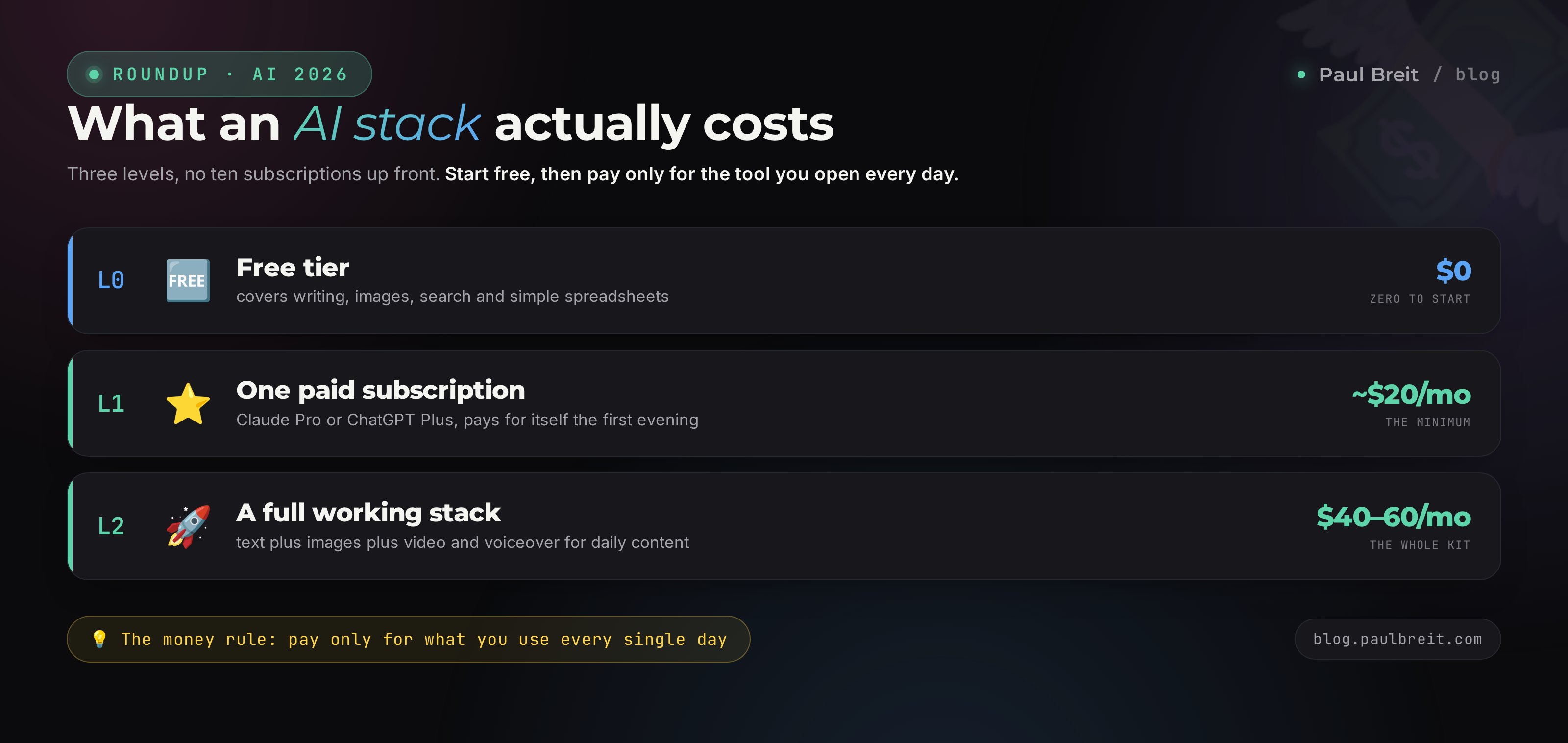
The beginner's big fear is that AI is expensive and you have to pay for ten subscriptions up front. Nothing of the sort. Here's the honest breakdown of how much money you actually need at each level.
Level 0. Free, zero dollars
Claude, ChatGPT, Perplexity and Gemini all have free tiers. They're plenty for spending a month poking at a tool and figuring out what you need every day. At this level you can cover writing, images, search, and simple spreadsheets without spending a cent. I put together a full list of the free options in the piece on free AI tools.
Level 1. One paid subscription, about $20 a month
The moment you hit the limits of the free tier and feel the model saving you hours, take one paid subscription. Claude Pro or ChatGPT Plus run around $20 a month. That's the minimum that pays for itself the first evening it saves. One model covers writing, spreadsheets, emails, and plans, which is most of your work.
Level 2. A full stack, $40-60 a month
Once you add images and video to your writing, you're at two or three subscriptions: a text model, an image generator like Midjourney, and, if you work with clips a lot, a video service and ElevenLabs. That comes to $40-60 a month. This is the level of someone making content daily and earning from it. For them the money is pocket change against the cost of a designer and an editor.
Pay only for what you use every day. A subscription you opened twice all month is wasted money. Start free, add paid as you hit the limits. That way the stack assembles itself, and exactly around you.
Section 055 mistakes when picking an AI tool
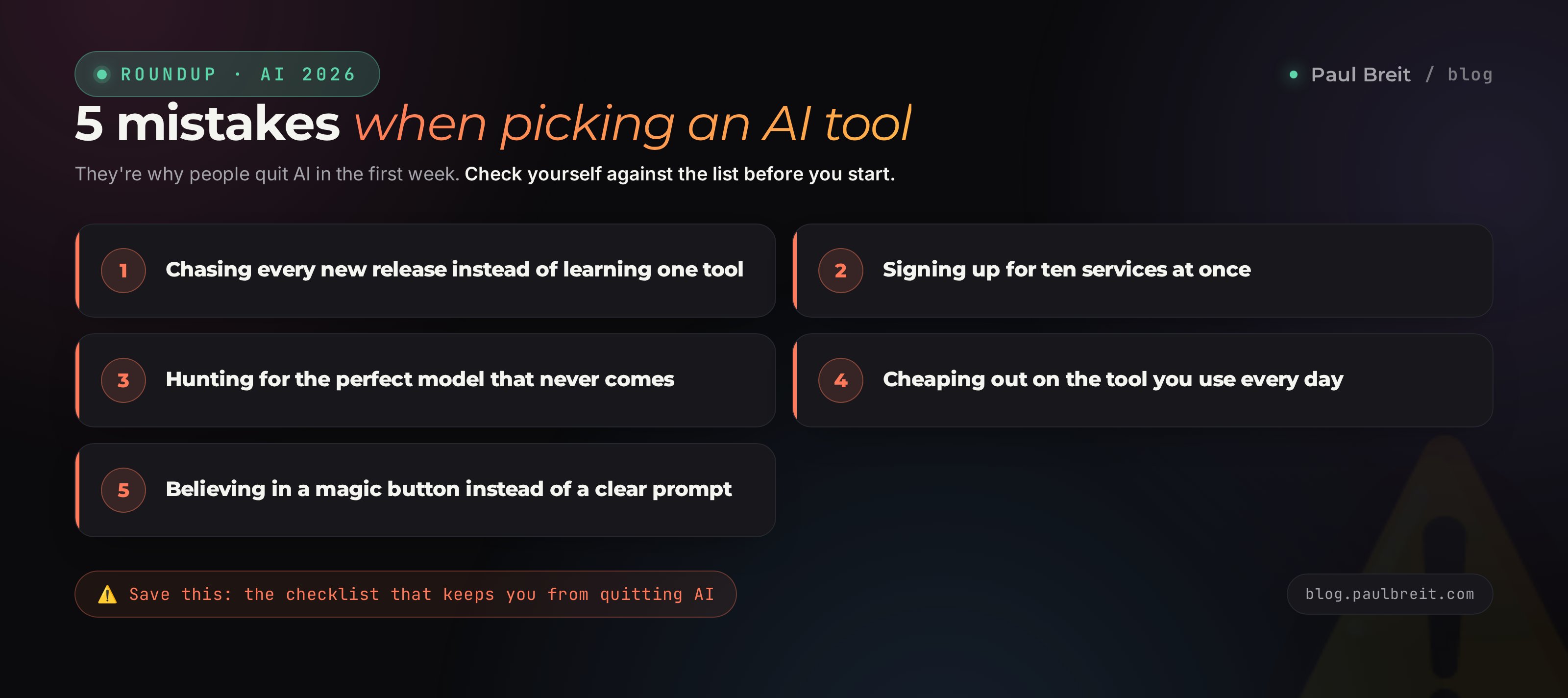
Over a couple of years I've watched plenty of people come to AI and quit within a week. It's almost always one of these five mistakes. Check yourself against the list up front so you don't step on any of them.
Mistake 1. Chasing new releases
Every week a new model drops that everyone's shouting about. The person abandons what they'd just started learning and runs off to try the fresh thing. In the end they've mastered nothing properly. Pick a proven tool and give yourself a month to work in it calmly. Look at the new releases later.
Mistake 2. Ten services at once
The beginner reads a roundup of 87 AI tools and tries to sign up for all of them. Head spinning, limits burned, nothing to show for it. Take one text model and spend a month solving your tasks with it. Add the rest when you feel what's specifically missing.
Mistake 3. Hunting for the perfect model
Someone spends months comparing, reading benchmarks, waiting for the one true best to come out. Meanwhile time passes and the tasks pile up. In 2026 any of the top models will handle your work. There is no perfect one. Take a good one and start working today.
Mistake 4. Cheaping out on the tool you use daily
The opposite extreme. Someone squeezes by on the free tier every day, loses time to limits and queues, all to avoid paying $20. If a tool saves you several hours a week, the subscription pays for itself instantly. Count the hours saved; they're worth more than twenty dollars.
Mistake 5. Believing in a magic button
It feels like the AI will do it all beautifully if you just press one button. It won't. The result depends on how clearly you framed the task. A bad prompt gives a bad answer. A good, detailed prompt gives an answer that makes you sit up. Learning to write prompts matters more than choosing between models.
Section 06How to build your stack in one evening
Let's put all of it into a simple plan. One evening, and you've got a working stack for your tasks. No reading twenty more articles.
Write down your three most common tasks
Exactly three, the ones that eat the most of your time each week. You don't need the full list of twelve right now. Posts? Images? Client replies? Name your three real pains honestly. The rest comes later.
Find them in the table above
For each of the three, look at my pick and the free starting point. Decide whether you'll begin on the free tiers or go straight to a paid leader for the task that matters most.
Set up the free tiers
Sign up for the tools you chose on their free plans. Still zero dollars. Your job for the evening is simply to get in and try one real task of your own. Grab Claude access at claude.ai.
Solve one live task right now
Something real, no abstractions. Write the AI a post you actually need to publish. Or design a cover for tomorrow's article. The first real result in an evening, and the fear drops away.
In a month, add paid and a second tool
Once you hit the limits and see the model really saving time, take one paid subscription. And add a second tool for the task that was missing. The stack assembles itself, exactly around you.
There's no single best AI, just a best one per task. Write down your three main pains, find the tools in the table, set up the free tiers, solve one live task today. In a month, add a paid subscription for what you use every day. Don't chase new releases, don't hunt for the perfect one. Start working with what you've got.
In 2026, AI isn't about the future or about programmers anymore. It's an ordinary work tool, like a phone or a spreadsheet. Whoever masters it does in an hour what takes others a day. Start with one task this evening, and in a month you'll be surprised how much routine has left your shoulders.
If you'd rather get a ready plan for your niche straight away – where to start, what to automate first, and how to turn on a steady stream of leads – book a free consultation. Together we'll build your system step by step, so you don't have to piece it together alone.
FAQFrequently asked questions
What is the best AI tool in 2026?
There's no single best AI: one model is stronger at text, another at images, a third at video. For writing and everyday business tasks people mostly reach for Claude and ChatGPT, for images Midjourney and FLUX, for search Perplexity. The smart move is to build a stack around your 3-4 most common tasks instead of hunting for one universal model.
How much does a stack of AI tools cost per month?
A minimal working stack is one paid subscription to a text model, around $20 a month (Claude Pro or ChatGPT Plus). Add images and video and it runs $40-60. You can start entirely on free tiers for $0 and only pay once you hit the limits on a tool you use every day.
Which is better for writing, Claude or ChatGPT?
Claude usually holds a long text more carefully, keeps your style better and reaches for cliches less. ChatGPT is stronger on short tasks, images inside the chat, and voice mode. Many people keep both and switch by task. There's a full comparison in a separate post on the blog.
Which AI is best for images and banners?
For realistic and artistic images people use Midjourney; for fast generation from a prompt, FLUX and images inside ChatGPT. For banners with text on them it's safer to lay the type in a design tool and use the AI only for the background and objects.
Can I build the whole stack on free tiers?
At the start, yes. The free tiers of Claude, ChatGPT, Perplexity and Gemini are enough to figure out what you actually need every day. It's worth paying only for the tool you use daily and where you keep hitting the limits.
Which AI is best for video and reels?
Scripts and captions are easy to write in Claude or ChatGPT. Video from text comes from Runway, Kling and Sora; a talking avatar with your face from HeyGen; voiceover in your own voice from ElevenLabs. A full reel is assembled from several tools plus an edit in CapCut.
Where should a beginner start so they don't get lost?
Take one text model and spend a month solving your real tasks with it: posts, emails, client replies, plans. Once you feel confident, add images and search. Don't chase ten services at once; that burns you out faster than it teaches you anything.