Review contracts and documents with AI before you sign
A client contract, an offer, a lease, an act, a claim – anyone who sells services, courses, or consulting signs something on a regular basis. And almost everyone skims, because the language is barely human. AI breaks a contract into plain pieces in a minute, highlights the clauses working against you, and preps a list of questions for a lawyer. This article walks the whole process with ready prompts: how to check other people's documents, and how to draft your own.
To check a document with AI, drop its text into Claude or ChatGPT, strip out personal data, and ask four questions in a row: give me a short summary, find the clauses against me, tell me what's missing from this contract, and explain the hard parts in plain words. In 15 minutes you get a clear picture of the contract and a list of questions for a lawyer. For deals with large amounts, leave the final check to a live lawyer.
A client sent me a contract with a course platform and asked if it looked okay. Fifteen pages in tiny type. She admitted she made it to page three and gave up. Buried in there was a quiet clause: the platform took the rights to every piece of her course material, with no time limit. She'd have signed it blind and then been unable to reclaim her own lessons.
We ran the contract through Claude in ten minutes. The AI pulled that clause out first, explained what it meant for her, and suggested wording to request in its place. She walked into the negotiation prepared and the clause got rewritten. She still needed a lawyer, but she came to him with a list instead of a shrug.
What follows is that whole process, step by step. We'll cover what AI does well with documents and where its ceiling is. What you should never upload. How to check any document in 15 minutes. The eight clauses where people lose money most often. Ready prompts to copy. And how to draft your own contract or offer if you work with clients.
What's inside
- What AI does with documents and where its ceiling is
- What you should never upload
- How to review a contract in 15 minutes
- 8 clauses where people lose money
- Ready prompts to copy
- How to draft your own contract and offer
- Different documents: what to check in each
- Getting started with Claude
- 5 mistakes when reviewing documents
- Review checklist
Section 01What AI does with documents and where its ceiling is
First, honestly about the limits, so you don't expect too much and end up disappointed. AI is a strong helper for the text of a contract, but it has a clear ceiling, and you want to see it before you lean on it.
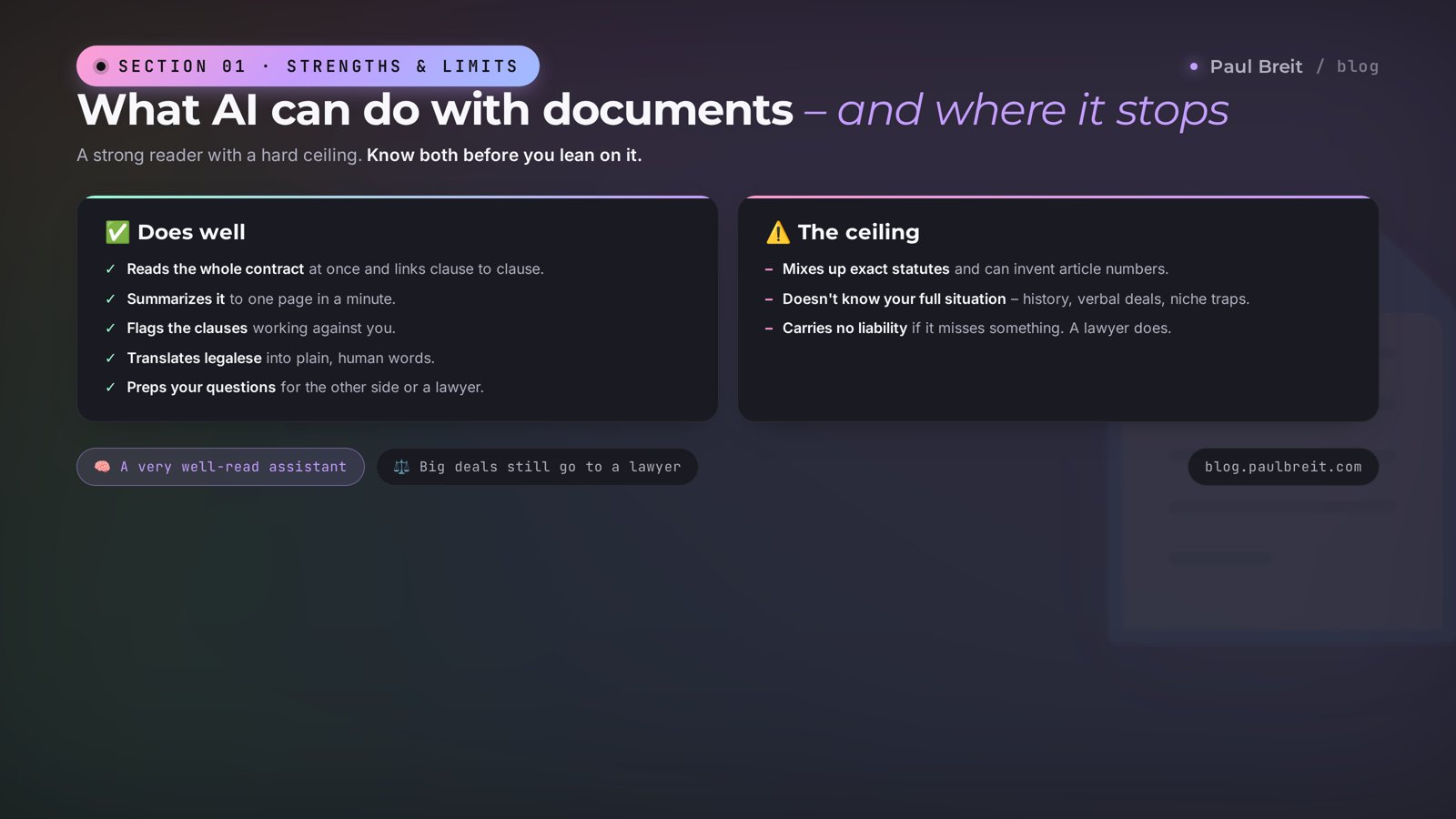
What it does well
- Reads the whole document. The fifteen pages you dropped on page three, it holds all at once and sees how the clauses connect. The payment clause on page two and the penalty clause on page ten – it lines them up.
- Summarizes. In a minute it compresses the contract to one page: who owes whom, for what money, on what timeline, what happens on a breach. You get the skeleton of the document instead of a soup of clauses.
- Finds weak spots. It highlights the clauses that play against you: one-sided rights for the other party, penalties, hidden obligations, vague deadlines.
- Translates legalese. "The parties agree to resolve disputes through a pre-claim procedure" becomes "we complain in writing first, only then go to court." Plain language, no legal fog.
- Preps your questions. From the review it builds a list of what to clarify with the other side or a lawyer. You show up prepared.
- Writes drafts. A services agreement, an offer, a scope of work, a claim, a reply letter – it assembles a first version from your inputs in a couple of minutes.
Where its ceiling is
AI is not a lawyer and carries no responsibility for the outcome. That's its main limit, and no prompt removes it.
- It confuses specific laws. It knows the general logic of contract law, but exact statute numbers and recent amendments it can name wrong or invent. Always double-check a legal reference.
- It doesn't know your full situation. It sees the text, but not the history of your relationship with the other side, the verbal agreements, or the traps specific to your niche.
- It isn't accountable for money. If it misses something and you sign and lose, there's no one to hold responsible. A lawyer answers for a mistake; AI does not.
Treat AI like a very well-read assistant who read the whole contract in a minute and told you what to look at. From there the decisions and the signature are on you, and the disputed, expensive moments are on a live lawyer. In that role it saves you hours and hundreds of dollars in legal fees on simple paperwork.
Section 02What you should never upload
Before you happily toss a contract into a chat, figure out what shouldn't go in there. A document is often personal data, trade secrets, and other people's obligations. A leak costs more than the time you saved.
The simple rule
AI needs the meaning of the document, not your ID details. It reads the structure and the wording just as well whether real names or placeholders sit in there. So the personal stuff can and should come out.
What to strip before uploading
- Names and ID details – yours and other people's. Replace them with "Party 1," "Party 2," "Provider," "Client."
- Account numbers, card numbers, bank details. You don't need them to check the terms.
- Addresses, phones, emails. Remove them or swap for "address," "contact."
- Trade secrets. Exact contract amounts, client lists, know-how. If you're checking the structure, replace the amounts with placeholders – the logic of the clauses won't change.
- Other people's signatures and stamps on scans. Send only the text for review.
On free tiers your chats may be used to train models. For sensitive documents, turn on the setting that blocks that, or use a paid plan where your data doesn't go into training. And strip the personal details anyway before uploading. The rule is simple: if a leak of this document would wreck your life, anonymize it fully or show it only to a lawyer in person.
I went deeper on which data you should never trust to AI and how to protect your client base in the article on automating your routine. Here, hold the main thing: hand over the meaning of the document, keep the personal stuff to yourself.
Section 03How to review a contract in 15 minutes
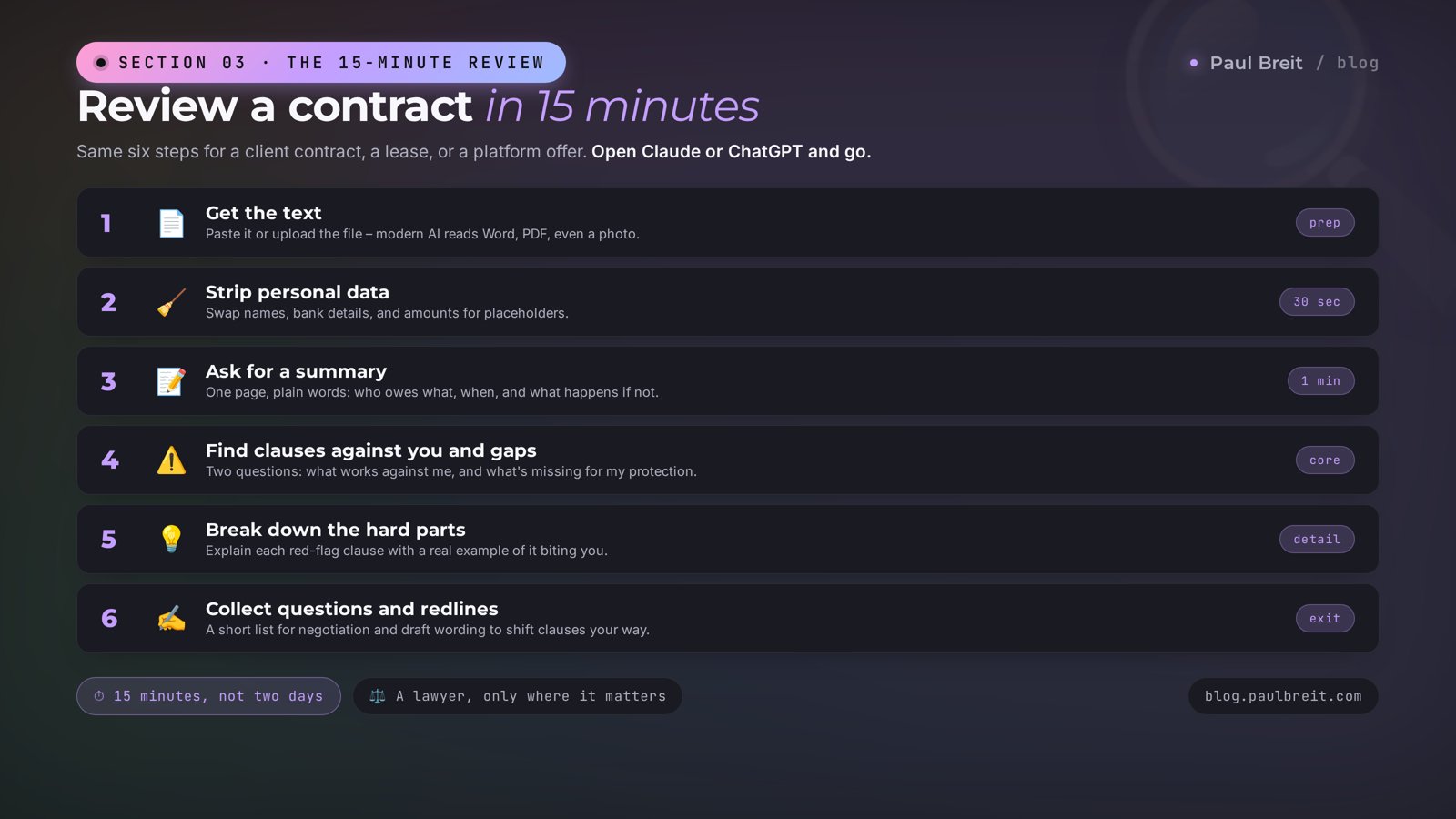
This is the core of the article – a step-by-step review of any contract. It works the same for a client contract, a lease, a platform offer, a contractor agreement. Open Claude or ChatGPT and walk through the steps.
Get the text of the document
If the contract is in Word or PDF, copy the text or upload the file straight into the chat – modern AI reads files. If it's a scan or a photo, upload it as an image; Claude and ChatGPT recognize the text themselves. When recognition struggles on a bad scan, run the photo through any free text-recognition tool and paste the result.
Strip out personal data
Before sending, run through the text and replace names, bank details, and amounts with placeholders, like in the last section. Thirty seconds of work, and you sleep easy after. For a boilerplate contract with nothing secret in it, you can skip this step.
Ask for a short recap
The first prompt sets the frame. You write it like this:
"You're an experienced contract lawyer. Here's a contract [paste the text]. Give me a short one-page summary: who the parties are, the subject, who owes whom what, deadlines, payment, what happens on a breach. Plain language, no legal terms."
In a minute you understand what the document is even about. From there you read with intent instead of wading through the wording.
Find clauses against you and the gaps
The key step. Two questions in a row:
"In this contract I'm the [Client / Provider / Tenant]. Find every clause that plays against me. For each one, explain how it can hurt me and rate the risk from 1 to 5."
And right after:
"Now tell me what's missing from this contract to protect me. Which clauses usually appear in contracts like this but got left out or removed here."
The first question catches the traps; the second catches the gaps. A missing clause on the other party's liability is more dangerous than any small trap, and you can't see it in the text – you can only see what isn't there.
Break down the hard parts
Take each clause the AI flagged red and ask it to spell it out:
"Explain clause 7.3 in really simple words, like you're telling a friend over dinner. Give a real-life example of when this clause works against me."
A real-life example switches your brain on better than any definition. When you see an abstract penalty clause turn into concrete dollars out of your pocket, the contract reads completely differently.
Collect questions and redline notes
The final prompt turns the review into action:
"Put together a list of 5-7 questions I need to ask the other side or a lawyer before signing. And suggest wording for a redline on the riskiest clauses – how to rewrite them in my favor."
You come out with a ready list for the negotiation and draft edits. From there you either work it out with the other side yourself or go to a lawyer with specifics instead of "please review the whole contract." The second costs far less.
A one-page summary of the contract. A list of risky clauses with a danger rating. A list of what the contract is missing. A breakdown of the hard parts with examples. Ready questions and draft edits. This used to cost a few hundred dollars in legal fees and take a couple of days. Now you come to your lawyer with a map already drawn, and their work costs less and moves faster.
Section 048 clauses where people lose money
So you know exactly what the AI is hunting for, here are eight places where trouble hides most often. Run any contract past them as a separate question if you want a targeted check.
This isn't a complete list, but these eight clauses cause the bulk of the problems in contracts for solo experts and small companies. Skim them yourself, then hand the details to the AI: it'll catch the wording you'd miss on page five and rate how dangerous each clause really is in your specific role. From there you argue with the other side on the merits instead of agreeing to everything out of fatigue.
One-sided exit and changes to terms
Wording like "the Party may terminate this contract unilaterally" or "change the rates with 3 days' notice." If only the other side holds that right, you're left hanging. Ask the AI to check whether the exit rights are symmetrical.
Penalties, fees, and late charges
Look not just at the size, but at what triggers them and who they hit. Often the penalties apply only to you, while the other side's delays pass without consequence. A late fee of 1% a day is 365% a year, and it looks harmless in the text.
Transfer of rights to the work
A sore spot for anyone who makes content, courses, design, or copy. The intellectual-property clause can quietly take everything you created, with no limit on time or territory. For an expert that means losing your own materials. AI pulls these clauses out first if you ask about it directly.
Automatic renewal
"The contract renews automatically unless either party gives notice of termination 30 days in advance." Forget to warn them in time and you're tied in for another term, sometimes at new prices. Service subscriptions and leases love this one.
Payment order and timing
When exactly you get paid, what counts as the moment of payment, whether there's a deposit, what happens to an advance on termination. A vague "payment is made upon delivery of the services" with no deadline means you can legally wait a very long time for your money.
Liability and its limits
Look for clauses where the other side caps its liability at zero or a token amount while leaving yours unlimited. "The Provider is not liable for lost profit" sitting next to full penalties against the Client is a classic imbalance.
Jurisdiction and dispute resolution
Which court hears the case if it comes to that. A clause saying "disputes are heard at the Provider's location" on the far side of the country means suing is expensive and inconvenient, so you'll drop it. That's exactly the bet.
Confidentiality and its term
What you're obligated to keep secret, for how long, and what it costs to slip. Wording that's too broad can tie your hands in your own work. Ask the AI to judge whether the obligations are realistic and whether they get in the way of doing business.
"Check this contract against eight risk points: one-sided exit, penalties and fees, transfer of rights to the work, auto-renewal, payment order, liability limits, jurisdiction, confidentiality. For each point, tell me what the contract says, whether it plays for me or against me, and what to clarify. In this contract I'm the [your role]."
Section 05Ready prompts to copy
Let's gather in one place the prompts that actually work. Copy, drop in your document and role. If you want to go deeper on building commands like these for yourself, look at the article on how to write prompts.
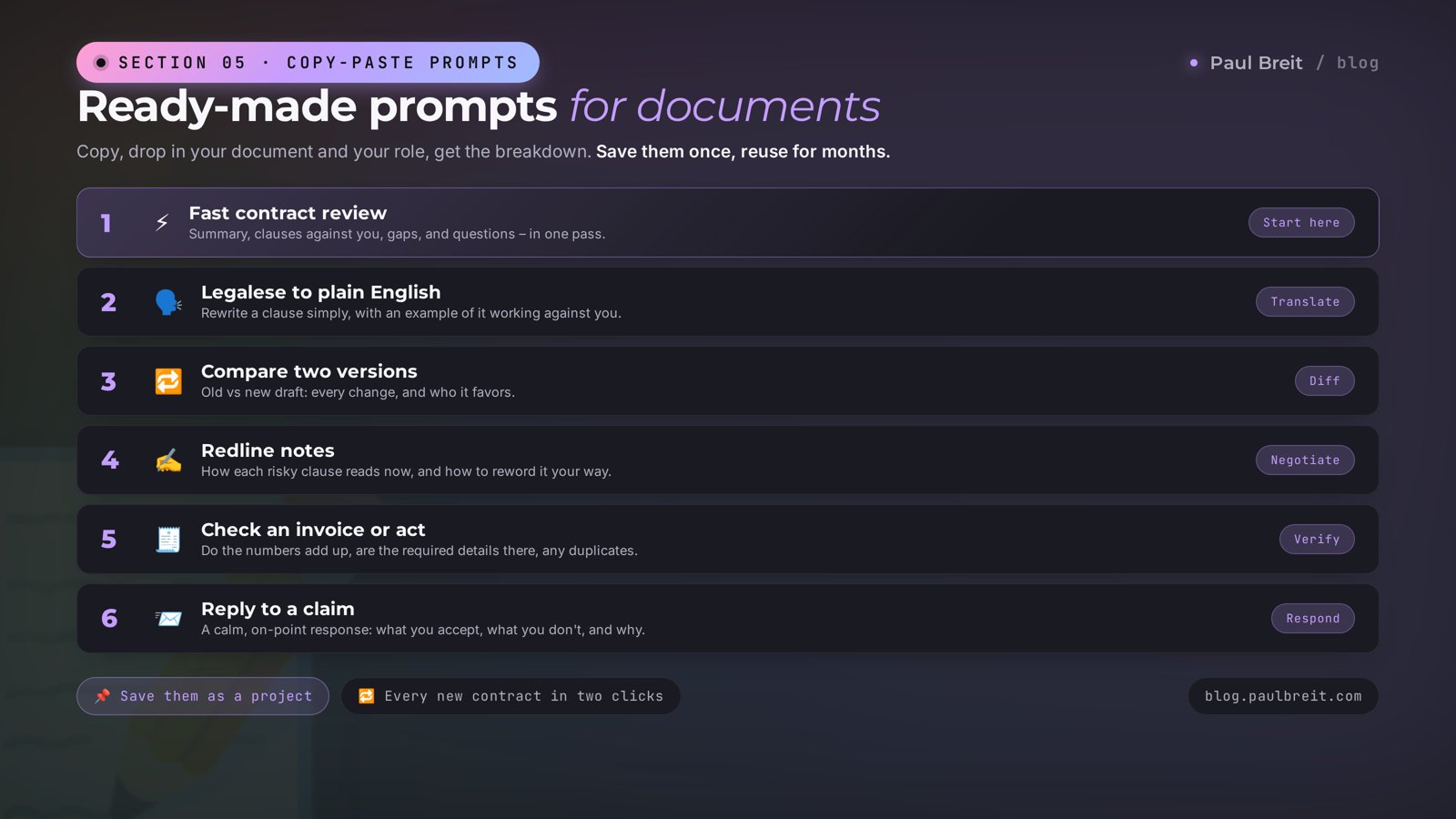
Fast contract review
"You're an experienced contract lawyer. Review the contract below. Give me: 1) a one-page summary in plain language, 2) a list of clauses against me with a risk rating of 1-5, 3) what's missing from the contract to protect me, 4) 5-7 questions for a lawyer. I'm the [role]. Contract: [text]."
Legalese into human
"Rewrite this contract clause in plain, living language, like you're explaining it to a friend. Add a real-life example of when it works against me. Clause: [text]."
Compare two versions
"Here are two versions of a contract: the old one and the new one sent for re-signing. Find every difference and tell me which changes play against me and which are in my favor. Version 1: [text]. Version 2: [text]."
Redline notes
"For these risky clauses, draft redline notes: how each clause reads now and how to propose rewriting it in my favor, while staying reasonable and within the law. Clauses: [list]."
Check an invoice or act
"Check this invoice / act: do the amounts add up, are the required details present, are there any extra or duplicated line items. Document: [text]."
Reply to a claim
"I received a claim [text]. Help me write a calm, polite, on-point reply: what I agree with, what I don't and why, what I propose. No rudeness and no admitting to things that didn't happen."
Save these prompts to a separate note or into a project inside the AI. Then every new contract gets checked in a couple of clicks: open, paste, get the review. Set it up once and use it for months.
Section 06How to draft your own contract and offer
Reviewing other people's documents is half the job. The other half, for anyone who sells services, courses, and consulting: your own documents. A services agreement, an offer on your site, a scope of work. AI assembles a draft in minutes, and you tune it to fit.
Services agreement
The prompt sets the frame and the inputs:
"Draft a services agreement. I'm [who], I provide [what services], the client is [who]. Price [amount], payment [how], term [what]. Write in my interests: a deposit, clear criteria for when the work is done, a cap on my liability, a revision process. A simple, clear contract with no fluff."
Then you check the draft the same way as in Section 3, as if it were someone else's document. A fresh eye catches what you can't see in your own text.
An offer for a site or course
If you sell courses, consulting, or access to materials, you need a public offer. AI builds its structure: subject, rights and obligations, payment and refunds, liability, details. An offer is tightly tied to your pitch and the promises on your landing page, so keep them consistent – I wrote about the pitch itself in a separate article.
Scope of work
Working with contractors – a designer, an editor, a developer? A clear scope of work saves you from disputes. Describe the task to the AI in free text and ask it to build a structured scope with acceptance criteria and deadlines. Half the conflicts with contractors die at the stage of a clear scope of work.
A draft from the AI is a starting point, not the final word. A template from general practice may not fit your niche, region, and specific situation. Before you push an offer live on your site or sign a contract with clients at scale, show the finished text to a live lawyer once. Checking a finished draft costs far less than drafting a contract from scratch, and takes less of a lawyer's time.
Section 07Different documents: what to check in each
Every type of document hides its own rake to step on. Here's a short map of what to watch for once the AI has done the general review.
| Document | The main thing to check |
|---|---|
| Client contract | Deposit, criteria for when the work is done, revision process and limit, cap on your liability, moment of payment |
| Platform offer | Rights to your content, fees and how they change, blocking conditions, payouts, auto-renewal |
| Lease | Rent-increase terms, deposit and its return, who pays for repairs, notice period to move out, auto-renewal |
| NDA | What counts as secret, the term of the obligations, the penalty size, whether it ties your hands at work |
| Contractor agreement | Scope and acceptance criteria, deadlines, what happens on a miss, rights to the work, warranty and fixes |
| Employment or freelance | Duties, pay and timing, probation period, liability, termination terms |
| Invoice and act | Matching amounts, required details, no extra line items, what exactly you're signing off on with the act |
| Claim | The substance of the demand, whether it's justified, response deadlines, what happens if ignored |
For lawyers and anyone who works with documents constantly, there's a separate breakdown with deeper scenarios – in the article on AI for lawyers. Here we hold it at the level of "an expert checking their own and other people's paperwork before signing."
Section 08Getting started with Claude
For contract review I most often reach for Claude – it holds a long document more reliably and cuts fewer corners on legal wording. If you're outside the US or EU, access can be limited, so here's a short note on getting set up.
Claude isn't available in every country. Check Anthropic's supported-regions list, and if yours isn't on it, a VPN set to a US or EU location gets you in. A couple of regions are on Anthropic's blocklist – Turkey and the UAE among them – so pick a US or EU endpoint. Full access and payment details are in the article on paying for Claude.
Three steps to a working account
- Turn on the VPN with a US or EU location before you open the site, if your region needs it. Signing in without it can tie the account to a restricted region and get it blocked later.
- Register with a mainstream email. Gmail or Apple work fine. If you don't have a suitable one, make a new one with the VPN already on, so the account doesn't tie to a restricted region.
- Go to claude.ai and create your account. The free tier covers a basic document review. For paying for Pro, I wrote it up in detail in a separate article.
A word on length. Contracts run to dozens of pages, and here it matters that the AI holds the whole text at once instead of reading it in chunks. Claude is solid on this: it sees a long document as a whole and connects clause to clause. If your contract is very large, hand it over as a single file rather than in pieces, so the review stays coherent and the AI notices contradictions between sections.
If Claude isn't handy, ChatGPT handles a contract review well too. The prompt logic from this article works in any AI. For a comparison of which models are out there and what to pick for the task, there's a roundup of free AI tools. And a general getting-started guide for Claude is in the article on learning Claude from scratch.
Section 095 mistakes when reviewing documents
Trusting every word blindly
AI sometimes invents legal references and confidently names statutes that don't exist. Check the meaning, and double-check specific legal references with a lawyer or the original source. A confident tone is no guarantee it's right.
Not stating your role
The same clause is dangerous in different ways for a client and a provider. If you don't tell the AI who you are in the contract, it reviews in general instead of for you. Always add: "in this contract I'm this-or-that party."
Uploading a document with personal data
An ID, bank details, a client base in someone else's cloud – a risk you can easily avoid. Anonymize the document before uploading. Thirty seconds saves you real trouble.
Only asking about traps
The most dangerous thing in a contract is often what isn't written, not what is. A missing clause on the other side's liability doesn't show up in a normal read. Always ask the second question: what's missing from this contract to protect me.
Replacing a lawyer with AI on a big deal
For a boilerplate contract at a manageable amount, an AI review is enough. For a deal where a house, a stake in a business, or serious money is on the line, a live lawyer is a must. Here the AI is prep for the meeting with him, so his hour costs you less.
Section 10Review checklist
Print it or save it. Run through the points before every signature.
- Document text pulled and recognized, if it came as a scan or photo
- Personal data removed or replaced with placeholders before uploading
- One-page summary in hand, the overall sense of the contract clear
- Clauses against you found and risk-rated, your role stated
- Gaps in protection checked with the separate "what's missing" question
- Hard parts broken down with real-life examples
- Eight risk points run: exit, penalties, rights, auto-renewal, payment, liability, jurisdiction, confidentiality
- List of questions for a lawyer or the other side put together
- Legal references double-checked, if they affect the decision
- Big deal? A live lawyer does the final check
The point isn't to fire your lawyer. It's to stop signing blind. In 15 minutes AI turns fifteen pages of legalese into a clear picture: where the traps are, what's missing, what to ask about. You walk into any deal prepared, and you call a lawyer on point and for a reason. That's how you save both hours and money, and the risky clauses stop slipping past.
How this connects to the other articles
Reviewing documents protects the money your work brings in. The pitch from the article on writing an offer brings the client in, the contract locks the terms of the deal, and the prompts from the prompts guide help you get the most out of the AI at every step. One system: attract, agree, protect.
FAQFrequently asked questions
Can AI replace a lawyer when reviewing a contract?
No. AI helps you understand the document, find weak spots, and prep your questions, but it carries no liability and sometimes gets legal references wrong. For deals with big money or real risk, leave the final word to a live lawyer. AI saves their time and your money: you show up with a ready list of questions instead of a blank page.
Which documents are safe to upload into AI?
Anonymized ones. Remove or replace names, ID numbers, account numbers, addresses, and amounts if the document is confidential. You are checking the structure and wording, not the personal data. For sensitive contracts use a paid plan where your data isn't used for training, and still strip the personal details first.
Does AI understand contract law?
Partly. It handles the general logic of contract law and typical clauses well, but exact statute numbers and recent changes it can confuse or invent. Ask it to explain the meaning of a clause and its consequences for you, and double-check any legal references with a lawyer or the original source.
How much does it cost to review documents with AI?
A basic review runs fine on the free tier. For regular work with long contracts, Claude Pro at $20/month is more comfortable: more capacity and cleaner handling of long files. There's no separate charge for documents.
Claude or ChatGPT for reading contracts?
Both work. Claude holds a long document as a whole more reliably and cuts fewer corners on legal wording, so for contracts I reach for it more often. For a short letter or invoice the difference doesn't matter.
Can I draft a contract from scratch with AI?
A draft, yes. AI will build the structure of a services agreement, an offer, or a scope of work from your inputs in a couple of minutes. But still show the finished draft to a lawyer before you sign it with clients: a template off the internet may not fit your situation.
How do I check a contract that arrived as a scan or photo?
Get the text first. Upload the photo or PDF straight into Claude or ChatGPT – they read images and pull the text themselves. If recognition is shaky, run it through any OCR tool, then hand the clean text to the AI for review.
What is AI most useful for with documents?
Speed and a second pair of eyes. In a minute it gives you a one-page summary, highlights the clauses against you, and turns legalese into human language. You stop signing blind and walk into negotiations prepared.