10 Beginner Mistakes With AI (And How to Avoid Them)
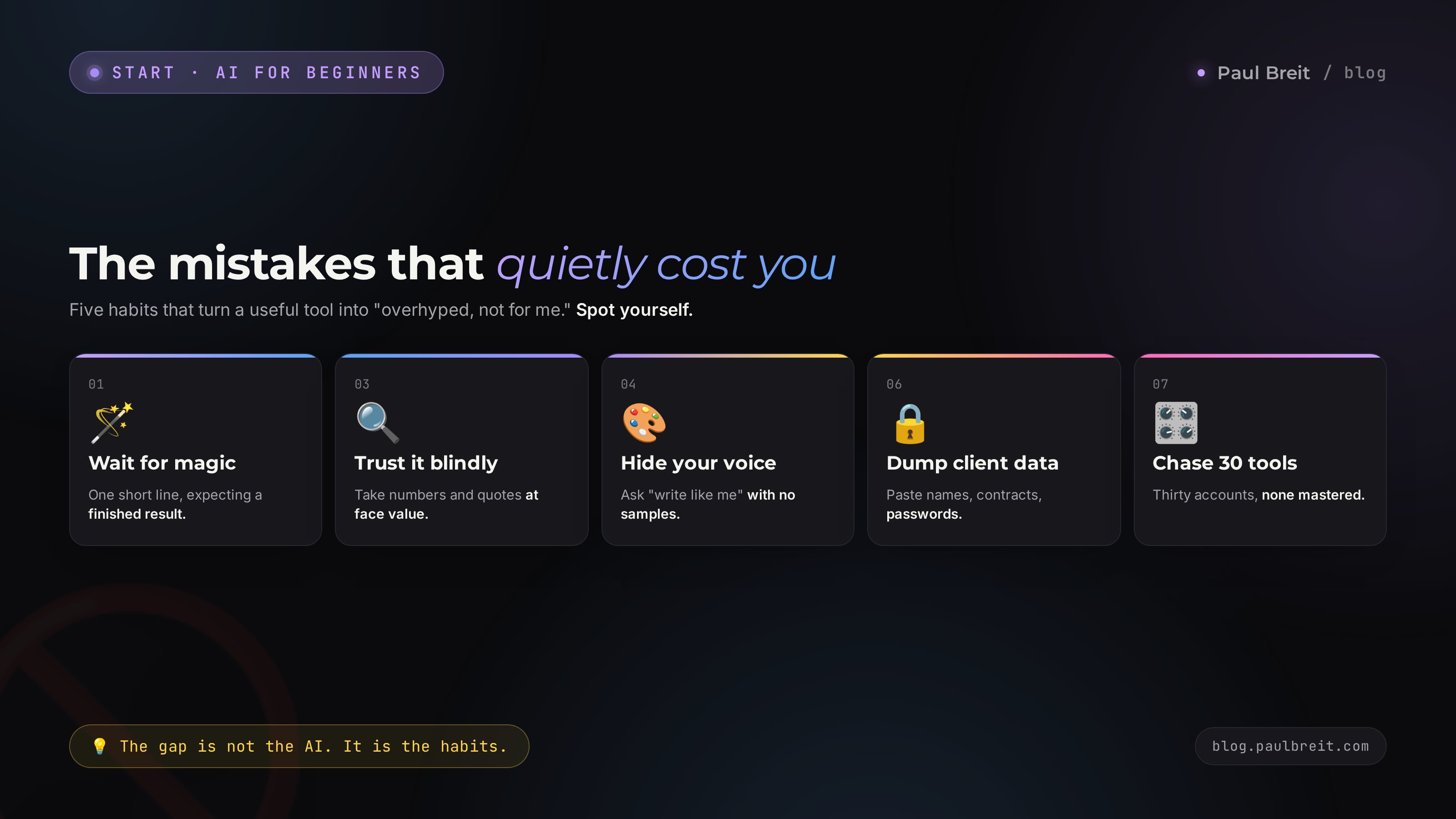
The AI hands you generic filler, invents numbers, and the text reads like a machine wrote it. Almost always the problem is not the AI. It is the ten habits people bring to it. I break down each mistake with real examples: what it looks like, why it wrecks your result, and how to fix it in a minute. At the end there is a checklist you can run yourself against.
Ten common beginner mistakes with AI: 1) expecting a finished result from one short line; 2) writing a prompt with no role, context, or format; 3) trusting facts and numbers at face value; 4) never giving the AI samples of your style; 5) starting every question in a fresh chat; 6) pasting client data and passwords into the chat; 7) chasing dozens of AI tools instead of one; 8) publishing text with no editing; 9) demanding everything at once in a single prompt; 10) quitting after the first bad answer instead of pushing it further. Almost all of them take a minute to fix. Each one is broken down below.
Someone opens an AI, types "write a post about my product," gets back watery text about nothing, and concludes: overhyped toy, not for me. A month later a friend says the exact same thing. Meanwhile a colleague uses the same AI to build a month of content in an hour, unpack a client call, and write an email people actually read to the end.
The difference is not the AI. It is the same for everyone. The difference is how you come at it. I work with AI every day: I run client projects and a channel of 20,000 subscribers with no team of assistants. And almost everyone who says "it doesn't work for me" trips over the same ten rakes. Check yourself against each one.
It reads in about 22 minutes. Every mistake follows the same shape: what it looks like in real life, why it produces a bad result, and what to do right now to close it.
What's inside
- Why beginners get let down by AI
- Mistake 1. Expecting magic from one short line
- Mistake 2. A prompt with no role, context, or format
- Mistake 3. Trusting facts and numbers blindly
- Mistake 4. Never giving the AI your style
- Mistake 5. Starting fresh in a new chat every time
- Mistake 6. Dumping client data and passwords
- Mistake 7. Chasing dozens of AI tools
- Mistake 8. Publishing with no editing
- Mistake 9. Demanding everything in one prompt
- Mistake 10. Quitting after the first bad answer
- How to check yourself in 5 minutes
- The 10-point checklist
If you are just getting into this, do not spread yourself across ten services. Pick one strong, general AI and learn it well. Claude or ChatGPT each cover almost everything a beginner needs. How to choose the one that fits your work is in how to choose an AI tool, and the full from-scratch route is in learn Claude from scratch.
Section 01Why beginners get let down by AI
The AI has no will of its own and no opinion about your task. It does not know who you are, what you sell, who your clients are, or what result you need. All it has is the text of your prompt. From that it builds the most likely answer. Ask vaguely, get vague. Ask precisely, with details and an example, get precise.
From that comes a simple rule that almost every mistake grows out of: the quality of the answer mirrors the quality of your prompt and what you fed the AI up front. People expect it to guess, fill in the blanks, and take initiative. It will not guess. It will do exactly what you described.
The second reason for the letdown is inflated expectations from the hype. In the ads, AI writes a book and paints a masterpiece in a second. In real life it is a tool that saves you hours on routine and gives you solid drafts, but it needs you to steer it. Whoever waits for a magic button quits on day two. Whoever treats the AI like a sharp but brand-new hire who needs everything spelled out is getting value within a week.
There is a third, quieter reason. Someone tries it once, gets a middling result, and decides they now know what AI can do. They never come back and never grow. Meanwhile the tool got stronger: new modes, deeper analysis, wider range. A verdict formed from one bad attempt six months ago holds you back harder than any technical problem.
Below are ten specific habits that turn a useful tool into "junk that wasn't for me." Let's take them one at a time.
Mistake 01Expecting magic from one short line
The most common one. Someone types "write a post about AI" or "make me a content plan" and expects a ready-to-publish result. They get generic words that would fit anyone, and they walk away disappointed.
Here is why it happens. A short line contains nothing for the AI to grab onto: no angle, no audience, no product, no tone. It has to average everything out, and the average of every blog on earth is exactly that faceless water.
Here is what good looks like. Compare two prompts for the same task.
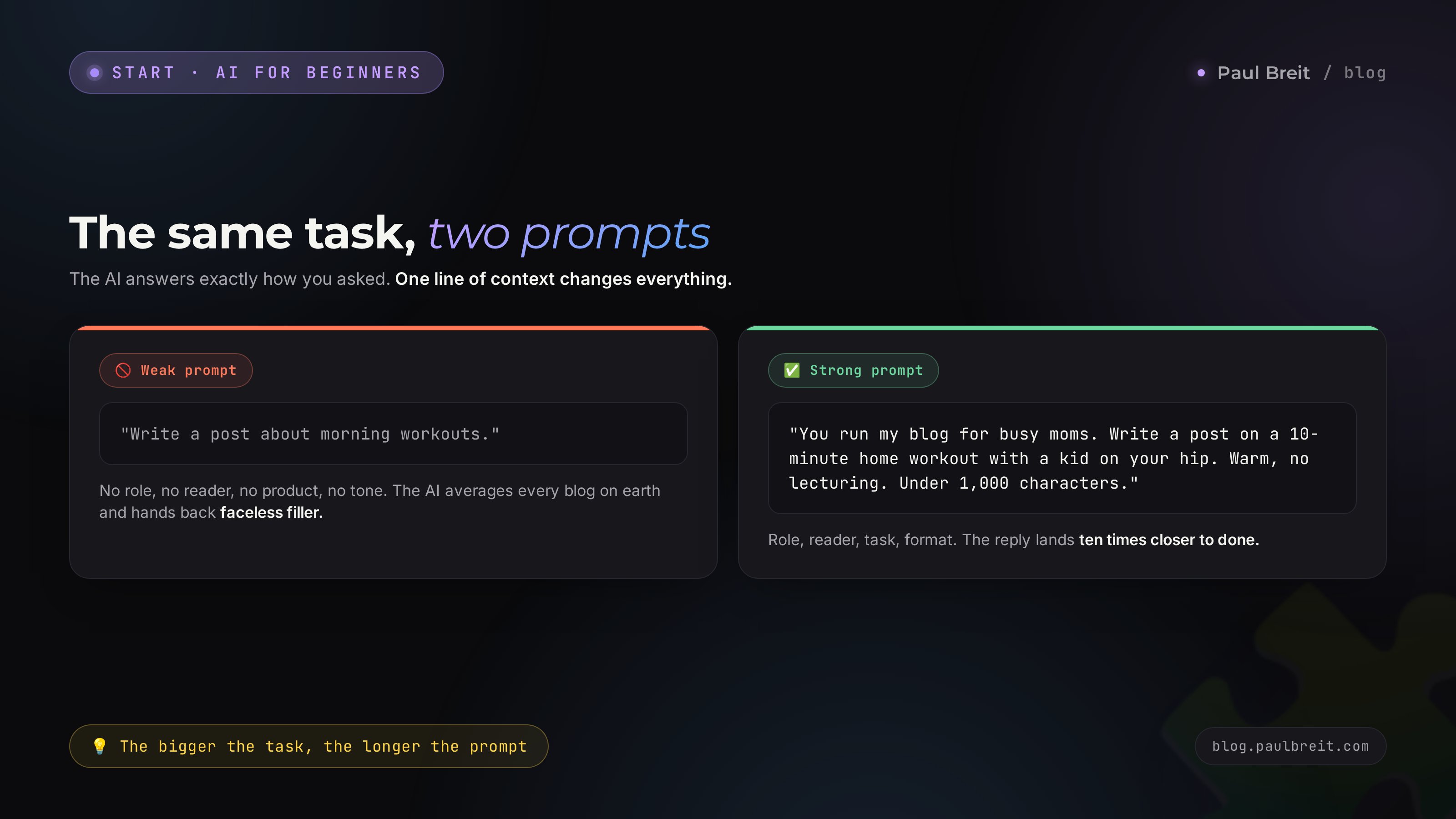
- Weak: "Write a post about the benefits of a morning workout."
- Strong: "You run my blog for busy moms who have no time for themselves. Write a post about a 10-minute home workout you can do with a kid on your hip. Tone: warm, no lecturing, speak directly to her. Open with a moment she'll recognize herself in. End with a gentle nudge to try it tomorrow morning. Length: under 1,000 characters."
The second prompt is ten times longer and gives you a result ten times closer to done. The rule is simple: the more important the task, the more detailed the prompt. A quick question needs one line. Text that goes out to clients deserves five or six sentences of setup.
One-minute fix: before you hit enter, add at least three things to the prompt - who it's for, what it's for, and what shape the answer should take. The full formula for a strong prompt is in a separate piece, how to write prompts.
Mistake 02A prompt with no role, context, or format
A follow-on from the first, but about structure. Even when someone writes at length, they often pile everything together and skip the three supports a good prompt stands on: role, context, and format.
Role - who the AI should become. "You're an experienced child psychologist," "you're an editor of business copy," "you're a paid-ads specialist who works with online schools." A role instantly lifts the answer, because it sets the vocabulary, the depth, and the point of view.
Context - the facts of your situation. What the product is, who the client is, what you've already tried, what you want to avoid. Without context the AI answers in general, and you need it to be about you.
Format - the shape you want the result in. A five-item list, a table, a post under 800 characters, three headline options. If you don't set the format, the AI picks one itself, and usually not the one you wanted.
Put the three supports together and "make me an ad" turns into a real brief:
Role: you're a marketer who writes ads for nail techs. Context: I'm a solo tech in a residential neighborhood, my average ticket is about $25, I want to bring in regulars who live nearby, and I'm afraid of sounding cheap. Task: write 5 ad variations. Format: each one a headline plus two lines, conversational, no clichés like "quality at an affordable price."
One-minute fix: keep three words in your head - role, context, format. Run through them before you send. If a support is missing, add it.
Mistake 03Trusting facts and numbers blindly
A dangerous one that lands people in awkward spots. The AI always sounds confident - when it's right and when it's making things up. It can invent a statistic, pin a quote on the wrong person, cite a law that doesn't exist, hand you a dead link, and justify all of it beautifully. Those inventions are called hallucinations.
Here's why. The AI doesn't "know" facts the way a reference book does. It builds plausible-sounding text. Plausible and true are two different things. Where there's a gap in what it has, it fills the gap with something that looks like it fits.
Where this really hurts:
- A lawyer pulls a statute number or a citation from the answer and drops it into a document - and the statute doesn't exist.
- A therapist posts "a study showed that 87% of people..." and there is no study.
- A marketer puts a market-size number the AI invented into a client deck.
- A doctor or nutritionist gets a dosage that must never be used without checking.
A real example. You ask the AI to find a statistic for a post, and it cheerfully returns: "according to a 2025 Pew Research survey, 73% of entrepreneurs use AI in their work." Sounds solid: a familiar source, a recent year, a clean number. You go to the Pew Research site - there's no such survey. The AI assembled a plausible sentence from typical parts and served it with the same confidence as a real fact. The check took a minute and saved you from blasting a fabrication to your whole audience.
The rule is ironclad: anything you can verify and that carries a cost if wrong - numbers, dates, names, quotes, laws, links, medical and legal details - verify it in the original source before you publish. The AI is great for thinking, structuring, and phrasing. It is not a source of truth. It's an assistant that needs watching.
One-minute fix: get in the habit of adding "if you're not sure about something, say so, don't make it up" to your prompt. It cuts the number of inventions, though it doesn't remove them. And check every number and link by hand. Trust, but verify.
Mistake 04Never giving the AI your style
Someone complains: "the text comes out not like me - smooth and faceless, like a corporate memo." Then it turns out they never once showed the AI how they write themselves. So it handed back an averaged style, because that's the only one it had for them.
By default the AI writes "medium-good": correct, smooth, forgettable. Your living voice is your little phrases, your rhythm, your favorite turns, your sentence length, how you open and how you close. All of that can be transferred - if you give examples.
How to teach the AI to write in your voice:
- Collect 5-10 of your own texts that you like and that are unmistakably yours.
- Give them to the AI with a task: "this is how I write. Break down my style - tone, sentence length, how I address the reader, which words I use and which I avoid."
- Ask it to write a short cheat sheet on your voice and to write by it from then on.
After that the text lands noticeably closer to yours. It won't copy you 100% - a final pass is still on you - but it starts from your intonation instead of from scratch. The full method with examples is in how to teach the AI to write in your voice.
One-minute fix: stop asking "write in my style" without showing the style. Give samples first, then ask. No samples handy? At least describe it in words: short sentences, humor, first-name basis, no jargon.
Mistake 05Starting fresh in a new chat every time
A beginner asks a question, gets an answer, closes the chat. Next task - new chat, explaining from scratch again who they are and what they do. The AI meets you fresh every time, because its memory lives inside a single conversation.
This wears you out and drops the quality. Inside a long conversation the AI holds all the context: it already knows your product, your niche, your style, what you corrected last time. The answers get sharper with every round. A new chat wipes all of it.
What to do instead:
- Run one task in one conversation. Writing a series of posts? Keep it in one chat instead of spinning up ten.
- Once at the start of the chat, lay out the basics: who you are, what you sell, who the client is, what tone. After that just point back to it.
- If your AI can hold a persistent knowledge base across chats, set one up. Claude has Projects for this - you load a description of yourself and your materials once, and they get pulled into every new chat inside the project.
One-minute fix: build the habit of not opening a new chat for every little thing. One topic, one conversation. And save the recurring "about me" intro as a separate text you paste at the start, so you're not retyping it.
Mistake 06Dumping client data and passwords
This one has nothing to do with output quality. It is about safety and reputation. In the heat of it, people throw anything into the chat: a whole contract with account details, a client thread with names and phone numbers, a screenshot of passwords, the full order database. Feels handy - the AI will help sort it out. But you're handing someone else's personal data to a third-party service.
Why it's risky. You're responsible for what your clients entrusted to you. The service may use the conversation for training, the data can leak, and you can lose the trust of the people who gave it to you. On paid tiers Anthropic and OpenAI don't train on your data, but the habit of pasting raw sensitive information is still the wrong one.
What not to upload without cleaning it first:
- ID documents, contracts, account details, card numbers.
- Client names, phones, addresses, and message threads.
- Passwords, access keys, trade secrets.
- Medical and any sensitive information about specific people.
How to work safely: anonymize. Swap the real name for "Client A," a specific amount for a placeholder, strip out phones and addresses. To analyze a situation the AI doesn't need to know it's Mary Johnson on Elm Street - the gist is enough. You can break down a contract, rewrite a letter, or find the weak spots in a negotiation on anonymized text just fine.
One-minute fix: before you paste someone else's text into the chat, run your eyes over it and scrub anything that identifies a specific person. A second of attention saves a lot of grief.
Mistake 07Chasing dozens of AI tools
A beginner sees roundups like "100 AI tools that will change your life" and opens accounts in thirty services at once. The result: none of them mastered, time burned on tool-hopping instead of work, and constant confusion over which tool does what.
The truth is that one strong, general AI covers almost every beginner task: text, ideas, analysis, planning, answering questions, working with your documents. Claude and ChatGPT each handle 90% of what you need at the start. Specialized tools for images, video, or voice come later, when a real need shows up - not "just in case."
Why one beats ten at the start:
- You build depth. You learn how this AI thinks, where it's strong, where it lies, how to ask it best.
- You don't scatter. One interface, one logic, all your practice compounding.
- You don't pay for what you don't use. Thirty subscriptions are thirty charges.
Pick one as your main tool, learn it properly over a couple of weeks, and only then look at what it doesn't cover - and grab a second tool for exactly that. How to compare the two big ones and pick for yourself is in Claude vs ChatGPT, and a rundown of the free options is in the pick of solid free AI tools.
One-minute fix: close the extra tabs. Keep one AI for the next two weeks and work only in it. Once you've got it, expand on purpose.
Mistake 08Publishing with no editing
Someone takes the AI's answer and copies it into a channel, a site, or a newsletter word for word. The reader clocks it instantly: a machine wrote this. Trust drops, the text reads flat. And sometimes there's still an invented fact from mistake number 3 sitting inside it.
Machine text gives itself away with tells the AI loves and that barely show up in real speech:
- Em dashes sprinkled everywhere instead of a plain hyphen.
- Stock corporate lead-ins and one-size-fits-all openers you'd never say out loud.
- Lists of exactly three items and booster phrases added for polish.
- A sugary-even rhythm where every sentence is the same length.
- A vague, grand finale with no concrete detail.
Editing takes a couple of minutes and changes everything. Cut the tells, break long sentences with short ones, add a live detail from your own practice, put your own ending on it. The text becomes yours and human right away. The full list of machine-text markers and how to scrub them is in how to remove AI traces from text.
One-minute fix: set a rule - no AI text goes out without a pass by your eyes and your hands. Read it aloud. Anywhere it doesn't sound like you, rewrite it.
Mistake 09Demanding everything in one prompt
A beginner writes: "come up with my niche, build a promotion strategy, write 10 posts, make reel scripts, and design an offer." In one message. The AI delivers all of it shallow, because each task gets one paragraph and none of them is worked through.
A big task dumped whole spreads the AI's attention thin. It's like a person handed five jobs at once - all of them come out at a C. Break it into steps and each one comes out deep.
How to break it down, using a content launch as the example:
- First: "help me figure out what to write about. Here's my niche and client - suggest 5 theme directions."
- You pick a direction: "let's take theme A. Give me 10 post ideas inside it."
- You pick an idea: "write the post for idea number 3, here's the structure and tone."
- You've got the post: "turn it into a 40-second reel script."
Each step builds on the last, the AI holds the context and goes deeper. You end up with a worked-through result instead of five half-finished ones. And you steer along the way: you see a theme isn't right and swap it without burning the whole prompt.
One-minute fix: catch yourself writing a prompt with an "and" between different tasks - split it. One task, one step. The next step after you've finished the last.
Mistake 10Quitting after the first bad answer
The final and most frustrating one. The AI returns the wrong thing, the person sighs "well, it doesn't work" and closes the tab. One round of edits away from a great result.
The first answer is almost never perfect - that's normal and it's true for everyone. The AI's strength isn't nailing it on the first try. It's that you can ask it to redo the work as many times as you want, and it won't get tired or offended. It's a conversation, not a vending machine.
How to push a result to done:
- Don't start over - say what's wrong: "too long, cut it in half," "the tone is formal, make it warmer," "not concrete enough, add real-life examples."
- Praise what worked: "the second option is closest, build on that." That tells the AI which way to go.
- Ask it back: "what could be improved here?" - sometimes it points the way itself.
Usually two or three rounds of edits take a draft where it needs to be. The people who get this pull results out of AI that a beginner - the one who quit on the first answer - never even knows are possible.
Watch how it plays out live. The first answer is a post that feels flat to you. Instead of closing the tab, you write: "too generic, add a concrete moment from a mom's day and drop the grand ending." The second answer is warmer but long. You write: "cut it by a third, keep only the strong parts." The third is exactly right. Three short messages instead of an hour of grinding from a blank page.
One-minute fix: remember - the first answer is a draft, not a verdict. Didn't like it? Don't close the tab. Say what to fix. A good result almost always shows up on the third round, and the first one only sets the direction.
Section 02How to check yourself in 5 minutes
If after all this you still feel "I seem to do everything right, but the result is average" - run your last five prompts through three questions. They surface almost every mistake at once.
Question one: did I give the AI enough to answer well? Look at the prompt through a stranger's eyes. Is it clear who you are, who the text is for, and what should come out? If a stranger can't tell, the AI certainly can't. This catches mistakes one through four.
Question two: did I check what can't be taken on faith? Are there numbers, facts, links, or other people's data in the answer? Did you verify them and strip what shouldn't be there before you used it? This catches the hallucination and safety mistakes.
Question three: did I push it to done or quit halfway? Is this the first answer taken as-is, or the result of a few rounds of edits with your own final pass? This catches the "everything at once," the "publish with no editing," and the "quit on the first answer" mistakes.
Three honest answers show you exactly where you're losing quality. Usually one or two points sag - start there.
And one more thing from practice. People who get great results out of AI rarely know any secret prompts. They just don't cut corners on the way in: an extra minute on the prompt, an extra minute on checking, an extra round of edits. That minute pays back in dozens of hours a month. The beginner saves a minute up front and loses an hour on redos and disappointment. The whole gap between "it doesn't work" and "that saved me half a day" fits into those three extra minutes of attention.
Section 03The 10-point checklist
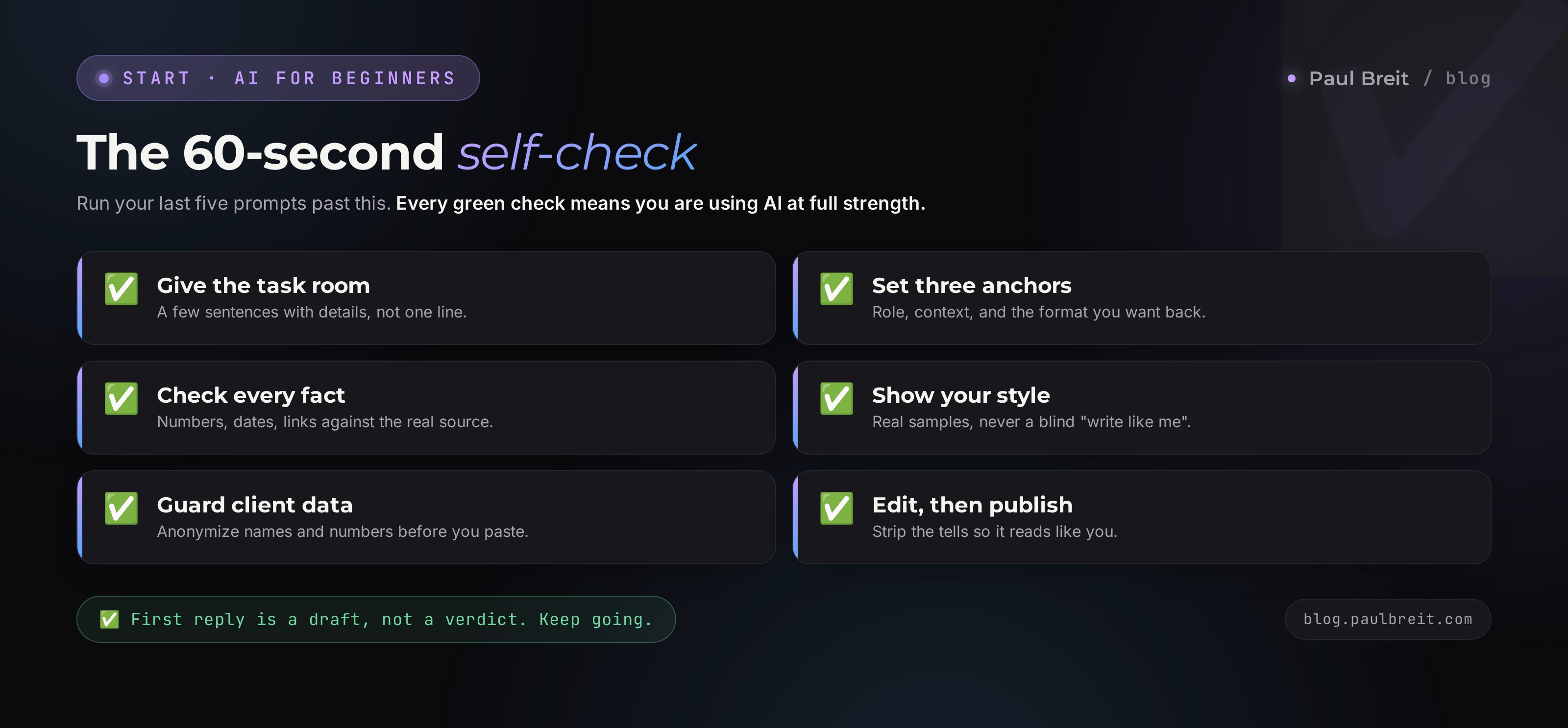
Save it and check yourself until the habits go on autopilot. As long as all ten boxes are ticked, you're working with AI at full strength.
- I give the task room. An important prompt is a few sentences with details, not one line.
- I set the three anchors. The prompt has a role, context, and a format for the answer.
- I check the facts. Every number, date, link, and legal detail against the original source.
- I give my style. I showed the AI samples of my writing instead of asking "write like me" blind.
- I keep one conversation. One topic lives in one chat, not ten new ones.
- I guard other people's data. I anonymize text and never paste passwords or client data.
- One AI as my main tool. I learned it deeply instead of collecting thirty accounts.
- I edit before publishing. No text goes out without my pass and a scrub of the tells.
- I break big tasks down. One step, one task, the next after the last.
- I push to a result. The first answer is a draft. I run two or three rounds instead of quitting.
AI is not an overhyped toy and not a magic button. It's a capable assistant that does exactly what you described and never tires of redoing it. Drop the ten beginner habits and the same tool that gave you junk yesterday starts saving you hours and making you money. The difference isn't the AI. It's the hands.
Want to build a strong prompt by formula right away - start with how to write prompts. Haven't picked your main AI yet - look at the 5-minute way to choose. And if you're coming in from zero, the whole route is laid out in learn Claude from scratch. You can try Claude, which I mentioned, at claude.ai.
The whole path in a minute
The AI answers the way you asked, so put your effort into the prompt first: give it room, a role, context, and a format. Anything you can verify - numbers, facts, links, other people's data - verify and anonymize before you use it. Teach the AI your style with samples, keep a topic in one conversation, and stick to one main AI at the start. Edit every text before publishing, break big tasks into steps, and treat the first answer as a draft you finish in two or three rounds. Ten habits, and the tool starts working for you.
FAQCommon questions
Why does the AI give me junk and generic phrases?
Usually it's the prompt. One line with no role, context, example, or format gets you average, faceless text. Give the AI a role, the facts of your situation, an example of the result you want, and specify the format - and the quality jumps right away.
Can I trust facts and numbers from the AI?
No, not at face value. The AI confidently invents facts, dates, quotes, statute numbers, and links - that's what hallucinations are. Re-check any numbers, legal and medical details, and links in the original source before you publish.
Why can people tell AI text on sight?
The tells: em dashes everywhere, stock corporate lead-ins, lists of exactly three items, and a sugary-even rhythm where every sentence is the same length. Edit the text into your own voice before publishing and the traces disappear.
What data should never go into an AI?
ID documents, contracts, passwords, card numbers, personal data and client message threads, trade secrets. Anonymize: swap real names and figures for placeholders before you hand the text to the chat.
How many AI tools does a beginner need?
At the start - one general tool, learned properly. Claude or ChatGPT cover 90% of the tasks. Chasing dozens of services early is a trap: you scatter and never build depth in any of them.
What if the AI didn't get the task the first time?
Don't start a new chat - refine in the same one. Say exactly what's off: too long, wrong tone, not concrete enough - and ask for a redo. Two or three rounds of edits usually get it there.
Will the AI replace me as a specialist?
No. It speeds up routine and gives you drafts, but the meaning, the facts of your practice, the final calls, and the responsibility stay with you. The people who get stronger use it as an assistant, not as a replacement for their own head.