Perplexity Download: iPhone, Android, Windows, Mac (2026)
Perplexity download is free on all four systems: the app is in the App Store and Google Play, and the desktop apps for Windows and Mac come from the official site. Below: where to get the real app on each device, what your phone or computer needs, why an APK from a mirror site is a bad idea, the first launch, what the plans cost and what to do when the app won't install.
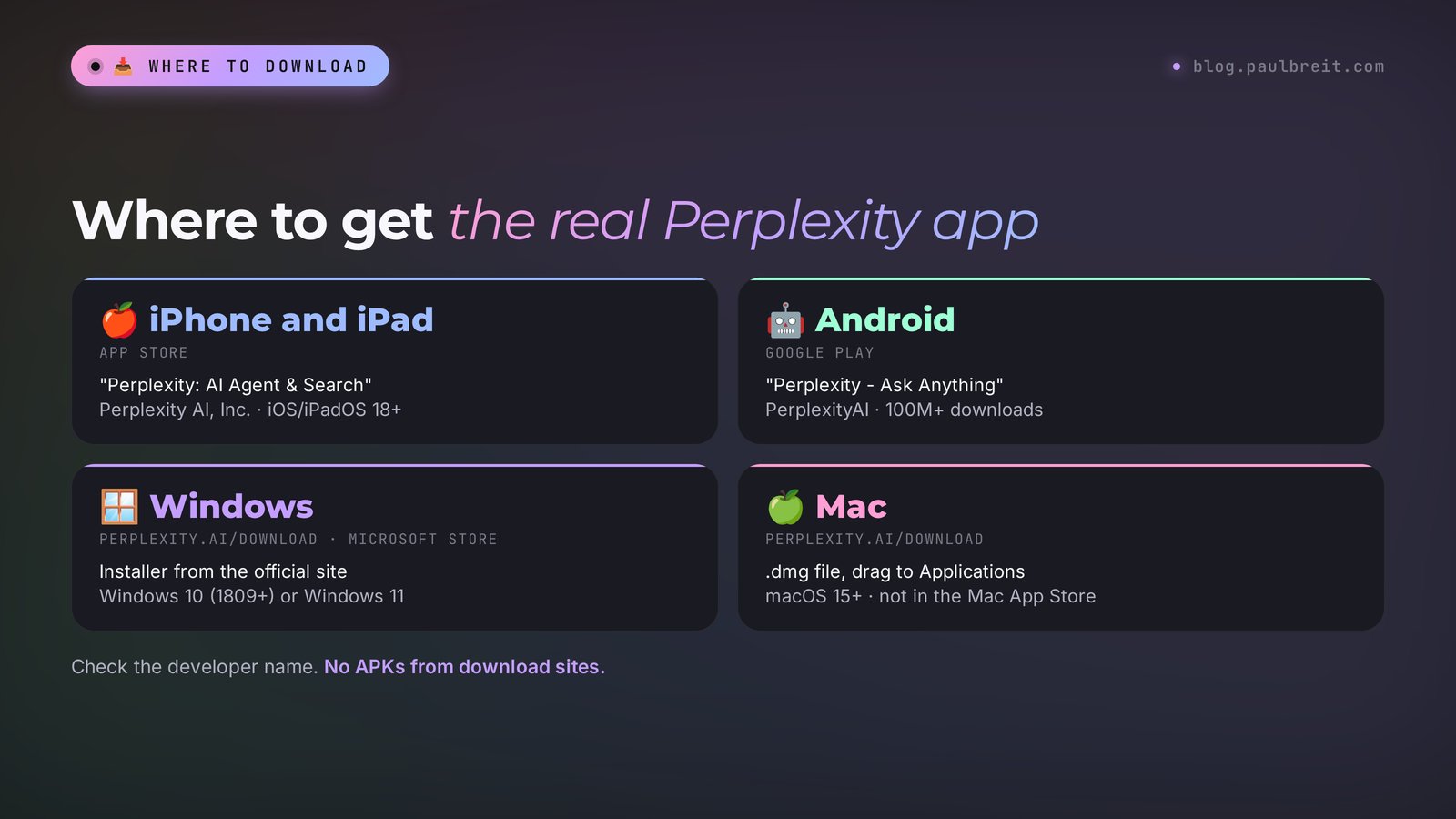
Perplexity download is free everywhere. On iPhone or iPad, get "Perplexity: AI Agent & Search" from the App Store (iOS 18 or later). On Android, get "Perplexity - Ask Anything" from Google Play. On Windows 10/11 or macOS 15+, get the desktop app from perplexity.ai/download. Skip APK files from mirror sites.
What's inside
- Where to download Perplexity: four systems
- iPhone and iPad: the App Store
- Android: Google Play and the APK question
- Windows 10 and 11: the PC app
- Mac: the .dmg download
- Desktop app, website or Comet
- First launch: sign-in, privacy, first question
- Is Perplexity free? Plans in $
- Perplexity won't install: causes and fixes
- Cheat sheet
- Sources
Perplexity is an AI search engine. You ask a question, it opens websites on its own, reads them and writes a short answer with a numbered source after each claim. Tap the number and you see the page the fact came from. That makes it handy when you need a quick, checkable answer: a competitor's prices, a new rule in your industry, what clients are asking about this month.
This guide is only about getting Perplexity onto your phone and computer. Modes, prompts and how it compares with ChatGPT are in my full walkthrough on how to use Perplexity AI: free vs Pro and 20 prompts. With the app installed, Perplexity is always one tap away: you can ask by voice on the go, take a photo of a price tag or a document, and on a computer call up search over any window.
Where to download Perplexity: four systems
Perplexity has official apps for iPhone and iPad, Android, Windows and Mac. All of them are free, and the account and history are shared: start a search on your phone, finish it at your desk. I checked every store page and the download page on November 28, 2026.
| System | Where to get it | Requirements | Listed developer |
|---|---|---|---|
| iPhone, iPad | App Store, "Perplexity: AI Agent & Search" | iOS or iPadOS 18.0 or later, about 202 MB | Perplexity AI, Inc. |
| Android | Google Play, "Perplexity - Ask Anything" | A phone with Google Play | PerplexityAI |
| Windows | perplexity.ai/download or Microsoft Store | Windows 10 version 1809 or later, Windows 11 | Perplexity (official site) |
| Mac | .dmg file from perplexity.ai/download | macOS 15 or later | Perplexity (official site, not in the Mac App Store for now) |
One rule works on every system: check the developer before you tap Install. The stores are full of apps with a similar icon and names like "Perplexity AI Chat" or "Ask Perplexity". They come from third parties who resell access to someone else's AI with their own subscription on top. The official developer is Perplexity AI, Inc. in the App Store and PerplexityAI in Google Play.
iPhone and iPad: the App Store
Check your iOS version
Settings → General → About → iOS Version. You need iOS 18 or later. If it's older, update in Settings → General → Software Update. If your iPhone can't run iOS 18, skip to the website option in Section 06.
Search the App Store for "Perplexity"
The right listing is called "Perplexity: AI Agent & Search" with the developer Perplexity AI, Inc. Sponsored results at the top of the search can show other apps first, so read the developer line.
Tap Get
The app is free with in-app purchases. Confirm with Face ID, Touch ID or your password. It's about 202 MB, so Wi-Fi is faster.
Open it and sign in
Sign in with Apple is the quickest: one tap, no password. Google or email with a code work too.
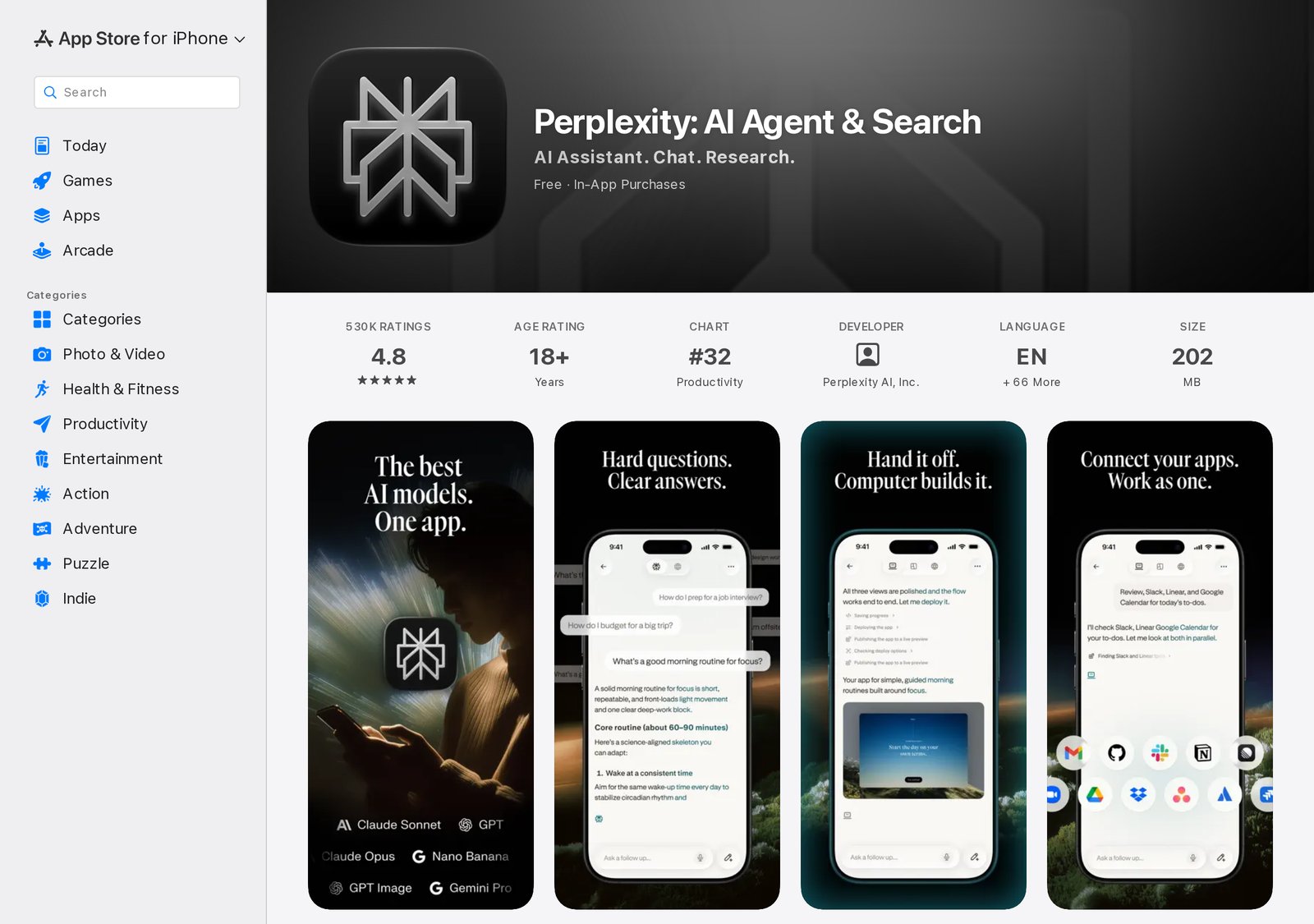
The screenshot shows the US App Store page: "Free · In-App Purchases", developer Perplexity AI, Inc., 202 MB, 4.8 stars from about 530K ratings. The in-app purchases are the paid plans. You can download the app and use the free plan without buying anything.
On iPad it's the same app, installed the same way, and it needs iPadOS 18.
Android: Google Play and the APK question
Search Google Play for "Perplexity"
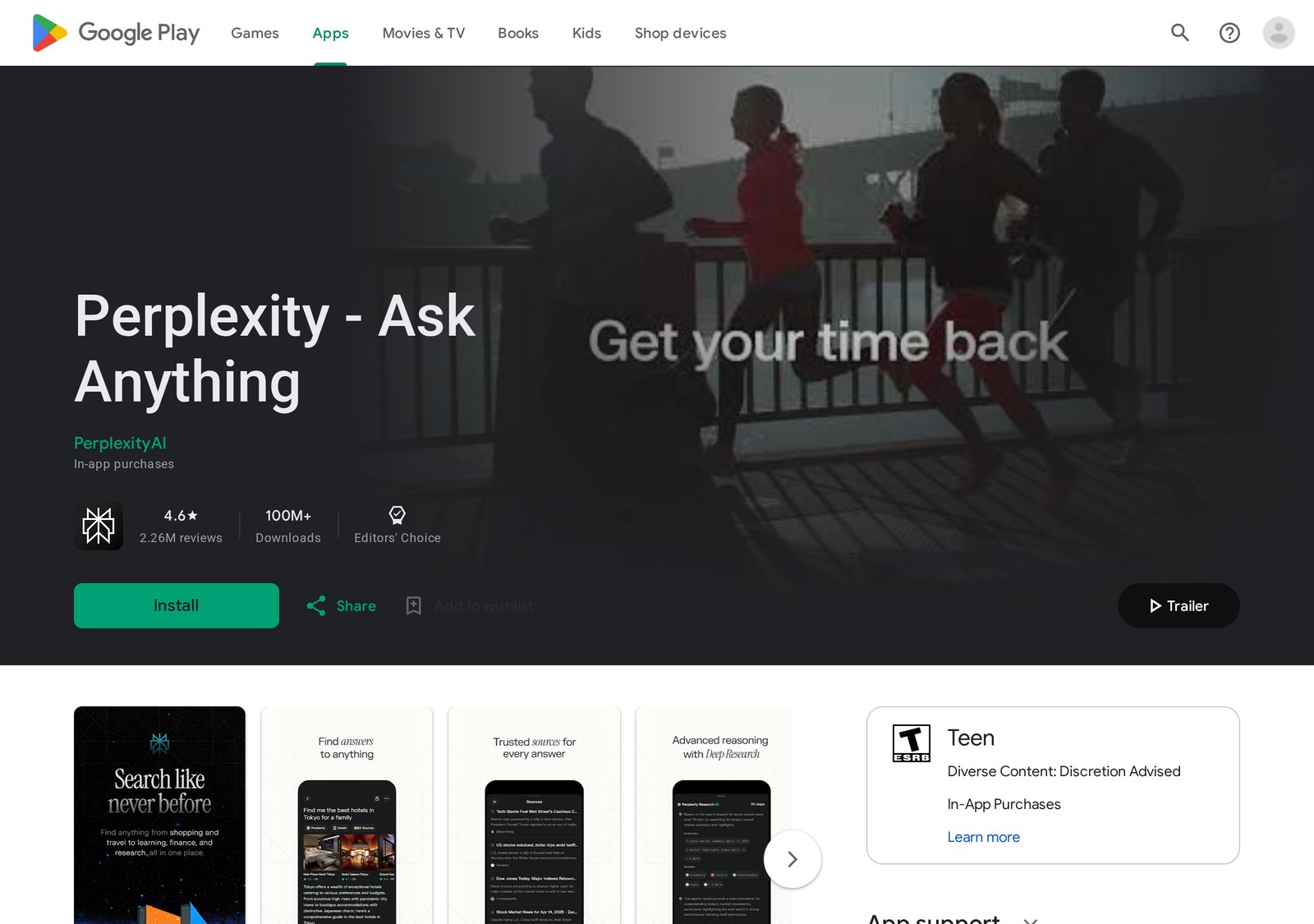
The right app is "Perplexity - Ask Anything" from the developer PerplexityAI, with 100M+ downloads.
Tap Install
If there's no Install button and the store says the app isn't available, update Google Play and Google Play services in your phone's settings, restart the phone and try again.
Open the app and sign in with Google
Your phone already has a Google account, so it's one tap. If you use Perplexity on the web with Apple or email, pick that method instead.
Search for "perplexity apk" and you'll find pages offering "Perplexity Pro APK free" or "Perplexity mod". Nobody checks those files. At best they carry extra ads. At worst they're modified copies that ask for access to your messages, your Google account and the codes your bank sends you. They also don't update on their own, so you're stuck on an old version.
And Pro won't appear either way: your plan is tied to your account on Perplexity's servers, not to the file on your phone. If your phone has no Google Play at all, use the website with a Home screen icon from Section 06.
Windows 10 and 11: the PC app
The desktop app gives you things the website doesn't: a quick way to open search over any window, voice input and working with files straight from your desktop. According to Perplexity's help center, it needs Windows 10 version 1809 or later, or Windows 11. Not sure about your version? Press Windows + R, type winver and press Enter.
Open perplexity.ai/download
Click the Windows download button. Type the address yourself: there are look-alike download sites in search results.
Run the installer
Open the downloaded file and wait for the install to finish. It uses the Microsoft Store install and update system under the hood, so the app keeps itself up to date afterwards.
Open it from the Start menu and sign in
Find Perplexity in Start, open it and sign in the same way you do on your phone.
You can also install it straight from the Microsoft Store. If the store says the app isn't available in your market, it's looking at the region in your Windows settings. Don't spend time on region settings: the installer from perplexity.ai/download puts the same app on your PC.
Mac: the .dmg download
The new Mac app needs macOS 15 or later. Check under Apple menu → About This Mac.
Download the .dmg file
Open perplexity.ai/download and pick the Mac version.
Drag Perplexity into Applications
Open the file and drag the Perplexity icon into the Applications folder.
Launch it from Applications
If macOS asks whether you're sure you want to open an app downloaded from the internet, click Open.
Sign in and allow only what you need
Microphone for voice, files for documents. You can grant the rest later in System Settings.
For now the new Mac app is only distributed through the website, so there's no point looking for it in the Mac App Store. If you already use Gemini on your computer too, the setup is very similar: here's my guide to the Gemini desktop app for Windows and Mac.
Desktop app, website or Comet
If your phone or computer doesn't meet the requirements, you don't have to install anything. There are two other doors into the same account.
The website, perplexity.ai. It works in any browser on a phone or computer, with the same account and history. On iPhone, open the site in Safari, tap Share → Add to Home Screen, and you get an icon that looks like an app. On Android, do the same in Chrome with the three-dot menu → Add to Home screen.
The Comet browser. This is Perplexity's own browser, with an assistant that sees the page you have open: it can summarize a long article, compare tabs or find something on a site. Comet is free and available for Windows, Mac, Android and iPhone from perplexity.ai/comet. If you plan to use Perplexity every day, Comet can replace both your regular browser and the app. Just keep the assistant out of your banking and your email with client conversations: it sees everything that's open in the tab.
| Desktop app | Website | Comet | |
|---|---|---|---|
| Install | Yes, Windows 10+ or macOS 15+ | Nothing to install | Yes, a separate browser |
| Runs on | Windows 10 (1809+), Windows 11, macOS 15+ | Any phone or computer with a modern browser | Windows, Mac, Android, iPhone |
| Best for | Quick search over any window, voice, files from your desktop | Older devices, a borrowed computer | Questions about the page you have open |
| Price | Free, same account and plan everywhere | ||
First launch: sign-in, privacy, first question
Spend two minutes on setup right after you install. It saves you from the most common surprises later.
Sign in
With Apple, Google or email. If you already have an account on the website, use the same method. Otherwise you'll end up with a second, empty account and wonder where your history went.
Close the upgrade screen
After you sign in, the app offers Pro. Tap the cross. The free plan is enough to find out whether you need a paid one.
Turn off training on your data
In settings, find the AI data retention toggle and switch it off so your searches aren't used to train models.
Ask your first question by voice
On a phone, tap the microphone and say the whole question. Take a task from your own work for the first try.
Here's a first search that shows well how Perplexity differs from a regular chatbot. Replace the part in square brackets and send.
I'm [what you do, for example: a career coach who works with clients online]. Find 5 articles from the last 30 days about what my clients are worried about right now. For each one: one sentence with the main point and a link to the source. Only sources from 2026.
The answer comes back with numbered sources. Tap any of them and check that the number or fact is really on that page. That's the key habit with Perplexity: it makes things up less often than chatbots, but it sometimes retells a source loosely. The full checking routine is in my Perplexity walkthrough.
US App Store: "Perplexity: AI Agent & Search", developer Perplexity AI, Inc., free with in-app purchases, iOS 18.0 or later, 202 MB. Google Play: "Perplexity - Ask Anything", developer PerplexityAI, 100M+ downloads. Download page: Windows and Mac builds on perplexity.ai/download. Mac App Store: the new Mac app isn't listed there.
Want to see how people use AI tools like this in real client work? I recorded 7 short free video lessons with a practice order, about 25 minutes in total.
Is Perplexity free? Plans in $
The app is free to download on every system. You only pay for a subscription, and for most tasks you don't need one. Prices from the official perplexity.ai/pricing page, checked November 28, 2026:
| Plan | Price | What you get |
|---|---|---|
| Free | $0 | Unlimited basic search with citations, a few Pro Searches a day, the Comet browser |
| Education Pro | $10 a month | Pro features for students and educators after verification |
| Pro | $20 a month or $200 a year | Choice of models, extended search, regular Research, file uploads |
| Max | $200 a month or $2,000 a year | The strongest models and many more credits for the Computer agent |
My advice: start on the free plan and work with it for a week. If you hit the Pro Search limit every day, then think about Pro. Subscriptions bought inside the iPhone or Android app are billed and canceled through your App Store or Google Play account. And don't buy a cheap "Pro for a year" shared login from resellers: Perplexity blocks accounts that are used from different countries, and your money goes along with your history.
Perplexity won't install: causes and fixes
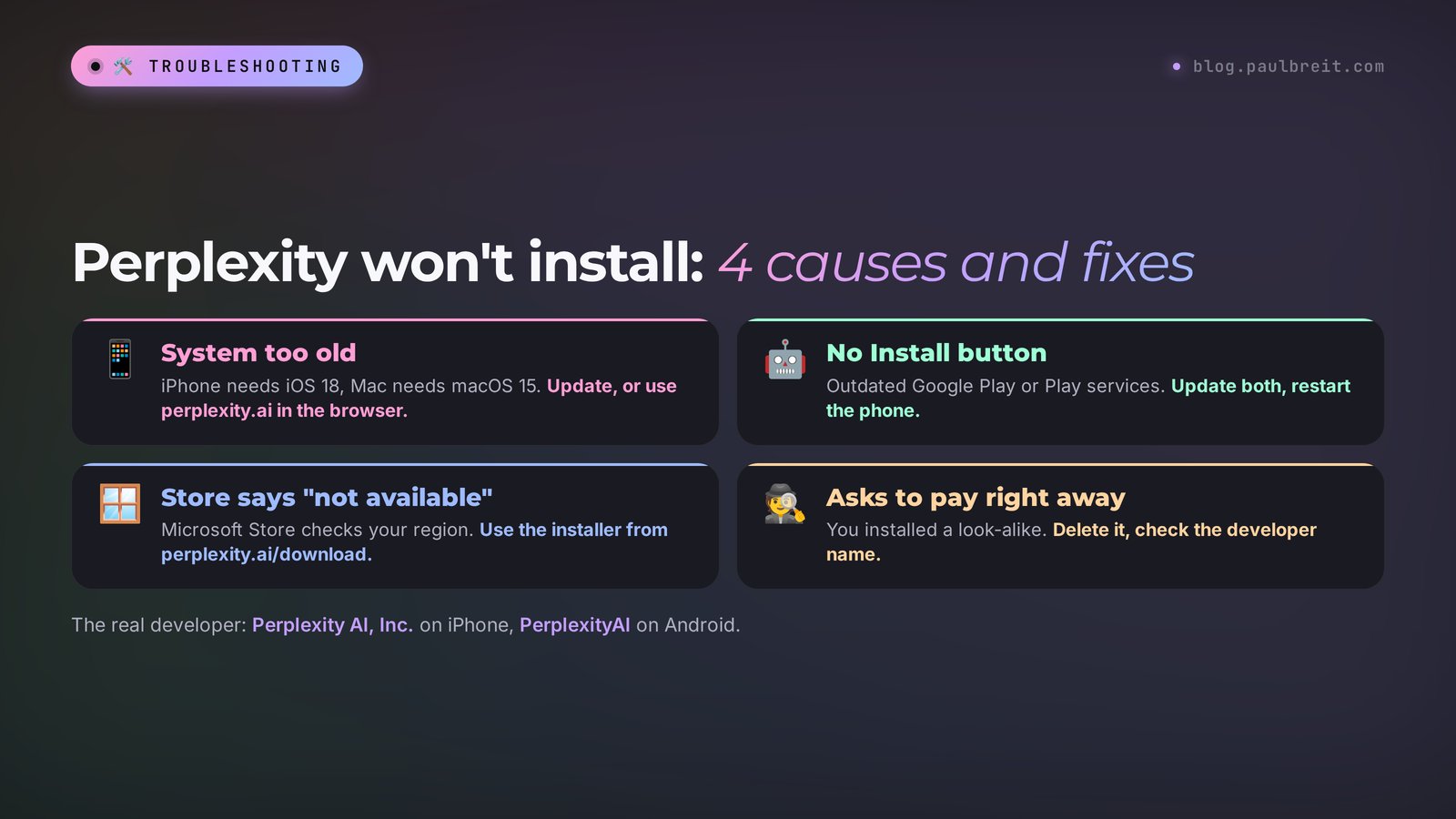
The most common problems and what to do about each:
| What happens | Why | What to do |
|---|---|---|
| App Store says you need a newer iOS | The app needs iOS 18 | Update your iPhone. If it can't update, add perplexity.ai to your Home Screen |
| No Install button in Google Play | Outdated Google Play or Play services, or a very old Android | Update Google Play and Play services, restart the phone, or use the website |
| Microsoft Store: "not available in your market" | The store looks at the region in your Windows settings | Download the installer from perplexity.ai/download |
| Windows installer won't start | Windows 10 older than version 1809 | Run Windows Update, or use the website |
| Mac app won't launch | The Mac runs something older than macOS 15 | Update macOS, or use the website or Comet |
| App installed, but answers don't load or cut off | Weak connection, or a work network or VPN that blocks it | Switch between Wi-Fi and mobile data, turn the VPN off and try again |
| Your history from the website is missing | You signed in with a different method | Sign out and sign in with the same Apple, Google or email account |
| It asks you to pay right after install | You installed a look-alike app | Delete it and check the developer: Perplexity AI, Inc. or PerplexityAI |
If Perplexity still won't work for you, other tools also search the web with sources, and I have install guides for them too: the Grok app download for iPhone and Android and how to use Gemini. Free options are collected in free AI tools that actually work. If you mostly need long texts, emails and work with documents, and search matters less, look at Claude: I explain where to begin in Claude from scratch.
Cheat sheet: all of it in a minute
The whole guide in one list. Copy it into your notes.
Cheat sheet: Perplexity download
1. iPhone and iPad: App Store → "Perplexity: AI Agent & Search", iOS 18+.
2. Android: Google Play → "Perplexity - Ask Anything".
3. Windows 10 (1809+) and 11: installer from perplexity.ai/download or Microsoft Store.
4. Mac with macOS 15+: .dmg from perplexity.ai/download → drag to Applications.
5. Developer: Perplexity AI, Inc. or PerplexityAI. Everything else is a look-alike.
6. No "Perplexity Pro APK free" from mirror sites.
7. Sign in with Apple, Google or email, the same way as on the website.
8. Settings: turn off AI data retention.
9. The free plan is enough to start. Pro is $20 a month or $200 a year.
10. Answers won't load: switch networks, turn off the VPN.
Sources
- Perplexity: AI Agent & Search on the App Store (US) (developer, iOS 18.0, 202 MB), checked 28.11.2026
- Perplexity - Ask Anything on Google Play (developer PerplexityAI, 100M+ downloads), checked 28.11.2026
- Download Perplexity (official download page for Windows and Mac), checked 28.11.2026
- Perplexity Help Center: About the app (Windows 10 version 1809, macOS 15, .dmg install), checked 28.11.2026
- Comet (Perplexity's browser, official page), checked 28.11.2026
- Perplexity Pricing (official plans page), checked 28.11.2026
Frequently asked questions
How do I download Perplexity on Mac?
Open perplexity.ai/download, download the Mac version as a .dmg file, open it and drag Perplexity into the Applications folder. The app needs macOS 15 or later. For now the new Mac app isn't in the Mac App Store, so download it from the official site.
Is there a Perplexity app for Windows?
Yes. The official desktop app runs on Windows 10 version 1809 or later and on Windows 11. Download the installer from perplexity.ai/download or get it from the Microsoft Store. The installer uses the Microsoft Store update system, so the app updates itself.
Can I download Perplexity for PC for free?
Yes. The Windows app is free to download and works on the free plan, which includes unlimited basic search with citations and a few Pro Searches a day. Pro costs $20 a month or $200 a year if you need more.
Is a Perplexity APK safe to install on Android?
Install Perplexity on Android from Google Play: the app is "Perplexity - Ask Anything" from PerplexityAI. APK files from mirror sites aren't checked and can be modified copies. A "Pro APK" doesn't give you Pro, because your plan is tied to your account. Without Google Play, use perplexity.ai in the browser.
Is the Perplexity app free?
Yes, the app and the basic plan are free on iPhone, Android, Windows and Mac. Paid plans: Education Pro $10 a month, Pro $20 a month or $200 a year, and Max $200 a month or $2,000 a year.
Do I need the Perplexity desktop app, or is the website enough?
The website at perplexity.ai has the same account and history and works on any computer. The desktop app adds search over any window, voice input and working with files from your desktop. If your computer is older than Windows 10 version 1809 or macOS 15, use the website.