Perplexity: the AI Search Engine That Cites Its Sources
Perplexity is an AI that searches the web for your answer and puts a link to the source next to every sentence. You ask a question in plain words, and a few seconds later you get a ready summary with numbers, quotes, and a list of the sites it all came from. I walk through how to use Perplexity in 2026: signing up, the search modes, Research for deep dives, Projects, the Comet browser, pricing, 20 ready prompts for real work, and how to check that a cited answer is actually right. For everyone who sells services, courses, and consulting and is tired of digging through twenty browser tabs.
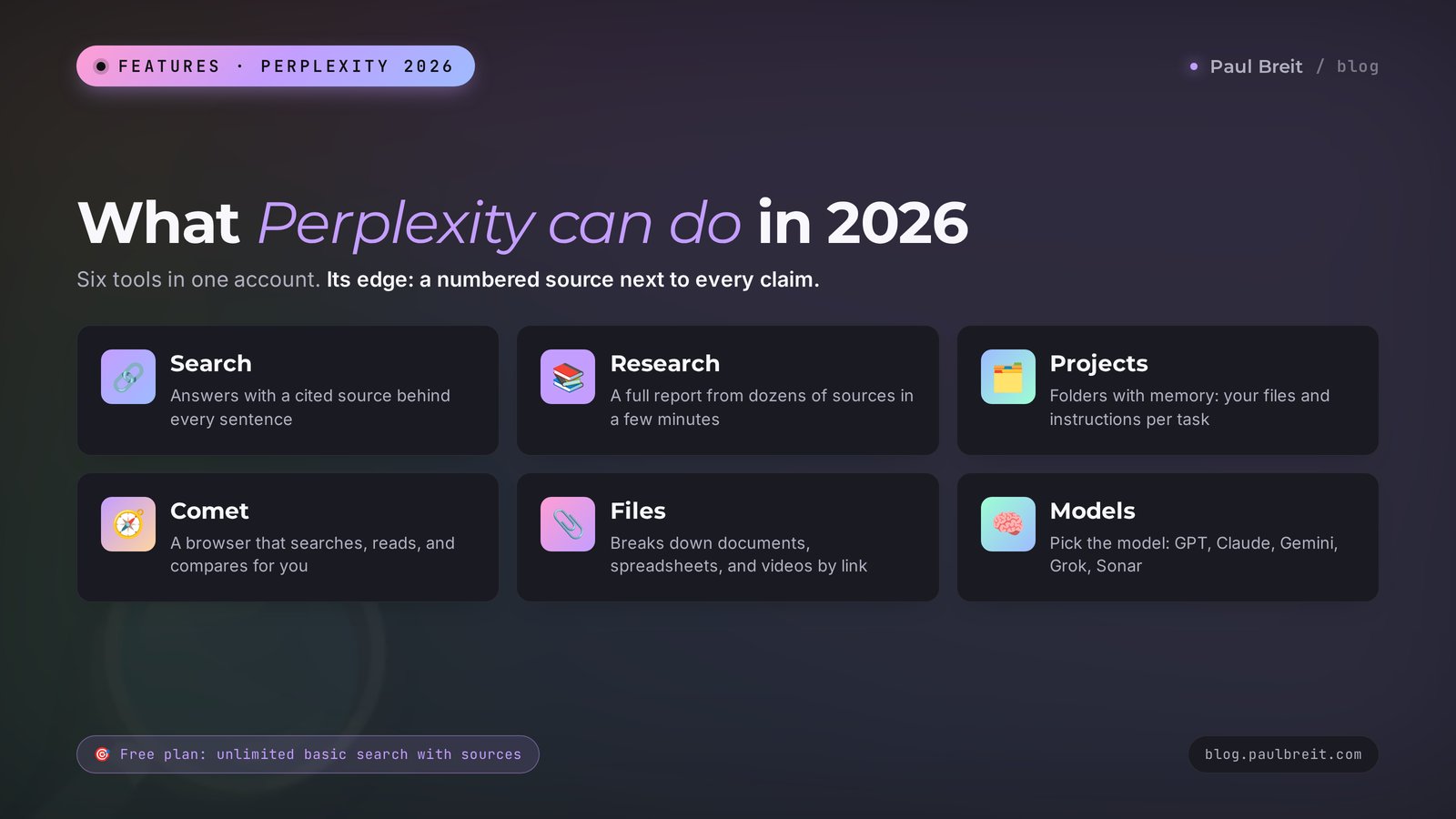
To use Perplexity, open perplexity.ai or the Perplexity app, sign in with Google, Apple, or email, and type your question in plain words. The AI finds websites, reads them, and writes an answer with numbered links to its sources. Basic search is free and unlimited. For complex topics, switch on Research: it reads dozens of sources and writes a detailed report. The Pro plan costs $20 a month and adds a choice of models, file uploads, and more deep research. Always check key numbers against the source before you publish them.
Perplexity is for people who search a lot: you research a niche before a launch, gather numbers for posts, compare competitors, look into rules and tools, or prep for a workshop or a live session. If you mostly need an AI that writes, start with my roundup of the best AI for writing. For the big picture of the market, see the best AI tools of 2026, and if you want to spend nothing at all, look at free AI tools.
What's inside
- What Perplexity is in 2026
- How Perplexity differs from Google and ChatGPT
- Phone, desktop, and Comet: where Perplexity runs
- Signing up, step by step
- Search, Pro Search, Research, and Computer
- How to choose your sources
- Your first search, step by step
- Niche and competitor research: 6 prompts
- Content with numbers and links: 6 prompts
- Sales and client work: 4 prompts
- Files, links, and learning: 4 prompts
- Projects: work folders with memory
- The Comet browser
- How much Perplexity costs
- Perplexity, ChatGPT, Google AI Mode, Grok, and Claude
- Downsides, lawsuits, and checking sources
- When something goes wrong
- Your first-week checklist
- The whole path in a minute
Think about what searching for work information usually looks like. You type a question, open five sites, three of them are ads and filler, the fourth is an article from 2021, and on the fifth the answer you need is buried in the middle of a wall of text. Forty minutes later you have twenty tabs, a headache, and half an answer.
Perplexity does that work for you. It opens the sites, reads them, and pulls what it found into a short answer. And here's the key part: every sentence has a small number next to it. Click it and you see exactly where the figure came from. That's why people call Perplexity an AI search engine. It answers like a person you're talking to, and it shows its work like a careful student on an exam.
I use it when I need fresh information with proof: what ads cost in a niche this month, what changed in the rules for sponsored posts, what competitors charge, what people say about a tool in reviews. Regular chatbots answer questions like these from memory and easily mix up dates. Perplexity goes to the web every single time.
This article takes it in order: what Perplexity is today, how to sign up, how the modes differ, 20 ready prompts for real work, Projects and the Comet browser, pricing, an honest comparison with ChatGPT, Google AI Mode, and Grok, and a five-minute routine that saves you from good-looking numbers that turn out to be made up. Read it straight through or jump around with the table of contents.
Section 01What Perplexity is in 2026
Perplexity AI is an American company based in San Francisco. Four engineers founded it in August 2022: Aravind Srinivas (who still runs the company), Denis Yarats, Johnny Ho, and Andy Konwinski. The name means confusion or bewilderment. The idea is simple: you bring the confusion, Perplexity brings the answer.
In four years the service grew into one of the best-known AI search engines in the world. In September 2025 the company was valued at $20 billion, and analysts estimate that in 2026 Perplexity handles more than a billion searches a month. In February 2026 the company dropped ads from its answers and bet on subscriptions. For you that means one thing: answers aren't padded with paid links.
Here's how it works inside, in the simplest terms. When you ask a question, Perplexity takes three steps:
- it turns your question into several search queries and runs them across the web;
- it opens the pages it found and pulls out the pieces that relate to your question;
- it hands those pieces to a language model, which writes a coherent answer and puts the page number next to each point.
That's why a Perplexity answer is always fresh: it searches today's web from scratch every time. And that's why it's checkable: every number is tied to a link.
Where Perplexity lives:
- the website perplexity.ai, the full version with every mode;
- apps for iPhone and Android, with the same features plus voice search and search by photo from your camera;
- apps for Windows and Mac;
- the Comet browser, a separate browser with the Perplexity assistant built in, more on it below;
- the API for developers, if you want to plug Perplexity search into your own bot or website.
Perplexity is no longer in WhatsApp: since January 15, 2026, Meta has banned general-purpose AI bots in the messenger. If you used it there, the website and the apps give you the same thing and more.
If words like "model," "token," and "prompt" still sound like noise, keep my glossary of AI terms for beginners close by. With it, this article reads twice as easily.
Section 02How Perplexity differs from Google and ChatGPT
This is the first question people ask, and it deserves an honest answer, because the answer decides which tasks you actually need Perplexity for.
A regular search engine like Google gives you a list of links. You do the reading, comparing, and concluding yourself. Google now has AI answers on top of the results and a separate AI Mode, and those are handy for quick questions. The links are still the main product there, and the AI summary sits on top of them.
A chatbot like ChatGPT or Claude answers with connected text, writes very well, and reasons through problems. They can search the web too, but search doesn't always switch on, and the answer is built around the conversation with you. Sources come as a bonus.
Perplexity sits in between and is built around search. Every answer starts with sources, and you see the list above or next to the text. You immediately know what the answer stands on: a government website, an article in a trade publication, or someone's social media post.
That leads to a simple rule I apply every day:
- you need to find out something fresh and checkable (numbers, prices, rules, news, reviews): Perplexity;
- you need to write a post, an email, a script, or sales copy: the chatbot that writes better;
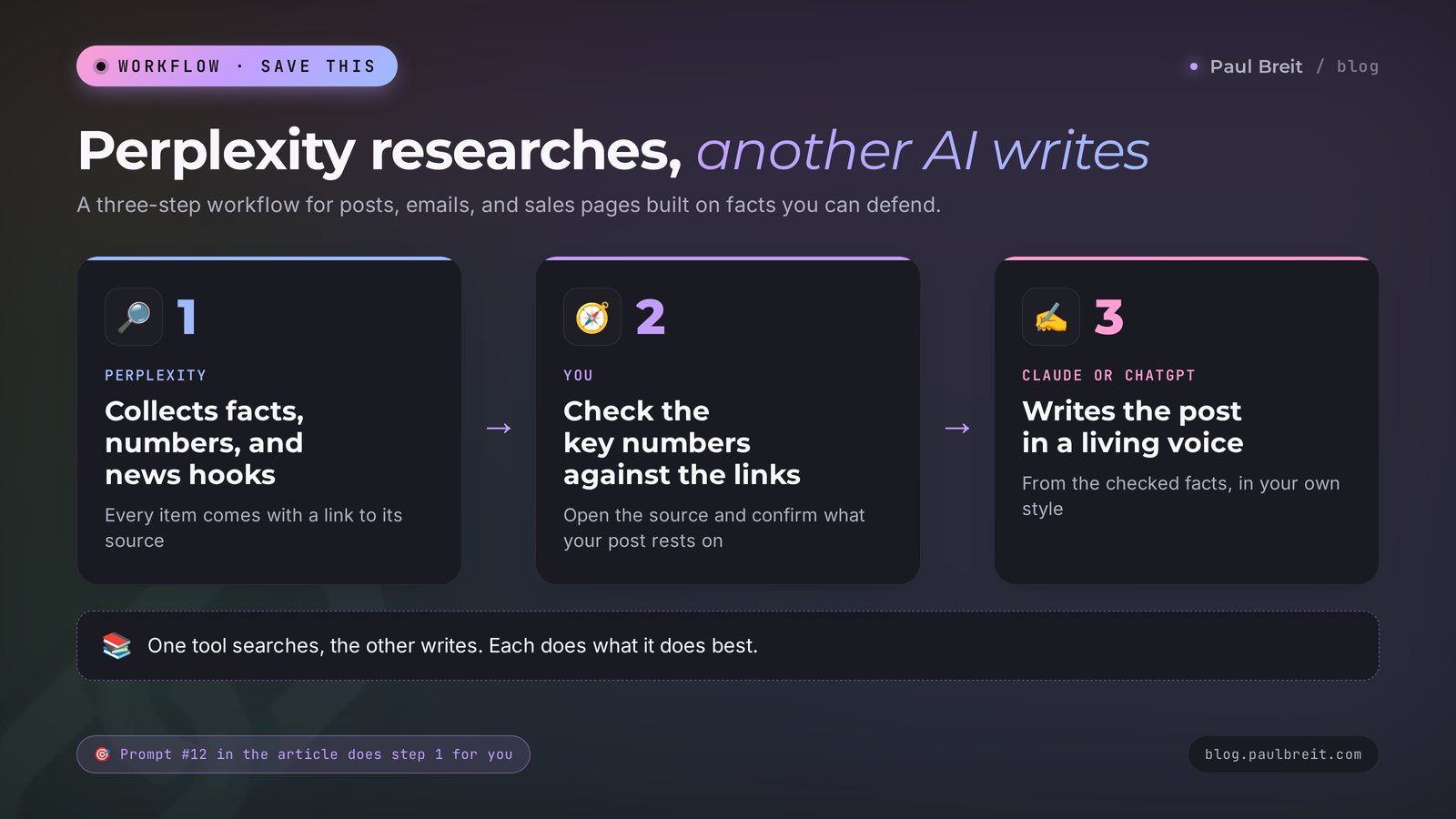
- you need both: gather the facts in Perplexity first, then hand them to a chatbot to write the text.
One more nice detail: in the paid version of Perplexity you can choose which model writes the answer. Under the hood you get the latest models from OpenAI, Anthropic, Google, xAI, and China's Moonshot, plus Perplexity's own model called Sonar. For $20 you get access to several top AIs at once, inside a search tool.
Section 03Phone, desktop, and Comet: where Perplexity runs
In the US, Perplexity just works. No workarounds, no special setup, and you pay for a subscription with a regular card or through the App Store and Google Play. Still, there are a few things worth knowing before you start, so you pick the right place to use it and don't get burned.
On your phone. The mobile app is where Perplexity feels most natural. You can ask by voice while walking, point the camera at a product, a sign, or a page of notes and ask about it, and get answers read aloud. If you search on the go between client sessions, install the app first.
On your computer. The website and the desktop apps for Windows and Mac are the most comfortable for long research, file uploads, and Projects. Reports from Research are easier to read on a big screen, and you can export them to PDF.
In Comet. If you spend your day in a browser, Comet puts the assistant right next to the page you're reading. It's free and I cover it in its own section below.
Download the app only from the official App Store or Google Play listing, and check that the developer is Perplexity AI, Inc. Lookalike apps and browser extensions with "Perplexity" in the name are a common way to collect your data or sell you a subscription you don't need.
Shared accounts. Online you'll see offers to buy "Pro access for pennies" in an account shared by several people. Perplexity blocks such accounts when it sees logins from different places. Nobody refunds you, and your Projects and history disappear along with the account.
Promo codes. Free "Pro for a year" deals from partners such as PayPal and mobile carriers ran in 2025 and mostly ended by 2026. If a stranger offers you "free Pro with a promo code" in a chat or a comment, it's most likely a shared account or a scam. Real offers show up on Perplexity's own site or in your carrier's or bank's official app.
Your data. By default, searches on the Free, Pro, and Max plans may be used to train models. It takes ten seconds to turn that off, and I show where in the next section. Teams that handle sensitive client data should look at the Enterprise plan, where data isn't used for training by default.
Section 04Signing up, step by step
You can use Perplexity without an account: open the site and ask a question. But without signing in, your history isn't saved and the limits are lower. Signing up takes two minutes.
- Open the site. Go to perplexity.ai or download the Perplexity app from the App Store or Google Play. Check the developer: Perplexity AI, Inc.
- Click Sign Up. The button is in the lower left corner on a computer or on the first screen in the app.
- Choose how to sign in. Continue with Google or Continue with Apple is the easiest: one click, no passwords. You can also enter your email, and Perplexity will send you a code or a sign-in link.
- Skip the Pro offer. After you sign up, Perplexity shows a subscription window. Close it: the free plan is enough to figure out whether you need a paid one.
- Check your language and region. Open Settings (the gear or your profile menu), find Preferences, and make sure the interface language and region match where you work. Perplexity uses this to pick local sources and currency.
- Turn off training on your data. In the same Preferences section, find the AI data retention toggle and switch it off. Your searches then won't be used to train models. It works from the moment you switch it off; earlier searches are already counted.
- Tell it about yourself. Your profile settings have a field where you can write a couple of lines about yourself. Perplexity takes them into account in its answers. Here's an example.
I'm a therapist and I work online with women aged 30 to 45. I run an Instagram account and a newsletter, and I sell one-on-one sessions and group programs. I live and work in the US, so I need prices in US dollars and US sources. Answer briefly and to the point, with numbers and links.Why it works: Perplexity tailors the search to these lines. A US therapist gets links to US sites and prices in dollars, without irrelevant studies from other countries' health systems.
Section 05Search, Pro Search, Research, and Computer
Under the input box there's a mode switch. It controls how deep the AI digs and how long that takes.
| Mode | What it does | Time | When to use it | Plan |
|---|---|---|---|---|
| Search | Fast search, 5 to 10 sources, a short answer | A few seconds | A fact, a number, a definition, a quick question | Free, unlimited |
| Pro Search | Splits the question into parts, searches each one, gives a fuller answer | 10 to 30 seconds | Comparisons, questions with several parts | A few a day free, hundreds on Pro |
| Research | Reads dozens of sources and writes a report with sections | 2 to 5 minutes | Niche, market, and competitor research, complex topics | Rarely on Free, regularly on Pro |
| Computer | An AI agent that carries out a multi-step task on its own: tables, simple sites, files | Minutes to an hour | Big "do it start to finish" tasks | Pro with bonus credits, Max |
Search is the workhorse. I use it in eight cases out of ten. You ask, and five seconds later you have an answer with sources.
Pro Search is for questions with several parts. Example: "Compare three email newsletter tools by price, subscriber limits, and automation features." Basic search would skim the surface. Pro Search looks up each tool and each point separately.
Research used to be called Deep Research. It's your personal analyst. It asks itself dozens of questions, reads a lot of pages, sometimes changes its mind and searches again, and at the end writes a report with sections, conclusions, and a list of sources. You can download the report as a PDF or turn it into a page that's easy to share. While Research works, you can get on with your day.
Computer arrived in February 2026 and grew out of the Labs mode. This one is an AI agent: you set the task, and it plans the steps, searches, calculates, and builds a table, a chart, or even a simple website. It runs on credits: Pro gives you bonus credits, Max gives you plenty. For everyday content and research work, the first three modes are enough. If AI agents interest you, take a look at my article about an AI competitor spy, where an agent is built for one specific job.
On paid plans there's a model menu next to the input box. The default is automatic selection, and for search it works well. Change the model in two cases: when you need the answer as polished, natural text (pick Claude) and when the task needs long reasoning and calculations (pick a model labeled "reasoning" or "thinking").
Section 06How to choose your sources
The most underrated setting in Perplexity is choosing where to search. By default it searches the whole web. Sometimes you need a narrow set of sources, and then the answers get noticeably more accurate.
In 2026 the source toggles live in one menu on the home screen. You'll find:
- Web: the whole internet, the default;
- Academic: scientific papers and studies. Use it when you write about health, psychology, or nutrition and want to stand on research;
- Finance: stock quotes, company filings, financial news;
- Health: medical sources;
- Patents: patents;
- Social and discussions: posts and forums, when you need to know what real people are saying.
There's also a manual way to narrow the search that works in any mode. Write in the prompt where to look:
Search only US government sites (ftc.gov and other .gov domains): what are the current FTC rules for disclosing paid partnerships and endorsements on Instagram and YouTube in 2026? Give me links to the specific guidance pages.Or the other way around, rule sources out:
What mistakes do new nutrition coaches make most often when they sell their sessions? Don't use online course websites or promotional articles. Search forums, reviews, and discussions.Why it works: course websites are written to sell a course, so their answers are predictable. Forums and reviews give you real pain points, and those later turn into topics for posts.
Section 07Your first search, step by step
Let's walk one prompt from start to finish so you see how Perplexity works on a real task.
The task. You're a career coach, and you want to know what colleagues charge for an online session so you can revisit your own price.
Step 1. Write the question with context. A weak version: "career coach prices." A strong one:
I'm a career coach. I work online with mid-career professionals who are preparing for job interviews at tech companies. As of October 2026, what do coaches like me in the US charge for a 60-minute online session? Split the answer into three price tiers: newer coaches, experienced coaches, and top specialists. For each tier, give a range in US dollars and 2 to 3 examples with links to profiles or websites.Step 2. Look at the sources. Above the answer, Perplexity shows source cards: coaching marketplaces, personal websites, articles. First, glance at the dates. If half the sources are two years old, add "use only 2026 data" in your next message.
Step 3. Read the answer. Perplexity will give you something like this:
Newer coaches with under two years of experience: $60 to $120 per session [1][3]. Experienced coaches with certifications and a clear specialty: $150 to $250 [2][4]. Top specialists in interview prep for tech roles: $300 to $500 and up, often sold as packages of 4 to 6 sessions [5][6]. A narrow "interview prep" specialty is less common and priced higher than general career coaching [4].
The numbers in this example are illustrative. You'll get current ones, with links to real profiles.
Step 4. Check what matters. Click the source numbers next to the figures you're going to rely on. Make sure the page really shows that price and that it's about online sessions for the same kind of client. It takes two minutes and saves you from deciding based on a mistake.
Step 5. Follow up. Perplexity remembers the context of the conversation, so keep going in the same thread:
Which of the top coaches sell session packages? How are their packages built: how many sessions, what bonuses, and what discount compared to the single-session price?Step 6. Save it. You can add the thread to a Project (more on that in Section 12) or share it with a link. Under the answer, Perplexity suggests related questions, and the next step you hadn't thought of is often sitting right there.
In 10 minutes you have a picture of the market you can use to rework your pricing. That used to take an evening.
Who you are and who you work for + what exactly to find + for what period and in which country + in what form to return it (table, list, tiers) + how many examples with links. Five parts, and a generic answer turns into a working one. You'll find more ready formulas in my AI prompt library.
Section 08Niche and competitor research: 6 prompts
This is where Perplexity pays off the most. Replace the parts in square brackets with your own details and copy the rest as is.
1. A market map
I'm a [who you are] and I sell [what you sell] to [who]. Give me an overview of this market in the US for 2026: who the main players are, which product formats are popular, what the price ranges are, and what trends stand out over the past year. A table plus 5 key takeaways. Use only 2025 to 2026 sources.Run this one in Research mode. A couple of minutes later you have a report you used to pay a marketer for.
2. A competitor breakdown
Break down [competitor's name or website]: what products they sell, at what prices, to which audience, through which channels they bring in clients, and what people say about them in reviews (good and bad). At the end, name three weak spots where I can win.3. Audience pain points from real conversations
Search forums, reviews, and discussions from the past year to find what people complain about when they tried to [solve the problem you solve]. Group the complaints into 7 themes and give 2 real quotes with links for each.Why it works: real quotes are ready-made post headlines. People recognize their own words and keep reading.
4. Demand and seasonality
How does demand for [your service] in the US change month by month? Are there seasonal peaks and dips? Use open data, studies, and platform statistics, and give links. If there's no precise data, say so.That last sentence matters. It gives the AI permission to say "there's no data" honestly instead of making something up.
5. Open niches next door
I'm a [who you are]. Which related narrow specialties in my field are growing right now but have few specialists? For each one: who the client is, how much they're willing to pay, and how hard it is to get in. 5 options, with sources.If you're deciding where to grow, this prompt pairs well with my article on choosing your niche.
6. Testing a product idea
I want to launch [product format] on [topic] for [price]. Find similar products on the market: who sells them, for how much, what's included, and what buyers say about them. Then tell me honestly where the risks in my idea are.Section 09Content with numbers and links: 6 prompts
Perplexity is a poor choice for writing a whole post: its text comes out dry, like a reference entry. What it does brilliantly is dig up what makes a post convincing: fresh news hooks, numbers, studies, examples.
7. A fresh hook for a post
What important things happened in [your field] over the last 7 days? Pick 5 news items that [your audience] would care about. For each: the gist in two sentences, a link to the source, and a post idea that connects the news to my work.8. Numbers and studies for an expert post
Find 5 studies or surveys from the last two years on [topic]. For each: who ran it, the sample size, the main finding in one sentence, and a link. Only real studies, no blog retellings.Turn on the Academic source for this one. A number backed by a study works harder in a post than ten paragraphs of opinion.
9. Busting a myth
People in my niche often say: "[common claim]." How true is it? Find what studies and specialists say, and give the arguments for and against with links. Sum it up in one plain-language paragraph.Myth-busting posts collect lots of saves and debate in the comments, and Perplexity gives you the evidence for them in five minutes.
10. Questions people ask search engines
What questions do people interested in [topic] ask online most often? Collect 20 questions from forums, search suggestions, and discussions. Group them by stage: just starting to think about it, comparing options, ready to buy.That's a content plan for a month: one question, one post or short video. If you want posts like these to bring in clients from search later, read my article on SEO for your blog.
11. Fact-checking your draft
Fact-check my text. For every claim with a number or a date, tell me: confirmed, not confirmed, or couldn't find it. Give links. Text: [paste your text]I recommend this prompt to anyone who writes posts with numbers. One wrong figure in a post, and someone will correct you publicly in the comments.
12. Gathering facts for another AI
For a post on [topic], collect all the verified facts: numbers, dates, names, quotes. Format: a bulleted list with a link for every item. Don't write the post itself, I only need the material.Then you hand this list to an AI that writes in a natural voice and ask it to build a post from these facts. The "Perplexity researches, Claude writes" combo covers most of what a blog needs. I explained how to get natural-sounding text out of an AI in detail in how to make AI write like a human.
Section 10Sales and client work: 4 prompts
13. Preparing for a client call
Tomorrow I have a call with a potential client: [name, company, or field, public information only]. Find everything publicly available about their business: what they do, recent news, and what problems they might bring to me. Suggest 5 questions I should ask on the call.Use only public information about the company or the person. Don't paste your clients' personal data into a search engine. I wrote a whole guide on client research before a sales call if you want to go deeper.
14. Arguments for a sales page
I sell [product]. Find what results people usually get after similar programs, what doubts buyers have before purchasing, and what convinces them. Sources: reviews, discussions, studies. Result: 7 arguments for my sales page.15. Pricing and packaging
How do specialists in [niche] package their services in 2026: one-off sessions, packages, subscriptions, group programs? What are the prices for each format? Give 6 examples with links and tell me which format is growing right now.16. Answering a tough client question
A client asks: "[client's question]." Find what specialists and official sources say. Give me a short answer I can send the client in a direct message, and separately, links I can point to.This one is especially useful for lawyers, accountants, therapists, and nutrition coaches: an answer that cites an official source earns more trust. If you want to sharpen the calls themselves, I have a detailed sales call script.
Section 11Files, links, and learning: 4 prompts
You can upload a file to Perplexity with the paperclip next to the input box: a PDF, a document, a spreadsheet, a photo. The free plan allows only a few uploads, while Pro gives you enough for daily work. You can also simply paste a link to a page or a YouTube video and ask questions about it.
17. Breaking down a long document
Here's a contract [attach the file]. Explain in plain words what matters for me as the contractor: deadlines, payment, liability, termination terms. Flag separately any clauses that could be risky.Remember: an AI doesn't replace a lawyer. It helps you quickly understand what a document is about and which questions to ask a professional.
18. Notes from a video or webinar
Here's a link to a video: [link]. Make notes: the main ideas as bullet points, concrete tips, numbers, and examples. At the end, give 3 ideas for applying this in my work [what you do].More tricks for studying and note-taking are in my article on AI note-taking.
19. Comparing files
I've attached three proposals from contractors. Put them in a table: price, timeline, what's included, what's not, guarantees. Then find reviews of each contractor online and add a column with conclusions.This shows where Perplexity is strongest: it combines your files and a web search in one answer.
20. Getting up to speed on a new topic fast
Explain [topic] to me as if I'm a smart person who knows nothing about it. Outline: what it is, why it matters, how it works, typical beginner mistakes, and where to start this week. Give me the 5 best resources to go deeper, with links.Section 12Projects: work folders with memory
Once you use Perplexity regularly, threads start getting lost. That's what Projects are for. Until summer 2026 they were called Spaces. On July 30 they were renamed and expanded, and old Spaces moved over automatically.
A Project is a folder for one task or one client. Inside:
- instructions: standing text that Perplexity applies to every search in this Project. For example: "I run a blog about healthy eating for busy moms. Use only sources from the last three years, and double-check numbers against two sources";
- files: your materials, which the AI searches along with the web: a price list, product descriptions, past research;
- thread history: all the searches on the topic in one place;
- memory: Perplexity remembers important details and doesn't ask you to repeat them;
- connections: you can connect Google Drive, Gmail, and other services to a Project if you need them.
Here's how I suggest setting up Projects at the start:
- "Niche and competitors": all your market research;
- "Content": hooks, numbers, fact-checking posts;
- "Product": everything about packaging, pricing, and sales arguments;
- "Learning": notes and deep dives into new topics.
You can share a Project with an assistant or a colleague, and they'll see the same instructions and materials.
Section 13The Comet browser
Comet is Perplexity's own browser. It looks like Chrome and is built on the same engine, so your usual sites and extensions work. The difference is the assistant that lives on the right side, sees the open page, and can work with it.
Comet is now free for everyone and available for Windows, Mac, Android, and iPhone. What it does in practice:
- summarizes a long article or a video you have open;
- compares several open tabs, for example three competitor landing pages;
- finds what you need on a page and answers questions about it;
- carries out a simple action on a site when you ask: fills in a form, collects data into a table, finds a product.
A sample Comet prompt when you have a competitor's page open:
Break down this sales page: what's the offer, who it's for, what arguments it uses, what guarantees, what price. What's missing on this page that would make me buy? Answer as a list.The Comet assistant sees whatever is open in the browser. Don't let it work in your bank, in an inbox with client correspondence, or in dashboards with personal data. For those tasks, keep a regular browser.
Section 14How much Perplexity costs
There are several plans, but for one person the choice comes down to three. Prices as of October 2026:
| Plan | Price | What you get | Who it's for |
|---|---|---|---|
| Free | $0 | Unlimited basic search with sources, a few Pro Searches a day, occasional Research, the Comet browser | Everyone, to start |
| Education Pro | $10/mo | Pro features for students after verifying their status | University students |
| Pro | $20/mo or $200/yr | A choice of models, hundreds of Pro Searches, regular Research, file uploads, connected services, bonus credits for Computer | People who search every day |
| Max | $200/mo or $2,000/yr | The most powerful models, lots of Computer credits, extended memory, priority support | Analysts and heavy agent users |
| Enterprise | from $40 per user/mo | Team features, data isn't used for training | Companies |
My advice is simple. Start with Free and work through the checklist below for a week. If you hit the Pro Search or Research limit every day, move to Pro. Max is overkill for content and client work.
Perplexity changes its limits often and doesn't always announce it loudly. Check the exact numbers for today at perplexity.ai/pricing before you pay.
For comparison: ChatGPT Plus, Claude Pro, and Google AI Pro cost about $20 a month too. If you already pay for one of them and search only occasionally, its built-in search may be enough. If search is the core of your day, Perplexity Pro earns its keep.
Section 15Perplexity, ChatGPT, Google AI Mode, Grok, and Claude
An honest comparison for the tasks of people who sell services, courses, and consulting.
| Service | Free plan | Strong side | Weak spot |
|---|---|---|---|
| Perplexity | Yes | A source on every sentence, a choice of models, Research | Dry text, mistakes when retelling sources |
| ChatGPT | Yes | The most versatile, has search and deep research | Search doesn't always switch on, answers sometimes come without links |
| Google AI Mode | Yes | Built into Google Search, huge index, local results and shopping | Shorter answers, fewer controls over sources, weaker for long research |
| Grok | Yes | Fresh posts and conversations on X | Picks up mistakes from social media |
| Claude | Yes | Natural writing, long documents | Has search, but it plays a supporting role |
How to turn this into a working set. Perplexity is your researcher: facts, numbers, competitors, rules. A chatbot like Claude or ChatGPT is your writer: posts, emails, scripts. Google AI Mode is your quick backup for everyday lookups, local businesses, and products. Read more about each one in my guides how to use Gemini, how to use Grok, and Claude vs ChatGPT.
The question I get most often: "If I already have ChatGPT, do I need Perplexity?" If you look things up once a week, ChatGPT's search is enough. If searching is part of your daily work, Perplexity will save you hours: its answers are faster to check, because the source sits next to every sentence.
Section 16Downsides, lawsuits, and checking sources
Links create a feeling that you can trust the answer blindly. That's the most dangerous illusion when you work with Perplexity. Here's what's worth knowing.
Mistakes in retelling. The source can be real while the retelling is off. Perplexity sometimes takes a number from one paragraph and attaches it to a different context, mixes up years, or blends data from two pages. In July 2026 the company itself added a Check Sources feature for verifying claims, which is an honest admission that the problem exists.
Weak sources. The AI can't always tell a study from someone's blog that retold the study wrong. This is especially true for health, finance, and legal topics.
Lawsuits from publishers. Several major publishers and reference works have sued Perplexity, among them Dow Jones, The New York Times, Encyclopaedia Britannica, and CNN. Their claim is that it uses their articles without permission. In 2025 Cloudflare accused Perplexity of having its crawlers get around websites' bans on data collection. For you as a user, this changes nothing yet, but it shows that the rules of the game for AI search engines are still being written.
Privacy. On the Free, Pro, and Max plans, your searches may be used to train models by default. Turn off the AI data retention toggle, as shown in the sign-up section. For one-off sensitive searches there's incognito mode: those threads aren't saved in your history. Don't paste clients' names, phone numbers, messages, or health details into Perplexity.
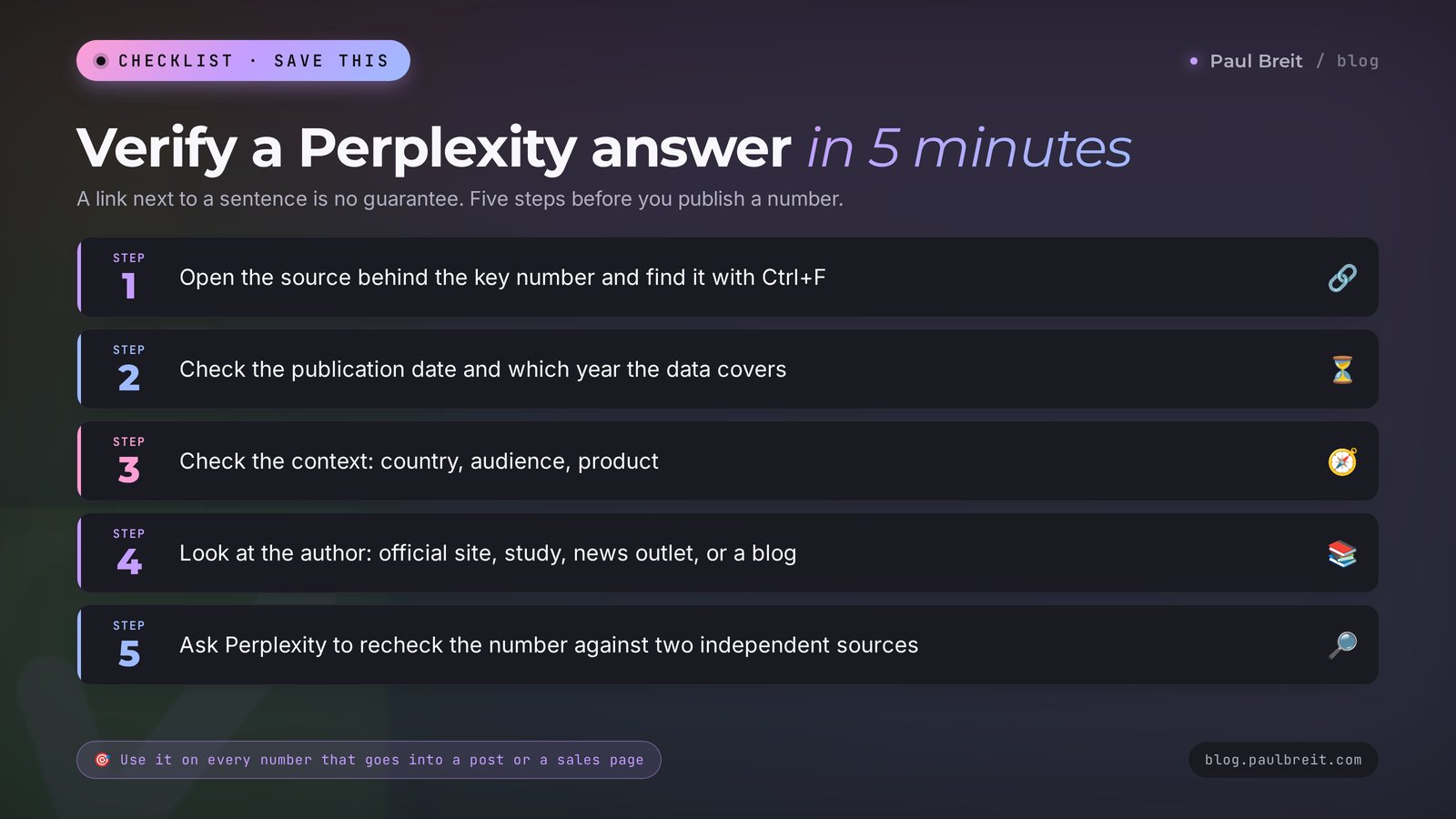
Checking an answer in 5 minutes
I recommend running this routine on every number that's going into a post, onto a sales page, or into a conversation with a client.
- Open the source behind the key number. Click the number next to it and find that figure on the page with Ctrl+F (Cmd+F on a Mac).
- Check the date. Is the page recent, and which year is the data from?
- Check the context. Is it about the same country, audience, and product?
- Look at the author. An official site, a study, a news outlet, or an anonymous blog?
- Ask a second time. Write to Perplexity: "Recheck this number against two independent sources." If the numbers differ, use the one with the more reliable source, or don't use it at all.
Section 17When something goes wrong
The answer cuts off in the middle or the page won't load. Refresh the page and try the app instead of the website. If you're on office or hotel Wi-Fi, switch to mobile data: some networks block or slow down new services.
Perplexity answers in the wrong language or uses foreign sources. Add "Answer in English and use US sources" at the start of your prompt. To avoid typing it every time, put that line in the "about you" field in your profile settings or in the Project instructions.
The sources are old. Set a time frame in your prompt: "only 2026 data" or "from the last 30 days."
Prices or rules are for the wrong country. Write "search US sites, US data, prices in dollars." Naming specific websites helps too.
The answer is too general. Add context using the formula from Section 07: who you are, who it's for, what to find, in what form, how many examples. Or switch on Pro Search.
A number in the answer doesn't match the source. Say it directly: "Source [number] shows a different figure. Recheck and correct your answer." Perplexity will reread the page.
You ran out of Pro Searches or Research. Free plan limits refresh over time. While you wait, basic Search works with no limits, and you can split a complex question into several simple ones.
Your card is declined. Check that it allows online and international payments, try a different card, or subscribe through the App Store or Google Play. Don't buy access to a shared account: those get blocked.
A file won't upload. Check the size and format. It's better to split a large PDF into parts or paste the section you need as text.
Section 18Your first-week checklist
Seven days, 15 to 20 minutes each, and Perplexity becomes a working tool.
- Day 1. Sign up, turn off AI data retention, and fill in the "about you" field.
- Day 2. Prompt #3: collect your audience's pain points from real conversations. Mark three topics for posts.
- Day 3. Prompt #2: break down your main competitor. Write down three of their weak spots.
- Day 4. Prompt #7: find a fresh hook and write a post. Check the numbers with the routine from Section 16.
- Day 5. Prompt #1 in Research mode: get a market report and save it as a PDF.
- Day 6. Create your first two Projects: "Niche and competitors" and "Content." Move this week's threads into them.
- Day 7. Sum it up: how much time Perplexity saved you and whether you hit the limits. Based on that, decide whether you need Pro.
Section 19The whole path in a minute
- Perplexity is an AI search engine: it searches the web and puts a source link next to every sentence. It runs at perplexity.ai, in phone and desktop apps, and in the Comet browser.
- In the US it works directly: sign in with Google, Apple, or email, and pay with a regular card or through the app store.
- Free: unlimited basic search, a few Pro Searches a day, occasional Research. Pro $20 a month, Max $200, Education Pro $10.
- Modes: Search for quick questions, Pro Search for complex ones, Research for deep dives, Computer for big tasks.
- Write prompts with the formula: who you are, what to find, period and country, answer format, how many examples.
- Perplexity is strongest at niche research, competitor breakdowns, finding hooks and numbers for posts, and fact-checking.
- Let another AI do the writing: Perplexity gathers the facts, Claude or ChatGPT turns them into a post.
- Check every important number at its link in 5 minutes. Turn off training on your data, and don't paste in client data.
Open perplexity.ai today and give it prompt #3. Ten minutes later you'll have a list of your audience's pain points in their own words.
FAQFrequently asked questions
Is Perplexity free?
Yes, Perplexity has a free plan. It includes unlimited basic search with sources, a few advanced Pro Searches a day, occasional Research reports, and the Comet browser. The Pro plan costs $20 a month and adds a choice of models, hundreds of Pro Searches, regular Research, and file uploads.
How is Perplexity different from ChatGPT?
Perplexity is built around search: every answer is assembled from fresh web pages, and every sentence carries a link to its source. ChatGPT is a general-purpose assistant that writes and reasons better and turns on search when it decides it needs to. For facts and research, Perplexity is more convenient. For writing, use a chatbot.
Can I trust Perplexity's sources?
The links are real, but the retelling can be inaccurate: the AI may mix up a number, a year, or the context. Open important numbers at the link and find them on the page. For decisions that matter, ask Perplexity to recheck the fact against two independent sources.
Is Perplexity better than Google?
For questions that need a summary of several sources, Perplexity is faster: it reads the pages for you and cites each claim. Google is still better for local businesses, shopping, and navigating to a specific site, and its AI Mode covers quick everyday questions. Many people use both.
What is Research in Perplexity?
Research, formerly Deep Research, is the deep research mode. In 2 to 5 minutes Perplexity reads dozens of sources and writes a detailed report with sections, conclusions, and links. It works well for niche, market, and competitor research and for complex topics. You can download the report as a PDF.
Which models are available in Perplexity Pro?
Pro lets you choose the latest models from OpenAI (GPT), Anthropic (Claude), Google (Gemini), xAI (Grok), Moonshot (Kimi), and Perplexity's own Sonar model. By default the model is picked automatically. The most powerful models are available on the Max plan.
Is it safe to put work data into Perplexity?
By default, searches on the Free, Pro, and Max plans may be used to train models. Turn off the AI data retention toggle in settings, and use incognito mode for one-off sensitive questions. Don't paste clients' personal data into Perplexity, such as names, phone numbers, messages, or health details.
What is Comet from Perplexity?
Comet is Perplexity's free browser for Windows, Mac, Android, and iPhone. It has a built-in assistant that sees the open page: it summarizes articles and videos, compares tabs, answers questions about the page, and carries out simple actions on websites. Don't let it work in your bank or in dashboards with client data.
Does Perplexity show ads in its answers?
No. In February 2026 Perplexity dropped ads from its answers and moved to a subscription model. Every link you see in an answer is a source the AI found on its own while searching.