Grok: How to Use Elon Musk's AI
Grok is the AI from xAI, Elon Musk's company. It writes, searches the web and the X social network in real time for fresh news and conversations, creates images, makes short videos, understands photos, and talks with you by voice. I walk through how to start using Grok in 2026, how the modes and plans differ, what the free version gives you, which prompts to write for real work, and where Grok gets things wrong. For everyone who sells services, courses, and consulting and wants to know whether Grok deserves a spot in their toolkit.
To use Grok, open grok.com or the Grok app, sign in with Google, Apple, your X account, or email, and type your task in plain words in the box at the bottom. The free plan includes the Grok 4.6 model, image creation, voice mode, and limited search. You pick a mode above the input box: Auto, Fast for quick answers, Expert for complex tasks, and Heavy on the most expensive plan. The paperclip adds photos and documents. The SuperGrok subscription costs $30 a month and you pay with a regular card. Don't send your clients' personal data to Grok.
Grok is handy when you need to understand what's happening in your niche right now: what people argue about, what they praise, what they complain about. It's good for posts tied to a live news hook, trend breakdowns, and images and short clips for your content. If you'd rather have a strong AI with no subscription at all, look at the guide to Qwen, and for the big picture of the market, see the best AI tools of 2026.
What's inside
- What Grok is in 2026
- Where Grok works and how to spot the real site
- Signing up for Grok, step by step
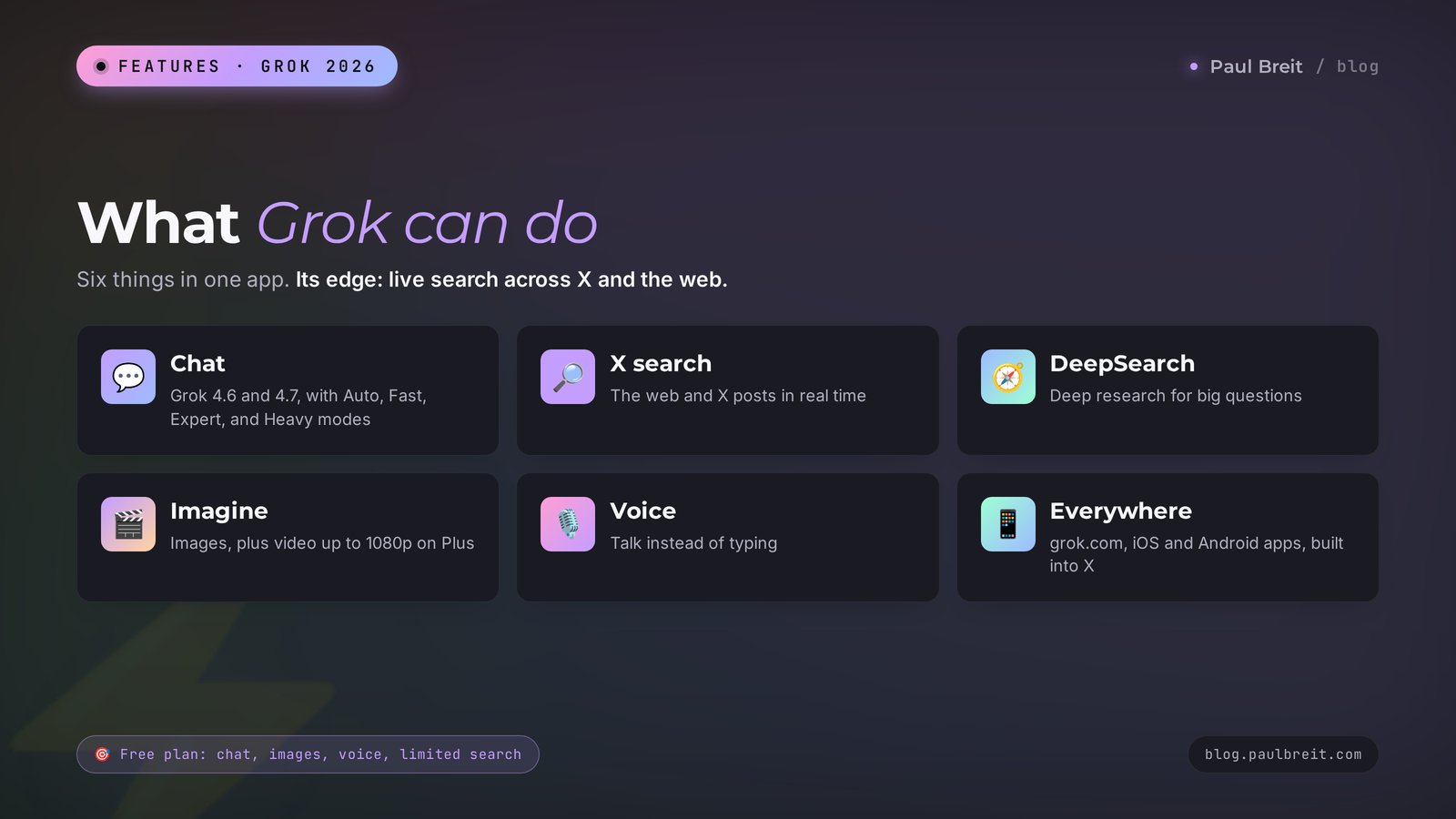
- What Grok can do: 12 features in one table
- Auto, Fast, Expert, and Heavy modes
- Your first chat, step by step
- Writing for work: 8 ready-to-use prompts
- Searching X and the web: 4 prompts
- Images and video in Imagine: 4 prompts
- Photos, documents, and voice: 3 prompts
- Grok inside X and Grokipedia
- How much Grok costs
- Grok, ChatGPT, Claude, Gemini, DeepSeek, and Qwen
- Downsides, scandals, and privacy
- When something goes wrong
- Your first-week checklist with Grok
- The whole path in a minute
Most people hear about Grok from the news. Musk promised something again, Grok offended someone with a sharp reply again, and people on X are arguing again about whether you can trust it. With all that noise, the main question gets lost: can you simply use this AI for work? Write posts, sort through client reviews, make images for your social media?
You can. And Grok has one thing most competitors don't have in this form. It's wired directly into X, where hundreds of millions of posts go up every day. When you ask what people in your niche are discussing right now, Grok looks at the live feed and comes back with an answer and links to specific posts. If you run a blog or a social account and hunt for content ideas, that's a powerful tool.
Grok also has a personality. It jokes more boldly than the others, it's quicker to argue, and sometimes it confidently repeats other people's mistakes from social media. And by fall 2026, xAI has five plans for individuals, so figuring out which one you need is hard without a table.
This article takes it in order: what Grok is today, how to sign up, how the modes differ, 20 ready prompts for writing, search, images, video, and files, an honest comparison with ChatGPT, Claude, Gemini, DeepSeek, and Qwen, and a list of what you'd better not send to Grok. Read it straight through or jump around with the table of contents.
Section 01What Grok is in 2026
Grok is a family of language models and a chatbot from xAI. Musk founded xAI in 2023, and the first version of Grok came out in November that year, at first only for paying X subscribers. The name comes from science fiction: in Robert Heinlein's novel Stranger in a Strange Land, to "grok" something means to understand it so deeply that you become part of it.
In February 2026, SpaceX bought xAI, so Grok is now formally a product of Musk's space company. The xAI website signs itself that way: SpaceXAI, the makers of Grok. For users, nothing changed: same site, same apps, same account.
Grok models get updated fast. Here's the picture in fall 2026:
- Grok 4.6 came out on August 12, 2026. It's the main model in the chat, including on the free plan. It holds up to 500,000 tokens in one conversation and understands both text and images.
- Grok 4.7 came out on September 21, 2026, and it's the newest one. It went first to developers and to tools like Cursor, and it's gradually arriving in the chat too.
- Grok Imagine is a separate model for images and video. Version 1.5 makes clips from text, from a photo, and from references, including clips with sound and voice.
- Grok 5 hasn't come out yet. Musk has named dates several times, those dates passed, and as of October 2026 there's no official release date.
Where Grok lives:
- the website grok.com, the full version with every mode;
- the Grok apps for iPhone and Android, which add a convenient voice mode and the camera;
- the X social network, with a Grok button in the menu and the option to call it into the replies by tagging @grok;
- the API for developers, if you want to plug Grok into your own bot or service.
How is Grok different from its neighbors, in plain words? ChatGPT is the most versatile. Claude is the strongest at long, careful writing and at working with documents. Gemini is tightly connected to Gmail, Google Docs, and Google Search. And Grok is the most "newsy" one: it's closest to the live social feed and bolder than the rest in tone. If you're just starting to figure out who's who, keep the glossary of AI terms for beginners close by.
Section 02Where Grok works and how to spot the real site
Short version: in the US, Grok just works. No workarounds, no special setup. There are still three things worth knowing before you start, so you don't waste an evening.
First, there's one official site. Grok lives at grok.com, in the official Grok apps from xAI, and inside X. Search results are full of lookalike sites with ads like "Grok free, no sign-up." They have nothing to do with xAI, and some of them just collect whatever you type.
Second, you don't need an X account. Many people think Grok only works inside X. It doesn't. You can sign in to grok.com with Google, Apple, or email, and Grok will still search X posts for you.
Third, payment is simple. Paid plans are billed in US dollars to a regular credit or debit card on the website, or through the App Store and Google Play if you subscribe inside the app.
What that means in practice:
- Type the address yourself or use a bookmark. Don't click "Grok" ads in search results.
- Sign up with the account you use for work, such as Google or Apple, so your chats stay in one place across your computer and phone.
- Start on the free plan. You can upgrade any time without losing your chat history.
In 2025, Telegram and xAI announced a partnership to bring Grok into the messenger. In summer 2026, news outlets reported that the integration never happened. Bots called "Grok" in Telegram and other messengers are third-party middlemen. They can run on any model and they see everything you write to them. Be careful with them.
If you'd rather not add another subscription, that's fine. For most tasks in this article there are free AIs too: Qwen, DeepSeek, and the free tiers of ChatGPT, Claude, and Gemini. The full list is in free AI tools for 2026. Grok is worth adding when you need its specific strength: live search across social media.
Section 03Signing up for Grok, step by step
I'll show it on a computer. The steps in the app are the same. It takes about five minutes.
Open the official site
Type grok.com into the address bar. Check the address with your own eyes: exactly grok, dot, com. Lookalike sites with "free Grok" ads have nothing to do with xAI.
Click Sign up
The button sits in the top right corner. Choose how to sign in: Google, Apple, your X account, or email. The fastest path is Google: one click and you're in. If you chose email, open the message from xAI and enter the confirmation code.
Enter your date of birth
Grok asks your age. You can use the service from age 13, and some features are only for adults. Use your real date.
Check the settings
Click your avatar and open the settings. There you can pick the interface language, a light or dark theme, and the data controls section. In that section, it's worth turning off the use of your chats for model training if you don't want your conversations going into the common pool.
Install the app on your phone
The Grok app is in the App Store and Google Play. Look for the publisher xAI so you don't download a clone. If you'd rather not install anything, grok.com works fine in a mobile browser too.
That's it. In front of you is a blank screen with an input box at the bottom and a mode switch next to it. You can write in plain English, and if you work with clients in other languages, Grok handles Spanish, French, German, and many more without trouble.
Section 04What Grok can do: 12 features in one table
Grok has a wide set of features, and some of them are tucked away in menus. Here's a map so you don't miss anything.
| Feature | What it does | How to use it |
|---|---|---|
| Chat and writing | Writes, rewrites, shortens, changes the tone | Posts, emails, replies to clients, service descriptions |
| Web search | Finds fresh pages and gives links | Niche news, prices, facts for a post |
| X search | Reads fresh posts on X | What people discuss today, reactions to an event, complaints and praise |
| DeepSearch | Goes through dozens of sources on its own and builds a report | Market overview, competitor research, prep for a live session |
| Expert mode | Reasons at length before answering | Calculations, comparing options, complex plans |
| Photos and screenshots | Understands what's in an image and reads text from photos | Breaking down a stats screenshot, a menu, an ad mockup |
| Documents | Reads PDFs, text files, and spreadsheets | Notes, summaries, questions about a document |
| Imagine: images | Creates images from a description and edits uploaded ones | Post illustrations, covers, backgrounds |
| Imagine: video | Makes short clips from text or a photo, with sound | Intros, animated photos, backgrounds for Reels |
| Voice mode | Talks with you by voice in real time | Practicing a sales call, thinking through an idea on a walk |
| Grok Build | Writes and edits code, builds simple pages | A calculator, a one-page site, a mini game |
| Connectors | Connects Grok to your cloud services | Searching your own files and documents |
The free plan includes chat with the Grok 4.6 model, image creation, voice mode, Grok Build, connectors, and limited search across the web and X. Video, Expert mode, and long conversations open up on paid plans. Since June 2026, xAI has been gradually moving paid plans from separate daily limits to one shared weekly pool: chat, images, voice, and code all draw from it together. When the pool runs out, Grok offers to wait or to buy extra credits, starting at $5.
Section 05Auto, Fast, Expert, and Heavy modes
Next to the input box there's a mode switch. It controls how long Grok thinks before answering and how much of your limit it uses.
| Mode | How it works | When to use it | Where it's available |
|---|---|---|---|
| Auto | Decides on its own whether to think longer or answer right away | The default for most tasks | All plans |
| Fast | Answers in seconds, without long reasoning | Short texts, rewording, ideas | All plans |
| Expert | Reasons step by step and checks itself | Calculations, strategy, complex analysis | Lite and up |
| Heavy | Runs a team of several agents that work on the task in parallel and compare answers | Big research projects and the hardest tasks | SuperGrok Heavy |
How to choose without overthinking it. A post, a reply to a client, ten ideas for Stories: Fast or Auto. Figuring out why sales dropped and drafting a plan for the quarter: Expert. Very few people need Heavy. It's a $300-a-month plan for those who run serious analytics or code through Grok every day.
One catch. Longer reasoning doesn't make an answer truer if the source data is bad. Expert is great at math and logic, but still check facts from search against the links.
Section 06Your first chat, step by step
Let's walk through a first conversation from a blank screen to a text you can actually use. It takes about fifteen minutes.
Open a new chat and pick a mode
For your first try, choose Auto. Grok will decide on its own where to think longer. Once you're comfortable, you'll start switching modes to fit the task.
Introduce yourself in one paragraph
Grok knows nothing about you. Until it understands who you are, who you work with, and how you talk to clients, the answers will be generic. A short introduction at the start of the chat solves half the problem.
Give it one task and name the format
One message, one task. Say what you want to get and in what form: a 200-word post, a table, a five-point list, three options to choose from.
Ask it to ask you questions
Add at the end: "If anything is missing, ask me up to three questions first." Grok will clarify the details, and the very first draft will land closer to what you need.
Edit the answer with short replies
Don't like it? Don't start over. Just say it directly: "a third shorter," "drop the fancy words," "make the first paragraph a client story." Grok keeps the whole conversation in memory and edits precisely.
Here's what it looks like in a real conversation.
You: I'm a therapist. I work online with women aged 30 to 45 who burned out at work. I run an Instagram account with 2,000 followers. I write simply and warmly, with no jargon. Write a 200-word post about why a vacation doesn't cure burnout. If anything is missing, ask me up to three questions first.

Grok: A couple of questions so I get the tone right. 1. Do you want to invite readers to a session at the end, or just leave them with a thought? 2. Is there a client story you can describe without a name? 3. Do you use emojis in your posts?

You: 1. A gentle invitation. 2. A client came back from two weeks at the beach and three days later was crying in her car in front of the office again. 3. No.

Grok: [a finished post with the story up front, three reasons, and a gentle invitation at the end]
Notice the questions Grok asked. Without them you'd get a textbook post. With them, you get a post about your client that your readers will recognize. Save the introduction formula in your notes and paste it at the start of every new chat. I've collected a hundred more ready-made phrasings for different tasks in the AI prompt library.
Section 07Writing for work: 8 ready-to-use prompts
The parts in square brackets are what you change for yourself. Copy the rest as is.
1. An introduction that saves time on every task
Remember the context for this chat. I'm a [nutritionist] and I work with [new moms who want to get back in shape without strict diets]. I sell [one-on-one sessions and a 6-week course]. My writing style is [simple, funny, friendly, no medical jargon]. My readers are tired of rules and don't believe in quick results. I'll give you tasks next. If anything is missing, ask me questions first.Why it works: niche, audience, product, and tone in one paragraph. Every answer that follows in this chat is written for you.
2. A post with a live news hook
Search X and the news for what people have been discussing about [kids' nutrition] over the last 3 days. Pick the one topic that sparks the most debate. Write an Instagram caption of about [200] words: start with a short summary of the news with a link to the source, then my opinion as a [nutritionist], and end with a question for readers. No hashtags.Why it works: this is the prompt that justifies opening Grok specifically. It finds a fresh hook in the live feed on its own, so your post is about what people care about today.
3. A content plan for the month
Create a [4]-week content plan for my account. [3] posts a week. The mix: 40% useful tips, 30% personal stories, 20% client case breakdowns, 10% sales posts. Format it as a table: week, day, topic, post type, one line about the main idea. Put the sales posts at the end of each week. For two topics this month, suggest a fresh hook from conversations on X.Why it works: the proportions keep a balance between value, stories, and selling. The last line adds a couple of topics with a live hook.
4. A service description
Write a description of my service [resume review and interview prep, 60 minutes, $50] for a page on my website. Structure: who it's for, the problem people come with, what happens during the session, what they walk away with, how much it costs. Up to [250] words. Be specific, and don't use the words "unique," "effective," or "personalized approach."Why it works: the banned-words list cuts out the advertising fluff. Without it, any AI reaches for the same clichés.
5. A reply to a tough client message
A client sent me a direct message: "[I'll think about it and get back to you after the holidays]." Write three reply options: calm, warm with a story about another client, and short and businesslike. Each one under 70 words. No pressure and no discount. The goal is to find out what's really stopping them and keep the conversation going.Why it works: three tones to choose from, and you pick the one that sounds like you. The goal at the end keeps the AI from sliding into hard selling.
6. An email sequence
Write a sequence of [3] emails for people who downloaded my free guide ["5 desk exercises for your back"]. Email 1: thank-you and one tip. Email 2: a client story with a result. Email 3: an invitation to a consultation. For each email, a subject line under 50 characters and body text under 250 words. Friendly, professional tone.Why it works: each email has a role set in advance, and the sequence walks the reader from a free gift to a conversation. More email structures are in the guide to email newsletters with AI.
7. A short video script
Write a [40]-second script for a Reel on the topic [why a $10-an-hour tutor ends up costing you more]. The first line has to stop the scroll. Then the problem, one unexpected twist, and a call to DM me the word [REVIEW]. Write it conversationally, the way I talk out loud. In a separate column, what to show on screen.Why it works: Grok is bold by nature and good at catchy opening lines. The shot column turns the script into a ready filming plan.
8. Translation and adaptation for another audience
Translate my post into Spanish for Spanish-speaking clients in the US. Not word for word: adapt the examples and the idioms so they sound natural. Keep my tone, simple and warm. Here's the text: [paste the post]Why it works: the word "adapt" and specific rules turn a dry translation into a text that sounds natural to a native speaker.
Section 08Searching X and the web: 4 prompts
This is where Grok is strongest. It looks at web pages and fresh X posts at the same time, and under the answer it shows the sources, so you can click through and check.
9. What hurts your audience right now
Find posts on X from the last month where people complain about [finding an English tutor for their kid]. Group the complaints by topic, and give 2 or 3 short quotes with links for each group. At the end, pick 5 topics I could write useful posts about as a [tutor].Why it works: real complaints are more accurate than any survey. You can check the quotes through the links, and you get post topics right away.
10. How people talk about competitors and similar products
Find discussions on X and on review sites about [online drawing courses for adults] from the last 3 months. What do people praise, what do they criticize, what are they willing to pay more for, what disappointed them? Format it as a table: what people say, roughly how many mentions, a link to an example. Don't include the names of the people who posted.Why it works: you see the market through your buyers' eyes. Everything people criticize about others becomes your argument in your own product description.
11. A quick fact check
Check this claim: "[AI has already replaced half of all copywriters]." Find 3 to 5 sources: research, statistics, articles from major publications. Mark separately what is confirmed, what is refuted, and what is just opinion. A link for each point.Why it works: splitting answers into "confirmed," "refuted," and "opinion" keeps Grok from passing off a social media rumor as fact. Posts on X are a live source, but far from always an accurate one.
12. A niche overview with DeepSearch
Write a detailed report on the market for [online nutrition coaching] in 2026. What changed over the year, which formats and prices are popular now, which trends specialists are discussing on X, what clients are missing. At the end, 5 ideas for how a solo practitioner can stand out. Every number with a source.Why it works: in DeepSearch mode, Grok goes through dozens of sources on its own, and in 5 to 10 minutes you get a report that would have taken you an evening by hand. Before you put any numbers in a post, open a couple of the links and make sure they say the same thing.
Section 09Images and video in Imagine: 4 prompts
Imagine is Grok's built-in image and video generator. It opens in its own tab or right from the chat: ask Grok to draw something and it switches over on its own. Images are available for free, and video comes with paid plans: SuperGrok gives you clips up to 720p, SuperGrok Plus up to 1080p. The Imagine 1.5 model can make video from text, from your photo, and from several references, including clips with a voice.
13. A post illustration
Create an illustration for a post about [burnout in working women]. Style: warm watercolor, soft light, calm pastel colors. In the picture: [a woman by a window with a cup of tea, an evening city outside]. No text in the image. Horizontal format, 16:9.Why it works: style, scene, no text, and format are all named explicitly. The more specific the scene, the fewer random details.
14. A Reel cover background
Make a background for a Reel cover, vertical, 9:16. Topic: [how a tutor can find the first clients online]. A minimalist desk, a laptop, an open notebook, morning light. Leave empty space at the top for a headline. No people and no text.Why it works: you ask for space for the headline in advance. It's better to add the text later in an editor, because AI still garbles lettering now and then.
15. Bring a photo to life
[Upload a photo of yourself at your desk] Turn this photo into a 6-second video: I look up from my laptop and smile at the camera, and the camera slowly moves in. Don't change the lighting or my face.Why it works: one simple movement and a smooth camera look natural. Complex scenes with several actions still often go wrong.
16. A short intro clip
Make an 8-second video for the intro of my channel about [home baking]: close-up, flour falling onto a wooden table, hands kneading dough, warm light, a cozy kitchen. Sound: quiet music and the rustle of flour.Why it works: a scene with no human face and clear movements is the most reliable format for generation. More on video generators in the guide to AI video from text.
Don't upload photos of other people to Imagine without their consent, and don't ask it to "make it look like a famous brand." After a scandal in early 2026, xAI tightened the filters on images of real people, and requests like that often get blocked. Legally, it's a risk for you too.
Section 10Photos, documents, and voice: 3 prompts
The paperclip in the input box lets you send Grok a photo, a screenshot, or a file. And the app has a voice mode where you can simply talk to it.
17. Reading a stats screenshot
[Attach a screenshot of your account or ad dashboard stats] These are my account stats for the month. Explain in plain words: what went up, what went down, which posts worked best, and why that might have happened. Give me 3 specific actions for next month.Why it works: you ask for conclusions and specific actions. Grok reads the numbers from the image and connects them to each other.
18. Notes from a long document
[Attach a PDF or text file] Summarize this document on one page: the main idea, 5 key points, numbers and facts worth remembering. At the end, 3 questions worth asking the author.Why it works: a strict structure keeps the answer from sprawling. The questions at the end help you notice what the document is missing.
19. Practicing a sale by voice
Turn on voice mode and say: Let's practice a sales call. You're a potential client who wants to sign up for [a marketing course for photographers] for [$350] but has doubts about the price. Push back like a real person. After five minutes of conversation, tell me where I sounded unsure and what I could say more strongly.Why it works: practicing out loud is easier than by text. Grok plays the hesitant client and gives you a review at the end. I break down how to structure the conversation itself in the article on the sales call script.
Section 11Grok inside X and Grokipedia
If you have an X account, Grok is built right in. Two useful features.
The Grok button in the menu. It opens the same chat, just inside the social network. Handy when you're scrolling the feed and want to ask about a post or topic on the spot.
Mentioning @grok in replies. Under any post you can write "@grok explain this simply" or "@grok is this true?" and Grok will answer publicly. It's a popular feature, but remember: everyone sees your question and its answer. It's not the way to handle work tasks with client data.
Grokipedia is xAI's encyclopedia, which Musk launched in October 2025 as an alternative to Wikipedia. Grok writes and updates its articles. It's fine for a quick intro to a topic, but treat its facts like any AI text: check them against primary sources.
Should you join X just for Grok if your clients live on Instagram, LinkedIn, Facebook groups, or your email list? Probably not. Grok searches X even without your account there, and a regular sign-in at grok.com is enough.
Section 12How much Grok costs
As of October 2026, xAI has five plans for individuals. Prices are in US dollars, you pay with a regular card, and paying for a year comes out roughly two months cheaper.
| Plan | Monthly price | Yearly price | What you get |
|---|---|---|---|
| Free | $0 | – | Grok 4.6, images, voice, Grok Build, connectors, limited search |
| SuperGrok Lite | $10 | $100 | Expert mode, conversations twice as long, trial videos |
| SuperGrok | $30 | $300 | Conversations five times as long, 720p video, the Grok Bot agent, high limits |
| SuperGrok Plus | $100 | $1,000 | 1080p video, priority access, new features before everyone else |
| SuperGrok Heavy | $300 | $3,000 | Heavy mode with a team of agents, an X Premium+ subscription, dedicated support |
There's also a route through X. The X Premium+ subscription at $40 a month includes SuperGrok-level access. Regular X Premium at $8 only raises your Grok limits inside the social network. For businesses, there's SuperGrok Business at $30 per seat per month.
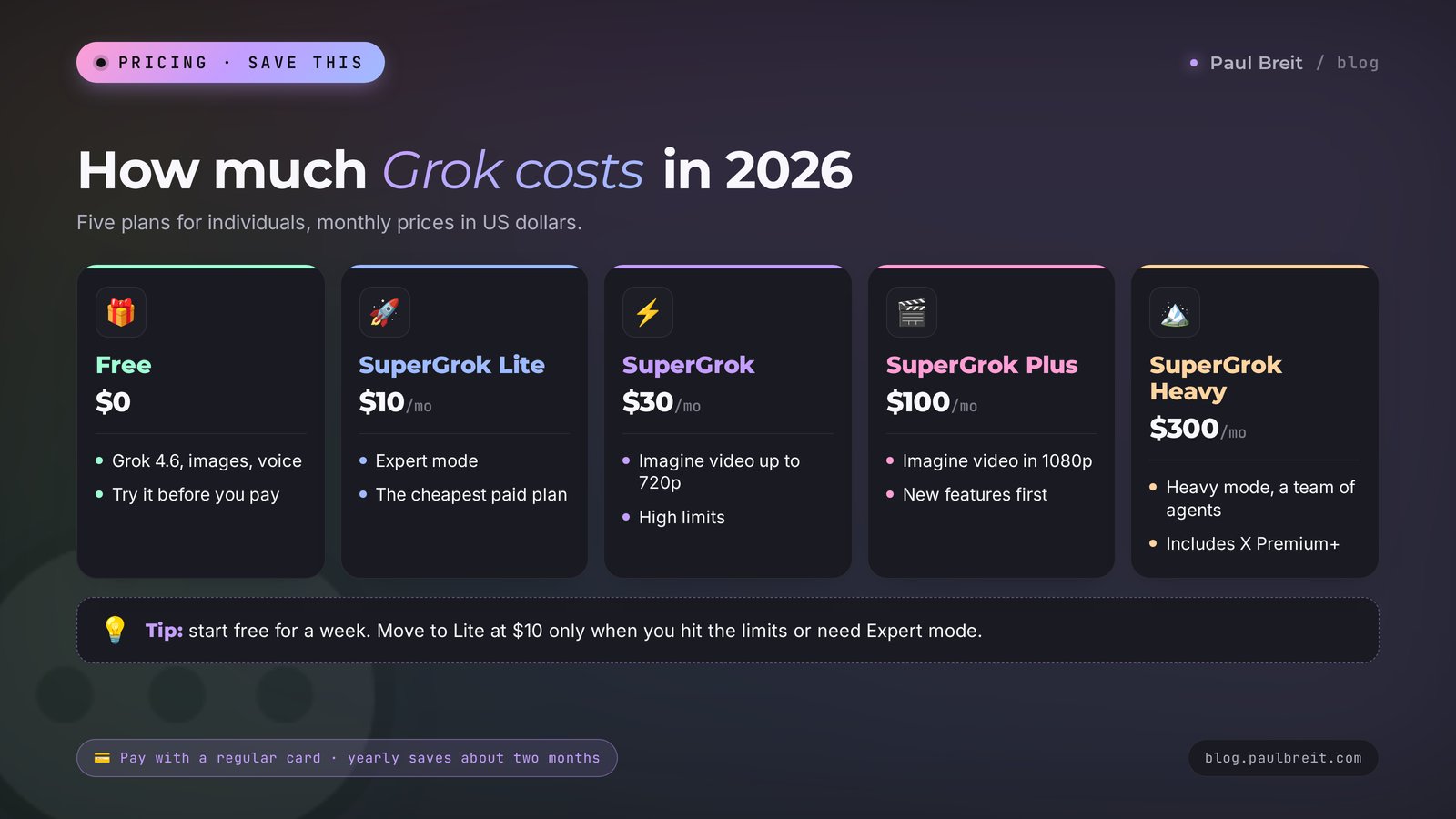
Which plan to choose. Start with the free one and work through the checklist below for a week. If you keep hitting limits or need Expert for analysis, move to Lite at $10. SuperGrok at $30 makes sense if you regularly make videos in Imagine or run X searches every day. Plus and Heavy are overkill for everyday content work.
For comparison: ChatGPT Plus, Claude Pro, and Google AI Pro cost about $20 a month, and for many people one of those subscriptions covers everything. If your budget is tight, start with the free versions of a few AIs. I've collected them in free AI tools.
Section 13Grok, ChatGPT, Claude, Gemini, DeepSeek, and Qwen
An honest comparison on the tasks that people who sell services, courses, and consulting handle most often.
| AI | Free plan | Paid from | Strongest side | Weak spot |
|---|---|---|---|---|
| Grok | Yes | $10/mo | Live search across X and the web, a bold tone, images and video in one window | Picks up errors from social media |
| ChatGPT | Yes | about $20/mo | The most versatile, a huge set of features | Writing often sounds generic without a good prompt |
| Claude | Yes | about $20/mo | Long, careful writing and documents, the most natural voice | No built-in image or video generation |
| Gemini | Yes | about $20/mo | Tied into Gmail, Google Docs, and Google Search | Shines mostly if you live in Google apps |
| DeepSeek | Yes | Free chat | Strong reasoning for free | Chinese servers, caution on sensitive topics |
| Qwen | Yes | Free chat | Text, images, video, and documents for free | Chinese servers, unclear limits |
How to turn this into a working toolkit. Grok works well as your "news scout": find a hook, understand what people are discussing, collect live quotes. Then you can polish the text itself in the AI that writes best for you. I compare the flagships in detail in Claude 5 vs GPT-5 vs Gemini 3, and the two most popular ones head to head in Claude vs ChatGPT. If you want Google's option, there's a separate guide on how to use Gemini.
The question I get most often: "Which one should I pick?" If you don't want to pay anything, start with the free tiers or with Qwen or DeepSeek. If you write a lot, go with Claude or ChatGPT. Add Grok as your second AI when you need a fresh look at what's happening in your niche.
Section 14Downsides, scandals, and privacy
Grok has a reputation as the most "rebellious" AI, and that's about more than jokes. Here's what to know before you trust it with your work.
Errors from social media. Grok leans on posts from X, and X is full of rumors, quotes taken out of context, and confident misconceptions. If a question is controversial, Grok may repeat a popular opinion as fact. The rule is simple: check every number and every big headline through the link Grok gave you.
Filter scandals. In July 2025, after an update, Grok started posting offensive replies on X, and xAI had to roll back the changes urgently. In early 2026, an image scandal broke out: users were getting Imagine to "undress" people in real photos. After that, xAI restricted work with images of real people, and several countries opened investigations. The practical takeaway for you: read Grok's texts with your own eyes before publishing, especially on sensitive topics.
Tone. By default, Grok is chattier and sharper than the others. In a post that can be a plus, in a reply to a client it's not. If you need a calm tone, say so directly: "calm tone, no jokes or sarcasm."
Privacy. Your conversations are stored on xAI servers in the US. By default, chats may be used to improve the models, so turn that off in the data controls settings. For one-off sensitive questions there's a private mode where the chat isn't saved to your history. Most important: don't upload your clients' personal data to Grok, such as names, phone numbers, messages, or health details. Your clients trust you with that information, and you're the one responsible for it.
Dependence. Plans, limits, and rules at xAI change fast: the whole pricing model was reworked in June 2026, and filters shift after every scandal. Don't build your whole workflow on one service. Keep a backup AI.
Section 15When something goes wrong
Common problems and what to do about them.
| What's happening | Why | What to do |
|---|---|---|
| grok.com won't load or says the service is unavailable | A temporary outage, or a work network or VPN blocking the site | Try the app or another network, clear your browser cache, and open the site again |
| You keep getting logged out | A VPN switching locations mid-session, or your browser clearing cookies | Turn off the VPN or keep one location, and allow cookies for grok.com |
| You can't find the right app | Lookalike apps crowd the search results | Search for Grok and check that the publisher is xAI, or use grok.com in a mobile browser |
| Your card is declined | The bank flagged a new subscription charge | Approve the charge in your bank app, try another card, or subscribe through the App Store or Google Play |
| The answer comes in the wrong language | The prompt mixed languages or a pasted text threw it off | Write at the start: "Reply only in English" |
| Answers are generic and boring | Grok knows nothing about you | Start the chat with the introduction paragraph from prompt #1 |
| A "fact" turned out to be false | Grok relied on a wrong post on X | Ask for links and check them, and use prompt #11 |
| Imagine refuses to create an image | The filter on real people or brands kicked in | Describe a fictional character and remove names and logos |
| You ran out of limit | The daily or weekly pool is used up | Wait for the reset, switch to Fast, or buy extra credits |
Section 16Your first-week checklist with Grok
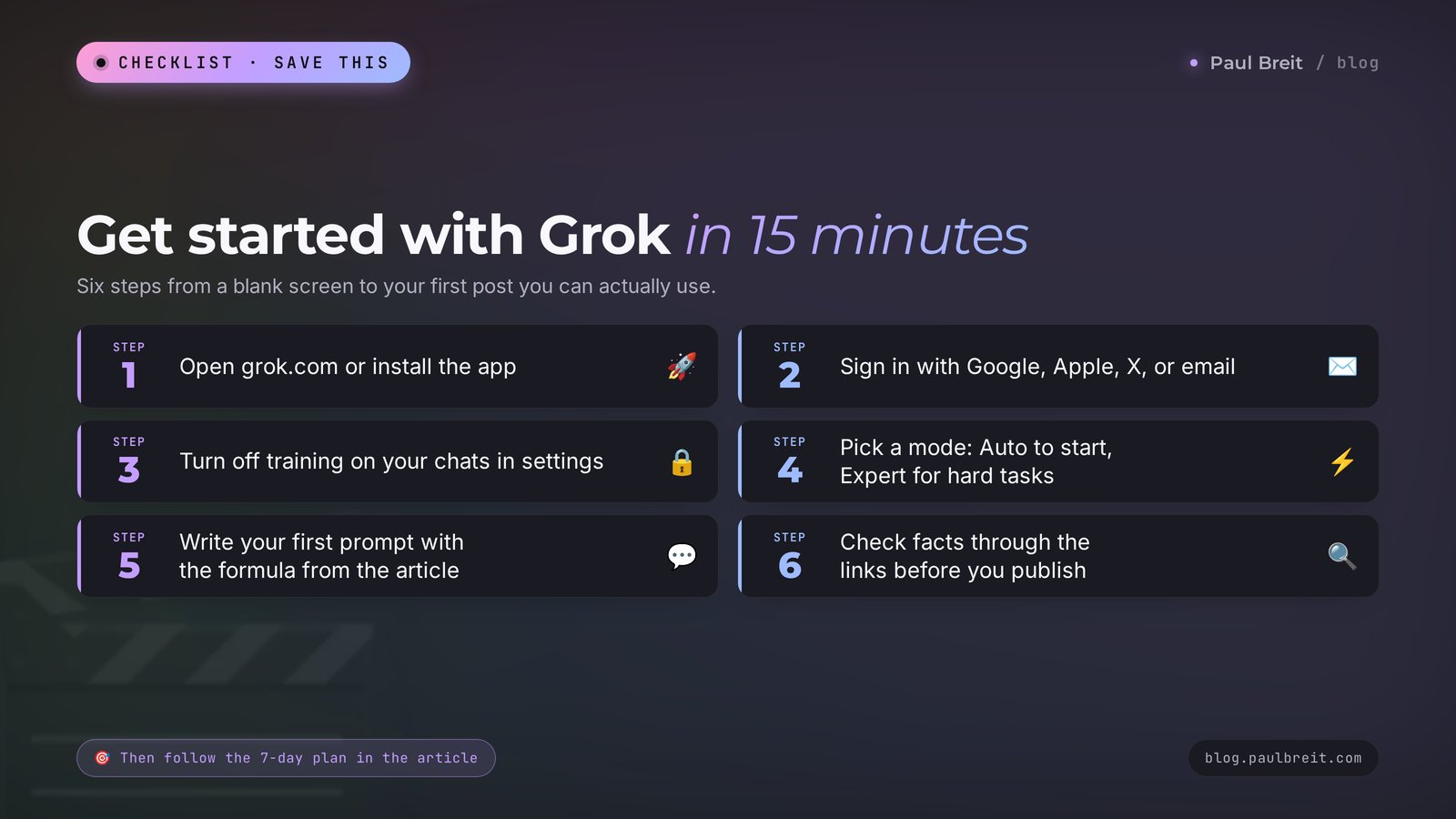
Seven days, 15 to 20 minutes each, and Grok becomes a working tool.
- Day 1. Sign up, turn off training on your chats, write your introduction paragraph, and save it in your notes.
- Day 2. Prompt #9: collect your audience's complaints from X. Mark three topics for posts.
- Day 3. Prompt #2: write a post with a live news hook and publish it.
- Day 4. Prompt #10: see what people say about similar products. Write down two arguments for your own service description.
- Day 5. Prompts #13 and #14: create a post illustration and a cover background.
- Day 6. Prompt #19: practice a sales call by voice and write down two strong lines.
- Day 7. Sum it up: which tasks Grok handled better than other AIs, and which are better left to another service. Based on that, decide whether you need a paid plan.
And a bonus prompt you'll use every day.
20. A personal editor
Here's my text: [paste the text]. Edit it like a strict editor: cut the filler and the corporate speak, break up long sentences, replace vague words with specific ones. Keep my tone. Below, in a separate list, show the 5 main edits and explain each one in a single line.Why it works: a list of edits with explanations teaches you to write better. In a couple of weeks you'll start catching those mistakes yourself.
Section 17The whole path in a minute
- Grok is the AI from Elon Musk's xAI. The site is grok.com, with apps for iPhone and Android, and it's built into X.
- Models in fall 2026: Grok 4.6 in the chat, the newer Grok 4.7, and Imagine 1.5 for images and video. Grok 5 hasn't come out yet.
- In the US it works directly: sign in with Google, Apple, X, or email, and pay with a regular card.
- Free: chat, images, voice, limited search. SuperGrok Lite $10, SuperGrok $30, Plus $100, Heavy $300.
- Modes: Fast for quick tasks, Auto by default, Expert for complex ones, Heavy for the hardest.
- Its main strength is search across fresh X posts and the web: content hooks, audience complaints, reviews of competitors.
- Write prompts with the formula: who you are, who it's for, what to do, in what format.
- Check facts through the links, turn off training on your chats, and don't upload client data.
- Keep a backup AI: Claude, ChatGPT, or a free one like Qwen or DeepSeek.
Open grok.com today and give it prompt #9. Fifteen minutes, and you have a list of topics your audience is talking about right now.
FAQFrequently asked questions
Is Grok free?
Yes, Grok has a free plan. It includes the Grok 4.6 model, image creation, voice mode, Grok Build, connectors, and limited search across the web and X. Video, Expert mode, and long conversations open up on paid plans: SuperGrok Lite at $10, SuperGrok at $30, Plus at $100, and Heavy at $300 a month.
How do I sign up for Grok?
Open grok.com or the official Grok app from xAI, click Sign up, and choose Google, Apple, your X account, or email. In the US it works directly, with no workarounds. Enter your date of birth, then turn off training on your chats in the data controls settings. Paid plans are billed to a regular card.
How is Grok different from ChatGPT?
The main difference is real-time search across posts on X. Grok knows better what people are discussing today, and by default it writes more boldly and sharply. ChatGPT is more versatile and more careful in tone. Both have a free plan, and both have paid plans: Grok from $10 a month, ChatGPT Plus at about $20.
What is the newest Grok model?
As of early October 2026, the newest model is Grok 4.7, released on September 21, 2026. The main model in the chat, including on the free plan, is Grok 4.6 from August 12, 2026. Grok 5 hasn't come out yet, and there's no official release date.
Do I need an X account to use Grok?
No. You can sign in to grok.com and the Grok apps with Google, Apple, or email. Grok still searches posts on X for you without an X account. An X account only adds the Grok button inside X and the option to tag @grok in replies.
Can Grok create images and video?
Yes, through its built-in Imagine generator. Images are available on the free plan too. Video from text, from a photo, and from references, including clips with sound, opens up on paid plans: up to 720p on SuperGrok and up to 1080p on SuperGrok Plus.
Is it safe to upload work data to Grok?
Conversations are stored on xAI servers in the US and by default may be used to train the models. Turn that off in the data controls settings, and use private mode for one-off sensitive questions. Don't upload your clients' personal data to Grok, such as names, phone numbers, messages, or health details.
Who owns Grok?
Grok is made by xAI, the AI company Elon Musk founded in 2023. In February 2026, SpaceX bought xAI, so Grok is now formally a SpaceX product. For users nothing changed: the same site, the same apps, and the same account.
Which Grok plan should I choose?
Start with the free plan and use it for a week. If you run out of limits or need Expert mode, move to SuperGrok Lite at $10. SuperGrok at $30 is worth it if you make videos regularly or use X search every day. Plus at $100 and Heavy at $300 are overkill for everyday content work.