AI for Note-Taking: a ready prompt and 7 tools in 2026
How to turn a lecture, webinar, book, article, or call recording into a short structured summary in a couple of minutes. A universal prompt that works in any AI, separate prompts for video, books, and meetings, a comparison of seven tools, and the mistakes to skip. All in plain language, so even someone opening an AI for the first time can follow along.
To make a summary with AI, copy the source text (or the transcript of a video or audio), open any AI – Claude, ChatGPT, DeepSeek, Gemini, or Google NotebookLM – and give it a prompt with a clear structure: the main idea, key points as a list, terms, examples and numbers, a conclusion. A ready universal prompt is below. The first summary takes 5 minutes, and the free tools are enough for study and work.
An hour and a half of lecture. A two-hour webinar. A three-hundred-page book. You watched all of it, nodded along, even took a few notes. And a week later, two fragments and a vague sense that it was useful. Where did the rest go? No idea. Writing notes by hand is slow, and while you write you lose the thread.
I went through this over hundreds of hours of other people's courses and my own live sessions. I used to rewatch recordings just to pull out the substance. Now the AI does that. I hand it the text or the recording, and two minutes later I have a clean summary: the main ideas, the terms, what to do with them. Below I'll show how it works and give ready prompts for every case.
It's a 22-minute read. Your first summary takes five. And you'll probably drop the habit of rewatching long recordings on a loop.
What's inside
- What AI can really do with your notes
- The master prompt: a universal formula for notes
- Notes from a lecture or webinar (video and audio)
- Notes from a book, article, or big PDF
- Call and meeting notes with action items
- Note formats: Cornell, mind map, flashcards
- 7 tools for notes, compared
- Getting started: accounts, access, and cost
- 5 mistakes and how to avoid them
- Checklist: a summary in 5 minutes
Section 01What AI can really do with your notes
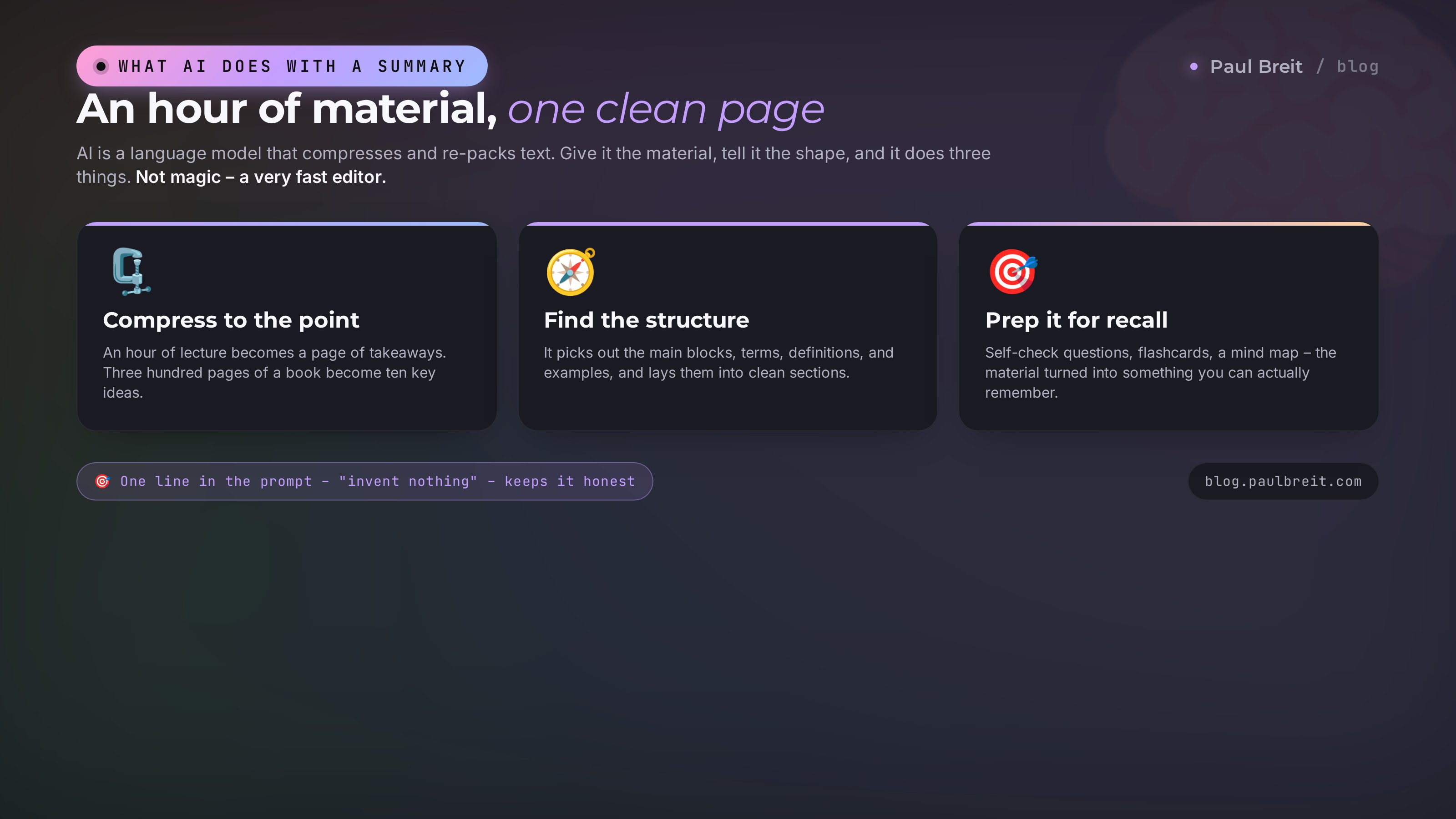
Let's be honest up front, no inflated expectations. AI is a language model that's good at compressing and re-packing text. Give it the material, tell it what shape you want the result in, and it pulls out the substance, sorts it, and drops the filler. That's exactly what a summary is.
Here's what it does confidently and fast:
- Compresses long into the point. An hour of lecture becomes a page of takeaways. Three hundred pages of a book become ten key ideas.
- Finds the structure. It picks out the main blocks, terms, definitions, and examples and lays them into sections on its own.
- Translates the complex into plain language. It retells a dense lecture so it clicks on the first read. You can ask it to explain like you're twelve.
- Preps the material for recall. It writes self-check questions, flashcards, a mind map.
- Pulls tasks out of a conversation. From a call recording it builds a list: who does what, by when.
And here are the edges worth knowing about in advance:
- AI doesn't watch video or listen to audio directly – it needs text. So a recording gets turned into a transcript first, and the transcript is what you hand over. How to do that fast and free is in the section on lectures.
- It can make things up. If something isn't in the source and the model decides it reads better that way, it'll add it. The fix is one line in the prompt: "add nothing that isn't in the text." And still check the original on important numbers.
- Length per pass is limited. Every model has its own cap on how much text it takes. A very big book gets cut into parts and summarized chunk by chunk. More on that below.
A small example to make it concrete. I once handed the AI the transcript of my own 90-minute session on sales funnels. Two minutes later I had a list of seven main ideas, eight terms with definitions, and five next steps. I read it and realized I'd rushed half of that in the live session. The summary came out clearer than the original. Since then I run not just other people's material through this, but my own, before I repackage it into an article or a post.
Keep those three things in mind and AI becomes your personal editor that never tires and works in minutes. Now for the main thing you opened this article for. The prompt.
Section 02The master prompt: a universal formula for notes
Ninety percent of a summary's quality comes from what you ask for. Type "make a summary" and you get a retelling you then want to summarize yourself. Give it a clear structure and you get material you can actually work with. Here's the prompt I run most often. It fits a lecture, an article, a session transcript, a book chapter.
You're an experienced teacher and editor. Below is some material.
Turn it into a summary, strictly in this structure:

1. What it's about. One sentence that captures the whole thing.
2. Main ideas. Between 5 and 9 points, each one short sentence.
3. Terms and definitions, if any appeared in the text.
4. Examples, facts, and numbers worth remembering.
5. Takeaway and what to do next - 3 concrete steps.

Rules:
- Write plainly, like you're explaining to a friend. No filler, no jargon.
- Invent nothing. If it isn't in the text, don't add it - put a dash.
- Keep important numbers and names exactly as written.

Here's the material:
[paste the text]
Let's break down why the prompt is built this way, so you can adapt it instead of copying it blind.
The role in the first line
"You're an experienced teacher and editor" isn't decoration. When you set a role, the model pulls up the right tone and level of explanation. Ask for a schoolteacher and you get simpler; a science editor and you get drier and more precise. Change it to fit the task.
The hard structure
The five points are a skeleton the model hangs the material on. Without it, the AI spits out a wall of text and you have to read the whole thing. With it, your eyes find the block you need in ten seconds. The points are flexible: drop terms if there are none, add "open questions" or "what stayed unclear."
The line about making things up
"Invent nothing, put a dash" is the most important line. Without it, the model fills gaps with plausible nonsense. With it, it honestly admits a term wasn't in the text. That's what turns a summary from pretty into reliable.
After the summary is ready, follow up with: "Now ask me 5 questions on this material so I can check that I got it." The AI runs a mini-exam. Answer all five and you've genuinely absorbed it. Trip on a question and you can see which part is worth a reread. There's a whole piece on this personal-tutor mode – see the personal AI tutor.
How to strengthen the summary with extra commands
The base prompt gives a solid result. From there you tune it with short add-ons at the end:
- "Make it shorter, just the 5 main ideas" – when you need a one-screen distillation.
- "Explain each point with an everyday example" – when the topic is abstract.
- "Add 3 exact quotes from the author at the end" – when the original wording matters.
- "Format it as a table: term – explanation" – for terms and definitions.
- "Star what the author treats as most important" – it sets the emphasis for you.
What it looks like on a real example
To make it concrete, here's a small chunk. Say a lecture had this in it:
"...okay so look, conversion is when out of a hundred people who came to us, someone took the action we wanted, made a purchase say, and if three bought, that's a three percent conversion, that's basic, but a lot of people confuse it with click-through rate, and those are totally different things, a click isn't a purchase yet..."
Run it through the base prompt and you get a clean piece of summary:
Term: conversion – the share of people who took the target action, out of everyone who arrived.
Example: 3 purchases out of 100 visitors = 3% conversion.
Don't confuse: conversion and click-through rate are different metrics. A click doesn't mean a purchase.
See the difference. On the left, live speech with filler and repeats; on the right, something you can reread a month later and recall instantly. The AI does this to the entire lecture at once.
Save the base prompt somewhere handy – your phone notes or a pinned message in a chat with yourself. From there you just paste the material and swap the tail to fit the moment. If you want to build a whole shelf of these, look at our prompt library with commands for every day, and if you want to understand the mechanics, read how to write prompts.
Section 03Notes from a lecture or webinar (video and audio)
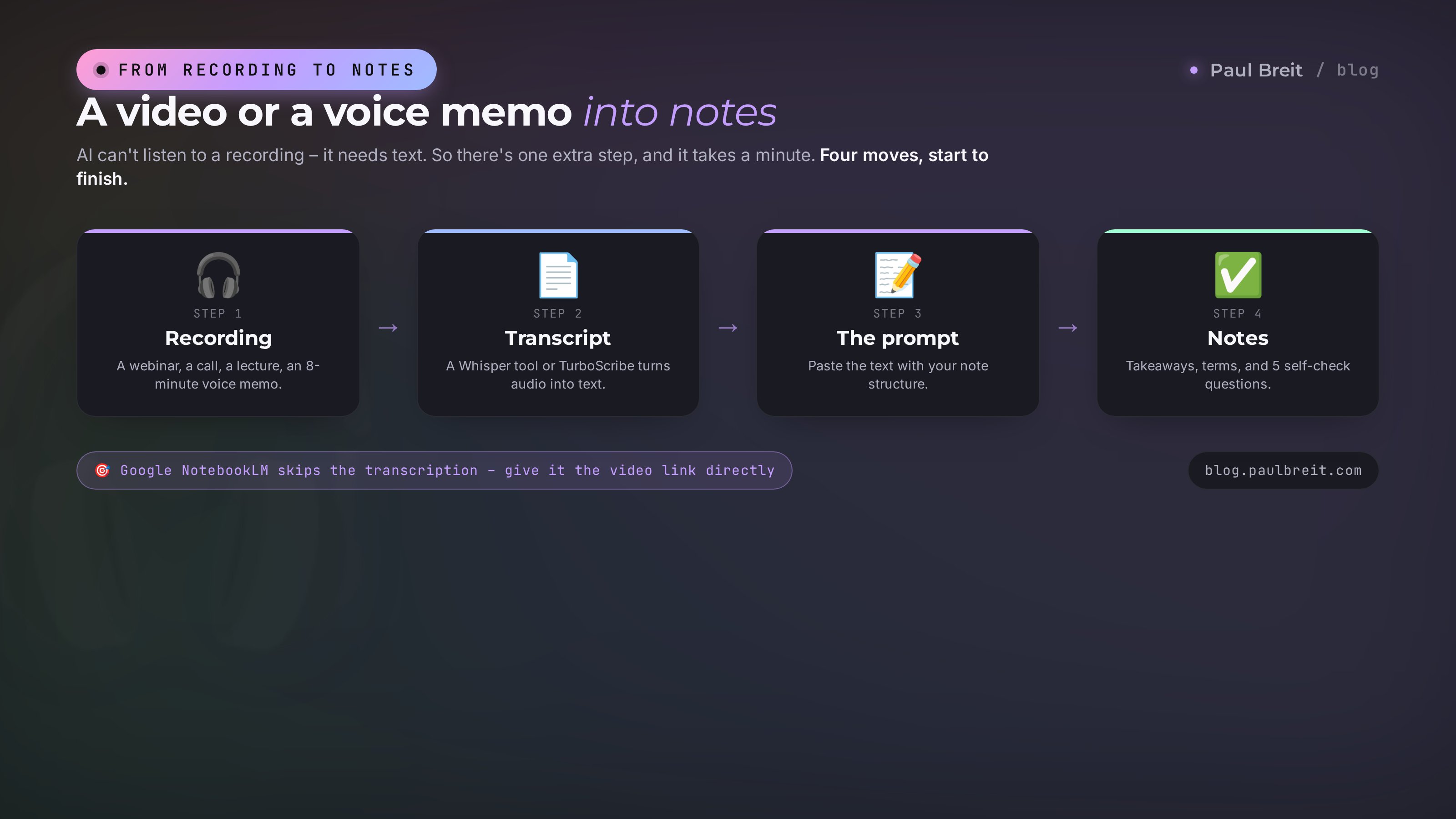
The most common request: I watched a webinar or a lecture, I want a summary. The catch is that AI can't listen to a recording itself. First the sound has to become text, and only then can you summarize. It sounds like an extra step, but it takes a minute, and the AI does it too. Here are three working paths.
Path 1. The video is already on YouTube
If the lecture lives on YouTube, there are almost always auto-captions under the clip. You can pull them out as one block of text with a free transcript tool (search "youtube transcript"). Copy all the text, paste it into the prompt from section 2, and add a line: "this is a transcript of a video lecture, there may be recognition errors in places, fix the obvious ones." Done.
Path 2. Your own recording of a session, call, or voice memo
You have an mp4, mp3, or voice memo – it needs transcribing. Free and near-free speech-recognition tools handle this. In the browser, tools built on Whisper do it; TurboScribe is free up to three files a day; and the built-in transcription in Zoom, Google Meet, and Otter.ai works too. You get a text transcript, and from there it's the usual drill – the prompt from section 2. We covered this in detail in the piece on transcribing audio with AI: step by step, how to turn an hour of recording into text in five minutes.
Path 3. Google NotebookLM takes it all at once
Google NotebookLM stands a little apart. It accepts a video link, a PDF, a document, or pasted text and builds a summary from it, answers questions, and even puts together an audio recap. For lectures it's the shortest path: load the source, ask for a summary, get it. It's free and reads English well.
Once you have the transcript, this variant of the prompt works better for a study lecture. It pulls out not just the takeaways but the things that usually slip past when you're only listening.
Below is a lecture transcript. Make study notes:

1. The lecture topic in one line.
2. An outline: the main blocks in the order the lecturer gave them.
3. For each block - 2-3 key points in plain words.
4. All terms with short definitions, as a separate list.
5. Formulas, dates, names, and numbers - pulled out separately, verbatim.
6. 5 self-check questions on the material.

This is an automatic transcript with recognition errors in places -
fix the obvious typos by meaning. Add nothing of your own.

Transcript:
[text]
With this prompt, a 90-minute lecture compresses into a one-page summary plus five review questions. No more rewatching the recording.
Section 04Notes from a book, article, or big PDF
Books and long articles follow the same logic, but the question of volume comes in. AI won't swallow a whole book in one pass – it hits the limit. There are three ways around it.
A short article or chapter
If the material fits in a few pages, just copy the text and use the prompt from section 2 with an add-on: "this is an article, keep the author's logic." For articles from the web, it's handy to ask an AI with internet access (Perplexity, Gemini, paid ChatGPT) to read the link and summarize it right away.
A whole book via a file
Upload the PDF or the book file straight into an AI that reads documents – Claude, ChatGPT, NotebookLM. Then the prompt, with a note about volume:
Attached is a book. Make a chapter-by-chapter summary:

1. The overall idea of the book in one paragraph.
2. For each chapter - the title and 3-5 main ideas.
3. Through-lines the author repeats across the whole book.
4. The 10 most valuable pieces of advice, as one list.
5. Who should read the whole book, and who's fine with the summary.

Get to the point, no retelling the plot for its own sake.
Rely only on the book's text.

[file attached]
A very large text, in parts
When the book won't fit even as a file, cut it into 30-40 page chunks and summarize each one separately, then ask the AI to merge your chunks into one summary at the end. The scheme is simple:
- Part 1: you give the text, you get a summary of the part.
- Parts 2, 3, and so on: the same, saving each summary.
- Finish: "Here are the summaries of all the book's parts. Merge them into one summary with no repeats, and pull out the through-lines."
It only sounds slow. In practice a mid-sized book gets handled in half an hour, and you're left with a clean distillation you can return to for years. And if you need a comparison table or structured data out of a book or course instead of a summary, look at the piece on AI for spreadsheets.
I keep a separate space for book summaries. In Claude it's Projects, in ChatGPT a dedicated chat, where I drop every distillation. It becomes a personal knowledge base: over a year a couple dozen books pile up in a usable form, and before a talk or an article I find the idea I need in a minute instead of flipping through a paper volume. That same space is handy when you're pulling together free AI tools for your own tasks and want the model to remember your context.
Section 05Call and meeting notes with action items
A work meeting is a special case. Here what matters is the decisions and the tasks: who does what, by when, what was agreed. A plain retelling isn't enough; you need a minutes format.
The order is the same: transcribe the call recording into text (Zoom, Google Meet, Otter.ai, and many tools give you a transcript themselves, or run it through speech recognition), then give a special prompt.
Below is a transcript of a work call. Make meeting minutes:

1. Date and participants, if named.
2. The main topics discussed, as a list.
3. Decisions made - short and by the point.
4. Tasks in the format: what to do - who owns it - by when.
5. Open questions that weren't resolved and were pushed to later.

Only facts from the conversation. If an owner or a deadline
isn't named, write "not set."

Transcript:
[text]
Out comes a ready set of minutes you wouldn't be embarrassed to send around. Tasks with owners, decisions on record, open questions not lost. This used to be written by the most diligent person in the room, who spent half an hour on it. Now – two minutes and no manual work.
If sensitive things come up on the call – client personal data, commercial figures, agreements under NDA – think about which tool you're uploading the recording into. Free tiers may use your data for training. For work meetings with sensitive information, use paid tiers with training turned off, or a tool that keeps data in your own workspace.
Section 06Note formats: Cornell, mind map, flashcards
Notes come in different shapes. Some people want a list of takeaways, some a diagram, some flashcards to drill. AI gives any format, you just have to ask. Here are the three most useful.
The Cornell method
The classic student format: the page splits into three zones – notes, key words and questions down the side, a summary at the bottom. It helps you not just record but review. The prompt:
Make notes in the Cornell method, as a table of three parts:
- Main notes: the key ideas of the material in order.
- Key words and questions: short cues next to each idea.
- Summary: 3-4 sentences, the whole substance at the bottom.

Material:
[text]
A mind map
When it matters to see the connections between topics, ask for a map. The AI draws it as a text tree, and on request outputs code for diagram tools that then turns into a picture.
Build a mind map of the material.
In the center - the main topic. Branches to the main sections,
and from each section - sub-points with the key ideas.
Format it as a nested list with indentation.

Material:
[text]
Flashcards for memorizing
For exams, terms, languages – question-and-answer cards. You can load them straight into spaced-repetition apps.
Make 15 flashcards on the material, in a "question - answer" format.
Questions short and specific, answers one or two sentences.
Format it as a two-column table: Question | Answer.

Material:
[text]
You can run the same material through all three formats and pick what sticks best for you. Some people remember by list, some by picture, some only through self-testing. Try them.
Section 077 tools for notes, compared
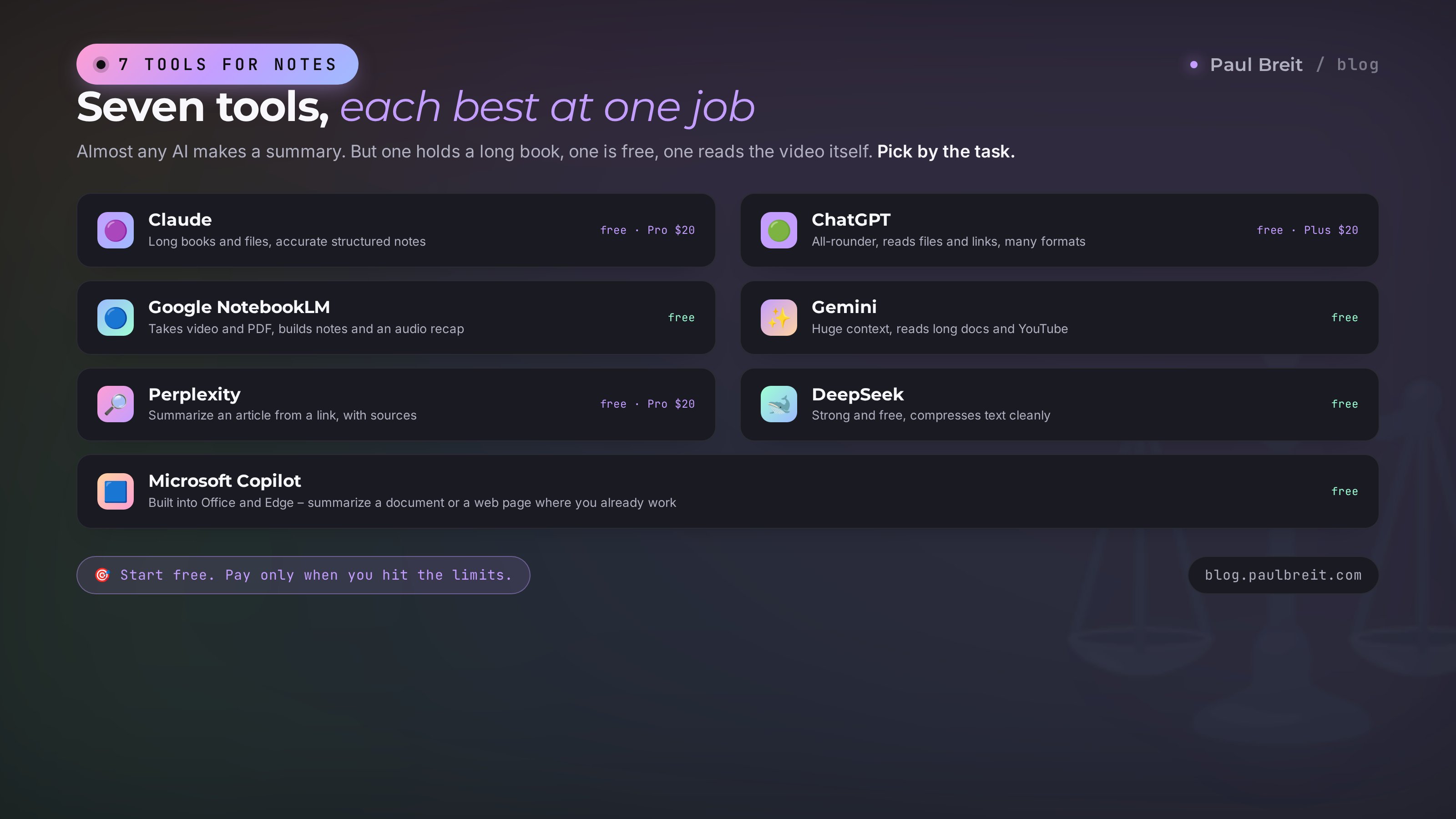
Almost any AI will make a summary. But each has its strengths: one holds a long text better, one is free, one reads the video itself. I gathered seven working options into a table, with a short breakdown under it.
| Tool | Best for notes | Reads files/links | Price |
|---|---|---|---|
| Claude | Long texts and books, clean structured notes | Files, PDFs | Free tier, Pro $20/mo |
| ChatGPT | All-rounder, many formats | Files and links | Free tier, Plus $20/mo |
| Google NotebookLM | Takes video, PDF, and sites; builds a summary and audio recap | Video, PDF, links | Free |
| Gemini | Huge context, strong free option | Long docs, YouTube | Free, Advanced ~$20/mo |
| DeepSeek | Strong and free, compresses text well | Text, files | Free |
| Perplexity | Summarize an article from a link, with sources | Web links | Free, Pro $20/mo |
| Microsoft Copilot | Summaries where you already work | Office docs, web pages | Free |
What to pick for the task
- Studying and want the most for free – start with DeepSeek or Gemini. Both are plenty for lectures and articles.
- A summary of a video or a big PDF with no transcription hassle – Google NotebookLM. Load the source, get the summary.
- A thick book or dense material where accuracy matters – Claude. It holds a long text more cleanly than the rest and invents less.
- A quick summary of an article from a link – Perplexity or Gemini. Drop in the link, get the distillation.
- One tool for everything – ChatGPT or Claude on a paid plan will cover any case.
Don't chain yourself to one tool. I keep three or four in rotation and grab whichever fits the material. If you want the full picture of who does what this year, there's a fresh roundup of the best AI tools of 2026 and a breakdown of free AI tools that genuinely work with no subscription.
Section 08Getting started: accounts, access, and cost
The setup is quick, and here's the honest version so you don't overthink it.
- From the US, just sign up. Open claude.ai or the site of the tool you want, create an account with your regular email, confirm it, and you're in. No workaround needed.
- Outside the US or EU, a couple of tools need a step. Claude, ChatGPT, and NotebookLM restrict some regions; a VPN with a US or EU location sorts that out. Everything else in the list is available directly.
- Start on the free tier. Your first summary works fine for free. You only need a paid plan once you keep hitting the volume limits.
For note-taking the free tiers go a long way. DeepSeek, Gemini, and Google NotebookLM are free outright; Claude and ChatGPT have free tiers that cover study and work. The $20/month plans matter when you push large volumes, want higher limits, or want Projects that remember your context. New to all of this? Start with the beginner's route in learning AI without courses.
Section 095 mistakes and how to avoid them
Here are the rakes people step on most often. Check yourself.
Mistake 1. Asking for "a summary" with no structure
The most common one. With no instructions, the model gives a wall of retelling that itself begs to be summarized. The fix is the structure from section 2. Always say what shape you want the result in.
Mistake 2. Taking numbers on faith
AI can garble a number or a date, especially from a rough transcript. Always check important numbers, sums, names, and dates against the original. The line "keep numbers verbatim" in the prompt lowers the risk but doesn't replace a check on what matters.
Mistake 3. Dumping a 90-minute video in whole, unprocessed
The model doesn't listen to audio and will choke on the size. Transcribe to text first, split into parts if needed. The order from sections 3 and 4 saves you.
Mistake 4. Uploading sensitive recordings into free tools
Client data, commercial figures, anything personal – not for a free version that may learn from your text. For that, use paid tiers with training turned off, or a tool that keeps data in your own workspace.
Mistake 5. Filing summaries into the void
You made a distillation, pasted it into a chat, closed it, and a month later can't find it. Set up one place: notes, a document, a dedicated space in the AI. A summary is valuable because you return to it. With no place to store it, you're just spending the time over again.
Good note-taking with AI is a simple habit in three steps: get the source text, give a clear structured prompt, save the result in one place. Nail it on a couple of lectures and you stop losing what you spent hours watching. An hour of recording turns into a page you actually remember.
Section 10Checklist: a summary in 5 minutes
Save this and walk the steps next time you want to summarize something.
- Identified the material type: text, video, audio, book, or call.
- Got the text: copied the article, pulled the captions, or transcribed the recording.
- Picked a tool: free DeepSeek or Gemini, Claude or NotebookLM for complex and large material.
- Took the right prompt: the universal one from section 2 or a special one for a lecture, book, or call.
- Added the "invent nothing" line and set the format, if you need Cornell, a map, or flashcards.
- Checked what matters: numbers, dates, and names against the original.
- Saved the summary in one permanent place you'll come back to.
- Optional – self-check: asked the AI for 5 questions on the material.
Eight points, five minutes. From there it becomes a habit, and you stop picturing how you ever rewatched recordings twice. The material you spent time on finally stays with you instead of leaking out in a week.
FAQFrequently asked questions
Which AI is best for note-taking?
For accuracy and long material, Claude holds a big text more cleanly and invents less. For a completely free option, DeepSeek and Gemini both work well. For video and PDFs with no transcription hassle, Google NotebookLM. As an all-rounder, ChatGPT. Start free; you only need a paid plan once you hit the limits.
How do I summarize a YouTube video?
Open the auto-captions under the clip, pull them out as plain text with a free transcript tool, then paste that into an AI with a note-taking prompt. Even shorter: Google NotebookLM lets you drop in the video link and builds the summary itself.
Can I do this for free?
Yes. DeepSeek, Gemini, and Google NotebookLM all take notes for free, and Claude and ChatGPT have free tiers that cover study and work tasks. A paid subscription only matters for very large volumes and higher limits.
Can AI summarize audio and voice memos?
Not directly - it needs text. First convert the recording to text with speech recognition (Whisper-based tools, TurboScribe, or the built-in transcription in Zoom, Google Meet, and Otter.ai), then hand the transcript to the AI with a note-taking prompt.
How do I stop AI from making things up in a summary?
Add one line to the prompt: "use only the text, add nothing of your own, and put a dash where something is missing." It sharply cuts invention. Still double-check important numbers, dates, and names against the original - that rule holds for any material.
How do I summarize a big book that won't fit at once?
Upload the file into a tool that reads documents (Claude, ChatGPT, NotebookLM). If the book is too big even as a file, split it into 30-40 page chunks, summarize each one, then ask the AI to merge your chunks into one summary with no repeats.
Is it safe to upload work recordings into an AI?
With care. Free tiers may use your text for training, so sensitive data - client names, commercial figures, anything under NDA - is best kept out. For that, use paid tiers with training turned off, or a tool that keeps data in your own workspace.