How to Learn AI Without Courses: A 30-Day Plan
A step-by-step, one-month plan you run on your own: 30–40 minutes a day, on the real tasks of your actual work. No courses to buy, no programming, and none of that "I missed something again" feeling. By day 30, AI writes in your voice, digs through your documents, and closes your first mini-project.
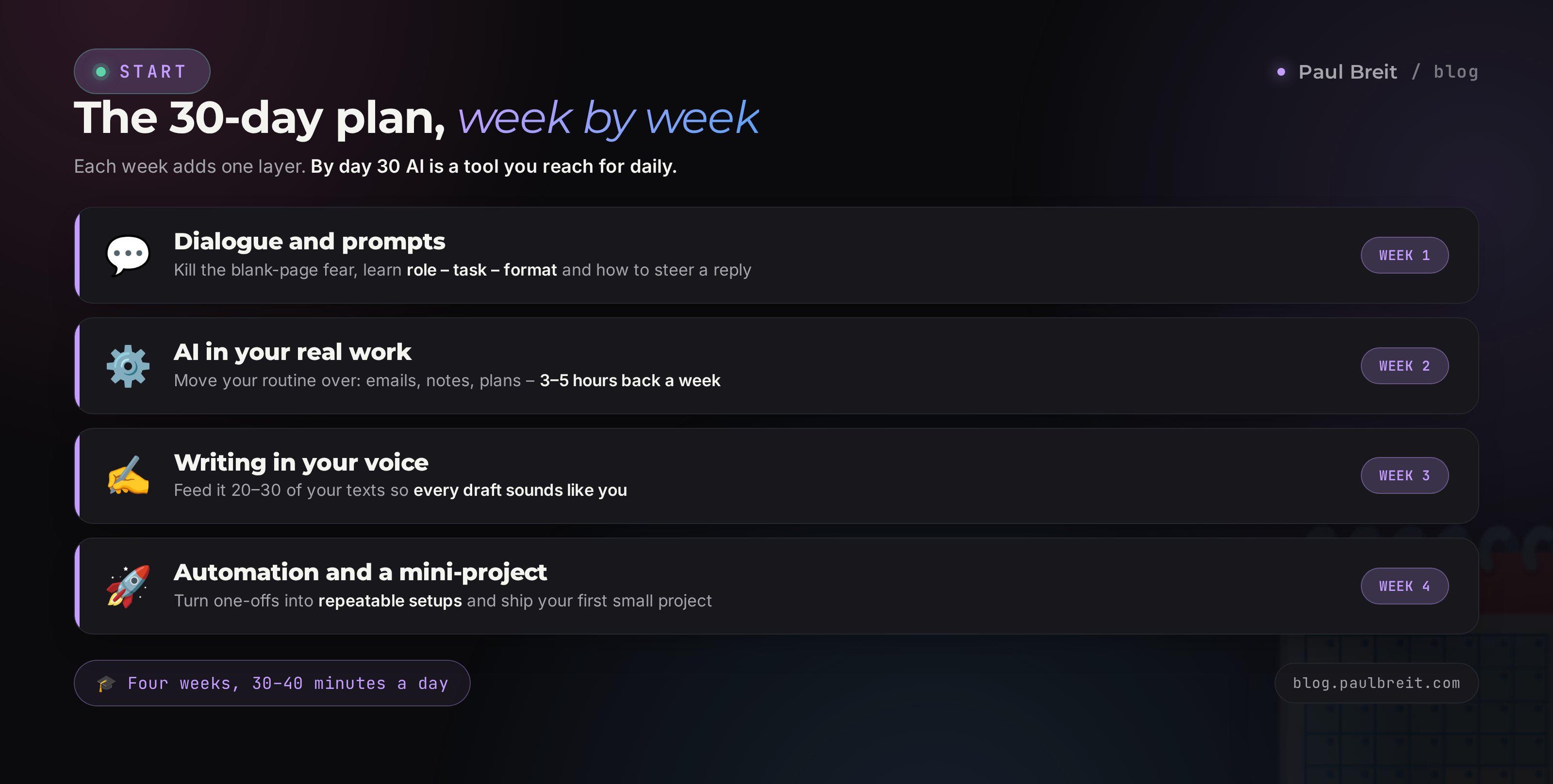
To learn AI from scratch, you don't need a course. Pick one AI (Claude, ChatGPT, or Gemini), build a 30–40-minute daily habit, and practice on the real tasks of your work. In week one you get comfortable with dialogue and prompts; in week two you move your routine into AI; in week three you teach it to write in your voice; in week four you ship your first mini-project. Thirty days in, AI becomes a tool you reach for every day.
You know the loop: you download an app, ask a couple of questions, get something vague and watery, and close it. A week later you buy a $200 course, watch three lessons, and it's all "prompt engineering" and "tokens" – with no clue how any of it applies to your own emails and posts. Another week and you've dropped it. A month later you hear again that "everyone's already making money with AI," and round you go.
The problem isn't you, and it isn't the AI. The problem is you were learning with no task and no plan. I built this plan the same way I get my clients on track – coaches, therapists, tutors, experts who started from zero. Thirty days, a short piece of practice every day, on your own work. By the end of the month AI becomes a daily tool.
You'll read this in 22 minutes. You'll start tonight. Thirty days from now you'll stop googling "how to learn AI" and just start using it.
What's inside
- Why 30 days and no course is realistic
- What "learning AI" actually means: 4 skills
- Tools and getting access
- Week 1. Dialogue and prompts (days 1–7)
- Week 2. AI inside your real work (days 8–14)
- Week 3. Writing in your voice (days 15–21)
- Week 4. Automation and a mini-project (days 22–30)
- How to learn without quitting
- Mistakes that stretch learning into a year
- Checklist: you've learned AI
Good news if you're in the US: Claude, ChatGPT, Gemini, and DeepSeek all open directly, no VPN and no workarounds. Just go to the site and sign up with your email. My pick for writing and working with documents is Claude – you can start on its free tier at claude.ai. If you're outside the US or EU, some tools gate certain regions; a VPN with a US or EU location fixes that. Either way, one account is all you need to run this whole plan.
Section 01Why 30 days and no course is realistic
A couple of years ago, "learn AI without courses" was a real stretch. To get anything decent out of a model you had to understand the fine print of prompting, know how the thing worked under the hood, and pick your wording almost by guesswork. The barrier to entry was high, and courses existed to lower it.
That's changed. Models got smarter and learned to understand plain human language. You write to AI the way you'd brief a sharp assistant, and it gets it. Magic incantations are no longer required. Which means the thing you actually need to learn is simple – how to state a task clearly, in words. That's a skill you build through practice in a few weeks.
Why a course slows you down at the start
A course gives you structure and the feeling that you're getting somewhere. In exchange it takes three things you can't learn without.
- Time on theory you'll never use. Half the lessons in any course are about how the model was trained, how GPT differs from a transformer, and what embeddings are. To write a client email, you don't need any of that – the same way a driver doesn't need the engine's internals.
- Someone else's examples instead of your tasks. A course walks through an abstract case, "let's make a post for a coffee shop." You nod along, but it never quite transfers to your work. The skill shows up when you solve your own task with your own hands. Watching someone else's solution doesn't get you there.
- The illusion of progress. You watched a lesson – checkbox, feels like movement. But your hands never touched the AI. A month later the course is "done," and you still haven't started using it.
Thirty days of daily practice on your own tasks will take you further than a three-month course. Because every single day you do the work with your hands. This doesn't mean learning materials are bad. A good article, a short video, a breakdown of one specific trick – that's fuel. What hurts is swapping practice for watching.
If you're building a complex AI agent that scrapes channels and answers clients on its own, or going into prompt engineering as a profession, then structured learning with a mentor saves you months. But if the goal is to make AI your everyday working tool, this plan covers the job in full.
One more strike against a course at the start – it forces someone else's pace and someone else's order. You're obliged to go from lesson 1 to lesson 20, even if half of it isn't relevant to you right now. Self-directed practice works the other way: you grab whatever task is on fire today and solve it. You set the order yourself, around your own work. A month later you'll notice you covered exactly what you needed and wasted zero minutes on the rest.
What you need on hand
Nothing special. A phone or a laptop, internet, and half an hour of quiet. You don't need a powerful computer – all the work happens on the AI's servers, and your device just opens the site or app. No graphics card, no installing software, no configuring an environment. If you can open a browser and type a message in a chat app, you have more than enough tech for this.
How much time to budget
30–40 minutes a day. That's less than you spend scrolling before bed. Consistency is what wins. Half an hour every day beats a three-hour marathon once a week, because the skill locks in through repetition. Miss a day? No big deal – you just pick up at the next item. The only thing to avoid is a week-long gap; coming back after that is hard.
Section 02What "learning AI" actually means: 4 skills
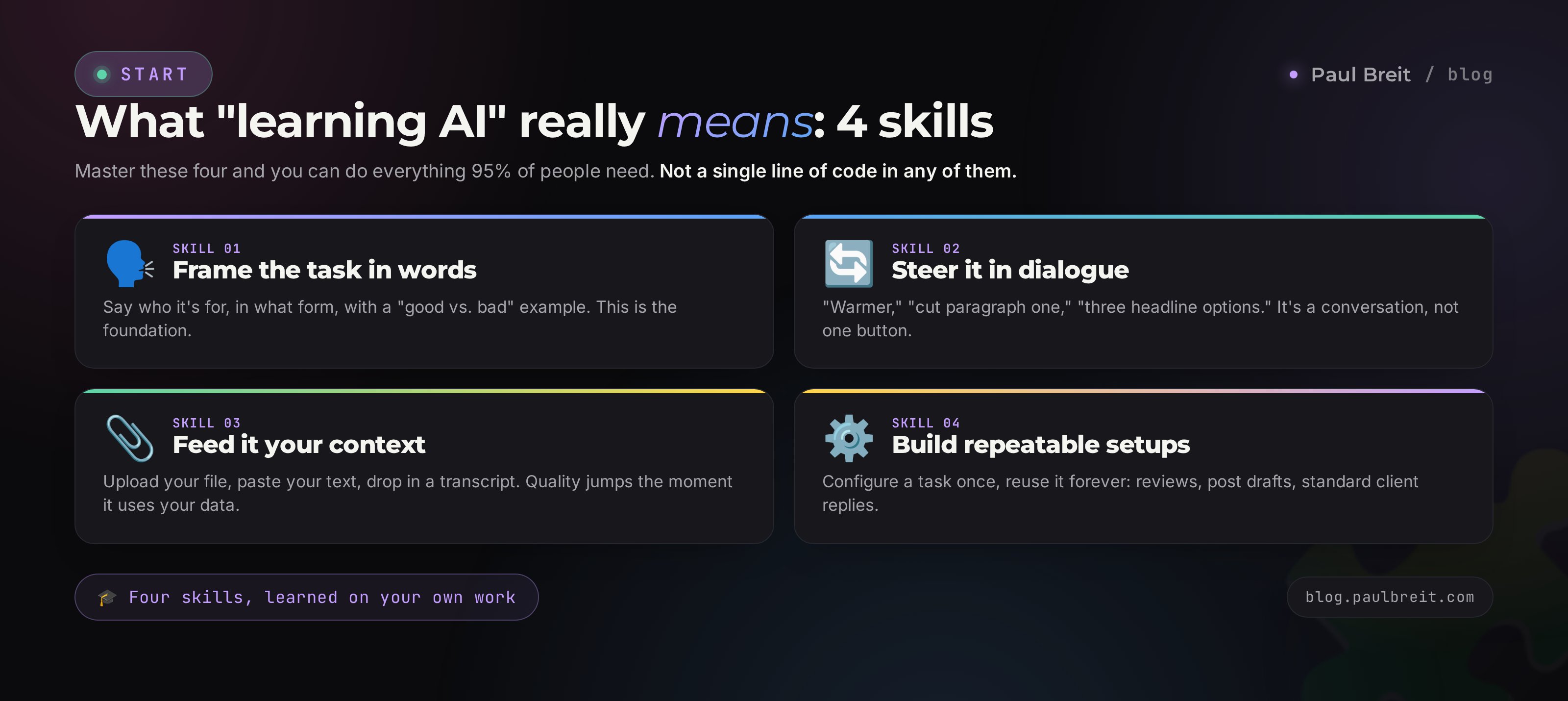
"Learn AI" sounds vague, and the vagueness is what makes people give up. Let's break the goal into 4 concrete skills. Master these four and you can do everything 95% of people need. These are exactly what we train, week by week.
Frame the task in words
The ability to explain what you need so the AI gets it on the first or second try. Who you are, who the result is for, in what form, at what length, with a "this is good, this is bad" example. This is the foundation. Without it, even the most powerful model hands you generic mush.
Steer it in dialogue
The first answer is almost never the final one. The skill is getting it where you want in 2–3 replies: "too formal, warm it up," "drop the first paragraph," "give me three headline options." Working with AI is a conversation. There's no single button here.
Feed it context and materials
Upload your file, paste an example of your writing, drop in a call transcript and ask it to break things down. The moment AI works with your own data, quality jumps several times over. This is what separates a beginner from a confident user.
Build repeatable setups
Configure AI once for a recurring task and come back to it every time: review analysis, post drafts, answers to standard client questions. This is the level where AI starts saving you hours every week.
Notice that not one of these skills has a line of code, the word "token," or any knowledge of how the model works inside. It's all about stating tasks clearly and working with your own materials. That's exactly what the plan below teaches.
Section 03Tools and getting access
Don't spread yourself across ten AIs at once. Pick one main tool and live in it for the first month. Jumping between tools at the start only confuses you: each has its own buttons, and instead of a skill you accumulate shallow familiarity.
Which AI to make your main one
My pick for text and documents is Claude. It writes cleaner, holds your style better, and handles big files without breaking a sweat. If you want the most familiar interface plus image generation, take ChatGPT. Either one runs this plan fine – the point is to commit to one for the month. If you want a side-by-side on which tool fits which task, see how to choose an AI and the best free AI tools for 2026.
Free or paid
Start on the free version. The first few weeks you're training how to state tasks, and free-tier limits are more than enough for that. A paid plan (Claude Pro or ChatGPT Plus, about $20/month) is worth adding once you hit the ceiling: long conversations cut off, big files won't fit, you want to load more material at once. By then you'll know exactly what you're paying for. Free tiers also unlock Projects – a saved knowledge base that keeps your context – which becomes worth it in week three.
Getting set up
If you chose Claude, the flow is quick. Head to claude.ai and sign up with your email. Confirm it, and you're working on the free tier – no card required. Same story with ChatGPT and Gemini: email, confirm, go. The whole thing takes two minutes, and you can run your first prompt before you finish your coffee.
Don't try to master five AIs, ten extensions, and three automation services at once. That's the surest way to drown in the first week. One AI, one habit, your own tasks. You add breadth in month two, once the base is solid.
Week 01Dialogue and prompts (days 1–7)
The goal this week is to stop fearing the empty input box and start pulling the result you want out of AI instead of generic filler. Each day is one short task. You do it right in the chat with the AI – nothing extra to install.
Just talk
Ask the AI 10 questions from your real life. "Explain in plain terms what a sales funnel is." "Turn this mental mess into a to-do list for tomorrow: ..." "Figure out what I can cook from chicken, rice, and whatever's in the fridge." The day's job is to shake off the fear and see that it's just a conversation.
Role, task, format
Learn the simple formula for a good prompt: who, what, in what form. Compare two requests and feel the difference.
Take three of your own tasks and rewrite each one on the "role – task – format" formula. This is the main skill of the whole week.
Steering in dialogue
Take yesterday's result and push it to where you want with quick replies: "make it a third shorter," "the first paragraph is boring, redo it," "give me three more headline options," "cut the fancy words." The day's goal is to internalize that the first answer is always a draft.
Examples beat explanations
The most powerful move of the week. Instead of describing what you want in words, show an example. "Here's a piece I like the style of: [paste it]. Write about [your topic] in the same style." AI picks up tone from one sample better than from a paragraph of explanation.
Working with your own file
Upload any document of yours – a proposal, an article, a contract, a spreadsheet. Ask: "sum up the key points in five bullets," "find the weak spots," "simplify this for a client." You'll see the quality change once AI is working with your data.
Three options and a choice
Train yourself to ask for several options at once. "Give me 5 headline options, each with a different angle." "Suggest 3 structures for this email." Choosing from options is faster and the result is stronger than grinding on a single one.
Build your first template
Take a task you do often and build a ready prompt template with blanks. For a review reply, say: "You're a polite brand rep. Reply to this customer review: [REVIEW]. Warm tone, thank them, solve the problem, no canned phrases." Save it to your notes. That's your first working asset.
Notice how the week is built. Each day adds exactly one brick: first we drop the fear, then the request formula, then steering, then the power of an example, then files, then options, and at the end you fold it all into your first template. Not a single day of pure theory – every one ends with something finished. If a day felt hard, repeat it tomorrow; there's no rush.
In one week you've gone from "what do I even type in this box" to stating a task, steering it, and working with your own files. That's the foundation. If you want to go deeper on the prompt formula, with before-and-after breakdowns, read how to write prompts.
Week 02AI inside your real work (days 8–14)
Week one was a practice run. From week two we move AI into your actual work so it starts saving time from day one. Tune the tasks to your profession – below are examples across different niches.
Map your routine
Write down 10 tasks you do by hand every week that eat your time. Repetitive answers, email drafts, plans, transcripts, reports. This is the map of what AI will take off your plate. Mark the three most tedious – we start there.
Messages and emails
Hand AI all the messaging you write on a template. A reply to a pricing question, a payment reminder, a follow-up after a call. Build a prompt starter for each one. A therapist answers "how much is a session," a tutor answers "do you have openings," an expert answers "what's included in the work."
Digging through documents and calls
Take a transcript of a call or meeting and ask: "pull the agreements, action items, and deadlines into a list." An hour-long conversation folds into a clear summary in a minute. For how to get a transcript from audio or video, see analyzing calls with AI.
Plans and structures
AI is great at building structures. A coach asks for a client program tailored to a request, a nutritionist for a draft meal plan within constraints, a tutor for a month of lessons aimed at one student's goal. You refine the ready draft to fit in a couple of minutes.
Ideas and brainstorming
Stuck? AI gets you unstuck. "Give me 20 post ideas in my niche." "Suggest 10 lead-magnet formats for my audience." "Come up with 15 topics for live sessions." Out of twenty ideas, three or four usually work – and that's cheaper than any brainstorm with a team.
Critique and feedback
Give AI your landing page, post, or offer and ask for an honest review: "find the weak spots," "what lowers trust," "where would a client get confused." It's like showing your work to an editor, only instant and free. A rundown of typical rookie slip-ups lives in 10 AI mistakes to avoid.
Count the time you saved
Week's wrap-up: run through your tasks and estimate how many hours AI has already taken. For most people it's 3–5 hours a week by the second week. That's your personal reason not to quit. For more task-by-task scenarios, see what you can do with AI.
Week 03Writing in your voice (days 15–21)
The main complaint about AI is "the writing is faceless, you can spot the machine instantly." That's fair right up until the moment you teach AI your voice. This week closes the question and kills the fear of getting caught.
Gather your own writing
Find 20–30 of your posts, emails, or transcripts where you sound like you. Copy them into one file. This is the material AI reads your style from. The livelier the texts, the truer the voice comes out.
Extract your style
Hand AI the file with this task: "Analyze these texts. Describe my style: sentence length, favorite words and phrases, tone, how I open and close, what I avoid. Turn it into an instruction someone could write from to sound like me." What comes back is your written portrait.
First post in your voice
Give AI that instruction and ask it to write a post on a fresh topic. Compare it to what you got in week one. The difference will be obvious. Then keep tuning the instruction: "too long," "I don't joke like that," "add my short-sentence pauses."
Scrub the AI tells
Learn to clean out the machine phrasing and corporate filler: stock opening lines, long dashes, lifeless lists. Ask the AI: "cut the corporate-speak and AI tells, make it alive." A breakdown of the markers and how to clean them lives in how to remove AI writing tells.
A month of content in an evening
Build 30 days of posts in one sitting. "Based on my topic and style, give me 30 post ideas with hooks, spread them across the days, and alternate value, stories, and sales." For the step-by-step, see a content plan for a month in one evening.
Other formats in your voice
The same style works beyond posts. A reel script, a newsletter email, a client reply, a service description. Run two or three formats through your style instruction and confirm the voice holds everywhere.
Save your voice into a project
If you work in Claude or ChatGPT, drop your style instruction into a permanent Project or into settings so you don't paste it every time. Now every new text comes out in your voice by default. For the full method, see how to teach AI to write in your voice.
By the end of week three you have something most people – even paying users – don't: an AI that writes like you. That's a level of its own.
Week 04Automation and a mini-project (days 22–30)
The final week. You already know how to state tasks, work with files, and hold your voice. What's left is turning one-off actions into repeatable setups and building a first small project that delivers value without you.
Repeatable setups
Take your three most frequent tasks and build ready starters you return to every time. A weekly review roundup, three post drafts every Monday, answers to standard client questions. Set it up once, then just feed in fresh data.
Connect AI to your tools
Get familiar with simple no-code automation: AI plus spreadsheets, plus a chat app, plus a scheduler. For example, form submissions drop into a sheet, and once a day AI pulls them into a summary. A set of ready-made recipes lives in automating your routine: 10 setups.
Build your first mini-project
Pick one small but whole thing and take it to the finish with AI. Options: a PDF lead magnet for your audience, a simple bot that answers common questions, a series of five warm-up emails, a mini landing page for a service. Whole, finished, ready to show people.
Publish and gather feedback
Ship what you built. A post, a lead magnet, a bot – doesn't matter. What matters is carrying the work out into the open and getting a reaction from real people. That moves the skill from "works in the sandbox" to "works in the wild."
Plan month two
Look back at the path and pick one direction to go deeper: content at scale, sales copy, AI agents, automation. Month one gave you breadth; month two gives you depth in whatever's closest to your work.
Section 08How to learn without quitting
The plan is simple, but people don't quit over difficulty. They quit because they lose the rhythm. A few moves that keep you in the groove all 30 days.
Attach the session to something you already do
A new habit sticks better when you bolt it onto an old one. Morning coffee means ten minutes with AI over that coffee. Lunch break means one task from the plan after you eat. Your brain doesn't argue with "after coffee"; it argues with a vague "I should study."
Keep a real task on hand
Learning AI on made-up examples is boring, and boredom makes people quit. Keep a real task nearby: a post you have to write anyway, an email you need to send, a report that's hanging over you. Then the session turns into work you're simply doing faster. Motivation holds because you see a result today.
Count the small wins
Once a week, note what AI took off your plate: two hours on posts, an hour on emails, an evening on the content plan. A visible tally of saved time holds better than any willpower. You keep going because it's already paying off.
Missing one day is fine – life happens. Missing two in a row is dangerous; that's where the habit falls apart. Hold the line: never two skips back to back. One rest day breaks nothing; two break your rhythm.
Section 09Mistakes that stretch learning into a year
The same rakes catch almost everyone who tries to learn AI on their own. Know them in advance and you'll get through the month clean.
Learning "in general," with no task
Reading about AI, watching clips, collecting prompt roundups, and never once applying it to your own work. Knowledge piles up, the skill doesn't. The fix is one rule: every day, solve a real task of yours with AI.
Giving up after the first weak answer
You asked a two-word question, got generic mush, and concluded "AI is useless." A weak answer almost always means a weak request. Give it a role, context, and an example, and the answer changes. Week one of the plan is exactly about this.
Grabbing everything at once
Five AIs, ten extensions, three automation services in the first week. The result is a fog in your head and the sense that nothing makes sense. One AI, one habit. Tools get added once the base stands firm.
Trusting without checking
AI sometimes states falsehoods with total confidence – it mixes up facts, invents numbers and sources. Always double-check facts, dates, and legal or medical details. AI is a strong helper, but responsibility for the result is on you.
Uploading other people's secrets and personal data
Don't send AI what shouldn't be shown to outsiders: client IDs, trade secrets, other people's messages without consent. Anonymize data before uploading. It's a matter of security and of your clients' trust.
Section 10Checklist: you've learned AI
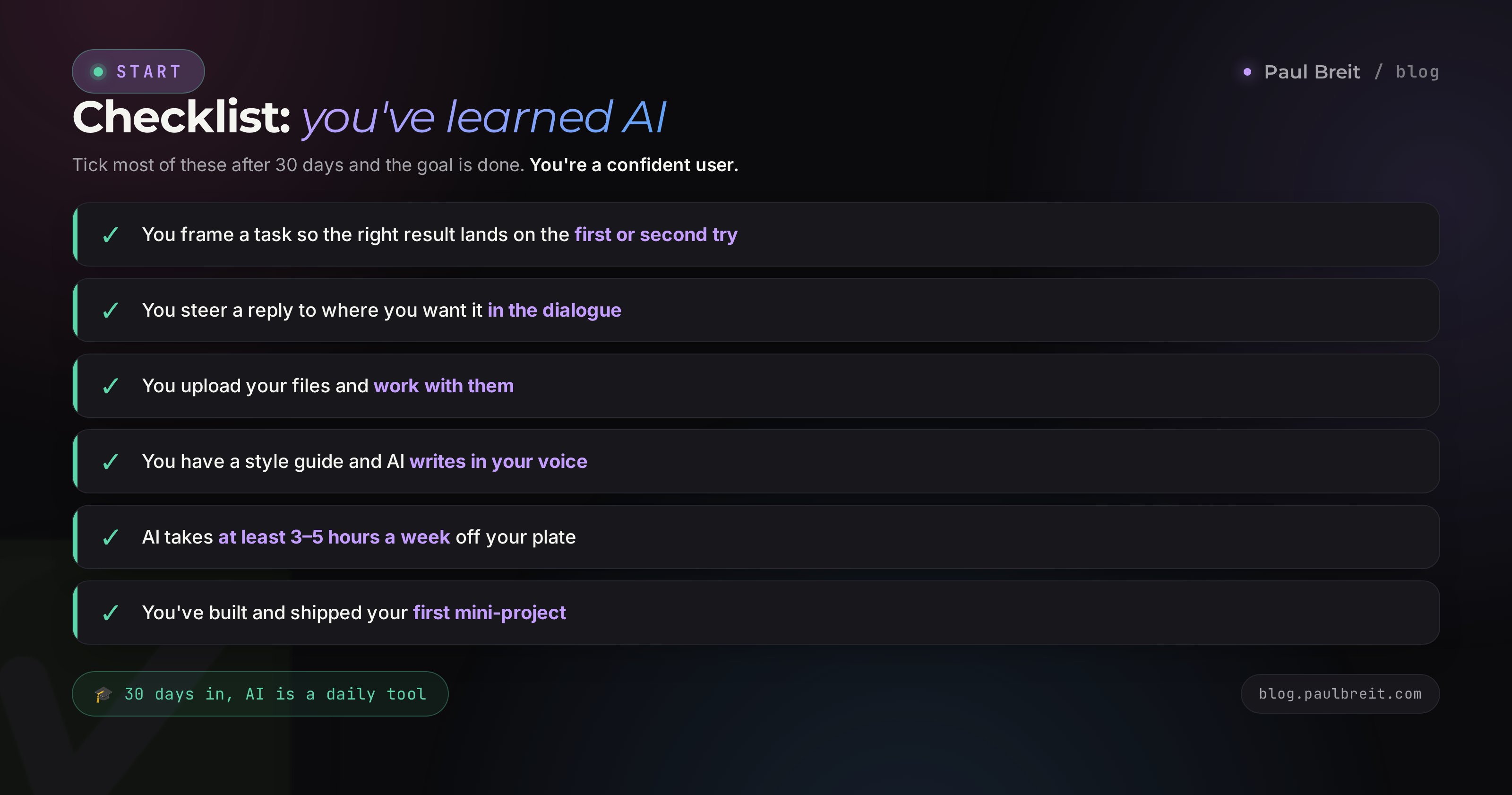
After 30 days, check yourself against the list. Tick most of these and the goal is met – you're a confident user.
- You state a task so the right result lands on the first or second try.
- You steer an answer in dialogue to exactly where you want it.
- You upload your own files and work with them.
- You have a style instruction, and AI writes in your voice.
- You've built a few prompt templates for your frequent tasks.
- AI takes at least 3–5 hours a week off your plate.
- You've built and published your first mini-project.
- You know where to go deeper in month two.
Pick one AI and build a 30–40-minute daily habit. Week 1 – learn to state tasks, steer in dialogue, and work with files. Week 2 – move your real routine into AI and count the time you saved. Week 3 – teach it to write in your voice from your own texts. Week 4 – build repeatable setups and a first mini-project, publish it, plan your depth. No course needed for this – just regular practice on your own tasks.
Thirty days, and "how to learn AI" stops being a question. AI turns into an ordinary working tool you reach for every day, like your phone or your notes. And then the interesting part begins – you keep finding new tasks of your own for it to close. From here, the road is open.
FAQFrequently asked questions
Can I really learn AI from total scratch if I'm not techie?
Yes, and non-techies actually have it easiest right now. Modern AI understands plain human language, so what you're learning is the ability to state a task clearly in words. That's a communication skill, not a coding one. Therapists, coaches, tutors, and nutritionists get through this plan without a single line of code.
How much time a day should I budget?
30–40 minutes. Consistency is what wins: half an hour every day gives you more than a three-hour marathon once a week. The skill locks in through repetition. It helps to attach the session to an existing habit – morning coffee or your lunch break.
Do I need to buy a course to learn AI?
To make AI your everyday working tool – no. Daily practice on your own tasks along this plan is enough. A course with a mentor only saves time on the hard stuff: building AI agents, prompt engineering as a profession. To get started, free articles and practice will do.
Which AI should I pick to start?
Just one, and don't hop around the first month. For writing and file analysis, Claude is the strongest; ChatGPT has the most familiar interface and generates images; Gemini has a generous free tier. All open directly in the US. Later, once your base is solid, try a second one.
Is the free version enough, or do I need to pay right away?
Free is enough to learn. The first weeks you're training how to state tasks, and free-tier limits handle that fine. A paid plan (about $20/month) comes later, when you hit the ceiling: long conversations cut off, big files won't fit. By then you'll understand exactly what you're paying for.
How do I keep the writing from sounding faceless and machine-made?
Teach AI your voice. You give it 20–30 of your own texts, it pulls out your phrasing, rhythm, and favorite words and folds them into a style instruction. From then on every new text is written like you. Plus you scrub the machine clichés and stock opening lines. Week three of the plan is all about this.
What if I skip a few days and drop off?
Just pick up at the next item – there's nothing to make up. The plan is flexible: skipping one day breaks nothing. The only real risk is a gap of a week or more, which is hard to come back from. Hold the "never two skips in a row" rule and you'll reach the end of the month.