Gemini Desktop App: How to Download on Windows and Mac
The Gemini desktop app is Google's free program for Windows and Mac, and it takes about five minutes to install. Below: who it runs on, step-by-step setup for both systems, the browser option for older computers, the first prompt and keyboard shortcuts, plan prices in $, and fixes for the errors people hit most often.
The Gemini desktop app is a free download from gemini.google/desktop for Windows 10 and 11 (x64 and ARM64) and from gemini.google/mac for Macs with Apple Silicon on macOS 15 Sequoia or later. You need 8 GB of RAM, 200 MB of disk space and a Google account. Open it with Alt + Space on Windows or Option + Space on Mac. Older computers can use gemini.google.com in a browser.
What's inside
- 3 ways to open Gemini on a computer
- Which computers it runs on
- Windows: install step by step
- Mac: install step by step
- No install: the website and a browser app
- "Gemini isn't available": country, work account, old Mac
- First prompt and keyboard shortcuts
- 4 tasks that work better on a computer
- Free or paid: Gemini plans in $
- Troubleshooting
- If Gemini won't open: alternatives
- Cheat sheet
- Sources
A phone is fine for a quick question on the go. A long contract, a forty-row spreadsheet or an email you need to think about is a different story: that work is easier at a desk, with a big screen, a keyboard and your files at hand. That's why people who use Gemini every day go looking for the Gemini desktop app.
This guide is only about the computer: getting Gemini installed, opened and set up. Everything Gemini can do, from images to Deep Research, is in my full walkthrough on how to use Gemini, Google's AI, step by step.
Section 013 ways to open Gemini on a computer
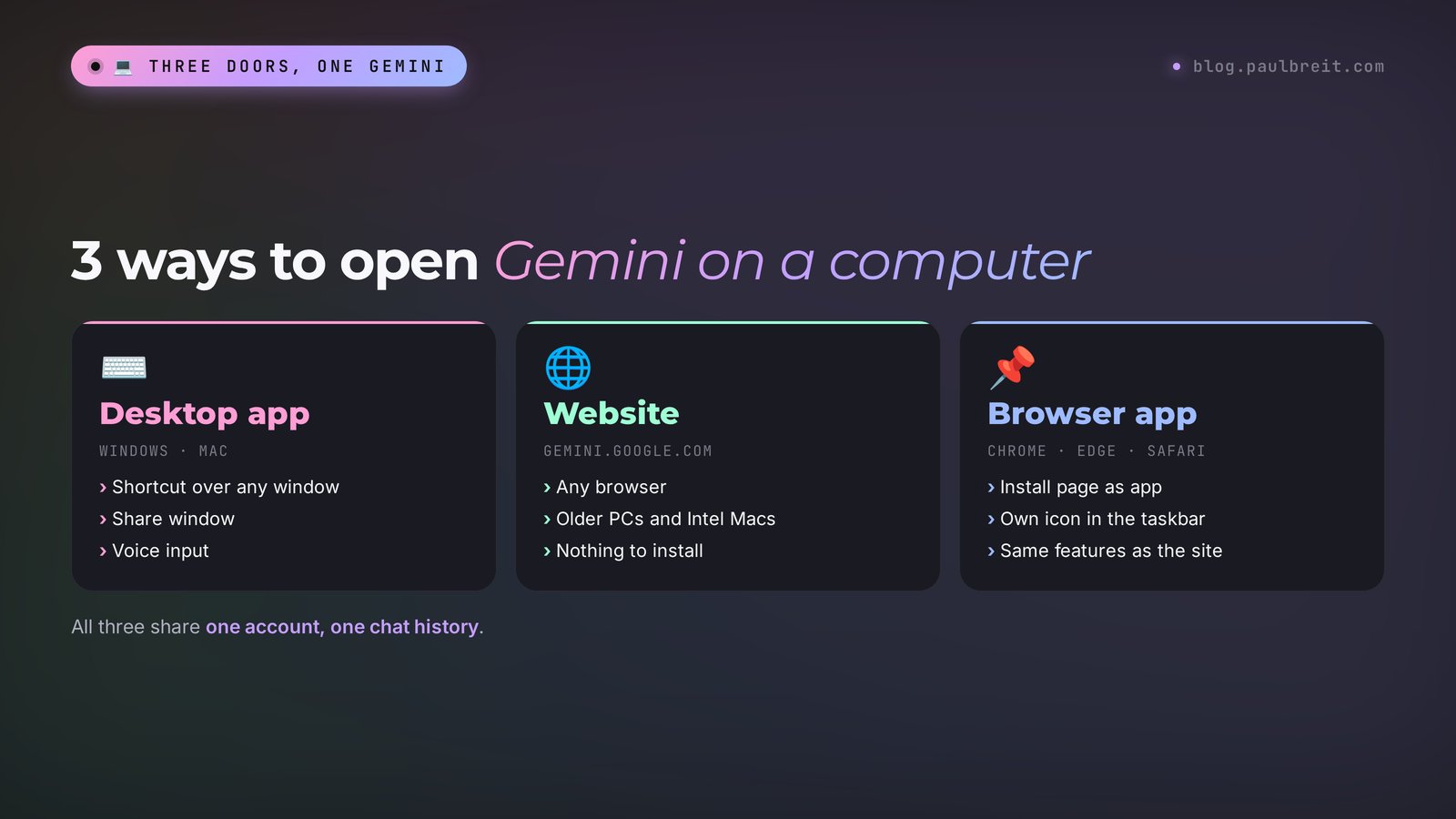
Gemini on a computer is the same AI behind three different doors. Chats, files and settings are shared across all three: start a conversation in the app, pick it up on the website or on your phone.
| Option | What it is | Who it's for |
|---|---|---|
| Gemini desktop app | Google's official app for Windows and Mac from gemini.google/desktop | People who use Gemini daily: one shortcut over any window, voice input, sharing a window |
| Website gemini.google.com | Gemini in any browser, nothing to install | Older computers, Windows 7 and 8, Intel Macs, work laptops where you can't install software |
| Browser app | The Gemini website saved as its own window with an icon in the taskbar or Dock | Anyone whose system doesn't fit the app but who still wants a separate icon |
If your computer meets the requirements in the next section, install the app. It does more: it opens with a keyboard shortcut, it can see the window you're working in, and it takes voice input.
Section 02Which computers it runs on
I checked the requirements against Google's help pages for Windows and for Mac on November 26, 2026.
| Windows | Mac | |
|---|---|---|
| System | Windows 10 or 11, x64 and ARM64 processors | macOS 15 Sequoia or later |
| Processor | Any modern one | Apple Silicon only (M1 or newer), Intel Macs aren't supported |
| RAM | 8 GB or more | |
| Disk space | At least 200 MB | |
| Account | A personal Google account, or a work or school account where your admin has turned Gemini on | |
| Keyboard shortcut | Alt + Space | Option + Space |
| Price of the app | Free, subscription optional | |
How to check what you have. On Windows: Start → Settings → System → About shows your Windows edition and installed RAM. On a Mac: Apple menu → About This Mac. The "Chip" line should say Apple M1, M2, M3, M4 or newer, and the "macOS" line should say 15 or higher.
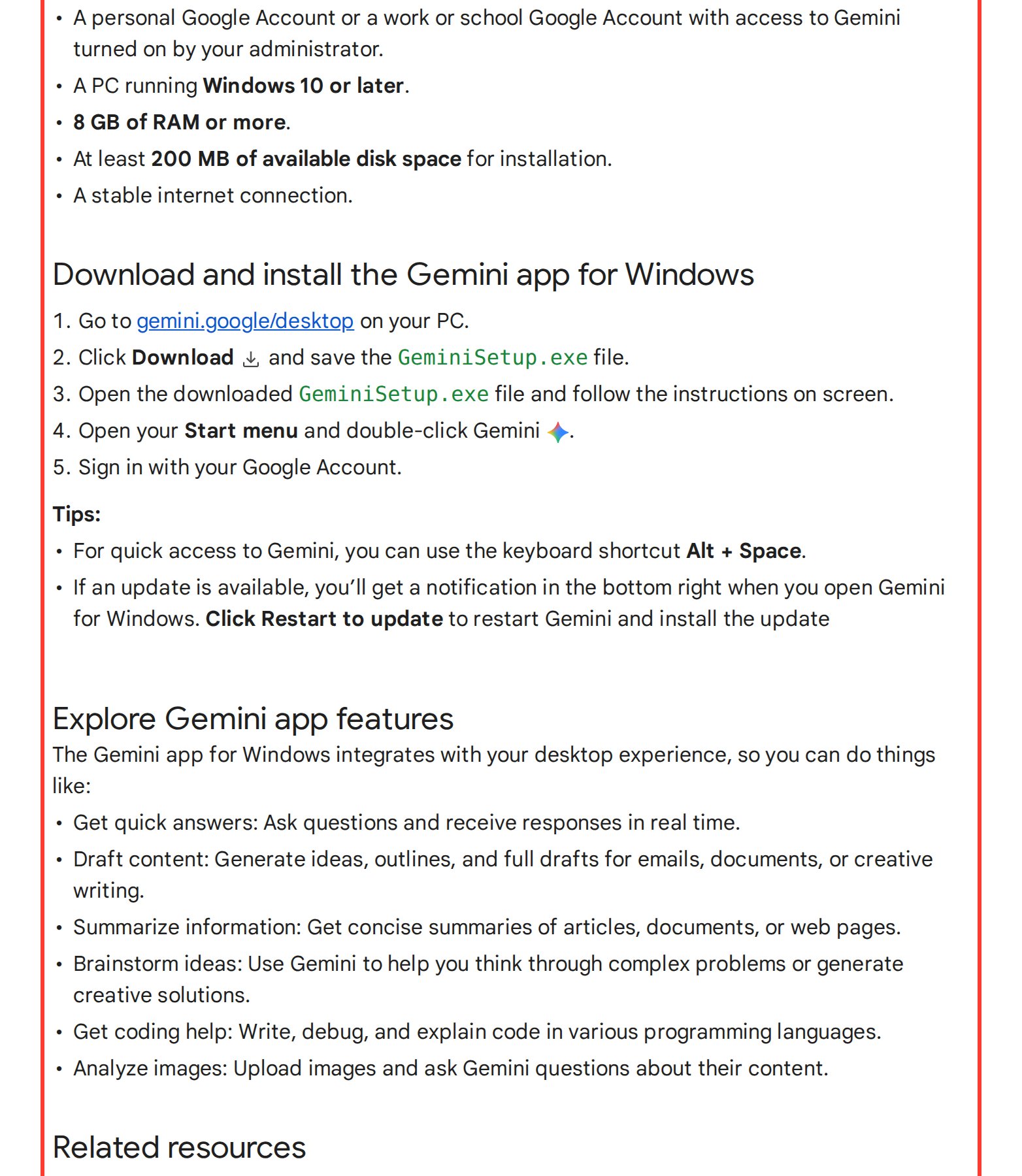
The screenshot shows Google's help page for the Windows app: Windows 10 or later, 8 GB of RAM, 200 MB of disk space and five install steps. The same page covers the Alt + Space shortcut and how updates arrive.
Section 03Windows: install step by step
Open the official download page
In your browser, go to gemini.google/desktop. That's Google's own page. Don't download "Gemini for PC" from other sites: a file posing as the AI often carries adware or malware.
Click Download for Windows
You'll get a file called GeminiSetup.exe. By default it goes to your Downloads folder.
Run the installer
Double-click GeminiSetup.exe and follow the prompts on screen. If Windows asks whether to let the app make changes to your device, click Yes: the publisher in that window should be Google.
Open Gemini and sign in
Open the Start menu, find Gemini (the four-pointed star icon) and launch it. Sign in with your Google account. No Gmail address yet? You can create one right in the sign-in window.
Test the shortcut
Press Alt + Space inside any program, Word or your browser for example. A Gemini prompt bar opens on top of the window. When an update is ready, a notification shows up in the bottom right corner: click "Restart to update".
Section 04Mac: install step by step
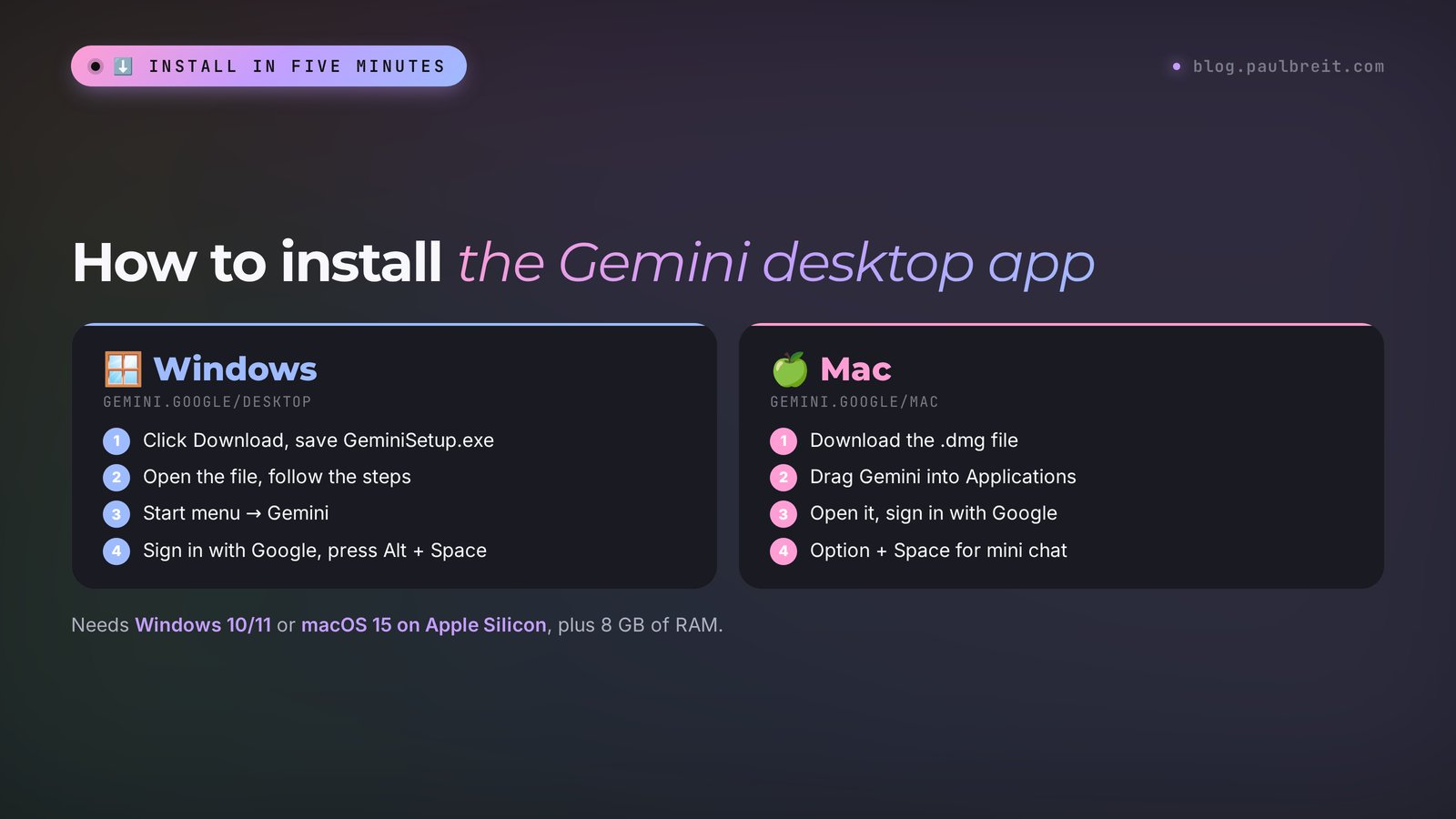
Go to gemini.google/mac
Click the download button for Mac. You'll get a file ending in .dmg.
Drag Gemini into Applications
Open the downloaded file. The window shows the Gemini icon and the Applications folder: drag the icon onto the folder. That's how most Mac apps install.
Launch it and sign in
Open Gemini from Applications or through Spotlight (Cmd + Space, type "Gemini"). Sign in with your Google account. On first launch macOS may ask for microphone and screen recording access: voice and window sharing need them, plain chat works without them.
Remember two shortcuts
Option + Space opens a small mini chat on top of everything. Option + Shift + Space opens the full window with your history. If your Mac isn't Apple Silicon or runs a macOS older than 15, the app won't install: use the website from Section 05.
Section 05No install: the website and a browser app
If the app doesn't fit your system, or your work laptop won't let you install anything, open gemini.google.com in Chrome, Edge, Safari or Firefox. The website asks almost nothing of your computer and runs even on Windows 7.
To make the site open in its own window with its own icon, like a regular app, save it as an app:
- Chrome: the three-dot menu ⋮ in the top right → Cast, save, and share → Install page as app.
- Edge: the three-dot menu → Apps → Install this site as an app.
- Safari on Mac: File → Add to Dock.
The icon appears in your taskbar or Dock. This version has no Alt + Space shortcut and no window sharing: it's the same website in a separate frame. Chats, file uploads, images and Deep Research work the same as in the app, though.
Section 06"Gemini isn't available": country, work account, old Mac
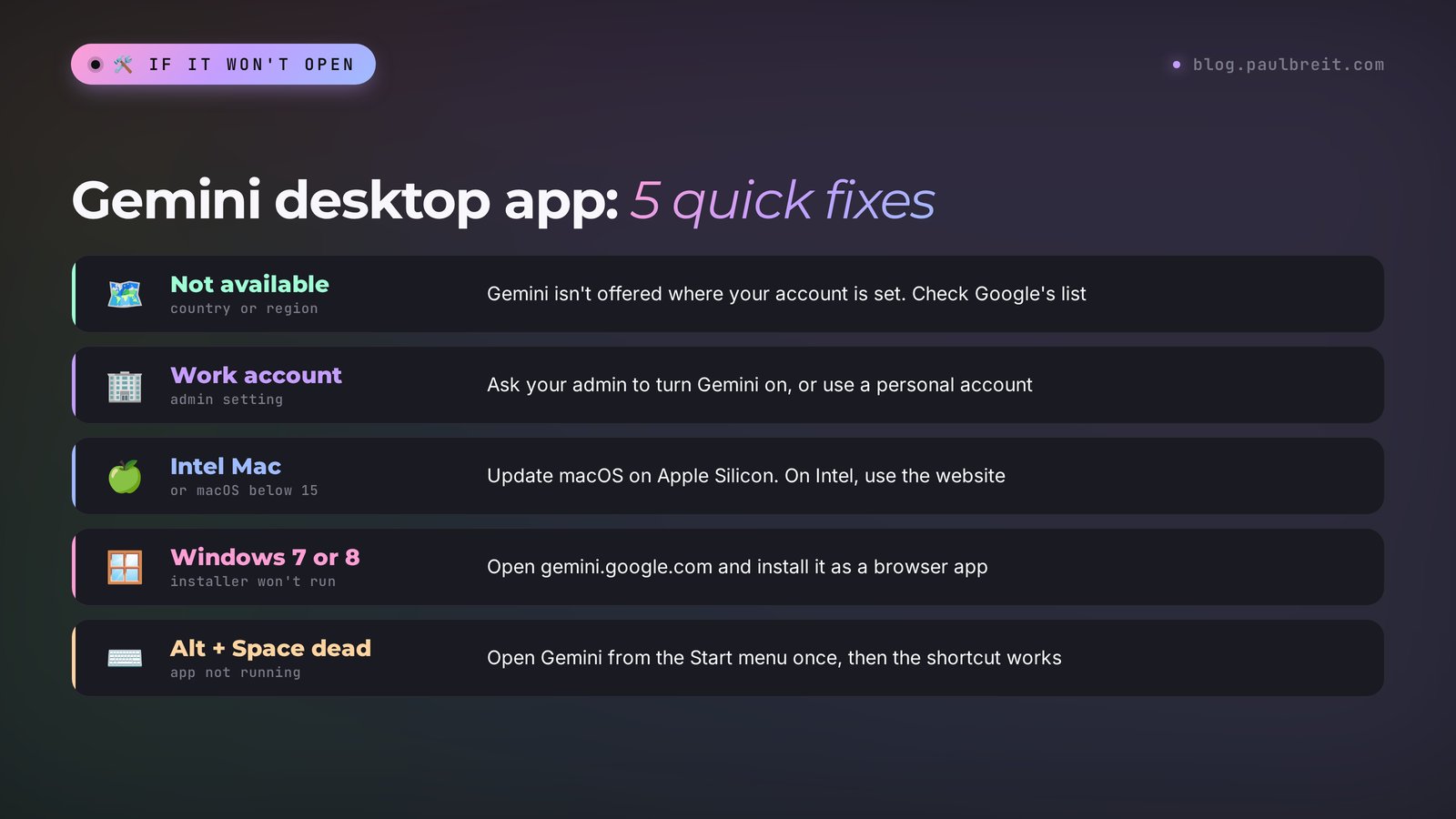
The download itself rarely fails. Problems usually start after you sign in, when Gemini checks your account and your device. Here are the four common causes as of November 26, 2026.
1. "Gemini isn't available in your country" or "region". Google says the desktop app works in all the countries and languages where the Gemini app is supported. Its help page keeps that list. If you've just moved, check your Google account's country and the one tied to your Google Play or payments profile, since Google looks at several signals, not only your connection.
2. A work or school account without Gemini. On a Google Workspace account, Gemini only opens if your admin has turned it on for your organization. Ask your IT team, or sign in with a personal Google account for personal use.
3. An Intel Mac or a macOS below 15. The Mac app needs Apple Silicon and macOS 15 Sequoia or later. On an M-series Mac, update macOS in System Settings → General → Software Update. On an Intel Mac, the website is your option.
4. Windows 7 or 8. The installer needs Windows 10 or 11. Use gemini.google.com and install it as a browser app from Section 05.
Some sites and marketplaces sell "ready-made Gemini accounts with a subscription". Someone else's account can be taken back by its original owner or suspended by Google at any moment, and your chats and files go with it. Refunds in that situation are rare.
Section 07First prompt and keyboard shortcuts
The app is open and you're signed in. Start with a prompt that tells Gemini about you, so the answers after it are sharper. Press Alt + Space (Option + Space on a Mac), paste this and replace the brackets with your own words:
I am [what you do, for example: a psychologist who runs sessions online]. You live on my computer and open with a keyboard shortcut. Suggest 5 tasks you can take off my plate every day. One line per task, no generic advice.
I ran the same prompt in Claude Opus 5.5 with "a psychologist who runs sessions online" filled in. The reply: 1) every morning, go through email and list which clients are waiting for an answer and what they asked; 2) draft a reply to a client who is hesitant about the price of a session; 3) turn session notes into a short summary for the client with homework before the next meeting; 4) turn a voice memo into a post for your channel; 5) look at the week's calendar and suggest where to fit a new session.
The prompt has nothing model-specific in it, so it behaves the same way in Gemini. Next come the three tricks that make the desktop app worth installing.
Open it over any window. You're writing an email, press Alt + Space, ask, close. No switching between tabs.
Share a window. In the prompt bar, click "Add files and tools" (the plus icon) → "Share window" and pick the window you're working in. Gemini sees the spreadsheet, document or web page and answers about what's on screen. Handy when explaining it in words would take too long.
Voice. The microphone icon in the prompt bar lets you dictate a prompt and send it. On a Mac there's also "Speak to Window": hold the fn key, say what you need, and Gemini puts the finished text straight into the app you have open. Google is rolling this mode out gradually, so you may not have it yet.
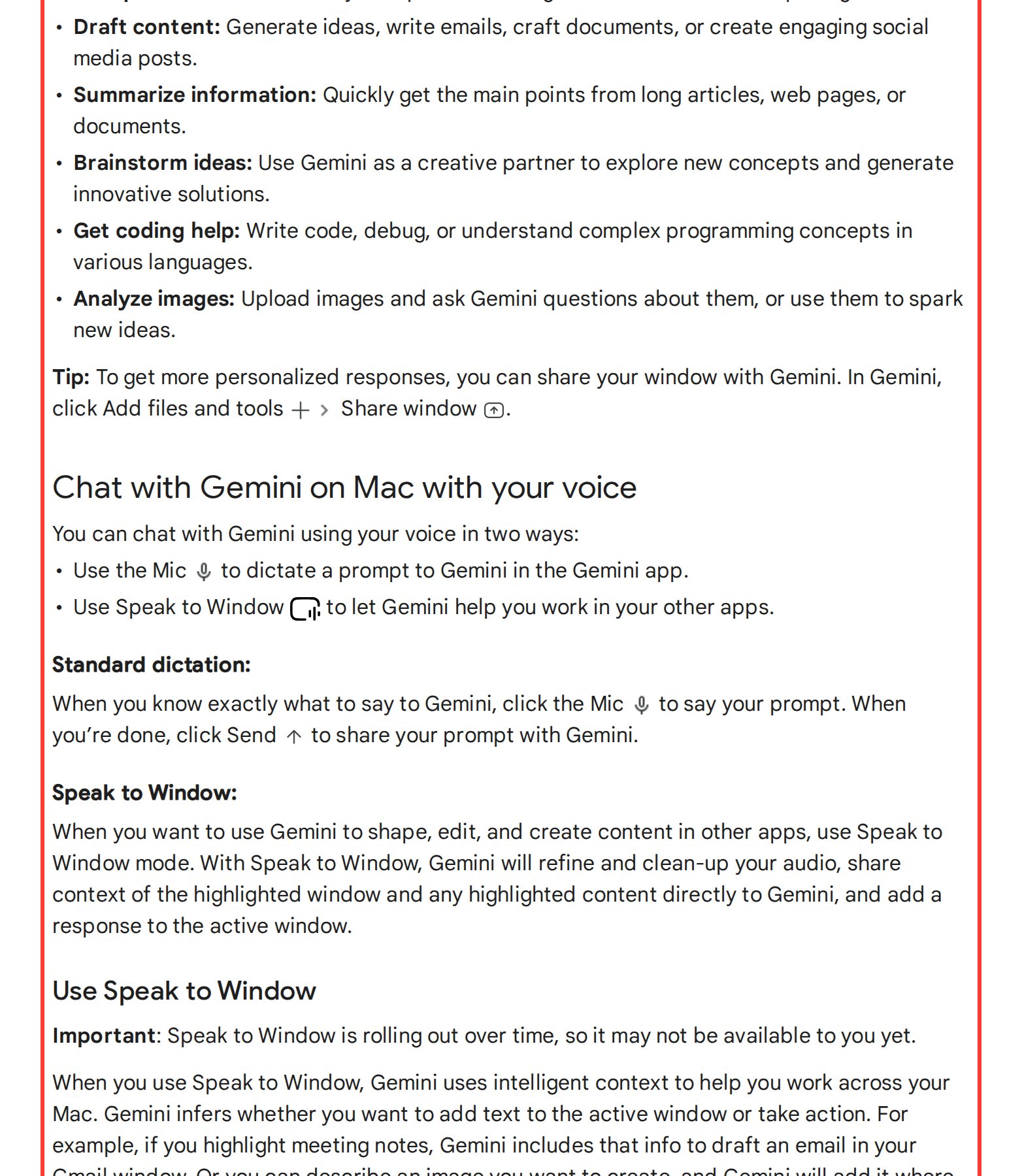
The screenshot shows Google's help page for Gemini on Mac: the "Share window" tip and the two ways to talk to Gemini, through the Mic and through "Speak to Window".
Want to see how people use AI tools like this in real client work? I recorded 7 short free video lessons with a practice order, about 25 minutes in total.
Section 084 tasks that work better on a computer
On a computer, Gemini shines on long, paper-heavy work. Here are four prompts I'd save first. Replace the square brackets with your own details.
1. A long document, short. Drag a contract, terms of service or policy PDF into the Gemini window and write:
Summarize this document in plain words in 7 points: what I'm required to do, the deadlines, the penalties and anything that could unpleasantly surprise me. At the end, list 3 questions I should ask the other side before signing.
2. Reply to a tricky email. Open the client's email, click "Share window" and write:
This is an email from a client. List what they're asking for and what's worrying them. Then draft a reply in 5 to 7 sentences: polite, to the point, without apologizing in every line. My tone: [friendly / formal].
3. A table from a screenshot. Take a screenshot of a price list, a schedule or a report (Win + Shift + S on Windows, Cmd + Shift + 4 on a Mac) and paste it into Gemini:
Move the data from this image into a table with the columns [name, price, deadline]. If a number is hard to read, mark that cell with a question mark. Don't guess the value.
4. Review your own page. Open your website or service page and share the window with Gemini:
Look at this page through the eyes of a client who is seeing it for the first time. What's unclear in the first 10 seconds? Where is a price, an example or a button missing? Give me 5 fixes in order of importance.
All four prompts work unchanged in ChatGPT and Claude, so the time you spend on them isn't tied to one tool. For more ready-made prompts, see my guide on how to write prompts.
Section 09Free or paid: Gemini plans in $
The app is the same on every plan; the limits and models differ. Prices come from the official Gemini subscriptions page (US version), checked November 26, 2026. Prices in other countries can differ and may include local tax.
| Plan | Price per month | What you get |
|---|---|---|
| Free | $0 | Automatic model choice, images, Deep Research, Gemini Live, Canvas, 15 GB of storage |
| Google AI Plus | $4.99 | 2x the free limits, the Gemini 4 Hydrogen model, 400 GB of storage |
| Google AI Pro | $19.99 | 4x the free limits, Gemini 4 Neon and Hydrogen, 5 TB of storage |
| Google AI Ultra | $99.99 or $199.99 | The most access to Gemini 4 Carbon, limits 5x or 20x higher than AI Pro |
For emails, short documents and first experiments, the free plan is enough. A subscription makes sense once you upload long files or hour-long recordings every day and keep running into limits.
Section 10Troubleshooting: if something goes wrong
| What happens | Why | What to do |
|---|---|---|
| After sign-in it says Gemini isn't available in your country | Your account's country isn't on Google's supported list | Check the list on Google's help page and your account country, see Section 06 |
| The Mac app won't install or open | Intel Mac or macOS older than 15 | Update macOS on Apple Silicon. On Intel, use the website |
| The installer won't run on Windows 7 or 8 | The app needs Windows 10 or 11 | gemini.google.com plus a browser app, Section 05 |
| Alt + Space does nothing | The app is closed or didn't start after a reboot | Open Gemini from the Start menu once, then the shortcut works |
| No "Share window" button or no voice | Outdated version, or the feature hasn't reached you yet | Update the app. On a Mac, allow screen recording and microphone in System Settings → Privacy & Security |
| Your work account is blocked | Your admin hasn't turned Gemini on | Ask your admin or sign in with a personal account |
| It answers in the wrong language | It follows your account's language settings | Write "answer in English" or change the language in Gemini's settings |
Section 11If Gemini won't open: alternatives
The skill of writing prompts carries over between AI assistants, so nothing is lost if Gemini doesn't work for you. Here's where to go next.
ChatGPT and Claude. The strongest alternatives, and both have their own desktop apps for Windows and Mac. How they differ and who each one suits is in my comparison of Claude 5, GPT-5 and Gemini 3. If you're choosing between the last two, read Claude vs ChatGPT.
Free options. If you mostly want to try AI without paying, my list of free AI tools covers what each one does well and where the free limits end.
Images from Google. If what you really wanted was the Nano Banana photo editor inside Gemini, see Nano Banana 2: how to edit photos. And for working from your phone, there's AI on your phone: a full workday from a smartphone.
Section 12Cheat sheet: all of it in a minute
The whole guide in one list. Copy it into your notes.
Cheat sheet: Gemini desktop app
1. Download only from gemini.google/desktop (Windows) or gemini.google/mac.
2. Windows 10/11, 8 GB RAM: GeminiSetup.exe → Start menu → Gemini → sign in with Google.
3. Mac with Apple Silicon on macOS 15+: .dmg → drag to Applications → sign in.
4. Shortcuts: Alt + Space on Windows, Option + Space (mini chat) or Option + Shift + Space (full chat) on Mac.
5. Older computer: gemini.google.com, then "Install page as app" in Chrome or Edge, or Add to Dock in Safari.
6. Show your screen: "+" → "Share window".
7. First prompt: "I am [what you do]. Suggest 5 tasks for every day."
8. "Not available": check your account country, ask your admin about a work account.
9. Free plan to start; Google AI Plus $4.99 a month, AI Pro $19.99.
SourcesSources
- Google Help: Gemini app for Windows (Windows 10 or later, 8 GB RAM, 200 MB, install steps, Alt + Space), checked November 26, 2026
- Google Help: Gemini app on Mac (macOS 15, Apple Silicon, install, Share window, voice), checked November 26, 2026
- Gemini for desktop (official download page, shortcuts, availability), checked November 26, 2026
- Google Help: Where the Gemini app is available (countries and languages), checked November 26, 2026
- Google AI plans (official subscriptions page, US), checked November 26, 2026
FAQFrequently asked questions
Is there a Gemini desktop app?
Yes. Google has an official Gemini app for Windows 10 and 11 and for Macs with Apple Silicon on macOS 15 or later. It's free to download from gemini.google/desktop. It opens with Alt + Space on Windows or Option + Space on Mac and can see a window you share with it.
How do I download the Gemini desktop app on Windows 11?
Go to gemini.google/desktop, click Download and save GeminiSetup.exe. Open the file, follow the steps on screen, then open Gemini from the Start menu and sign in with your Google account. The app works on Windows 10 and 11 with x64 and ARM64 processors and needs 8 GB of RAM.
How do I install Gemini on a Mac?
Download the .dmg file from gemini.google/mac, open it and drag Gemini into Applications. Launch it and sign in with Google. You need a Mac with Apple Silicon on macOS 15 Sequoia or later. Option + Space opens the mini chat, Option + Shift + Space the full chat.
Can I use Gemini on Windows 7 or an Intel Mac?
The desktop app isn't made for them: it needs Windows 10 or 11, or a Mac with Apple Silicon on macOS 15 or later, plus 8 GB of RAM. On older computers, open gemini.google.com in your browser and, if you like, install it as an app in Chrome or Edge or add it to the Dock in Safari.
Is the Gemini desktop app free?
Yes. The app and the free plan cost nothing: chat, images, Deep Research and Gemini Live with daily limits. On the US subscriptions page, Google AI Plus is $4.99 a month, Google AI Pro is $19.99 and Google AI Ultra is $99.99 or $199.99.
What's the difference between the Gemini app and the website?
The model and the chats are the same, with one shared history. The desktop app adds a keyboard shortcut over any window, window sharing through "Share window" and voice input, plus "Speak to Window" on Mac. The website runs on any computer with nothing to install.