SEO Articles With AI: How to Rank Without a Copywriter
A blog pulls in clients from search for years, with no ad budget. That used to mean hiring a copywriter and an SEO specialist. Now you build one search-ready article yourself in a couple of hours: AI drafts it from your keywords and skeleton, you clean it up and add real experience. I'll walk the whole chain step by step, with ready prompts.
To write an SEO article with AI and rank, gather your keywords (a head query plus 10-20 mid and long-tail), build a skeleton for the intent (H1 with the keyword, a short answer in the first screen, H2s by subtopic, a FAQ), and hand it to AI as a finished prompt with examples from your practice. Clean the draft of cliches and add your own numbers and cases. Mark the article up with schema and a short answer for AI search. One piece takes about two hours; what works is a system of 15-30 articles around a single topic.
What's inside
- What an SEO article is and why AI is good at it
- Keyword research: the queries people actually search
- The article structure that ranks
- The prompt that returns a finished draft
- Scrub the AI tells and add your expertise
- GEO: getting cited in AI search
- Publishing and interlinking
- 7 mistakes that keep an article out of the top
Section 01What an SEO article is and why AI is good at it
An SEO article is text that answers a specific search query better than whatever already sits at the top. Someone types "AI writing tool" or "how to build a landing page without a developer" into Google, and it shows ten links. Your job is to land in that ten and hold the person, so they don't bounce back to the results in five seconds.
Search rates an article on three things. First, whether the text answers the query and how fast. If someone searches "how to write prompts" and your first five paragraphs muse on the history of artificial intelligence, they leave, and the position drops. Second, structure: headings, lists, tables that let a bot and a human instantly grasp what each chunk is about. Third, trust: real experience, numbers, an author's name, links, reviews. A bare Wikipedia retelling sends none of those signals.
Now, honestly, about the AI's role. A model like Claude or GPT holds structure beautifully, unpacks subtopics evenly, and writes clean, error-free copy. What it doesn't have is your experience. It never sat on a client call, never blew a budget on a bad launch, doesn't know which question you get asked most. So an article where you told the AI "write me some text about SEO" comes out smooth and empty. Text like that doesn't hold in the top: over the past two years search has learned to tell filler from usefulness.
The working setup is different. You bring the material and the structure; the AI turns it into coherent text. You're the head and the memory; it's the hands that type fast. In that pairing the article comes out quickly and with the trust that moves it up. Below we break down each step: where to get keywords, how to build a skeleton, which prompt to feed the model, and how to scrub the draft.
Here's a number for perspective. A dense 4,000-word article takes a copywriter two to four days and costs $50 to $150. An SEO specialist charges extra on top for keyword research and markup. With the approach in this article you do the same work yourself in a couple of hours, and quality doesn't drop, because the expertise in the text is still yours. The savings aren't only money: you stop depending on whether a free contractor who actually gets your topic ever turns up.
AI doesn't write the ranking article for you. It writes the draft for you, on your plan and your facts. The gap between empty text and working text is two hours of your own thinking. The model's horsepower is secondary here.
If prompts are still a dark forest for you, start with the formula in the piece on how to write prompts - without that skill the AI will hand you fluff no matter how nicely you ask.
Section 02Keyword research: the queries people actually search
Keyword research is the list of queries people use to look for your topic. Every ranking article starts here, because this is what answers the question "does anyone actually search this text." You can write a lovely piece called "My Thoughts on AI" - nobody searches for it. Or you can write "AI Writing Tools: Top 5 Free Ones," and pull in people every day, because that query gets typed.
The head query and the tail
Every topic has one head query - short, high-volume, heavy on competition. Say, "AI writing tool." The top on it is held by big sites, and a young blog struggles to break in. And there's a tail - mid and long queries with lower competition: "free AI writing tool," "how to write posts with AI," "AI that writes articles for a website." The tail brings your first traffic faster, because you're competing with sites your own size, and the giants don't even fight for narrow queries.
The rule is simple: the head query goes in the H1 and the first paragraph, and a dozen tail queries spread across the subheads and the body. One article covers a whole group of closely related queries at once.
How to gather keywords with AI in 15 minutes
Keyword research used to be done by hand in dedicated tools. AI speeds up the rough pass. Give it a topic and ask it to sort the queries by intent - that is, by what the person actually wants.
You're an SEO specialist. My topic: "AI writing tool."
Build the keyword set for a blog article.
Split the queries into 4 intent groups:
1) informational (the person wants to understand what it is);
2) how-to (the person wants instructions);
3) choice and comparison (the person is picking a tool);
4) long tail (narrow, specific queries).
In each group, give 5-8 real queries the way people
actually type them, no jargon.
Mark which query to take as the head keyword for the article.
The model returns a structured list. One key point: AI doesn't know the real search volume for a query, it makes them up from the logic of the language. So the final check happens in a keyword tool like Google Keyword Planner - you paste in the suggested queries and see how many times a month they get searched. You keep the ones with real volume. AI gave you the guesses; the tool confirmed them with numbers.
Taking the AI's list of queries and stuffing them straight into the article without checking volume. Half of the invented queries nobody searches. Five minutes in a keyword tool filters the junk and leaves what actually brings people.
One intent, one article
Here's how it looks in practice. The topic "AI writing tool" breaks down like this: the informational group - "what is an AI writing tool," "how AI text generation works"; the how-to group - "how to write articles with AI," "how to write posts with AI"; choice - "which AI writes best," "Claude or ChatGPT for writing"; long tail - "AI writing tool with no sign-up," "free AI for website articles." Every line is a potential headline for a separate article. From one topic you get eight pieces and half a year of blog work, and the "what do I write tomorrow" question answers itself.
Don't try to close both "what is an AI writing tool" and "how to make money writing with AI" in one text. Those are different intents and different readers. Search likes an article that hits one need precisely. A big keyword set grows into a whole month's content plan: each query group is its own piece. How to build that plan with AI in one evening, I showed in the piece on a content plan for a month.
Section 03The article structure that ranks
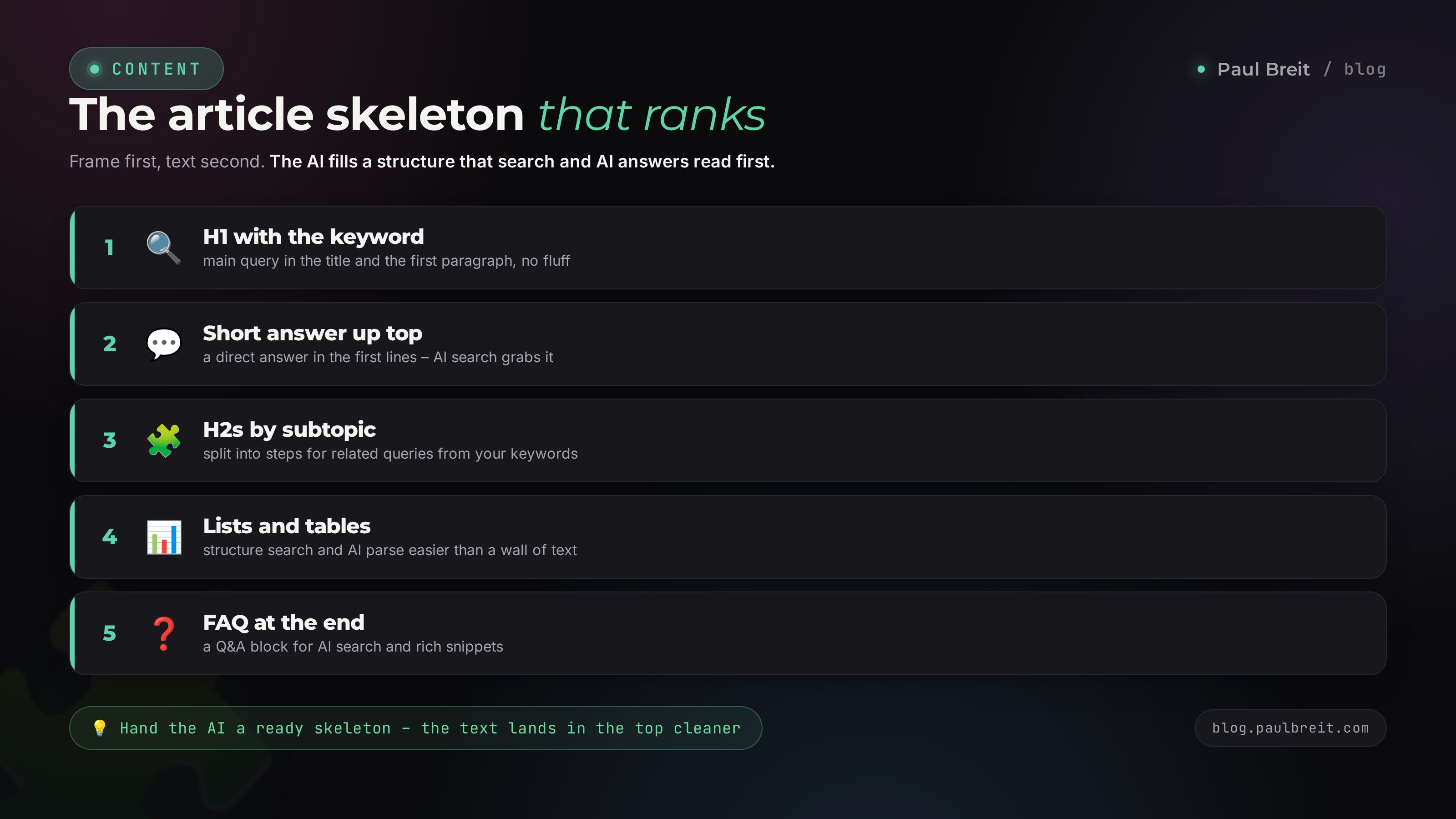
The skeleton settles half the fight. With the right structure, even middling text holds in the results, because search and reader both find their way around it easily. Here's a skeleton that works in Google and in AI search alike.
H1 with the head keyword
One first-level heading per page, with the head query in natural form. Not "Text and AI: Some Reflections," but "AI Writing Tool: How to Write Articles and Posts Without a Copywriter." From the results page, the person should read the headline and know the answer to their question is here.
A short answer in the first screen
Right after the intro - a direct answer to the query in 3-5 sentences, with numbers. This is what search shows as a snippet and what AI search cites. The person gets the answer instantly, then reads the details. This block is exactly why articles with a short answer up top outrank walls of text without one.
H2 subheads by subtopic
Every big question in the topic gets its own H2 with its mid keyword. Inside, H3s for the specific questions. The table of contents builds from these headings, and a bot reads the topic coverage from them too. The more fully you close the subtopics, the higher the odds the article gets judged exhaustive.
Lists, tables, callouts
Solid text reads poorly. Where there's an enumeration, make a list. Where there's a comparison, a table. Where there's a warning, a callout. It keeps the person on the page, and time on page is a usefulness signal to search.
A FAQ at the end
A question-and-answer block closes the follow-up queries that didn't fit the main text, and AI search likes it separately: it pulls ready question-answer pairs straight out of it. 7-10 real questions people ask you about the topic.
Build this skeleton before you switch the AI on. Five minutes of work, and the output is a frame the model fills with dense meaning in every section. You decide what each chunk is about first, and only then ask the model to write it.
One more thing about readability. Over half your readers are on a phone. Check the article on a narrow screen: five-line paragraphs turn into a wall there. Keep a paragraph to 2-4 sentences, break ideas up with subheads and lists. Search looks separately at whether the page is easy to open on mobile, and it demotes text you can't make out on a phone.
Section 04The prompt that returns a finished draft
Now the interesting part - how to get AI to write a useful article instead of a pile of generic lines. The trick is that you give the model a full brief: a role, the skeleton, the keywords, the material, and the don'ts. The richer the input, the better the output.
The five-part prompt formula
A good article prompt rests on five blocks:
- Role. Who the model should be: "You're a blog editor for people who sell services and courses."
- Task. What to write and for which query: "Write an article for query X, for a reader who wants Y."
- Structure. Your skeleton from the previous section: the headings in order.
- Material. Your numbers, cases, client objections - the things the model doesn't have.
- Don'ts. What to avoid: no fluff, no cliches, no long intros, write directly to "you."
The assembled prompt looks like this:
You're a blog editor for people who sell services,
courses, and consulting. You write in living language,
straight to "you," no corporate speak and no generic lines.

Task: write a section of an article for the query
"AI for social posts," for a reader who runs their
own blog and wants to write posts faster.

Section structure:
- a subhead on which posts AI handles and which it doesn't;
- a list of 4 post formats with a sample prompt for each;
- a short takeaway with one action.

My material (use it, don't invent your own):
- I run a blog with 20,000 followers;
- a post used to take me 40 minutes, with AI it's 15;
- the post formula I give clients: pain - story - takeaway - action.

Don'ts: no cliche openers and no filler connectors;
no three-paragraph intro; every paragraph straight to the point.
The difference between this prompt and a plain "write an article about AI for posts" is the difference between a draft you polish in five minutes and text you rewrite from scratch. A full breakdown of how the prompt formula works and how to make it automatic, I put in a separate piece on how to write prompts.
Write by section: one at a time
The temptation is strong - to ask for the whole 4,000-word article at once. Don't: over a long stretch the model starts repeating itself and pouring fluff toward the end. Give it the skeleton and ask it to write one section at a time. A section comes out - move to the next, keeping the overall plan in front of the model. That way each chunk stays dense, and you control quality as you go.
Which model to use
For holding meaning and voice, Claude leads - it stays closest to living language and reads intent well. If you're outside the US or EU, setting it up may need a VPN pointed at a supported region, or sign-in won't go through - Anthropic blocks a number of countries. Sign-up runs through claude.ai. I walk the full setup step by step in the guide on Claude from scratch. From here on I show prompts on Claude, but the formula works in any strong model.
Before you hit send, reread the prompt and ask yourself: did I give the model material it doesn't already have? If the prompt is just a topic and zero of your facts, the output is fluff no matter how you ask. Material is the fuel.
Section 05Scrub the AI tells and add your expertise
The draft is ready. It's smooth, even, and - if you do nothing - dead. Search and a live reader both spot machine text that went out unedited just as fast. This step's job is to put the human back in.
Cut the machine markers
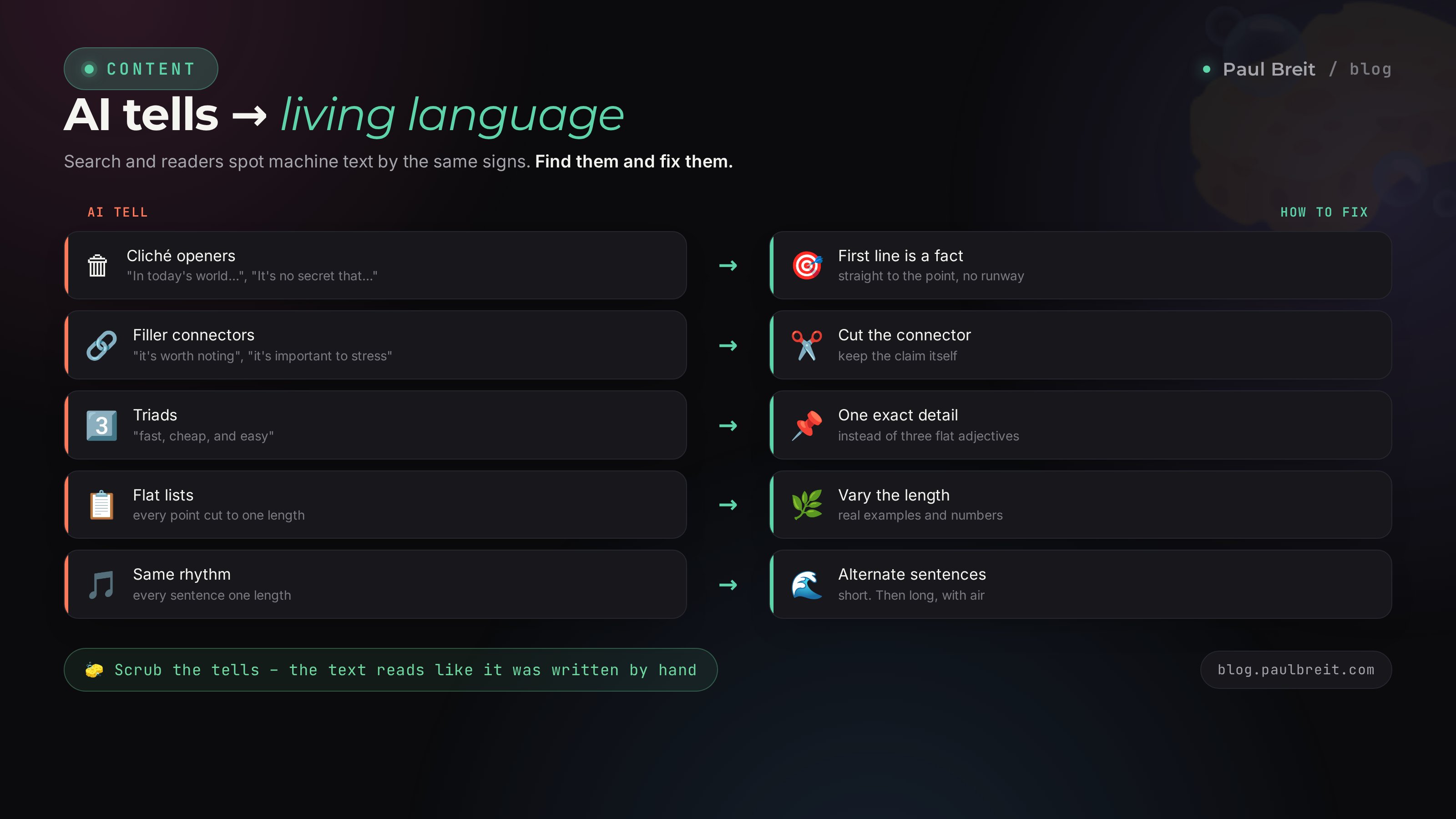
AI text has recognizable tells. Go through the draft and scrub them out:
| AI marker | What to do |
|---|---|
| Cliche filler openers at the start of a paragraph | Delete, open with a fact |
| Lead-in connectors "it's worth stressing," "one cannot fail to mention" | Delete, the fact speaks for itself |
| Filler links "well then," "and now" | Cut, keep the direct transition |
| Triads "Fast. Simple. Convenient." | Rewrite as a living line |
| Suspiciously even lists with no exceptions | Add a nuance, a caveat, an example |
| Every sentence the same length | Break the rhythm: long, then short |
Now the most important part. Add what the model never had: your case, your number, a mistake you made yourself. One paragraph - "last month I built an article this way about X, it hit the top five for query Y in three weeks and brought in 40 people" - is worth ten paragraphs of smooth theory. That's the trust signal the whole effort was for. A full breakdown of the five markers and the cleanup is in the piece on how to remove AI traces from text.
Check the density of usefulness
Go through each paragraph with one question: does it answer the reader, or does it lead up to an answer? The lead-up paragraphs ("now let's talk about how important it is to...") go in the bin. Keep what carries a fact, a step, an example, or a number. After that cleanup the article loses about twenty percent and gets twice as useful.
Scrubbing the AI tells is about bringing living language back. Chasing plagiarism-checker percentages has nothing to do with it. Mangle the text on purpose to "beat the detector" and you get unreadable mush. The goal is one thing: the person reads and believes. A tool's green checkmark is a side issue.
Section 06GEO: getting cited in AI search
People increasingly ask an AI instead of Google. "Which tool should I pick for email," "how to build a landing page without a developer" - and ChatGPT, Perplexity, or Google AI Overviews hand over a ready answer, often with a link to the source. Optimizing for that answer is called GEO. The good news: the same article that reached the regular top lands in AI search too, if you build in a couple of things.
What AI search cites
AI in search pulls short, precise answers out of articles. It's easier for it to cite text where the answer to a question sits as its own 3-5-sentence paragraph and isn't dissolved across the page. That's why the "short answer" block at the top of the article works for two jobs at once: the snippet in regular search and the citation in AI search.
- Direct answers. For every explicit question in the topic, a separate paragraph with the answer. A FAQ at the end is perfect for this.
- Clear structure. Headings and lists help the model break the article into meaning chunks.
- Markup. FAQPage and Article schema on the page tell AI search exactly where the question, the answer, and the author are.
- Freshness and facts. Concrete numbers and a year raise the odds it cites you. A neighbor with vague words won't make the cut.
A whole separate topic is how to get into ChatGPT and AI answers at all, and what that changes for promotion. I covered it in the piece on how to show up in ChatGPT and AI search: the new SEO. Here the point is one thing: you don't write a separate article for AI search. You write one article so it's easy for a person to find and for a machine to cite.
Here's how it works. A person asks AI search "which AI should I write website articles with." The model doesn't invent the answer from thin air - it assembles it from the articles it found on the topic, and often puts a source link right next to it. If your article gives that query a clear short answer with tool names and numbers, your odds of making the round-up beat a structureless wall. In effect you get another traffic channel on top of the regular results, from that same single article.
Want to check if the article is ready for AI search - ask ChatGPT or Perplexity the exact query you wrote for. See what answer they give and who they link to. If your structure mirrors the logic of that answer, your odds of landing the citation are high.
Section 07Publishing and interlinking
The article is written and cleaned. All that's left is to publish it so search finds it fast and reads it right. This is where beginners usually miss three things.
Meta tags for the snippet
A page needs a title and a description. The title - up to 60 characters, with the head keyword, is the blue link the person sees in the results. The description - 150-160 characters, keyword plus a promise of value, is the text under the link. You can draft these with AI too: give it the article headline and ask for five title and description options for the query, then pick the best.
Interlinking: articles should hold onto each other
One article in search is an island. Fifteen articles around one topic, tied together with links, are a mainland search treats as an authority on the topic. The rule: from a new article, 3-5 links to related older ones, and from a couple of old ones, a link to the new one. That way page weight flows across the blog, and new pieces index faster, leaning on the ones already indexed.
Link by meaning. Random links pass no weight. An article on SEO text logically links to prompts, to removing AI traces, to AI search, to a content plan. The reader follows the chain and stays on the blog longer, which is another usefulness signal.
Speed up indexing
After publishing, don't wait for a bot to wander onto the page on its own. Submit it for re-indexing: Google Search Console has a re-crawl request, and search engines support the IndexNow protocol - a ping that says "here's a new address, come by." For a young blog this cuts the time to index from weeks to days. A separate lever of free traffic is Medium: it pulls the article into its feed and into search - I covered it in the piece on Medium for business.
Watch what happens after publishing
Publish and forget, and traffic won't grow. Set your blog up in Google Search Console and Bing Webmaster Tools, both free. In a couple of weeks you'll see which queries you're already shown for and at what position. Then the useful part starts: an article sits at spots 11-15, you add a section for the query it almost cracked the top on, and it climbs. One such tune-up of an old article often brings more traffic than a new one from scratch. AI helps here too: feed it the list of queries from the console and ask which subtopics to add to the text.

Section 087 mistakes that keep an article out of the top
I gathered the slips people trip on most when they first write articles with AI. Run through the list before you publish.
Writing with no keyword research
Pretty text for a query nobody searches brings no traffic. Keywords and a volume check first, then the article.
Handing everything to AI and not editing
The model's draft is half the work. Without a cleanup of cliches and without your material the text stays empty, and search won't lift it.
Keyword stuffing
Jamming the head query into every paragraph is a straight path under a filter. One keyword in the H1 and the first paragraph, then by meaning and naturally.
No short answer up top
With no direct answer in the first screen the article loses both the snippet in search and the citation in AI search. It's five sentences that decide a lot.
One article in a vacuum
With no interlinking and no neighboring pieces on the topic, search sees no authority in you. A system of 15-30 articles works. A lone text gets lost in the results.
Rewriting someone else's instead of your own angle
Search recognizes an AI rewrite of someone else's article. Uniqueness comes from your experience: cases, numbers, mistakes, the order of steps nobody else has.
Quitting after one article
A blog is a marathon. First traffic arrives after 1-3 months of steady work. Whoever writes 2-3 articles a week collects a stream of clients from search within six months. Whoever writes one and waits collects nothing.
FAQFrequently asked questions
Can AI write an SEO article that actually ranks?
An article can rank when AI writes it on your structure and your material. A bare answer to "write an article about X" won't rank: no keywords for the intent, no experience, no specifics. The working setup: you supply the keywords, the skeleton, and examples from practice; AI assembles the draft; you clean it and add to it. On that setup articles really do rank in Google.
How many keywords should go in an article?
One head keyword in the H1 and the first paragraph, 3-5 mid keywords in the H2s, the rest woven in naturally. A keyword density above 3-4% reads as spam and gets cut. The rule of thumb: write for a human, the keywords land on their own, then you check that the head and mid ones are in place.
AI gives me fluff. How do I get dense text?
Fluff shows up when the prompt has no material. Give the AI your numbers, cases, client objections, and the steps you take, and it will build them into the text. Separately, ask it to cut lead-ins, repetition, and generic phrasing. Every paragraph should answer the reader right away, without three sentences of warm-up.
How do I remove the AI tells from an article?
Cut cliche openers and filler connectors, cookie-cutter triads, and suspiciously even lists. Break the monotone rhythm with short lines, add your own examples and living words. A full breakdown of the markers is in the piece on removing AI traces from text.
What is GEO, and why bother if I already do SEO?
GEO is optimizing for AI search: answers from ChatGPT, Perplexity, and Google AI Overviews. They cite articles that give a short direct answer, a clear structure, and schema markup. SEO brings a person in from the results page; GEO gets an AI to cite you. One article covers both if you build them into the structure.
How much does it cost to write an SEO article with AI?
Almost nothing. You need access to Claude or another strong model - Claude Pro runs about $20 a month. Everything else is your time: a couple of hours on keywords, the skeleton, and the cleanup. A copywriter charges $50 to $150 for an article this size.
How fast does an article reach the top?
A young blog indexes in days to weeks; positions on mid and long-tail queries climb over 1-3 months. What speeds it up: an IndexNow ping, interlinking with already-indexed articles, and consistency. One piece won't move the needle; a system of 15-30 articles around a topic will.
Do I need unique text, or is a rewrite fine?
Search catches an AI rewrite of someone else's article and won't lift it. Uniqueness comes from your angle: your cases, numbers, client mistakes, and the order of your steps. Then the text is unique in meaning, and plagiarism-checker percentages are a side issue.