Learning AI: How to Choose a Course and Not Overpay
The market for AI courses grew faster than AI itself. Half the offers are screenshots of last year's ChatGPT in a pretty wrapper for $800. Let's be honest about it: when you don't need to pay at all, what's actually worth paying for, how to spot an empty course on sight, and how to teach yourself AI in 30 days if you don't have the money right now.
To choose an AI course and not overpay, first decide why you want it: to cover your own work tasks, to learn a new profession, or just to get your bearings. For work tasks, a free course and a month of practice are enough in 8 cases out of 10. Pay for feedback on your actual work, a fresh program (check the last-updated date), and a live community where there's someone to ask. Red flags: a guarantee of specific income, outdated tools in the lessons, an eternal discount, and a program hidden until you pay.
Someone sees an ad: "Master AI in 3 days and earn $2,500+ a month." They pay $790. Inside are last year's recordings where the host clicks around an interface that no longer exists. A chat with two thousand people in it, where questions sink in a minute. At the end, a certificate with nowhere to hang it. A month later they say the line I hear constantly: "AI is a scam, I tried it."
AI isn't a scam. The scam was the specific course they were sold. I run an online school for AI myself, and more than ten thousand people have come through it. That's exactly why I'll say it straight: very often you don't need to pay at all. And if you do pay, pay for things you can name. This article is how to choose your training with a cool head and not hand over money for air.
Twenty-two minutes to read. You'll save yourself at least one bad purchase. And at best you'll realize the course you need is already free, and you'll start learning today.
What's inside
- What "learning AI" even means
- Do you need a paid course at all
- What a decent course should give you
- Five training formats and who each is for
- How to vet a course in 15 minutes before you pay
- Red flags: where you get scammed
- What it costs and what's worth paying for
- How to learn AI in 30 days for free
- 7 mistakes when choosing a course
- The choosing checklist
This article mentions Claude a lot – one of the strongest AIs for text. In some regions it won't open directly, and you'll need a VPN with a US or EU location. Register at claude.ai with a mainstream email (Gmail, Apple); some regional providers get rejected. Note that Anthropic blocks a handful of countries, so pick a US or EU exit, not one on the blocklist. No such email yet? Set one up with the VPN already on, so the account isn't tied to a blocked region. If Claude is a hassle where you are, ChatGPT, Gemini, and a free option like DeepSeek all work fine to learn on too.
Section 01What "learning AI" even means
When someone types "learning AI" into search, those two words hide four completely different needs. And a course that's perfect for one is a waste of money for another. Before you look at prices, answer honestly which of these is you.
One: cover your own work tasks. A psychologist wants to prep case notes faster, a tutor wants lesson plans, a marketer wants copy and banners, an entrepreneur wants client replies and documents. You don't need theory about how a neural net is built. You need clear "here's a task, here's how to do it in five minutes" scenarios. This is the most common case, and a short hands-on course almost always covers it.
Two: learn a new profession. Someone wants to earn with AI: make content for hire, build chatbots, run automation projects. This calls for depth, practice on real orders, and ideally a mentor to walk you through your first money. There's a separate breakdown of the earning models – 7 ways to make money with AI.
Three: get a general grip on the topic. Curiosity, the "am I falling behind" worry, wanting to understand what everyone's talking about. Here a paid course is overkill. Free lessons, a couple of channels, and a month of playing with AI for fun are plenty.
Four: a technical profession. Training models, machine learning, working with data, programming. That's a separate world with math and code, and those courses are priced differently and take years. If you're reading this article, almost certainly that's not your path. From here on, it's only about the first three.
For tasks and curiosity, a paid course is usually unnecessary. For a profession and first money, a paid course saves months. Settle this before you open the first landing page, and half of the bad purchases fall away on their own.
Section 02Do you need a paid course at all
As the founder of a school, it's supposedly against my interest to write this. But I'm tired of watching people pay for what's already free. So, honestly: what you're actually paying for when you buy a course.
Information costs zero today. Every prompt, every scenario, every AI walkthrough is out there in the open – in articles, on YouTube, in free mini-courses. Paying for information in 2026 is odd. You pay for three other things, and only they have a price.
Speed
Building the path yourself out of dozens of videos, filtering out the outdated stuff, ordering it – that's weeks. A good course already did that for you: cut the fluff, laid it out in steps, showed only what works now. If your time is worth more than money, you're paying to skip a month of sorting.
Feedback
You do the assignment, the author or a coach looks at your specific work and tells you what's off. That's the one thing you can't get from an article. Feedback is what turns "I watched it" into "I can do it." A course with no review of your work is just video you could have found for free.
Community and discipline
On your own, most people quit on day three. A live chat where people learn together, ask questions, and show results pulls you forward. Plus the simple fact of having paid switches on discipline: free stuff feels skippable, paid stuff feels wasteful to drop. Sometimes people buy a course precisely for that kick, and that's an honest reason.
A word on the "I'm too late, everyone already knows this" fear. Not true. AI as a mainstream work tool showed up very recently, and the overwhelming majority of people around you use it at the level of "asked it for a soup recipe." Whoever calmly sits down today and spends a month practicing will pass 95 percent of the market. It would be late if the topic had been sitting still for ten years. It hasn't been still for even one.
Ask one question: "Can I study on my own for 30 days straight, with no one checking on me?" If yes – start with the free path at the end of this article, and spend on a course later and precisely. If honestly no – a paid course with live support pays off by getting you to the finish instead of quitting.
Section 03What a decent course should give you
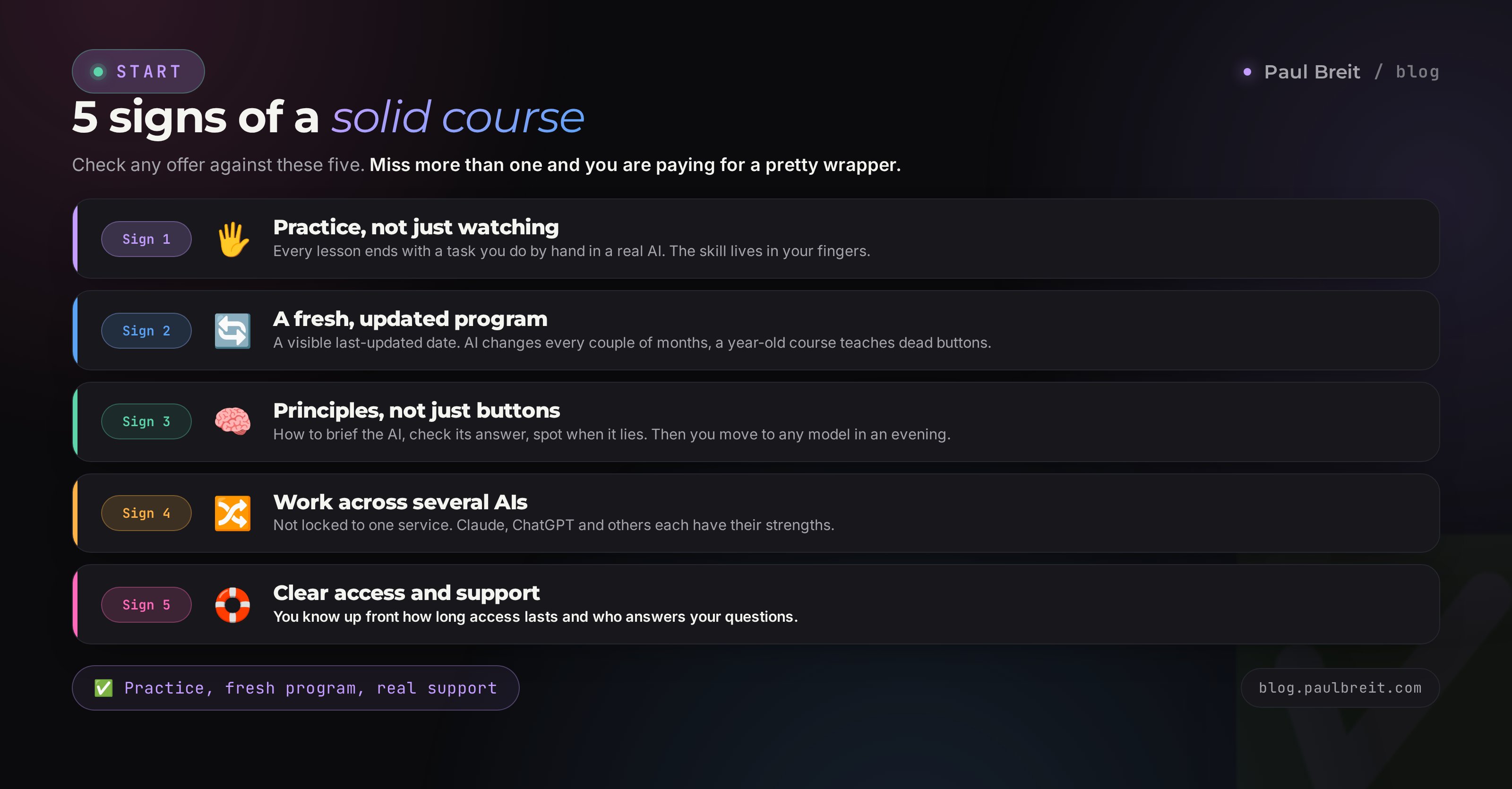
Say you've decided you need a course. Then here are the five things that separate training worth charging for from a prettily packaged nothing. Check any offer against them.
1. Practice, not just watching
After every lesson there should be a task you do with your own hands in a real AI. Not "watch me click," but "do it yourself and bring back a result." A skill lives in your fingers, not your eyes. If the whole course is lectures you can play in the background, you'll learn nothing, no matter what you paid.
2. A fresh program
AI updates every couple of months. Claude, ChatGPT, and the rest change beyond recognition in a year. A course recorded a year and a half ago and never updated teaches you to press buttons that are gone. Look for a last-updated date on the lessons. A decent author doesn't hide it, because they're proud of keeping the material alive.
3. Principles, not just buttons
Buttons change, thinking stays. A good course teaches you to brief the AI, check its answer, notice when it's making things up, and fit it into your work. Once you have that, you'll move from any model to any other in an evening. A course that only teaches "click here in this version" leaves you helpless after the first update.
4. Work across several AIs
The world doesn't end at one model. Claude and ChatGPT are strong for text, Gemini is handy too, and images have their own tools. A course that ties you to a single service ties your hands. How to pick a model for the task is its own breakdown, how to choose an AI tool in 5 minutes.
5. Clear access and support
You should know up front: how long access to the lessons lasts, who answers questions and how, what happens after you finish. Lifetime access and live support are good. Access for 30 days, after which everything closes and questions vanish into the void – that's a reason to negotiate or look elsewhere.
Section 04Five training formats and who each is for
The word "course" hides five very different formats. They differ in price, depth, and how much personal attention you get. Here they are from lightest to most expensive, with honest pros and cons.
A free mini-course
A few lessons a school gives away so you can try the format. Pro: zero risk, real value, you get to size up the author. Con: no deep feedback, often ends at the best part. For whom: almost everyone, as a first step. It's smart to start any author with their free mini-course before you even think about paying.
A challenge or intensive
A few days of dense practice on one topic: say, "AI for content over a weekend." Pro: fast, cheap, energizing. Con: you can't go deep in a couple of days, and it's often a shop window for a bigger course. For whom: people who want a quick win on one narrow task and are ready to dig further on their own.
A full course with practice
A multi-week program with assignments, work review, and a community. Pro: structure, feedback, gets you to an actual skill. Con: the price, and you need the discipline to finish. For whom: people learning AI for a profession, or who want to close all their work tasks at once instead of gathering knowledge in scraps.
One-on-one mentorship
Working one to one: a mentor guides you through your specific situation. Pro: maximum attention, a breakdown of your exact tasks, fast progress. Con: the priciest format. For whom: people with a concrete business task and the money, who want to cover the path in weeks, not months.
A community subscription
Monthly access to lessons, livestreams, and a community. Pro: cheap by the month, always-fresh material, a live environment. Con: with no strict program it's easy to relax and just pay while doing nothing. For whom: people who already have the basics and want to stay current in a topic that shifts every month.
A working combo for a beginner looks like this. A free mini-course to try it and pick an author. Then either a month of solo practice on the plan in this article, or one full course if you want structure and support. Mentorship and a subscription come later, once the base is there and it's clear where to grow. Buying everything at once, and expensively, is the classic overpay.
Section 05How to vet a course in 15 minutes before you pay
Before you hit "buy," spend a quarter of an hour checking. It's boring and you won't feel like it, but those 15 minutes are exactly what separates a good purchase from wasted money. Run through six points.
Open the full program
A decent course shows a detailed program before you pay: the topics, the order, what you'll do with your hands. If instead of a program there are only vague words – "you'll master AI and change your life" – that's a worry. A good author has nothing to hide in the contents.
Find the update date
Look on the course page for when the lessons were last updated. No date at all? Ask support directly. If the material is over a year old and untouched, half of it will be about dead interfaces.
Watch the sample lesson
Almost every course has a free lesson or mini-course. Watch it all the way through. It should feel clear, interesting, and on point. If even the showcase lesson is dull and watery, the paid part will be the same.
Read reviews off the landing page
Reviews on the landing page itself were hand-picked by the author. Look for live ones: in comments under videos, in chats, in a search for the author's name plus "reviews." In reviews, look for specifics: what the person did after the course. Generic raves with no detail tell you nothing.
Check the author
Who's teaching. Do they have real practice or are they reselling someone else's material. Do they run their own blog, do they show their own work. A person who applies AI in real work every day teaches differently from someone who downloaded a course yesterday and is flipping it.
Ask about feedback and refunds
Write support two questions: how does the review of my work happen, and can I get a refund if the format doesn't fit in the first few days. From how fast and how humanly they answer, you'll already sense how they treat people after payment.
Copy the course program and hand it to an AI with the task: "Here's the program of an AI course. I want to learn [your task]. Break down what's current in 2026, what's missing, which topics are filler and which will actually build a skill. Be critical." In a minute you'll get a sober read with none of the sales-page hypnosis. How to phrase requests like this is in the article how to write prompts.
Section 06Red flags: where you get scammed
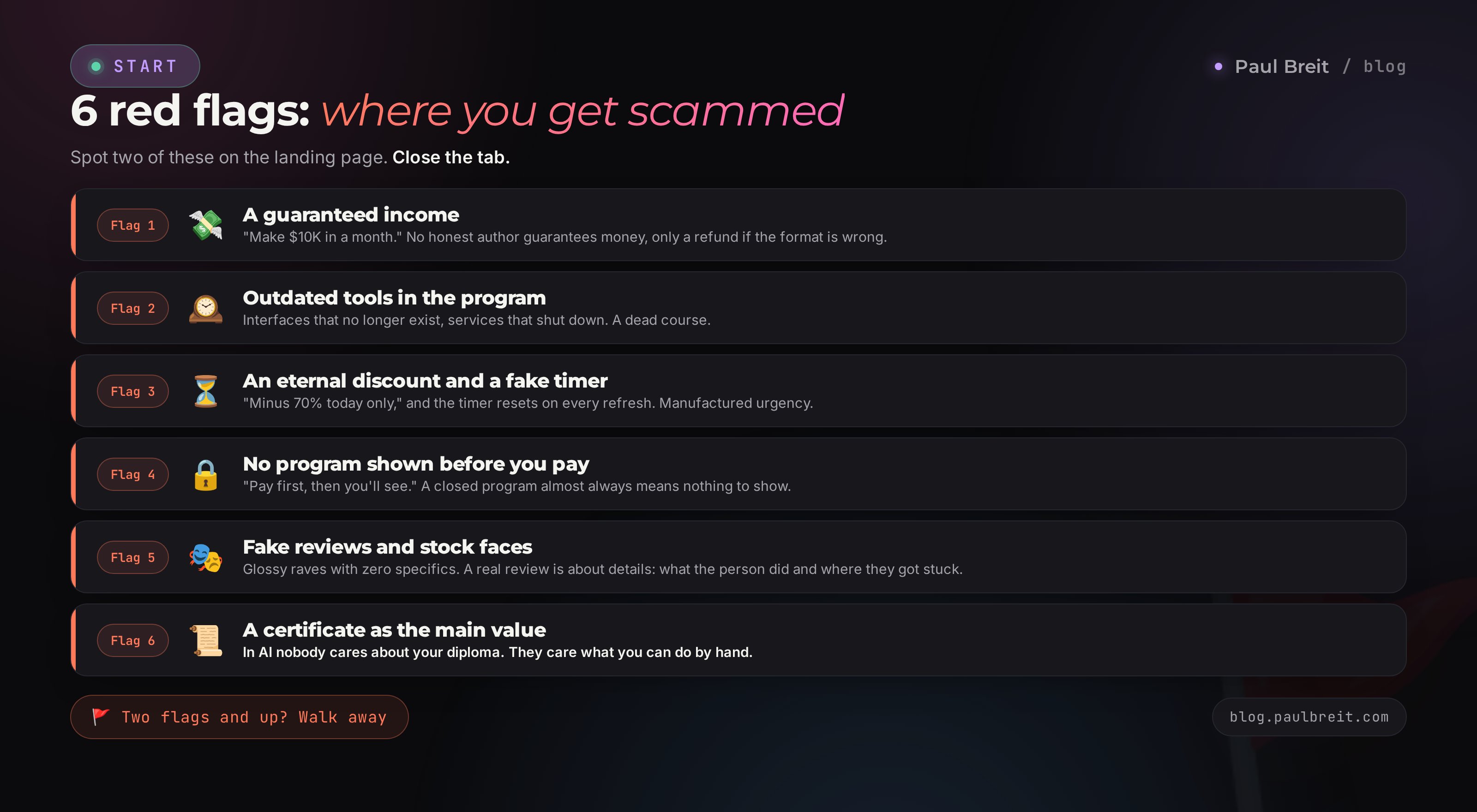
Some signs make an empty or scammy course obvious right away. Spot even two – close the tab. I'm not sparing colleagues here, because people like this are why others later say AI doesn't work.
A promise of specific income
"Make ten grand a month," "earn the course back in a week," "$4K a month guaranteed." No honest author guarantees money, because income depends on your practice, your niche, and the market. The only guarantee they give is a refund if the format didn't fit. Everything else is manipulation that plays on greed.
Outdated tools in the program
If the lessons feature AI versions from two years ago, interfaces that no longer exist, services that shut down – the course is dead. A related tell: the whole thing is built on one service, with not a word about how to access it.
An eternal discount and pressure
"Minus 70 percent today only," "3 seats left," and the timer resets every time you refresh the page. Manufactured urgency is a tool for people with a weak product. A good course sells itself on content, not on a timer that ticks forever.
No program shown before you pay
They sell you an emotion and a transformation, but won't show what's actually inside. "Pay, and you'll see" is how someone with nothing to show behaves. A closed program almost always means there's nothing to show.
Fake reviews and photos
Ecstatic reviews with not a single specific, identical in style, over stock faces. Income screenshots with no context. A real review is always about details: what the person did, what worked, where they stumbled. Glossy "this changed my life" cries with no facts are window dressing.
A certificate as the main value
When a course leans on "you'll get a diploma" and "we'll add you to a registry of specialists" instead of the skill, that's a swap. In AI nobody cares about your certificate. They care what you can do with your hands. A certificate is nice, but it's not what you should pay for.
Section 07What it costs and what's worth paying for
Prices on the market run from zero to thousands, and there's almost no link between price and quality. There are great courses for $65 and empty ones for $1,000. But keeping the 2026 market benchmarks in mind is useful, so you can tell where the overpay is.
- Free mini-courses – $0. Real value as a first step, zero risk.
- Challenges and intensives – $40 to $200. Fair for a narrow topic and a jolt of energy, if there's practice inside.
- Full courses with feedback – $300 to $800. Justified when there's work review, a fresh program, and a community.
- One-on-one mentorship – $700 and up. For real one-to-one attention on your task.
- A community subscription – $15 to $40 a month. For always-fresh material and a live environment.
What's worth paying for: a real person reviewing your work, a program kept current, a community where there's someone to ask, saving your own time. That's what you can't download for free.
What isn't worth it: information that's out in the open, a big name with no practice, a certificate, a pretty landing page and promises nobody controls. If you pay $800 and inside it's nothing but video lectures with not a single assignment review, you overpaid many times over for what you'd have found for free.
One more trap – payment plans. A $1,200 course turns into "just $100 a month," and the brain agrees more easily. Always count the full sum and ask yourself honestly whether you'd hand it over in one go for what's really inside. A payment plan is handy when the product is worth it, and dangerous when it fogs the real price. Also check separately who runs the plan – a bank or the school itself – and what happens if you want a refund in the first few days.
Count the price per skill. The sticker alone tells you nothing. A $500 course that leaves you confidently handling your work tasks and saving dozens of hours a month is cheaper than a free one you quit on lesson three. And the reverse: a pricey course that left you alone with the videos is more expensive than any money, because it steals your belief that you can do this, too.
Section 08How to learn AI in 30 days for free
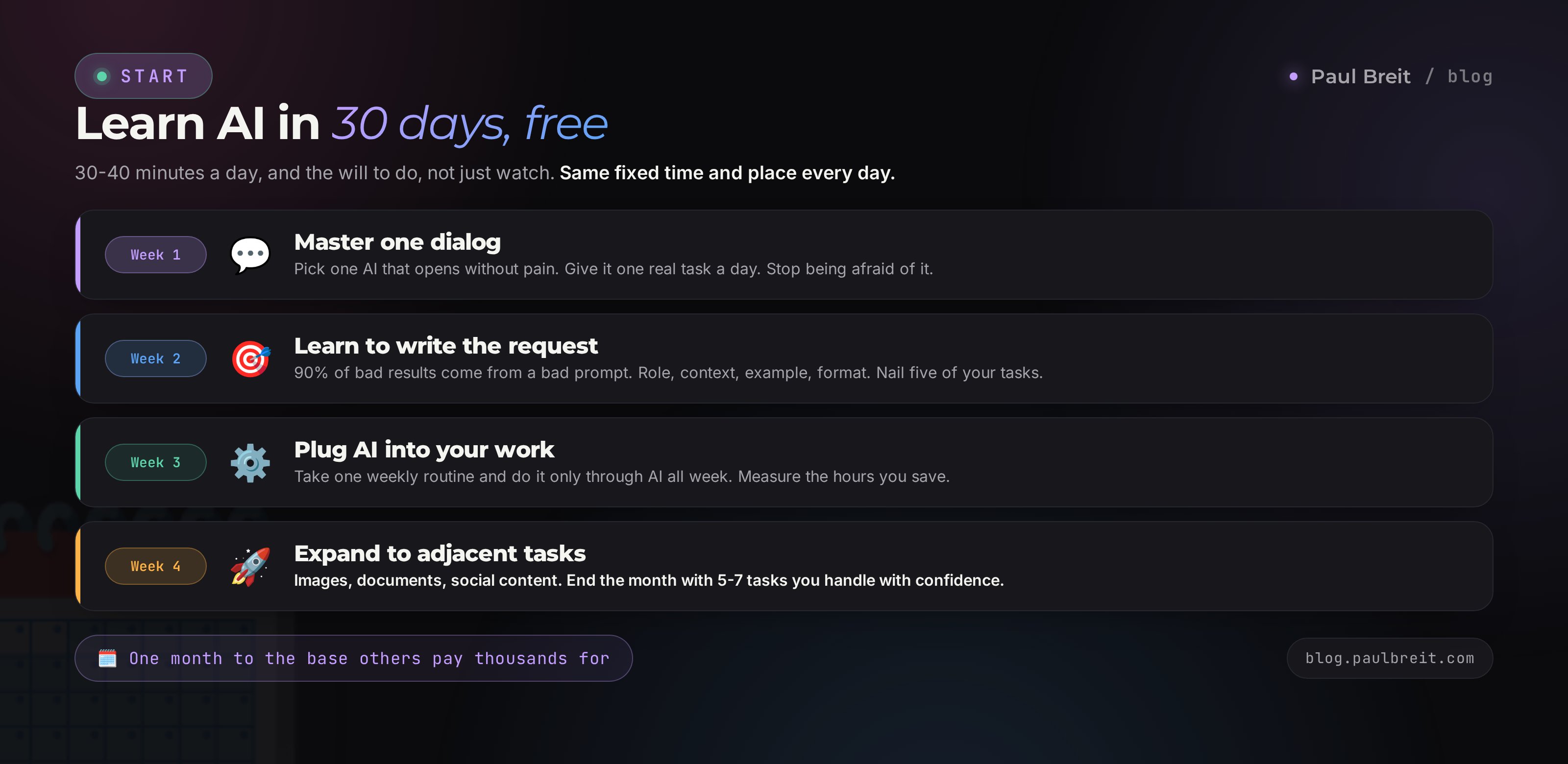
If you've decided you don't need a course yet, here's an honest plan. It works – I put it together for people who are short on money or who want to try it themselves first. It takes 30 to 40 minutes a day and a willingness to do, not just watch. A detailed, extended version is in the article how to learn AI without courses.
One condition, without which the plan won't work: pick a fixed time and place. Make it something concrete – right after your morning coffee, 30 minutes, at your desk. The brain latches onto a habit through repetition in one context, and within a week you'll be sitting down with the AI on autopilot. It's the absence of this small thing that breaks solo learning, not a shortage of material – there's plenty of that today.
Master one dialog
Pick one AI that opens for you without pain. If Claude and ChatGPT are a hassle in your region, Gemini and a free option like DeepSeek work fine to start. Every day, give it one real task of yours: a client email, a plan for the day, a read on a situation. The goal of the week is to stop being afraid and grasp that it's just a conversation partner you have to brief clearly.
Learn to phrase the request
90 percent of bad results come from a bad request. Learn to give the AI a role, context, an example, and a response format. Take five of your work tasks and get a result on each one you wouldn't be embarrassed to use. The request formula is broken down in the article how to write prompts. By the end of the week you'll feel how the same AI puts out either garbage or gold, depending on how you asked.
Plug the AI into your work
Pick one routine that eats your time every week: writing, answering the same kinds of questions, plans, reviews. Build a set of working prompts for it and, all week, do that routine only through the AI. Measure how much time you saved. It usually comes out to a few hours a week, and that's the first moment you understand what this was all for.
Expand to adjacent tasks
Add images if you need banners and covers. Add reading documents and spreadsheets. Try the AI on social content. By the end of the month you'll have five to seven tasks you handle confidently with AI, and a sense of where to trust it and where to double-check. That's the base skill many people pay thousands for.
After a month like that, you'll soberly know whether you need a paid course and which one. Either you'll have enough and simply keep practicing, or you'll see a specific gap – earning, bots, automation – and buy a course precisely for it, not "AI in general." That's a purchase with no overpay: you pay for a clear task, not for fog.
Section 097 mistakes when choosing a course
I see these mistakes constantly. Each one costs people money, time, or self-belief. Run down the list before you buy.
- Buying on emotion from an ad. A slick video and a promise of a new life switch on greed. Give yourself a day and vet the course against the points in section 5 before you pay.
- Taking "AI in general" instead of a specific task. A course about everything at once is usually about nothing deeply. Your task first, then a course for it.
- Chasing the most expensive, thinking pricey means good. The link is nearly nonexistent. Look at the practice and the program, not the sticker.
- Chasing the cheapest or a pirated copy. A course downloaded for pennies is almost always outdated, with no feedback and no support. The savings turn into a lost month.
- Ignoring the update date. In AI, material a year and a half old is a museum. Always check how fresh it is.
- Believing in the certificate. In this field they value the skill and the work, not the paper. Don't pay for a diploma.
- Buying and not doing. The most expensive mistake. Any course is useless without practice. If you know you won't do the work, pick a format with live support that pulls you along.
There's a separate breakdown of the typical misses in the actual work with AI – 10 beginner mistakes with AI. Worth reading before you start, so you don't step on them after the course.
Section 10The choosing checklist
Save it and run through it before any purchase. Until the first three boxes are checked, it's too early to pay.
- Goal defined – you know why you want AI: tasks, a profession, or interest.
- Format matched to the goal – mini-course, intensive, full course, mentorship, or subscription chosen on purpose.
- Checked whether you even need to pay – for tasks and interest, the free path was honestly considered.
- Program is open before payment and has practice in it, not just lectures.
- Update date is fresh or confirmed by support.
- Sample lesson watched, you trust the author, you like the delivery.
- Reviews off the landing page found and specific.
- Feedback and refunds – the terms are clear and human.
- No red flags – no income guarantees, no eternal discounts, no hidden program.
- Price per skill counted, not just the sticker – you know what you get for the money.
Learning AI is about practice, not about a purchase. The priciest course is useless without hands-on practice, and a free plan pays off when you reach the end. Start today: open an AI, give it one task of yours, and see what happens. After that the course choice becomes obvious, because you'll already understand exactly what you're missing.
Where to go next
Want a structured start? Begin with Claude from scratch, a complete guide. Want to learn on your own? Here's the 30-day plan with no courses. Need a rundown of the models? The best AI tools of 2026 across 12 tasks. And if you're weighing which assistant to build a habit with, here's how to choose an AI tool in 5 minutes.
FAQFrequently asked questions
Do I even need a paid course to learn AI?
Often no. If the goal is to cover your own work tasks (writing, summaries, images, routine), a free course and a month of daily practice are enough in 8 cases out of 10. A paid course earns its price when you need speed, feedback on your actual work, and a live community where there's someone to ask.
What does a good AI course honestly cost in 2026?
The range is wide. A short intensive runs $40 to $200, a full course with practice and feedback $300 to $800, one-on-one mentorship $700 and up. A community subscription is $15 to $40 a month. Price alone tells you nothing about quality – look at the program and the practice.
How do I vet a course before buying if money is tight?
Open the full program, find the last-updated date, watch a sample lesson, read reviews outside the landing page, and ask support how feedback works. If the program is hidden until you pay, the update date is buried, and support answers with a template – that's your cue not to pay.
Won't the course be outdated by the time I finish?
Tools change every couple of months, so a course's value is in what it teaches: how to brief the AI, how to check its answer, how to fit it into your work. A course that teaches principles and keeps the lessons updated lasts. A course of screenshots from one ChatGPT version is stale before you open it.
Do courses guarantee results?
An honest guarantee sounds like a refund if the format doesn't fit in the first few days. A promise of specific income – ten grand a month, payback in a week – is a red flag. Results depend on your practice, your niche, and the market, and no course author controls that.
As a beginner, which should I pick: ChatGPT or Claude?
Start with whatever opens for you without friction, so you don't quit on step one. Claude and ChatGPT are both strong for text and reasoning; Claude holds your voice better in longer writing, ChatGPT has a more familiar interface and makes images. A good course shows work across several AIs instead of locking you to one.
Can I learn AI for free, and when does that make sense?
Yes. If you have 30 to 40 minutes a day and you're willing to figure things out yourself, a free course plus practice is enough to handle real work tasks with confidence in a month. There's a 30-day plan at the end of the article. A paid course makes sense when time is worth more than money, or when you lack the discipline to do it alone.