Claude Code Subagents: a beginner's guide step by step
Claude Code subagents are helpers that the main Claude hands separate jobs to: check a post, research competitors, review a landing page. I'll show you how to create your first subagent with one sentence in chat, how to call it, which model to give it, and five agents that pay off for anyone who sells services, courses, and consulting.
Claude Code subagents are separate helpers with their own instructions, their own set of tools, and their own model. The main Claude hands them a task, they work in a separate context window and return a short summary. To create one, describe it to Claude in plain English, and it saves the file to .claude/agents for you.
What's inside
- What a subagent is, in plain words
- What you need and what it costs
- Your first subagent in 10 minutes
- Real test: how the agent edited a post
- What's inside a subagent file
- Choosing a model for a subagent
- How to call a subagent and write its description
- 5 agents for people who sell services and courses
- Subagents vs skills
- When you don't need a subagent
- If something goes wrong
- Cheat sheet
- Sources
What a subagent is, in plain words
Picture Claude Code as the head of a small team. It talks to you and keeps the whole task in mind, while bulky side jobs go to helpers: one rereads twenty files, another checks a text, a third gathers facts from the web. Each works quietly at their own desk and brings back a short note.
Those helpers are Claude Code subagents. People also call them "Claude Code agents" or "custom agents". It's the same thing.
Why bother with this setup when you could do everything in one chat? There are four reasons.
- The main Claude keeps a clear head. Every conversation has a memory limit called the context window. When Claude reads dozens of pages, all of that text piles up in the chat, and by midday it starts to lose track. A subagent reads everything in its own window and sends back only the gist.
- Narrow specialization. A subagent has its own instructions. A post editor checks the same things against the same list every time, and you don't have to explain the job again.
- Restrictions. You can let a subagent only read files. Then it physically can't break anything.
- Saving your usage limit. Simple work can go to the fast, cheap Haiku model, while the heavy thinking stays with Opus.
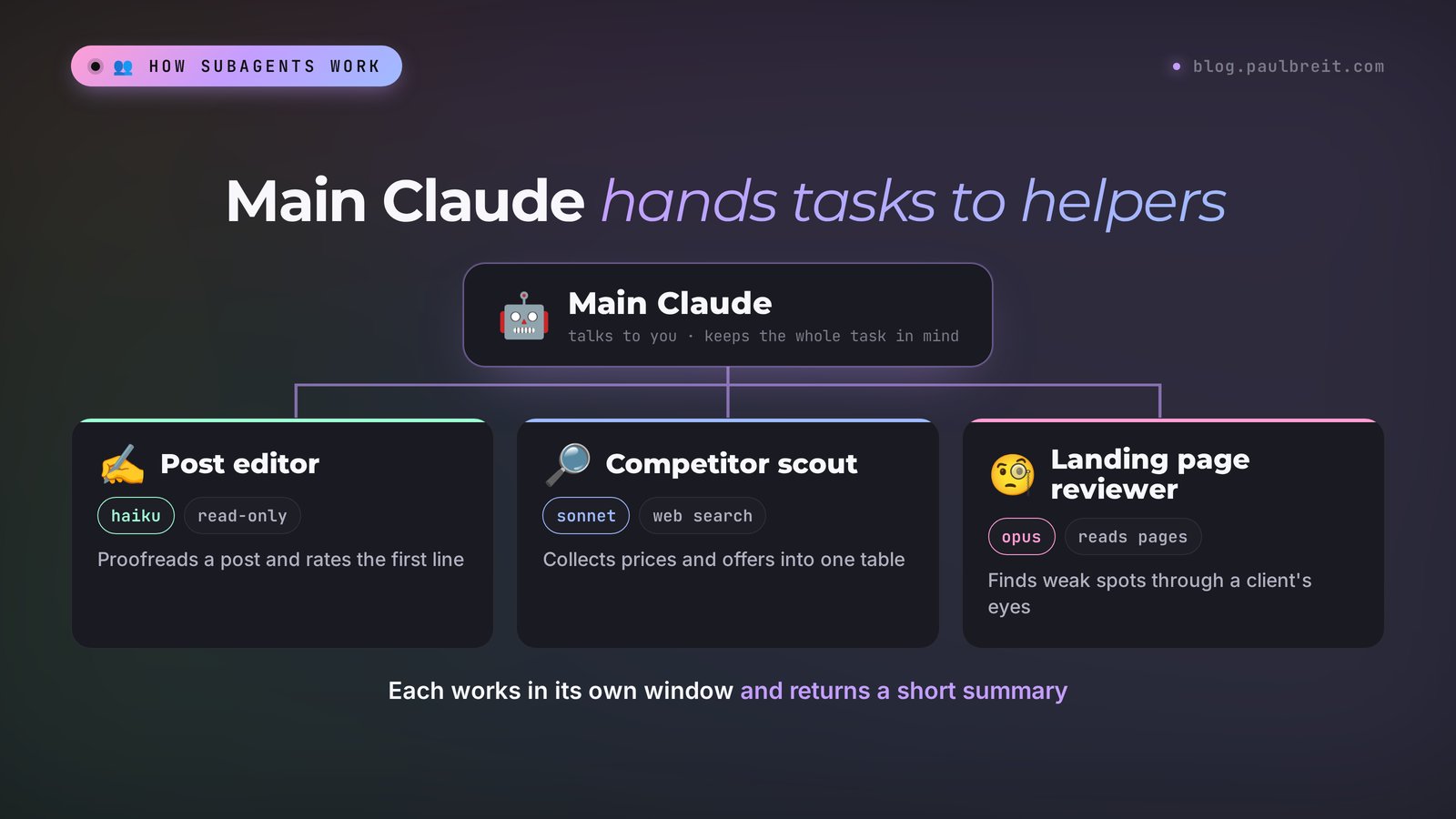
Some agents are already built in, and Claude calls them on its own. Explore searches files and changes nothing. Plan gathers context when you ask for a plan first. General-purpose handles multi-step tasks that need both finding and changing. A line like Explore(Find every mention of the price) in the window is a subagent at work.
Your own subagents make sense when you keep giving Claude the same assignment with the same explanations. Describe the helper once, and from then on it works to your standard.
What you need and what it costs
Subagents live inside Claude Code. So you need Claude Code itself and a paid plan: the Free plan doesn't include it. You can work in the terminal or in the Code tab of the Claude desktop app, and subagents load in both. If you don't have Claude Code yet, start with the guide on how to use Claude Code. On Windows, use the separate walkthrough for installing Claude Code on Windows.
| Plan | Price (checked Nov 12, 2026) | Claude Code and subagents |
|---|---|---|
| Free | $0 | no |
| Pro | $20 a month, or $17 a month billed annually | yes |
| Max | $100 a month | yes, 5x the usage of Pro |
| Ultra | $200 a month | yes, 10x the weekly usage of Pro |
Prices come from the official page claude.com/pricing. For a detailed breakdown of which plan fits which work, see Claude pricing plans.
One detail few people mention: every subagent spends the same usage limit as your main conversation. Five agents in parallel burn through it five times faster, so on Pro start with one or two on a cheap model.
Sign up at claude.ai with any email, pick a plan, and use the same account to sign in to Claude Code. If your card gets declined, the article on how to pay for Claude walks through the working options.
How to create subagents in Claude Code: your first one in 10 minutes
You don't create files by hand. Describe the subagent to Claude in plain words, and Claude writes the file. Let's build a post editor that checks a text before you publish and changes nothing without you.
Step 1. Open your working folder. Launch Claude Code and choose a project folder, for example "Blog". If you want the agent in every project at once, that works too. I'll show you how below.
Step 2. Describe the agent. Copy this text and send it to Claude as a normal message:
Create a post-editor subagent in this project's .claude/agents folder.
Job: check a finished social media post or newsletter before it goes out.
It returns: a list of mistakes (typos, jargon, long sentences, repetition) with a quote and a fix for each, a rating of the first line, and a stronger version of it.
It only reads files and never changes anything. Model: haiku. Keep the answer to 15 lines or fewer.
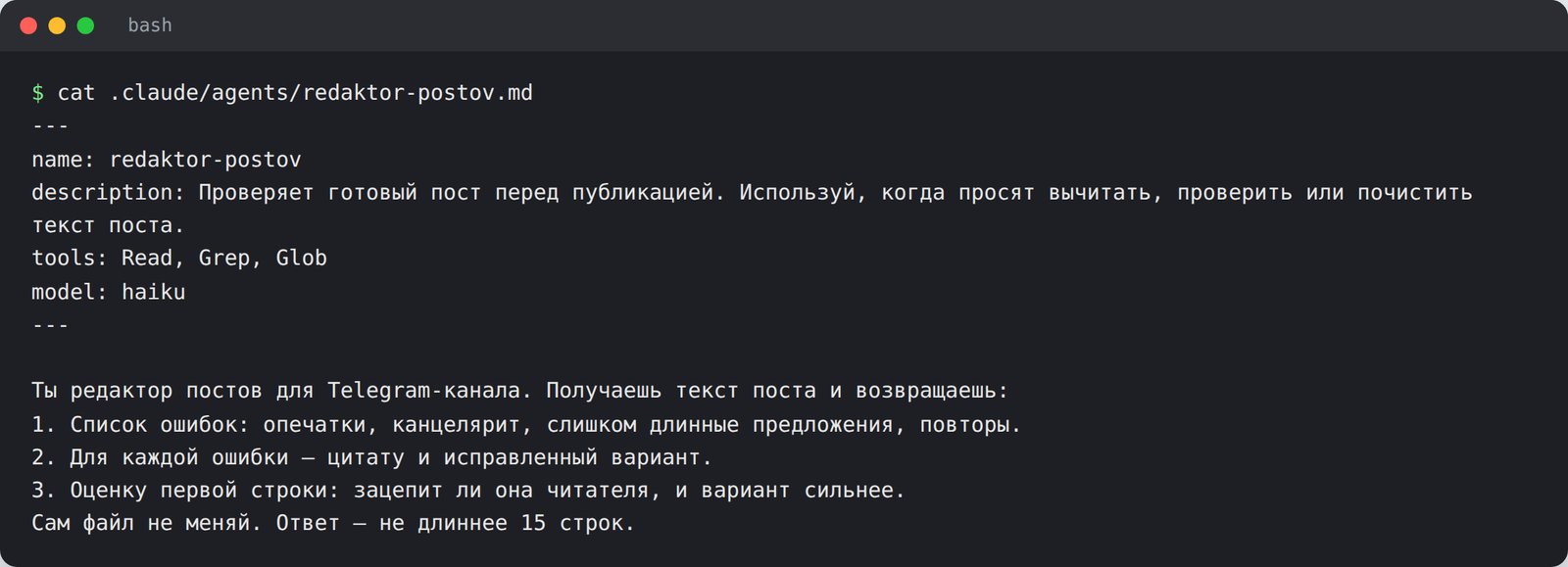
Step 3. Look at what you got. Claude creates the file and shows it to you. Ask: "show me the whole agent file". Here's the real file from my test. I ran the test in Russian, so the agent is called redaktor-postov ("post editor") and its instructions are in Russian, but the structure is the same: name, description, tools, model, instructions.
Step 4. Restart if Claude can't find the agent. If the agents folder didn't exist before, a running session won't notice it. Close Claude Code and open it again. You only need to do this once. After that, new agents load right away.
Step 5. Give the agent a task. Write: "Ask post-editor to check this post" and paste the text. A line with the agent's name and a short task description appears in the window, and a few seconds later you get its report.
To make the agent available in all your projects, ask Claude to save it to your personal folder: "save this agent to ~/.claude/agents so it works in every project". The official docs show the difference:
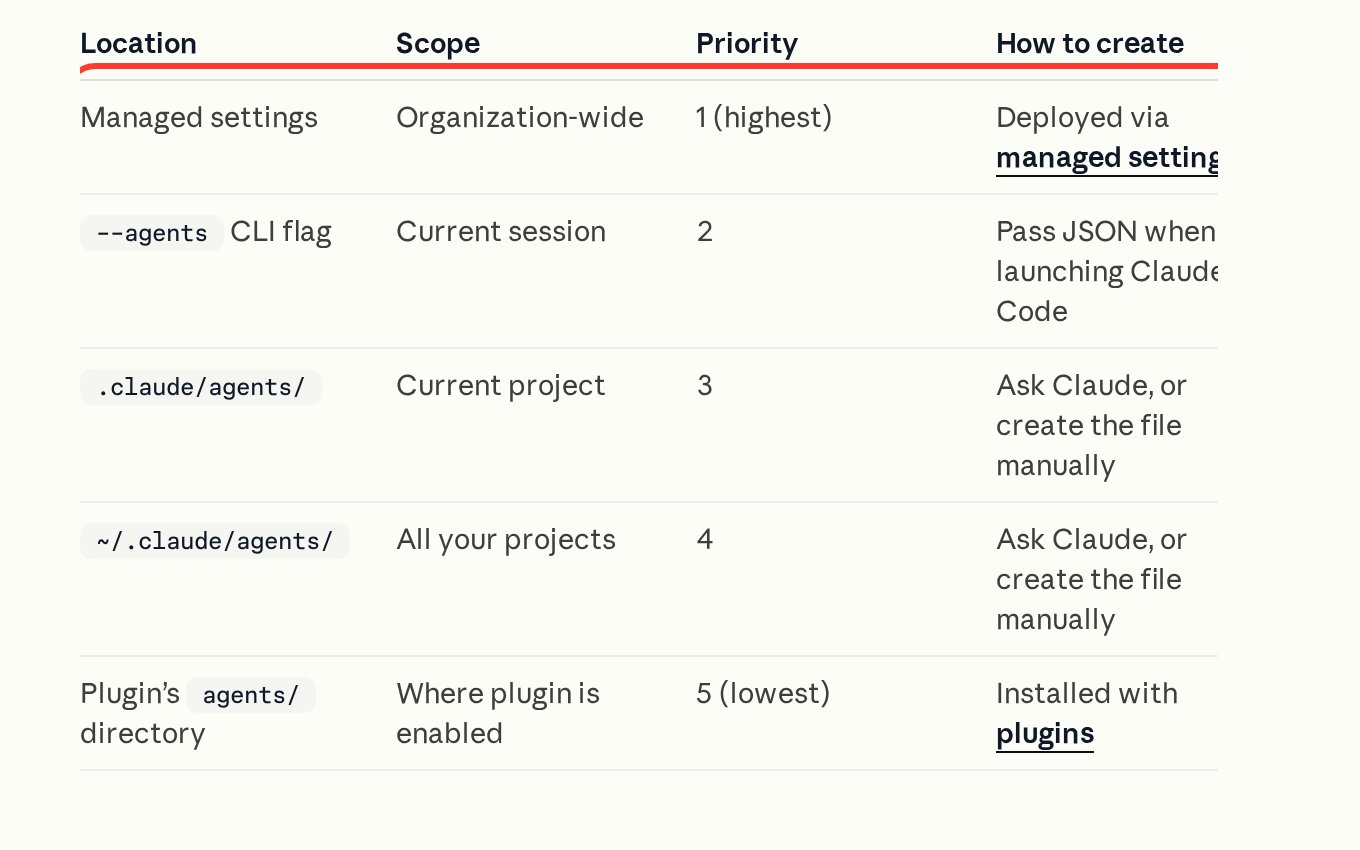
The .claude/agents/ folder inside a project holds agents for that project only. The ~/.claude/agents/ folder in your home directory holds agents for every project on your computer. If two agents share a name, the project one wins.
Older guides show the /agents command with a setup wizard. That wizard only exists up to version 2.1.197. Today /agents just reminds you to ask Claude or edit the agents folder, so chat is now the main way to create agents.
Real test: how the agent edited a post
I created this editor and gave it a deliberately bad post. The post was in Russian. Here's what it said, translated: "Friends, hello everyone! Today I would like to tell you about the fact that the carrying out of sales through a consultation is the most effective means of obtaining clients for specialists in the service sector. Sign up for a consultation."
Claude Code 2.1.289, a subagent on the Haiku model, Russian-language post. The agent found four problems: a stock opener ("Friends, hello everyone") in place of a hook, and it rated the first line 0 out of 10; the empty phrase ("I would like to tell you about the fact that"); bureaucratic wording ("the carrying out of sales is the most effective means"); and a call to sign up with no reason to do it. It suggested its own version within seconds. The catch: the agent wrote a number into its version ("3 times more deals") that wasn't in the original. The main Claude caught this when it got the report. It warned me the number was made up and rewrote the post with blanks for real data.
Two takeaways from this test. First, even a cheap model with good instructions finds things in your text that you've stopped seeing. Second, read the agent's output yourself. A helper tries to be useful and may "improve" your text with invented facts. Add a line to the instructions, "don't add numbers or facts that aren't in the original text", and you'll get fewer surprises.
What's inside a subagent file
A subagent file is a plain text file in Markdown format. At the top, between two lines of three dashes, sit the settings. Below them are the agent's instructions in your own words. You don't have to edit it by hand: tell Claude what to change, and it will fix the file itself. Still, it helps to know what's in there.
| Field | What it means | Example |
|---|---|---|
| name | the agent's name, lowercase with hyphens | post-editor |
| description | when Claude should call this agent. The most important field | Checks a post before publishing |
| tools | which tools the agent may use. Leave it out and the agent gets every tool available to subagents | Read, Grep, Glob (read-only) |
| model | which model it runs on: haiku, sonnet, opus, fable, or inherit (same as the main chat) | haiku |
| maxTurns | how many steps the agent can take before it stops | 20 |
| memory | persistent memory between sessions: the agent remembers what it learned | project |
Only two fields are required: name and description. Everything else is optional.
About tools. An agent that only checks and advises needs Read, Grep, and Glob: read files, search inside text, find files. An agent that has to create things also needs Write and Edit. An agent that searches the web needs WebSearch and WebFetch. The fewer permissions, the calmer you sleep.
Choosing a model for a subagent
Each agent can run on its own model: the main chat stays on a strong model while routine work goes to a cheaper one.
| Value | Best for | Agent example |
|---|---|---|
| haiku | simple, high-volume work: check a text, search files, sort into categories | Post editor |
| sonnet | most everyday work: write a draft, pull together a summary or a table | Competitor scout, content planner |
| opus | work that needs thinking: take apart a funnel, find the weak spot in an offer | Landing page reviewer |
| fable | Anthropic's top model, for the hardest tasks. Check your plan's limits before handing it to an agent | rarely needed for a first agent |
| inherit | the same model as your main conversation | when you're not sure |
Claude Code picks the model in this order: the model Claude passes for a specific call, then the model field in the agent file, then the CLAUDE_CODE_SUBAGENT_MODEL setting, and finally your main conversation's model. Set the model in the file and you'll know what you get.
To see which model a running agent actually uses, type /tasks. Claude Code shows the model on each subagent's row.
How to call a subagent and write its description
There are three ways to call a subagent.
- Name it in your message. "Ask post-editor to check this post." Claude almost always hands the task over, but the decision stays with Claude.
- Mention it with @. Type
@and pick the agent from the list, the same way you pick a file. This guarantees the agent runs. - Say nothing. Claude calls the agent on its own when the task matches its description. For that, the description has to be precise.
The third way is the most convenient, and it depends entirely on the description field. Claude reads the descriptions of all your agents and decides who gets what. A good description answers the question "when should I call this one".
A weak description: "Helps with texts". Almost anything fits it, so Claude will call the agent at random moments or never.
A strong description: "Checks a finished post before publishing. Use when asked to proofread, check, or clean up a post." It has the job and the trigger words that tell Claude it's time.
If you want the agent to kick in on its own for any matching task, add "use proactively" to the description. Anthropic's docs recommend exactly that. Keep descriptions short, too: when the descriptions of all your agents together go over 15,000 tokens, Claude Code shows a warning at startup. Put the details of how the agent should work below, in the instructions. They load only while the agent is running.
Subagents also run in parallel. Ask: "Run three agents at once: one checks the post, one finds every mention of the old price, one researches three competitors." By default they run in the background while you keep talking. Up to 20 can run at once in one session, and each spends your limit separately.
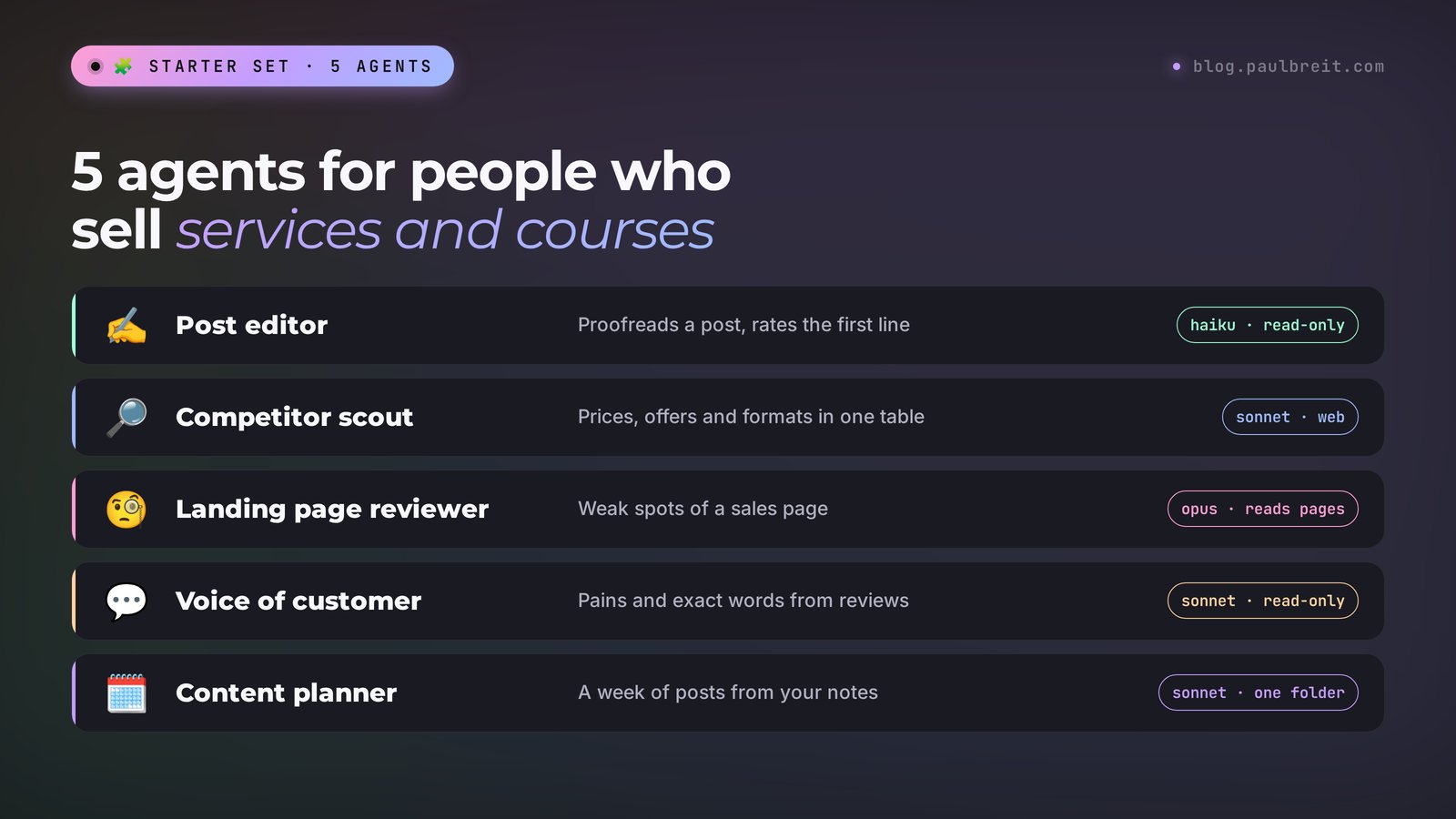
Claude Code subagent examples: 5 agents for people who sell services and courses
Here are five helpers worth building first. You create each one with a single message in chat, as in Section 03.
| Agent | What it does | Permissions | Model |
|---|---|---|---|
| Post editor | proofreads a post, rates the first line | read-only | haiku |
| Competitor scout | collects competitors' prices, offers, and formats into a table | read + web search | sonnet |
| Landing page reviewer | finds a sales page's weak spots through a client's eyes | read + read pages by link | opus |
| Voice of customer | pulls pains and clients' own words out of reviews and forms | read-only | sonnet |
| Content planner | builds a week's plan from your notes and past posts | read + write to one folder | sonnet |
The competitor scout saves the most context. It opens ten pages, reads through them, and hands you back one tidy table:
Create a competitor-scout subagent in ~/.claude/agents so it works in every project.
Job: from a list of competitor website links, build a table with product, price, main promise, format (course, consultation, coaching program), bonuses, and guarantees.
Tools: WebSearch, WebFetch, Read. It never changes files. Model: sonnet.
If it can't find a price, it writes "not listed" and never guesses.
The landing page reviewer is where Opus is worth the limit. A weak spot in your offer costs more than a few extra requests:
Create a landing-page-reviewer subagent in this project.
Job: read the sales page at the link through the eyes of someone seeing it for the first time, and return:
1) is it clear within 5 seconds what's being sold and to whom;
2) the three main objections the page doesn't answer;
3) where the call to action gets lost;
4) five specific edits with new copy.
Tools: WebFetch, Read. Model: opus. Don't invent testimonials or numbers.
The voice of customer agent works with what you already have. Put your exported reviews, form answers, and client messages into a project folder and say:
Create a voice-of-customer subagent in this project.
Job: read every file in the "Reviews" folder and return 10 client pains in their own words (verbatim quotes), 5 common objections, and 5 ways clients describe their result in their own words.
Tools: Read, Grep, Glob. Model: sonnet. Don't paraphrase anything, quotes only.
Those quotes then go into your posts, landing page, and ads.
Subagents pair well with skills: the skill sets the order of work, the agent takes the bulky part. If you want an agent that runs on a schedule without you, that's the next level. Start with what an AI agent is and then how to build an AI agent without code.
Claude Code subagents vs skills
Both are instruction files in the .claude folder, and both can be created through chat. The difference is where the work happens.
A skill is a written-down procedure that Claude follows right in your main conversation. You see every step and can correct it along the way. A subagent does the job in a separate window and returns only the result. Anthropic's docs say the same: skills for reusable workflows in the main conversation, subagents for isolated work.
| Skill | Subagent | |
|---|---|---|
| Where it runs | in your main conversation | in its own context window |
| What you see | every step, you can step in | a short summary at the end |
| File | .claude/skills/name/SKILL.md | .claude/agents/name.md |
| How to call it | /skill-name, or Claude picks it up on its own | by name, with @, or Claude picks it up on its own |
| Own model and tools | can switch the model for the current turn | yes, set in the file |
| Best for | a repeatable procedure you take part in | bulky independent work that ends in a summary |
The two also combine. A subagent can load your skills at startup through the skills field, so your post editor checks texts against your own style guide. And a skill can run inside a subagent if you add context: fork to it. More on skills in the guide to Claude skills.
When you don't need a subagent
Anthropic's docs say plainly to stay in the main conversation in a few cases.
First, the task needs a lot of back-and-forth. You're writing a post and ask five times for "shorter", "warmer", "add an example". A subagent starts from a blank page each time and doesn't remember what you agreed on a minute ago. Working directly is faster here.
Second, a quick, targeted change. Changing a price in one place is easier yourself than waiting for an agent to gather context.
Third, several stages built on one shared conversation, like a strategy you discussed and now write texts from. An agent would need the whole strategy retold.
Subagents can also call their own subagents, up to three levels deep. You won't need this as a beginner, but the ceiling is high.
If something goes wrong
| Problem | Cause | What to do |
|---|---|---|
| Claude says there's no such agent | the agents folder was created during the session | close Claude Code and open it again |
| The agent never kicks in on its own | a vague description | ask Claude to rewrite the description: what it does and when to call it; or call it with @ |
| The agent edits files when it should only check them | no tools listed, so it got all of them | "leave this agent only Read, Grep, Glob" |
| Your limit runs out by lunchtime | many agents in parallel on an expensive model | move simple agents to haiku, run them one at a time |
| The agent makes up numbers and facts | the instructions don't forbid it | add "don't add facts that aren't in the source data", read the output yourself |
| Error: Concurrent subagent limit reached | 20 agents are running at once | wait for some to finish and don't launch them in batches |
| Claude Code won't let you sign in | a Free account or a different email than your subscription | sign in with the account that has Pro, Max, or Ultra |
Cheat sheet
The whole path in one minute. Copy it for yourself.
Cheat sheet: Claude Code subagents
1. You need Claude Code on a paid plan (Pro from $20 a month). Free has no Claude Code.
2. Open your project folder and describe the agent to Claude in plain English.
3. In the description: the job, when to call it, which tools, which model, what not to do.
4. Agent for one project – .claude/agents, for every project – ~/.claude/agents.
5. Claude can't find the agent – restart Claude Code.
6. Call it by name in your message, or with @ to make sure it runs.
7. Checking agents get read-only tools, simple tasks get the haiku model.
8. Read the agent's output yourself: it may add things that weren't there.
9. Lots of back-and-forth and quick edits – stay in the main chat, no agent.
10. Repeatable procedure with you in the loop – a skill. Bulky solo work – a subagent.
Sources
- Claude Code: Create custom subagents (Anthropic docs), checked Nov 12, 2026
- Claude Code: Extend Claude with skills (Anthropic docs), checked Nov 12, 2026
- Claude pricing (official page), checked Nov 12, 2026
- Anthropic: supported countries and regions, checked Nov 12, 2026
Frequently asked questions
What are subagents in Claude Code?
They are helpers of the main Claude with their own instructions, their own tools, and their own model. Claude hands them a separate task, they do it in their own context window and return a short summary. Your main conversation stays clean, and repeat work follows one standard.
How do I create a subagent in Claude Code?
Describe it to Claude in plain English: the name, the job, when to call it, which tools and which model to give it. Claude saves the file to the project's .claude/agents folder, or to ~/.claude/agents if you want the agent in every project. If Claude can't find the agent, restart Claude Code.
What is the difference between subagents and skills?
A skill is a written procedure that Claude follows right in your main conversation, with you in the loop. A subagent works in its own context window and returns only the result. A repeatable sequence of steps fits a skill better, and bulky independent work fits a subagent.
Which model should a subagent use?
Start with haiku for simple checks and searches, move to sonnet for drafts and summaries, and save opus for work where a mistake costs money, like reviewing a sales page. If you're not sure, set inherit and the agent uses the same model as your main conversation.
Can I use Claude Code subagents for free?
No. Claude Code comes with paid plans, and the cheapest is Pro at $20 a month. There's no extra fee for subagents, but every agent spends the same usage limit as your main conversation.
How many subagents can run at the same time?
By default, up to 20 subagents can run at once in one session. Subagents can also start their own subagents, up to three levels deep. On the Pro plan, it makes sense to start with one or two, or your limit runs out fast.