Claude Pricing Plans 2026: Free, Pro, Max and Ultra – Which One to Pick
Claude pricing plans in 2026 come down to one free tier and three paid ones: Pro, Max and Ultra, plus Team and Enterprise for companies. Here is what each plan includes, what it costs in dollars, how the usage limits work, and which plan fits your work so you don't overpay.
Claude pricing plans: Free costs $0 and runs Sonnet and Haiku with tight limits. Pro is $20 a month ($17 billed annually) and adds Opus, Claude Code, Projects and Cowork. Max is $100 a month with 5x Pro usage. Ultra is $200 with 10x Pro per week and no 5-hour limit. Most people do fine on Pro.
What's inside
- Every Claude plan in one table
- Free: what you get and where it stops
- Pro: the everyday working plan
- Max and Ultra: when Pro gets tight
- How usage limits work: 5 hours and a week
- Which plan to pick for your work
- Team and Enterprise plans
- How to subscribe, upgrade and cancel
- Mistakes people make when choosing a plan
- The whole choice in one minute
- Sources
Section 01Every Claude plan in one table
I checked these prices on the official claude.com/pricing page on November 10, 2026. Anthropic bills in US dollars. Depending on where you live, sales tax or VAT may be added at checkout, so the final charge on your card can be a little higher than the sticker price.
| Plan | Price | Models | How much work fits |
|---|---|---|---|
| Free | $0 | Sonnet, Haiku | Limited: a 5-hour cap and a weekly cap |
| Pro | $20/month, or $17/month billed annually ($200 up front) | Sonnet, Haiku, Opus; Fable only on usage credits | More than Free, every 5 hours and every week |
| Max | $100/month | All models, Fable included up to half the weekly limit | 5x Pro, every 5 hours and every week |
| Ultra | $200/month | All models, Fable included up to half the weekly limit | 10x Pro per week, no 5-hour limit |
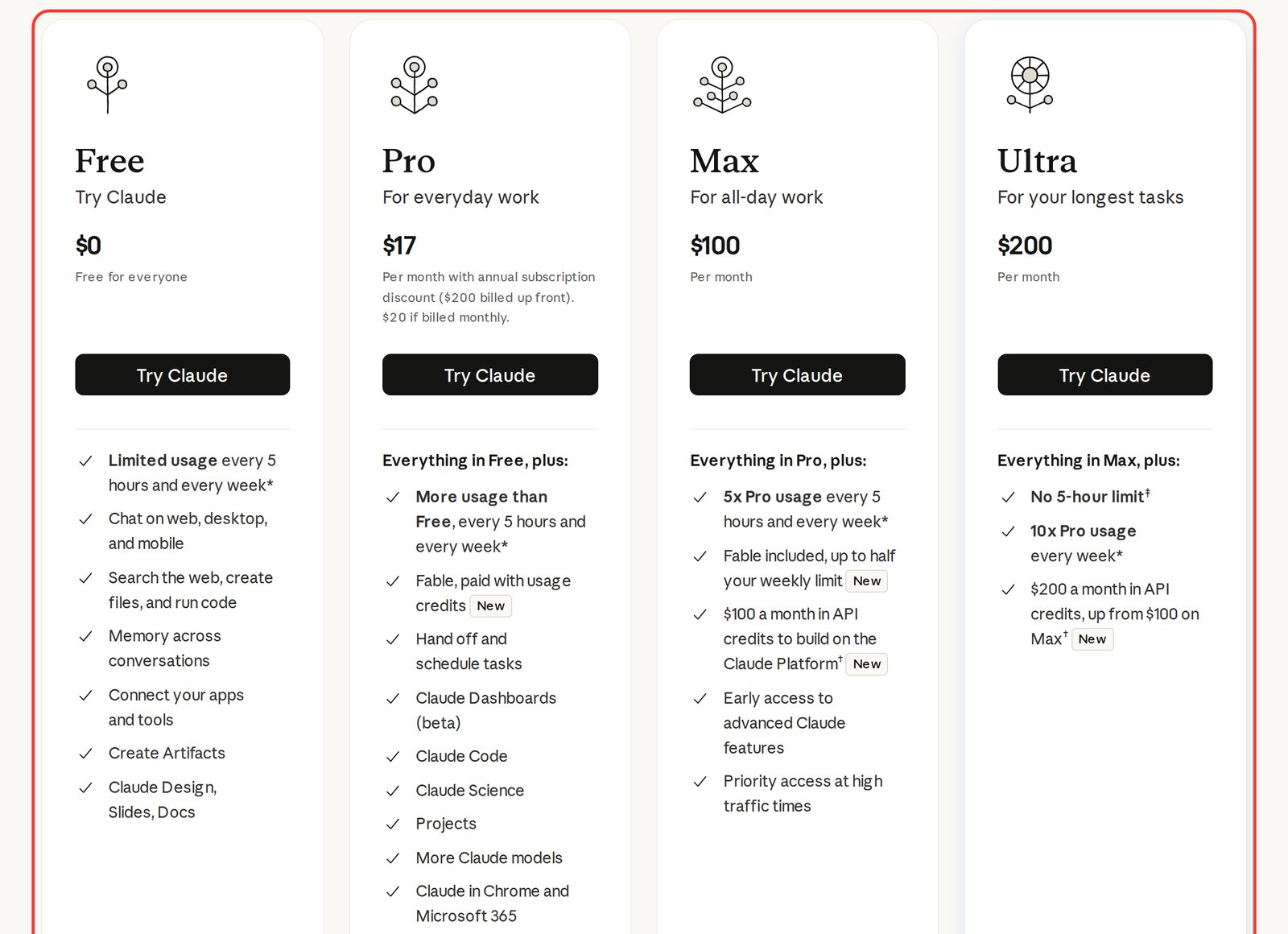
If you read about Claude plans a while ago and remember the names Max 5x and Max 20x, those are the same plans. In the fall of 2026 Anthropic renamed the lineup: Max 5x became plain Max, and Max 20x became Ultra. Ultra also lost the 5-hour limit, and both top plans now come with monthly API credits. Older articles that still say "Max for $200" are describing what is now Ultra.
Section 02Free: what you get and where it stops
The free Claude plan is more generous than most people expect. You get chat on the web, in the desktop app and on your phone, web search, file uploads, memory across conversations, connected apps, and Artifacts – small apps that run right inside the chat window. Claude Design, Slides and Docs are on Free too. The models are Sonnet and Haiku, and Sonnet handles most everyday tasks well.
Where Free runs out:
- Usage. You don't get many messages, the counter resets every 5 hours, and a weekly cap sits on top. Upload a long document, go back and forth for half an hour, and you're probably done for the day.
- No Opus. The strongest model for complex writing and analysis is paid-only.
- No Claude Code and no Projects. The agent that builds sites and automations, and Claude Projects with a permanent knowledge base, start at Pro.
- No Cowork. Handing Claude a multi-step task and putting it on a schedule needs a paid plan. More on that in how to use Claude Cowork.
Free is the right place to find out whether Claude is your tool: a couple of questions a day, a post, a reply to a tricky email. Once you use Claude daily, the limit becomes the main topic of your relationship with it. Other options that cost nothing are in free AI tools.
Section 03Pro: the everyday working plan
Claude Pro costs $20 a month. Billed annually it's $200 in one payment, which works out to about $17 a month. You save $40 a year, and you pay the full amount up front.
What Pro adds on top of Free:
- More usage every 5 hours and every week. Anthropic doesn't publish an exact message count: it depends on conversation length, files and the model.
- Opus, the top model for hard work: sales copy, offer reviews, long documents. I broke down the latest version in Claude Opus 5.5.
- Claude Code, the agent that builds websites, bots and automations from your description. Where to begin is in how to use Claude Code.
- Projects, Research and Cowork: a knowledge base per task, deep research with a written report, and the ability to hand off and schedule tasks.
- Claude in Chrome and Microsoft 365, plus Claude Science and Claude Dashboards (beta).
Fable models aren't included in Pro: every Fable request is billed to separately paid usage credits from the first message. For regular work Opus and Sonnet are enough.
Section 04Max and Ultra: when Pro gets tight
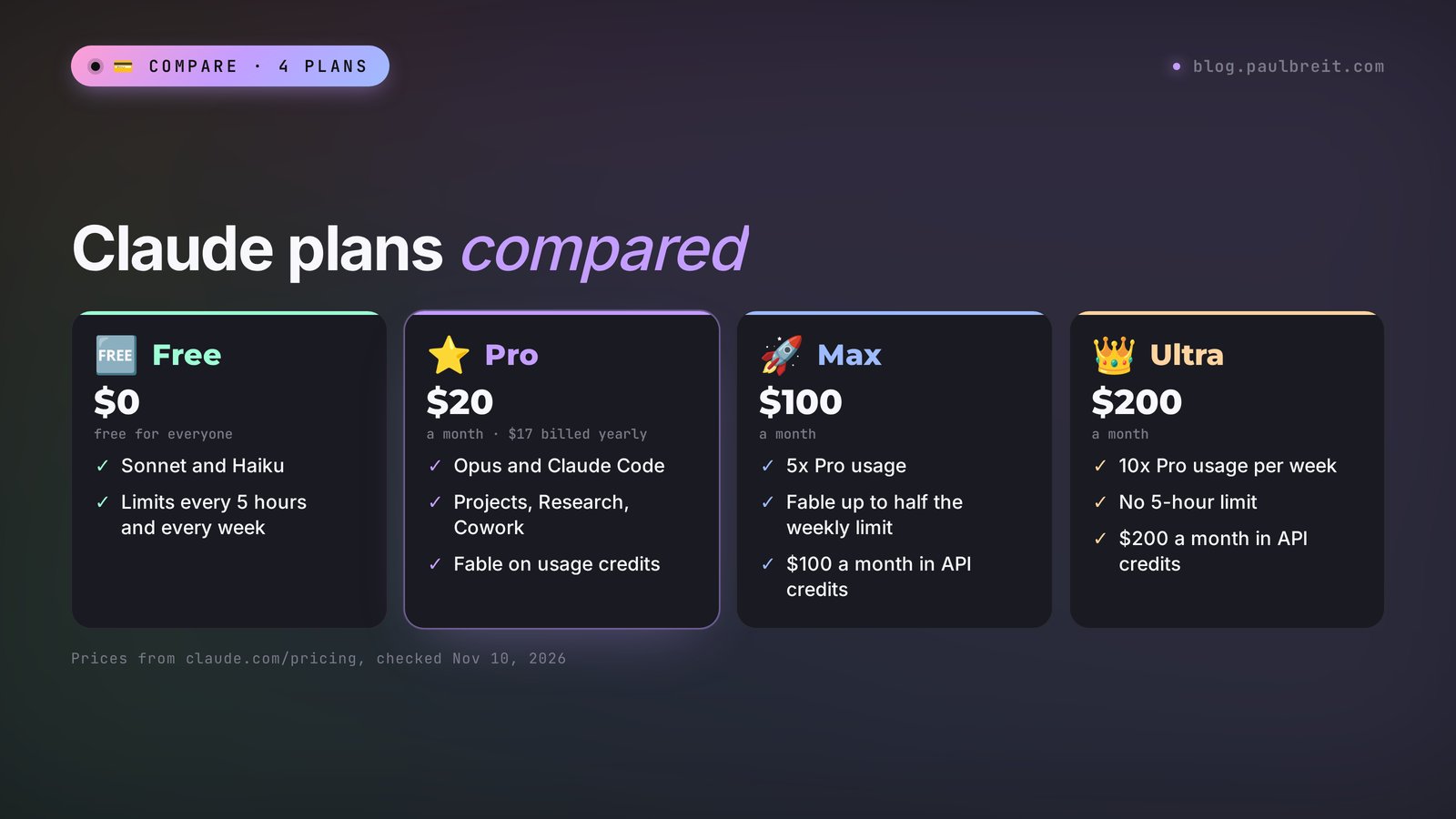
Max and Ultra have the same features as Pro, with much more headroom and a few extras. You pay for room to work without hitting the ceiling.
Max: $100 a month. You get 5x the usage of Pro, both per 5-hour session and per week. Fable models are included: you can spend up to half your weekly limit on them. On top of that come $100 a month in API credits for the Claude Platform, so you can plug Claude into your own services and bots (the setup is in how to get a Claude API key). You also get early access to new features and priority access when traffic is high.
Ultra: $200 a month. Everything in Max, plus 10x Pro usage per week and $200 a month in API credits. The big difference is the missing 5-hour limit: according to the footnote on the pricing page, this applies to verified accounts. You never wait for a reset in the middle of the workday. The only ceiling left is the weekly one.
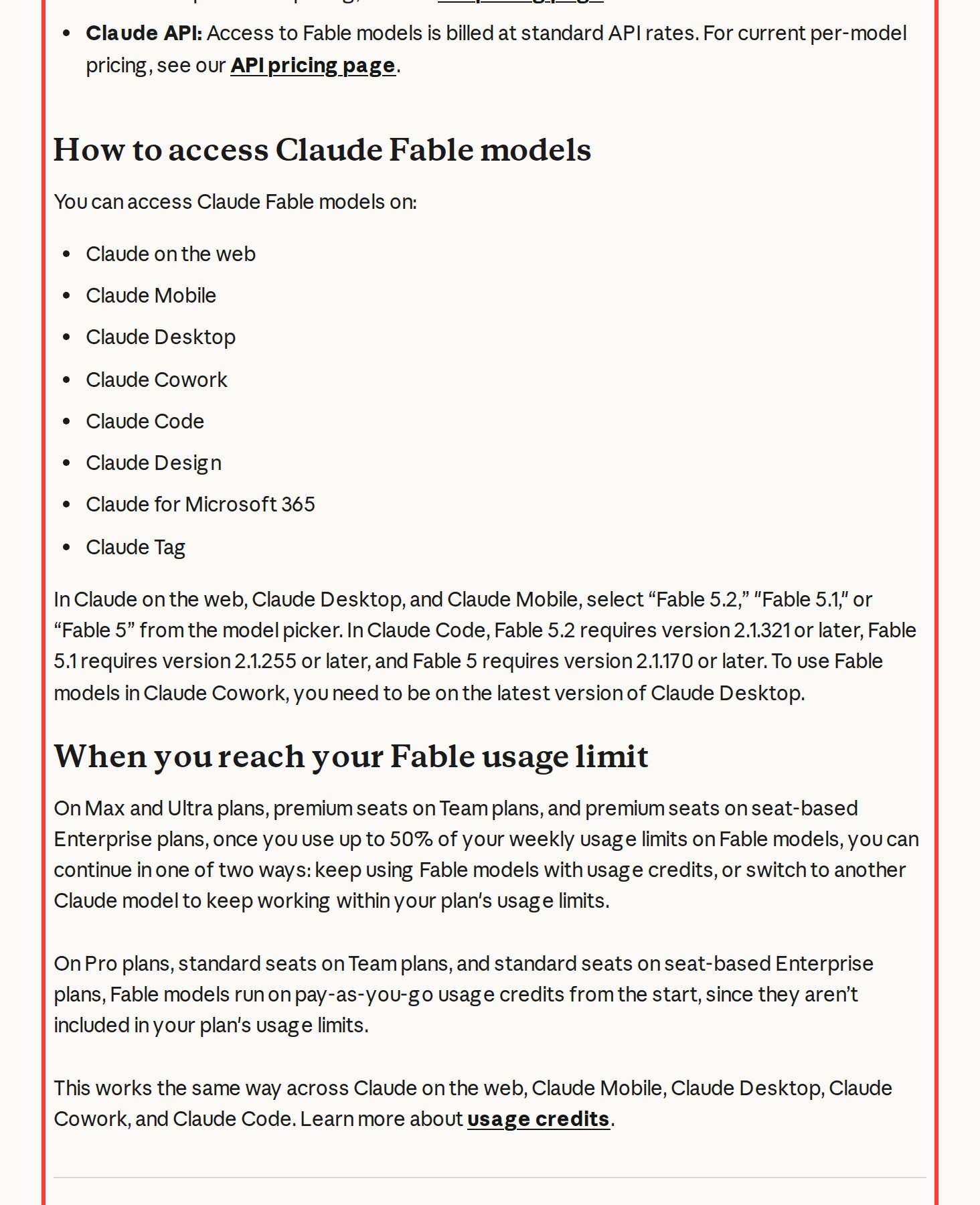
The screenshot from Anthropic's help center shows the Fable rule. On Max and Ultra, once you've used up to 50% of your weekly limit on Fable, you have two options: keep going on Fable with usage credits, or switch to another model and keep working inside your plan. On Pro, Fable runs on credits from the first request.
One detail people miss: the monthly API credits on Max and Ultra are for building on the Claude Platform. They don't cover extra usage in the Claude app, Claude Code or Cowork, and unused credits expire at the end of each billing cycle.
If you mostly write posts and answer client messages, Max and Ultra are money you don't need to spend. Who does need them is in Section 06.
Section 05How usage limits work: 5 hours and a week
On every plan except Ultra, Claude has two counters. The first is a session limit: the 5-hour window starts with your first message and resets in full five hours later. The second is weekly and resets at a fixed day and time assigned to your account. Hit either one and Claude asks you to wait. You can see both counters and the time until reset in Settings > Usage.
Usage is measured by the amount of work, and the number of messages matters less. A short question costs little. A long conversation with three uploaded PDFs costs a lot, because Claude rereads the whole thread for every reply. Opus burns through the limit faster than Sonnet, and Fable faster than any other model. Everything you do in the chat, the desktop app and Claude Code counts toward the same limit.
What to do when you run out:
- A new conversation for each new task. Each reply carries the whole history with it.
- Sonnet for simple work. Posts, emails and idea lists cost less on Sonnet. Save Opus for the hard stuff.
- Usage credits. On Pro, Max and Ultra you can turn on pay-as-you-go: when the counter runs out, your requests keep going at standard API rates. Handy in a crunch, and you can set a spend limit so the bill doesn't surprise you.
- Move up a plan. If you hit the ceiling every single week, Max is calmer than constantly topping up credits.
Section 06Which plan to pick for your work
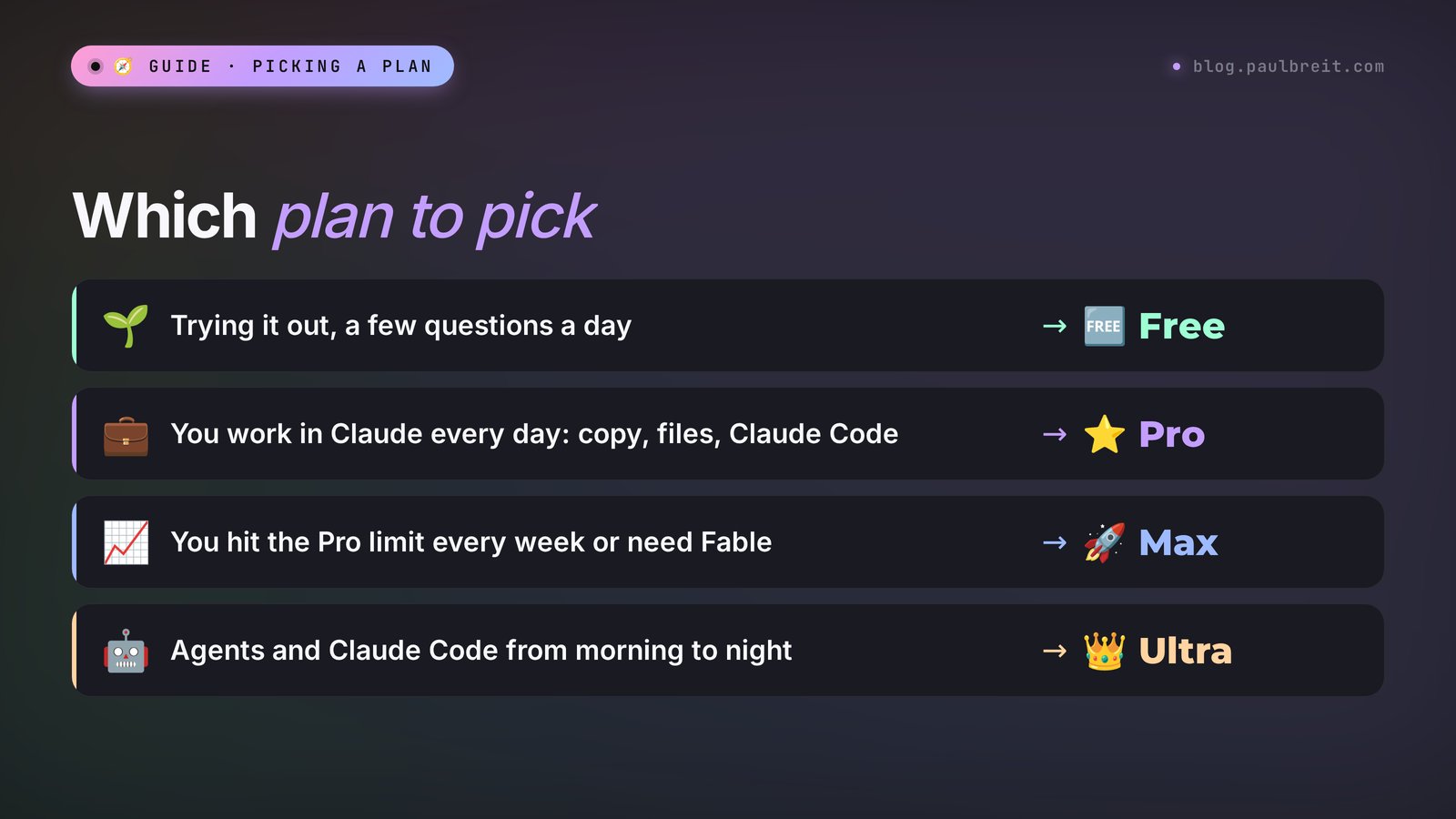
The choice comes down to one question: how many hours a week do you really spend in Claude, and what do you do there? Here are four typical situations.
Trying it out or asking a few questions a day → Free
A couple of posts a week, the odd email or brainstorm. Work on Free for a week and count how often you hit the limit.
Working in Claude every day → Pro
Content, client intake forms, a course outline, the occasional landing page in Claude Code. This is the main scenario for anyone who sells services, courses and consulting, and Pro covers it.
Running out of Pro every week → Max
You spend the day in Claude Code, work with long documents on Opus, or need Fable without paying per request. Max gives you 5x the headroom plus API credits.
Agents running for hours nonstop → Ultra
Several agents in Claude Code work from morning till night, and the 5-hour reset keeps breaking the flow.
Not sure where you land? Describe your week to Claude and let it do the math. Copy this prompt and fill in your own tasks:
Help me pick a Claude plan: Free, Pro ($20 a month), Max ($100) or Ultra ($200, no 5-hour limit).
What I do: [your niche].
What I do in Claude each week: [for example: 5 posts, review 20 intake forms, a course outline, a landing page in Claude Code once a month].
Hours a day I work in Claude: [number].
Do I hit the limit now: [yes/no, how often].
Tell me which plan I need, why, and what I lose if I take the plan one step lower.
I ran this prompt with a sample profile: a coach, 5 posts a week, 20 intake forms to review, a course outline, a landing page in Claude Code once a month, 1-2 hours a day in Claude, hitting the Free limit almost every day. Claude's answer:
"You need Pro. Your tasks – writing, reviewing intake forms and the course outline – are covered by Sonnet and Opus without Fable, and a landing page once a month fits easily into the Pro limit, since Claude Code is included. At 1-2 hours a day you'll rarely hit the Pro limit, especially if you keep separate tasks in separate conversations. Max at $100 only makes sense if you start working in Claude Code every day. If you stay on Free, you lose Opus, Claude Code and Projects, and the limit will run out halfway through your intake forms."
If you're still deciding on the AI itself, start with Claude vs ChatGPT: it shows which one is stronger for which tasks.
Section 07Team and Enterprise plans
When a whole team works in Claude – you, an assistant, a marketer and a salesperson – the company plans come into play. Prices from claude.com/pricing as of November 10, 2026:
| Plan | Price per seat | Who it's for |
|---|---|---|
| Team, standard seat | $25/month, or $20/month billed annually | People who'd be fine on Pro |
| Team, premium seat | $125/month, or $100/month billed annually | People who spend the day in Claude Code |
| Enterprise | $20 per seat/month, 20 seats minimum, plus usage | Companies with a security team |
For a team of two or three, giving each person their own Pro is often simpler and cheaper.
Section 08How to subscribe, upgrade and cancel
Everything about your plan lives in Settings > Billing.
Create an account and pick a plan
Sign up at claude.ai, open the plans page and choose Pro, Max or Ultra. Start monthly: outside of legal exceptions, payments are non-refundable, so an unused annual plan is money gone.
Pay with a card
Anthropic accepts credit and debit cards, no PayPal or Venmo. Subscriptions bought in the iPhone or Android app are billed and managed by the App Store or Google Play.
Upgrade or switch to annual
In Settings > Billing, click "Adjust plan" to move from Pro to Max or Ultra, or to switch Pro from monthly to annual. When you switch to annual, the unused part of your current month is credited to the first annual invoice.
Downgrade or cancel
Click "Cancel" in Settings > Billing. The plan keeps working until the end of the period you've paid for. Cancel at least 24 hours before the next billing date to avoid another charge. In the EU and the UK you may get a prorated refund within 14 days of purchase.
Card declined? The usual causes, per Anthropic's help center: a billing address that doesn't match your bank's records, a card country outside the supported list, an unfinished 3D Secure check, or low funds. If another card doesn't help either, see Claude payment methods.
Taxes. Whether sales tax or VAT is added depends on your billing address. Buying for a business, you can add a tax or VAT ID at signup. Receipts arrive by email and sit under Invoices in Settings > Billing.
Section 09Mistakes people make when choosing a plan
| Mistake | Why it happens | What to do |
|---|---|---|
| Bought Max "to grow into" | It feels like more usage means better results | Start with Pro. Answer quality is the same on Pro and Max, only the volume differs |
| Paid for a year without trying a month | The discount is tempting | Go monthly first, switch to annual once you're sure |
| Pro runs out in an hour | One long conversation with files on Opus | A new conversation per task, Sonnet for simple work |
| A surprise charge on top of the plan | Fable on Pro or usage credits turned on | Check your usage credit settings and set a spend limit |
| Relied on an old article | The plans were renamed, Max 20x is now Ultra | Check prices on claude.com/pricing before paying |
The first mistake is the most common. Opus on Pro answers exactly like Opus on Ultra: you're buying working time. To make it last, learn to give short, precise tasks with Claude prompts and Claude from scratch.
Section 10The whole choice in one minute
Free to try, Pro for daily work, Max when Pro runs out every week, Ultra when the 5-hour reset gets in your agents' way. Here is the whole guide as one list – copy it for yourself.
Cheat sheet: Claude pricing plans (prices as of Nov 10, 2026)
1. Free – $0: Sonnet and Haiku, tight limits. For trying it out.
2. Pro – $20 a month, $200 a year: Opus, Claude Code, Projects, Cowork.
3. Max – $100: 5x Pro, Fable up to half the weekly limit, $100 in API credits.
4. Ultra – $200: 10x Pro per week, no 5-hour limit, $200 in API credits.
5. Usage is measured by work: a new conversation per task, Sonnet for simple jobs.
6. First month monthly, annual once you're sure.
7. Plan, card, invoices and cancel: Settings > Billing.
8. Check prices on claude.com/pricing before you pay.
Section 11Sources
- Anthropic: Claude plans and pricing, checked November 10, 2026
- Anthropic: Claude Fable models on your plan, checked November 10, 2026
- Anthropic: Manage usage credits for paid Claude plans, checked November 10, 2026
- Anthropic: How do usage and length limits work?, checked November 10, 2026
- Anthropic: Cancel your Pro, Max, or Ultra subscription, checked November 10, 2026
- Anthropic: Why was my card declined?, checked November 10, 2026
FAQFrequently asked questions
How much does Claude Pro cost?
Claude Pro costs $20 a month. Billed annually it's $200 up front, which works out to $17 a month. Depending on your country, sales tax or VAT may be added at checkout.
What is the difference between Claude Max and Ultra?
Max costs $100 a month and gives 5x the usage of Pro plus $100 a month in API credits. Ultra costs $200 a month and gives 10x Pro usage per week, $200 a month in API credits, and no 5-hour limit for verified accounts.
Can I use Claude for free?
Yes. The Free plan costs nothing and includes chat, web search, files, memory and Artifacts on Sonnet and Haiku. The catch is a small limit that resets every 5 hours, plus a weekly cap. Opus, Claude Code and Projects aren't available on Free.
Is Claude Code included in Claude Pro?
Yes. Claude Code comes with every paid plan starting from Pro, and it shares the same usage limit as chat. If you work in Claude Code every day and keep hitting the limit, Max is the next step.
What happens when I hit my Claude usage limit?
Claude asks you to wait for the reset: the session limit resets five hours after your first message, the weekly limit once a week. On paid plans you can turn on usage credits and keep working at standard API rates, or move up a plan.
Can I cancel Claude Pro anytime?
Yes. Go to Settings > Billing and click Cancel. The plan keeps working until the end of the paid period. Cancel at least 24 hours before your next billing date to avoid being charged again.