How to Get a Claude API Key (and What It Costs) in 2026
The Claude API is how your bots, sites, and AI agents talk to Claude on their own: a program sends Claude a question and gets the answer back, with no chat window in between. To use it you need three things: a Console account, a funded balance, and an API key. Here is the whole path step by step, what requests actually cost as of October 31, 2026, how to send your first request with or without code, and how to avoid burning money in week one.
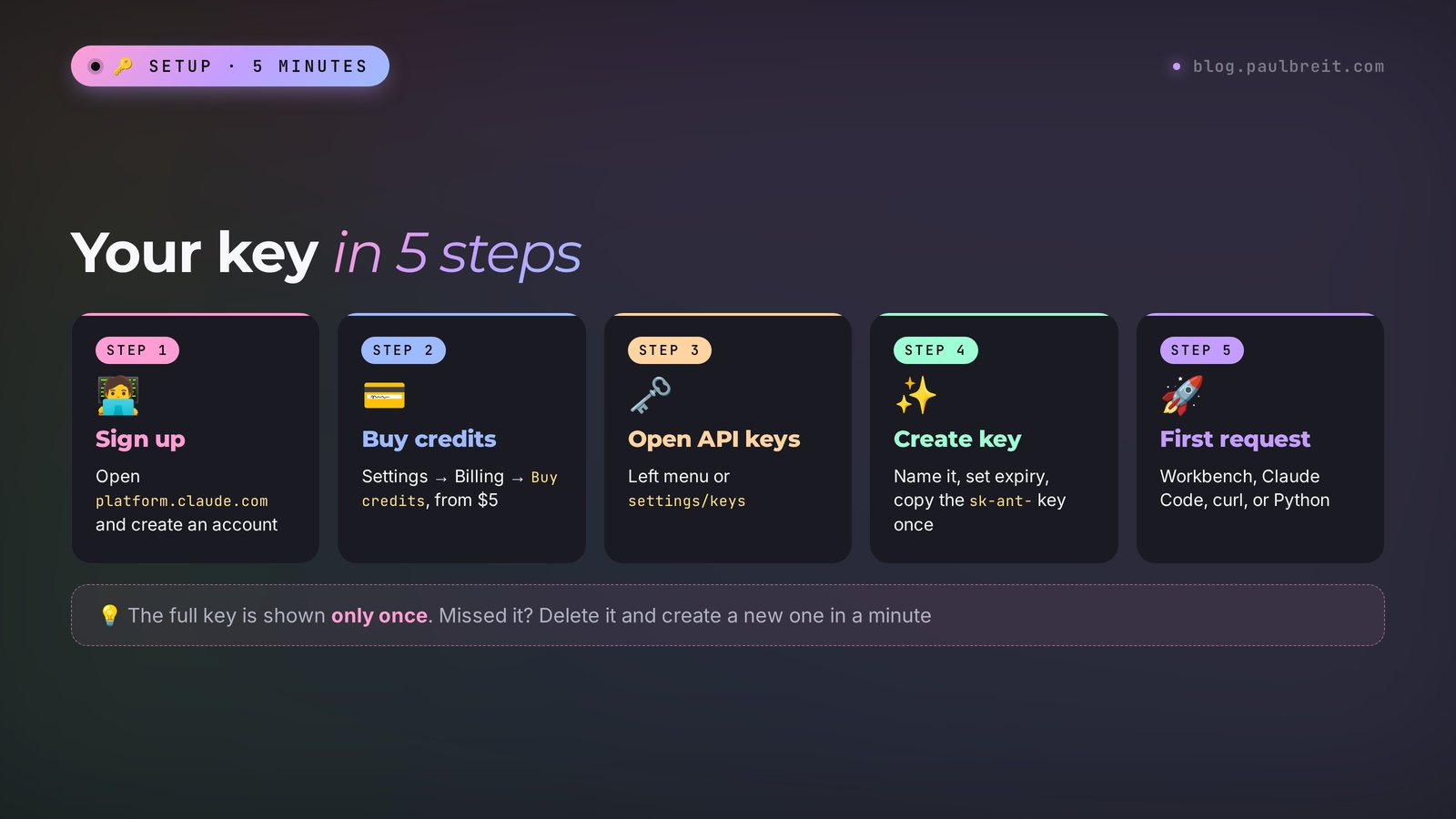
To get a Claude API key, sign up at platform.claude.com, open Settings, then Billing, and buy at least $5 in credits. Then go to API keys, click Create key, give it a name and an expiry, and copy it right away: it starts with sk-ant- and is shown only once. Send your first request from the Workbench in the browser, through Claude Code, with curl, or with the official Python library. Start with Sonnet 5.5 at $2 per million input tokens and $10 per million output tokens, and set a monthly spend limit before you build anything.
Anyone who sells services, courses, or consulting and wants AI to work without them in the loop. A therapist gets a Telegram bot that answers questions about session formats at night. An online school gets homework checked against clear criteria. A nutritionist gets food diaries reviewed against a template. A coach gets a site assistant that knows every program. If you only chat with Claude in a window, you don't need the API, a subscription is enough. You need the API when Claude has to work inside your own service.
What's inside
- What the Claude API is and how it differs from a subscription
- What the Claude API costs in 2026
- Signing up in the Console
- How to buy credits
- How to create an API key
- Your first request, with and without code
- A live test
- Where to run it 24/7
- How not to overspend
- How to keep the key safe
- When something goes wrong
- API, subscription, or Claude Code
- The whole path in a minute
- FAQ
Section 01What the Claude API is and how it differs from a subscription
Claude has two doors. The first one everybody knows: the claude.ai site, the phone app, the chat window. You type, Claude answers. You pay with a subscription: Pro at $20 a month or Max at $100 and $200.
The second door is the API. It is the entrance for programs. Your Telegram bot receives a client's question, forwards it to Claude by itself, gets the answer, and sends it back to the client. No human in the chain. A site with an assistant, a spreadsheet that sorts incoming leads into categories on its own, an agent that builds a sales report every morning – all of that runs through the API.
The one thing to remember from the start: these are two separate wallets. A Pro subscription gives you zero free API requests. An API balance does not unlock Pro in the chat. Even the accounts live in different places: the chat is at claude.ai, the API is in the developer Console at platform.claude.com. You can sign in with the same email, but each door has its own billing.
How the money is counted
A subscription works like a gym membership: you pay a fixed amount and use it within the limits. The API works like an electricity meter. You put money on the balance up front, and every request takes its share depending on how much text went into Claude and how much came back.
Text is measured in tokens. A token is a piece of a word. The official models page gives a conversion: a million tokens is roughly 555,000 English words. For quick math, think of a dense page of text as about a thousand tokens. Prices are listed per million tokens, separately for input (what you sent) and output (what Claude wrote). Output always costs five times more than input.
What you can build with the API
- A Telegram bot that answers clients in your words – how to build one with no programmer is covered in Telegram bot without a programmer.
- An assistant on your site that knows your programs and prices. Example: an AI consultant on your site.
- An agent in your DMs that replies to leads and books calls: an AI agent in your Telegram DMs.
- Bulk processing: sort 500 reviews, rewrite 200 product descriptions, check 50 homework assignments overnight.
- Connecting Claude to no-code services: Make, n8n, and similar builders ask for exactly this API key.
If you want Claude for yourself in a chat window, start with Claude from scratch: sign-up and plans are covered there. This article is about the next step, when Claude has to work inside your services on its own.
Section 02What the Claude API costs in 2026
Prices were checked against the official claude.com/pricing page and the models overview, limits against the rate limits page. Anthropic updates prices when new models come out, so check the current numbers there before any big spend.
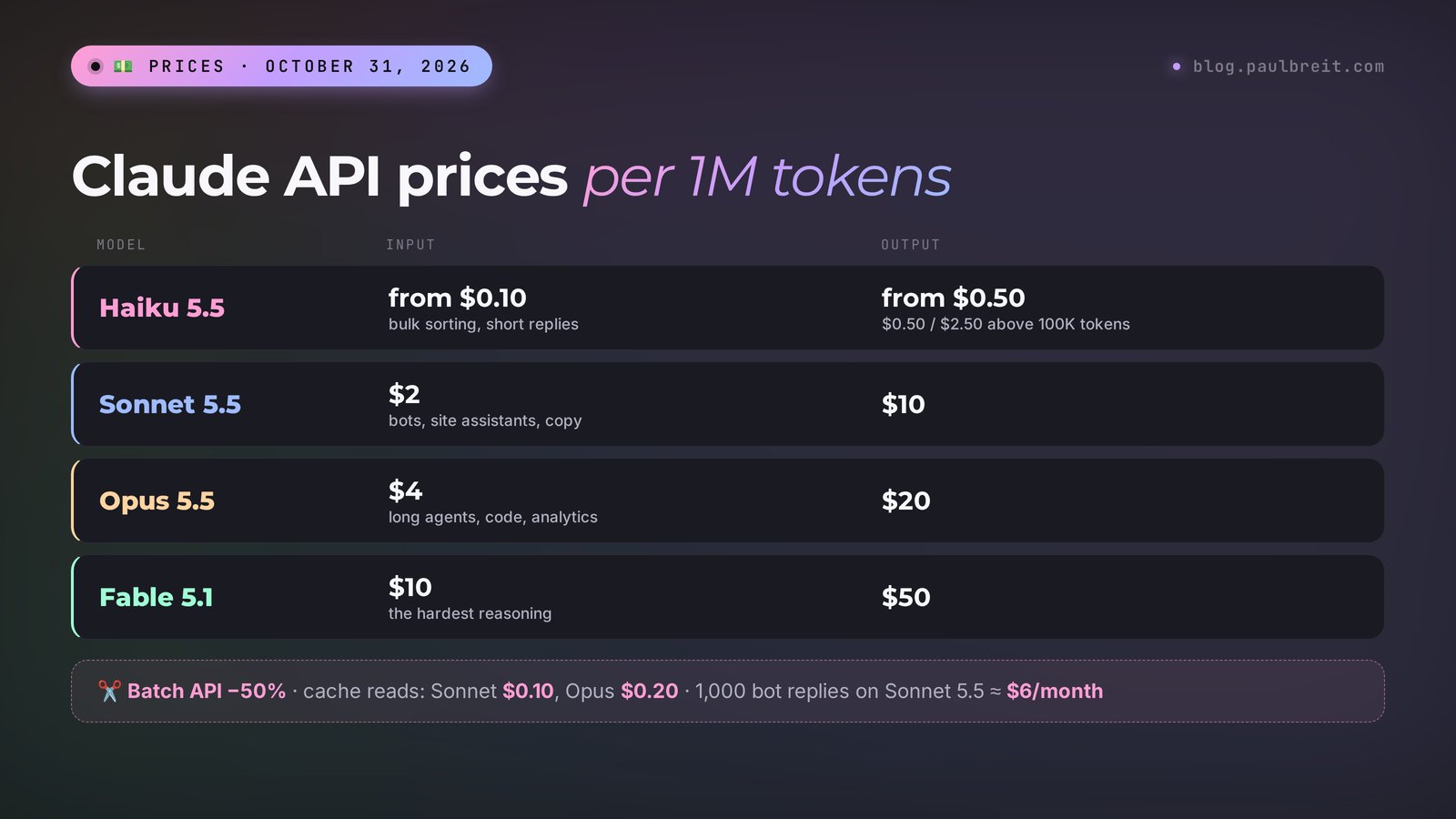
| Model | Best for | Input, $ per 1M tokens | Output, $ per 1M tokens |
|---|---|---|---|
| Haiku 5.5 | Fast bulk tasks: sorting leads, short replies, pulling data out of text | from 0.10 | from 0.50 |
| Sonnet 5.5 | The best balance of speed and brains: bots, site assistants, copy | 2 | 10 |
| Opus 5.5 | Hard work: long-running agents, code, analytics | 4 | 20 |
| Fable 5.1 | The hardest reasoning and long autonomous tasks | 10 | 50 |
Haiku 5.5 has two-tier pricing. A request up to 100,000 tokens costs $0.10 for input and $0.50 for output. Above that, the price rises to $0.50 and $2.50. A bot with short questions almost always stays in the lower tier.
All four models have a context window of one million tokens and can write up to 128,000 tokens in a single answer. Their knowledge runs through June 2026.
Discounts worth knowing
- Batch processing. If you don't need the answer instantly, send tasks as a batch through the Batch API: the price drops by 50%. Good for overnight processing of reviews, descriptions, and homework.
- Prompt caching. If every request repeats the same large chunk, say a ten-page bot instruction, you can cache it. Reading from the cache on Sonnet 5.5 costs $0.10 instead of $2 per million tokens, on Opus 5.5 $0.20 instead of $4.
- Fast mode. Opus 5.5 also has the opposite option: answers 2.5x faster at twice the price. A beginner doesn't need it.
What that means in real life
"Dollars per million" says nothing on its own, so here is a live example. A therapist's bot answers 1,000 client questions a month. Each request carries the bot instruction plus the question – about 1,500 input tokens. The answer is about 300 tokens. Over a month that comes to 1.5 million input tokens and 0.3 million output tokens.
| Model | Input per month | Output per month | Total |
|---|---|---|---|
| Haiku 5.5 | $0.15 | $0.15 | $0.30 |
| Sonnet 5.5 | $3 | $3 | $6 |
| Opus 5.5 | $6 | $6 | $12 |
| Fable 5.1 | $15 | $15 | $30 |
A thousand client replies for 30 cents. Really. That's why the $5 minimum top-up lasts a beginner a long time. Money starts to melt when you run Opus or Fable on huge documents or forget to stop a script stuck in a loop. How to protect yourself from that is in the section on saving money.
Is it free?
No. The official help center says it plainly: the API and the Console's Workbench are paid with prepaid credits. As of October 31, 2026, Anthropic does not promise any free trial balance. If someone offers you a "free Claude key," it is either somebody's stolen key or a reseller who will send you a bill later. Use neither.
Section 03Signing up in the Console: step by step
The developer Console is your API account. It holds your balance, your keys, your spending stats, and the Workbench, where you can talk to a model without writing code. The API works in a long list of countries, the full list is on the supported regions page.
Open the Console
Go to platform.claude.com. If you already have an account at claude.ai, sign in with the same email. If not, click sign up and continue with Google or with your email address.
Confirm your email
You'll get an email with a link or a code. Open it in the same browser. No email after five minutes? Check Spam and the Promotions tab in Gmail.
Fill in the organization details
The Console asks for an organization name and a couple of questions about how you plan to use the API. The organization is simply your account. Your own name or a project name works fine. If it asks for a country, pick the one where you and your card are based.
Look around
The menu on the left has Workbench (the sandbox), API keys, Usage (spending), and Settings with Billing inside it (balance and payments). You need three of them: Billing, API keys, and Workbench.
Section 04How to buy credits
With an empty balance the key won't work: the very first request returns an error about insufficient credits. So payment comes first, the key second.
Open Billing
Settings, then Billing. Only the account owner or someone with the Billing role can top up. If you signed up yourself, the owner is you.
Click Buy credits
Enter an amount. The minimum first purchase is $5. For a test bot that's weeks or months of work.
Add a card and confirm
Enter your card details and a billing address that matches the card. Credits show up on the balance right after payment. They last one year from the date of purchase, then expire, so there's no point in buying a big stash up front.
Decide on auto-reload
The same page has Auto-reload: the balance tops itself up when it drops below a threshold. For a bot that runs 24/7 that's convenient, because an empty balance means the bot goes silent in front of clients. For the first weeks keep it off: you'll see how much you really spend before anything refills on autopilot.
The usual reasons: the billing address doesn't match the card, the card has too little money on it, or the bank blocks online payments to a new merchant. Check the address, make sure there's a small buffer on the card, and approve the charge in your banking app if the bank asks. Three declines in a row – try a different card, since repeated failures look suspicious to payment systems.
Section 05How to create an API key
The key is a password that tells Anthropic the request came from you and which balance to charge. It takes a minute to create.
Open the keys page
API keys in the left menu, or go straight to platform.claude.com/settings/keys.
Click Create key
Give the key a clear name: "therapist bot," "school site," "tests." When you have five keys, you'll thank yourself. If the Console asks you to pick a workspace, choose Default: that way the key needs no extra settings in your requests.
Pick the type and the expiry
For your own projects a personal key works. Set a sensible lifetime: a month for tests, whatever fits for a live bot. A key with an expiry date stops working by itself if you forget about it.
Copy the key right away
The Console shows the full key once. It starts with sk-ant-. Copy it and save it in a password manager. Closed the window without copying? You can't view it again. No big deal: delete it and create a new one.
Section 06Your first request: with and without code
Option 1. No code, right in the browser
The Console has the Workbench, a sandbox. Pick a model, write a system instruction and a question, click Run. It's the same API, only with buttons. This is the best place to debug a bot instruction before you hook it up to Telegram. Keep in mind that Workbench requests are charged to your balance too.
Option 2. Let Claude Code do everything for you
If you already have Claude Code installed (how to do that is in how to use Claude Code), you don't need to set anything up by hand. Tell it:
I have a Claude API key. Store it somewhere safe on this computer so it never ends up in the code or in git, then make a test request to the claude-sonnet-5-5 model with the question "Answer in one word: are you working?". Show me the answer and how many tokens it used.
Claude Code creates the files it needs, asks for the key, and shows you the result. Your only job is to paste the key when it asks.
Option 3. One command in the terminal
For those who aren't afraid of the terminal. First save the key to an environment variable:
export ANTHROPIC_API_KEY="sk-ant-your-key"
Then send a request. This is the official example from the docs, I only changed the model and the question:
curl https://api.anthropic.com/v1/messages \
  -H "content-type: application/json" \
  -H "x-api-key: $ANTHROPIC_API_KEY" \
  -H "anthropic-version: 2023-06-01" \
  -d '{
    "model": "claude-sonnet-5-5",
    "max_tokens": 500,
    "messages": [
      {"role": "user", "content": "Hi! Answer in one sentence: are you working?"}
    ]
  }'
You get JSON back. Claude's text sits in the content field, and the usage field shows how many tokens went in and came out. With those two numbers you can always work out what a request cost.
Option 4. Python
pip install anthropic
import anthropic

client = anthropic.Anthropic()  # the key is read from ANTHROPIC_API_KEY

message = client.messages.create(
    model="claude-sonnet-5-5",
    max_tokens=500,
    system="You are a therapist's assistant. Answer warmly and briefly.",
    messages=[{"role": "user", "content": "How long is a session?"}],
)

print(message.content[0].text)
print(message.usage)
Model IDs for the API as of October 31, 2026: claude-haiku-5-5, claude-sonnet-5-5, claude-opus-5-5, claude-fable-5-1. Not sure where to start? Start with Sonnet 5.5: it's fast and smart. Move to Haiku 5.5 later for simple bulk tasks, once you see Sonnet handles them with room to spare.
Section 07A live test
The most common reason people get an API key is a bot that answers clients. Its heart is the system instruction. Here's a working instruction for a nutritionist's bot. Swap in your own details and debug it in the Workbench.
You are the assistant of Anna, a nutritionist. You answer people on Telegram who are interested in her program "Easy Month."

Program facts:
– 4 weeks, a new group starts every Monday
– a menu for every day plus a shopping list
– a chat with Anna, replies within the day on weekdays
– price $129, pay by card or in installments
– not suitable during pregnancy or for people with diabetes; in those cases, a personal consultation only

Rules:
– Keep answers short, 2–4 sentences, polite and warm.
– Never diagnose and never give medical advice.
– If the question isn't covered by the facts, say you'll check with Anna and ask for a phone number.
– At the end of the answer, when it fits, offer to book a free 15-minute call.
I ran this instruction with a client question: "I'm 34, breastfeeding, and want to lose 10 pounds. Is your program right for me?" The model's answer, word for word:
"Congratulations on your little one! While you're breastfeeding, nutrition matters even more and should be tailored to you, so I won't sign you up for the group program right away. I'll check with Anna whether Easy Month is a good fit or whether it's better to start with a personal consultation. Please leave your phone number, and we'll get back to you within the day. And if it's convenient, you can book a free 15-minute call to talk it through with Anna directly."
What matters in this answer: the bot didn't promise results and didn't invent a breastfeeding rule that isn't in the facts. It honestly fell back to "I'll check with Anna" and offered a next step. That's exactly how a bot you trust with your clients should behave.
What did that conversation cost? The instruction plus the question is about 500 tokens, the answer about 150. On Sonnet 5.5 that's roughly a quarter of a cent. On Haiku 5.5, hundredths of a cent. A thousand such conversations on Sonnet fit into $2–3.
A tip from practice: before launch, throw 20 awkward questions at the instruction. About discounts you don't offer. About contraindications. About competitors. A rude question. An off-topic question. Every answer you don't like becomes a new rule in the instruction. That way the bot gets more reliable in one evening than in a week of mistakes in front of real clients.
Section 08Where to run it 24/7
While you test in the Console, everything runs from your browser. A bot that answers clients around the clock can't live on your laptop, though. Close the lid and the bot goes quiet. Wi-Fi drops at night and so does the bot.
The right home is a small server: a computer in a data center that runs nonstop. Any small VPS or cloud server will do. The bot lives there and sends its requests to Claude day and night. For one or two bots the most basic plan is plenty: 1–2 CPU cores, 2 GB of RAM, a 20 GB disk. Pick a data center location in a supported region, and you're set.
You don't have to configure the server by hand. Install Claude Code on it and then just talk: "deploy a Telegram bot here, here's the Claude API key, here's the bot instruction, make it restart itself after a crash." If Claude Code is new to you, start with Claude Code for non-coders.
One more path with no server at all: automation builders like Make or n8n in the cloud. You paste the key there, and the workflow calls Claude on its own. The downside is a subscription to the builder itself and less flexibility.
Section 09How not to overspend
Across 250+ projects rolling out AI for therapists, coaches, lawyers, and marketplace sellers, I've seen money leak out of an API balance through the same few holes. Here's what closes almost all of them.
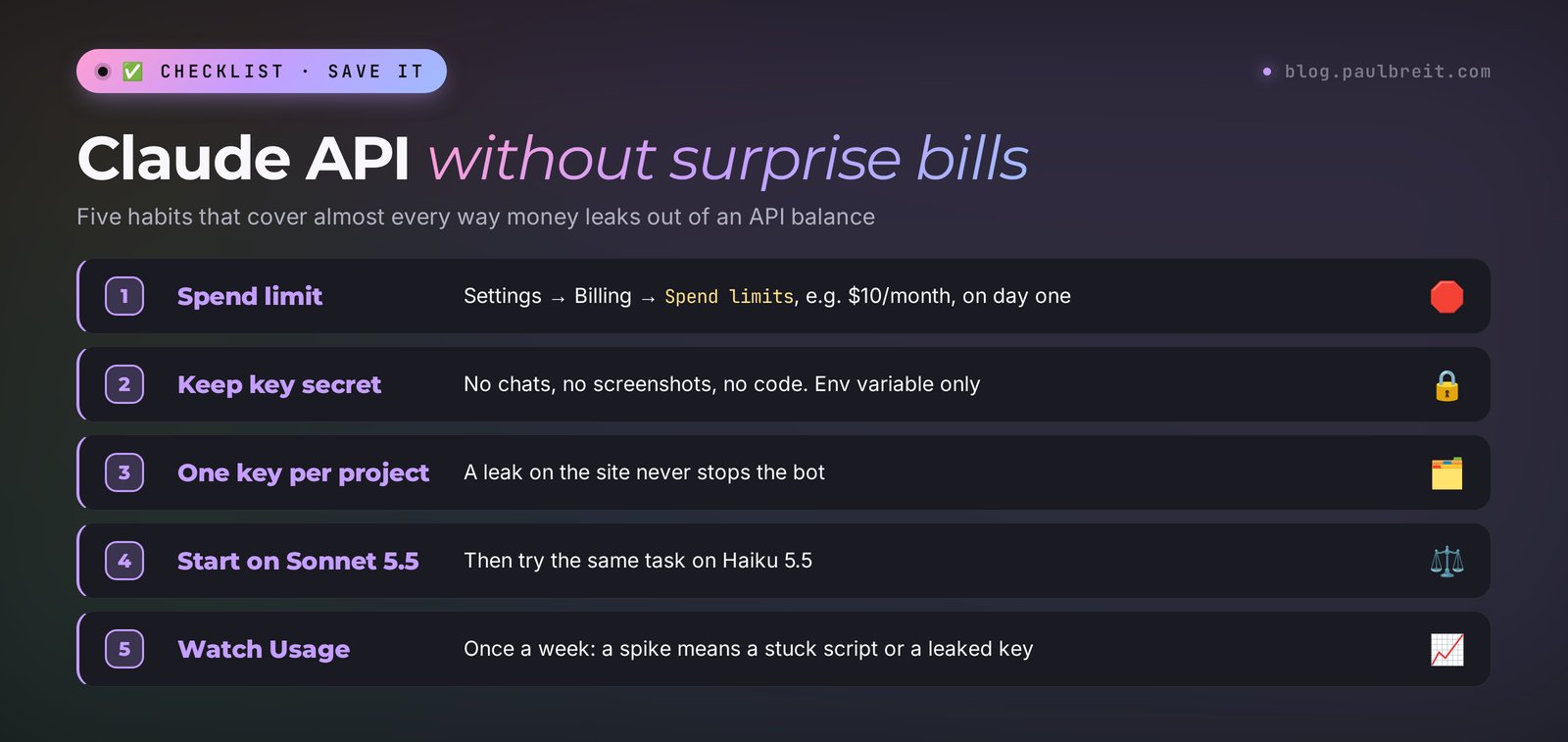
1. Set a spend limit on day one
Settings, Billing, the Spend limits section, the Set limit button. Enter the most you're willing to spend in a month, say $10. Once spending reaches it, the API starts returning an error and stops charging you. This is the main insurance against a looping script that fires ten thousand requests overnight.
Anthropic also has its own ceiling based on your account tier. On the Start tier it's $500 a month, on Build it's $1,000. New accounts sometimes begin on an even lower Evaluation tier, and the limits there go up by themselves as you use the API.
2. Match the model to the task
Using Fable 5.1 to sort leads is like taking a limo to buy bread. The price gap between Haiku and Fable is a hundredfold. The rule is simple: start with Sonnet 5.5, then try the same task on Haiku 5.5. If the quality holds up, switch. Bring in Opus and Fable only where Sonnet actually makes mistakes.
3. Cap the answer length
The max_tokens parameter in a request is the ceiling on answer length. For a bot, 300–500 is enough. Output costs five times more than input, so a single line in the instruction, "answer in 2–4 sentences," saves money directly.
4. Don't drag the whole history into every request
The API doesn't remember past messages by itself. For a bot to remember the conversation, the program resends the entire thread every time. By the tenth message you're paying for all ten. Keep the last 10–15 turns and compress older ones into a short summary.
5. Cache the long instruction
If the bot instruction is long (price list, programs, answers to common questions), turn on caching. A cache read costs 5% of the normal input price on Sonnet and Opus 5.5. Tell Claude Code: "turn on prompt caching for the bot's system instruction."
6. Bulk jobs go in a batch
Sorting 300 reviews by morning is a job for the Batch API. Half the price, results within 24 hours, usually much sooner.
7. Check Usage once a week
The Usage page shows spending by day and by model. A sudden spike is your cue to check whether a script got stuck or a key leaked.
Section 10How to keep the key safe
The key is access to your money. Whoever has it spends your balance. Bots crawl the internet around the clock looking for sk-ant- keys in public code, and they find them within minutes.
- Don't send the key in messengers, even to yourself in Saved Messages. Don't put it in screenshots or shared documents.
- Don't write the key into your code. It belongs in an environment variable or a secrets file that never goes into git. Claude Code will set that up if you ask.
- One key per project. If the site's key leaks, you disable just that one and the bot keeps working.
- Give a contractor a separate key with a short lifetime, and delete it when the work is done.
- Suspect a leak? Delete the key on the API keys page right away and create a new one. Then check Usage for spending that isn't yours.
More on protecting your projects from AI-powered attacks is in how to protect your blog and client base.
Section 11When something goes wrong
| What you see | What it means | What to do |
|---|---|---|
| 401, authentication_error | The key is wrong, deleted, or expired | Check that you copied the whole key with no spaces. Create a new one |
| 400, "credit balance is too low" | The balance is empty | Buy credits in Billing |
| 400, "specified API usage limits" | Your own spend limit kicked in | Raise the limit in Billing or wait for the new month |
| 429, rate_limit_error | Too many requests per minute, or the monthly tier ceiling is reached | Wait as many seconds as the retry-after header says. If it's the monthly ceiling, request a tier increase on the limits page |
| 403 or a region refusal | The request came from a country outside the supported list | Run the bot from a server in a supported region |
| 529, overloaded_error | Anthropic's servers are overloaded | Retry in a minute. The official libraries retry on their own |
| Card declined | Address mismatch, too little money, or the bank blocked the charge | See the "If the payment is declined" box in section 4 |
| Answers cut off mid-sentence | max_tokens is too low | Raise it or ask for shorter answers in the instruction |
The fastest way to deal with any error is to copy its full text and hand it to Claude Code or to Claude in the chat with the question "what does this mean and how do I fix it." Every API response includes a request_id. If it ever comes to Anthropic support, send it along with your description.
Section 12API, subscription, or Claude Code: which to choose
| Pro or Max subscription | Claude Code | Claude API | |
|---|---|---|---|
| What it's for | Working with Claude yourself in a chat | Handing Claude tasks on your computer or server: sites, scripts, files | Building Claude into a bot, site, spreadsheet, or service |
| How you pay | $20, $100, or $200 a month | With a subscription or from the API balance | Per request, from the balance |
| Code needed | No | No, you talk in plain words | Yes, but Claude Code writes it |
| Works without you | No | Partly | Yes, 24/7 |
In practice all three work together. The subscription is for your daily work. Claude Code is for building the bot or agent. The API is what keeps that bot running on its own afterwards. If you're still choosing an AI, the comparison with its main rival is in Claude vs ChatGPT. And to connect Claude to Telegram, spreadsheets, and your site without programming, see MCP in Claude.
Section 13The whole path in a minute
Go to platform.claude.com and sign up. In Settings, Billing, buy at least $5 in credits and set a spend limit right away. In API keys, click Create key, name it after the project, and copy it, since it's shown only once. Debug your instruction in the Workbench on Sonnet 5.5. Run the bot on a small always-on server and ask Claude Code to deploy it. Keep the key secret and check Usage once a week.
Start today with one action: top up $5 and run the bot instruction from section 7 in the Workbench against ten real questions from your clients. Five dollars, and you'll know for sure whether AI can handle your conversations.
FAQFrequently asked questions
How do I get a Claude API key?
Sign up in the Console at platform.claude.com, buy at least $5 in credits under Settings, Billing, then click Create key on the API keys page. Give the key a name and an expiry and copy it right away: it starts with sk-ant- and is shown only once.
Is the Claude API free?
No. The API and the Console Workbench are paid with prepaid credits, and the minimum top-up is $5. As of October 31, 2026, Anthropic does not promise a free trial balance. Requests are cheap, though: a thousand short answers on Haiku 5.5 cost less than a dollar.
How much does the Claude API cost?
As of October 31, 2026, per million tokens: Haiku 5.5 from $0.10 input and from $0.50 output, Sonnet 5.5 $2 and $10, Opus 5.5 $4 and $20, Fable 5.1 $10 and $50. Batch processing is 50% cheaper, and cache reads cost a fraction of normal input. Current prices are at claude.com/pricing.
Is the API included in a Claude Pro subscription?
No. A Pro or Max subscription and the API are billed separately. The subscription gives you the chat on claude.ai and in the app, while API requests are charged to a separate balance in the Console at platform.claude.com.
How long do Claude API credits last?
Prepaid credits are valid for one year from the date of purchase, then they expire. That's why it makes sense to top up in small amounts or turn on auto-reload with a low threshold once your bot is live. A large balance bought far in advance can simply expire unused.
Do I need to know how to code to use the Claude API?
No. You can test everything in the Workbench in your browser, and Claude Code will write and deploy the code for a bot or a site integration from a plain-language request. No-code builders like Make and n8n also just ask for the key.