Claude Opus 5.5: What It Can Do and How to Get Access in 2026
Claude Opus 5.5 is Anthropic's senior working model, released on September 22, 2026. According to the company's tests, it performs at the level of the flagship Fable 5.1 and costs 40% less than the previous Opus 5. Here's what it can do in practice, how it differs from Sonnet and Fable, which plan includes it, how to get access, where to switch it on, and which tasks to give it so your usage limits go to real work.
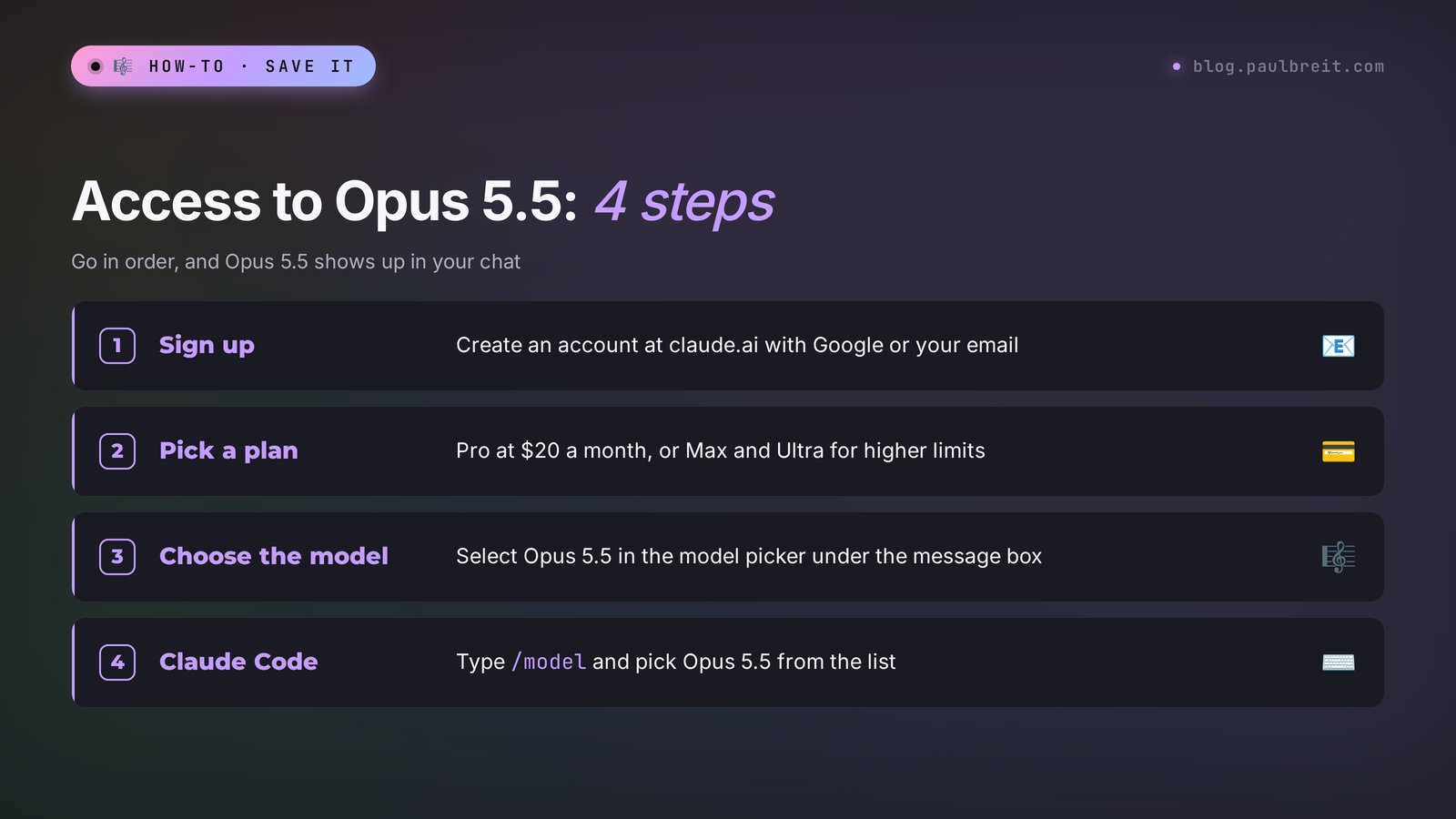
Claude Opus 5.5 is the strongest Claude model on the regular plans, released on September 22, 2026. It reads up to 1 million tokens at once, writes complex texts, and works with code and files. Opus requires a paid plan: it comes with Pro at $20 a month and with Max at $100. To get access, sign up at claude.ai, choose Pro or a higher plan, open a new chat, click the model name under the message box, and select Opus 5.5. In Claude Code, type /model and pick Opus 5.5 from the list.
Everyone who sells services, courses, and consulting and keeps hitting tasks where a smaller model gives shallow answers. A coach uploads transcripts of twenty sessions and asks which words clients use most often when they first show up. A lawyer hands over a forty-page contract and gets a list of risky clauses with their numbers. A course creator builds a curriculum from a year of live streams. For "rewrite this post," Sonnet is plenty. Tasks like these are Opus territory.
What's inside
- What Claude Opus 5.5 is
- What's new compared to Opus 5
- Opus, Sonnet, Haiku, and Fable: when to use which
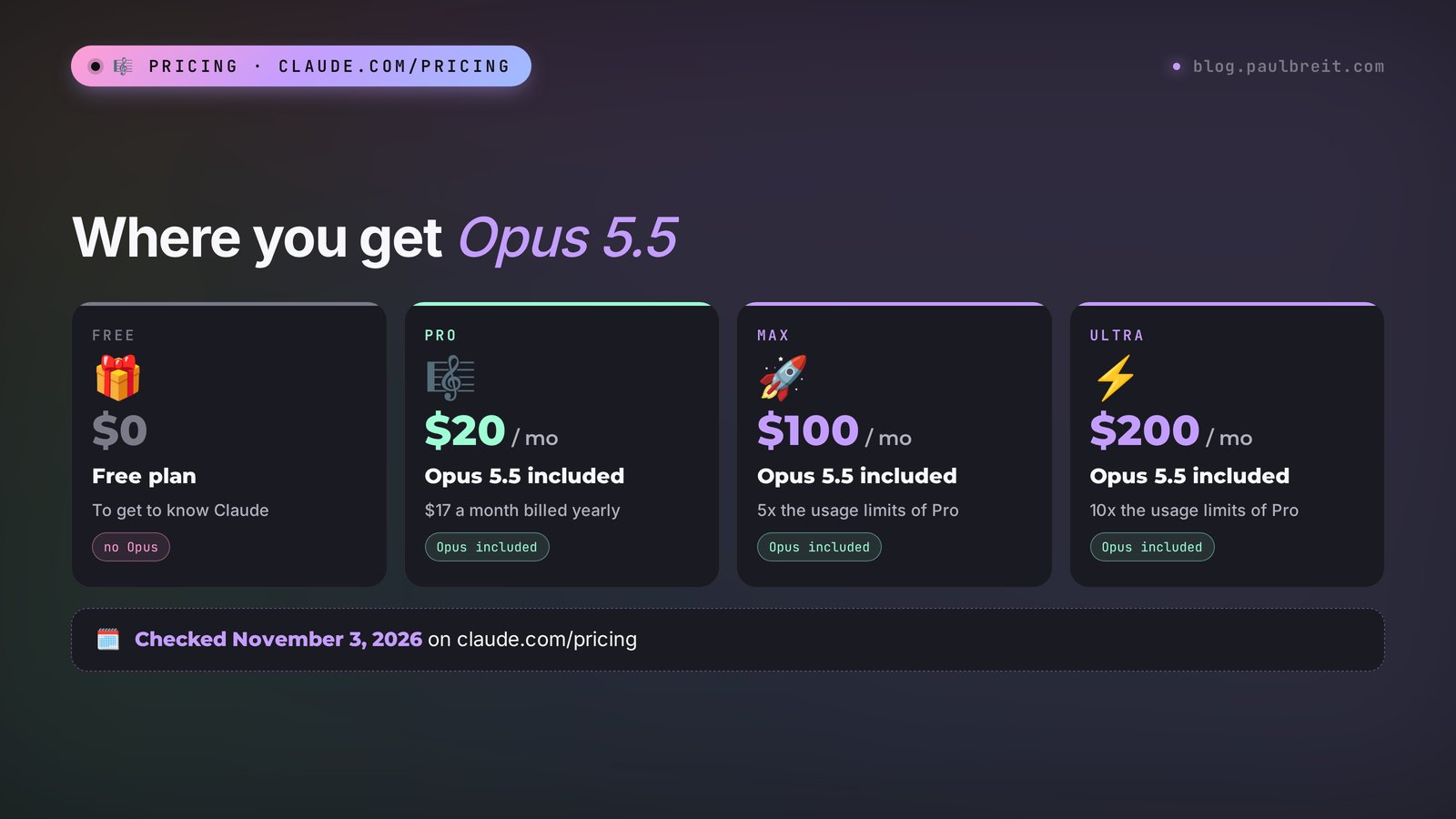
- Which plans include Opus 5.5 and what it costs
- How to get access to Opus 5.5: 5 steps
- How to switch on Opus 5.5 in chat and in Claude Code
- What to give Opus: 6 tasks with prompts
- The test: a real Opus 5.5 response
- How to save your Opus limits
- If something goes wrong
- Opus 5.5 through the API
- The whole path in one minute
- FAQ
Section 01What Claude Opus 5.5 is
Claude is a family of AI models from Anthropic. The family has several models of different sizes, and each has its own name. Haiku is the fastest and lightest. Sonnet is the everyday workhorse. Opus is the senior model for complex tasks. Above them sits Fable 5.1, the company's most powerful and most expensive model.
The number in the name is the generation. Opus 5.5 replaced Opus 5 and opened the 5.5 line: Sonnet 5.5 and Haiku 5.5 followed. The model's technical ID is claude-opus-5-5. You'll only need it if you connect Claude to your own software through the API. In the chat on the website, you pick the model from a list with a regular click.
The main thing Anthropic said at launch: on most tests, Opus 5.5 catches up with or beats Fable 5.1, and it costs noticeably less. For a regular user, that means something simple. The top tier used to require the Max plan or separate credits, and now nearly the same level comes with Pro at $20 a month.
| Parameter | Claude Opus 5.5 |
|---|---|
| Release date | September 22, 2026 |
| Developer | Anthropic, USA |
| Context window | 1M tokens |
| Where it's available | claude.ai (Pro, Max, Ultra, Team, Enterprise), the apps, Claude Code, the API, AWS, Google Cloud, Microsoft Foundry |
| API price | $4 per 1M input tokens, $20 per 1M output tokens |
| Languages | English and dozens of other languages, reads and writes them fluently |
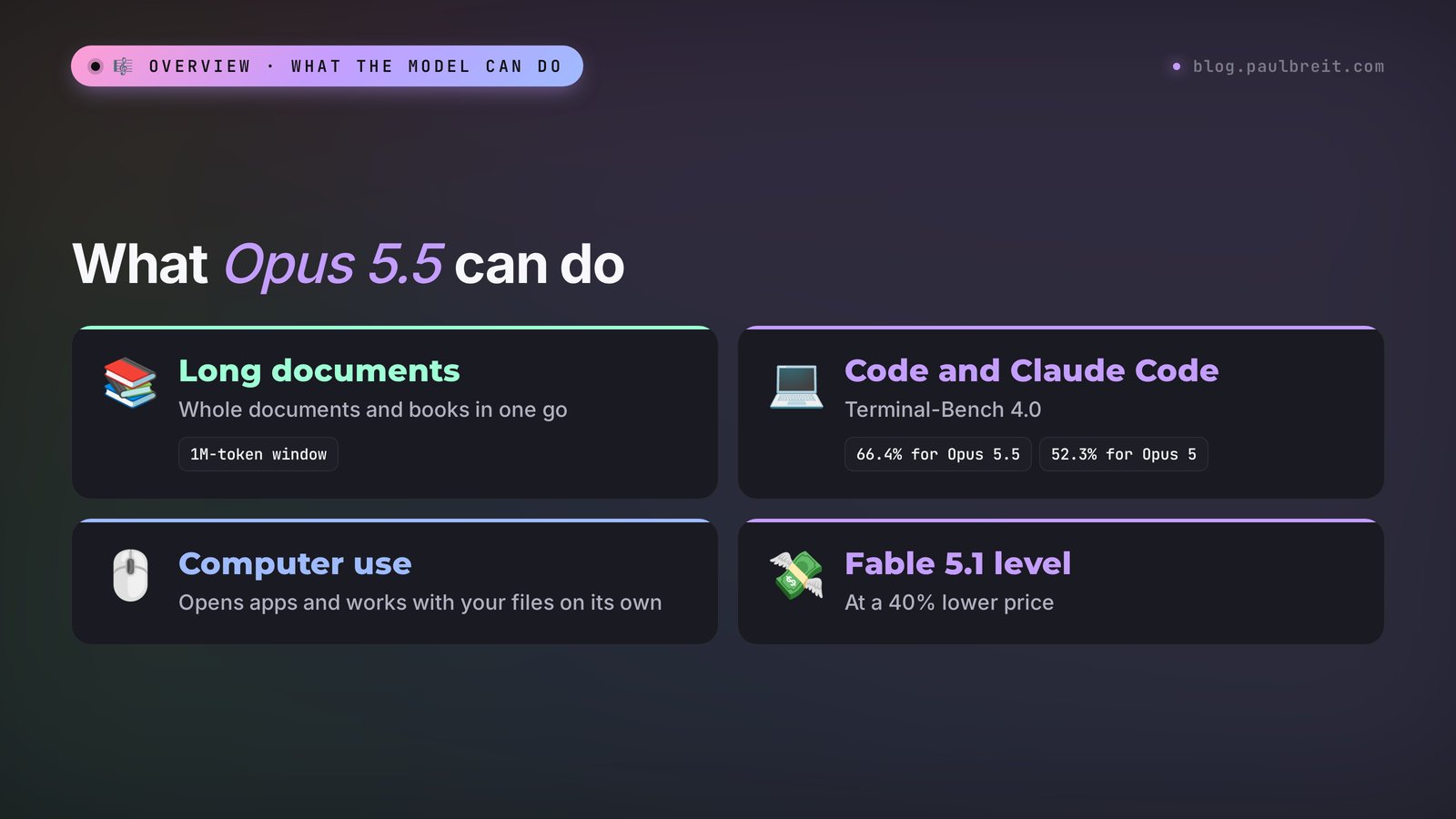
The context window is how much text the model keeps in mind during one conversation. A million tokens is roughly several thick books, or a couple hundred pages of contracts, transcripts, and spreadsheets at once. You can upload all your posts from the past year and ask which topics got the most reactions. The model reads them in full and works from all of it at once, without summarizing piece by piece.
Section 02What's new compared to Opus 5
Anthropic published the results on the announcement page anthropic.com/claude-opus-5-5. I pulled out what you'll notice in everyday work and skipped the lab details.
40% cheaper and 30% faster
A typical task on Opus 5.5 costs 40% less than on Opus 5, and the text comes out more than 30% faster. For subscribers, this turned into bigger limits: Anthropic specifically said the five-hour limits on Pro, Max, Team, and Enterprise went up. Put simply, for the same money you get more messages with the senior model.
Writing that sounds like you
Early testers described the change in one phrase: "It writes the way I do." The model holds someone else's voice better. Give it five of your posts, and the next one will sound like you, with your pet phrases and your sentence length. For anyone who runs a blog about their services, this is the most useful change.
Code and long tasks
On Terminal-Bench 4.0, where the model completes tasks in the command line on its own, Opus 5.5 scored 66.4% against 52.3% for Opus 5. On CursorBench 4.0, it's 57.8% against 46.6%. One Anthropic customer said they gave Opus 5.5 a big task across six repositories at once and left it running overnight unattended. If you build sites, bots, and automations with Claude Code, you'll feel the difference.
Office work and computer use
On GDPval-AA v2.1, which tests everyday work tasks like reports, spreadsheets, and emails, Opus 5.5 has a rating of 1846 against 1735 for Fable 5.1. On OSWorld 2.1, where the model clicks through apps on a computer by itself, it scores 81.8%. With tools, it solves 67.7% of Humanity's Last Exam, one of the hardest knowledge tests around.
Thinking with adjustable depth
Opus 5.5 decides for itself how long to think before answering. Developers can set the effort level from low to maximum, with medium as the default. In the chat it looks like this: a simple question gets an instant answer, and a complex one gets broken down first and answered after.
Safety
The model is better at resisting attempts to slip it someone else's commands through a document or a website. This matters when Claude reads emails, pages, and files from strangers: the chance that a line hidden in someone's PDF takes over the conversation is lower now.
Anthropic itself notes that at this level, percentage gaps say less and less about the difference in real work. So the best test is your own task. Further down there are prompts that show the difference in ten minutes.
| Model | Input, $ per 1M tokens | Output, $ per 1M tokens | When to use it |
|---|---|---|---|
| Opus 5 | 5 | 25 | previous generation, replaced by 5.5 |
| Opus 5.5 | 4 | 20 | complex tasks, long documents, code |
| Fable 5.1 | 10 | 50 | the hardest tasks, when price comes second |
| Sonnet 5.5 | 2 | 10 | everyday work with text |
API prices from the official Opus 5.5 announcement and claude.com/pricing, checked on November 3, 2026.
Section 03Opus, Sonnet, Haiku, and Fable: when to use which
The most common mistake after buying Pro is to switch on Opus for everything and hit the limit by lunch. The senior model uses up your limit faster, so match it to the task. I keep a simple rule in mind: if you can check the result with your own eyes in a minute, Sonnet is enough. If checking takes an hour and a mistake costs money, use Opus.
| Task | Model | Why |
|---|---|---|
| A post, a story, a reply to a client | Sonnet 5.5 | fast, and the writing quality is already high |
| Going through messages, sorting leads | Haiku 5.5 | lots of small, repetitive actions |
| An offer, a launch strategy, a course curriculum | Opus 5.5 | has to juggle many conditions at once |
| A contract, transcripts, 50+ page reports | Opus 5.5 | long context without losing details |
| A site, a bot, an automation in Claude Code | Opus 5.5 | makes fewer mistakes over long chains of actions |
| Research where a mistake is very costly | Fable 5.1 | top quality, but pricey and on Pro only through usage credits |
I covered the fifth Claude generation against GPT-5 and Gemini 3 in detail in Claude 5, GPT-5, and Gemini 3: what changed and which one fits you. If you're choosing between Claude and ChatGPT in general, take a look at an honest comparison of Claude and ChatGPT for your work.
Section 04Which plans include Opus 5.5 and what it costs
I checked the plans on the official page claude.com/pricing on November 3, 2026. Prices are in US dollars, billed monthly or yearly.
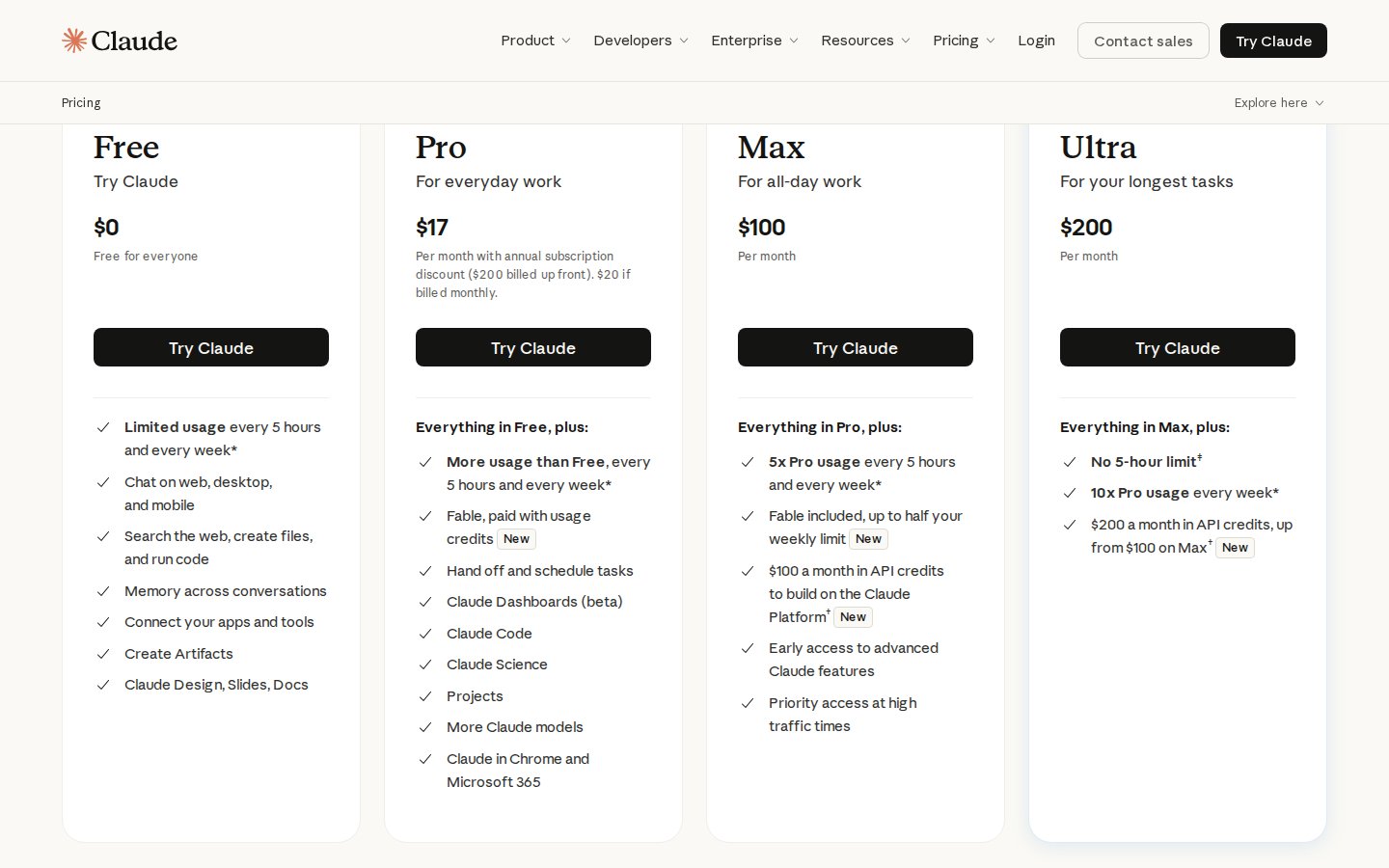
| Plan | Price | Opus 5.5 | Fable 5.1 | Limits |
|---|---|---|---|---|
| Free | $0 | no | no | limited, every 5 hours and every week |
| Pro | $20 a month or $17 billed yearly | yes | only through usage credits | base paid limits |
| Max | $100 a month | yes | up to half of the weekly limit | 5x Pro |
| Ultra | $200 a month | yes | up to half of the weekly limit | 10x Pro per week, no 5-hour limit for verified accounts |
| Team | from $20 per seat a month, billed yearly | yes | depends on the seat terms | for teams |
Pro is enough for most people. Max makes sense when Opus works for you several hours a day, every day: for example, you're building a site or a bot in Claude Code and keep hitting the five-hour limit. Ultra is for people whose Claude runs almost nonstop.
You can't try Opus 5.5 for free. The Free plan only has the smaller models. If you first want to see whether Claude is your tool, spend a week on the free plan with Sonnet or Haiku, and pay for Pro once you hit the limits or a task that's too hard.
Section 05How to get access to Opus 5.5: 5 steps
The whole setup takes about ten minutes. Claude officially works in the US, the UK, the EU, Canada, and many other countries. If you're outside the US and EU, check Anthropic's list of supported countries first: the site won't open from regions that aren't on it.
1. Sign up at claude.ai
Open claude.ai and click Sign up. The fastest way is Continue with Google. You can also enter any email address and confirm it with the code Claude sends you. Claude may ask for a phone number to verify the account; a regular mobile number works.
2. Pick a paid plan
In the profile menu at the bottom left, choose View all plans and click Pro. A regular credit or debit card works. Enter the billing country and ZIP code exactly as your bank has them, or the payment may be declined. If you already know you'll work with Opus for hours every day, start with Max right away. If your card still gets declined, the workarounds are in how to pay for Claude: 3 working methods.
3. Select Opus 5.5 in the model picker
Pro turns on as soon as the payment goes through. Open a new chat, click the model name under the message box, and choose Opus 5.5. That's it, you can start working. The choice is saved for new chats.
4. Type /model in Claude Code
If you use Claude Code, sign in with the same account. Pro, Max, and Ultra all include it. In the Claude Code window, type /model and pick Opus 5.5 from the list.
5. Install the mobile apps
Download Claude from the App Store or Google Play and sign in with the same account. Your plan and your chats come with you, and the model picker sits right next to the message box.
If you'd rather not figure it all out alone, you're in good company. In my online school, Claude is the main tool, and setting up access is the very first thing we do, so the rest of the work goes smoothly. The school has trained 10,000+ graduates.
Section 06How to switch on Opus 5.5 in chat and in Claude Code
On the website and in the desktop app
The current model's name sits under the message box. Click it, and a list opens: Opus 5.5, Sonnet 5.5, Haiku 5.5, and Fable 5.1 if you have access. The selected model is remembered for new chats. You can also switch models in the middle of a conversation: the next answer comes from the other model, and the whole chat history stays.
On your phone
In the Claude apps for iPhone and Android, the model switch is in the same place, next to the message box. I described the setup, voice mode, and the camera in detail in how to use Claude on your phone.
In Claude Code
Claude Code is Claude working with files on your computer or server: it builds sites, bots, spreadsheets, and reports. It's included in Pro, Max, and Ultra. To pick the model, type /model in the Claude Code window and choose Opus 5.5 from the list. Claude Code also has a fast mode: it responds up to 2.5 times faster, but it uses more of your limit. As a beginner, you don't need to rush into it. If Claude Code still feels like a dark forest, start with how to use Claude Code step by step.
For each big task, set up its own project in Claude: upload your service descriptions, brand tone, and past texts. Opus, with its long context window, leans on these materials well, and you won't have to explain everything from scratch every time. Here's how to set it up: Claude Projects: a knowledge base that remembers everything for you.
Section 07What to give Opus: 6 tasks with prompts
Below are tasks where Opus 5.5 is noticeably stronger than the smaller models. Copy any prompt and put your own details in the square brackets. More ready-made wording and the formula for a good prompt are in Claude prompts: a formula and 25 examples.
1. An offer review with honest criticism
Opus keeps the audience, the price, the competitors, and the objections in mind all at once, so its critique goes deeper than "add more specifics."
You're a marketer with 10 years of experience selling services. Here's the description of my service: [text]. My audience: [who they are, what hurts]. Price: [amount]. Find the 5 weakest spots in the offer. For each one, explain which client objection it triggers and suggest a fixed version. No compliments, straight to the point.
2. A course curriculum from your own materials
Upload live stream transcripts, notes, and a year of posts. The 1M-token window fits all of it.
The files contain my live streams and posts from the past year. Build a 6-module online course curriculum for [audience] from them. For each module: the goal, 3–5 lessons, a homework assignment, and a reference to the material of mine the topic comes from. Separately, list the topics the materials are missing.
3. Reviewing a long document
A contractor agreement, terms of service, a public policy: the things you dread reading in full.
This is a contract for [what]. I'm the contractor. Find the clauses that are risky for me: penalties, one-sided rights for the client, vague deadlines. For each one, give the clause number, what it could cost me, and how to reword it. At the end, list three questions I should ask the client before signing.
Keep in mind that AI doesn't replace a lawyer. Show the final contract to a professional when serious money is involved.
4. Your blog's voice
This is where the main new skill of 5.5 comes in: writing "like you."
Here are 7 of my best posts. Describe my style: sentence length, favorite phrases, how I open and close, what I never write. Then write a post in this style on [topic]. After the post, mark the places where you weren't sure I'd say it that way.
5. Analyzing leads and conversations
The spreadsheet has 200 leads from the last quarter: where they came from, what they asked, whether they bought. Find the patterns: which sources bring purchases, what buyers and non-buyers ask, at which step people drop off most often. Give me 5 takeaways and one action for this week for each.
6. Building a tool in Claude Code
Build me a booking page for a consultation: a headline, three points about what the person gets, and a form with name, phone, and a convenient time. Send the requests to me in Telegram. Before you start, ask the questions you need, then do everything yourself and only send me what I need to click or type.
Ready-made business scenarios are collected in Claude for business: 15 use cases with prompts.
Section 08The test: a real Opus 5.5 response
I ran the first prompt from the list above on Claude Opus 5.5. I took a typical case: a therapist selling a package of sessions for anxiety. Here's what I sent and what I got back, unedited.
You're a marketer with 10 years of experience selling services. Here's the description of my service: "I work with anxiety. One-on-one online sessions, 8 meetings of 50 minutes each. I'll help you understand yourself and find inner stability. 6 years of experience." My audience: women aged 28–40 who work in an office; anxiety keeps them from sleeping and making decisions. Price: $400. Find the 5 weakest spots in the offer. For each one, explain which client objection it triggers and suggest a fixed version. No compliments, straight to the point.
1. "Understand yourself and find inner stability" promises no result she can feel. Objection: "So what will change in my life?" A woman who can't sleep because of anxiety is buying sleep and calm decisions. Fix: "After 8 sessions, you fall asleep without replaying work conversations and make decisions without three rounds of second-guessing."
2. A price with no breakdown. $400 for the package scares people off, $50 a session doesn't. Objection: "It's expensive, and I'm not sure it'll work." Fix: "8 sessions of 50 minutes, $50 per session. If after the first one you feel the format isn't for you, I'll refund the other 7."
3. No answer to "why 8." Objection: "Why so many? Maybe two would do." Fix: "Sessions 1–2: we figure out what triggers your anxiety. Sessions 3–6: we practice techniques on your real situations. Sessions 7–8: we lock it in so you can cope without me."
4. "6 years of experience" proves nothing. Objection: "There are thousands of therapists like that." Fix: one number or a client story: "I've worked with anxiety in office workers since 2020. The most common request is insomnia before Monday meetings."
5. No first step. The offer ends with a description, and the person leaves to think it over. Objection: "I'll think about it later." Fix: "Send me the word ANXIETY in a direct message, and I'll send you 3 questions. Based on your answers, I'll tell you whether this format fits you."
Here's what this example shows. The model worked out the per-session price on its own, tied the audience's pain to the wording of the result, and added a first step, even though the prompt didn't say a word about it. Notice the refund point: the model suggests terms like that, and the decision is yours. If you don't offer refunds, cross that line out. On the same task, Sonnet gives a good but more general answer. The difference shows up exactly where several conditions have to be kept in mind at once.
Section 09How to save your Opus limits
Claude counts limits by volume: the longer the conversation and the more files in it, the more each next message costs. And Opus uses up the limit faster than the smaller models. Here's what helps stretch Pro across a full workday.
- One task, one chat. Done with the offer? Open a new chat for the post. In an old chat, every message drags the whole history along with it.
- Draft on Sonnet, finish on Opus. Sketch the structure and ideas on Sonnet, then switch to Opus in the same chat for the final review.
- Put the recurring stuff in a project. Upload your service descriptions and brand tone to Projects once. Don't paste them into every message.
- Ask for shorter answers when you can. "Answer in five bullet points" saves your limit and your reading time.
- Compress long conversations. When a chat gets big, ask Claude: "Summarize our conversation on one page, I'll continue in a new chat." Paste the summary into the new chat.
- Heavy tasks in the morning. The five-hour limit resets five hours after your first message. Start the hard work early, and by lunch the limit will already be fresh.
Section 10If something goes wrong
Opus 5.5 isn't in the model list
You're on the free plan, or the payment hasn't gone through yet. Check your plan in the profile menu at the bottom left. If Pro is paid, sign out and back in, and update the app to the latest version.
It says "App unavailable in your region"
Claude sees a connection from a country that isn't on Anthropic's supported list. This happens when you travel or when a corporate network routes traffic through another country. Check the supported countries list, and if you're in a supported country, turn off any proxy or VPN that sends your traffic elsewhere.
The payment is declined
Most often, the country and ZIP code in the payment form don't match the card's bank. Enter the address exactly as it appears in your banking app. Some prepaid cards get declined too; a regular credit or debit card is the safest bet.
The limit ran out mid-task
Claude shows when the limit will reset. While you wait, switch to Sonnet: it has its own allowance and can finish the simple steps. If you hit the limit every day, look at Max.
The answer is too long or drifts off topic
Opus loves detail. Add a format to the prompt: "under 200 words," "as a table," "only a list of actions." And give it an example of a good result: the model copies a sample well.
The model confidently states something false
Mistakes are rarer than in earlier versions, but they happen, especially with numbers, dates, and laws. Ask for sources and check anything important on official websites. For fresh data, turn on web search in the chat settings.
Section 11Opus 5.5 through the API
You need the API when Claude works inside your bot, site, or service: answering clients, sorting leads, writing product descriptions. There you pay for the volume of text, and no subscription is needed. Opus 5.5 costs $4 per million input tokens and $20 per million output tokens. Reused context from the cache costs $0.20 per million, 60% less than with Opus 5. Fast mode costs twice as much: $8 and $40.
For a sense of scale: replying to a lead with 300 words in and 200 words out costs less than one cent on Opus 5.5. A thousand of these replies comes to a few dollars. For simple client replies, Haiku or Sonnet is cheaper, and Opus is worth plugging in for complex reviews.
You get an API key in the Anthropic Console. I walked through getting the key and paying for it in how to get a Claude API key and what it costs.
Section 12The whole path in one minute
- Sign up at claude.ai with Google or your email.
- Pick Pro at $20 a month ($17 billed yearly) and pay with a regular credit or debit card.
- In a new chat, click the model name and select Opus 5.5. In Claude Code, use the
/modelcommand. - Install the Claude app on your phone and sign in with the same account.
- Give Opus the hard stuff: offers, course curricula, contracts, lead analysis, building tools.
- Leave simple texts to Sonnet, keep one task per chat, and store recurring materials in a project.
- Hitting the limit every day? Move to Max at $100.
If you want to learn Claude systematically, from your first requests to your own automations, start with Claude from scratch: a complete guide for non-techies. The whole path is laid out there step by step.
FAQFrequently asked questions
Can I use Claude Opus 5.5 for free?
No, Opus isn't on the free plan. The free Claude plan only includes the smaller models. Opus 5.5 comes with the paid plans: Pro at $20 a month or $17 billed yearly, Max at $100, and Ultra at $200. Terms checked on claude.com/pricing on November 3, 2026.
How much does Claude Opus cost?
In a subscription, Opus 5.5 is included in Pro at $20 a month, Max at $100, and Ultra at $200. In the API, it costs $4 per million input tokens and $20 per million output tokens, 20% below Opus 5, and a typical task comes out 40% cheaper.
What's the difference between Opus and Sonnet?
Opus is the senior model for complex tasks: strategy, long documents, code, and multi-step work. Sonnet is faster and uses less of your limit, and it's enough for posts, emails, and short answers. A handy setup: draft on Sonnet, do the final review on Opus.
How do I get access to Claude Opus 5.5?
Sign up at claude.ai with Google or your email, choose Pro or a higher plan in View all plans, and pay with a regular credit or debit card. Then open a new chat, click the model name under the message box, and select Opus 5.5. In Claude Code, type /model and pick Opus 5.5.
Which is better: Opus 5.5 or Fable 5.1?
According to Anthropic's tests, Opus 5.5 catches up with or beats Fable 5.1 on most tasks, and in the API it costs 2.5 times less. Fable 5.1 makes sense for the hardest research. On Pro it's available only through usage credits, and on Max and Ultra it can use up to half of the weekly limit.
What is the context window of Claude Opus 5.5?
The Opus 5.5 context window is 1 million tokens. That's several hundred pages of text in one conversation: contracts, transcripts, a year of posts, or large spreadsheets in full.