Claude for Business in 2026: 15 Use Cases with Prompts
Claude for business is Anthropic's AI that takes over your writing, client messages, and the work of going through spreadsheets, contracts, and reviews. Below are 15 working use cases for everyone who sells services, courses, and consulting. Each one comes with a copy-paste prompt, a sample answer, and a tip on how to get the most out of Claude.
People use Claude for business to write posts and sales copy, prepare sales scripts and answers to objections, reply to clients, go through reviews, analyze sales spreadsheets, review contracts, and build small calculators. Start with a free account at claude.ai, create a project that describes your business, and give Claude its first task using the formula: role, context, task, format, constraints. For daily work, switch to the Pro plan at $20 a month.
Everyone who sells services, courses, and consulting and is tired of doing everything alone. The therapist who spends evenings answering the same questions in DMs. The coach who needs three hours to write one post. The tutor, the nutritionist, the fitness trainer, the owner of a small online school. If you've ever thought "I could use an assistant for a couple of hours a day," this article is for you.
What's inside
- What Claude can do for a business in 2026
- Plans: which one to pick
- Signing up and paying
- Setup: a project that describes your business
- The business prompt formula
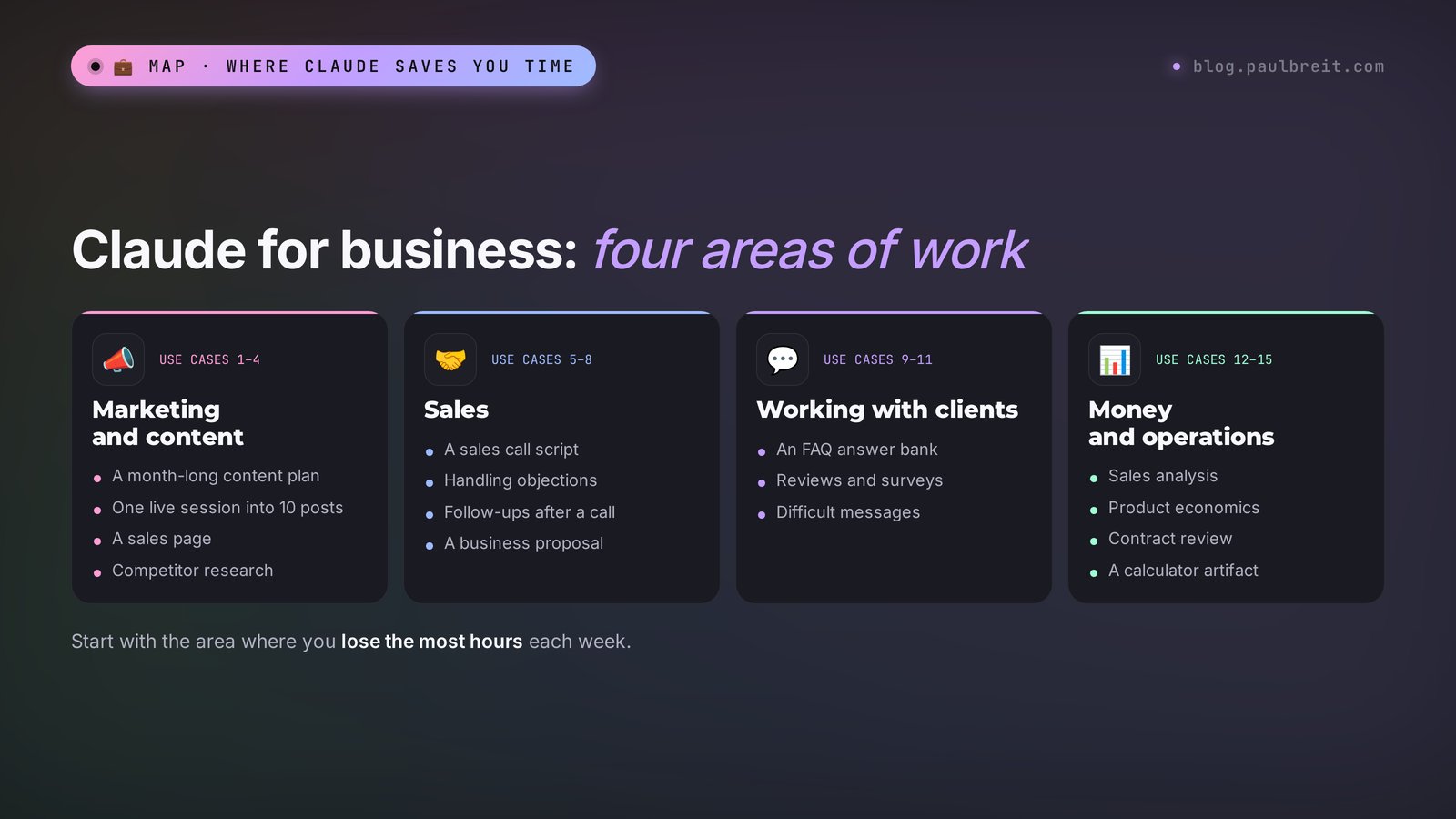
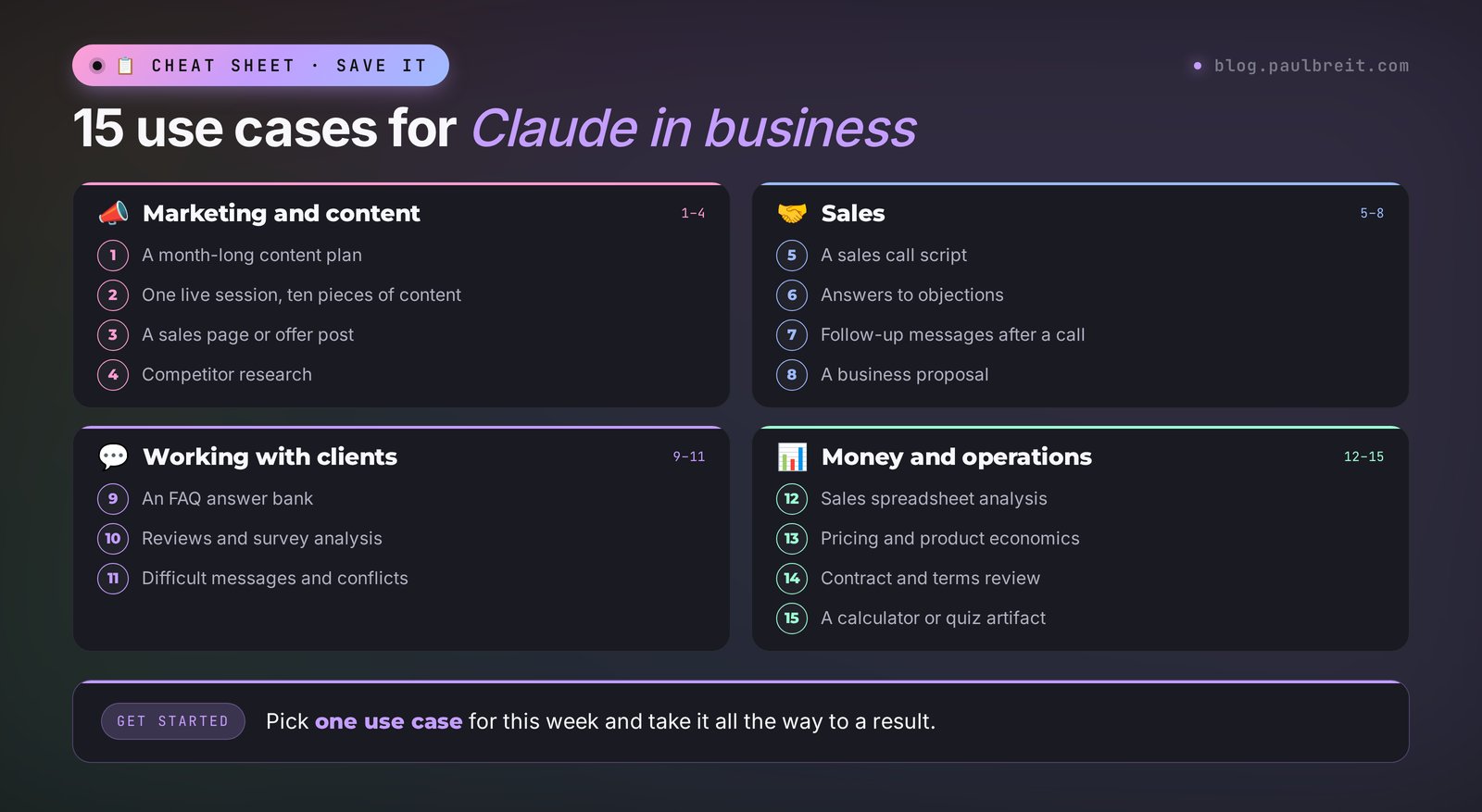
- Marketing and content: use cases 1–4
- Sales: use cases 5–8
- Working with clients: use cases 9–11
- Money and operations: use cases 12–15
- Where to start in your niche
- Email, Drive, and calendar: connectors
- What data you can give Claude
- If something goes wrong
- A 7-day rollout plan
- The whole path in a minute
Most people open an AI chat, type "come up with a post about burnout," get a smooth text that says nothing, and decide it's useless for real work. Sound familiar? The model is almost never the problem. Claude simply knows nothing about your business: who your clients are, what you sell, what it costs, and how you talk.
Tell it about all that once, and the picture changes. The post sounds like you. The answer to the "too expensive" objection leans on your real price and your real results. The breakdown of your sales spreadsheet shows which product brings in the revenue and which one eats your time. Seriously, the gap between "AI writes nonsense" and "AI saves me two hours a day" is twenty minutes of setup.
Below are 15 use cases that actually work for people who sell their knowledge and services. You can take any of them and repeat it tonight. If you're completely new to Claude, skim the Claude from scratch guide first, then come back here for the business tasks.
Section 01What Claude can do for a business in 2026
Claude is an AI made by Anthropic, an American company. As of October 2026 it has four models: Haiku 5.5 for quick small tasks, Sonnet 5.5 for everyday work, Opus 5.5 for complex tasks, and Fable 5.1, the most powerful one, for large and long projects. Sonnet 5.5 is the default, and for nine business tasks out of ten it's more than enough.
Here's what makes Claude useful at work:
- It writes like a person. Claude's texts sound less like corporate boilerplate than those of many competitors, and it holds a given tone better. For posts, emails, and sales pages, that matters most.
- It reads long documents. A 40-page contract, an export of your message history, a year of sales data, the transcript of an hour-long live session. Fifth-generation models have a context window of about a million tokens, which is hundreds of pages at once.
- Projects. A folder of permanent knowledge: product descriptions, prices, reviews, your tone. Every chat inside the project sees these materials. More on this in the article about Claude Projects.
- Artifacts. Right in the chat, Claude builds small apps: a price calculator, a quiz, a table, a web page. You can share them with a link. See what that looks like in the breakdown of Claude Artifacts.
- Research. A deep research mode: Claude searches the web on its own, reads dozens of sources, and brings back a report with links. Handy for sizing up your market and competitors.
- Connectors. Since August 2026, Claude on paid plans reads Gmail and Google Drive, and it can send emails and organize files, asking for your permission every time.
- Claude Code. For those who want to go further: Claude builds bots, websites, and automations from a plain-language description. There's a separate article on this: Claude Code for non-coders.
If you're choosing between Claude and ChatGPT, take a look at the honest task-by-task comparison. In short: for writing and document work, many people prefer Claude, and for images and voice mode, ChatGPT. Nothing stops you from using both.
Section 02Plans: which one to pick
Claude has five plans. For one person selling their own services, the choice is usually between Free and Pro. For a small team, there's Team.
| Plan | Price | Who it's for | What you get |
|---|---|---|---|
| Free | $0 | Trying it out | Sonnet and Haiku, a small message limit, web search |
| Pro | $20 a month, or $17 a month billed yearly | One professional for daily work | More messages, Projects, Opus 5.5 and Fable 5.1, Research, connectors, Claude Code |
| Max | $100 or $200 a month | People who hit Pro limits every day | 5x or 20x higher limits, priority at peak times |
| Team | Standard seat $25 a month, or $20 billed yearly; premium seat $125 or $100 | A team: assistant, manager, support staff | Shared projects, an admin panel, and team data isn't used to train models by default |
| Enterprise | Custom pricing | Large companies | Single sign-on, advanced security, custom terms |
My recommendation is simple. Spend the first week on the free plan and work through three or four use cases from this article. If you notice the limit runs out by lunch and you want more, get Pro. Twenty dollars pays for itself on day one if Claude takes even one hour of work off your plate.
Limits are based on the amount of work. A long contract or a spreadsheet with a thousand rows uses up your limit faster than a dozen short questions. If you're running low, start a new chat: the old conversation gets re-read every time and eats into your allowance too.
Section 03Signing up and paying
Getting started takes a few minutes. Here are the three steps, and if you have questions about billing, the full breakdown is in the article on how to pay for Claude.
Create an account
Open claude.ai and sign in with your Google account or your email. Use the address you work from: that's where Claude's connectors to Gmail and Google Drive will plug in later.
Start on the free plan
The free plan opens right away. Create your first project and go through the setup in Section 04. That's enough to test several use cases from this article and see whether Claude fits your work.
Upgrade when you need to
When the free limit gets tight, pick Pro, Max, or Team in the settings and pay with a regular credit or debit card. The subscription renews automatically each month or year, and you can switch plans or cancel in the same place.
Don't share your password with assistants or contractors. If other people need Claude for your business, give each of them their own seat on the Team plan: you keep control over access and shared projects.
Section 04Setup: a project that describes your business
This is the most important section of the article. Twenty minutes here will save you dozens of hours of edits later.
In Claude's left-hand menu there's a Projects section. Create a project and name it after your business. Inside are two fields: project instructions and project knowledge. You upload files to the knowledge, and you write how Claude should behave in the instructions.
What to upload to project knowledge
- Product descriptions. What you sell, what it costs, how long it lasts, what's included, and what result the client gets.
- Your client profile. Who comes to you, with what pain, what they tried before you, and what questions they ask before buying.
- Reviews. Copy 10–20 real reviews into one document. Claude will lean on them in your sales copy and won't start inventing results.
- Samples of your writing. 5–10 posts or emails you like. From these, Claude will pick up your voice.
- Frequent client questions and your answers to them, even if they only live in your head for now. Dictate them into your notes app and paste them in as text.
No files? No problem. Write this to Claude in a regular chat:
I want to create a description of my business to work with you.
Ask me 15 questions, one at a time: about my products, prices,
clients, their problems, my results, and how I communicate.
After my last answer, put everything into one document
called "My Business" with clear sections.
Claude will interview you like a good marketer at a first meeting and put the document together. Copy it into the project knowledge.
Project instructions: a ready template
You're my business assistant. I'm a [who you are: therapist, coach, tutor].
My clients are [who they are], and they come to me with [main problem].
Rely on the project files: products, prices, reviews, my writing.
Write in plain, friendly, conversational language, in short paragraphs.
Don't make up numbers, results, or reviews: if you don't have the data,
ask me. If the task is unclear, ask 2–3 clarifying questions first.
No corporate jargon and no hype. Don't use long em dashes.
The line "don't make up numbers" is the most important one. An AI that's short on facts will happily invent them. In business, a made-up review or a guarantee you never offered is a direct risk to your reputation.
Set up separate projects for different jobs: "Content," "Sales," "Clients." Each one gets its own instructions. In the "Sales" project Claude thinks like a sales manager, in "Content" like an editor, and the answers come out more precise.
Section 05The business prompt formula
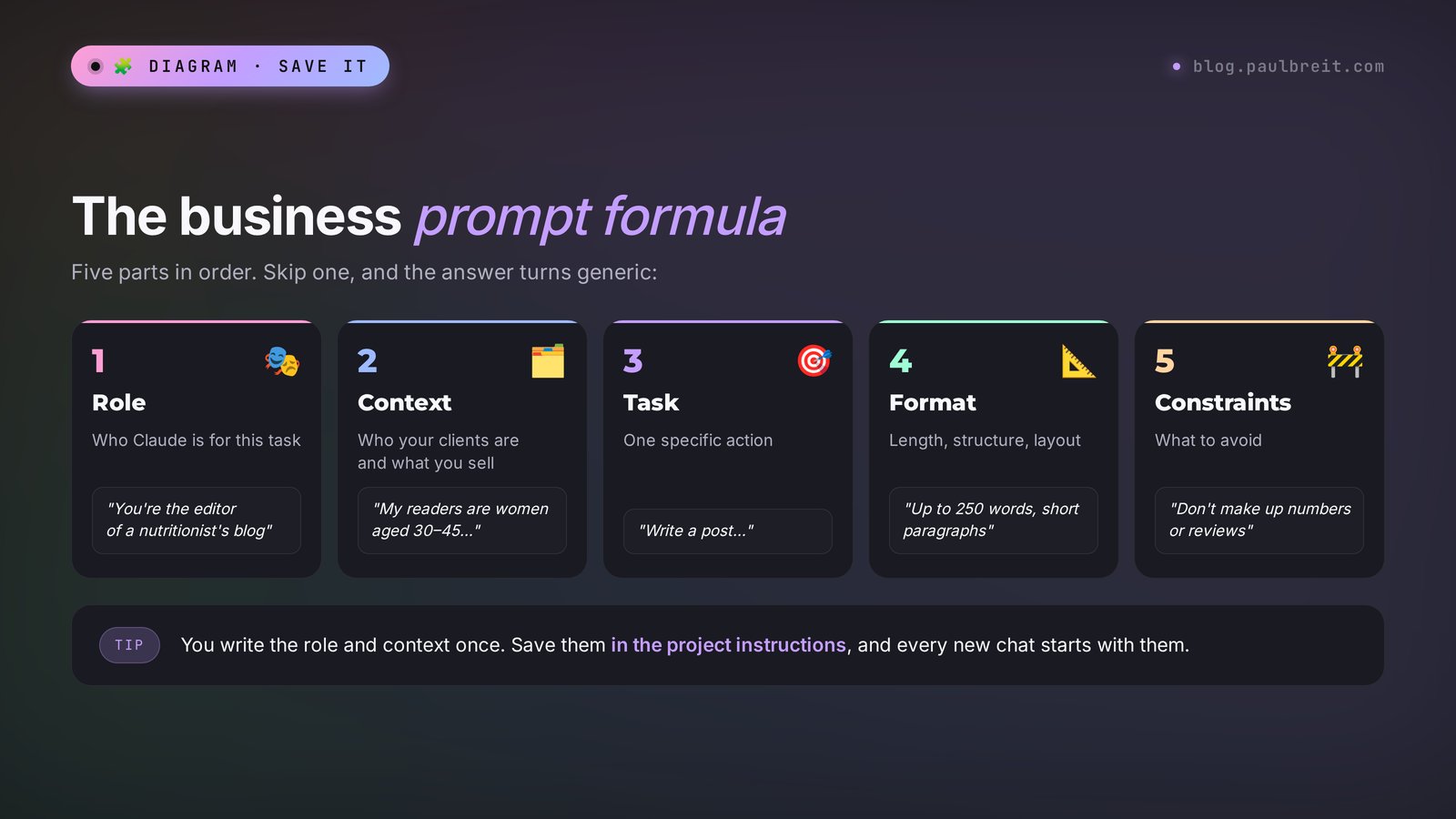
A good prompt for a business task has five parts. Learn them once, and all 15 use cases below will make sense without further explanation.
- Role. Who Claude is playing: a marketer, a sales manager, a lawyer, a financial analyst.
- Context. What the business is, who the clients are, what you already have. Inside a project, part of the context gets pulled in automatically.
- Task. One action, phrased as a verb: write, analyze, compare, find.
- Format. A table, a list, a 250-word text, three options to choose from.
- Constraints. What's off-limits: making things up, promising results, going over length, using slang.
Compare two prompts.
Weak: "Write a post about my nutrition course."
Strong: "You're the editor of a nutritionist's blog. My readers are women aged 30–45 who have gone on diets many times and fallen off them. Write a post about why falling off happens because of overly strict restrictions, and what willpower has to do with it. At the end, gently invite readers to my course 'Food Without Rules' from the project files. Up to 250 words, short paragraphs, without the words 'weight loss' and 'slim.'"
The second prompt takes one more minute to write. In return, you won't spend half an hour rewriting the result. More examples of the formula are in the article on how to write prompts and in the collection of Claude prompts.
Section 06Marketing and content: use cases 1–4
Almost everyone starts with content. This is where Claude pays off fastest: what used to take an evening now takes twenty minutes, edits included.
Use case 1. A month-long content plan
The situation. You sit down to write a post and have no idea what about. Every time from scratch, every time painful.
You're a content strategist. Based on the project files, put together
a content plan for my Instagram for 4 weeks, 3 posts a week.
Split the topics: 40% useful, 30% personal stories and behind the scenes,
20% breakdowns of client mistakes, 10% sales posts.
Format: a table – week, day, topic, goal of the post, opening line.
Build the topics around questions my clients actually ask.
What you get. A table of 12 posts with topics and ready opening lines. The opening line matters more than the topic: with it, sitting down and writing the post is much easier.
Pro tip. Ask for a follow-up: "Mark three posts in the plan after which a sales post makes sense, and explain why." That turns the plan into a chain that leads to a sale. A detailed walkthrough with a real example is in the article a month-long content plan in one evening.
Use case 2. One live session, ten pieces of content
The situation. You ran an hour-long live session or webinar. 200 people watched it and forgot it. Yet there's a month's worth of material in it.
Below is the transcript of my live session. You're an editor.
Find 10 standalone ideas in it, each of which could become
its own post. For each one, give me:
– a hook headline,
– a post of up to 200 words in my own words from the transcript,
– an idea for a 30-second short video.
Keep my wording and examples, and don't add anything of your own.

[paste the transcript]
What you get. Ten posts and ten reel ideas written in your own words. You can get a transcript of your session for free in any transcription service, or upload the audio file straight to ChatGPT and ask for the text.
Pro tip. The phrase "keep my wording" saves you from smooth, generic AI copy. Claude stops retelling and starts editing together your real voice.
Use case 3. A sales page or offer post
The situation. You're launching a new product or a new cohort and need copy for a page or a long sales post.
You're a copywriter who writes sales copy without pressure.
Product: [name from the project files].
Write the sales page copy using this structure:
1) the client's pain in their own words,
2) why the usual approaches don't help,
3) what changes after the product – specifically, step by step,
4) what's included and what it costs,
5) who it's not for,
6) reviews – ONLY from the reviews file, word for word,
7) answers to 5 common doubts,
8) a call to action.
Don't promise guaranteed results and don't make up numbers.
What you get. A page skeleton that already has everything it needs. All that's left is to add your own stories and read the copy with your own eyes.
Pro tip. The "who it's not for" block builds more trust than three more paragraphs of praise. People buy from those who are honest about limitations.
Use case 4. Competitor research
The situation. You want to understand how you differ from a dozen colleagues in your niche and why a client should pay you specifically.
Turn on web search. Find 7 specialists or schools
that sell [your service] online in the US.
For each one, put into a table: product, price, format,
main promise, what draws people in, weak spots according to reviews.
Then compare them with my product from the project files
and suggest 3 honest ways I can stand out.
What you get. A market table and three positioning ideas. For a deeper look, turn on Research mode: Claude will read more sources and think longer, and the report will come with links.
Pro tip. Check prices via the links. Websites change, and Claude may pick up an outdated page. Treat the table as a draft for your own conclusions.
Section 07Sales: use cases 5–8
This is where the money starts. You do the selling yourself. Claude prepares you so you feel confident on the call.
Use case 5. A sales call script
The situation. You run free discovery calls, but only one client in ten ends up buying. The conversation drifts into free help, and you never get to the offer.
You're a mentor in selling services without pressure.
Write a script for a 40-minute consultation for my product
from the project files. Stages: introduction, the client's point A,
the desired point B, what's in the way, presenting the solution,
answering doubts, the offer, and the next step.
For each stage: the goal, how many minutes, 3–4 questions
word for word, and common mistakes at that stage.
What you get. A minute-by-minute script with ready questions. Print it out and keep it in front of you for your first calls.
Pro tip. After the consultation, upload the call transcript and ask: "Show me at which stage I lost the client and what I could have said differently." It's like having a personal sales coach after every meeting. The structure that turns more than half of calls into sales is broken down in the article a sales call script.
Use case 6. Answers to objections
The situation. "It's too expensive," "I'll think about it," "I need to talk to my husband," "are you sure it'll work?" You answer each one differently, and not always well.
You're an experienced sales manager for consulting services.
Here are the 7 objections I hear most often: [list].
For each one:
– what's really behind this objection (2–3 reasons),
– a clarifying question to find the real reason,
– 2 possible answers in my words, calm, without pressure,
– when to let the client go and not push.
Rely on my prices and reviews from the project.
Here's what an answer to one objection looks like. You write: "Objection: too expensive, a colleague charges half as much." Claude answers roughly like this:
"Too expensive" usually hides one of three reasons: the person doesn't see the difference between you and your colleague, they really don't have the money right now, or they're not sure the result will come. Clarifying question: "Could you tell me what you're comparing with – what does your colleague include at that price?" A possible answer: "I get it. My price also includes two weeks of message support after the sessions: that's exactly when clients tend to slip back, and I'm there. If a one-time meeting is all you need, my colleague really is the better deal."
Pro tip. Ask Claude to play the client: "You're a hesitant client. Throw objections at me one at a time, and after each of my answers rate it on a 10-point scale and suggest how to say it better." Ten minutes of this practice before a call takes away half the nerves.
Use case 7. Follow-up messages after a call
The situation. The client said "I'll think about it" and disappeared. Writing feels awkward, and not writing means losing money.
A client had a consultation on [date], was interested in [product],
and had doubts because of [reason]. Write a sequence of 3 direct
messages: after 1 day, after 4 days, and after 10 days.
Each one up to 70 words, useful for them, no pressure,
and no "just checking in." The third message is a polite
close that makes it easy for the client to answer even "no."
What you get. Three messages you won't be embarrassed to send. The first brings them back to an idea from the call, the second offers something useful or a story about a similar client, and the third closes the conversation with no hard feelings.
Pro tip. Send them yourself, by hand. Clients can tell a personal message from an automated one, and Claude's job is to save you twenty minutes of searching for the right words.
Use case 8. A business proposal
The situation. A company reaches out: they want corporate training, a workshop for their team, or a series of consultations for employees. You need a proposal, and you need it today.
You're a corporate sales specialist.
Company: [name, industry, number of employees].
Their request: [what they want, in their words].
Write a 2-page business proposal:
the company's challenge, the proposed solution, format and program,
the result for the business, timeline, 3 pricing packages
(basic, recommended, extended), and the next step.
Professional tone, no corporate jargon.
What you get. A ready proposal with three packages. Three price options work better than one: the client chooses which of your packages to take, and "should I buy or not" fades into the background.
Pro tip. Ask Claude to lay out the proposal as an artifact page. You'll get a neat document you can download as a PDF or send as a link.
Section 08Working with clients: use cases 9–11
Answering the same questions, going through reviews, collecting feedback – all of this eats hours and barely needs your expertise. Hand it to Claude.
Use case 9. An FAQ answer bank
The situation. "How much is it?", "what if it doesn't work for me?", "can I pay in installments?", "when does it start?" Every day, the same thing.
Below is an export of my conversations with clients from the past month.
Find the 20 most frequent questions. For each one, write
a short answer in my words – up to 50 words, friendly
and polite. Group them by topic: prices and payment, format,
results, logistics.
If there's no answer in the conversations, mark it "needs my answer."
What you get. A document with ready answers. Put it in your phone's notes or in saved replies for Instagram DMs and your email, and answer in seconds. If you have an assistant, it's a ready-made playbook for them.
Pro tip. This same bank later becomes the foundation for a bot or an AI consultant on your website that answers in your words around the clock. How to build one is covered in the article about an AI consultant for your site.
Use case 10. Reviews and survey analysis
The situation. You have 150 responses to a feedback survey or a pile of reviews. Reading them all in a row is a full day's work.
You're a customer experience researcher. Below are responses to
a feedback survey about my course. Analyze them and give me:
1) the top 5 things clients liked, with quotes,
2) the top 5 complaints and sticking points, with quotes,
3) the words clients use when describing their result,
4) 3 specific course improvements, in order of priority.
Quote word for word and don't change anything.
What you get. A one-page summary. Item 3 is pure gold for marketing: the words clients use to describe their results work best in ads and on a sales page.
Pro tip. Upload the survey spreadsheet as a whole file. Claude will read every response, and you won't have to copy it over piece by piece.
Use case 11. Difficult messages and conflicts
The situation. A client is unhappy, demands a refund, writes in the heat of the moment. You're angry, and any reply you write right now will only add fuel to the fire.
A client sent the message below. Help me reply.
My refund terms: [from your terms of service].
What I'm willing to offer: [options].
Write a reply: acknowledge their feelings, no excuses,
explain the terms in plain language, offer 2 possible solutions.
Up to 130 words, calm and human.

[the client's message]
What you get. A calm reply that lowers the temperature. Claude doesn't get offended or tired, so it makes a good buffer between your emotions and the client.
Pro tip. Before sending, ask: "How might the client read this reply in the worst case?" Claude will flag phrases that could sting, and you'll fix them in advance.
Section 09Money and operations: use cases 12–15
These use cases look boring, yet they bring in the most money. This is where you see which product feeds the business and which one eats your time.
Use case 12. Sales spreadsheet analysis
The situation. You have a sales spreadsheet or an export from your payment service. You vaguely sense that "spring was worse," but you have no exact conclusions.
You're a small business financial analyst.
The file contains 12 months of sales: date, product,
amount, client source. Calculate and show:
1) revenue by month and by product,
2) average order value and how it changed,
3) which client source brings in the most money,
4) the share of repeat purchases,
5) 3 conclusions and 3 actions for next quarter.
Make charts. Show all calculations so I can check them.
What you get. Charts and numbers that used to take a day in spreadsheets. Claude writes and runs the calculations itself, so the math is more reliable than "counting in your head."
Pro tip. The phrase "show all calculations" is a must. If the export had empty rows or refunds, you'll see it in the calculations and can ask for a recount.
Use case 13. Pricing and product economics
The situation. You want to raise prices or launch a new product, and you don't know how much you'll really earn from it.
Help me calculate my product economics. The data:
price [amount], how many hours I spend per client,
monthly ad spend, how many leads come in,
how many of them buy, taxes and service fees.
Calculate: cost per client, how much I earn
per client after all expenses, my hourly earnings.
Then show 3 scenarios: price +20%, conversion +5%,
ad spend –30%. As a table.
What you get. A clear picture of where you're losing money. It often turns out that raising your price by 20% pays off better than bringing in twice as many clients.
Pro tip. If you don't have some number, Claude will suggest how to calculate it and won't plug in a made-up one. That's exactly what the project instructions from Section 04 ask for.
Use case 14. Contract and terms review
The situation. A platform or a contractor sent you a contract. Or you're writing the terms of service for your own course.
You're a lawyer protecting my interests as the service provider.
Read the attached contract. Find:
1) clauses that work against me, and why,
2) risks: penalties, one-sided changes, payment terms,
3) what's missing from the contract,
4) how to rephrase the disputed clauses.
Explain in plain language, without legal jargon.
What you get. A list of risks and ready wording for your edits. Claude won't replace a lawyer. It will help you come to one with specific questions, and the consultation will cost less.
Claude reads contracts well, but it can get details of the law wrong, especially state-specific rules and recent changes. Anything involving taxes, refunds, and personal data, check with a lawyer or an accountant.
Use case 15. A mini app: a calculator or a quiz
The situation. You want clients to calculate the cost of your service themselves, or take a quiz like "which format is right for me." You don't have a developer.
Build an artifact: a price calculator for my services.
The client chooses: format (one-on-one / group),
number of sessions (4, 8, 12), and whether they want message support.
The calculator shows the total price, the savings on a package,
and a "Book now" button that leads to [your link].
Light, clean design, easy to use on a phone.
What you get. A working calculator right in the chat. You can publish it and send it to clients as a link. Want to change a color or add an option? Just say so in your next message.
Pro tip. A "which format suits you" quiz works as a soft lead magnet: a person answers 5 questions and gets a recommendation with your booking button. More mini app examples are in the article about Claude Artifacts.
Section 10Where to start in your niche
You don't need all fifteen use cases at once. Pick the three that will pay off for you specifically, and turn them into a habit. Here's a hint by niche.
| Niche | First three use cases | Why these |
|---|---|---|
| Therapist | 1, 9, 11 | Trust-building content, answers to questions before the first session, careful replies in difficult situations |
| Coach, mentor | 2, 5, 6 | Live sessions turn into content, consultations turn into sales |
| Tutor | 9, 13, 15 | Parents' questions, package pricing, a lesson price calculator |
| Nutritionist | 1, 3, 10 | Regular content, a sales page for the program, analysis of client surveys |
| Fitness trainer | 2, 7, 15 | Short videos from workouts, bringing back clients who went quiet, a program quiz |
| Online school | 10, 12, 14 | Course feedback, sales analytics, contracts with instructors and platforms |
| Freelancer: designer, marketer | 4, 8, 13 | Market research, business proposals, project pricing |
There's one rule: a use case should cover a task you do every week. Then the time savings add up, and in a month you can't imagine how you worked any other way.
Section 11Email, Drive, and calendar: connectors
On paid plans, Claude connects to the services you work in. The settings have a connectors section: Gmail, Google Drive, Google Calendar, and dozens of other services. Since August 18, 2026, Gmail and Google Drive support both reading and writing: Claude can draft and send an email or move a file, but by default it asks for your approval every time.
Here's what that gives you in practice:
- Inbox triage. "Find emails from clients this week that I haven't answered and prepare draft replies."
- Meeting prep. "Look at my calendar for tomorrow, and for each meeting find my correspondence with that person and remind me what we agreed on."
- Order in your documents. "Find all of this year's contracts on my Drive and put together a table: with whom, amount, end date."
If your work lives in tools like HubSpot, Notion, or Slack, you can link them through MCP, the Model Context Protocol. It's a bit more involved, but you still set it up by talking to Claude. How it works is covered in the article about MCP in Claude.
The Claude desktop app has a Cowork mode. In it, Claude works with the files in a folder you choose and, through connectors, carries out multi-step tasks on its own: putting together a report from ten files, sorting documents, preparing a presentation. You set the task and come back to the finished result.
Section 12What data you can give Claude
Everyone who works with clients asks this. Especially therapists, doctors, and lawyers.
- Safe to share: descriptions of your products, your own writing, anonymized reviews, general client questions, sales spreadsheets without names and phone numbers.
- Only anonymized: message threads and consultation transcripts. Replace names with "Client A," and remove phone numbers, addresses, and any details that could identify the person.
- Better not to upload: ID and Social Security numbers, medical diagnoses with names, passwords, payment card details.
In your personal account settings, check the option that allows your chats to be used to improve the models, and turn it off if you don't want that. On the Team and Enterprise plans, team data isn't used for training by default.
Keep privacy rules in mind too. If you work with health information, as therapists and nutritionists often do, rules like HIPAA apply in the US. And in any niche, share a client's personal data with an outside service only with that client's consent. The simplest path is not to share personal data at all and to work with anonymized text. Protecting your client base gets its own article: how to protect your blog and client base.
Section 13If something goes wrong
| What happened | Why | What to do |
|---|---|---|
| The text is smooth but empty | Too little context about the business and clients | Create a project describing your business from Section 04 and add samples of your writing |
| It sounds like AI | By default, Claude writes in an "average" style | Give it 5 of your posts and ask it to write the same way. A list of words that give away AI is in the article how to make AI write like a human |
| Claude made up numbers or reviews | It lacked facts, and there was no ban on inventing | Add "don't make up numbers or reviews, ask me" to the project instructions |
| The answer is too long | No length was specified | State the length explicitly: "up to 150 words," "5 points," "one table" |
| Claude forgot what you agreed on | The chat got too long | Ask for a short summary of what you agreed on, open a new chat, and paste it as the first message |
| It can't read a file | A scan without a text layer, or a protected PDF | Save the document as a text PDF or Word file, and the spreadsheet as xlsx or csv |
| The limit runs out fast | Large files and long chats | A new chat for each task, keep files in project knowledge, and if you keep running short, move to Pro |
| The site won't let you sign up | Claude isn't available in your region | Check Anthropic's list of supported countries and sign up from a supported one |
| The payment doesn't go through | The card was declined | Try another card or ask your bank to allow online payments; details are in how to pay for Claude |
Section 14A 7-day rollout plan
So this article doesn't just end up as a browser bookmark, here's a plan at half an hour a day. By the end of the week you'll have a set-up assistant and three use cases that already save you time.
- Day 1. Sign up at claude.ai, create a "My Business" project, and go through the 15-question interview from Section 04.
- Day 2. Upload your reviews, 5–10 samples of your writing, and your product descriptions to the project. Paste in the instructions template.
- Day 3. Use case 1: a month-long content plan. Write the first two posts from the plan with Claude.
- Day 4. Use case 9: an FAQ answer bank. Save it to your saved replies.
- Day 5. Use case 6: answers to objections, plus practice with Claude playing the client.
- Day 6. Use case 12 or 13: analyze your sales or calculate the economics of your main product.
- Day 7. Take stock: how many hours freed up, which use cases stuck. Decide whether you need Pro.
Save the prompts that worked into one note. In a month you'll have your own library of 20–30 commands for your business. You can grab ready commands for different tasks from the AI prompt library.
Section 15The whole path in a minute
- Claude for business covers content, sales, client work, and money and operations.
- The free plan is enough to start, Pro at $20 for daily work, and Team for a team.
- Signing up: claude.ai, a Google account or email, and a regular card for paid plans.
- The key setup step is a project with your business description, reviews, and samples of your writing.
- In the project instructions, make sure to forbid making up numbers and reviews.
- The prompt: role, context, task, format, constraints.
- Marketing: a content plan, repurposing live sessions, a sales page, competitor research.
- Sales: a call script, objections, follow-ups after the call, a business proposal.
- Clients: an answer bank, review analysis, calm replies in conflicts.
- Money and operations: sales analytics, product economics, contract review, calculators.
- Share clients' personal data only in anonymized form.
- Start with three use cases for your niche and turn them into a habit within a week.
FAQFrequently asked questions
Is there a separate version of Claude for business?
Yes, for companies there are the Team and Enterprise plans with shared projects, an admin panel, and stronger data protection. A professional who works alone will be fine on the regular Pro plan: every use case in this article works on it, and many work even on the free plan.
How much does Claude for business cost?
The free plan is $0, Pro is $20 a month or $17 a month billed yearly, and Max is $100 or $200 a month. Team costs $25 a month per standard seat or $20 billed yearly, and a premium seat is $125 or $100. Enterprise pricing is custom.
How do I sign up for Claude for business?
Go to claude.ai and sign in with your Google account or email. The free plan opens right away. When you need more, pick Pro, Max, or Team in the settings and pay with a regular credit or debit card. For a team, each person gets their own seat on the Team plan.
Is it safe to upload client data to Claude?
It's better not to upload personal data at all. Give message threads and consultation transcripts in anonymized form: replace names, and remove phone numbers and addresses. In your account settings you can turn off the use of chats to improve the models, and on Team and Enterprise, data isn't used for training by default.
Is Claude better than ChatGPT for business?
Claude usually writes more natural text, holds a given tone well, and handles long documents carefully: contracts, transcripts, spreadsheets. ChatGPT is stronger at images and voice mode. Many people use both: text and documents in Claude, visuals in ChatGPT.
Can Claude answer clients for me?
In the chat, Claude prepares the replies and you send them. Through the Gmail connector, it can send emails once you approve them. For a bot that answers clients on its own around the clock, you need a separate AI consultant on your website or in your messenger, and you can build one with Claude Code.
Which Claude model should I choose for business tasks?
For writing, emails, client replies, and content plans, Sonnet 5.5 is enough, and it's the default. For complex analytics, reviewing a big contract, or strategy, switch to Opus 5.5. For quick small tasks, Haiku 5.5 will do.
Can Claude replace an employee?
Claude takes over routine work: text drafts, answers to typical questions, going through spreadsheets and documents. Decisions, live contact with clients, and responsibility for the result stay with you. For a small business, Claude often stands in for an assistant for a couple of hours a day, and for an employee it frees up time for what matters.