Hailuo: AI video for free – how to use it in 2026
Hailuo is the AI video tool from the Chinese company MiniMax. You type a couple of lines or upload a photo, and a few minutes later you get a clip up to 15 seconds long, with sound already in it: footsteps, street noise, a cup clinking, a voice. In the summer of 2026 Hailuo released a new model, MiniMax H3, and the rules for free access changed. Here's how to try Hailuo for free today, what the paid plans cost, how to sign up and pay, how to make your first video from a photo, and which prompts work on the first try.
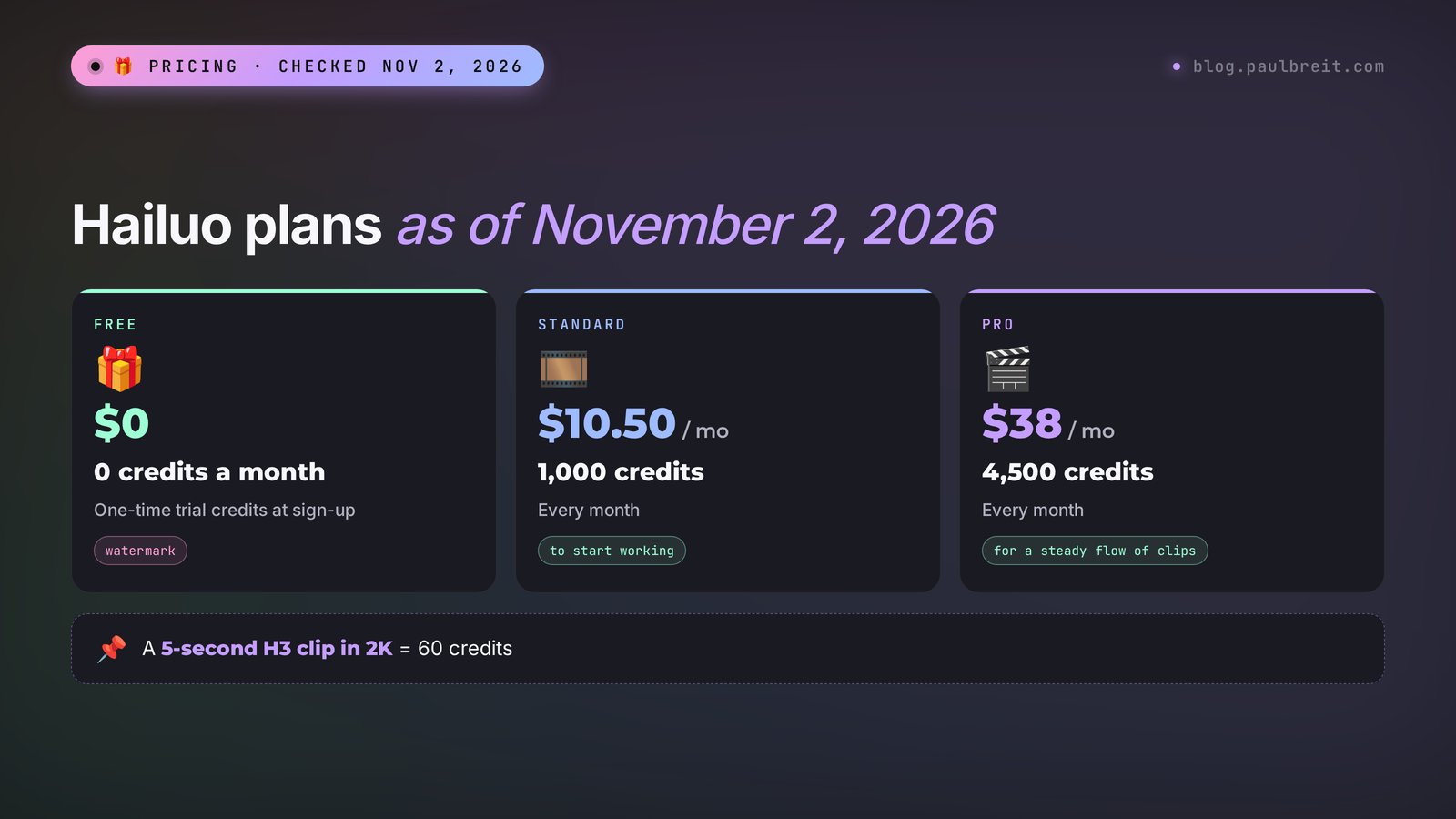
To use Hailuo for free, sign up at hailuoai.video with Google: a new account gets one-time trial credits, enough for a few short clips. As of November 2, 2026, there are no monthly free credits, and videos from the Free plan come with a watermark. Video is made in the Video section: upload a photo or write a prompt in English, pick the MiniMax H3 model, set 5–6 seconds, and click Create. A 5-second clip in 2K costs 60 credits. Paid plans start at $10.50 a month for 1,000 credits, and you pay by card.
Everyone who sells services, courses, and consulting and wants short clips for Reels, Stories, and ads without a film crew. Hailuo's big feature in 2026 is sound. A nutritionist gets a plate with steam rising off it and hears the pan sizzling. A therapist gets an armchair by the window, rustling curtains, and birds singing outside. A fitness trainer gets dumbbells hitting the floor and an exhale. A tutor gets the rustle of pages. You used to have to find the sound separately. Now it comes in the same file as the video.
What's inside
- What Hailuo is and what changed in 2026
- Hailuo for free: what you really get
- Plans and what one clip costs
- How to sign up and pay
- Your first video, step by step
- Video from a photo and references
- Which model to pick so your credits last
- The prompt formula with sound
- 10 ready prompts for real tasks
- Let Claude write the prompts
- If something goes wrong
- Hailuo, Kling, Pika, and Seedance
- The whole path in one minute
- FAQ
Section 01What Hailuo is and what changed in 2026
Hailuo is the website and app through which MiniMax, a company based in Shanghai, gives access to its video models. The name stuck back in 2024: Hailuo was one of the first AI tools where people in the shot moved almost like real people, without rubbery hands and melting faces. Many remember it for its free daily credits. A lot has changed since then, though, and the old how-tos you find in search are now wrong.
The big event of the year came on July 31, 2026. MiniMax released the MiniMax H3 model, also called Hailuo 3.0 or Hailuo 03. Here's how it differs from earlier versions, in plain terms:
- Sound in one pass. The model makes the picture and the sound at the same time: lines of dialogue, noises, room ambience. Before, the video came out silent, and you had to add sound in an editor.
- Up to 15 seconds. Hailuo 2.3 topped out at 6 or 10 seconds. Now you can make 4 to 15 seconds in one continuous clip.
- Up to 2K. That's more than enough for Reels and Stories, and the picture stays sharp even after social media compresses it.
- References. You can attach your own files in the input box. As of November 2, 2026, the counter shows up to 12: a photo of a face, a product, a room, a sound sample.
- Open weights. On August 3, 2026, MiniMax released the model openly. For you that means one thing: H3 also showed up on other platforms. But the easiest place to use it is its home site.
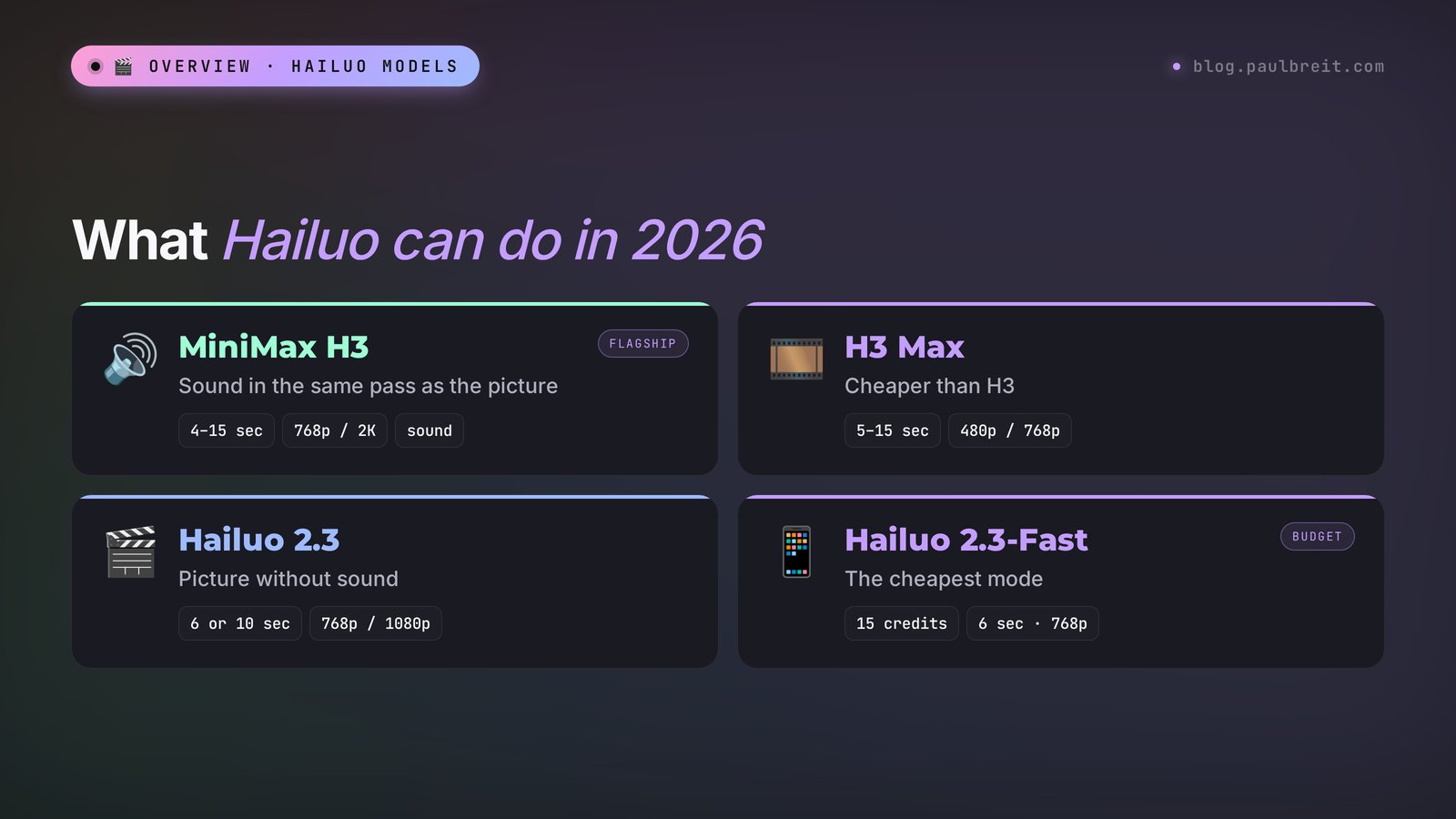
Besides H3, the site still has the earlier models: H3 Max (faster and cheaper, 480p or 768p), Hailuo 2.3, Hailuo 2.3-Fast, Hailuo 2.0, and Hailuo 1.0. On paid plans, Google's Veo 3.1 is available in the same window too. The top menu has Video, Image, Audio, and Hailuo Agent. For your first clip you only need Video, so you can leave the rest alone for now.
| Model | Length | Quality | Sound | When to use it |
|---|---|---|---|---|
| MiniMax H3 | 4–15 sec | 768p, 2K | Yes | The final clip, when you need sound and detail |
| MiniMax H3 Max | 5–15 sec | 480p, 768p | Yes | Drafts and tests, when you want to save credits |
| Hailuo 2.3 | 6 or 10 sec | 768p, 1080p | No | A silent clip for your own music |
| Hailuo 2.3-Fast | 6 or 10 sec | 768p, 1080p | No | The cheapest way to test an idea |
The length and quality figures come from the plan comparison table on hailuoai.video, checked November 2, 2026. The 10-second and 1080p modes aren't open on every plan. More on that below.
Section 02Hailuo for free: what you really get
The most common search about Hailuo includes the word "free." And the honest answer will disappoint anyone who read the 2025 articles. As of November 2, 2026, there are no daily free credits. In the pricing table, the Free plan shows 0 credits a month and the note "One-time free trial credits, Hailuo models only." In plain English: you get trial credits once, when you sign up, and you can spend them only on Hailuo's own models.
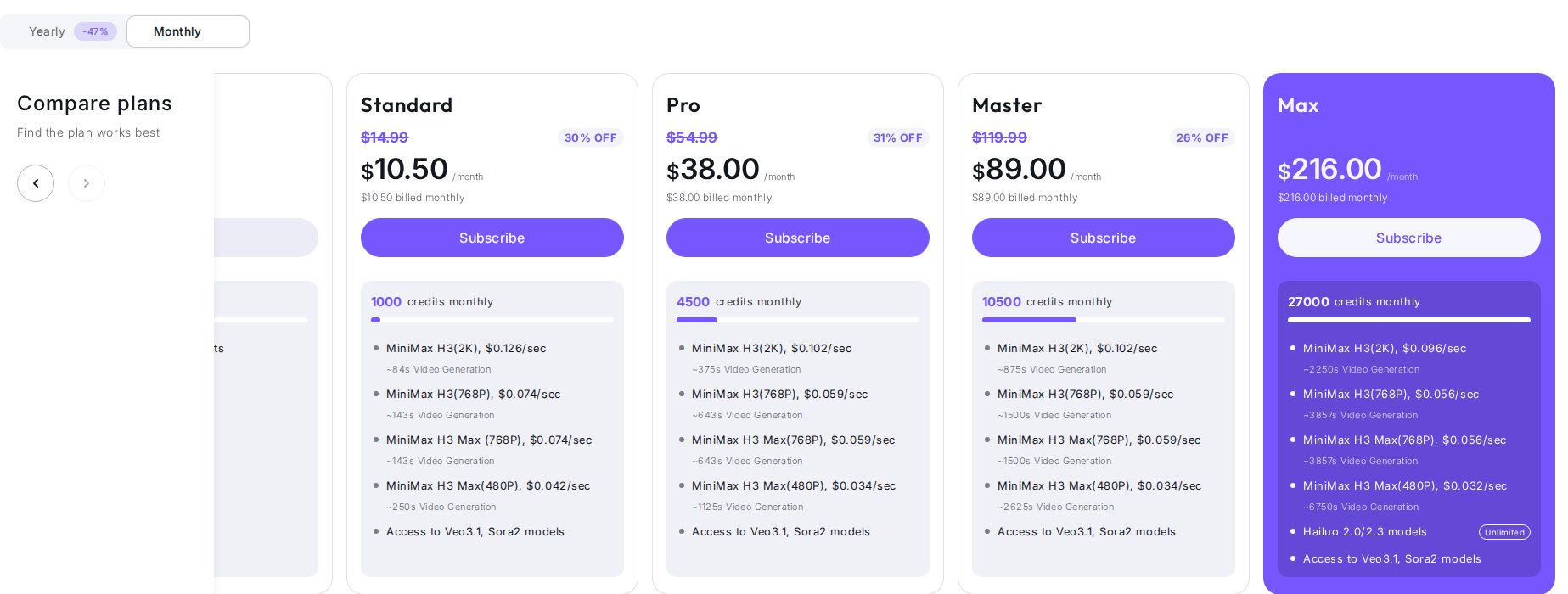
The official hailuoai.video pricing page: the Free plan is $0, 0 credits a month, one-time trial credits, Hailuo models only. You can queue up to 4 tasks, and 1 generates at a time. Watermark removal is listed only for paid plans. A pop-up banner for new users on the same day promised 150 credits for signing up. Under the site's rules, failed generations don't use up credits.
What you can do with the trial credits. The Free plan opens all H3 modes (4 to 15 seconds, 768p and 2K), H3 Max (5–15 seconds, 480p and 768p), Hailuo 2.3 at 6 seconds in 768p, and the older models. If you get 150 credits, that's about six 6-second clips on Hailuo 2.3, or two 5-second clips on H3 in 2K. Not much, but enough to see whether this tool is for you.
There's one more free route, advertised at the top of the site. On November 2, 2026, a banner there said: download the MiniMax Design app and get 3,000 free credits. It's a promotion, and its terms can change any day, so read them on the banner itself before you install anything.
Two limits of the Free plan you're better off knowing in advance:
- Watermark. Clips from the Free plan download with the Hailuo logo. Fine for tests, not for ads or clients.
- Commercial use. The site's rules say that clips you can download without a watermark belong to you and can be used commercially. Only paid subscribers download without the watermark. So for ads you need a paid plan.
Here's how I'd spend the trial credits. Make your first generation on H3 Max in 768p: it's cheaper, and it already shows whether the model understands your prompt. Then repeat the prompt that worked on H3 in 2K. That way one batch of credits gives you both the tests and one clip you're not embarrassed to show.
Section 03Hailuo plans and what one clip costs
Hailuo has five plans. Prices on the site change often, and there are always discounts up, so below is what the official pricing page showed on November 2, 2026.
| Plan | Monthly | Billed yearly | Credits a month | What matters |
|---|---|---|---|---|
| Free | $0 | $0 | 0, one-time trial | Watermark, 1 task at a time |
| Standard | $10.50 | $8.40 a month ($100.80 a year) | 1,000 | No watermark, 1080p on Hailuo 2.3 |
| Pro | $38 | $30.40 a month ($364.80 a year) | 4,500 | 2 clips at once, 10 seconds on Hailuo 2.3 |
| Master | $89 | $71.20 a month ($854.40 a year) | 10,500 | Queue of up to 12 tasks |
| Max | $216 | $184 a month ($2,208 a year) | 27,000 | Hailuo 2.0 and 2.3 without using credits |
Now the most practical part: how many clips that money buys. The site itself says how many seconds of video 1,000 credits get you on Standard: about 84 seconds on H3 in 2K, about 143 seconds on H3 in 768p, and about 250 seconds on H3 Max in 480p. In the interface, a 5-second H3 clip in 2K shows a price of 60 credits. Prices for the older models are listed in the FAQ on the same page.
| Model and mode | Credits per clip | Clips on Standard |
|---|---|---|
| H3, 5 seconds, 2K | 60 | about 16 |
| H3, 5 seconds, 768p | about 35 | about 28 |
| H3 Max, 5 seconds, 480p | about 20 | about 50 |
| Hailuo 2.3, 6 seconds, 768p | 25 | 40 |
| Hailuo 2.3, 6 seconds, 1080p | 80 | 12 |
| Hailuo 2.3, 10 seconds, 768p | 50 | 20 |
| Hailuo 2.3-Fast, 6 seconds, 768p | 15 | 66 |
I calculated the rows marked "about" myself from the seconds the site promises per 1,000 credits. The other numbers are taken from the site as is. If your interface shows a different price, trust the interface: Hailuo always shows how much it will charge right before the Create button.
Three more rules that save money. Credits bought separately last a year, but on their own they don't remove the watermark: for that you need a subscription. Under the site's rules, subscriptions aren't refundable, so start with one month of Standard and take the yearly plan once you know you use Hailuo every week. And third: a failed generation is free, so don't be afraid to experiment.
Section 04How to sign up and pay for Hailuo
Getting started takes a couple of minutes. Here's the path.
Step 1. Open the site
The address is hailuoai.video. If the page loads slowly or spins forever, refresh it or try another browser: at peak hours the service can be overloaded.
Step 2. Sign up with Google
Click Sign In and choose to sign in with your Google account. It's the fastest way, and you won't lose the account. After you sign in, check the credits icon in the top right corner: the trial bonus should show up there.
Step 3. Pay for a subscription if you need one
Plans are paid with a regular credit or debit card on the pricing page. You can also pay through the iPhone app, with the payment method on your Apple ID.
Step 4. Install the phone app if that's easier
Hailuo has an iPhone app. Your account and credits are shared with the website, so you can start a generation on your computer, then download the finished clip on your phone and post it to Reels right away.
Section 05Your first video in Hailuo, step by step
Start with the simplest thing: a clip from text. It's the easiest way to see how well Hailuo follows a prompt.
1. Open the Video section
The home page has a big input box with the hint "Describe the video content you want to generate." That's the generator. Below the box are the settings for model, quality, length, and aspect ratio.
2. Pick the model and mode
MiniMax H3 is selected by default. Next to it is the mode switch: text, first and last frame, or Omni Reference with your own files. For the first time, keep the regular text mode.
3. Set quality, length, and aspect ratio
For a test, set 768p and 5 seconds, it's cheaper. For Reels and Stories use 9:16, for YouTube and a website use 16:9. The number on the Create button shows how many credits will be charged.
4. Write the prompt in English
Describe one scene and one action, the camera move, the light, and the sound in a separate sentence. For example: "A cup of coffee on a wooden table by the window, steam slowly rising. Slow push-in. Soft morning light. Sound: quiet rain on the window, a spoon gently clinking. No text". Ready prompts for your tasks are below, in Section 9.
5. Click Create and wait
A clip usually takes a few minutes, longer at peak hours. On the Free plan one generation runs at a time, and the rest wait in a queue, up to 4. You can close the tab: the finished video will wait for you in Assets.
6. Watch it with sound on and download
Make sure the sound is on: in H3 it's part of the result. If you like everything, download it. If one detail is off, change one sentence in the prompt and run it again. Don't rewrite the whole prompt, or you won't know what actually worked.
Section 06Video from a photo and references
If you sell your own services, this is the main mode. You take your real photo, and the clip keeps you: your face, your smile. The same goes for a product, your office, a plate of food.
There are two ways to bring a photo to life in Hailuo.
First frame and last frame. You upload a photo as the first frame, and the model continues the scene from it. If you also upload a last frame, Hailuo works out the motion between the two shots on its own. It's handy for before-and-after: a messy kitchen and the same kitchen after cleaning, a face before a treatment and after. In this mode the prompt describes only what happens between the frames.
Omni Reference. You attach several files and explain in the prompt what to take from each: the face from this photo, the sweater from that one, the room from a third, the voice from an audio file. It's harder, but you can build a scene that never existed in a single shot. For example: your face, your office, and your mug with your logo in one clip.
Sharp, in daylight, the face looking at the camera or slightly to the side, the hands either fully visible or not in the shot at all. Group photos, heavily blurred shots, and frames where the hands are cut off by the edge come out worst. If the photo has a label or a logo, add "keep the label unchanged" to the prompt, or the model may rewrite the letters.
Want to compare how different services animate the same photo? See how to animate a photo with AI, where one shot goes through five AI tools.
Section 07Which model to pick so your credits last
The most common beginner mistake is to go straight for H3 in 2K at 15 seconds. The clip is expensive, and if the model misreads the prompt, a whole batch of credits burns up. It's better to climb a ladder.
- Test the idea. H3 Max in 480p, 5 seconds. About 20 credits. Look at one thing only: did the model get the action and the camera right.
- Check the details. The same prompt on H3 in 768p. About 35 credits. Now you can see the face, the hands, the sound.
- The final. H3 in 2K at the length you need. 60 credits for 5 seconds, longer costs more. Do this only once the first two steps look right.
If you don't need sound because you'll add your own music anyway, take Hailuo 2.3-Fast. 15 credits for 6 seconds in 768p is the cheapest option on the site. Hailuo 2.3 in 1080p (80 credits) makes sense when you need high sharpness without sound, for example for a course cover on your website.
Clips longer than 15 seconds are stitched together from several pieces in any video editor.
Section 08The prompt formula for Hailuo with sound
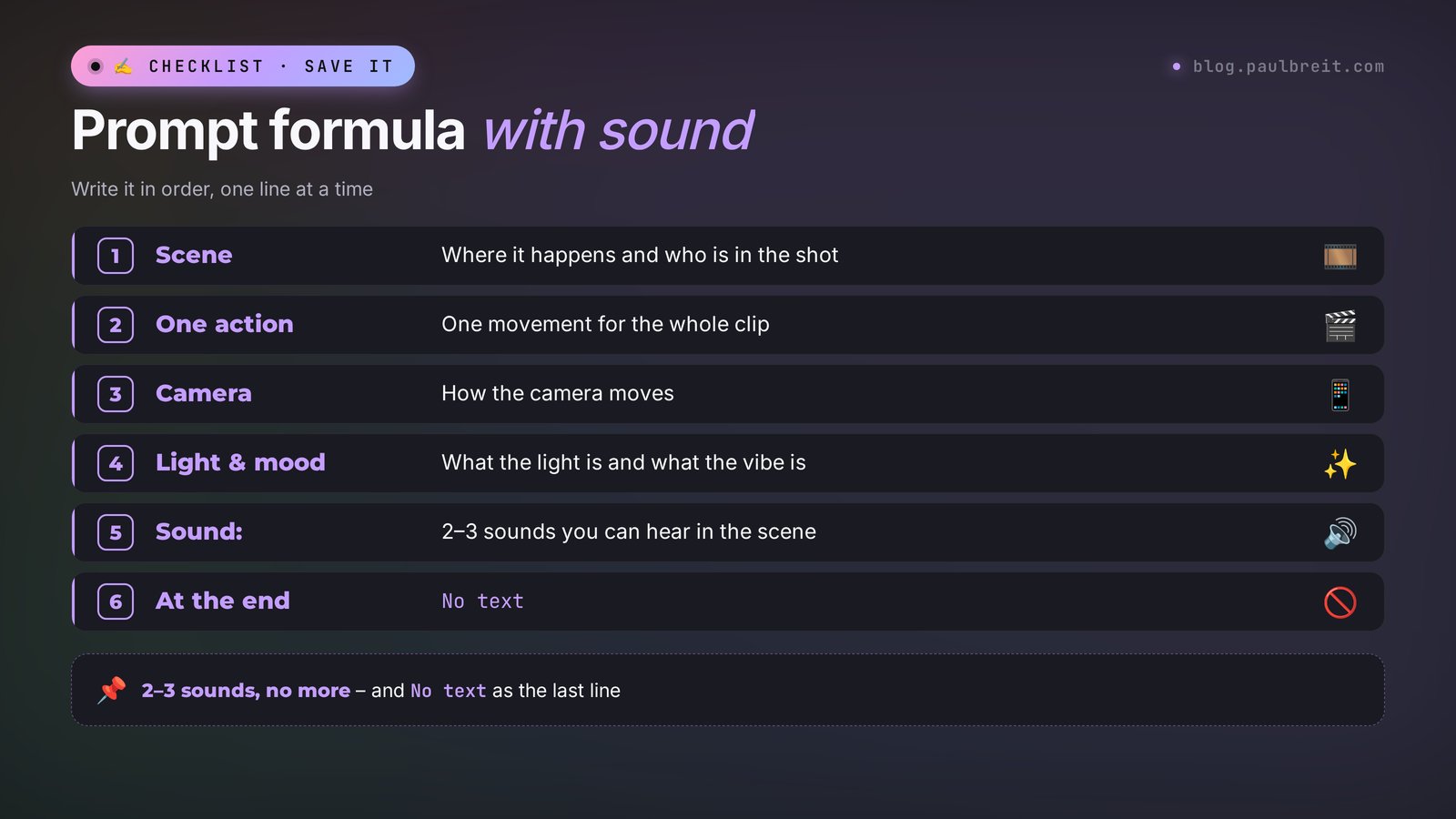
Hailuo understands English prompts best. It sometimes handles short phrases in other languages too, but the results are hit or miss. You don't have to write in English yourself: Claude can do it, more on that in Section 10. But keep the structure of the prompt in your head, because it's the same for any task.
| Part | What to write | Example |
|---|---|---|
| Scene | Who or what is in the shot and where | A woman in a beige sweater sits in an armchair by the window |
| Action | One movement, no chain of events | slowly looks up and smiles |
| Camera | How the camera moves | slow push-in, static shot, slow orbit |
| Light and mood | Time of day, tone | soft morning light, warm calm mood |
| Sound | A separate sentence after Sound: | Sound: quiet room tone, birds outside |
| Restrictions | At the end | No text, keep the face unchanged |
Why one action. When a prompt has three events in a row ("stands up, walks to the window, opens it, and waves"), the model tries to fit it all into 5 seconds, and the motion comes out jerky. One action per clip gives you a smooth picture. If you need a sequence, make several short clips and stitch them together.
A word on sound. If you say nothing about sound, H3 will make it up itself, and often it's a generic background or music that doesn't fit. Better to name 2–3 specific sounds. The model can do speech too, but I wouldn't ask for it in your first tests: the voice will come out as someone else's. Record your own voice on your phone and add it in editing.
For more prompt examples for different AI video tools, see the collection of AI video prompts. The structure there is the same, so they work for Hailuo too.
Section 0910 ready prompts for real tasks
Copy them and change the details to fit you. The first prompts are made for the "photo as first frame" mode, the last ones also work for generating from text.
The person looks up from the laptop straight into the camera and gives a warm, confident smile. Slow push-in from medium shot to close-up. Soft natural daylight, calm mood, realistic motion. Sound: quiet office room tone, a soft keyboard click. No text, keep the face unchanged.
Steam slowly rises from the warm breakfast plate on the kitchen table. The camera gently lowers and pushes in toward the food. Soft morning window light, cozy mood. Sound: a pan sizzling in the background, a fork touching the plate. No text, no hands.
The curtains move slightly in a soft breeze, sunlight slowly shifts across the empty armchair. Very slow camera push-in, peaceful and safe mood, warm tones. Sound: gentle wind, distant birds outside the window, a clock ticking. No people, no text.
The camera slowly orbits around the product on the table. Soft studio light with gentle reflections on the surface, premium commercial look, smooth motion. Sound: soft ambient hum, a light whoosh as the camera moves. No text, keep the label unchanged.
The athlete lifts the dumbbells in one powerful motion and exhales. Handheld camera with slight shake, dramatic side light in the gym, energetic mood, realistic motion. Sound: heavy breath, the clank of metal, a gym echo. No text.
The pages of the open book slowly turn by themselves, dust particles float in the sunlight. Static camera, warm afternoon light, magical but realistic mood. Sound: soft rustle of paper, quiet room tone. No text, no people.
The hand slowly turns toward the light, glossy reflections glide across the nails. Macro shot, static camera, soft bright studio light, elegant mood. Sound: quiet salon ambience, a light tap of a nail on glass. No text, no extra fingers.
A smooth transformation from the first frame to the last frame, the room gradually becomes clean and tidy. Static camera, consistent daylight, satisfying mood, natural motion. Sound: soft cleaning sounds, a calm ambient tone. No text.
The person waves hello to the camera with a friendly smile and nods slightly. Static camera, medium shot, bright soft light, welcoming mood, natural motion. Sound: light room tone, no music. No text.
A cozy home studio at night, a microphone and a laptop on the desk, a warm lamp turns on by itself. Slow dolly-in toward the desk. Warm amber light, inviting mood, cinematic look. Sound: a soft click of the lamp, quiet evening city noise outside. No text, no people.
If the clip is for Reels, set 9:16 right away. And remember that the first two seconds decide whether people keep watching, so the most interesting movement should start immediately. For ideas on what to post in Reels a month ahead, see AI Reels scripts.
Section 10Let Claude write the prompts for Hailuo
You don't have to write English prompts yourself. I describe the task to Claude in plain words and ask for a ready prompt for Hailuo. It's faster and more reliable than a translator: Claude knows how prompts for video models are built, and it adds the camera, light, and sound on its own.
Here's a request you can copy as is. Change only the photo description and the task.
Write a prompt for the Hailuo AI video tool (MiniMax H3 model), video from a photo, 6 seconds, with sound.
In the photo: a therapist, a woman around 40, sitting in an armchair by the window with a cup of tea.
What should happen: she looks up into the camera and smiles softly.
Rules: prompt in English, one action, camera move, light, a separate Sound line with 2–3 sounds, restrictions at the end. No text on screen, don't change the face.
After the prompt, briefly explain what each part of it does.
I ran this request. Here's Claude's reply:
The woman sitting in the armchair by the window slowly lifts her gaze from the cup of tea to the camera and gives a soft, warm smile. Slow dolly-in from medium shot to close-up. Soft natural daylight from the window, warm calm tones, shallow depth of field. Sound: quiet room tone, a faint clink of the cup on the saucer, distant birds outside. Realistic natural motion. No text on screen, keep her face unchanged.
And the explanation: the first sentence sets one action, "slow dolly-in" is a smooth camera push-in, "soft natural daylight" and "warm calm tones" handle the calm mood, the Sound line lists specific sounds so the model doesn't drop in music. The last sentence protects the face from distortion.
Notice that Claude added "shallow depth of field" on its own, a blurred background. It wasn't in the original task, but for a portrait it's the right move: attention stays on the face. If you don't like it, just ask Claude to remove it.
From there you can keep working in the same chat: "give me two more versions with a different camera move," "rewrite it for 9:16," "add rain to the sound." Save the prompt that works in your notes, it's your template for next time. If you don't use Claude yet, start with the guide Learn Claude from scratch: signing up at claude.ai, the free plan, and your first requests.
Section 11If something goes wrong
| What happened | Why | What to do |
|---|---|---|
| The site won't open or keeps loading | The service is overloaded | Refresh the page, try another browser, or come back outside peak hours |
| The Create button is gray | Not enough credits for the selected mode | Lower the quality to 768p or 480p, shorten the clip, pick H3 Max or Hailuo 2.3-Fast |
| The generation is stuck in the queue | The Free plan runs one task at a time | Wait, close the tab, the clip will show up in Assets |
| The face in the clip looks like someone else | Too much head movement or a poor photo | Use a photo facing the camera, make the movement smaller, add keep the face unchanged |
| Extra fingers and strange hands | The hands are cut off by the edge of the photo or make a complex move | Crop the photo so the hands are fully visible, add no extra fingers |
| Letters appeared in the clip | The model drew in some text | End the prompt with no text, for a product add keep the label unchanged |
| Wrong sound, music is playing | Nothing was said about sound | Add a Sound line with specific sounds and no music |
| The generation was rejected | The safety filter kicked in | Remove words about weapons, injuries, or famous people from the prompt and rephrase |
| The payment doesn't go through | The card was declined | Try another card or pay through the iPhone app |
Good news about rejections and glitches: under Hailuo's rules, failed generations don't use up credits. So rephrase the prompt calmly and try again.
Section 12Hailuo, Kling, Pika, and Seedance
Hailuo isn't the only AI video tool, and different tasks suit different ones. Here's how I'd choose in November 2026.
| Service | Strength | Free | When to use it |
|---|---|---|---|
| Hailuo | Sound together with the picture, up to 15 seconds, up to 2K | One-time trial credits | You need a clip with sound and no editing |
| Kling | Realistic people, longer clips, video from a photo | Terms on the Kling site | A lifelike face and motion matter most |
| Pika | Several third-party models in one window, Pikaframes | Bonus through ChatGPT | You want to compare models on one photo |
| Seedance | Clips up to 30 seconds in one take | Depends on the platform | You need one long continuous shot |
| Veo 3 | Google's video with sound and speech | Limited | You need a character to speak |
My pick to start with: Hailuo, if you need a short Reels clip with sound and don't want to bother with editing. One prompt, and you get a finished file you can post right away. If you want music-video-style camera effects, also take a look at Higgsfield.
Section 13The whole path in one minute
Open hailuoai.video. Sign in with Google and get the one-time trial credits. There are no monthly free credits, and clips from the Free plan come with a watermark. In the Video section, pick MiniMax H3 Max, 480p or 768p, 5 seconds, and 9:16. Upload your photo as the first frame and describe in English one action, the camera, the light, a Sound line, and no text at the end. Claude will put the prompt together. Repeat the version that works on H3 in 2K: that's 60 credits for 5 seconds. For ads you need a paid plan: Standard at $10.50 a month for 1,000 credits, paid by card.
Start today with one action: take a waist-up photo of yourself and prompt #1 from Section 9, and make a clip with the trial credits. Turn the sound on when you watch it. Even if the first take isn't perfect, you'll hear right away how an ordinary photo changes once it has room tone and your eyes on the camera.
FAQFrequently asked questions
Is Hailuo free?
Partly. The Free plan costs $0, but as of November 2, 2026 it gives 0 credits a month. A new account gets one-time trial credits that can be spent only on Hailuo models, and clips download with a watermark. That's enough for a few short tests.
How do I sign up for Hailuo and pay?
Open hailuoai.video, click Sign In, and sign in with your Google account. The trial credits show up next to the credits icon. Plans are paid with a regular credit or debit card, or through the iPhone app with your Apple ID payment method.
How much does Hailuo cost?
As of November 2, 2026, with monthly billing: Standard is $10.50 for 1,000 credits, Pro $38 for 4,500, Master $89 for 10,500, Max $216 for 27,000. Billed yearly, Standard comes to $8.40 a month. A 5-second clip on MiniMax H3 in 2K costs 60 credits, 6 seconds on Hailuo 2.3 in 768p costs 25 credits.
Do I have to write Hailuo prompts in English?
The Hailuo interface is in English. The model sometimes understands short prompts in other languages, but English gives more stable results. The easiest way is to describe the task to Claude in plain words and ask for a finished English prompt.
How do I make a video from a photo in Hailuo?
In the Video section, upload the photo as the first frame, pick the MiniMax H3 or H3 Max model, 768p quality, and 5 seconds. In English, describe one action, the camera move, the light, and a Sound line with the sounds you want, then add no text at the end. Click Create.
How do I remove the Hailuo watermark?
Only with a paid subscription. Clips made on any paid plan download without a watermark and, under the site's rules, can be used commercially. Credits bought separately without a subscription don't remove the watermark.