AI video prompts: 40 ready prompts for Kling, Veo, and Seedance
AI video prompts follow different rules than image prompts: you describe the shot, and also the motion, the camera, the light, and the sound. Below you'll find a six-part formula, a cheat sheet of camera moves, 40 ready prompts for Reels, products, ads, and Stories, the differences between Kling, Veo 3.1, and Seedance 2.5, and a master prompt that lets Claude turn your idea into a prompt for any video model.
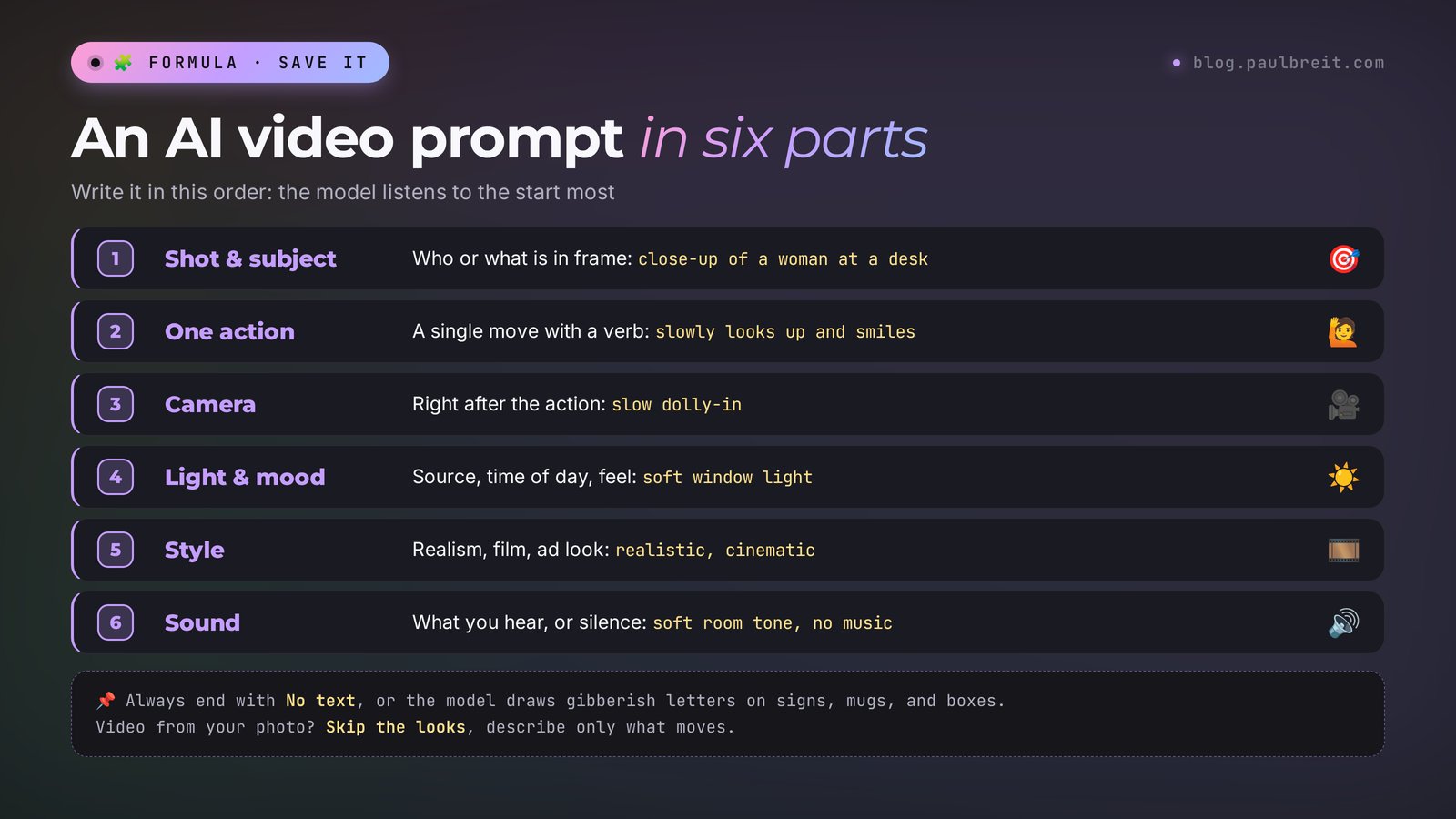
Write your AI video prompt in English and always in the same order: who or what is in the shot, one main action, the camera move, light and mood, style, and sound. End with no text so the model doesn't draw letters. For video from a photo, describe only the motion, since the looks are already in the picture. A 5-second clip needs 25–50 words. For speech in Veo 3.1, put the line after a colon and in quotes. For Seedance 2.5, split the clip by timecodes. The 40 ready prompts are in Sections 5–10.
Everyone who sells services, courses, and consulting and makes Reels, Stories, and ads without a camera crew. A therapist gets calm background shots to put under their voice. A nutritionist gets food with steam rising from it. A tutor gets a lesson cover where you look up at the viewer. A nail artist, a trainer, or a designer gets close-ups of the product and the process. Every prompt is beginner-friendly: copy it, change a word or two, and run it.
What's inside
- How a video prompt differs from an image prompt
- The six-part video prompt formula
- A cheat sheet of camera moves
- One idea for Kling, Veo, and Seedance
- Prompts 1–8: you on camera
- Prompts 9–15: products and services
- Prompts 16–22: background shots for Reels
- Prompts 23–28: speech and sound
- Prompts 29–33: a clip with several scenes
- Prompts 34–40: hooks for ads and Stories
- Let Claude write the prompts: a master prompt
- If something goes wrong
- The whole path in one minute
- FAQ
Section 01How a video prompt differs from an image prompt
An image prompt describes one frozen moment: who, where, in what light. A video prompt describes five, eight, sometimes thirty seconds. In that time something happens in the shot, the camera moves somewhere, the light may change, and today's models also make up the sound. If you say nothing about motion, the AI will invent it. Usually it invents it badly: the person starts waving their arms, the camera drifts off in a random direction, and a sign full of made-up letters appears in the frame.
That's why the image habit of "describe the looks in rich detail" works against you in video. A long description of appearance eats up the model's attention, and there's none left for the motion. This matters most in video-from-photo mode: the face, the clothes, and the background are already in the picture, so there's no need to repeat them in words. Tell the model what changes.
The second difference is time. Five seconds fits one action. A person looks up and smiles: that's one. A person stands up, walks to the window, picks up a cup, and turns around: that's four, and by second five the face will probably warp or a sixth finger will show up. A short prompt with one action almost always beats a long one with three.
The third difference is sound. Veo 3.1, Kling 3.0, and Seedance 2.5 generate sound together with the picture. If you stay silent, the model adds something of its own: music, a hum, sometimes mumbled speech. If you say exactly what should be heard, or ask for silence, the clip is ready for editing right away.
Everything each tool can do is covered in separate guides: Kling AI: video from a photo or text, Veo 3: how to make AI video with Google, and Seedance 2.5: how to use the AI video generator. If you'd like several models in one window, see the guide to Pika. This article is only about prompts that work in any of them.
Section 02The six-part video prompt formula
All 40 prompts below follow one pattern. Learn the order, and you'll write your own without a cheat sheet. The order matters: models pay more attention to the start of a prompt, so put the most important part first.
| Part | What to write | Example |
|---|---|---|
| 1. Shot and subject | Who or what is in the frame, and how close. For video from a photo, a word or two | Close-up of a woman in her 30s at a desk |
| 2. Action | One main movement, with a verb and a pace | slowly looks up and smiles at the camera |
| 3. Camera | How the camera moves, or that it stays still | slow dolly-in / static camera |
| 4. Light and mood | The light source, time of day, atmosphere | soft window light, calm morning mood |
| 5. Style | Realistic, cinematic, commercial, film | realistic, cinematic, shallow depth of field |
| 6. Sound | What you hear, or silence, with any line in quotes | soft room tone, no music |
And one line at the end: No text. Video models love to draw letters on signs, mugs, and packaging, and it's almost always gibberish. If your product has a label you need to keep, add keep the label unchanged, and put your logo and captions on later in editing.
Here's the whole formula on a simple example. The task: a Reel cover for a therapist who already has a photo in her office.
Medium shot of the woman in the armchair. She slowly lifts her eyes from the notebook and gives a soft, calm smile to the camera. Slow dolly-in. Warm afternoon window light, peaceful mood. Realistic, shallow depth of field. Quiet room tone, no music. No text.That's 44 words. For a 5–8 second clip, you don't need more. If your prompt has grown to a hundred words, check whether you're describing three actions instead of one.
Why English works best
Kling, Veo, and Seedance are trained mostly on English descriptions. They sometimes understand short prompts in other languages, but the results jump around: the model gets one word and ignores the next. An English prompt gives you a predictable result. If English isn't your first language, that's fine: describe the task to Claude in your own words, and it will return a finished prompt that follows the formula. Section 11 shows how.
Video from text and video from a photo
If you're generating from scratch, from text, spell out parts 1 and 5 in more detail: looks, clothes, place, the style of the shot. If you upload your own photo, cut part 1 down to "the woman," "the product," "the plate," and put all your attention on the action and the camera. For anyone who sells their own services, the second mode is more useful: the shot keeps you, your office, your product. This mode is covered in detail in how to animate a photo with AI.
Section 03A cheat sheet of camera moves
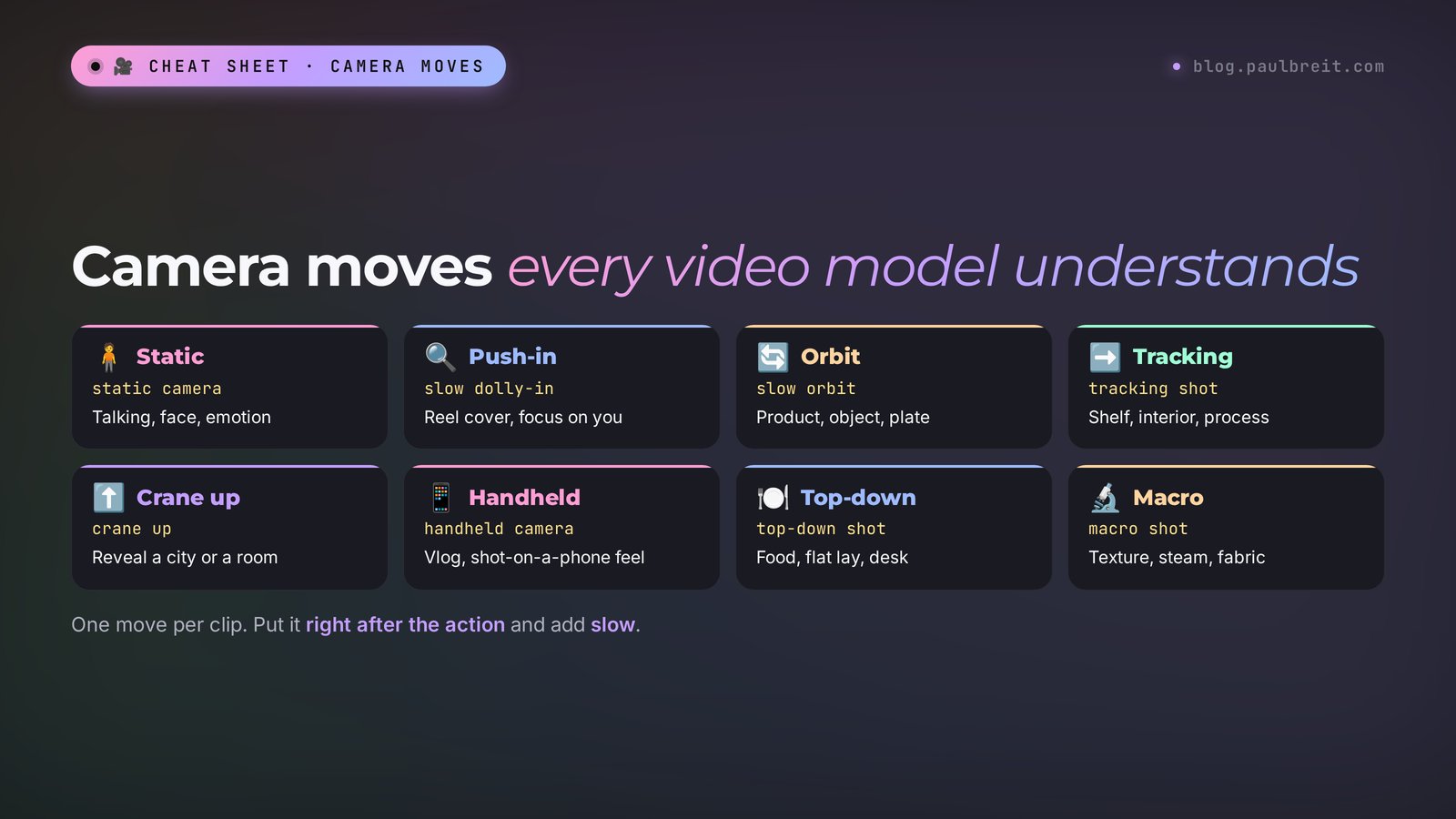
The camera is what separates a real clip from a photo that wiggles. One camera move makes a five-second shot look like it was filmed by a camera operator. Every major video model understands the terms below. Pick one per clip.
| Move | How to write it | When to use it |
|---|---|---|
| Camera stays still | static camera, locked-off shot | Someone is talking, the face and emotion matter |
| Slow push-in | slow dolly-in, slow push-in | Reel cover, focus on the person or product |
| Pull back | slow dolly-out, pull back | Show the setting, a closing shot |
| Orbit | slow orbit around the subject | A product on a table, an object, a dish |
| Side tracking | tracking shot from left to right | A product shelf, an interior, a work process |
| Rise up | crane up, camera rises | Reveal a view: a city, a hall, a desk from above |
| Handheld | handheld camera, slight shake | A casual vlog, sports, a "shot on my phone" feel |
| Overhead | top-down shot, overhead view | Food, a product flat lay, a desk |
| Close detail | macro shot, extreme close-up | Cream texture, fabric, nails, steam over a cup |
| Camera follows | the camera follows behind her | A person walking down a street or through an office |
A few rules that save takes. Put the camera move right after the action: at the end of a long prompt it's the first thing to get lost. Add a pace word: slow, gentle, smooth. Without one, the camera often flies too fast. And don't mix two moves: "push-in plus orbit" comes out as a jerky flight.
If you want flashy camera moves at the push of a button, without describing them in words, that's where Higgsfield shines: it has 65 ready camera moves. See the breakdown in Higgsfield: AI video with camera effects.
Section 04One idea for Kling, Veo, and Seedance
The formula is shared, but each model has its own character. It's worth tuning the same idea for each tool. Here's what to look at.
| Kling 3.0 | Veo 3.1 | Seedance 2.5 | |
|---|---|---|---|
| Strength | Video from a photo, natural human motion | Speech with lip sync, scene sound | Long clips with several scenes, up to 30 seconds |
| Clip length | 3–15 seconds | 4, 6, or 8 seconds, can be extended | Up to 30 seconds per generation |
| How to write | Short: one action, camera, light | Scene + a line after a colon in quotes + sounds | By timecodes: [0–5s], [5–10s], and so on |
| Sound | Yes, including speech | The strongest: dialogue and ambient noise | Yes |
| Where to use it | kling.ai or inside aggregators | Google Flow | Dreamina by ByteDance |
As of November 1, 2026, Kling is rolling out version 4.0: since the end of September it has been opening in stages, starting with the lighter 4.0 Flash. The prompts in this article work with it too, the formula hasn't changed.
Here's one idea rewritten for three models. The task: a nutritionist at a table talks about breakfast.
Kling 3.0, video from a photo:
The woman picks up a spoon, takes a small bite of the oatmeal and nods with a satisfied smile. Static camera. Soft morning window light, cozy kitchen. Realistic motion. No text.Veo 3.1, with speech:
Medium shot of a friendly nutritionist in her 30s at a bright kitchen table with a bowl of oatmeal and berries. She looks at the camera and says: "Breakfast is the easiest habit to fix." Static camera, soft morning light. Audio: quiet kitchen ambience, no music. No subtitles, no text.Seedance 2.5, three scenes:
[0-4s] Top-down shot of a bowl of oatmeal, berries falling into it in slow motion.
[4-9s] Medium shot, the woman at the kitchen table takes a bite and smiles, static camera.
[9-12s] Slow dolly-out revealing the bright kitchen and morning sunlight.
Soft natural light, realistic, warm tones. Gentle acoustic music. No text.
Notice the No subtitles in the Veo prompt. When someone speaks on camera, models sometimes draw subtitles on their own, and once again it's a mess of letters. You'll add clean captions in editing; that's covered in AI for Reels.
Kling, Google Flow, and Dreamina aren't available in every country, and features sometimes roll out region by region. If a service won't open or won't let you sign in, check its list of supported countries first. Sign-up with a Google or Apple account is the quickest route everywhere. Paid plans are billed by card.
Section 05Prompts 1–8: you on camera
For these prompts, upload your own photo and choose video-from-photo mode (Image to Video). The model takes your looks from the picture, so the prompt describes only the motion. Sharp waist-up photos work best, where the whole face is visible and looking straight ahead or slightly to the side.
1. A look into the camera for a Reel cover
You look at your laptop, then lift your eyes to the viewer. A perfect first frame: the eye contact hooks people.
The person looks up from the laptop directly into the camera and gives a short, confident smile. Slow push-in. Soft daylight from the window, calm focused mood. Realistic, natural motion. No text.2. An "I hear you" nod
Great for a therapist, coach, or consultant: a short gesture of agreement under a voiceover.
The person listens attentively, then nods slowly twice with a warm, understanding expression. Static camera. Soft warm lamp light, safe and calm atmosphere. Realistic. No text.3. Turning to the viewer
A profile or three-quarter photo. You turn to face the camera and start talking, under a voiceover.
The person turns their head from the window toward the camera and starts speaking calmly, small natural hand gesture. Static camera. Golden hour light from the side. Realistic, shallow depth of field. No text, no subtitles.4. A walk with coffee
An outdoor photo. A "day in my life" shot for Stories and Reels about your story.
The person walks slowly toward the camera holding a coffee cup and smiles. The camera moves backward in front of them. Soft overcast city light, relaxed weekend mood. Realistic, slight handheld feel. No text.5. Writing in a notebook
A shot for Reels about planning, a challenge, or a review. The hand moves, the face stays almost still, so there's less risk of distortion.
The person writes in a notebook, then pauses and taps the pen thoughtfully against the page. Slow dolly-in toward the notebook. Warm desk lamp light, focused evening mood. Realistic. No text on the pages.6. Laughing off camera
The most human shot for building trust: you laugh as if at someone's joke.
The person laughs naturally at something off-camera, then looks back into the lens with a smile. Static camera. Bright natural daylight, friendly mood. Realistic, natural facial motion. No text.7. Speaking on stage
A photo with a microphone. Good for announcing a live session or a workshop.
The speaker raises the microphone and confidently gestures toward the audience. Slow crane up behind the audience. Stage spotlight, warm audience glow, energetic conference atmosphere. Cinematic, realistic. No text.8. Your desk from above
An overhead photo of your desk: hands, laptop, cup. Good for a "how my day works" Reel.
Top-down shot. Hands type on the laptop keyboard, then reach for the coffee cup. Static overhead camera. Soft morning light, tidy minimal desk. Realistic. No text on the screen.Section 06Prompts 9–15: products and services
These prompts work both for video from a product photo and for generating from scratch. If the product has a label, always add keep the label unchanged, or the model will redraw it in every frame.
9. Orbit around a product on a table
The camera slowly orbits around the product on the wooden table. Soft studio light with gentle reflections. Premium commercial look, smooth motion. Keep the label unchanged. No new text.10. Cream in close-up
For an esthetician, a beauty pro, or a skincare brand: texture sells better than words.
Macro shot. A finger gently scoops the white cream from the jar, revealing its silky texture. Static camera. Soft diffused light, clean bright background. Luxury skincare commercial style. No text.11. A steaming dish
For a nutritionist, a baker, or a chef: warm food on screen makes people hungry instantly.
Steam rises from the hot soup in the bowl, a sprig of herbs gently falls on top. Slow push-in, slight downward angle. Warm kitchen light, cozy evening mood. Realistic food commercial. No text, no hands.12. Unboxing
Close-up of hands slowly opening a gift box and lifting the lid, soft tissue paper inside. Static camera. Warm natural light, festive calm mood. Realistic, smooth motion. Keep the box design unchanged. No new text.13. A book or a workbook
For anyone selling a course, a guide, or a book: the cover comes to life and the pages turn.
The book lies on the table, its pages slowly flip by themselves and stop in the middle. Slow dolly-in. Warm afternoon sunlight, dust particles in the air. Realistic, cozy mood. Keep the cover unchanged. No new text.14. A finished renovation or interior design
For an interior designer or a renovation crew. Upload the "after" photo, and the camera glides through the room.
Smooth tracking shot from left to right through the bright living room, sunlight shifts slightly on the sofa and plants. Clean modern interior, soft natural light. Realistic real estate video style. No people, no text.15. A craftsperson at work
For a nail artist, a florist, or a ceramicist: hands at work, no face, the most reliable shot there is.
Close-up of hands carefully arranging flowers into a bouquet, adding one last stem. Slow orbit around the hands. Soft daylight in a calm studio. Realistic, satisfying motion. No text.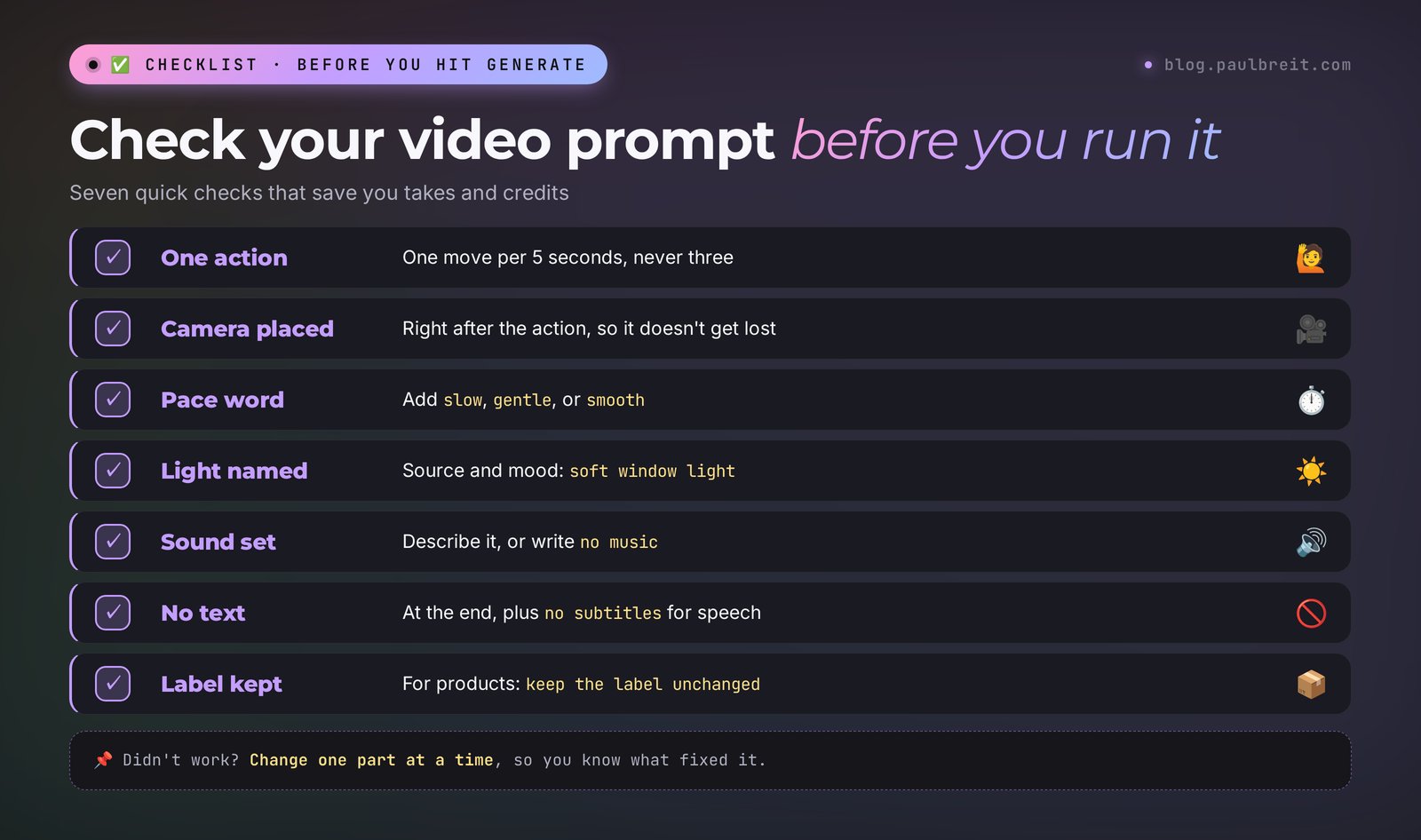
Section 07Prompts 16–22: background shots for Reels
Background shots (b-roll) are what plays under your voice: you talk, and the screen shows a calm, beautiful picture. They're easy to generate from text, without a photo: there are no people in the frame, so there's nothing to distort. Set the format to 9:16.
16. A morning city from the window
View from a high apartment window at sunrise, the city slowly wakes up, soft fog over the rooftops. Very slow push-in toward the glass. Warm golden light, quiet hopeful mood. Cinematic, realistic. Vertical 9:16. No people, no text.17. A cup and the rain
For Reels about burnout, rest, or a slower pace.
A cup of tea on the windowsill, rain drops slide down the glass, steam rises slowly. Static camera, shallow depth of field. Soft grey daylight, cozy calm mood. Realistic. Vertical 9:16. No text.18. The sea at sunset
Gentle waves roll onto the sandy beach at sunset, foam slowly spreads across the sand. Low static camera near the water. Warm orange and pink sky, peaceful mood. Cinematic, realistic. Vertical 9:16. No people, no text. Audio: soft waves, no music.19. A forest path
The camera slowly moves forward along a forest path, sunlight beams through tall pine trees, light morning mist. Smooth steady motion. Fresh calm atmosphere. Cinematic, realistic. Vertical 9:16. No people, no text.20. A desk in the evening
For Reels about work, planning, or money.
A tidy desk at night with a glowing laptop, a notebook and a warm lamp, city lights blur behind the window. Slow dolly-in toward the laptop. Warm cozy evening light. Cinematic, shallow depth of field. Vertical 9:16. No people, no text on the screen.21. An hourglass
For Reels about time, deadlines, or "while you keep putting it off."
Macro shot of an hourglass on a dark wooden table, sand slowly falls through the narrow neck. Static camera. Single warm side light, dramatic shadows. Cinematic, realistic. Vertical 9:16. No text.22. The view from a train window
For Reels about a journey, change, or a move.
View from a moving train window, green fields and small villages pass by, soft reflections on the glass. Static camera inside the train. Bright summer daylight, calm thoughtful mood. Realistic. Vertical 9:16. No people, no text.Section 08Prompts 23–28: speech and sound
These prompts are for Veo 3.1 and Kling 3.0, which generate speech along with the picture. The key rule from Google's official Veo 3.1 guide: the line goes after a colon and in quotes. Without them, the character may stay silent and the words show up on screen as text.
Lines in English come out the most stable. If you need another language, test it with a short take first. For ads and important clips, it's safer to record your own voice separately and lay it over the video in editing.
23. Speaking to the viewer
Medium close-up of a confident woman in her 40s in a bright home office. She looks into the camera and says: "Stop posting every day. Post with a goal." Static camera, soft window light. Audio: clear voice, quiet room tone, no music. No subtitles, no text.24. A client and a specialist talking
A little scene for a Reel: the client asks a question, the specialist answers.
Two people sit at a cafe table. The young man asks: "How do I find my first clients?" The woman smiles and answers: "Start with the people who already trust you." Static two-shot, warm cafe light. Audio: soft cafe ambience, cups clinking, no music. No subtitles, no text.25. A "wow" reaction
A short shot for a hook: a person looks at their phone and is surprised.
Close-up of a man looking at his phone. His eyes widen and he says: "Wait, that actually worked?" Handheld camera, slight shake. Natural daylight in a living room. Audio: his voice, light room tone. No subtitles, no text.26. Silence and the sound of an object
Sometimes you don't need speech, just one expressive sound.
Macro shot of a fountain pen signing a contract on a wooden desk. Static camera, soft warm light. Audio: only the scratching sound of the pen on paper, no music, no voices. No readable text on the document.27. Street sound for a vlog
The woman walks along a sunny street with a tote bag, the camera follows beside her. Golden hour light, relaxed mood. Audio: footsteps, distant traffic, birds, no music, no speech. Realistic. No text.28. A whispered secret
A hook trick: the character leans toward the camera as if sharing a secret.
Close-up of a smiling man leaning toward the camera. He whispers: "Here is what nobody tells you about pricing." Slow push-in. Dim warm light, intimate mood. Audio: soft whisper, quiet room. No subtitles, no text.Section 09Prompts 29–33: a clip with several scenes
Seedance 2.5 makes clips up to 30 seconds in one generation and understands a breakdown by timecodes. Each line is a separate scene with its own shot and camera. Write the shared settings for light, style, and sound on the last line, once for the whole clip. More tricks are in the guide to Seedance 2.5.
29. A specialist's day in 15 seconds
[0-5s] Close-up of an alarm clock at 7 am, a hand turns it off, soft morning light.
[5-10s] The woman pours coffee in a bright kitchen, static camera.
[10-15s] She opens a laptop at the desk and smiles at a new message, slow push-in.
Realistic, warm natural tones, smooth motion. Upbeat light music. No text.
30. The client's journey: before and after
[0-5s] A tired man sits at a messy desk late at night, rubbing his eyes, dim cold light, static camera.
[5-10s] Same man in a bright morning office, organized desk, he checks a notebook and nods, slow dolly-in.
[10-14s] He closes the laptop and leaves the office smiling, the camera stays in place.
Cinematic, realistic. Calm piano music. No text.
31. A live session announcement
[0-4s] Macro shot of a microphone on a stand, a ring light turns on.
[4-9s] The host sits down in front of the camera and adjusts the headphones, static camera.
[9-12s] Slow dolly-out revealing a cozy home studio with plants and warm lamps.
Warm cinematic light, realistic. Energetic soft electronic music. No text.
32. A product from three angles
[0-4s] Top-down shot of the product on a marble surface, soft shadows.
[4-8s] Slow orbit around the product at table level.
[8-12s] Macro shot of the product texture, light slowly moves across it.
Premium commercial look, soft studio light. Keep the label unchanged. Minimal ambient music. No new text.
33. Travel and work
For Reels about a flexible schedule and working from anywhere.
[0-5s] Aerial view of a coastal town at sunrise, slow forward motion.
[5-10s] The woman works on a laptop on a balcony overlooking the sea, static camera.
[10-15s] She closes the laptop and walks toward the beach, the camera follows behind her.
Cinematic, warm golden tones, realistic. Gentle acoustic music. No text.
Section 10Prompts 34–40: hooks for ads and Stories
The first seconds decide whether people keep watching. These prompts are built for a short, catchy shot you put at the start of a Reel or an ad, followed by your regular video.
34. A stack of papers falls
A hook about routine and chaos at work.
A tall stack of papers on the desk slowly tilts and collapses in slow motion, sheets fly in the air. Static camera. Bright office daylight. Cinematic, realistic. Vertical 9:16. No text on the papers.35. Notifications on a phone
A hook about leads and clients. The screen has no readable text: you'll add captions in editing.
Close-up of a phone lying on a table, the screen lights up again and again, the phone vibrates slightly. Slow push-in. Dark cozy room, soft screen glow. Realistic. Vertical 9:16. Audio: notification sounds. No readable text on the screen.36. A glass jar of coins
Coins fall one by one into a glass jar in slow motion, the jar slowly fills up. Static camera, shallow depth of field. Warm side light on a wooden table. Realistic. Vertical 9:16. Audio: clinking coins. No text.37. A laptop snaps shut
A "stop working at night" hook.
Close-up of hands firmly closing a laptop at night, the screen light disappears and the room turns dark. Static camera. Cold screen light, then darkness. Cinematic, realistic. Vertical 9:16. Audio: a soft thud. No text.38. A key in a lock
A hook about "opening access," a course launch, or a new chapter.
Macro shot of a golden key turning in an old lock, the door slowly opens and warm light pours through the gap. Static camera. Dark room, warm light from behind the door. Cinematic. Vertical 9:16. Audio: key click, door creak. No text.39. A look and a stop gesture
From your own photo: you raise your palm to the camera. The classic "stop scrolling" hook.
The person raises one open palm toward the camera in a calm stop gesture and looks directly into the lens. Quick slight push-in. Bright natural light. Realistic, natural hand motion. No text.40. A light bulb turns on
An "I've got an idea" or "here's how to fix it" hook.
Macro shot of a vintage light bulb in a dark room, the filament slowly starts to glow and the bulb lights up fully. Static camera. Dark background, warm glow. Cinematic, realistic. Vertical 9:16. Audio: a soft electric buzz. No text.Section 11Let Claude write the prompts: a master prompt
Ready prompts cover the typical tasks. For your own ideas, it's easier to hand the prompt-building to Claude: you describe in plain words what you want to see, and it returns a prompt that follows the formula and fits the model you picked. Go to claude.ai and sign in with Google or your email. The free plan is enough for building prompts.
Paste this master prompt into Claude and describe your task at the end:
You are a director of short vertical videos. Turn my idea into a prompt for an AI video model.
Rules:
– write the prompt in English, 25–60 words;
– order: shot and subject, one action, camera move, light and mood, style, sound;
– only one action per 5–8 seconds;
– if I upload my own photo, don't describe my looks, only the motion;
– end with no text, and for products add keep the label unchanged;
– for speech, put the line after a colon in quotes and add no subtitles.
Model: [Kling / Veo 3.1 / Seedance 2.5].
Give me one prompt and, below it, one plain-language line about what will happen in the shot.
My idea: [describe it in your own words]I ran the master prompt in Claude Opus 5.5. Model: Kling. The idea: "I'm a therapist, I have a photo in my office, and I want an opening shot for a Reel about anxiety where I calmly look into the camera." The full answer:
Medium shot of the woman in the armchair. She takes a slow, calm breath, lowers her shoulders and gently looks into the camera with a soft, reassuring expression. Static camera. Warm afternoon window light, quiet safe atmosphere. Realistic, natural facial motion, shallow depth of field. Quiet room tone, no music. No text.
And the plain-language line: "You sit in the armchair, take a calm breath, relax your shoulders, and look softly into the camera; the camera stays still, warm light from the window, silence." Claude dropped the description of looks on its own because the photo already exists, kept a single action, and asked for silence instead of music. 46 words, right inside the formula.
If the result misses, don't rewrite the whole prompt. Tell Claude exactly what's off: "the camera moved too fast," "the face doesn't look like me," "text showed up on the mug." It will fix one part of the prompt and leave the rest. That way you get to a working version faster and learn which part controls which effect.
One more handy trick: ask Claude for five versions of the same shot with different camera moves right away: push-in, orbit, side tracking, overhead, and handheld. Run all five, pick the best, and keep the rest for future Reels. For more on how to phrase tasks for Claude, see Claude prompts: a 6-block formula and 25 examples and how to write prompts for AI. And if you want to learn Claude end to end, from prompts to your own assistants, start with Claude from scratch.
A script for a whole Reel
Claude can put together a whole clip, too. Ask: "Write a 30-second Reel script about mistakes when launching a course. Split it into 5 shots, and for each one give a Kling prompt and the voiceover text." You'll get a storyboard where the picture and the voice already match. Generate the shots one at a time, record the voice yourself, and assemble everything in your editing app.
Section 12If something goes wrong
| Problem | Why | What to do |
|---|---|---|
| The face doesn't look like you anymore | A complex action or a big head turn | One simple action, no turning. A sharp, front-facing photo |
| Hands and fingers warp | Small details in motion are the weak spot of every video model | Cut the gestures, frame the shot with fewer hands, add natural hand motion |
| Gibberish letters on a mug, sign, or screen | The model draws text on its own | End with No text, and for screens no readable text on the screen |
| The product label got redrawn | The model changes details in every frame | Keep the label unchanged, and add your logo in editing |
| Motion is too fast, like a cartoon | Too many actions for a short clip | One action, plus the words slow, gentle, natural motion |
| The camera stays still even though you asked for a push-in | The camera move got lost in a long prompt | Put the camera right after the action and shorten the description of looks |
| The character doesn't talk, the words appear as text | The line has no colon and no quotes | says: "Your line" and no subtitles at the end |
| The clip has random music | No sound was specified, so the model made up its own | Describe the sound directly or write no music |
| Seedance scenes merged into one | No timecode breakdown | Each scene on a new line with a timecode like [0-5s] |
The general debugging rule: change one part of the prompt at a time. If you change the camera, the light, and the action all at once, you won't know what worked. Save your winning prompts in a note with the model name and clip length: in a month you'll have your own library of tested shots. For a ready library of prompts for text and everyday tasks, see the AI prompt library.
Rights and labeling
Most services don't allow clips made on free plans to be used in ads: a commercial license usually comes only with paid plans. Check your service's terms before you run an ad. Animate other people's photos only with their consent. And it's more honest, and safer, to label ads made with AI.
Section 13The whole path in one minute
Write in English and always in the same order: shot and subject, one action, camera, light and mood, style, sound, and no text at the end. For video from a photo, describe only the motion. One action per 5–8 seconds, the camera right after the action, with the word slow. For speech in Veo 3.1, put the line after a colon in quotes and add no subtitles. For Seedance 2.5, split scenes by timecodes. For products, add keep the label unchanged. Hand your own ideas to Claude with the master prompt from Section 11. Didn't work? Change one part of the prompt at a time.
Start today with one shot: take a waist-up photo of yourself, prompt #1, and make a cover for your next Reel. Five seconds of eye contact builds more trust than any fancy intro, and in one evening you'll see how the model listens to your words.
FAQFrequently asked questions
How do I write a prompt for an AI video generator?
Describe in order: who or what is in the shot, one main action, the camera move, light and mood, style, and sound. End with no text. For a 5–8 second clip, 25–50 words is enough. If you upload your own photo, don't describe your looks, only the motion.
Do I have to write AI video prompts in English?
Kling, Veo, and Seedance sometimes understand short prompts in other languages, but the results are unstable. In English the models follow instructions more precisely. If English isn't your first language, describe the task to Claude in your own words and ask for a finished English prompt for the model you need.
What prompt do I need for video from a photo?
Only the motion: what the person or object does, how the camera moves, and what the light is like. For example: The person looks up into the camera and smiles. Slow push-in. Soft daylight. Realistic. No text. The model takes the looks, clothes, and background from the photo.
How do I make the character in the video talk?
Use a model with sound, such as Veo 3.1 or Kling 3.0, and write the line after a colon in quotes: She looks at the camera and says: "Your line". Add no subtitles so the model doesn't draw text. Lines in English are the most stable; test other languages with a short take.
Why does the AI ignore what I wrote in the prompt?
Most often the prompt has too many actions, or the camera description sits at the end and gets lost. Keep one action, put the camera right after it, and add the word slow. Change one part of the prompt at a time to see what worked.