Seedance 2.5: how to use the AI video generator for free
Seedance 2.5 is the video model from ByteDance, the company behind TikTok and CapCut. Since late July 2026 it makes clips up to 30 seconds in one take, with sound, from text, from a photo, or from a stack of up to 50 references. Here's how to get in, how many videos you can make for free, how to write prompts by timecode, and where Seedance beats Kling and Veo.
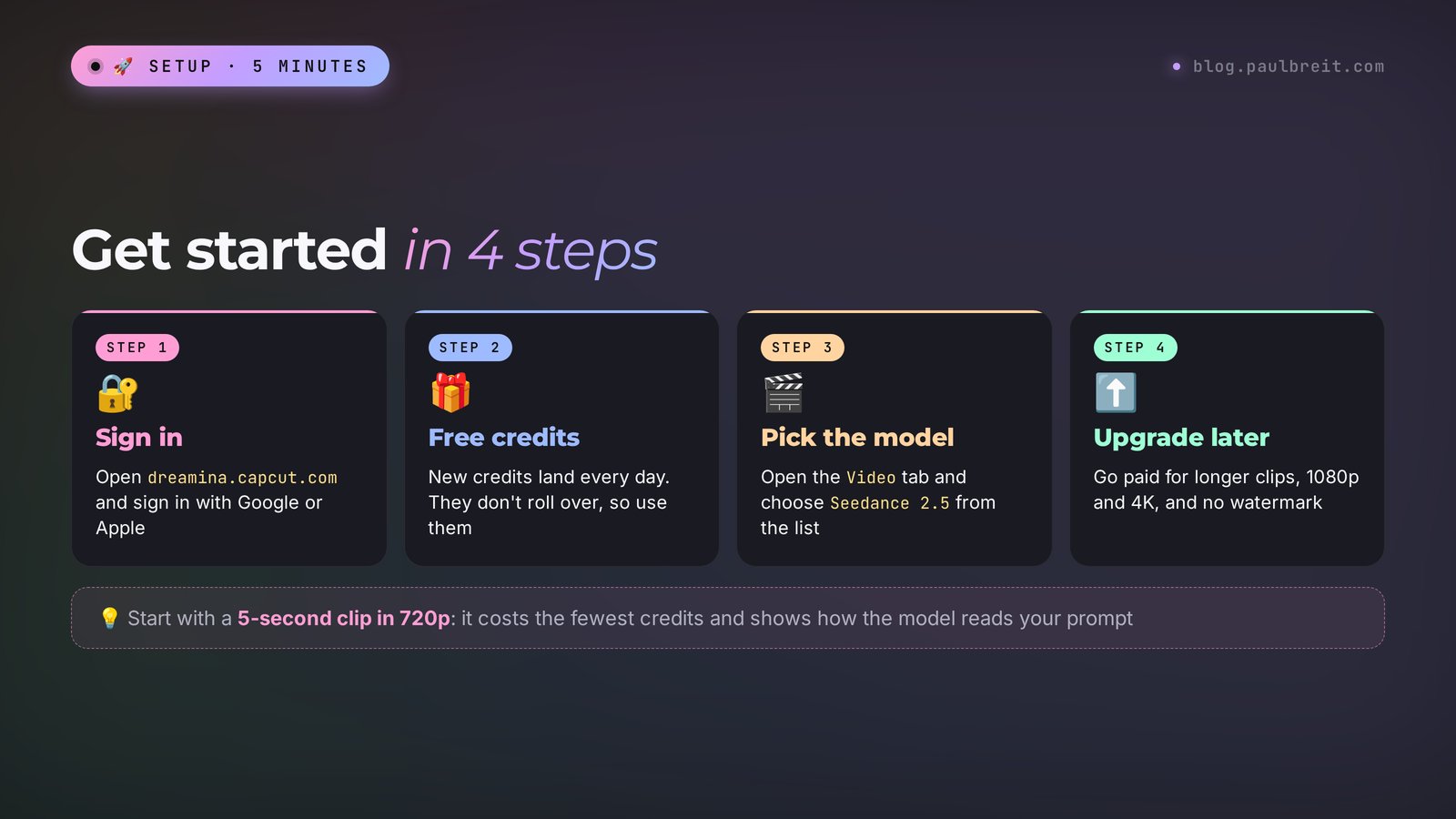
To use Seedance 2.5, open dreamina.capcut.com and sign in with Google or Apple. In the Video tab, pick the Seedance 2.5 model, choose 9:16 for Reels or 16:9 for YouTube, set the length to 5–10 seconds, and type an English prompt. The free daily credits cover a few short test clips. For clips up to 30 seconds, 1080p, 4K, and no watermark, you need a paid plan: in the US that's around $15 a month to start (check your region).
Everyone who sells services, courses, and consulting and needs short videos without a film crew. A coach who wants an intro for a live stream, a nutritionist who wants Reels with beautiful food, a therapist who needs calm video backgrounds for text, a tutor who wants an animation for a lesson, a beauty pro announcing a new price list, an online school cutting a course trailer. If you already film yourself on your phone, Seedance adds what's hard or expensive to shoot on your own: a city from above, a kitchen straight out of a commercial, a fairy-tale scene for a kids' course.
What's inside
- What Seedance 2.5 is and what's new
- Is it free: credits and plans
- How to sign up and get started
- Where Seedance lives in Dreamina
- Your first video, step by step
- Text, photo, or references: which mode to pick
- The prompt formula and timecodes
- 15 ready prompts for real tasks
- Sound and speech
- Let Claude write your Seedance prompts
- When something goes wrong
- Seedance vs Kling, Veo, and the rest
- Checklist before you publish
- The whole path in a minute
- FAQ
Section 01What Seedance 2.5 is and what's new
Seedance is ByteDance's family of video models. The first versions came out in 2025 and spent a long time in the shadow of Kling and Veo. That changed in February 2026 with Seedance 2.0: the clips were so cinematic that even people who don't follow AI started talking about it. Seedance 2.5 is the next step. ByteDance announced it on July 31, 2026, released it first on its own platform, Dreamina, and then rolled it out to business customers through the BytePlus cloud.
Get one distinction straight right away, because you'll see these two words side by side. Seedance is the model itself, the "brain" that draws the video. Dreamina is the website where you use that brain: you type a prompt, upload photos, download the result. Looking for where to use Seedance? Look for Dreamina, at dreamina.capcut.com. In China the same pairing is called Jimeng, but it requires a Chinese phone number.
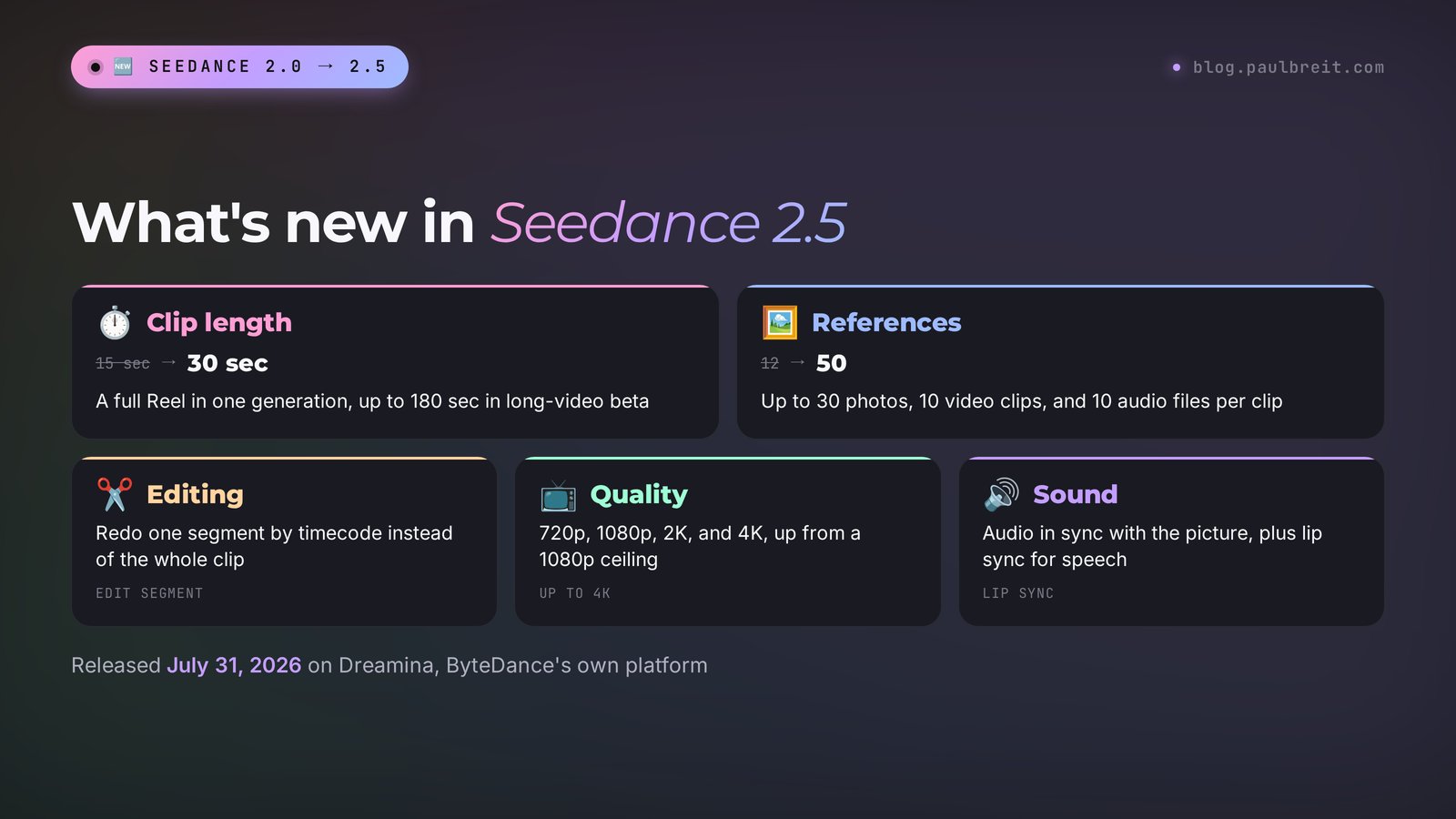
Here's what changed compared to version 2.0:
| What | Seedance 2.0 | Seedance 2.5 |
|---|---|---|
| Clip length per generation | up to 15 seconds | up to 30 seconds, up to 180 seconds in the long-video beta |
| References per clip | up to 12 | up to 50: up to 30 photos, 10 videos, 10 audio files |
| Editing a finished video | full regeneration only | edit a single segment by timecode, a character, or a detail in the frame |
| Quality | up to 1080p | 720p, 1080p, 2K, and 4K |
| Motion control | text and references | plus R2V: a character's movement is driven by a reference video on a green screen or with a stand-in |
| Sound | generated with the video | same, plus lip sync and fewer random music tracks and subtitles |
For a regular person, the most useful rows in that table are the first and the third. Before, a 20–30 second Reel had to be stitched from three or four pieces, and at every seam the character changed faces, the light jumped, and the jacket suddenly turned a different color. Now a feed-ready clip comes out of one generation, and the character stays the same person from the first frame to the last. And if at second 12 your character waves a hand in a weird way, you regenerate just those couple of seconds instead of paying for the whole clip again.
Fifty references sounds like a feature for film studios, but it pays off in everyday work too. Upload three photos of yourself, a photo of your office, your logo, and a music track, and the model builds a clip where you're recognizable, the room is yours, and the music has the right mood. Without references Seedance invents everything itself, and the result is often beautiful but feels like someone else's.
There are weak spots too, and I'll be upfront about them. Text inside the frame often comes out with typos. The free tier is small and leaves a watermark. Popular hours mean a queue. And the model only speaks a fixed list of languages. All of it has a workaround, and I'll show each one below.
Section 02Is it free: credits and plans
You can use Seedance for free, within a daily limit. Dreamina's internal currency is credits. Each generation costs a number of credits that depends on the model, clip length, quality, number of references, and whether sound is on. The service shows the exact price of a clip right on the Generate button, before you click.
The free limit
A free account gets credits every day. In its own guide, Dreamina named 120 credits a day as the baseline figure as of August 2026, and warns right away that the number changes and the exact value is shown in your account. Credits don't roll over: whatever you don't spend today is gone, and tomorrow you start again from the daily allowance. No card is required for the free tier.
In practice that's a few short 720p clips a day. Long clips, 4K, and dozens of references are out of reach on the free limit. Its job is to let you try the model, dial in a prompt, and see whether this tool is for you. For clips you plan to run as ads, the free credits usually aren't enough, and the watermark only goes away on paid plans.
Paid plans
Prices are taken from the official Seedance 2.5 page on Dreamina. The service states plainly that prices depend on the region, so your currency and discounts may differ. US figures below are rounded; check your own region before you subscribe.
| Plan | Price per month (US) | Price per month (EU) | Who it's for |
|---|---|---|---|
| Free | $0 | €0 | Trying the model, 1–3 short clips a day |
| Basic | around $15 | €13.99 | Clips for your own feed a couple of times a week |
| Standard | around $35 | €31 | Reels almost every day, long clips in 1080p |
| Advanced | around $70 | €68 | Ads, 4K, client work |
A discounted first month is a regular thing at Dreamina, it's on almost all the time. When I checked on October 28, 2026, the first month of Basic in Europe cost €0.27, a 98% discount, and a Black Friday promo had been added on top. My advice is simple: start with Basic at the promo price, and within a month you'll know how many credits you actually burn. The subscription renews automatically at full price, so put the renewal date on your calendar.
One more way to save. In Dreamina's model list, next to Seedance 2.5, you'll find Seedance 2.5 Draft and Seedance 2.0 Mini. These are lighter versions: cheaper in credits, simpler in picture quality. They're handy for testing an idea and a prompt. Once the scene looks the way you planned, you run it again on the full model.
Section 03How to sign up and get started
Dreamina is open to users 16 and older. Signing up takes about a minute, and you don't need a card until you decide to pay.
Open Dreamina
Go to dreamina.capcut.com and click Sign in in the top right corner. If the site asks you to accept cookies, accept them, otherwise the sign-in window may not open.
Sign in with Google or Apple
You can sign in with Google, Apple, TikTok, CapCut, or email. Google or Apple is the most reliable. If you already have a CapCut account, you can sign in with it too.
Check your credits
Once you're in, a credit counter appears in the header. If it shows zero, refresh the page in a minute: free credits are sometimes added with a delay.
Make sure Seedance 2.5 is in the list
Open the Video tab and expand the model list. Dreamina rolls new models out region by region. If you don't see Seedance 2.5 yet, it hasn't reached your country; use Seedance 2.0 or Draft in the meantime and check back.
Paying
When you upgrade, a regular credit or debit card works. If the payment is declined, the usual cause is your bank blocking an online or international charge: allow those payments in your banking app and try again. Pay from the same account you'll work in, and keep the receipt email: it's the fastest way to sort out any billing question with support.
Section 04Where Seedance lives in Dreamina
Dreamina does a lot: images, video, avatars, audio, an infinite canvas. That scares beginners off, so here's what you actually need in your first week.
- Create – the home page with a big input field. Below it are the Agent, Image, Video, and Audio tabs. For clips, you need Video.
- Model picker – a dropdown right under the prompt field. It lists Seedance 2.5, Seedance 2.5 Draft, Seedance 2.0 Mini, and third-party models such as Veo and Sora. Make sure it's set to Seedance 2.5: the service sometimes defaults to a different one.
- Clip settings – next to the model: aspect ratio (9:16, 16:9, 1:1, and others), length in seconds, quality, sound.
- The plus button to the left of the prompt – uploads references: photos, video, audio. In the prompt you refer to an uploaded file with @, for example @Image1.
- Assets – all your clips and images. You download from here and open clips for editing from here.
- Smart edit – the editing tools: Edit segment (redo a piece), Extend video (make it longer), Upscale (raise the quality), Inpaint (replace a detail in the frame).
Everything is labeled in plain English, and there aren't many buttons. One tip: if you use your browser's auto-translate on other sites, turn it off here. It can quietly rewrite your prompt in the input field, so glance at the text before you hit Generate.
Section 05Your first video, step by step
Let's make a short vertical clip for Reels. The goal of the first run is to see how the model follows a prompt, so no references and just 5 seconds.
Open the Video tab
On the Create page, click Video. The input field becomes a video prompt field.
Pick the model and format
Model: Seedance 2.5, or Seedance 2.5 Draft to save credits. Format: 9:16. Length: 5 seconds. Quality: 720p. That's plenty to start: you'll be watching it on a phone anyway.
Type the prompt
For example: Vertical video. A cup of coffee on a wooden table by a window, morning sunlight, steam rises slowly, camera slowly moves closer, cozy realistic style, quiet cafe sounds, no text. Not sure how to phrase a scene? Describe it in your own words to Claude and ask for a prompt, more on that in Section 10.
Check the price and click Generate
The button shows how many credits it will take. A clip takes anywhere from one to several minutes, longer at peak hours. You can close the tab: the finished video will be waiting in Assets.
Review and adjust
Watch the clip twice: first all the way through, then second by second. Don't like the camera move? Change one phrase in the prompt and run it again. Change one thing at a time, otherwise you won't know what worked.
Download
In Assets, hover over the clip and click Download. Publish the original file; a screen recording will degrade the quality.
Once your first clip works, raise the length to 10 seconds and move on to references. That's where the real work starts.
Section 06Text, photo, or references: which mode to pick
Seedance 2.5 accepts different kinds of input. That choice decides how close the clip gets to what's in your head.
| Mode | What you give it | When to use it |
|---|---|---|
| Text to video | a prompt only | Backgrounds, mood scenes, intros, when it doesn't matter exactly who's in the frame |
| Image to video | one picture + a prompt about motion | Bring your own photo to life: a cover, a shot from a photo session, a product photo |
| First and last frame | two pictures | A before-and-after transition: an empty office becomes an office with a client, a raw cake becomes a finished one |
| References | up to 50 files: photos, video, audio | Your own character, your own interior, your own music, copying a movement from another clip |
| R2V | a video with the movement on a green screen or with a stand-in | Complex scenes where it matters who walks where and what the hands do |
How to work with references
Upload files with the plus button. Each one gets a name: @Image1, @Image2, @Video1, @Audio1. Refer to them by name right in the prompt, and the model will know what to take from where.
Example for a therapist: you upload a photo of yourself (@Image1), a photo of your office (@Image2), and a calm track (@Audio1). Prompt: The woman from @Image1 sits in the armchair in the room from @Image2, pours tea, looks at the window and smiles softly. Slow camera push-in, warm evening light. Background music from @Audio1. No text. The output is a clip of you in your own office, no shoot required.
Three tips on references. Give sharp photos of your character, in daylight, face without glasses or filters, ideally two or three angles. Don't mix references of different styles in one clip: a cartoon image next to a real photo will confuse the model. And don't upload other people's faces without their consent, and never upload celebrities: the filters often reject those references, and rightly so.
Section 07The prompt formula and timecodes
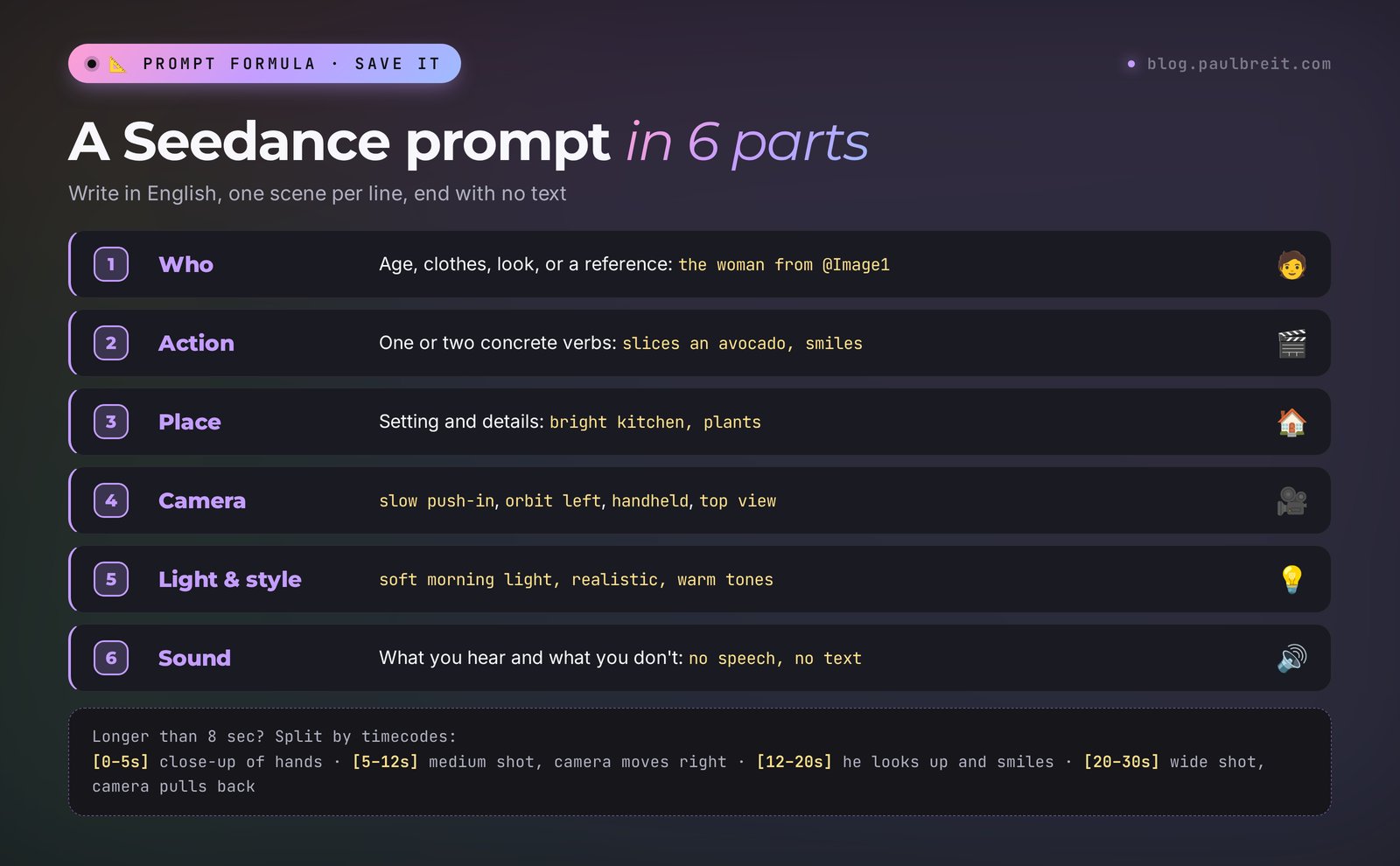
Seedance is a director who needs a script. The more precisely you describe the shot, the fewer surprises you get. Here's a working formula in six parts:
- Who's in the frame. Age, clothes, looks, or a reference: a woman in her 30s in a linen shirt.
- What they do. One or two actions, with concrete verbs: slices an avocado, then looks at the camera.
- Where. The place and its details: bright kitchen, plants on the windowsill.
- Camera. How it moves: slow push-in, orbit left, handheld, top view.
- Light and style. soft morning light, realistic, cinematic, warm tones.
- Sound. What you hear and what you shouldn't: kitchen sounds, no music, no speech, no text.
Timecodes for clips longer than 8 seconds
The new 30-second length is a gift with a catch. Describe a 30-second clip in one paragraph, and the model decides on its own when to show what, often in a dull way. Describe long clips by timecode, like a storyboard:
[0–5s] Close-up of hands opening a notebook on a desk. [5–12s] Medium shot: a man in a grey sweater writes a plan, camera slowly moves right. [12–20s] He looks up, smiles and closes the laptop. [20–30s] Wide shot of the room, evening city lights in the window, camera pulls back.
One scene per line. One main action inside each line. The model handles transitions between scenes on its own; if you want a sharp edit, add hard cut at the start of the line.
What not to write
- Abstractions with no picture: "success," "transformation," "confidence." The model doesn't know what they look like. Write what's visible: a person straightens their shoulders and smiles.
- Five actions in one line. The model picks two and loses the rest.
- Text that should appear in the frame. Add captions later in an editor.
- Brand names and celebrity names. Filters block them, and a clip with someone else's logo in an ad will cause trouble.
Section 0815 ready prompts for real tasks
Copy them and swap the details for your niche. Format and length are in parentheses. Every prompt ends with no text, so the model doesn't paint its own letters over the frame.
| Task | Prompt |
|---|---|
| Coach's live stream intro (16:9, 5 s) | Microphone on a stand in a modern home studio, ring light turns on, warm orange and deep blue accents, slow push-in, cinematic, soft electronic hum, no text |
| Nutritionist's Reel (9:16, 10 s) | [0–4s] Top view, hands arrange salmon, avocado and greens in a white bowl. [4–10s] Camera tilts up to a smiling woman holding the bowl, bright kitchen, natural daylight, realistic, kitchen sounds, no text |
| Background for a therapist's text post (9:16, 10 s) | Rain drops on a window, blurred evening city lights behind, a cup of tea on the windowsill, very slow camera movement, calm muted blue tones, soft rain sound, no text |
| Animation for a tutor's lesson (16:9, 8 s) | Cartoon style, a small rocket flies out of an open textbook and draws a path of numbers in the air, bright friendly colors, playful music, no text |
| Nail artist ad (9:16, 6 s) | Close-up of a hand with fresh glossy nude manicure turning slowly in soft studio light, pink marble background, sparkles of light on the nails, elegant, no text |
| Online course trailer (16:9, 20 s) | [0–5s] Close-up of a laptop opening, screen glow. [5–12s] A young woman takes notes, focused, cozy room. [12–20s] She stands up, opens the window, sunrise over the city, camera pulls back. Cinematic, inspiring music, no text |
| Product photo in motion (1:1, 5 s) | Glass bottle of face serum on a white podium, slow 360 orbit, soft studio light, light beige background, water drops on the glass, product commercial, no text |
| Bring your photo to life (9:16, 5 s) | The person from @Image1 turns head to the camera, smiles and nods slightly, natural movement, same clothes and background, realistic, no text |
| Before and after for an interior designer (16:9, 8 s) | First frame @Image1, last frame @Image2. Smooth transformation of the empty room into the furnished living room, camera slowly moves forward, realistic, no text |
| Fitness trainer clip (9:16, 10 s) | A man in sportswear does a slow squat in a bright gym, side view, camera slowly orbits, morning light through big windows, realistic, rhythmic music, no text |
| Webinar teaser (9:16, 6 s) | A calendar page flips by itself on a desk, a pen circles a date, coffee cup nearby, top view, warm light, ticking clock sound, no text |
| Scene for a kids' course (16:9, 10 s) | Pixar-like 3D animation, a friendly fox reads a big book under a tree, fireflies glow around, gentle wind, magical evening light, soft music, no text |
| Podcast intro (1:1, 5 s) | Two coffee cups and two microphones on a wooden table, slow orbit, warm cozy studio, shallow depth of field, soft jazz, no text |
| Travel B-roll for a blog (9:16, 8 s) | Drone shot over a turquoise sea and white sandy beach, camera rises slowly, golden hour, waves sound, realistic, no text |
| Explaining a service (16:9, 15 s) | [0–5s] A tired woman looks at a messy pile of papers. [5–10s] She opens a laptop, the screen lights up her face. [10–15s] Neat folders on the desk, she leans back and smiles. Realistic, soft office light, no text |
Prompts with @Image1 and @Image2 only work after you upload the pictures. Without them, the model ignores the reference and invents its own character.
Section 09Sound and speech
Seedance generates sound together with the picture: footsteps, cafe noise, rain, music, speech. Sound is turned on with a toggle in the clip settings and costs extra credits.
Speech comes with a catch. The official Seedance 2.5 page lists the languages the model speaks: Chinese, English, Spanish, Indonesian, Malay, Thai, Arabic, Portuguese, Vietnamese, Japanese, and Korean. English is on the list, so a character can say a short line on camera with matching lip movement. Languages outside that list come out with an accent, mixed-up words, and lips that don't match the sounds. And even in English, a generated voice is a stranger's voice, not yours.
Working options for a clip that sounds like you:
- A clip with no speech + your own voice. Generate the video with no speech, record the voiceover on your phone, and lay it over in CapCut. The simplest and the most human option.
- A clip with no speech + a synthetic voice. Voice the text in a speech-synthesis service such as ElevenLabs, with your cloned voice or a ready-made narrator, and lay it over.
- The character is silent, a voiceover talks. The camera shows the action, the off-screen voice tells the story. No lip sync needed, no errors.
- Generated speech in English. Fine for short punchy lines in ads and atmospheric clips, where the voice doesn't need to be yours.
Add subtitles yourself in an editor either way: AI-generated letters are hard to read. If you post Reels regularly, the scripts matter as much as the visuals, and I showed how to plan a month of them in one evening in my piece on AI for Reels scripts.
Section 10Let Claude write your Seedance prompts
The hardest part of Seedance for most people is a timecoded prompt with camera, light, and sound all spelled out. You don't have to write it yourself. Describe the task to Claude in plain words and ask for a finished prompt. If you don't have Claude yet, sign up at claude.ai; the free plan is enough for this. Where to start in Claude, I covered in Claude from scratch.
Here's a request you can copy as is:
I'm a nutritionist. I need a 10-second clip for Reels: morning, a woman makes a breakfast bowl, and at the end she smiles at the camera. Write a prompt for the Seedance 2.5 video model in English. Split it by timecodes, specify camera movement, light, and sound. No speech, no text in the frame. Format 9:16.
I ran this request myself. Here's what Claude returned, word for word:
Vertical 9:16, 10 seconds, realistic, soft morning daylight.
[0–3s] Close-up: hands slice a ripe avocado on a wooden board in a bright kitchen, steam rises from a cup of tea in the background. Slow push-in.
[3–7s] Medium shot: a woman in her 30s in a light linen apron arranges quinoa, salmon, avocado and greens in a white bowl, sprinkles sesame seeds. Camera slowly orbits left.
[7–10s] She lifts the bowl toward the camera, looks into the lens and smiles. Shallow depth of field, warm natural tones.
Audio: quiet kitchen sounds, knife on wood, soft acoustic background. No speech, no text, no subtitles, no logos.
Claude then added a tip on its own: if you want yourself in the clip, upload your photo as a reference and replace a woman in her 30s with the woman from @Image1.
Look at what Claude did. It split 10 seconds into three scenes. One action in each. It specified camera, light, and sound. It banned text and logos. That's exactly the formula from Section 7, assembled in five seconds.
From there it's easiest to work in a dialogue. The clip came out too dark? Tell Claude: "make it brighter and add some greenery on the windowsill." Need a series of five clips in one style? Ask for five prompts with the same light, palette, and character. If you're deciding which assistant to trust with tasks like this, I have a breakdown of Claude vs ChatGPT.
One more trick that saves credits: before you generate a 30-second clip, ask Claude to check the storyboard for logic. "Look at this prompt like a director: where is the action illogical, or where might the model get confused?" It will catch the scene where the character is sitting in one line and, with no transition, standing by the window in the next, and fix it before you pay for the generation.
Section 11When something goes wrong
| Problem | What to do |
|---|---|
| The site won't load or hangs at sign-in | Clear cookies for dreamina.capcut.com, turn off ad blockers for the site, try a private window |
| No verification code in your email | Check spam, wait a couple of minutes, or sign in with Google or Apple instead |
| Seedance 2.5 isn't in the model list | The model hasn't rolled out in your region yet. Use Seedance 2.0 or Draft and check back |
| Credits ran out after two clips | Cut the length to 5 seconds and the quality to 720p, turn off sound, test the prompt on the Draft version |
| The character's face changes mid-clip | Upload 2–3 sharp photos of the character as references and refer to them in every timecode line |
| Garbled letters appear in the frame | Add no text, no subtitles, no logos at the end of the prompt and put text on in an editor |
| Hands and fingers look strange | Remove small hand actions from the prompt or redo that piece with Edit segment |
| The model ignored half the prompt | Too many actions in one scene. Split it by timecodes, one action per line |
| The generation was rejected by a filter | Remove celebrity names, brands, violence, overly revealing clothing. Replace someone else's photo with your own |
| Payment won't go through | Allow online and international payments in your banking app, or try another card |
Section 12Seedance vs Kling, Veo, and the rest
Seedance 2.5 isn't the only strong video model out there. Here's how it stacks up against the ones people talk about most:
| Model | Strong side | Pick it when |
|---|---|---|
| Seedance 2.5 (ByteDance) | Long clips up to 30 seconds in one take, 50 references, segment editing | You need one consistent character across a whole Reel or a scene built from references |
| Kling (Kuaishou) | Natural human motion, easy photo animation | You want to bring a photo to life quickly and cheaply |
| Veo (Google) | Cinematic picture and sound | You want the most film-like look with natural audio |
| Runway | Editing and post-production tools | You already have footage and want to edit, extend, or restyle it |
How to choose without overthinking it. Need a 20–30 second clip with one character, or a complex scene from references? Seedance 2.5. Need to animate your own photo fast and cheap? Kling. Need the most cinematic picture with natural sound? Veo 3. If you used to work in Sora and are looking for where to go after it shut down, I have a separate breakdown of Sora alternatives.
In my school we cover video in Kling and Runway, and the main lesson there holds for any model: whoever can describe the shot wins. A prompt written with the formula from Section 7 works in Seedance, Kling, and Veo with minimal changes. So learn the formula, and switch models to fit the task.
Section 13Checklist before you publish
One minute of checking before a clip goes into Reels or an ad:
- The character is the same from the first second to the last: face, clothes, hair.
- Hands and fingers look right, and objects don't dissolve into thin air.
- No random letters, no other brands' logos, no recognizable faces of other people in the frame.
- The format fits the platform: 9:16 for Reels and Stories, 16:9 for YouTube and live stream covers, 1:1 or 4:5 for the feed.
- The first second hooks: there's already movement or an unexpected detail in it.
- No stray music in the audio. Speech sounds natural or is laid over separately.
- Subtitles are added in an editor and readable on a phone with the sound off.
- For ads: the clip was made on a paid plan, with no watermark, and you've checked the terms of use.
- You downloaded the original file in the right quality, not a screen recording.
If you want more than one-off clips, pair Seedance with a steady flow of ideas. I showed how to turn a single text prompt into a finished clip in a few minutes in AI video from text: the scene ideas from there drop straight into Seedance timecodes.
Section 14The whole path in a minute
Open dreamina.capcut.com and sign in with Google or Apple. Free credits arrive every day and don't roll over. In the Video tab, pick Seedance 2.5, 9:16, 5–10 seconds, 720p. Write the prompt in English using the formula: who, what they do, where, camera, light, sound, and end with no text. Split long clips by timecode. Upload your own character and interior as references and refer to them with @Image1. Lay your own voice over separately. Fix a bad piece with Edit segment. For regular work you need a paid plan, around $15 a month in the US to start (check your region).
Start today with one action: take the prompt from Section 8 that's closest to your niche, swap the details, and make a five-second clip on free credits. Didn't work the first time? Change one phrase and run it again. By the third or fourth clip you'll usually have something you're happy to post to Stories.
FAQFrequently asked questions
Is Seedance 2.5 free?
Partly. Dreamina gives free credits every day; as of August 2026 the baseline was 120 a day. They don't roll over and cover a few short 720p clips. Long clips, 1080p and 4K, and clips without a watermark need a paid plan, around $15 a month to start in the US.
How do I start using Seedance 2.5?
Open dreamina.capcut.com and sign in with Google or Apple. In the Video tab, pick Seedance 2.5 from the model list, choose 9:16 or 16:9, set 5–10 seconds, and type an English prompt. No card is needed for the free tier.
Where can I find Seedance 2.5?
Officially the model runs on ByteDance's Dreamina platform at dreamina.capcut.com, in the model list of the Video tab. Businesses can access it through the BytePlus cloud API. In China the same model lives in the Jimeng service.
How is Seedance 2.5 different from Seedance 2.0?
A single generation grew from 15 to 30 seconds, and up to 180 seconds in beta. You can upload up to 50 references instead of 12. You can now edit one segment of a video without regenerating the whole thing, and quality goes up to 4K.
Which languages can Seedance 2.5 speak?
The official list is Chinese, English, Spanish, Indonesian, Malay, Thai, Arabic, Portuguese, Vietnamese, Japanese, and Korean. Prompts work best in English. If you want the clip to sound like you, generate it without speech and lay your own voice over in an editor.
Can I use Seedance clips in ads?
Yes, if the clip was made on a paid plan with no watermark and contains no third-party logos, celebrities, or people's faces without their consent. Check Dreamina's current terms of use for your country before you launch the ad.