ElevenLabs: AI Voiceover and Voice Cloning in 2026
ElevenLabs is an AI that reads text in a natural human voice, clones your own voice from a couple of minutes of audio, and dubs video into 90+ languages while keeping your tone. In this guide: what the service can do in 2026, the plans and how many minutes of audio you actually get, which model to pick (Eleven v4, v3, Multilingual v2, Flash), how to prepare a script so the AI doesn't stumble over names and numbers, a step-by-step voice clone, dubbing your reels into Spanish, and 10 practical use cases for everyone who sells services, courses, and consulting.
ElevenLabs is an AI service for text-to-speech voiceover and voice cloning. To start, go to elevenlabs.io, sign up with Google, paste your text into Text to Speech, choose a voice and the Eleven v4 model, and click Generate. The free plan gives about 10 minutes of audio a month with no commercial rights. Cloning your own voice starts on the Starter plan at $6: record 1–2 minutes of clean speech, upload it under Voices → Instant Voice Clone, and a minute later the AI speaks in your voice in 90+ languages.
Everyone who sells services, courses, and consulting and is tired of sitting at a microphone. A therapist records guided meditations and audio exercises for clients. A coach dubs reels into Spanish in their own voice. A tutor turns study notes into audio. A nutritionist converts a PDF guide into a 15-minute podcast episode. An online school fixes a slip of the tongue at minute three of a lesson without reshooting. And anyone who hates talking on camera can build a voiceover without recording a single take.
What's inside
- What ElevenLabs is and what it does
- ElevenLabs pricing and plans in 2026
- Which model to pick: v4, v3, v2, Flash
- How to sign up
- Your first voiceover in 5 minutes
- How to prepare a script: pronunciation, pauses, emotion
- Voice cloning: instant and professional
- Clone your voice step by step
- A voice from a description: Voice Design
- Dubbing: your reel in another language
- Voice Changer, effects, music, transcription
- Studio: audiobook, course, podcast
- 10 use cases for people who sell services
- Claude plus ElevenLabs
- Rights, ethics, and protecting your voice
- ElevenLabs alternatives
- When something goes wrong
- The whole path in a minute
For a long time I recorded the voice for my videos myself. You sit down at the mic, read the script, trip on the seventh sentence, start over, and then the neighbor starts drilling through a wall, and you start over again. Half an hour for one clean minute of audio is normal if you've ever voiced a lesson or a reel.
Then I uploaded a couple of minutes of my speech to ElevenLabs and got a voice clone that reads any text I give it. These days that's how I translate my videos into other languages: my timbre, my intonation, and I'm busy with something else while it happens.
Below is the full path from zero: what the service does, what it costs, how to write a script so the AI doesn't mangle names and numbers, and where AI voice genuinely saves hours and money. If you want an overview of AI video tools in general, read the guide on AI video from text. This article is about the voice.
Section 01What ElevenLabs is and what it does
ElevenLabs is a New York company with Polish founders that has been building speech AI since 2022. It started with a single feature: paste text, get audio. Today it's a full audio toolkit with about a dozen tools in one dashboard. Here's each one in plain words, minus the marketing copy from their website.
| Tool | What it does | Why you'd use it |
|---|---|---|
| Text to Speech | Reads text aloud in the voice you choose | Voiceover for a reel, a lesson, an ad |
| Instant Voice Clone | Clones a voice from 1–2 minutes of audio | The AI speaks in your voice |
| Professional Voice Clone | A precise clone trained on 30+ minutes of audio | Courses and audiobooks where every inflection matters |
| Voice Design | Creates a voice from a text description | A character, a host, a brand voice |
| Voice Library | Thousands of ready-made voices shared by other users | Find the right tone fast |
| Dubbing | Translates video into 90+ languages, keeping the voice | A reel or webinar in Spanish with no translator |
| Voice Changer | Swaps your voice for another while keeping your delivery | Act out the emotion yourself, borrow a different timbre |
| Studio | An editor for long projects with a timeline | An audiobook, a podcast, a whole course |
| Speech to Text (Scribe) | Transcribes speech into text | Webinar notes, captions |
| Sound Effects and Music | Generates sounds and music from a description | Background audio for video with no copyright headaches |
| Voice Isolator | Removes noise and keeps the voice | Rescue a recording made on the street or in a cafe |
| Agents | Voice assistants that talk to people | A bot that answers by voice on your site or on the phone |
What makes ElevenLabs stand out among dozens of similar services? Three things. The voices sound alive, with breathing and natural pauses, and they're hard to tell apart from a human recording. English sounds native in a wide range of accents, from General American to British and Australian, and dozens of other languages are fully supported. And a voice clone takes minutes, with no studio and no week-long wait.
Your voice stops being the bottleneck. You write the script for a lesson, a reel, or an ad with AI in 10 minutes, and then used to spend another half hour fighting with the recording. With ElevenLabs that second half takes a couple of minutes, and you can do it on a train or at 2 a.m.
Section 02ElevenLabs pricing and plans in 2026
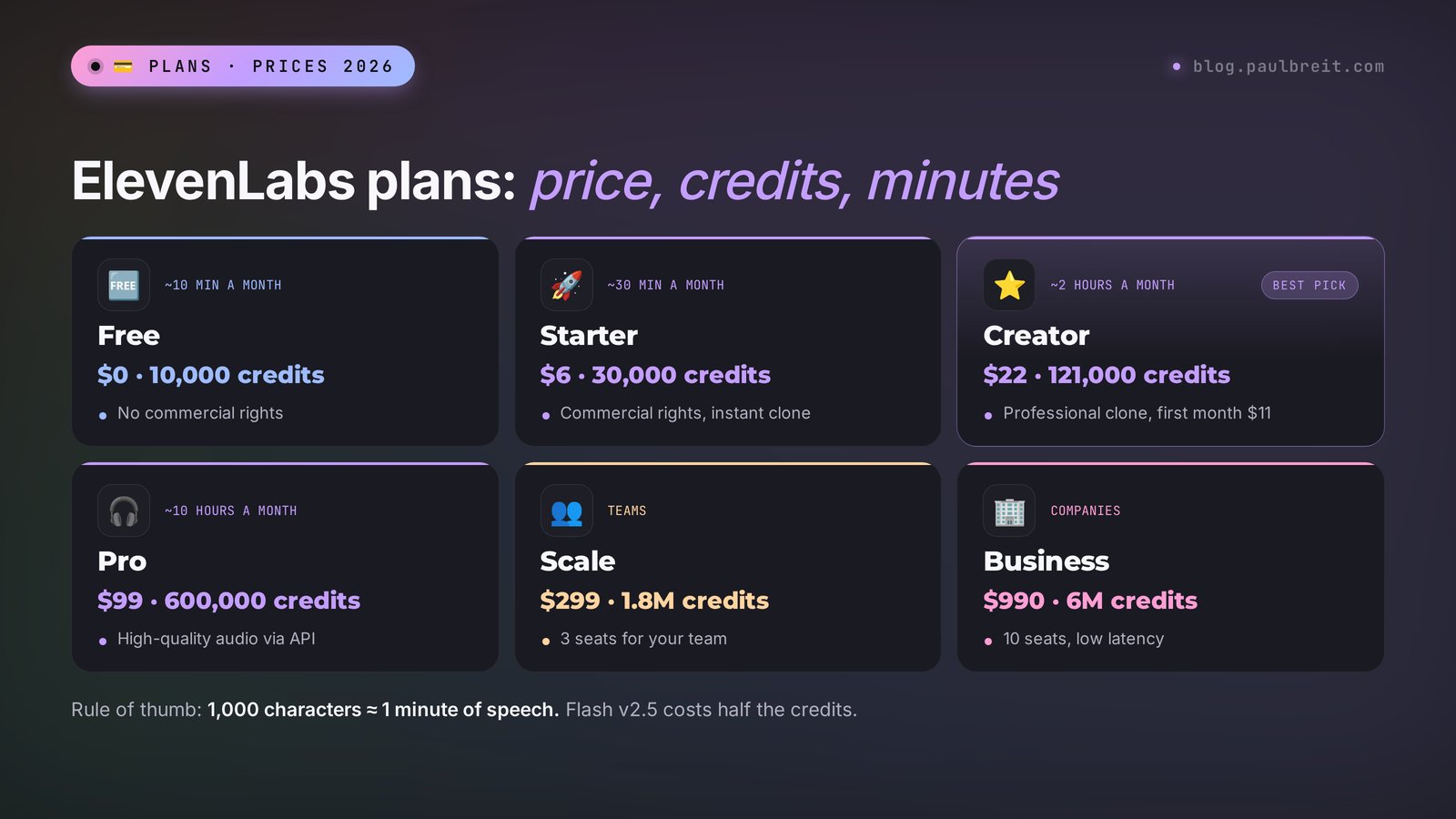
Everything in ElevenLabs runs on credits. On the main models one character of text costs one credit; on the fast Flash model it's half a credit. In practice 1,000 characters of text gives you about a minute of speech. So the math is simple: 10,000 credits is roughly 10 minutes of finished audio.
| Plan | Price per month | Credits | Minutes of audio | Key point |
|---|---|---|---|---|
| Free | $0 | 10,000 | ~10 | No commercial rights, dubbing carries a watermark |
| Starter | $6 | 30,000 | ~30 | Commercial rights, Instant Voice Clone |
| Creator | $22 (first month $11) | 121,000 | ~120 | Professional Voice Clone, Studio projects |
| Pro | $99 | 600,000 | ~600 | High-quality audio output via API |
| Scale | $299 | 1,800,000 | ~1,800 | 3 team seats |
| Business | $990 | 6,000,000 | ~6,000 | 10 seats, low latency |
Prices were checked against the official pricing page in October 2026. ElevenLabs adjusts them regularly and runs promotions, so take a look at elevenlabs.io/pricing before you pay.
Which plan should you get? It depends on the job. To try the voices and see whether you like the sound, the free plan is enough. As soon as the audio goes into a reel, an ad, or a paid course, you need at least Starter: the free plan has no commercial rights, so you can't use that audio in content that sells. If you voice more than half an hour a month or want a clone that's indistinguishable from you, go with Creator. For most people who run a blog and create courses it's more than enough.
Credits are charged for every generation, including the bad ones. Regenerate a paragraph five times hunting for the right intonation, and you've paid five times. So voice long scripts one paragraph at a time and redo only what you didn't like. On paid plans unused credits partly roll over to the next month, but don't treat that as a savings account.
Section 03Which model to pick: v4, v3, v2, Flash
A model is the engine that turns text into speech. You choose the voice separately; the model decides how alive it sounds and how much emotion it carries. The dropdown lists several, and beginners often stay on whatever is set by default. Here's how to tell them apart.
| Model | Languages | Best for | What stands out |
|---|---|---|---|
| Eleven v4 | 90+ | Reels, ads, lessons that need a lively delivery | The most expressive, understands audio tags, released September 28, 2026 |
| Eleven v4 Turbo | 90+ | Voice assistants and bots | Responds in about 100 ms, built for real-time conversation |
| Eleven v3 | 70+ | Dialog and expressive reading | The previous generation, 5,000-character limit per request |
| Multilingual v2 | 29 | Even narration of long texts | Stable and predictable, no surprises |
| Flash v2.5 | 32 | Drafts, high volume, bots | Half the credits, the fastest of all |
Here's my working setup. Everything headed for social media and ads gets voiced on Eleven v4: intonation matters there, and the listener shouldn't trip over anything that sounds robotic. Long lessons and audio versions of guides, where you need a calm, steady delivery for 20 minutes, sound great on Multilingual v2. Plenty of clones have lived on that model for years, and it's less likely to throw an unexpected emotion into the middle of a sentence. Flash is for drafts: listen to how the script sounds out loud, find the clunky spots, and only then spend full credits on the final take.
What changed in v4 compared with v3? The new architecture reads text like an actor: it takes into account who is speaking and what came in the previous line before deciding how to deliver the next one. You can now stack audio tags, and the model plays them in order. The voice drifts less on long passages. And Professional Voice Clones are supported again, which v3 lacked.
Section 04How to sign up
This part is short, because there's nothing tricky about it.
Create an account
Open elevenlabs.io, click Sign up, and log in with Google or Apple, or with any email. The service asks a couple of questions about what you plan to use it for. Answer however you like; it doesn't change what you can do.
Start on the free plan
You get 10,000 credits right away, no card required. Spend them on testing voices and models before you commit to anything.
Upgrade when you need commercial rights
Payment goes through Stripe with a regular credit or debit card. Start with one month of Starter or the discounted first month of Creator, and cancel anytime from the subscription settings.
If you're working outside the US or EU and the card is declined, check that the billing country matches the country of the issuing bank. That fixes most failed payments. And if you're still deciding which AI tools are worth paying for at all, there's a broader roundup of the best AI tools of 2026.
Section 05Your first voiceover in 5 minutes
Let's start with the simplest thing: voicing a paragraph with a ready-made voice. It takes less time than reading this section.
Open Text to Speech
In the left menu of the dashboard, click Text to Speech. In the middle there's a big text field, on the right the settings: voice, model, sliders.
Paste your text
For a first test, take 3–4 sentences from one of your posts. You don't need to set the language; the model detects it from the text.
Choose a voice
Click the Voice field. You'll see a list of default voices and a way into the Voice Library. The library has filters for language and accent: pick English and American, and listen to a few options. For Spanish or any other language, choose voices recorded by native speakers. They sound noticeably more natural than an English voice "speaking" a second language.
Pick the model and click Generate
In the Model field, choose Eleven v4. Click Generate speech. A few seconds later a player appears at the bottom. Listen, download the MP3 with the download button, and the audio is ready for editing.
Now the sliders. There are three or four depending on the model, and they decide half the result.
- Stability. Lower means a more emotional, varied delivery, but a higher chance of odd intonation. Higher means steadier, all the way to monotone. For reels keep it around the middle; for lectures, above the middle.
- Similarity. How strictly the AI sticks to the original timbre. For a clone of your own voice, set it high, around 75–85%.
- Style. Amplifies the manner of the source voice. Sounds great in ads, but uses more resources and sometimes overdoes it. Start at zero and add a little at a time.
- Speed. The pace of speech. For reels that need to fit into 30 seconds, you can nudge it up to 1.1.
If the first generation doesn't land, don't touch every slider at once. Just click Generate again: each generation comes out slightly different, and the second or third is often better. Change the settings only if three takes in a row sound wrong in the same way.
Section 06How to prepare a script: pronunciation, pauses, emotion
This is where the real gap lies between a voiceover that's "fine, I guess" and one nobody can tell from a human. The AI reads exactly what's written. So text for the ear gets prepared differently from text for the eye.
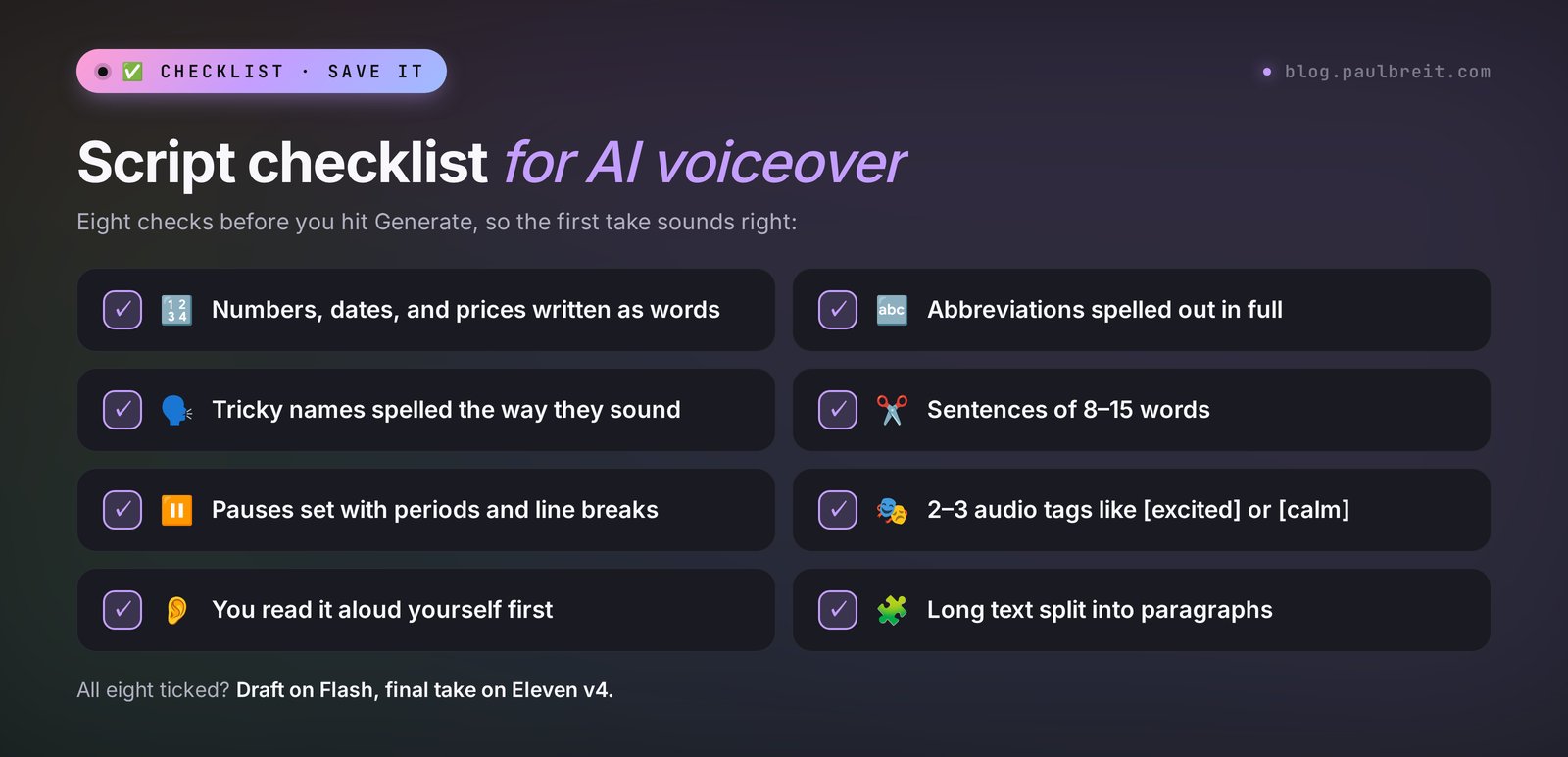
Write numbers, dates, and abbreviations as words
"On 10/15 at 7:00 PM, 30% off the course, $499" can come out any number of ways, including "ten slash fifteen." Write it the way you'd say it: "On October fifteenth at seven p.m., thirty percent off the course, which costs four hundred ninety-nine dollars." The same goes for abbreviations: "e.g.," "approx.," "Q3" should become full words. Acronyms are a separate trap: the model has to guess whether "SaaS" is read as a word or spelled out, so write "sass" or "S-A-A-S" depending on how you say it.
Pronunciation of names and tricky words
ElevenLabs speaks excellent English, but it can slip on homographs and rare words: "read" in the present and past tense, "live" as a verb and as an adjective, "lead" the metal and "lead" the verb, plus surnames, city names, brand names, and professional jargon. What helps:
- Rephrase so the meaning is unambiguous. "I read it yesterday" gives the model the context to pick the right sound.
- Swap a word the model keeps stumbling on for a synonym. That's the fastest fix.
- Spell a name or term the way it sounds, or break it up with hyphens: "Nguyen" becomes "Win," a brand name becomes its syllables.
- Studio has pronunciation dictionaries: you define once how a word should be read, and the rule applies across the whole project. Handy for courses where the same terms come up hundreds of times.
Pauses and pacing
The v3 and v4 models set pauses on their own from punctuation. Want a longer pause? Use a period instead of a comma, or an ellipsis. Want to emphasize a thought? Give it its own paragraph. On Multilingual v2 and Flash the pause tag <break time="1s" /> works: you type it right into the text, and the AI stays silent for that long. Don't overdo it; a dozen of these in one chunk makes the speech sound choppy.
Emotion through audio tags
On v3 and v4 you can steer the delivery straight from the text. Put a tag in square brackets before a line, and the voice acts it out.
[excited] Friends, I've got news I've been waiting six months to share!
[whispers] Just don't tell anyone yet.
[laughs] Okay, kidding, tell everyone.
[calm] Now the details: enrollment is open until Friday.
The most useful tags: [whispers], [laughs], [sighs], [excited], [calm], [sarcastic], [curious]. In v4 you can stack them, like [sighs][calm], and the model plays them in order. Tags don't work equally well with every voice: a clone recorded in a monotone can't really shout or laugh. The livelier the source recording, the wider the emotional range.
Short sentences
A three-line sentence with three subordinate clauses is hard to follow even from a live narrator. For voiceover, cut the text into phrases of 8–15 words. Read it aloud yourself before you generate: wherever you stumble, the AI will stumble too.
Don't like one word in the middle of a one-minute clip? Don't re-voice the whole thing. Split the text into paragraphs, generate them separately, and stitch them together in your editor. Studio makes this easier still: highlight a specific sentence and regenerate only that, and everything else stays as it was.
Section 07Voice cloning: instant and professional
This is the feature most people come to ElevenLabs for. There are two kinds of clone, and the difference between them is big.
| Instant | Professional | |
|---|---|---|
| Audio needed | 1–2 minutes, at least 10 seconds | 30 minutes and up, ideally 1–3 hours |
| Plan | Paid, starting with Starter | Creator and above |
| Wait time | About a minute | Usually 3–6 hours of training |
| Quality | Recognizable timbre, averaged intonation | Almost indistinguishable from you, keeps your speaking style |
| Verification | Confirm your rights with a checkbox | Read a verification phrase in your own voice |
| Good for | Reels, stories, video translation | Courses, audiobooks, long lessons |
How it works, in plain words. An Instant Voice Clone doesn't train a separate model for you. The model already knows thousands of voices and uses your recording to figure out how to sound similar. That's why it's fast, and also why the resemblance drops with unusual voices, strong accents, or an idiosyncratic delivery. A Professional Voice Clone trains on your speech specifically and picks up your rhythm, your habitual pauses, the way you stretch your vowels.
You can only make a professional clone of your own voice: the service asks you to read a verification phrase and compares it with the uploaded recordings. Verification for an instant clone is lighter, but the rules are the same: you can't clone someone else's voice without that person's consent. More on that in Section 15.
How to record your voice for a clone
About 80% of clone quality comes from the recording. The AI copies everything: your timbre, the room echo, the hum of the fridge. A few rules that will save you dozens of regenerations.
- A quiet room with soft surfaces. Curtains, a rug, a couch, a closet full of clothes. An empty room with bare walls gives you echo, and the clone will sound like it lives in a bathroom. The sound engineer's trick: record in a walk-in closet or throw a blanket over your head.
- A decent microphone. A $20–40 lavalier or a USB mic will do. In a pinch, a modern smartphone 6–8 inches from your mouth, in the voice memo app, on airplane mode so no notifications chime in.
- Speak the way you want the clone to sound. The AI repeats your delivery. Read in a monotone, and the clone will be monotone. Record with the same energy you bring to your live streams and reels.
- One style per file. Don't mix whispering, shouting, and lecture mode in one recording. If you need different deliveries, make different clones.
- No music, no other voices. A cut from a live stream with viewer questions and background music gives you a muddy clone. If that's the only recording you have, run it through Voice Isolator first.
- Format. MP3 at 192 kbps or higher, or WAV. Even volume, no clipping: the peaks shouldn't hit the ceiling.
Section 08Clone your voice step by step
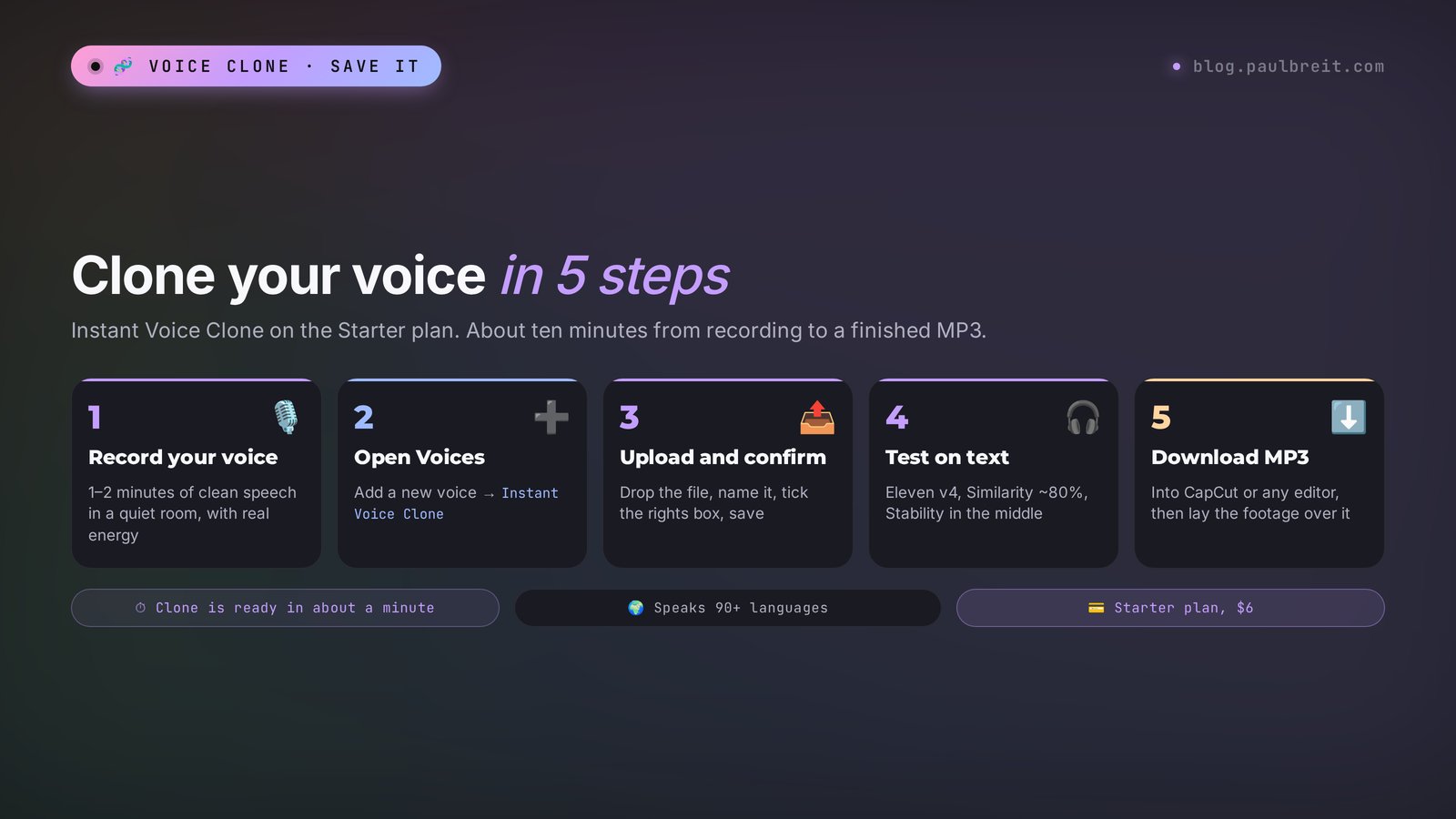
We're making an Instant Voice Clone. You need the Starter plan or higher and a 1–3 minute recording.
Record your voice
Read any text at your normal pace: a chunk of a post, your answer to a common client question, a short story about yourself. You can also speak freely without a script, and the clone often comes out even livelier. Two minutes is enough. More than five minutes adds almost nothing for an instant clone.
Open Voices → Add a new voice
In the left menu, go to Voices; in the top right, click Create or Add a new voice. Choose Instant Voice Clone.
Upload the recording and confirm your rights
Drag in the file and give it a name, for example "My voice – energetic." Tick the box confirming you have the rights to this voice. If there's background noise, turn on the noise removal option that appears next to the file. Click Save.
Test the clone on text
Go to Text to Speech, pick your voice from the list, and choose Eleven v4. Set Similarity to around 80% and Stability to the middle. Paste 3–4 sentences and generate. Listen on headphones: timbre, pace, any metallic artifacts.
Download and use it
The MP3 drops into any editor: CapCut, your phone's built-in editor, DaVinci Resolve. For a reel it's convenient to generate the voice first and then lay the footage over it, so the pace of the video follows the speech.
Doesn't sound like you? Most of the time the recording is to blame: echo, noise, or a flat read. Re-record in a different room with more energy, delete the old clone, and create a new one. The model matters too: if the clone sounds like a stranger on v4, try the same clone on Multilingual v2. Different models "wear" the same voice differently.
I keep separate clones for different languages. A clone that sounds great in one language can come out with an odd accent in another, and vice versa. If you plan to translate your content, make a dedicated clone for the second language by recording yourself in it for at least a couple of minutes, even with an accent.
Section 09A voice from a description: Voice Design
Sometimes you need a voice that neither you nor the library has. A calm, low male voice for meditations, an upbeat young woman for a kids' course ad, an older professor for history content. That's what Voice Design is for: you describe the voice in words, and the AI builds it from scratch.
A good description has four parts: gender and age, timbre, manner, and audio quality. Example:
Calm female voice, around 40 years old, warm and soft low tone,
speaks slowly with gentle pauses, like a meditation guide.
Studio quality, close microphone, no background noise.
The service gives you three options; you listen and save the one you like to your voices. From then on you can use it for anything, like any other voice. If you're stuck on the wording, ask Claude or ChatGPT to help: they'll suggest precise words for timbre and manner in seconds.
Where this helps people who sell services: a character voice in training videos, two different voices for a "client and specialist" dialog in a case breakdown, or a signature brand voice for ads if you'd rather not use your own.
Section 10Dubbing: your reel in another language
My favorite tool. Dubbing takes your video, transcribes the speech, translates it into the language you choose, and voices the translation in a voice close to yours. It supports 90+ languages and files up to 180 minutes and 2 GB. It even works on the free plan, though there it adds a watermark to the video, which you can only remove on a paid plan.
For a US creator the obvious first target is Spanish: tens of millions of Americans speak it at home, and Spanish-language Instagram and YouTube are far less crowded in most niches. Portuguese, German, and French are the next logical steps if you sell online courses worldwide.
Open Dubbing and upload the video
In the menu, go to Dubbing and click Create. Upload a file or paste a YouTube link.
Choose the languages
Source language: English (or Auto detect). Target: for example Spanish or Portuguese. You can select several languages at once.
Run it and wait
A one-minute reel processes in a couple of minutes. You can download the finished video in full or grab just the audio track.
Check the translation
Machine translation sometimes takes idioms literally, and a line like "that offer hit it out of the park" turns into nonsense about baseball. In the dubbing editor you can correct the translated text and regenerate a specific segment.
There's a more precise route, and I use it myself for important videos. Take the transcript of the video, give it to Claude, and ask for a translation by meaning in lively spoken language, adapted for the target audience, with prices converted to local currency. Then voice the result with your clone in Text to Speech. The translation sounds more natural than automatic dubbing, and the voice is still yours. You can get the transcript right in ElevenLabs or with any method from the guide on AI transcription.
Dubbing changes the sound, but your lips on screen keep speaking the original language. On a talking head that's noticeable, especially in close-ups. Videos where you're off camera translate best: b-roll, travel footage, screencasts, slides. For talking heads there are dedicated lip-sync services such as HeyGen.
Section 11Voice Changer, effects, music, transcription
Voice Changer
You record a line in your own voice, with the intonation and pauses you want, and the AI "dresses" it in another voice. The delivery stays yours; the timbre changes. Useful when Text to Speech can't hit the emotion you need: it's easier to act out the line once yourself than to regenerate it 20 times.
Sound Effects
Describe the sound you need in text: "a phone notification," "applause in a small room," "cafe ambience in the background." You get a short sound effect. For reels this is a lifesaver: no digging through stock libraries and no fear of a copyright strike for someone else's audio.
Music
Generates music from a description: genre, mood, tempo, length. The flagship model right now is Eleven Music v2.5. If you need full songs with vocals and lyrics, ElevenLabs has a competitor that's stronger there; see Suno: how to make a song with AI. For background music under a reel or a lesson, the built-in music is plenty.
Voice Isolator
Strips street noise, wind, and air-conditioner hum from a recording and keeps the voice. It works surprisingly well: a live stream recorded in a cafe sounds like it came from a quiet room after processing. Use it before cloning a voice and before publishing call recordings.
Speech to Text
Transcription on the Scribe v2 model, 90+ languages, with speaker labels. Handy if you're already paying for ElevenLabs and don't want a separate service for webinar notes and captions.
Section 12Studio: audiobook, course, podcast
Text to Speech is great for short pieces. When the text runs 20 pages, you need Studio, the editor for long projects. Upload a whole document (Word, PDF, or a link to an article), and Studio splits it into chapters and paragraphs. You can assign a different voice to each piece, fix pronunciation, and regenerate a single sentence. Studio 3.0 added a video-editor-style timeline, and you can generate background music right into it.
A real-life example: you have a 25-page PDF guide you give away as a lead magnet. Upload it to Studio, choose your clone, and half an hour later you have a 25–30 minute audio version. Now the guide comes in two formats: read it, or listen in the car. Some people will never open the PDF, yet they'll happily listen to the audio on their commute. For how to build a guide like that in the first place, see a lead magnet with AI in an hour.
Same with courses. A text lesson becomes an audio lesson, a slide deck gets a voiceover, and if you change something in the program you re-voice one paragraph instead of re-recording the whole lesson. If you're building a program right now, read how to create a course that gets results.
A 25-page guide is roughly 40,000–50,000 characters. On the Creator plan with 121,000 credits a month you can voice two of those guides and still have credits left for reels. A 300-page audiobook needs Pro, or several months on Creator.
Section 1310 use cases for people who sell services
Voiceover for its own sake is pointless. Here's where it actually saves time or brings in leads.
| Who | What to voice | What you get |
|---|---|---|
| Therapist | Meditations and anxiety exercises in your own voice | A paid audio product or a free bonus for subscribing |
| Coach | Reels dubbed into Spanish and Portuguese | A new audience with no reshoots |
| Tutor | Audio summaries of rules and vocabulary | Students listen on the go, fewer questions in your DMs |
| Nutritionist | An audio version of a meal-planning guide | People finish the guide while driving or walking |
| Fitness trainer | Voice cues for workouts | A workout "with the coach" without you being there |
| Online school | Fixing slips of the tongue in lessons | No need to reshoot the whole lesson |
| Marketer | Voiceover for video ads | 10 creative variants for testing in one evening |
| Camera-shy creator | Reels on b-roll with a voiceover | Content without filming yourself |
| Consultant | Audio answers to common client questions | Hours saved on repeating the same explanations |
| Blogger with a podcast | A podcast built from blog articles | A new traffic channel from the content you already have |
A word on reels. A voiceover on b-roll is a format that works really well for people who don't like talking to the camera. Scripts for these videos are easiest to write in batches, as shown in AI for reels: 30 scripts a month in one evening. Generate the text, voice it with your clone, and lay it over the footage.
AI voice speeds up ad testing dramatically. A new version of a video with a new hook used to mean a new recording. Now you write 10 versions of the first three seconds, voice them in 5 minutes, and launch them all. A couple of days later the cost per lead shows you the winner.
Section 14Claude plus ElevenLabs
ElevenLabs handles the voice; a different AI is better at the text. I write my scripts in Claude: it writes natural English and keeps a lively, conversational tone. The workflow looks like this: Claude prepares the text for the ear from the start, and you voice it in ElevenLabs.
Here's a prompt that turns an ordinary post into a voiceover script:
Rewrite this text for an AI voiceover in ElevenLabs.
Rules:
– write all numbers, dates, percentages, and prices as words,
  the way they're spoken;
– spell out all abbreviations;
– spell unusual names and brand names the way they sound;
– short sentences, 8–15 words, conversational, like I'm talking to a friend;
– add English audio tags in square brackets in two or three places
  ([excited], [calm], [laughs]) where they strengthen the delivery;
– reading time: about 40 seconds.
Text: [paste your post]
What you get back looks something like this:
[excited] Want to know how long one minute of voiceover used to take me?
Half an hour. Every single time.
[calm] Now I write the script, press one button, and ten seconds later it's done.
My voice. My intonation. And I'm drinking coffee while it happens.
The second useful prompt checks a finished script for spots where the AI might trip:
Read this text the way a voice AI will read it.
Find words with ambiguous pronunciation (homographs), rare names
and terms, numbers and acronyms, and sentences that are too long.
For each spot, suggest a rewrite so the voiceover
sounds right on the first take.
If you haven't used Claude yet, sign up at claude.ai; the free plan is enough for this workflow. Ready-made prompt formulas are collected in Claude prompts: a 6-block formula and 25 examples.
ElevenLabs has an API. If you work with Claude Code or n8n, you can build voiceover into a pipeline: the AI writes the script, sends it to ElevenLabs on its own, and drops the finished MP3 into a folder. That's how my video translation is set up. You don't need any of this to start; manual mode is more than enough. If the idea appeals to you, begin with Claude Code for non-coders.
Section 15Rights, ethics, and protecting your voice
Your voice is part of who you are, and clones come with a few rules worth knowing up front.
- Commercial use only on a paid plan. Audio from the free plan can't go into ads, paid courses, or monetized videos. Starting with Starter, you have commercial rights.
- Clone only your own voice, or a voice with written consent. You can't clone a colleague, a voice actor, or a celebrity without permission. It breaks ElevenLabs' rules, accounts get banned for it, and using a cloned voice to deceive people is fraud.
- Be honest with your audience. You don't have to say "this is my clone" in every reel, but if a client pays for a live session, you can't swap yourself out for an AI. Audio lessons, guide voiceovers, and translations are normal practice, and many creators openly note that a video is voiced by AI in their own voice.
- Protect your voice. Scammers can clone voices from social media clips too, and they call relatives asking for an urgent wire transfer. Agree on a code word with your family that only you know, and warn them about this scenario.
If you want the wider picture on ownership of AI output, who owns AI-generated content covers what the law allows and what it doesn't.
Section 16ElevenLabs alternatives
ElevenLabs is the benchmark for voice quality, but it isn't the only option, and for some jobs a different tool fits better. Here's what it usually gets compared with.
| Service | Strength | Weakness |
|---|---|---|
| OpenAI TTS | Cheap and fast through the API, steerable tone with plain-language instructions | Built for developers, no clone of your own voice for regular users |
| Google Gemini TTS | Natural multi-speaker dialog, easy to try in Google AI Studio | Preset voices only, little control over the final file without some setup |
| Murf | A friendly studio for narrating presentations and training videos | Voices sound less lively, cloning is reserved for higher tiers |
| Descript | Edit audio and video by editing the transcript, with an AI voice to fix flubbed words | The voice clone is a feature inside an editor, weaker as a standalone voice tool |
| HeyGen | Video avatars and lip sync when translating | Pricier, overkill for voiceover alone |
| Fish Audio, MiniMax Audio | Cheaper, voice cloning included | Less consistent quality, more pronunciation slips |
My conclusion is simple. If the voice goes into content that sells, take ElevenLabs: the difference in liveliness is audible from the first sentence. If you're a developer who needs cheap narration at scale, OpenAI TTS is worth testing. If you mostly edit talking-head videos, Descript may cover everything in one app. A full overview of what's worth your attention right now is in the best AI tools of 2026, and free options are collected in free AI tools that actually work.
Section 17When something goes wrong
The site won't load or hangs at login
Clear your browser cache or open the site in a private window. If Google sign-in loops, try a different browser or log in with email.
The voice has the wrong accent
You picked a voice recorded in a different language or accent. Filter the Voice Library by language and accent, or clone your own voice from a recording in the target language. The model matters too, so try both Eleven v4 and Multilingual v2.
A word is mispronounced
Swap it for a synonym, rephrase so the meaning is unambiguous, spell it phonetically, or generate the line again. In Studio, add the word to a pronunciation dictionary.
The voice changes halfway through
The text is too long for a single generation. Cut it into paragraphs of 500–1,000 characters and raise Stability by 10–15 points.
A metallic or "bubbly" sound in the clone
The source recording had noise or heavy compression. Run it through Voice Isolator and recreate the clone. Lower Style to zero.
Audio tags are read out loud
You're on Multilingual v2 or Flash, which don't understand tags. Switch to Eleven v3 or v4.
Credits ran out before the month ended
Run drafts on Flash and finals on v4. Voice one paragraph at a time and regenerate only the weak pieces. If it's still not enough, move up a plan: buying extra credits one batch at a time usually costs more.
The payment is declined
Check that the billing country matches the country of the bank that issued your card, and that your bank isn't blocking the charge as suspicious. A quick call or an approval in your banking app usually solves it.
RecapThe whole path in a minute
- Sign up at elevenlabs.io with Google.
- Try the voices on the free plan: 10 minutes of audio a month is enough to see whether it's for you.
- For reels, ads, and courses, get Starter at $6 for commercial rights and a voice clone. For bigger volumes and a professional clone, Creator at $22.
- Record 1–2 minutes of your speech in a quiet room with lively intonation and make an Instant Voice Clone.
- Write for the ear: numbers as words, phonetic spelling for tricky names, short sentences. Ask Claude to rewrite your post for voiceover.
- Do final takes on Eleven v4 with audio tags, drafts on Flash.
- Translate videos through Dubbing, or through a Claude translation voiced by your clone.
- Voice long guides and lessons in Studio, fixing single sentences without re-voicing everything.
Start small: take today's post, voice it with your clone, and publish it as a reel over b-roll. A week from now you'll wonder how you ever spent half an hour at the microphone 🎙️
FAQFrequently asked questions
What is ElevenLabs in simple terms?
It's an AI that reads text aloud in a human voice. You paste text, choose a voice, and get an MP3. It can also clone your voice from a recording, translate videos into other languages, and create sound effects, music, and transcripts.
Can I use ElevenLabs for free?
Yes. The free plan gives you 10,000 credits a month, about 10 minutes of audio. It comes with no commercial rights, so that audio can't be used in ads, paid courses, or monetized videos. Dubbing on the free plan comes with a watermark.
How much does ElevenLabs cost in 2026?
Starter is $6 a month for 30,000 credits (about 30 minutes), Creator is $22 for 121,000 credits (about two hours) with a Professional Voice Clone and a first month at $11, and Pro is $99 for 600,000 credits. Team plans cost $299 and $990. Prices change from time to time, so check elevenlabs.io/pricing.
How do I clone my own voice in ElevenLabs?
Record 1–2 minutes of speech in a quiet room, open Voices, click Add a new voice, and choose Instant Voice Clone. Upload the recording, confirm you have the rights to the voice, and save. A minute later the clone appears in your voice list. You need the Starter plan or higher.
Does ElevenLabs sound natural in English and other languages?
Yes. English sounds native in a range of accents, and 90+ languages are supported on Eleven v4. The weak spots are homographs, acronyms, rare names, and numbers. Script prep fixes most of it: numbers as words, phonetic spelling, short sentences.
Which ElevenLabs model is best?
For a lively, emotional delivery, Eleven v4: it was released in September 2026 and supports 90+ languages and audio tags. For steady narration of long texts, Multilingual v2. For drafts and high volume, Flash v2.5, which uses half the credits.
Can I sell content voiced with ElevenLabs?
Yes, as long as the audio was made on a paid plan: starting with Starter you have commercial rights. The voice must be your own, a ready-made voice from the library, or a clone made with the owner's consent.
Can I translate my video into another language in my own voice?
Yes, that's what Dubbing does: upload the video, choose a language, and the service voices the translation in a voice close to yours. For a more precise result, give the transcript to Claude, ask for a translation by meaning, and voice it with your clone in Text to Speech.
Is it legal to clone someone else's voice?
Only with that person's explicit consent, ideally in writing. Cloning a colleague, a voice actor, or a celebrity without permission breaks ElevenLabs' rules and can get your account banned, and using a cloned voice to deceive people is fraud.