How to Use Midjourney in 2026: Prompts, Parameters, and 30 Examples
Midjourney is an AI model that draws images from a text description, and in 2026 it still sets the bar for good-looking visuals. This summer brought version V8.2, August added editing images with words, and October brought a "thinking" mode. Inside: what each version can do, what a subscription costs, how to sign up and pay, your first image step by step, a prompt formula, a parameter cheat sheet, and 30 ready prompts for avatars, covers, product shots, and ads.
To use Midjourney, go to midjourney.com, sign in with Google or Discord, and pick a subscription: there's no free plan, and the cheapest one costs $10 a month. Open the Create page, type a description of the image in the prompt bar, and press Enter: four options appear within seconds. A good prompt goes like this: who or what is in the shot, details, setting, light, style, and parameters at the end, such as --ar 4:5 for a feed post. Since July 24, 2026, the default model is V8.2, and you can refine the option you like with the Vary, Upscale, and Edit buttons.
Everyone who sells services, courses, and consulting and hunts for images for posts, covers, and ads every week. A therapist needs calm, atmospheric illustrations for posts about anxiety and burnout. A coach needs covers for live sessions and challenges. A nutritionist needs beautiful dishes and ingredients. A fitness trainer needs dynamic scenes for ads. A marketplace seller needs backgrounds and scenes for product listings. Stock photos look the same for everyone, while Midjourney draws a shot nobody else has in about a minute.
What's inside
- What Midjourney is and what makes it different
- Versions V7, V8.1, and V8.2: what runs now
- Plans: what it costs and how many images you get
- Signing up and paying
- Your first image: step by step
- The buttons under an image: Vary, Upscale, Edit
- The prompt formula
- Parameters: a cheat sheet
- Let AI write the prompt for you
- Avatars and portraits: 6 prompts
- Covers and post illustrations: 6 prompts
- Products and food: 6 prompts
- Backgrounds, interiors, and textures: 6 prompts
- Ad creatives and text: 6 prompts
- Your own style: references, moodboards, personalization
- Editing images and your own photos
- Video from an image
- Midjourney vs. other image AI tools
- Rights, privacy, and honesty
- When something goes wrong
- A checklist for your first evening
- The whole path in a minute
I remember the first image I made in Midjourney. It was a cat in a spacesuit, slightly lopsided, with six toes on one paw, which cats don't actually have. Back then, in 2022, everything worked only inside Discord: you typed a command into a shared chat where three hundred other people were generating at the same time, and you tried to catch your image in an endless feed of other people's dragons.
Today it's a different tool. A website in your browser, your own image folder, editing with words, video from an image with one button, four options in a couple of seconds. And Midjourney kept the thing designers love it for: it has taste. Light, composition, color – even on a short prompt, the shot looks like it came from a photographer with a strong portfolio.
Below is everything you need to start from zero without burning your subscription on experiments. If you're still choosing which image generator fits you, take a look at my overview of AI image generators. This piece focuses on Midjourney alone: how to use it and how to write prompts that get you what you pictured from the first tries.
Section 01What Midjourney is and what makes it different
Midjourney is an independent research lab in San Francisco and the AI model of the same name that creates images from a text description. The company was founded by David Holz, and public access opened in the summer of 2022. Midjourney has no outside investors and lives entirely on subscriptions, and it shows in the product: no ads, no free plan, and a model that gets updated several times a year.
The main thing that sets Midjourney apart from competitors is aesthetics. ChatGPT and Gemini draw what you asked for, neatly and literally. Midjourney adds something of its own: beautiful light, depth, cinematic color. From a three-word prompt, it will give you an image you wouldn't be embarrassed to put on a cover. That's both a plus and a minus. The plus: you get something beautiful fast. The minus: if you need an exact diagram, an infographic, or specific text on the image, Midjourney will argue with you using its own taste.
What Midjourney can do in 2026:
- draw images from a description in any style: photo, illustration, watercolor, 3D, anime, poster;
- give you four options for every request, so you can pick the best and develop it;
- render in 2K with the --hd parameter on V8 models;
- write short text if you put it in quotes;
- copy a style from a sample image and learn your taste through personalization;
- edit a finished image or your own photo with words and a brush: extend the edges, replace a detail, move an object into a new scene;
- animate an image into a short video.
Midjourney is the best choice when an image has to catch the eye: a cover, an atmospheric illustration for a post, an ad background, visuals for a landing page. For precise edits of your own photo where your face has to stay the same, Nano Banana 2 is more convenient, and for diagrams and infographics with long text, ChatGPT is.
Section 02Versions V7, V8.1, and V8.2: what runs now
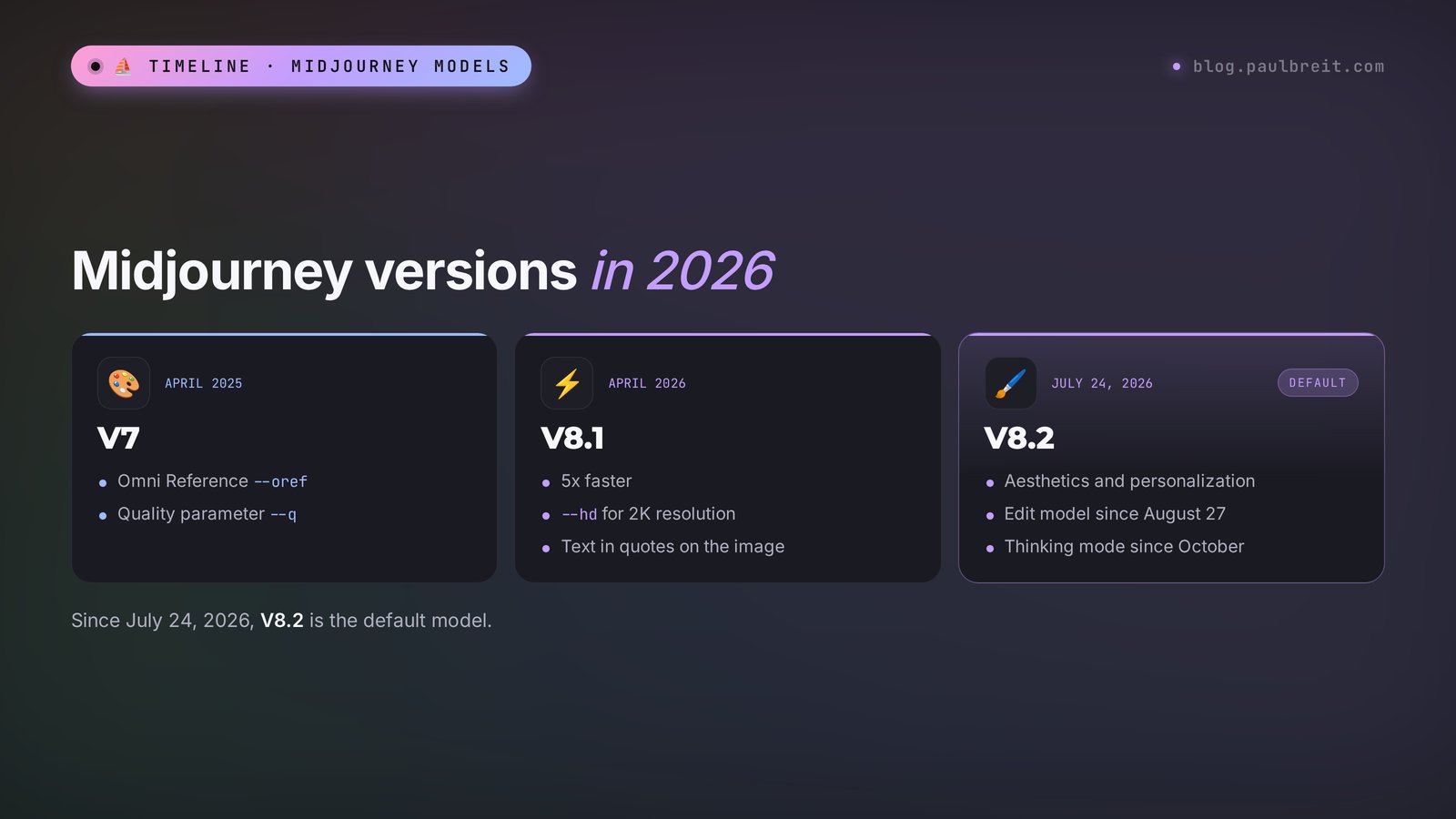
Midjourney doesn't delete old models: in the settings you can pick any of them, from the ancient V1 to the latest. As a beginner, you only need to know the three most recent ones.
V7 – April 2025
The model Midjourney ran on for most of last year. It introduced personalization by default, a fast draft mode, and Omni Reference – the --oref parameter, which moves a specific person or object from your image into a new scene. V7 is still available, and sometimes it's worth going back to it precisely for --oref and the --q quality parameter.
V8 and V8.1 – spring 2026
The V8 alpha came out on March 17, 2026, the V8.1 update followed in April, and on June 10 it became the default model. Midjourney rewrote the code from scratch and trained the model on a new dataset. What changed in practice:
- speed: images render several times faster than on V7, and a regular run takes seconds;
- resolution: the --hd parameter renders straight to 2K without a separate upscale;
- text: short phrases in quotes come out readable;
- prompt understanding: the model follows long descriptions with several objects more precisely and loses details less often.
V8.2 – the default since July 24, 2026
An update about beauty and taste. Images got bolder and more refined, clearly weak options show up much less often, and personalization guesses your style more accurately if you've already rated plenty of images. On August 27, an Edit model for V8.2 arrived: editing images with words, extending them, and up to four reference images in one request. In October, a Thinking mode appeared on the test site alpha.midjourney.com: the model looks at the finished image, finds where it missed the prompt, and redraws it.
| What you need | V7 | V8.2 |
|---|---|---|
| Speed | Regular | Several times faster |
| 2K resolution without upscaling | No | Yes, the --hd parameter |
| Text on the image | Often with errors | Short phrases in quotes are readable |
| Moving a person or object into a new scene | --oref (Omni Reference) | Edit model, up to 4 references |
| Style reference --sref and moodboards | Yes | Yes |
| Personalization --p | Yes | Yes, V7 profiles work too |
| Quality parameter --q | Yes | No |
| Draft mode | Yes | Yes, on the website |
My advice: work on V8.2 by default and switch to V7 in just one case – when you need --oref and the Edit model somehow didn't handle the job. You choose the version in the settings next to the prompt bar or with a parameter at the end of the prompt: --v 7.
Section 03Plans: what it costs and how many images you get
Midjourney has no free plan. The company has turned on trial periods only rarely and briefly, so don't count on one. There are four subscriptions, all with the same model; the difference is in volume and a couple of features.
| Plan | Monthly price | Yearly price | Fast hours | Relax mode | Stealth mode |
|---|---|---|---|---|---|
| Basic | $10 | $96 | 3.3 hours | No | No |
| Standard | $30 | $288 | 15 hours | Unlimited | No |
| Pro | $60 | $576 | 30 hours | Unlimited, plus video | Yes |
| Mega | $120 | $1,152 | 60 hours | Unlimited, plus video | Yes |
What those hours mean. Midjourney counts the GPU time your requests used. Fast mode renders right away and spends hours. Relax mode puts you in a queue, the image shows up in a minute or two, but no hours are spent. Basic has no Relax mode, so 3.3 hours is your ceiling for the month. In practice, that's around two hundred regular runs of four images, as long as you don't lean on 2K and video: the --hd parameter, style references, and video eat hours several times faster.
Which plan to pick:
- Basic for $10 – to try it and see whether it's for you. A month of experiments and a few dozen finished covers.
- Standard for $30 – for people who make visuals every week. Unlimited Relax mode removes the fear of "using it all up in one evening."
- Pro for $60 – if privacy matters to you or you work with clients. Stealth mode keeps your images out of the public gallery.
- Mega for $120 – for agencies and anyone generating hundreds of images and videos a week.
Under Midjourney's terms, companies with more than $1 million in annual revenue must be on the Pro or Mega plan to use images commercially. For a solo professional or a small business, any paid plan works.
Section 04Signing up and paying
Getting started takes about two minutes, and there's nothing to install.
Signing up
You create an account by signing in with Google or Discord. Google is the easiest: one click and you're in. Use the Google account you already work from, so all your images stay tied to one place.
Paying
After you sign in, Midjourney offers you a plan. Pay with a regular credit or debit card; the subscription renews automatically each month or year, depending on what you picked. You can switch plans or cancel in your account's subscription settings. If you're not sure you'll stick with it, start with monthly Basic, and move to a yearly plan with about 20% off once Midjourney has become part of your weekly routine.
App stores and messengers are full of apps and bots with "Midjourney" in the name. Midjourney has no official phone app and has never released an official Telegram bot. These middleman bots connect to the model through unofficial workarounds, so quality and reliability are unpredictable. If you use one anyway, don't pay for a year up front.
Section 05Your first image: step by step
Let's take a real task: a cover for a post about how not to burn out by the end of the year. The format for a post in Instagram and other feeds is 4:5.
Go to the website and sign in
Open midjourney.com and click Log In. Choose to sign in with Google or Discord. Once you've paid for a subscription, a menu appears on the left: Explore (the public feed), Create (where you generate), Edit (editing), Organize (your folder).
Open Create and find the prompt bar
At the top of the page there's a long field with text like What will you imagine? That's where your image description goes. To the right of the field is a settings icon: that's where you pick the aspect ratio, model version, stylization, and speed mode.
Set the format once
In the settings, set the aspect ratio to 4:5 – the frame becomes vertical, like a feed post. These settings are saved and applied to all your next requests. If you need a different format for one image, add it right in the prompt: --ar 16:9.
Write the prompt
Describe who's in the shot, what they're doing, where, and what light and style you want. An example prompt for the cover is below, after the steps.
Press Enter and wait a few seconds
Four options appear. Hover over an image or click it to open it full size. Don't be discouraged if none of them nails it: that's normal for a first run. Look for the one closest to what you had in mind.
Develop the best option
Open the best image and click Vary (Subtle) to get four similar options with small differences, or Vary (Strong) for bolder ones. If you like almost everything but one detail gets in the way, click Edit and fix it. The buttons are covered in detail in the next section.
Download the image
In the open image, click the download icon. For print and large screens, click Upscale first to increase the resolution. Your images also live in Organize, where you can sort them into folders.
The prompt for this example:
a calm woman in a cozy knitted sweater sitting by a large window with a cup of tea, soft winter morning light, warm beige and sage green tones, quiet and peaceful mood, editorial lifestyle photo, shallow depth of field --ar 4:5Here's what live work on an image looks like when the first run came out almost right:
You: a calm woman in a cozy knitted sweater sitting by a large window with a cup of tea, soft winter morning light, editorial lifestyle photo --ar 4:5
Midjourney: [four images] Two options are too dark, the third is good, but the woman looks straight into the camera and seems like she's in an ad.
You: You open the third one, click Vary (Subtle), and add to the prompt: looking out of the window, not posing, natural candid moment, soft snow outside.
Midjourney: [four images] The woman looks out the window, snow is falling outside, the light got softer. The second option is ready for the cover.
Notice: the fix took one line, and you didn't start over. You kept a good base and refined only what was in the way. That way, working on an image takes five minutes instead of an hour.
Section 06The buttons under an image: Vary, Upscale, Edit
When you open an image, a set of actions appears on the right. Beginners often write a new prompt right away, when it's faster to polish what already worked.
Vary – variations
Subtle makes four close copies: the same composition with slightly different details. Use it when you like the image almost entirely. Strong changes more: pose, angle, how objects are arranged. Use it when you like the idea but not the execution.
Upscale – enlarging
Doubles the resolution of a finished image. Subtle mode carefully keeps everything as it is, Creative adds small details and texture. On V8 it's often easier to render with --hd from the start: the image comes out in 2K without an extra step.
Rerun – run it again
The same prompt, four new options. Useful when the prompt is good but all four images came out badly by chance.
Edit – editing
Opens the editor: you can select an area with a brush and describe what should be there, extend the frame past its edges, or change the aspect ratio. On V8.2, the Edit model works here, and it understands simple word commands like "make the jacket blue." More on this in Section 16.
Use – use as a reference
Three buttons side by side: use the image as a style reference, as an image reference, or just copy its prompt. Handy when you've found your dream image in the public Explore feed and want something in the same spirit.
Animate – bring it to life
Turns the image into a short video. More on video in Section 17.
Section 07The prompt formula
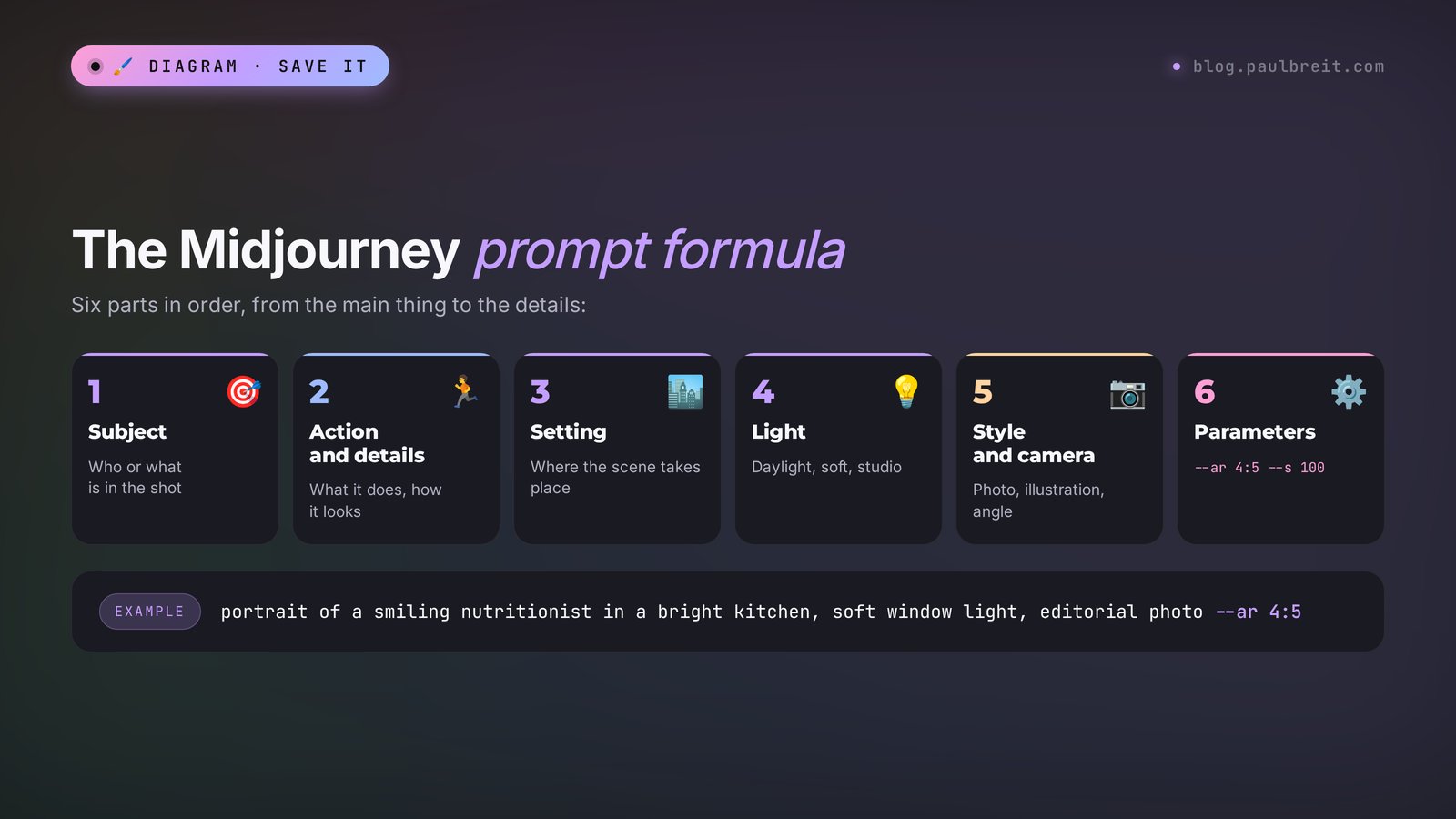
Midjourney reads a prompt as a description of a shot. The closer your text is to how a photographer explains a future shot to an assistant, the more accurate the result. Polite words like "please draw me" add nothing. And the model can't guess the details you're holding in your head: you have to write them down.
A working six-part formula:
- Subject. Who or what is at the center of the shot: "a woman therapist in her forties," "a frosted glass jar of cream," "an old wooden table."
- Action and details. What they're doing, what they're wearing, what objects are nearby: "writing in a notebook, gray cashmere sweater, glasses pushed up on her head."
- Setting. Where it happens: "a bright office with plants," "a Scandinavian-style kitchen," "a misty forest at dawn."
- Light. Where it comes from and what kind: "soft window light from the left," "golden hour," "studio light with a rim light."
- Style and camera. Photo or illustration, what kind of shot: "editorial magazine photo," "film photo," "watercolor illustration," "close-up, shallow depth of field."
- Parameters. Technical settings with a double hyphen at the very end: format --ar, stylization --s, exclusions --no.
A template to fill in with your own details:
[subject], [action and details], [setting], [light], [style and camera] --ar [format] --s [stylization]Five rules that save your subscription
- The main thing goes first. Midjourney weighs the first words of a prompt more heavily. Put the subject first and small things at the end.
- Specifics instead of judgments. Words like "beautiful," "cool," and "high quality" change almost nothing. "Light wood, a linen napkin, a sprig of eucalyptus" changes everything.
- Describe what should be there. The phrase "no people" in the text sometimes adds people, because the model saw the word. Exclusions have their own parameter: --no people.
- One shot, one scene. If a prompt has three locations and five characters, the model will blend them into mush. Build a complex scene in pieces through editing.
- Save the prompts that work. Start a note and drop everything that worked into it. A month from now you'll have your own library, like my prompt library for text.
Long prompt or short
V8 understands long descriptions of 40–60 words well and follows them more precisely than past versions. A short prompt of 5–7 words gives the model more freedom: it fills in the atmosphere to its own taste. A good strategy is to start short, see what Midjourney offers, and then refine.
Section 08Parameters: a cheat sheet
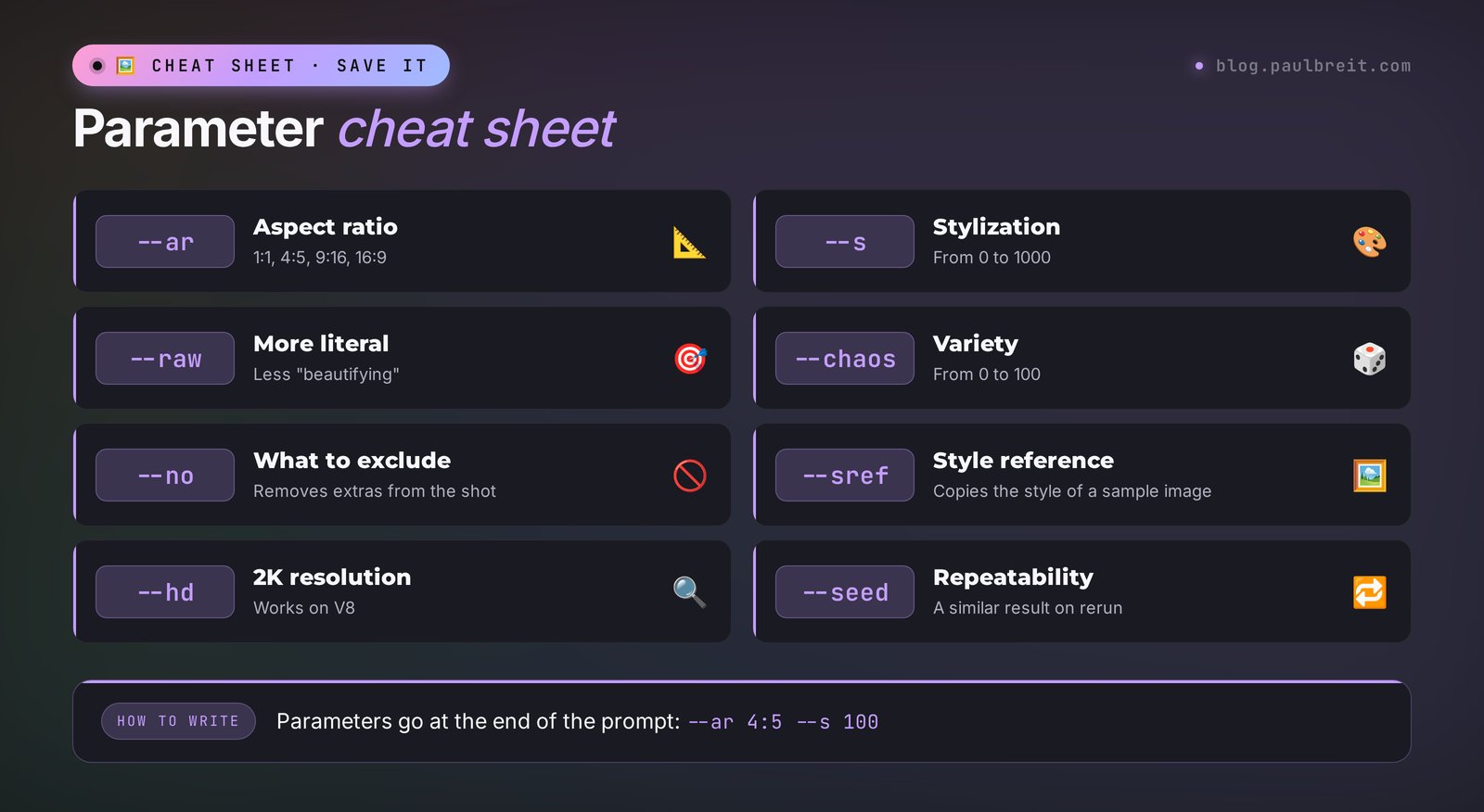
Parameters go at the very end of the prompt, separated by spaces, with two hyphens in front. You can set most of them with buttons in the settings, but they're worth knowing: that way you can change a single run quickly without touching your default settings.
| Parameter | What it does | Values | When to use it |
|---|---|---|---|
| --ar | Aspect ratio | 1:1, 4:5, 9:16, 16:9, 3:4, and any others | Always: 4:5 for a post, 9:16 for stories and reels, 16:9 for a live session cover, 3:4 for a product listing |
| --s | Strength of Midjourney's signature aesthetic | 0–1000, default 100 | 50 for accuracy and simplicity, 300–600 for artistry |
| --raw | Follows the prompt literally, with less "beautifying" | No value | Realistic photos, product shots, when the model over-polishes |
| --chaos | Variety across the four options | 0–100 | 20–40 when you're looking for an idea and want different takes |
| --weird | Strangeness and unusualness | 0–3000 | 100–300 for unexpected covers |
| --no | What to exclude | Comma-separated list | --no text, people, logo |
| --sref | Style from a sample image or a code | Image link or style code | One consistent style for a series of posts |
| --sw | Strength of the style reference | 0–1000, default 100 | Below 100 if the reference overpowers the prompt |
| --p | Your personalization | No value or a profile code | Once you've rated images and created a taste profile |
| --hd | 2K resolution on V8 | No value | Covers, print, large banners. Uses more hours |
| --seed | Repeatable results | Any whole number | When you want to compare how one word changes the image |
| --v | Model version | 7, 8.1, 8.2 | --v 7 for --oref |
| --tile | Seamless pattern | No value | Backgrounds, patterns, packaging |
The combination I start almost every work image with: --ar 4:5 --s 100. For a realistic product photo I add --raw, and for a cover that needs atmosphere I raise it to --s 400.
Section 09Let AI write the prompt for you
Most people think in rough ideas, not in tidy shot descriptions: "something calm about burnout," "a cover about sales, but not cheesy." Midjourney does best with a concrete, structured prompt, and small details like "an oatmeal-colored knitted sweater" get lost when the idea stays vague. The good news: you don't have to structure it yourself.
Open Claude or ChatGPT and give it the role of a prompt writer once. Here's a ready text, just copy it:
You help me write prompts for Midjourney V8.
I describe in plain words what I want to see in the image.
You return one prompt in English using the formula: subject, action and details, setting, light, style and camera.
Don't add filler or words like beautiful, masterpiece, 8k.
At the end, add parameters: --ar to fit the task (post 4:5, stories 9:16, cover 16:9), --s 100 unless I say otherwise.
If my description is missing something important (light, style, format), ask me one clarifying question.
Here's how it looks in action:
You: I need a cover for a live session about selling through messengers. No people. Something about chats and money, but not cheesy.
Claude: Which style is closer: a realistic photo or a 3D illustration? And do you need empty space on one side for a headline?
You: 3D, space for the headline on the left.
Claude: a smartphone floating above a soft pastel surface, chat bubbles rising from the screen and turning into golden coins, clean 3D render, soft studio light, lots of empty space on the left side for a headline, calm lavender and mint palette --ar 16:9 --s 150 --no text
Notice the --no text: that way Midjourney won't draw random letters where your headline will go later. If you don't have Claude yet, sign up at claude.ai. More on writing tasks for AI in general is in the article on Claude prompts.
Text on the image
V8 writes short phrases if you put them in quotes: a neon sign that says "OPEN". The model renders the Latin alphabet confidently. With other scripts, letters often come out wrong, and long lines of text break too. So a long headline is more reliable to add later in Canva or any editor, leaving empty space for it in Midjourney. If you really need a longer headline right on the image, use Nano Banana 2 or ChatGPT – they handle text better.
Section 10Avatars and portraits: 6 prompts
An important caveat: Midjourney draws made-up people. If you need an avatar with your own face, upload your photo to the Edit model (Section 16) or use Nano Banana. The prompts below work for illustrations where you need a character: a bot's avatar, a cover featuring a "client," an image for a post.
#1. A professional in their office. For an intro post or an About page in a magazine-shoot style.
portrait of a confident woman psychologist in her forties, sitting in a bright office with plants and bookshelves, gentle smile, cream knitted cardigan, soft window light from the left, editorial magazine photo, 85mm lens --ar 4:5 --raw#2. A male coach on the move. For a challenge ad or a live session cover.
a man in his thirties walking through a modern city street at golden hour, holding a coffee and talking on the phone, relaxed confident expression, navy jacket, cinematic street photo, warm backlight --ar 16:9#3. A trainer at the gym. For workout posts and ads for an online program.
a fit woman personal trainer in a sunlit minimalist gym, tying her sneakers on a wooden bench, natural candid moment, soft morning light, muted earthy tones, documentary photo --ar 4:5 --raw#4. An illustrated avatar. When you want a recognizable look instead of a photo.
flat vector avatar of a friendly woman with short curly hair and round glasses, simple shapes, pastel peach background, clean lines, modern minimal illustration --ar 1:1 --s 200#5. The client "after." An image of a happy client to illustrate a result, with no promises in numbers.
a relaxed woman sitting on a balcony with a laptop and a cup of coffee, smiling at the screen, summer evening light, plants around, feeling of freedom and calm, lifestyle photo --ar 4:5#6. A film-style portrait. For warm personal posts and stories.
candid portrait of a young man laughing in a small cafe, 35mm film photo, soft grain, warm colors, natural light from the window, slightly out of focus background --ar 4:5 --rawSection 11Covers and post illustrations: 6 prompts
A cover has one job: stop the scroll. Metaphors work well for that – an object or scene that tells the topic at a glance. Every prompt below leaves empty space for a headline.
#7. Burnout. For posts about overload and rest.
a single burnt-out match next to a fresh green sprout growing from a crack in concrete, soft morning light, minimal composition, lots of empty space at the top, muted colors, conceptual photo --ar 4:5 --no text#8. Task chaos and order. For posts about planning and automation.
a messy pile of colorful sticky notes on the left slowly turning into a neat grid on the right, top-down view, clean white desk, soft shadows, conceptual still life --ar 16:9 --no text#9. Growth and results. For case studies and posts about first sales.
a tiny paper boat sailing on a calm sea toward a huge glowing sunrise, minimal surreal scene, soft pastel colors, empty sky for a headline --ar 16:9 --s 300#10. An illustration for a tip. A flat illustration in one style for a series of how-to posts.
flat illustration of a woman watering a plant made of speech bubbles, simple shapes, limited palette of sage green, cream and terracotta, lots of white space, modern editorial illustration --ar 4:5 --no text#11. A 3D live session cover. For a webinar or livestream announcement.
a glossy 3D microphone surrounded by floating soft shapes, pastel lavender and mint background, studio lighting, clean modern render, empty space on the right for a title --ar 16:9 --no text#12. An atmospheric illustration for a story. For personal posts and stories.
a cozy room at night with a desk lamp, an open notebook and a sleeping cat, rain on the window, watercolor illustration, warm yellow light, calm nostalgic mood --ar 4:5 --s 400Section 12Products and food: 6 prompts
For product shots, almost always add --raw: without it, Midjourney likes to throw in dramatic light and extra shine. Keep in mind that the model draws a generic product. To get your actual product with your label in the image, upload its photo to the Edit model and ask it to place it in the scene.
#13. A jar of cream on a stone. For skincare and cosmetics.
a frosted glass jar of face cream standing on a wet grey stone, water droplets, soft daylight, minimal spa aesthetic, pale green background, product photography --ar 4:5 --raw --no text, logo#14. A healthy bowl. For nutritionists and food bloggers.
overhead shot of a colorful healthy bowl with quinoa, avocado, roasted vegetables and seeds on a linen tablecloth, natural daylight, fresh and appetizing, food photography --ar 4:5 --raw#15. A book or workbook. For a guide or lead magnet cover.
a blank hardcover notebook lying on a wooden desk next to a cup of coffee and a pen, soft morning light, cozy workspace, clean cover without text, product mockup photo --ar 4:5 --raw --no text#16. A marketplace listing background. A scene where you'll later place your own product photo.
empty light beige podium on a soft pastel background, gentle shadows, dried flowers on the side, minimal product display scene, studio lighting --ar 3:4 --raw --no text, product#17. Candles and coziness. For handmade goods and gift sets.
three handmade soy candles in ceramic jars on a windowsill, winter evening, warm glow, snow outside, cozy hygge mood, lifestyle product photo --ar 4:5 --raw#18. A drink in motion. For coffee shops and beverage ads.
iced coffee in a tall glass with milk swirling into the coffee, splash frozen in motion, dark background with warm rim light, commercial beverage photography --ar 4:5 --rawSection 13Backgrounds, interiors, and textures: 6 prompts
Backgrounds are the most underrated use of Midjourney. One good background works for months: on covers, in stories, on a landing page, in a presentation.
#19. A soft gradient. A versatile background for text.
soft abstract gradient background, flowing shapes of peach, lavender and cream, smooth matte texture, calm and airy, no objects --ar 9:16 --no text#20. A consultation room. A background for video calls or a service cover.
a cozy consultation room with two armchairs, a small round table, plants and warm lamps, Scandinavian interior, soft daylight, empty room, interior photography --ar 16:9 --raw --no people#21. A seamless pattern. For packaging, brand backgrounds, and backdrops.
seamless pattern of small hand-drawn lemons and leaves, cream background, simple flat illustration, soft yellow and green --tile --ar 1:1#22. Nature for a quote. For quote posts and stories.
misty mountain lake at sunrise, still water reflection, soft pink sky, minimal landscape, lots of empty space in the sky --ar 9:16 --no text, people#23. A paper texture. For a carousel or presentation backdrop.
close-up of handmade watercolor paper texture, warm off-white color, subtle fibers, soft even light, flat lay --ar 4:5 --raw --no text#24. A desk from above. For posts about work, planning, and learning.
top-down view of a tidy desk with a laptop, a planner, a cup of tea and a small plant, light wood surface, soft natural light, empty space in the center, flat lay photo --ar 4:5 --raw --no textSection 14Ad creatives and text: 6 prompts
#25. A neon sign with text. Latin letters render confidently.
a pink neon sign that says "OPEN FOR CLIENTS" on a dark brick wall, glowing light reflections, night atmosphere, photo --ar 4:5#26. A "before and after" contrast. Two halves of the frame for a transformation creative.
split image, left side a cluttered stressful desk in cold grey light, right side the same desk clean and organized in warm sunlight, photo, clear contrast between two halves --ar 16:9 --raw --no text#27. A hero object. For a creative built around one strong symbol.
a single golden key lying on a soft velvet surface, dramatic spotlight from above, dark emerald background, luxury minimal still life --ar 1:1 --no text#28. An event poster. Empty space for the name and date.
bold graphic poster background with abstract overlapping circles in coral, navy and mustard, Swiss design style, strong composition, large empty area at the top for a title --ar 4:5 --no text#29. A metaphor for a service. An example for an accountant or a lawyer.
a calm person sitting in a small boat on a stormy sea of paper documents, an umbrella protecting them, surreal editorial illustration, muted blue and beige palette --ar 4:5 --s 300 --no text#30. A gift for a lead magnet. For ads promoting a free guide.
an open gift box with a glowing booklet inside, pastel lavender background, soft studio light, playful 3D render, simple and clean --ar 1:1 --no textChange only the subject and the colors, and keep everything else. For example, in #13 swap the cream for "a bottle of essential oil" or "a box of herbal tea," and in #14 swap the bowl for your own dish. The prompt structure keeps the quality, and the scene becomes yours.
Section 15Your own style: references, moodboards, personalization
The most common pain: every image is beautiful, but they're all different, and your feed looks like a collection of other people's work. Midjourney has three tools for holding one style.
Style reference --sref
Drag an image whose style you like into the prompt bar and choose the "style" role. Midjourney takes its colors, texture, and manner and applies them to your new description. Objects from the reference don't carry over into the new image. The strength of the influence is set with --sw: at 50 the reference just hints, at 300 it dominates.
Midjourney also has style codes: a number instead of an image, for example --sref 1234567. You find them in draft mode with --sref random – the model draws 24 images in different random styles, you pick the one you like and save its code. One code you've found, and your whole series of posts has one style.
Moodboards
A moodboard is a set of several images that Midjourney turns into one style. Collect 5–10 images whose mood you like, create a moodboard in the personalization section, and attach it to your prompts. Handy when a style can't be captured by a single image.
Personalization --p
Midjourney asks you to rate pairs of images: which one you like more. After a few dozen ratings, you get a taste profile, and with --p the model draws closer to it. On V8.2, personalization is noticeably more accurate than before. Profiles created on V7 work too.
Find one style code, add it to every prompt in a content series, set the same format, and describe the same palette in words. A month from now, your followers will recognize your post in their feed before they read the first line.
Section 16Editing images and your own photos
The Edit section is the editor inside Midjourney. Since August 27, 2026, it runs on the V8.2 Edit model, and that's a big step: editing used to be crude, and now you can ask for changes in words.
What you can do
- Edit with words. Upload an image and write: "make the sweater navy blue," "remove the mug from the table," "add snow outside the window."
- Edit with a brush. Paint over an area and describe what should be there. The rest of the image stays the same.
- Extend the frame. A vertical image can be extended into a horizontal one: the model continues the scene past the edges. Handy when you need the same image for a post and for a live session cover.
- Combine references. Up to four images in one request: for example, a photo of your product, a photo of an interior, and a style reference.
How to put your own product into a scene
Photograph the product on a plain background
Even light, no glare on the label, the whole product in the frame. A phone by a window is enough.
Upload the photo to Edit
Drag the shot into the editor or attach it to the prompt as an image reference.
Describe the scene and ask it to keep the product
Example below. The line about keeping the shape and label is a must.
place this exact product on a wet grey stone in a spa setting, keep the shape, colors and label of the product unchanged, soft daylight, pale green background, product photography --ar 4:5An honest note on the limits: Midjourney handles people's faces more carefully than a year ago, but the likeness can still drift, especially across a series of images. If the task is your portrait in a new setting where staying yourself matters, Nano Banana 2 is more convenient. On V7, the --oref parameter is still there for moving a person into a scene.
Section 17Video from an image
Since the summer of 2025, Midjourney can animate images. Open a finished image and click Animate. Auto mode comes up with the motion on its own, and Manual mode lets you describe it in words: "the camera slowly zooms in," "hair blowing in the wind," "steam rising from the cup."
What you need to know:
- the clip comes out short, about five seconds, and you can extend it a few seconds at a time;
- the --motion low parameter gives calm movement, --motion high gives dynamic movement but risks distortion;
- video burns fast hours many times faster than images;
- Relax mode for video is only available on the Pro and Mega plans.
Short animated covers work great in stories and as backgrounds for reels. For a full video with a script, voiceover, and editing, you need other tools, and they're covered in the article on making video from text with AI.
Section 18Midjourney vs. other image AI tools
Every image AI has its own character. Below is an honest comparison for the tasks people who sell their services come with most often.
| Tool | Strong at | Weaker at | Price |
|---|---|---|---|
| Midjourney | Beautiful shots, light, style, one consistent style across a series | No free plan, longer text on images breaks | From $10 a month |
| Nano Banana 2 (Gemini) | Editing your own photos while keeping your face, text on images | Less artistic by default | Free daily limit |
| ChatGPT | Understands complex tasks, infographics, long text on images | Slower, images can look "flat" | Free limit |
| Adobe Firefly | Generative fill inside Photoshop and other Adobe tools, commercially focused output | Less distinctive aesthetic, fewer style controls | Free credits, more with an Adobe plan |
| Ideogram | Typography and text on images, posters and logos | Less atmospheric photo realism | Free tier with limits |
My recommendation: if visuals are an important part of your content and you make them every week, Midjourney pays back its $10–30 a month with the very first cover. If you need images once a month, start with the free options from my roundup of free AI tools, and the best tools for 12 tasks are collected in the best AI tools of 2026.
Section 19Rights, privacy, and honesty
Who owns the images
Under Midjourney's terms, images created on a paid plan belong to you, and you can use them commercially: in ads, on a website, on packaging. There's one exception – companies with more than $1 million in annual revenue need the Pro or Mega plan.
Other people can see your images
On the Basic and Standard plans, everything you create goes into the public Explore gallery, and other users can see and reuse your prompt. If you're making visuals for a client or for a launch you haven't announced yet, you need the Pro plan with Stealth mode.
Other people's styles and brands
A prompt like "in the style of [a living artist's name]" technically works, but using those images in ads is a bad idea: it's ethically questionable and can end in a complaint. Midjourney often refuses to draw other companies' logos and famous people, and that's the right call.
Honesty with clients
A generated "interior after renovation" or "treatment result" in your portfolio is a direct path to a disappointed client. The rule I follow: AI makes covers, backgrounds, illustrations, and atmosphere. Work results, reviews, and case studies stay real.
Section 20When something goes wrong
| What happened | Why | What to do |
|---|---|---|
| The image is about something else entirely | The main thing is buried at the end of the prompt, or the prompt is too vague | Put the subject first, or have Claude or ChatGPT rewrite the idea using the formula |
| Too polished and unnatural | High stylization, the model is beautifying | Add --raw and lower --s to 50 |
| Extra letters on the image | The model added "text for decoration" | Add --no text, letters |
| Text with errors | A long phrase or a non-Latin script | Cut it to 2–4 words in quotes, or add the text later in an editor |
| All four options look the same | Low variety by default | Add --chaos 30 or click Vary (Strong) |
| Wrong format | No --ar specified | Add --ar 4:5, 9:16, or 16:9, or set the format in settings |
| Weird hands or fingers | A complex pose, hands in the center of the frame | Select the hands with the brush in Edit and redraw them, or remove hands from the prompt |
| Fast hours ran out | Lots of runs with --hd, style references, or video | Switch to Relax on Standard and up; on Basic, buy extra hours or wait for renewal |
| It says the request breaks the rules | Words from the banned list, famous people, explicit scenes | Remove names and borderline words, rephrase neutrally |
| The payment doesn't go through | The bank blocked the charge or the card has expired | Check the card details, confirm the charge with your bank, or try another card |
| The site won't load properly | Browser extensions or an outdated browser | Refresh the page, try a private window or another browser |
Section 21A checklist for your first evening
So your subscription doesn't go to aimless experiments, here's a two-hour plan. By the end, you'll have visuals for a couple of weeks ahead.
- Sign up with Google and get Basic or Standard.
- In the settings, set the format to 4:5 and stylization to 100.
- Give Claude or ChatGPT the prompt writer role from Section 09.
- Make three covers with prompts #7, #8, and #9, swapping in the topics of your next posts.
- Make two backgrounds with prompts #19 and #24 for stories and carousels.
- Find your style: run draft mode with --sref random and save a code you like.
- Redo one cover with that style code and compare it to the first version.
- Animate your best image with the Animate button for stories.
- Check every image zoomed in: hands, eyes, small details, random letters.
- Save the prompts that worked in your notes, and sort the images into folders in Organize.
Section 22The whole path in a minute
- Midjourney is an AI for beautiful images. It runs on midjourney.com, and you sign in with Google or Discord.
- The default model is V8.2: fast, renders in 2K with --hd, writes short text in quotes.
- There's no free plan; subscriptions start at $10 a month. Unlimited Relax mode starts with Standard at $30, hidden images with Pro.
- You pay with a regular card, and the subscription renews automatically.
- The prompt formula: subject, action and details, setting, light, style, parameters.
- Let Claude or ChatGPT turn a rough idea into a structured prompt.
- The key parameters: --ar for format, --s for stylization, --raw for realism, --no for exclusions.
- One consistent style comes from --sref, moodboards, and --p personalization.
- Edit changes images with words and a brush, and Animate turns an image into video.
FAQFrequently asked questions
Is Midjourney free?
No, Midjourney has no free plan. The cheapest subscription, Basic, costs $10 a month, Standard is $30, Pro is $60, and Mega is $120. Paying yearly gets you about 20% off. The company turns on trial periods rarely and only briefly.
How do I use Midjourney without Discord?
Go to midjourney.com and sign in with your Google account. Every feature is available in the browser: Create for making images, Edit for editing, Organize for storage. You no longer need Discord, though the bot there still works.
What is the latest version of Midjourney?
Since July 24, 2026, the default model is V8.2. Before it came V8.1 (the default since June 2026) and V7 (April 2025). On August 27, an Edit model for V8.2 came out for editing images, and in October a Thinking mode appeared on the test site. You can pick older versions in the settings or with the --v parameter.
How do I write a good Midjourney prompt?
Use the formula: subject, action and details, setting, light, style and camera, and parameters at the end. Put the main thing first, use specifics instead of words like "beautiful," and use --no for exclusions. If you only have a rough idea, ask Claude or ChatGPT to turn it into a prompt using this formula.
How do I pay for Midjourney?
After you sign in at midjourney.com, pick a plan and pay with a regular credit or debit card. The subscription renews automatically each month or year. You can switch plans or cancel in your account's subscription settings.
Can Midjourney write text on an image?
Yes, V8 models write short text if you put it in quotes. Midjourney renders the Latin alphabet confidently, while long lines and other scripts often come out with mistakes. Longer headlines are more reliable to add in a graphics editor or to create with Nano Banana or ChatGPT.
Can I use Midjourney images in ads?
Yes, images from a paid plan can be used commercially. Under Midjourney's terms, companies with more than $1 million in annual revenue need the Pro or Mega plan. Don't use images in the style of specific living artists or with other companies' brands in your ads.
What do --ar, --s, and --raw mean?
These are parameters at the end of the prompt. --ar sets the aspect ratio, for example 4:5 for a post or 16:9 for a cover. --s controls the strength of Midjourney's signature aesthetic from 0 to 1000. --raw makes the result more literal and realistic, without extra beautifying.
Can I make an image with my own face in Midjourney?
You can upload your photo to the editor and use the V8.2 Edit model, or the --oref parameter on V7. But the likeness can drift across a series of images. For portraits where you need to stay recognizable, Nano Banana 2 in Gemini is more convenient.
Is Midjourney better than ChatGPT for images?
Midjourney is stronger on aesthetics: light, composition, color, artistic styles, and one consistent style across a series through --sref. ChatGPT better understands complex tasks and draws infographics and long text on images. For covers and atmospheric illustrations, Midjourney usually wins.