AI Photo Prompt Ideas: 30 Examples to Copy
AI photo prompt ideas for everyday work: portraits and avatars, blog shots, product photos, ads and covers, mood shots, and holidays. Thirty ready examples you can copy and paste into an image generator right now, plus the formula you'll use to write a hundred of your own. Built for everyone who sells services, courses, and consulting and is tired of hunting for pictures on stock sites.
The easiest way to find AI photo prompt ideas is to sort them by task: a business headshot for your avatar, a "you at work" shot for your blog, a product on a clean background, a reel cover, a cozy mood shot, a holiday photo. Write every prompt with the same formula: subject, action, setting, light, camera and style. For example: "A 35-year-old woman with a laptop by a coffee shop window, soft morning light, shot on a 50 mm lens, natural colors, photorealistic." Paste it into Nano Banana (Gemini), ChatGPT, Midjourney, or Adobe Firefly and polish the result with 2–3 edits. Thirty ready examples below.
What's inside
- The 5-part photo prompt formula
- Where to paste your prompts: 7 AI tools
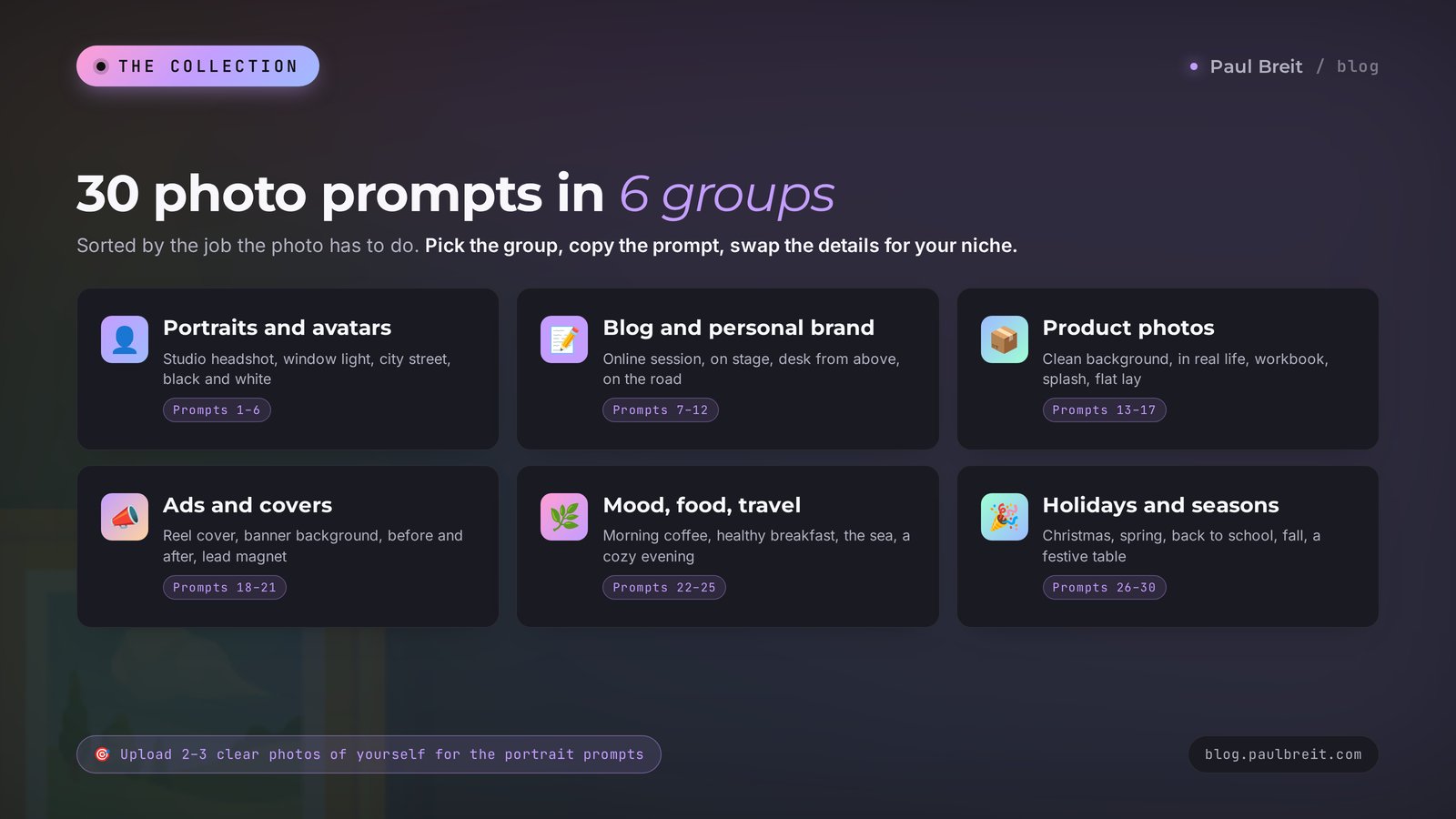
- Portraits and avatars: prompts 1–6
- Blog and personal brand photos: prompts 7–12
- Product photos: prompts 13–17
- Ads, covers, banners: prompts 18–21
- Mood, food, travel: prompts 22–25
- Holidays and seasonal photos: prompts 26–30
- How to come up with your own ideas
- When something goes wrong
- Checklist before you generate
- The whole path in a minute
You know how it usually goes. You need a photo for a post. You open a stock site, scroll past the same smiling people in the same white offices, download something that sort of fits, and post it. Your followers scroll right past, because they've already seen that picture on five other accounts. I did this for years and never noticed how much attention it was quietly eating from my posts.
AI closed that chapter. In a minute you can get a shot nobody else has: you in studio light, your coffee cup on your own desk, a cover made for one specific reel. And yet this is exactly where most people get stuck. They open an image generator, type "nice photo of a coach," and get a plastic greeting card. They get disappointed and go back to stock photos.
The problem is almost always the prompt. The AI draws exactly what you described and fills in everything else in the most average way possible. So I pulled together 30 AI photo prompt ideas that I use myself or have handed to clients, grouped them by task, and added a note on where each one works and how to tune it for you. Copy, paste, and swap the details for your niche.
Section 01The 5-part photo prompt formula
Before you copy the examples, let's look at what they're made of. Once you see the parts, you can change one detail in any prompt and get a completely different shot, with no guessing.
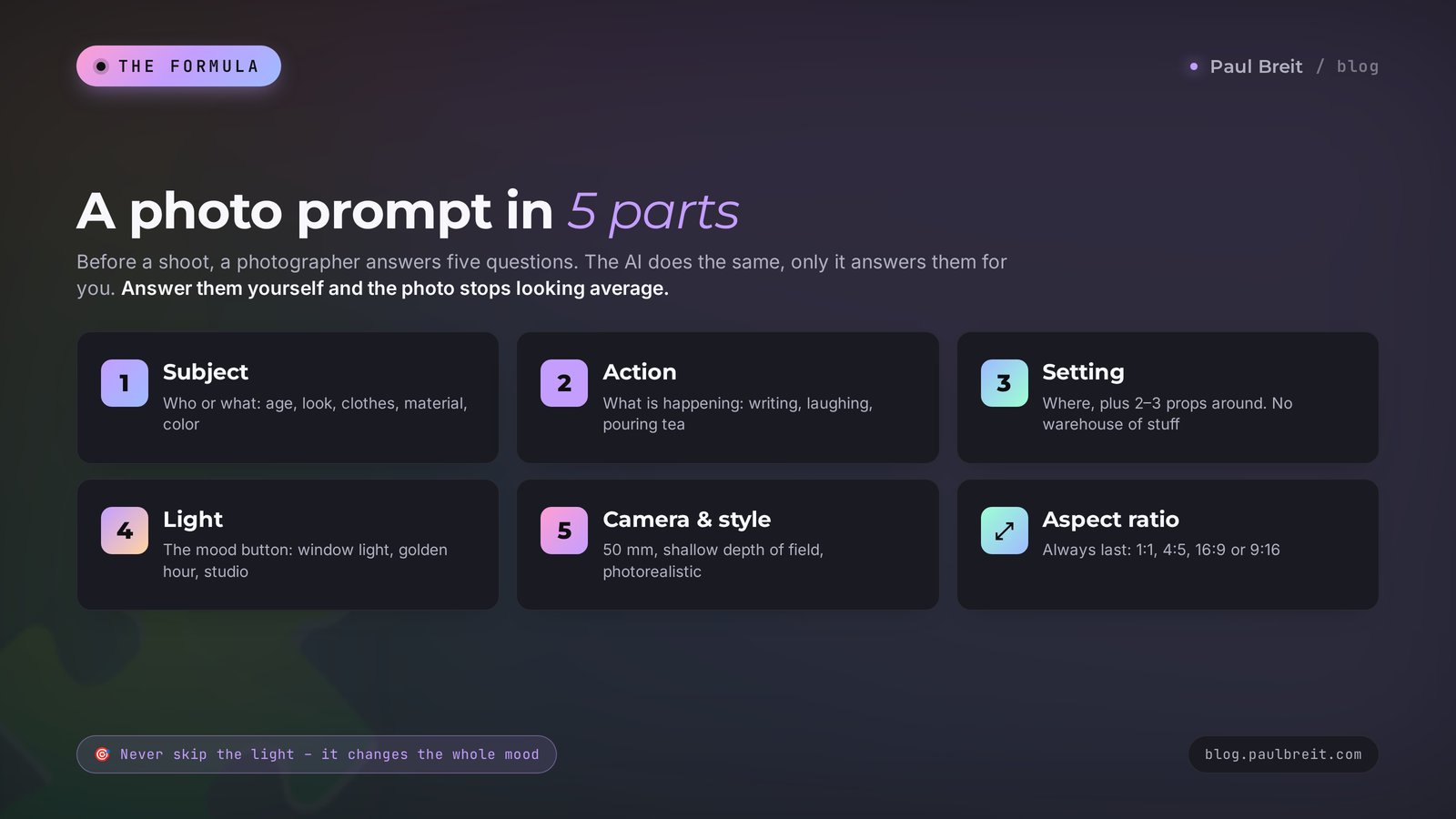
Here's the trick. Before a shoot, a photographer always answers five questions: who are we shooting, what is the person doing, where are we, what's the light, and what are we shooting on. The AI goes through the same five questions, it just never asks you. If you don't answer, it answers for you, and it answers boringly.
Subject: who or what is in the frame
Gender, age, looks, clothes, personality. "A woman" is empty. "A 40-year-old woman with short hair, a sand-colored linen shirt, and a calm smile" is already a person. For product shots: what the object is, its material, color, and size.
Action: what's happening
People in real photos are doing something: writing in a notebook, laughing at someone's joke, pouring tea, explaining something at a whiteboard. Action kills the stiff posing and gives the shot a story. Without an action, the AI almost always stands the person at attention and makes them stare into the lens.
Setting: where, and what's around
A coffee shop, a bright studio, a kitchen with a wooden table, a waterfront at dusk. Add 2–3 objects around the subject: a stack of books, a plant, a laptop. That makes the scene believable. Just don't overload it: ten objects turn the shot into a storage room.
Light: the main mood button
The same photo in soft morning window light and in harsh noon sun gives you two different moods. Phrases that work: "soft daylight from a window," "golden hour," "studio light with a softbox," "warm evening lamp light," "backlight." If you pick one part of the formula to never skip, make it the light.
Camera and style: what it looks like it was shot on
The phrase "shot on 85 mm, shallow depth of field" instantly gives you a portrait with a soft blurred background. "Wide angle, 24 mm" shows more of the space. "Film photography, light grain" adds warm nostalgia. Finish with a style: photorealistic, magazine editorial, documentary, minimalism.
Let's put it all together. Before: "photo of a therapist." After:
A 38-year-old female therapist, dark hair in a bun, beige cardigan. She sits in an armchair, listening closely to someone outside the frame, holding a cup of tea. A cozy office with a bookshelf and a potted plant. Soft daylight from a window on the left. Shot on 50 mm, shallow depth of field, natural colors, photorealistic, horizontal 16:9 frame.The gap between those two versions is huge. The first gives you an average picture from the internet. The second gives you a shot you can put on your website and in your post.
Always add the aspect ratio at the end of the prompt. For blog posts and websites use 16:9 or 4:3, for the Instagram feed 4:5, for Stories, Reels, and video covers 9:16, for an avatar 1:1. Forget it and the AI hands you a square, which you'll have to crop and lose detail.
If you want to go deeper into prompts in general, not just for photos, I broke the same five-part logic down for text tasks in how to write prompts for AI. The skeleton is the same: the more of the questions you answer yourself, the less the AI has to guess.
Section 02Where to paste your prompts: 7 AI tools
All 30 prompts below are universal. They're written in plain English, and every major image generator in 2026 handles that fine. But each tool has its own personality, and the same idea comes out differently in each one. Here's a short cheat sheet so you don't bounce between tabs.
| AI tool | What it's best at | Your own photo | Price |
|---|---|---|---|
| Nano Banana (Gemini) | Keeps your face, edits in plain words, realism | Yes, very well | Free tier |
| ChatGPT | Understands long descriptions, easy edits in chat | Yes, fairly well | Free tier, Plus $20/mo |
| Midjourney | The most beautiful aesthetics and light | Limited | From $10/mo |
| FLUX | Photorealism, text inside the image | In editing mode | Limits and subscriptions |
| Ideogram | Clean lettering, posters, covers with a headline | Limited | Free tier, subscription |
| Adobe Firefly | Built into Photoshop, made for commercial use | Limited | Free credits, subscription |
| Leonardo | Lots of styles and models in one place | Limited | Free tier, subscription |
My advice is simple. If you need a photo with your own face, go with Nano Banana in Gemini: upload two or three shots of yourself, write the prompt, and the face almost always stays yours. If you need a beautiful atmospheric picture without people, try Midjourney. If the image needs a readable headline right on it, Ideogram handles lettering better than most. And if you already pay for Adobe and live in Photoshop, Firefly is right there in the toolbar. I compared these tools in detail in AI image generators in 2026: which to choose.
Gemini, ChatGPT, and most other tools understand prompts in dozens of languages. Midjourney and FLUX are pickier: they accept other languages but lose some of the details. The fix takes ten seconds. Ask Claude or ChatGPT: "Translate this prompt into English for Midjourney, keep every detail," and paste the translation.
Section 03Portraits and avatars: prompts 1–6
Let's start with what people need most. Your avatar is the first thing someone sees in comments, in DMs, and in search. A clear, alive photo in your profile builds more trust than any line in your bio. And yet a professional photoshoot is the thing most of us keep putting off for years.
For every prompt in this section, upload 2–3 photos of yourself: facing the camera, in good light, no sunglasses, no heavy filters. The cleaner your source photos, the better the likeness.
Prompt 01. Business studio headshot
The classic for your avatar, website, and "About me" page. Works for lawyers, accountants, consultants, anyone who needs to look reliable.
Based on the uploaded photos, keep my face and features exactly as they are. A chest-up business studio portrait, navy blazer over a white T-shirt, a light confident smile, looking into the camera. Solid graphite-gray background with a soft gradient. Studio light with a large softbox on the left, soft shadows. Shot on 85 mm, sharp focus on the eyes, natural skin without plastic retouching. Photorealistic, 1:1 format.Tweak: swap the blazer for a chunky knit sweater if you're a coach or a therapist. The portrait instantly feels warmer.
Prompt 02. Natural window-light portrait
Soft, alive, no studio gloss. Looks great for therapists, nutritionists, beauty pros.
Based on the uploaded photos, keep my face unchanged. A waist-up portrait, I'm standing by a large window, looking slightly away with a soft smile. Light linen shirt. Soft morning light from the window falls on my face from the side, a blurred bright room with plants behind me. Shot on 50 mm, shallow depth of field, warm natural colors, light film grain. 4:5 format.Prompt 03. City street portrait
Gives a sense of movement and freedom. Perfect if you sell travel, location independence, or online careers.
Based on the uploaded photos, keep my face unchanged. I'm walking down an old European cobblestone street, laughing, looking past the camera. Beige trench coat, a paper coffee cup in my hand. Golden hour, warm low sun behind me, a soft rim light along my hair. Blurred background with cafes and shop signs without readable text. Shot on 85 mm, street photography style, photorealistic, 4:5 format.Prompt 04. Black-and-white portrait with character
Looks expensive and serious. A great fit for a course cover or a speaker card at a conference.
Based on the uploaded photos, keep my face unchanged. A black-and-white close-up portrait, head slightly tilted, a calm attentive look into the camera. Black turtleneck. Dark background. Hard side light, half the face in shadow, expressive skin texture. Shot on 105 mm, high contrast, magazine portrait style, 4:5 format.Prompt 05. Close-up avatar for social profiles
On Instagram, LinkedIn, and Telegram your avatar shows up as a circle the size of a fingernail. So the face has to fill almost the whole frame, and the background has to be simple and bright.
Based on the uploaded photos, keep my face unchanged. Avatar: face and shoulders close up, the face centered and filling two-thirds of the frame. An open smile, looking straight into the camera. Solid warm peach background. Even, soft studio light from the front, no harsh shadows. Crisp facial detail, photorealistic, 1:1 format.Tweak: match the background color to your brand colors, and your avatar becomes recognizable in the feed.
Prompt 06. You doing what you love
This prompt shows you at work, in your craft. For a baker that's a cake, for a photographer a camera, for a tutor a notebook and a pen.
Based on the uploaded photos, keep my face unchanged. I'm working: [describe the work, for example: decorating a cake with cream from a piping bag]. A focused face, a slight smile. A bright workspace, blurred tools in the background. Warm light from a lamp above plus daylight from a window. Shot on 35 mm, documentary style, as if someone caught me unnoticed, photorealistic, 4:5 format.By the way, if you want to have some fun, I have a separate collection of viral formats: LEGO figures, anime, meeting your childhood self. It's in how to make viral photos with AI. Here I'm keeping the focus on shots that work for sales and trust.
Section 04Blog and personal brand photos: prompts 7–12
A blog needs more than portraits. It needs story shots: you running a session, you on the road, you getting ready for a live stream. People used to book a "day in the life" photoshoot for $300–600 to get these. Now you can build most of them with AI from your own photos. One warning: don't present generated shots as coverage of a real event that never happened. They're great for illustrating an idea in a post, and they're no good as proof.
Prompt 07. An online session
For posts about working with clients, for a landing page, for a "what a session looks like" Story.
Based on the uploaded photos, keep my face unchanged. I'm sitting at a desk in front of a laptop running an online session, gesturing with one hand, explaining something with a friendly expression. On the laptop screen, a blurred video call window. A notebook and a cup of coffee nearby. A bright room at home, a plant. Soft daylight. Shot from the side at a 45-degree angle, 35 mm, photorealistic, 16:9 format.Prompt 08. Speaking to an audience
An illustration for a post about a live stream, a webinar, or a workshop. You can use it as the cover of the announcement.
Based on the uploaded photos, keep my face unchanged. I'm standing on a small stage with a lapel mic, talking, one hand raised in an explaining gesture. Silhouettes of the audience from behind, blurred. Behind me a large screen with abstract light graphics and no text. Warm stage light, a light haze in the air. Shot from the audience, 70 mm, photorealistic, 16:9 format.Prompt 09. Desk from above
No face, so it fits anyone and needs no uploads. A classic for posts about planning, productivity, and content plans.
Top-down view of a wooden desk: an open laptop, a paper notebook with a handwritten weekly plan and no readable text, a pen, a cappuccino with latte art, a phone face down, a small potted plant. A person's hands hold the pen above the notebook. Soft daylight from a window, light shadows. Minimalist composition, warm natural tones, photorealistic, 4:5 format.Prompt 10. On the road with a laptop
For anyone who works online from anywhere. Lands well in posts about a flexible schedule.
Based on the uploaded photos, keep my face unchanged. I'm sitting by a train window with a laptop on the little table, looking out the window with a soft smile. Blurred green hills outside. Headphones around my neck, a paper coffee cup. Soft diffused daylight, faint reflections on the glass. Shot on 35 mm, calm mood, natural colors, photorealistic, 16:9 format.Prompt 11. Recording a video for your blog
Behind the scenes, which people love. Handy for posts like "how I shoot my reels" or "how I prep for a live."
Based on the uploaded photos, keep my face unchanged. I'm sitting in front of a phone on a tripod with a ring light, recording a video, talking to the camera and smiling. Shot from the side, showing both me and the phone screen with my image on it. A cozy room, a bookshelf in the background. Warm evening lamp light plus the soft glow of the ring light. 35 mm, behind-the-scenes documentary style, photorealistic, 4:5 format.Prompt 12. Coffee with a client
A warm shot for posts about first meetings, getting to know people, and trust. The client's face isn't visible, which makes the shot feel more honest.
Based on the uploaded photos, keep my face unchanged. I'm sitting at a table in a bright coffee shop across from another person, seen from behind and slightly blurred. I'm listening and smiling, holding my cup with both hands. Two cappuccinos and an open notebook on the table. Soft light from a large window, warm tones. Shot over the other person's shoulder, 50 mm, shallow depth of field, photorealistic, 16:9 format.If you're making several blog shots at once, generate them in one chat and start with: "All the following photos are one series: the same outfit, the same color palette, warm natural light." Your posts for the week will then look like one photoshoot, and your feed becomes recognizable.
Series thinking pays off beyond looks. When the photos in your feed share a palette and a mood, people start recognizing your posts before they read your name. That's the same effect brands pay designers for. Here you get it with one sentence at the top of the chat.
Section 05Product photos: prompts 13–17
This is where AI saves the most money. A product photographer charges $25 and up per shot, and you need dozens of variations: for a product card, for Stories, for ads. If you have a physical product (skincare, candles, books, clothing, workbooks), these prompts are for you. The best approach: upload a real photo of your product and ask the AI to place it in a new scene. That way the product stays real.
Prompt 13. Product on a clean background for a listing
Based on the uploaded product photo, keep the shape, color, label, and proportions exactly as they are. Place the product in the center on a solid light-gray background with a soft gradient. A light natural shadow under the object. Even studio light from both sides, no glare on the label. Sharp across the whole product, commercial product photography, 1:1 format.Where it helps: marketplace listings, the catalog on your site. I covered marketplaces in detail in AI for marketplaces.
Prompt 14. Product in real life
Based on the uploaded product photo, keep its appearance unchanged. Place the product on a marble shelf in a bright bathroom, next to a rolled white towel, a eucalyptus sprig, and a small candle. Soft morning light from a window on the side, light highlights on the surface. Shallow depth of field, focus on the product, blurred background. Lifestyle photography for a skincare brand, 4:5 format.Tweak: swap the bathroom for a kitchen, a bedroom, or a desk, whatever fits your product. The scene should be a place where the product actually gets used.
Prompt 15. A book or a workbook
For authors of courses, guides, workbooks, and lead magnets. It shows your digital product as a real, physical thing.
A paperback book lying on a linen tablecloth next to a cup of tea and reading glasses. The book cover is solid dark green with no text, so I can add my own. The book is slightly open, pages visible. Warm evening lamp light from the side, a cozy atmosphere. Viewed from 30 degrees above, 50 mm, photorealistic, 4:5 format.Notice the phrase "no text." It's better to add the title later in Canva or ask for it separately, so it comes out without typos.
Prompt 16. A dynamic ad shot
Based on the uploaded product photo, keep its appearance unchanged. The product floats in midair in the center of the frame, surrounded by splashes and droplets of water frozen in motion. A bright solid turquoise background. Hard studio light, crisp highlights on the droplets. High-speed photography effect, very sharp detail, advertising photography, 1:1 format.Prompt 17. A "what's inside" flat lay
For kits, gift boxes, starter sets. People love seeing everything at once.
Straight top-down view: a neat flat lay of a gift set's contents on a light beige background. [List the items: a jar of cream, a small towel, a candle, a card with no text, a linen pouch]. Items laid out in an even grid with equal spacing. Soft diffused light, light shadows. Knolling style, minimalism, photorealistic, 4:5 format.A quick note on honesty with product shots. The product itself should stay true to life: same color, same size, same label. Change the scene around it as much as you like. If the photo makes the jar look twice as big or the color a shade richer than reality, you'll hear about it in reviews and returns.
Section 06Ads, covers, banners: prompts 18–21
Ads and covers need shots with room for text. This is the thing people forget most often: they generate a beautiful picture, and then there's nowhere to put the headline, so it lands on a face or on the most important detail. That's why every prompt in this section spells out the empty space directly.
Prompt 18. A cover for a reel or video
Based on the uploaded photos, keep my face unchanged. Vertical 9:16 frame. I'm looking into the camera with a surprised expression, one eyebrow raised, hand at my chin. My face in the lower half of the frame. The top third of the frame is empty: a solid saturated purple background for a large headline. Bright, contrasty studio light, crisp detail. YouTube thumbnail and reel cover style, photorealistic.The emotion on your face works as the hook. Surprise, doubt, laughter make a thumb stop in the feed.
Prompt 19. A background for an ad banner
Horizontal 16:9 frame. On the right, a 30-year-old woman holding a phone, smiling at the screen, wearing a light sweater. The left half of the frame is empty: a soft solid light-blue background for text. Even, soft studio light. Clean, modern advertising photography, photorealistic.If you need a finished banner with the text already on it, I have a separate breakdown: an AI banner maker.
Prompt 20. A "before and after" shot
For nutritionists, interior designers, cleaning pros, professional organizers. An honest rule: these shots are for illustrating an idea, and real client results should always be shown with real photos.
A horizontal frame split vertically in half. Left: a desk buried in papers and mugs, dim cold light, chaos. Right: the same desk, clean and organized, a laptop, a notebook, and a plant, warm sunlight. The same camera angle in both halves. Photorealistic, 16:9 format.Prompt 21. A lead magnet cover
A tablet lying on a light wooden table, the screen showing a neat checklist page with items and no readable text. A cup of coffee, a pen, and sticky notes nearby. The top of the frame is empty for a headline, a plain light wall. Soft daylight, warm tones. Viewed from above at an angle, 50 mm, photorealistic, 4:5 format.A shot like this makes a free resource look like a valuable product. I showed how to build the lead magnet itself in a lead magnet with AI in an hour.
Section 07Mood, food, travel: prompts 22–25
Mood shots without people are the cherry on top of your feed. They give the eye a break between portraits and text cards, and they set the tone for posts about rest, burnout, and balance. Nobody in them has to look like you, so they're the easiest to generate.
Prompt 22. Morning coffee
A cup of black coffee and an open paperback on a windowsill, a foggy morning and blurred trees outside. Light steam rising from the cup. A chunky knit blanket nearby. Soft, cool morning light from the window, a warm glint on the cup. Shallow depth of field, calm cozy mood, film photography with light grain, 4:5 format.Prompt 23. Healthy food for a nutritionist
Top-down view of a plate with a healthy breakfast: oatmeal with blueberries and raspberries, banana slices, chia seeds, a spoonful of honey. A glass of water with lemon and a linen napkin nearby. A light stone table. Soft natural window light, rich natural colors. Magazine food photography, photorealistic, 4:5 format.Tweak: replace the dish with something you actually recommend to clients. The picture should match how you eat, or someone in the comments will ask for the recipe of a dish you never touch. More ideas for this niche are in AI for nutritionists.
Prompt 24. A happy place by the sea
An empty wooden lounge chair on a terrace overlooking a calm sea at sunset. A small side table next to it with a glass of lemonade and an open notebook. Soft pink and orange clouds, the sun near the horizon. Golden light, long shadows. Wide angle, 24 mm, calm peaceful mood, photorealistic, 16:9 format.Prompt 25. A cozy evening at home
A cozy corner of a living room in the evening: a soft armchair, a floor lamp with warm light, a blanket, a stack of books on the floor, a mug of hot cocoa with marshmallows on the side table. Blue dusk and city lights outside the window. Warm amber lamp light contrasts with the cool light outside. 35 mm, atmospheric interior photography, photorealistic, 4:5 format.Section 08Holidays and seasonal photos: prompts 26–30
Seasonal shots bring a spike in reactions every year. People happily respond to the holidays, spring, back-to-school season. And each of those is a great reason for a post with a greeting and a gentle offer. Here are five ideas that cover the whole year.
Prompt 26. A holiday portrait
Based on the uploaded photos, keep my face unchanged. I'm sitting by a decorated Christmas tree in a cozy living room, holding a mug of cocoa, wearing a red sweater with reindeer. Warm string lights blurred into round bokeh in the background. Warm light from the string lights and the fireplace. Shot on 85 mm, shallow depth of field, festive cozy mood, photorealistic, 4:5 format.Prompt 27. A spring portrait in bloom
Based on the uploaded photos, keep my face unchanged. I'm standing among blooming cherry blossom branches in a park, smiling and looking to the side. A light dress (or a light shirt). Petals drifting softly in the air. Soft diffused daylight, delicate pastel colors. 85 mm, shallow depth of field, photorealistic, 4:5 format.Prompt 28. Back to school for tutors
A school desk by a window: an open ruled notebook, bright pencils, an apple, a small bunch of asters in a glass, a stack of textbooks. Golden leaves on the trees outside. Warm morning light, the feeling of a new school year starting. 35 mm, soft fall tones, photorealistic, 4:5 format.Works for announcing a new student group or a post about exam prep. More ideas for this niche are in AI for tutors.
Prompt 29. Cozy fall
Based on the uploaded photos, keep my face unchanged. I'm walking down a park path covered in yellow and orange leaves, in a chunky scarf and a coat, holding a cup of something hot, laughing. Golden hour, warm low light from the side, the leaves glowing slightly with the light behind them. 85 mm, shallow depth of field, photorealistic, 4:5 format.Prompt 30. A festive table for a greeting
A close-up of a festive table: glasses of sparkling wine, a plate of desserts, candles, pine sprigs, and gold ornaments. Two people's hands clinking glasses in the center of the frame. Warm candlelight, soft bokeh lights in the background. 50 mm, festive mood, photorealistic, 16:9 format.That's all thirty. Bookmark this page: you'll keep coming back to it before holidays and launches.
Section 09How to come up with your own prompt ideas
Ready-made prompts run out. Ideas for your niche shouldn't. Here are four moves I use myself when my head has zero ideas for a shot.
Go from the post to the shot
Write the post first, then ask yourself: what single photo would show its idea best? A post about burnout: an empty office chair with a blanket over the back. A post about your first sale: hands holding a phone with a payment notification. The picture should tell the same story as the text.
Change one part of the formula
Take any prompt from this collection and change only the light, or only the setting, or only the outfit. One window portrait turns into five different shots: morning, evening, rain outside, lamp light, golden hour. It's the fastest way to get a series.
Borrow from photographers
Find a photo you like on Pinterest, upload it to ChatGPT or Gemini, and ask: "Describe this photo as an AI prompt: subject, action, setting, light, camera." You get a breakdown of someone else's shot, and then you plug in yourself and your niche. There's no need to copy the photo one to one. Take the technique.
Ask the AI to brainstorm
The most underrated move. Claude or ChatGPT are great at coming up with shot ideas for your niche once you tell them who you are and who you write for. Here's an example of that kind of conversation.
Here's how it looks in practice. A nutritionist asks for ideas for a week of posts:
You: I'm a nutritionist. I help women aged 30–45 sort out their eating without strict diets. This week I have 5 posts: about breakfast, water, sweets, sleep, and snacks at work. Come up with a photo idea for each one and write a ready prompt using the formula: subject, action, setting, light, camera and style. 4:5 format, photorealistic, one color palette for the whole series.
Claude: Great series. I suggest a shared palette: warm beige, olive, and milky white, with soft morning light in every shot. Breakfast post: a top-down view of a wooden table, a plate with an omelet and greens, avocado toast, a hand reaching for a cup of tea... (five ready prompts follow)
You: Make the sweets post funny, so it doesn't feel like a ban.
Claude: Then how about this: a whole cake on the table, and next to it a neat little plate with a single slice and a spoon, with a heart-shaped note with no text by the plate. The mood: I allow myself, in moderation. Here's the prompt...
Look at what just happened. You spent one minute telling it about yourself and got five connected ideas instead of five random pictures. On top of that, Claude kept the series in one style, which you might have forgotten about. If you don't have Claude yet, sign up at claude.ai. The free plan is plenty for brainstorming shot ideas.
To keep your ideas and prompts from getting lost, save the good ones in a single note. In a month you'll have your own library, like my library of 100 ready-made prompts. And if you want AI to write your post captions in your own voice too, see how to teach AI to write in your voice.
Section 10When something goes wrong
AI draws very well in 2026, and it still messes up. Here are the most common problems and what to type back. The main rule: don't rewrite the prompt from scratch. Fix the result in the same chat with short phrases.
| What happened | Why | What to type |
|---|---|---|
| The face became someone else's | Too few source photos, or poor ones | Upload 2–3 clear front-facing photos and add: "keep the face 100%, don't change the features, nose, or eye shape" |
| Skin looks like plastic | The AI "improves" by default | "Natural skin with texture and pores, no retouching, no glossy effect" |
| Weird hands and fingers | Hands are still a weak spot | "Keep the hands out of the frame" or "hands in pockets," or "fix the fingers on the left hand, there should be five" |
| Everything is too perfect, like an ad | Not enough life in it | "Add a little mess, natural light, looks like it was shot on a phone" |
| Letter soup in the image | The AI is trying to write text | Add "no text, no lettering, no logos" to the prompt, and put the text on later |
| The frame is cropped, no room for a headline | No aspect ratio or empty zone specified | "Pull the camera back, leave the top third empty for text, 9:16 format" |
| Muddy or neon colors | The AI picked an average | "Soft natural colors, a warm palette: beige, milky white, olive" |
| The AI refused to draw it | A filter kicked in: celebrities, brands, children | Remove the names of famous people and logos, describe the look in words |
One more common mistake is expecting a masterpiece on the first try. The normal path looks like this: the first generation gives you a direction, two or three edits take it to the finish. If after five edits the shot still isn't right, start a new chat with a corrected prompt, otherwise the AI starts getting confused by its own earlier versions.
A small habit that helps: when an edit finally lands, copy the final prompt plus your edits into your notes as one clean prompt. Next time you'll start from the version that already works, and the first generation will be much closer to what you need.
Only upload your own photos or photos of people who agreed to it. Generating shots with celebrity faces for ads is off the table, that's a direct route to a legal claim. And the rights to the generated images themselves aren't so clear-cut. I broke that down in who owns AI content.
Section 11Checklist before you generate
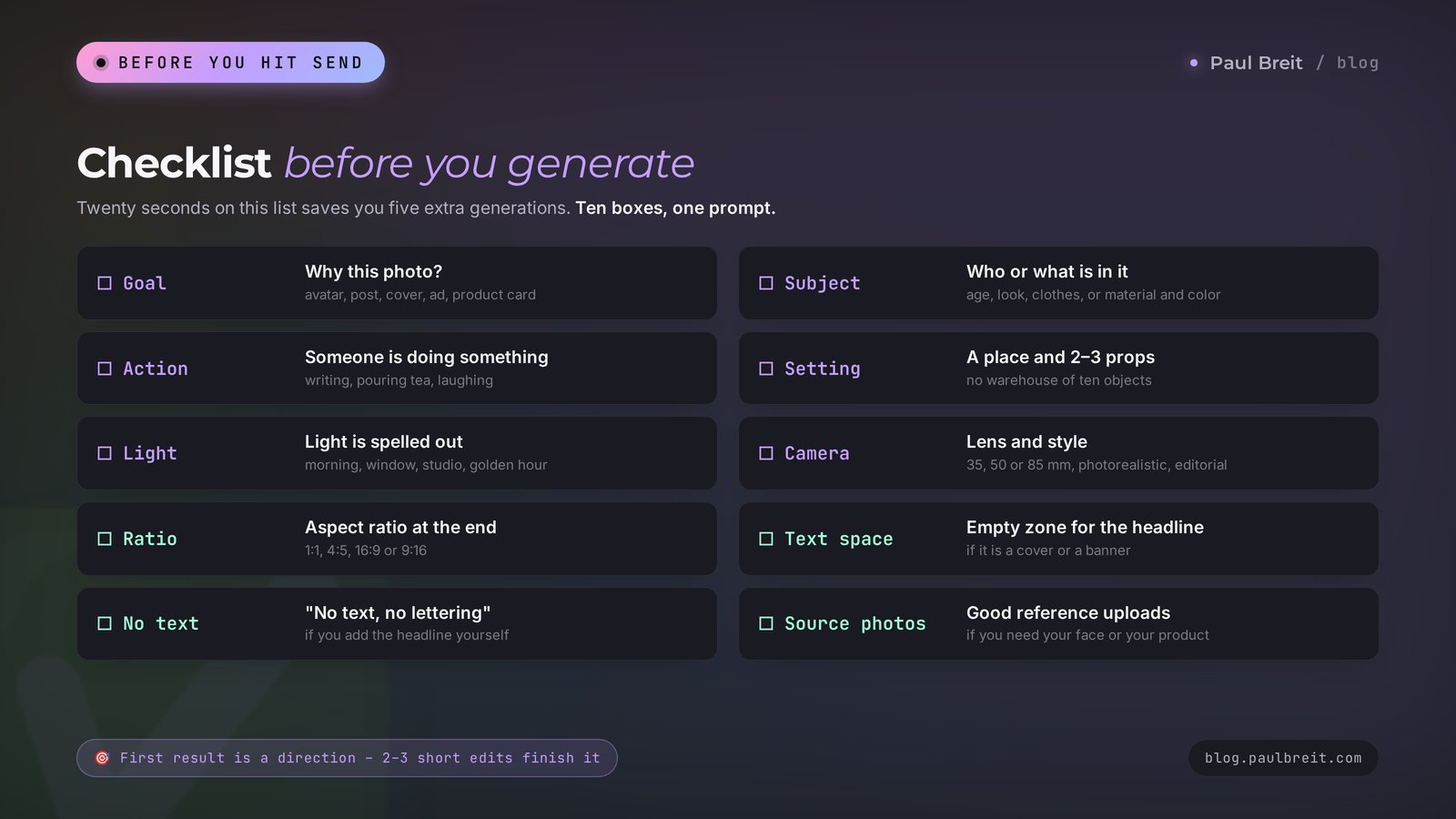
Before you hit send, run through this list. It takes twenty seconds and saves you five extra generations.
- You know why you need the shot. Avatar, post, cover, ad, product card. Everything else depends on the task.
- The subject is described. Age, looks, clothes, or the material and color of the object.
- There's an action. The person is doing something: writing, pouring tea, laughing.
- The setting and 2–3 details around it are named. No storage room of ten objects.
- The light is spelled out. Morning, window, studio, golden hour, lamps.
- The camera and style are named. 35, 50 or 85 mm, photorealistic, documentary, editorial.
- The aspect ratio is set. 1:1, 4:5, 16:9 or 9:16.
- There's room for text, if it's a cover or a banner.
- "No text, no lettering" is added, if you'll put the text on yourself.
- Good source photos are uploaded, if you need your face or your product.
Section 12The whole path in a minute
Let's pull it all into one picture.
- A photo prompt follows the formula: subject, action, setting, light, camera and style, plus the aspect ratio at the end.
- For photos with your own face, use Nano Banana in Gemini or ChatGPT and upload 2–3 clear source photos.
- For atmospheric shots without people, Midjourney gives the most beautiful look. For covers with a headline on the image, try Ideogram.
- For ads and covers, leave empty space for the headline in the frame from the start.
- Upload your product as a real photo and ask to place it in a new scene, so it stays real.
- Fix the result with short phrases in the same chat. 2–3 edits usually get the shot where it needs to be.
- Your own ideas come from your posts: the thought first, the shot second. And Claude will brainstorm a series for your niche in a minute.
That's it. Pick three prompts from this collection that fit your blog right now and generate them tonight. By tomorrow your feed will have your photo instead of a stock one. Pretty great 📸
FAQFrequently asked questions
How do I write an AI photo prompt?
Describe five things: who is in the frame, what they're doing, where they are, what the light is like, and what it looks like it was shot on. At the end, add the aspect ratio, for example 4:5 or 16:9. Example: "a 35-year-old woman with a laptop by a coffee shop window, soft morning light, 50 mm, photorealistic, 4:5."
Which AI makes the best photos from a prompt?
For photos with your own face, Nano Banana in Gemini is the best: it holds your features. ChatGPT is convenient for edits in chat, and Midjourney gives the most beautiful aesthetics. For images with a readable headline, Ideogram is strong, and Adobe Firefly is built for commercial use.
Can I write photo prompts in a language other than English?
Yes. Gemini, ChatGPT, and most other tools understand prompts in many languages. Midjourney and FLUX work best with English: ask Claude or ChatGPT to translate the prompt and keep every detail, then paste the translation.
How do I make a photo with my own face using AI?
Upload 2–3 clear front-facing photos of yourself in good light and start the prompt with "Based on the uploaded photos, keep my face unchanged." Then describe the scene with the formula. Nano Banana in Gemini and ChatGPT handle this best.
Why does AI make skin look like plastic?
By default, image generators smooth the skin and make the picture glossy. Add "natural skin with texture and pores, no retouching, no glossy effect" to the prompt, or "looks like it was shot on a phone, natural light."
How do I leave room for text in the photo?
Spell it out in the prompt: "the top third of the frame is empty, a solid background for a headline" or "the left half of the frame is empty for text." Also add "no lettering," and put the headline on later in Canva or another editor.
Can I use AI-generated photos in ads?
Yes, as long as there are no celebrity faces, other people's brands, or logos, and the people in the source photos agreed to it. Show real client results with real photos, and use generated shots to illustrate an idea.
Where do I find new photo prompt ideas?
Go from the post to the shot: what single photo would best show the idea of the text. Change one part of the formula in a ready prompt, break down photos you like from Pinterest with ChatGPT or Gemini, and ask Claude to brainstorm a series of ideas for your niche.