Manus AI: how to use the AI agent in 2026 – step by step
Manus is an AI agent you hand a whole task to. It opens websites on its own, collects data, writes code, and gives you a finished result: a competitor spreadsheet, a website, a slide deck, a report. Here's how to start using Manus in 2026, how much you can do for free, what changed in Manus 2.0, and how to word a task so the agent doesn't burn your credits for nothing.
To use Manus, type manus.im into your browser and sign in with your Google account. In the task field, describe in plain words what you want to get, where to take the data from, and what form the result should take, for example "a spreadsheet of 15 competitors with prices and links." The agent shows a plan, carries it out on its own, and sends you a file, a website, or a report. The free plan gives you 300 credits a day, up to 1,500 a month. Paid plans start at $20 a month.
Everyone who sells services, courses, and consulting and is drowning in routine work you can describe in words. A coach can collect 20 competitors with their prices and offers. A therapist can find the groups and communities where their clients hang out. A nutritionist can get a landing page for a challenge. A tutor can build a deck for an open lesson. An online school can get a weekly report on niche news. Manus is especially good when a task has to be done by hand: visit forty websites, pull out the data, and put it into one spreadsheet.
What's inside
- What Manus is and how an agent differs from a chatbot
- What Manus 2.0 can do
- Is it free: credits and plans
- How to sign up
- Your first task, step by step
- The task formula for an agent
- 10 ready tasks for your business
- Wide Research: competitors and the market
- Websites and slides in Manus
- Scheduled tasks
- How not to burn your credits
- Let Claude write your Manus tasks
- What not to trust the agent with
- When something goes wrong
- Manus vs Claude, ChatGPT, and Perplexity
- The whole path in a minute
- FAQ
Section 01What Manus is and how an agent differs from a chatbot
Manus is a service from a Singapore company that, in March 2025, was one of the first to show the general public a real AI agent. The name is Latin for "hand," and that sums up the idea: the AI got hands. It still answers with text, but it also acts on its own on the web and on a computer.
The difference from a regular chat is easy to see. You ask ChatGPT or Claude: "find me 15 nutritionists who sell challenges and list their prices." The chatbot answers from what it already knows or runs a couple of searches. Some prices will be outdated, some links broken, and you'll still have to check the table by hand.
Manus handles the same request by spinning up a separate computer in the cloud. It opens a browser, searches, visits each site, scrolls through the pricing pages, copies the data, cross-checks it, and builds the spreadsheet. You watch the whole process in a window on the right: which sites it opened, what it read, where it got stuck. In 10–30 minutes, the file arrives.
That gives you the main rule of working with an agent. A chatbot is good when you need to think something through together. An agent is good when the same action has to be repeated many times, the kind of thing you'd otherwise spend a whole evening on: open, find, copy, combine.
In 2026, Manus became part of a large American corporation, but in April, Chinese regulators demanded that the deal be reversed, and since August the company has been independent again. In October 2026, it raised more than $500 million in funding. For you, that means one thing: the service is alive, growing, and shipping updates. If you used Manus before and haven't logged in since summer, check that your old projects are still there and save the files you need.
If agents are completely new to you, start with the basics: what an AI agent is in plain words. It explains, without jargon, how an agent differs from a bot and from a chat AI.
Section 02What Manus 2.0 can do
Manus 2.0 came out on September 28, 2026. Inside is a new agent engine called Cascade. According to the developers, in one of their tests it used 32% fewer resources and finished tasks 28% faster than the previous version. For you, that means fewer credits spent on the same work. Manus runs in the browser, in a desktop app, and in a mobile app.
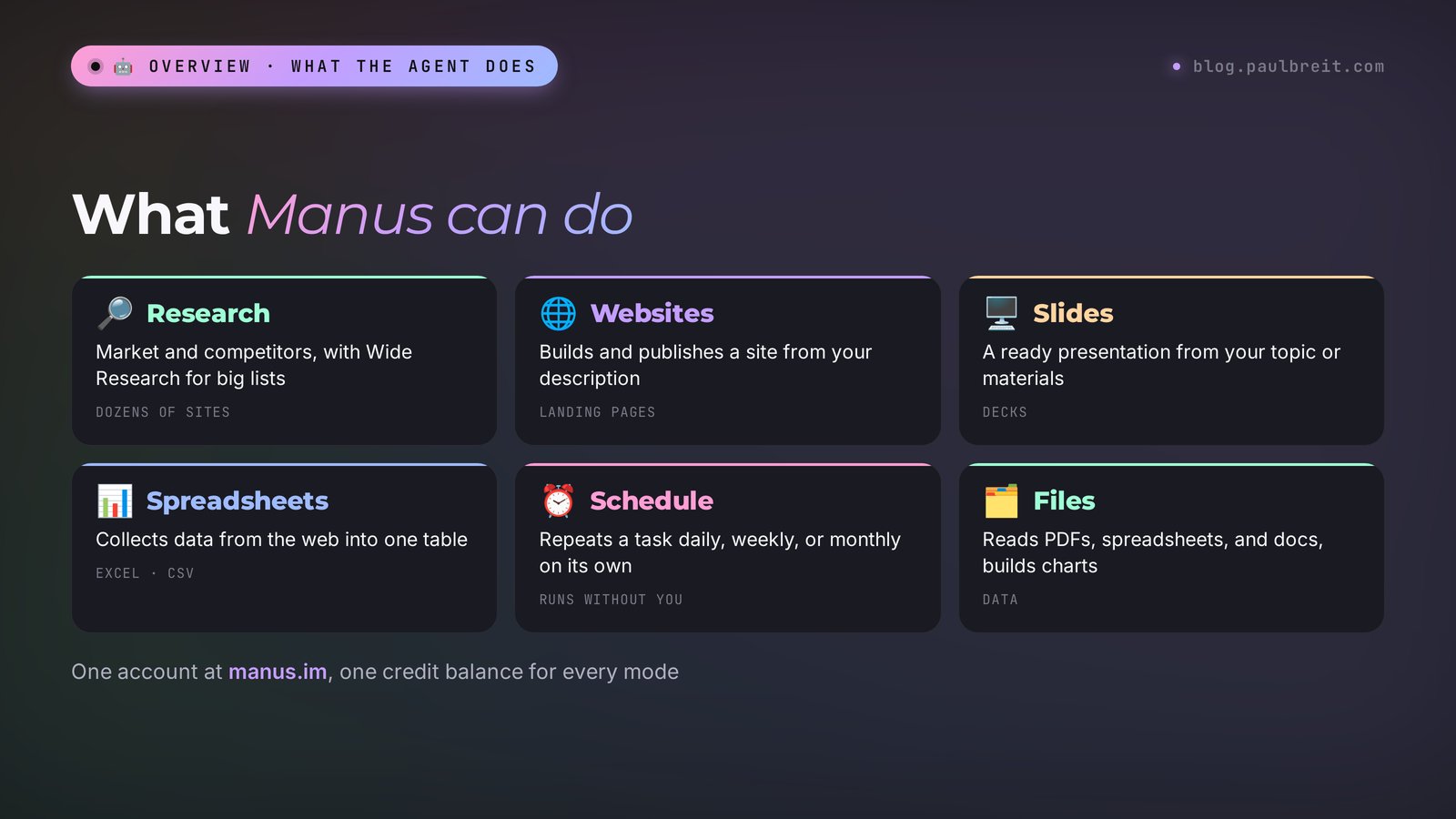
| What it does | What it looks like | Why you'd use it |
|---|---|---|
| Research | Searches, reads dozens of sites, and pulls the data into a report or spreadsheet | Competitors, prices, places where your clients hang out |
| Wide Research | Runs many agents in parallel on one big task | Break down 50–100 competitors in one go |
| Websites | Builds and publishes a site from your description and gives you a link | A challenge landing page, a consultation page, a simple personal site |
| Slides | Makes a presentation on a topic or from your materials | An open lesson, a webinar, a sales proposal |
| Files and data | Reads PDFs, spreadsheets, and documents, builds charts | Analyze a lead export, compare contracts, calculate a funnel |
| Schedule | Repeats a task on its own: every day, week, or month | A morning niche news digest, a weekly competitor report |
| Automations | Starts a task when something happens in your email, Slack, or Notion | A lead email arrives, and the agent puts together a brief on the client |
There are also tools for advanced users: a cloud computer for projects that need permanent hosting, a video editor, and a mode where the Manus Studio app controls your own computer. Alongside Manus 2.0, a separate app called Cue launched for personal agents, each with its own email address, phone number, and budget. You won't need any of this in the first few weeks. Start with research, spreadsheets, websites, and slides: that's where the agent pays for itself fastest.
Section 03Is it free: credits and plans
Manus runs on credits. Credits are spent while the agent thinks, works in its cloud computer, and calls outside services. A finished task, saved files, and a published website no longer eat credits. Before a task starts, Manus shows an estimated cost, and it's worth checking every time.
Free. You get 300 credits every day. On a free account, daily credits add up to no more than 1,500 a month, and only one task runs at a time. That's enough for a few small research tasks to figure out whether you need an agent at all.
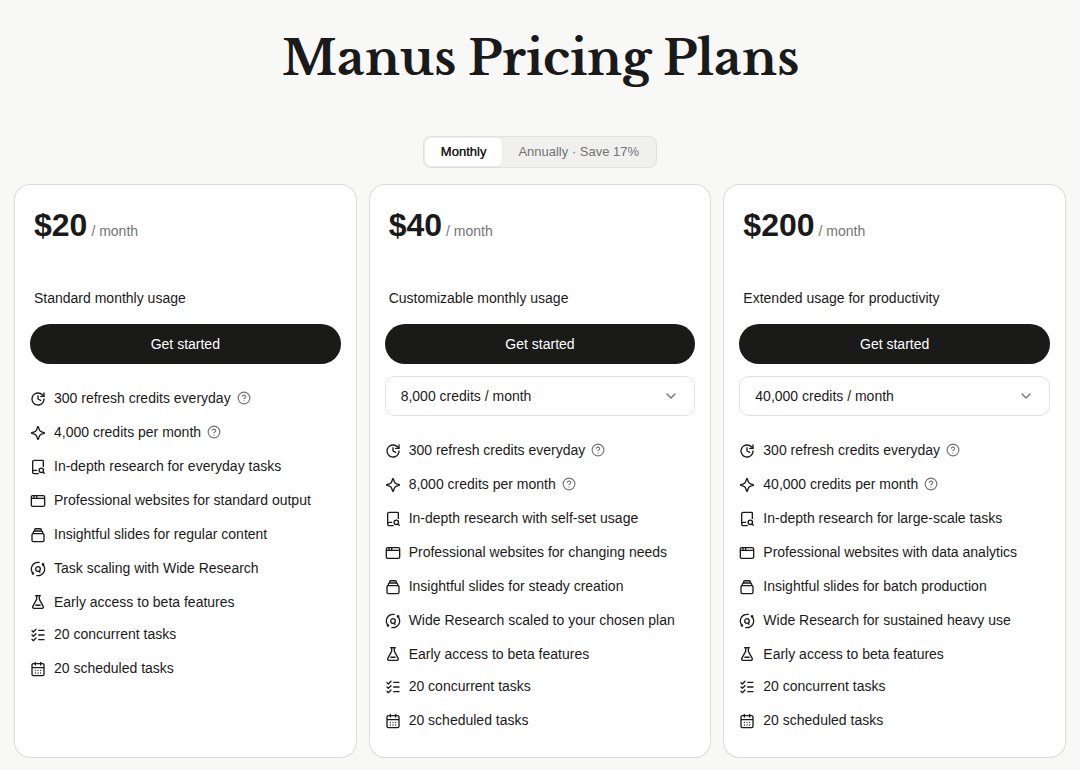
| Plan | Price per month | Credits per month | On top |
|---|---|---|---|
| Free | $0 | up to 1,500 (300 a day) | 1 task at a time |
| $20 | $20 | 4,000 | +300 a day, 20 tasks at once, 20 scheduled |
| $40 | $40 | 8,000 (you can choose more) | +300 a day, same limits |
| $200 | $200 | 40,000 (you can choose more) | +300 a day, same limits |
The prices and credit amounts in the table come from the official Manus pricing page, and the credit rules come from the Manus help center. Paying yearly gets you a 17% discount, according to the site. There's also a separate Team plan with a shared credit pool. Manus prices change, so check the page before you pay.
Three credit rules that save money. Monthly credits expire at the end of the billing period and don't roll over. Credits you buy on top last as long as your paid subscription is active. Free bonus credits never expire. And if a task ends up costing more than you had in your balance, the balance goes negative and gets covered by your next top-up.
Which plan should you start with? Free. Run small tasks on it for two or three weeks and watch how many credits your typical work takes. If you hit the limit every day, the $20 plan is the logical next step.
Section 04How to sign up
Signing up takes a couple of minutes. The only real trap is landing on the wrong site.
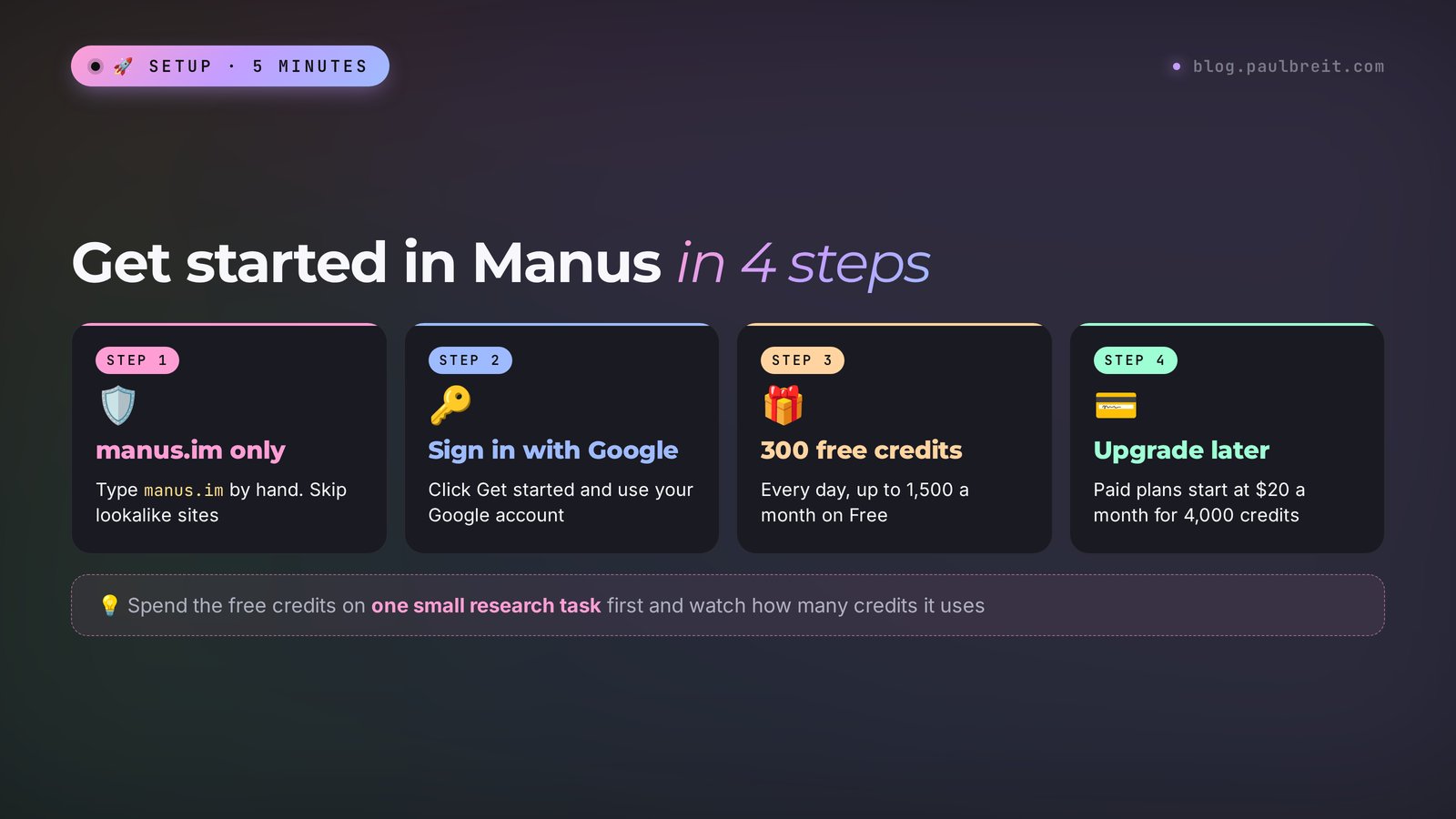
Open only the official site, manus.im
Type the address by hand: manus.im. Search results and ads are full of lookalike sites with similar names, like manus-ai with a different ending. They charge for "access" and have nothing to do with the real agent. If a site asks you to pay before you even sign up or offers a "lifetime account" for a one-time fee, close it.
Sign in with Google
Click Get started and choose Sign in with Google. It's the fastest route: no separate password and no waiting for a confirmation email. Your first free credits land in your account right after you sign in.
Start on the free credits
You get 300 credits every day, up to 1,500 a month on the free plan. Spend them on one or two small tasks first and watch how many credits each one takes.
Upgrade when you need more
When the free credits stop being enough, pick a plan on the pricing page and pay by regular card. Paid plans start at $20 a month for 4,000 credits.
There's a Manus mobile app, but it's easier to start in a browser on your computer: you can see what the agent is doing, and grabbing the files is simpler.
Section 05Your first task, step by step
Let's take a task almost everyone who sells their services needs: collecting competitors with their prices. By hand, that's an evening. For the agent, it's half an hour without you.
Open a new task
The Manus home screen has a big input field, like any chat. Above it or next to it are mode switches: research, slides, website, and others. For your first task, don't switch anything, the agent will figure out what to do.
Write the task in detail
Example: "I'm a nutritionist selling a 21-day online nutrition challenge for $79. Find 15 nutritionists in the US who sell similar challenges or courses. For each one, collect: name, link to their website or social page, product name, price, length, what's included. Deliver the result as an Excel spreadsheet. Use only data from their own sites and pages, don't make up prices. If a price isn't on the site, write: price not listed."
Look at the plan and the credit estimate
Manus shows how it plans to work: search, shortlist, visit the sites, build the table. If the plan goes off track, for example the agent wants to search the whole world, correct it right away with one message: "US-based programs only."
Don't interfere, but keep an eye on it
On the right you'll see the cloud computer window: which pages the agent opened, what it's copying. You can close the tab and come back later, the task keeps running on Manus servers. If the agent gets stuck on a page with a captcha or a password login, it will ask you what to do.
Grab the result and check five rows
Download the spreadsheet. Open five random links and compare the prices. The agent makes fewer mistakes than a person tired out by the twentieth site, but it still makes them. Found an error? Write in the same task: "the price in row 7 is different, recheck all prices against the links."
Ask for conclusions
A spreadsheet is raw material. In the next message, ask: "Compare my challenge with these 15. Where am I cheaper, where am I more expensive, what do they have that I don't, what do I have that nobody else does. Give me three ideas to strengthen my offer." Now you have material for positioning your product and for posts.
Section 06The task formula for an agent
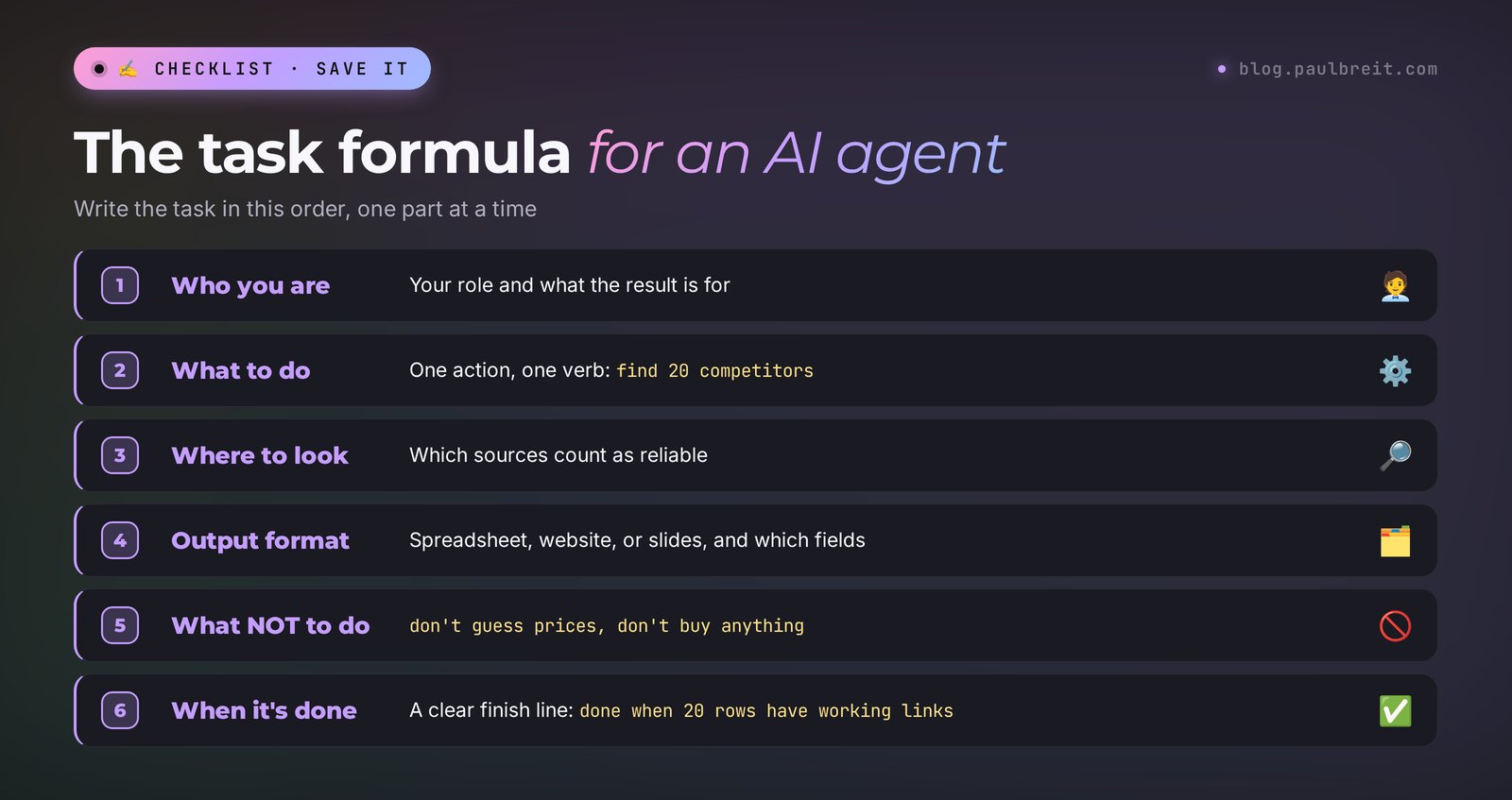
An agent is diligent but literal. A vague task like "research my competitors" turns into twenty minutes of wandering and a report about nothing. A clear task in six parts gets results on the first try.
| Part | What to write | Example |
|---|---|---|
| 1. Who you are and why | Your niche and what the result is for | I'm a therapist preparing to launch a support group |
| 2. What to do | One action, a verb | Find 20 similar groups in the US |
| 3. Where to look | Where to search and which sources count as reliable | Therapists' websites, community pages, directories |
| 4. Output format | The format and the fields of the result | Spreadsheet: name, link, price, format, length |
| 5. What not to do | Boundaries | Don't make up prices, don't sign up on sites, don't buy anything |
| 6. When it's done | The finish line | Done when the spreadsheet has 20 rows with working links |
Beginners skip the fifth part most often, and that's a mistake. The agent acts on the real internet. If you don't write "don't buy anything and don't submit any forms," it may well fill out a form on a competitor's site to find out the price. The sixth part saves credits: without it, the agent doesn't know when to stop and keeps "improving" the result.
One more habit that pays off: ask the agent to ask you questions first. Add at the end: "if anything in the task is unclear, ask me first, then start." A couple of clarifications at the start cost less than redoing the whole task.
Section 0710 ready tasks for your business
Copy them and swap in your own niche and numbers. Every task is already built on the formula from section 6.
I'm a career coach selling a 2-month program for $800. Find 20 career coaches in the US with similar programs. Spreadsheet: name, link, program name, price, length, format, guarantees. Only data from their own sites, no made-up prices. Don't buy anything and don't submit any forms. Done when there are 20 rows with working links.
I'm a therapist working with anxiety in women aged 30–45. Find 25 public online communities, groups, and forums where people discuss anxiety, burnout, and motherhood. Spreadsheet: name, link, approximate number of members, what they talk about, whether they allow ads. Public communities only, don't join anything. Done when there are 25 rows.
I'm a Spanish tutor for adults. Go through forums, reviews, and comments in English and collect 40 real phrases adults use to describe their struggles with learning Spanish. Word for word, with a link to the source. Group them by topic. Don't paraphrase anything. Done when there are 40 quotes with sources.
Here are three links to competitors' landing pages: [links]. For each one, describe the client's path: what they promise on the first screen, what free step they offer, what they ask you to leave, what arguments and testimonials they use, where the payment button is. Don't enter your own data into any forms. The result is a document with the breakdown and one comparison table.
Make a one-page website for my nutrition challenge "21 days without sugar," price $79, starting November 15. Sections: a first screen with the promise, who it's for, the week-by-week program, about me, testimonials (leave space for 3 testimonials, don't make up any text), price, FAQ, a "Sign up" button linking to [your link]. Calm, light design, in English. Show me the link to the finished site.
Make a 15-slide presentation for an open lesson "How to lose 7 pounds in a month without dieting" for women 35+. One slide, one idea, large text, minimal words. At the end, two slides: an invitation to the challenge and how to sign up. Don't make up studies or numbers. Deliver it as a PowerPoint file.
I sell a drawing course for adult beginners. Find 20 newsletters, blogs, and podcasts about creativity, hobbies, and self-development that sell ads or sponsorships. Spreadsheet: name, link, topic, audience size, ad contact, price per placement if listed. Don't message anyone. Done when there are 20 rows.
I'm attaching a spreadsheet of leads for the last 3 months. Calculate: how many leads per week, from which sources, what share turned into payments, which days of the week bring more leads. Build 3 simple charts. Conclusions: 5 points in plain language, no jargon. Don't change the data in the file.
I run a blog about money skills for families. Find 30 questions people in the US ask in search and on forums about family budgets, savings, and debt. For each one, give a link where the question appears. Group them by topic and suggest 3 post headlines for each group. Don't make anything up.
Every Monday at 9:00 a.m. Eastern, find the top news from the past week on "online education in the US": regulation changes, major launches, market research. 5–7 points, each with a link to the source and one sentence on what it means for a small online school. Only sources from the last 7 days.
Task #10 is already scheduled work, more on that below in section 10. For how agents like this work inside a business and what else you can hand them, read how to build an AI agent without code.
Section 08Wide Research: competitors and the market
A regular Manus task runs with one agent: it visits sites one by one. With 100 sites, that takes a long time, and by the end the agent can start losing details. Wide Research solves this differently: Manus launches many agents at once, each takes its own part of the list, and at the end everything comes together in one spreadsheet.
Where it helps. Break down every competitor in your niche, across all the search result pages. Collect a hundred places to advertise. Go through a course catalog on a platform and write down prices and programs. Check which of your old partners are still in business.
Competitor analysis is one of the tasks almost any product positioning starts with. One of our clients, Magomed Dibirov, who runs launches, started exactly there: he analyzed competitors, pulled out the selling points, polished his blog, made a lead magnet, and ran ads. He got 200 subscribers, invited them to consultations, and earned 230,000 rubles on his first launch. Back then, competitors were analyzed by hand. Now you can hand the first part of that work, the data collection, to the agent and keep the important part for yourself: the conclusions and the message.
Turn on Wide Research mode and write: "Find 80 online interior design schools in the US. For each: name, website, flagship course, price, length, whether there's a free intro lesson, the main promised result in one sentence. Only data from their own sites. The result is one Excel spreadsheet and a short summary: average price, the most common promises, what nobody offers."
Wide Research eats credits noticeably faster than a regular task, because there are many agents. Always check the cost estimate before you start. On the free plan, start with a list of 20–30 items.
For quick "find and explain" questions with sources, an AI search engine is more convenient. Here's how to use one: Perplexity, the AI search engine with sources. Use Manus when the result is a big spreadsheet or document gathered from dozens of sites.
Section 09Websites and slides in Manus
Manus can build a website from your description and publish it at a link right away. For a challenge landing page, a consultation page, or a simple personal site, that's enough. Write the task using the same formula: which sections, what text, where the button leads, what style.
Three tips that save you rework. Give it your own copy if you have it: the agent will move it onto the page, and you won't have to clean out its generic phrases. Explicitly forbid made-up testimonials, numbers, and case studies: write "leave space for testimonials, don't make up any text." Ask to see the site on a phone: most of your clients will open it there.
Make edits as messages in the same task: "make the button bigger," "change the first screen background to light," "remove the price section." If you need the site for the long haul and with a lead form, think about where it lives and what happens if you cancel your subscription. For a serious project, compare other options: Lovable is a service built specifically for websites, and the guide to vibe coding shows how to build a site with Claude.
Manus makes presentations in a separate slides mode. A two-step approach works well. First, ask for a plan: "suggest a structure for a 15-slide presentation, one idea per slide." Fix the plan. Then: "make the slides from this plan, large text, minimal words." If you need presentations often, also look at Gamma, a service that does nothing but slides.
Section 10Scheduled tasks
The most valuable part of an agent starts when it works without you. In Manus, any task can be set to repeat: every day, every week, at the hour you choose. On paid plans, up to 20 of these tasks can run at once.
What's worth scheduling if you sell services and courses:
- every Monday – a niche news digest with links, like task #10;
- once a week – a price check on your five main competitors: what changed, who launched a promotion;
- once a month – a roundup of fresh audience questions from forums and reviews for your content plan;
- every morning – a summary of new mentions of your name or your school in public sources.
Manus 2.0 also added automations: a task starts when something happens in a connected service. A lead email arrives, and the agent puts together a brief on the person from public sources. A card is added in Notion, and the agent drafts something from it. Start with one such connection and watch for a week how many credits it eats.
Every scheduled task spends credits on every run. Five daily tasks at 100 credits each come to 15,000 credits a month, more than the $40 plan. Do the math up front and schedule only what you actually read. If you need an agent that works around the clock in your Telegram and answers clients, that's a different class of task, for example an AI agent in your Telegram DMs.
Section 11How not to burn your credits
Complaint number one about Manus in reviews: "my credits ran out in two days." Almost always, the cause is how the task was worded. Seven habits that fix the problem:
- Write the whole task at once. Every clarification after launch is another round of work. Better to spend five minutes on the task text than to correct it three times later.
- Set a limit. Write "20 competitors" instead of "all competitors." Ask for 5 slides as a test, you can order forty later.
- Give a finish line. Without it, the agent keeps improving the result and spending credits.
- Check the estimate before you start. If the number scares you, cut the task down.
- Stop it if it goes off track. If you see in the window that the agent is reading the wrong sites, hit stop and fix the task.
- Think in a chat, act in the agent. Discussing ideas, writing posts, and coming up with an offer is cheaper in Claude or ChatGPT. Bring to Manus only what requires action: visiting sites, collecting, publishing.
- Use your daily credits. 300 credits arrive every day and are spent first, right after bonus credits. Small tasks are easy to run daily, while big ones are worth saving monthly credits for.
Section 12Let Claude write your Manus tasks
Writing a task with all six parts on the first try isn't easy. A handy move is to ask Claude to turn your rough idea into a clear task for the agent. Claude does the thinking for free or within your subscription, and your Manus credits then go only to the actual work. If you don't have Claude yet, sign up at claude.ai. For where to start with Claude, see learning Claude from scratch.
A request you can copy as is:
I teach online yoga courses for beginners. I want to know what others charge for similar courses and what they promise. Turn this into a clear task for the Manus AI agent: who I am, what to do, where to get the data, what format to deliver, what not to do, when the task is done. Limit the scope so the task doesn't eat a lot of credits.
I ran this request myself. Here's what Claude returned:
I teach online yoga courses for beginners and want to understand the market before I revise my prices. Find 15 online yoga courses for beginners that are on sale right now. Search school and teacher websites, their social pages, and online course platforms. For each course, collect into an Excel spreadsheet: name, author or school, link, price (if there are several tiers, the cheapest and the most expensive), length, format (recordings, live sessions, feedback), the course's main promise in one sentence from the sales page. Take data only from the course pages themselves. If there's no price, write "not listed," don't guess. Don't sign up, don't submit forms, and don't buy anything. The task is done when the spreadsheet has 15 rows with working links. Below the spreadsheet, add 3–5 lines of conclusions: the price range, the most common promises, what almost every course is missing.
And then a tip from Claude: "Start with 15 courses. If you like the result, repeat the task for another 15 and add 'don't repeat courses from the previous list.' That way you'll see the credit cost on a small batch before ordering a big research task."
Look at what Claude did. It added the goal ("before I revise my prices"), without which the agent doesn't know what to look for. It listed the sources. It laid out the spreadsheet fields so they can be compared. It closed three dangerous gaps: guessing prices, signing up, and buying. It set a clear finish line and asked for a short conclusion. That's exactly the formula from section 6, put together in a few seconds.
If you're not sure you need Manus at all, or whether one chat AI subscription is enough, read the honest comparison Claude vs ChatGPT in 2026: Claude handles many of the tasks in this article on its own, without a separate agent.
Section 13What not to trust the agent with
The agent works on the real internet, on your behalf, with whatever access you've given it. So a few rules are worth following from day one.
- Don't share passwords or text message codes. If a task requires logging into your account, decide whether you're okay with the agent acting there. Public data is enough to start.
- Upload client data anonymized. You can hand over a lead export for analysis without names, phone numbers, and emails: they aren't needed for the math.
- Explicitly forbid purchases, sending emails, and publishing unless the task needs them. And check the result before anything goes out to clients.
- Double-check facts. The agent takes prices, numbers, and legal wording from the internet, and the internet has outdated pages.
- Keep important things on your side. In summer 2026, Manus users were asked to export their data by a certain date because of the ownership change. Keep copies of your spreadsheets and files on your own drive.
Section 14When something goes wrong
| Problem | Cause | What to do |
|---|---|---|
| The confirmation email doesn't arrive | It landed in spam or got delayed | Check your spam folder or sign in with Google instead |
| Your card is declined | The bank flagged a charge from a foreign company | Approve the charge in your bank app or try another card |
| Credits ran out in a day | The task was too broad, with no limit and no finish line | Cut the scope, add "done when…", check the estimate |
| The spreadsheet has made-up prices | You didn't forbid guessing | Add "if there's no data, write: not listed" |
| The agent is stuck on a captcha or a login | The site blocks bots | Skip that site or add the data yourself |
| The report comes back in another language | The agent picked up the language of its sources | Add "write the whole result in English" |
| The task runs for a long time | Lots of sites or a heavy mode | Wait, the task runs on the server; if it hangs, stop it and split it into parts |
| You ended up on a lookalike site | You clicked an ad or a search result | Close it, type manus.im by hand, and don't pay anything there |
Section 15Manus vs Claude, ChatGPT, and Perplexity
These are different tools for different jobs, and "which is better" makes no sense without a task. Here's how I'd split the work.
| Task | What to use | Why |
|---|---|---|
| Write a post, an offer, a script, an email | Claude or ChatGPT | It's work with text and ideas, an agent is overkill here |
| Quickly find an answer with sources | Perplexity | One search, one summary, links right there |
| Build a spreadsheet from 20–100 sites | Manus | It visits the sites itself and pulls the data together |
| A landing page or a deck in one evening | Manus, Lovable, Gamma | Manus does both, the specialized services go deeper in their own area |
| A recurring task without you | Manus with a schedule | It runs on its own and sends you the result |
| An agent that lives in your Telegram and answers clients | Claude Code on your own server | It works around the clock and knows your business |
For many of my clients, the setup is simple: Claude for thinking and writing, the agent for routine data collection. Our school has 10,000+ graduates, and over these years one conclusion holds: the people who win are the ones who hand repetitive work to the machine and keep the decisions for themselves.
Section 16The whole path in a minute
Type manus.im by hand and sign in with Google. You get 300 free credits every day, up to 1,500 a month. Write the task with the formula: who you are and why, what to do, where to look, what format to deliver, what not to do, when it's done. Claude will turn a rough idea into a task. Check the credit estimate before you start, and check five rows of the result. For a hundred sites, use Wide Research; for repeats, use the schedule. After that, plans start at $20 a month for 4,000 credits.
Start today with one action: take task #1 from section 7, swap in your own niche, cut it down to 10 competitors, and run it on the free credits. In half an hour, you'll have a spreadsheet that used to take you an evening, and you'll know whether the agent is worth paying for.
FAQFrequently asked questions
Is Manus free?
Partly. You get 300 free credits every day, but on the free plan they add up to no more than 1,500 a month, and only one task runs at a time. That's enough for a few small research tasks. Paid plans start at $20 a month for 4,000 credits.
How do I start using Manus?
Type manus.im into your browser by hand and sign in with your Google account. Your free credits arrive right away. Write the task in the input field, check the plan and the credit estimate, and let the agent work. When the free credits stop being enough, pick a plan and pay by card.
How much does Manus cost?
As of October 30, 2026: $20 a month for 4,000 credits, $40 for 8,000, $200 for 40,000. Every paid plan adds 300 credits a day and up to 20 tasks at once. Paying yearly saves 17%. Current prices are at manus.im/pricing.
Does Manus work in languages other than English?
Yes, you can write the task in your own language, and the agent understands it. If the sources are in another language, the report sometimes comes back in that language: add "write the whole result in English" (or in the language you need) to the task.
What is the official Manus website?
The official site is manus.im. Sites with similar names and different endings that sell "access to Manus" have nothing to do with the service. Type the address by hand and don't pay for anything before you're signed into your own account.
How is Manus different from ChatGPT?
ChatGPT mainly answers and writes in a chat. Manus takes a whole task and carries it out itself: it opens sites in a cloud computer, collects data, makes spreadsheets, websites, and presentations, and can repeat a task on a schedule. Writing is easier in a chat, while routine data collection is better handed to the agent.