Lovable: a website from a description in one evening
Lovable is a service that builds a website or a web app from a plain-language description: you type what you need into a chat, and the AI creates the design, the copy, and the lead form, then puts the page online. Below is a step-by-step guide for everyone who sells services, courses, and consulting: what Lovable can do in 2026, what the credits really cost, how it compares to Wix, Squarespace, Claude Code, and Cursor, and how to build a consultation landing page in one evening with a form that sends every lead straight to your Telegram, email, or Slack.
Lovable is an AI website builder that makes a site from a plain-language description. Go to lovable.dev, sign in with Google, type a task such as "build a landing page for a therapist's first consultation with a booking form," and in a minute or two you get a finished page. Then you edit it with short sentences in the chat and click Publish. The free plan gives you 5 credits a day (up to 30 a month), a simple landing page uses about 2 credits, and the Pro plan costs $25 a month for 100 credits.
A coach who needs a page for a new cohort. A therapist who wants a booking form for a first session. A tutor, a nutritionist, a fitness trainer, a photographer, a lawyer – anyone who needs a clear site that collects leads and doesn't want to pay an agency $500 and wait a month. You won't write any code. You will have to explain clearly who you are, who you help, and what a visitor should do on the page. That's exactly what we'll practice.
What's inside
- What Lovable is, in plain words
- What's new in Lovable in 2026
- Plans and credits: what a site really costs
- Getting started: account, payment, and what free really gives you
- Lovable vs Wix, Squarespace, Claude Code, and Cursor
- Your first project: the screen and the key buttons
- How to describe your site: the first-message formula
- Project: a consultation landing page in one evening
- Leads from the form to Telegram, email, or Slack
- How to spend fewer credits: 8 techniques
- What else to build with Lovable: 8 ideas
- If something goes wrong
- 7 beginner mistakes
- The whole path in a minute
Here's how getting a website usually goes. You decide to start selling consultations, you look for a designer, you spend two weeks approving a mockup, then a developer builds it for another week, and a month later you want to change the price and have to email the agency again. Or you sit down with a page builder yourself, spend the weekend dragging blocks around, and end up with a page you're slightly embarrassed to share.
Lovable removes almost all of that. You write one message: who you are, who you work with, what you sell, and what form you need. The AI comes up with the structure, writes the copy, picks colors and fonts, builds the mobile version, and shows you the result next to the chat. Don't like the headline? Type "make the headline shorter and about the client's result." Ten seconds later it's different.
Below I'll show you what Lovable can do right now, what the credits cost, how to set up your account without overpaying, and how it differs from Wix, Squarespace, and Claude Code. Then, step by step, we'll build a consultation landing page whose leads arrive straight in your messenger or inbox. If building software with words is new to you, start with the overview of vibe coding – it gives you the big picture, and this article covers one specific tool.
Section 01What Lovable is, in plain words
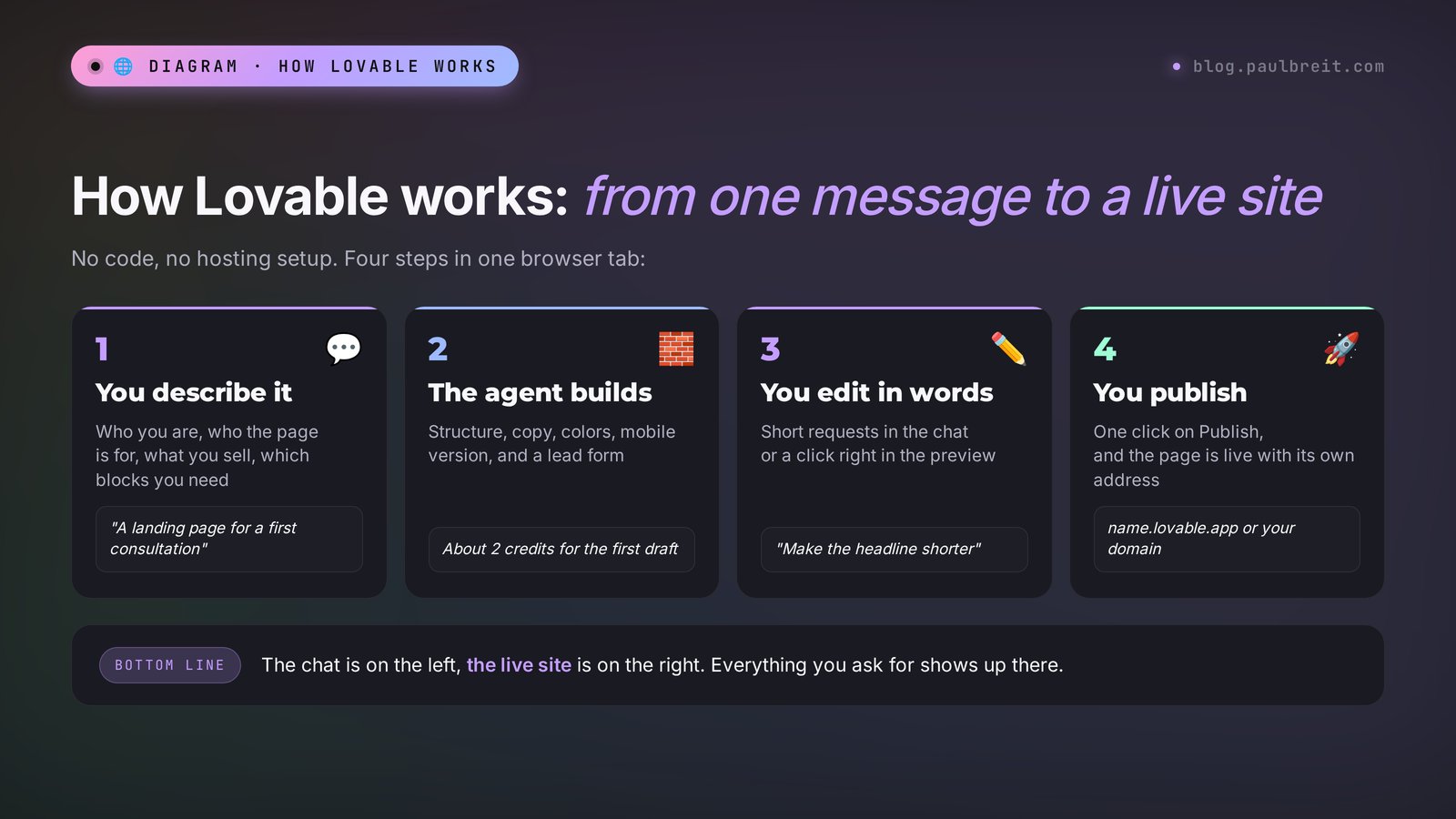
Lovable is a Swedish service that builds websites and web apps from a text description. It runs in the browser at lovable.dev, so there's nothing to install. The screen is split in two: on the left, a chat with the AI; on the right, a live preview of your site. Everything you ask for in the chat shows up on the right right away.
Inside Lovable there's an AI agent. It does more than reply with text: it creates pages, writes the code, connects a database for your leads, sets up user sign-in, and publishes the finished site to the internet. You don't see the code unless you ask for it. To you, it feels like messaging a very fast web designer who never gets tired of revisions.
In 2026 Lovable made TIME's list of the Best Inventions of the year as an app builder for people who can't code. In August the company raised a $400M Series C at a $13.3 billion valuation. It's one of the fastest-growing AI services in the world, and it clearly isn't going anywhere. For you, that means your site won't vanish along with the builder six months from now.
What people actually build with it, without a developer
- Landing pages. A page for a consultation, a course, a challenge, a webinar, or an event: the offer, the program, reviews, prices, and a lead form.
- Small business sites. A few pages: about you, services, case studies, contacts, a blog.
- Quizzes and calculators. "Which format is right for you," a renovation cost estimate, a plan picker with a lead form at the end.
- Client portals. A page where a client signs in with their email and sees their materials, homework, or session bookings.
- Internal tools. A client and payment tracker, a class log, a lead database with filters – the things you used to keep in a spreadsheet.
How Lovable differs from a regular AI chat
Ask ChatGPT or Claude to "make me a landing page," and you get a chunk of code. Then you have to figure out where to put it, how to make the page open for other people, how to wire up the form, and where the leads will go. For a beginner, that's usually where the project ends.
Lovable takes it all the way. The site lives on a server from the start, it has an address, the form saves leads to a database, and the Publish button puts the page online. Your job is to describe what you need and check the result through your client's eyes. That's exactly why people with no technical background choose it.
Section 02What's new in Lovable in 2026
If you tried Lovable a year ago and gave up, take another look. The service grew a lot in 2026. Here are the changes that matter if you're building a site for your own services.
An agent that works for hours
Since August 26, 2026, Lovable has had an agent mode that can work on one large task for up to 10 hours straight. You set a task like "build a school website with a client portal, payments, and a schedule," and the agent breaks it into stages on its own, builds, tests, and fixes. For a landing page that's overkill, but for complex projects it saves days of back-and-forth.
Plan mode and Drafts
Plan mode lets you talk the project through with the AI first: it asks questions and proposes a structure without touching the code. Every message in this mode costs exactly 1 credit. Since September there's also a separate chat outside your projects, where you can think through an idea before creating anything.
Drafts arrived on September 9. A draft is a copy of the project where you try a risky change while the live site stays as it is. Like the result? Move the changes over. Don't like it? Delete the draft, and your clients never notice a thing.
Custom domains, a database, and client sign-in
Since September 1, you can buy or connect a domain right inside Lovable. The built-in backend, Lovable Cloud, stores leads, files, and user accounts, and since September 7 it has a full database. In October came "Sign in with Lovable," and earlier, sign-in with Microsoft. In practice, a client portal now takes one sentence to set up.
Growth tools and analytics
On October 14, 2026, Lovable added growth tools: the AI drafts a plan for winning your first customers and helps you launch it on Google Search, YouTube, Google Maps, Google Ads, Facebook, and Instagram. Analytics got an update too: you can see which source a visitor came from and how your ads are performing. For a US business that's a handy starting point, but treat the plan as a draft. You still know better than anyone where your clients actually spend their time.
Strong models under the hood
Lovable runs on Claude, GPT, and Gemini models, and the newest versions were added in September and October. You don't pay for them separately: it all comes out of your credits. And if you want your own AI helper on your site, say, a bot that answers questions about your services, you can build that inside Lovable too, paid from the same balance.
Section 03Plans and credits: what a site really costs
Lovable measures work in credits. Every message to the agent uses part of a credit or several credits, depending on how complex the task is. Prices as of October 2026:
| Plan | Price | Credits | What matters |
|---|---|---|---|
| Free | $0 | 5 a day, max 30 a month | Addresses like name.lovable.app, no custom domain |
| Pro | $25 a month ($21 billed annually) | 100 a month + 5 a day (up to 150 a month) | Custom domain, code export, unused credits roll over |
| Business | $50 a month | 100 a month | Team features, protected preview links, staff sign-in |
| Enterprise | Custom | Based on volume | For large companies |
On Pro you can choose a bigger credit tier: 200 credits for $50, and so on up the ladder. Students and teachers with a school email get 50% off Pro for up to 12 months, which works out to $12.50 a month.
How many credits typical tasks use
Lovable itself gives these examples:
| What you ask for | Credits used |
|---|---|
| "Make the button gray" | 0.5 |
| "Remove the footer" | 0.9 |
| "Add sign-in with email" | 1.2 |
| "Build a landing page with images" | 2 |
| Any message in Plan mode | 1 |
Simple math: the first version of a landing page is about 2 credits, plus another 10–15 edits at half a credit to a credit each. On the free 5 credits a day, a landing page takes two or three evenings. On Pro, one evening with plenty to spare.
The big August 2026 change: one balance for everything
Lovable used to have three separate meters: credits for building, money for hosting, and money for the AI features inside your site. In August 2026 they merged into one balance. It pays both for the agent's work and for keeping your published site alive: the lead database, file storage, and sign-in.
Every month, every plan also gets a separate grant of 20 Cloud credits and 4 AI credits for the AI features inside your site. For a landing page with a form, that's usually more than enough. But there's one important detail: if your credits run out, the database, storage, and sign-in on your live site pause. So don't burn your whole balance on edits on the last day of the month if you're running ads to that page.
The 5 daily credits expire the same day; you can't save them up. Monthly credits roll over to the next month while your subscription is active and expire 2 months after they were issued. Credits you buy separately as a top-up last 12 months.
Section 04Getting started: account, payment, and what free really gives you
Setting up Lovable takes five minutes. The real decision is when to start paying, and the honest answer is: later than you think. Here's the order that keeps you from overpaying.
Create an account with Google
Lovable offers sign-in with Google, GitHub, or email. Google is the fastest: one click, no new password. Use the email you check every day, because billing notices and messages from the service land there.
Start on Free and build the first version
The free plan needs no card. You get 5 credits a day, up to 30 a month, which is enough to build a first landing page over two or three evenings and publish it at an address like name.lovable.app. Use that time to find out whether you enjoy working this way and whether the page gets any response.
Know what free does not give you
There's no custom domain on the free plan and no code export. Daily credits disappear at the end of the day, and the monthly cap of 30 means you can't make a big push in a single weekend. For a quick test of an offer, that's fine. For a page you'll send to paying clients or run ads to, you'll want your own domain.
Upgrade to Pro when the page earns it
Pro is $25 a month, or $21 a month billed annually, and you pay with a regular credit or debit card. It adds a custom domain, code export, and 100 credits a month plus 5 a day, up to 150 a month, with unused credits rolling over. If you're a student or a teacher, check the 50% discount first.
Watch the balance once a week
Because one balance now pays for building and for running the site, keep an eye on it. If the page collects leads every day, keep a reserve of credits for the rest of the month. When credits run out, the live site's database, storage, and sign-in pause, and that's not something you want to discover from a client.
One more thing before you publish anything that collects names, emails, or phone numbers: add a short privacy notice under the form and a privacy policy page. Lovable will create both from a single sentence. If you work in a regulated field, such as health or finance, have a professional review the policy text for your situation.
Section 05Lovable vs Wix, Squarespace, Claude Code, and Cursor
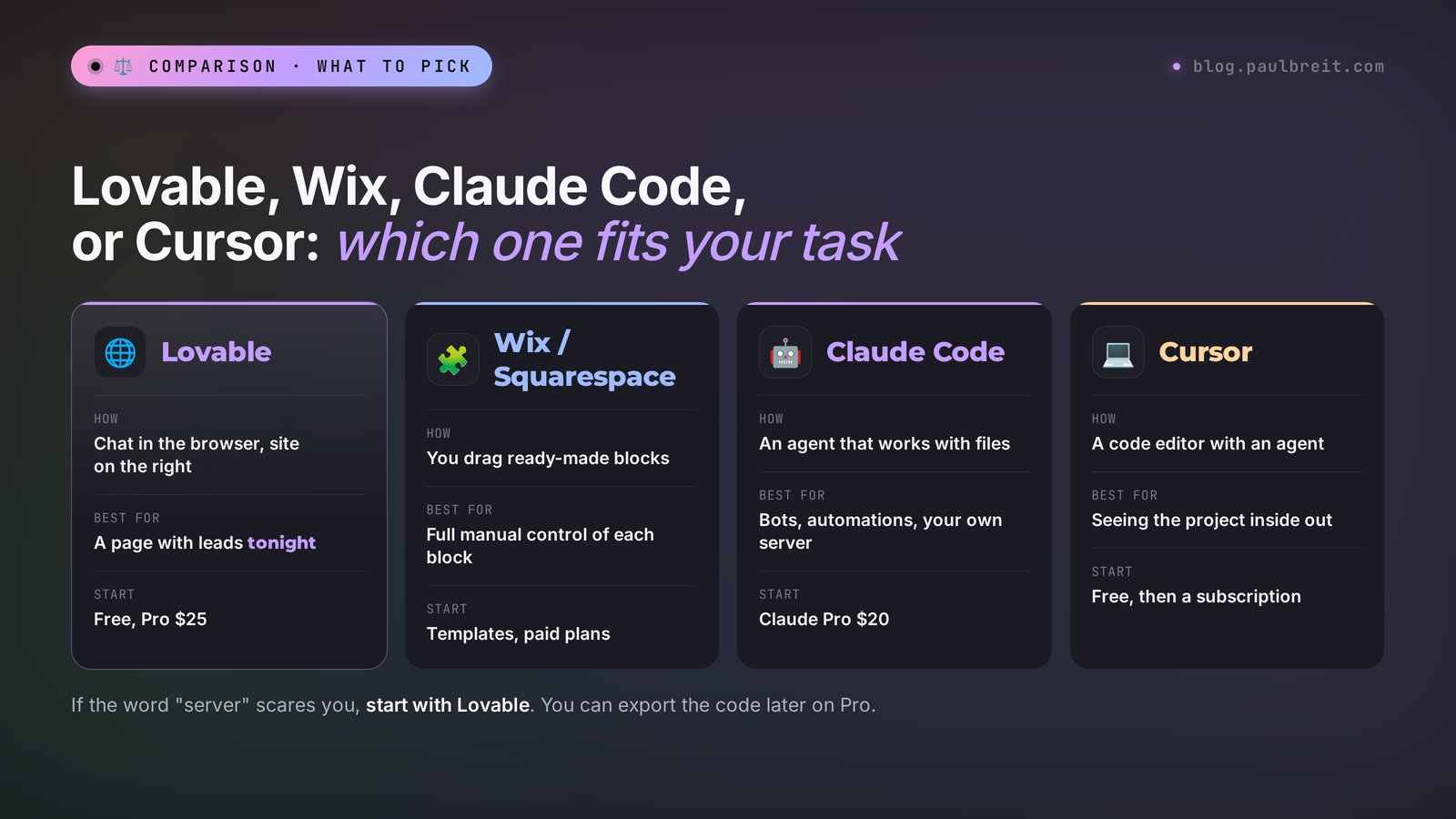
Lovable has a few frequent neighbors, and the question "which one should I pick" comes up all the time. The short answer: it depends on what matters most to you – speed, control over every pixel, or the freedom to build anything at all.
| Tool | How it works | Difficulty | Best for | Start |
|---|---|---|---|---|
| Lovable | Chat in the browser, site on the right | The lowest | Landing pages, sites, quizzes, client portals, published in one click | Free, Pro $25 |
| Wix / Squarespace | You assemble a page from ready-made blocks and templates with the mouse | Low, but slow | When you want to move every block yourself and rely on built-in templates | Paid plans after a trial or free tier |
| Claude Code | A conversation with an agent that works with files | Medium | Bots, automations, sites of any complexity on your own server | Claude Pro subscription, $20 |
| Cursor | A code editor with an agent | Above medium | When you want to see how the project is built and grow it over time | Free, then a subscription |
How to choose in a minute
- You need a page that collects leads tonight, and the word "server" makes you nervous – Lovable.
- You already have a working site on Wix or Squarespace, with your booking and payments set up – stay there, and use Lovable for quick tests of new offers.
- You need a Telegram bot, an automation, or a site that lives on your own server and doesn't depend on anyone – Claude Code. For a detailed walkthrough of building a site with it, see "A Site of Any Complexity in One Evening with Claude Code."
- You want to understand how your project is put together and choose the models yourself – Cursor.
Lovable vs Wix and Squarespace, in practice
The difference shows up on the very first evening. In Wix or Squarespace you pick a template, then replace every heading, photo, and button by hand. You get full control, and you also do all the work. In Lovable you describe the page once, and the copy, layout, and mobile version come together on their own. Changes are sentences, not clicks through a settings panel.
The flip side: a classic builder shows you exactly what you'll get before you start, and nothing changes unless you change it. Lovable sometimes "improves" things you didn't ask about, which is why later in this guide you'll see the phrase "change nothing else" in almost every edit.
The honest downside of Lovable is platform dependence. Your site lives on their servers and runs on credits; if you stop paying, the domain and database work within the limits of the free plan. The upside is that on a paid plan you can export the code and move it anywhere. So a great setup for getting started is to test the idea in Lovable quickly, and once the page starts bringing in leads, decide whether to keep it there or move it.
Section 06Your first project: the screen and the key buttons
Go to lovable.dev and click Get started
Sign in with Google. The service will ask who you are and why you're here – answer honestly; it only affects the suggestions. You can write to the AI in plain English, and it will write your site's copy in whatever language you ask for.
Look at the home screen
In the center is a large field that says "Ask Lovable to create…". That's your entry point: you type the first description of your site here. Below it are example projects from other people that you can open and use as a starting point. On the left are your projects and account settings.
Send the description and wait a minute or two
Lovable creates the project, tells you in the chat what it's doing, and a couple of minutes later the site appears on the right. Don't worry if the first version isn't perfect: it's a draft, and the real work happens through short edits.
Learn three buttons
The desktop/phone preview switch – check both views, because clients almost always arrive on their phones. The history button – roll back to any earlier version if an edit broke something. The Publish button in the top right corner – it puts your site online and gives you a link.
Fill in the project Knowledge
In the project settings there's a section called Knowledge. You write down once who you are, who you help, your tone, and what the agent must not do. The AI reads it before every task, so you don't have to repeat yourself in every message. You'll find a ready-made text for this section below.
Ready-made text for the Knowledge section
This is the website of [name], [profession]. I help [who] get [result].
Write in clear, friendly American English and speak to the visitor as "you."
Tone: warm and confident, no hype, no exclamation points.
Short paragraphs, concrete numbers and examples instead of generic phrases.
Colors: [for example, warm beige and dark green]. Fonts readable and large.
Every page must look great on a phone.
Before big changes, briefly describe the plan and wait for my "yes."
Change only what I ask for in the message.
Don't rewrite text I wrote myself unless I ask.
Section 07How to describe your site: the first-message formula
The first message decides 80% of the result. "Build a therapist's website" gets you an average page that looks like thousands of others. A detailed description gets you a page that sounds like you. Here's a six-part formula:
- Who you are. Profession, experience, what sets you apart. "Therapist, 9 years in practice, I work with burnout in executives."
- Who the page is for. A specific person and their pain. "Executives aged 30–45 who work 12-hour days and no longer enjoy their results."
- What you sell. Format, price, length. "A 60-minute first consultation online, $70."
- Which blocks you need. List them in order: first screen, who it's for, how it works, about me, reviews, price, questions, form.
- What the visitor should do. One target action. "Leave their name, email, phone, and a good time to talk."
- How it should look. Mood, colors, examples. "Calm, lots of white space, warm colors, large type, no stock photos of smiling people."
If you're not sure how to put it, start in Plan mode: type "I want a landing page for a consultation, ask me questions to gather everything you need." The AI will interview you and suggest a structure. You'll spend 3–4 credits, but the first version of the site will be noticeably more accurate. For more ready-made wording for different tasks, see the AI prompt library, and for the basics of a good request, the guide on how to write prompts.
Section 08Project: a consultation landing page in one evening
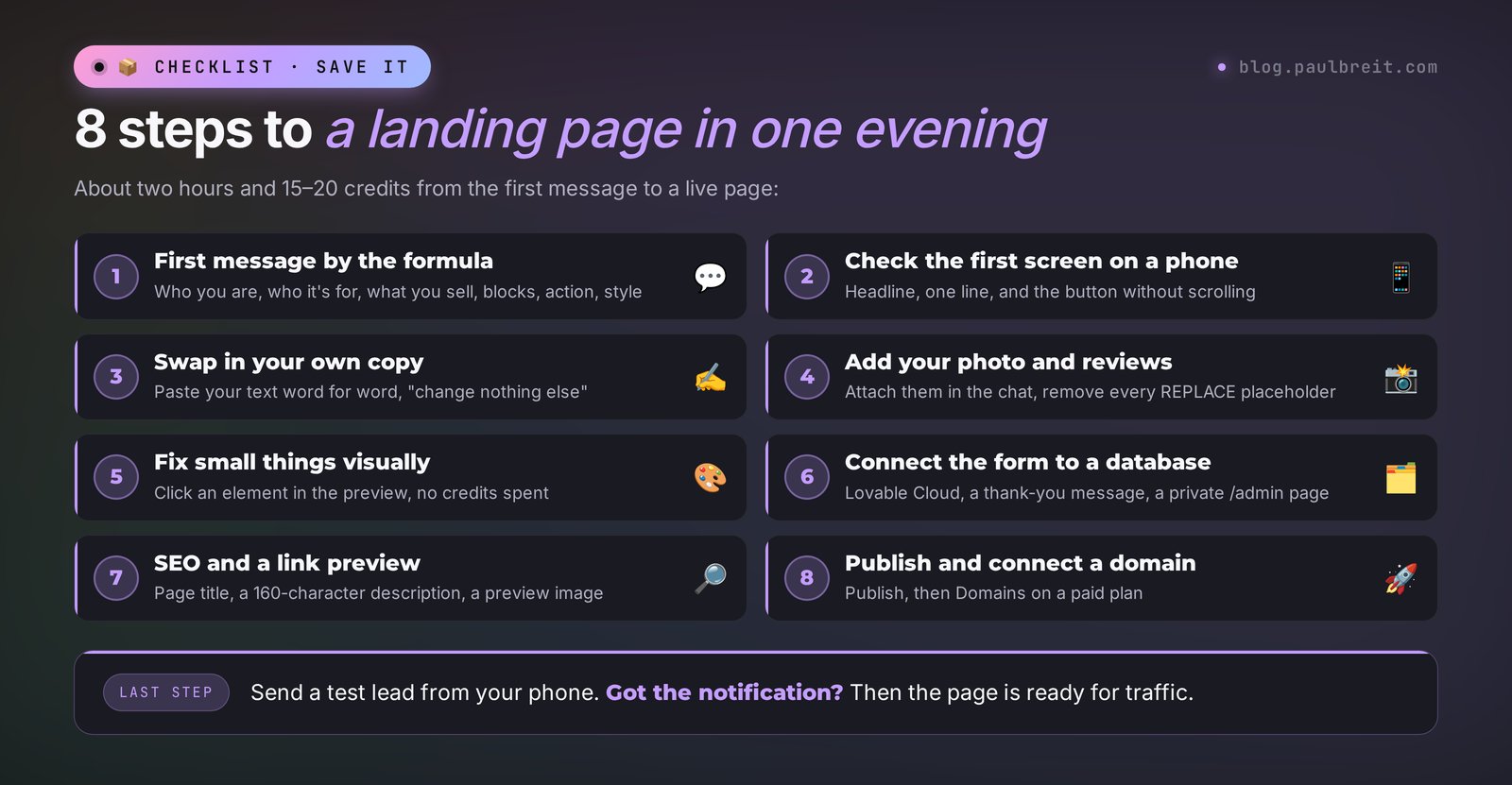
Let's take a real example: a first-consultation page for a therapist. For your own niche you only change the details in brackets; the logic stays the same. The whole path takes about two hours and 15–20 credits.
Step 1. The first message
Build a landing page in English for booking a first consultation.

Who I am: Anna, a therapist with 9 years of practice. I work with
burnout in executives and business owners.

Who it's for: executives aged 30–45 who work a lot, feel exhausted,
and no longer enjoy their results.

What I sell: a first consultation online, 60 minutes, $70.
In it we figure out where the exhaustion comes from and make a plan
for the next month.

Blocks in this order:
1. First screen: a headline about the result, a subheadline, a "Book a session" button.
2. "Sound familiar?" – 5 signs of burnout.
3. How the consultation works – 3 steps.
4. About me – photo, experience, education.
5. Reviews – 3 cards (I'll send the texts later; for now add placeholders
   marked REPLACE).
6. Price and what's included.
7. FAQ – 5 questions.
8. Lead form: name, email, phone, preferred time, comment.

Style: calm, lots of white space, warm beige background, dark green
accents, large readable type. No stock photos of people.
The site must look perfect on a phone.
A couple of minutes later the page appears on the right. Switch to the phone view right away and scroll through the whole thing.
Step 2. Check the first screen
The first screen is everything a person sees without scrolling. On a phone it has to fit the headline, one line of explanation, and the button. If the button slid down, write:
On a phone, the "Book a session" button isn't visible on the first screen.
Shorten the subheadline to one sentence and move the button up
so it's visible without scrolling.
The AI often writes headlines that are pretty but vague. Ask for options: "Suggest 5 headlines for the first screen. Each one about a specific client result, 8 words max." Pick one and type "use option 3." If you want to sharpen the offer itself, the guide on how to write an offer walks you through it.
Step 3. Replace the copy with your own
The AI writes smoothly, but it doesn't have your voice or your story. Go through every block and replace anything that doesn't sound like you. The easiest way is to send the text in full:
Replace the text in the "About me" block with this, word for word:
[your text]
Change nothing else on the page.
The phrase "change nothing else" matters. Without it, the agent sometimes "improves" the neighboring blocks too, and you lose wording you've already polished.
Step 4. Add your photo and reviews
Attach your photo right in the chat with the paperclip button and write: "Put this photo in the About me block, crop it square with rounded corners." Do the same with screenshots of reviews: "Here are 3 reviews, move the texts into the review cards, show only the first name and the initial of the last name." After that, the REPLACE placeholders should be gone – check with a search on the page.
Step 5. Fix small things visually
For tiny edits like a button color, spacing, or a typo, you don't have to message the agent. Lovable has a visual edit mode: click an element in the preview and change the text, color, or size right there. It's faster and saves credits on the small stuff.
Step 6. Set up the form
The form is already there from the first message, but by default the leads may not be saved anywhere. Ask for it explicitly:
Connect Lovable Cloud and save every form submission to the database:
name, email, phone, preferred time, comment, date and time sent.
After submitting, show the visitor this message:
"Thank you! I'll get back to you within a day."
Under the form, add a short privacy notice with a link
to a privacy policy page, and create that page.
Create a separate private /admin page for me with the list of leads,
accessible only with my email.
Now send a test lead yourself, open /admin, and make sure it's there. How to have every lead land in Telegram, your inbox, or Slack right away is covered in the next section.
Step 7. Prepare the page for search and social
Set up SEO: page title "Online Therapist for Burnout – Anna [last name]",
a description up to 160 characters with a call to book.
Create a link preview image from the first screen for messengers
and social media. Add a site icon.
The preview image is what people see when you send the link in Telegram, iMessage, or WhatsApp. Without it, the link looks empty and earns less trust.
Step 8. Publish and connect a domain
Click Publish. Lovable will ask for an address – pick something short, like anna-therapy.lovable.app. A few seconds later the site is available to everyone. On a paid plan, the project settings have a Domains section: you can buy a domain right inside Lovable or connect one you already bought from any registrar. Lovable shows you which records to add at the registrar, and if it's unclear, paste the instructions into the chat and ask for a step-by-step explanation.
Every edit after publishing is visible only to you until you click Publish again. That's handy: you can rework the site calmly, and clients keep seeing the old version until you decide otherwise.
Section 09Leads from the form to Telegram, email, or Slack
Leads in a database are good, but nobody checks /admin every hour. It's much easier when each new lead lands where you already are all day. Pick one channel: Telegram if you live in messengers, email if your inbox is your office, Slack if you run things with a team. Each takes about 10 minutes.
Option 1. Telegram
Create a bot with @BotFather
Open @BotFather in Telegram, send /newbot, and choose a name and a username for the bot. You'll get back a long token that looks like 123456:ABC… That's the key to your bot – never show it to anyone.
Message your bot
Find the bot by its username and tap "Start." Without this step the bot can't message you.
Give Lovable the task
Write in the project chat:
I want every new form submission sent to me in Telegram.
Here's my bot token: [token]. Save it as a secret,
don't put it in the page code.
I've already sent /start to the bot. Find my chat id and set up sending.
Message format:
🔔 New lead
Name: ...
Email: ...
Phone: ...
Preferred time: ...
Comment: ...
Lovable will ask permission to save the secret and will tell you how to find your chat id if it can't do it on its own. Send a test lead from your phone. Got the message? Everything works. If not, tell the agent what you see and ask it to check the error log. For more on what Telegram bots can do for bookings and delivering materials, read "A Telegram Bot Without a Programmer."
Option 2. Email
Email is the default for most US small businesses, and it's the easiest channel to forward or search later. Sending email needs an email-sending service; Lovable will suggest one and walk you through creating an account and an API key. Then write:
Send every new form submission to my email: [your email].
Subject: "New lead: [name]".
In the body: name, email, phone, preferred time, comment,
date and time sent.
Help me connect an email-sending service. Save the API key
as a secret, don't put it in the page code.
When it's done, send a test email and tell me what to check
if it doesn't arrive.
Send a test lead and check your inbox and your spam folder. If the first email went to spam, mark it "Not spam" so the next ones arrive normally.
Option 3. Slack
If you work with an assistant or a small team, a Slack channel for leads means everyone sees a new request at once and nobody asks "did you reply to her?" In Slack, create a channel such as #leads and add an incoming webhook for it – Slack gives you a webhook URL. Then write to Lovable:
Post every new form submission to my Slack channel.
Here's the incoming webhook URL: [URL]. Save it as a secret,
don't put it in the page code.
Message: "New lead" plus name, email, phone, preferred time, comment.
Send a test lead and make sure the message shows up in the channel. You can combine channels: for example, email for the record and Telegram or Slack for speed.
Always ask for tokens, passwords, keys, and webhook URLs to be stored as secrets. If a token ends up in the page code, anyone who opens the site's source can see it and use it – for example, to send messages from your bot. If that happens with Telegram, issue a new token in @BotFather with the /revoke command; for email or Slack, delete the old key or webhook and create a new one.
Section 10How to spend fewer credits: 8 techniques
- One task, one message. The agent handles "change the color, add a block, rewrite the headline, and build a form" worse and more expensively than four short requests in a row. And if something breaks, you'll know exactly which step did it.
- Think in Plan mode. A discussion costs 1 credit per message and doesn't break anything. Once the plan is clear, switch to building and write "do it according to the plan."
- Small fixes visually. Colors, spacing, and typos can be fixed with a click in the preview, with no message to the agent.
- Fill in Knowledge. The agent won't have to guess your tone and style, so there will be fewer redos.
- Point to the exact spot. "In the second block from the top, the third card" beats "somewhere down there." You can also select an element in the preview and write a task about it.
- Roll back instead of repairing. If an edit ruined things, go back to the previous version in the history. Three messages of "put it back the way it was" cost more than one click.
- Risky work goes in a draft. Try a big redesign in Drafts so the live site stays untouched.
- Prepare your copy in advance. Keep your reviews, your About text, and your prices in your notes. Pasting finished text is one edit. Writing it paragraph by paragraph with the agent is ten.
Section 11What else to build with Lovable: 8 ideas
A landing page is just the beginning. Here's what else you can build with the same approach, with a ready first sentence for each task:
| Who | What to build | First sentence for Lovable |
|---|---|---|
| Coach | A "which format suits you" quiz | Build a 6-question quiz that ends with a format recommendation and a lead form |
| Tutor | A lesson price calculator | Build a calculator: subject, grade, frequency, format, total monthly price |
| Nutritionist | A lead magnet page with a PDF download | Build a page where a visitor leaves an email and instantly downloads a guide |
| Fitness trainer | A client portal with a workout plan | Build a portal with email sign-in where the client sees their plan for the week |
| Online school | A course site with a syllabus and pricing | Build a course landing page: week-by-week syllabus, 3 pricing tiers, reviews, FAQ |
| Photographer | A portfolio with shoot booking | Build a portfolio gallery by category and a calendar of open dates |
| Lawyer, accountant | A services site with prices and a question form | Build a site: 6 services with prices, case studies, an "ask a question" form |
| Any niche | A client and payment tracker for yourself | Build a private client table: name, service, amount, payment date, reminder |
It's convenient to draft the copy for these pages in a regular AI chat first – that saves your Lovable credits. To see which AI tools write the best sales copy and which ones make images for your site, check the roundup of the best AI tools of 2026, and if you'd rather skip subscriptions for now, the overview of free AI tools.
Section 12If something goes wrong
| Problem | What to do |
|---|---|
| A white screen or a red error on the right | Lovable usually offers a "Try to fix" button. Click it. If it doesn't help on the second try, roll back to the last working version in the history and repeat the task in a shorter form. |
| The agent changes things you didn't ask for | Add the line "change only what I ask for in the message" to Knowledge. In the task itself, name the block precisely and end with "don't touch anything else." |
| Everything shifted on the phone | Take a screenshot of the phone view, attach it in the chat, and write: "This is how it looks on a phone. Fix it: the text runs off the edge, the buttons are too small." |
| Leads aren't being saved | Check that Lovable Cloud is connected. Write: "Send a test lead yourself and show me whether it appeared in the database. If not, find the cause and fix it." |
| Notifications don't arrive | For Telegram, make sure you tapped Start in your bot. For email, check spam. For Slack, check that the webhook belongs to the right channel. Then ask the agent to send a test notification and read the error log. |
| Credits ran out mid-project | On the free plan, 5 new credits arrive tomorrow. To avoid losing time, write your next tasks in your notes in advance and send them one at a time the next day. |
| Clients can't open the site | Check that you clicked Publish after the latest edits. Then open the site on your phone over mobile data, with Wi-Fi off, and ask a couple of friends to do the same. |
| The domain won't connect | DNS records can take anywhere from a few minutes to a day to update. Paste a screenshot of your registrar settings into the Lovable chat and ask whether everything is correct. |
Section 137 beginner mistakes
1. A short first message
"A site for a coach" is a lottery. The six parts of the formula from Section 07 get you a solid result on the first try.
2. Leaving the AI copy as is
Clients can feel impersonal text. Your story, your wording, and real reviews sell better.
3. Skipping the phone view
Most visitors will come from mobile. Check every edit in both views.
4. Forgetting to test the form
The most painful mistake: ads are running, people are leaving their details, and the leads go nowhere. Send a test lead after every change to the form or the notifications.
5. Ten tasks in one message
Expensive, slow, and hard to tell what broke.
6. Keeping tokens in the page text
Keys, passwords, and webhook URLs belong in secrets, nowhere else.
7. Polishing forever before publishing
Publish the page once it's clear and the form works. It's easier to improve it while you're seeing real leads and real questions from clients.
Section 14The whole path in a minute
- Lovable is a browser service that builds a site from a chat description and publishes it to the internet.
- Free gives you 5 credits a day, up to 30 a month. A landing page is about 2 credits, an edit 0.5–1. Pro costs $25 a month for 100 credits.
- Since August 2026, one balance pays for building and for running the live site. If credits run out, the database and sign-in pause.
- Start: sign in with Google, build on Free, upgrade to Pro by card when you need a domain or more credits.
- Fill in Knowledge: who you are, your tone, your colors, "change only what I ask for."
- The first message follows the formula: who you are, who it's for, what you sell, the blocks, the target action, the style.
- Next: the first screen on a phone, your own copy, photos and reviews, a form with a database and a privacy notice, SEO, Publish.
- Leads: a Telegram bot from @BotFather, an email-sending service, or a Slack webhook, always stored as a secret, always tested.
- Savings: one task per message, discussion in Plan mode, small fixes visually, rollback instead of repair.
FAQFrequently asked questions
What is Lovable in plain words?
Lovable is a browser-based service that builds websites and web apps from a plain-language description. You type what you need into the chat, the AI creates the design, the copy, the lead form, and the database, and the Publish button puts the site online. No coding required.
Is Lovable free?
There is a free plan: 5 credits a day, up to 30 a month, with addresses like name.lovable.app. That's enough to build and publish a simple landing page over two or three evenings. A custom domain and code export are available only on paid plans.
How much does Lovable cost in 2026?
Free is $0, Pro is $25 a month for 100 credits ($21 a month billed annually), Business is $50 a month, and Enterprise is custom. Students and teachers get 50% off Pro. A simple landing page costs about 2 credits, and a small edit costs 0.5 to 1 credit.
Do Lovable credits expire?
The 5 daily credits expire the same day. Monthly credits roll over while your subscription is active and expire 2 months after they were issued. Credits bought as a separate top-up last 12 months.
Is Lovable better than Wix or Squarespace?
They solve the task differently. Lovable builds a page from a description in minutes, writes the copy itself, and connects a lead database, and you make edits with sentences. Wix and Squarespace give you full manual control over every block and ready-made templates. For a quick test of a new offer, Lovable is faster; if your site already works well on a classic builder, you can keep it there.
How do I get leads from a Lovable site in Telegram, email, or Slack?
For Telegram, create a bot with @BotFather, send it /start, and give the token to Lovable with a request to save it as a secret and forward every form submission to you. For email, ask Lovable to connect an email-sending service and send each lead to your address. For Slack, create an incoming webhook for a channel and give Lovable the URL as a secret. In every case, send a test lead and check that the message arrived.
Can I connect my own domain to Lovable?
Yes, on paid plans. The project settings have a Domains section: you can buy a domain right in Lovable or connect one you already bought from any registrar. Lovable shows you which records to add in your domain settings.
What happens to my site if I run out of credits?
The site stays published, but since August 2026 building and running the site are paid from one balance. If it runs empty, the database, storage, and user sign-in on your site pause. So keep a reserve of credits, especially when you're running ads to the page.