AI Photoshoot Prompts: 50 Ideas Using Your Own Photo
A photoshoot prompt is the text that tells an AI to take your photo and shoot you all over again: in an office, a coffee shop, a studio, on a street in the fall. Below are 50 ready prompts in seven styles, the formula that makes them easy to adapt, and a step-by-step AI photoshoot with your own photo in half an hour. I ran two of the prompts on my own portrait and show the results as they came out.
Write an AI photoshoot prompt with this formula: start with "keep my face from the uploaded photos unchanged," then add the look (clothes and hair), setting, light, camera, and aspect ratio. Example: "Keep my face unchanged. Waist-up business portrait in a bright loft office by a window, navy blazer, soft daylight from the left, shot on an 85mm lens, photorealistic, 4:5." Upload 2–3 sharp photos of yourself to Gemini (Nano Banana) or ChatGPT, paste the prompt, and polish the shot with one or two edits in the same chat.
Everyone who sells services, courses, and consulting and needs fresh photos of themselves for a profile picture, website, posts, and ads. A therapist gets a calm portrait in the office. A coach gets a shot on stage. A nutritionist gets a photo in the kitchen surrounded by vegetables. A tutor gets a picture at a desk full of books. A personal trainer gets a shot in the gym. A nail artist or stylist gets a portrait at the workstation. One AI photoshoot covers a month of content.
What's inside
- What an AI photoshoot is
- Where to do an AI photoshoot with your own photo
- Which photos to upload so your face stays yours
- The photoshoot prompt formula
- An AI photoshoot in 30 minutes: step by step
- Business photoshoot: prompts 1–8
- Blog and social media shots: prompts 9–16
- Studio photoshoot: prompts 17–23
- Street and nature: prompts 24–31
- A photoshoot for your profession: prompts 32–39
- Stylized looks: prompts 40–45
- Seasonal photoshoots: prompts 46–50
- I tested it on my own photo: the results
- How to keep one face across the whole set
- Let Claude write prompts for your niche
- If something goes wrong
- The whole path in a minute
- FAQ
Section 01What an AI photoshoot is
An AI photoshoot is when you upload a few photos of yourself to an AI, describe the shot in words, and it draws you into that shot. A new suit, a new place, different light. Your face stays yours, and the AI fills in everything else from the prompt.
Just two years ago this meant "training a model": uploading 20 photos, waiting an hour, and paying for every attempt. In 2026 it's much simpler. Modern image generators understand a face from two or three photos right in the chat. You type what you want and see the result in about thirty seconds.
How is an AI photoshoot different from regular image generation from a prompt? The key thing: you're in the shot. Your face, your beard, the mole above your eyebrow. That's why a photoshoot prompt is built differently. It starts with an order to keep the face and only then describes the scene. Skip that part, and the AI will "improve" you beyond recognition: smooth out the wrinkles, narrow the nose, take years off. You end up with a good-looking stranger.
What an AI photoshoot gives you in practice:
- A profile picture and photos for your About page without hunting for a photographer.
- Shots for posts that show you "at work": at a laptop, in a session, on stage.
- Covers for Reels and live streams with your face.
- Ad photos where you stand in place of a stock face.
- Seasonal shots for holidays and launches without a separate shoot.
If you need photo ideas in general, without you in the shot – product photos, ads, atmospheric images – they're collected in AI photo prompt ideas. This article is all about shooting yourself.
Section 02Where to do an AI photoshoot with your own photo
The prompts in this article are universal. Any AI that can work with an uploaded photo understands them. But how closely the result looks like you varies from service to service, and that's the main thing to choose by.
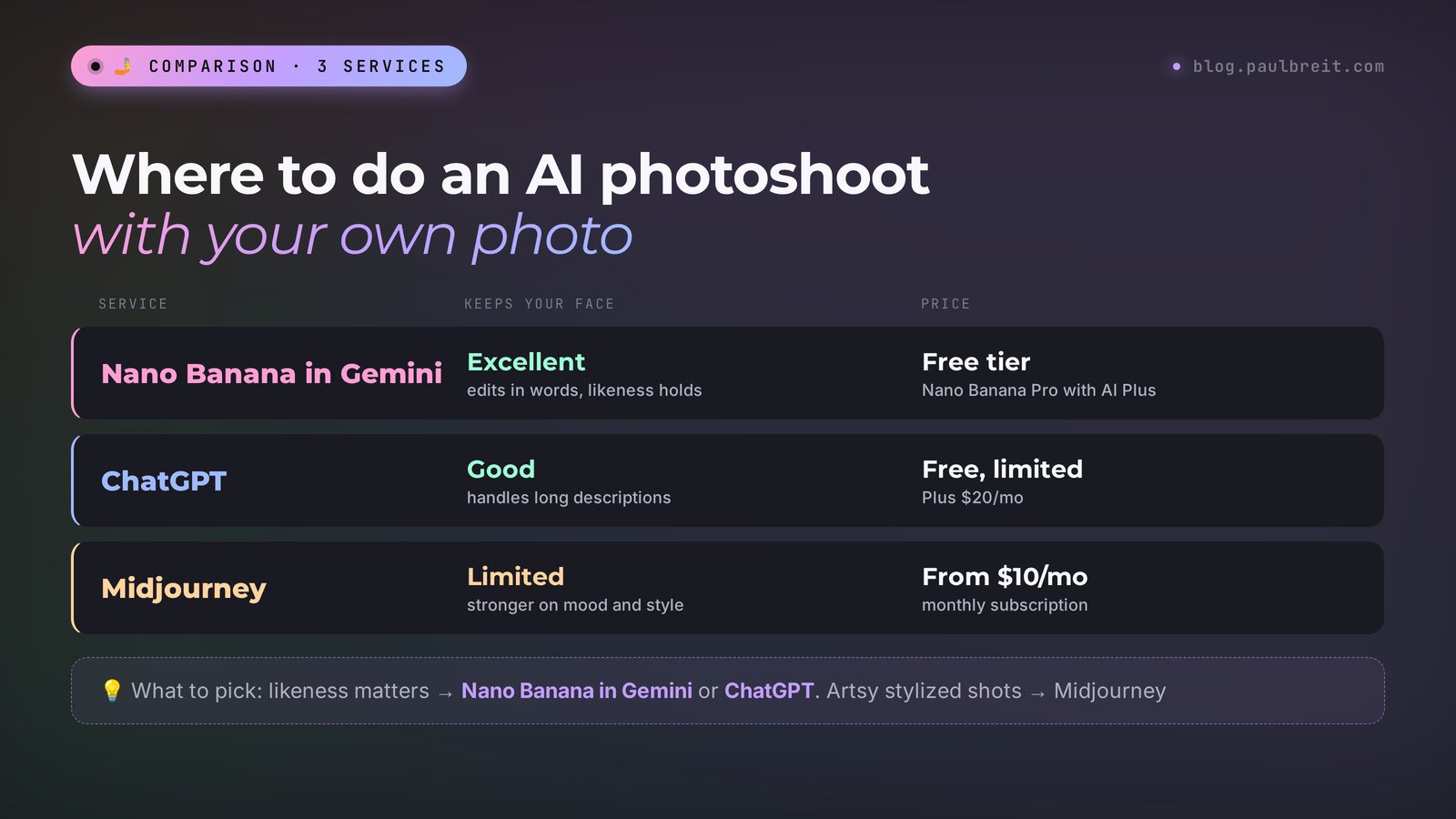
| AI | How it holds your face | Price |
|---|---|---|
| Nano Banana in Gemini | Excellent, edits in words without losing the likeness | Free tier available, Nano Banana Pro starts with the AI Plus plan |
| ChatGPT | Good, understands long descriptions | A few images a day for free, Plus $20/month |
| Midjourney | Limited, stronger on mood and style | From $10/month |
Gemini limits were checked against Google's official help page "Gemini Apps limits": images with Nano Banana 2 are available on every plan, including the free one, and upgrading to Nano Banana Pro starts with the AI Plus plan. Google calculates limits based on compute and refreshes them every 5 hours, up to a weekly cap. In ChatGPT, the chat itself tells you how many free images you have left when you get close to the limit. Prices change, so check the official pages before you pay.
My choice is simple. When likeness matters, I use Nano Banana in Gemini or ChatGPT. I covered editing photos with words in Gemini in detail in Nano Banana 2: how to edit photos with Google's AI, and the basics of Gemini itself in how to use Gemini. Midjourney is good for stylized shots and atmosphere, but it changes the face more often. For a wider look at the tools, see AI image generators in 2026.
Section 03Which photos to upload so your face stays yours
Half of failed AI photoshoots fail before the prompt. Someone uploads a single photo taken in the car at night, in sunglasses, with a filter, and then wonders why the result shows someone similar but not them. The AI can't see what's hidden, so it makes it up. And it always makes it up in the direction of an "average pretty face."
Three shots from different angles
One photo facing the camera, one at three-quarters, one smiling. That way the AI sees your face from different sides and invents less. There's no point in uploading more than five: many services only use the first few anyway.
Daylight by a window
Stand facing a window during the day and shoot yourself with your phone's main camera, ideally with someone's help or a timer. A sharp face, even light, no harsh shadows. Five minutes of this gives you better source photos than anything in your archive.
No filters, glasses, or masks
A beauty filter smooths your features, the AI adds its own smoothing on top, and you get plastic squared. Sunglasses hide your eyes, and eyes are half the likeness. A face mask, a cap pulled down over half your face, a hand on your chin – all of it gets in the way.
Your current hair and beard
Got a haircut or a new color? Use fresh photos. Otherwise your followers will see you with a hairstyle from three years ago, and half the comments will be about that.
Keep your distinguishing marks in the shot
A mole, a piercing, a scar above the eyebrow, an earring – everything that makes you you should be visible in the source photos. In my test, the AI kept my eyebrow piercing and earring only because they're clearly visible in the original portrait.
Upload only your own photos and photos of people who said yes. An AI photoshoot for a friend from her social media pictures without asking is a bad idea, even if you really want to surprise her. For photos of kids, stick to services you trust, and don't post the result publicly without the other parent's consent.
Section 04The photoshoot prompt formula
All 50 prompts below follow one six-part formula. Once you get it, you can adapt any prompt to yourself or write your own in a minute.
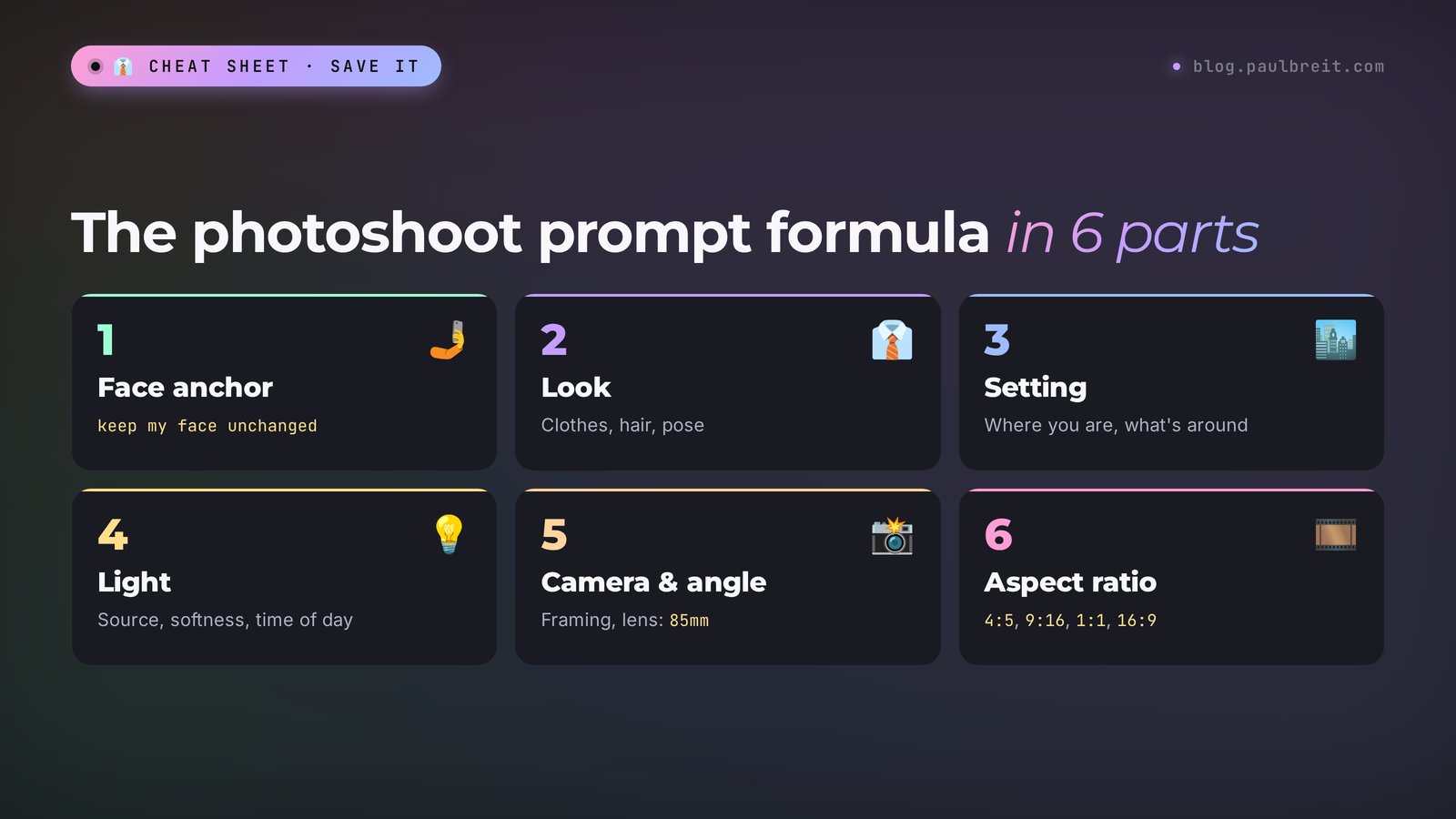
| Part | What to write | Example |
|---|---|---|
| 1. Face anchor | An order to keep the face and features | Keep my face from the photo unchanged, don't make me look younger, don't smooth my skin |
| 2. Look | Clothes, hair, accessories, pose | Navy blazer over a white T-shirt, arms crossed |
| 3. Setting | Where you are and what's around you | Bright loft office, a large window, plants in the background |
| 4. Light | Where the light comes from, what it's like, time of day | Soft daylight from a window on the left |
| 5. Camera | Framing, angle, lens, shooting style | Waist-up portrait, shot on an 85mm lens, blurred background |
| 6. Aspect ratio | Proportions for the platform | 4:5 for the feed, 9:16 for Stories, 1:1 for a profile picture |
Why the face anchor goes first
The AI reads a prompt top to bottom, and what comes first carries more weight. If the face anchor is at the end, the model first "falls in love" with the scene description and fits the face to it. Put it first, and the scene adjusts to you.
The working phrasing I use myself: "Keep the face, features, eye color, and hairstyle of the person in the photo unchanged, don't make them look younger, and don't smooth the skin." The last two parts aren't extra. Without them, almost every generator takes five years off and wipes out skin texture. On a profile picture that looks like a 2015 photo-editor job.
Words that make a shot look like a "photograph"
To make the image look like a real photo, add something from this list to the camera part: "photorealistic," "shot on an 85mm lens" for a portrait, "shot on a 35mm lens" for a shot with surroundings, "shallow depth of field," "natural colors," "light film grain," "documentary style." Words like "perfect," "masterpiece," or "8K, ultra HD" add little beyond gloss.
Aspect ratio for the platform
Vertical 4:5 – the Instagram and Facebook feed. 9:16 – Stories, Reels, short-video covers. 1:1 – a profile picture. 16:9 – a YouTube thumbnail, a website banner, a channel header. Write the aspect ratio right in the prompt, or the AI will pick a square and you'll have to crop off the top of your head.
Section 05An AI photoshoot in 30 minutes: step by step
I'll show it in Gemini. In ChatGPT everything works the same way, only the buttons differ.
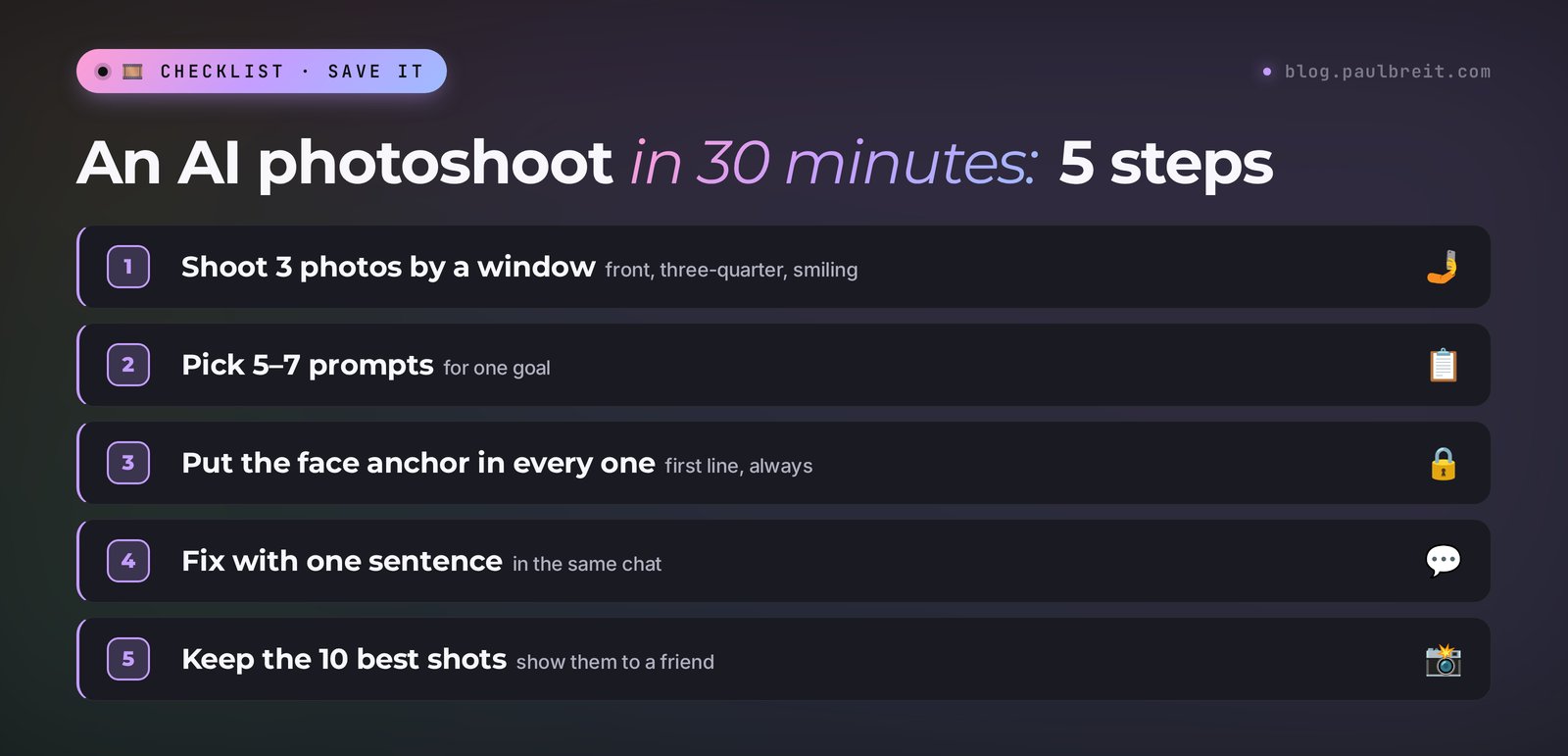
Take your source photos (5 minutes)
Three photos by a window during the day: facing the camera, at three-quarters, smiling. No glasses, no filters. Move them to your computer or work straight from your phone.
Pick 5–7 prompts for the job (5 minutes)
Think about where the photos will go. Profile picture and website – business and studio shots. Posts – blog shots. Ads – profession shots. Don't try to do all 50 at once: a set of six or seven shots in one style looks stronger.
Open a new chat and upload your photos (2 minutes)
In Gemini, tap the plus or the paperclip and attach the three shots. In ChatGPT, it's the paperclip next to the input field.
Paste the first prompt and wait (3 minutes)
Copy the prompt from the article in full and change the clothes and details to suit you. In 20–40 seconds you'll have a shot. If the likeness is good, move on to the next prompt in the same chat: the model already remembers your face.
Fix things with one sentence (10 minutes)
The shot is almost there, but the light is cold? Write: "Keep everything as is, make the light warmer." The blazer is the wrong color: "Keep the face and pose, change the blazer to beige." A one-sentence edit almost always beats a new prompt from scratch: the good details don't get lost.
Pick the 10 best and download them (5 minutes)
Out of 20–25 versions, keep the 10 where you definitely look like yourself. Show them to someone close: your own eye gets used to them fast, while someone else will immediately say "that's not you." Download them at full size.
Section 06Business photoshoot: prompts 1–8
Business portraits are the most common reason people turn to an AI photoshoot. A profile picture, a website, an About page, a marketplace profile, a presentation cover. In every prompt in this section the face anchor comes first. Change the clothes and colors to suit you.
Prompt 01. Portrait by the window in a loft office
A versatile shot for a website and profile picture. This is the one I tested on myself; the result is in Section 13.
Keep the face, features, eye color, and hairstyle of the person in the photo unchanged, don't make them look younger, and don't smooth the skin. Waist-up business portrait: a navy blazer over a black T-shirt, the person stands by a large window in a bright loft office, slight smile, looking at the camera. Soft daylight from the window on the left, blurred background. Shot on an 85mm lens, f/2, natural colors, photorealistic, vertical 4:5.Prompt 02. Formal portrait on a graphite background
For lawyers, accountants, financial advisors – anyone who needs to look trustworthy.
Keep my face from the photo unchanged, don't make me look younger. Chest-up portrait, dark gray suit, white shirt, calm confident look into the camera, no smile. Solid graphite background with a subtle gradient. Studio light: a large softbox on the left, a faint fill light on the right. Shot on an 85mm lens, focus on the eyes, natural skin texture, photorealistic, 1:1.Prompt 03. Arms crossed, light background
An energetic shot for a website header and ads.
Keep my face from the photo unchanged. Waist-up portrait, arms crossed on the chest, open smile. Light beige blazer, plain T-shirt. Light warm background with no details. Even soft light from the front, a faint shadow behind. Shot on a 70mm lens, photorealistic, natural colors, horizontal 16:9, the person in the right third of the frame, empty space on the left for text.Prompt 04. At the desk
Shows you at work, good for an About page.
Keep my face from the photo unchanged. I'm sitting at a light wooden desk in a modern office, a laptop and a notebook in front of me, holding a pen and looking at the camera with a slight smile. Olive shirt with rolled-up sleeves. Daylight from a window on the right, bookshelves and a plant in the background, blurred. Shot on a 50mm lens, photorealistic, 4:5.Prompt 05. In a meeting
For anyone who sells consulting and works with companies.
Keep my face from the photo unchanged. I'm sitting at a large conference table, explaining something, my hand pointing at a sheet with a chart. Two people across from me, seen from behind, out of focus. Navy blazer. A glass wall with a blurred office behind it. Cool daylight, soft reflections on the table. Documentary style, shot on a 35mm lens, photorealistic, 16:9.Prompt 06. On the stairs of an office building
A dynamic full-length shot, good for a cover and ads.
Keep my face from the photo unchanged. Full length, I'm walking up a wide concrete staircase in a modern office building, looking at the camera, a leather folder in my hand. Light suit without a tie, white sneakers. Large windows, daylight, clean architectural lines. Shot from below on a 35mm lens, photorealistic, 4:5.Prompt 07. Portrait with a laptop in a coworking space
For freelancers and online professionals.
Keep my face from the photo unchanged. I'm sitting on a couch in a bright coworking space with a laptop on my lap, looking up from the screen at the camera and smiling. Soft gray sweater. Plants and lamps around, people in the background out of focus. Warm daylight, shallow depth of field, shot on a 50mm lens, photorealistic, 4:5.Prompt 08. Black-and-white business portrait
Solid and ageless, good for a book, a long read, or a presentation.
Keep my face from the photo unchanged, keep the wrinkles and skin texture. Black-and-white chest-up portrait, dark shirt, gaze slightly off camera, calm face. Dark background. Contrasting side light from a single source, half the face in soft shadow. Shot on an 85mm lens, rich texture, light grain, 4:5.Section 07Blog and social media shots: prompts 9–16
These shots need life. Followers scroll past polished portraits and stop on a photo where a person is doing something. That's why every prompt below includes an action and a setting.
Prompt 09. Conversation in a coffee shop
The second prompt I tested on my own photo.
Keep the face, features, eye color, and hairstyle of the person in the photo unchanged, don't make them look younger, and don't smooth the skin. The person sits at a wooden table in a cozy coffee shop, a laptop and a cappuccino in front of them, explaining something to someone off camera and gesturing with one hand. Side shot at a 45-degree angle, warm morning light from a window, blurred bookshelves in the background. Documentary style, as if a photographer shot it on a 35mm lens, real emotions, natural colors, vertical 4:5.Prompt 10. Morning coffee at home
Keep my face from the photo unchanged. I'm standing by the window in a bright kitchen in a cozy sweater, holding a mug with both hands and looking out the window, slight smile. Early morning, soft golden light on my face, steam rising from the mug. Shot on a 50mm lens, warm film colors, light grain, 4:5.Prompt 11. Writing a post in a notebook
Keep my face from the photo unchanged. I'm sitting on a windowsill with a notebook and a pen, writing down a thought, a focused look on my face. Loose linen shirt. The city outside the window, an overcast day, soft diffused light. Shot from above and to the side on a 35mm lens, calm muted colors, photorealistic, 4:5.Prompt 12. Live stream or video recording
A cover for a live stream announcement.
Keep my face from the photo unchanged. I'm sitting at a desk in front of a phone on a tripod with a ring light, talking to the camera and gesturing, an excited expression. Bright solid-color shirt. Home studio: a bookshelf, a plant, warm string lights in the background. Shot from behind the phone, on a 35mm lens, photorealistic, 9:16.Prompt 13. Laughing on a walk
Keep my face from the photo unchanged. I'm walking down a quiet tree-lined street and laughing, looking just past the camera, a coffee cup in my hand. Denim jacket, light T-shirt. Evening sunlight from the side, a soft rim light on my hair. Blurred background, a shot in motion. Shot on an 85mm lens, street photography style, photorealistic, 4:5.Prompt 14. Workspace from above
Keep my face from the photo unchanged. Top-down view: I'm sitting at a desk looking up at the camera, on the desk a laptop, a notebook with notes, a cup of tea, a phone, glasses. Mustard sweater. Even daylight, clean colors, a neat composition. Photorealistic, 4:5.Prompt 15. A Reels cover with emotion
Keep my face from the photo unchanged. Shoulder-up close-up, I raise my eyebrows in surprise and cover my mouth with my hand, as if I just heard incredible news. Bright solid coral background. Even bright light, vivid colors. Leave empty space at the top for a headline. Shot on a 50mm lens, photorealistic, 9:16.Prompt 16. An evening with a book
Keep my face from the photo unchanged. I'm sitting in an armchair by a floor lamp with a book on my lap, looking up from the page and smiling at the camera. Knit cardigan. Warm evening lamplight, blue dusk outside the window. Cozy atmosphere, shot on a 50mm lens, soft grain, warm colors, 4:5.Section 08Studio photoshoot: prompts 17–23
Studio prompts give the cleanest result. There's almost no background, all the attention is on the face, and the likeness usually comes out better than in complex scenes. If a service struggles to hold your face, start with these.
Prompt 17. Classic studio portrait
Keep my face from the photo unchanged, don't smooth the skin. Chest-up portrait, plain black turtleneck, calm slight smile. Solid warm gray background. Butterfly lighting: a softbox above and in front, a soft shadow under the nose. Shot on an 85mm lens, focus on the eyes, photorealistic, 1:1.Prompt 18. Color background, magazine style
Keep my face from the photo unchanged. Waist-up portrait on a bright solid teal background, I'm looking at the camera and tilting my head slightly. Oversized white shirt. Even diffused light, vivid colors, like a modern magazine. Shot on a 70mm lens, photorealistic, 4:5.Prompt 19. Dramatic light
Keep my face from the photo unchanged. Shoulder-up portrait on a black background, a single hard light source from the side at 90 degrees, the other half of the face in deep shadow. Dark clothes. A serious look into the camera. Shot on an 85mm lens, high contrast, photorealistic, 4:5.Prompt 20. Full-length portrait on a stool
Keep my face from the photo unchanged. Full length, I'm sitting on a tall wooden stool, one foot on the rung, hands on my knee, looking at the camera. Light pants, dark sweater, sneakers. Seamless white studio background, a soft shadow on the floor. Shot on a 50mm lens, photorealistic, 4:5.Prompt 21. Portrait with colored backlight
Keep my face from the photo unchanged. Shoulder-up portrait, the key light soft and white from the front, a warm orange spot of light on the dark blue background behind me. Black T-shirt. A calm, confident face. Shot on an 85mm lens, natural skin, photorealistic, 1:1.Prompt 22. A shot in motion
Keep my face from the photo unchanged. I'm turning toward the camera mid-step, smiling as I turn, the fabric of my blazer in motion. Light gray studio background. Soft light, fast shutter speed, a sharp shot. Shot on a 70mm lens, photorealistic, 4:5.Prompt 23. Close-up for a profile picture
Keep my face from the photo unchanged, keep every mole and the skin texture. A very close portrait: face and shoulders, the face in the center of the frame, looking straight into the camera, open smile. Solid light background with a warm tint. Soft even light, no harsh shadows. Shot on an 85mm lens, photorealistic, 1:1, the face takes up two-thirds of the frame.Section 09Street and nature: prompts 24–31
Outdoor shots add air and a sense of freedom. They work well for people who sell travel, online careers, health, and fitness. Tip: specify the time of day. "Golden hour" and "overcast day" give completely different pictures.
Prompt 24. Old town, golden hour
Keep my face from the photo unchanged. I'm walking down an old European cobblestone street, looking back over my shoulder and smiling. Beige trench coat, scarf. Golden hour, the low sun behind me, warm backlight. Shop signs with no readable text. Shot on an 85mm lens, blurred background, photorealistic, 4:5.Prompt 25. Seaside promenade
Keep my face from the photo unchanged. I'm standing at the railing of a promenade, the sea and a sunset sky behind me, the wind in my hair, slight smile. Light linen shirt. Soft sunset light on my face. Shot on a 50mm lens, warm natural colors, photorealistic, 4:5.Prompt 26. Forest and fog
Keep my face from the photo unchanged. I'm standing on a forest path among tall pines, in a light morning fog, hands in my pockets, looking to the side. Dark green jacket, a knit hat in my hand. Soft diffused light, rays through the branches. Shot on a 35mm lens, calm muted colors, photorealistic, 4:5.Prompt 27. A city rooftop at night
Keep my face from the photo unchanged. I'm on an open rooftop overlooking the city at night, leaning on the parapet, looking at the camera. Dark blazer, shirt without a tie. Blue dusk, city lights blurred in the background, warm light from string lights on my face. Shot on a 50mm lens, photorealistic, 4:5.Prompt 28. A field at sunset
Keep my face from the photo unchanged. I'm walking through a field of tall grass at sunset, running my palm over the stalks, laughing. A light linen dress or a light shirt. The sun low behind me, warm backlight, a light haze. Shot on an 85mm lens, film colors, photorealistic, 4:5.Prompt 29. Mountains and travel
Keep my face from the photo unchanged. I'm standing at a mountain lookout, a valley and clouds behind me, a backpack on one shoulder, a satisfied smile after the climb. Sports jacket. A clear day, bright light, a deep sky. Shot on a 35mm lens, sharp background, photorealistic, 4:5.Prompt 30. A café patio in summer
Keep my face from the photo unchanged. I'm sitting at a table on a café patio in summer, a glass of mint lemonade next to me, looking at my phone and smiling. White T-shirt, sunglasses pushed up on my head. A bright summer day, shade from an umbrella, glints of light. Shot on a 50mm lens, vivid natural colors, photorealistic, 4:5.Prompt 31. A rainy city
Keep my face from the photo unchanged. I'm standing under a clear umbrella on a wet street in the evening, raindrops on the umbrella, streetlights reflected in puddles, slight smile. Dark coat. Warm light from shop windows on the side. Shot on a 50mm lens, cinematic colors, photorealistic, 4:5.Section 10A photoshoot for your profession: prompts 32–39
The most useful shots for sales. People see you at work and instantly understand what you do. These photos perform well in ads, on a website, and on service marketplace profiles.
Prompt 32. Therapist in the office
Keep my face from the photo unchanged. I'm sitting in a soft armchair in a cozy therapist's office, an empty armchair for the client across from me, a notebook in my hands, an attentive warm look into the camera. Dusty pink sweater. Plants, a floor lamp, a soft rug. Warm diffused light, calm pastel colors, shot on a 50mm lens, photorealistic, 4:5.Prompt 33. Coach on stage
Keep my face from the photo unchanged. I'm speaking on a small stage with a lavalier mic, my hand open toward the audience, an engaged expression. Dark blazer, light T-shirt. Stage light from above, blurred silhouettes of people in the audience. Shot from the audience on an 85mm lens, photorealistic, 16:9.Prompt 34. Nutritionist in the kitchen
Keep my face from the photo unchanged. I'm standing at a light kitchen counter chopping vegetables, bowls of greens, avocado, and berries around me, smiling at the camera. White shirt with rolled-up sleeves. Daylight from a window, fresh bright colors. Shot on a 50mm lens, photorealistic, 4:5.Prompt 35. Tutor during a lesson
Keep my face from the photo unchanged. I'm sitting at a desk next to a teenager who is seen from behind and out of focus, pointing with a pen at a notebook and smiling. Light shirt. Books, a lamp, a laptop. Warm evening light. Shot on a 35mm lens, photorealistic, 4:5.Prompt 36. Personal trainer in the gym
Keep my face from the photo unchanged, keep my body type. I'm standing in a gym by a dumbbell rack, a towel over my shoulder, a slight smile after a workout. Athletic T-shirt and shorts. Light from large windows, soft highlights. Shot on a 50mm lens, photorealistic, 4:5.Prompt 37. Nail artist or beauty professional
Keep my face from the photo unchanged. I'm sitting at a nail technician's workstation, a lamp over the table, bottles of polish in a row, holding a brush and smiling at the camera. White uniform. A clean bright room, soft light, gentle colors. Shot on a 50mm lens, photorealistic, 4:5.Prompt 38. Online consultation
Keep my face from the photo unchanged. I'm sitting in front of a laptop wearing headphones on a video call, a blurred call window on the screen, listening carefully and nodding. Home office, a bookshelf behind me. Soft light from a window and a desk lamp. Shot from the side on a 35mm lens, photorealistic, 16:9.Prompt 39. Workshop host
Keep my face from the photo unchanged. I'm standing at a flip chart with a marker in my hand, a simple diagram of arrows with no text on the sheet, turning toward a group of participants who sit in a semicircle and are seen from behind. Sweater, jeans. A bright room, daylight. Shot on a 35mm lens, documentary style, photorealistic, 16:9.Section 11Stylized looks: prompts 40–45
Stylized shots are for fun posts, covers, and holiday emails. Likeness matters a little more than usual here: in a strong style, the AI likes to "draw its own way," so make the face anchor stronger.
Prompt 40. Nineties film
Keep my face from the photo unchanged, this is the most important part. The photo looks like it was taken on a film point-and-shoot camera in 1995: I'm in a kitchen in a patterned sweater, laughing, direct on-camera flash, a slight red tint, no date stamp in the corner. Film grain, slightly faded colors, 4:5.Prompt 41. Magazine cover
Keep my face from the photo unchanged. Waist-up portrait for the cover of a business magazine: a confident pose, hands in my pants pockets, looking at the camera. Solid dark blue background, glossy studio light. No text or logos in the image, leave space at the top for the title. Photorealistic, 3:4.Prompt 42. A movie still
Keep my face from the photo unchanged. A shot like something out of a European film: I'm sitting by the window of a night train, watching the lights rush past, a thoughtful face. Coat, scarf. Warm compartment light and blue reflections from the window. Wide cinematic 21:9 frame, light grain, deep shadows.Prompt 43. Black-and-white classic
Keep my face from the photo unchanged. A black-and-white portrait in the style of classic mid-20th-century photography: I'm in a dark blazer, sitting at three-quarters, hand at my chin, looking at the camera. Soft side light, deep shadows, rich texture, grain. 4:5.Prompt 44. Watercolor portrait
Keep my face, features, and proportions from the photo recognizable. A shoulder-up portrait in watercolor: soft blurred edges, patches of color, white paper around the edges. Pastel colors, light washes. 1:1.Prompt 45. A 3D brand character
Turn me from the photo into a 3D character in the style of an animated film, keep the recognizable features: face shape, hairstyle, beard, eye color, accessories. The character waves and smiles. Solid light background, soft studio light. 1:1.Section 12Seasonal photoshoots: prompts 46–50
Seasonal shots refresh your blog without a new shoot. Make them a little ahead of time: at the height of the season everyone generates the same thing, and your photos get lost. A big holiday collection is in holiday photo prompts; here it's one shot per season.
Prompt 46. Fall in the park
Keep my face from the photo unchanged. I'm walking down a park alley, yellow leaves underfoot, a cup of hot chocolate in my hand, looking at the camera and smiling. Caramel coat, knit scarf. Soft fall afternoon light, warm colors. Shot on an 85mm lens, blurred background, photorealistic, 4:5.Prompt 47. A winter evening by the window
Keep my face from the photo unchanged. I'm sitting on a wide windowsill with a blanket and a mug, snow falling outside, warm string lights glowing in the room. Knit sweater. Warm light from the string lights on my face, blue dusk outside the window. Shot on a 50mm lens, cozy colors, photorealistic, 4:5.Prompt 48. Spring and blossoms
Keep my face from the photo unchanged. I'm standing under a blossoming tree with white and pink flowers, petals falling, slight smile. Light raincoat. Soft spring light, pastel colors. Shot on an 85mm lens, blurred background, photorealistic, 4:5.Prompt 49. Summer and the sea
Keep my face from the photo unchanged, keep my body type. I'm walking along the water's edge on a sandy beach, pants rolled up, sandals in my hand, laughing. An open white shirt over a T-shirt. Bright summer sun, turquoise water. Shot on a 50mm lens, vivid colors, photorealistic, 4:5.Prompt 50. A project's birthday
For a post about the anniversary of your channel, school, or business.
Keep my face from the photo unchanged. I'm holding a small cake with one lit candle and smiling at the camera, pastel balloons around me. Bright shirt. A light room, warm candlelight on my face. Shot on a 50mm lens, festive atmosphere, photorealistic, 4:5.Section 13I tested it on my own photo: the results
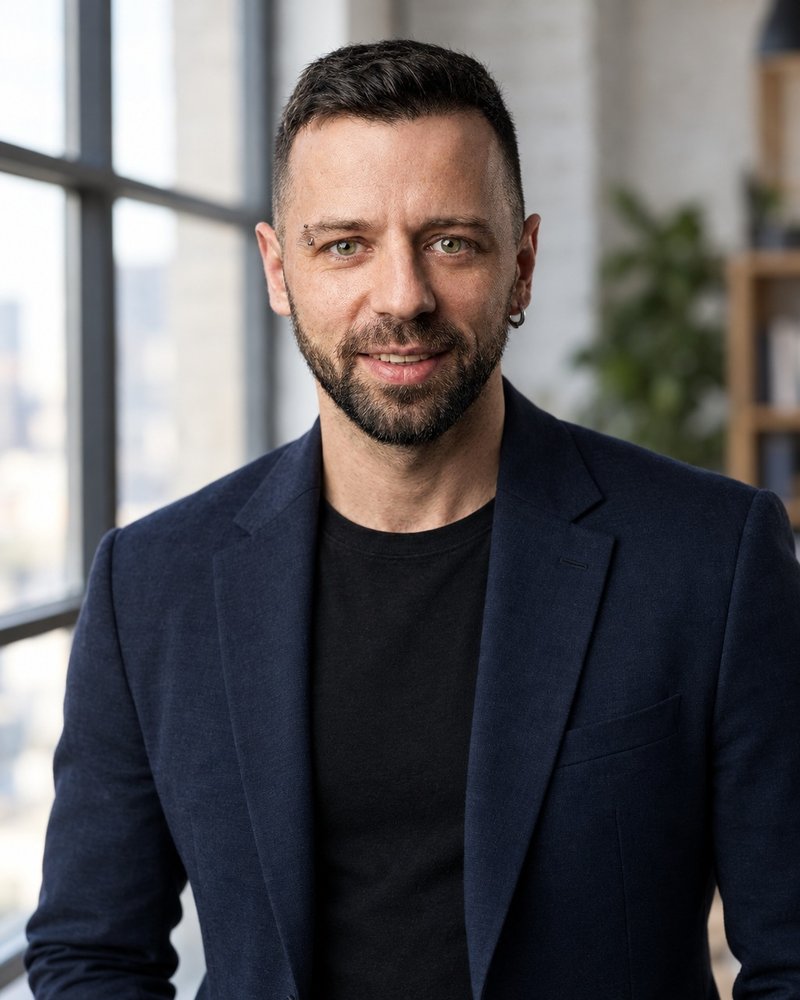
Prompt collections often get published without a single test run. I ran two prompts from this article – No. 01 and No. 09 – on my own studio portrait, and I'm showing the results with no retouching and no retries: both shots came out on the first attempt.
Source: one studio portrait of me on a dark background in a black T-shirt. Model: OpenAI's gpt-image-2.5-flare image generator, high quality, 4:5. The prompts were pasted word for word from the original Russian edition of this guide, with no edits; the English versions above are direct translations of them.
Prompt 01. Loft office, blazer, window light.
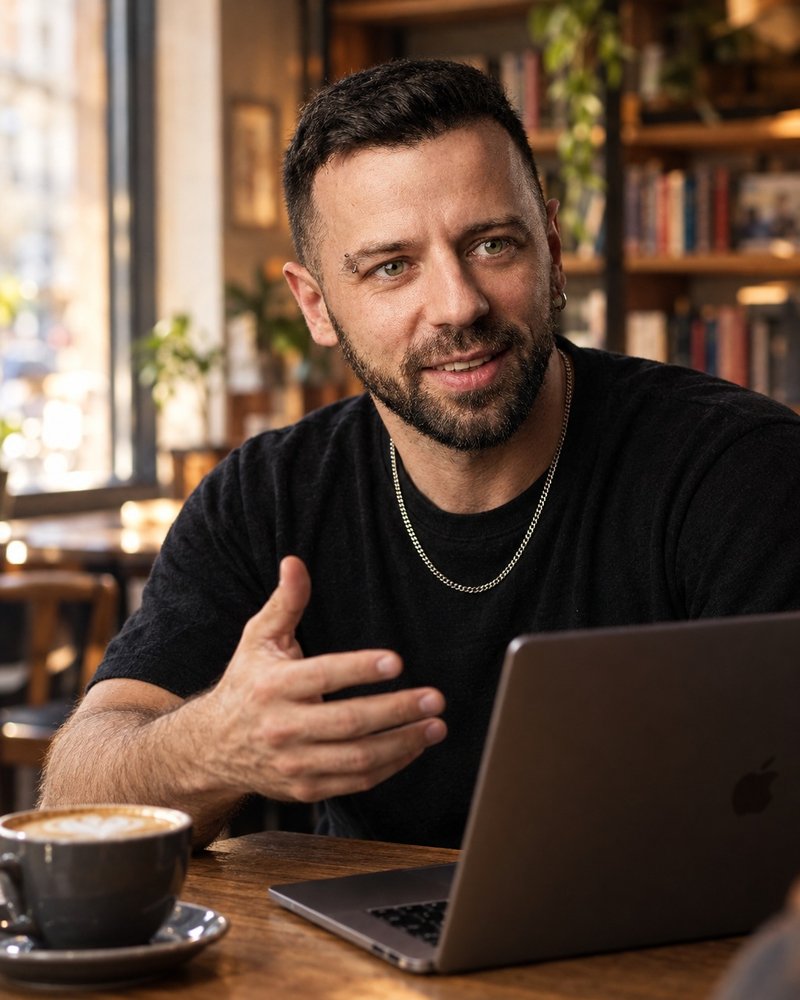
Prompt 09. Coffee shop, documentary shot.
What worked well. The face is recognizable right away: the shape of the beard, the eye color, the hairline. The eyebrow piercing and the earring stayed in place, even though the prompt didn't mention them. That's thanks to the source photo: the distinguishing marks are clearly visible, and the model kept them. The skin doesn't look plastic, with pores and fine lines around the eyes visible – the words "don't smooth the skin" do their job.
What I'd fix. In the second shot, the AI kept the chain from the original photo, even though the scene says nothing about it. And it drew a logo on the laptop lid. For a post these are small things; for an ad, the logo is better removed with one sentence: "Keep everything as is, remove the logo from the laptop." In the first shot, the features softened slightly compared to the original, but within the range of how a face changes with light and lens on a real shoot.
The main takeaway: with a good source photo and the face anchor at the start of the prompt, two out of two shots came out ready for a website and posts.
Section 14How to keep one face across the whole set
Making one good shot is easy. Making ten where you look the same is harder: the face, the hair, the skin tone. If a set "drifts," followers notice, even if they can't explain what's off.
Work in one chat
Make every shot in the set in the same conversation where you uploaded your source photos. The model remembers your face and matches new shots to the good earlier ones. A new chat means getting to know your face from scratch.
Lean on your best shot
Got a shot where you look 100% like yourself? Write: "Use the face from this image as the reference for all the next shots." From then on, the model will check against it.
Keep one light and one color palette
A set looks cohesive when the shots share the same character of light: for example, soft daylight and warm natural colors in all of them. Add the same ending to every prompt in the set: "soft daylight, warm natural colors, shot on a 50mm lens, photorealistic."
Change one thing at a time
Want a version in a different suit – change only the suit. A different place – only the place. If you change everything at once in a single edit, the model often "rebuilds" the face too.
Finished shots are easy to bring to life: a portrait turns into a short video for Reels or Stories. I covered how in how to animate a photo with AI. And if you want a shot to spread through the feed, take a look at viral AI photos.
Section 15Let Claude write prompts for your niche
50 prompts cover the typical jobs. But the best photoshoot is the one made for you: your niche, your clients, your colors. Writing those prompts by hand takes a while. It's faster to ask Claude: it will ask a couple of questions and put together a set using the same six-part formula.
Open claude.ai, paste the text below, and replace the details in square brackets with your own. If you're new to Claude, start with Claude from scratch.
You are a photographer and art director. I need an AI photoshoot for my blog and website.
Who I am: [a therapist, I work with anxiety in adults, I consult online].
My clients: [women aged 30–45, worn out by stress at work].
My style and colors: [calm, warm, beige and olive].
Where the photos will go: [profile picture, About page, 6 posts, a live stream cover].

Write 8 prompts for an image generator using the formula: face anchor, look, setting, light, camera, aspect ratio.
Start every prompt with: "Keep my face from the photo unchanged, don't make me look younger, don't smooth my skin."
For each one, say where the shot will go and why it will work for my clients.
Make all the shots look like one set: shared light and color palette.I ran this request in Claude Opus 5.5 with the example details (in Russian). Claude put together a set of prompts with a shared ending, "soft diffused light, warm beige and olive tones, shot on a 50mm lens, photorealistic," to keep the set unified. Two prompts from its answer, translated:
"1. Profile picture. Keep my face from the photo unchanged, don't make me look younger, don't smooth my skin. Shoulder-up portrait, a soft-knit cream sweater, a calm warm smile, looking at the camera. Solid beige background. Soft diffused light, warm beige and olive tones, shot on a 50mm lens, photorealistic, 1:1. Why it will work: a warm, open look without corporate polish lowers the anxiety before the first message."
"2. About page. Keep my face from the photo unchanged, don't make me look younger, don't smooth my skin. I'm sitting in an armchair by the window in a bright office, an olive tree in a planter and a small table with a cup of tea next to me, hands resting calmly on my knees. Soft diffused light, warm beige and olive tones, shot on a 50mm lens, photorealistic, 4:5. Why it will work: the client sees a place where she'll feel at ease before she even books."
Notice the "why it will work" line. It's useful for you: it tells you which shot goes on your profile picture and which one goes into a booking post, so you don't publish a photo just because it's pretty. I wrote about how Claude differs from ChatGPT on tasks like this in Claude vs ChatGPT.
Section 16If something goes wrong
| What happened | Why | What to do |
|---|---|---|
| The photo shows someone similar, but not me | Weak source photos or the face anchor at the end of the prompt | Upload 3 sharp photos in daylight, put the anchor first |
| I look younger and smoother than in real life | By default the model "improves" the face | Add "don't make me look younger, keep the skin texture and wrinkles" |
| The face changes from shot to shot | Each shot in a new chat, or everything changes at once | Work in one chat, change one thing per edit |
| Strange hands and fingers | A complex hand pose in the prompt | Simplify the gesture or write "hands in pockets," "hands on knees" |
| Text appeared in the image | The scene has signs, books, screens | Add "no readable text or logos" |
| The shot is too glossy | Words like "perfect," "8K," "masterpiece" | Remove them, add "natural colors, light film grain" |
| The top of the head is cut off | No aspect ratio specified | Write the ratio: 4:5, 9:16, 1:1, 16:9 |
| The service refuses to generate | A filter kicked in: a famous person, a child, a revealing look | Rephrase the scene, work only with your own photos |
If the source photo itself is bad – dark, blurry, with a color cast – fix it first. Ready prompts for that are in AI photo editing prompts.
Section 17The whole path in a minute
- Take three photos by a window during the day: facing the camera, at three-quarters, smiling. No glasses or filters.
- Pick a service: Nano Banana in Gemini or ChatGPT for the best likeness, Midjourney for stylized shots.
- Pick 5–7 prompts from this article for the job: profile picture, website, posts, ads.
- Start every prompt with the anchor: "Keep my face from the photo unchanged, don't make me look younger, don't smooth my skin."
- Work in one chat, fix with one sentence, and change one thing at a time.
- Pick the 10 best shots, show them to someone close, and download them at full size.
- Need a set for your niche? Ask Claude to write prompts using the six-part formula.
FAQFrequently asked questions
What prompt should I write for an AI photoshoot?
A photoshoot prompt has six parts: a face anchor ("keep my face from the photo unchanged"), the look, the setting, the light, the camera, and the aspect ratio. For example: "Keep my face unchanged. Waist-up portrait in a bright office by a window, navy blazer, soft daylight, shot on an 85mm lens, photorealistic, 4:5." The article has 50 ready examples.
Where can I do an AI photoshoot for free?
Nano Banana in Gemini and ChatGPT both create images with your face for free within limits. In Gemini, Nano Banana 2 is available on every plan, including the free one; Google refreshes the limits every 5 hours up to a weekly cap. ChatGPT gives a few free images a day.
How do I do an AI photoshoot with my own photo so the face looks like me?
Upload 2–3 sharp photos taken in daylight without glasses or filters, start the prompt with "keep my face unchanged, don't make me look younger, don't smooth my skin," and make every shot in the same chat. Fix things with one sentence, changing one thing at a time.
How many photos do I need to upload for an AI photoshoot?
Two or three are enough: facing the camera, at three-quarters, and smiling. You usually don't need more than five; many services only use the first few.
Can I use AI photos as a profile picture and in ads?
You can use AI photos of yourself as a profile picture, on your website, and in posts. For ads, make sure the image has no other brands' logos or recognizable people, and check the ad platform's rules. Don't upload other people's photos without their permission.